What's inside
- Key Takeaways
- Quick Picks
- How We Chose These Picks
- Why Choose a Crank Over a Motor in the First Place?
- Frame Only or Complete Desk — Which Are You Actually Buying?
- How Do You Set a Crank Desk to the Right Heights?
- What Does Cranking Actually Feel Like Day to Day?
- How Much Load Will You Really Put on the Lift?
- Where in the Home Does a Crank Desk Earn Its Keep?
- The Six Crank Desks, Reviewed One by One
- How Do These Six Compare When You Line Them Up?
- What Mistakes Do Crank Desk Buyers Keep Making?
- Final Recommendation
- Frequently Asked Questions
- Related Guides
As an Amazon Associate I earn from qualifying purchases. This post may contain affiliate links at no extra cost to you.
widgetverdict.com is reader-supported. When you buy through links on our site, we may earn an affiliate commission.
Where to buy: every desk and frame below is sold on Amazon, and each pick’s name links to its listing from the Quick Picks table and again from its detailed review. Three of the six are frames only — you supply the desktop — so read each pick’s heading carefully before assuming a top is in the box.
The best crank adjustable standing desks exist for a simple reason: a motor is the most expensive, most fragile and least necessary part of a sit-stand desk. A hand crank and a geared lifting column do the same work with no power supply, no control box, no error codes and nothing to fail the week after the warranty ends. What you give up is speed and ceremony — a full sit-to-stand change takes a short spell of turning rather than a button press — and what you gain is a desk that works during a power cut, in a workshop with no spare socket, and in a rented room where the outlet situation is already spoken for.
The six picks divide into three honest groups. Two are complete desks with tops included: the two-tier Stand Up Desk Store model at 48 inches, and VIVO’s 60-inch one-piece-top desk. Three are frames only — a VIVO frame, a Tangkula frame and a COSTWAY frame — bought by people who already own a desktop they like, or who want a top size no complete desk offers. The sixth pick is the honest exception in the room: the FLEXISPOT H7 Plus is not a crank desk at all but a pneumatic one, lifted by a gas spring and a lever. It belongs here because it answers the same brief — height adjustment with no motor and no mains power — for buyers whose space suits a compact mobile desk better than a full frame.
One discipline applies across the whole guide: capacities and dimensions below come only from the listings’ own titles. Where a title states a figure — 110 lbs, 132 lbs, a top up to 72 by 43 inches — we quote it. Where a title is silent, we say nothing numerical at all, because a crank desk’s real limits depend on the top you fit and the load you pile on it, and invented precision helps nobody.
Key Takeaways
- Two picks are complete desks with tops; three are frames only that need a desktop you supply; one, the FLEXISPOT H7 Plus, is pneumatic rather than crank-driven.
- The VIVO complete desk states a 110 lb capacity and a one-piece 60 x 24 inch top; the VIVO frame states 132 lbs and fits tops up to 72 x 43 inches.
- Crank desks need no power at all, which suits workshops, sheds, spare rooms and desks placed far from a socket.
- The Tangkula and COSTWAY frames add a cable management tray or rack and a headphone hook — small extras complete desks often skip.
- The Stand Up Desk Store pick is the only two-tier design here, with a raised rear shelf for monitors.
- Frame-only buying is the route to an unusual top size or a beloved existing desktop; complete desks are the route to working today.
Quick Picks
| Pick | Badge | Why it earns its place |
|---|---|---|
| Stand Up Desk Store Crank Adjustable Two Tier Standing Desk | Best two-tier layout | A complete 48-inch crank desk whose raised rear tier lifts monitors without a separate stand. |
| VIVO Manual Height Adjustment Standing Desk, 60″ x 24″ Black | Best complete desk | A one-piece 60-inch top on a crank frame, rated in its title at 110 lbs, ready to work the day it is built. |
| VIVO Manual Height Adjustable Standing Desk Frame with Hand Crank | Best frame for big tops | A frame only, rated at 132 lbs, that accepts tops up to 72 x 43 inches — bring your own desktop. |
| Tangkula Hand Crank Stand Up Desk Frame | Best frame extras | A frame only with a foldable crank handle, a cable management tray and a headphone hook included. |
| COSTWAY Crank Standing Desk Frame | Best tidy frame | A frame only in black with a foldable crank handle, a hook and a cable management rack. |
| FLEXISPOT H7 Plus Pneumatic Mobile Standing Desk | Best motor-free compact | Not a crank desk — a pneumatic 40-inch mobile desk on a dual-column base, adjustable from 27.6 to 45 inches. |
How We Chose These Picks
Mechanism honesty came first. A crank desk should be a crank desk: a geared hand drive that a buyer can understand, maintain and, in the worst case, repair with ordinary tools. That test is why the one pneumatic pick is labelled as pneumatic everywhere it appears rather than quietly absorbed into the category — it earns its place on the shared brief of motor-free adjustment, not by pretending to have a handle it does not have. Electric desks were excluded entirely; a buyer who wants a motor has a large and separate market.
The complete-versus-frame split came second, because it is the decision buyers most often get wrong. A complete desk is a finished object with a matched top; a frame is a commitment to source, finish and fit a desktop yourself. We kept both kinds in clear proportion — two complete, three frames, one compact alternative — and we marked frame-only picks as frame-only in every table and heading, so nobody orders legs expecting a surface. Frames were judged on the tops they accept and the extras they include, since the lifting work itself is similar across the class.
Stated capacity was treated as a title-level fact, quoted where given and never extrapolated. The VIVO complete desk’s 110 lbs and the VIVO frame’s 132 lbs are the only load figures in this guide, because they are the only ones the listings state in their titles. The Tangkula and COSTWAY frames carry no title capacity, so their reviews talk about structure and extras rather than numbers. That restraint matters with crank desks in particular: the safe load of a frame-plus-top combination depends on the top’s material and span as much as on the frame.
Finally, we weighted the small things that decide whether a manual desk gets adjusted or abandoned. A crank handle that folds away stops the handle catching your thigh every time you pass; a cable tray keeps the underside honest; a hook gives headphones a home that is not the work surface. Manual adjustment survives on convenience, and convenience lives in details like these.
We also read the six as a set, checking that each pick answers a question the others do not. A guide of six near-identical frames would be useless; this one spans the compact two-tier complete desk, the mainstream 60-inch complete desk, the oversize frame, two tidy mid-market frames separated by their fittings, and a pneumatic compact that serves rooms the rest cannot enter. If none of the six fits your situation, the honest conclusion is that your situation wants an electric desk — and knowing that is also a result worth having.
Why Choose a Crank Over a Motor in the First Place?
Start with failure modes. An electric desk can fail at the motor, the control box, the handset, the power supply or the cable between any two of them, and diagnosis usually means a support ticket. A crank desk’s drivetrain is visible and mechanical: if it ever feels wrong, you can see and reach the part that feels wrong. For a desk expected to serve a decade — in a home office, a studio or a workshop — that simplicity is not nostalgia; it is a maintenance strategy.
Then consider placement. A crank desk needs no socket, draws no standby power and trails no cable to the wall, so it can stand in the middle of a room, in a conservatory, in a garage corner or in the spare bedroom whose two sockets already serve a lamp and a router. Renters, who cannot add sockets, and workshop users, whose sockets serve tools, feel this freedom most. The desk also keeps working through a power cut, which matters to anyone whose standing habit is tied to long calls or long making sessions.
The honest cost is effort and time. Raising a loaded crank desk through its full range is a short workout for one arm, and it is slower than a motor’s glide. Buyers who change height six times a day will feel that cost daily; buyers who change twice — sit in the morning, stand after lunch — will barely notice it across a year. Judge the mechanism against your own change frequency, not against an idealised day.
There is a resale and longevity angle that rarely surfaces in desk buying. Electric desks age with their electronics: handsets yellow, control boxes become unobtainable, and a desk whose motor dies out of warranty often becomes a fixed desk or landfill. A crank desk’s wearing parts are generic and mechanical, its frame is steel, and its top — on the frame-only picks — is replaceable in an afternoon. Buyers who keep furniture for a long time, or who hand desks down to teenagers and spare rooms, are buying that second and third life whether they articulate it or not.
Frame Only or Complete Desk — Which Are You Actually Buying?
This is the most consequential question in the guide, and the listings do not always shout the answer. A frame-only pick — the VIVO frame, the Tangkula and the COSTWAY — arrives as legs, lifting columns, crossbar, crank and fixings. There is no desktop in the box. You supply one: a butcher-block slab, a sheet of plywood you finish yourself, a door blank, or the top of the desk you are retiring. Budget the top’s cost and your weekend alongside the frame’s price, or the bargain curdles.
The rewards for that work are real. You choose the size — the VIVO frame accepts tops approaching six feet wide and well over three feet deep, far beyond complete-desk norms — the material, the edge profile and the finish. A solid timber top on a crank frame is a desk no catalogue sells, and reusing a good existing top keeps it out of landfill. Workshops and studios, where the surface must survive solvents, soldering or a vice, are the natural home of the frame route.
The complete desks — the Stand Up Desk Store two-tier and the VIVO 60-inch — trade that freedom for certainty. Top and frame are matched, the fixings are counted, and the desk works the day it is built. First-time standing-desk buyers, and anyone whose free time is scarcer than their opinions about timber, should start here. Neither route is the grown-up one; they are answers to different questions about time, tools and taste.
How Do You Set a Crank Desk to the Right Heights?
Set the sitting height first, because it is the position you will return to most. Sit with feet flat, thighs roughly level, and crank the desk until your forearms rest on the surface with elbows near a right angle and shoulders dropped, not hunched. The keyboard should sit at that height without your wrists bending upward to reach it. Mark the crank position — a small pencil line on the column or a counted number of turns from the bottom — so the setting is repeatable rather than rediscovered.
Standing height follows the same elbow rule: stand tall, let your upper arms hang, and raise the desk until the surface meets your forearms with elbows again near a right angle. The monitor is the second half of the setup. Its top edge should sit near eye level, which on the two-tier Stand Up Desk Store pick is handled by the raised rear shelf, and on flat-top desks usually means a stand or a stack of something sturdy until a stand arrives. Screen too low is the quiet flaw in most new standing setups.
Then live with it for a week before judging. New standing users commonly set the desk a touch high, chasing a feeling of uprightness, and end up with tired shoulders; a touch low, and the wrists complain instead. Small corrections — half an inch at a time — settle the desk into your body. The crank makes those experiments cheap, which is one of its underappreciated virtues: no presets to programme, just turns.
Footwear and flooring quietly enter the same equation. Standing on a hard floor in socks is a different experience from standing on carpet or a mat, and the desk height that felt right in shoes can feel a fraction off barefoot, because your elbow height moves with what is under your heels. Set the desk for the footwear you actually work in, and if your household is a shoes-off one, set it barefoot from the start. It sounds fussy; it is the difference between a desk that disappears beneath the work and one that nags at the edge of attention all afternoon.
What Does Cranking Actually Feel Like Day to Day?
Honest answer: a minor ritual, closer to winding a window than to using a machine. The handle turns with light resistance when the desk carries a normal load — monitors, laptop, books — and the surface rises smoothly in small increments, which makes fine height adjustments easier than on many motor desks that overshoot by momentum. Lowering is quicker, gravity assisting. The foldable handles on the VIVO complete desk, the Tangkula and the COSTWAY matter here: folded, the handle disappears under the top; left out, it is a thigh-height obstacle in a small room.
Noise is the other daily fact, and it favours the crank. There is a soft mechanical whir and the occasional creak from a loaded top, nothing that carries into the next room or interrupts a call. Early-morning and late-night workers, and anyone sharing a room with a sleeping baby or a light-sleeping partner, get a desk they can adjust at hours when a motor’s hum would be a small domestic incident.
The routine that works for most owners is anchoring height changes to existing habits: stand for the first call of the day, sit for deep writing, stand again after lunch. Desks adjusted on a whim get adjusted rarely; desks adjusted on a rhythm become furniture that quietly structures the day. The crank, being effortful in a small way, suits rhythm better than whim — and owners consistently report that the slight effort makes the change feel deliberate rather than fidgety.
How Much Load Will You Really Put on the Lift?
Do the arithmetic honestly once, and most capacity anxiety evaporates. Two modern monitors on their stands, a laptop, a keyboard, a lamp and the usual surface population of books and mugs add up to a load that sits comfortably inside the VIVO complete desk’s stated 110 lbs, with the top itself carried by the frame’s design rather than counted against your freight. The figure that should change behaviour is not the total but the exceptions: a desktop tower parked on the moving surface, a printer living there permanently, a shelf of reference books. Each is heavy, static and pointless to lift, and each makes the crank feel heavier than the mechanism deserves.
The tower question deserves its own answer, because it decides cable planning too. A tower on the floor beside the desk needs display and USB cables with enough slack for the desk’s full travel — or a cable spine that manages the rise. A tower on the desk travels with the surface and keeps cables short, at the cost of adding its full weight to every lift and raising the setup’s centre of gravity at standing height. For crank desks, where your arm is the motor, the floor arrangement usually wins: the lift stays light, the turning stays easy, and easy turning is what keeps the desk being adjusted in year three.
Load distribution matters as much as load total. A crank drive lifts through both columns, and a surface loaded heavily on one side — the tower at the left end, everything else at the right — asks the drive to work against a tilt it was not designed around. Spread the heavy items, keep the middle for the things you touch, and the mechanism rewards you with the even, uncomplaining movement that makes manual adjustment a habit rather than a chore. The frames with stated figures, the two VIVOs, give you numbers to plan this against; with the unstated frames, the same discipline applied to a conventional top is the sensible course.
Where in the Home Does a Crank Desk Earn Its Keep?
The spare room is the obvious answer, but the more interesting placements are the ones an electric desk cannot serve. The corner of a garage workshop, where the sockets run a saw and a charger already. The garden studio at the end of a long extension lead you would rather not extend further. The rented flat where the desk must stand mid-room because the walls are spoken for by radiators and doors, and a cable trailing to the one free socket would cross every walking line in the home. In each of these, the crank’s independence from the wall is not a compromise accepted for simplicity’s sake; it is the feature that makes the placement possible at all.
Shared and shifting spaces make the same case from another direction. A desk that serves homework at four, a standing call at six and a sewing project at eight gets moved, nudged and re-aimed constantly, and a desk with no umbilical tolerates that life without complaint. The FLEXISPOT H7 Plus exists for the extreme version of this pattern, but even the full frames benefit: unplug nothing, roll or slide the desk to its new angle, and work. Households that rearrange seasonally — most of them, whether they admit it or not — quietly favour furniture that does not negotiate.
There is also the question of what a room sounds like. A home office that doubles as a guest room, a nursery-adjacent study, a flat with thin walls and a night-shift sleeper: in these rooms the absence of motor hum is a social feature. The crank desk adjusts in near-silence at any hour, which means the standing habit survives the household’s schedule instead of being confined to the hours when noise is forgiven. It is a small thing daily and a large thing across years.
The Six Crank Desks, Reviewed One by One

Stand Up Desk Store Crank Adjustable Two Tier Standing Desk — Best two-tier layout
Most standing desks are one flat plane, and the monitor problem — screen too low once you stand — is left for the buyer to solve with a stand bought later. This desk solves it in the frame: the two-tier layout puts the main work surface at crank height and a raised rear tier above it, so monitors sit closer to eye level while the keyboard stays where your hands want it. At 48 inches wide with a black frame and black top, it is sized for a single serious workstation rather than a sprawling multi-screen rig.
The heavy duty steel frame in the title is the other half of the pitch. Crank desks live or die by the rigidity of their lifting columns, because any flex is amplified every time you turn the handle against a loaded top. A steel frame built for the purpose, under a modest 48-inch top, has less span to defend than the wide frames below — physics is on this desk’s side. The two-tier shape also divides the surface into zones: screens and speakers above, keyboard, notebook and coffee below, with the tier’s edge acting as a natural stop for the clutter that migrates backwards on flat desks.
Who should hesitate? Buyers who want one uninterrupted plane for drawing, drafting or a large cutting mat will find the tier a fence in the middle of their work. Buyers planning three monitors will find 48 inches a negotiation. But for the classic setup — one or two screens, a keyboard, a notebook — this is the most thought-through surface in the guide, and the only pick that treats screen height as the desk’s own job.
The two-tier shape also earns its keep at sitting height, which is easy to overlook in a standing desk review. Raised screens free the main surface in both positions, and the tier’s shelf takes the speakers, the phone stand and the small clutter that otherwise colonises the keyboard’s neighbourhood. Owners of compact desks talk about surface discipline constantly; this design builds the discipline into the furniture instead of demanding it from the human, which is the more reliable arrangement over years of daily use.
- Format: complete desk, top included
- Width: 48 inches
- Layout: two tiers, raised rear shelf
- Frame: heavy duty steel, black
- Top finish: black
- Adjustment: hand crank, no power needed
Strengths
- Raised rear tier puts monitors near eye level without a separate stand.
- Complete desk — the top is in the box, matched to the frame.
- Steel frame under a 48-inch span has little flex to fight.
Trade-offs
- The tier splits the surface; large flat work has no home.
- Forty-eight inches suits one or two screens, not three.
- Black on black is a single, committed look.
Best for: a one- or two-screen workstation where screen height matters and floor space is measured. Not suited for: a buyer who needs one wide, unbroken drawing or drafting surface.

VIVO Manual Height Adjustment Standing Desk, 60″ x 24″ Black — Best complete desk
If the frame-only route sounds like a project you will never finish, this is your pick: a complete crank desk with a solid one-piece top measuring 60 by 24 inches, in black, on a black frame, with a title-stated capacity of 110 lbs. The one-piece top deserves emphasis. Wide budget desks often ship tops in two or three joined sections, and the seam sits exactly where your forearms rest; a single piece removes the seam, the slight lip and the long-term risk of sections settling unevenly.
Sixty inches is the size at which a desk stops rationing. Two monitors and a laptop, or one wide monitor with room for an open book and a writing pad, fit without the daily shuffle. The 24-inch depth is the standard home-office depth — enough for a monitor on its stand plus a keyboard, without the desk projecting into the room like the deeper frames below can when fitted with a big top. The foldable hand crank tucks away after each adjustment, which in a 60-inch desk placed against a wall is a small mercy repeated daily.
The 110 lb title figure is worth reading plainly: it covers a normal workstation — screens, a tower on the floor or the desk, books, a lamp — with room to spare, but it is not an invitation to store a library on the moving surface. Keep heavy storage off any standing desk and the mechanism, crank or motor, will thank you with years of even movement. As a first standing desk that asks nothing of the buyer but assembly, this VIVO is the guide’s default answer.
- Format: complete desk, top included
- Top: 60 x 24 inches, solid one-piece
- Capacity: 110 lbs, as stated in the listing title
- Crank: foldable hand crank
- Finish: black top, black frame
- Model: DESK-KIT-MB6B
Strengths
- One-piece top — no centre seam under your forearms.
- Sixty inches fits dual monitors without rationing space.
- Nothing else to buy: top, frame and crank in one box.
Trade-offs
- Depth is 24 inches; deep monitor stands sit close to the edge.
- The 110 lb stated capacity asks you to keep storage off the surface.
- Fixed 60-inch width — no path to a wider top later.
Best for: a first standing desk that must simply work, at a proper dual-monitor width. Not suited for: a buyer who already owns a desktop they intend to keep using.

VIVO Manual Height Adjustable Standing Desk Frame with Hand Crank — Best frame for big tops
This is a frame only — legs, columns, crank and fixings, with no desktop included — and it is the most permissive starting point in the guide. The title states a 132 lb capacity and compatibility with tops as large as 72 by 43 inches, which covers everything from a modest 48-inch slab to a full sheet-derived desktop nearly six feet wide and unusually deep. Buyers with a specific top in mind — reclaimed timber, a thick workbench slab, the surface from a desk being retired — start their search here.
The depth figure is the one to savour. Forty-three inches of possible depth is workshop territory: room for monitors at the back, a work zone in the middle and tools at the front, or a sewing machine with fabric spread behind it. Most complete desks never offer that depth at any price. Fitted with a smaller top, the same frame simply runs with margin in hand — a frame working well inside its stated limits moves smoothly and wears slowly, which is the quiet argument for buying capacity you do not strictly need.
Be honest about the project, though. The frame is the beginning, not the desk: the top must be sourced, possibly cut, finished, drilled and fixed, and a 72-inch timber slab is a two-person lift before it is furniture. The buyers who thrive with this pick are the ones who wanted that project anyway. If the previous sentence filled you with dread rather than anticipation, the complete VIVO above is the same brand’s answer to a different temperament.
- Format: frame only — desktop not included
- Capacity: 132 lbs, as stated in the listing title
- Top range: fits tops up to 72 x 43 inches
- Adjustment: hand crank
- Finish: black frame
- Model: DESK-V101M
Strengths
- Widest top range here — up to 72 x 43 inches.
- Highest stated capacity in the guide at 132 lbs.
- Lets a valued existing desktop become a standing desk.
Trade-offs
- No top in the box; the desktop is a separate purchase and project.
- A large fitted top makes assembly a two-person job.
- The finished desk’s quality depends on your top choice.
Best for: a maker or upgrader fitting a specific, possibly oversized desktop. Not suited for: anyone who wants to be working at the desk the day it arrives.
Tangkula Hand Crank Stand Up Desk Frame — Best frame extras
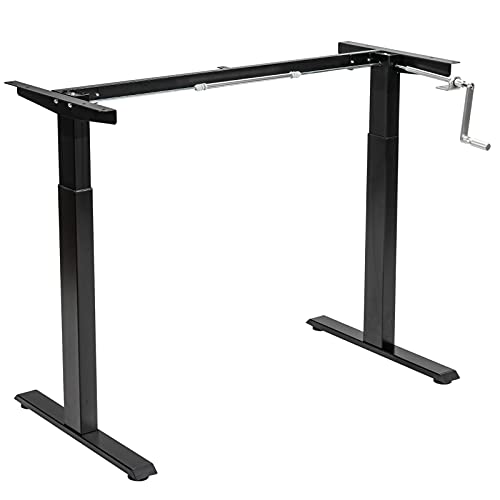
Another frame only — no desktop included — but the Tangkula arrives with the small fittings that other frames leave to your ingenuity: a cable management tray, a headphone hook, and a foldable crank handle. Each is minor alone; together they describe a frame designed by someone who has lived with the finished desk. The tray gives the power strip and the monitor bricks a home that rises and falls with the desk, which is the correct answer to the standing desk’s oldest problem — cables sized for one height, strained at the other.
The headphone hook deserves its sentence. Headphones on a desk are always in the way: on the surface they eat the mouse’s territory, in a drawer they tangle. A hook on the frame’s edge is the kind of five-second convenience you use every single day, and its presence here, on a frame at the practical end of the market, suggests the rest of the design received the same attention. The foldable crank handle completes the trio — turn, fold, forget.
The listing’s title states no capacity figure, so we offer none; judge the frame by its structure and your top. A modest top — the 48 to 60 inch range most home offices use — is the natural pairing, keeping the moving mass sensible for a hand drive. Buyers planning a very large or very heavy top should choose the VIVO frame above, whose stated figures cover that ambition explicitly. Within its natural territory, the Tangkula is the frame that feels finished soonest after the top goes on.
- Format: frame only — desktop not included
- Crank: foldable handle
- Cable care: management tray included
- Extras: headphone hook
- Aimed at: home office sit-stand builds
- Capacity: not stated in the listing title
Strengths
- Cable tray solves the rising-desk cable problem from day one.
- Headphone hook is a small daily convenience rivals skip.
- Foldable crank handle stays out of the way between adjustments.
Trade-offs
- Frame only; the desktop is on you to source and fit.
- No capacity figure in the title to plan a heavy top against.
- Extras add small parts to keep track of during assembly.
Best for: a home-office build where tidy cables and small comforts matter as much as the lift itself. Not suited for: a very large, heavy desktop that needs a stated capacity to plan around.

COSTWAY Crank Standing Desk Frame — Best tidy frame
The COSTWAY is the third frame only in the guide — again, no desktop in the box — and its personality is tidiness. A foldable crank handle, a hook, and a cable management rack are the named features, all in black. Where the Tangkula leans toward comfort extras, the COSTWAY reads as the workshop-and-office organiser’s frame: everything that usually dangles from a standing desk — the strip, the bricks, the bag, the headphones — is given a designated place on the frame itself.
That matters more on a crank desk than on an electric one, for a mechanical reason: anything hanging off the moving surface adds uneven load, and uneven load is what makes a hand drive feel heavy on one side. A rack that gathers the electrical clutter low and central keeps the lift balanced, and a balanced lift is the difference between a desk adjusted twice daily and a desk adjusted twice, ever. The black finish keeps the frame visually quiet under pale tops, where a silver frame would draw the eye.
As with the Tangkula, the title gives no capacity, so plan the top conservatively — a standard home-office slab in the usual sizes, not a monumental one. COSTWAY sells across home furniture, and this frame’s appeal is the complete, orderly kit rather than a headline specification. If your current desk’s underside is a cable thicket you are slightly ashamed of, this is the frame designed to make the next desk’s underside a point of pride.
Choosing between this and the Tangkula is the closest call in the guide, and it resolves on habits rather than specifications. If your headphones live on your head or around your neck all day, the Tangkula’s hook will be used hourly and its tray keeps cables contained. If your clutter problem is the electrical undergrowth — strips, bricks, adapters — the COSTWAY’s rack is the more deliberate answer, and its hook takes the bag or the headset you do remember to hang up. Neither choice is wrong; both frames ask the same of you in return, which is a sensible top and an honest afternoon of assembly.
- Format: frame only — desktop not included
- Crank: foldable hand crank
- Cable care: management rack included
- Extras: hook for headphones or a bag
- Finish: black
- Capacity: not stated in the listing title
Strengths
- Cable rack keeps the underside orderly and the load balanced.
- Hook gives headphones or a bag a fixed home.
- All-black frame disappears under light-coloured tops.
Trade-offs
- Frame only; sourcing and fitting the top is your project.
- No title capacity figure for planning an ambitious top.
- Overlaps the Tangkula closely — the choice is taste in extras.
Best for: a tidy-minded builder who wants the frame itself to organise cables and clutter. Not suited for: a buyer chasing the largest possible top, who needs stated limits to work to.

FLEXISPOT H7 Plus Pneumatic Mobile Standing Desk — Best motor-free compact
Honesty first: this desk has no crank. The H7 Plus lifts pneumatically — a gas spring in a dual-column base, worked by a lever — and it is in this guide because the underlying want, height adjustment with no motor and no mains cable, is the same want that brings most buyers to crank desks. If your commitment is specifically to a turning handle, this is not your pick and the five above are. If your commitment is to motor-free simplicity, read on, because this is the most space-efficient expression of it here.
The format is a compact mobile desk: a one-piece 40-inch top, a stated height range of 27.6 to 45 inches, a white finish, and a base designed to move. That mobility changes the use case entirely. This is a desk that works beside the sofa, rolls to the window for a call, serves as a laptop station in a bedroom corner and parks against a wall afterwards. The dual-column design is the stability answer to the wobble that single-post mobile desks are known for, and the cordless operation — no power lead at all — is what makes the roaming possible.
Forty inches is a laptop-and-notebook surface, not a dual-monitor command centre, and the desk should be bought as the flexible second station it is: the overflow desk, the call desk, the desk for the household member whose work migrates. Paired with one of the full frames above as the main station, it covers the rooms the big desk cannot reach. Judged as a compact pneumatic — on its own honest terms — it is a genuinely useful piece of furniture.
The stated height range deserves a practical translation. A low end of 27.6 inches is a normal sitting desk height, so the H7 works as a seated laptop table without compromise; the 45-inch top end serves standing work for most adults. That full span, delivered by a lever rather than a handle or a motor, makes the desk the fastest-adjusting pick in this guide — a genuine virtue for a station that gets raised and lowered as it moves between users and rooms through the day.
- Format: complete mobile desk, top included
- Mechanism: pneumatic gas spring — not a crank
- Top: one-piece, 40 inches
- Height range: 27.6 to 45 inches, as stated in the listing title
- Base: dual-column, cordless
- Finish: white
Strengths
- Motor-free and cordless, so it works anywhere in the home.
- Dual-column base is steadier than single-post mobile desks.
- Compact 40-inch top parks against a wall when not in use.
Trade-offs
- Pneumatic, not crank — handle purists should look above.
- Forty inches is a laptop station, not a multi-monitor desk.
- Gas springs age; the lift feel will soften over years.
Best for: a flexible second station that roams the home and never needs a socket. Not suited for: a buyer whose main workstation runs two monitors and a tower.
How Do These Six Compare When You Line Them Up?
| Pick | Format | Top | Stated capacity | Defining extra |
|---|---|---|---|---|
| Stand Up Desk Store Two Tier | Complete desk | 48 in, two-tier | Not stated in title | Raised rear tier for monitors |
| VIVO Complete 60″ | Complete desk | 60 x 24 in, one-piece | 110 lbs | Seamless top, foldable crank |
| VIVO Frame DESK-V101M | Frame only | You supply (max 72 x 43 in) | 132 lbs | Largest top range |
| Tangkula Frame | Frame only | You supply | Not stated in title | Cable tray, headphone hook |
| COSTWAY Frame | Frame only | You supply | Not stated in title | Cable rack, hook |
| FLEXISPOT H7 Plus | Complete mobile desk | 40 in, one-piece | Not stated in title | Pneumatic lift, 27.6–45 in range |
Read the table as a decision tree. Need to work today: the two complete desks or the FLEXISPOT. Own a top, or want one nobody sells: the three frames. The VIVO pair are the specification-led choices, the only picks whose titles state capacities; the Tangkula and COSTWAY compete on the fittings that make a built desk pleasant; the Stand Up Desk Store pick stands alone on layout, and the FLEXISPOT stands alone on mechanism and mobility.
What Mistakes Do Crank Desk Buyers Keep Making?
The first is ordering a frame and expecting a desk. It sounds too basic to happen, yet frame-only listings are photographed with beautiful tops that are not in the box, and every season produces buyers who discover the difference on delivery day. Three of the six picks here are frames. If a top is not listed as included, it is not included — plan the desktop as its own purchase, with its own delivery and its own weekend.
The second is overloading the moving surface. A standing desk, crank or electric, is a lift, and everything on it is freight: monitors, tower, books, the printer someone parked there temporarily two years ago. Heavy static storage belongs on a shelf, not on the lift. Overloaded crank desks feel heavy and uneven, and owners blame the mechanism for what is actually a loading decision.
The third is setting the height once and never touching the crank again. A crank desk adjusted twice becomes a fixed desk bought at a premium. Anchor adjustments to the day’s rhythm — calls standing, writing sitting — for the first fortnight, until changing height is a habit rather than a project. The fourth mistake is ignoring the floor: a desk that rocks slightly at sitting height can sway noticeably at standing height, so level the feet at full extension, where the problem shows itself.
The fifth is fitting a frame with a top that is too thin or too flexible for its span. A wide, thin top on a two-leg frame will drum and flex no matter how good the columns are. Match the top’s stiffness to its width, add a centre support to very wide builds, and remember the frame’s stated top range is a maximum, not a recommendation to use all of it with the thinnest board in the yard.
The sixth mistake is forgetting that other furniture must live with the desk at both heights. A bookshelf beside the desk that clears the surface when you sit may collide with it when you stand; a wall-mounted shelf above the desk sets a hard ceiling on standing height for anything tall on the surface. Walk the desk through its full travel on assembly day, with its real load aboard, and move the neighbours then — not the first morning you raise a monitor into a shelf you forgot was there.
Final Recommendation
For most buyers, the VIVO complete 60-inch desk is the answer: a one-piece top, a foldable crank, a stated capacity, and nothing else to source. Buy the Stand Up Desk Store two-tier instead if your screens need the raised shelf and your corner is compact. Buy a frame — the VIVO for size and stated strength, the Tangkula or COSTWAY for their fittings — when the desktop itself is the point of the project. Add the FLEXISPOT when the home needs a second, roaming station that owes nothing to any wall socket.
Whichever route you take, do the unglamorous things in order: confirm whether a top is included, measure the space at standing height as well as sitting, and plan the cable run for both heights before the first box is opened. A crank desk bought that way becomes the longest-serving machine in the home office — no firmware, no handset, no fanfare, just a handle that still turns a decade from now, in a room that may have changed around it three times.
Frequently Asked Questions
How long does it take to crank a desk from sitting to standing height?
Expect a short spell of steady turning — under a minute for a typical range on a normally loaded desk. It is slower than a motor and entirely silent, and most owners fold the change into an existing pause: the kettle, the call ending, the chapter break. If you change height many times an hour, that arithmetic may push you toward electric; twice or three times a day, it is a non-issue.
Can I fit any desktop to a crank frame?
Within the frame’s stated top range and capacity, broadly yes — timber slabs, worktop offcuts, quality plywood and retired desktops all serve. The top must be stiff enough for its span and thick enough to take the fixing screws. The VIVO frame in this guide states the widest envelope — tops as wide as 72 inches and as deep as 43, up to 132 lbs; the Tangkula and COSTWAY titles state no figures, so keep their tops in the conventional home-office sizes.
Is a pneumatic desk the same as a crank desk?
No, and this guide keeps the two labelled separately for exactly that reason. A crank desk lifts through a geared hand drive; a pneumatic desk like the FLEXISPOT H7 Plus lifts on a gas spring worked by a lever. They share the motor-free, cordless brief and differ in feel: the crank gives fine, incremental control under load, the gas spring gives a quicker, assisted rise on a light compact desk.
Do crank desks wobble at standing height?
Any two-leg desk has more movement at full extension than at sitting height; the variables are frame rigidity, top span and load. A steel frame under a modest top, like the 48-inch two-tier pick, has the least to contend with. Level feet, a balanced load and a stiff top keep movement to the slight tremor that is normal for the format rather than a sway that sets coffee rippling.
What maintenance does a hand crank mechanism need?
Very little, which is the point of the format. Keep the crank’s folding joint clean, check the frame fixings after the first month as the desk settles, and re-check them yearly. If the drive ever feels gritty or uneven, stop and inspect rather than forcing the handle — mechanical systems announce their problems early and quietly, and a crank drive is simple enough that the cause is usually visible.
Can two people of different heights share one crank desk?
Yes, and the crank handles the sharing gracefully because there are no presets to fight over. The repeatable trick is counting: each user counts the turns from a known reference — fully lowered, say — to their own height, and notes the two numbers somewhere unglamorous like the underside of the top. A small marker line on one column works too. What sharing does rule out is laziness about the monitor: two users of very different heights need the screen on a stand or arm that adjusts independently of the surface, or one of them will always be looking slightly down or up.
Are crank desks a good choice for a workshop or garage?
They are arguably the best choice there. No socket is consumed, no electronics sit in a dusty or damp-adjacent environment, the desk works through power cuts, and a frame fitted with a sacrificial worktop can be re-topped when the surface is spent. The VIVO frame under a thick bench slab is the classic build; the complete desks suit cleaner studio and office corners.
Related Guides
A crank desk changes height; the next guide changes what you do at it — our roundup of the best bike desks covers the trainer desks and pedal setups built for people who move while they work. If your standing desk is really the anchor of an L-shaped room, the best l shaped desks with drawers guide covers corner desks whose storage is built in rather than added. And for the corner that also needs to store upward, the best l shaped desks with hutch collection examines L desks whose shelving and cabinets rise above the surface.


