What's inside
As an Amazon Associate I earn from qualifying purchases. This post may contain affiliate links at no extra cost to you.
widgetverdict.com is reader-supported. When you buy through links on our site, we may earn an affiliate commission.
Where to buy: the best hotspot routers for small business below each link to their Amazon listing, beginning with the pocket-sized GL.iNet MUDI 4G LTE portable router — and because carrier compatibility is the whole product in this category, read the listing’s network claims against your own provider before anything else.
A small business does not experience an internet outage as an inconvenience. It experiences it as a card machine that will not settle, a booking system that will not load, a till that becomes a cash-only island while a queue forms. The best hotspot routers for small business exist to make that moment short and undramatic: a cellular connection — as the main line where fixed broadband is poor, or standing behind it as failover — that keeps the business trading while the street’s infrastructure has its bad day. The six picks here divide into the two honest shapes of that idea: fixed cellular routers built to run a premises, and portable hotspots built to run a person, a stall or a site that moves.
Carrier compatibility is the category’s first law, and the titles here state it with varying precision. Two picks name the major networks they are certified or compatible with. One hotspot claims coverage across more than 140 countries and automatic switching among hundreds of carriers, with no SIM required at all. The portables speak the language of travel — batteries, pocket weight, VPN — while the fixed units speak of failover, cloud management and 5G. This guide credits each claim only as its title prints it, and treats the data arrangement — your own SIM, a bundled data allowance, a certified carrier list — as part of the product, because in cellular routing the connection contract is half the purchase.
The second law is that Wi-Fi class matters less here than in any other router category. The cellular link is the bottleneck long before the wireless is: a 4G connection feeding an AC1200 router is a balanced system, and the picks’ wireless figures — from the pocket router’s modest dual-band sums to the InHand’s AX5400 — should be read as premises coverage, not as speed promises. What separates these six is where they sit, what they plug into, how they fail over, and whose SIM they take. Those are the questions the sections below answer, one title at a time.
Key Takeaways
- Two picks are premises-class 5G routers with printed failover: the MOFI6500 (dual SIM, auto failover) and the InHand CPE (auto failover, cloud managed) — the till-keepers of the guide.
- The Hitron D60 pairs AX3000 Wi-Fi 6 with Nano SIM plus eSIM for dual failover, and names its certified carriers in the title.
- Carrier claims are printed unevenly: the three major US networks are named by the MOFI and InHand titles, while the Hitron names T-Mobile, AT&T and US Cellular — check your network against the title before purchase.
- The SIMO Solis Edge removes the SIM entirely: 5G hotspot service with a monthly data inclusion, 140+ countries and 300+ carriers, aimed at travel and pop-up trading.
- The GL.iNet MUDI is the pocket option — 7000mAh battery for a stated 8 hours, 285g, OpenWrt with OpenVPN and WireGuard — while the Cudy LT500 is the fixed, four-port 4G router for a small premises on a budget of bands.
Quick Picks
| Pick | Badge | Why it earns its place |
|---|---|---|
| GL.iNet MUDI (GL-E750V2) 4G LTE Portable Router | Pocket failover with a battery | 4G LTE with SIM slot, OpenWrt VPN support, a 7000mAh battery stated at 8 hours, in a 285g pocket format. |
| Cudy 4G AC1200 4-Port Wi-Fi 5 Dual-Band Router with SIM Slot | Fixed 4G for a small premises | AC1200 dual-band Wi-Fi 5 over 4G LTE, four 100M ports, Nano SIM, VPN server and client, app and cloud control. |
| MOFI6500-5GXeLTE | Dual-SIM business failover | 4G LTE and 5G with dual SIM, amplified Wi-Fi 6, auto failover, and named compatibility with the major US carriers. |
| Hitron D60 5G Cellular Router with Sim Card Slot | eSIM second line built in | Wi-Fi 6 in the AX3000 class with mesh capability, Nano SIM plus eSIM for dual failover, certified with three named carriers. |
| SIMO Solis Edge 5G WiFi Hotspot | No-SIM global hotspot | 5G hotspot with included monthly data, 140+ countries, auto-switching across 300+ carriers, no contract and no SIM. |
| InHand Networks 5G Router Indoor CPE WiFi 6 | Cloud-managed 5G premises unit | AX5400 Wi-Fi 6 with 2.5GbE ports, auto failover, certification for the three major US carriers, cloud managed. |
How Were These Hotspot Routers Chosen?
By starting from the outage, not the brochure. A business buying cellular routing is buying a behaviour on a bad day: the fixed line dies, and either the card machine keeps settling or it does not. So the first filter was the failover story each title is willing to print — auto failover is claimed outright by the MOFI, Hitron and InHand titles, in those words, and credited there; the portables were judged instead as primary connections for people and premises that have no fixed line to fail over from. The second filter was the carrier story: whose networks the title names, whether the device takes your own SIM, and — in the SIMO’s singular case — whether the service model removes the SIM question altogether.
The third filter was premises fit. A fixed router for a shop needs wired ports for the till and the printer, and the sections note them where titles print them — the Cudy’s four ports carry a speed caveat its title states honestly, the InHand’s 2.5GbE ports point the other way. A portable needs a battery figure and a weight, and the MUDI’s title supplies both. VPN language was credited where printed — the MUDI names OpenVPN and WireGuard, the Cudy names VPN server and client modes, the MOFI calls itself a VPN router — because the market stall that processes payments over a hotspot and the consultant joining a client’s network both live on that feature.
Finally, the data model was treated as specification. A router that takes your business’s existing SIM plan is one purchase; a hotspot whose title bundles a monthly data inclusion is a service relationship with different arithmetic. Neither is superior in the abstract — the sections argue each on its own terms — but conflating them is how businesses end up with the wrong contract in the right hardware. Where a title leaves a business-critical detail unprinted — port speeds, failover behaviour, carrier lists — the spec boxes record the gap in this guide’s own words and send the reader to the manufacturer’s documentation.
We also kept the ownership horizon in view. Cellular hardware is bought against carrier networks that are themselves moving — 4G is mature, 5G is still arriving street by street — so a pick’s value depends partly on where the business’s own postcode sits in that rollout. The sections say so where it matters: the 4G picks are defended as adequate for today’s duties rather than as forever purchases, and the 5G picks are credited with headroom the business may not use until its second year. A guide that pretended the network map was finished would be selling certainty nobody owns.

GL.iNet MUDI (GL-E750V2) 4G LTE Portable Router — Pocket Failover With a Battery
The MUDI is the router as personal equipment: a 4G LTE portable travel router with a SIM card slot, OpenWrt firmware with OpenVPN and WireGuard, a 7000mAh battery stated at eight hours, dual-band Wi-Fi summing 300 plus 433 Mbps, and a weight of 285 grams. For a small business, its roles are the mobile ones — the market trader whose card reader needs a connection the venue cannot provide, the consultant whose client Wi-Fi is a security conversation they would rather not have, the site manager bridging the week between a lease starting and a broadband installation finishing. In each case the MUDI is not the premises network; it is the professional’s own network, carried.
The VPN support is the business feature hiding in a travel product. OpenWrt with OpenVPN and WireGuard means the pocket router can join the office network as a proper encrypted endpoint, or carry the user’s traffic safely across whatever local connection supplements it — and for payment-taking on the move, that encrypted path is the difference between a defensible setup and a hopeful one. The battery figure deserves its plain reading: eight stated hours is a trading day, after which the MUDI wants a charger like any phone. Its Wi-Fi sums are modest by home-router standards and entirely sufficient for the cellular link behind them; nobody’s 4G connection is waiting on a faster radio.
- Cellular: 4G LTE with SIM card slot
- Battery: 7000mAh, stated at 8 hours
- Wireless: 300 + 433 Mbps dual-band Wi-Fi
- Firmware: OpenWrt, with OpenVPN and WireGuard
- Weight: 285g, pocket travel size
- 5G: not claimed in this listing title — this is a 4G LTE unit
Who it suits is the business that moves: traders, consultants, field teams, pop-ups measured in days. Who it does not suit is the fixed shop seeking a premises router — no wired ports are itemised in its title, its radio is sized for a person rather than a floor, and its battery is a virtue only where there is no socket. The fixed answers in this guide sit below, and the MUDI’s owner will likely end up owning one of each: the pocket router for the road, the premises router for the shop, and a business that stays connected in both places.
One discipline travels with the product: the SIM in it is a business asset. Put it on the business’s own plan, know its data ceiling, and test the whole chain — reader, router, VPN — at the premises before the first market day, because the middle of a queue is the worst classroom networking offers.
The MUDI also earns a quieter role inside a fixed business: the engineer’s spare. When the premises connection is being installed, moved or repaired, a charged MUDI on the business’s own SIM bridges the gap without ceremony, and its OpenWrt flexibility means the same unit can be reconfigured for the next job rather than retired to a drawer. Small businesses accumulate single-purpose gadgets; a pocket router that serves the road, the stall and the contingency shelf is three purchases wearing one battery.
Strengths
- A stated eight-hour battery makes it a true trading-day device.
- OpenWrt with both major VPN protocols, printed in the title.
- 285g pocket format — the only pick here that travels in a coat.
Trade-offs
- 4G LTE only; no 5G claim in the title.
- Modest Wi-Fi sums, sized for one user’s devices.
- No wired port estate is itemised in the listing title.
Best for: the mobile trader, consultant or field worker who carries their own connection. Not suited for: a fixed shop seeking a premises router with wired ports for the till — this unit’s estate is a pocket, not a counter.
Mobile kit earns its keep away from desks, so check the MUDI’s current listing and match its SIM slot against your business plan’s card size before the next market day.
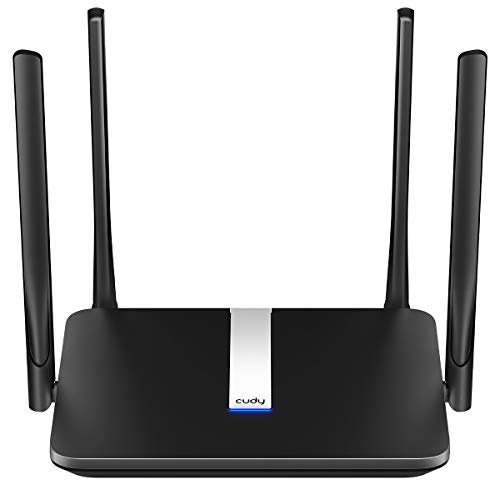
Cudy 4G AC1200 4-Port Wi-Fi 5 Dual-Band Router with SIM Slot — Fixed 4G for a Small Premises
The Cudy LT500 is the fixed counterpart to the MUDI’s pocket act: a 4G LTE router with AC1200 dual-band Wi-Fi 5 — 867 plus 300 Mbps — four wired ports, a Nano SIM slot, multiple VPN server and client modes, and app plus cloud control. Its natural premises is the small one that fixed broadband forgot or overcharges: the rural shop, the yard office, the kiosk, the start-up in a unit where the fibre cabinet is a rumour. Drop in a SIM and the building has a network — wireless for the staff devices, wired ports for the till and the printer, and a VPN story for reaching the business’s other systems.
The title carries one caveat in plain print, and this guide underlines it rather than stepping around it: the four ports are 100M ports. For the cellular purpose that ceiling rarely binds — a 4G connection will seldom outrun it — but it rules the LT500 out of one future: if a fast fixed line later arrives at the premises, the router’s own ports become the bottleneck for wired devices, and the unit becomes the backup it may always have been destined to be. Read that as lifecycle honesty. The VPN server and client duality is the counterweight feature: the router can accept connections from the owner’s laptop at home and make connections out to a head office, which is the full small-business VPN grammar in one modest box.
- Cellular: 4G LTE, Nano SIM slot
- Wireless: Wi-Fi 5 dual-band in the AC1200 class, 867 + 300 Mbps
- Ports: 4x 100M ports, as stated in the title
- VPN: multiple VPN server and client modes
- Control: app and cloud control stated in the title
- Model: LT500
App and cloud control close the ownership picture: the owner can see and manage the shop’s connection from home, which for a single-site business is the difference between a network that gets attention and one that gets a shrug. The LT500’s buyer should still walk in clear-eyed — this is a 4G, Wi-Fi 5, fast-Ethernet design in a guide that also contains 5G AX5400 equipment, and its case rests on adequacy and simplicity for a small premises rather than on headroom. For the premises it fits, adequacy reliably delivered is not a consolation prize; it is the entire requirement.
Position it with the same care as any router: cellular signal is the real specification, and the window nearest the mast-facing side of the building will outperform the stockroom every day of the week. The LT500 cannot print that advice in its title, but every hour of its working life will be governed by it.
There is a budgeting clarity to the LT500’s modesty worth stating. A premises that buys it is not paying for generations it cannot use: no 5G premium where 5G has not arrived, no multi-gig ports behind a cellular link, no wireless class the connection cannot feed. The money not spent on headroom is the money available for the data plan, the external siting, the second SIM for the drawer — the unglamorous items that decide whether the connection works in November. Adequacy, deliberately chosen and properly sited, is a strategy; this router is its instrument.
Strengths
- A complete fixed premises answer — SIM in, network out — with wired ports.
- VPN server and client modes cover both directions of small-business access.
- App and cloud control suit an owner who manages from elsewhere.
Trade-offs
- The four ports are 100M class, capping any future fast fixed line.
- 4G and Wi-Fi 5 — adequate generations, not headroom generations.
- No failover pairing is claimed; this is a primary-connection design.
Best for: a small premises whose main connection is cellular — the rural shop, the yard office, the kiosk. Not suited for: a site expecting a fast fibre line soon, where the printed 100M ports would cap the wired estate the day it arrives.
Premises purchases want a site survey first, so review the LT500’s current listing alongside a realistic look at the 4G signal inside your building.

MOFI6500-5GXeLTE — Dual-SIM Business Failover
The MOFI6500 is the guide’s most single-minded business machine. MOFINETWORK’s title describes a 4G LTE and 5G dual SIM cellular router with amplified Wi-Fi 6, auto failover, business-class performance positioning, compatibility with Verizon, AT&T, T-Mobile and more, and VPN router duty. Every phrase aims at the same buyer: the business whose connection is revenue. Dual SIM is the heart of it — two carriers’ networks in one box, so the failure of one network, not just one line, is survivable. Auto failover is the behaviour that makes the second SIM more than a spare: the switch happens without a person, at till-side, mid-queue.
The carrier list matters because it is printed. Compatibility with the three major US networks named in the title means the business can shop its data plans across carriers and can pair two different networks for genuine independence — the entire point of dual SIM, since two plans on one network share that network’s bad days. Amplified Wi-Fi 6 speaks to premises coverage: a shop floor, a small warehouse, a forecourt office, where the router’s radio must reach the corners a till and a stock terminal live in. The title does not itemise wired ports or wireless sums, and this guide records that plainly; MOFI’s own documentation is where the port estate gets verified against the premises’ wired needs.
- Cellular: 4G LTE + 5G, dual SIM
- Failover: auto failover stated in the title
- Carriers: Verizon, AT&T, T-Mobile and more, per the title
- Wireless: amplified Wi-Fi 6, per the title
- Role: VPN router; business-class performance positioning
- Ports: the wired estate is not itemised in this listing title — verify it in MOFINETWORK’s documentation for this model
Who it suits is the business that has already done the outage arithmetic: the café whose card-only hour cost more than this router, the clinic whose booking system is its front desk, the retailer whose premises has indifferent fixed broadband and excellent cellular. For those buyers the MOFI is not a gadget but a continuity control, and its dual-network design is the strongest version of that control in this guide. Who should hesitate is the business whose cellular coverage is thin on every carrier — dual SIM cannot manufacture signal — and the business whose real need is a pocket hotspot, for whom this premises unit is the wrong shape entirely.
The ownership discipline is contractual: two SIMs means two plans to manage, and the failover only earns its keep if both are live, funded and tested. Schedule the drill — primary carrier disabled, till still settling — at installation and once a season thereafter. Continuity that has been witnessed is a business asset; continuity that is merely configured is a hypothesis.
The MOFI’s amplified wireless claim deserves its premises translation. A router whose radio is built to cover a working floor — stockroom, office, forecourt — removes the access point conversation from a small site entirely, which is one less device between the outage and the recovery. Combined with the dual-SIM core, the picture is of a single box that assumes the business’s connection problem is total: line, network and coverage all answered in one unit. That totality is what business-class positioning should mean, and this title, unusually, prints the components of it rather than asking the buyer to trust the adjective.
Strengths
- Dual SIM across named major carriers — genuine network independence.
- Auto failover printed in the title; the switch needs no human.
- 5G and 4G in one unit covers both present and arriving coverage.
Trade-offs
- Two live data plans are the running cost of the dual-SIM promise.
- Port estate and wireless sums need the manufacturer’s documentation to settle.
- Premises-shaped: no battery, no pocket role.
Best for: a revenue-critical premises that needs carrier-level, automatic continuity. Not suited for: a site with weak cellular signal on every network — no router in this guide can fail over to a signal that is not there.
Continuity hardware should be bought before the outage, not after, so check the MOFI6500’s current listing and line up the two carrier plans it will carry.
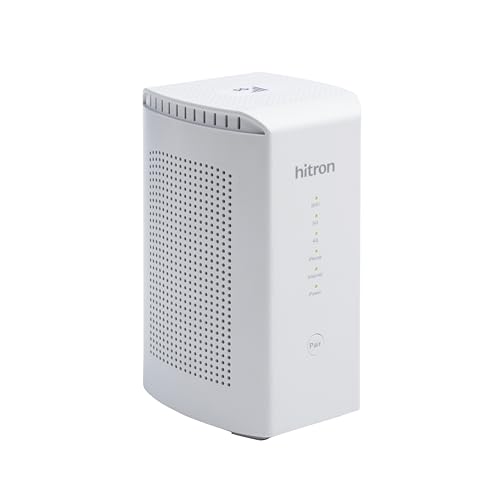
Hitron D60 5G Cellular Router with Sim Card Slot — eSIM Second Line Built In
The Hitron D60 approaches dual-network resilience from a different angle: a 5G cellular router with AX3000 Wi-Fi 6 and mesh Wi-Fi capability, certified with T-Mobile, AT&T and US Cellular, taking a Nano SIM — and carrying eSIM for dual failover capability. The eSIM is the elegant part. The second network arrives as software rather than as a second physical card to source, post and swap, which lowers the activation energy of actually having a failover line — and a failover that exists beats a superior one that was never provisioned. Certification, named in the title against three carriers, is the other trust signal: the device has been through those networks’ own approval, which is the strongest compatibility language any title in this guide uses.
AX3000 Wi-Fi 6 with mesh capability gives the D60 the premises story the pocket picks cannot tell: a current-generation wireless estate for the shop or small office, extendable by mesh where the floor plan demands. Read the combination as the D60’s whole thesis — a business can run its primary connection on cellular 5G through this unit, hold a second carrier in reserve inside the same box, and cover its floor with modern Wi-Fi, all without a fixed line being involved at any point. For premises in leased spaces, temporary sites and buildings where fixed installation is a landlord negotiation, that self-containment is the product.
- Cellular: 5G, Nano SIM slot plus eSIM
- Failover: dual failover capability via eSIM, per the title
- Certification: T-Mobile, AT&T, US Cellular, per the title
- Wireless: AX3000 Wi-Fi 6, mesh Wi-Fi capable
- Ports: the title does not enumerate the wired estate — Hitron’s D60 documentation is the place to confirm it
- Model: D60 5G
The questions a buyer should still ask live in the title’s silences. The wired port estate is not itemised, so a premises with several wired devices must confirm it in Hitron’s documentation; and the eSIM failover’s carrier choices will be governed by the eSIM provisioning the device supports, which the listing’s fuller details should confirm against the business’s preferred second network. Neither silence is unusual in this category — the MOFI’s title is similarly terse about ports — but the D60’s buyer is buying a primary connection, and primary connections deserve the fuller reading.
Hitron’s background is in carrier-grade premises equipment, which shows in the certification-first presentation: this is a device introduced by its approvals rather than its adjectives. Businesses that have been burned by an uncertified cellular gadget’s carrier mood swings will read that ordering correctly — in cellular routing, the network’s blessing is a feature, and the D60’s title leads with it.
The mesh capability deserves its own sentence of planning advice. A premises that starts with the D60 alone and grows into its mesh ecosystem keeps one management world as it expands — the stockroom node and the office node are the same system the till already trusts. That growth path is the quiet advantage of choosing a mesh-capable primary router over a marginally faster standalone: the second purchase extends the first instead of replacing it, and the failover arrangement at the centre never has to be rebuilt to accommodate a bigger floor.
Strengths
- eSIM dual failover removes the second physical SIM from the setup.
- Carrier certification is named against three networks in the title.
- AX3000 Wi-Fi 6 with mesh capability covers a real premises.
Trade-offs
- The wired port estate is not itemised in the listing title.
- eSIM carrier choice depends on the provisioning the unit supports.
- A primary-connection purchase that rewards reading the full documentation first.
Best for: a leased or temporary premises wanting 5G as its main line with a software-defined second network in reserve. Not suited for: the listing-settled port count requirement — this title leaves the estate to the documentation.
Certified kit rewards a certified plan, so look at the D60’s current listing and confirm your carrier pairing — physical plus eSIM — before the lease’s first trading day.
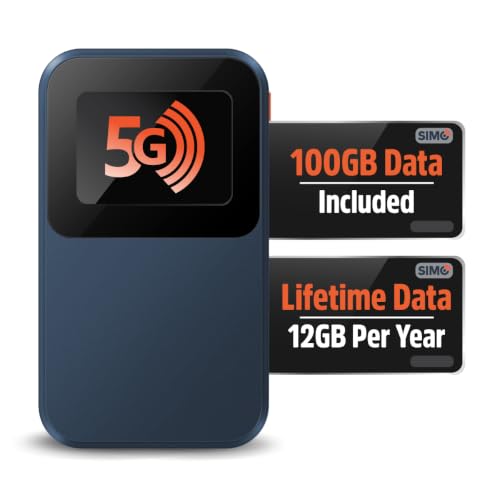
SIMO Solis Edge 5G WiFi Hotspot — No-SIM Global Hotspot
The Solis Edge deletes the category’s first law and replaces it with a service. SIMO’s title describes a 5G Wi-Fi hotspot with 1GB monthly plus 100GB of global data included, covering more than 140 countries, auto-switching across more than 300 carriers, requiring no SIM and no contract, aimed at home, enterprise and travel use. The mechanism implied is a virtualised connection: the device attaches to whichever partner network serves the location, and the data relationship is with SIMO rather than with a carrier the user must choose, provision and manage. For a small business, that is a genuinely different product from every other pick here — connectivity as a subscription appliance rather than as hardware awaiting a plan.
The use cases arrange themselves around movement and multiplicity. The consultancy whose people work across borders, the events business that lands in a new venue weekly, the pop-up retailer for whom a carrier contract per site is absurd — for these, a hotspot that simply works in the next country, on the next carrier, without a drawer of local SIMs, is worth more than any wireless specification. The included data figures in the title set the scale of the offer: a monthly inclusion suited to connectivity duties — payments, bookings, email, the till — rather than to a premises’ entire media diet, with the larger global data figure forming the travel reserve. Read those numbers as the service’s shape, and judge them against the business’s actual consumption.
- Cellular: 5G hotspot, no SIM required
- Data: 1GB monthly plus 100GB global data, as printed in the title
- Coverage: 140+ countries; auto-switching across 300+ carriers
- Contract: no contract needed, per the title
- Wireless class: the hotspot’s Wi-Fi specification goes unlisted in the title — SIMO’s Solis Edge materials carry it
- Audience: home, enterprise and travel, per the title
The trade is control for convenience, and it should be chosen knowingly. A business on the Solis model does not pick its carrier, does not hold its own plan, and depends on the service’s partnerships and data terms continuing to suit it; the business on a MOFI or Hitron holds its own contracts and answers for its own arrangements. Neither posture is naive — they suit different temperaments and different travel patterns. What the Solis cannot be is a like-for-like substitute for a premises failover router: it is a hotspot, with a hotspot’s local wireless footprint, and the shop that needs its whole floor covered should look at the fixed picks and treat the Solis as the travel arm of the same business.
There is a cash-flow footnote in the model’s favour. No contract and included data convert connectivity from a procurement project into an expense line a small business can start and stop with its season — the Christmas market stall, the summer events run, the exhibition quarter. Businesses whose trading is seasonal will recognise that rhythm as the product’s real specification.
The enterprise mention in the title points at the other scale of the same idea: the firm with travellers in forty countries cannot sensibly maintain forty carrier relationships, and a hotspot fleet on one service relationship is an administrative decision as much as a technical one. The person who owns connectivity in such a firm is buying back their own time — no expense claims for local SIMs, no per-country provisioning, no drawer of labelled cards. Priced against that time honestly, the service model stops looking like the expensive option and starts looking like the staffed one.
Strengths
- No SIM, no contract, no carrier decision — connectivity as an appliance.
- 140+ countries with automatic carrier switching for travelling teams.
- Included data figures are printed in the title, so the offer’s shape is clear.
Trade-offs
- The data inclusion suits connectivity duties, not a premises’ whole diet.
- Carrier choice is surrendered to the service’s partnerships.
- A hotspot’s local footprint, not a fixed router’s premises estate.
Best for: travelling teams, events businesses and seasonal pop-ups that need working connectivity in the next place, not just this one. Not suited for: a fixed premises seeking to hold its own carrier contracts and cover its floor — the fixed picks in this guide are built for that posture.
Seasonal businesses buy against a calendar, so check the Solis Edge’s current listing and read its data terms against your trading season’s real consumption.

InHand Networks 5G Router Indoor CPE WiFi 6 — Cloud-Managed 5G Premises Unit
InHand’s indoor CPE is the premises professional of the field: a 5G cellular router for business, retail and RV travel, with Wi-Fi 6 in the AX5400 class, 2.5GbE ports, auto failover, certification for Verizon, AT&T and T-Mobile, and cloud management. The specification reads like the fixed picks’ checklist completed — the fastest wireless class in this guide, multi-gig wired ports for the premises’ wired core, a printed failover behaviour, the three major carriers named as certified, and a management layer that lets the owner or provider administer the connection from anywhere. InHand’s background in industrial connectivity shows in the ordering: failover and management are presented as first-class features, not afterthoughts.
The retail framing in the title is precise. A shop’s connection supports the till, the stock system, the staff devices and the customer Wi-Fi, and its failure is measured in turned-away sales; an auto-failover 5G unit with cloud oversight is the direct answer, because the owner learns about the fixed line’s failure from a dashboard rather than from a phone call about the card machine. The 2.5GbE ports matter in the same premises: the wired core — till, server, access point uplinks — runs at modern speeds, so the cellular router does not become the ceiling on the local network it feeds. RV travel’s presence in the title is the secondary market speaking; the same self-contained 5G estate serves a large vehicle, but the business retail case is the design’s centre of gravity.
- Cellular: 5G, certified for Verizon, AT&T and T-Mobile
- Failover: auto failover stated in the title
- Wireless: Wi-Fi 6, AX5400 class
- Ports: 2.5GbE ports stated in the title
- Management: cloud managed, per the title
- Audience: business retail and RV travel, per the title
Against the MOFI, the comparison is dual-SIM depth versus specification breadth: the MOFI holds two physical networks in reserve, the InHand prints the faster wired and wireless estate with certification across the same three carrier names and a cloud layer on top. A business choosing between them is choosing which failure it fears — the carrier’s bad day, or the premises outgrowing its router. Against the Hitron, the InHand prints its ports and its management where the D60 prints its eSIM; both are credible premises answers with different paperwork. The InHand’s buyer should still confirm the SIM arrangement and failover pairing in the full listing, since its title — generous as it is — does not itemise the SIM estate.
Cloud management deserves its standard caveat, applied evenly: the dashboard that lets an owner check the shop’s connection from home is an account that must be guarded like the till. Set it up with the business’s own credentials and proper access control at installation, and the management layer is the asset this section describes.
One more retail-specific virtue hides in the failover-plus-cloud pairing: evidence. When a franchisor, an insurer or a landlord asks how the business protects its trading continuity, a cloud-managed failover unit produces an answer with logs attached — the outage happened, the connection switched, the tills kept settling. That documentary quality is invisible in a specification table and decisive in a lease negotiation or a claim. The InHand is the pick in this guide most naturally fluent in that language, because its management layer was designed for organisations that report on their infrastructure rather than merely own it.
Strengths
- The most complete printed premises specification in this guide.
- Auto failover plus certification for all three major US carriers.
- Cloud management suits owners and providers running sites remotely.
Trade-offs
- The SIM arrangement needs the full listing and documentation to settle.
- Specification breadth is wasted on a single-till micro-premises.
- Cloud management is an account to secure, not just a convenience.
Best for: a retail or business premises wanting 5G failover with a modern wired and wireless estate, run from a dashboard. Not suited for: a buyer seeking dual physical SIMs in the listing’s own terms — that printed promise belongs to the MOFI in this guide.
Premises flagships reward a full read, so review the InHand CPE’s current listing and confirm its SIM arrangement against your failover plan.
Comparison Table
| Pick | Cellular | SIM story | Failover in title | Wireless | Shape |
|---|---|---|---|---|---|
| GL.iNet MUDI | 4G LTE | SIM slot | Not claimed | 300 + 433 Mbps | Pocket, battery |
| Cudy LT500 | 4G LTE | Nano SIM | Not claimed | AC1200 Wi-Fi 5 | Fixed, 4x 100M ports |
| MOFI6500 | 4G LTE + 5G | Dual SIM | Auto failover | Amplified Wi-Fi 6 | Fixed premises |
| Hitron D60 | 5G | Nano SIM + eSIM | Dual failover via eSIM | AX3000 Wi-Fi 6 | Fixed, mesh capable |
| SIMO Solis Edge | 5G | None required | Carrier auto-switching | Not itemised in title | Portable hotspot |
| InHand CPE | 5G | Not itemised in title | Auto failover | AX5400 Wi-Fi 6 | Fixed, cloud managed |
Primary Connection or Backup? Deciding the Cellular Role
The first decision is not which router but which job. As a backup, cellular sits behind a fixed line and is judged on one behaviour — the changeover — which is why the failover picks (MOFI, Hitron, InHand) print that behaviour in their titles and why the wired firewall layer in our Best Small Business Network Routers for Continuity, VPN and Control guide treats the second connection as a design input, not an accessory. As a primary connection, cellular carries the whole business every day and is judged on signal, data allowance and premises coverage — the Cudy’s and Hitron’s natural framing, and the MUDI’s and Solis’s entire existence.
The two jobs also fail differently, and a business should rehearse both. Backup failure is silent: the line that never gets tested, the SIM whose plan lapsed, the failover that was configured by an installer two summers ago. Primary failure is loud but simpler — the signal is the product, and positioning the router where the building’s signal actually lives matters more than any feature in this guide. The calls a business makes over that connection deserve the same rehearsal: voice traffic is the least forgiving flow a small network carries, and our Best Routers for Use With VoIP roundup covers the router side of keeping those calls clear when the office’s connection is under load.
Data arithmetic closes the decision. A backup line idles most of the year and surges on the worst days; a primary line consumes steadily and must be sized for the business’s real month — tills and bookings are light, but a premises that also streams, syncs and backs up over cellular will meet its ceiling in the first fortnight. Match the plan to the job before matching the router to the plan.
There is a hybrid worth naming for the many businesses between the poles: fixed broadband as the primary with a cellular pick from this guide as the rehearsed understudy, where the cellular unit also earns its shelf space in ordinary weeks — carrying the guest network, the seasonal stall, the site visit — rather than waiting in a cupboard for a disaster. Equipment that works weekly is equipment whose health is known; the pure standby, by contrast, must be drilled deliberately or doubted honestly. Either model is defensible. The indefensible one is the untested box and the unexamined assumption, which is why every section of this guide keeps returning to the same unglamorous verb: rehearse.
Siting the Router: Signal Is the Real Specification
Every router in this guide obeys one physical law its title cannot repeal: cellular performance is decided by where the box sits. The window facing the serving mast, the upper floor, the wall away from the metal racking — these choices move real-world throughput more than the difference between any two picks here. Businesses routinely install the router beside the till for cabling convenience and then blame the carrier for the stockroom’s physics. Walk the premises with a phone on the same network first, find where the signal honestly lives, and let the router live there; run cable from the router to the till, never the argument the other way around.
The same siting logic governs the travelling picks, in miniature. The MUDI on the market stall’s back shelf and the Solis in a venue’s basement office are both one relocation away from a different business day. And the fixed premises with staff accommodation or a sister site — a small hotel, a guesthouse, a serviced office — faces the guest-facing version of the same problem, which our Best Wireless Routers for Hotels guide takes up from the coverage side.
Siting has a seasonal dimension too. A shop’s signal in an empty January unit is not its signal in a December crowd, when bodies, stock and neighbouring networks all thicken the air; and a market trader’s pitch varies by venue in ways no specification can predict. The businesses that cope best treat the first trading day in any new location as a survey — arrive early, test the till chain at the exact spot it will stand, relocate the router before the queue forms rather than during it. Five minutes of that discipline is worth more than the difference between any two products in this guide, and it costs nothing but the decision to do it.
The Data Plan Is Half the Product
Hardware comparisons in this category are only ever half the review, because the other half is a contract. A dual-SIM failover unit on two starved plans is a weaker control than a single-SIM router on a generous one; a 5G primary connection with a small monthly ceiling is a fast road to a throttled fourth week. Businesses should therefore run the arithmetic in the order this guide has implied throughout: estimate the month’s real consumption by duty — payments and bookings are whispers, cloud sync and camera uploads are conversations, streaming and large updates are shouting — then choose the plan shape that fits it, then choose the router that carries that plan best.
Failover plans have their own arithmetic. A backup line that idles eleven months a year should be bought for its behaviour in the twelfth: enough data to trade at full tilt through a multi-day outage, on a plan whose terms do not punish the surge it exists to absorb. The seasonal business faces the mirror image — heavy months and empty ones — which is precisely the rhythm the Solis Edge’s no-contract model is shaped around, and precisely why a fixed annual contract can be the wrong instrument for a three-month trading season even when its monthly rate looks cheaper.
Finally, keep the paperwork with the hardware. The plan details, the SIM inventory, the failover test dates and the carrier contacts belong in the same folder as the router’s admin credentials, owned by the business rather than by whichever employee set it up. Cellular continuity fails administratively more often than electronically — the lapsed plan, the cancelled card, the ex-staffer’s account — and the folder is the cheapest control in this entire guide.
Common Mistakes
Buying the router before checking the signal. No feature in this guide manufactures coverage. Test the carrier’s real signal inside the premises, at the counter, at trading hours — then choose the hardware that rides it.
Leaving the failover untested. An auto failover that has never been witnessed is a hope with a power light. Pull the primary connection at installation, watch the till survive, and repeat the drill each season.
Two SIMs, one network. Dual SIM on a single carrier shares that carrier’s outage. The MOFI’s named multi-carrier compatibility exists so the second SIM can be a genuinely different network.
Sizing the data plan by the router’s speed. The plan’s monthly allowance, not the modem’s generation, decides whether the business reaches the 28th still connected. Count the real consumption — tills are light, sync and streaming are not.
Installing for cable convenience. The router placed by the till instead of by the signal underperforms every day to save an hour once. Site for the mast, then run the cable.
FAQ
Can a cellular router really run a whole small business? For the connectivity duties most small businesses depend on — payments, bookings, email, cloud tills, staff devices — yes, provided the signal is real and the data plan is sized honestly. The fixed picks here (Cudy, MOFI, Hitron, InHand) are built for exactly that duty; media-heavy consumption is what strains the model, not the till.
What is the difference between dual SIM and eSIM failover? Dual SIM, as in the MOFI, holds two physical carrier cards in the device. The Hitron’s eSIM approach provisions the second network electronically. Both aim at the same behaviour — a second network when the first fails — with different setup errands; the printed titles state each model plainly.
Does 5G matter, or is 4G enough for a backup line? For backup duty, 4G is usually enough: the failover carries essential traffic for hours or days, and the MUDI and Cudy show the 4G shape done properly. For a primary connection expected to serve for years, 5G’s capacity headroom is the safer purchase where coverage exists.
How does the no-SIM Solis Edge work for a business? As a service: the hotspot connects through the provider’s carrier partnerships — 140+ countries and 300+ carriers in the title — with data included on the title’s stated terms. It suits travelling and seasonal trading; a fixed premises wanting its own carrier contracts should choose a SIM-based pick.
Which pick should a shop with unreliable fixed broadband choose? One of the printed-failover premises units — MOFI6500 for dual physical SIMs, Hitron D60 for eSIM reserve, InHand CPE for the fullest wired and wireless estate with cloud oversight — paired with a tested changeover drill. The router is half the control; the rehearsal is the other half.
Can one of these replace a broken router today, before a contract is sorted? The portable picks can bridge exactly that emergency: a MUDI on an existing business SIM, or a Solis Edge with no SIM at all, can carry the till and the bookings while the permanent arrangement is negotiated. Bridging is a legitimate purchase reason — several businesses meet this category through a crisis and stay for the continuity it taught them to value.
Final Recommendation
One number should be computed before any of the names below is chosen: the cost of one dark day. Multiply the till’s silent hours by the business’s real trading rate, add the bookings that never arrived and the regulars who found the door closed, and the result is the budget this purchase defends. Against that number, every pick in this guide is inexpensive — which is exactly why the choice should be made on fit and rehearsal rather than on shaving the hardware line.
Let the business’s geography decide. The premises with a fixed line it cannot trust takes a failover unit — MOFI for two physical networks, Hitron for the eSIM reserve, InHand for the complete managed estate. The premises with no line worth trusting takes the Cudy as its primary connection, or the Hitron where 5G and certification argue louder. The business that moves takes the MUDI in the pocket or the Solis in the travel kit, and stops apologising for connections it does not control. Buy before the outage, test the changeover out loud, and the next failure of the street’s infrastructure becomes a story the business tells rather than a day it loses. The till that never stops is not a luxury in a card-first economy; it is the business itself, still open, still trading, still trusted.
Related Guides
Cellular backup is one layer of a small business’s continuity, and these guides cover the layers around it: Best Routers for Use With VoIP for the calls that must survive the changeover, Best Wireless Routers for Hotels for guest-facing coverage, and Best Small Business Network Routers for Continuity, VPN and Control for the wider continuity design.


