What's inside
- Key Takeaways
- Quick Picks
- How Were These Bay-Equipped Cases Chosen?
- The Six Bay-Equipped Cases, Reviewed in Full
- How Do the Six Bay-Equipped Cases Compare at a Glance?
- A Brief History of the 5.25-Inch Bay, and Why It Refuses to Die
- What Can a 5.25-Inch Bay Still Do in a Modern Build?
- How Should You Choose Between One Bay and Two?
- Bay Devices in Depth: What Each Occupant Demands
- Six Rooms: Where Each Bay Case Belongs
- A Second Look: Bay Cases in Daily Service
- Preservation: Why the Archive Stays Physical
- Building the Bay Machine: Cabling, Power and Airflow
- The Retro Sleeper Phenomenon
- Common Mistakes When Buying a Case With 5.25-Inch Bays
- What About an External Drive Instead of a Bay?
- The Bay in Offices, Institutions and Workshops
- What Should You Verify in the Full Listing Before Ordering?
- Frequently Asked Questions
- A Note on Drive Noise and Vibration in Bay Builds
- Final Recommendation
- Related Guides
As an Amazon Associate I earn from qualifying purchases. This post may contain affiliate links at no extra cost to you.
widgetverdict.com is reader-supported. When you buy through links on our site, we may earn an affiliate commission.
Where to buy: The Rosewill Retro NAS ATX Mid Tower leads this guide with two 5.25-inch bays and its Amazon listing is the first stop; every other pick below is linked inside its own review; use those links to view each case on Amazon and confirm it suits your drive collection.
The best pc cases that have 5.25 drive bays serve a need the modern market tried to declare finished. The 5.25-inch bay — the wide slot that once held every optical drive — was written off when downloads replaced discs, and case after case deleted it in favour of unbroken glass fronts. Yet the bay never stopped being useful. It is the standard opening for optical drives that still read and burn the world’s archived discs, for hot-swap caddies that turn hard drives into cartridges, for fan controllers, card readers, reservoir mounts, drawers and front panels of a dozen kinds. A case with the bay is a case with a future socket, and the owners who need one — archivists, media collectors, NAS builders, retro enthusiasts, workshops — need it non-negotiably.
The six entries here divide by how seriously they take that socket. The Rosewill Retro NAS builds a whole storage philosophy around it: dual 5.25-inch bays beside six 3.5-inch hard-drive bays in a retro sleeper shell. The SilverStone PS13B and the Antec VSK3000E-U3 each offer two bays in plainer towers. The two Zalmans and the In Win offer one bay each, at sizes from full ATX down to a micro-ATX mini tower, proving the socket survives at every scale for builders who plan around it. Every bay count below comes straight from the listing title, because in this category the count is the headline and approximations are useless.
Why keep the faith with a format the fashion pages buried? Because media collections are physical. The shelf of discs, the archive of family video, the music library ripped once and kept forever, the retro software that only exists on a spinning platter — these belong to owners who measure a case’s worth in decades. A bay-equipped case also hedges the future in both directions: fit a drive today, a controller tomorrow, a drawer next year. Readers whose taste runs to plain, closed fronts will find these cases’ natural allies in Best PC Cases Without a Side Panel Window, where several picks share the same equipment-first philosophy.
Key Takeaways
- The 5.25-inch bay remains the standard socket for optical drives, hot-swap caddies, fan controllers and front-panel accessories.
- The Rosewill Retro NAS pairs dual 5.25-inch bays with six 3.5-inch HDD bays, three 140mm fans and 360mm radiator support.
- The SilverStone PS13B and Antec VSK3000E-U3 each provide two 5.25-inch bays in straightforward towers.
- The Zalman T6 and T8 each provide one 5.25-inch ODD bay in ATX mid towers with mesh and lighting characters respectively.
- The In Win EN708 keeps a single 5.25-inch bay alive in a micro-ATX mini tower with twin USB 3.0 front ports.
- Bay count is stated in every title here — verify it first, because it is the entire reason for the purchase.
Quick Picks
- Best Bay-Equipped Storage Build — Rosewill Retro NAS ATX Mid Tower: a retro sleeper case with six 3.5-inch HDD bays, dual 5.25-inch bays, three pre-installed 140mm fans, 360mm radiator support and USB-C.
- Best Straightforward ODD Tower — Zalman T6 ATX Mid Tower: a patterned-mesh ATX case with a pre-installed 120mm fan, 5.25-inch ODD support and USB 3.0, spanning ATX, mATX and ITX boards.
- Best Bay With a Light Touch — Zalman T8 ATX Mid Tower: a compact ATX case with a 5.25-inch ODD bay, an RGB strip with control button, a 120mm fan, 240mm radiator and 295mm GPU support.
- Best Twin-Bay Plain Tower — SilverStone PS13B ATX Tower: an ATX tower with two 5.25-inch bays, model PS13B-x, from a maker with a long storage-case pedigree.
- Best Compact Twin-Bay — Antec VSK3000E-U3 Mini Tower: an SGCC steel micro-ATX mini tower with two USB 3.0 ports, two 5.25-inch bays and two 3.5-inch HDD bays.
- Best Small Single-Bay — In Win EN708 Micro ATX Case: a micro-ATX mini tower with one 5.25-inch drive bay, two USB 3.0 front ports and HD Audio.
How Were These Bay-Equipped Cases Chosen?
The first filter was the bay itself, verified in the title: a pick had to state its 5.25-inch provision in so many words, because this category attracts listings whose photographs show a bay the specification quietly deleted. Counts were recorded exactly — dual bays where dual is claimed, one where one is claimed — and the reviews hold each case to its own number. The second filter was the case around the bay: a socket in a shell that cannot cool, house or feed a modern build is a museum piece, so radiator support, fan provision, drive capacity and board formats were weighed wherever titles state them.
The third filter was audience spread. The set had to serve the NAS builder stacking hard drives, the archivist keeping one optical drive alive, the retro builder assembling a sleeper, and the small-office buyer whose mini tower must still read the occasional disc. That spread is why the list runs from the Rosewill’s eight total drive positions down to the EN708’s single bay in a mini tower. Minimalist readers weighing these honest, functional fronts against cleaner designs will find the comparison set out in Best Minimal PC Cases for ATX — several of these bay cases are what minimalism looks like when it grows up around media collections.
The Six Bay-Equipped Cases, Reviewed in Full

Rosewill Retro NAS ATX Mid Tower (Dual 5.25 Bays)
The Retro NAS is the guide’s flagship because it treats drive bays as a worldview. Its title stacks the evidence: an ATX mid tower in a retro sleeper style, six 3.5-inch HDD bays, dual 5.25-inch bays, three 140mm fans pre-installed, 360mm radiator support and USB-C, pitched as ideal for a DIY NAS. Read that as a complete storage machine’s blueprint. The hard-drive bays hold the array; the twin 5.25-inch bays hold an optical drive for ingesting media and a hot-swap caddy or controller beside it; the fans and radiator support keep the whole library cool; and the sleeper styling keeps it looking like a mild-mannered retro box rather than a server.
Sleeper is the operative charm. A sleeper build hides serious capability inside an unassuming shell, and for a home NAS that lives in a living space, the disguise is practical as well as fun — the most storage-dense machine in the house reads as its least assuming object. The DIY NAS framing in the title is honest about the audience: builders who roll their own storage, who want drive counts that prebuilt boxes ration, and who still believe a disc drive belongs in the house’s archive machine. Nothing else in this guide, and little anywhere in the current market, serves that builder this completely.
Strengths
- Six 3.5-inch HDD bays plus dual 5.25-inch bays is the richest drive provision here.
- Three 140mm fans pre-installed and 360mm radiator support keep a dense build cooled.
- USB-C keeps the front panel current despite the retro brief.
Trade-offs
- A storage-first interior is wasted on a one-drive gaming build.
- Retro sleeper styling is a taste; it will not satisfy a glass-showcase brief.
- Populating eight drive positions demands power and cable planning to match.
Spec mini box
- Format: ATX mid tower, retro sleeper style
- Hard-drive bays: six 3.5-inch
- 5.25-inch bays: dual
- Fans: three 140mm pre-installed
- Radiator support: 360mm
- Front connectivity: USB-C named
- Stated purpose: DIY NAS
Best for: a home-built NAS or media archive machine that must also keep optical and bay accessories in play.
Not suited for: a minimalist single-drive desk build, which would leave its talents idle.
Storage builders should begin at the Rosewill Retro NAS on Amazon and count their drives against its bays — the rare case where the title’s arithmetic is the entire sales pitch, and it adds up.
Zalman T6 ATX Mid Tower (5.25 ODD Bay)
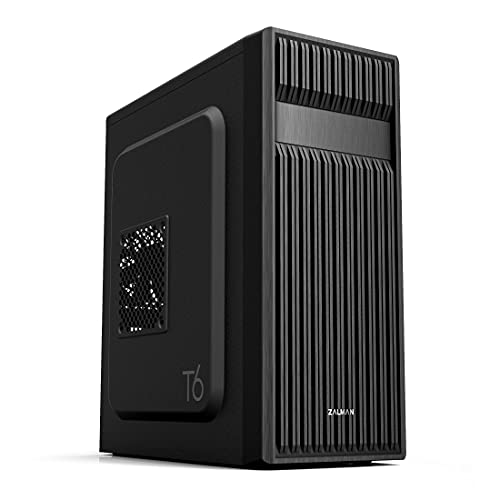
The T6 is the honest mid-tower of the category: an ATX desktop case with a 120mm fan pre-installed, a 5.25-inch ODD bay stated twice in its title for emphasis, USB 3.0, a patterned mesh design, and support spanning ATX, mATX and ITX boards, in black, for gaming and workstation use. The patterned mesh front is the design’s working surface — air in, plainly — and the single bay sits in that front like a kept promise. Nothing about the T6 performs; everything about it provides, which is the correct character for the case most likely to be bought by offices, families and builders who simply refuse to orphan their disc drives.
Its breadth of board support makes it a fleet-friendly choice: the same case can house a full ATX workstation or a modest mATX family machine, and the bay serves both — an optical drive in one, a card reader or drawer in the other. The pre-installed fan is a starting point rather than a cooling plan, and the title’s restraint about radiator figures should be honoured by checking the full listing before a liquid build is planned. Within those honest limits, the T6 is the category’s default recommendation for a normal tower with a normal bay, and defaults earn that status by disappointing nobody.
Strengths
- 5.25-inch ODD support stated plainly, in a breathable patterned-mesh ATX shell.
- Board support spans ATX, mATX and ITX, suiting fleets and mixed builds.
- USB 3.0 front connectivity covers the everyday peripheral set.
Trade-offs
- One pre-installed 120mm fan is a beginning; warmer builds will add more.
- The title states no radiator ceiling, so liquid plans need the full listing first.
- A single bay means choosing between an optical drive and a bay accessory.
Spec mini box
- Format: ATX mid tower
- 5.25-inch provision: one ODD bay
- Fan: one 120mm pre-installed
- Front connectivity: USB 3.0
- Front design: patterned mesh
- Board support: ATX, mATX, ITX
- Colour: black
Best for: a general-purpose family, office or gaming tower that must keep one optical drive or bay device.
Not suited for: a twin-bay plan, or a liquid-cooling build specced from titles alone.
Read the Zalman T6 on Amazon for its radiator and clearance figures — the bay is confirmed in the title, and the rest of the plan completes on the product page.

Zalman T8 ATX Mid Tower (5.25 ODD Bay)
The T8 answers a question its sibling does not ask: can a bay-equipped case still join the modern lighting era? Its title offers a 5.25-inch ODD bay in a compact ATX gaming case with an RGB lighting strip and control button, one 120mm fan, USB 3.0, 240mm radiator support and 295mm of graphics-card room, in black. The control button is the detail to appreciate — the lighting is governed from the case itself, a small sovereignty that owners of software-locked rainbows will envy — and it coexists with the bay rather than replacing it, which is the whole point.
Compact ATX is the other half of the proposition: a full-size board in a tightened shell, with stated figures — 240mm of radiator, 295mm of card — that let a gaming build be planned precisely. The single bay in such a case serves the gamer-archivist, the player whose shelves hold two decades of discs and whose new build refuses to exile them. Choose the T8 when the build brief contains both a graphics card with ambitions and a disc collection with seniority; it is the only pick here that speaks both languages fluently.
Strengths
- A 5.25-inch bay and an RGB strip with its own control button coexist in one compact case.
- Stated 240mm radiator and 295mm GPU figures make the gaming build plannable.
- Compact ATX footprint keeps a full board on a smaller desk area.
Trade-offs
- One included 120mm fan starts the cooling story rather than finishing it.
- 295mm of card room excludes the longest flagship designs.
- One bay forces the optical-versus-accessory choice, as with the T6.
Spec mini box
- Format: ATX mid tower, compact
- 5.25-inch provision: one ODD bay
- Lighting: RGB strip with control button
- Fan: one 120mm included
- Radiator support: 240mm
- Graphics-card support: 295mm
- Front connectivity: USB 3.0
- Colour: black
Best for: a gaming build that wants its lighting, its compact shell and its disc drive in the same machine.
Not suited for: a 300mm-plus graphics card, which exceeds the clearance the title states.
Check your card’s length, then view the Zalman T8 on Amazon — the pairing of a stated GPU figure with a real bay makes this the planner’s gaming pick in the category.

SilverStone PS13B ATX Tower (2x 5.25 Bays)
SilverStone has built storage-literate cases for longer than most brands have existed, and the PS13B is that literacy in a plain suit: an ATX tower with two 5.25-inch bays, model PS13B-x, and a title that declines to say anything else. Treat the brevity as the product’s character. This is the tower for the builder who knows exactly what the two bays are for — the classic pairing of an optical drive and a second device, a burner beside a reader, a drive beside a hot-swap caddy — and who wants a reputable shell around them without paying for theatre.
Twin bays change the daily arithmetic of the category. With one bay, every device choice is an eviction; with two, the machine settles into a stable configuration and stays there for years. The PS13B suits the workstation that archives to disc and swaps drives, the media PC that reads and burns, the office machine whose front panel is a working interface rather than a design statement. Its full figures live on its product page rather than its title, and the review respects that division: the bays are the headline, the documentation is the rest of the story, and SilverStone’s long case-making history is the context that makes the brevity credible.
Strengths
- Two 5.25-inch bays allow a stable optical-plus-accessory configuration.
- SilverStone’s storage-case pedigree stands behind the plain specification.
- ATX tower format keeps board and build choices mainstream.
Trade-offs
- The title states no fan, radiator or port figures, so the full listing is essential reading.
- Plain styling offers nothing to a showcase brief.
- Builders wanting front USB-C should verify the panel rather than assume it.
Spec mini box
- Format: ATX tower
- 5.25-inch bays: two
- Model: PS13B-x
- Finish: black, per the PS13B designation
- Cooling and port figures: the title does not state them, so consult the manufacturer’s documentation before a parts list depends on them
Best for: a workstation or media machine running an optical drive and a second bay device together, long-term.
Not suited for: a build specced entirely from titles, since this one keeps its figures on the product page.
Open the PS13B listing on Amazon with your bay plan written down — drive plus caddy, reader plus burner — and let the full specification confirm the shell around it.

Antec VSK3000E-U3 Mini Tower with 5.25 Bays
Antec’s VSK line is the procurement department’s old friend, and the VSK3000E-U3 keeps the faith at small scale: a micro-ATX mini tower in SGCC steel with two USB 3.0 ports, two 5.25-inch bays and two 3.5-inch HDD bays. Twin 5.25-inch bays in a mini tower is the headline — a provision many full towers no longer offer, delivered in a shell sized for an office desk’s side or a small room’s corner. SGCC, the galvanised steel of business enclosures, sets the tone: this case is bought by the dozen in spirit, even when it is bought one at a time.
The audience writes itself: the small office that still burns archival discs and swaps a backup drive, the home worker whose mini tower must read anything a client sends, the family machine in a small room that serves as the house’s disc reader of last resort. Two HDD bays beside the twin 5.25-inch pair make a complete little storage citizen, and the twin USB 3.0 ports cover the daily peripherals. Nothing here chases fashion, and in return nothing here will embarrass its owner in five years — the VSK’s whole argument, and a good one.
Strengths
- Two 5.25-inch bays in a mini tower is a rare and useful provision.
- SGCC steel construction suits offices and long, unglamorous service.
- Two 3.5-inch HDD bays and twin USB 3.0 ports complete a working specification.
Trade-offs
- Micro-ATX ceiling excludes full ATX boards and the largest builds.
- The title names no included fans or radiator support, so cooling plans start on the product page.
- Business styling is deliberately invisible, which showcase builders will find dull.
Spec mini box
- Format: mini tower, micro-ATX
- Material: SGCC steel
- 5.25-inch bays: two
- Hard-drive bays: two 3.5-inch
- Front connectivity: two USB 3.0 ports
- Model: VSK3000E-U3_US
Best for: a small office or home-work machine that must read, burn and swap with twin bays in a compact shell.
Not suited for: a full ATX gaming build, which needs a larger case from further up this list.
Offices should note the VSK3000E-U3 on Amazon — twin bays at mini-tower scale is the combination that keeps a small machine compatible with a physical-media world.
In Win EN708 Micro ATX Case with 5.25 Drive Bay
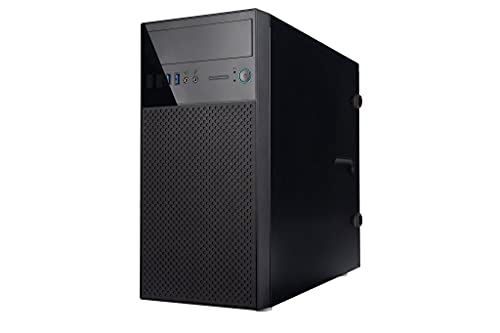
The EN708 closes the list at the smallest scale: a micro-ATX mini tower, case only, with one 5.25-inch drive bay, two USB 3.0 front ports and HD Audio. In Win is better known for design-forward showpieces, which makes this plain little tower an interesting artefact — the company’s practical streak, a compact enclosure for offices and compact desks that nonetheless keeps the bay. One bay, honestly stated, in a case that asks little space and less attention: that is a complete proposition for the machine whose owner needs a disc read occasionally and a small footprint always.
The twin front USB 3.0 ports and HD Audio describe the daily interface of a working desk — a headset, a drive, a peripheral or two — and the micro-ATX format keeps the build in the affordable mainstream. The case-only note in the title deserves respect: it sets the expectation that this is an enclosure purchase, with the build’s other provisions to be planned from the full listing. For a small office fleet, a reception machine, a library or classroom PC, or the household’s compact second computer, the EN708 is the category’s modest, correct answer.
Strengths
- A genuine 5.25-inch bay survives at micro-ATX mini-tower scale.
- Two USB 3.0 front ports plus HD Audio cover the working desk’s daily connections.
- Compact footprint suits offices, classrooms and small rooms.
Trade-offs
- One bay means the optical-versus-accessory choice, unavoidable at this size.
- Sold as case only; fans and other provisions belong to the full listing’s account.
- Micro-ATX limits expansion compared with the ATX towers above.
Spec mini box
- Format: micro-ATX mini tower
- 5.25-inch provision: one drive bay
- Front connectivity: two USB 3.0 ports, HD Audio
- Contents: case only, per the title
- Cooling figures: the title leaves these to the manufacturer’s documentation, which should be read before a warm build is planned
Best for: a compact office, classroom or second-machine build that still needs one real bay.
Not suited for: twin-bay workflows, or an expansion-heavy gaming build.
Small-desk buyers can confirm the remaining details on the EN708 listing on Amazon — the bay and the ports are stated in its title, and the rest is a short read. Readers comparing bay counts across the wider market will find the sibling survey in Best PC Cases With 5.25-Inch Bays a useful cross-check.
How Do the Six Bay-Equipped Cases Compare at a Glance?
| Case | Format | 5.25-inch bays | Other drive provision | Headline extra |
|---|---|---|---|---|
| Rosewill Retro NAS | ATX mid tower | Two | Six 3.5-inch HDD bays | Three 140mm fans, 360mm radiator, USB-C |
| Zalman T6 | ATX mid tower | One ODD | Not stated in the title | Patterned mesh, USB 3.0 |
| Zalman T8 | ATX mid tower, compact | One ODD | Not stated in the title | RGB strip with button, 295mm GPU |
| SilverStone PS13B | ATX tower | Two | Not stated in the title | Storage-maker pedigree |
| Antec VSK3000E-U3 | Mini tower, micro-ATX | Two | Two 3.5-inch HDD bays | SGCC steel, twin USB 3.0 |
| In Win EN708 | Mini tower, micro-ATX | One | Not stated in the title | Twin USB 3.0, HD Audio |
The table sorts the category by its true first question — how many bays — and then by the life around them. Two-bay cases split into the storage flagship, the plain tower and the compact surprise. One-bay cases split into the mesh all-rounder, the lit gamer and the mini-tower minimalist. Every buyer in this category arrives with a bay count already in mind, usually learned from the devices on their shelf; the table’s job is to show which shells honour that count with a complete case around it.
A Brief History of the 5.25-Inch Bay, and Why It Refuses to Die
The bay’s dimensions are older than most of its users: the 5.25-inch form began with floppy drives in the industry’s first decade, standardised into the front of nearly every computer built for thirty years, and graduated through CD, DVD and Blu-ray eras without changing its footprint. That longevity created an installed base of devices and media beyond any other front-panel format in computing — shelves of discs in most houses, drawers of drives in most workshops, an accessory ecosystem refined across generations. Standards with that kind of gravity do not vanish when fashion turns; they recede to the audiences who still need them and serve those audiences for decades, as the parallel persistence of the 3.5-inch drive bay inside several of these very cases demonstrates.
The deletion era, when case after case dropped the bay for unbroken glass, taught the market a clarifying lesson: the buyers who remained were not confused or behind the times. They were archivists, collectors, institutions and workshops — the users with the most concrete reasons in the entire category — and their demand proved steady enough that makers like Rosewill, Zalman, SilverStone, Antec and In Win kept tooling for them. A format kept alive by its most serious users is a format with a future, and the six enclosures in this guide are that future’s current catalogue.
What Can a 5.25-Inch Bay Still Do in a Modern Build?
More than nostalgia suggests. The optical drive remains the bay’s first citizen: reading and writing the discs that archives, music collections, retro games, medical and legal records, and family video still live on, in a world where a downloaded copy is not always the copy that exists. Beside it, the hot-swap caddy turns bare hard drives into removable cartridges — the backup rotation, the project drive, the client’s data — without opening the case. The fan controller gives manual command of a multi-fan build from the front panel. The card reader and front-I/O panel modernise an older desk’s connections. And the humble bay drawer, much mocked, solves the desk’s smallest chaos — screws, adapters, the dongle that must not be lost — with a straight face and perfect reliability.
The deeper point is optionality. A bay is a standardised opening into the machine’s front, with power and data behind it, and standards outlive the devices that defined them. The builders who kept a bay through the fashion for deleting it now own the only machines that can accept whatever the next useful front-panel device turns out to be. That is not retro sentiment; it is the same future-proofing logic applied to graphics-card clearance and front ports elsewhere in this site’s guides, expressed in the oldest form factor the PC still honours.
How Should You Choose Between One Bay and Two?
Inventory the shelf before the shop. List every device that could plausibly live in a bay across the machine’s life — the optical drive is one line; then the honest maybes: a second optical for disc-to-disc work, a hot-swap caddy for the backup rotation, a controller, a reader. If the list closes at one device with no credible second, the one-bay cases serve with smaller shells and simpler fronts: the T6 for mesh practicality, the T8 for the gaming build, the EN708 for the compact desk. If the list reaches two with conviction, the twin-bay cases — Rosewill for storage scale, SilverStone for the plain tower, Antec for the mini tower — prevent the eviction cycle that makes one-bay owners quietly miserable by year two.
Then check the rest of the contract with the same care as any case purchase: the radiator and card figures where titles state them, the documentation where they do not, the front ports against the desk’s daily devices. A bay is the reason for the shortlist, not a substitute for the checklist.
Bay Devices in Depth: What Each Occupant Demands
The optical drive is the undemanding tenant: a SATA lead, a power connector, and a front it can open its tray through — which last detail matters, because a bay behind a closed door panel serves a reader poorly and a burner worse. Cases in this guide present their bays at the front in the traditional way, and the owner’s part is simply to keep the tray’s path clear of desk clutter. The hot-swap caddy is the demanding tenant: it wants its backplane powered properly, its insertion cycle respected, and its drives treated as cartridges with a rotation — backup on Monday, archive on Friday — rather than as a drawer of loose disks. A twin-bay case running an optical drive and a caddy together is, in effect, a small media department, and the Rosewill and PS13B exist for exactly that department.
The fan controller is the enthusiast’s tenant, turning the front panel into the build’s dashboard — valuable in a multi-fan storage machine whose noise should follow its workload, and a natural partner to the Rosewill’s six spinning drives. The card reader is the photographer’s tenant, ageing gracefully into a front-I/O panel as card formats migrate. And the drawer is the honest tenant, asking nothing and organising everything. A buyer choosing between one bay and two is really choosing which of these tenants get permanent residence and which get the hallway; the guide’s twin-bay picks simply refuse to make that eviction necessary.
Six Rooms: Where Each Bay Case Belongs
The Rosewill belongs in the room where the household’s memory lives: the study or living-room corner where the archive sits, quietly holding every photograph, rip and backup the family owns, in a shell that looks like it was always furniture. Its room is a permanent one, because archives do not move house lightly, and its sleeper styling is chosen for exactly that permanence.
The T6 belongs in the family room of a house that still does everything: homework, work, games, the occasional disc for the car, the grandparents’ photos arriving on a DVD in the post. Its mesh front and broad board support make it the household’s universal donor — whatever the next build inside it turns out to be, the bay will still be there, holding the drive that reads the family’s past.
The T8 belongs in the bedroom-desk gaming setup of a collector-player: new titles on the big card, old titles on the shelf of discs behind the chair, the lighting strip setting the evening’s colour while the bay keeps twenty years of games legally and physically playable. Its room is where the past and the present of the hobby share one machine.
The PS13B belongs in the workstation room: the editor’s suite, the small studio, the office where discs are deliverables and drives are inventory. Twin bays, plain tower, no conversation — its room is a workplace, and the case is specified like one.
The VSK3000E-U3 belongs in the small office that runs on paper’s edge: contracts scanned, archives burned, a backup drive swapped on Fridays, all from a mini tower beside a desk that has no spare surface to give. Its room measures its furniture in centimetres, and the case was designed by people who understood the measurement.
The EN708 belongs in the institution’s room: the classroom, the library desk, the reception counter, where a compact machine must occasionally read a disc a visitor brings and otherwise stay out of the way for a decade. Its room is public, its duties are occasional, and its single bay is the difference between a machine that can cope and one that has to apologise.
A Second Look: Bay Cases in Daily Service
Daily service reveals the bay’s rhythm: long quiet periods punctuated by moments of irreplaceability. The Rosewill’s owner lives the fullest version — drives spinning in their six bays, the optical waking for a ripping weekend, the second bay hosting whichever tool the season needs — and the sleeper shell keeps the whole archive looking like furniture. The PS13B’s owner experiences the twin-bay calm: nothing is ever unplugged to make room, the configuration set in year one is the configuration in year five, and stability itself becomes the feature.
The T6 and T8 divide the one-bay life by temperament: the T6’s mesh-fronted practicality in the family room, the T8’s lit compact build in the gaming corner, each with its disc drive ready for the evening it is needed. The Antec compresses the twin-bay calm into an office’s mini tower, where its steel takes the knocks of a working room without comment. The EN708 performs the smallest version of the same service — a compact machine on a compact desk, its single bay earning its frontage a few times a month and its footprint earning it every day. In every case, pun intended and unavoidable, the bay’s value is realised in moments, and the moments keep coming for as long as physical media exists in the house.
Preservation: Why the Archive Stays Physical
There is a serious argument underneath this category’s nostalgia, and it belongs to archivists rather than hobbyists. Digital files survive by being copied, and copies survive by being managed; physical media survives, within its limits, by being left alone on a shelf. Households hold decades of material in the second form — camcorder years, scanned-photo discs, music bought across three format wars, software that was never reissued — and the machine that can read all of it is not a retro indulgence but the household’s memory interface. When that machine’s case deletes the bay, the archive does not become modern; it becomes inaccessible, which is a different thing wearing modern clothes.
The bay-equipped build is therefore a preservation instrument, and it should be specified like one: a reliable optical drive, a second bay for the caddy that rotates backups off the machine, drive positions enough to hold the working archive, and cooling that treats a shelf of spinning disks with respect. The Rosewill was quite obviously designed by people who hold this view. The smaller picks hold it at smaller scales — the office’s records, the classroom’s materials, the family’s one disc-reading machine — and the view scales down without losing its point.
Building the Bay Machine: Cabling, Power and Airflow
A bay build has its own craft. Bay devices sit at the front, far from the power supply in most layouts, so cable planning comes first: SATA leads of the right length, power runs that reach the front without tension, and a routing path that keeps the tray’s ejection and the caddy’s handle free of obstruction. In the compact shells — the Antec and the EN708 — that planning is the difference between a tidy front and a negotiation. Drive-dense builds add a thermal clause: hard drives in a stack warm each other, and the fan provision stated in a title, like the Rosewill’s three 140mm units, should be read as part of the storage specification rather than a cooling garnish.
Power deserves its sentence too. Each spinning drive draws its share, optical drives spike theirs at spin-up, and a supply chosen with headroom keeps a six-drive archive machine boring in the best sense. None of this is advanced building; it is the ordinary diligence of a format that predates the glass era, and it repays the builder with the format’s characteristic virtue — a machine whose front panel does things, visibly and usefully, every week of its life.
The Retro Sleeper Phenomenon
The sleeper aesthetic deserves its own note because the Rosewill rides it and the category increasingly speaks its language. A sleeper hides capability inside understatement — the beige-adjacent box that benchmarks like a flagship, the plain tower that holds the house’s entire archive. Part of the appeal is humour, part is theft-deterrence by camouflage, and part is a genuine design position: that a computer’s exterior should reflect its owner’s taste in furniture rather than the component industry’s taste in theatre. Bay cases are natural sleepers because their fronts were designed in the era the style quotes, and a builder drawn to the phenomenon will find this guide’s plainer picks — the PS13B, the VSK, the T6 — as ready-made canvases for it.
Common Mistakes When Buying a Case With 5.25-Inch Bays
The first mistake is trusting a photograph over a title: bay delete panels and blanking plates have fooled many buyers, so the stated count in the listing — the method this guide used — is the only safe evidence. The second is buying one bay for a two-device life, usually discovered when the hot-swap caddy meets the optical drive and one of them moves into a drawer forever. The third is forgetting depth and cabling: bay devices need their cables routed and their power leads planned, especially in the compact shells here.
The fourth mistake is treating the bay as the whole specification and neglecting cooling for a drive-dense build — six hard drives are a thermal commitment, which is why the Rosewill’s fan and radiator figures matter. The fifth is the mirror error: paying for a storage flagship to house a single drive and a dream. Count the devices, then the bays, then everything else, in that order, and the category will not disappoint.
What About an External Drive Instead of a Bay?
The external optical drive is the bay’s modern rival, and it deserves a fair hearing. It is portable between machines, it asks nothing of the case, and for the owner who reads a disc twice a year it is probably the proportionate answer. The bay’s counter-argument is about permanence and integration. An internal drive is always connected, always powered, never in a drawer in another room, never the thing borrowed and not returned; it reads at full interface speed without sharing a desk port; and it cannot be knocked off the desk by the cat of the household. For archives in active use — the ripping project, the backup rotation, the office’s weekly disc work — that permanence is the working difference, and it is why the owners in this category’s audience keep choosing the internal route with their eyes open.
The two answers also compose well together, and many bay households run both: the internal drive as the archive’s home port, the external as the traveller for laptops and other people’s machines. The case decision, though, is one-directional — a bay cannot be added to a case that lacks it, while an external drive can be added to anything — and that asymmetry is the wisest sentence in this entire guide. When in doubt, keep the socket.
The Bay in Offices, Institutions and Workshops
Institutions kept the bay alive through the years the consumer market flirted with deleting it, because institutions run on physical records longer than households do. The office’s archival discs, the workshop’s machine manuals on CD, the school’s software library, the clinic’s imaging media — each arrives in a format the receiving computer must physically accept, and the mini towers in this guide, the Antec and the EN708 especially, read like answers written for those desks. Steel construction, modest footprints, twin or single bays, front ports for the day’s peripherals: the institutional specification is unglamorous and exact, and it explains why these models persist in catalogues while flashier cases cycle out.
Workshops add their own clause: the bay as the machine’s loading dock. Controllers, diagnostic interfaces and drive caddies cycle through a bench machine’s front in a way no rear port can imitate, and a case that offers the socket turns a general PC into a service instrument. The T6’s broad board support and mesh practicality suit that bench life well. Between the archive, the institution and the bench, the bay’s constituency is broad enough to keep this category honest for years to come.
What Should You Verify in the Full Listing Before Ordering?
Three verifications protect a bay purchase. First, the bay count itself, in the specification rather than the photograph — blanking plates have impersonated bays before, and the titles used in this guide state counts precisely because the distinction matters. Second, the bay’s accessibility: a drive tray needs a clear path out of the front, so confirm the panel arrangement suits a working optical drive rather than only a blanked accessory. Third, the supporting figures the titles leave open — fans, radiators, clearances, port lists — from the manufacturer’s documentation, matched against the build’s actual parts. A bay case is a long-service purchase; ten minutes of verification is the correct tariff for a decade of compatibility.
Frequently Asked Questions
Do modern motherboards and power supplies still support optical drives?
Yes — a standard SATA data connection and a SATA power lead are all an internal optical drive asks, and both remain standard provisions. The constraint is the case’s bay, which is precisely what this guide catalogues.
What else fits a 5.25-inch bay besides an optical drive?
Hot-swap drive caddies, fan controllers, card readers, front-I/O panels, reservoirs in some liquid builds, and storage drawers. The bay is a standard opening; the accessory market around it is old, broad and inexpensive in spirit.
Is one bay enough?
For a single optical drive and no second device in prospect, yes — the T6, T8 and EN708 serve that life well. Owners with a caddy, controller or second drive in mind should start at the twin-bay cases to avoid evicting one device for another.
Can a bay-equipped case still be a serious gaming or NAS build?
The Rosewill pairs its bays with six HDD positions, three 140mm fans and 360mm radiator support for the NAS brief, and the Zalman T8 states 240mm radiator and 295mm card figures for the gaming brief. The bay costs a modern build nothing when the case around it is specified like these.
Why do so few new cases offer the bay?
Fashion and the shift to downloads moved the market’s centre of gravity to unbroken fronts. The demand that remains — archives, media, workshops, retro — is smaller but durable, and the makers in this guide continue to serve it deliberately.
Can I fit a bay device later if I buy a case without one?
No — the bay is part of the chassis, not an accessory, and a case manufactured without the opening cannot accept an internal 5.25-inch device afterward. That one-way-door quality is the strongest argument for choosing a bay case whenever the device’s future presence is even plausible.
Which pick suits a retro or sleeper build best?
The Rosewill Retro NAS was styled for exactly that brief, pairing the retro exterior with the guide’s richest drive provision. The plainer SilverStone and Zalman T6 serve sleeper builders who prefer their understatement unbranded by any era.
A Note on Drive Noise and Vibration in Bay Builds
A machine full of spinning drives has an acoustic signature that glass-era builds never meet, and bay owners should plan for it with the same practicality they bring to everything else. Hard drives hum at their platter frequency and click at their seeks; an optical drive at full spin is briefly the loudest object in the room. None of this is a defect — it is the sound of physical media working — but placement and mounting decide whether it reads as character or as nuisance. A bay machine on a desk beside a microphone wants its drives’ power settings taught to sleep when idle; a NAS in a cupboard wants only its airflow watched. The steel shells in this guide, the Antec’s SGCC among them, give vibration a heavier, duller path than thin panels would, which is one more way the old materials suit the old format.
The practical summary is short: mount drives firmly, let idle drives sleep, keep the archive machine out of the recording corner, and let the optical drive’s brief spin be the sound of the collection being alive. Owners who grew up with these noises rarely hear them as noise at all — which may be the bay’s last, unlisted specification: it sounds like a computer used to.
Final Recommendation
Count your devices and buy the count. For the full storage life, the Rosewill Retro NAS is the category’s complete statement — twin bays inside a six-drive, well-cooled sleeper. For a twin-bay tower without the NAS brief, the SilverStone PS13B is the plain, pedigreed answer, and the Antec VSK3000E-U3 performs the same trick at mini-tower scale. For one bay, the Zalman T6 is the default, the T8 is the gamer’s variant with its lit, compact charms, and the In Win EN708 keeps the socket alive on the smallest desks. The 5.25-inch bay has outlived its obituaries because physical media, hot-swap workflows and front-panel ingenuity never actually left — and the builders who kept the faith now own the machines that can still do everything. Keep the bay, and the discs will keep their home.
One final habit separates satisfied bay owners from the rest: they buy the drive and the case in the same week and test the pairing while returns are still easy — tray clearance, cable reach, the caddy’s fit — rather than discovering a friction a year later when the archive project finally begins. The cases here make that test simple because their counts and headline figures are stated where a buyer can read them before ordering. Do the count, run the test, and then settle into the long, quiet service these machines were built for: a front panel that still does things, in a house whose shelves still hold the media to prove it. The bay endures because the need endures, and the need, on the evidence of every archive and workshop still running, is not going anywhere — not this year, not this decade, not while a single shelf in a single house still holds a disc that matters to the people who live there, which is to say not within any planning horizon a case buyer should care about, and certainly not within the service life of any machine built into the six honest, bay-carrying cases recommended above, each one ready to read, burn, swap and store for many good years to come, in rooms that still value what physical media does best.
Related Guides
- Best PC Cases Without a Side Panel Window
- Best Minimal PC Cases for ATX
- Best PC Cases With 5.25-Inch Bays


