What's inside
- Key Takeaways
- Quick Picks
- How These Picks Were Chosen
- Six Ways to Give a Bare Drive a Job
- Side-by-Side Comparison
- Dock, Case, Bay, or Sleeve: Which Shape Fits Your Drives?
- Cooling, Power, and the Physics of a Drive in a Box
- Matching the Enclosure to the Drive You Actually Own
- Common Mistakes When Housing Bare Drives
- Frequently Asked Questions
- Final Recommendation
- Related Guides
As an Amazon Associate I earn from qualifying purchases. This post may contain affiliate links at no extra cost to you.
widgetverdict.com is reader-supported. When you buy through links on our site, we may earn an affiliate commission.
Where to buy: the SABRENT USB 3.0 SATA Hard Drive Docking Station opens this guide as the most flexible starting point, and every other pick links to its own checked listing in its review below.
Searches for the best hard drives for external enclosures usually hide a more precise question: what hardware turns a bare drive — the one from an old PC, a retired server, a bargain internal purchase — into useful external storage? The products that answer that question are not drives at all. They are enclosures and docks: the cases, bridges, and power arrangements that give a naked SATA drive a USB connection, a protected home, and a second career. This guide reviews six of them on their own terms — connection standard, UASP support, power for 3.5-inch drives, cooling, and the daily ergonomics of swapping, seating, and storing bare drives.
The six divide by lifestyle. Two Sabrent designs offer an open docking station and a closed tool-free enclosure from the same maker. UGREEN and ORICO bring full enclosures with UASP and proper 12V power for desktop-size drives. TerraMaster’s four-bay unit scales the idea into a small drive library. And BENFEI’s slim adapter serves the 2.5-inch SSD and laptop-drive world where a case is sometimes more than the job needs. None of them contains a drive; every one of them decides what a drive you already own is worth.
One more framing before the reviews: an enclosure purchase is really a decision about the next five years of a drive you already own, made for a small fraction of that drive’s original cost. Judged that way, the questions that matter are not about this week’s transfer speed but about fit, power, protocol, and whether the case will still suit the drive’s replacement. The reviews below keep returning to those questions, because they are the ones the purchase actually answers.
Read the reviews with your bare drives in mind — their sizes, their SATA interfaces, and the work you want them to do. An enclosure is a matchmaking exercise: the right case makes a forgotten drive useful for years, and the wrong one makes a good drive feel broken.
Key Takeaways
- These picks are enclosures and docks; the drive inside them is one you supply.
- Desktop 3.5-inch drives need 12V power, so a proper adapter in the box is non-negotiable.
- UASP support, stated on several picks, is the protocol that lets USB storage run at its best.
- Open docks suit frequent swapping; closed enclosures suit a drive with a permanent post.
- Check the interface limits in each title: SATA only means SATA only, however hopeful the buyer.
- A multi-bay enclosure turns several bare drives into one organised external library.
- A printed capacity ceiling and a stated interface are the two title lines worth reading twice.
- Label every bare drive the day it enters service; identical drives defeat memory within a month.
Quick Picks
| Pick | Badge | Why it earns its place |
|---|---|---|
| SABRENT USB 3.0 SATA Hard Drive Docking Station | The open-dock all-rounder | Top-loading dock for 2.5 and 3.5 inch SATA drives, with 12V adapter for the big ones. |
| UGREEN External Hard Drive Enclosure 2.5/3.5 Inch | The closed-case standard | USB 3.0 to SATA III case with UASP and a 12V adapter, for both drive sizes. |
| ORICO USB 3.0 External Hard Drive Enclosure 3588US3 | The high-ceiling case | Tool-free enclosure stating support up to 20 TB, with UASP and a 12V/2A supply. |
| SABRENT USB 3.0 Hard Drive Enclosure EC-KSL3 | The tool-free traveller | Tool-free 2.5/3.5 inch enclosure with UASP, LED indicator, and 12V adapter included. |
| TERRAMASTER D4-320 4-Bay Enclosure (Diskless) | The four-bay library | Diskless four-bay enclosure on USB 3.2 Gen2 10Gbps Type-C, hot swappable. |
| BENFEI 2.5 Inch SATA to USB Enclosure | The slim SSD sleeve | Tool-free 2.5 inch enclosure, USB Type-C and Type-A, optimised for SSD with UASP. |
How These Picks Were Chosen
The first filter was interface honesty. Every pick here speaks SATA, because the bare drives most households own — pulled from desktops, laptops, and older enclosures — speak SATA. Each title was read for its exact promises and its exact exclusions, and the reviews repeat both: a dock that states “SATA HDD/SSD only, not USB-C, not M.2 NVMe” is giving the buyer a gift of clarity, and this guide passes that gift along rather than softening it. An enclosure bought for the wrong interface is not a bargain at any discount; it is a return.
The second filter was power. A 2.5-inch drive can live on USB power alone, but a 3.5-inch desktop drive needs 12V, which USB alone does not provide. Enclosures and docks that serve both sizes were therefore required to include a proper 12V adapter, and the picks state it in their titles: Sabrent’s dock includes one for 3.5-inch drives, UGREEN bundles one, ORICO specifies a 12V/2A supply, and the Sabrent enclosure includes one as well. That adapter is not an accessory; it is the difference between a case that hosts your desktop drives and one that merely fits them.
The third filter was the protocol. UASP — named in the UGREEN, ORICO, Sabrent enclosure, and BENFEI titles — is the USB protocol that lets storage devices queue commands efficiently, and with an SSD inside, it is the difference between an enclosure that honours the drive and one that hobbles it. Where a title does not claim UASP, the review does not claim it either. Cooling and ergonomics formed the fourth filter: closed cases were judged on how a drive’s heat escapes and how a swap happens at midnight, docks on how gracefully a drive seats and stands, and the four-bay unit on whether its hot-swap promise turns a library into a system rather than a shelf.
Longevity of the purchase itself also counted. An enclosure is bought against a moving target: drives grow, hosts change their ports, and a case that fits only this year’s arrangement becomes next year’s drawer weight. The picks favour stated ceilings, dual-size fits, and connections with a future — the TerraMaster’s 10Gbps Type-C most obviously, the BENFEI’s dual Type-C and Type-A in miniature — because the correct enclosure is the one still in service when the drive inside it has been replaced twice. Cheap cases that fail that test are the expensive ones, paid for repeatedly.
Finally, the guide kept the roles separate on purpose. A dock, a case, a four-bay library, and a slim sleeve are four different tools that happen to share a connector, and ranking them as if they were interchangeable would mislead everyone. Each review therefore argues its pick’s role at full strength and names the role it cannot play, so the reader’s own drive shelf can cast the deciding vote.
Six Ways to Give a Bare Drive a Job
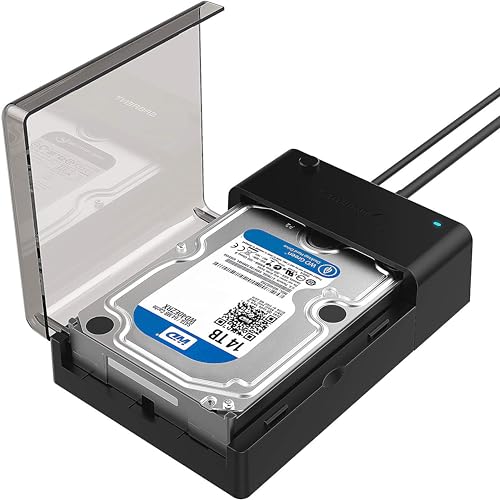
SABRENT USB 3.0 SATA Hard Drive Docking Station — the open-dock all-rounder
The SABRENT USB 3.0 SATA Hard Drive Docking Station is the workbench tool of this guide: a top-loading dock, model EC-DFLT, into which 2.5-inch and 3.5-inch SATA drives drop vertically like toast. Its title is a model of honest specification — SATA HDD and SSD only, not USB-C, not M.2 NVMe, and a note that 3.5-inch drives need the included 12V adapter. Read those lines as the dock’s whole personality: it does one family of jobs, states the boundaries plainly, and within those boundaries it is superbly convenient. A drive seats in seconds, stands exposed for perfect cooling, and lifts out the moment its task ends.
That convenience defines its natural owner: the person with several bare drives and rotating purposes. The old desktop drive being cloned before a PC rebuild. The retired laptop drive holding photographs that need rescuing. The spare SSD drafted as a transfer shuttle. A closed enclosure makes each of those jobs a small ceremony of screws and lids; the dock makes them a gesture. It also serves as a diagnostic bench — a drive suspected of failing can be seated, listened to, and tested without being installed anywhere, which is often the fastest route to the truth about it.
Strengths
- Top-loading design swaps 2.5 and 3.5 inch SATA drives in seconds, tool-free by nature.
- Included 12V adapter means desktop-size drives are genuinely supported, not merely fitted.
- Open-air seating gives a working drive the best cooling any pick here can offer.
Trade-offs
- SATA only, stated plainly: M.2 NVMe drives need a different tool entirely.
- An exposed drive is unprotected against knocks, dust, and curious pets.
- The connection is USB 3.0, not USB-C, per the title’s own clear statement.
Spec snapshot: Fit 2.5 and 3.5 inch · Interface SATA HDD/SSD only · Host connection USB 3.0 · Power 12V adapter included for 3.5-inch drives · Model EC-DFLT · Exclusions stated in the title: not USB-C, not M.2 NVMe · Anything further belongs to Sabrent’s documentation for this dock.
Working habits make or break a dock’s usefulness. Keep it on the desk’s calm side, seat drives with the machine awake and the dock powered as its instructions direct, and always eject through the operating system before lifting a drive out — the top-loading gesture is so easy that it tempts haste, and haste mid-write is how filesystems acquire their scars. Treated with that one courtesy, the dock becomes the fastest pair of hands a drive collection can have.
There is also a rescue narrative worth naming. When a computer dies, its drive usually has not, and the dock is how the photographs, documents, and save files come home. Households that own a dock before the emergency describe the experience as an errand; households that order one during the emergency describe it as a vigil. That difference alone justifies the desk space for many readers.
Best for: a multi-drive household seeking a fast, open dock for cloning, rescue, and rotation work.
Not suited for: a drive that must travel in a bag or live permanently inside a protective case.
If your shelf holds more than one bare drive, start with the Sabrent dock listing and note its stated limits as features, not fine print.
A dock also changes how a household thinks about spare drives. Without one, a removed drive is e-waste in waiting, because verifying or using it requires installation somewhere. With one, every retired drive becomes a readable object — check its health, copy what matters, wipe it properly before it leaves the house. That readability is a security habit as much as a convenience: the drive donated or recycled without a dock-side wipe is the drive whose contents travel with it, and the dock is what makes the careful path the easy path.
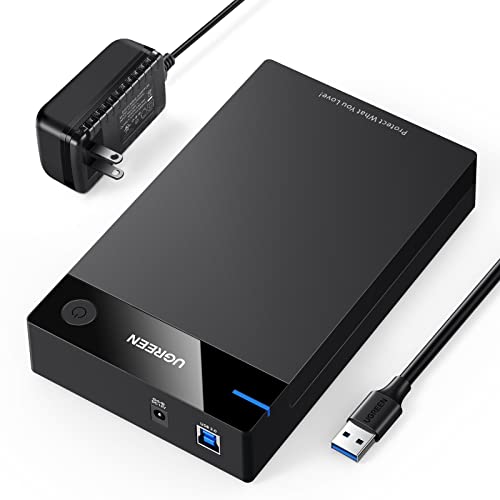
UGREEN External Hard Drive Enclosure 2.5/3.5 Inch — the closed-case standard
The UGREEN External Hard Drive Enclosure 2.5/3.5 Inch is the dock’s opposite number: a closed case that turns one bare SATA drive into a finished external drive. Its title promises USB 3.0 to SATA III conversion with UASP support and a 12V power adapter, and it names the drive brands it expects to host — WD, Seagate, Toshiba, Samsung, Hitachi — along with PS5 and Xbox among its uses. That is the specification of a general-purpose home for a drive with a permanent job: the backup drive that lives beside the PC, the library drive that serves the console corner, the archive that sits in a drawer and emerges monthly.
The closed form earns its place through protection and manners. Inside the case, the drive is shielded from knocks, dust, and the slow abrasion of desk life, and the assembly presents to the world as one tidy object with one cable. UASP support means an SSD inside is not throttled by an old-fashioned bridge, and a mechanical drive inside gets the most orderly version of USB the standard offers. The included 12V adapter keeps the promise the dual-size fit makes: a 3.5-inch desktop drive is a citizen here, not a guest the case cannot feed.
Strengths
- Closed case protects the resident drive and presents as a finished external unit.
- UASP and SATA III stated in the title — the bridge honours fast drives.
- 12V adapter included, so both 2.5 and 3.5 inch drives are fully supported.
Trade-offs
- Swapping drives means opening the case; frequent rotators should choose the dock.
- A closed case cools less freely than open air, so placement still matters.
- One bay, one drive: libraries of several drives need the TerraMaster below.
Spec snapshot: Fit 2.5 and 3.5 inch SATA HDD/SSD · Bridge USB 3.0 to SATA III · Protocol UASP · Power 12V adapter included · Stated drive brands WD, Seagate, Toshiba, Samsung, Hitachi · Stated uses include PS5 and Xbox · For thermal particulars beyond the case design, UGREEN’s documentation is the reference.
Think of this enclosure as the difference between a drive and an appliance. A bare drive on a desk is a component, handled carefully and stored nervously. The same drive inside this case becomes the household’s backup drive — labelled, shelved, plugged in on schedule, and trusted by people who would never touch a naked circuit board. That transformation in who is willing to use the drive is worth as much as any protocol, because backups that intimidate their owners do not happen.
Installation is a one-time act of matchmaking: seat the drive, close the case, format it for its intended host, and label the outside with the job and the date. Consoles will want their own formatting conversation, computers theirs, and a drive that has been claimed by one host should keep that loyalty. The case makes the drive presentable; the label makes it permanent.
Best for: a single bare drive seeking a permanent, protected external post with UASP and full power.
Not suited for: a rotation of several drives swapped daily, where a dock’s openness wins.
For the classic one-drive-one-case answer, look at the UGREEN enclosure listing and confirm your drive’s size against its dual fit.
There is a console chapter to this case’s story that its title states outright. With PS5 and Xbox named among its uses, the enclosure can house a drive destined for a console corner — a capacious home for a game library that the console treats as its external storage. The same discipline applies as with a PC: the console will claim and format the drive for its own world, so install a drive whose previous contents have already emigrated. A case that can serve desk and console alike gives a household one spare-drive strategy instead of two, and simplicity of that kind compounds across years of upgrades.

ORICO USB 3.0 External Hard Drive Enclosure 3588US3 — the high-ceiling case
The ORICO USB 3.0 External Hard Drive Enclosure 3588US3 makes its headline claim in capacity: a tool-free enclosure for 3.5 and 2.5 inch SATA drives, stating support up to 20 TB, with UASP acceleration and a 12V/2A power supply. That ceiling matters because the bare-drive world has changed — the drives readers pull from servers and buy as internal bargains now arrive in sizes that older enclosures, designed in a smaller era, cannot address. An enclosure that states 20 TB is stating that it belongs to the current era of big iron, and a household housing a large NAS refugee or a high-capacity desktop drive needs exactly that statement in writing.
Tool-free assembly keeps the big-drive experience civilised: the drive slides in, the case closes, and the 12V/2A supply — a specification the title states with unusual precision — feeds a full-size mechanism with the authority it expects. UASP keeps the bridge from becoming the bottleneck in SSD duty or fast transfers. The result is a case whose natural resident is the largest drive you own, given a permanent external post as a media vault, a backup target, or the household’s overflow library.
Strengths
- Stated support up to 20 TB welcomes the largest current bare drives.
- 12V/2A power supply specified in the title — full-size drives are fed properly.
- Tool-free design plus UASP: easy assembly, efficient transfers.
Trade-offs
- Its talents centre on large resident drives; small-drive users pay for ceiling they skip.
- A closed case for a big, warm drive still needs air around it in the cabinet.
- Single bay only; the collection-minded should compare the four-bay pick below.
Spec snapshot: Fit 3.5 and 2.5 inch SATA HDD/SSD · Stated capacity ceiling 20 TB · Assembly tool-free · Protocol UASP · Power 12V/2A supply · Model 3588US3 · Host connection USB 3.0 · Any figure beyond the title’s statements should be confirmed in ORICO’s documentation for this enclosure.
Consider the specific biography this case serves best. A media server is retired and its big drive — years of library aboard — needs a new home that is not a drawer. A desktop is replaced and its capacious internal drive deserves a second career as the backup vault. In both stories the drive is valuable, large, and homeless, and the enclosure’s stated ceiling and power turn what could be a compatibility gamble into a straightforward rehousing. That is a genuinely useful product, and its title tells you so with numbers instead of adjectives.
One working note for big resident drives: the first connection deserves a full, patient session. Let the host index, verify, or back up without interruption, and check the case’s warmth with a hand after an hour of real work. A large mechanical drive in a closed case should feel warm, never hot; if it feels hot, the cabinet is the problem and the fix is air, not anxiety.
Best for: a large bare drive, up to the stated 20 TB ceiling, seeking a permanent powered case.
Not suited for: a pocketable 2.5-inch SSD setup that travels daily and needs no mains supply.
Owners of big homeless drives should read the ORICO 3588US3 listing and match its ceiling against their largest drive.
Capacity ceilings deserve one more moment, because they are the specification most likely to ambush a buyer two years after purchase. An enclosure bought for today’s 4TB drive may meet tomorrow’s 16TB bargain, and an unstated ceiling becomes a failed installation at the worst moment. ORICO’s decision to print 20 TB in the title removes that ambush for this case’s entire plausible life. When comparing enclosures for big drives, treat a printed ceiling as a feature on par with the connector itself — it is the manufacturer telling you, in advance, how long the product intends to remain useful.
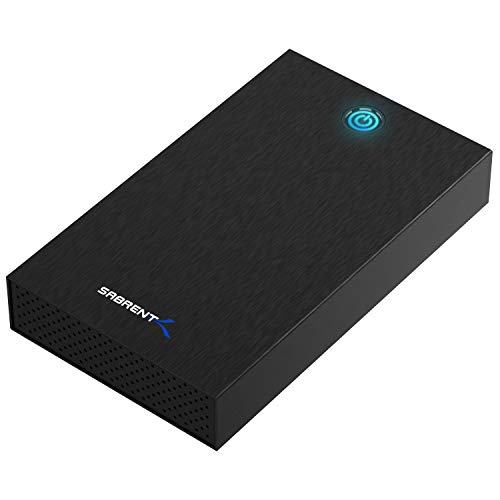
SABRENT USB 3.0 Hard Drive Enclosure EC-KSL3 — the tool-free traveller
The SABRENT USB 3.0 Hard Drive Enclosure EC-KSL3 takes the closed-case idea and removes its last friction: tools. Its title lists tool-free installation, UASP, an LED indicator, plug and play behaviour, a 12V adapter included, and compatibility spanning Windows, macOS, and Linux, for 2.5 and 3.5 inch SATA HDD and SSD. That is a case designed for a drive whose post is permanent-ish but whose owner still values the ability to open, swap, or service it in seconds — the technician’s own drive, the household’s shared utility storage, the case that lives in a desk drawer and takes whichever drive the week requires.
The LED indicator deserves its sentence, because small signals prevent large mistakes. A visible sign of activity tells the hand reaching for the cable whether the drive is mid-write, and in a tool-free case — where opening is effortless — that signal is the difference between a safe swap and a filesystem’s bad day. Cross-platform title claims matter in mixed households too: a case that states Windows, macOS, and Linux in its title is a case that expects to be passed between machines without a compatibility interview each time.
Strengths
- Tool-free design makes opening, swapping, and servicing a seconds-long act.
- UASP plus an LED activity indicator: efficient transfers, visible warnings.
- 12V adapter included and three operating systems named in the title.
Trade-offs
- Tool-free convenience invites casual swaps; resident drives deserve a label and loyalty.
- Closed case cooling is adequate, not open-air; give it room in warm cabinets.
- USB 3.0 is the stated host connection; Type-C natives should note the cable plan.
Spec snapshot: Fit 2.5 and 3.5 inch SATA HDD/SSD · Assembly tool-free · Protocol UASP · Indicator LED · Power 12V adapter included · Stated systems Windows, macOS, Linux · Model EC-KSL3 · Behaviour plug and play per the title · Further particulars live in Sabrent’s documentation for this enclosure.
The household this case suits best is the one with a designated fixer. Every family and small office has one: the person handed the dead laptop, the full drive, the mysterious backup. A tool-free enclosure with an activity light is that person’s apron pocket — always ready, never a project. It also serves the deliberate rotator well: a backup drive that changes monthly between two bare drives, each formatted and labelled, with the case as their shared uniform.
Rotation, though, deserves the same discipline here as at the dock: eject through the system, watch the LED settle, and only then open the case. Tool-free refers to the absence of screws, not the absence of procedure, and the drives that live longest in rotating service are the ones whose swaps were boring rituals rather than improvisations.
Best for: a fixer or rotating-backup household seeking a tool-free dual-size case with UASP.
Not suited for: a sealed-forever archive post where the case will never be opened again.
For the drawer-ready utility case, examine the Sabrent EC-KSL3 listing and picture your most-swapped drive inside it.
The EC-KSL3 also makes a thoughtful loaner. Households and small teams constantly face the “can you copy this onto something” errand, and a tool-free case with a spare drive inside is the clean way to run it: no accounts, no cloud uploads, no handing over a personal drive with its entire history aboard. Keep one wiped, labelled utility drive paired with this case and the errand becomes a five-minute courtesy instead of a privacy negotiation. Tools that make the safe path the easy path earn their drawer space many times over.

TERRAMASTER D4-320 4-Bay Enclosure (Diskless) — the four-bay library
The TERRAMASTER D4-320 4-Bay Enclosure (Diskless) scales the entire idea. Its title states four bays, diskless — you supply the drives — a USB 3.2 Gen2 connection at 10Gbps over Type-C, and hot swappable, plug and play behaviour. Where the other picks house a drive, this one houses a collection: up to four bare drives presented to one computer through one fast cable, each swappable without shutting the library down. For a household or small studio whose external storage has become a shelf of mismatched cases and wall adapters, the D4-320 is the consolidation — one box, one supply, one connection, four citizens.
The 10Gbps Type-C connection is the headline for a reason. Four drives behind a slow bridge would queue like a single-lane bridge at rush hour; a 10Gbps link gives the enclosure room to serve a fast SSD and several mechanical drives without the connection itself becoming the story. Hot swapping completes the system feel: a drive can graduate, be replaced, or be pulled for a rescue job at the dock while the library keeps serving. It is important to be clear about what this unit is not — the title calls it an enclosure, a direct-attached box for one host computer, not a network server — and that clarity is a virtue. It does the attached-library job at full strength rather than pretending to be a NAS.
Strengths
- Four bays consolidate a bare-drive collection behind one Type-C cable.
- USB 3.2 Gen2 10Gbps gives the multi-drive library a fast host link.
- Hot swappable bays let drives rotate without closing the library.
Trade-offs
- Diskless means the drives are a separate purchase or an existing shelf’s migration.
- It serves one host directly; network sharing is a NAS’s job, not this box’s.
- Four drives in one cabinet concentrate heat, so its placement deserves real air.
Spec snapshot: Bays 4, diskless · Host connection USB 3.2 Gen2 10Gbps, Type-C · Behaviour hot swappable, plug and play · Drives not included · Role direct-attached multi-bay enclosure · The listing title leaves per-bay particulars to TerraMaster’s documentation, which should be consulted for drive-size and capacity specifics per bay.
The buyer this serves has usually passed through the earlier picks’ stages: a dock for rescues, a case for the backup drive, then the realisation that the collection itself has become the system. At that point the four-bay enclosure stops looking like an extravagance and starts looking like tidiness with a power supply. Label each bay’s resident, keep a one-line index taped to the lid, and the box becomes the household’s drive library in the literal sense — browsable, lendable, and under control.
Heat management is the owner’s main duty at this scale. Four mechanisms in one cabinet generate a communal warmth that a single case never meets, so place the unit where air genuinely moves, keep its vents unblocked by the very drives waiting to enter it, and let the cabinet door stay honest. Do that, and the D4-320 will quietly be the most organised object in the room.
Best for: a collection of bare drives seeking one fast, hot-swappable four-bay home.
Not suited for: a single-drive household, where four bays are furniture without a purpose.
Collection owners should study the TerraMaster D4-320 listing and count their bare drives before deciding.
Migration day is where a unit like this proves its worth in a single afternoon. Moving a workstation’s life from an old array of drives to a new arrangement means hours of sustained copying, and a hot-swappable library behind a 10Gbps link turns that afternoon from a vigil into a background task. Drives arrive, fill, and retire to labelled storage without the host ever powering down. Small studios billing by the project feel that difference in the calendar, not just in benchmarks, which is why multi-bay direct storage remains a category of its own long after network storage became cheap.

BENFEI 2.5 Inch SATA to USB Enclosure — the slim SSD sleeve
The BENFEI 2.5 Inch SATA to USB Enclosure strips the idea to its minimum: a tool-free external enclosure for 2.5-inch SATA drives, with USB Type-C and Type-A connection, optimised for SSD, and supporting UASP. Its title’s honesty is in the specialism — this is not a dual-size case pretending to serve desktops; it is a slim sleeve for the laptop-size drives and SSDs that modern households actually accumulate. A retired laptop’s SSD, a spare 2.5-inch drive from an upgrade, a game console’s replaced internal: each becomes a fast, pocketable external drive inside this enclosure, powered entirely by the cable.
Optimised for SSD, with UASP, is the phrase that matters. An SSD behind an old-fashioned bridge is a racehorse in a corridor; UASP lets the USB connection queue work efficiently enough that the SSD’s manners survive the translation. The dual Type-C and Type-A connection ends the adapter hunt between a modern laptop and an older desktop. And because 2.5-inch drives sip power, no 12V adapter enters the story at all — the sleeve and its cable are the whole kit, which is exactly right for a drive whose destiny is a laptop bag.
Strengths
- Optimised for SSD with UASP support — fast drives stay fast inside it.
- Type-C and Type-A connection covers modern and older hosts without adapters.
- Tool-free, cable-powered, pocketable: the complete travelling kit is two objects.
Trade-offs
- 2.5-inch only; desktop drives need one of the dual-size picks above.
- A slim sleeve protects against scratches and bumps, not against serious drops.
- One drive at a time; it is a sleeve, not a library.
Spec snapshot: Fit 2.5 inch SATA · Optimisation per the title: for SSD · Protocol UASP · Connection USB Type-C / Type-A · Assembly tool free · Power from the USB connection · For any particular beyond the title’s claims, BENFEI’s documentation is the reference to check.
The biography this sleeve serves is the upgrade cycle itself. A laptop gains a bigger SSD and its old one, still healthy, becomes the household’s fastest shuttle. A console’s internal drive is replaced and the original becomes a portable library. In each case the enclosure’s cost is trivial beside the drive’s remaining value, and the result — a genuinely quick external SSD — outperforms many purpose-bought portables. It is the most economical pick in this guide in the only sense that matters: value rescued per drive revived.
Working notes are minimal because the tool is minimal: seat the drive, close the sleeve, eject before unplugging, and keep the cable with the sleeve rather than in the general cable drawer from which cables never return. Label the outside with the drive’s contents and size. A pocket SSD that cannot be identified at a glance will be formatted by someone, someday, in a hurry — the label is its passport.
Best for: a spare 2.5-inch SSD or laptop drive seeking a slim, UASP, travel-ready second life.
Not suited for: a 3.5-inch desktop drive, which physically and electrically belongs in the dual-size picks.
Upgraders with a healthy old SSD in the drawer should check the BENFEI enclosure listing before buying any new portable.
The sleeve has one more quiet virtue: it is the enclosure most likely to actually be in the bag when needed. Bulky cases get left at home by rational people making rational choices about weight, and then the one trip in ten that needs a drive interface becomes a small crisis. A sleeve and cable weigh almost nothing, live permanently in the laptop bag’s flat pocket, and convert any stray 2.5-inch drive encountered on the road into readable storage. Preparedness that requires no decision at packing time is the only preparedness that survives contact with real travel.
Side-by-Side Comparison
| Pick | Form | Drive fit | Host connection | Defining trait |
|---|---|---|---|---|
| SABRENT Docking Station EC-DFLT | Open dock | 2.5 / 3.5 inch SATA | USB 3.0 | Seconds-fast swaps, open-air cooling |
| UGREEN Enclosure | Closed case | 2.5 / 3.5 inch SATA | USB 3.0, UASP | Protected permanent post, 12V included |
| ORICO 3588US3 | Closed case | 3.5 / 2.5 inch SATA | USB 3.0, UASP | Stated ceiling of 20 TB, 12V/2A supply |
| SABRENT Enclosure EC-KSL3 | Closed case | 2.5 / 3.5 inch SATA | USB 3.0, UASP | Tool-free with LED indicator |
| TERRAMASTER D4-320 | Four-bay enclosure | Four bays, diskless | USB 3.2 Gen2 10Gbps Type-C | Hot-swappable drive library |
| BENFEI Enclosure | Slim sleeve | 2.5 inch SATA | USB Type-C / Type-A, UASP | Optimised for SSD, cable-powered |
Dock, Case, Bay, or Sleeve: Which Shape Fits Your Drives?
Start by counting drives and jobs, not by admiring hardware. One bare drive with one permanent job — backup, library, console overflow — belongs in a closed case: the UGREEN for the standard answer, the ORICO if the drive is large, the Sabrent enclosure if swaps remain likely. Several drives with rotating jobs belong at the dock, where swapping is the entire design. Several drives with permanent, simultaneous jobs belong in the four-bay TerraMaster, behind one fast cable. And a single small SSD with a travelling job belongs in the BENFEI sleeve, where the whole kit fits a coat pocket.
Power is the second question, and it is binary. If any drive in the plan is a 3.5-inch desktop model, a 12V adapter must be in the box — as it is, stated plainly, in the Sabrent dock, the UGREEN, the ORICO, and the Sabrent enclosure titles. If every drive is 2.5-inch, cable power suffices and the sleeve’s simplicity wins. Readers speccing the internal side of a build will find the companion thinking in Best Hard Drives for a Desktop PC, while those chasing sheer scale should continue to Best High-Capacity Hard Drives, and readers whose enclosure plan is really a budget external-drive plan in disguise should compare against Best Affordable External Hard Drives before committing.
There is a fourth question, easily missed: where will the enclosed drive live, physically, for the next two years? A case destined for a fixed shelf can be chosen for capacity and power; a case destined for a drawer-and-bag life should be chosen for slimness and cable simplicity, even at the cost of the dual-size fit it will never use. Storage hardware fails socially when it is bought for an imaginary lifestyle, so let the real shelf, drawer, or bag cast the final vote between the picks that survive the technical questions.
The third question is the host’s ports. A modern laptop with only Type-C sockets makes the TerraMaster’s native Type-C link and the BENFEI’s dual connection immediately relevant, while a desktop with plentiful USB 3.0 ports treats every pick here as a citizen. Adapters can bridge most gaps, but each adapter is a small tax on speed and reliability that a well-matched purchase avoids entirely.
Cooling, Power, and the Physics of a Drive in a Box
A bare drive on a bench cools itself in open air. The moment it enters a case, it moves into a climate the case designer chose, and the owner’s placement completes the design. Mechanical drives generate modest heat in steady work and more during long copies; SSDs generate theirs in bursts during heavy transfers. In both cases the rules rhyme: keep the enclosure’s vents unobstructed, never bury it under papers or inside a sealed drawer while it works, and treat a case that feels hot to the touch during an ordinary backup as a placement problem asking for air, not a mystery.
Vibration is the third physical fact, and the one most often discovered by ear. A mechanical drive in a case resting directly on a hollow desk can broadcast a low hum through the furniture, out of all proportion to the drive’s own voice. Soft feet, a mat, or a shelf that is not a sounding board will usually restore silence without touching the hardware. SSD residents make the whole question moot, which is one more reason the retired-SSD-in-a-sleeve combination is such a satisfying piece of household engineering: fast, silent, and built almost entirely from things already owned.
Power discipline is the other half of the physics. A 3.5-inch drive’s 12V adapter should be the one supplied for the enclosure, plugged into a socket that is not switched off by the room’s light switch — a surprisingly common cause of “unreliable” external drives that were, in truth, being unplugged nightly by architecture. For 2.5-inch drives on cable power, prefer a direct host port over an unpowered hub, because a hub dividing one port’s power among several hungry devices is the other classic source of a drive that vanishes mid-copy. None of this is exotic; all of it is the difference between an enclosure that feels flaky and one that feels invisible.
Matching the Enclosure to the Drive You Actually Own
Before any purchase, perform the thirty-second audit this whole category depends on. Take the bare drive in your hand. Read its label for the interface and the size: a SATA connector and a 3.5-inch body point to the dual-size picks with their 12V adapters; a SATA connector in a 2.5-inch body opens every pick in this guide, including the sleeve. If the drive’s connector is a row of pins from another era, or a slim proprietary blade, stop — no pick here will adopt it, and the honest move is a specialist adapter search or a dignified retirement for the drive.
Then read the label for capacity, because capacity interacts with the enclosure’s ceiling and the host’s expectations. The ORICO prints its 20 TB ceiling; other titles leave ceilings unstated, and for a very large drive that silence deserves a check of the manufacturer’s documentation before the order, not after the failed first mount. Finally, read the label for the drive’s origin story. A drive pulled from a RAID set, a DVR, or a games console may carry formatting its new host dislikes, and a dock-side inspection — seat it in the Sabrent dock, see what the computer reports, rescue what matters — is the calm way to begin its second career.
While the drive is in your hand, note its health honestly as well. A drive that clicked, vanished, or ran hot in its previous post will carry those habits into any enclosure, and no case in this guide is a hospital. Retire the genuinely ailing to a dock-side data rescue and a dignified end; install the healthy with confidence. The enclosure market suffers a thousand unfair reviews written about dying drives, and the audit in your hand is how your purchase avoids becoming one of them.
This audit sounds humble, and it is, but it prevents nearly every enclosure disappointment ever posted. The products in this guide state their fits, interfaces, power, and ceilings with unusual clarity in their titles; the buyer’s half of the contract is simply to know the drive in the hand as precisely as the title knows the case.
Common Mistakes When Housing Bare Drives
The founding mistake is buying by fit alone — a case the drive physically enters but electrically cannot use, most often a 3.5-inch drive in an enclosure with no 12V supply. Read the power line of every title as carefully as the size line. The second mistake is forcing the interface: an M.2 NVMe drive and a SATA enclosure will never negotiate, however hopeful the purchaser, and the Sabrent dock’s title models the honesty required — SATA only means SATA only. Check the bare drive’s connector against the enclosure’s stated standard before money moves.
A related social mistake deserves naming: the enclosure that becomes communal property without communal rules. One person formats its drive for a console, another for a PC backup, a third borrows the case and returns it with a different drive inside, and within a season nobody can say what the object on the shelf actually is. A line of tape and a household agreement — this case, this drive, this job — prevent the entire genre of confusion, and they cost less than the cable the case came with.
Third comes the unlabelled rotation: several bare drives, one dock, no labels, and a backup schedule that depends on telling identical-looking drives apart by memory. Label every bare drive with its contents, its host, and its formatting the day it enters service. Fourth is the mid-write lift — pulling a drive from a dock or case while the host is still writing, because the physical gesture was easy. Eject through the system, watch the activity light settle, then move. Fifth is entombing a working enclosure in a hot, sealed cabinet and blaming the drive for the climate. Enclosures are honest tools; most of their failures are addresses, not defects.
Frequently Asked Questions
Will any bare drive work in any of these enclosures?
No — two matches must be made. The interface must match: every pick here speaks SATA, in 2.5-inch, 3.5-inch, or both sizes as each title states. And the power must match: 3.5-inch drives need the 12V adapter that the dual-size picks include. An M.2 NVMe drive matches none of these, however modern it is, and needs an NVMe-specific enclosure instead.
What does UASP actually do for me?
UASP is the USB protocol that lets a storage device handle queued commands efficiently rather than one at a time in strict sequence. With an SSD inside — the BENFEI’s stated specialism — it preserves much of the drive’s natural pace; with a mechanical drive it smooths heavy multitasking transfers. Where a title in this guide claims UASP, the review says so; where it does not, no claim is made.
Dock or enclosure — which is better for a backup drive?
For a dedicated backup drive with one job, a closed enclosure is better: protected, tidy, and permanently dressed for its post. For a rotation of two or more backup drives sharing one connection point, the dock earns its place, because the swap is its whole design. The deciding question is whether the drive’s identity is permanent or rotating.
Can an enclosure make an old drive fast?
It can let a drive be exactly as fast as it is, and no faster. A SATA SSD in a UASP enclosure will feel quick; a decade-old mechanical drive will feel like itself, which for archives and backups is entirely sufficient. Judge an old drive by its health and capacity, not by hoping a case will rejuvenate it — the enclosure is a home, not a tonic.
Is a four-bay enclosure the same as a NAS?
No, and the TerraMaster’s title is honest about it: this is a direct-attached enclosure serving one host computer over USB, not a network device serving a household. If several rooms and screens must reach the drives independently, that is a NAS’s job. If one workstation must reach four drives quickly and swap them freely, the enclosure is the right tool.
Can I boot or run everyday work from a drive in an enclosure?
For everyday external duties — libraries, backups, media, transfer shuttles — yes, that is precisely what these products are for. Treat the enclosed drive as a normal external drive once its host has formatted it, with the usual courtesies: eject before unplugging, keep the case ventilated during long transfers, and remember that a drive in a removable home is only as permanent as the household’s agreement to leave it in post. Backup drives in particular earn a label and a fixed shelf, not a life of casual borrowing.
What should I do with a drive before it enters an enclosure?
Decide its job and its host first, because the host will usually want to format it, and formatting clears it. Rescue any needed files while the drive is still in its old home or seated in a dock, then install it, let the intended host format it, and label the case with the job and date. A drive with a decided identity ages gracefully; a drive in perpetual maybe-duty gets formatted by accident eventually.
Final Recommendation
Most readers should begin with the shape that matches their shelf. A single homeless drive belongs in the UGREEN enclosure — protected, UASP-equipped, properly powered — or in the ORICO if that drive is large. A shelf of several drives belongs at the Sabrent dock for working jobs and in the TerraMaster four-bay for permanent ones, while the Sabrent EC-KSL3 serves the fixers and rotators between those poles. And every household with a retired laptop SSD should perform the small rescue the BENFEI sleeve makes so cheap before buying any new portable storage at all. The enclosure is never the glamorous half of a storage setup, but it is the half that decides whether the drives you already own are a collection of regrets or a working library — choose the right homes, and the regrets become infrastructure.
Buy the enclosure on a calm day, too, if you can. The reader who orders a dock while a PC still works gets to rehearse the rescue at leisure; the reader who orders one beside a silent machine gets the same hardware with an audience of anxiety. Every product in this guide is inexpensive beside the data it exists to serve, and the household that treats bare-drive hardware as standing equipment — like a spare cable or a labelled box of adapters — will find that storage emergencies quietly demote themselves into errands.
Related Guides
- Best Hard Drives for a Desktop PC
- Best High-Capacity Hard Drives
- Best Affordable External Hard Drives


