What's inside
- Key Takeaways
- Quick Picks
- How Did We Assemble a Field at a Capacity the Market Half-Abandoned?
- Who Is a 3TB Drive Actually For in a 20TB World?
- Portable or Desktop at the Same Capacity: What Really Changes?
- What Should a Console Owner Know Before Adding 3TB?
- How Long Will a 3TB Drive Remain the Right Size?
- What Does the Connection Figure on the Box Actually Promise?
- Six 3TB Drives, Reviewed One by One
- How Should a Household Choose Between One 3TB Drive and a Pair?
- The 3TB Field at a Glance
- How Do You Put a 3TB Drive to Work on Day One?
- Which 3TB Buying Mistakes Are the Easiest to Make?
- Final Recommendation
- Frequently Asked Questions
- Related Guides
As an Amazon Associate I earn from qualifying purchases. This post may contain affiliate links at no extra cost to you.
widgetverdict.com is reader-supported. When you buy through links on our site, we may earn an affiliate commission.
Where to buy: Amazon’s 3TB shelf is a museum of drive generations living side by side — a portable from WD’s current line, two My Book desktop listings from different eras of the same family, and a trio of newer USB-C names most buyers will not have met. Read the model codes as carefully as the capacities; at this size, the code is the product.
Three terabytes is the capacity the storage industry nearly skipped. The mainstream marched from 2TB portables to 4TB and beyond, and 3TB survived in the catalogue as the size of older desktop lines, of consoles hungry for a game library, and of buyers whose arithmetic landed precisely there. The result is that the best external hard drives 3tb shoppers can choose from form the most varied field in this batch of guides: one true portable, three desktop drives of three different generations and philosophies, and two USB-C newcomers whose titles lead with connection speed rather than with brand. Every drive below holds exactly three terabytes as its title states — in this category, verifying that the capacity in the headline is the capacity in the title is the first act of due diligence.
The field sorts by a question the capacity cannot answer: will the drive travel or stay? The WD Elements Portable is the traveller, bus-powered and pocketable, its title claiming PC, Mac, PS4 and Xbox compatibility. Everything else is deskbound — the two WD My Book listings, Seagate’s absence from this size leaving the desktop field to WD and the newcomers — the OSENTRiX GX100 with its built-in USB hub, the GX200 on USB-C, and the ModusTech Vault, whose title insists in capital letters that it is not portable and is mains-powered. Buyers whose 3TB problem is a recorder’s or a server’s may also want Best Hard Drives for Samsung NVR and DVR Systems, Best Hard Drives for a TiVo Bolt Upgrade and Best Hard Drives for Music Production and Film Editing for the sizes above this one.
Key Takeaways
- Every pick holds exactly 3TB as its title states — the capacity is verified per listing, not assumed from the roundup’s theme.
- Only one pick is a portable; the other five are desktop drives, two of them explicit about mains power and staying put.
- Two listings share the WD My Book 3TB name from different generations — the model code, not the name, distinguishes them.
- Connection speed is the newcomers’ headline: USB 3.2 Gen 2 at 10Gbps on the GX100, USB-C on the GX200 and the ModusTech.
- Two titles print a two-year warranty — the OSENTRiX GX100 and the ModusTech — while the WD titles print none.
- At 3TB the buying decision is mostly about form and connection, since capacity is the one thing every pick agrees on.
Quick Picks
| Pick | Badge | Why it earns its place |
|---|---|---|
| WD 3TB Elements Portable | The one true portable | Bus-powered 3TB for PC, Mac, PS4 and Xbox in a pocketable enclosure. |
| WD 3TB My Book Desktop | The current desktop standard | The modern My Book generation at 3TB, on USB 3.0. |
| WD My Book 3TB (USB 3.0) | The veteran listing | An earlier My Book generation still sold for file backup and storage. |
| OSENTRiX GX100 3TB | The hub-equipped fast port | USB 3.2 Gen 2 at 10Gbps with a USB hub built in, and a two-year warranty. |
| OSENTRiX GX200 3TB USB-C | The USB-C minimalist | 3TB on a USB 3.2 USB-C connection for current desktops and laptops. |
| ModusTech 3TB Desktop Vault USB-C | The proudly deskbound vault | Mains-powered, explicitly not portable, USB-C 3.1 at 5Gbps, two-year warranty. |
How Did We Assemble a Field at a Capacity the Market Half-Abandoned?
By treating 3TB as a real requirement rather than as a rounding error. Buyers arrive at this size for concrete reasons: a console whose library measures out to it, a backup rotation built around it, a budget whose ceiling it fits, an older machine whose owner wants the same capacity the last drive had. The pool was therefore built from listings whose titles state 3TB outright — no 2TB drives promoted as close enough, no 4TB drives demoted — and then sorted by the characteristics that actually differentiate drives of identical capacity: form, power, connection, stated compatibility and stated warranty.
Evidence discipline mattered more here than in any other guide in this batch, because a half-abandoned capacity accumulates half-maintained listings. Two of the six titles are generations of the same WD family, and the reviews keep their model codes separate and their claims separate, declining to lend the newer listing’s particulars to the older one. The newer brands, OSENTRiX and ModusTech, are assessed on what their titles print — connection figures, a hub, a warranty term — and on nothing else, since a young brand’s listing is the whole of the evidence a buyer is offered. What no title states, no review invents.
Who Is a 3TB Drive Actually For in a 20TB World?
More households than the capacity race suggests. The console player whose installed library and captures measure in the low terabytes is the emblematic buyer: a 3TB drive doubles or triples a console’s room without paying for capacity the library will never reach, and the Elements Portable’s title names the PS4 and Xbox outright. Behind that buyer stands the backup disciplinarian, whose rotation scheme — a drive per set of machines, swapped on a schedule — is denominated in 3TB units and works precisely because the units are modest. And behind both stands the replacement buyer, whose dead drive was 3TB, whose backup software expects 3TB, and whose appetite is for sameness rather than for growth.
There is also an economics of enough that this guide is happy to defend. Capacity beyond need is not harmless: it concentrates more data behind a single mechanism’s fate, it costs money that protection copies need more, and it tempts owners to let one drive become the archive, the backup and the working volume at once. A 3TB drive bought deliberately, for a measured requirement, inside a routine that includes a second copy, is better storage practice than a 20TB drive bought aspirationally and used as a single point of failure. The terabytes are not the virtue; the fit is.
Portable or Desktop at the Same Capacity: What Really Changes?
Power and posture. The portable draws everything from its USB cable and can therefore work anywhere a host exists — a laptop on a train, a console in a rented room — while asking nothing of the wall. The desktop drives bring their own power supplies, and in exchange they live the sheltered, permanently connected life of furniture: always on the desk, always available to the backup schedule, never forgotten in a bag in another city. At 3TB the internal mechanisms differ in size between the forms, but the buyer’s lived difference is the routine each form makes possible, and the reviews grade the five desktops and the one portable against the routines they serve.
The ModusTech title deserves credit for stating the divide in so many words: not portable, mains-powered. Most listings leave the buyer to infer the form from photographs and dimensions, and a buyer who orders a desktop drive expecting a portable discovers the inference at the door, in a box heavier than hoped. Read every title in this guide for its power and form language before its capacity language; at a size where all six drives hold the same amount, the differences that will govern your daily experience are exactly those.
What Should a Console Owner Know Before Adding 3TB?
That the console, not the drive, sets the terms. A games console formats external storage in its own way, assigns it a role — extended storage for games, or media playback, or capture backup — and treats the drive as part of itself thereafter, which means the drive should be bought for that console’s company rather than rotated casually among machines. The Elements Portable’s title claims PS4 and Xbox compatibility, which is the kind of statement a console buyer should look for in print; the desktop drives’ titles speak of PCs, Macs and laptops, with the ModusTech adding consoles to its list, and those wordings should be weighed as the listings’ own account of their intended hosts.
The second thing is the library arithmetic. Games have grown to sizes their grandfathers would not believe, and a 3TB extension that sounds cavernous can be a dozen large titles and their updates. The console owner should measure the installed library’s appetite honestly — the console’s own storage screen reports it — and confirm that 3TB is the expansion the next two years need, rather than the expansion that merely postpones the same purchase. Capacity bought in the right size, once, is the theme of this entire guide, and consoles are where it is tested most often, because no other device in the house reports its storage hunger so precisely or so publicly, usually at the exact moment a new game is waiting to be installed and the household is gathered around the screen, in no mood for a lecture about next time or about the virtues of planning ahead.
How Long Will a 3TB Drive Remain the Right Size?
Longer than the capacity race implies, because a drive’s rightness is measured against a job, and jobs change slowly. A console extension remains right until the library outgrows it, which the console’s own storage screen forecasts honestly. A backup vault remains right while the machines it protects hold less than it does, with room for generations of their history. A rotated offline copy remains right almost indefinitely, since its job is to be a snapshot rather than a frontier. The drives that become wrong are the ones bought without a job, which are wrong from the first day at any capacity — a 20TB drive bought on the same terms is merely a larger mistake with a longer warranty.
The practical review is annual and takes five minutes: how full is the drive, how fast did it fill, and does the job still exist? A drive filling at a rate that exhausts it within the year earns a planned successor, bought at leisure and migrated with overlap, exactly as the media server guide in this batch prescribes for libraries. A drive holding steady is infrastructure, and infrastructure’s highest praise is that nobody has thought about it since its label was written.
What Does the Connection Figure on the Box Actually Promise?
Less than it appears to, and the 3TB field is the perfect classroom for the lesson. A connection figure — 5Gbps on the classic USB 3.0 generation and the ModusTech’s USB-C 3.1, 10Gbps on the GX100’s USB 3.2 Gen 2 — is the ceiling of the pipe, not the speed of the water. The mechanical drive behind the pipe sustains what it sustains, and for large sequential transfers the pipe’s ceiling matters only when the drive can reach it. Two consequences follow for buyers. First, a faster connection never makes a mechanical drive fast in the way a different technology would; it removes a ceiling, which is valuable precisely on the large transfers where the ceiling binds. Second, the host’s port must match the drive’s generation for the ceiling to lift at all, so the GX100’s figure is a promise shared between the drive and the machine it meets.
None of this makes the figures meaningless — the newcomers print them because they are real differentiators for the initial load and the full backup, the two jobs where a 3TB drive’s owner actually waits. It makes them contextual. A buyer who understands what a connection figure is can read this guide’s table the way an engineer reads it: as ceilings and compatibilities, not as stopwatch results, and can spend the difference in price on the second copy instead.
Six 3TB Drives, Reviewed One by One
The portable comes first, then the two generations of My Book in order, then the three newcomers in ascending order of deskbound conviction.
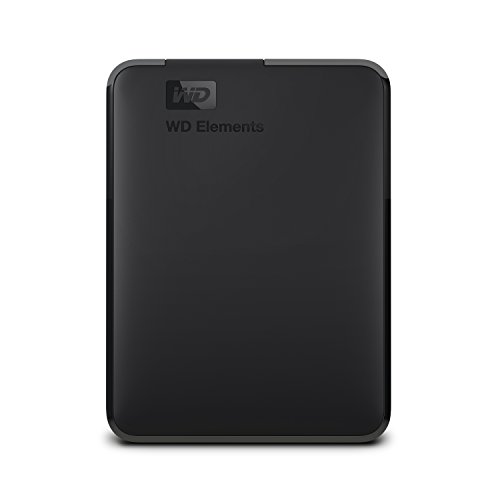
WD 3TB Elements Portable — The one true portable
The Elements Portable is the only drive in this guide that can leave the house, and its title equips it for the life: 3TB, USB 3.0, compatible with PC, Mac, PS4 and Xbox, model WDBU6Y0030BBK-WESN. The Elements formula is WD’s simplest — storage without a software layer, ready for whatever host it meets — and at 3TB in a bus-powered enclosure it becomes the general-purpose answer to several different questions at once: the console extension, the laptop’s overflow, the drive that carries a household’s photographs to a relative’s computer and back.
The console compatibility deserves its place at the head of the review, because it is the use this capacity serves most distinctively. A portable that a console accepts becomes part of the furniture beside the television while remaining, in principle, a traveller — and the owner should decide which of those lives it is actually living, since a drive permanently married to a console inherits the console’s formatting and role, while a drive kept for travel should be formatted for the computers it visits. The title’s breadth of claimed hosts is real, but a single drive can only wear one format at a time, and choosing it deliberately is the first setup decision.
Beyond that decision, the Elements asks nothing: no power supply to pack, no software to install, no password to remember. Its trade-offs are the portable class’s own — a drive that travels is a drive that can be dropped, lost or left behind, and a drive without protection features leaves its contents’ privacy to the owner’s physical care. For the household’s only copy of anything, those are arguments for a routine rather than against the drive. The WD 3TB Elements Portable listing confirms the model code for the current version of this long-running line.
There is a longevity note in the line’s favour: Elements portables have been a catalogue fixture for years, which means cables, behaviour and expectations are all standard issue. A buyer is not experimenting with this drive; they are buying the known quantity at the size the market nearly forgot, and known quantities are underrated in storage.
The Elements Portable also exposes the one question a portable buyer must answer alone: where will it sleep? A drive with a permanent home — the console’s shelf, the laptop bag’s padded pocket — lives a long and boring life, while a drive that migrates between coat pockets and car boots collects the risks its class is known for. The product cannot make that decision; the title’s promise of broad compatibility simply means the decision is available to be made well.
- Capacity: 3TB
- Form: portable, bus-powered class
- Connection: USB 3.0
- Compatibility stated: PC, Mac, PS4 and Xbox
- Software: none claimed in the title
- Warranty: no term is printed in the listing title
- Model: WDBU6Y0030BBK-WESN
Strengths
- The guide’s only genuine portable at the full 3TB.
- Console compatibility claimed in the title itself.
- The simplest possible ownership: no supply, no software.
Trade-offs
- Travel exposes it to the portable class’s physical risks.
- No password protection is claimed for a drive that moves.
- One format at a time, despite the broad host list.
Best for: a console extension or a travelling household drive at an honest capacity.
Not suited for: the sole copy of a family’s irreplaceable archive.
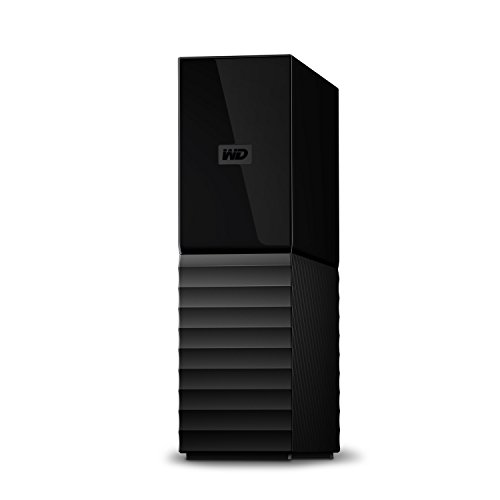
WD 3TB My Book Desktop — The current desktop standard
This My Book listing, model WDBBGB0030HBK-NESN, represents the family’s modern desktop generation at 3TB: an external desktop hard drive on USB 3.0, sold under the name that has anchored WD’s desk line for years. The My Book proposition, across its generations, is the drive as a piece of office furniture — a book-shaped enclosure that stands on the desk, keeps its own power supply, and serves as the machine’s permanent second volume for backups and overflow. At 3TB it suits the single-computer household whose data estate is real but bounded: documents, photographs, a music library, the system backups of one or two machines.
The title supplied for this listing is terse — capacity, family, connection, model code — and the review respects the terseness. The richer My Book story told elsewhere in this batch, of password protection and auto backup software, belongs to the 6TB model’s title in the studio guide; this 3TB listing does not print those claims, and they are not transferred to it here. Buyers for whom those features decide the purchase should read this listing’s product page in full, where the current generation’s particulars live, and compare model codes rather than family reputations.
What can be said from the title is enough to place the drive: a mainstream desktop volume from the market’s largest maker, at the size for a bounded household, in the current generation of a line with deep documentation and support behind it. For a buyer replacing a failed desk drive with the same capacity and a familiar name, that placement is the whole argument. The WD 3TB My Book listing is where the generation’s full specification waits to be confirmed.
Its natural rival in this guide is its own ancestor, reviewed next, and the comparison is instructive: two listings, one name, one capacity, separated by a model code and by years. The modern code is the safer default for a buyer without a reason to prefer the elder, if only because support and documentation accumulate around the living generation.
Desk placement is this drive’s one piece of homework. A book-format enclosure standing beside a monitor lives well; the same enclosure sealed in a drawer with the router lives warmly and ages accordingly. The My Book’s whole proposition is permanence, and permanence deserves a shelf with air around it — the cheapest longevity any desktop drive in this guide can be given.
- Capacity: 3TB
- Form: desktop external drive
- Connection: USB 3.0
- Model: WDBBGB0030HBK-NESN
- Features: the supplied title prints none beyond the family name — the product page carries them
- Generation: the current My Book desktop line
Strengths
- The mainstream desktop answer at this capacity.
- A living product line’s documentation and support.
- Desk-permanent form for backup routines.
Trade-offs
- The title’s terseness sends feature hunters to the product page.
- Shares its name with an older listing, inviting confusion.
- Desktop form means mains power and a fixed home.
Best for: a one-computer household’s permanent backup and overflow volume.
Not suited for: a purchase that needs its features confirmed in the headline.

WD My Book 3TB (USB 3.0) — The veteran listing
The second My Book in this guide is the family’s elder: a 3TB external drive whose title speaks the plain language of an earlier catalogue era — external hard drive storage, USB 3.0, file backup and storage. Listings of this vintage persist because the drives they describe persist, in the channel and on desks, and a buyer meeting one should understand what they are looking at: a previous generation of a famous line, still sold, still capacious, and specified by its title only in the broadest strokes.
The honest assessment has two sides. On one, the fundamentals of a desktop backup drive have not changed across the generations this listing spans: a 3.5-inch mechanism in a powered enclosure, connected by USB 3.0, holding three terabytes for file backup and storage, is a complete description of a tool that does its job today exactly as it did when the listing was written. On the other side, everything a careful buyer verifies — warranty standing, software support, the particulars of the enclosure — belongs to its era, and the listing page, not the family name, is where those verifications happen.
This guide includes the veteran neither as a bargain tip nor as a warning, but as a fact of the 3TB landscape: at this capacity, generations coexist, and the buyer’s defence is the model code and a slow read. A buyer who finds this listing’s terms, on its own page, satisfactory for a backup role whose contents are duplicated elsewhere has made a defensible purchase; a buyer who assumes the modern line’s features from the shared name has made an error the title never invited. The veteran WD My Book 3TB listing should be read in that spirit, in full.
There is even a role where the elder’s simplicity is the point: the offline copy. A drive that lives most of its life disconnected, brought out for the monthly backup and returned to a drawer, does not need a current software ecosystem — it needs capacity, a standard connection and a label with a date on it. For that duty, a plainly specified veteran is not a compromise at all.
A veteran drive also teaches a calibration the whole batch of guides depends on: the difference between a listing that is old and a drive that is unsuitable. Age shows in vocabulary and in the absence of modern claims; unsuitability shows in a mismatch between the title’s stated job and the buyer’s actual one. This listing’s stated job — file backup and storage, on a standard connection, at a full 3TB — is a job that still exists in every household, and the calendar has not repealed it.
- Capacity: 3TB
- Form: external desktop drive
- Connection: USB 3.0
- Stated purpose: file backup and storage
- Generation: an earlier My Book listing, distinguished by its own product page rather than by a model code in the supplied title
- Features: none are enumerated in the title
Strengths
- The complete, classic desktop backup specification.
- Well suited to the offline, rotated-copy role.
- A famous line’s mechanism at the exact capacity.
Trade-offs
- Its terms and support belong to an earlier generation.
- Nothing is specified beyond the fundamentals.
- The shared family name invites false assumptions.
Best for: a rotated offline backup copy, bought with its page read carefully.
Not suited for: a buyer expecting the current generation’s feature set.

OSENTRiX GX100 3TB — The hub-equipped fast port
The OSENTRiX GX100 arrives from the opposite end of the market’s history: a new-brand 3TB external drive whose title leads with USB 3.2 Gen 2 at 10Gbps, adds a USB hub built into the drive, claims Windows and MacOS desktop and laptop hosts, and prints a two-year warranty. Each of those claims addresses a modern desk’s actual complaints. The 10Gbps connection doubles the classic USB 3.0 ceiling for the transfers a 3TB drive spends its life performing; the hub returns the port the drive occupies, and then some, to a laptop whose ports are counted in single digits; the warranty term is stated in the open, which neither WD listing in this guide does.
The hub deserves a moment’s thought, because it changes the drive’s desk role from endpoint to infrastructure. A drive that hosts other devices becomes the dock the laptop meets each morning — one connection restoring storage and peripherals together — and for the small desk that modern laptops create, that consolidation is a genuine feature rather than a novelty. It also means the drive’s failure or absence is felt more widely, a trade the tidy-minded should weigh: infrastructure is convenient precisely because everything depends on it.
The counterweight is the brand’s youth. OSENTRiX offers no decades of documentation, no installed base to consult, and the buyer is relying on the title’s claims and the printed warranty as the substance of the relationship. That reliance is neither foolish nor free: it is the standard exchange the market offers when a new name competes on specifications the old names leave unstated. The OSENTRiX GX100 listing is where the hub’s port details and the warranty’s terms should be confirmed before the exchange is accepted.
For a buyer whose desk is a current laptop and a thicket of small devices, the GX100 is the guide’s most contemporary answer at 3TB: fast port, returned ports, stated warranty. Its review simply insists that the contemporary answer be bought as what it is — a specification-led purchase from a young brand — rather than as a famous name it does not claim to be.
The GX100’s proposition will suit a particular desk rhythm: the laptop that arrives each morning to one cable and leaves each evening with none. For that rhythm the drive-plus-hub is not two products merged but one gesture — sit down, connect, everything is present — and gestures that simple are the ones routines survive on. Desks with a permanently resident desktop machine gain less, since their ports are plentiful and their drives never leave; the hub’s value is proportional to the host’s mobility.
- Capacity: 3TB
- Connection: USB 3.2 Gen 2 (10Gbps)
- Extra: built-in USB hub, per the title
- Compatibility stated: Windows and MacOS desktop PC and laptop
- Warranty: two years, stated in the title
- Form: external hard drive
- Brand note: a newer name, assessed on its printed claims
Strengths
- The fastest stated connection in the guide.
- A built-in hub that returns more ports than it takes.
- A two-year warranty printed in the title.
Trade-offs
- A young brand without a long documentation trail.
- The hub role makes the drive a single point of desk failure.
- Transfer pace depends on the host’s port generation too.
Best for: a modern laptop desk that wants storage and docking in one device.
Not suited for: desks where a famous maker’s support history is a requirement.

OSENTRiX GX200 3TB USB-C — The USB-C minimalist
The GX200 is the GX100’s sibling with the hub removed and the proposition purified: 3TB, USB 3.2, USB-C, for desktop PC and laptop on Windows or MacOS. Where the GX100 competes on infrastructure, the GX200 competes on the connector alone — a drive for the machines that have standardised on USB-C, plugging in natively, without the adapter drawer that the USB 3.0 drives in this guide will visit on a current laptop. In a roundup where capacity is a constant, the connector is a legitimate headline, and this title is honest enough to make it the whole headline.
The minimalism cuts both ways, and the review follows the title in both directions. Nothing else is claimed: no transfer figure beyond the USB 3.2 designation, no hub, no warranty term printed where the GX100 prints one. A buyer comparing the siblings should notice that difference in print rather than assume the family’s terms carry across models — the same discipline this guide applied to the two My Books applies within the new brand’s own line. What the GX200 promises is a current-connector 3TB drive from the same house as the hub model, and for a buyer whose only requirement is exactly that, the promise is complete.
Its role is the overflow and backup volume for a USB-C machine that does not need docking: the writer’s laptop, the student’s desk, the small office’s second computer. Three terabytes in that role is generous — a working life of documents and media with the system backups included — and the drive’s simplicity keeps the routine to a single cable. The OSENTRiX GX200 listing holds whatever further specification the maker publishes, and the buyer should collect it there before ordering.
Set the two OSENTRiX models side by side and they describe a sensible fork: pay attention to the hub if the desk needs one, take the simpler drive if it does not, and in neither case expect the listing to say more than it does. New brands earn trust one accurate title at a time, and these two titles are, at least, accurate about their own contents.
There is a quiet virtue in a product that declines to compete on extras: it can be understood completely from its title, and a buyer who has understood a product completely is rarely disappointed by it. The GX200 asks to be judged as the plain USB-C volume it declares itself to be, and in a guide full of drives whose listings must be excavated, plainness is a form of respect for the buyer’s time.
- Capacity: 3TB
- Connection: USB 3.2, USB-C
- Compatibility stated: desktop PC and laptop, Windows or MacOS
- Hub: none — that is the sibling GX100’s feature
- Warranty: no term is printed in this model’s title
- Form: external hard drive
Strengths
- Native USB-C for the current generation of machines.
- A simple, single-cable proposition without extras to manage.
- The same 3TB honesty as its hub-equipped sibling.
Trade-offs
- No warranty term is stated where the sibling states one.
- No transfer figure beyond the interface designation.
- A young brand’s support depth is unproven.
Best for: a USB-C laptop or desktop needing a straightforward 3TB volume.
Not suited for: a desk that needs the drive to double as its dock.

ModusTech 3TB Desktop Vault USB-C — The proudly deskbound vault
The ModusTech Vault’s title contains the most emphatic parenthesis in this batch of guides: NOT-Portable. Around it, the listing builds a coherent identity — a 3TB desktop external drive, Vault by name, USB-C 3.1 at 5Gbps, mains-powered backup storage, for PC, Mac, laptop and console, with a two-year warranty. A maker that warns you in capitals that its drive stays on the desk is a maker that understands its product’s role completely, and the role is the fixed backup vault: the drive that lives behind the monitor, connected and powered, receiving the machine’s backups on schedule and travelling nowhere, ever.
Mains power, so often listed as a desktop drive’s limitation, is in this framing the feature itself. A bus-powered portable can be borrowed, carried off, left in another room; a mains-powered vault is anchored by its own supply to the desk it protects, and its permanence is what makes an automatic backup schedule real rather than aspirational. The console mention in its host list adds a second desk it can anchor — the television’s — though a buyer should confirm on the listing how the drive is presented for console use before assigning it there.
The 5Gbps figure is the honest middle of the connection range in this guide: half the GX100’s stated ceiling, equal to the classic USB 3.0 generation’s, and entirely sufficient for the backup workloads the Vault names, which run unattended and overnight rather than against a clock. The two-year warranty printed in the title matches the guide’s best stated term. What the brand shares with OSENTRiX is youth, and the same counsel applies: buy the printed claims, verify them on the page, and let the warranty be part of the evidence. The ModusTech Vault listing is where those claims are set out in full.
For the household whose backup plan has failed repeatedly at the same step — the portable drive is never in the room when the schedule runs — the Vault is the guide’s most direct answer. It removes the step. A backup that cannot wander off is a backup that happens, and at 3TB with a stated warranty, happening is the whole specification that matters.
The Vault name, finally, is a piece of honest marketing worth endorsing: a vault is where valuables stay, guarded by the fact of the building rather than by movement. A backup drive’s enemies are forgetfulness and absence, and a product designed around staying — heavy with intent, tethered by its own power supply, named for stillness — is designed against the right enemies. Buyers whose backup failures have all been failures of presence will recognise their problem in this drive’s parenthesis.
- Capacity: 3TB
- Form: desktop, explicitly not portable, per the title
- Power: mains-powered, stated in the title
- Connection: USB-C 3.1 (5Gbps)
- Compatibility stated: PC, Mac, laptop and console
- Warranty: two years, stated in the title
- Stated purpose: backup storage
- Brand note: a newer name, judged on printed claims
Strengths
- Permanence by design, which is what backup schedules need.
- A two-year warranty stated outright.
- The clearest form-and-power language in the guide.
Trade-offs
- It cannot travel, by proud design.
- A mid-range connection figure beside the 10Gbps rival.
- A young brand, with the usual verification counsel.
Best for: a fixed desk’s automatic backup vault that must never wander off.
Not suited for: any job that involves carrying the drive anywhere.
How Should a Household Choose Between One 3TB Drive and a Pair?
By asking what the second drive is for, because at this capacity the pair is the natural unit of serious use. One 3TB drive holding data that exists nowhere else is a risk with a label on it; two 3TB drives, one working and one copying, are a system. The pair need not be twins — the guide’s own field suggests the sensible combinations, a portable for the console and a vault for the backups, a current My Book as the working volume and the veteran as its rotated offline copy — and the pairing logic matters more than the pairing itself: every important file should exist on two mechanisms, in two states of connection, so that no single failure, theft or moment of carelessness can take both. Even the household’s photographs, which feel too humble for such ceremony, qualify — they are usually the least replaceable files the family owns.
Households that cannot stretch to a pair today should buy the drive whose job is primary and write the second drive into the plan with a date, because the interval between the two purchases is the exposure window and it should be a window, not an era. The 3TB size is kind to this discipline: the second copy costs a second modest drive rather than a second flagship, which is one more reason the capacity endures in real households while the catalogue chases larger numbers.
The 3TB Field at a Glance
| Drive | Form | Connection | Power | Warranty in title |
|---|---|---|---|---|
| WD Elements Portable | Portable | USB 3.0 | Bus-powered | Not stated |
| WD My Book (current) | Desktop | USB 3.0 | Mains | Not stated |
| WD My Book (veteran) | Desktop | USB 3.0 | Mains | Not stated |
| OSENTRiX GX100 | External, hub | USB 3.2 Gen 2 10Gbps | Not stated | 2 years |
| OSENTRiX GX200 | External | USB 3.2 USB-C | Not stated | Not stated |
| ModusTech Vault | Desktop | USB-C 3.1 5Gbps | Mains | 2 years |
With capacity held constant, the table becomes a map of everything else a drive is: where it lives, what it plugs into, what powers it and what its maker will promise in print. The generational story is visible at a glance — the older listings state almost nothing beyond the fundamentals, the newer ones compete on connection figures and warranty terms — and the buyer’s task is to decide which generation’s kind of evidence they trust, then verify it on the page.
The warranty column is the table’s quiet verdict on the field’s direction. Two printed terms, both from the newer brands, against three generations of a famous name that print none in their titles: the market’s centre of gravity is moving from reputation toward stated terms, and a buyer in 3TB territory — where listings are old, names are shared and codes matter — is better served by the stated kind. Read the column as the guide’s method in miniature: prefer the promise you can point to.
How Do You Put a 3TB Drive to Work on Day One?
Decide its single job before it is connected, and write the job on its label: console extension, backup vault, travelling overflow, offline copy. A 3TB drive is small enough to be borrowed for everything and therefore, in undisciplined households, ends up responsible for everything and duplicated nowhere. The label is a contract with the future: this drive is the backup, so it stays; this drive travels, so its contents live elsewhere too. Every misery in this category begins with a drive whose job was never decided. The label should carry the purchase date as well, since a drive’s age is the first fact its owner will want on the day it behaves strangely.
Then format and fill deliberately. Choose the file system for the hosts named in its job — the console will impose its own, the mixed computer household should choose consciously — set the backup schedule if that is the job, and run the first full cycle by hand while watching it complete. Name the volume for its job and its date, and record the purchase in whatever list the household keeps for such things. A drive commissioned this way joins the household’s infrastructure; a drive merely plugged in joins its clutter, and clutter is where backups go to be forgotten. Finish by putting the paperwork — the order record, the warranty terms where the title printed them — in the same place the household keeps such things, because the day they are needed is never the day anyone wants to search.
Which 3TB Buying Mistakes Are the Easiest to Make?
The first is buying the name instead of the code — ordering a My Book and receiving the other generation’s listing, then discovering the difference in features that were never promised by the page actually ordered from. The second is assuming portable and desktop are styling choices, and learning about mains power from a box on the doorstep. The third is its mirror: buying a desktop vault for a job that travels, and spending a year carrying a power supply like a punishment.
The fourth mistake is treating 3TB as a compromise to be apologised for and therefore buying it carelessly, when the evidence of this guide is that the size serves real, measured requirements — consoles, rotations, bounded households — better than an aspirational size would. The fifth is letting the new drive become the only copy of whatever it first holds, because it arrived during a tidy-up. A drive’s first week sets its role for its life; spend it on purpose.
A sixth mistake belongs to the second-hand temptation this capacity attracts: buying an unknown used drive because the size is unfashionable and therefore cheap. A storage device’s value is its remaining life and its trustworthiness, neither of which a used listing can show, and the entire field above is sold new with stated terms for sums that keep the experiment unnecessary. Cheap capacity that fails with the household’s only copy aboard is the most expensive storage there is.
Final Recommendation
Let the job choose the drive, since the capacity cannot. For the traveller and the console, the WD Elements Portable is the field’s only true portable and its console compatibility is in print. For the classic desk, the current My Book is the mainstream answer, and its veteran sibling is the considered choice for an offline rotated copy with its page read carefully. For the modern laptop desk, the OSENTRiX pair divides by the hub: the GX100 if the desk needs docking, the GX200 if it needs only the connector. And for the backup that must simply happen, the ModusTech Vault’s proud immobility is the most honest specification in the guide.
Buy the chosen drive with its second copy planned, its label written and its job decided, and the unfashionable capacity will repay the deliberation every day it serves. Three terabytes was never the compromise; indecision about the job was.
Frequently Asked Questions
Why does 3TB exist at all when 4TB drives are common?
Because product lines, consoles and household requirements do not move in lockstep. Desktop lines carried the size for years, game libraries and backup rotations were built around it, and listings persist where requirements persist. The buyer whose arithmetic lands on three terabytes is not behind the times; they are measuring their own data instead of the market’s marketing, which is the habit this entire guide exists to encourage. It is also worth noting that a formatted drive reports less than its headline figure under any operating system’s arithmetic, at every capacity — a universal piece of bookkeeping, not a defect of this size, and no reason to buy a size you do not need.
Are the two WD My Book listings the same drive?
They share a family name and a capacity, and they are different listings from different generations of that family, with different product pages and, in the material supplied to this guide, different levels of stated detail. The current listing carries a model code in its title; the veteran’s title is plainer and older in style. Treat them as relatives, not twins: compare their pages, note which claims each actually makes, and order by the identity of the specific listing rather than by the surname. The same caution applies anywhere a famous storage name spans decades — the name is a lineage, and lineages contain multitudes.
Does the faster connection on the GX100 make a real difference?
For the large transfers a 3TB drive performs — the initial load, the full backup, the library move — a 10Gbps connection, met by a host port of the same generation, shortens the waits that make owners postpone those jobs. For small daily increments the difference fades. The figure’s real value is behavioural: jobs that finish quickly get run, and a backup that gets run is worth more than a faster specification on a drive whose owner dreads plugging it in. Judge the figure, in other words, by the routine it sustains rather than by the benchmark it implies, and it earns its place in the GX100’s title honestly.
Can a desktop 3TB drive serve as a console drive?
Only where the listing says so or the console’s own documentation confirms it. In this guide the Elements Portable claims PS4 and Xbox compatibility in its title, and the ModusTech names consoles among its hosts; the other titles speak of computers. Console storage is formatted and managed by the console itself, so the listing’s stated hosts are the buyer’s evidence, and assuming beyond them is how a desktop drive becomes a return. A related caution: a drive a console has formatted belongs to that console until it is reformatted elsewhere, which erases it — so the console drive and the computer drive should be separate purchases, not one drive with two ambitions.
Is a two-year warranty worth weighing at this size?
Yes, because it is one of the few promises in this field printed in plain language, and it tells you the maker’s own expectation of the drive’s early life. Two of the six titles state one; the others leave the subject to their product pages. A warranty does not protect data — only copies do that — but as evidence of a maker’s confidence, weighed alongside connection and form, it is a legitimate column in the decision. Read its terms as carefully as its length: what it covers, how a claim is made, and whether the process presumes a receipt kept from the day of purchase.
What should a 3TB drive replace first in an untidy setup?
The pile. Most households’ real storage problem is a scattering of small, old, unlabelled drives whose contents nobody can survey, and a single 3TB volume, deliberately commissioned as the consolidated home with a second copy arranged, replaces the pile’s risk with a system. Consolidate onto it, verify the contents, label the retired drives with their own dates, and the household’s storage goes from archaeology to infrastructure in one afternoon. Keep one of the retired drives, wiped and labelled, as the spare: consolidation should end with a shelf that can be explained in one breath, not with a bonfire of the household’s history.
Related Guides
Buyers whose capacity arithmetic lands higher will find the neighbouring shelves in Best Hard Drives for Samsung NVR and DVR Systems for drives that record around the clock, Best Hard Drives for a TiVo Bolt Upgrade for the slim internals of a television recorder, and Best Hard Drives for Music Production and Film Editing for the desktop capacities a studio’s projects demand.


