What's inside
- Key Takeaways
- Quick Picks
- How Did We Choose Drives for a Library That Never Stops Growing?
- What Does Streaming Actually Ask of a Drive?
- Internal Bays or a Desktop External: Which Architecture Serves Better?
- How Should the Library Be Protected Without Spoiling the Simplicity?
- How Does the Server Software Itself Treat the Drives?
- What Changes When the Library Goes Lossless and High-Resolution?
- Six Ways to House a Library, Reviewed in Turn
- How Quiet Must a Media Server Be, and Who Decides?
- Does Transcoding Change What the Drive Must Do?
- Putting the Six Media Server Drives in One Table
- How Do You Migrate a Library Onto a New Drive Without Losing Your Place?
- Which Media Server Habits Age a Drive Before Its Time?
- Final Recommendation
- Frequently Asked Questions
- Related Guides
As an Amazon Associate I earn from qualifying purchases. This post may contain affiliate links at no extra cost to you.
widgetverdict.com is reader-supported. When you buy through links on our site, we may earn an affiliate commission.
Where to buy: Amazon sells every drive in this guide, and the useful distinction on the page is not brand but architecture — four of these drives are internals that disappear into a server or NAS enclosure, and two are finished desktop units that plug into whatever machine hosts the library. Order by the model code, and decide the architecture before the capacity.
A media server is the most patient customer a hard drive will ever serve, and the most relentless. It asks for nothing exotic — a film streamed here, a series binge there, a household’s music on demand — but it asks around the clock, from a box that lives in a cupboard and is expected to be forgotten. The best hard drives to use for a media server are therefore chosen for a particular blend of virtues: capacity that swallows a library whole, manners quiet enough for a home, tuning for the multi-bay enclosure most media servers live in, and the stamina to idle, spin and serve for years without becoming the household’s hobby. The six drives below divide between the NAS internals built for exactly that enclosure life and two desktop externals that serve libraries hosted on an ordinary computer.
The internal field is a family affair: three Seagate IronWolf models at 4TB, 6TB and 10TB — one of them sold explicitly as multimedia server storage — and a WD Red Plus 8TB carrying the CMR banner for Western Digital. The externals answer a different question: the G-DRIVE desktop, with an enterprise-class mechanism and a stated transfer speed, for a library hosted on a Mac or PC; and Seagate’s Backup Plus Hub, an 8TB desktop unit whose title says almost nothing and whose role the review defines accordingly. Households whose serving box is a step more serious may also want Best 3TB External Hard Drives, Best Hard Drives for Samsung NVR and DVR Systems and Best Hard Drives for a TiVo Bolt Upgrade, which cover the library’s portable and recording cousins.
Key Takeaways
- A media server’s workload is streaming, not speed: sustained sequential reads at modest rates, delivered for years without attention.
- Four picks are 3.5-inch NAS internals for enclosures; two are desktop externals for libraries hosted on a regular computer.
- One internal title says the quiet part aloud — the IronWolf 6TB is sold as multimedia server storage in its own listing.
- CMR is claimed outright by the WD Red Plus; the IronWolf titles in this set emphasise RAID and home-server duty instead.
- The G-DRIVE is the only pick with a stated transfer speed, up to 260MB/s, and the only one with an enterprise-class mechanism inside.
- Library growth, not present size, should set the capacity: media collections expand in one direction only.
Quick Picks
| Pick | Badge | Why it earns its place |
|---|---|---|
| Seagate IronWolf 6TB Multimedia Server | The purpose-named pick | Sold in its title as multimedia server storage, at the library-friendly 6TB tier. |
| Seagate IronWolf 10TB | The deep library drive | 7200 RPM and a 256MB cache at the largest internal capacity in the guide. |
| WD Red Plus 8TB | The CMR standard-bearer | 5400 RPM, CMR stated, 256MB cache — the quiet array citizen. |
| Seagate IronWolf 4TB (ST4000VN008) | The starter bay | A 256MB-cache IronWolf for personal cloud and first enclosures. |
| G-DRIVE 8TB Desktop | The hosted-library desktop | Enterprise-class Ultrastar inside, USB-C, up to 260MB/s, Mac-ready. |
| Seagate Backup Plus Hub 8TB | The simple desktop volume | 8TB of external storage for a library that lives on a computer’s desk. |
How Did We Choose Drives for a Library That Never Stops Growing?
The first filter was the enclosure reality. Most media servers are NAS boxes or small always-on computers, and their drives live stacked in bays, spinning for years, serving a household whose members regard the library the way they regard the plumbing: it should work, silently, and be somebody else’s department when it does not. NAS-class internals are built for that social contract — tuned for multi-bay vibration, for RAID arrays, for continuous residence — which is why four of the six picks come from the two great NAS families, and why desktop-class internals were left out of the pool entirely.
The second filter was honesty about the workload. A media server does not need the fastest drives in this batch of guides; it needs drives whose capacities match a library’s growth and whose behaviour suits simultaneous streams to several rooms. Specifications were therefore read in that light — cache and spindle figures noted where titles print them, never inflated into streaming promises — and two externals were admitted for the large minority of households whose server is a desktop or a Mac mini wearing a media application’s hat. Evidence discipline follows the rest of the batch: what a title does not state, the review records as unstated.
What Does Streaming Actually Ask of a Drive?
Less than almost any other workload, and for far longer. A film stream is a sequential read at a rate a drive from any era in this guide sustains without effort; even several simultaneous streams to different rooms interleave into a pattern modern mechanisms handle as a matter of routine. The binding constraints are elsewhere: the drive must do this at 3 a.m. without complaint, in a warm enclosure, for years, and it must coexist with neighbours in adjacent bays whose vibration it both suffers and causes. That is why NAS tuning — the RV sensors and array firmware of the class, where titles name them — matters more to a media server than any benchmark figure.
The second demand is capacity behaviour over time. A library is not a static archive; it accretes, in rips and downloads and recordings, and every addition is permanent in a way documents are not — nobody deletes a film because a newer one arrived. The drive bought for today’s library will meet next year’s at the same address, so the honest sizing question is not how large the collection is but how fast it grows, and the answer, multiplied by the years the owner intends to ignore the server, is the capacity to buy. The six picks span 4TB to 10TB in internals precisely so that arithmetic has somewhere to land.
Internal Bays or a Desktop External: Which Architecture Serves Better?
The internal route wins where the server is a dedicated box. Drives inside an enclosure share its power management, its cooling assumptions and its RAID, if any; the library gains redundancy options and the household gains a cupboard with one appliance in it rather than a constellation of boxes and wall adapters. The IronWolf and Red Plus picks assume this architecture, and for a household building or expanding a NAS-based server they are the natural population of its bays.
The external route wins where the server is a computer with another life. A Mac or PC hosting the library keeps its storage outside itself, and a desktop external like the G-DRIVE or the Backup Plus Hub can be added, replaced or moved to a successor machine without opening anything. The costs are the absence of RAID in a single unit and a desk’s worth of extra equipment; the gain is a library that is portable between hosts in an afternoon. Neither architecture is the grown-up one — they serve different households, and the guide’s final recommendation sorts by household rather than by snobbery.
How Should the Library Be Protected Without Spoiling the Simplicity?
By remembering what a media library actually is: mostly replaceable, partly not. The films and series that can be re-acquired are an inconvenience to lose; the home videos, the ripped discs long since given away, the recordings of broadcasts that will never repeat — those are the library’s irreplaceable core, and they are usually a small fraction of its terabytes. A sane protection plan mirrors the whole array if the budget allows, and in any case copies the irreplaceable fraction somewhere else: a rotated external, a relative’s shelf, a cloud tier sized to the precious subset rather than to the whole collection.
RAID deserves its usual clarification here, because media servers attract the misunderstanding most: an array’s redundancy protects against a drive failure interrupting service, and it is worth having for a library the household uses daily, but it is not a backup, since it replicates deletions and corruptions with the same fidelity as everything else. The drives in this guide will serve in either arrangement honourably. The owner’s task is to know which protection each layer provides and to refuse to let one impersonate the other.
How Does the Server Software Itself Treat the Drives?
The media application is a tenant with habits of its own, and the wise owner reads them before blaming the hardware. Server software scans the library, generates thumbnails and preview images, maintains a database of metadata and watched states, and periodically re-examines everything it holds — work that touches every file on the drive on a schedule the owner rarely sees. On a large library those passes are the heaviest load the drives ever bear, heavier than any evening’s streaming, and they explain why housekeeping speed appears in these reviews at all: a server that finishes its nightly maintenance before the household wakes is a server nobody complains about.
The database deserves a sentence of its own, because it is the library’s memory and it usually lives wherever the application was installed rather than with the media. Owners migrating drives should learn where their software keeps that database and back it up with the same care as the irreplaceable media fraction; a library whose files survive but whose watched states, collections and metadata vanish has lost the layer the household actually touches. The drives hold the films. The database holds the family’s relationship with them, and it is measured in megabytes that are easy to protect and miserable to rebuild.
What Changes When the Library Goes Lossless and High-Resolution?
Ambition multiplies terabytes. A music library kept in lossless form occupies several times the space of the same collection in compressed formats; a film library that graduates from standard definition to high, and then to the highest resolutions with their heavier encodings, can multiply by an order of magnitude across the same catalogue of titles. Households rarely notice the multiplication title by title — each upgrade feels like one film — until the volume that held everything holds two-thirds of everything, and the migration conversation begins.
The planning consequence is to size for the library’s destination format, not its current one. A household mid-way through re-ripping a collection at higher quality should run the growth arithmetic at the destination’s per-title average, and will usually land on the guide’s upper capacities sooner than appetite alone suggests. The 10TB IronWolf and the mirrored-pair geometry it enables exist for exactly this household: the one whose library is not merely growing but densifying, becoming heavier in every dimension at once.
Six Ways to House a Library, Reviewed in Turn
The internals come first, in the order a growing library meets them, and the two desktop externals close the set for the computer-hosted households.

Seagate IronWolf 6TB Multimedia Server — The purpose-named pick
There is a small pleasure in a listing that names the job outright. This IronWolf, model ST6000VN0033, is sold in its title as multimedia server storage — a 6TB internal drive, 3.5-inch, SATA — which makes it the only internal pick here whose maker aimed it at this guide’s exact subject in print. Six terabytes is the size at which a serious household library stops being a selection and becomes a collection: thousands of films in ordinary resolutions, or a deep bench of high-resolution ones, with the music library living alongside and room left for the next few years of accretion.
The title’s economy is also its limitation: no spindle speed, no cache figure and no CMR claim are printed, and the review declines to import them from the IronWolf family’s general reputation. What can be said from the listing is the class and the intent — an IronWolf is Seagate’s NAS line, built for enclosures and arrays, and this one’s stated purpose is the multimedia server role itself. Buyers who want the figures will find them under the model code in Seagate’s documentation, a five-minute errand the guide recommends rather than performs by guesswork.
As the centre of a first media server build, the proposition is coherence: a drive whose listing, class and capacity all point at the same job, sized to the middle of a library’s growth curve. Owners whose collections already dwarf 6TB should step up within the guide rather than start here and migrate within the year; owners building their first enclosure will find this the size that postpones the next purchase longest per bay. The IronWolf 6TB multimedia listing carries the model details for the documentation trail.
It also makes a natural second drive. A household running a smaller IronWolf today can add this one as the library’s growth bay, keeping maker, class and behaviour consistent across the enclosure — a consistency that pays in predictable noise, power and replacement planning, the unglamorous currencies in which media servers are actually run.
There is a naming honesty in the title that a buyer should reward with attention: Seagate could have sold this mechanism under the family’s general banner and let the capacity speak, and instead labelled the listing for the multimedia server shelf. Listings that name their job let buyers sort faster and complain less, and a guide that has spent its length insisting on evidence should acknowledge the listings that provide it unprompted.
- Capacity: 6TB
- Form factor: 3.5 inch
- Interface: SATA
- Stated purpose: multimedia server storage, in the title itself
- Spindle speed: the title does not print one — Seagate’s model documentation is the reference
- Cache: likewise unstated in the listing
- Model: ST6000VN0033
- Line: Seagate IronWolf NAS family
Strengths
- The only internal title that names the media server role outright.
- A capacity matched to the middle of a library’s growth.
- NAS-line design for enclosure and array life.
Trade-offs
- Spindle, cache and recording technology all require the datasheet.
- Fast-growing libraries will outgrow 6TB within a few years.
- No services or warranty terms are printed in the title.
Best for: a first media server enclosure built around a growing household library.
Not suited for: a collection already measured in tens of terabytes.

Seagate IronWolf 10TB — The deep library drive
The IronWolf 10TB, model ST10000VN0008, is the internal capacity leader of this guide, and its title is correspondingly complete: 3.5-inch, SATA 6Gb/s, 7200 RPM, 256MB cache, for RAID network attached storage and home servers. Ten terabytes in a bay is a library strategy in itself — a mirrored pair of these gives a household a 10TB protected library, and a multi-bay enclosure populated with them holds collections that were institutional a generation ago. The home-server phrase in the title is doing honest work: this drive’s intended reader is exactly the person this guide addresses.
The 7200 RPM spindle distinguishes it from the quieter 5400-class drives in the set, and in a media server the difference shows in the library’s housekeeping rather than its streaming: scans, metadata passes, thumbnail generation and the initial ingest of large additions all complete sooner, while playback itself remains indifferent, as playback always is. The 256MB cache is the joint-largest among the internals. Owners sensitive to enclosure noise should note that faster spindles bring more presence, and site the box accordingly — a cupboard with a door has settled this question in most homes.
What the title does not claim is a workload rating or a warranty term, and no CMR statement appears either, so the evidence-minded buyer takes the model code to Seagate’s documentation for the full sheet, as with its 6TB sibling. Within the listing’s own four corners, the proposition is capacity, speed and home-server intent from the NAS line’s upper shelf. The IronWolf 10TB listing is the starting point for that confirmation.
For the household whose library is its entertainment centre — films in high resolution, whole series kept entire, a music collection in lossless form — this is the drive that ends the capacity conversation for the life of the enclosure. Buying depth once is cheaper in attention than buying it three times, and attention is the resource a media server exists to save.
Power draw is the quiet line item at this size: a 10TB, 7200 RPM mechanism in a multi-bay enclosure contributes meaningfully to the server’s always-on consumption, and a household running four of them is running a small continuous load that belongs in the electricity arithmetic. The cost is rarely decisive, but the owner who counts it in advance owns the whole machine on purpose, which is this guide’s recurring definition of doing storage properly.
- Capacity: 10TB
- Form factor: 3.5 inch
- Interface: SATA 6Gb/s
- Cache: 256MB
- Spindle speed: 7200 RPM
- Stated duty: RAID NAS and home servers
- Recording technology: the title makes no CMR statement — the datasheet decides
- Model: ST10000VN0008
Strengths
- The deepest internal capacity in the guide.
- A full stated specification of spindle and cache.
- Home-server duty named in the title.
Trade-offs
- A 7200 RPM mechanism asks the enclosure for air and distance.
- No workload rating or warranty term is printed.
- Its depth is wasted on a small, static library.
Best for: a large and growing library in a multi-bay home server.
Not suited for: a bedside enclosure where every decibel is audited.

WD Red Plus 8TB — The CMR standard-bearer
The WD Red Plus 8TB, model WD80EFAX, is the internal set’s argument for calm: 5400 RPM, SATA 6 Gb/s, CMR stated in the title, a 256MB cache, 3.5-inch. Where the IronWolf 10TB competes on depth and pace, the Red Plus competes on temperament — a drive tuned for the enclosure that sits in a living space, serving streams at the speed streaming requires and no faster, with its recording technology declared in the open for the RAID-minded buyer.
The CMR declaration matters to media servers for a reason the category under-explains: arrays rebuild. When a drive in a mirrored or parity array fails and its replacement must be written full from its siblings, the recording technology decides how gracefully that long write proceeds, and CMR is the behaviour array software is built around. A household may go years without a rebuild, but the rebuild is the array’s worst day, and choosing drives whose titles promise the right behaviour for it is foresight of the cheapest kind.
Eight terabytes splits the difference between the guide’s 6TB purpose-named drive and the 10TB flagship, and for many libraries it is the honest size: large enough for years of accretion, in a specification that privileges quiet, cool, array-friendly operation over housekeeping speed. The title offers no workload rating and no services, so its case rests on the stated figures and the Red Plus line’s small-business NAS positioning. The WD Red Plus 8TB listing confirms the model code behind those figures.
In a mixed enclosure, this is also the drive that plays well with others: a household expanding a WD-populated NAS stays within one maker’s behaviour and documentation, and a household starting fresh gains a second credible lineage to set against Seagate’s. Either way, the Red Plus earns its place by being the array citizen its title describes.
The Red Plus also anchors the guide’s maker-diversity argument. A household need not marry one drive family for life, and an enclosure standardised on WD gains a separate documentation trail, a separate support relationship and a separate product rhythm from the Seagate-populated alternative. When both families offer a drive as well-evidenced as this one, the choice between them is legitimately a matter of the household’s history and preference — a conclusion evidence-based guides should be willing to reach.
- Capacity: 8TB
- Form factor: 3.5 inch
- Interface: SATA 6 Gb/s
- Cache: 256MB
- Spindle speed: 5400 RPM
- Recording: CMR, stated in the title
- Stated duty: NAS internal hard drive
- Model: WD80EFAX
Strengths
- CMR declared outright, for honest array rebuilds.
- A quiet, cool spindle class for living-space enclosures.
- A full cache figure matching the guide’s best internals.
Trade-offs
- No workload rating or service package is printed.
- Library housekeeping runs at the calmer spindle’s pace.
- Eight terabytes is a middle size some libraries will pass through.
Best for: a mirrored home library in an enclosure that shares the household’s air.
Not suited for: a server whose owner benchmarks ingest speed for pleasure.

Seagate IronWolf 4TB (ST4000VN008) — The starter bay
Every library starts somewhere, and the IronWolf 4TB in this specification — model ST4000VN008, silver — is the guide’s starting point: a NAS SATA drive at 6Gb/s with a 256MB cache, sold for NAS servers and personal cloud storage. Four terabytes holds a young library entire — a few hundred films, a household’s music, the first years of a recording habit — and the personal-cloud phrase in the title names the other role these enclosures play, as the household’s private store for photographs and documents beside the media.
The 256MB cache is the specification that lifts this drive above a bare-bones starter: it matches the buffers of the guide’s 8TB and 10TB internals, giving the small array the same housekeeping manners as its larger siblings. The title does not print a spindle speed, and the review leaves the figure to Seagate’s documentation rather than borrowing one from the other 4TB IronWolf in this batch’s server guide — a different model with its own sheet, and a distinction this guide is careful to keep, since model codes, not family names, are what documentation describes.
As a foundation purchase, the 4TB’s virtue is that it teaches the household its own growth rate. A year in a 4TB enclosure produces the one number no review can supply — the library’s actual annual accretion — and every later purchase in this guide can be sized from evidence instead of appetite. Buyers already certain of a large library should skip the lesson and start higher; buyers genuinely unsure will find this the cheapest tuition in the category. The IronWolf 4TB listing holds the model’s details for the record.
The drive also serves honourably as the array’s second act: added to an existing enclosure as the mirror of an identical bay, or as the dedicated volume for the household’s recordings while a larger drive holds the films. Small drives in a grown system are not failures of planning; they are the strata of a library’s history, each still working.
Its silver finish, noted in the title, is a triviality with one practical consequence: in a mixed enclosure, a visibly distinct drive is easier to identify when a bay must be pulled under pressure, and administrators have blessed smaller mercies. Identification is a theme of this guide — labels, model codes, dates — because the moment a drive needs attention is never the moment to be guessing which one it is.
- Capacity: 4TB
- Form factor: 3.5 inch
- Interface: SATA 6Gb/s
- Cache: 256MB
- Stated duty: NAS servers and personal cloud storage
- Spindle speed: absent from the listing title — consult the model’s documentation
- Finish: silver, per the title
- Model: ST4000VN008
Strengths
- A full-sized cache at the guide’s entry capacity.
- NAS and personal-cloud duty stated in the title.
- The right size for learning a library’s growth rate.
Trade-offs
- The smallest internal capacity in the guide.
- Spindle speed must be confirmed from documentation.
- Certain large libraries will outgrow it within a year.
Best for: a first enclosure and a young library, or a mirror bay in a growing one.
Not suited for: a household already holding more media than this drive holds.
G-DRIVE 8TB Desktop — The hosted-library desktop
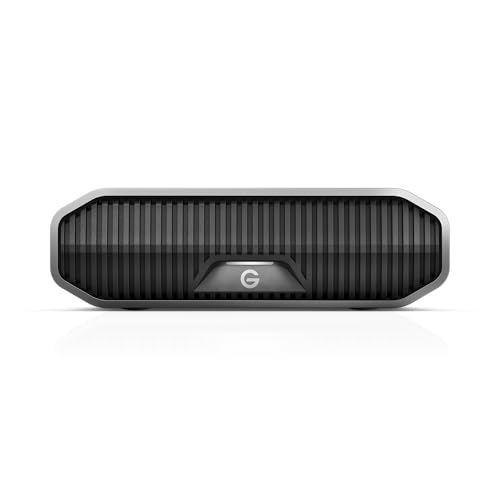
The G-DRIVE desktop changes the guide’s architecture and its evidence standard at once: an 8TB external drive with an enterprise-class 7200RPM Ultrastar mechanism inside, USB-C at 10Gbps, stated speeds of up to 260MB/s read and 260MB/s write, and a Mac-ready designation, model SDPHF1A-008T. For a library hosted on a computer — the Mac mini under the television, the household PC running the media server application — this is the external with an internal worth naming: the Ultrastar line is an enterprise family, and its presence inside a desktop enclosure gives the hosted library a mechanism of genuine pedigree.
The stated transfer speed is the only one among the guide’s externals and internals alike outside the studio batch, and it matters here for a specific media-server reason: library maintenance. The initial load of a large collection, the periodic re-scan, the backup of the library to its protection copy — these are the moments a media server’s owner actually waits on a drive, and a stated 260MB/s turns the initial load of an 8TB library from a weekend into an afternoon. Streaming itself, as ever, asks almost nothing.
The Mac-ready wording will decide the drive for some households and is irrelevant to others; the title does not extend the promise to every platform, and Windows households should confirm formatting and compatibility on the listing rather than assume. What is universal is the architecture’s trade: no RAID inside a single desktop unit, so protection for the library must be arranged as a copy elsewhere, exactly as the guide’s protection section prescribes. The G-DRIVE 8TB listing carries the platform details behind the Mac-ready claim.
There is an aesthetic footnote that studio and living-room hosts will understand: a desktop drive on a media shelf is furniture as well as equipment, and the G-DRIVE line has always been designed to be seen. A library that lives in the open, beside the screen it feeds, may as well be housed handsomely — provided the handsome housing contains, as here, a mechanism with an enterprise name.
The G-DRIVE’s stated figures also make it the guide’s easiest external to plan a backup around: a library’s protection copy can be scheduled against a known transfer pace, and the owner can calculate, rather than discover, how long the weekly duplication window runs. Predictability is a feature in a routine that must survive busy seasons, and it is purchased here with nothing more exotic than a maker willing to print a number.
- Capacity: 8TB
- Mechanism: enterprise-class 7200RPM Ultrastar, per the title
- Connection: USB-C (10Gbps)
- Stated speed: up to 260MB/s read and 260MB/s write
- Platform: Mac-ready, per the title
- Form: external desktop drive
- Model: SDPHF1A-008T
Strengths
- An enterprise-class mechanism inside a desktop enclosure.
- The guide’s only stated transfer speed among these six.
- USB-C at 10Gbps for current hosts.
Trade-offs
- A single external unit offers no internal redundancy.
- The Mac-ready promise leaves other platforms to verify.
- Desktop architecture means another box and power supply on the shelf.
Best for: a library hosted on a Mac or modern PC that loads and maintains large collections.
Not suited for: an enclosure build, where internal bays are the whole point.

Seagate Backup Plus Hub 8TB — The simple desktop volume
The Backup Plus Hub’s title is the shortest in this guide — an 8TB external desktop hard drive, model STEL8000100, and very little more — and the review takes the listing at its word. This is a large, simple volume for a library hosted on a computer, from a mainstream Seagate line whose name announces its original purpose: backup. A media library and a backup target are cousins — both are large, mostly-written-once collections read sequentially — and a drive positioned for the one commonly serves the other in households whose server is a desk machine.
The Hub name itself carries the model’s distinguishing idea, a desktop unit intended to sit at the centre of a desk’s connections, though the listing title supplied to this guide does not enumerate ports or features, and the review therefore claims none of them. That restraint is the honest way to buy this drive: as 8TB of Seagate desktop storage whose detailed specification — interface generation, hub provisions, software — is confirmed on the listing page before ordering, by a buyer whose need is a large volume at a hosted library’s desk and whose questions are answered by capacity and form alone.
Set against the G-DRIVE, the contrast is evidence: one external publishes its mechanism, its connection speed and its transfer figures, while the other publishes a capacity and a name. Buyers who plan around specifications should choose accordingly; buyers whose library simply needs eight terabytes beside the computer, and who will verify the particulars on the page, will find the proposition coherent. The Seagate Backup Plus Hub listing is, more than for any other pick here, a document to read in full before the order.
Its most defensible role may be the protection layer itself: the second copy of a library hosted elsewhere, in a size that matches the 8TB internals of this guide volume for volume. A backup target does not need a stated transfer speed or an enterprise mechanism; it needs capacity, presence and a schedule — and on those terms the plainest listing in the guide is honestly matched to the job.
There is a household-economics point in the Hub’s favour as well: the protection copy is the volume owners are most tempted to economise into inadequacy, buying something small and slow that quietly stops being a full copy as the library grows. An honestly sized 8TB target, matched to the library it protects, keeps the copy complete — and a complete copy, however plain its listing, is worth more than a sophisticated partial one.
- Capacity: 8TB
- Form: external desktop hard drive
- Line: Seagate Backup Plus Hub
- Model: STEL8000100
- Interface and features: the listing title supplied states none — read the product page closely before ordering
- Stated purpose in the name: backup and hub duty
Strengths
- Full 8TB desktop capacity from a mainstream line.
- A natural protection-copy volume matched to the guide’s internals.
- Simple positioning with no feature claims to unravel.
Trade-offs
- The title states almost nothing, so the listing page must be studied.
- No mechanism, speed or interface figure is available to plan by.
- A single external carries no redundancy of its own.
Best for: a hosted library’s second volume, or a protection copy sized to match the primary.
Not suited for: a purchase that needs every specification settled before the listing page.
How Quiet Must a Media Server Be, and Who Decides?
The household decides, and its verdict depends on where the server sleeps. A NAS in a garage or a network cupboard can be as industrious as it likes; the same box in a studio flat’s living corner is a member of the audience, and its drives are audible in every quiet scene. The drives in this guide span that social range: the 5400-class Red Plus was specified for the calmer end, the 7200 RPM internals and the G-DRIVE’s Ultrastar for installations where the box lives apart from the listeners. No title here prints a noise figure, so the buyer’s instruments are placement and architecture — a door, a shelf of solid construction, an enclosure whose fans do not add their own commentary.
Vibration is noise’s accomplice and the array’s quiet enemy. Drives mounted firmly, in an enclosure designed for its bay count, behave; drives loose in a converted desktop case transmit their working sounds into the furniture and their vibration into each other. The media server’s legendary reliability is mostly this unglamorous physics, repeated daily: cool air, firm mounting, electrical calm. Owners who arrange those three have done more for their library’s lifespan than any specification in this guide can, which is why the reviews keep returning to the room as much as to the drive.
Does Transcoding Change What the Drive Must Do?
Only at the margins, and mostly by moving the burden elsewhere. When a media server transcodes — converting a film on the fly for a device that cannot play its stored form — the processor does the heavy labour while the drive performs an ordinary sequential read, the same read it performs for a direct stream. A household whose server transcodes for several viewers at once is exercising its processor, its memory and its network far more than its storage, and the drive choice should not be distorted by the feature. Where transcoding does touch the drives is in its caches and temporary files, small change beside the library itself.
The more consequential server feature for storage is the one nobody markets: the library scan. Applications differ in how aggressively they re-examine their holdings — some fingerprint every file, some trust the folder structure, some generate preview thumbnails for every title — and a large library on a scanning schedule gives its drives a regular workout that streaming never does. Owners who find the server busy at odd hours are usually meeting the scan, and the drives that shrug it off are the NAS-class mechanisms this guide is built from, whose entire design brief is unattended multi-year residence in exactly such a box.
There is a corollary for the computer-hosted households. A desktop or laptop moonlighting as the server brings its own storage habits — sleep timers, power policies, an operating system’s eagerness to spin things down — into the library’s life, and the externals in this guide will live under those policies. Setting the host’s power behaviour deliberately, so the library is awake when the household is, is the hosted equivalent of the enclosure owner’s commissioning care, and it costs one visit to a settings page.
Putting the Six Media Server Drives in One Table
| Drive | Capacity | Architecture | Spindle | Cache |
|---|---|---|---|---|
| IronWolf 6TB Multimedia | 6TB | Internal NAS | Not stated | Not stated |
| IronWolf 10TB | 10TB | Internal NAS | 7200 RPM | 256MB |
| WD Red Plus 8TB | 8TB | Internal NAS | 5400 RPM | 256MB |
| IronWolf 4TB | 4TB | Internal NAS | Not stated | 256MB |
| G-DRIVE 8TB | 8TB | External desktop | 7200 RPM Ultrastar | External unit |
| Backup Plus Hub 8TB | 8TB | External desktop | Not stated | Not stated |
The table’s blanks are distributed honestly: the drives with the fullest stated specifications are the ones whose makers chose to print them, and the media server buyer should read the blanks as invitations to the datasheet rather than as demerits. What the table settles without any blanks at all is the architecture split and the capacity ladder — the two decisions that determine how the library will live for the next several years.
One row rewards a second look. The IronWolf 4TB carries the same 256MB cache as the 8TB and 10TB models, which inverts the usual assumption that smaller drives are lesser drives throughout; in this family the starter bay is a full citizen, and a household can begin at 4TB without accepting second-class housekeeping behaviour. Tables in this guide are built to surface exactly such exceptions, because buying decisions turn on them more often than on the headline columns.
How Do You Migrate a Library Onto a New Drive Without Losing Your Place?
Migration is the media server’s rite of passage, and its rule is overlap: the new arrangement must be complete and proven before the old one is retired. Load or copy the library onto the new drive or array, point the server application at the new location, and let it scan and index fully — a process that can take the better part of a day on a large collection, and should be allowed to. Then verify as a user, not as an administrator: play the oldest film, the newest addition, something with subtitles, something from the music library’s far end, and confirm that watched states and metadata survived the move in the form your server software keeps them.
Keep a written note of the migration itself: the date, the drives involved by model code, where the server’s database was backed up, and which volume now holds what. Migrations are the moments libraries acquire folklore — half-remembered arrangements that nobody can reconstruct during a failure two years later — and a paragraph of notes, stored with the server’s documentation, is the entire cost of preventing it. The household that writes things down at migration time is the household whose next migration is a procedure rather than an excavation.
Only when the new home has served a week of ordinary evenings should the old drive be wiped, demoted or shelved — and shelved, labelled with its contents and date, is often the wisest first retirement, since a labelled old drive is a free extra copy for exactly as long as it lasts. Households that migrate this way never experience the library as lost; households that migrate by leap discover which of their server’s settings lived only in their memory. The week of overlap is not dead time, either: it is when the household learns the new arrangement’s sounds, speeds and habits while the old one still stands behind it.
Which Media Server Habits Age a Drive Before Its Time?
The first is the sealed cupboard: a server and its drives entombed without airflow, in the warmest corner of the house, ageing at summer temperatures all year. The second is the full drive — a library volume run at the edge of its capacity for months, where the server software’s housekeeping has nowhere to breathe and every addition becomes a negotiation. Leaving headroom is a drive-longevity practice disguised as a capacity preference. The third is the unconsidered spin cycle: power-saving settings that stop and start the mechanisms many times a day can age a drive faster than the continuous running its class was built for, and the enclosure’s defaults deserve one informed look.
The fourth habit is treating the server as immortal and its drives as beneath notice until the evening a film will not play. A quarterly glance — free space, drive health as the enclosure reports it, the backup’s last success — takes minutes and converts the library’s worst evening into a scheduled purchase. The fifth is its opposite, perpetual tinkering: a media server’s virtue is that it disappears, and the owner who lets it disappear, checking in quarterly like a landlord rather than daily like a hobbyist, is the owner these drives were designed for.
Final Recommendation
Choose the architecture first and the answer follows. For an enclosure-based server, the IronWolf 6TB is the purpose-named foundation for a growing library, the IronWolf 10TB is the depth play for a collection already large, the WD Red Plus 8TB is the calm mirrored citizen with its CMR in writing, and the IronWolf 4TB is the honest starter that teaches a household its growth rate. For a library hosted on a computer, the G-DRIVE brings an enterprise mechanism and a stated speed to the desk, while the Backup Plus Hub offers the plain 8TB volume whose best role is the library’s second copy.
Whichever route is chosen, buy the drive for the library’s next chapter rather than its current page, and let the protection copy be arranged in the same week as the purchase rather than in some later, calmer one that never quite arrives. Media servers reward the owner who finishes the job — and then reward them again every evening afterwards, in the currency of films that simply play.
Frequently Asked Questions
How many films does a terabyte of media storage hold?
It depends entirely on resolution and encoding, which is why this guide refuses to print a single figure: an hour of high-resolution video can occupy many times the space of an hour of standard definition, and two households’ terabytes can differ by hundreds of titles. The reliable method is local — measure your own library’s current size and title count, divide one by the other, and plan capacity from your own average rather than from anyone’s estimate, including this guide’s. Repeat the measurement after any change of habit, such as a move to higher-resolution sources, because the average moves with the habit and last year’s planning figure becomes this year’s underestimate.
Do I need RAID in a media server?
Need is too strong a word; value is the right one. Redundancy keeps the library serving through a drive failure and converts a crisis into a scheduled replacement, which households that use the library daily will appreciate exactly once, completely. It does not protect against deletion, corruption or the loss of the building, so it complements rather than replaces a copy of the irreplaceable material elsewhere. Drives with stated CMR, like the Red Plus here, are the ones to build arrays from. Owners on a budget should sequence honestly: the single well-chosen drive today, the mirror when the library has earned it, and the off-site copy of the irreplaceable fraction from the very first week, because that fraction’s protection cannot wait for the array.
Is a 5400 RPM drive fast enough for streaming to several rooms?
Yes, with room to spare. Streams are sequential reads at rates far below any drive here’s abilities, and several at once remain a modest pattern for a modern mechanism. The 5400-class drives repay their calm specification in quiet and cool running inside living-space enclosures. Where spindle speed shows at all is in the library’s housekeeping — scans, ingests, thumbnail passes — which is why the 7200 RPM models exist in the set for owners who feel those tasks often. A household streaming to a television, two tablets and a phone simultaneously is still asking less of the drive than a single enthusiastic file copy asks of it.
Can one of the desktop externals be the whole media server storage?
It can, and in computer-hosted setups it commonly is: the G-DRIVE or the Backup Plus Hub attached to the machine running the server software is a complete, legitimate architecture for a household library. Its boundaries are the absence of internal redundancy and the desk footprint of the unit and its power supply. Households choosing it should arrange the library’s protection copy as deliberately as enclosure owners arrange their arrays. The hosted route also ages gracefully in one respect: when the host computer is replaced, the library simply moves with its drive to the new machine, an afternoon’s work with no enclosure to reconfigure.
When should the library move to a larger drive?
Before it must. The trigger is a trend, not an event: when the library’s growth, measured over a few months, projects exhaustion within the planning horizon, the migration belongs on the calendar while the old volume still has headroom to make copying leisurely. Owners who wait for the full-drive warning migrate under pressure, at whatever the market offers that week, and the overlap method this guide describes becomes a luxury they no longer have time for. A useful household rule is to begin shopping when the library passes two-thirds of its volume — early enough for choice, late enough for evidence.
Should the media server’s drives match each other?
In an array, matching is the sound default: identical models share behaviour, age and documentation, and rebuilds proceed without surprises. Across roles, matching matters less — the protection copy need not twin the primary, and a growing enclosure commonly accumulates generations. The exception to keep is recording technology and class: keep NAS-class drives in NAS roles, whatever their badges, and let the model codes in the reviews be the guide to what is actually matched. When a matched model is discontinued mid-life, its closest documented sibling from the same family is the standard substitute, chosen by datasheet rather than by shelf resemblance.
Related Guides
The library’s neighbours in the storage family are covered in Best 3TB External Hard Drives for the portable tier, Best Hard Drives for Samsung NVR and DVR Systems for the recorder that fills with footage instead of films, and Best Hard Drives for a TiVo Bolt Upgrade for the smallest always-on library of all.


