What's inside
- Key Takeaways
- Quick Picks
- How We Chose These Picks
- What Do Shockproof, Waterproof and Drop Resistant Actually Promise?
- Why Is the Spinning Drive Inside Still the Weak Point?
- How Much Capacity Should a Rugged Drive Carry?
- Which Shell Matches the Hazards in Your Working Life?
- Rugged Claims Compared: What Each Shell Actually Promises
- What Mistakes Do Buyers Make When Shopping for Tough Drives?
- How Should You Handle a Rugged Drive Day to Day?
- Why Does a Second Copy Matter More Than a Stronger Shell?
- How Do Photographers, Builders and Students Each Define Durable?
- What Happens Inside a Drive During a Drop?
- How Should You Test a New Rugged Drive Without Abusing It?
- When Should a Rugged Drive Be Retired, and How?
- Do Rugged Drives Make Sense for Home Archives That Never Travel?
- How Do Consoles and Game Libraries Change the Durability Question?
- What Should You Do in the First Hour After a Drive Takes a Fall?
- Why Do Cables and Connectors Deserve a Durability Budget of Their Own?
- Final Recommendation
- Frequently Asked Questions
- Related Guides
As an Amazon Associate I earn from qualifying purchases. This post may contain affiliate links at no extra cost to you.
widgetverdict.com is reader-supported. When you buy through links on our site, we may earn an affiliate commission.
Where to buy: each drive below links to its Amazon listing, where the capacity variants and the exact protection wording for that model are spelled out; rugged claims vary by capacity line, so read the variant you are actually buying.
Every external drive is a small spinning machine in a box, and the box is what this guide is really about. The platters and heads inside any portable hard drive are delicate in ways no specification sheet advertises, and the difference between a drive that survives a life of travel and one that dies in a backpack is almost entirely armour: rubber bumpers, internal suspension, sealed seams and shells that take the blow so the mechanism does not. That is the lens for the best external hard drives durability shoppers actually need, because durability is not a single number. It is a set of distinct promises, drop, shock, dust, water and scratch resistance, and each of the six drives here makes a different subset of those promises in its own listing title.
Read the titles as contracts. One drive claims shockproofing and nothing about water. Another stacks an IPX4 water and dust rating on top of shock protection. A third, the ADATA, uses the full trio of shockproof, waterproof and dustproof in a single breath. The LaCie speaks the language of working photographers: drop, shock, dust and rain resistance. The guide’s job is to keep those contracts separate, match them to the hazards your drive will actually meet, and remind you at every turn that armour reduces risk rather than abolishing it. A rugged drive is a safer drive, never an invincible one, and the backup habits in the later sections matter as much as the shell.
Power for the road belongs to other guides: dashboard charging in best car qi chargers, parked-vehicle power in best chargers for car camping, and the nightstand end of the story in best inexpensive wireless chargers.
Key Takeaways
- The ADATA HD710 Pro makes the broadest claim set in its title: shockproof, waterproof and dustproof in one housing.
- LaCie’s Rugged USB-C is the capacity leader here at 5TB, with drop, shock, dust and rain resistance aimed at field work.
- Silicon Power fields two Armor models: the A60 as the shockproof value entry, the A62L adding IPX4 water, dust and scratch resistance at 4TB.
- Transcend’s StoreJet 25H3 answers drops with a three-stage shock protection system and adds one-touch backup.
- The SanDisk Professional ArmorATD brings 6TB and a USB-C interface in the group’s most work-focused housing.
- No shell repeals physics: rugged drives still deserve a second copy of anything irreplaceable.
Quick Picks
| Pick | Badge | Why it earns its place |
|---|---|---|
| Silicon Power Armor A60 2TB Rugged Portable HDD | The shockproof starter | A shockproof 2TB drive for PC, Mac, Xbox and PS4 at the accessible end of the rugged shelf. |
| Silicon Power Armor A62L 4TB Rugged HDD | The weather-sealed Armor | Shockproofing plus IPX4 water resistance, dustproofing and an anti-scratch finish at 4TB. |
| LaCie Rugged USB-C 5TB Portable HDD | The field photographer’s drive | Drop, shock, dust and rain resistance around 5TB, in the orange armour the location industry trusts. |
| ADATA HD710 Pro 2TB External Hard Drive | The triple-rated tank | Shockproof, waterproof and dustproof claims in one 2TB housing for gamers, students and professionals. |
| Transcend StoreJet 25H3 2TB Rugged HDD | The three-stage defender | A three-stage shock protection system with one-touch backup in a purple anti-shock shell. |
| SanDisk Professional 6TB G-Drive ArmorATD | The big-capacity workhorse | 6TB of rugged portable storage on USB-C for professionals who carry whole projects. |
How We Chose These Picks
Candidates were admitted on the strength of protection language in their own listing titles, not on brand folklore. A drive had to claim at least one explicit rugged property, shock, drop, water or dust resistance, in words a buyer can hold the seller to. Capacity and interface were then spread deliberately: the set runs from 2TB to 6TB, across USB 3.0, USB 3.1 and USB-C connections, so that readers with different libraries and ports all find a candidate. Console compatibility earned the A60 its seat, since a drive that guards game libraries faces a different life from one guarding photo archives.
One discipline governs every review below: claims are reported exactly as the titles make them, and where a title is silent, on water rating, drop height or any other test, the spec box records the silence rather than borrowing a sibling model’s glory. Rugged lines often certify one capacity or variant more thoroughly than another, so the listing page for your exact variant is the final authority, and each review points you there.
What Do Shockproof, Waterproof and Drop Resistant Actually Promise?
These words describe tests, not vibes, and each covers a different accident. Shock protection addresses the sudden deceleration of a fall or a knock: internal suspension and external bumpers spread the impulse so the drive heads survive it. Drop resistance is the same story told from a stated height in the maker’s own testing, though none of the titles in this guide print a height, so treat the word as a design claim rather than a measured guarantee. Water ratings are the most codified: an IP code’s second digit describes the water exposure survived, from splashes to immersion, and IPX4, claimed by the Armor A62L, means splashing from any direction, which covers rain and spills but not a dunk in a stream.
Dustproofing protects the seams and ports against the grit that works into ordinary enclosures on building sites, farms and desert trips, slowly grinding at connectors and vents. Scratch resistance, claimed by the A62L alone here, is cosmetic armour: it keeps the shell honest-looking, which matters for resale and for the simple dignity of tools, without changing survival odds. The practical lesson is to shop by hazard. A drive that lives on construction sites needs dust and shock coverage. A drive that travels to weddings in the rain needs water language. A drive that only fears the drop from desk to floor needs honest shock protection and nothing more exotic.
Why Is the Spinning Drive Inside Still the Weak Point?
Because physics keeps a vote. A portable hard drive reads and writes with heads floating nanometres above platters spinning thousands of times a minute. A sharp shock while the drive is running, plugged in and working on a train table or a location laptop, is far more dangerous than the same shock in a bag while parked, since a parked drive locks its heads away from the platter surface. Rugged shells are engineered around this truth: they cannot make the mechanism immortal, so they manage energy, absorbing and spreading impacts before the energy reaches the delicate parts.
That is also why the handling sections of this guide repeat one refrain in different words: a rugged drive tolerates accidents, it does not invite experiments. Unplug before moving a working drive where you can, let a drive finish writing before it travels, and carry it in a padded pocket rather than loose among keys and tools. The armour buys forgiveness for the drop you did not plan. Deliberate roughness spends that forgiveness in advance, and no title in this guide, however many proof-words it stacks, promises otherwise.
How Much Capacity Should a Rugged Drive Carry?
Capacity interacts with durability in a way buyers rarely consider: the more of your life sits on one drive, the more the drive’s survival matters. A 2TB drive holding a game library or a semester’s work is replaceable in spirit, since games re-download and documents live in other places too. A 5TB or 6TB drive holding a decade of photographs or a client’s whole project archive is a single point of failure wearing armour, and armour should be the second line of defence for such a drive, behind a second copy kept somewhere else.
Size the drive to the working set it must carry, not to the archive it might one day hold. Field photographers often run a 5TB LaCie as the location drive and mirror it nightly to a second unit at base. Students and gamers are well served at 2TB, where replacement cost after an accident stays bearable. The 6TB ArmorATD suits the professional who must carry entire projects to site, paired, one hopes, with a backup habit worthy of the cargo. The reviews that follow keep asking the same question in different costumes: what does this drive carry, and what happens to you on the day it stops?
Which Shell Matches the Hazards in Your Working Life?
Six drives, six armour philosophies. Read for the accident you are actually likely to have: the backpack drop, the site dust, the rainstorm, the spilled drink, and let the claims in each title argue against that scene.
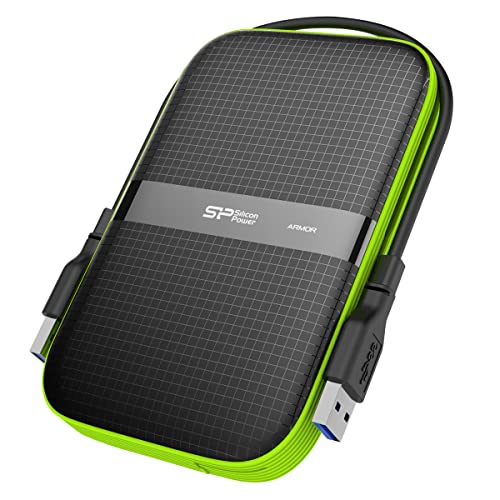
Silicon Power Armor A60 2TB Rugged Portable HDD — The shockproof starter
The Armor A60 is the entry point to Silicon Power’s rugged line and the most console-friendly drive in this guide. Its title promises a shockproof 2TB drive on USB 3.1 Gen1, compatible with PC, Mac, Xbox and PS4, in black. That compatibility list tells you the intended life: a drive that moves between a desk, a console shelf and a backpack, absorbing the knocks of a shared household rather than the weather of a building site. Shockproofing is the claim, and for the drops and bumps of domestic travel it is the claim that matters most.
Silicon Power’s Armor housings typically wrap the mechanism in a rubberised shell that gives fingers purchase and gives corners something sacrificial to land on. The A60’s virtue is focus: it does not pretend to be a diving companion or a dust-sealed site drive, and its price tier reflects that honesty. For a student whose drive rides daily in a bag among books and bottles, or a gamer moving a library between consoles at different houses, focused shock protection plus 2TB of room is a well-judged package.
Buyers who need weather language should step up to its A62L sibling in this same guide, since the A60’s title offers no water or dust rating to lean on. Check the Silicon Power Armor A60 listing for the cable arrangement and the current capacity options before ordering.
- Capacity: 2TB
- Protection stated: shockproof
- Interface: USB 3.1 Gen1
- Compatibility stated: PC, Mac, Xbox and PS4
- Water and dust rating: not claimed in the listing title
- Colour: black
- Format: 2.5-inch class portable drive
Strengths
- Console compatibility widens its life beyond the desk.
- Focused shock protection matches backpack and household hazards.
- An accessible entry into the Armor line for first rugged drives.
Trade-offs
- No water or dust claim to rely on outdoors.
- 2TB fills quickly under a growing game or media library.
- USB 3.1 Gen1 speeds are those of its generation, not the newest.
Best for: students, gamers and commuters whose drives fear drops more than weather.
Not suited for: field work in rain or dust, where an explicit environmental rating is required.

Silicon Power Armor A62L 4TB Rugged HDD — The weather-sealed Armor
The A62L is what the Armor line looks like when it goes outside properly. Its title stacks four claims: shockproof construction, an IPX4 water-resistant rating, dustproofing, and an anti-scratch finish, wrapped around 4TB on USB 3.0 in the 2.5-inch portable format. IPX4 deserves translation: the enclosure resists water splashing from any direction, which is the correct rating for rain, puddles and spilled bottles, while stopping honestly short of immersion. For a drive that works at outdoor events, markets, sites and festivals, that is the weather promise that gets used weekly.
Doubling the A60’s capacity changes the drive’s role from companion to archive. Four terabytes holds a serious photo library or a household’s whole media collection, which raises the stakes of the armour around it and makes the dustproofing more than a spec-sheet garnish: dust is the slow hazard, working into ports and seams across seasons, and a sealed design is the only real answer to it. The anti-scratch shell keeps a hard-working drive presentable, a small thing until the drive belongs to a business and sits on clients’ tables.
USB 3.0 rather than a newer interface is the visible compromise, capping transfer speeds at the level of that standard; for a spinning drive, whose own mechanics limit throughput, the practical penalty is smaller than the numbers suggest. Confirm the rating wording for the exact capacity you order on the Silicon Power Armor A62L listing, since rugged lines sometimes vary claims between variants.
- Capacity: 4TB
- Protection stated: shockproof, IPX4 water-resistant, dustproof, anti-scratch
- Interface: USB 3.0
- Format: 2.5-inch portable external drive
- Immersion: IPX4 covers splashes, not submersion
- Compatibility: general computer use; console support not stated in the title
Strengths
- The fullest environmental claim set in the Armor family here.
- 4TB suits archive duty, not just carry duty.
- Dustproofing answers the slow hazard other drives ignore.
Trade-offs
- IPX4 is splash resistance; a dunk is still a disaster.
- USB 3.0 interface is a generation behind the USB-C drives.
- Archive-sized capacity concentrates risk in one enclosure.
Best for: outdoor workers and event crews needing splash, dust and shock coverage at archive capacity.
Not suited for: anyone planning to use a drive around immersion risks like boats’ bilges or pool decks.

LaCie Rugged USB-C 5TB Portable HDD — The field photographer’s drive
LaCie’s orange Rugged drives are the closest thing field computing has to a uniform, and this 5TB USB-C model states its contract in four words: drop, shock, dust and rain resistant. The wording is aimed at working photographers and videographers, people whose drives ride in camera bags, get set down on location floors, and must simply work when the card reader comes out at midnight. Five terabytes is location-archive capacity, enough for a serious shoot’s stills and footage with room to keep working.
The USB-C connector matters on modern laptops, where it removes the adapter shuffle that costs location workers time and occasionally a port. LaCie’s Rugged line has built its reputation over many product generations, and while this guide reports claims rather than folklore, a line that professionals keep re-buying has survived the only durability test that cannot be faked, which is years of other people’s accidents. The orange shell is also a practical feature: a drive that can be spotted instantly in a dark bag or on a cluttered location table gets left behind less often.
Rain resistant is the phrase to hold precisely: it promises weather, not submersion, and the title offers no IP code to grade it by, so treat it as a maker’s claim to be respected within its plain meaning. The LaCie Rugged USB-C listing, under model STFR5000800, carries the detailed specifications for this capacity.
- Capacity: 5TB
- Protection stated: drop, shock, dust and rain resistant
- Interface: USB-C
- Compatibility stated: Mac and PC
- Model: STFR5000800
- Water grading: rain resistance claimed; no IP code stated in the title
Strengths
- Location-work claim set covering the photographer’s four real hazards.
- 5TB holds a full shoot’s archive with working room to spare.
- USB-C suits current laptops without adapter chains.
Trade-offs
- Rain resistance is not immersion protection.
- Professional positioning prices it above the value Armor models.
- Five terabytes on one drive demands a mirroring habit.
Best for: photographers and videographers backing up on location in real weather.
Not suited for: professional work requiring a graded IP rating for insurance, compliance or marine use.
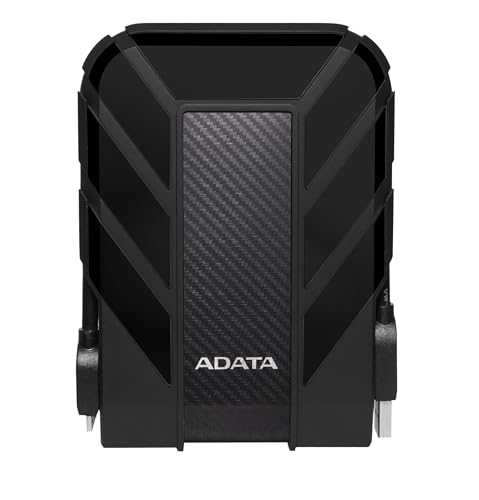
ADATA HD710 Pro 2TB External Hard Drive — The triple-rated tank
ADATA’s HD710 Pro makes the boldest sentence in this guide: shockproof, waterproof and dustproof, all three, in a 2TB drive pitched at gamers, students and professionals, compatible with Mac, PC and Linux. Where rivals pick their hazards, the HD710 Pro claims the set, and that breadth suits the drive that cannot predict its week: a student’s bag on Monday, a site visit on Wednesday, a tournament across town on Saturday. Versatility is the product here, wrapped in ADATA’s characteristically chunky, grip-friendly housing.
The waterproof word deserves the same discipline applied everywhere in this guide: the title claims it without printing an IP code in the text provided, so the listing page is where to confirm the graded depth and duration before the drive goes anywhere near serious water. Even taken at its most conservative reading, a housing designed and sold as waterproof brings sealed seams that also serve the dustproof claim, and sealed seams are the feature that ages best in a portable drive’s life. Linux compatibility, rarely stated in consumer titles, quietly widens the drive’s parish to the workshop and the lab.
At 2TB this is a working drive rather than an archive, which pairs sensibly with its go-anywhere brief: the data on it is the current project, the current library, the current semester. The model code AHD710P-2TU31-CBK identifies the black 2TB variant. Check the graded protection details on the ADATA HD710 Pro listing before trusting it around the wettest work.
- Capacity: 2TB
- Protection stated: shockproof, waterproof and dustproof
- Compatibility stated: Mac, PC and Linux; gamers, students and professionals
- Model: AHD710P-2TU31-CBK, black
- Water grading: claimed in the title without an IP code shown; confirm the grade on the listing
- Interface: USB family connection; exact generation to confirm on the listing
Strengths
- All three environmental claims in a single housing.
- Linux compatibility stated, rare among consumer rugged drives.
- Sealed construction serves dust duty even where water never appears.
Trade-offs
- 2TB limits archive ambitions.
- Protection grades need the listing to quantify.
- Chunky protective housing is bulkier than slim portable drives.
Best for: mixed-life drives that face weather, dust and drops in the same week.
Not suited for: archive keepers needing four-plus terabytes in the same enclosure.

Transcend StoreJet 25H3 2TB Rugged HDD — The three-stage defender
Transcend describes its defence as a system rather than a shell: three-stage shock protection, the StoreJet 25H3’s signature idea, in which layers of different materials absorb an impact in sequence, a hard outer case, a damping structure and an internal suspension sharing one blow between them. The 2TB drive adds a one-touch backup button, USB 3.1 Type-A connectivity and an anti-shock resistant build in purple. The engineering story is the appeal: instead of one thick wall, staged absorption tuned like a crumple zone.
The one-touch backup button is the feature that changes behaviour. Backups fail socially before they fail technically: the software is installed, the intention is sincere, and the backup somehow happens monthly. A physical button on the drive collapses the ritual to a press, and a drive whose owner actually backs up to it weekly is, in the only sense that matters, more durable than a tougher drive used carelessly. Paired with the staged shock system, the 25H3 defends the data twice, once against physics and once against procrastination.
The title makes no water or dust claim, so this is an indoor-and-commute drive whose armour faces drops, not weather. Its USB 3.1 Type-A connector suits the large installed base of machines with full-size ports. Transcend is a long-standing storage name, and the model’s longevity in the market is its own quiet evidence. See the Transcend StoreJet 25H3 listing for the backup software details for your operating system.
- Capacity: 2TB
- Protection stated: three-stage shock protection system, anti-shock resistant
- Interface: USB 3.1 Type-A
- Backup: one-touch backup button
- Colour: purple
- Water and dust rating: not claimed in the listing title
Strengths
- Staged absorption is a considered answer to the drop problem.
- One-touch backup turns intention into a weekly habit.
- Long-market-life model from an established storage maker.
Trade-offs
- No environmental sealing claims for wet or dusty work.
- Type-A connector needs an adapter on USB-C-only laptops.
- 2TB is working-set size, not archive size.
Best for: office and commute drives whose owners want backup to be a button, not a project.
Not suited for: outdoor crews needing stated water or dust protection.

SanDisk Professional 6TB G-Drive ArmorATD — The big-capacity workhorse
The ArmorATD closes the guide at the professional end: 6TB, the largest capacity here, in a rugged, durable portable housing from SanDisk Professional, on USB-C with USB 3.2 Gen 1. The title’s language is restrained compared with its rivals, rugged and durable rather than a stack of proof-words, which suits its audience: professionals buy this line for its place in a workflow, carrying entire projects, media libraries or client archives between studio, site and home, and they read restrained claims from a professional brand as confidence rather than absence.
Six terabytes changes the handling stakes completely. This is not a drive whose contents can be shrugged off; it is a drive that must be paired with a backup strategy from the day it is formatted, and its armour exists to protect a serious investment of work during the journeys that work requires. USB-C keeps it native on current professional laptops, and the SanDisk Professional badge brings the support expectations of a line sold into studios rather than souvenir shops.
Because the title does not enumerate drop heights or IP grades, a buyer with a compliance checklist should extract the detailed ratings from the listing, where the model SDPHE1G-006T-GBAND is specified. The SanDisk Professional ArmorATD listing is the authoritative source for those figures and for the cable included.
- Capacity: 6TB
- Protection stated: rugged, durable portable housing
- Interface: USB-C, USB 3.2 Gen 1
- Model: SDPHE1G-006T-GBAND
- Audience: SanDisk Professional line, aimed at working professionals
- Specific drop or IP grades: not printed in the title; the listing carries the detailed ratings
Strengths
- The largest capacity in this guide, for whole-project portability.
- Professional line support and positioning.
- USB-C native for current studio laptops.
Trade-offs
- Title-level claim detail is thinner than rivals; homework required.
- Six terabytes of eggs, one armoured basket: backup discipline essential.
- Professional capacity carries a professional price tier.
Best for: professionals carrying complete projects between studio and location.
Not suited for: casual users whose real need is a small, cheap drive for occasional files.
Rugged Claims Compared: What Each Shell Actually Promises
| Drive | Capacity | Shock / drop | Water | Dust | Interface |
|---|---|---|---|---|---|
| Silicon Power Armor A60 | 2TB | Shockproof | Not claimed | Not claimed | USB 3.1 Gen1 |
| Silicon Power Armor A62L | 4TB | Shockproof | IPX4 splash resistant | Dustproof | USB 3.0 |
| LaCie Rugged USB-C | 5TB | Drop and shock resistant | Rain resistant | Resistant | USB-C |
| ADATA HD710 Pro | 2TB | Shockproof | Waterproof claimed | Dustproof | USB (see listing) |
| Transcend StoreJet 25H3 | 2TB | Three-stage shock system | Not claimed | Not claimed | USB 3.1 Type-A |
| SanDisk Pro ArmorATD | 6TB | Rugged, durable housing | Not graded in title | Not graded in title | USB-C, USB 3.2 Gen 1 |
The table’s empty cells teach as much as its full ones. Only two drives claim dust protection in words, only one prints an IP code, and the two professional drives, LaCie and SanDisk, trade in broader language aimed at buyers who will read full datasheets. Match the row to your hazard list rather than counting claims: a site worker needs the A62L’s row, a wedding photographer the LaCie’s, a commuter the Transcend’s. The most expensive row is not the safest row for every life; it is merely the biggest.
What Mistakes Do Buyers Make When Shopping for Tough Drives?
The first mistake is treating the word rugged as a rating. It is a family name for a design direction, and the protection lives in the specific claims, codes and tests behind it, which is why this guide keeps quoting titles instead of vibes. The second mistake is buying armour and skipping the backup: a dropped drive that survives is a good day, but drives also fail electrically, get stolen, get left in taxis, and meet hazards no shell covers. The third is testing the armour deliberately, dropping a new drive to see, a ceremony that spends the drive’s luck on theatre.
Buyers also mismatch capacity and courage. They load a 6TB drive with the only copy of everything because it feels professional, then carry it everywhere because it holds everything, maximising both the value at risk and the exposure hours in one decision. The calmer pattern is a working drive sized to the current job, an archive that stays home, and copies between them. Finally, shoppers forget the cable and port side of durability: a rugged drive with a loose, worn connector fails its owner as completely as a cracked shell, so inspect the cable and socket as part of the drive’s health, and replace a tired cable before it corrupts a transfer at midnight.
How Should You Handle a Rugged Drive Day to Day?
Handling is where durability is won after purchase. Eject the drive properly before unplugging, every time, because a write interrupted by a yanked cable corrupts data more reliably than any drop. Let a spinning drive settle for a few seconds after activity stops before it goes into a bag. Carry it in its own padded pocket or sleeve, not loose against keys, coins and multi-tools, which scratch shells and worry ports. Keep the cable captive where the design allows, or coil it separately so its weight never hangs from the drive’s socket in transit.
At the desk, give the drive a home position away from edges, drink rings and the sweep of elbows, and route its cable so a chair wheel cannot find it. In the field, the drive goes back into the bag before the camera does, because the end of a shoot, tired, rushed, dark, is when location gear gets dropped. None of this requires the armour to work; all of it means the armour is saved for the accident you could not schedule. A rugged drive handled with ordinary care should outlast several computers, and its owner should be faintly disappointed never to learn how tough it really was.
Why Does a Second Copy Matter More Than a Stronger Shell?
Because shells address one failure family, impact and environment, while data dies of many causes: controller failure, accidental formatting, ransomware, theft, fire in the building where the single drive sits. A second copy, ideally in a different place and ideally maintained by a boring automatic routine, answers all of those at once. The Transcend’s one-touch button is praised in this guide precisely because it lowers the friction of making that copy. Treat the rugged drive as the copy that travels, and keep the stay-at-home twin in a drawer; then the worst day in the travelling drive’s life is an inconvenience and a replacement order, not a bereavement. Professionals formalise this as a three-copy rule with one off-site; home users can start with two and a calendar reminder, and upgrade the system when the archive’s value becomes clear to them.
How Do Photographers, Builders and Students Each Define Durable?
The word durable changes meaning with the owner’s calendar. For a wedding photographer, durability is a drive that survives the bag, the venue floor and the rain between church and reception, then mounts instantly at midnight when the backup cannot wait until morning. Speed of workflow joins the armour in the definition: a drive that needs an adapter hunt at midnight is, in the only sense that matters at midnight, less reliable. That is the LaCie’s home ground, USB-C native and visibly orange in a dark bag.
For a builder, surveyor or site engineer, the enemies arrive slowly and then all at once: dust in the seams across a season, a drive knocked from a tailgate onto gravel, a cabin that freezes overnight and bakes by noon. Sealing and shock claims share top billing, and the A62L’s dustproof, IPX4 and shockproof stack reads like it was written from a site diary. The drive’s data, drawings, surveys, compliance photos, is also the project’s memory, so the backup sermon in this guide applies with legal force: a second copy is not a preference on a commercial job.
For a student, durability is mostly about the bag: the daily drop from desk to floor, the drink that escapes in a library, the drive that lives among chargers and keys for four years of term time. Shock protection and price share the crown, because a student drive will be replaced on a student’s budget if the worst happens. The A60 and the HD710 Pro split that vote by temperament, one focused and console-friendly, the other sealed against the full accident menu. Three owners, three definitions, one guide: the claims language in each title is how you tell which definition the maker was designing for.
What Happens Inside a Drive During a Drop?
Understanding the accident explains the armour’s shapes. A falling drive accelerates until it meets the floor, then stops in a distance measured in millimetres. Everything inside wants to keep moving. The platters, heavy for their size, stress their bearing; the head assembly, parked safely if the drive is off, can still be jolted against its latch; the circuit board flexes; the USB socket takes the cable’s leverage if one is attached. Rubber bumpers and soft internal mounts work by lengthening that stopping distance, turning a spike of force into a shove. Three-stage systems like Transcend’s stage the shove through materials of increasing firmness, so small knocks are absorbed softly and large ones meet progressively sterner resistance.
Two practical morals fall out of the physics. First, corners matter: drives land on corners, which is why rugged shells grow their thickest rubber there, and why a drive dropped flat on carpet and a drive dropped corner-first on concrete are different events wearing the same name. Second, a connected cable is a lever and a tether at once; a drive knocked off a desk often survives the fall and dies of the yank, torn socket or a head crash as it swings. Short cables, slack routing and drives placed away from edges are not fussiness. They are the cheapest stage of shock protection you will ever own, and they work on drives with no armour at all.
How Should You Test a New Rugged Drive Without Abusing It?
Resist the drop ceremony. A new drive earns trust through boring verification instead: format it for your machines, copy a large folder across and confirm the checksums or at least the file count and spot-open the largest files, then run the maker’s diagnostic utility if one is offered. Fill it past halfway once in its first week, because marginal drives often confess under sustained writing while still inside the easy-return window. Note its normal sounds and warmth in that week, so that a later change in either is recognisable as news rather than as a mystery.
Then set up the copy routine the drive will live by, a scheduled mirror, a one-touch habit, a cloud twin for the most precious folder, and test the restore path once with a single file. A backup that has never been restored is a hypothesis, and the day of the accident is the wrong day to peer-review it. None of this theatre requires dropping anything, and all of it protects the data more certainly than the thickest rubber in this guide. The armour is for the accident you cannot schedule; the routine is for every other day of the drive’s life.
When Should a Rugged Drive Be Retired, and How?
Drives rarely die without sending letters first. A new clicking or scraping in the sound signature, a drive that mounts slowly or vanishes mid-transfer, files that corrupt between copies, a file system that asks to be checked with increasing frequency: each is a retirement notice written in a polite hand. The correct response is always the same order of operations: copy everything off first, verify the copy, and only then investigate the drive’s health for curiosity’s sake. Owners who troubleshoot first and copy later sometimes spend the drive’s last working hour proving what was wrong with it.
Retirement itself deserves a plan because the data’s sensitivity outlives the device. A drive that held client work, financial records or family archives should be wiped with a proper overwrite tool, or physically destroyed if it can no longer write reliably enough to be wiped, rather than donated in a hopeful state. The shell’s toughness makes the point oddly practical: a rugged drive is hard to destroy casually, so use the maker’s or a data-destruction service’s method rather than a hammer and optimism. Keep the replacement’s arrival ahead of the old drive’s departure where budgets allow, so the archive is never homeless between homes, and log the serial numbers of both in the same note that holds your backup schedule.
Do Rugged Drives Make Sense for Home Archives That Never Travel?
Sometimes, for reasons that have nothing to do with travel. A home archive drive lives among children, pets, cleaning sprays and the occasional flood from a washing machine, and it gets knocked off shelves by people reaching past it. Sealed, shock-mounted designs forgive that domestic chaos exactly as they forgive a building site. The stronger argument, though, is about which copy the rugged drive should be. In a two-copy home system, the rugged unit is the one that goes to the relative’s house, the office drawer or the car boot for off-site rotation, because the travelling copy faces travelling hazards. The stay-at-home copy can be any honest drive on a shelf. Buyers who grasp that division often find the rugged premium buys them a calmer rotation routine: the armoured drive is simply the one they worry about least while it is out in the world doing the most important job in the system.
How Do Consoles and Game Libraries Change the Durability Question?
A drive living under a television faces a gentler but stranger life than a drive in a camera bag. It sits for months in warm, dusty stillness behind a console, then gets unplugged and carried to a friend’s house for a weekend, which is precisely the A60’s stated parish of Xbox and PS4 alongside PC and Mac. The hazards are the move itself, the car ride in a bag of controllers, and the household it visits, with its unfamiliar shelves and enthusiastic pets. Shock protection is again the headline need, and capacity discipline matters differently: a game library re-downloads in the worst case, so a console drive can be run closer to the wind than an archive drive, its loss an annoyance measured in bandwidth rather than in grief. That replaceability makes the console drive the household’s natural candidate for hand-me-down duty, graduating to backup service when a larger drive takes its place, provided its health checks still pass and nobody mistakes a retired game drive for a backup plan without copying anything to it.
What Should You Do in the First Hour After a Drive Takes a Fall?
Stay calm and do nothing heroic. Pick the drive up, inspect the shell and cable, and let it sit for a few minutes if it was running when it fell. Then connect it to a computer, in a quiet room, and listen before you look: a normal spin-up followed by a normal mount is the best news the hour can offer, while repetitive clicking, beeping or scraping means unplug it and stop, because every restart of a mechanically injured drive can worsen the damage, and data-recovery specialists will thank you for the restraint if the contents justify their help. If it mounts normally, copy the most irreplaceable folders first, in priority order, before running any diagnostic or copying the bulk. Diagnostics can wait an hour; a marginal drive’s remaining strength should be spent on rescue, in descending order of grief, and only when the precious data is safe elsewhere does the drive become a patient instead of a lifeboat.
Why Do Cables and Connectors Deserve a Durability Budget of Their Own?
Ask a repair bench what kills portable drives in the wild and the connector gets named early: a socket loosened by a thousand insertions and one bad yank, a cable whose conductors have fatigued at the strain relief, a plug that only connects at a persuasive angle. None of these failures cares how thick the rubber is. The defences are habits and spares. Keep one known-good cable with the drive and replace it at the first sign of persuasion being needed; never carry the drive by its cable or leave it dangling from a laptop port over a sofa edge; and prefer, where the design offers it, a captive or short cable that travels as part of the unit. When a drive starts disconnecting mid-transfer, suspect the cable first and the drive second, because the cheap diagnosis is right surprisingly often, and swapping a cable has rescued more archives than any enclosure ever built.
Final Recommendation
Choose by hazard. For all-weather, all-surface work at archive size, the Armor A62L’s stated IPX4, dust and shock set is the most complete contract in this guide. For location photography, the LaCie Rugged’s 5TB and its four-way resistance language remain the professional’s habit for good reason. The ADATA HD710 Pro is the versatile tank for unpredictable weeks, the Transcend the commuter’s defender with the backup button that actually gets pressed, the A60 the value shockproof starter for bags and consoles, and the ArmorATD the 6TB vessel for whole projects, provided a second copy guards what it carries.
Buy the armour that matches your accidents, then handle the drive as if it had none; that combination, respect plus rubber, is what durability actually consists of. Add the second copy, kept somewhere the same accident cannot reach, and you have done everything a careful owner can do, which is a short list, honestly kept: the right shell, the right habits, and a twin.
Frequently Asked Questions
Does shockproof mean I can drop the drive while it is copying files?
No operating drive enjoys being dropped, rugged or not. Shock protection is engineered largely around surviving impacts, with the greatest safety when the drive is parked and unplugged. A fall mid-transfer risks both the mechanism and the data being written. Treat the rating as insurance for accidents, and still unplug, wait and pocket the drive before moving.
What does IPX4 protect against in daily use?
IPX4 describes resistance to water splashing from any direction: rain during a walk to the car, a spilled drink across a desk, spray at an outdoor event. It does not cover jets of water, immersion in a sink or stream, or a drive left in a puddle. The Armor A62L carries this rating; drives without an IP code in their claims should be kept dry on principle.
Are rugged hard drives slower than ordinary portable drives?
The armour itself does not slow the drive; the interface and the spinning mechanism set the pace. In this guide the interfaces span USB 3.0 to USB 3.2 Gen 1, all comfortably faster than the platters they serve for large sequential transfers. Small-file work is where spinning drives feel their nature, whatever their shell, and buyers needing speed above all should be shopping for solid-state drives instead.
Can a rugged drive survive being left in a hot car?
Heat is a slower enemy than impact, and no title here claims thermal heroics. A drive baked repeatedly in a parked car ages its lubricants and electronics faster, and a drive brought from a cold car into a warm room can gather condensation. Let the drive reach room temperature before plugging in after extreme exposure, and avoid making a hot car its permanent home.
Should I buy one large rugged drive or two smaller ones?
For data you cannot replace, two smaller drives in different places beat one large drive in one bag, because the second copy answers theft, failure and fire as well as drops. For a working set that must travel whole, one large drive like the 5TB LaCie or 6TB ArmorATD is the practical tool, mirrored to a stay-at-home copy whenever it returns.
Is a rugged hard drive or a portable SSD the tougher buy?
For pure impact survival, solid-state storage has no moving parts to injure and wins the physics argument outright. The spinning drives in this guide answer with capacity per unit of money and decades of proven behaviour in exactly these armoured enclosures. A buyer whose data must survive motorcycle luggage or site work at any cost should price both families; a buyer who needs five or six terabytes that can take a knock will find the rugged hard drive remains the rational instrument, handled with the care this guide keeps recommending.
Should a rugged drive be formatted differently for Mac and PC households?
The armour does not care about the file system, but your households’ machines do. A drive that must write on both Mac and Windows belongs on a cross-platform format such as exFAT, while a drive living on one system is happiest in that system’s native format, where journaling and permissions behave best. Decide by the machines the drive will actually meet in its working life, and write the choice on a label, because the next person to plug it in deserves to know the plan before a helpful operating system offers to reformat the drive for them at the worst possible moment, mid-deadline, in front of an audience, with the only copy of the presentation aboard.
Does the warranty replace my data if the drive fails?
No warranty in this category replaces data; warranties replace hardware. A maker may repair or exchange the drive itself within its terms, and some professional lines offer recovery services as a separate arrangement, but the photographs, projects and archives are the owner’s responsibility from the first day. That single fact is the economic argument for the second copy, stated more plainly than any scare story could state it.
Can I check a rugged drive’s health myself?
Yes, within limits. Your operating system can report the drive’s self-monitoring status, and makers and third parties offer utilities that read those indicators in friendlier language. Treat warnings as retirement notices and a clean report as permission to continue, not as a guarantee, because some failures arrive unannounced. The health check that matters most is simpler: a full copy that completes without errors, made recently, onto a second device you have also verified.
How long should a rugged portable drive last?
Handled well, the mechanism should serve for years of regular use, and the shell will usually outlive the interface standard it carries. Plan around the data rather than the device: keep copies current, watch for clicking sounds, slow mounts or disappearing files as retirement warnings, and replace the drive on suspicion rather than after a failure has introduced itself.
Related Guides
Keep the road kit complete with best car qi chargers for the dashboard, best chargers for car camping for parked power, and best inexpensive wireless chargers for the home these drives return to.


