What's inside
- Key Takeaways
- Quick Picks
- How These Picks Were Chosen
- Six Drives at the Top of the Scale
- Side-by-Side Comparison
- How Do You Protect a Library This Large?
- Cold Vault or Working Archive: Deciding Your Drive’s Temperature
- Filling a Giant: Migration Discipline for Very Large Libraries
- Common Mistakes at the Top of the Scale
- Frequently Asked Questions
- Final Recommendation
- Related Guides
As an Amazon Associate I earn from qualifying purchases. This post may contain affiliate links at no extra cost to you.
widgetverdict.com is reader-supported. When you buy through links on our site, we may earn an affiliate commission.
Where to buy: the WD Elements Desktop 20TB HDD opens this guide as the plug-and-play ceiling, and the other five picks each link to their own checked listing inside their reviews.
The best high-capacity hard drives begin where ordinary storage advice ends: at 12TB and upward, in the territory where a single drive holds a household’s entire digital memory or a studio’s working archive. At this scale the questions change character. It is no longer about whether the library fits, but about how a library of that size is powered, connected, protected, and — when the inevitable day comes — recovered. A 20TB drive is not a bigger version of a 2TB drive in any way that matters to its owner; it is a piece of infrastructure, and it should be bought with an infrastructure mindset.
The six picks span the three shapes that infrastructure takes. Two WD Elements desktop drives and a Seagate Expansion offer the plug-and-play route: finished external units on USB 3.0, at 16TB, 20TB, and a chart-topping 24TB. Two internal drives — Seagate’s enterprise Exos X18 and Toshiba’s X300 PRO, both 16TB — serve builders putting serious capacity inside a workstation, server, or enclosure. And SanDisk’s G-DRIVE Project at 12TB serves the creative desk, with Thunderbolt 3 and an Ultrastar mechanism inside. Every figure below comes from the listing titles; at this scale, invented specifications are not a venial sin but a structural one.
Scale also changes who the buyer is. A 2TB drive is bought by a person; a 20TB drive is bought by a household, a studio, or a small institution, and its contents usually belong to more people than the one holding the card. That shared ownership is worth a conversation before the purchase: whose archive is this, who may add to it, who is responsible for its copy, and what happens to it when the studio reorganises or the household moves. The drives below will hold whatever they are given; the governance is the humans’ contribution, and giants governed well become heirlooms rather than liabilities.
One principle governs the whole guide: at these capacities, the drive is never the whole purchase. The backup arrangement, the power protection, and the folder discipline are part of the product you are really buying, and the reviews price them in as attention, even where the listing does not.
Key Takeaways
- This guide starts at 12TB; below that line, ordinary desktop and NAS picks serve better.
- Finished external drives from WD and Seagate offer the plug-and-play route to 16TB, 20TB, and 24TB.
- Enterprise and workstation internal drives serve builders housing capacity in their own machines.
- At this scale, a backup arrangement is part of the purchase, not an accessory to it.
- Workload figures and connection types, where titles state them, separate working archives from cold storage.
- A single vast drive concentrates a library; plan its protection with the same seriousness as its purchase.
- Migrate in stages, verify each stage, and retire the old drives only after the new home has been lived in.
- Choose the drive’s temperature first — cold vault or working archive — and let capacity follow.
- Keep a one-page inventory with the drive: what arrived, when, and where its copy lives.
- Give the giant a cool, ventilated, surge-protected corner and a reliable socket no household light switch controls.
- Decide the folder structure and the admission policy before the first migration weekend begins.
Quick Picks
| Pick | Badge | Why it earns its place |
|---|---|---|
| WD Elements Desktop 20TB HDD | The plug-and-play ceiling | Twenty terabytes of finished USB 3.0 desktop storage, ready on arrival. |
| Seagate Expansion 24TB External Hard Drive | The maximum shelf size | Twenty-four terabytes with Rescue Data Recovery Services named in the title. |
| WD Elements 16TB Desktop Hard Drive | The sensible giant | Sixteen terabytes in the same finished Elements form, for libraries a step smaller. |
| Seagate Exos X18 16TB Enterprise Internal Hard Drive | The enterprise internal | Sixteen terabytes of Exos-class SATA storage for servers and serious enclosures. |
| Toshiba X300 PRO 16TB Internal Hard Drive | The workload workstation drive | Sixteen terabytes rated up to 300 TB/year, CMR, 7200 RPM, 512 MB cache. |
| G-DRIVE 12TB Project Hard Drive | The creative desk drive | Twelve terabytes with Thunderbolt 3 and USB 10Gbps around a 7200RPM Ultrastar. |
How These Picks Were Chosen
The first filter was the threshold itself: nothing under 12TB was admitted, because below that line a buyer is shopping in the ordinary desktop and NAS categories, where calmer and cheaper picks serve better. Above the line, the guide demanded that each product state its scale honestly in its title — capacity in the headline, not discovered in a footnote — and that the product’s shape be one a serious library can actually use: a finished desktop external, an internal drive for a workstation or enclosure, or a creative-desk unit with the connections that work demands.
The second filter separated temperature of use. A high-capacity drive can be a cold vault — written occasionally, read gratefully — or a working archive written daily. The titles that state workload figures earn their emphasis here: Toshiba prints up to 300 TB/year for the X300 PRO, a number that speaks directly to working life, while the finished WD and Seagate externals present themselves as plug-and-play storage, a cold-to-lukewarm temperament the reviews respect rather than inflate. The G-DRIVE Project states a read figure of up to 250MB/s and a 7200RPM Ultrastar mechanism, marking it for the editing desk where footage moves constantly.
The third filter was connection realism. USB 3.0 on the big finished drives is entirely adequate for vault duty and nightly backups, and this guide says so without embarrassment. Buyers whose work is moving footage all day are directed, by the titles themselves, to the G-DRIVE’s Thunderbolt 3 and 10Gbps USB. Internal-drive buyers are reminded that the Exos and the X300 PRO arrive as mechanisms: a bay, a SATA connection, and a power supply must exist to receive them, whether in a workstation, a server, or a multi-bay enclosure.
One more consideration ran quietly through the selection: the honesty of the category’s own marketing. At these capacities, product pages compete in superlatives, and the guide rewarded titles that spent their words on verifiable facts — capacities, connections, workload figures, named services — over titles that spent them on adjectives. A reader can verify a number against a manufacturer’s documentation in a minute; an adjective can be verified never. The six titles gathered here are, by the standards of their shelf, unusually factual documents, and the reviews’ confidence rests on exactly that.
Finally, protection was treated as a selection criterion, not a sermon appended afterwards. The Seagate Expansion’s title names Rescue Data Recovery Services; the enterprise and workstation drives carry their makers’ serious-duty positioning; and every review below addresses what a library of that size must do about copies. At 16TB and above, the cost of the drive is the smaller half of the commitment, and a guide that pretended otherwise would be selling its readers a very large surprise.
Six Drives at the Top of the Scale

WD Elements Desktop 20TB HDD — the plug-and-play ceiling
The WD Elements Desktop 20TB HDD is the simplest route to a serious library ever sold: a finished desktop external drive, USB 3.0, described by its title as a drive for plug-and-play storage, model WDBWLG0200HBK-NESN. Twenty terabytes arrives as one object — no bay, no enclosure decision, no installation beyond a desk position, its own power arrangement, and a cable. For the household or studio whose archive has outgrown every previous container, that simplicity is not a compromise. It is the feature that gets the archive consolidated this weekend instead of next quarter.
Elements is Western Digital’s plainest line, and plainness at this scale is wisdom. The drive’s job is to be the vault: the place the media library, the photograph archive, the project history, and the backups of two computers come to live in one addressable home. USB 3.0 serves that job at the pace the job actually happens — bulk copies in the background, a film served in the evening, a backup received at night. Owners who need a working drive for daily footage-shuffling should look at the G-DRIVE below; owners who need a continent for their data will find this one entirely sufficient.
Strengths
- Twenty terabytes in a finished unit — consolidation without assembly.
- Plug-and-play positioning stated in the title; the setup is a desk decision.
- One drive, one library: the simplest possible shape for a household archive.
Trade-offs
- A single unit concentrates the library; its protection plan is the owner’s to build.
- USB 3.0 suits vault duty, not an editing desk’s daily footage traffic.
- The title leaves internal particulars unstated; Western Digital’s documentation holds them.
Spec snapshot: Capacity 20TB · Form desktop external · Interface USB 3.0 · Positioning per the title: plug-and-play storage · Model WDBWLG0200HBK-NESN · Anything about the mechanism inside sits outside the listing title, so Western Digital’s documentation is the authority for it.
The ownership pattern at 20TB deserves a paragraph of its own. A drive this size is filled deliberately, in campaigns: the great consolidation weekend, the annual archive of finished projects, the migration of a retiring NAS. Between campaigns it sits as the household’s memory, and its free-space figure becomes a kind of census — a number the owner checks the way a librarian checks the shelves. Buy it with a folder structure already decided, migrate in stages with verification, and the Elements will do the only thing asked of it for years: be there, entire, when the library is wanted.
Placement at this scale is a small ceremony. A desktop drive of this class lives on a shelf or desk permanently, with air around it and its power supply on a socket that no light switch controls. It should not travel, should not be borrowed, and should be labelled with the library it holds and the date the consolidation finished. Infrastructure earns its name through exactly this kind of boring permanence.
Best for: a household or studio seeking a finished 20TB vault with no assembly decisions.
Not suited for: an editing desk moving footage hourly, where Thunderbolt-class connections lead.
Consolidators should start with the Elements 20TB listing and decide its shelf before it ships.
One more habit separates vault owners who sleep well from those who merely own a vault: the annual opening. Once a year, pick a handful of folders at random — the oldest photographs, a finished project, a backup from two computers ago — and open them. A library that is opened stays a library; a library that is only ever written becomes a rumour about one. The Elements’ plug-and-play nature makes the ceremony effortless, which is a final, underappreciated argument for the finished-drive route at any size in this guide.
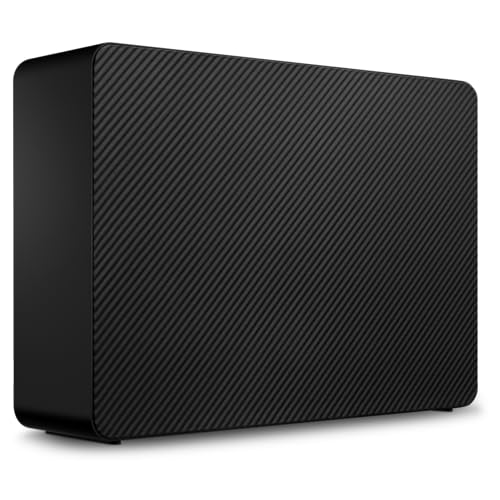
Seagate Expansion 24TB External Hard Drive — the maximum shelf size
The Seagate Expansion 24TB External Hard Drive is the largest finished drive in this guide, and its title pairs that scale with a safety net: 24TB, USB 3.0, and Rescue Data Recovery Services, model STKP24000400. Twenty-four terabytes is a number that ends arguments. A media library measured in thousands of films, a photographer’s lifetime archive, a small studio’s complete project history, backups of every machine in the building — the Expansion holds the combination in one desktop unit, and the Rescue mention in its title acknowledges, with unusual candour, what is at stake when a library concentrates at this scale.
Seagate’s Expansion line is the direct counterpart to WD’s Elements: plain, finished, plug-in storage whose entire personality is capacity and calm. The choice between the two giants is legitimately made on ecosystem and the stated recovery cover — a household already fluent in Seagate’s tools and reassured by the Rescue line has its answer, as does a household standardised on WD. What neither giant should be bought for is daily working traffic; both are vaults, and a vault’s virtues are size, stability, and the quality of the plan standing behind it.
Strengths
- Twenty-four terabytes: the largest finished capacity in this guide.
- Rescue Data Recovery Services named in the title — a stated recovery path.
- Finished desktop form keeps consolidation to a plug and a placement.
Trade-offs
- The concentration argument applies at maximum force; protection planning is essential.
- USB 3.0 defines its pace: vault and backup duty, not editing traffic.
- Its title omits internal particulars, as finished drives generally do.
Spec snapshot: Capacity 24TB · Form desktop external · Interface USB 3.0 · Included per the title: Rescue Data Recovery Services · Model STKP24000400 · For anything beyond those stated facts, Seagate’s documentation for this model is the reference to consult.
Think about who legitimately needs the maximum. The answer is narrower than the marketing suggests and more honourable: the archivist whose library genuinely measures in tens of terabytes, the studio whose finished projects must remain addressable for clients, the household absorbing three retiring drives and a NAS into one home. For those buyers, the alternative to 24TB in one unit is a shelf of almost-as-large units with a spreadsheet to govern them, and the single vault is the calmer civilisation. Everyone else should buy the size their census actually reports.
A drive of this scale also changes backup arithmetic in a way worth stating plainly: copying 24TB anywhere takes real time, so the protection plan must be designed, not improvised — a second large drive, a cloud tier for the irreplaceable core, or both, running on a schedule that begins the week the vault is filled. The Rescue services in the title are the parachute; the schedule is the flight plan, and serious libraries file both.
Best for: a genuine tens-of-terabytes archive seeking one finished vault with recovery cover named.
Not suited for: a library under ten terabytes, where the sensible giant below serves at less commitment.
Maximum-scale buyers should read the Expansion 24TB listing carefully, Rescue line included, before the consolidation weekend.
The maximum also imposes a discipline on what enters the vault in the first place. When capacity stops rationing, the temptation is to keep everything at full fidelity forever — every duplicate, every abandoned render, every backup of a backup. Resist it at the door. A 24TB library with a admission policy remains searchable and meaningful; a 24TB landfill with a USB cable is just a slower form of forgetting. The archivists who love their big drives in year five are the ones who stayed editors, not just collectors, in year one.

WD Elements 16TB Desktop Hard Drive — the sensible giant
The WD Elements 16TB Desktop Hard Drive is the same finished idea as its 20TB sibling, four terabytes smaller — and for a great many libraries, four terabytes more honest. Its title mirrors the larger unit’s: a desktop external hard drive on USB 3.0 for plug-and-play storage, model WDBWLG0160HBK-NESN. Sixteen terabytes holds the full household archive for most households that have one: the media library, the photographs, the documents, the machine backups, with headroom that is generous rather than theatrical. It is the size for buyers who counted, found their number, and refused to purchase a monument to a library they do not own.
The Elements virtues repeat because they are the point: no assembly, no enclosure research, a drive that arrives as infrastructure and behaves as furniture. In a household consolidating from a tangle of smaller externals, the 16TB unit often proves the sweet spot of the whole category — large enough to end the tangle permanently, sized closely enough to the real library that the backup plan for it remains affordable, because the second drive or cloud tier that protects a 16TB vault is a smaller commitment than the one standing behind 24TB.
Strengths
- Sixteen terabytes matches the counted archive of most serious households.
- Finished plug-and-play form: consolidation without a build project.
- A protection plan for this size stays within ordinary household reach.
Trade-offs
- Libraries already pressing sixteen terabytes should buy the ceiling above instead.
- Vault temperament again: USB 3.0 serves storage, not editing traffic.
- Internal particulars stay inside Western Digital’s documentation, unstated in the title.
Spec snapshot: Capacity 16TB · Form desktop external · Interface USB 3.0 · Positioning per the title: plug-and-play storage · Model WDBWLG0160HBK-NESN · Details the title leaves out should be settled through Western Digital’s documentation rather than assumed from the 20TB model.
There is a budgeting elegance to the sensible giant that deserves naming. The money not spent on unneeded terabytes is precisely the money the protection plan needs — the second drive, the backup subscription, the surge protection for the shelf. A 16TB vault with a complete protection plan is a more serious piece of infrastructure than a 24TB vault standing alone, and households choosing between the two should price the plan, not just the drive, before deciding which giant is actually theirs.
Settled on a shelf with air and a labelled purpose, this Elements will absorb the household’s digital past and present without a further thought for years. That is the entire promise of the finished-drive route at its best size, and it is a promise this model is specified to keep.
Best for: a counted household archive seeking a finished 16TB vault and an affordable protection plan.
Not suited for: an archive already larger than this drive, where stepping down invites a second migration.
For the honestly sized giant, look at the Elements 16TB listing and let your census, not the shelf, confirm the size.
There is a migration story this size tells particularly well. The household arriving at 16TB usually arrives with three or four ageing drives, each holding a stratum of the library and each with its own cable, supply, and superstitions. Consolidating them onto one finished unit is a weekend of copying with verification — and then a drawer empties, a power strip relaxes, and the library has one address for the first time in years. Owners consistently describe that weekend as the moment their archive became an archive. The sensible giant is sized to be that weekend’s destination for most households.

Seagate Exos X18 16TB Enterprise Internal Hard Drive — the enterprise internal
The Seagate Exos X18 16TB Enterprise Internal Hard Drive changes the guide’s register from furniture to machinery. Its title is an engineer’s sentence: enterprise class, 16TB, an enterprise internal hard drive on SATA, 3.5-inch, 6Gbit/s, with a 128MB cache, model ST16000NM000J. Exos is Seagate’s enterprise family — drives built for data-centre and server duty — and in a home or studio context this pick serves the builder: the workstation with a serious bay, the home server assembled from real components, the multi-bay enclosure whose owner wants enterprise mechanisms inside it. It arrives as a bare drive and expects a competent home.
What enterprise class buys the smaller buyer is design intent for relentless duty. A home server built around Exos drives is built around components whose working assumption is continuous service among many neighbouring drives. That assumption shows up in how such a system ages: predictably, boringly, with the library’s home treated as seriously as the library. The trade is equally clear — an enterprise mechanism makes no concessions to living-room manners, and its natural habitat is a machine in a cupboard, a rack, or a workstation under a desk, not a silent media cabinet.
Strengths
- Enterprise-class design intent for continuous, multi-drive server duty.
- Sixteen terabytes per bay builds serious arrays from few drives.
- SATA 6Gbit/s internal connection suits workstations, servers, and enclosures alike.
Trade-offs
- A bare mechanism: a bay, power, and a host must be supplied by the buyer.
- Enterprise manners prioritise duty over quiet; placement should respect that.
- The title states a 128MB cache and leaves the rest to Seagate’s enterprise documentation.
Spec snapshot: Capacity 16TB · Class enterprise · Form 3.5 inch internal · Interface SATA 6Gbit/s · Cache 128MB per the title · Model ST16000NM000J · Line Exos X18 · Full enterprise particulars — workload, acoustics, power — belong to Seagate’s documentation for this model and should be read there before a build is finalised.
The buyer profile is specific and should be honoured. If your storage lives in a self-built server that already hums in a utility space, the Exos is the native citizen of that machine and this is your pick. If your storage lives in the living room, the enterprise virtues will be wasted and its manners noticed; the finished drives above exist for that room. Matching the drive’s intended habitat to your actual one is the whole decision, and it is a decision about your house as much as about hardware.
In an enclosure, the Exos makes a compelling vault heart: a quality multi-bay case around enterprise mechanisms is the closest a home archive comes to the way institutions store things, and at 16TB per bay the institution needs very few bays. Builders who think in those terms already know this drive’s name; this review merely confirms it belongs on their shortlist.
Best for: a self-built server or enclosure seeking enterprise-class 16TB mechanisms.
Not suited for: a silent living-room cabinet, where finished drives’ manners serve better.
Builders should examine the Exos X18 listing alongside Seagate’s documentation before speccing the array.
Cooling and mounting, at enterprise scale, stop being footnotes. A mechanism designed for dense server company expects airflow arranged by its host, and a home builder who gives an Exos a cramped, still-air bay is asking a marathon runner to work in a closet. Follow the host’s airflow path, leave the drive’s vents the room the maker intended, and the enterprise virtues — steadiness under load, predictable ageing — will show up as promised. Starve the same drive of air and its data-centre pedigree will not rescue the arrangement.

Toshiba X300 PRO 16TB Internal Hard Drive — the workload workstation drive
The Toshiba X300 PRO 16TB Internal Hard Drive carries the most complete working specification of any internal pick here: a high-workload performance drive for creative professionals, 3.5-inch, with a workload rate of up to 300 TB/year stated in the title, CMR recording, SATA 6 GB/s, 7200 RPM, and a 512 MB cache, model HDWR51GXZSTB. Read that title as a job description. This is a drive for a workstation that writes heavily every day — the video editor’s project drive, the photographer’s working archive, the creator whose storage is a bench and not a shelf — and the workload figure is the headline, because it is the number that separates working drives from warehousing ones.
CMR and the large cache support that working brief: predictable behaviour under sustained writing, and a cache sized for a drive whose contents are in constant motion. Sixteen terabytes at this temperament means a creative professional can keep entire project histories online — current work, last season’s work, the archive that clients occasionally resurrect — on one mechanism, inside the workstation, at internal-connection pace. For sole practitioners and small studios, that consolidation simplifies everything from backup scheduling to the simple question of where a file from March actually lives.
Strengths
- A stated workload rate of up to 300 TB/year — a working drive’s credential, printed.
- 7200 RPM with a 512 MB cache suits daily creative production.
- CMR recording keeps behaviour predictable under sustained writes.
Trade-offs
- A bare internal drive: it needs a workstation bay or an enclosure to live in.
- Its working temperament is wasted on cold storage that a finished drive serves calmly.
- Sixteen working terabytes demand a backup discipline equal to the workload.
Spec snapshot: Capacity 16TB · Form 3.5 inch internal · Interface SATA 6 GB/s · Speed 7200 RPM · Cache 512 MB · Recording CMR · Workload per the title: up to 300 TB/year · Model HDWR51GXZSTB · Audience per the title: creative professionals · Anything further belongs to Toshiba’s documentation for this model.
The workload figure deserves a buyer’s translation. A drive’s annual workload rating is a budget of writing and reading, and a creative workflow spends it visibly: footage ingested, projects rendered, archives shuffled. A home archivist spends almost none of it; a working editor spends it like salary. Toshiba printing the figure in the title lets the editor verify, before purchase, that the drive’s budget matches the studio’s spending — the kind of honesty that should be ordinary and is, in this category, still worth praising when it appears.
Paired with a finished vault from this same guide — projects graduating from the X300 PRO’s bench to an Elements or Expansion shelf when they close — a small studio gains a complete storage civilisation in two objects: the working drive and the keeping drive, each bought for its own temperament. That pairing is this review’s real recommendation for the creative buyer.
Best for: a creative workstation seeking 16TB of high-workload internal storage with the rating printed.
Not suited for: a cold archive role, where its working design has nothing to exercise.
Working editors should study the X300 PRO listing and set its workload figure against their own annual traffic.
A workstation drive also earns a specific courtesy from its owner: defragmented thinking about what “working” means. The projects in active production belong on the X300 PRO; the projects merely being kept belong on a vault, where they stop consuming the working drive’s workload budget and the owner’s attention alike. Studios that enforce that border find their working drive feels fast for years, because it is only ever carrying the present tense. Studios that let the archive colonise the bench discover, slowly, that everything feels like wading.

G-DRIVE 12TB Project Hard Drive — the creative desk drive
The G-DRIVE 12TB Project Hard Drive is the guide’s smallest pick and its most specialised: a high-capacity desktop drive with Thunderbolt 3 and USB at 10Gbps, a 7200RPM Ultrastar hard drive inside, and read speeds stated at up to 250MB/s, model SDPHG1H-012T. Ultrastar is the enterprise lineage within Western Digital’s world, and its presence inside a desk drive tells the story plainly — this is a finished external built for work, aimed at the creative desk where footage arrives from cameras, moves to the editing machine, and shuttles between collaborators, all at a pace USB 3.0 vaults were never asked to sustain.
Twelve terabytes is the deliberate size for that desk: a season of projects live, the current production’s footage entire, with the finished work graduating to a vault — possibly one of the giants above — when the season closes. The dual connection is the other half of the brief. Thunderbolt 3 serves the modern editing workstation at full stride, while 10Gbps USB keeps the drive fluent with the wider world of machines it will meet across a project’s life. A drive that travels between a studio workstation, a location laptop, and a client’s machine needs exactly that bilingual connection.
Strengths
- Thunderbolt 3 plus USB 10Gbps: connections matched to professional footage traffic.
- A 7200RPM Ultrastar mechanism inside, with reads stated up to 250MB/s.
- Twelve terabytes sized for a working season of creative projects.
Trade-offs
- Its premium talents are wasted on cold vault duty the Elements serves plainly.
- Twelve terabytes is this guide’s floor; archives beyond it need the giants.
- The title states a read figure; writers should confirm further detail in the maker’s documentation.
Spec snapshot: Capacity 12TB · Connections Thunderbolt 3 and USB 10Gbps per the title · Mechanism 7200RPM Ultrastar hard drive · Read performance per the title: up to 250MB/s · Model SDPHG1H-012T · Line G-DRIVE Project · For specifications beyond the title’s statements, the manufacturer’s documentation is the source to consult.
The desk this drive serves has a recognisable rhythm: ingest in the morning, edit through the day, hand over or back up at night. A vault drive in that rhythm becomes a bottleneck with a power cable; the G-DRIVE’s connections and mechanism are specified so that storage never becomes the reason a session pauses. Creative professionals bill in finished projects, and a drive that protects the day’s momentum pays for its specialism in the only currency the desk respects.
It also makes the natural partner to this guide’s vaults in a complete system: the Project drive as the season’s bench, an Elements or Expansion as the archive the bench graduates to. Studios that adopt that two-tier pattern stop having storage conversations entirely, which is the highest state a working drive can achieve.
Best for: a creative desk seeking 12TB of Thunderbolt-connected working storage with enterprise lineage.
Not suited for: a set-and-forget household vault, where the finished USB 3.0 giants serve at plainer cost.
Creative buyers should review the G-DRIVE Project listing against their workstation’s ports before ordering.
The creative desk has one more storage habit worth borrowing from the vault world: the nightly graduation. At the end of a session, the day’s footage copies to the archive — in a two-tier setup, to one of this guide’s giants — and the Project drive begins each morning as it should, with the current work aboard and its headroom restored. Desks that run the ritual describe their storage as a non-topic, which, in a profession billed by finished work, is the most valuable property a drive can have after capacity itself.
Side-by-Side Comparison
| Drive | Capacity | Shape | Connection | Defining trait |
|---|---|---|---|---|
| WD Elements Desktop | 20TB | Finished external | USB 3.0 | Plug-and-play vault at near-ceiling size |
| Seagate Expansion | 24TB | Finished external | USB 3.0 | Maximum capacity, Rescue services named |
| WD Elements, smaller | 16TB | Finished external | USB 3.0 | The honestly sized household giant |
| Seagate Exos X18 | 16TB | Internal, enterprise | SATA 6Gbit/s | Data-centre lineage for builders |
| Toshiba X300 PRO | 16TB | Internal, workstation | SATA 6 GB/s | Up to 300 TB/year workload, 512 MB cache |
| G-DRIVE Project | 12TB | Finished external, creative | Thunderbolt 3, USB 10Gbps | Ultrastar inside, reads up to 250MB/s |
How Do You Protect a Library This Large?
Begin with the arithmetic of loss, stated once and then acted on forever: a 20TB drive that fails without a copy is not a hardware problem but a biography problem, because at this scale the contents are never a download queue — they are the archive. The protection standard for a serious library is a second copy of everything and a third copy of the irreplaceable, with at least one copy living somewhere other than the shelf the main drive sits on. Readers building a smaller receiver-side library will recognise a humbler version of the same discipline in Best Hard Drives for Hopper 3, where dedication and headroom do the protecting.
The practical shapes are few. A second high-capacity drive — a natural use for the sensible giant in this guide — mirrors the vault on a schedule. A NAS or server built on the internal picks holds the working copy while a finished drive holds the archive. Cloud storage takes the irreplaceable core off-site for households whose connection allows it. And the living-room version of the whole question is explored in Best Hard Drives for Media Centers, while the post-production end — where a big drive’s contents are actively cut rather than kept — continues in Best Hard Drives for Editing 4K.
Cost the protection honestly while you are choosing the drive, because the two purchases are really one. A vault and its mirror, or a working drive and its archive partner, together form the actual product a serious library needs; a lone giant, however excellent, is half a product at full confidence. Households that budget the pair from the start never face the miserable arithmetic of protecting twenty terabytes with a drive bought in a panic, and studios that treat the pair as one line item stop having the argument annually.
Whatever the shape, two rules bind it. The copy must be scheduled, because manual backups decay with human enthusiasm, and the copy must be verified, because a backup that has never been opened is a hope rather than a copy. A library at this scale deserves the same professionalism its purchase price implies: a calendar entry, a checksum where the tools offer one, and an annual afternoon spent confirming that the archive and its shadow still agree.
Cold Vault or Working Archive: Deciding Your Drive’s Temperature
Every pick in this guide sits somewhere on a spectrum between two jobs. The cold vault is written in campaigns and read in gratitude: consolidations, annual archives, the household memory. The working archive is written daily and read hourly: the editor’s projects, the server’s library, the studio’s bench. Confusing the two is the expensive error at this scale — a vault drive worked daily will feel slow and age in dog years, while a working drive warehoused is money spent on a workload rating that never gets spent by work.
The titles in this guide mark the spectrum honestly for a careful reader. Plug-and-play language signals the vault end. A printed workload figure — the Toshiba’s up to 300 TB/year — signals the working end as plainly as a label can. Thunderbolt connections and a stated read pace mark the G-DRIVE for the bench. And enterprise class marks the Exos for the machine room, where working and warehousing blur into continuous service. Choose your temperature first, and the shortlist assembles itself; choose by capacity alone, and the drive will spend years being the wrong temperature beautifully.
Power and environment complete the temperature question. A working archive in a workstation shares its climate with a hard-working machine and needs the case’s airflow respected; a vault on a shelf needs a stable, cool corner and a surge-protected socket more than it needs anything else. Both dislike the same things — heat, dust, knocks, and the switched socket that murders them nightly — and an owner who arranges those four courtesies has done more for a giant drive’s lifespan than any specification choice made in the shop.
Many serious setups, as the reviews suggest, end with one of each: a working drive where the week’s material lives, and a vault where the finished years accumulate. The two-tier pattern costs less than it appears, because each tier can be sized for its real job instead of one drive being oversized and over-specified for both.
Filling a Giant: Migration Discipline for Very Large Libraries
A high-capacity drive is filled in campaigns, and campaigns deserve logistics. Migrate one source at a time — the old NAS, then the retiring externals, then the workstation’s archive folders — copying, verifying, and only then releasing the source. The verification step is the one impatience deletes, and it is the only step that makes the migration a consolidation rather than a rumour: open files from the new home, confirm the counts agree, and let a week of ordinary use pass before the old drives are wiped, sold, or shelved as the library’s cold spare.
Order matters for a subtler reason. The irreplaceable should migrate first, while the owner’s attention is freshest and the source drives are healthiest, and it should land inside the folder structure the vault will keep for a decade. Decide that structure before the first copy — by year, by project, by medium, in some combination the household can recite — because reorganising twenty terabytes later is a project nobody schedules voluntarily. The structure chosen in an hour of thought will be lived in for years; give it the hour.
Keep a written inventory as the migration proceeds — a single page, kept with the drive, listing what arrived, from which source, on which date, and where its copy lives. At two terabytes such a page is a nicety; at twenty it is the difference between an archive and an attic. Future owners, future collaborators, and future you — three years older and certain the inventory was unnecessary — will all be grateful it exists, because memory is the one storage medium in the building with no warranty at all.
Finally, leave the new giant with headroom and a label. Headroom, because a library’s growth did not stop being true at this scale — it merely slowed its announcements. A label, because a drive containing a decade will outlive the memory of everyone who filled it, and the person who opens the drawer in five years deserves to know what they are holding, when it was consolidated, and where its copy lives.
Common Mistakes at the Top of the Scale
The founding mistake is buying capacity without a census. A 24TB vault purchased for a 6TB library is not future-proofing; it is a decade of idle platters and a backup plan made needlessly expensive, because the shadow of a drive costs roughly what the drive costs. Count the library, project its honest growth, and buy the tier that fits the projection. The second mistake is the mirror-image one: buying exactly today’s size at a scale where migration is measured in days, and scheduling the next consolidation before the first one has settled.
A sixth mistake is environmental and embarrassingly common: the giant drive placed on top of a warm amplifier, inside a sealed cabinet, or in a sunny corner, because that is where the shelf was. Large drives work for years in such places and spend their resilience doing it. A cool, ventilated, unglamorous corner — boring to look at, kind to live in — is the correct address for anything holding a decade, and finding that corner is part of the purchase whether the shop mentions it or not.
Third is the unprotected concentration — the single giant drive holding the only copy, defended by the argument that modern drives are reliable. They are, and libraries still vanish, because reliability statistics describe populations and your archive is a population of one. Fourth is power neglect: a vault on a socket that a light switch controls, or without surge protection, in a house where storms are a season. Fifth is the working-vault confusion described above, discovered slowly and expensively. Each of these mistakes is a decision made at purchase time, which is fortunate: purchase time is exactly when they are cheapest to unmake.
Frequently Asked Questions
Should a giant drive stay powered on all the time?
A vault that serves as a household’s memory is usually happiest left connected and available, on a protected socket, in its cool corner — the pattern the finished drives here were designed around. A purely archival drive holding a completed migration can reasonably rest powered down between uses, which some owners prefer for a cold spare. Either pattern is defensible; the indefensible pattern is the accidental one, where a switched socket or a borrowed power supply decides the drive’s schedule by household chaos rather than by choice.
Who actually needs more than 12TB in one drive?
Households and studios whose counted library says so: media archives in the thousands of titles, photographers and videographers keeping raw histories, small businesses whose project records must stay addressable, and consolidators retiring several smaller drives into one home. If the census comes back under ten terabytes, the ordinary desktop and NAS categories serve better and calmer, and this guide’s floor exists to tell you so.
Finished external or internal drive — which route is better?
Finished externals win on simplicity: a vault in one object, working the day it arrives. Internal drives win on integration: inside a workstation, server, or quality enclosure, they become part of a system with its own cooling, power, and expansion story. The deciding question is whether a suitable host already exists. Builders with a server should buy mechanisms; everyone else should buy furniture.
What does a workload rating like 300 TB/year actually govern?
It is the manufacturer’s stated annual budget of data written and read for the drive’s intended duty. A creative workstation ingesting and rendering footage spends that budget visibly; a cold archive barely touches it. Matching the rating to your real traffic — as the Toshiba’s title lets you do in plain numbers — is how a working drive is bought on evidence rather than temperament.
Is USB 3.0 fast enough for a 20TB drive?
For the vault’s actual life, yes: bulk copies run in the background, backups arrive on schedules, and media streams ask for a modest, steady flow. The connection becomes the wrong tool when the drive is a daily editing bench, which is why the G-DRIVE’s Thunderbolt 3 exists in this guide. Judge the port by the job’s rhythm, not by the drive’s size.
How should a drive this large be backed up?
By design, on a schedule, with verification: a second large drive mirroring the vault, a NAS or server holding the working copy, or a cloud tier carrying the irreplaceable core off-site — most serious libraries combine two of those. What does not qualify is a plan to copy things “when there’s time,” because at twenty terabytes there is never time; there is only a schedule or an apology.
How long does it take to fill or copy a drive this size?
Long enough that it must be planned rather than improvised: a full consolidation or a complete copy is an overnight or weekend operation at these capacities, not a coffee break. That arithmetic shapes everything in this guide’s advice — migrate in stages, verify as you go, keep the old arrangement alive until the new one has proven itself, and never schedule a full-library move on the same day the library is needed for work or an audience.
Can one of these replace a NAS?
A finished external can replace a NAS’s storage, but not its networking: it serves the one machine it is attached to. Households whose library must reach several rooms independently still need network storage at the centre, possibly built on this guide’s internal picks. Studios whose archive lives beside one workstation will find the big finished drives simpler and entirely sufficient.
Final Recommendation
Most serious libraries should take the finished route at the size their census reports: the WD Elements 16TB for the counted household archive, the 20TB Elements when the count demands it, and the Seagate Expansion 24TB — with its Rescue cover named in the title — only when the library genuinely lives at that scale. Builders should house the Exos X18 in the server it was designed for, creative workstations should run the Toshiba X300 PRO as their bench, and editing desks should let the G-DRIVE Project’s Thunderbolt connection carry the working season. In every case, buy the protection plan in the same season as the drive, schedule it, and verify it once while the library is still small enough to forgive a rehearsal. A library that has reached this size has already become part of a family’s or a studio’s history; store it like history, and it will still be there, entire and addressable, when the next generation comes asking what everything looked like.
Buy the giant on a calm week and fill it on a calm weekend, in stages, with the old library still intact beside it until the new one has been opened, searched, and lived in. Every pick in this guide rewards that patience identically, because at this scale the hardware differences — real as they are — matter less than the manner of the migration and the discipline of the years that follow. Get those two things right, and whichever giant you chose will quietly become the most trusted object in the building.


