Our Top Picks
 HP EliteDisplay 23-Inch Screen LED-Lit Monitor Silver2320.5 x 8.6 x 18 inches12.43 poundsCheck on Amazon
 HP Z Display 23-Inch Screen LED-Lit Monitor Black23 inch10 x 2 x 10 inches7.28 poundsCheck on Amazon
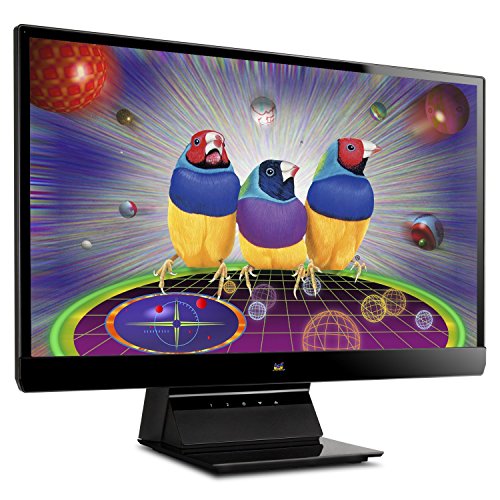 ViewSonic VX2370SMH-LED 23" IPS 1080p Frameless LED Monitor23-Inch7.1 x 21 x 16.1 inches8.6 poundsCheck on Amazon
 Acer 23.8in FHD 1920x1080 IPS 120Hz Office Monitor23.8-inch4.53 x 21.21 x 16.7 inches7.7 poundsCheck on Amazon
 DELL 23in PROFESSIONAL P2319H 1920X1080 IPS LED-LIT DISPLAY6.5 x 20.5 x 13.8 inches14 poundsCheck on Amazon

What's inside
- Why a thin bezel matters, and where it does not
- IPS panels and 1920 by 1080 at this size
- Connections in plain language: HDMI, DisplayPort, VGA and DVI
- Dell P2319H 23″ 16:9 Full HD Ultrathin Bezel LED-Backlit IPS LCD Monitor (B08GHK9NL6)
- HP EliteDisplay 23-Inch Screen LED-Lit Monitor Silver (B075FNG9V7)
- HP Z Display 23-Inch Screen LED-Lit Monitor Black Pearl (B076PM8WQ6)
- ViewSonic VX2370SMH-LED 23″ IPS 1080p Frameless LED Monitor HDMI, DVI, VGA (B008RM235I)
- Acer 23.8in FHD 1920×1080 IPS 120Hz Office Monitor KB242Y G0bi | 1ms, AdaptiveSync (FreeSync Compatible), sRGB 99%, HDMI, VGA, VESA (B09KG5FW1G)
- DELL 23in PROFESSIONAL P2319H 1920X1080 IPS LED-LIT DISPLAY VGA HDMI DP MONITOR (Renewed) (B07MRC8R63)
- How to choose between these six monitors
- Common mistakes when buying a narrow-bezel monitor
- Setup, installation and everyday care
- Deeper practical considerations for a two-screen desk
- Disclosure
- Check prices on Amazon
- Conclusion
As an Amazon Associate I earn from qualifying purchases. This post may contain affiliate links at no extra cost to you.
A narrow-bezel 23 inch monitor solves a very specific desk problem. The screen is large enough for full-time work at 1920 by 1080, the footprint stays manageable on a shallow desk, and the thin frame keeps the interruption small when two screens sit side by side. This guide compares six monitors built around that idea, using only the specifications published in each product title. Where a title names a connection, a refresh figure or a colour figure, that detail is discussed. Where a title stays silent, this guide says so rather than filling the gap with an assumption.
Two points of transparency belong at the start. One Dell P2319H in this list is a Renewed unit, which is a different purchase from a new unit even though the model name is the same. One Acer in this list is 23.8 inches rather than exactly 23 inches, which makes it fractionally wider and changes how it pairs with a true 23 inch screen. Both points are flagged again in the individual sections so a reader building a matched pair does not miss them.
Why a thin bezel matters, and where it does not
Text clarity at native resolution depends on running the operating system at 1920 by 1080 and using the digital connection where one is available, rather than stretching a lower resolution to fill the screen. On a small desk, every centimetre of stand depth and screen width changes where a keyboard, notebook and mouse can sit comfortably through a long work session. For a dual-screen desk, the gap between two active picture areas is shaped by the bezel on both sides, so two narrow edges together create a wider combined seam than a single product photo suggests.
Readers comparing panel categories alongside this size class can also explore best 10 bit monitors for a different priority, colour depth, before deciding whether bezel width or colour performance matters more for their own desk.
IPS panels and 1920 by 1080 at this size
Full HD and 1080p describe the same 1920 by 1080 pixel count in the titles in this group. At 23 inches that count produces a fine enough grid for office documents, code, accounting tables and general browsing without the scaling complications that can appear on smaller, denser screens. The IPS designation, where a title states it, describes the panel technology. The published specifications for the Dell, ViewSonic, Acer and Renewed Dell models name IPS directly. The two HP titles in this group describe LED-lit screens without naming IPS in the title, so readers who require a specific panel technology should confirm that detail on the listing for those two models.
Connections in plain language: HDMI, DisplayPort, VGA and DVI
HDMI is the most widely carried digital connection on modern laptops and desktop computers. DisplayPort, shortened to DP in one title here, is another digital connection common on business computers. VGA is an older analogue connection that still appears on office equipment and projectors. DVI is a legacy digital and analogue family that appears in the ViewSonic title in this group. None of these names, on its own, changes the picture resolution a monitor can show at its native setting, but the connection available on the computer decides which cable belongs in the box on day one.
For refresh-focused comparisons beyond office use, see best 100 hz gaming monitors alongside the Acer section below, where a 120Hz figure is stated in the product title itself.
Dell P2319H 23″ 16:9 Full HD Ultrathin Bezel LED-Backlit IPS LCD Monitor (B08GHK9NL6)
The Dell P2319H 23″ 16:9 Full HD Ultrathin Bezel LED-Backlit IPS LCD Monitor (B08GHK9NL6) is defined in its published title by an ultrathin bezel design, a 23 inch diagonal, a 16:9 aspect ratio, Full HD resolution, LED backlighting and an IPS LCD panel. That combination places it squarely in the narrow-frame, small-desk category covered by this guide, and the sections below separate what the title confirms from what a buyer should still verify.
Hdmi, displayport and vga are not all named in this exact listing title beyond the panel and format details, so the listing page itself should be checked for the final port count before ordering cables. For a buyer, that single point often matters more than a long list of general monitor advice, because it determines the cable to order, the finish that will match the rest of the desk, or the condition of the unit that will arrive.
In a single-screen setup, this size works well centred directly in front of the chair, with the top of the picture area near eye level and the keyboard placed so the elbows stay relaxed. In a dual-screen setup, the same monitor works best when both screens share the same height and angle, so the eye travels across the seam without a step up or down. The narrow frame helps that arrangement visually, but stand height and mount choice do the physical work.
For everyday office tasks, the practical checklist is short. Run the screen at its native 1920 by 1080 setting where the title confirms that resolution. Use a digital connection where the computer offers one. Keep brightness at a level that matches the room rather than at the maximum setting for long document work. Clean the surface with a soft, dry microfibre cloth and avoid pressing on the panel when adjusting the angle.
For a dual-screen desk, the gap between two active picture areas is shaped by the bezel on both sides, so two narrow edges together create a wider combined seam than a single product photo suggests. A narrow bezel does not change the resolution, the panel type or the text size, and those fundamentals should be weighed before the frame is treated as the deciding factor. Cable routing matters more in a multi-monitor arrangement because each additional screen brings its own power lead and at least one signal cable to the same small area.
- Best suited role: a compact primary screen, or one half of a matched multi-monitor pair where the title specifications align.
- Check before ordering: the exact connections on your computer, the stand or mount you plan to use, and, for the Renewed Dell, the condition terms attached to that listing.
- Desk note: measure the available width including the stand, not only the diagonal size named in the title.
HP EliteDisplay 23-Inch Screen LED-Lit Monitor Silver (B075FNG9V7)
The HP EliteDisplay 23-Inch Screen LED-Lit Monitor Silver (B075FNG9V7) is defined in its published title by a 23 inch screen, LED-lit illumination and a silver finish. That combination places it squarely in the narrow-frame, small-desk category covered by this guide, and the sections below separate what the title confirms from what a buyer should still verify.
The elitedisplay name signals a business-focused desk monitor, and the silver finish is the clearest distinguishing detail in the title. For a buyer, that single point often matters more than a long list of general monitor advice, because it determines the cable to order, the finish that will match the rest of the desk, or the condition of the unit that will arrive.
In a single-screen setup, this size works well centred directly in front of the chair, with the top of the picture area near eye level and the keyboard placed so the elbows stay relaxed. In a dual-screen setup, the same monitor works best when both screens share the same height and angle, so the eye travels across the seam without a step up or down. The narrow frame helps that arrangement visually, but stand height and mount choice do the physical work.
For everyday office tasks, the practical checklist is short. Run the screen at its native 1920 by 1080 setting where the title confirms that resolution. Use a digital connection where the computer offers one. Keep brightness at a level that matches the room rather than at the maximum setting for long document work. Clean the surface with a soft, dry microfibre cloth and avoid pressing on the panel when adjusting the angle.
- Best suited role: a compact primary screen, or one half of a matched multi-monitor pair where the title specifications align.
- Check before ordering: the exact connections on your computer, the stand or mount you plan to use, and, for the Renewed Dell, the condition terms attached to that listing.
- Desk note: measure the available width including the stand, not only the diagonal size named in the title.
HP Z Display 23-Inch Screen LED-Lit Monitor Black Pearl (B076PM8WQ6)
The HP Z Display 23-Inch Screen LED-Lit Monitor Black Pearl (B076PM8WQ6) is defined in its published title by a 23 inch screen, LED-lit illumination and a Black Pearl finish. That combination places it squarely in the narrow-frame, small-desk category covered by this guide, and the sections below separate what the title confirms from what a buyer should still verify.
The z display name and the dark finish set this model apart from the silver elitedisplay in the same size class. For a buyer, that single point often matters more than a long list of general monitor advice, because it determines the cable to order, the finish that will match the rest of the desk, or the condition of the unit that will arrive.
In a single-screen setup, this size works well centred directly in front of the chair, with the top of the picture area near eye level and the keyboard placed so the elbows stay relaxed. In a dual-screen setup, the same monitor works best when both screens share the same height and angle, so the eye travels across the seam without a step up or down. The narrow frame helps that arrangement visually, but stand height and mount choice do the physical work.
For everyday office tasks, the practical checklist is short. Run the screen at its native 1920 by 1080 setting where the title confirms that resolution. Use a digital connection where the computer offers one. Keep brightness at a level that matches the room rather than at the maximum setting for long document work. Clean the surface with a soft, dry microfibre cloth and avoid pressing on the panel when adjusting the angle.
Text clarity at native resolution depends on running the operating system at 1920 by 1080 and using the digital connection where one is available, rather than stretching a lower resolution to fill the screen. On a small desk, every centimetre of stand depth and screen width changes where a keyboard, notebook and mouse can sit comfortably through a long work session. For a dual-screen desk, the gap between two active picture areas is shaped by the bezel on both sides, so two narrow edges together create a wider combined seam than a single product photo suggests.
- Best suited role: a compact primary screen, or one half of a matched multi-monitor pair where the title specifications align.
- Check before ordering: the exact connections on your computer, the stand or mount you plan to use, and, for the Renewed Dell, the condition terms attached to that listing.
- Desk note: measure the available width including the stand, not only the diagonal size named in the title.
ViewSonic VX2370SMH-LED 23″ IPS 1080p Frameless LED Monitor HDMI, DVI, VGA (B008RM235I)
The ViewSonic VX2370SMH-LED 23″ IPS 1080p Frameless LED Monitor HDMI, DVI, VGA (B008RM235I) is defined in its published title by a frameless design, a 23 inch IPS panel, 1080p resolution and HDMI, DVI and VGA connections named directly in the title. That combination places it squarely in the narrow-frame, small-desk category covered by this guide, and the sections below separate what the title confirms from what a buyer should still verify.
This is the clearest legacy-connection option in the group because dvi appears alongside hdmi and vga. For a buyer, that single point often matters more than a long list of general monitor advice, because it determines the cable to order, the finish that will match the rest of the desk, or the condition of the unit that will arrive.
In a single-screen setup, this size works well centred directly in front of the chair, with the top of the picture area near eye level and the keyboard placed so the elbows stay relaxed. In a dual-screen setup, the same monitor works best when both screens share the same height and angle, so the eye travels across the seam without a step up or down. The narrow frame helps that arrangement visually, but stand height and mount choice do the physical work.
For everyday office tasks, the practical checklist is short. Run the screen at its native 1920 by 1080 setting where the title confirms that resolution. Use a digital connection where the computer offers one. Keep brightness at a level that matches the room rather than at the maximum setting for long document work. Clean the surface with a soft, dry microfibre cloth and avoid pressing on the panel when adjusting the angle.
- Best suited role: a compact primary screen, or one half of a matched multi-monitor pair where the title specifications align.
- Check before ordering: the exact connections on your computer, the stand or mount you plan to use, and, for the Renewed Dell, the condition terms attached to that listing.
- Desk note: measure the available width including the stand, not only the diagonal size named in the title.
Acer 23.8in FHD 1920×1080 IPS 120Hz Office Monitor KB242Y G0bi | 1ms, AdaptiveSync (FreeSync Compatible), sRGB 99%, HDMI, VGA, VESA (B09KG5FW1G)
The Acer 23.8in FHD 1920×1080 IPS 120Hz Office Monitor KB242Y G0bi | 1ms, AdaptiveSync (FreeSync Compatible), sRGB 99%, HDMI, VGA, VESA (B09KG5FW1G) is defined in its published title by a 23.8 inch size, 1920 by 1080 resolution, an IPS panel, a 120Hz refresh rate as stated in the title, 1ms as stated in the title, AdaptiveSync described as FreeSync Compatible, sRGB 99 percent as stated in the title, HDMI, VGA and VESA mounting. That combination places it squarely in the narrow-frame, small-desk category covered by this guide, and the sections below separate what the title confirms from what a buyer should still verify.
This model is slightly larger than the 23 inch models and the title places it in an office monitor line while also naming gaming-adjacent sync language. For a buyer, that single point often matters more than a long list of general monitor advice, because it determines the cable to order, the finish that will match the rest of the desk, or the condition of the unit that will arrive.
In a single-screen setup, this size works well centred directly in front of the chair, with the top of the picture area near eye level and the keyboard placed so the elbows stay relaxed. In a dual-screen setup, the same monitor works best when both screens share the same height and angle, so the eye travels across the seam without a step up or down. The narrow frame helps that arrangement visually, but stand height and mount choice do the physical work.
For everyday office tasks, the practical checklist is short. Run the screen at its native 1920 by 1080 setting where the title confirms that resolution. Use a digital connection where the computer offers one. Keep brightness at a level that matches the room rather than at the maximum setting for long document work. Clean the surface with a soft, dry microfibre cloth and avoid pressing on the panel when adjusting the angle.
For a dual-screen desk, the gap between two active picture areas is shaped by the bezel on both sides, so two narrow edges together create a wider combined seam than a single product photo suggests. A narrow bezel does not change the resolution, the panel type or the text size, and those fundamentals should be weighed before the frame is treated as the deciding factor. Cable routing matters more in a multi-monitor arrangement because each additional screen brings its own power lead and at least one signal cable to the same small area.
- Best suited role: a compact primary screen, or one half of a matched multi-monitor pair where the title specifications align.
- Check before ordering: the exact connections on your computer, the stand or mount you plan to use, and, for the Renewed Dell, the condition terms attached to that listing.
- Desk note: measure the available width including the stand, not only the diagonal size named in the title.
DELL 23in PROFESSIONAL P2319H 1920X1080 IPS LED-LIT DISPLAY VGA HDMI DP MONITOR (Renewed) (B07MRC8R63)
The DELL 23in PROFESSIONAL P2319H 1920X1080 IPS LED-LIT DISPLAY VGA HDMI DP MONITOR (Renewed) (B07MRC8R63) is defined in its published title by a 23 inch professional P2319H format, 1920 by 1080 resolution, an IPS LED-lit display and VGA, HDMI and DP connections, supplied as a Renewed unit. That combination places it squarely in the narrow-frame, small-desk category covered by this guide, and the sections below separate what the title confirms from what a buyer should still verify.
The renewed status is the essential transparency point here, because the underlying model name matches the first dell in this roundup. For a buyer, that single point often matters more than a long list of general monitor advice, because it determines the cable to order, the finish that will match the rest of the desk, or the condition of the unit that will arrive.
In a single-screen setup, this size works well centred directly in front of the chair, with the top of the picture area near eye level and the keyboard placed so the elbows stay relaxed. In a dual-screen setup, the same monitor works best when both screens share the same height and angle, so the eye travels across the seam without a step up or down. The narrow frame helps that arrangement visually, but stand height and mount choice do the physical work.
For everyday office tasks, the practical checklist is short. Run the screen at its native 1920 by 1080 setting where the title confirms that resolution. Use a digital connection where the computer offers one. Keep brightness at a level that matches the room rather than at the maximum setting for long document work. Clean the surface with a soft, dry microfibre cloth and avoid pressing on the panel when adjusting the angle.
Text clarity at native resolution depends on running the operating system at 1920 by 1080 and using the digital connection where one is available, rather than stretching a lower resolution to fill the screen. On a small desk, every centimetre of stand depth and screen width changes where a keyboard, notebook and mouse can sit comfortably through a long work session. For a dual-screen desk, the gap between two active picture areas is shaped by the bezel on both sides, so two narrow edges together create a wider combined seam than a single product photo suggests.
- Best suited role: a compact primary screen, or one half of a matched multi-monitor pair where the title specifications align.
- Check before ordering: the exact connections on your computer, the stand or mount you plan to use, and, for the Renewed Dell, the condition terms attached to that listing.
- Desk note: measure the available width including the stand, not only the diagonal size named in the title.
How to choose between these six monitors
Start with condition and size, because those two decisions cannot be changed with a cable or a setting. Decide whether a Renewed unit is acceptable, and decide whether a 23.8 inch screen is close enough to 23 inches for the pairing you have in mind. Next, list the connections on the computer that will drive the screen and match that list against the connections named in each title. Then consider finish, because the silver HP, the Black Pearl HP and the other models will not look identical on the same desk even when their screens are the same size.
Readers whose main interest is gaming at the standard resolution can compare this office-focused group with best 1080 gaming monitors 60hz to see how priorities change when refresh behaviour moves to the centre of the decision.
Text clarity at native resolution depends on running the operating system at 1920 by 1080 and using the digital connection where one is available, rather than stretching a lower resolution to fill the screen. On a small desk, every centimetre of stand depth and screen width changes where a keyboard, notebook and mouse can sit comfortably through a long work session. For a dual-screen desk, the gap between two active picture areas is shaped by the bezel on both sides, so two narrow edges together create a wider combined seam than a single product photo suggests.
An IPS panel is valued in this size class for consistent colour and clarity when the screen is viewed slightly off centre, for example when two monitors are angled inward toward the chair. LED backlighting is the illumination method named across this group, and it is now the standard approach for slim office monitors of this size. Before buying two units for a pair, checking that both use the same height, the same mount pattern and the same connection type saves a surprising amount of adjustment time.
Common mistakes when buying a narrow-bezel monitor
- Buying two different sizes for a matched pair and then discovering that text and windows change scale as they cross from one screen to the other.
- Assuming every title in a roundup names the same connections, when some titles list ports explicitly and others do not.
- Treating a Renewed unit as identical to a new unit without reading the condition information on that specific listing.
- Measuring only the diagonal and forgetting stand depth, which is what decides whether a keyboard still fits on a shallow desk.
- Running the monitor below its native resolution and blaming the panel for soft text that the setting caused.
- Forgetting that a VESA mount, where a title names VESA, still requires a compatible arm or bracket bought to the correct pattern.
Text clarity at native resolution depends on running the operating system at 1920 by 1080 and using the digital connection where one is available, rather than stretching a lower resolution to fill the screen. On a small desk, every centimetre of stand depth and screen width changes where a keyboard, notebook and mouse can sit comfortably through a long work session. For a dual-screen desk, the gap between two active picture areas is shaped by the bezel on both sides, so two narrow edges together create a wider combined seam than a single product photo suggests.
Setup, installation and everyday care
Unpack the monitor on a soft, flat surface, attach the stand before lifting the screen by its frame, and connect the signal cable before the power lead so the computer can detect the display cleanly on first start. Set the resolution to 1920 by 1080 where that is the native figure, position the screen an arm length away as a starting point, and angle a second screen inward so both picture areas face the chair. For wall or arm mounting, only the Acer title in this group names VESA directly, so mounting plans for the other models should be confirmed against their own listings first.
For portable and travel-friendly screen ideas that follow a different form factor entirely, best usb 3 portable laptop monitors covers a separate category from the fixed desk monitors in this guide.
An IPS panel is valued in this size class for consistent colour and clarity when the screen is viewed slightly off centre, for example when two monitors are angled inward toward the chair. LED backlighting is the illumination method named across this group, and it is now the standard approach for slim office monitors of this size. Before buying two units for a pair, checking that both use the same height, the same mount pattern and the same connection type saves a surprising amount of adjustment time.
For a dual-screen desk, the gap between two active picture areas is shaped by the bezel on both sides, so two narrow edges together create a wider combined seam than a single product photo suggests. A narrow bezel does not change the resolution, the panel type or the text size, and those fundamentals should be weighed before the frame is treated as the deciding factor. Cable routing matters more in a multi-monitor arrangement because each additional screen brings its own power lead and at least one signal cable to the same small area.
Deeper practical considerations for a two-screen desk
Matching two monitors is about more than buying the same diagonal size twice. Brightness should be set to a similar level on both screens so that a white document does not appear to change colour as it is dragged across the seam. Most operating systems allow each display to be arranged, scaled and oriented independently, and spending a few minutes in those settings at installation prevents weeks of minor irritation. Align the virtual arrangement in the settings with the physical arrangement on the desk, so the cursor crosses between screens at the height where the panels actually meet rather than jumping unexpectedly.
Colour consistency between two units of the same model is generally closer than between two different models, which is another reason a matched pair deserves consideration for design, photography or retail work where a product image must look the same on both screens. Where two different models must be paired, placing the newer or clearer screen directly in front of the chair and the secondary screen at an angle for email, messaging and reference material is a sensible compromise. That arrangement also reflects how attention actually works during a day, with one primary task and several supporting windows around it.
Cable length deserves a measurement before ordering rather than after. A monitor placed on the far side of a desk, or mounted on an arm that moves, may need a longer signal cable than the one supplied in the box, and a cable that is pulled tight will work loose over time. Power leads should reach the socket or extension strip without crossing the keyboard area. Keeping one spare signal cable of the correct type in the desk drawer turns a future fault-finding exercise into a two-minute swap, which is especially valuable when a screen is used for work with fixed deadlines.
Ergonomics at this screen size are forgiving but not automatic. The chair height, desk height and monitor height work as a system, and changing one element changes the others. If the monitor stand does not reach the height the chair requires, a stable riser or a mounting arm is a better answer than stacking the screen on books or boxes, which can wobble and can block ventilation. Breaks in posture matter as much as the starting position, and a setup that allows the screen to be repositioned easily through the day supports that variation better than a fixed, taped-down arrangement.
For the Renewed Dell in this group, the practical approach is to treat the purchase as its own category. Read the condition description attached to that specific listing, confirm what accessories are included, and check the return terms before the unit is integrated into a matched pair. A Renewed monitor that performs as described can be a rational choice for a secondary screen, a spare screen or a home office on a tighter budget, provided the buyer has made that decision deliberately rather than discovering the Renewed status after delivery.
The Acer at 23.8 inches deserves a similarly deliberate decision. That extra fraction of an inch is not a problem in a single-screen setup, and for a single screen the larger picture area may be welcome. In a matched pair with a true 23 inch model, however, the difference in physical size means windows and text will not line up perfectly across the seam, and the two stands may place the screens at slightly different heights. Buyers planning a pair should therefore decide whether to buy two of the same model rather than mixing sizes for the sake of a small saving.
Sound, lighting and reflections complete the picture. A glossy room light reflected in the screen can undo the benefit of a good panel, so positioning the desk so that windows sit to the side rather than directly behind or in front of the screen is worth the effort. Evening work benefits from a warm room light behind the monitor rather than a dark room with a bright screen, which reduces the contrast the eyes must handle. These are room decisions rather than product decisions, and they are available to every buyer in this group regardless of which model is chosen.
Finally, keep the packaging and the purchase records for the first period of use, note the connection and settings that produced the best text clarity, and photograph the cable routing once it works well. That small record makes it far easier to restore the same setup after moving house, changing desks or replacing a cable, and it turns a one-time installation effort into a repeatable system for the next screen as well.
A final desk audit before ordering takes only a few minutes and prevents most returns in this category. Measure the width, depth and height available, list the connections on the computer, decide whether the screen will stand alone or form half of a pair, and write down whether a new or Renewed unit is intended. With those four answers recorded, the six titles in this guide can be compared in minutes, and the remaining choice becomes a matter of finish, connection fit and personal preference rather than guesswork.
Disclosure
This guide was prepared from the published product titles and widely understood monitor terminology, and it is intended to help readers compare formats, connections and condition before they buy. As an Amazon Associate we earn from qualifying purchases. Links in this article may therefore support the running of this site at no additional cost to the reader, and that relationship does not change which specifications are reported here or how the Renewed and 23.8 inch exceptions are flagged.
Check prices on Amazon
Live listings for the shortlist in this guide are pulled from Amazon below, so prices and availability are always current at the moment you look.
Conclusion
Cable routing matters more in a multi-monitor arrangement because each additional screen brings its own power lead and at least one signal cable to the same small area. Viewing distance on a compact desk is usually shorter than in a larger office, which makes the 1920 by 1080 pixel grid on a 23 inch panel a practical balance for documents, spreadsheets and browser windows. An IPS panel is valued in this size class for consistent colour and clarity when the screen is viewed slightly off centre, for example when two monitors are angled inward toward the chair.
For most small desks, the right choice in this group is the monitor whose size, condition, finish and named connections match the computer and the room, rather than the model with the longest title. Keep the seam in mind for a pair, keep the native resolution in mind for text, and keep the Renewed label in mind for the second Dell, and the comparison becomes straightforward.