What's inside
- Key Takeaways
- Quick Picks
- How We Chose These Picks
- The Fifteen-Inch Field at a Glance: Where Each Machine Stands
- What Do the Screens and Keyboards Feel Like Across the Six?
- How Long Will Each of These Machines Stay Pleasant?
- Who Should Buy Which of the Best 15 Inch Laptops?
- How Do You Make a Fifteen-Inch Laptop Your Only Computer?
- What Should You Do in the First Week With a New Fifteen-Inch Laptop?
- Is Now the Right Time to Buy, and Which Tier Ages Best?
- Common Mistakes When Choosing at This Size
- Final Recommendation
- Frequently Asked Questions
- Related Guides
As an Amazon Associate I earn from qualifying purchases. This post may contain affiliate links at no extra cost to you.
widgetverdict.com is reader-supported. When you buy through links on our site, we may earn an affiliate commission.
Ask a room of experienced laptop owners what size they would buy again, after years of living with their choices, and most land on the same answer: fifteen inches, give or take the decimal. The best 15 inch laptops occupy that consensus because the size resolves the category’s oldest tension — a screen large enough for real work and real films, in a machine that still fits the bags, desks, and laps of ordinary life. Fourteen inches asks documents to shrink; seventeen asks the owner to commit. Fifteen is the size of no apology in either direction, which is why every major maker fights hardest here and why the choice, paradoxically, is the hardest to make well.
This guide ranks the size class on its own terms, without a budget ceiling, a thinness filter, or a gaming requirement. Four picks carry verified links whose titles state their configurations outright: Apple’s MacBook Air 15, the machine most rivals are measured against; HP’s Pavilion 15 in a light-duty 2026 configuration sold as a renewed unit, included with its entry-level processor and refurbished status stated as plainly as its virtues; Lenovo’s IdeaPad Slim 3, the touchscreen all-rounder of the Windows mainstream; and ASUS’s Vivobook 15, the straightforward value design. Two further machines — Dell’s Inspiron 15 and Lenovo’s ThinkPad E15 — are profiled in prose, the first because its configurations multiply across retailers beyond any single listing’s honesty, the second because business channels, not marketplaces, are where it is properly bought. On linked listings you can check price on Amazon and confirm the exact build in the title; prose picks name the configuration to hunt.
Read the six as a map of what fifteen inches can mean. At one pole sits the Air: silent, thin, premium, and sealed. At the other sits the Pavilion’s renewed configuration: modest silicon, a low-commitment route into a big screen for light work. Between them, the IdeaPad and Vivobook divide the Windows mainstream by touch and by simplicity, while the prose pair represent the support-first and business-first philosophies. There is no single winner hiding in that map, because fifteen-inch buyers are not one buyer — but there is a correct answer for each reader, and the sections below are organised to surface it quickly.
Key Takeaways
- The MacBook Air 15 leads the class on completeness: M5 performance, a 15.3 inch Liquid Retina display, 16GB of memory, and silence under every mainstream workload.
- The IdeaPad Slim 3 is the Windows pick for most people — an eight-core Ryzen 7, 16GB of memory, and a touchscreen in a mainstream chassis.
- The Pavilion 15’s linked configuration is a light-duty, renewed unit built on Intel’s N100; buy it for browsing, documents, and media, not for heavy work.
- The Vivobook 15 covers the basics cleanly — full HD screen, modern Intel Core 3, a tidy design — for buyers whose needs are equally clean.
- Memory divides the guide: the Air, IdeaPad, and prose picks target 16GB, while the Pavilion and Vivobook configurations carry 8GB and should be bought with that ceiling understood.
- Exact screen sizes are stated throughout — 15, 15.3, and 15.6 inches all appear — and the decimals matter less than the memory figure in every comparison here.
Quick Picks
| Pick | Badge | Why it earns its place |
|---|---|---|
| Apple MacBook Air 15 M5 | Class leader | The complete large laptop: fanless M5 power, a bright 15.3 inch display, and the best battery manners in this guide. |
| HP Pavilion 15 2026 | Light-duty value | A renewed, lightweight 15 inch machine on Intel’s N100 with a full HD screen and keypad — browsing and documents done cheaply. |
| Lenovo IdeaPad Slim 3 15.6 | Windows all-rounder | Ryzen 7 eight-core performance, 16GB of memory, and a full HD touchscreen in Lenovo’s mainstream line. |
| ASUS Vivobook 15 | Straightforward basics | A 15.6 inch full HD design on Intel’s Core 3 100U with a clean, professional look in Cool Silver. |
| Dell Inspiron 15 | Prose pick — the safe default | The support network and keyboard of the mainstream’s most established name, in configurations for every tier. |
| Lenovo ThinkPad E15 | Prose pick — business sense | The ThinkPad formula at its most accessible: durable, serviceable, and bought through business channels. |
How We Chose These Picks
A general guide owes its readers a general standard, so selection weighed the whole ownership experience rather than any single axis. Performance was assessed against the mainstream’s real ceiling — heavy browsing, office suites, video calls, photo management, media, and light creative work — and every pick clears it, though by very different margins that each section states honestly. The Air and the IdeaPad clear it with years of headroom. The Vivobook clears it for the workloads its buyer actually runs. The Pavilion’s renewed configuration clears the light end of it and says so, which is why it is framed as the light-duty pick rather than dressed as something stronger.
Screens were judged as the size class’s reason to exist. A 15 inch laptop sells a big canvas, so panel quality — full HD resolution as the floor, IPS-class viewing angles, brightness for ordinary rooms — carried heavy weight, and the Air’s Liquid Retina sets the guide’s reference standard. Keyboards, trackpads, cameras, and speakers were scored as the daily interface they are, because at this size the machine is usually its owner’s only computer and every component gets used every day.
Ownership economics formed the third lens. Sealed machines were judged on whether their fixed configuration will still serve in year four; the renewed Pavilion was judged on the refurbisher’s warranty reality as much as its specification; the prose picks were judged on the channels that sell them properly. The aim throughout was a guide a reader could buy from directly — four machines in verified listings — extended by two more that reward a different route to purchase, with no pick present merely to fill a row.

Apple MacBook Air 15 M5 — Class Leader
Any honest ranking of this size begins with the machine that redefined it. The Air 15 puts Apple’s M5 chip — with 16GB of unified memory and a 512GB SSD in the verified configuration — inside an aluminium shell so slim that the laptop reads as a screen with ambitions, and it does the whole job without a fan. The practical consequences stack up quietly: no fan noise in a quiet room, no hot lap under load, no performance anxiety across the mainstream’s entire workload, and a battery that treats the working day as a suggestion rather than a limit. The 15.3 inch Liquid Retina panel is bright, colour-rich, and framed tightly enough that the machine’s desk footprint feels a size smaller than its screen.
The supporting details are the ones rivals chase. A 12MP Center Stage camera keeps you framed and lit on calls with a competence built-in webcams rarely approach. Touch ID turns logins and approvals into a fingertip’s reflex. Wi-Fi 7 covers the newest networks, and the Midnight finish of the verified listing wears its fingerprints and its professionalism equally gracefully. The keyboard and glass trackpad remain the pairing by which the class is judged — the trackpad in particular, wide and precise, quietly deletes the mouse from most owners’ bags.
The boundaries are Apple’s standing ones and are stated here without varnish. The machine runs macOS, which is a genuine disqualifier where Windows-only software rules. Its two USB-C ports make a hub the desk worker’s first accessory. And its memory and storage are settled forever at purchase, so the configuration deserves a moment’s foresight — owners whose libraries grow quickly should weigh the storage question at the order page, not in year three. Within those boundaries, this is the most complete 15 inch laptop in the guide and the one against which every other pick’s compromises are measured.
Ownership research consistently surfaces the same Air details once the honeymoon ends, and they are worth listing because none appears in a specification table. The speakers, firing from a chassis this thin, embarrass most of the Windows field for film and call clarity. The lid opens one-handed without the base lifting, a small engineering courtesy felt several times a day. Standby drain is so low that the machine’s charge state stops being a thing its owner tracks. And the resale and hand-me-down culture around MacBooks means the Air’s cost should be reckoned across two owners, not one — a machine passed to a family member in year four is still earning its purchase price, which reframes what its premium actually buys.
The renewed route itself deserves a fair hearing beyond this one listing, because the Pavilion illustrates its best case. A current-design machine, professionally checked and resold with a returns promise, puts a genuinely large, genuinely modern screen into hands that a new flagship’s price would exclude entirely — a grandparent joining family video calls on a 15 inch canvas rather than a phone, a household’s second screen for homework and recipes, a spare that keeps a family working when the main machine is away for repair. Those are real computing needs, and meeting them well at a modest commitment is not a compromise; it is the market working. The discipline is only to buy the workload honestly and the seller carefully, both of which this section has tried to make easy.
Two further IdeaPad traits round out its all-rounder claim. Its port selection follows Lenovo’s mainstream generosity, so the dongle drawer stays shut for presenters and peripheral owners more often than with slimmer rivals. And its thermal manners under the mainstream workload are calm — the Ryzen chip’s efficiency means the fan is a background presence during documents and calls rather than a participant in them. Neither trait headlines a listing, and together they describe the machine’s real character: considered, unhurried competence across every ordinary demand, which is what an all-rounder is for. Readers comparison-shopping against the Vivobook should notice that the IdeaPad’s advantages are precisely the ones that compound — memory, cores, touch — while the ASUS’s are the ones that greet you on day one.
The Vivobook also rewards a note on ASUS’s mainstream software restraint. The preinstalled load on this line is comparatively light, the utilities that remain are mostly useful, and the machine reaches its owner’s working rhythm quickly after setup — a small mercy that budget buyers, who often lack the patience or the knowledge to debloat a system, benefit from disproportionately. Paired with the tidy hardware, the result is a laptop that feels considered rather than merely inexpensive, and for the presentable-basics brief that feeling is the product. A machine can be the cheapest adequate option or the neatest adequate option; the Vivobook has chosen to be the second, and its buyers can tell.
- Power and memory: Apple M5, 16GB unified memory, no fan anywhere in the design
- Screen: 15.3 inch Liquid Retina, bright and colour-rich
- Storage: 512GB SSD in the verified build, fixed for the machine’s life
- Calls and access: 12MP Center Stage camera, Touch ID in the power button
- Radio and shell: Wi-Fi 7, aluminium unibody in Midnight
Strengths
- Silent, cool, and fast across the whole mainstream workload.
- Battery life that removes the charger from the daily bag.
- Camera, trackpad, speakers, and screen form the class’s reference package.
Trade-offs
- macOS only — Windows-only software environments need not apply.
- Two ports total; desk setups will budget for a hub or dock.
- Configuration is permanent, so storage foresight matters at purchase.
Best for: professionals, writers, and students wanting the size class at its most complete.
Not suited for: Windows-only workplaces, or owners who expand storage as they go.
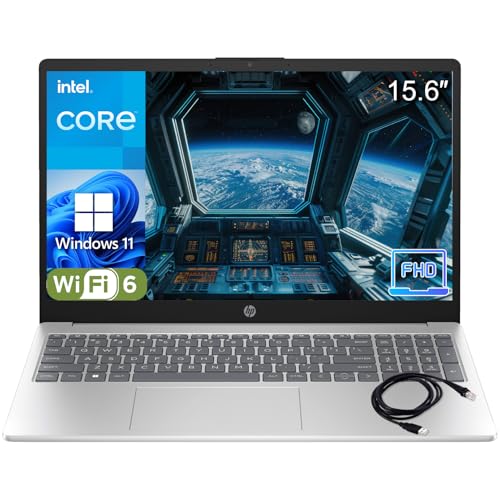
HP Pavilion 15 2026 — Light-Duty Value
This Pavilion asks to be judged by a different brief than its companions, and its listing is admirably plain about the terms: an Intel N100 processor with four cores, 8GB of memory, a 256GB SSD, a 15 inch full HD display with a numeric keypad, Microsoft Office 365 in the bundle, and a renewed unit — professionally refurbished rather than factory-new. The N100 is Intel’s efficiency-first silicon, designed for exactly the work this machine targets: browsing, documents, email, video calls, and streaming, all of which it handles smoothly and quietly, sipping power in a lightweight chassis HP positions for long battery life.
What this configuration is not must be said with equal clarity. Four efficiency cores and eight gigabytes are not a heavy multitasker’s toolkit, a creator’s engine, or a games machine beyond the lightest casual titles, and no honest guide should let the Pavilion name — which also sits on far stronger machines, two of them elsewhere in this batch of guides — imply otherwise. The 256GB drive suits a cloud-centred life and pinches a local-hoarding one. Buyers should also weigh the renewed terms: a shorter warranty horizon than new stock, and a seller whose returns policy deserves reading before the order.
Within its brief, though, the machine makes real sense. A second laptop for the house, a first laptop for a light user, a big calm screen for a parent whose computing is the browser and the family archive’s front end, a student whose work lives in documents and lectures — for those readers the Pavilion delivers the 15 inch experience, a proper keyboard with a keypad, and Office aboard, at the lowest commitment in this guide. The error would not be buying it; the error would be buying it for the wrong workload, and this section exists to prevent exactly that.
- Processor and memory: Intel N100, four efficiency cores, 8GB RAM
- Storage: 256GB SSD — a cloud-centred allowance
- Screen and deck: 15 inch full HD display, numeric keypad
- Bundle and system: Microsoft Office 365 included, Windows 11 Home
- Listing status: renewed unit in Platinum White; verify warranty and returns
Strengths
- Lightweight, quiet, and frugal — a big screen for light work at the guide’s lowest commitment.
- Full HD panel and a proper numeric keypad cover documents and figures comfortably.
- Office 365 in the bundle removes a first purchase for its intended user.
Trade-offs
- The N100’s four cores set a hard ceiling well below the guide’s other picks.
- 8GB of memory and 256GB of storage assume a light, cloud-centred workload.
- Renewed status means warranty terms vary and deserve verification.
Best for: light users, second household machines, and browser-and-documents students.
Not suited for: heavy multitasking, creative production, or gaming beyond casual titles.

Lenovo IdeaPad Slim 3 15.6 — Windows All-Rounder
If the Air is the class’s ceiling, the IdeaPad Slim 3 is its centre of gravity — the Windows machine this guide would hand to the widest range of readers. Its engine is AMD’s Ryzen 7 5825U, an eight-core processor whose performance has been proven across several model years, paired with 16GB of DDR4 memory and a 512GB SSD. That trio is the mainstream’s sweet spot stated numerically: enough cores for anything the category’s workload contains, enough memory for the machine’s fourth year to feel like its first, and storage that holds a real life without weekly housekeeping. Radeon integrated graphics ride along for media, photo work, and undemanding games.
The display adds the guide’s only touch layer among its mainstream Windows picks: a 15.6 inch full HD touchscreen that earns its place in the small interactions — dismissing, scrolling, signing, zooming a map with two fingers — scattered through every day. Around it, Lenovo assembles the sensible supporting cast: Wi-Fi 6 and Bluetooth 5.2, a 720p camera adequate to routine calls, Windows 11 Home, and a keyboard from the maker whose mainstream decks are the ones typists consistently praise. The Slim name is honoured in the carrying: this is a 15.6 inch machine that moves between desk, bag, and sofa without ceremony.
Set against the Air, the exchanges are the familiar ones — Windows breadth and touch against macOS polish and silence, a fine panel against a finer one, mainstream materials against a unibody. Set against the rest of this guide’s Windows field, the IdeaPad is simply the most balanced: stronger than the Vivobook’s configuration, more capable than the Pavilion’s by a wide margin, and touch-equipped where both are not. Buyers who want one Windows laptop to do everything a household or a degree contains should start here and require a specific reason to leave.
- Engine room: AMD Ryzen 7 5825U, eight cores, Radeon integrated graphics
- Memory and storage: 16GB DDR4 beside a 512GB SSD
- Screen: 15.6-inch 1080p touchscreen
- Radios and camera: Wi-Fi 6, Bluetooth 5.2, 720p HD webcam
- System: Windows 11 Home in a slim mainstream chassis
Strengths
- The guide’s best balance of processor, memory, and price-class on the Windows side.
- Touchscreen adds daily convenience the other mainstream picks lack.
- Lenovo’s keyboard and the slim build suit both desk and bag.
Trade-offs
- The 720p camera is the specification that feels its class on long call days.
- DDR4 memory is a generation behind the newest standard, if an invisible one in use.
- Integrated graphics cap gaming at undemanding titles and settings.
Best for: households, students, and hybrid workers wanting one Windows machine for everything mainstream.
Not suited for: serious gaming, or video-call-heavy roles wanting a sharper camera.

ASUS Vivobook 15 — Straightforward Basics
The Vivobook 15 is the guide’s argument for simplicity. ASUS’s mainstream line has always sold a clean proposition — a big screen, a current processor, a tidy design, no theatrics — and this configuration states it in the listing’s own terms: a 15.6 inch full HD display, an Intel Core 3 100U processor, 8GB of memory, a 256GB SSD, Windows 11 Home, and a Cool Silver finish on the F1504VA build. The Core 3 is Intel’s current entry silicon, a clear step above the efficiency-only chips of the class’s floor: browsing, documents, calls, and media run with the smoothness its intended user expects, and the machine never pretends to a brief beyond that.
The design deserves its sentence. Vivobooks look like laptops designed by people who attend meetings: slim bezels, a restrained deck, a finish that survives a professional room without comment. For the buyer equipping a home office that clients see on camera, or a student whose laptop will be judged in seminars, that presentability is a feature with daily value, and it distinguishes the ASUS from louder rivals at its tier. Port selection follows the mainstream’s practical pattern, and the keyboard covers long documents without complaint.
The ceilings are the configuration’s, stated plainly: eight gigabytes of memory and a quarter-terabyte drive define a machine for the browser-and-documents centre of life, with cloud storage assumed and heavy local archives unwelcome. Buyers whose work fits that centre — and it is a large, honest centre — get a handsome, adequate, uncomplicated machine. Buyers at its edges should look to the IdeaPad’s configuration above and pay the difference gladly, because the Vivobook’s virtues are real but they are the virtues of enough, and enough must be measured against the owner’s actual week.
- Processor and memory: Intel Core 3 100U with 8GB RAM
- Storage: 256GB SSD, sized for cloud-assisted work
- Screen: FHD 15.6-inch panel in slim bezels
- Build and system: Cool Silver finish, Windows 11 Home, model F1504VA
- Character: restrained, professional design across the mainstream brief
Strengths
- Clean, presentable design that suits client-facing and academic settings.
- Current entry Intel silicon keeps everyday work smooth and quiet.
- Full HD screen covers the size class’s core promise without compromise.
Trade-offs
- 8GB of memory is the mainstream’s floor, not its comfort figure.
- 256GB of storage assumes cloud habits from day one.
- No touchscreen, and graphics are integrated only.
Best for: home offices, students, and presenters whose work is documents, calls, and browsing.
Not suited for: heavy multitasking, large local archives, or gaming beyond the casual.
Dell Inspiron 15 — Prose Pick, the Safe Default
Every category has a purchase nobody gets fired for making, and in this one it is Dell’s Inspiron 15. The formula is institutional: a 15.6 inch full HD mainstream laptop, in Intel and AMD configurations spanning the class’s tiers, sold and serviced by the largest support organisation in the business. In a general guide its role is specific — it is the recommendation for buyers whose deciding question is not performance but consequence: what happens in year two when something fails, who answers, and how far away the answer lives. For households without a resident technician, that infrastructure outweighs small specification gaps against any rival in this guide.
The prose treatment reflects Dell’s retail reality: the Inspiron nameplate covers machines of widely varying merit across sellers, and a single link would endorse configurations this guide has not examined. Shop the line by its figures — sixteen gigabytes as the target, full HD IPS as the screen floor, a current-generation processor — and the Inspiron rewards the diligence with a comfortable keyboard, a restrained design, and ownership paperwork that stays simple. Dell’s own store is often the cleanest route, with the warranty record established at purchase.
Against the IdeaPad, the Inspiron trades touch and a little value for support depth. Against the Vivobook, it trades design flair for the same. Neither trade is a defeat; they are the mainstream sorting itself by what its buyers fear most — being unsupported, versus being underwhelmed — and the Inspiron’s buyers have simply chosen their fear honestly.
One Inspiron pattern is worth passing on from long observation of the line: its best value appears on a rhythm. Dell’s direct store cycles promotions through the well-specified configurations regularly, and the gap between a promoted 16GB Inspiron and its rivals narrows to the point where the support network becomes effectively free. Buyers with any flexibility in timing should let that rhythm work for them, checking the exact configuration against this guide’s targets whenever a promotion surfaces. The Inspiron bought patiently is a different value proposition from the Inspiron bought in a hurry, and the line rewards the patient more reliably than any rival line here.
- Class profile: 15.6 inch full HD line spanning Intel and AMD tiers
- Configuration targets: 16GB memory, FHD IPS panel, current processor
- Deck: comfortable keyboard with numeric pad on most builds
- Ownership note: Dell’s service network is the pick’s defining asset; configurations vary by seller
Strengths
- Support and warranty infrastructure beyond any rival here.
- Configurations exist for nearly every tier of the size class.
- Keyboard and design suit shared and professional settings alike.
Trade-offs
- The nameplate hides weak builds with 8GB and dim panels.
- Value per specification trails Lenovo at comparable configurations.
- No touchscreen on the mainstream builds in this class.
Best for: buyers ranking support, warranty simplicity, and keyboard comfort first.
Not suited for: specification-per-pound bargain hunting.
Lenovo ThinkPad E15 — Prose Pick, Business Sense
The ThinkPad E15 is the business world’s answer to this size class, and its presence in a general guide is deliberate: a meaningful share of 15 inch buyers are really buying a work instrument, and the E series is where ThinkPad durability, serviceability, and keyboard culture meet an accessible tier. The formula is conservative in the ways businesses value — a robust chassis, ports for real offices, security features for real IT departments, and components a technician can reach — wrapped around Intel or AMD processors depending on generation and channel.
It is profiled in prose because its natural habitat is the business channel: Lenovo’s own store, resellers, and fleet agreements, where configurations are specified per order and marketplace listings are the exception. Buyers shopping it should target the same figures this guide applies everywhere — sixteen gigabytes, a full HD IPS panel, half a terabyte — and value what the E adds on top: a keyboard with the ThinkPad reputation behind it, a TrackPoint for its devotees, and a design that treats a five-year service life as the baseline assumption.
Against its IdeaPad sibling, the E trades consumer polish and touch for durability culture and serviceability. Against the Inspiron, it trades Dell’s consumer support reach for Lenovo’s business one. The reader who recognises their own working life in those trades has found their pick; the reader who does not should take the IdeaPad and never look back.
The E15’s serviceability deserves a concrete illustration. In business service culture, a keyboard, a battery, a drive, or a fan is a part with a number, stocked and replaceable by a technician in a single visit, because fleets cannot tolerate machines retired by a single failed component. A private buyer entering that ecosystem inherits the benefit: the E15’s fifth year is a maintenance question, not a replacement question. For a small firm equipping several staff, that difference compounds across the fleet into the line’s entire argument — and it is why the ThinkPad name, decades into its life, still closes business sales that prettier machines open.
- Class profile: 15.6 inch business line in Intel and AMD generations
- Configuration targets: 16GB memory, FHD IPS panel, 512GB storage
- Deck: ThinkPad keyboard with TrackPoint
- Ownership note: bought through business channels; specify the configuration per order
Strengths
- Durability and serviceability culture aimed at five-year working lives.
- The keyboard is the business class’s reference standard.
- Security and port selection suit managed office environments.
Trade-offs
- Design is utilitarian; media and speakers are afterthoughts.
- Business-channel buying lacks marketplace convenience.
- Consumer touches like touchscreens are scarce in the line.
Best for: professionals and small firms buying a durable, serviceable work instrument.
Not suited for: media-centred households, or shopping led by consumer polish.
The Fifteen-Inch Field at a Glance: Where Each Machine Stands
| Machine | Processor | Memory | Storage | Defining trait |
|---|---|---|---|---|
| Apple MacBook Air 15 M5 | Apple M5 | 16GB unified | 512GB SSD | Silent completeness |
| HP Pavilion 15 2026 | Intel N100 | 8GB | 256GB SSD | Light-duty renewed value |
| Lenovo IdeaPad Slim 3 15.6 | Ryzen 7 5825U | 16GB DDR4 | 512GB SSD | Touch all-rounder |
| ASUS Vivobook 15 | Intel Core 3 100U | 8GB | 256GB SSD | Presentable basics |
| Dell Inspiron 15 | Varies by tier | Target 16GB | Varies | Support network |
| Lenovo ThinkPad E15 | Varies by generation | Target 16GB | Target 512GB | Business durability |
The memory column is the table’s honest spine. Three philosophies sit inside it: the 16GB machines bought for the long term, the 8GB configurations bought knowingly for light work, and the prose lines where the figure is yours to specify. Every other column matters, but that one decides how the purchase feels in year four, and the guide’s recommendations can be reconstructed from it alone.
What Do the Screens and Keyboards Feel Like Across the Six?
A size class sells a canvas, so the canvas deserves direct comparison. The Air’s Liquid Retina is the guide’s reference: bright, tightly framed, and colour-rich enough that photographs look like decisions rather than approximations. The IdeaPad’s full HD touch panel is the mainstream’s good citizen — accurate, responsive to finger and glance, and matte enough for ordinary rooms. The Pavilion and Vivobook panels cover the full HD baseline competently, which at this size still means a genuinely pleasant working area; their buyers should simply know they are buying adequacy where the Air buys excellence. The prose pair split by purpose: the Inspiron’s panels vary by configuration and must be verified per build, while the ThinkPad’s are chosen by businesses for legibility across long days rather than for media glamour, and judged on that basis they succeed.
Keyboards tell a similar story of one reference and several honest answers. The ThinkPad’s deck is the typist’s benchmark — deep, sculpted, and backed by decades of iteration — with the IdeaPad and Inspiron close behind in mainstream tuning. The Air’s keyboard is shallower by design and excellent of its kind, its enormous trackpad compensating for any hand that misses travel. The Pavilion’s keypad makes it the figures worker’s friend, and the Vivobook’s deck is the neat, unremarkable middle. No keyboard here will ruin a purchase; the differences decide delight, not adequacy, and a buyer’s own ten minutes at a store keyboard remains the cheapest certainty available in this entire guide.
Sound and cameras complete the daily interface. The Air leads both — speakers with genuine body, a camera that flatters — while the rest divide the mainstream honours: adequate cameras, speech-first speakers, and headphone jacks that remain the professional’s real audio plan. Buyers whose days are meetings should weight this paragraph heavily; buyers whose days are documents can skim it, which is itself a useful act of self-knowledge before money moves.
How Long Will Each of These Machines Stay Pleasant?
Longevity in this class is decided less by build than by headroom, and the guide’s picks divide predictably. The Air and the IdeaPad, with sixteen gigabytes and strong processors, should feel willing through four or five years of mainstream evolution — the browser will grow heavier, the office suite will grow features, and both machines will absorb the growth without comment. The ThinkPad and a well-specified Inspiron reach the same horizon by the business route: adequate headroom plus components a technician can refresh. The Vivobook and the Pavilion’s renewed configuration live on a shorter clock by design — not because they are poorly made, but because their ceilings were chosen lower, and they will meet the mainstream’s growth sooner. That is a legitimate purchase when the price reflects it and the workload stays light; it is only a mistake when the buyer needed the longer clock and bought the shorter one unknowingly.
The battery writes the other half of every longevity story. All six will want a battery service somewhere in their middle years if they are used daily away from desks, and the business-channel machines make that service easiest to arrange. Plan for it as maintenance rather than failure — a battery in year three is the laptop equivalent of tyres on a car — and the class’s economics improve noticeably: a serviced machine with headroom is a five-year machine, whatever its badge.
Who Should Buy Which of the Best 15 Inch Laptops?
Start with the operating system, because it is the only irreversible fork in this guide. Workplaces and software collections built on Windows close the Air’s door regardless of its virtues, and households living in Apple’s ecosystem will find every Windows pick here slightly foreign. Decide the system first and the field halves itself honestly. Inside the Windows half, the IdeaPad is the default for a one-machine life, the Vivobook the answer for a presentable basics machine, the Pavilion the light-duty and second-machine choice, and the prose pair the support-first and business-first routes.
Then match the workload’s weight, not its label. Students span the whole range: a documents-and-lectures degree runs beautifully on the Vivobook, while a data-heavy or engineering-adjacent one belongs on the IdeaPad or the Air. Households should count their heaviest regular user rather than their average one, because the machine will be borrowed for exactly that peak. Professionals should price their time into the decision — the Air’s battery and silence, the ThinkPad’s serviceability, and Dell’s support are all, in the end, purchases of uninterrupted working hours.
How Do You Make a Fifteen-Inch Laptop Your Only Computer?
Dock it properly. A single USB-C hub or dock at the desk — monitor, keyboard, mouse, wired network, the charger left plugged into it — turns any pick here into a workstation that undocks into a laptop in one motion, and the big built-in screen becomes the second display rather than a casualty of the setup. That pattern is the modern answer to the desktop question, and fifteen inches is its sweet spot precisely because the built-in screen remains fully useful away from the dock.
Then organise the machine as a primary. Backups automated from the first week, the browser’s profiles separating work and home where the machine is shared, and storage habits that archive finished projects outward — the picks with 512GB hold a working life comfortably under that discipline, while the 256GB configurations assume the cloud carries the archive. Owners who set a fifteen-inch laptop up as a system, rather than accumulating it as a gadget, routinely keep them five years; the hardware in this guide, the two light-duty configurations’ ceilings understood, is built for exactly that horizon.
What Should You Do in the First Week With a New Fifteen-Inch Laptop?
Spend the first hour on foundations: let the system finish its updates, remove the trial software you did not ask for, turn on drive encryption and backup, and record the serial number and warranty terms somewhere other than the machine itself. These steps are unglamorous and they are the difference between a laptop that is a system and a laptop that is an accident accumulating. Then set the desk pattern if you dock — one cable, peripherals waiting — and test the whole arrangement with a real working day rather than a synthetic trial, because the return window is the only period when a mismatch costs nothing to correct.
Use that window deliberately. Type a long document to judge the keyboard honestly, take your real meetings to judge the camera and microphone as your colleagues will experience them, carry the machine through your actual commute, and run one unplugged day to learn the battery’s truth rather than its brochure. Every pick in this guide will pass those tests for its intended reader and fail at least one for the wrong reader — which is precisely what the tests are for. A fifteen-inch laptop is a multi-year companion bought in an afternoon; the first week is where the afternoon’s decision gets verified, and verification, in this class as in every other in this batch of guides, is the cheapest form of wisdom available.
Is Now the Right Time to Buy, and Which Tier Ages Best?
The fifteen-inch class follows the industry’s calendar faithfully, and buyers with a working machine can let it work for them: education seasons, autumn events, and the new-year clearance of outgoing configurations all move the well-specified builds this guide targets. The pattern to exploit is consistent — promotions tend to lift the configuration your budget reaches, from eight gigabytes to sixteen, from a smaller drive to a larger one — so patience should be spent hunting the better build rather than a cheaper weak one. Buyers replacing a dead machine should ignore the calendar without guilt; every linked pick here is a sound purchase in an ordinary week, and weeks without a computer cost more than promotions save.
As for tiers, the class’s middle ages best. The flagship’s premium buys materials and refinement that remain pleasant but do not extend usefulness much beyond the all-rounder’s horizon, while the floor’s savings are repaid in earlier ceilings. The IdeaPad’s position — strong processor, full memory, mainstream everything else — is the longevity bargain of this guide, and the Air justifies its tier by completeness rather than by lifespan alone. Buy the middle for years, the top for pleasure, and the floor for a defined light job, and none of the three will betray you.
Common Mistakes When Choosing at This Size
Assuming the size guarantees the specification is the general guide’s signature trap. Fifteen inches describes a screen, not a capability: this one guide spans a fanless flagship and a four-core light-duty renewed unit under the same headline size. Readers who buy the size and skim the figures can land four years of performance away from their intention in either direction, and the sections above exist to make the figures impossible to skim past.
Memory myopia follows. Two of the linked configurations here carry eight gigabytes, and both are honest machines for light work — but buyers routinely purchase them for heavy work because the screen was big and the brand was familiar. The ceiling in a sealed machine is forever. Match the memory figure to the heaviest week the laptop will actually serve, not the lightest, and let the price difference be what it is.
A third pattern is ignoring the camera and microphone in an era when the laptop is a broadcast studio. The Air’s camera is a genuine professional asset; the IdeaPad’s 720p unit is adequate; the difference is visible to everyone you meet online. Buyers whose work is substantially meetings should weigh the camera column as heavily as the processor column, because their colleagues experience the camera, not the chip.
Finally, do not buy a gaming laptop by accident or a light-duty machine by aspiration. The size class contains both, clearly labelled in this guide’s sibling roundups and in this one’s sections. The fifteen-inch centre is broad and excellent; its edges are specialised. Knowing which territory your week occupies is the whole of the art.
Accessories complete the purchase and deserve the guide’s last practical paragraph. A sleeve or padded bag insert protects the mainstream chassis in this class more meaningfully than any extended specification; a compact hub civilises the two-port machines; and an external drive for backups — the habit, not the hardware, being the point — protects the owner’s work rather than the owner’s machine. Budget for those three before budgeting for a higher tier of laptop, because across five years of ownership they will be felt more often than the tier would have been.
Final Recommendation
The MacBook Air 15 is the class leader and this guide’s first recommendation for any reader free to choose a system: complete, silent, long-legged, and finished to a standard the rest of the field chases. On the Windows side, the IdeaPad Slim 3 is the all-rounder most readers should buy — eight cores, sixteen gigabytes, a touchscreen, and a slim chassis at a mainstream tier. The Vivobook 15 serves the presentable-basics brief with genuine neatness, and the Pavilion 15’s renewed configuration is the honest light-duty option, bought for browsing and documents with its ceiling understood. The Inspiron 15 and ThinkPad E15 close the guide for the support-first and business-first readers respectively.
Choose by system, then by workload weight, then by the memory figure — in that order, and with the camera and keyboard weighed honestly for meeting-heavy and writing-heavy lives — and the fifteen-inch class will do what it has done for a generation of satisfied owners: disappear into the work, at exactly the size where a laptop stops being a compromise in either direction.
A word about decimals, since this guide spans 15, 15.3, and 15.6 inch screens under one headline. The differences are real but small — a third of an inch of diagonal is a few millimetres of width — and in bags, on desks, and across working days they are outweighed by every other figure in this guide: memory, panel quality, battery, and the system the machine runs. Buyers should note the exact sizes as each section states them, because honesty about measurements is this guide’s house rule, and then rank the decimals last among their criteria, because that is where their practical importance sits.
Frequently Asked Questions
Why is the MacBook Air’s screen listed as 15.3 inches in a 15 inch guide?
Because that is its true measurement, and this guide states sizes as they are. The Air’s footprint, working area, and bag fit place it squarely in the 15 inch class the article covers. Buyers who need a literal 15.6 inch panel have three in the linked picks alone, each named with its exact size in its section.
Is the Pavilion 15’s N100 processor a problem?
Only if the workload is misjudged. For browsing, documents, email, calls, and streaming — the brief its listing states — the N100 is smooth, quiet, and frugal. For heavy multitasking, creative work, or gaming, it is the wrong tool at any price, and this guide flags it as the light-duty pick for exactly that reason. The renewed status deserves the same clear-eyed reading: verify the warranty and the seller’s returns terms.
Which of these is best for a student?
It follows the degree. Documents, lectures, and browsing run well on the Vivobook 15 or even the light-duty Pavilion; a mixed or technical course belongs on the IdeaPad Slim 3, whose memory and cores will still feel adequate in the final year; and a student free to choose a system should look hard at the Air, whose battery survives a full day of lectures without a charger in the bag.
Do I need 16GB of memory in a 15 inch laptop?
For a machine bought as your main computer for several years, treat it as the standard: it is the figure that keeps heavy browsing, office work, and calls comfortable simultaneously, and in sealed designs it cannot be added later. The guide’s 8GB picks are honest light-duty machines, bought knowingly for lighter weeks — the mistake is not the figure itself but buying it for the wrong workload.
Can a 15 inch laptop replace a desktop?
For mainstream work, yes, with a dock: one cable at the desk gives you a monitor, keyboard, and wired peripherals, and the laptop’s own large screen serves as the second display. The exceptions are sustained heavy workloads — long rendering, serious gaming, large compiling — which belong to machines with more cooling and graphics headroom, several of which this guide’s gaming sibling covers at this same size.
Touchscreen or not?
The IdeaPad’s touch layer earns its keep in small daily interactions and in shared, casual use — signing, scrolling, presenting to someone beside you. It is a convenience, not a necessity, and buyers who type exclusively will not miss it on the other picks. If your current laptop has touch and you use it without thinking, stay with touch; habits are data.
Should I buy a warranty extension for a mainstream 15 inch laptop?
Run the arithmetic the category invites: the machines most likely to justify an extension are the ones carried daily and depended on professionally, where a week’s downtime costs more than the plan. Desk-bound household machines, and buyers comfortable with local independent repair, can reasonably decline. The business-channel picks complicate the question pleasantly — their service ecosystems often make support arrangements cheaper and better than consumer extensions — so price the maker’s own options before any third-party plan.
How much storage is enough at this size?
Match the drive to where your files actually live. Cloud-centred users — documents in a synced folder, photos in a cloud library, media streamed — live comfortably in 256GB, as the Vivobook and Pavilion configurations assume. Owners who keep photo libraries, video projects, or game installs locally should treat 512GB as the floor, which is where the Air and IdeaPad sit. The discipline is to audit your current machine’s drive before ordering; its contents are the only forecast that has ever been right.
Is a 15 inch laptop too large for travel?
For travel, this size is the ceiling — anything larger becomes the trip’s organising problem. In a proper laptop bag it rides fine through airports and commutes, and its screen repays the carry at every destination. Travellers who move on foot for long distances, or who work in genuinely small spaces — economy tray tables are the honest test — should weigh the thin class covered in this batch’s sibling guide, where the same money buys lightness instead of universality.
Finally, a note on handing these machines on, because fifteen-inch laptops have the longest second lives in the industry. A well-kept Air or IdeaPad becomes a child’s school machine, a parent’s upgrade, or a household spare with real capability left, and the business picks were designed for redeployment from the start. Buying with that second life in mind — adequate memory, a battery that can be serviced, a brand whose parts persist — is the quiet final argument for the guide’s standards, and it costs nothing at purchase except the foresight to apply them.
One last consideration belongs to households rather than individuals, because a fifteen-inch laptop is so often a shared asset. A machine bought for one person’s work becomes the family’s photo terminal, the children’s homework desk, and the holiday-planning screen within a month of arrival, and its specification should be chosen for that collective life: the memory for the heaviest user’s week, the storage for the family’s archive habits, the account setup — separate profiles for separate people — done properly on the first day. The picks in this guide were ranked as personal machines, but their order survives the household test intact, which is perhaps the size class’s deepest virtue: it is the laptop everybody in the house can simply use.
Related Guides
Three companions refine the search from here: the storage-first view in our best 15 inch laptops with a 1 tb ssd guide, the budget end of the wider library in the best 13 inch laptops under 400 dollars roundup, and the connected niche in the best 13 inch laptops with 4g lte connectivity selection. Fifteen inches endures as the default size because it asks the least of its owner in every direction — and chosen with its figures read honestly, from the processor’s generation to the memory’s ceiling, it gives back the most across the longest span of ordinary working days.



[…] neighbouring guides complete the picture around this size: the general best 15 inch laptops roundup covers the same screens without the gaming hardware, our best 15 inch laptops with a 1 tb […]