What's inside
As an Amazon Associate I earn from qualifying purchases. This post may contain affiliate links at no extra cost to you.
A studio monitor is a speaker that tells the truth, with a flat response that shows the mix as it is, and the best studio monitors and speakers for home and pro audio are the nearfields that work in both, with a sound that is accurate enough for a professional room and a size that fits a bedroom studio. A monitor that is too large will overwhelm a small room, a monitor that is too small will not show the bass, and a monitor that is coloured will lie about the mix, while a good nearfield will tell the truth in any room, and this guide covers six studio monitors that suit home and pro audio, from the KRK Rokit 5 G4 that is the standard home studio monitor to the Focal Alpha 50 Evo that is the standard pro nearfield.
The reason a studio monitor matters for home and pro audio is that a mix has to translate, with a mix that sounds good on the monitors having to sound good on headphones, on a car stereo, and on a phone, and a monitor that is flat will show the mix as it is, while a monitor that is coloured will hide the problems, so the mix will sound good in the studio and bad everywhere else. The monitors in this guide are all nearfields, with a flat response, a clear stereo image, and a bass that is tight, and they are the monitors that the community recommends, with the differences being in the size, the bass, and the price, and the buying guide explains how to choose between them, how to position them, and how to get a mix that translates.
The six monitors in this guide cover the whole home and pro range, from the KRK Rokit 5 G4 that suits a bedroom studio to the Focal Alpha 50 Evo that suits a professional room, and each one is judged on the same things: flatness, bass, stereo image, and whether it works in a small room and a large room. A five-inch monitor is the right choice for a small room, a larger monitor is the right choice for a larger room, and a monitor with a front port is the right choice for a desk against a wall, and the buying guide at the end explains how to choose between them, how to set up the triangle, and how to treat the room.
The monitors in this guide are all studio monitors that a buyer can use for home and pro audio, with a mix that is heard clearly, a bass that is tight, and a stereo image that is stable, which is the sound that a mix needs. A studio monitor is not a hi-fi speaker, and a hi-fi speaker is not a studio monitor, because a hi-fi speaker is designed to sound pleasant, while a studio monitor is designed to sound accurate, and a mix that is made on a hi-fi speaker will not translate, while a mix made on a studio monitor will, which is the reason the monitor matters.
Quick picks: best studio monitors speakers for home pro audio
| # | Product | Where to buy |
|---|---|---|
| 1 | JBL 305P MkII | Check on Amazon |
| 2 | Yamaha HS5 | Check on Amazon |
| 3 | Adam Audio T5V | Check on Amazon |
| 4 | PreSonus Eris 3.5 | Check on Amazon |
| 5 | Focal Alpha 50 Evo | Check on Amazon |
Quick Comparison
| Product | Key Specs | Best For |
|---|---|---|
| KRK Rokit 5 G4 | 5-inch nearfield, 55W, front port, yellow woofer | Best overall studio monitor for home & pro audio |
| JBL 305P MkII | 5-inch nearfield, 82W, Image Control Waveguide | Best value studio monitor for home & pro audio |
| Yamaha HS5 | 5-inch nearfield, 70W, white cone, flat response | Best flat studio monitor for home & pro audio |
| Adam Audio T5V | 5-inch nearfield, 70W, U-ART ribbon tweeter | Best tweeter in a studio monitor for home & pro audio |
| PreSonus Eris 3.5 | 3.5-inch nearfield, 50W, compact, budget | Best budget studio monitor for home & pro audio |
| Focal Alpha 50 Evo | 5-inch nearfield, 65W, Slatefiber woofer | Best pro studio monitor for home & pro audio |
KRK Rokit 5 G4
The KRK Rokit 5 G4 is the best overall studio monitor for home and pro audio in this guide, and it is the monitor that home studios reach for first, because KRK built the Rokit 5 G4 as a five-inch nearfield with a 55-watt amplifier, a front port, and a yellow woofer that is the most recognisable in the studio, with a sound that is clear, a bass that is solid, and a price that is affordable. The Rokit 5 G4 is the monitor for a home studio, and it is the reason it is the best overall in this guide.
The sound is the reason the Rokit 5 G4 is the standard, with a flat response that is accurate enough for mixing, and a bass that is tight, because the front port lets the monitor sit close to a wall without the bass becoming boomy, and a Kevlar woofer that is rigid, so the bass is clean, and a tweeter that is clear, so the high frequencies are detailed. The Rokit 5 G4 has a DSP with 25 EQ settings, which lets the monitor be tuned to the room, and it has a boundary control that adjusts the bass for a desk against a wall, and it has a volume control on the front, which is convenient. The Rokit 5 G4 is the monitor that a home studio buys when the goal is a reliable nearfield that will last, and it is the monitor that proves a five-inch monitor can be enough for a small room.
The practical details are built for a home studio. The Rokit 5 G4 is a five-inch monitor, which fits on a desk, and it has a front port, so it can sit against a wall, and it has a sturdy cabinet that does not resonate, and it has a power switch on the back, with an auto-standby mode that saves power. The Rokit 5 G4 is the monitor that a home studio buys when the budget is moderate, and the goal is a monitor that will translate, and it is the monitor that is the most recommended home studio monitor in the world.
The trade-offs are that the Rokit 5 G4 is a five-inch monitor, so the bass does not go as low as a larger monitor, although a subwoofer can be added, and it is a home studio monitor, so a professional room may want a larger model, although the Rokit 5 G4 is accurate enough for most work. But as a studio monitor for home and pro audio, the Rokit 5 G4 is the best in this guide, and it fits a bedroom studio, a home studio, and anyone who wants the standard home studio monitor.

JBL 305P MkII
The JBL 305P MkII is the best value studio monitor for home and pro audio in this guide, and it is the monitor to choose when the budget is tight and the sound still has to be accurate, because JBL built the 305P MkII as a five-inch nearfield with an 82-watt amplifier, an Image Control Waveguide, and a price that is lower than the KRK Rokit 5 G4, with a sound that is detailed and a stereo image that is wide. The 305P MkII is the monitor for a home studio on a budget, and it is the reason it is the best value in this guide.
The waveguide is the reason the 305P MkII is the standard value monitor, with an Image Control Waveguide that controls the dispersion of the tweeter, so the stereo image is wide and stable, and the listener can move without the image collapsing, and a five-inch woofer that is rigid, so the bass is clean, and a 82-watt amplifier that gives the monitor enough power for a small room. The 305P MkII has a boundary EQ that adjusts the bass for a desk against a wall, and it has a high-frequency trim that adjusts the treble, and it has a rear port, so it should sit a little away from the wall, although it can still work close to it. The 305P MkII is the monitor that a home studio buys when the goal is a value monitor with a wide image, and it is the monitor that proves a budget monitor can still be accurate.
The practical details are good for a value monitor. The 305P MkII is a five-inch monitor, which fits on a desk, and it has a sturdy cabinet that does not resonate, and it has a power switch on the back, with an auto-standby mode. The 305P MkII is the monitor that a home studio buys when the budget is the limiting factor, and the goal is still an accurate monitor, and it is the monitor that is the best value for a five-inch nearfield.
The trade-offs are that the 305P MkII has a rear port, so it should sit a little away from the wall, although it can work close to it, and it is a value monitor, so the finish is less refined than the KRK, although the sound is as good. But as a value studio monitor for home and pro audio, the 305P MkII is the best in this guide, and it fits a home studio on a budget, a student, and anyone who wants an accurate monitor for the lowest price.
Check price on Amazon: JBL 305P MkII

Yamaha HS5
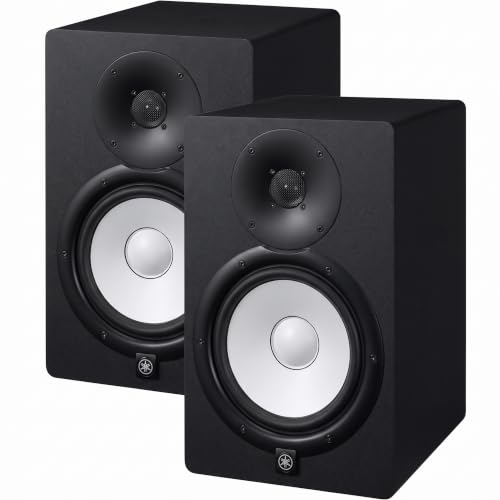
The Yamaha HS5 is the best flat studio monitor for home and pro audio in this guide, and it is the monitor to choose when the goal is a flat response that tells the truth, because Yamaha built the HS5 as a five-inch nearfield with a 70-watt amplifier, a white cone, and a reputation for honesty that goes back to the NS-10, with a sound that is clear, a midrange that is detailed, and a bass that is tight. The HS5 is the monitor for a mixer who wants the truth, and it is the reason it is the best flat option in this guide.
The flatness is the reason the HS5 is the standard, with a response that is flat from the midrange to the treble, so the mix is heard as it is, without colour, and a five-inch woofer that is rigid, so the bass is clean, and a tweeter that is clear, so the high frequencies are detailed. The HS5 has a room control that adjusts the bass for a desk against a wall, and a high trim that adjusts the treble, and it has a rear port, so it should sit a little away from the wall, although it can still work close to it. The HS5 is the monitor that a mixer buys when the goal is a monitor that does not flatter the mix, and it is the monitor that proves a flat monitor is the best tool for mixing.
The practical details are built for a mixing desk. The HS5 is a five-inch monitor, which fits on a desk, and it has a sturdy cabinet that does not resonate, and it has a white cone that is the most recognisable in the studio, and it has a power switch on the back. The HS5 is the monitor that a mixer buys when the budget is moderate, and the goal is a monitor that tells the truth, and it is the monitor that is the most recommended flat monitor in the world.
The trade-offs are that the HS5 is a five-inch monitor, so the bass does not go as low as a larger monitor, although a subwoofer can be added, and it has a rear port, so it should sit a little away from the wall. The HS5 is also a flat monitor, so it may sound less exciting than a coloured monitor, although that is its job, because a monitor that flatters the mix will hide the problems. But as a flat studio monitor for home and pro audio, the HS5 is the best in this guide, and it fits a mixer who wants the truth, a home studio, and anyone who wants a monitor that does not lie.
Check price on Amazon: Yamaha HS5

Adam Audio T5V
The Adam Audio T5V is the best tweeter in a studio monitor for home and pro audio in this guide, and it is the monitor to choose when the high frequencies matter most, because Adam built the T5V as a five-inch nearfield with a 70-watt amplifier, a U-ART ribbon tweeter, and a price that is competitive with the KRK Rokit 5 G4, with a treble that is detailed, airy and clear. The T5V is the monitor for a mixer who listens to the treble, and it is the reason it is the best tweeter option in this guide.
The ribbon tweeter is the reason the T5V is the standard, with a U-ART ribbon that moves air faster than a dome tweeter, so the high frequencies are more detailed, with a clarity that a dome cannot match, and a five-inch woofer that is rigid, so the bass is clean, and a 70-watt amplifier that gives the monitor enough power for a small room. The T5V has a rear port, so it should sit a little away from the wall, and it has a high-frequency control that adjusts the treble, and it has a sturdy cabinet that does not resonate. The T5V is the monitor that a mixer buys when the goal is a detailed treble, and it is the monitor that proves a ribbon tweeter can make a difference in a budget monitor.
The practical details are good for a home studio. The T5V is a five-inch monitor, which fits on a desk, and it has a front-facing volume control, which is convenient, and it has a power switch on the back, with an auto-standby mode. The T5V is the monitor that a home studio buys when the budget is moderate, and the goal is a monitor with a detailed treble, and it is the monitor that is the best value for a ribbon tweeter.
The trade-offs are that the T5V has a rear port, so it should sit a little away from the wall, and it is a five-inch monitor, so the bass does not go as low as a larger monitor, although a subwoofer can be added. But as a studio monitor with a ribbon tweeter for home and pro audio, the T5V is the best in this guide, and it fits a mixer who listens to the treble, a home studio, and anyone who wants a detailed high end.
Check price on Amazon: Adam Audio T5V

PreSonus Eris 3.5
The PreSonus Eris 3.5 is the best budget studio monitor for home and pro audio in this guide, and it is the monitor to choose when the budget is tight and the desk is tiny, because PreSonus built the Eris 3.5 as a 3.5-inch nearfield with a 50-watt amplifier, a compact cabinet, and a price that is the lowest in this guide, with a sound that is clear enough for a beginner. The Eris 3.5 is the monitor for a bedroom desk, and it is the reason it is the best budget option in this guide.
The size is the reason the Eris 3.5 is the standard budget monitor, with a 3.5-inch woofer that fits on a crowded desk, and a one-inch tweeter that is clear, and a 50-watt amplifier that gives the monitor enough power for a small room, and a front port that lets the monitor sit against a wall without the bass becoming boomy. The Eris 3.5 has a high-frequency control that adjusts the treble, and a low-frequency control that adjusts the bass, and it has a headphone output on the front, which is convenient for a late-night session, and it has an auxiliary input on the front, for a phone or a tablet. The Eris 3.5 is the monitor that a beginner buys when the goal is a first monitor on a budget, and it is the monitor that proves a small monitor can still be useful.
The practical details are built for a small desk. The Eris 3.5 is a 3.5-inch monitor, which fits on a crowded desk, and it has a compact cabinet that does not take up much space, and it has a volume control on the front, which is convenient. The Eris 3.5 is the monitor that a student buys when the budget is the limiting factor, and the goal is a first monitor, and it is the monitor that is the best value for a compact nearfield.
The trade-offs are that the Eris 3.5 is a 3.5-inch monitor, so the bass does not go low, and the volume does not go loud, although it is enough for a small room, and it is a budget monitor, so the sound is less detailed than a five-inch monitor, although it is clear enough for a beginner. But as a budget studio monitor for home and pro audio, the Eris 3.5 is the best in this guide, and it fits a beginner, a student, and anyone who wants a first monitor for the lowest price.
Check price on Amazon: PreSonus Eris 3.5

Focal Alpha 50 Evo
The Focal Alpha 50 Evo is the best pro studio monitor for home and pro audio in this guide, and it is the monitor to choose when the goal is a professional sound in a home studio, because Focal built the Alpha 50 Evo as a five-inch nearfield with a 65-watt amplifier, a Slatefiber woofer, and a reputation for accuracy that comes from Focal's professional range, with a sound that is detailed, a bass that is tight, and a stereo image that is stable. The Alpha 50 Evo is the monitor for a pro who works at home, and it is the reason it is the best pro option in this guide.
The Slatefiber woofer is the reason the Alpha 50 Evo is the standard pro monitor, with a cone made from recycled carbon fibre and a polymer, which is rigid and light, so the bass is clean and the midrange is detailed, and a tweeter that is clear, so the high frequencies are airy. The Alpha 50 Evo has a front port, so it can sit against a wall without the bass becoming boomy, and it has a low-frequency control that adjusts the bass, and a high-frequency control that adjusts the treble, and it has a sturdy cabinet that does not resonate. The Alpha 50 Evo is the monitor that a professional buys when the goal is a pro sound in a home studio, and it is the monitor that proves a five-inch monitor can be a pro tool.
The practical details are built for a professional home studio. The Alpha 50 Evo is a five-inch monitor, which fits on a desk, and it has a front port, so it can sit against a wall, and it has a power switch on the back, with an auto-standby mode. The Alpha 50 Evo is the monitor that a pro buys when the budget is moderate, and the goal is a monitor that will translate, and it is the monitor that is the most recommended pro nearfield for a home studio.
The trade-offs are that the Alpha 50 Evo is a five-inch monitor, so the bass does not go as low as a larger monitor, although a subwoofer can be added, and it is more expensive than the KRK Rokit 5 G4, although it is more accurate. But as a pro studio monitor for home and pro audio, the Alpha 50 Evo is the best in this guide, and it fits a professional who works at home, a home studio that wants a pro sound, and anyone who wants the best five-inch monitor in this guide.
Check price on Amazon: Focal Alpha 50 Evo
Buying Guide
Set up the triangle, and the image will be stable
A studio monitor should be set up in a triangle, with the two monitors and the listener forming an equilateral triangle, with the monitors at ear height, and the tweeters pointing at the ears, because a triangle that is correct will give a stable stereo image, while a triangle that is wrong will give an image that is narrow or unstable. The monitors should be at arm's length, with the listener sitting upright, and the monitors should be angled inward, so the tweeters point at the ears, and the distance from each monitor to the listener should be the same, because a triangle that is uneven will give an image that is off-centre. A monitor that is set up correctly will sound better than the same monitor set up wrong, and the triangle is the first thing to check.
Treat the room, or the room will treat the mix
A studio monitor in an untreated room will sound boomy, because the room will reflect the sound, and the bass will build up in the corners, while a studio monitor in a treated room will sound clear, because the treatment absorbs the reflections, and the bass is controlled. A room should have absorption at the first reflection points, bass traps in the corners, and a rug on the floor, because those three things will make the biggest difference, and a room that is treated will let the monitor tell the truth, while a room that is not will lie. A monitor that is accurate in a bad room will still sound bad, and a monitor that is average in a good room will sound good, so the room matters as much as the monitor.
A five-inch monitor is the right size for a small room
A five-inch monitor is the right size for a small room, because it has enough bass for a nearfield, without overwhelming the room, while a larger monitor in a small room will have too much bass, and the bass will build up, and the mix will be boomy. A five-inch monitor is the standard for a bedroom studio, a home studio, and a small room, and a larger monitor is the right choice for a larger room, with more space, and a subwoofer is the right choice when the bass has to go lower, because a subwoofer can be placed and tuned separately. A buyer who is unsure should buy a five-inch monitor first, because it is the standard, and it can be supplemented with a subwoofer later.
Use a front port when the desk is against a wall
A monitor with a rear port should sit a little away from the wall, because the port needs space to breathe, and a monitor with a rear port against a wall will have a boomy bass, while a monitor with a front port can sit against a wall, because the port faces the listener, not the wall, and the bass will be tight. A desk that is against a wall should have a front-ported monitor, such as the KRK Rokit 5 G4, the PreSonus Eris 3.5 or the Focal Alpha 50 Evo, and a desk that is away from the wall can have a rear-ported monitor, such as the JBL 305P MkII, the Yamaha HS5 or the Adam T5V, and a buyer who checks the port before buying will not be surprised after.
Listen to the monitors before buying, when the choice is close
A studio monitor that is heard in person can be compared with another, with the sound, the image and the bass all checked, while a monitor that is bought online cannot be heard, so a buyer who is choosing between two monitors should visit a store, and hear both, before buying, because the difference in sound is audible in person, and the specifications alone do not tell the whole story. A buyer who hears the monitor will make a better choice, and a buyer who does not will have to rely on reviews, which are useful but not the same as hearing it, and a store that has monitors on display is the best place to compare.
Test the mix on other systems, and check that it translates
A mix that sounds good on the monitors should be tested on headphones, on a car stereo, and on a phone, because a mix that translates will sound good everywhere, while a mix that does not will sound good only in the studio, and the test is the way to check. Play the mix on the monitors, then on headphones, then in the car, and note what changes, because a bass that is too loud on the monitors will be too loud everywhere, and a treble that is too bright will be too bright everywhere. A mix that is tested on other systems will be a mix that can be trusted, and a mix that is not tested will be a guess, and the monitor is the tool that makes the mix, but the test is the tool that checks it.
Frequently Asked Questions
What is the best studio monitor for home use?
The KRK Rokit 5 G4 is the best overall studio monitor for home use, because its five-inch nearfield has a 55-watt amplifier, a front port that lets it sit against a wall, and a sound that is clear with a solid bass, at an affordable price. The JBL 305P MkII is the best value, the Yamaha HS5 is the best flat, the Adam Audio T5V is the best for treble detail, the PreSonus Eris 3.5 is the best budget, and the Focal Alpha 50 Evo is the best pro, and the right choice depends on the room size, the budget, and whether the goal is a flat response or a detailed treble.
Do studio monitors work for pro audio?
Yes, because a studio monitor is designed for accuracy, with a flat response that shows the mix as it is, and the monitors in this guide are all used in professional rooms, with the Focal Alpha 50 Evo being the most pro, and the KRK Rokit 5 G4, the JBL 305P MkII, the Yamaha HS5 and the Adam Audio T5V all being used by professionals as well as home studios. A monitor that is accurate in a home studio will be accurate in a pro room, and a mix made on a good monitor will translate, whether the room is a bedroom or a professional studio, because the monitor tells the truth in any room.
What size studio monitor do I need?
A five-inch monitor is the right size for a small room, because it has enough bass for a nearfield without overwhelming the room, while a larger monitor is the right choice for a larger room, and a 3.5-inch monitor is the right choice for a tiny desk, such as the PreSonus Eris 3.5. A buyer who is unsure should buy a five-inch monitor first, because it is the standard, and it can be supplemented with a subwoofer later, when the bass has to go lower, because a subwoofer can be placed and tuned separately, while a larger monitor cannot be made smaller.
Should studio monitors be placed against a wall?
A monitor with a front port can sit against a wall, because the port faces the listener, while a monitor with a rear port should sit a little away from the wall, because the port needs space to breathe, and a monitor with a rear port against a wall will have a boomy bass. The KRK Rokit 5 G4, the PreSonus Eris 3.5 and the Focal Alpha 50 Evo have front ports, so they can sit against a wall, while the JBL 305P MkII, the Yamaha HS5 and the Adam Audio T5V have rear ports, so they should sit a little away from the wall, and a buyer who checks the port before buying will not be surprised after.
Do I need a subwoofer with studio monitors?
Not necessarily, because a five-inch monitor has enough bass for most mixing, although a subwoofer is useful when the bass has to go lower, such as for electronic music, hip hop, or film, and a subwoofer can be added later, when the budget allows. A subwoofer should be placed carefully, and tuned to the monitors, because a subwoofer that is too loud will make the mix boomy, and a subwoofer that is too quiet will not help, and a buyer who adds a subwoofer should calibrate it with the monitors, so the bass is balanced, and the mix translates.
Conclusion
The best studio monitor for home and pro audio is the nearfield that tells the truth in any room, and in this guide the KRK Rokit 5 G4 is the best overall choice, because it is the standard home studio monitor. The JBL 305P MkII is the best value, the Yamaha HS5 is the best flat, the Adam Audio T5V is the best for treble detail, the PreSonus Eris 3.5 is the best budget, and the Focal Alpha 50 Evo is the best pro. Set up the triangle, treat the room, choose a five-inch monitor for a small room, and test the mix on other systems, because a mix that is made on a good monitor will translate, and a mix that translates is a mix that can be trusted.