What's inside
As an Amazon Associate I earn from qualifying purchases. This post may contain affiliate links at no extra cost to you.
A small room changes everything about choosing studio monitors, because a speaker that sounds open and balanced in a large treated studio can sound boomy, harsh or muddy when the walls are a metre away and the desk sits in a corner, and the first lesson of small-room listening is that a bigger woofer is not a better woofer when the room cannot handle the low end. The best small room audio monitors are compact speakers with a five-inch woofer or smaller, a front-firing port or a sealed design that keeps bass tight instead of letting it pile up against the wall, and a flat frequency response that lets a mix be judged honestly rather than flattered, and this guide covers six models that fit a small desk and a small room without overwhelming either one.
The physics of a small room are unforgiving, and they explain why so many home studios sound worse than the gear deserves. Low frequencies build up in corners and along walls, which makes bass sound louder than it really is, so a mix made on bass-heavy monitors in a small room comes out thin on every other system, while reflections off a bare wall behind the desk smear the stereo image and make it hard to tell where an instrument sits in the mix. A compact monitor with a five-inch woofer produces less low-end energy to excite those room modes, a front port keeps the bass output away from the wall, and a monitor with boundary or room-correction controls lets the speaker be tuned to the desk position instead of fighting it.
Placement matters as much as the speaker itself, and the best small room audio monitors are the ones that work with the placement a small room actually allows. The monitors should sit on isolation pads or stands so the desk does not vibrate, they should form an equilateral triangle with the listening position, with the tweeters at ear height, and they should be pulled at least a few inches away from the wall behind them, even in a tight room, because a monitor pressed flat against a wall gets a bass boost that no amount of equalisation can fully fix. The models in this guide are all compact enough to sit on a normal desk at arm's length, they all have the controls needed to tame a difficult room, and they all sound honest at the low volumes that a small room and close neighbours demand.
The six monitors in this guide cover the whole small-room range, from the ultra-compact three-inch models that suit a bedroom desk to the five-inch models that suit a dedicated spare room, and each one is judged on the same things: honest sound at low volume, controlled bass that does not excite the room, a stereo image that stays stable at close range, and controls that let the speaker be tuned to the desk. A three-inch monitor is the right choice when the desk is tiny and the room is a bedroom, a five-inch monitor is the right choice when there is room for a proper triangle and a little more low end, and the buying guide at the end explains how to choose between them, how to place them, and how to get a reliable mix out of a room that was never built for sound.
Quick picks: best small room audio monitors
| # | Product | Where to buy |
|---|---|---|
| 1 | JBL 305P MkII | Check on Amazon |
| 2 | Yamaha HS5 | Check on Amazon |
| 3 | Adam Audio T5V | Check on Amazon |
| 4 | PreSonus Eris 3.5 | Check on Amazon |
| 5 | IK Multimedia iLoud Micro Monitor | Check on Amazon |
Quick Comparison
| Product | Key Specs | Best For |
|---|---|---|
| KRK Rokit 5 G4 | 5-inch Kevlar woofer, 1-inch tweeter, 55 W, DSP room tuning | Best overall small room studio monitor |
| JBL 305P MkII | 5-inch woofer, 1-inch tweeter, 82 W, boundary EQ | Best small room monitor for honest mixing |
| Yamaha HS5 | 5-inch cone woofer, 1-inch dome tweeter, 70 W, room control | Best small room monitor for flat response |
| Adam Audio T5V | 5-inch polypropylene woofer, U-ART ribbon tweeter, 70 W | Best small room monitor for detailed highs |
| PreSonus Eris 3.5 | 3.5-inch woofer, 1-inch tweeter, 50 W, compact | Best ultra-compact monitor for tiny desks |
| IK Multimedia iLoud Micro Monitor | 3-inch woofer, 3/4-inch tweeter, 50 W, tiny footprint | Best portable small room monitor |
KRK Rokit 5 G4
The KRK Rokit 5 G4 is the best overall small room audio monitor in this guide, and it earns that place because it is the compact monitor that most home studios actually end up with, with a five-inch Kevlar woofer that stays tight and controlled in a small space, a one-inch silk dome tweeter that keeps the high end smooth rather than harsh, and a built-in DSP with twenty-five room-tuning presets that let the speaker be matched to the desk, the wall and the corner it sits in.
The sound is the reason the Rokit 5 G4 appears in so many home studios, with a low end that is present and punchy without being bloated, a midrange that keeps vocals and guitars clear and forward, and a high end that is detailed without the fatigue that a bright tweeter causes over a long session. The five-inch woofer reaches low enough for most music without a subwoofer, which matters in a small room where a subwoofer would only add more low-end energy for the room to fight with, and the front-firing bass port keeps the port output away from the wall behind the speaker, so the bass stays clean even when the monitor sits close to the wall.
The practical details are strong for a small desk. The Rokit 5 G4 has balanced XLR and TRS inputs plus an unbalanced RCA input, so it connects to an audio interface, a mixer or a computer without an adapter, and the volume control on the back is easy to reach once the monitor is set up. The cabinet is compact for a five-inch monitor, with a curved front baffle that reduces diffraction and keeps the stereo image stable, and the monitor is light enough to sit on a desktop isolation pad without a dedicated stand. The DSP is adjusted with a small LCD on the back, and the presets cover boundary settings, low-frequency trim and high-frequency trim, which is enough to tame most small rooms without external equalisation.
The trade-offs are that the Rokit 5 G4 has a slightly forward low end even with the DSP set flat, so a buyer who wants a ruthlessly flat monitor may prefer the Yamaha HS5, and the five-inch woofer, while tight, does not reach the deepest bass, so music with heavy sub-bass still needs a check on headphones. The monitor is also a little heavier than some rivals, and the DSP menu takes a few minutes to learn. But as a small room monitor, the Rokit 5 G4 is the most complete package in this guide, and it fits a bedroom producer who needs honest sound in a tight space, a podcaster who needs clear speech at low volume, and anyone building a first home studio in a room that was never meant for music.

JBL 305P MkII
The JBL 305P MkII is the best small room monitor for honest mixing in this guide, and it is the monitor that mixing engineers reach for when the budget is modest and the room is small, because JBL built it around the same Image Control Waveguide that appears in the company's large studio monitors, and that waveguide keeps the stereo image wide and stable at the close listening distances a small room forces. The five-inch woofer and one-inch tweeter are driven by separate amplifiers with a combined eighty-two watts, and the result is a monitor that sounds bigger than it is, with a low end that is tight rather than boomy and a high end that is clear without being sharp, which is exactly what a small room needs.
The sound is famously honest for the size and the class, with a flat response that does not flatter a mix, so a track that sounds good on the 305P MkII tends to sound good everywhere else, and a track with a problem in the low mids or the high end is exposed quickly. The boundary EQ switch on the back is the small-room feature that matters most: it trims the low frequencies when the monitor sits near a wall or on a desk, which is where almost every small-room monitor sits, and it prevents the bass build-up that makes a mix sound thin elsewhere. The slip stream port design reduces port noise at higher volumes, which keeps the bass clean when the monitor is pushed, and the waveguide keeps the sweet spot wide enough that a small movement of the head does not collapse the stereo image.
The practical details suit a small desk. The 305P MkII is compact for a five-inch monitor, it has balanced XLR and TRS inputs, and it sits happily on an isolation pad or a small desktop stand, with the tweeter at ear height once the pad is in place. The monitor has a volume control on the back and a high-frequency trim switch, and the cabinet is solid and well damped, which keeps resonances out of the sound. The white finish option is a nice touch for a home studio, because it makes the monitors look like furniture rather than equipment, and the price is low enough that a pair is within reach of a first studio.
The trade-offs are that the 305P MkII has a slight hiss at idle that is audible in a very quiet room at close range, although it disappears once music plays, and the five-inch woofer does not reach the deepest bass, so sub-bass still needs a headphone check. The volume control on the back is awkward to reach once the monitors are placed, and the monitor has no digital input, so it needs an analogue connection from the interface. But as a small room mixing monitor, the 305P MkII is one of the best values in audio, and it fits a producer who needs an honest reference in a small room, a mixer who works at low volume, and anyone who wants a monitor that tells the truth about a mix.
Check price on Amazon: JBL 305P MkII

Yamaha HS5
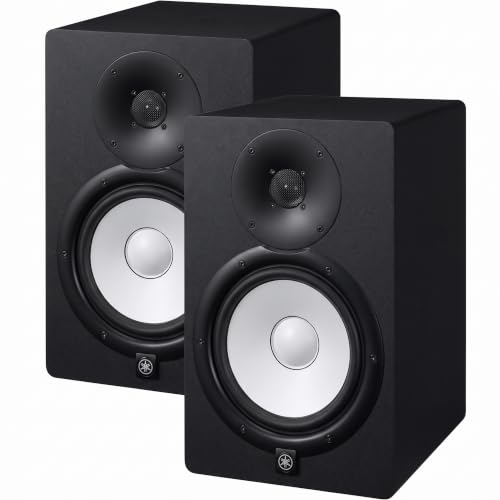
The Yamaha HS5 is the best small room monitor for a flat response in this guide, and it is the monitor that buyers choose when they want the least coloured sound available in a compact speaker, because Yamaha built the HS series to be ruthlessly honest, with a flat frequency response that shows every flaw in a mix and a white cone woofer that has become a familiar sight in studios around the world. The five-inch cone woofer and one-inch dome tweeter are driven by seventy watts of bi-amplified power, and the result is a monitor that sounds dry and precise, with a midrange that is unusually clear and a low end that is tight and controlled, which is the combination a small room needs most.
The sound is the flattest in this guide, and that flatness is both the strength and the challenge of the HS5. A mix that sounds good on the HS5 is a mix that is genuinely good, because the monitor adds nothing and hides nothing, and the midrange clarity is especially useful for vocals, guitars and keyboards, which sit in the range where most mixes go wrong. The room control switch on the back trims the low frequencies in steps, which lets the HS5 be tuned to a desk or a wall position, and the high trim switch adjusts the top end for a bright or dead room. The low end is tight rather than extended, which is the right trade in a small room, because a monitor that tries to produce deep bass in a small space only excites room modes and makes the bass sound worse.
The practical details are solid. The HS5 has balanced XLR and TRS inputs, a volume control on the back, and a cabinet that is compact and well built, with a front bass port that keeps the port output away from the wall. The monitor sits well on an isolation pad, and the white cone makes it easy to see the woofer moving, which is a small but real help when checking for distortion at higher volumes. The HS5 is a monitor that rewards careful placement, and once it is positioned in an equilateral triangle with the tweeters at ear height, the stereo image is precise and stable, with instruments placed clearly across the soundstage.
The trade-offs are that the HS5 sounds less exciting than the KRK or the JBL, and a buyer who is used to a coloured speaker may find it dry or even dull at first, although that impression usually fades once the ear adjusts to an honest monitor. The five-inch woofer does not produce deep bass, so electronic music and hip hop need a headphone check for the lowest octave, and the monitor has no RCA input, so a computer needs an interface or an adapter. But as a flat reference for a small room, the HS5 is hard to beat, and it fits a mixer who needs a brutally honest second opinion, a producer who wants a mix that translates everywhere, and anyone who trusts a flat monitor more than a flattering one.
Check price on Amazon: Yamaha HS5

Adam Audio T5V
The Adam Audio T5V is the best small room monitor for detailed highs in this guide, and it is the monitor that buyers choose when the top end of a mix is the priority, because Adam built it around the U-ART ribbon tweeter, a folded-ribbon design that moves air faster and more precisely than a conventional dome tweeter, and the result is a high end that is open, detailed and extended, with a sense of air around cymbals, strings and vocals that a dome tweeter struggles to match. The five-inch polypropylene woofer is driven alongside the ribbon tweeter by seventy watts of bi-amplified power, and the combination is a monitor that sounds fast and articulate in a small room.
The sound is the most detailed in this guide, with a high end that reveals reverb tails, sibilance and the fine texture of an acoustic instrument, which makes the T5V especially useful for mixing vocals, acoustic music and anything where the top octave matters. The low end is tight and controlled, with a rear port that needs a little space behind the monitor, so the T5V suits a desk that can be pulled away from the wall, and the high-frequency trim on the back lets the top end be softened for a bright room or a reflective desk. The stereo image is precise, with the ribbon tweeter keeping the soundstage wide and stable at the close listening distances a small room forces, and the monitor sounds balanced at low volume, which is how most small-room work happens.
The practical details are good for a small studio. The T5V has balanced XLR and RCA inputs, so it connects to an interface or directly to a computer, and the volume control on the back is easy to set once the monitors are placed. The cabinet is compact for a five-inch monitor, with a bevelled front baffle that reduces diffraction, and the monitor is light enough for a desktop isolation pad. The ribbon tweeter is protected by a grille, which is a sensible touch in a home studio where a monitor may be knocked, and the build quality is solid, with a finish that looks professional on a desk.
The trade-offs are that the rear port means the T5V needs more space behind it than a front-ported monitor, so it suits a desk that can sit away from the wall rather than a desk pressed against one, and the ribbon tweeter, while detailed, can sound a little forward in a bright, untreated room. The five-inch woofer does not reach deep bass, so the lowest octave still needs a headphone check. But as a small room monitor for detailed work, the T5V is excellent, and it fits a producer who mixes vocals and acoustic instruments, an engineer who needs to hear the top end clearly, and anyone who wants a ribbon tweeter without paying for a large studio monitor.
Check price on Amazon: Adam Audio T5V

PreSonus Eris 3.5
The PreSonus Eris 3.5 is the best ultra-compact monitor for tiny desks in this guide, and it is the monitor to choose when the desk is small, the room is a bedroom, and the budget is tight, because PreSonus built the Eris 3.5 as a genuine studio monitor in a three-and-a-half-inch package, with a flat response, a front-firing port and tuning controls that larger monitors in this class often skip. The three-and-a-half-inch Kevlar woofer and one-inch silk dome tweeter are driven by fifty watts, and the result is a monitor that sounds far bigger than it looks, with a clear midrange, a smooth top end and a low end that is honest about what a small woofer can do.
The sound is surprisingly grown-up for a monitor of this size, with a midrange that keeps vocals and dialogue clear, a high end that is detailed without fatigue, and a low end that is tight rather than boomy, which is the right choice in a small room where a bigger woofer would only excite room modes. The acoustic tuning controls on the back are the feature that sets the Eris 3.5 apart from other tiny monitors: a high-frequency trim, a midrange trim and a low-frequency cutoff let the speaker be tuned to the desk and the room, and the low cutoff is especially useful when the monitor sits on a desk, because it trims the bass build-up that a desk surface causes. At low volume the Eris 3.5 keeps its balance, which matters in a bedroom where the neighbours are close and the listening level is modest.
The practical details are excellent for a small desk. The Eris 3.5 has balanced TRS inputs plus unbalanced RCA and a front-panel auxiliary input with a headphone output, so it connects to an interface, a computer or a phone, and the front volume control is easy to reach, which is a real convenience that monitors with a rear volume control lack. The cabinet is tiny, with a footprint that fits on a crowded desk beside a laptop, and the front port means the monitor can sit close to a wall without the bass going muddy. The pair is inexpensive, which makes it the easiest way into honest monitoring for a first studio.
The trade-offs are that a three-and-a-half-inch woofer cannot produce deep bass, so the Eris 3.5 is not the monitor for bass-heavy music without a headphone check, and the maximum volume is modest, so it suits nearfield listening at a desk rather than filling a room. The low end rolls off earlier than a five-inch monitor, and the monitor is best used at arm's length, where its size is an advantage rather than a limit. But as a tiny-desk monitor, the Eris 3.5 is the best value in this guide, and it fits a student with a bedroom desk, a podcaster who needs clear speech, and anyone who needs honest sound from a speaker that fits in a backpack.
Check price on Amazon: PreSonus Eris 3.5

IK Multimedia iLoud Micro Monitor
The IK Multimedia iLoud Micro Monitor is the best portable small room monitor in this guide, and it is the speaker to choose when the studio moves, because IK Multimedia built the iLoud Micro as a genuine reference monitor in a package smaller than a paperback book, with a three-inch woofer, a three-quarter-inch tweeter and fifty watts of bi-amplified power, plus a built-in DSP that corrects the response for the size of the cabinet. The iLoud Micro is the monitor for a producer who works in hotel rooms, on trains and at a kitchen table, and it is also the monitor for a small room where the desk has no space for a five-inch speaker.
The sound is remarkable for the size, with a low end that reaches far lower than a three-inch woofer should, thanks to the DSP correction and the passive radiator design, a midrange that is clear and honest, and a high end that is smooth and detailed. The iLoud Micro has a desktop switch that compensates for the bass boost a desk surface causes, and a high-frequency trim that adjusts the top end for a bright or dead room, and those two controls are enough to make the speaker sound right on almost any surface. At low volume the iLoud Micro is at its best, with a balance that holds together quietly, which is how most small-room and travel listening happens, and a mix made on the iLoud Micro translates well to larger systems because the DSP keeps the response honest.
The practical details are built for movement. The iLoud Micro has RCA inputs, a Bluetooth connection for casual listening, and a mounting thread on the base for a microphone stand or a camera tripod, which is a genuinely useful feature in a small room where desk space is scarce. The pair is tiny and light, it fits in a laptop bag, and it runs from a single power supply, so setting it up in a new room takes a minute. The volume control is on the front, the speakers are magnetically shielded, and the build quality is solid for a speaker that is designed to be carried.
The trade-offs are that the iLoud Micro is a small speaker, so it cannot play loudly without strain, and it suits nearfield listening at a desk rather than filling a room with sound. The three-inch woofer, even with DSP help, does not produce the physical impact of a five-inch monitor, so bass-heavy music still needs a headphone check for the lowest octave. But as a portable small room monitor, the iLoud Micro has no real rival, and it fits a travelling producer, a student with a tiny desk, and anyone who needs a reference monitor that can be packed away when the room is needed for something else.
Check price on Amazon: IK Multimedia iLoud Micro Monitor
Buying Guide
Match the woofer to the room, not to the ambition
A five-inch woofer is the sweet spot for most small rooms, because it produces enough bass for a mix to be judged without producing so much low-end energy that the room modes take over, and a three-inch monitor is the right choice when the desk is tiny or the room is a bedroom, because it produces even less low-end energy and its size lets it sit in a proper triangle at arm's length. An eight-inch monitor in a small room is almost always a mistake, because the extra bass it produces bounces off the walls and the corners and makes the low end sound louder than it is, so a mix made on large monitors in a small room comes out thin on every other system. Choose the smallest monitor that reaches the bass the music needs, and check the lowest octave on headphones.
Front port or sealed beats rear port in a tight room
A rear-firing bass port needs space behind the monitor to work, because the port output bounces off the wall and back into the room, and when the monitor sits close to a wall that reflection makes the bass boomy and undefined. A front-firing port sends the bass output toward the listener, so the monitor can sit close to a wall without the bass going muddy, and a sealed monitor has no port at all, which gives the tightest bass of all at the cost of a little low-end extension. In a small room where the desk must sit against a wall, a front-ported or sealed monitor is the safer choice, and a rear-ported monitor is only worth it when the desk can be pulled at least a foot away from the wall.
Use the room controls on the back
Almost every monitor in this guide has a low-frequency trim, a boundary switch or a DSP preset, and those controls exist because no small room is the same as any other, so a monitor that sounds flat in the factory will sound bass-heavy on a desk against a wall. Start with the controls flat, play a familiar track, and if the bass sounds bloated, trim the low end one step at a time until the track sounds right, then check the same track on headphones to confirm the change was real and not just a preference. The controls are not a substitute for acoustic treatment, but they are the fastest way to make a small room listenable, and a buyer who ignores them is leaving the most useful feature of the monitor unused.
Place the monitors in a triangle, tweeters at ear height
The monitors and the listening position should form an equilateral triangle, with the tweeters at ear height and the monitors angled inward so they point at the ears, because that geometry puts the listener in the sweet spot where the stereo image is widest and most stable. In a small room the triangle will be small, often no more than a metre on each side, and that is fine, because nearfield monitors are designed to be listened to at close range. Put the monitors on isolation pads or stands so the desk does not vibrate, keep them away from the corners where bass builds up, and avoid placing one monitor in a corner and the other in free space, because an asymmetric placement makes the stereo image lopsided.
Listen quietly, and check the mix elsewhere
A small room sounds best at low volume, because quiet listening excites the room modes less, reduces the reflections off the walls, and lets the ear hear the balance of the mix without fatigue, and most professional mixers do the bulk of their work quietly for exactly that reason. Once a mix sounds right on the monitors, check it on headphones, in a car and on a phone speaker, because each of those systems exposes a different part of the mix, and a mix that survives all three is a mix that is genuinely finished. The monitors are a tool for judgement, not a system for enjoyment, and the discipline of checking elsewhere is what makes a small-room mix translate.
Do not buy a subwoofer for a small room
A subwoofer in a small room adds more low-end energy to a space that already has too much of it, and the result is usually a bass response that is louder, boomier and harder to judge, not a bass response that is better. A five-inch monitor reaches low enough for most music, and the lowest octave can be checked on a good pair of headphones, which is a far more reliable way to judge sub-bass in a small room than a subwoofer that the room cannot accommodate. If a subwoofer is genuinely needed, it should be a small one with a crossover and a level control, it should be placed carefully and measured, and it should be treated as an advanced purchase, not a first purchase.
Frequently Asked Questions
What size studio monitor is best for a small room?
A five-inch monitor is the best size for most small rooms, because it produces enough bass to judge a mix without producing so much low-end energy that the room modes take over, and a three-inch monitor is the right choice when the desk is very small or the room is a bedroom. An eight-inch monitor is usually too much for a small room, because the extra bass bounces off the walls and makes the low end sound louder than it is, so a mix made on large monitors in a small room tends to sound thin elsewhere. Choose the smallest monitor that reaches the bass the music needs.
Should I buy a subwoofer for a small room?
In most cases no, because a subwoofer adds more low-end energy to a space that already has too much of it, and the result is usually boomier and harder to judge, not better. A five-inch monitor reaches low enough for most music, and the lowest octave can be checked on headphones, which is a more reliable way to judge sub-bass in a small room. A subwoofer only makes sense once the monitors are placed well, the room has some treatment, and the subwoofer can be positioned and level-matched carefully.
How far from the wall should studio monitors sit?
As far as the room allows, but at least a few inches, because a monitor pressed flat against a wall gets a bass boost that makes the low end sound louder than it is. A front-ported monitor can sit closer to a wall than a rear-ported one, and a monitor with a boundary switch or low-frequency trim can compensate for a close wall position. Avoid corners, where bass builds up most, and avoid placing one monitor in a corner and the other in free space, because that makes the stereo image lopsided.
Why does my mix sound different on other speakers?
A mix sounds different on other systems because every room and every speaker colours the sound differently, and a small untreated room colours it more than most, with bass build-up in the corners and reflections off bare walls. The remedy is to mix at low volume, use the room controls on the monitors, place the monitors in a proper triangle, and check the mix on headphones, in a car and on a phone speaker before calling it finished. A mix that survives those checks is a mix that translates.
Are three-inch monitors good enough for mixing?
Three-inch monitors are good enough for mixing when the room is small and the listening distance is short, because they produce an honest midrange and top end, which is where most mixing decisions are made, and their small size keeps the bass tight instead of exciting room modes. They do not reproduce the deepest bass, so the lowest octave needs a headphone check, and they do not play loudly, so they suit nearfield work at a desk. For a bedroom studio, a three-inch monitor is often the most honest choice available.
Conclusion
The best small room audio monitor is the one that matches the room rather than fighting it, and in this guide the KRK Rokit 5 G4 is the best overall choice, because its DSP room tuning and front port are built for the tight spaces most home studios actually occupy. The JBL 305P MkII is the most honest mixer, the Yamaha HS5 is the flattest reference, the Adam T5V is the most detailed in the highs, the PreSonus Eris 3.5 is the best for a tiny desk, and the iLoud Micro Monitor is the best when the studio has to move. Choose a five-inch monitor for a spare room, a three-inch monitor for a bedroom desk, place the pair in a triangle, use the room controls, listen quietly, and check every mix on headphones before calling it done.