What's inside
- Key Takeaways
- Quick Picks
- How We Chose These Picks
- Comparison: The Six Machines Side by Side
- How Much Laptop Does a Course Actually Need?
- What Breaks on Student Laptops, and What Can Be Done About It?
- How Should a Student Set Up a Laptop in the First Week of Term?
- How Does a Student Laptop Earn Its Keep Outside the Timetable?
- What Does the Second Charger, the Bag and the Rest Actually Add?
- How Should Parents and Students Split This Decision?
- How Do These Machines Handle the Examination Season Specifically?
- What Are the Common Mistakes When Buying a Student Laptop?
- What Happens at Graduation to a Well-Bought Student Laptop?
- Final Recommendation
- Frequently Asked Questions
- Related Guides
As an Amazon Associate I earn from qualifying purchases. This post may contain affiliate links at no extra cost to you.
widgetverdict.com is reader-supported. When you buy through links on our site, we may earn an affiliate commission.
Each linked laptop below leads to its Amazon listing, where you can check price on Amazon and confirm the specification in the title before paying — this guide prints only figures those titles state. The best 15 inch laptops for students are not the fastest or the prettiest; they are the ones whose specification, build and support story still make sense in the third year of the treatment a student laptop leads — carried daily, opened on lecture-hall desks the size of a paperback, charged opportunistically in libraries, and dropped into a backpack a thousand times between enrolment and graduation. Four machines here carry verified listings; two familiar names are covered in prose because their configurations rotate too freely to anchor figures to.
The student calculus starts with a horizon. A laptop bought for a course must outlast the course, which means the figures that decide longevity — memory above all — matter more than the processor’s badge. Sixteen gigabytes is this guide’s student standard, because coursework software, browser-based learning platforms and a student’s entire social infrastructure now run concurrently, and a machine that starts swapping to disk in first year will be hated by third. Two linked picks meet that standard outright; two carry 8GB and are recommended, openly, as light-duty machines for defined kinds of study rather than as all-course answers.
One pick requires its status read aloud, and this guide reads it: the HP Pavilion in this shortlist is a Renewed listing — the word is in its title — and its badge, spec box and analysis repeat it, because a student (or a parent) buying a refurbished machine deserves the fact presented as information, not discovered as a surprise. Renewed can be a shrewd student purchase; it is treated here with the same inspection advice this site gives every refurbished buyer, tailored to a life where the campus IT desk is the safety net.
Size honesty applies as usual: three picks are true 15.6-inch machines, and the Samsung is a 16-inch convertible included because students cross-shop it for note-taking, flagged wherever it appears. A 15-inch-class screen is itself a student decision — large enough for split-screen reading and writing, small enough for lecture seating — and the sections below keep returning to the lived details: backpack weight, hinge survival, webcam quality for remote seminars, and what happens when the machine breaks in week nine of term.
Key Takeaways
- Two linked picks carry the full student specification — 16GB of memory and 512GB of storage — and they anchor the guide: the IdeaPad Slim 3 and, at a very different price of admission, the Galaxy Book5 Pro 360.
- The HP Pavilion 15 in this shortlist is a Renewed listing, stated in its title and repeated in its badge, spec box and analysis; it suits light coursework with an inspection on arrival.
- The Galaxy Book5 Pro 360 is a 16-inch machine with 32GB of memory and a folding touchscreen — the note-taking splurge, with its size declared openly.
- The IdeaPad 1 pairs an FHD touchscreen with 8GB of memory and 256GB of storage: an honest light-duty pick for reading, writing and streaming-led study.
- Backpack life is a specification too: hinges, chargers and repair routes matter as much as chips across a three- or four-year course.
- The Acer Aspire 5 15 and Dell Inspiron 15 are covered in prose because their student-market configurations rotate too much for one verified title.
Quick Picks
| Pick | Badge | Why it is here |
|---|---|---|
| Lenovo IdeaPad Slim 3 15.6 | Top Choice for Students | An 8-core Ryzen 7, 16GB of memory, 512GB of storage and an FHD touchscreen — the whole-course specification. |
| HP Pavilion 15 (2026) | Renewed — Light-Duty Budget Pick, Status Stated | A Renewed Pavilion with an Intel N100, 8GB and 256GB for reading, writing and cloud-based coursework. |
| Samsung Galaxy Book5 Pro 360 | Best Note-Taking Splurge — 16-Inch, Stated Plainly | A folding AMOLED touchscreen with 32GB of memory for handwritten notes, diagrams and heavy multitasking. |
| Lenovo IdeaPad 1 15.6 Touch | Best Light-Duty New Pick | An FHD IPS touchscreen, Ryzen 5 and anti-glare finish for library-and-lecture study on a budget. |
| Acer Aspire 5 15 | Prose Pick — The Ubiquitous Alternative | The student-market staple sold everywhere in rotating builds; judge it per listing against this guide’s standards. |
| Dell Inspiron 15 | Prose Pick — The Other Ubiquitous Alternative | Dell’s mainstream 15, equally configuration-fluid; the support network is its quiet argument. |
How We Chose These Picks
The linked group required a listing title stating screen, processor, memory and storage in full — the same evidence bar as every guide on this site — and the student lens then re-ranked what passed. Memory was weighted first, because a course lasts years and memory is the figure that decides whether year three feels like year one. Storage came second, with 512GB treated as the comfortable figure for a student who accumulates coursework, media and a growing photo library, and 256GB as workable only for the genuinely cloud-based. Processor badges were read last and least, because coursework rarely queues for peak speed; it queues for responsiveness under a pile of open obligations.
Student-specific evidence was weighed alongside the figures. Touchscreens earned credit for annotation and for the hundred small interactions of a study day. Camera quality was noted without theatre — remote seminars and recorded presentations are coursework now, and a 720p camera is adequate rather than good, which the relevant sections say. Repairability and parts availability ran through the whole assessment: a student far from home needs a machine any campus-town repair shop can open, with parts that exist, and mainstream Lenovo and HP lines score well on exactly that unglamorous axis.
Status honesty shaped the list’s construction. One linked pick is a Renewed machine, included deliberately: students are the refurbished market’s natural constituency, and excluding the route would have made the guide less useful to the readers who most need value. It is labelled everywhere it appears, its light-duty processor is described without inflation, and its section carries the arrival-inspection advice that turns a Renewed purchase from a gamble into a procedure. The two prose picks, by contrast, are new machines whose listings simply will not hold still — a different evidentiary problem, given the same solution: explain the model, teach the check, print no unverifiable figures.
What the guide did not do is rank by first-year impressions. Every recommendation below is argued over the length of a course: hinges opened twice a day for three years, a battery cycled daily, a drive filling with each term’s work. A machine that wins September and loses the second winter is a bad student laptop whatever its launch reviews said, and the verdicts are written with the second winter in mind.

Lenovo IdeaPad Slim 3 15.6 — Top Choice for Students
Read this specification as a course-length promise: a 15.6-inch FHD touchscreen, an AMD Ryzen 7 5825U with eight cores, 16GB of DDR4 memory, a 512GB SSD, Wi-Fi 6 and Windows 11 Home, in Lenovo’s 2025 build of the IdeaPad Slim 3. Nothing in that list needs managing. The memory clears the guide’s student standard, the storage holds three years of coursework without a filing system, and the eight-core processor gives the machine a calm, unhurried gait through the pile-up of learning platform, documents, reference tabs and music that constitutes a modern study session. It is the only linked pick under the premium convertible that asks nothing of its owner in advance, and for a purchase that must simply work until graduation, that completeness is the recommendation.
Student life adds textures the specification only implies. The touchscreen earns its place in seminars — annotating a PDF of the lecture slides, signing the form the accommodation office sent, zooming a diagram with two fingers while the other hand holds the pen that is also taking notes. The chassis is a mainstream Lenovo build, which translates to parts in every repair shop and a design that tolerates backpack carriage without jewellery-grade anxiety. The 720p camera is the one ordinary component: seminars will see you clearly enough, and a student whose course involves recorded presentations or remote interviews may add an external camera later — a cheap, standard accessory rather than a reason to reject the machine.
The ownership arc is where this pick separates from the 8GB machines below. A student who buys it in first year owns, in third year, a laptop that still opens the same pile of applications without negotiation, because 16GB and an eight-core chip age at the pace coursework grows. That is the entire economics of student buying: the slightly stronger machine, bought once, against the weaker machine endured daily and replaced early. Parents funding the purchase should read this section as addressed to them — the difference between the tiers in this guide is not luxury, it is the number of times the purchase has to be made.
- Screen: 15.6-inch FHD (1920 x 1080) touchscreen
- Processor: AMD Ryzen 7 5825U, 8-core
- Memory: 16GB DDR4 RAM
- Storage: 512GB SSD
- Wireless: Wi-Fi 6, Bluetooth 5.2; 720p HD camera
- System: Windows 11 Home; 2025 model
Strengths
- The whole-course specification: 16GB, 512GB and eight cores with nothing left to manage.
- A touchscreen that serves annotation, forms and seminar work daily.
- Mainstream Lenovo repairability — parts and knowledge in every campus town.
Trade-offs
- The 720p camera is adequate for seminars, unremarkable for recorded presentations.
- A 15.6-inch machine fills a small backpack completely; measure the bag before ordering.
- Windows 11 Home, which a small number of course or placement networks may ask to upgrade.
Best for: a student buying once for a whole course, in any subject that lives in documents, browsers and data rather than in specialist workstations.
Not suited for: a student on an engineering or media course whose faculty specifies workstation-class hardware.
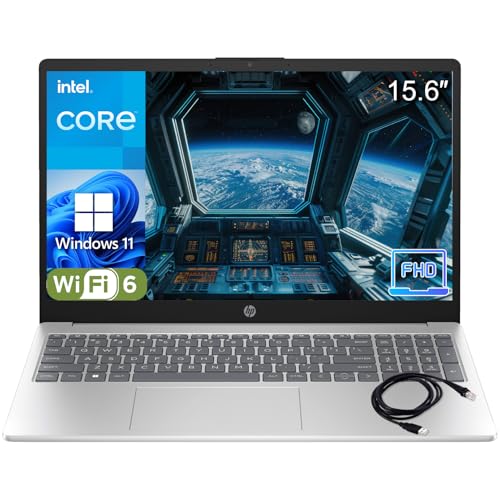
HP Pavilion 15 (2026) — Renewed — Light-Duty Budget Pick, Status Stated
The status leads, as it should: this Pavilion’s listing title ends with the word Renewed, and the machine is a refurbished unit — inspected, tested and graded by its seller and backed by the Renewed programme’s guarantee. Its specification is a light-duty one: an Intel N100 processor with four cores, 8GB of memory, a 256GB SSD and an FHD display with a numeric keypad, running Windows 11 Home, bundled with a Microsoft Office 365 subscription and described by its listing as lightweight with long battery life. The guide includes it because students are refurbished buying’s natural constituency — and because a Renewed machine at this specification, bought knowingly and inspected on arrival, serves a defined kind of study honestly.
That kind of study is the cloud-shaped one. The N100 is an efficiency processor for reading, writing, browsing, video and the browser-based platforms through which much coursework now flows; it is not a chip for compiling large projects, editing video or running engineering software, and a student whose course involves those should take the IdeaPad Slim 3 above and not look back. Within its lane, the Pavilion’s virtues are practical: a full 15-inch FHD screen for split-screen reading and writing, a numeric keypad for the spreadsheet-shaped corners of many courses, and a refurbished price structure that leaves budget for the bag, the mouse and the printer the student will also need.
Renewed ownership has a procedure, and students are well placed to run it because campus IT desks exist. On arrival: confirm the delivered memory, storage and processor match the title, read the battery health report — a refurbished battery is part-used, and its remaining capacity is the machine’s most honest unknown — run the maker’s diagnostics, and use the laptop properly through the first week while the return window stands open. A machine that passes that week has declared itself. The Pavilion’s mainstream bones help thereafter: HP parts and knowledge are everywhere, so the inevitable third-year battery or charger replacement is an errand, not an expedition.
- Status: Renewed (stated in the listing title) — refurbished, inspected and graded by the seller
- Screen: 15-inch FHD display
- Processor: Intel N100, 4-core
- Memory: 8GB RAM
- Storage: 256GB SSD
- System: Windows 11 Home; Microsoft Office 365 included; numeric keypad fitted
Strengths
- A refurbished route into a full-size FHD laptop for genuinely light, cloud-based coursework.
- Numeric keypad and a 15-inch screen suit reading-and-writing study better than smaller budget machines.
- Mainstream HP parts and campus-town repairability keep long-term ownership simple.
Trade-offs
- The N100 processor sets a low ceiling: no heavy software, no engineering or media coursework.
- 8GB of memory and 256GB of storage ask for tidy, cloud-centred habits from day one.
- As a Renewed unit, battery capacity is part-used and condition follows the seller’s grade.
Best for: a student whose course is reading, writing, browsing and cloud platforms — and who will run the arrival inspection like a procedure.
Not suited for: a student whose coursework includes compiling, media production, CAD or any faculty-specified heavy software.

Samsung Galaxy Book5 Pro 360 — Best Note-Taking Splurge — 16-Inch, Stated Plainly
Declare the deviation first, as this guide always does with this machine: the verified listing is a 16-inch laptop. Samsung’s Galaxy Book5 Pro 360, in this configuration, carries a 16-inch 3K AMOLED touchscreen on a 360-degree hinge, an Intel Core Ultra 7 258V, 32GB of memory and a 1TB SSD, running Windows 11 Pro. It appears in a student guide because no 15.6-inch machine in the verified pool does what its hinge and screen do for handwritten study — and because students, of all buyers, should be told a machine’s true size in its badge rather than discover it against a lecture-hall desk.
The student case rests on the posture of learning. Lectures produce diagrams, derivations and annotations that keyboards handle badly and pens handle natively; a convertible that folds flat turns the laptop into the notebook, with the AMOLED screen’s colour and contrast making dense slides and scanned texts legible in bright halls. Then it folds back into a laptop with 32GB of memory — a figure that lets a science or engineering-adjacent student keep reference libraries, data tools, a browser estate and notes open simultaneously without the machine arbitrating. The 1TB drive swallows recorded lectures and course media without a filing policy. As a single device replacing notebook, reader and laptop, it makes an argument no two-device combination quite matches.
The costs are the honest ones. Sixteen inches is a large presence in a backpack and on a fold-down desk; a hinge is a mechanism that rewards a careful owner; a touchscreen used for handwriting collects the evidence, so a cloth lives in the bag now. And the specification’s completeness prices the machine as the guide’s splurge — the pick for a student (or a funding parent) who has decided to buy the note-taking problem away for the whole course, rather than the pick for a budget being stretched across a whole enrolment kit. Judged on those terms it is superb; judged as a bargain it was never entered in the competition.
- Screen: 16-inch 3K AMOLED touchscreen, 360-degree convertible (size stated plainly: 16 inches, not 15.6)
- Processor: Intel Core Ultra 7 258V
- Memory: 32GB RAM
- Storage: 1TB SSD
- System: Windows 11 Pro; 2025 model
- Colour: Gray
Strengths
- Pen-friendly folding AMOLED: handwritten notes, diagrams and annotation in the machine itself.
- 32GB of memory and 1TB of storage remove every ceiling a course can reasonably impose.
- A current Intel platform with Windows 11 Pro for placement and research networks.
Trade-offs
- Sixteen inches strains small backpacks and fold-down lecture desks.
- The guide’s splurge: its completeness is priced like it, so check price on Amazon against the field.
- A convertible hinge asks for gentler handling than a student’s worst habits may offer.
Best for: a student whose learning is handwritten at its core — mathematics, sciences, medicine, design — buying one device for the whole course.
Not suited for: a student who types everything, travels light and would rather spend the difference across the rest of the enrolment kit.

Lenovo IdeaPad 1 15.6 Touch — Best Light-Duty New Pick
The IdeaPad 1 is the guide’s honest floor among new machines, and its specification is more respectable than its tier usually manages: a 15.6-inch FHD IPS touchscreen with 300 nits of brightness and an anti-glare finish, an AMD Ryzen 5 7520U processor, 8GB of memory, 256GB of storage and Windows 11, in Abyss Blue. The screen deserves emphasis, because budget laptops traditionally cheat there first — this one is full HD, IPS and touch-enabled, with an anti-glare surface that suits the library’s overhead lighting and the window seat’s optimism. A student reads for hours on this panel, and it is built for reading.
The limits sit where the tier’s arithmetic puts them. Eight gigabytes of memory serves the focused study pattern — a document, a platform, a modest browser load — and complains when the pile grows; 256GB fills across a course unless the student’s life is genuinely cloud-kept, which for many now it is: coursework in institutional cloud storage, media streamed, photos in the phone’s ecosystem. The Ryzen 5 7520U is a frugal, modern-enough chip for that pattern, with the battery manners a library day rewards. Bought with those habits understood, the IdeaPad 1 is not a compromise to apologise for; it is a correct tool for a defined workload.
Who should walk past it is equally definable. A student whose course will grow into data work, media production or large local libraries will outgrow this machine mid-course, and outgrowing is the most expensive way to buy — the Slim 3 above exists for them. A student whose course is essays, reading, seminars and streamed everything, bought on a budget that must also cover the rest of enrolment, is exactly its owner. The guide’s respect for this pick is genuine: an honest floor, clearly labelled, serves students better than a inflated midrange that fails at the same tasks more expensively.
- Screen: 15.6-inch FHD (1920 x 1080) IPS touchscreen, 300 nits, anti-glare
- Processor: AMD Ryzen 5 7520U
- Memory: 8GB RAM
- Storage: 256GB
- Graphics: AMD Radeon integrated graphics
- System: Windows 11; Abyss Blue
Strengths
- A proper FHD IPS touchscreen with anti-glare finish — the budget tier’s usual cheat, refused.
- A frugal Ryzen 5 suited to library days of reading, writing and streaming.
- Lenovo’s mainstream parts and repair footprint behind a budget machine.
Trade-offs
- 8GB of memory caps multitasking at the focused end of student life.
- 256GB of storage assumes a cloud-kept life; local hoarders will fill it.
- Not a machine for a course that grows into heavy software mid-way.
Best for: an essay-and-seminar student on a real budget whose coursework lives in browsers, documents and streams.
Not suited for: a student whose degree will escalate into data, media or engineering software before it ends.
Acer Aspire 5 15 — Prose Pick — The Ubiquitous Alternative
Walk into any electronics shop during enrolment season and the Aspire 5 15 will be there, in several builds at several prices, wearing one name. That ubiquity is why it is covered in prose: Acer sells this line across so many processor, memory and panel combinations, through so many channels, that no single verified listing title can stand for the model — and this guide does not print figures it cannot tie to a title. What can be said truthfully is what the line is: Acer’s mainstream 15.6-inch offering, generally competitive on specification per cost, and entirely dependent for its value on which build a given listing actually describes.
The prose treatment therefore becomes a shopping method. Hold any Aspire 5 listing to the standards the linked picks were held to: 16GB of memory as the whole-course figure, 512GB as the comfortable storage figure, an FHD panel stated in words, and a named processor you can place. Builds meeting those marks compete honestly with the IdeaPad Slim 3; builds below them should be priced as light-duty machines whatever the badge suggests. Check also the panel type and the keyboard, the two places this line’s builds diverge most, and let the specific listing — not the family name — make the argument.
Students meet this machine constantly because retailers push it during enrolment, and there is no scandal in buying one. The scandal would be buying the name without reading the build, which is the one error this guide exists to prevent, in this brand and every other.
- Status: current line, sold in rotating configurations (described in prose; no figures claimed for any single build)
- Screen: 15.6-inch class; panel specification varies by build — confirm FHD in the listing
- Processor: depends on the build — place the named chip before comparing
- Memory: set by the individual build — hold it to the 16GB whole-course standard
- Storage: build-dependent — hold it to the 512GB comfortable figure
- Buying route: audit the individual listing against the standards in this guide
Strengths
- Available everywhere, in builds spanning the whole student budget range.
- Well-specified builds compete directly with this guide’s linked picks.
- Acer’s mainstream service footprint keeps student ownership uncomplicated.
Trade-offs
- The name guarantees nothing; weak builds share it with strong ones.
- Panel and keyboard quality vary across the line’s builds.
- No verified title means this guide can promise no figure for it.
Best for: a student who finds a fully specified build in a shop or listing and audits it against this guide’s standards before paying.
Not suited for: a purchase made without reading a specification — this line demands the audit.
Dell Inspiron 15 — Prose Pick — The Other Ubiquitous Alternative
Dell’s Inspiron 15 occupies the same enrolment-season shelf as the Aspire, with the same evidentiary problem: the name covers a wide, rotating spread of processors, memory figures, storage figures and panels, sold direct and through retail in configurations that change with the season. It is covered in prose for that reason alone. Dell’s argument, where the Aspire’s is specification per cost, is the support and service network behind the badge — a genuine consideration for a student studying far from home, and one the guide weighs honestly rather than dismissing.
Shopping it follows the same audit as its rival: the individual listing must state an FHD screen, a named processor, 16GB of memory for a whole-course machine and 512GB of storage for a comfortable one, and builds below those marks are light-duty purchases to be priced as such. Dell’s own configuration pages make the audit easier than most, since the maker lists builds explicitly — a student buying direct can assemble the guide’s standard specification knowingly, which is a legitimate route this prose pick exists to describe.
The Inspiron also illustrates the guide’s closing lesson in miniature. Two students can both “buy an Inspiron 15” and own machines a world apart — one still serving in the final year, one struggling in the second — because within a famous name, the configuration is the product. Read the build, and the brand takes care of itself.
- Status: current line, sold in rotating configurations direct and at retail (described in prose; no figures claimed)
- Screen: 15.6-inch class; confirm an FHD panel on the specific build
- Processor: confirm per build — Intel and other options rotate by season
- Memory: differs across builds — hold it to the 16GB whole-course standard
- Storage: specified per build — hold it to the 512GB comfortable figure
- Buying route: audit the build, whether at retail or on the maker’s configuration pages
Strengths
- A service and support network that suits students far from home.
- Maker-direct configuration makes the exact build knowable before paying.
- Builds at the guide’s standard compete with any mainstream rival.
Trade-offs
- The name spans builds a world apart; the audit is the buyer’s job.
- Retail configurations rotate, so a reviewed build may not be the stocked build.
- No verified title means no figures are promised here.
Best for: a student who values Dell’s support reach and will configure or audit the build to the guide’s standard.
Not suited for: delegating the decision to the shortlist without a specification check.
Comparison: The Six Machines Side by Side
| Pick | Status / Screen | Processor | Memory / Storage | Student question it answers |
|---|---|---|---|---|
| IdeaPad Slim 3 15.6 | New; 15.6-inch FHD touch | Ryzen 7 5825U, 8-core | 16GB / 512GB | Can one purchase cover the whole course without managing limits? Yes — this one. |
| Pavilion 15 (2026) | Renewed; 15-inch FHD | Intel N100, 4-core | 8GB / 256GB | Is your coursework cloud-shaped enough for a light-duty Renewed machine, inspected on arrival? |
| Galaxy Book5 Pro 360 | New; 16-inch 3K AMOLED touch | Core Ultra 7 258V | 32GB / 1TB | Is handwriting central enough to your learning to justify the splurge and the size? |
| IdeaPad 1 15.6 Touch | New; 15.6-inch FHD IPS touch | Ryzen 5 7520U | 8GB / 256GB | Is your study reading, writing and streaming, on a budget with other claims on it? |
| Aspire 5 15 (prose) | New; 15.6-inch class, varies | Varies by build | Set by the individual build | Does the specific build in front of you meet the 16GB / 512GB course standard? |
| Inspiron 15 (prose) | New; 15.6-inch class, varies | Varies by build | Build-dependent; audit the listing | Will you configure or audit the build — and does Dell’s support reach matter to you? |
How Much Laptop Does a Course Actually Need?
Coursework divides into three weights, and matching the machine to the weight is the whole decision. Light coursework — essays, reading, seminars, browser platforms, streamed media — runs on any pick in this guide, including the Renewed Pavilion, and a student in the humanities or social sciences whose faculty has not specified otherwise lives here. Middle coursework adds data: statistics packages, large spreadsheets, reference managers, many simultaneous obligations, the occasional media project. That is the IdeaPad Slim 3’s home ground, and the 8GB machines begin to negotiate rather than serve. Heavy coursework — engineering simulation, compiling at scale, media production, virtual machines — leaves this guide’s mainstream entirely, and the honest advice is to follow the faculty’s specification toward workstation-class machines rather than to stretch a student laptop past its design.
Two traps flank that tidy scheme. The first is buying for a hoped-for course change: the student who might switch to engineering should not buy an engineering laptop for a humanities first year, because the might usually stays might, and the money was needed elsewhere in the enrolment kit. The second trap is the reverse — buying light for a course already known to be middle-weight, because the price was kind in September. Course handbooks state software requirements plainly; five minutes with the handbook outranks every benchmark in this guide, and the guide’s tiers exist to be matched against it.
Electives and societies complicate the picture in the best way. The student who joins the film society, the podcast, the data club, acquires middle-weight needs through the side door — one more argument for the 16GB standard as the default, since it absorbs the side doors without a second purchase. Ambition is cheaper to insure against at purchase time than to retrofit in the second year.
What Breaks on Student Laptops, and What Can Be Done About It?
Student laptops rarely die of old age; they die of incidents and neglect, and the pattern is predictable enough to plan for. Screens and hinges take the physical risks — the bag dropped off a desk, the lid closed on a pen — which is why mainstream builds with plentiful parts, like the Lenovos and the HP here, are quietly better student machines than exotic thin designs whose every component is a special order. Chargers are the most-lost and most-broken accessory in student life; a second charger, one for the desk and one for the bag, is the cheapest quality-of-life purchase in this entire guide’s territory, and standardising on mainstream models keeps replacements cheap and findable.
Batteries wear on a student’s schedule — charged nightly, drained daily, topped up opportunistically — and a mainstream machine whose battery is a standard, stocked part converts that wear into a mid-course errand. Storage fills with each term’s accumulation, and the student who adopts the cloud-first filing habit early never meets the full-drive panic of submission week. Software neglect completes the list: updates deferred until they arrive as a crisis during assessment season. None of these is a specification, and together they decide more student-laptop outcomes than any processor in this guide — which is why the guide keeps recommending boring, repairable, well-supported machines to the least boring readers it has.
Warranty and insurance deserve a student’s realism. The manufacturer’s warranty covers defects, not drops; a student whose life involves bicycles, shared houses and festival weekends should price accidental-damage cover or a care plan as part of the purchase, particularly on the convertible, whose hinge and screen are its value and its vulnerability in one. A parent funding the machine can treat that cover as the difference between a bad week and a bad term.
How Should a Student Set Up a Laptop in the First Week of Term?
Setup week decides whether the machine becomes infrastructure or friction. Begin with the institution: connect the university account, install the learning platform and the library’s authentication, and confirm the machine joins the campus network and the printers before the first deadline depends on them. Then the safety net — turn on the institutional cloud storage, set coursework folders to sync automatically, and verify the sync with a test file, because a backup that has never been observed working is a hope, not a backup.
Next, the study ergonomics that students skip and later regret: set the text scaling so reading is comfortable at lecture distance, arrange the split-screen habit the 15-inch panel exists for — source on one side, document on the other — and put the reference manager, the calendar and the task list on the machine before the term’s obligations arrive in a pile. For the Renewed Pavilion, add the arrival inspection from its section to this list, in the first days while the return window stands open. For the convertible, add pen setup and a handwriting practice session before the first real lecture asks for it at speed.
Finally, the unglamorous resilience pass: a password manager, two-factor authentication on the accounts that matter, the find-my-device feature switched on, and the machine’s serial number photographed into the student’s phone. Laptops are stolen from libraries and left in lecture halls with a regularity that campus security can recite; the student who did this pass loses an afternoon, and the student who did not loses a term’s work and the machine with it.
How Does a Student Laptop Earn Its Keep Outside the Timetable?
A student machine is also the television, the games console, the video-call booth and the photo archive, and a guide that ignored those lives would be grading a fiction. The 15.6-inch FHD screens across this shortlist are the right size for a bedsit film night for two; the touchscreens serve the kitchen-table recipe and the shared slideshow; the cameras carry the calls home that are, for many students, the machine’s most important function. None of that requires a specification beyond what coursework already demands — which is precisely why the mainstream figures in this guide serve the whole life rather than the timetable slice of it.
Games deserve one honest sentence rather than a paragraph of pretence: none of the linked picks carries a discrete graphics card, and all of them play the light and older end of a library happily while declining the newest heavy titles. A student for whom gaming is central should read this site’s MSI guide alongside this one and consider whether one machine must do both jobs, or whether the laptop serves the course and a different device serves the hobby. Splitting the jobs is unfashionable advice and frequently the correct economics.
The social infrastructure matters too, in a way older buyers underestimate. Group projects run through shared documents and calls at hours no timetable admits; societies organise through the machine; part-time work — tutoring, freelancing, campus jobs — is done on it. A reliable mainstream laptop is a student’s professional presence before they have a profession, and its camera, keyboard and battery manners are, in that sense, career equipment. The guide’s emphasis on repairable, well-supported, honestly specified machines is not frugality for its own sake; it is respect for how much of a student’s life runs through the one device.
What Does the Second Charger, the Bag and the Rest Actually Add?
Every student budget meets the same temptation: put everything into the laptop and improvise the rest. The arithmetic of ownership argues otherwise. A backpack with a padded, correctly sized compartment is the difference between a machine that ages and a machine that is damaged; measure the compartment against a 15.6-inch laptop before enrolment, not after the first rainy walk. A second charger ends the daily cable ritual that frays cables and strands students in libraries with a dying battery and a charger at home. A basic mouse serves the long writing sessions that trackpads make miserable. None of these is glamorous, and together they cost less than the difference between two tiers of laptop while improving daily life more than the tier difference would.
Software and subscriptions complete the kit, mostly free to students and mostly unclaimed: institutional licences for office suites and reference tools, cloud storage through the university, and library software that students discover in their final year with genuine grief. Claiming them in week one is part of setting up the machine, and the student who does inherits a professional toolkit at no cost beyond attention. The laptop is the platform; the enrolment’s real value is everything that runs on it, in every sense.
How Should Parents and Students Split This Decision?
Many of these purchases are negotiated between a student who will live with the machine and a parent who is paying for it, and the negotiation goes better with the guide’s framework on the table. The parent’s legitimate concerns are longevity, repairability and total cost across the course — the figures-first reading this guide teaches. The student’s legitimate concerns are the lived ones: the screen they will read on for years, the weight in the bag, the camera on the calls home, whether the machine feels like theirs. A purchase that honours both sets — the whole-course specification in a machine the student is glad to carry — is the one that survives contact with the second year.
Where the budget forces a choice, the guide’s ordering resolves it: protect memory and storage first, because they cannot be apologised for later; let the processor badge go, because coursework will not miss it; and treat the touchscreen, the pen and the splurge convertible as genuine quality-of-life decisions rather than necessities. If the Renewed route is what makes the figures reachable, take it with the inspection procedure as part of the gift — a student taught to verify a refurbished machine has learned something the course itself may never teach.
How Do These Machines Handle the Examination Season Specifically?
Assessment season is a distinct workload with its own physics: everything is open at once, nothing may be lost, and the machine’s manners under stress become the student’s manners under stress. The 16GB machines absorb the pile — sources, drafts, data, the submission portal, the panicked group chat — without the swapping slowdowns that read, at 2am, like personal failures. The 8GB machines serve the same season for the organised student who closes what they finish, and punish the one who does not, which is a fair summary of their whole ownership proposition. Battery behaviour matters in a new way too: revision migrates to gardens, cafés and library corners without sockets, and the efficient processors in this shortlist were chosen partly for how they behave in those corners.
The season also justifies the guide’s backup sermon with unusual force. Coursework lost in submission week is the one student-laptop catastrophe that no specification prevents and one habit entirely does: synced folders, verified in week one, working silently ever since. A student reading this guide in September should treat that sentence as the highest-value line in it; a student reading in May should check the sync before finishing the article.
What Are the Common Mistakes When Buying a Student Laptop?
Buying for September rather than for the course is the governing mistake. A machine that delights in freshers’ week and struggles in the second year was not a bargain at any price, because the replacement purchase lands in the year the student’s budget can least absorb surprises. The figures that prevent it are unglamorous — memory first, storage second — and this guide’s ranking is simply that prevention, itemised.
Ignoring the faculty’s stated requirements comes next, in both directions. Some courses specify software that sets a hardware floor, and no guide’s general advice outranks a handbook. Other students buy far above their course’s weight out of anxiety, spending the society fees, the printer and the second charger on processor headroom no seminar will ever request. Read the handbook, match the tier, and spend the remainder on the life around the laptop.
Forgetting the Renewed procedure is the third mistake, and it belongs to the Pavilion’s buyers specifically: a refurbished machine’s return window is part of the purchase, and it only works if the battery report is read, the diagnostics are run and the machine is used properly in its first week. Students who run the procedure almost never end up stuck; students who leave the box sealed until term starts have donated their protection to the calendar.
The last mistake is treating the laptop as the whole purchase. Bag, second charger, backup habit, damage cover where the life warrants it — the system around the machine decides the ownership experience as surely as the specification does, and it is cheaper to assemble in enrolment week than to improvise in the week of the first deadline.
What Happens at Graduation to a Well-Bought Student Laptop?
A machine bought to the guide’s standard does not expire with the degree. The 16GB picks graduate into first-job service, home-office duty or a sibling’s course, because their figures were chosen against a horizon rather than a term. The light-duty machines find lighter second lives — a kitchen laptop, a parent’s first computer, a travel spare — where their limits stop mattering. Even the Renewed Pavilion, bought as a procedure, teaches its owner the inspection habits that make every later technology purchase calmer. Student buying done well is therefore not a smaller version of ordinary buying; it is the training ground for it. The habits it teaches — read the figures, respect the horizon, verify what arrives, insure the irreplaceable work rather than the replaceable machine — will serve its owner through every larger purchase that adult life has queued up patiently behind this one, in the years after graduation and into working life beyond it, and the shortlist above is written to be worth learning those habits on properly. Start the course with the right machine and those habits in place, and the laptop stops being a recurring worry and becomes what it should have been all along: quiet infrastructure for an education.
One more constituency deserves a direct word: the student studying while working, parenting or commuting — a reader whose laptop competes with a job and a household for the same hours. For that reader the guide’s ordering sharpens rather than changes. Reliability outranks everything, because there is no slack in the week to absorb a failure; the whole-course specification matters more, not less, because replacement is hardest exactly when money and time are both spoken for; and the Renewed route, run as a procedure, can be the difference between a machine that keeps up and a phone asked to be a university. The shortlist was built with that reader in the front row throughout, even where the prose wears a younger face and speaks of lecture halls rather than night shifts, school runs and the quiet arithmetic of mature study, part-time work and family life combined.
Final Recommendation
For most students, the IdeaPad Slim 3 is the purchase this guide exists to point at: the whole-course specification, a touchscreen that earns its place, mainstream repairability, and no limit that needs managing from the first term to the last. Students whose learning is handwritten at its core — and whose budget can carry the decision once — should take the Galaxy Book5 Pro 360, with its 16-inch size accepted as knowingly as its virtues. Students on tight budgets split by workload: the IdeaPad 1 for a new machine with an honest floor, the Renewed Pavilion for the cloud-shaped course at a refurbished price, inspected on arrival like the procedure it is. And the two prose names remain worth any student’s attention in a shop, provided the build in front of them passes the audit their sections teach. Buy for the course, not the month, and the machine will still be a colleague at graduation — a little scuffed, thoroughly known, and with years of useful life left in it for whatever comes next in its owner’s story, at home or at work.
Frequently Asked Questions
Is 8GB of memory enough for a student?
For light coursework — essays, reading, browser platforms, seminars and streaming — yes, and two picks in this guide are recommended on exactly those terms. For middle-weight study with data tools, many simultaneous applications or a course that grows, 16GB is the figure that survives to graduation, which is why the guide’s top choice carries it. The deciding document is the course handbook: match the memory to the heaviest software the course names, not to the lightest week of the first term.
Should a student buy a refurbished laptop?
It can be the smartest money in the enrolment budget, bought as a procedure rather than a punt: choose a programme-backed listing whose title states its specification and its Renewed status, inspect the machine on arrival, read the battery health report, run the maker’s diagnostics and use it properly inside the return window. The Pavilion in this guide is included on those terms. A student unwilling to run the procedure should buy new and take the IdeaPad 1’s honest floor instead.
Is a 15-inch laptop too big to carry to lectures?
It is the largest size that remains a natural daily carry, and the trade is deliberate: a 15.6-inch screen splits comfortably between a source and a document, which is the posture of actual study, while smaller machines ask the student to alt-tab through their education. Measure the backpack’s laptop compartment before ordering, keep the charger habit light — charge overnight, top up at the library — and the size becomes an asset carried willingly rather than a burden carried daily.
Does a student need a touchscreen?
Need is too strong; use is demonstrable. Annotation of lecture PDFs, form signing, diagram work and a hundred small taps make touch the feature students report using more than they predicted — and on the Galaxy Book convertible, with a pen and a folding hinge, it changes the kind of notes a lecture produces. A student who types everything and reads on paper can skip it without loss; the guide’s touchscreen picks simply reflect how most students actually work now.
How long should a student laptop last?
The length of the course, bought once — three or four years of daily carriage, charging and deadlines. That horizon is what sets the guide’s standards: 16GB of memory and 512GB of storage as the figures that age at coursework’s pace, mainstream builds whose parts exist in every campus town, and a battery treated as a replaceable consumable midway through. A machine specced below those figures may still serve, but it should be bought as a shorter-horizon purchase with its eyes open.
What if the course specifies software this guide’s picks cannot run?
Then the faculty’s specification outranks this guide, and the student should follow it — typically toward the workstation-class machines covered in our engineers’ shortlist, or toward whatever the department itself recommends. This guide serves the broad middle of student life honestly, and part of that honesty is naming its boundary: specialist coursework is a specialist purchase, and pretending otherwise would waste a student’s money more surely than any specification error.
Related Guides
Students speccing up for heavier work may also want our shortlist of the best 15-inch laptops MSI makes for gaming-grade power after hours, our guide to the best 15 laptops for engineers if the course turns technical, and our roundup of the best 15 laptops for watching movies for the hours the timetable does not claim.



[…] the best 15-inch laptops for students for a second machine that travels to campus, our roundup of the best 15-inch laptops MSI makes if gaming-grade cooling is on the table, and our shortlist of the best 15 laptops for engineers […]