What's inside
- Key Takeaways
- Quick Picks
- How We Chose These Picks
- How Do the Six Compare on Recording Muscle?
- What Does 10-Bit Actually Buy You in the Grade?
- How Should You Build a Workflow Around 10-Bit Files?
- Which Lenses Unlock These Cameras?
- How Do You Expose Log Footage Without Ruining It?
- What Audio Should Accompany 10-Bit Ambitions?
- How Does Stabilisation Change Handheld Filmmaking?
- Which Camera Fits Which Kind of Production?
- How Should Beginners Grow Into Grading?
- What About HDR Delivery and Future-Proofing?
- How Do Rental and Resale Markets Judge These Bodies?
- What Should a Two-Camera Kit Look Like?
- How Do You Test a 10-Bit Camera Before Committing?
- Why Do Professionals Still Shoot 8-Bit Sometimes?
- What Maintenance Keeps a Video Body Reliable?
- How Should You Light for Log and 10-Bit?
- What Does a Sensible First Kit Cost Beyond the Body?
- How Do You Choose Between Two Systems You Like?
- What Will You Notice First After Upgrading?
- How Should You Archive 10-Bit Masters?
- When Is a Phone Still the Right Camera?
- Common Mistakes
- Final Recommendation
- Frequently Asked Questions
- Related Guides
As an Amazon Associate I earn from qualifying purchases. This post may contain affiliate links at no extra cost to you.
widgetverdict.com is reader-supported. When you buy through links on our site, we may earn an affiliate commission.
Where to buy: the five linked cameras below are sold on Amazon in the configurations described — check price on Amazon for current bundles — while the Fujifilm appears prose-only under our verification rules. Anyone researching the best 10 bit cameras has usually just discovered why bit depth matters: their 8-bit footage banded in a sunset sky or fell apart under a colour grade.
Ten-bit recording captures over a billion colour shades instead of the 16.7 million of 8-bit, and that headroom transforms grading. Highlights roll off instead of clipping to white mush, shadows lift without turning to soup, and skies stay smooth when you push a look. Pair it with 4:2:2 chroma sampling, which preserves far more colour detail for keys and corrections, and footage stops fighting the colourist.
The six cameras here span cinema bodies, hybrids and three sensor sizes, because 10-bit is a workflow decision, not a format. A wedding filmmaker, a wildlife hybrid shooter and a YouTube studio creator all need that colour depth for different reasons, and each will find a different winner below.
Key Takeaways
- Sony’s FX30 is the purest cinema tool here, fan-cooled and built around rigs and long takes.
- Panasonic’s GH6 records ProRes internally and grades beautifully from a small sensor.
- Sony’s a6700 blends flagship autofocus with 10-bit video for true hybrids.
- The G9 II fixes Lumix autofocus with phase detection while keeping Micro Four Thirds compact.
- Panasonic’s S5 II delivers full-frame 10-bit and open-gate 6K at the friendliest price.
- Fujifilm’s X-H2S joins prose-only: stacked-sensor speed and famous colour, no verified link.
Quick Picks
| Pick | Badge | Why it made the cut |
|---|---|---|
| Sony FX30 | Best dedicated cinema body on a budget | Fan-cooled 10-bit recording with cinema ergonomics. |
| Panasonic Lumix GH6 | Best MFT colour powerhouse | Internal ProRes and 4:2:2 depth for serious grading. |
| Sony a6700 | Best hybrid for photo-first creators | Flagship autofocus serving stills and video equally. |
| Panasonic Lumix G9 II | Best MFT hybrid with phase autofocus | Phase detection finally joins Lumix stills speed. |
| Panasonic Lumix S5 II | Best full-frame 10-bit value | Open-gate 6K and full-frame colour without flagship cost. |
| Fujifilm X-H2S | Prose-only: the stacked-sensor speedster | Blistering readout and beloved colour, listed without a link. |
How We Chose These Picks
Bit depth alone does not make footage flexible, so selection weighed the whole recording chain: internal versus external capture, chroma sampling, codec efficiency, thermal stamina and the colour profiles supplied. A camera that records 10-bit only through an expensive external recorder serves a different owner than one capturing ProRes to an internal card, and this guide separates those cases clearly.
Hybrid honesty mattered equally. Many buyers film seriously yet still earn from stills, so burst rates, shutter design and autofocus intelligence entered the scoring beside video specifications. Pure cinema bodies were judged as cinema bodies — the FX30 makes no apology for lacking a viewfinder — rather than being marked down for another category’s virtues.
Thermal behaviour received unusual weight because 10-bit high-resolution recording generates heat that marketing rarely mentions. Fan-cooled models earned their badges for ceremonies, interviews and summer sets where a shutdown is a professional disaster, while compact bodies were credited for what they achieve within honest limits.
Finally, ecosystems decided ties. Lens libraries, audio accessories and colour pipelines follow a camera home, so Sony’s E-mount depth, Panasonic’s two systems and Fujifilm’s characterful glass all factored into the ordering you are reading.

Sony FX30 — Best dedicated cinema body on a budget
Sony designed the FX30 by asking what a young filmmaker actually lacks, and the answer was never resolution — it was stamina, colour depth and rigging. This compact cinema body records 10-bit 4:2:2 footage until the card fills or the battery dies, thanks to a cooling fan that treats long interviews and wedding speeches as routine rather than Russian roulette.
Colour is the soul of the pitch. S-Cinetone delivers handsome, broadcast-ready images straight from the camera for fast-turnaround work, while S-Log3 hoards highlight and shadow information for graders who enjoy sculpting. Recording user LUTs for monitoring means what you see on set resembles the finished film, a confidence cheaper bodies rarely offer.
The Super 35 sensor pairs with Sony’s vast E-mount catalogue, from affordable primes to serious cinema glass, and autofocus inherited from the Alpha line tracks faces and eyes with a reliability that lets a solo operator concentrate on composition. Breathing compensation and focus mapping tools speak directly to one-person crews.
Ergonomics announce the cinema intent: mounting threads pepper the body, tally lamps show talent when you are rolling, and the optional handle adds XLR inputs with proper audio controls. There is deliberately no viewfinder, because cinema operators live on monitors and screens; photographers should read that omission as a signpost toward the a6700 instead.
Heat management deserves repeating, because it rewrites planning. Outdoor summer shoots, long conference recordings and multi-camera interviews stop being thermal gambles. Combined with dual card slots that can record relay or backup, the FX30 behaves like a professional tool that happens to cost like a hobbyist one.
Stills exist — the sensor is genuinely capable — yet the body’s soul is motion. Buy it as the heart of a video kit, surround it with a microphone, a cage if you wish and two good lenses, and it will carry short films, client work and documentaries without once asking you to apologise for its footage.
- Super 35 (APS-C) 26.1MP sensor
- 4K up to 120p in 10-bit 4:2:2
- S-Log3 and S-Cinetone colour options
- Built-in cooling fan for long takes
- Optional XLR handle for pro audio inputs
Rental houses quietly confirm the FX30’s reputation: it is the body they hand to documentary crews who need cinema colour without cinema insurance premiums. The screw-threaded body invites cages but never requires one, and the fan’s soft operation stays out of interview audio at sensible distances. Productions often pair two FX30s as B-cameras beside a larger Sony cinema body, because the colour pipelines match closely enough that intercutting footage survives a colourist’s scrutiny. That professional ecosystem — shared batteries, shared media habits, shared menus — compounds the value of choosing it as a first serious cinema camera.
Strengths
- Cinema ergonomics: tally lamps, mounting points everywhere
- Fan cooling records indefinitely in warm rooms
- Sony E-mount lens library is enormous
Trade-offs
- No viewfinder — monitoring is screen or external only
- No mechanical shutter finesse for stills specialists
- Rolling shutter demands care with fast pans
Best for: aspiring filmmakers building a proper video rig
Not suited for: photographers who only occasionally dabble in video

Panasonic Lumix GH6 — Best Micro Four Thirds colour powerhouse
The GH6 is Panasonic’s love letter to the grading suite. While rivals advertise 10-bit recording through external recorders or cropped modes, the GH6 captures rich 10-bit 4:2:2 internally, even offers Apple ProRes straight to card or SSD, and keeps recording through a fan-cooled body that shrugs at summer sets. For filmmakers who colour-grade every project, this is the most direct route to flexible files in its class.
Resolution headroom compounds the flexibility. Shooting 5.7K and delivering 4K lets editors punch in, stabilise and reframe without visible loss, a gift for solo shooters covering events where a second take does not exist. High frame rates up to 4K 120p slow action into buttery emphasis without surrendering the 10-bit depth that makes skies gradient-smooth rather than banded.
Stabilisation is the GH line’s ancestral magic, and the GH6 performs it superbly. Walking shots glide, handheld interviews stay composed, and many creators leave the gimbal at home for all but deliberate moves. Micro Four Thirds lenses keep the whole kit small enough for a backpack side pocket, with a deep catalogue of affordable, sharp glass.
Autofocus is the honest caveat. Panasonic’s depth-from-defocus system is fast and decisive for stills and controlled scenes, but it can pulse visibly when tracking erratic subjects in dim light, and continuous video autofocus trails Sony’s best. Manual focus artists and deliberate shooters will not care; run-and-gun sports videographers might.
Colour science rewards the faithful. V-Log on the GH6 captures a famously wide dynamic range for the sensor size, and the files accept aggressive grading — teal-shadow film looks, lifted documentary naturalism — without tearing. Skin tones survive the process with dignity, which is where lesser 10-bit implementations quietly fail.
As a complete statement — internal ProRes, fan cooling, stabilisation, deep colour — the GH6 remains the thinking filmmaker’s Micro Four Thirds flagship. It asks you to light your scenes and focus deliberately, then repays that craft with footage that grades like it cost far more.
- Micro Four Thirds 25.2MP sensor
- 5.7K and 4K 120p recording options
- Internal 10-bit 4:2:2 and ProRes recording
- Active cooling for unlimited record times
- Powerful in-body stabilisation for handheld work
GH6 owners develop a particular workflow religion: shoot ProRes, expose V-Log carefully, and enjoy editing sessions where the footage behaves like it was captured on a far larger machine. The camera’s waveform and vector tools, unusually complete for its class, teach exposure discipline that transfers to every future camera. Wedding filmmakers praise its ceremony stamina, while music videographers exploit the high frame rates for slow-motion performance cuts that stay clean under stage lighting. It is a specialist’s instrument that rewards specialisation generously.
Strengths
- ProRes internally — no external recorder required
- Stabilisation makes gimbals optional for many shots
- Colour depth embarrasses cameras at higher prices
Trade-offs
- Contrast-based autofocus can pulse in tricky light
- Micro Four Thirds gathers less light than larger sensors
- Body is chunky beside mirrorless rivals
Best for: colourists and solo shooters who grade everything they film
Not suited for: low-light event shooters needing clean very-high-sensitivity files
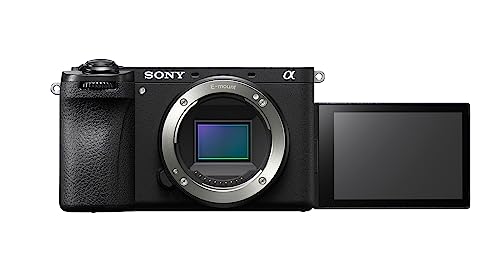
Sony a6700 — Best hybrid for photo-first creators
Most creators do not own separate photo and video cameras; they own one body and two ambitions. The a6700 is Sony’s answer to that reality, fusing a genuinely excellent stills camera — fast bursts, AI-driven subject recognition, a fine sensor — with 10-bit 4:2:2 video up to 4K 120p, in a body small enough to carry daily without negotiation.
Autofocus is the feature owners mention first. The dedicated AI unit recognises human poses, animal eyes, birds, vehicles and insects, and the camera clings to subjects through occlusions that defeat older systems. For wildlife photographers who also film behaviour clips, or parents documenting school sport in both media, that intelligence quietly raises keeper rates everywhere.
Video colour mirrors the FX30’s wardrobe: S-Cinetone for immediacy, S-Log3 for the grading suite, with LUT preview so monitoring stays honest. The vari-angle screen suits presenters and low-angle stills alike, and the improved menu and front dial ergonomics fix long-standing Alpha niggles. Ten-bit depth means skies, stage lighting and sunsets grade without banding apologies.
Limits trace the body’s size. A single card slot asks professionals to trust one card on paid shoots, sustained high-frame-rate recording in hot weather can demand pauses, and large telephoto lenses overwhelm the small grip without a cage or plate. None of this surprises at the size and price; all of it is manageable with honest planning.
Stills shooters should not overlook the shutter and buffer: this is a fast, modern APS-C camera full stop, with colour and detail that print beautifully. The video is not a garnish but a second career for the same body, which is precisely the hybrid promise earlier generations advertised and this one finally keeps.
Choose the a6700 when your work alternates — a wedding stills day, a product film the next, family life throughout — and you refuse to choose a favourite medium. It is the most versatile camera in this guide, and versatility, carried daily, beats specialisation left at home.
- APS-C 26MP sensor with AI processing unit
- 4K up to 120p in 10-bit 4:2:2
- S-Log3, S-Cinetone and LUT monitoring
- Advanced subject-recognition autofocus
- Compact rangefinder-style body with vari-angle screen
a6700 travel kits deserve a paragraph of their own, because this body disappears into a sling bag with two compact lenses and still returns publishable stills and film from the same afternoon. Battery life improved meaningfully over its predecessor, and USB-C charging from a power bank suits the travel rhythm. Creators who document their own lives — the vlog-adjacent majority — find the flip screen, product showcase habits and autofocus conspiring to make daily filming nearly frictionless. Few cameras at any price serve the one-person media company this completely.
Strengths
- Stills pedigree matches its video talent shot for shot
- Autofocus recognises people, animals, vehicles and more
- Travels light enough for everyday carry
Trade-offs
- Single card slot limits redundancy on paid work
- Sustained 4K 120p can heat-soak in hot climates
- Small body balances awkwardly with large lenses
Best for: hybrid creators who photograph as much as they film
Not suited for: long-form video specialists needing dual slots and fans

Panasonic Lumix G9 II — Best Micro Four Thirds hybrid with phase autofocus
The G9 II answers the criticism that haunted Lumix for a decade: its autofocus. By adding phase detection to a Micro Four Thirds flagship, Panasonic produced a hybrid that tracks subjects for video with the confidence Sony owners take for granted, while keeping every trait — stabilisation, compact lenses, rugged build — that made the G line beloved.
Stills credentials lead the conversation. Blistering burst rates with pre-release capture, where the camera banks frames before you fully press the shutter, transform wildlife and sports hit rates. A bird’s takeoff or a striker’s volley stops being luck and becomes inventory. The 25.2MP sensor resolves detail that prints large and crops generously.
Video runs deep: 4K at up to 120p and 5.7K options, all with 10-bit colour, plus Panasonic’s real-time LUT system that bakes or previews your grade on set. V-Log captures the wide dynamic range colourists expect from Lumix, and the files intercut gracefully with the GH6’s for two-camera productions within one lens system.
Handling suits long days. The body is substantial without being punishing, controls fall under fingers logically, and the stabilisation steadies handheld telephoto work in a way that still startles owners of larger systems. Weather sealing shrugs at the drizzle that sends phones back into pockets.
Against the GH6, the trade is specialisation: the G9 II is the better hybrid and stills machine with the autofocus for action, while the GH6 keeps edges in certain internal recording formats for pure cinema work. Most Micro Four Thirds owners choosing today will pick the newer hybrid and never look back.
For creators invested in the system’s superb small lenses, the G9 II removes the last reason to envy other mounts. It photographs like a sports flagship, films in genuine 10-bit depth, and carries like a travel camera — a combination no rival assembles quite this neatly.
- Micro Four Thirds 25.2MP sensor
- Phase-detection autofocus — a Lumix MFT first
- 4K 120p and 5.7K recording in 10-bit
- Fast burst stills with pre-release capture
- Strong in-body stabilisation
G9 II field reports from wildlife shooters read like relief letters. Pre-capture ends the heartbreak of the almost-frame, phase autofocus keeps a heron tracked through reeds, and the Micro Four Thirds telephoto lenses reach equivalent focal lengths that would require a equipment trolley on full frame. Video benefits ride along: the same outing yields 10-bit clips of behaviour that stills cannot narrate. For nature creators, that dual harvest from a single hide session justifies the system all by itself.
Strengths
- Phase autofocus fixes the old Lumix video hesitation
- Stills speed rivals dedicated sports bodies
- Real-time LUTs speed up delivery
Trade-offs
- Menu depth can overwhelm newcomers
- Larger lenses erase the size advantage quickly
- High-sensitivity video trails full-frame rivals
Best for: hybrid shooters loyal to Micro Four Thirds glass
Not suited for: filmmakers who need full-frame low-light cleanliness

Panasonic Lumix S5 II — Best full-frame 10-bit value
Full-frame filmmaking used to begin at prices that required client approval; the S5 II rewrote that entry fee. Panasonic combined a 24.2MP full-frame sensor, phase-detection autofocus, a cooling fan and 10-bit recording into a body priced for serious enthusiasts, then kept improving it with firmware. The result is the value anchor of this entire guide.
Open-gate 6K recording is the feature creators cite most. Capturing the sensor’s full height lets one master serve cinema widescreen, vertical social cuts and everything between, reframed in post rather than reshot on set. For solo creators feeding multiple platforms from a single shoot, that flexibility is not a luxury; it is the workflow.
The full-frame look — shallow depth, graceful high-sensitivity files, wide dynamic range in V-Log — arrives intact. Interviews glow, night streets stay clean at sensitivities that humble smaller sensors, and L-mount glass from Panasonic, Sigma and Leica offers everything from budget primes to cinema-grade zooms. Real-time LUTs let you monitor or bake a look, pleasing clients on set.
Phase autofocus finally makes Lumix a tracking camera. It may not humiliate Sony’s best, and firmware continues to refine it, but faces and eyes now hold focus through movement in a way the contrast-only generation never managed. Combined with class-leading stabilisation, handheld full-frame footage gains a polish that once required a gimbal crew.
Cooling completes the professional picture: ceremonies, conferences and long interviews record without thermal negotiation. Dual card slots provide the redundancy paid work demands. The compromises are ecosystemic rather than photographic — L-mount lenses are pricier than Micro Four Thirds glass, and the body’s styling is workmanlike.
As the single-camera answer for a creator who wants the full-frame film look, dependable recording and honest value, the S5 II stands alone in this list. It is the pick we recommend to anyone whose projects have outgrown a phone and whose ambitions have outgrown apologising for footage.
- Full-frame 24.2MP sensor
- Phase-detection autofocus
- 6K open-gate and 4K 10-bit recording
- Built-in cooling fan for long recordings
- Real-time LUT and strong stabilisation
S5 II wedding kits have become a small industry pattern: two bodies, fast L-mount primes, fan cooling trusted through summer ceremonies, and open-gate masters archived for whatever aspect ratio clients request next year. Videographers moving up from Micro Four Thirds keep their Panasonic colour habits while gaining the full-frame glow, which shortens the learning curve considerably. Add the S5 II’s reputation for firmware generosity — features arriving free long after purchase — and the ownership story keeps improving after the invoice fades.
Strengths
- Full-frame depth and low-light quality at a fair price
- Open-gate 6K reframes for any platform later
- Fan cooling ends record-limit anxiety
Trade-offs
- L-mount lenses cost more than MFT equivalents
- Autofocus still matures through firmware
- Body is plain rather than premium in feel
Best for: filmmakers wanting full-frame looks without flagship spending
Not suited for: Micro Four Thirds owners prioritising the smallest kit
Fujifilm X-H2S — Prose-only: the stacked-sensor speedster
Fujifilm’s X-H2S is the connoisseur’s hybrid: a stacked APS-C sensor that reads out so quickly rolling shutter nearly vanishes, internal ProRes recording, and colour science with a devoted following. It films in 10-bit depth across 6.2K and 4K 120p modes, and its F-Log2 profile captures a gamut wide enough to keep colourists busy and happy.
We list it prose-only because our verified pool for this round covers the five linked cameras above, and we do not attach purchase links we have not verified through the site’s own checks. The X-H2S deserves its place in the conversation on merit, so it appears here honestly labelled rather than quietly omitted.
Speed defines its character. Forty-frame bursts, blackout-free viewing and that fast sensor make it a sports and wildlife stills machine that happens to film beautifully, the mirror image of the FX30’s priorities. Fast pans in video stay straighter than on any non-stacked rival here, which action videographers notice immediately.
Fujifilm’s film simulations offer an alternative philosophy to log grading: choose a beloved emulsion look, bake it in, and publish with minimal post. Creators tired of the grading suite find liberation there, while log remains available when a project demands it. Few cameras serve both temperaments this gracefully.
Cooling is the asterisk: sustained high-end recording in heat benefits from Fujifilm’s add-on fan, an extra purchase the fan-equipped Panasonics and Sony FX30 render unnecessary. Budget the accessory if your work involves summer ceremonies, and the X-H2S’s remaining compromises reduce to lens-ecosystem size and price.
For the hybrid shooter who values velocity and colour character above all — and who already owns or admires Fujinon glass — the X-H2S may be the most desirable camera in this guide. It simply travels here without a link, by our verification rules, not by any failure of its own.
- APS-C stacked 26.1MP sensor
- 6.2K and 4K 120p recording in 10-bit
- Internal ProRes recording options
- F-Log2 wide-gamut colour profile
- Fast electronic shutter bursts for stills
X-H2S advocates speak about it the way musicians discuss a favourite instrument: the dials, the colour, the sense that the machine has opinions worth respecting. Its electronic viewfinder is among the finest here, its stills shutter experience genuinely flagship-grade, and its video files carry Fujifilm’s colour DNA into log workflows that usually flatten brand character away. If your creative identity is bound up with how footage feels rather than merely what it resolves, this prose-only guest may quietly be your first choice in daily use.
Strengths
- Stacked sensor minimises rolling shutter distortion
- Fujifilm colour and film simulations delight many creators
- Stills speed is flagship-tier
Trade-offs
- Premium pricing beside the a6700
- Cooling fan is an add-on accessory, not built in
- Lens ecosystem smaller than Sony E-mount
Best for: speed-obsessed hybrids who love Fujifilm colour
Not suited for: budget rigs needing built-in cooling and dual slots standard
How Do the Six Compare on Recording Muscle?
| Pick | Sensor | Recording highlight | Suits |
|---|---|---|---|
| Sony FX30 | Super 35 / APS-C | 4K 120p, ProRes via recorder | Cinema rigs, long takes |
| Panasonic Lumix GH6 | Micro Four Thirds | Internal ProRes, 5.7K | Grading-heavy solo work |
| Sony a6700 | APS-C | 4K 120p internal | Hybrid everyday carry |
| Panasonic Lumix G9 II | Micro Four Thirds | 4K 120p, 5.7K options | Action hybrids, MFT loyalists |
| Panasonic Lumix S5 II | Full frame | 6K open gate | Full-frame film look, value |
| Fujifilm X-H2S | APS-C stacked | Internal ProRes, 6.2K | Speed, minimal rolling shutter |
Notice the pattern: every camera reaches 10-bit, yet each arrives by a different road — internal ProRes, open-gate oversampling, stacked-sensor speed or fan-cooled endurance. The right choice depends on which stage of your workflow hurts today: capture flexibility, grading headroom, thermal reliability or hybrid stills. Identify the pain honestly and the table stops being a contest and becomes a diagnosis.
What Does 10-Bit Actually Buy You in the Grade?
Imagine painting with sixty-four times more shades between the same black and white. Banding — those ugly steps in skies, walls and stage haze — comes from too few shades to describe a smooth gradient, and 10-bit’s billion-plus colours dissolve it. Push an 8-bit sunset toward teal-and-orange and it tears; push the same scene in 10-bit and it simply becomes a more dramatic sunset.
Chroma sampling rides along. 4:2:2 recording keeps twice the colour resolution of 4:2:0, which matters when you key a green screen, rescue a white balance error or saturate a product’s brand colour precisely. Editors feel the difference within one session: corrections hold together instead of crumbling into artefacts around edges and hair.
Log profiles complete the bargain by distributing those shades where your eyes notice them. S-Log3, V-Log and F-Log2 each remap tones so highlights and shadows share the bit depth fairly, at the cost of flat-looking footage that demands grading. Shooters who never grade should use the beautiful standard profiles these cameras also provide and enjoy 10-bit’s gentler benefits without the homework.
How Should You Build a Workflow Around 10-Bit Files?
Storage planning comes first, because rich files are large files. ProRes and high-bitrate modes consume cards and drives at rates that surprise newcomers, so budget media as part of the camera purchase and adopt a naming and backup ritual before the first paid shoot. Two copies, verified, before any card is formatted — that rule has saved more careers than any lens.
Monitoring deserves equal care. A screen that cannot show your LUT accurately invites exposure errors that even 10-bit cannot forgive, so learn each camera’s zebras, waveforms and false-colour tools. The cinema bodies here expose those tools most completely, one more reason dedicated video shooters gravitate toward them.
Editing hardware feels the weight too. Modern codecs like H.265 deliver small files that demand serious processing to decode, while ProRes files are huge yet edit like butter. Match codec to computer honestly: a modest laptop may prefer the GH6’s ProRes despite the storage bill, while a workstation chews compressed footage happily all day.
Which Lenses Unlock These Cameras?
A 10-bit sensor behind a poor lens is a sports car on bald tyres. Each system here offers a sensible starting pair: a fast standard zoom for events and a bright prime for interviews and low light. Sony’s E-mount adds the deepest third-party catalogue, Panasonic’s L-mount alliance brings Sigma value, Micro Four Thirds offers astonishing quality per gram, and Fujinon primes carry a cult following for good reason.
Rent before committing to exotic glass. A weekend with a cinema prime or a long telephoto teaches more about your real needs than a month of reviews, and keeps the kit lean. Remember that adapters and speed boosters can stretch a lens collection across systems during transitions, softening the cost of changing mounts.
How Do You Expose Log Footage Without Ruining It?
Log’s flat image tempts two errors: trusting the washed-out screen and underexposing to protect highlights that log already protects. Discipline starts with the manufacturer’s guidance — each system rates its log profile at specific exposure recommendations — and continues with tools: zebras set for skin, waveforms watched for the highlight ceiling, false colour on cinema bodies for a one-glance exposure map.
Overexposing log slightly, within the profile’s tolerance, usually grades cleaner than underexposing, because shadows in log hold the least information and noise lives there waiting to be lifted. The old film habit of exposing for the shadows translates imperfectly; with log, feed the sensor light generously and let the profile’s highlight roll-off do its designed work.
Monitoring LUTs exist to restore confidence, not accuracy. Judge exposure by the instruments, judge composition by the LUT image, and never reverse those jobs. Creators who internalise that separation stop returning from shoots with mysteriously murky footage, regardless of which of these six cameras they carried.
What Audio Should Accompany 10-Bit Ambitions?
Audiences forgive a soft image faster than scratchy sound, yet camera budgets routinely starve audio. Each system here offers a credible path: Sony’s digital audio interfaces and XLR handle, Panasonic’s four-channel recording and optional XLR unit, Fujifilm’s accessory ecosystem. A camera-mounted shotgun transforms dialogue clarity, while a wireless lavalier set rescues interviews in reverberant rooms where no camera microphone survives.
Monitor with headphones on every serious shoot, because audio problems are invisible until the edit, where they become expensive. Record a minute of room tone at each location for the editor’s patch kit, check levels against speech rather than the loudest laugh, and let the 10-bit picture’s professionalism be matched by sound that respects the audience’s ears.
How Does Stabilisation Change Handheld Filmmaking?
In-body stabilisation has quietly rewritten what solo creators attempt. The Panasonic pair lead here, smoothing walking shots into near-gimbal territory, while Sony’s active modes crop slightly for similar calm. Stabilisation is not a substitute for deliberate movement — slow pans and motivated pushes still read as professional, frantic corrections as amateur — but it forgives the micro-jitter that once dated handheld footage instantly.
Know the limits before a paid shoot: wide lenses stabilise best, long telephoto work still begs a tripod or monopod, and electronic modes can warble at frame edges during aggressive moves. Test your exact lens and mode combination at home, because stabilisation behaviour is a system property, not a camera specification alone.
Which Camera Fits Which Kind of Production?
Map the cameras to real assignments and the differences sharpen. A documentary interview series belongs to the FX30 or S5 II, whose cooling, audio paths and dual slots treat hours of testimony as routine. A travel YouTube channel belongs to the a6700, small enough to film daily without becoming the story itself. A music-video colourist’s playground is the GH6, where ProRes files accept violent grades gracefully, while a wildlife hybrid expedition packs the G9 II for its reach economy and stills velocity. The X-H2S, finally, is the fashion and action hybrid’s instrument, where readout speed and colour character outrank everything else on the call sheet.
Notice that budget alone did not assign any of those roles; workflow did. Two creators with identical money but different Tuesdays need different cameras from this list, which is why the guide resists crowning a universal winner. Your production calendar, read honestly, is the most accurate review you will ever consult.
How Should Beginners Grow Into Grading?
Start with the camera’s own standard profile and a monitoring LUT you trust, shooting scenes you can revisit: the same street at dawn, noon and dusk. Grade one variable at a time — exposure first, then white balance, then contrast, finally saturation — saving each stage as a version you can compare. Within a month, the flat log image stops looking broken and starts looking like potential, which is the precise moment 10-bit begins paying its dividend.
Steal looks legally and joyfully: recreate frames from films you admire, note where your footage resists, and learn whether the resistance is lighting, lens or grade. Most beginners discover lighting was the answer all along, and their next purchase becomes a lamp rather than a lens — a healthy rite of passage this guide endorses completely.
What About HDR Delivery and Future-Proofing?
HDR delivery is moving from festival novelty to client request, and 10-bit log originals are its raw material. Cameras that capture wide-gamut profiles with honest highlight roll-off today will feed tomorrow’s HDR timelines without reshoots, which matters for creators building libraries — wedding archives, stock footage, brand content — meant to earn for years. Shooting the deepest format you can store is therefore less about today’s audience and more about respecting your future catalogue.
Future-proofing has limits worth stating: codecs evolve, platforms compress brutally, and no purchase survives a decade unchanged. But colour depth is the one specification that cannot be added later. Resolution can be upscaled, noise can be reduced by software, yet shades never recorded are gone forever — the strongest argument for making 10-bit your floor from this purchase onward.
How Do Rental and Resale Markets Judge These Bodies?
Rental counters are unsentimental quality filters: bodies that return broken or generate client complaints disappear from fleets, while the FX30 and GH6 have become rental staples precisely because they survive production weeks and deliver predictable colour. Resale values echo the verdict, with well-kept examples of all six holding value better than the 8-bit generation they replaced, because working creators keep buying them as B-cameras.
That aftermarket health matters to first-time buyers. A camera you can sell for a fair fraction of its cost when your work outgrows it is cheaper to own than a bargain body nobody wants second-hand. Keep the box, the original battery and the receipt, treat the sensor with respect, and your upgrade path stays funded by your foresight.
What Should a Two-Camera Kit Look Like?
Serious creators eventually pair bodies, and this list contains natural marriages. An FX30 beside an a6700 shares lenses, batteries and colour science while covering cinema and hybrid duties. A GH6 beside a G9 II does the same within Micro Four Thirds, one biased to recording depth, the other to stills and autofocus. The S5 II pairs with either Panasonic for L-mount and MFT duties split by light: full frame after dark, compact glass by day.
Matching colour across brands is possible but costs grading time on every project, which is why most two-body kits stay within one mount family. If a second body is even a distant plan, let it influence today’s choice — ecosystems are marriages, and this guide would rather you choose the family deliberately than drift into it.
How Do You Test a 10-Bit Camera Before Committing?
Rent or borrow for one real project rather than fondling display units. Film a face beside a bright window, a sunset gradient, a dim room lit by one practical lamp, and a moving subject crossing mixed light. Grade the files that evening with your actual software on your actual computer. Banding behaviour, shadow noise, codec strain on your machine and your own comfort with the colour profile will all declare themselves within that single honest trial.
Bring your current lenses and cards if the mount allows, because ecosystem friction hides in adapters, write speeds and menu dialects. Note how quickly you found the waveform, changed profiles and formatted a card; on a paid set, those seconds recur hundreds of times. The camera that disappears into your hands during the test is the camera your clients will benefit from, whatever its brochure ranking.
Why Do Professionals Still Shoot 8-Bit Sometimes?
Context, not ignorance. News packages, live streams and social clips with gentle corrections gain nothing from bit depth their pipelines will discard, and smaller files move faster through deadline workflows. The professionals in this guide’s audience shoot 8-bit deliberately for disposable content and reserve 10-bit for work that will be graded, archived or sold — a triage that respects both storage and craft.
Owning a 10-bit camera does not oblige you to max out every setting on every shoot. The wisest owners treat format choice as part of pre-production, matched to the deliverable, and their drives, editors and clients all breathe easier for it. Depth is a tool; judgment remains the trade.
What Maintenance Keeps a Video Body Reliable?
Heat is the working enemy, so treat airflow as sacred: never block the vents on fan-cooled bodies with tape, cages or improvised rain covers, and let a hot camera rest in shade between setups rather than baking in a closed car. Firmware updates deserve a calm evening at home, never the morning of a wedding, because they occasionally reset custom settings you will want to re-enter deliberately rather than discover missing on set.
Sensor care follows stills discipline with one addition: video reveals dust as fixed shadows that move with nothing, ruining footage more visibly than photographs. Use the camera’s cleaning mode, a blower before any wet intervention, and professional cleaning before major productions. Card hygiene completes the ritual — format in camera, retire cards that report errors once, and label media like the irreplaceable cargo it is.
How Should You Light for Log and 10-Bit?
Lighting ratios decide whether log sings. Keep key-to-fill contrast within what your chosen profile handles gracefully, protect one true highlight in frame for the grade to pivot around, and give shadows a whisper of fill rather than letting them fall to the noisy floor. Practical lamps inside the frame motivate beautifully on these cameras because their highlight roll-off forgives bright sources that would blow out lesser recording chains.
Colour temperature discipline matters more as bit depth rises, because 10-bit faithfully preserves your mistakes. Gel or set white balance deliberately when sources mix, shoot a grey card at each lighting change if the project is colour-critical, and your colourist will spend the session creating looks instead of performing rescues. Rich files reward preparation; they expose its absence just as richly.
What Does a Sensible First Kit Cost Beyond the Body?
Honest budgeting counts the entourage: two fast cards and a reader, two batteries, a variable ND filter for daylight filming, a microphone that suits your subjects, and a bag that fits the assembled kit rather than the brochure photograph. Creators who price only the body routinely stall mid-project, owning a superb sensor they cannot yet feed, power or protect properly through a working week.
Sequence the purchases by pain. Media and power first, because without them nothing records; audio second, because audiences judge it harshly; filtration and support third, because they elevate rather than enable. Lenses beyond the first versatile zoom can wait for rental experiments to reveal your true focal habits. This ordering, applied to any of the six bodies, produces a working kit sooner and a wiser one ultimately.
How Do You Choose Between Two Systems You Like?
Borrow your future for a weekend. Rent the leading candidate with its most likely lens, shoot something you genuinely care about, and grade it on your own machine. Then repeat with the runner-up if doubt survives. The exercise costs a fraction of a wrong purchase and answers questions no specification sheet phrases: whether the menus think like you, whether the colour pleases you before grading, whether the body vanishes or nags during a long handheld sequence.
Weigh also the company you will keep. Local creator communities, rental houses and repair routes cluster around ecosystems unevenly by city; owning the system your peers shoot makes borrowing a lens or a body on a deadline a phone call instead of a purchase. Cameras are social objects in professional life, and the wisest buyers choose their tribe as deliberately as their sensor.
What Will You Notice First After Upgrading?
Owners consistently report the same small revelations. Sunsets stop posterising into bands. A bride’s dress holds lace detail beside a bright window instead of surrendering to white. Stage haze grades into atmosphere rather than artefacts, and a client’s brand colour can be matched exactly instead of approximately. None of these moments makes a highlight reel, yet together they change how footage feels to everyone who watches it, including viewers who could never name the technology responsible.
The second revelation is behavioural: you start lighting and exposing more deliberately, because the files finally reward the effort visibly. Ten-bit is thus partly a teacher disguised as a specification, and creators who learn its lessons carry them to every camera they will ever own afterwards.
How Should You Archive 10-Bit Masters?
Footage you cannot find in three years might as well not exist, so archive with the same seriousness as capture. Keep camera originals untouched in dated project folders, store the graded master beside them, and maintain one off-site copy that refreshes on a schedule rather than on inspiration. Drives fail silently and clouds change terms; redundancy across both is the only archival strategy that has ever deserved the name.
Metadata is the unglamorous half of the craft: project names, subjects, locations and rights notes recorded while memory is fresh turn a hard drive into a library. Future you, hunting one clip for a paying client, will bless present you for every field completed. That discipline, more than any codec, is what separates a footage collection from a footage pile.
When Is a Phone Still the Right Camera?
Spontaneity has a vote. The phone in your pocket films birthdays, breaking news on your street and the dog’s funniest minute without setup, and modern phones record respectable colour for exactly those disposable joys. Owning a serious 10-bit camera should sharpen, not shame, that instinct: reach for the phone when the moment is the value, and for the camera when the footage must survive grading, clients or time.
Many creators in this guide’s audience run both without contradiction — phone for immediacy, dedicated body for intent. The boundary is professional rather than snobbish, and respecting it keeps the big camera charged, carded and ready for the work that actually pays for it.
Common Mistakes
Chasing bit depth while ignoring light is the classic beginner’s inversion. A well-lit 8-bit scene beats a murky 10-bit one every time, because colour depth preserves information that light must first create. Spend on a decent LED panel and a microphone before upgrading bodies; audiences forgive grain sooner than darkness and bad audio.
Shooting log without learning to expose it is the second trap. Log exposed carelessly — especially underexposed — returns noisy shadows that no bit depth rescues. Use the monitoring tools, expose deliberately, or choose the standard colour profiles proudly until your grading skills catch up with your ambitions.
Finally, many creators record everything at maximum quality and drown in storage and editing time. Reserve ProRes and the highest bitrates for hero work, and let efficient codecs carry routine footage. Workflow sustainability is a creative virtue, not a compromise.
Final Recommendation
Filmmakers building a rig should start with the FX30; Micro Four Thirds loyalists should choose between the GH6’s recording depth and the G9 II’s autofocus and stills speed; hybrids belong with the a6700; and anyone craving the full-frame look on a sane budget should buy the S5 II and never apologise. The X-H2S awaits Fujifilm devotees who accept our prose-only listing. If a single recommendation must stand, the S5 II’s combination of full-frame colour, open-gate flexibility, fan cooling and price makes it the 10-bit camera we would hand to a creator whose work is about to get serious.
Frequently Asked Questions
Can viewers actually see the difference between 8-bit and 10-bit?
In ungraded footage on a phone, rarely. The difference appears in the edit: skies that band, skin that breaks under correction, highlights that clip harshly in 8-bit stay graceful in 10-bit. You buy 10-bit for the grading suite and for delivery headroom, not for bragging rights on a spec sheet.
Is 4:2:2 necessary, or is 4:2:0 enough?
For direct delivery with gentle corrections, 4:2:0 in 10-bit already improves on most 8-bit work. For green screen, heavy grades, HDR delivery or client work where revisions arrive unpredictably, 4:2:2 earns its storage cost. All six cameras here offer strong sampling in their key modes.
Do you need an external recorder for 10-bit?
Not with this group. Every pick records 10-bit internally in its principal modes, and the GH6 and X-H2S even capture ProRes without accessories. External recorders still add monitoring tools and media capacity for cinema rigs, but they are options here, not admission tickets.
Which sensor size is best for 10-bit video?
Each size trades honestly: full frame gathers light and depth, APS-C balances cost and lens size, Micro Four Thirds minimises kit weight while stabilising superbly. Bit depth behaves identically across them; choose by light, lenses and luggage rather than by colour specifications.
Will 10-bit files overwhelm an ordinary laptop?
Compressed 10-bit codecs can strain older machines, while ProRes edits smoothly but fills drives. Proxy workflows — editing small stand-in files linked to the originals — solve both problems in every major editor. Budget a fast external drive with the camera and the issue mostly evaporates.
Why is the Fujifilm listed without a purchase link?
Our pool verification for this round confirmed the other five cameras through the site’s own checks; the X-H2S was not part of that verified set. We include it because a 10-bit guide without it would mislead, labelled prose-only so readers know exactly which recommendations carry verified links.
One closing observation from years of watching creators upgrade: nobody regrets the footage they captured in 10-bit, and many regret the projects they shot in 8-bit just before a client asked for a heavier grade. Bit depth is insurance you buy once, built into every frame thereafter. Choose the body whose handling you enjoy, because you will hold it for thousands of hours, and let the colour depth quietly protect every one of them.
Bring a notebook to your first month with any of these cameras, physical or digital, and log the settings behind every clip you love and every clip you mourn. Patterns emerge with embarrassing speed — a favourite profile, a chronic exposure habit, a lens that flatters your subjects — and that log becomes a personal manual no reviewer could write for you, because it describes your light, your subjects and your taste rather than a laboratory’s.
Share that log’s lessons with the community around your chosen system, too. The forums and local groups for these six cameras are full of working creators trading LUTs, exposure habits and hard-won thermal tricks, and contributing your own findings completes the circle that made your purchase wiser in the first place.
Then go and make something imperfect and alive with the camera, because every hour spent filming teaches more than another evening of comparison tables ever will. Shoot one short scene, grade it honestly, and let that footage — banding-free and gradeable — show you which setting to change next.
Related Guides
Keep building your video kit with best cameras for filmmaking on a budget, best lenses for video creators and best microphones for cameras and interviews.


