What's inside
- Key Takeaways
- Quick Picks
- How We Chose These Picks
- Side-by-Side Comparison
- How to Choose a Monitor in the 30-Inch Class
- Is a 29.5-Inch Ultrawide Really a 30-Inch Monitor?
- Does 2560×1080 Look Soft on a Screen This Wide?
- Can One Ultrawide Replace a Dual-Monitor Setup?
- Common Mistakes
- Final Recommendation
- Frequently Asked Questions
- Related Guides
As an Amazon Associate I earn from qualifying purchases. This post may contain affiliate links at no extra cost to you.
[SITE_DOMAIN] is reader-supported. When you buy through links on our site, we may earn an affiliate commission.
All six screens in this roundup carry a live Amazon listing behind their name, so you can open the exact model page, read the full specification sheet the seller publishes there, and check the price on Amazon before anything reaches your cart. Model codes deserve that pause in this size class more than in most, because the shelf label and the physical panel disagree with each other here — a listing sold as a 30-inch monitor may hide a 29.5-inch ultrawide or, in one case below, a 31.5-inch panel wearing a smaller name.
Start with a correction, because the search for the best 30 inch monitors begins with a size that has nearly vanished. True 30-inch panels — a 30-inch diagonal in a conventional 16:9 or 16:10 shape — have effectively left the market, and what replaced them on the shelf is a different animal: 29.5-inch ultrawide panels sold under the 30-inch label, stretched to a 21:9 shape at 2560×1080. Five of the six picks below belong to that ultrawide family or sit beside it. One pick, Dell’s UltraSharp U3023E, is a genuine 30-inch 16:10 screen, and one, from Acer, is honestly a 31.5-inch monitor included because shoppers hunting this size keep landing on it. This guide names each panel’s real dimensions inside its review rather than letting the shelf label do the talking.
That honesty changes what the size is for. A 29.5-inch ultrawide at 2560×1080 gives you the horizontal room of a small dual-screen setup with no bezel down the middle, which is why racing games, flight sims, timelines and wide spreadsheets dominate the use cases below. The Dell’s 16:10 frame trades that width for vertical height, the rarest commodity in modern displays, and suits documents, code and photo work where scrolling is the enemy. Neither shape is the 30-inch television-style panel the keyword once described, and pretending otherwise would send you home with the wrong glass.
Refresh rate draws the second dividing line. Four of these panels run at up to 200Hz and court players outright, one Dell is a work screen whose listing does not even quote a refresh figure, and the Acer settles at 75Hz for office duty. Read the reviews with your own week in mind: the person editing a novel and the person chasing lap times both typed the same search, and this guide refuses to sell either of them the other’s monitor.
Desk space draws a third line, quieter than the other two. A 21:9 panel is a wide object — wider, in physical terms, than the television many buyers replaced to get it — and a 16:10 panel is a tall one. Both shapes fail in different furniture: the ultrawide crowds a narrow desk flanked by speakers, the Dell’s height can collide with shelves and hutch tops that a shorter panel clears. The reviews flag the shape each pick commits you to, and the buying advice near the end returns to the tape measure, because in this class the dimensions are the decision.
Key Takeaways
- True 30-inch panels are nearly extinct: most of this class is 29.5-inch 21:9 ultrawide glass at 2560×1080 sold under a 30-inch label, and this guide says so in every review it applies to.
- The Dell UltraSharp U3023E is the one genuine 30-inch 16:10 screen here, aimed at document and desk work rather than play.
- Four picks reach up to 200Hz — the Sceptre, CRUA, Z-Edge and the Kado two-pack — while the Acer EZ321Q is a 31.5-inch panel, labelled as such in its review, running 75Hz.
- The Kado listing is a two-pack, the only way in this guide to buy a matched ultrawide pair in a single order.
- Two picks state built-in speakers in their titles — the Sceptre and the Kado pair — while the CRUA offers a 3.5mm audio output instead.
Quick Picks
| Pick | Badge | Why it earns a place |
|---|---|---|
| Dell UltraSharp U3023E | The real 30 inches | A genuine 30-inch 16:10 WQXGA panel for desks that measure worth in vertical lines of text. |
| Sceptre C305B-200UN1 | Curved 200Hz ultrawide | 2560×1080 at up to 200Hz with built-in speakers on a curved 21:9 frame. |
| CRUA 30-inch Ultrawide | 1500R VA curve | A VA panel bent to 1500R with FreeSync, 120 percent sRGB coverage and a 100×100 wall mount. |
| Z-Edge UG30 | Ports and PIP-PBP | Two DisplayPort 1.4 and two HDMI 2.0 inputs plus picture-in-picture and picture-by-picture modes. |
| Kado 30-inch Ultrawide 2-Pack | Matched pair in one box | Two 1800R curved ultrawides with FreeSync Premium and built-in speakers for stacked or side-by-side rigs. |
| Acer EZ321Q | The 31.5-inch neighbour | An IPS office panel at 1920×1080 and 75Hz with HDMI and VGA, sized honestly in its review below. |
How We Chose These Picks
Every specification quoted in the reviews comes from the manufacturer’s own listing title, checked against the live Amazon page before the pick was admitted. That rule sounds modest until you apply it to this size class, where the shelf name and the physical panel part company: titles were read for the diagonal they actually state, the shape they actually describe, and the refresh figure they actually promise, and each review repeats those facts in the panel’s own terms. Where a title stays silent — the Dell U3023E’s listing names its resolution class and aspect ratio but quotes no refresh rate — the spec list below records the silence in plain words instead of borrowing a number from a review elsewhere.
Shape came before speed in the sorting. A shopper who wants the old 30-inch experience — a tall, squarish screen for documents — is served by exactly one pick here, and the guide would be dishonest if it padded that role with ultrawides and called the job done. The remaining five were judged as ultrawides and near-ultrawides on their own terms: how tight the curve is, how many inputs they carry, whether the panel splits for two sources, and whether a second screen is already in the box.
Refresh rate was treated as a ceiling, not a character reference. The four 200Hz panels quote that figure as an up-to maximum, and the Z-Edge title itself lists 200Hz, 165Hz and 144Hz as the rates its inputs support, which tells you the headline number depends on the cable and port you feed it. The reviews keep that conditional phrasing, because a monitor that only reaches its badge number over one specific connection is a different purchase from one that reaches it everywhere.
Sound and mounting were recorded from titles rather than assumed. Built-in speakers appear in this class less often than the gaming styling suggests, so the two picks whose titles state them are flagged, the CRUA’s 3.5mm audio output is described as an output and nothing more, and wall-mount patterns are quoted where the title gives them — 100x100mm on the CRUA, a VESA mount on the Kado pair and the Acer.
Finally, the Acer’s presence was a deliberate editorial call, disclosed rather than disguised. Shoppers searching this size meet 31.5-inch panels constantly, because manufacturers group them together; excluding the class’s most straightforward office example would leave the guide tidier and less useful. It stays, labelled at its true size in its heading, its review and the comparison table, so nobody buys it believing a tape measure will read 30 inches.
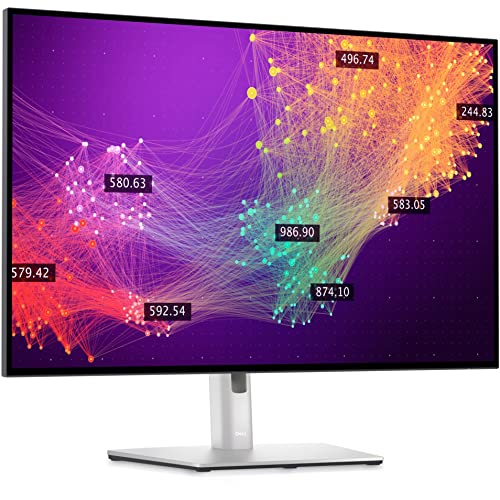
Dell UltraSharp U3023E — The one true 30-inch panel in the class
The U3023E is the pick that makes the correction in the introduction concrete: this is an actual 30-inch diagonal, in a 16:10 aspect ratio, carrying a WQXGA resolution class behind a WLED backlight. That shape is the story. A 16:10 frame restores the vertical lines that 16:9 panels surrendered a decade ago, and on a desk where the day is contracts, manuscripts, code editors and tall web pages, those extra lines are not a luxury — they are fewer scrolls per hour, every hour, for the life of the screen. Dell finishes it in black and silver, the UltraSharp line’s usual office dress, and nothing about the listing pitches it at gamers.
That restraint cuts both ways, and the listing title is where you see it. The title quotes no refresh rate, no response time, no adaptive sync and no HDR tier, because this panel was not built to chase them. Treat the silence as a specification in itself: this is a work instrument whose maker chose to headline size, shape and resolution class, and anyone whose evenings involve competitive play should keep reading the reviews below rather than asking this Dell to be something its own title never claims. For the desk it targets, the WQXGA pixel count spread over 30 inches lands in the comfortable zone where text renders crisply at full size and interface elements stay large enough to read without leaning in.
Who it suits is therefore easy to picture. A solicitor reviewing a forty-page agreement sees more of the document at once. A developer keeps an editor, a terminal and a browser preview stacked without the sideways sprawl an ultrawide demands. A photographer working in portrait orientation stops fighting the frame. The 16:10 shape also pairs gracefully with a laptop, whose own screen is likely 16:10 as well, so windows keep their proportions when dragged across. If your desk sounds like that, open the U3023E’s listing and check the price on Amazon with the stand and port details in front of you — the title quoted here is a summary, and the full page is where connection specifics live.
One more quality of the 16:10 shape deserves spelling out, because it only becomes obvious after a week of use. Vertical space compounds. A spreadsheet shows more rows before the fold of the screen, a code file shows more of the function you are editing alongside the one calling it, and a video call can sit above a document without either being squeezed into a ribbon. None of that appears in a specification table, yet it is the entire reason this format has loyalists who refuse to give it up. The counterweight is media: films and games are mastered for wider frames, so widescreen content on a 16:10 panel leaves black bars above and below, slightly shrinking the picture compared with a panel of the same diagonal cut for video. Desk workers who end the day with a film will notice those bars; desk workers who end the day by closing the laptop will not. Dell also builds this line for multi-monitor offices, and a pair of 16:10 panels side by side makes a tall, document-first wall that the ultrawides below cannot imitate — though at that point the desk, the mount and the budget all need to agree, and the single-panel simplicity that drew most buyers here starts to dissolve.
- Size and shape: 30-inch diagonal, 16:10 aspect ratio
- Resolution class: WQXGA
- Panel and backlight: LCD with WLED backlight
- Finish: Black and silver
- Refresh rate: Not stated in the listing title — verify with the manufacturer documentation
- Adaptive sync: Not stated in the listing title — verify with the manufacturer documentation
Strengths
- A genuine 30-inch 16:10 frame in a class where that shape has almost disappeared.
- WQXGA resolution class gives documents and code more vertical room than any 2560×1080 ultrawide here.
- UltraSharp office finish in black and silver suits a formal desk rather than a gaming cave.
Trade-offs
- The listing quotes no refresh rate or sync technology, so fast play is outside its stated remit.
- Its 16:10 width is narrower than the 21:9 panels below for side-by-side window layouts.
- Speakers are not mentioned in the title, so plan on separate audio for calls and media.
Best for: document-heavy professionals whose screen time is text, code and tall pages on a true 30-inch 16:10 canvas.
Not suited for: players chasing 200Hz motion, or desks that need the 2560-pixel horizontal span of a 21:9 ultrawide for side-by-side windows.

Sceptre C305B-200UN1 — Curved 200Hz ultrawide with speakers on board
Sceptre’s C305B-200UN1 is the archetype of what the 30-inch label now means: a curved 21:9 ultrawide running 2560×1080, quoting up to 200Hz, and finished in metal black. The curve and the width do the immersion work — a racing cockpit or a flight deck stretches into your peripheral vision in a way a flat 27-inch screen cannot imitate — while the 200Hz ceiling gives fast motion the headroom it needs when a capable graphics card is feeding it. Built-in speakers are stated in the title, which matters more than it sounds, because ultrawide gaming desks often have no spare surface for a soundbar.
The title’s phrasing deserves a careful read. It promises HDMI and DisplayPort connections and a refresh rate of up to 200Hz, and that up-to is doing honest work: the rate you actually get depends on which input you use and what your source can send. Wire it with DisplayPort from a desktop card and you are in the panel’s intended configuration; hang it off an older laptop HDMI port and the ceiling drops. The 2560×1080 resolution is the other half of the bargain — it is wide rather than dense, so text carries softer edges than on the Dell above, and in exchange your graphics card renders far fewer pixels per frame than a 3440×1440 ultrawide would demand.
For a single-screen gaming desk that also handles email and browsing, that trade is coherent. The speakers remove a peripheral from the budget, the curve fills the view, and the resolution keeps frame rates high on mid-range hardware. Buyers running a home office off the same desk should weigh the softer text honestly, because eight hours of documents at 2560×1080 spread across this width is a different experience from the same hours on the Dell’s WQXGA frame. If the balance of your week tips toward play, look at today’s Amazon price for the C305B-200UN1 while its input list is on screen, since the port you plan to use decides the refresh you will actually see.
Think, too, about what the curve does to the ordinary parts of a day. Browsing, messaging and documents sit perfectly happily on a curved ultrawide once your eyes adjust, which for most people takes days rather than weeks, and the wrap that feels theatrical in a racing game becomes invisible in a spreadsheet. What does not adjust is geometry for precision work: long straight lines — architectural drawings, timeline rulers, page margins — bow very slightly with the panel, and the people who work with those lines daily are the ones who should choose a flat screen instead. Sceptre’s slim framing, named in the title, suits the multi-panel temptation this class creates, though a single 21:9 already covers the width most desks can hold. The speakers deserve a realistic expectation as well: built-in monitor speakers are for voices, alerts and casual video, and they do that job while saving the desk; a player who cares about engine notes and footsteps will add headphones or external speakers regardless of what any panel in this guide promises, and should judge the Sceptre’s audio as a convenience that covers the gaps rather than as the sound system itself.
- Size and shape: 30-inch class curved ultrawide, 21:9 aspect ratio
- Resolution: 2560×1080
- Refresh rate: up to 200Hz
- Inputs: HDMI, DisplayPort
- Speakers: built in, per listing title
- Finish: Metal Black
Strengths
- 200Hz ceiling on a curved 21:9 frame built squarely for immersive play.
- Built-in speakers stated in the title, saving desk space and a separate audio purchase.
- 2560×1080 keeps frame rates within reach of mid-range graphics cards.
Trade-offs
- The 200Hz figure is an up-to maximum that depends on input and source.
- 1080 vertical pixels spread across an ultrawide width render text less sharply than the Dell above.
- Curve radius is not stated in the listing title — verify with the manufacturer documentation
Best for: single-screen gaming desks that want curve, speed and sound from one panel with no soundbar in the budget.
Not suited for: text-first office work at this width, or a setup whose only video output is an older HDMI port that cannot feed the headline refresh rate.

CRUA 30-inch Ultrawide — 1500R VA curve with a wall mount in the title
CRUA’s entry bends its 30-inch ultrawide to a 1500R curve, the tightest radius quoted anywhere in this guide, around a VA panel running 2560×1080 at 200Hz. The VA choice is the interesting part. VA glass is the contrast specialist among the common panel families, and pairing it with an aggressive curve gives films and atmospheric games a depth that flatter, faster panels trade away. The title adds 120 percent sRGB coverage, FreeSync support, and a 100x100mm wall mount pattern, which together sketch a screen meant to be mounted once and used for everything — gaming, movies, multitasking and work are the four jobs CRUA itself names.
Inputs are specified with unusual precision for this class: HDMI 2.0 and DisplayPort 1.4, named by version. That precision lets you plan cables before the box arrives, and DisplayPort 1.4 is the connection that the 200Hz headline assumes. Sound leaves through a 3.5mm audio port — an output for headphones or powered speakers, not a speaker system of its own — so a desk that needs voice calls and video sound must budget for something to plug into that jack. The FHD phrasing in the title refers to the 1080 vertical resolution; stretched to 21:9 it becomes the 2560×1080 figure the title also states.
The buyer this fits is the one-screen household: a wall-mounted panel above a desk that serves as office by day and cinema by night, with a console or PC feeding the DisplayPort or HDMI input. The 1500R curve asks for a centred seat, so a sofa placed off to the side will see the far edge at an angle the panel never intended. Before ordering, see what Amazon is asking for the CRUA alongside the mount pattern, because the 100x100mm figure in the title is the one your wall bracket has to match.
The wall-mount emphasis deserves one more consideration: a mounted panel changes the ergonomics of the whole desk. Freed from its stand, the screen can sit further back than a desktop foot allows, which is precisely what a 1500R curve wants — the bend is calculated for a viewing distance, and mounting lets you hit that distance exactly and then leave it there. It also means adjustments become deliberate acts with a bracket rather than a casual nudge, so households where the screen is repositioned for different viewers should think about an articulated arm rather than a fixed plate. For films, the VA panel and the curve pull in the same direction: dark scenes hold their depth, and the wrap fills more of your view than the diagonal suggests. For bright office work in a sunlit room, any curved glossy experience depends on placement, and a window behind your seat will find the bend wherever you put it. None of that diminishes the package; it simply means the CRUA rewards anyone willing to plan the installation once, properly, instead of improvising it on delivery day.
- Size and shape: 30-inch ultrawide curved, 21:9 aspect ratio
- Resolution: 2560×1080
- Panel: VA, 1500R curve
- Refresh rate: 200Hz
- Colour: 120 percent sRGB
- Sync: FreeSync
- Inputs: HDMI 2.0, DisplayPort 1.4, 3.5mm audio output
- Mount: 100x100mm wall mount
Strengths
- 1500R is the tightest curve in this guide, wrapping the VA panel firmly around a centred seat.
- Input versions are named in the title, so cable planning needs no guesswork.
- Wall-mount pattern is stated outright, which suits a fixed desk-and-cinema installation.
Trade-offs
- No built-in speakers are claimed; audio leaves by a 3.5mm output only.
- A curve this tight penalises viewers seated off to either side.
- FreeSync is the only sync family named, with no G-Sync mention in the title.
Best for: a centred, wall-mounted one-screen setup splitting its hours between games, films and desk work over DisplayPort 1.4.
Not suited for: shared viewing from a wide sofa, or any desk that needs the monitor itself to produce sound.
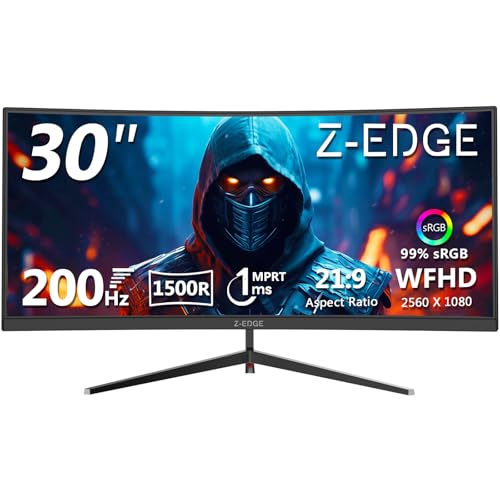
Z-Edge UG30 — Four video inputs and two-source screen modes
The Z-Edge UG30 reads like a panel specified by someone who owns too many machines. Its title lists two DisplayPort 1.4 inputs and two HDMI 2.0 inputs — four video connections, double what most of this class offers — and adds PIP and PBP modes, picture-in-picture and picture-by-picture, so two sources can share the 21:9 canvas at once. A work laptop in one half and a console in the other, or a desktop beside a streaming box, without a KVM switch or a second screen: that is the UG30’s reason to exist, wrapped in the same curved 2560×1080 shape as its rivals.
The performance figures are quoted with more granularity than usual. The title gives 200Hz, 165Hz and 144Hz as the supported rates, a 1ms MPRT response figure, 16.7 million colours and a 3000:1 contrast ratio, on a 1500R curve. Read the three refresh numbers as a map of its inputs rather than a contradiction — the fastest rate belongs to the fastest connection — and read the MPRT figure as the motion-clarity measurement it is, taken with backlight strobing rather than as a grey-to-grey time. The contrast figure, stated in the title, puts numbers behind what a curved panel of this type is expected to do with dark scenes.
Nothing in the title mentions speakers, so the four-input flexibility stops at the picture; a two-machine desk still needs its audio solved separately, per machine or through an external mixer. The buyer who benefits most is the one whose desk genuinely hosts two live sources every day — a trading layout with a second feed, a streamer monitoring a capture machine, a household where the PC and the console share one good screen. For a single-PC desk, the extra ports sit idle and the Sceptre or CRUA serve the same picture with simpler stories. Compare the UG30’s Amazon figure against the single-source rivals if your desk is the two-source kind, because no other pick in this guide splits its screen by design.
The split-screen modes repay a closer look, because they change what a single desk can do. Picture-by-picture divides the 2560 width into two 1280-wide halves, each a comfortable workspace for a laptop that would otherwise need its own monitor, and picture-in-picture keeps a small window of a second source over the main picture — a console’s output while the PC holds the screen, or a camera feed during a call. Switching between full-screen and split layouts becomes a daily habit rather than a rewiring job, which is the real luxury here: the second machine stops being a guest on the desk and becomes a resident. The four physical inputs also future-proof the panel against the churn of machines in a household; laptops rotate, consoles are replaced, and a screen with two of each connector absorbs that churn without a switch box. Against that, weigh the cable discipline four inputs invite — four video leads plus power behind one desk needs management, or the flexibility you paid for expresses itself as a tangle you see every day.
- Size and shape: 30-inch curved ultrawide, 21:9 aspect ratio
- Resolution: WFHD 2560×1080 class, per listing title
- Refresh rates: 200Hz, 165Hz and 144Hz as listed
- Response: 1ms MPRT
- Contrast: 3000:1
- Colour: 16.7 million colours
- Curve: 1500R
- Inputs: 2x DisplayPort 1.4, 2x HDMI 2.0
- Screen modes: PIP and PBP
Strengths
- Four video inputs is the deepest connection set in this guide.
- PIP and PBP modes let two sources share the ultrawide canvas simultaneously.
- Contrast and colour figures are stated in the title rather than left to inference.
Trade-offs
- No speakers are mentioned in the title, so two machines still need an audio plan.
- The headline 200Hz belongs to the fastest input path, not to every port equally.
- Split-screen modes halve the width each source sees, which suits monitoring better than full play.
Best for: two-source desks — a PC beside a console, or a work machine beside a feed — sharing one curved ultrawide.
Not suited for: a single-computer desk paying for ports it will never plug in, or anyone expecting sound from the panel itself.
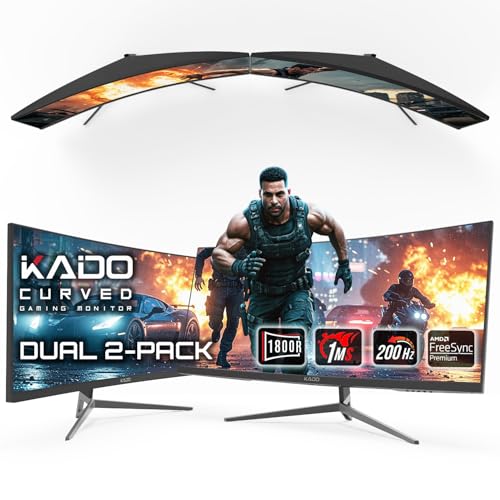
Kado 30-inch Ultrawide 2-Pack — A matched pair for stacked and streaming rigs
Kado sells this listing as a two-pack, and that single word reorganises the purchase. Instead of one 30-inch ultrawide, you receive two identical curved panels — each 21:9 at 2560×1080, up to 200Hz, bent to an 1800R curve — with AMD FreeSync Premium named in the title, DisplayPort and HDMI inputs, VESA mounting and built-in speakers on the pair. Matched panels matter more than they appear to: two screens from the same production line share colour behaviour and brightness in a way that two separately bought monitors, even of the same model months apart, often do not.
The title points the pair at two layouts. Stacked mounting — one panel above the other on a VESA stand — is the streamer’s arrangement, game below and chat above, and the title’s own language about stacked gaming and multi-view split-screen streaming confirms the intent. Side by side is the alternative, a 5120-pixel-wide combined canvas for timelines, markets or sprawling strategy maps, though the bezel seam sits exactly where a single ultrawide would be seamless. The 1800R curve is gentler than the 1500R bends elsewhere in this guide, which suits the stacked layout: a shallower wrap keeps the upper screen readable from a seated position below it.
Judge the pack as a system rather than as two bargains. Your desk, mount and graphics card must all support the pair — a stacked stand rated for two panels, and outputs enough to feed both at useful refresh rates — and a laptop with a single video output will light only one screen without a dock. The speakers being built in helps the stacked layout most, since a soundbar has nowhere sensible to live between two panels. If a two-screen rig is the actual plan, price the pair on Amazon as a single purchase, because that one-box matching is precisely what separate orders cannot guarantee.
Consider the failure arithmetic as well, because it runs in this pack’s favour. A two-screen desk built from one panel type bought twice at different times risks a visible mismatch that no calibration fully hides; a desk built from this pack starts matched and ages matched, since both panels accumulate the same hours in the same room. The stacked layout the title names also solves a width problem: two ultrawides side by side demand a very wide desk, while the same two panels stacked ask only for height and a stand rated for the load. Streamers get the clearest version of the benefit — gameplay on the lower panel at its full width, chat and alerts above, speakers already inside the frames — but a researcher with a document panel above a writing panel gets the same geometry in quieter clothes. What the pack cannot do is shrink: if your plans collapse back to one screen, the second panel is surplus in a way a single purchase never is, so the commitment should be genuine before the box is opened.
- Quantity: two monitors in one listing
- Size and shape: 30-inch class ultrawide curved, 21:9 aspect ratio, each
- Resolution: 2560×1080 each
- Refresh rate: 200Hz
- Curve: 1800R
- Sync: AMD FreeSync Premium
- Inputs: DisplayPort, HDMI
- Mount: VESA mount
- Speakers: built in, per listing title
Strengths
- Two matched panels from one order share colour and brightness behaviour.
- FreeSync Premium is a step above the base FreeSync named on rivals here.
- The gentler 1800R curve suits a stacked two-screen layout viewed from below.
Trade-offs
- Your stand, desk depth and graphics outputs must all support a pair, not a single screen.
- Side-by-side use puts a bezel seam where one larger ultrawide would be continuous.
- There is no way to buy half the listing if the second panel proves surplus.
Best for: streamers and multi-screen desks planning a stacked or paired ultrawide rig from the outset.
Not suited for: a laptop with one video output and no dock, or a desk with room for exactly one panel.

Acer EZ321Q — The honest 31.5-inch office panel next door
Disclose it again in the review itself, because a heading is easy to skim: the Acer EZ321Q is a 31.5-inch monitor, not a 30-inch one, and it earns its place here because shoppers in this size class meet it constantly and deserve a straight account of it. What the extra diagonal buys is a straightforward IPS office panel at 1920×1080 and 75Hz, with a 1ms response figure, AdaptiveSync, HDMI and VGA inputs, VESA mounting, a blue light filter and flickerless technology — a specification aimed at long, ordinary working days rather than at play.
Read that specification as a set of deliberate priorities. IPS glass keeps colours consistent from off-centre angles, which matters when a colleague leans over your desk. The 75Hz rate is a modest step above the old 60Hz office standard, enough to make scrolling and window dragging feel less smeared without pretending at gaming credentials. VGA looks anachronistic until you remember the installed base of office desktops, projectors and older laptops that still speak it; keeping that port means this panel can serve as the spare screen for almost any machine in a building. The blue light filter and flickerless backlight address the two complaints that dominate eight-hour screen work, eye strain at the end of the day being a specification you feel rather than measure.
The compromises are the mirror image of its rivals. At 1920×1080 spread over 31.5 inches, pixel density is the lowest in this guide, so text is large and soft-edged — comfortable for presentations and shared viewing, less so for dense documents at close range. There is no curve, no ultrawide width and no refresh headline. What there is, is simplicity. For a home office, a reception desk, a classroom or a second screen for an older PC, check what the EZ321Q costs on Amazon with its true 31.5-inch size in mind, and measure your desk for that diagonal rather than the smaller one you searched for.
There is also a longevity argument specific to this kind of unambitious panel, though it has nothing to do with fashion. A screen whose job is to light up, show a desktop and accept whatever machine the building hands it will stay useful through several generations of computers, because its inputs span two eras and its resolution asks nothing of the source. Schools and small offices buy panels like this in quantity for exactly that reason, and the VESA mount means a failed stand never retires the screen. At home, the same logic makes it the natural second monitor for a household machine, a homework desk or a workshop bench where a screen is a tool rather than a centrepiece. Judge it by uptime and coverage rather than by the numbers its gaming rivals headline, and it stops looking like the odd one out in this guide and starts looking like the one most likely to still be on a desk, doing its job, long after faster panels have been replaced twice.
- Size: 31.5-inch — larger than the 30-inch class this guide covers
- Resolution: FHD 1920×1080
- Panel: IPS
- Refresh rate: 75Hz
- Response: 1ms, per listing title
- Sync: AdaptiveSync
- Inputs: HDMI, VGA
- Mount: VESA mountable
- Eye care: Blue light filter, flickerless technology
Strengths
- HDMI and VGA together cover both current laptops and legacy office machines.
- Blue light filtering and a flickerless backlight target end-of-day eye strain directly.
- IPS viewing angles suit shared desks and screens shown to colleagues.
Trade-offs
- It is a 31.5-inch panel, so desks measured for 30 inches need re-checking.
- 1920×1080 at this diagonal gives the softest text in the guide at close range.
- 75Hz and no curve put fast gaming and ultrawide layouts outside its remit.
Best for: offices, classrooms and spare-screen duty where HDMI-plus-VGA coverage and eye comfort outrank speed.
Not suited for: a desk measured to fit a true 30-inch panel, or close-range document work that needs denser pixels than 1920×1080 at 31.5 inches.
Side-by-Side Comparison
| Pick | Real size and shape | Resolution | Refresh | Sync | Sound |
|---|---|---|---|---|---|
| Dell UltraSharp U3023E | 30-inch, 16:10 flat | WQXGA | Not stated in the listing title | Not stated in the listing title | Not stated in the listing title |
| Sceptre C305B-200UN1 | 30-inch class, 21:9 curved | 2560×1080 | Up to 200Hz | Not stated in the listing title | Built-in speakers |
| CRUA 30-inch Ultrawide | 30-inch class, 21:9, 1500R | 2560×1080 | 200Hz | FreeSync | 3.5mm audio output |
| Z-Edge UG30 | 30-inch class, 21:9, 1500R | 2560×1080 | 200Hz / 165Hz / 144Hz | Not stated in the listing title | Not stated in the listing title |
| Kado 2-Pack | 30-inch class x2, 21:9, 1800R | 2560×1080 each | 200Hz | FreeSync Premium | Built-in speakers |
| Acer EZ321Q | 31.5-inch, 16:9 flat | 1920×1080 | 75Hz | AdaptiveSync | Not stated in the listing title |
How to Choose a Monitor in the 30-Inch Class
Begin with the tape measure, not the badge. Decide which shape your work actually wants — the tall 16:10 frame of the Dell for documents, or the wide 21:9 sweep of the ultrawides for timelines, games and paired windows — and then check the physical width your desk can hold, because a 21:9 panel is considerably wider than its diagonal suggests while the Dell’s height is what surprises. Sellers label this class loosely, so the diagonal printed in each review above is the figure to plan around.
Next, match resolution to distance. Every ultrawide here renders 2560×1080, which reads clearly at a typical gaming distance and keeps graphics cards unstressed, but shows its softness when you lean into a spreadsheet. The Dell’s WQXGA class is the denser, taller alternative. If your day is text, weight density and height; if your evening is play, weight width and refresh.
Then count your sources. One machine needs one good input, and DisplayPort is the path to the headline refresh rates. Two machines argue for the Z-Edge’s four inputs and split-screen modes, or for the Kado pair giving each source its own glass. Consoles fit any of the HDMI inputs here, at the rates those inputs support.
Close with the unglamorous checks: whether the panel must make its own sound, whether it will hang on a wall or a stacked stand, and whether the curve radius suits your seat. A 1500R bend wants you centred; an 1800R bend tolerates a stacked layout. These are the decisions that determine whether the monitor still pleases you in month six.
Viewing distance is the variable buyers most often leave to chance, and in this class it decides more than the brand does. An ultrawide is meant to fill your peripheral vision from a normal seated position, roughly an arm’s length and a little more; sit much closer and the edges demand head movement for menus parked in the corners, sit much further back and the width you paid for reads as an ordinary screen with letterbox proportions. The Dell inverts the problem — its extra height is most valuable at the same arm’s-length distance where text stays large, and it is wasted on a deep desk where the panel sits across a meeting table. Measure the distance from your chair to the back of your desk before ordering, and be honest about whether that distance is fixed by the room or free to change, because a wall-mounted CRUA or a stacked Kado pair can be placed at the ideal distance deliberately, while a stand-bound panel on a shallow desk cannot move an inch further away than the furniture allows.
Graphics hardware is the last gate, and it is a forgiving one in this class. The 2560×1080 ultrawides ask roughly a third fewer pixels per frame than a 3440×1440 panel, which is why older and mid-range cards that would stumble at the higher resolution hold high frame rates here; the 200Hz badges assume a card that can actually produce frames at something approaching that pace, and a modest card will simply run the same panel at the rate it can sustain, with adaptive sync smoothing the gap. The Dell and the Acer ask almost nothing of the source at all — integrated graphics in a modern laptop drive either happily — so anyone running a work laptop should weight shape and inputs, and let the refresh contest between the gaming four settle itself without their vote.
Is a 29.5-Inch Ultrawide Really a 30-Inch Monitor?
By shelf labelling, yes; by tape measure, it is half an inch short and a completely different shape. The panels sold as 30-inch ultrawides measure 29.5 inches diagonally in most cases and stretch that diagonal across a 21:9 frame, so the screen is wider and shorter than a true 30-inch 16:10 panel like the Dell in this guide. The practical consequence is height: an ultrawide gives you 1080 vertical pixels, while the Dell’s taller shape exists precisely to give documents more. Buy the shape your work needs and let the label say what it likes.
Does 2560×1080 Look Soft on a Screen This Wide?
It depends on what fills it. Games and films, which is what these panels are built around, look entirely at home — motion hides pixel structure, and the lower count is exactly why mid-range graphics cards can drive 200Hz here. Text is where the density shows: at a close reading distance, letter edges are visibly less crisp than on the WQXGA Dell or on a 1440p-class panel. Readers who split the day evenly should sit in front of a 1080-class ultrawide before buying, because this is a preference some people never notice and others cannot unsee.
Can One Ultrawide Replace a Dual-Monitor Setup?
For many desks, yes, with two honest caveats. Window managers on both major desktop systems will tile two or three windows across a 2560-pixel width comfortably, and the absence of a centre bezel helps anything that wants to sit in the middle — a game, a timeline, a wide chart. The caveats are sharing and failure: two separate screens let you hand one to a console, a call or a colleague while keeping the other, and the Z-Edge’s PIP and PBP modes exist to soften exactly that loss. A single panel is also a single point of failure for the whole desk, which the Kado two-pack answers by simply being two panels.
There is a subtler difference in how the two arrangements handle attention. Two monitors create two places, and many people organise their work by place — writing on the left, reference on the right, communication banished to whichever screen is further from the chair. One ultrawide creates a single field that has to be organised by software instead of by furniture, which suits people who tile windows deliberately and frustrates people who organise by turning their head. Neither habit is better; they are simply different, and the honest way to choose is to notice which one you already have. If your current pair of screens functions as two rooms, keep two rooms — the Kado pack exists for you. If you constantly drag windows across the bezel and wish it gone, the single ultrawide is the answer you have been describing.
Common Mistakes
Trusting the shelf label over the stated diagonal
Shoppers order a 30-inch monitor, unbox a 29.5-inch ultrawide or a 31.5-inch office panel, and discover the mismatch only when the desk layout fails. Read the diagonal and aspect ratio stated in the listing — every review above repeats them — and measure your space for the shape that is actually coming.
Feeding a 200Hz panel through the wrong port
The headline refresh rate on the gaming picks assumes the fastest input, usually DisplayPort. Plug the same panel into an older HDMI output and it may cap far lower, leaving buyers convinced the monitor underdelivers when the cable path is the ceiling. Check which port carries which rate before the panel arrives, and use the cable supplied in the box first.
Buying a curve for a shared screen
A 1500R curve is engineered for one centred viewer. Put the same panel on a desk that colleagues gather around, or a sofa set off to one side, and half the audience watches a foreshortened edge. Shared screens belong to flat panels — the Dell and the Acer in this guide — while curves belong to fixed single seats.
Forgetting that most of these panels are silent
Only two listings here state built-in speakers. Buyers who retire their old monitor-and-speaker setup in one move can find themselves with a mute desk and a meeting starting in five minutes. Confirm the sound story in the title of the pick you choose, and keep a headset or speakers in the plan for the CRUA’s audio output and the silent panels alike.
Final Recommendation
Match the shape to the week you actually live. Document workers should take the Dell UltraSharp U3023E and its true 30-inch 16:10 frame without a backward glance. Players building one curved screen should choose between the Sceptre’s speakers, the CRUA’s wall-mountable 1500R VA bend and the Z-Edge’s four-input split-screen talent by counting their machines and their seats. Anyone planning two screens from the start should price the Kado pair as a system, and offices that need a big, simple, legacy-friendly panel should take the Acer at its honest 31.5 inches. A size class this loosely labelled rewards the buyer who reads diagonals instead of badges — do that, and whichever of these six lands on your desk will be the one you meant to buy.
Frequently Asked Questions
Why are there so few true 30-inch monitors for sale?
Panel factories cut glass in sizes that serve the largest markets, and production consolidated around 27-inch and 32-inch diagonals in 16:9, plus ultrawide formats. The 30-inch 16:10 shape survives mainly in professional lines like the Dell UltraSharp in this guide, which is why a search for this size returns mostly 29.5-inch ultrawides wearing the label.
Will a 2560×1080 ultrawide work with a games console?
Consoles connect over HDMI, which every gaming pick here provides, and they output a picture these panels accept. Expect the console to drive the screen at the rates its HDMI output and the panel’s HDMI input jointly support rather than at the 200Hz DisplayPort ceiling, and expect some titles to render with borders where they assume a 16:9 frame.
What does the R number in 1500R or 1800R mean?
It is the radius, in millimetres, of the circle the curve is cut from: a 1500R panel would complete a circle of 1.5 metres radius, so the smaller number bends more tightly. A 1500R screen wraps a close, centred viewer more aggressively, while 1800R is a gentler bend that stays readable from slightly further back or below, as in a stacked layout.
Is the Kado two-pack cheaper than buying two singles?
Compare the pack’s price against two single ultrawides on the day you buy, because panel pricing moves. The pack’s durable advantage is not the arithmetic but the matching: two panels from one production run share colour and brightness behaviour, which keeps a stacked or side-by-side pair from drifting apart visually.
Can the Acer EZ321Q really not be a 30-inch monitor?
Correct — its own listing title states 31.5 inches, and this guide lists it at that size everywhere. It appears here because the same shoppers meet it in the same search results, and its HDMI-plus-VGA office specification serves desks the ultrawides do not. Measure for 31.5 inches if it is the one you choose.
How wide is a 30-inch ultrawide in practice?
Wider than the diagonal implies. A 21:9 panel spends its inches horizontally, so a screen in this class occupies roughly the desk width of a much larger 16:9 television while standing shorter than one. Before ordering any ultrawide here, measure the desk’s clear width including the space your speakers, laptop or second machine already claim, and remember a curved panel’s corners sweep forward of its stand line, which matters in alcoves and against walls.
Related Guides
Shoppers whose desks have room for the next size up should read our roundup of the best 32-inch computer monitors with speakers, where sound is part of the brief from the start. And if the ultrawide width appealed but the panel choice did not, our guide to the best 27-inch IPS monitors covers the sharper, flatter alternative at a smaller diagonal. At 30 inches the real choice is width over height: go ultrawide for timelines and spreadsheets side by side, or stay at 27 inches for a sharper, simpler desk.


