What's inside
- Key Takeaways
- Quick Picks
- How We Chose These Picks
- Comparison Table
- What Can a Flip Phone Camera Honestly Do?
- How Do You Check AT&T Compatibility Before Buying?
- How Do You Get Photographs Off a Flip Phone?
- Why Do People Still Choose Flip Phones?
- How Should You Set Up a Flip Phone for a Parent?
- What Should a Worksite Buyer Check Beyond Durability?
- How Does a Flip Phone Fit a Digital Detox?
- What Accessories Does a Flip Phone Actually Need?
- How Long Will a Flip Phone Serve?
- What Should You Photograph With a Flip Phone?
- How Do Carriers Treat Flip Customers Differently?
- What Is the Case for a Flip as a Second Phone?
- How Should You Talk to a Relative About Switching to a Flip?
- What Happens When a Flip Phone Finally Retires?
- How Do You Choose Between the Two AT&T Picks?
- What Should Teenagers’ First Phones Teach?
- How Reliable Is the Hinge, Really?
- What Does a Flip Phone Cost to Run?
- How Should You Store a Flip Phone as a Spare?
- What Is the Flip Phone’s Place in an Emergency Kit?
- How Do You Decide Between a Flip and a Simple Smartphone?
- What One Sentence Should Every Flip Buyer Remember?
- Common Mistakes
- Final Recommendation
- Frequently Asked Questions
- Related Guides
As an Amazon Associate I earn from qualifying purchases. This post may contain affiliate links at no extra cost to you.
widgetverdict.com is reader-supported. When you buy through links on our site, we may earn an affiliate commission.
Where to buy: each flip phone below links to its Amazon listing — check price on Amazon once you have matched a model to your carrier. The best att flip phones with camera start from an honest admission this guide will repeat until it sticks: a flip phone’s camera is a notebook, not a portfolio. It records the whiteboard, the grandchild’s visit, the scratch on the hire car, the menu you want to remember — clearly enough to be useful, never well enough to be art. Buyers who understand that bargain get a tool they love. Buyers who expect smartphone photography from a two-inch sensor get a disappointment no review can rescue.
Why, then, does this unfashionable category quietly thrive? Because the flip phone’s virtues are precisely the smartphone’s failures, inverted. It opens and closes with intent, so calls end when you say they end. Its battery measures life in days. Its buttons can be found by touch, in gloves, in the dark, by hands that have worked for sixty years. It fits a pocket without negotiating, survives drops that would total a glass slab, and costs so little to replace that nobody insures it or mourns it. The camera rides along as a useful witness — and for the AT&T customer specifically, the choice narrows to handsets the network will actually activate, which is where this guide earns its keep.
AT&T matters here more than in any smartphone guide, because the carrier maintains an allowlist for devices on its network, and flip phones live or die by it. Two of the six picks below are AT&T models outright. The others are included with their carrier positions stated in plain language — unlocked flexibility, another network’s home turf — so that an AT&T reader can separate the phones they can activate today from the phones worth considering only if a line moves or a second household phone is the goal.
Every pick is a real, currently sold flip phone with a working camera, drawn from our verified pool of checked listings. Camera expectations are set per model, durability and battery claims are kept to what the designs genuinely deliver, and no phone here is praised for a photograph it cannot take.
Key Takeaways
- Flip phone cameras are documentation tools: fine for records, snapshots and video calls on the models that support them, not for photography as a hobby.
- AT&T activation is the first filter — the Alcatel SmartFlip and Kyocera DuraXE Epic are the carrier’s own answers in this guide.
- Rugged models from Kyocera trade camera ambition for survival: drops, water, dust and worksites.
- The Nokia 2780 Flip is the unlocked all-rounder, with the friendliest camera and app touches in the flip class.
- Battery life measured in days, physical buttons and hearing-aid-friendly designs are the real reasons to buy.
- Check whether a model is sold locked to a carrier or prepaid brand before assuming it will join your AT&T line.
Quick Picks
| Pick | Badge | Why it earns a slot |
|---|---|---|
| Alcatel SmartFlip 4052R | AT&T’s own answer | Made for AT&T prepaid, with a camera for everyday records. |
| Kyocera DuraXE Epic | AT&T worksite tank | Rugged AT&T flip with the stronger camera of the tough pair. |
| Nokia 2780 Flip | Unlocked all-rounder | KaiOS smarts, a decent camera and freedom between carriers. |
| TCL Go Flip 2 | Simple and unlocked | Straightforward flip for calls, texts and snapshot duty. |
| Kyocera DuraXV Extreme+ | Rugged beyond AT&T | Verizon’s heavy-duty flip, included for households comparing networks. |
| TCL Flip 4 5G | The 5G flip | KaiOS on T-Mobile’s network with modern connectivity. |
How We Chose These Picks
Carrier reality came before camera quality, before durability, before everything, because a flip phone that cannot join your network is a paperweight with a hinge. We started from AT&T’s own ecosystem — the models sold for its prepaid and postpaid customers — then widened to unlocked and rival-network handsets whose inclusion serves real households: the family comparing carriers, the worker whose employer issues a line elsewhere, the buyer who wants one phone understood in full rather than six variations of the same locked box.
Camera assessment was conducted at the class’s honest scale. We asked whether the camera focuses reliably, whether its flash exists and helps, whether photographs survive being sent to a smartphone and viewed there, and whether video is usable for a call or a clip of a leaking pipe. Resolution figures in this category are small and similar; the differences that matter are speed, reliability and whether the phone makes sending the picture easy. Those were the differences graded.
Durability and accessibility completed the picture, because they are why these phones are bought. Military-grade drop claims, water resistance, button size and travel, screen legibility outdoors, hearing-aid compatibility, battery endurance — each pick was read against the life it advertises, whether that is a building site, a farm, a grandparent’s handbag or a teenager’s first-phone probation.
Renewed and prepaid listings appear where they are the natural way these phones are sold, with the standard advice attached: confirm the exact carrier branding and lock status in the listing, because in the flip-phone market the same model name can hide three different network destinies.
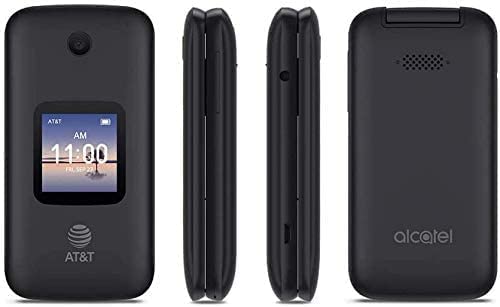
Alcatel SmartFlip 4052R — AT&T’s own answer
Start with the phone AT&T itself puts in its prepaid customers’ hands. The Alcatel SmartFlip is the carrier’s house flip: it activates without argument, speaks the network’s language natively, and asks nothing of its owner beyond charging it occasionally and opening it to talk. For the reader whose question was literally “which flip phone with a camera works on AT&T,” this is the shortest answer in the guide, and its shortness is a virtue — no allowlist research, no compatibility roulette, no apologetic call to customer service.
The camera, assessed at the class’s honest scale, is a basic unit suited to records and reminders: the label on a parcel, the whiteboard before it is wiped, a grandchild produced for the camera at a family lunch. Photographs are clearest in daylight and presentable indoors; they will be viewed on phone screens and appreciated for their content, which is the entire job description. The SmartFlip runs KaiOS, which brings a few smartphone-flavoured abilities — basic apps, voice assistance, Wi-Fi calling where supported — wrapped around an interface that never forgets it is a phone first.
Daily virtues accumulate quietly. The buttons are large and separated, the external display shows who is calling before you commit to opening, the battery lasts days of ordinary use, and the whole device costs so little to replace that it can be lent, dropped and taken fishing without a flicker of anxiety. Hearing-aid compatibility and a loud, clear earpiece serve the audience that buys these phones most faithfully.
Limits, plainly: this is a prepaid AT&T handset, so read the listing’s lock and plan terms before assuming it will serve a postpaid line or another carrier, and do not buy it for photography. Buy it because it is the flip phone AT&T intended, and intention, in carrier matters, is half the product.
- Carrier: AT&T prepaid model
- Camera: basic rear camera for records and snapshots
- System: KaiOS with light smart features
- Battery: multi-day ordinary use
- Design: large buttons, external caller display
- Extras: Wi-Fi calling support, hearing-aid friendly
There is a demographic truth inside this phone’s design worth respecting: for many owners, the SmartFlip is not a lesser smartphone but a better telephone. It is the device on the kitchen counter that rings loudly, opens to a grandchild’s voice, and closes with a click that ends the call in the body as well as the account. The camera extends that same philosophy — present when needed, invisible when not — and households buying for a parent should weigh that coherence above every specification in this guide.
Strengths
- Activates on AT&T without compatibility drama
- Simple, loud, legible — built for its audience
- Costs little to own, run or replace
Trade-offs
- Camera is documentation-grade only
- Prepaid lock terms need reading before purchase
- Small internal screen limits app ambitions
Best for: AT&T prepaid customers wanting the carrier’s own simple flip. Not suited for: photography, heavy app use or other carriers’ lines.
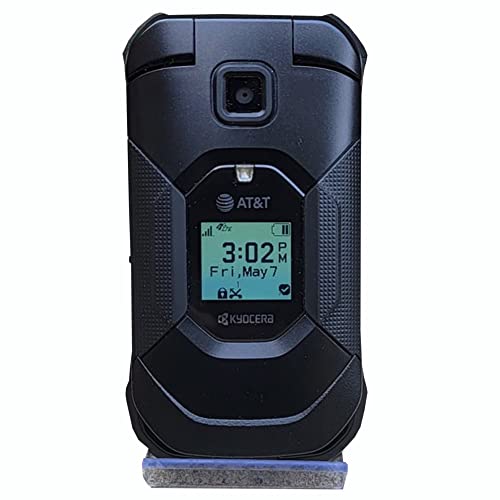
Kyocera DuraXE Epic — AT&T worksite tank
Some phones are bought to be carried; the DuraXE Epic is bought to be survived. Kyocera builds this flip for AT&T’s business and first-responder-adjacent customers, and the specification reads like a site foreman’s diary: military-standard drop protection, sealing against water and dust, a shell that shrugs off the glovebox, the toolbox and the concrete floor. It is the AT&T flip for people whose previous phones died young and memorably.
Its camera is the stronger of the guide’s two rugged AT&T-adjacent offerings, and its purpose is documentary in the professional sense: photograph the damage, the meter reading, the delivered condition, the serial plate in the plant room. An LED flash helps in the dark corners where such photographs live. Images are clear, serviceable and easy to send onward to a supervisor’s smartphone, which is the entire workflow — nobody on a worksite is cropping for composition, and the Epic’s camera is honest about serving the record rather than the gallery.
The rest of the design respects gloved, busy hands. Push-to-talk support suits crews, the buttons are oversized and tactile, the speaker is loud enough for a plant room, and the battery endures long shifts with charge to spare. KaiOS provides the light smart layer — hotspot capability on supported plans, basic apps — without disturbing the phone’s essential character as a tool.
The linked listing is a renewed unit, so the standard renewed checks apply with worksite seasoning: confirm AT&T branding and lock status, inspect the seals and hinge on arrival, and test the camera flash in a dark room. For AT&T customers whose environment eats phones, this is the guide’s recommendation — the camera documents the job, and the phone survives to document the next one.
- Carrier: AT&T model (renewed listing — verify branding)
- Camera: basic rear camera with LED flash
- Durability: military-standard drops, water and dust sealing
- Extras: push-to-talk support, loud speaker
- Battery: long-shift endurance
- System: KaiOS
Insurance adjusters and site managers form this phone’s quiet fan base, because its photographs carry timestamps into places smartphones fear to tread — the flooded plant room, the roof in sleet, the crawl space with the burst pipe. A camera that survives the environment it documents is worth more than a finer camera in a truck’s glovebox, and the Epic’s whole design argues that single point with military-standard evidence.
Strengths
- Survives environments that kill ordinary phones
- Camera and flash suited to worksite records
- Glove-friendly controls and crew features
Trade-offs
- Heavy and industrial in the pocket
- Camera remains record-grade, not recreational
- Renewed stock requires lock and seal checks
Best for: AT&T crews, trades and anyone whose phones die outdoors. Not suited for: buyers wanting a light, elegant everyday flip.

Nokia 2780 Flip — Unlocked all-rounder
The Nokia 2780 Flip is the flip phone for people who like the idea of the category but not its restrictions. Sold unlocked, it moves between carriers with a SIM swap — a freedom worth pausing on for AT&T readers, since unlocked KaiOS flips of this generation are commonly used on AT&T’s network, though confirming your specific line’s compatibility before purchase remains the buyer’s job, as with any unlocked device. What the Nokia adds is polish: the friendliest interface in this guide, a camera that leads the flip class for casual snapshots, and small civilisations like FM radio and a proper app store.
That camera deserves its class-leading label with the class’s caveat attached. It produces the most pleasing daylight photographs here — family snapshots that survive the journey to a relative’s smartphone without embarrassment — and it records usable video for a flip. Evening and indoor results return to the category’s honest baseline. Buyers graduating from a smartphone will still notice the gulf; buyers graduating from an older flip will think it is witchcraft. Both reactions are correct, which is the flip market in miniature.
KaiOS gives the 2780 a light smart layer — messaging apps, maps basics, voice assistance — on hardware that keeps the flip virtues intact: days of battery, real buttons, a hinge with a satisfying mechanical finality, and an external screen for the time and the caller’s name. The build is plastic and proud of it, light in the pocket and unbothered by drops that would end a flagship.
For households not yet committed to AT&T — or holding an AT&T line alongside others — the Nokia is the flexible heart of this guide: one phone that can follow a family through carrier changes, serve as the grandparent phone, the festival phone or the digital-minimalist’s daily driver, and photograph the whole arrangement adequately.
- Carrier: unlocked — check your AT&T line’s compatibility
- Camera: class-leading flip camera, daylight-strong
- System: KaiOS with app store
- Battery: multi-day use
- Extras: FM radio, external display
- Design: light, classic flip build
Digital minimalists have adopted this Nokia as a manifesto with a hinge. It permits communication without permitting the feed; it photographs the day without demanding the day be curated. Owners report the same discovery in different words: the camera’s modesty is the feature, because a photograph taken on a 2780 is taken for a person, not an audience. In a guide full of specifications, that may be the most modern sentence available — delivered by the least modern phone in it.
Strengths
- Carrier freedom rare in the flip class
- Best casual camera of the six
- Friendly interface for smartphone refugees
Trade-offs
- Unlocked status means compatibility homework on AT&T
- Night photography returns to flip baseline
- Plastic build feels light beside the Kyoceras
Best for: unlocked buyers, grandparents and minimalists wanting the nicest flip camera. Not suited for: worksite abuse or buyers wanting carrier-guaranteed activation.

TCL Go Flip 2 — Simple and unlocked
TCL’s Go Flip 2 makes the minimalist case inside a category that is already minimal. Factory unlocked in the linked renewed listing, it covers the essentials with a minimum of ceremony: calls that sound clear, texts on a proper keypad, a battery that minds its own business for days, and a camera that handles the snapshot duties of ordinary life — the dog doing something, the notice on the community board, the parking row at the airport — without pretending to larger ambitions.
The camera sits at the category’s honest middle. Daylight results are clean enough to send and keep; indoor results are records rather than portraits. What the Go Flip 2 adds over the barest flips is a slightly more modern supporting act: a clear external display, decent call audio, and a build that feels assembled with care rather than merely assembled. For a buyer whose specification is literally “a flip phone with a camera that works,” the absence of complications is the feature list.
Carrier position needs the usual sentence, in bold mental type: factory unlocked means the phone is not married to a network, and GSM networks are its natural home. AT&T readers should verify their line’s compatibility for this specific model before purchase, as AT&T’s allowlist decides activation for unlocked devices; T-Mobile-family users will find the path smoother. The renewed grading of the linked listing deserves the standard read — condition, battery language, returns — before the phone becomes a gift or a lifeline.
As a second phone, a first phone or a deliberate step back from the smartphone’s demands, the Go Flip 2 is the guide’s quiet recommendation: the flip that asks the least of its owner while still carrying a camera worth the name.
- Carrier: factory unlocked (renewed listing) — verify AT&T line
- Camera: basic, daylight-capable
- Battery: multi-day ordinary use
- Design: clear external display, tidy build
- System: simple feature-phone interface
- Extras: hearing-aid friendly design
Parents handing down a first phone keep choosing this class of device for a reason the spec sheet understates: the Go Flip 2 can be lost, dropped or soaked at a scout camp without the household budget attending the funeral. Its camera still brings home the evidence of the trip, its buttons still teach a child that communication is an act with a beginning and an end, and its simplicity postpones the smartphone negotiation by exactly the years many families are trying to buy.
Strengths
- Unlocked flexibility at a gentle renewed cost
- Uncomplicated operation for any age
- Snapshot camera adequate to daily records
Trade-offs
- AT&T activation not guaranteed — check first
- Camera and screen are basic by design
- Renewed condition varies by listing
Best for: minimalists and second-phone buyers on GSM networks. Not suited for: AT&T buyers needing guaranteed activation, or app users.

Kyocera DuraXV Extreme+ — Rugged beyond AT&T
Honesty in labelling requires this review to open with its carrier: the DuraXV Extreme+ is Verizon’s rugged flip, not an AT&T phone. It earns its place in an AT&T-titled guide for three legitimate reasons — households comparing networks before committing, workers whose employer issues Verizon lines, and AT&T readers whose second line or family plan lives elsewhere. If your line is AT&T and immovable, the DuraXE Epic above is your Kyocera; read this review as the comparison that proves it.
As hardware, the Extreme+ is the most serious survival instrument in the guide: IP68 sealing, military-standard drop credentials, a camera with flash built for documenting work in bad places, and push-to-talk for crews. Its photographs share the family character — clear records, honest snapshots, no artistic pretensions — and its battery and speaker are specified for environments where a missed call has consequences. Construction workers, farmers, utility crews and the chronically phone-destructive form its natural readership, and within Verizon’s world it has no real rival.
The comparison it enables is genuinely useful. Put the two Kyoceras side by side and the AT&T-versus-Verizon question stops being abstract: same philosophy, same durability class, same documentary camera, different network destinies. Families split across carriers — a common American arrangement — can standardise on one rugged flip per network and share chargers, habits and expectations.
Buy it for Verizon, admire it from AT&T, and do not let a listing’s brevity blur the distinction: network first, hardware second, camera third is the correct order of worship in the flip category, and this excellent phone is the proof of the ordering.
- Carrier: Verizon model — not for AT&T lines
- Camera: basic rear camera with flash
- Durability: IP68, military-standard drops
- Extras: push-to-talk, very loud audio
- Battery: multi-day, shift-proof
- System: feature-phone interface
Farmers give this Kyocera its most persuasive testimonial, usually without meaning to: it lives in a tractor cab, photographs a part number in a dusty barn, survives being dropped in a yard that has ended three smartphones, and rings loudly enough to be heard over machinery. The camera’s flash earns its keep in machinery sheds and animal housing where the light never fully arrives. Tools earn reputations in such places slowly and keep them for decades.
Strengths
- Toughest build in this guide
- Documentary camera with flash for field records
- Crew-ready audio and push-to-talk
Trade-offs
- Verizon only — the AT&T reader must look to the Epic
- Substantial size and weight
- Camera is a tool, not a toy
Best for: Verizon households and crews needing maximum durability. Not suited for: AT&T lines under any circumstances.

TCL Flip 4 5G — The 5G flip
The TCL Flip 4 5G answers the question nobody expected to ask: what happens when the flip phone grows a 5G radio? Built for T-Mobile’s network on KaiOS, it pairs the category’s traditional virtues — hinge, buttons, days of battery — with connectivity that will not age out as networks keep evolving. For the buyer whose household runs on T-Mobile, or who is choosing a network and a phone in the same afternoon, it is the most future-facing flip in this guide.
Its camera follows the family pattern with a modern tint: a basic rear unit for records and snapshots, adequate in daylight, honest after dark, supported by an interface that makes sending a photograph to a smartphone-owning relative reasonably painless. KaiOS brings the light smart layer — messaging, basic apps, voice help — and 5G data makes the hotspot and browsing features meaningfully quicker than the 4G flips can manage, a difference a grandparent on a video call may never name but will certainly feel.
For AT&T readers, the position is stated as plainly as the Kyocera’s: this is a T-Mobile handset, and it does not join AT&T lines. Its inclusion serves the comparison shopper and the T-Mobile household member — and it marks where the flip category is heading, which an AT&T buyer planning a possible future move should know. Networks change; hinges endure.
Within its own network, the Flip 4 5G is easy to recommend: the traditional flip experience, insured against connectivity obsolescence, with a camera that does its documentary duty. It is the guide’s glimpse of the category’s next decade, available in the present tense for the households on the right carrier.
- Carrier: T-Mobile model — not for AT&T lines
- Camera: basic rear camera
- Connectivity: 5G with KaiOS smart features
- Battery: multi-day ordinary use
- Design: classic flip, large buttons
- Extras: hotspot capability on supported plans
There is something quietly moving about this phone’s proposition: the format your grandfather trusted, insured against the network future your grandchildren will inhabit. A buyer who keeps phones for a decade — the flip category’s natural citizen — is exactly the buyer 5G future-proofing serves, because obsolescence, not damage, is what finally retires a well-kept flip. The Flip 4 5G postpones that retirement further than any handset in this guide.
Strengths
- 5G future-proofs the flip format
- KaiOS apps and hotspot genuinely useful
- Traditional flip virtues fully intact
Trade-offs
- T-Mobile only
- Camera remains basic documentation grade
- 5G coverage varies by area
Best for: T-Mobile households wanting a flip that will not age out. Not suited for: AT&T or Verizon lines.
Comparison Table
| Phone | Network home | Camera character | Buy it for |
|---|---|---|---|
| Alcatel SmartFlip 4052R | AT&T prepaid | Basic records | Guaranteed AT&T simplicity |
| Kyocera DuraXE Epic | AT&T | Records with flash | Worksite survival on AT&T |
| Nokia 2780 Flip | Unlocked | Best casual snapshots | Freedom and friendliness |
| TCL Go Flip 2 | Unlocked (GSM) | Basic snapshots | Minimal second phone |
| Kyocera DuraXV Extreme+ | Verizon | Field records with flash | Maximum durability |
| TCL Flip 4 5G | T-Mobile | Basic records | 5G longevity |
Read the network column before the camera column — in this category it is the difference between a phone and a souvenir. AT&T readers have two direct answers and one flexible one; the remaining three exist so the household’s other lines, and the reader’s future options, are covered by the same honest map.
What Can a Flip Phone Camera Honestly Do?
More than nostalgia suggests, less than marketing implies. In daylight, every camera here produces a legible, sendable record: faces recognisable, documents readable, scenes identifiable. That covers the genuine use cases — proof, memory-jogging, sharing a moment with someone who would rather see it roughly than hear it described. Video exists for short clips and, on KaiOS models, light app-based calling, at qualities best described as present rather than polished.
Where the class honestly fails is equally specific. Low light turns grainy and slow. Zoom is digital and destructive. Action blurs. Nobody should buy a flip phone to photograph a wedding, a product line or a child’s sporting career, and any guide implying otherwise is selling something. The flip camera’s dignity lies in its adequacy: it is the camera that is present, pocketable and unbreakable on the days when the good camera stayed home — and presence, as every photography guide eventually admits, is the first specification.
How Do You Check AT&T Compatibility Before Buying?
Start with the carrier’s own word. AT&T publishes compatibility information for devices on its network, and its prepaid and postpaid teams can confirm a specific model — the SmartFlip and DuraXE Epic in this guide are AT&T’s own, which removes the question entirely. For unlocked models like the Nokia and the TCL Go Flip 2, confirm the exact model number against AT&T’s current device policy before money moves, because model families contain variants with different destinies.
Then read the listing like a contract. Carrier branding, lock status, prepaid versus postpaid origin and return terms decide what arrives in the box. On arrival, test with your actual SIM during the return window: make a call, send a text, take and send a photograph. A flip phone that passes those four trials on your line is compatible in the only sense that matters, whatever any forum thread claimed.
How Do You Get Photographs Off a Flip Phone?
Easier than the format’s reputation suggests. The universal method is messaging: send the photograph to a smartphone number or email address, and it arrives like any other picture message. KaiOS models add light app options and, on some, the ability to share through familiar messaging services. A microSD card, where the model supports one, turns the phone into a tiny archive you can hand to a computer. Bluetooth transfer covers the phone-to-phone case at the kitchen table.
The habit that matters is regularity. Flip phone storage is modest, and photographs marooned on a lost or retired handset are the category’s saddest story. Send the keepers onward weekly — to a relative’s smartphone, to an email archive — and the little camera’s work joins the family’s permanent record instead of expiring with the hardware.
Why Do People Still Choose Flip Phones?
Because the smartphone’s costs are real and not everyone wishes to pay them. The flip owner declines the nightly charge, the cracked-glass anxiety, the notification weather system, the thousand-dollar replacement dread — and accepts, in exchange, a camera of modest gifts and a screen the size of a matchbook. For a growing minority that trade reads not as deprivation but as editing: a life with the communication kept and the compulsion removed. The six phones here serve that editorial decision at every carrier and budget, which is why the category refuses to die on the schedule analysts keep setting for it.
There is also the matter of the hands. Buttons that can be felt, a hinge that can be trusted, a phone that can be answered without looking — these are not nostalgic preferences but ergonomic facts, valued by workers in gloves, drivers keeping eyes forward, and anyone whose eyesight or dexterity makes a glass rectangle a daily negotiation. The flip phone is the last handset designed around the hand.
How Should You Set Up a Flip Phone for a Parent?
Do the configuration before the gift, not during the visit. Load the family contacts with photographs where the phone supports them, set the emergency contact and any ICE information, enlarge the display text to its most legible setting, and programme the speed dials for the three numbers that matter. Take a practice photograph together and send it to your own phone, so the workflow — shoot, send, receive your reply — is a memory rather than a manual.
Then write the four essential operations on a card that lives with the charger: answering, calling back, taking a photograph, charging. A flip phone’s simplicity is real but not self-explanatory to someone meeting KaiOS for the first time, and a card by the charger has prevented more support calls than any feature in this guide. Choose the AT&T models for an AT&T parent and the whole arrangement becomes boring, which for family technology is the highest available praise.
What Should a Worksite Buyer Check Beyond Durability?
Audio first, because a phone that cannot be heard over machinery is a brick with a hinge: test the speaker and the earpiece at full volume in a genuinely loud place, not a quiet shop. Push-to-talk compatibility with the crew’s existing setup comes second — a rugged phone that cannot join the crew’s talk group is a private island. Third, confirm the camera’s flash and the ease of sending a photograph with gloves on, because the documentary workflow fails at the sending step more often than at the taking step.
Finally, price the whole deployment rather than the handset. Spare batteries where the model allows them, belt holsters that fit the thicker rugged bodies, and a replacement pipeline through the carrier’s business channel all belong in the arithmetic. The Kyoceras in this guide reward that arithmetic; bought carelessly, even a tank can become an orphan.
How Does a Flip Phone Fit a Digital Detox?
As the honest version of one. App timers and greyscale modes negotiate with a smartphone; a flip phone simply declines the negotiation, offering calls, texts, a camera for the day’s evidence and nothing to scroll. KaiOS models like the Nokia keep a safety valve — maps, messaging, the occasional necessary app — which is why they suit detoxers better than the purest dumbphones: the essentials survive, the compulsions do not. Battery life measured in days completes the philosophy, because a phone that rarely needs charging rarely needs checking.
Detox buyers should still choose by network first and camera second, like everyone else in this category. A detox that ends in an activation failure teaches the wrong lesson entirely.
What Accessories Does a Flip Phone Actually Need?
Fewer than any smartphone ever sold. A belt holster or a lanyard for the owners whose pockets are hostile territory; a spare charging cable for the car or the site cabin; a microSD card on the models that accept one, if the camera will be used for records worth keeping. That is the list. No case industry, no lens attachments, no screen-protector liturgy — the flip’s clamshell is its own case, closing over its screens like a book, which remains the most elegant protection mechanism ever fitted to a telephone.
How Long Will a Flip Phone Serve?
Longer than the smartphone it replaces, usually — the category’s owners measure ownership in half-decades. The hinge is the mechanical question, rated on the better models for hundreds of thousands of folds, which at fifty openings a day outlasts the battery, the network generation and possibly the owner’s patience with being teased about it. Batteries are the realistic limit, and on models with replaceable cells even that limit negotiates. The Kyoceras add environmental survival to the arithmetic; the Nokia adds carrier freedom, which extends life across network changes that retire locked phones.
The true expiry date is set by networks, not hardware: a phone dies when its carrier retires the technology it speaks. That is the Flip 4 5G’s quiet argument, and the reason 4G models — all the others here — should be bought with a good decade’s expectation rather than a permanent one.
What Should You Photograph With a Flip Phone?
The things whose value is in the having, not the framing. The parking row at the airport. The whiteboard before the cleaner arrives. The grandchild mid-laugh, accepting the grain as the price of the laugh being real and the phone being there. The rash, the leak, the dent, the label, the sunset that will not wait for a better camera to be fetched. Flip photography is a documentary discipline with a hundred humble subjects a day, and the owners who thrive in the category are the ones who stop apologising for its aesthetic and start relying on its presence.
Keep one technique: get close and hold still. A flip camera at arm’s length in daylight, steadied for a breath, produces the best file its small sensor can make — and that file, sent promptly to the people it concerns, does everything a photograph is for.
How Do Carriers Treat Flip Customers Differently?
With a respect the smartphone market rarely shows, because flip customers are loyal, long-tenured and allergic to churn. AT&T’s maintenance of dedicated prepaid flips like the SmartFlip, and business channels for handsets like the DuraXE Epic, reflects that arithmetic. The practical consequence for buyers: support staff know these devices, replacement pipelines exist, and a flip customer asking for help is a familiar figure rather than an anomaly. When comparing the networks represented in this guide, weigh that service culture alongside coverage maps — the phone will be simple, so the relationship around it matters more, not less.
What Is the Case for a Flip as a Second Phone?
Stronger than the smartphone industry admits. A flip serves as the festival phone, the beach phone, the worksite phone, the number given to the world while the smartphone’s number stays private — and its camera covers the second phone’s documentary needs without a second flagship’s cost or fragility. Battery life makes it the emergency phone in the car kit, charged monthly and ready in the month it is needed. Households that run one as a shared spare discover it quietly becomes the most borrowed, most forgiven and occasionally most loved handset in the house.
How Should You Talk to a Relative About Switching to a Flip?
Lead with what the flip restores, not what it removes. It restores the click that ends a call, the battery that forgives a forgotten charger, the buttons that work in the garden with gloves on, the bill that shrinks to a whisper. Let the camera be discovered as a pleasant extra — the grandchild’s picture arriving on it, the label photographed at the pharmacy — rather than promised as a replacement for the family archive. Relatives adopt tools whose virtues they experience in the first week; they resist lectures about digital wellness, however accurate, with the energy of people who have survived every previous improvement.
And keep their old phone, charged, in a drawer for the first month. The safety net costs nothing, and its existence is usually what makes it unnecessary.
What Happens When a Flip Phone Finally Retires?
Plan the succession like the small ceremony it is. Move the photographs off first — message the keepers onward or copy the card — because a retired flip’s storage is the archive most often lost in this category. Transfer the SIM or the line with the carrier’s help, confirm the new handset places calls and sends picture messages, and only then wipe and recycle the old one through the carrier’s programme. Owners who keep phones for a decade accumulate a decade’s evidence inside them; the hinge may be immortal, but the responsibility for the photographs belongs to the human.
How Do You Choose Between the Two AT&T Picks?
By environment, entirely. The SmartFlip assumes a life of kitchens, gardens, shops and grandchildren — ordinary hazards, met with ordinary toughness and an extraordinary simplicity. The DuraXE Epic assumes a life of sites, yards, weather and machinery, and charges for its armour in weight and industrial looks. An AT&T buyer who cannot decide should picture the phone’s worst Tuesday: if the worst Tuesday involves a spilled coffee, take the Alcatel; if it involves a fall from scaffolding onto concrete in the rain, take the Kyocera, and do not look back at the difference in elegance, because elegance was never the category being purchased.
What Should Teenagers’ First Phones Teach?
That a phone is for reaching people, and that reaching people is enough. A flip as a first handset teaches communication as an act with edges — a call placed, a text sent, a photograph taken for somebody specific — before the infinite corridor of the smartphone arrives with its own curriculum. Parents choosing from this guide for that purpose should favour the simple AT&T or unlocked models, set the contacts together, and let the camera’s modesty do quiet pedagogical work: photographs on a flip are taken because the moment mattered, not because the feed was hungry.
How Reliable Is the Hinge, Really?
More reliable than the smartphone’s screen, which is the comparison that matters. A hinge is a simple mechanism doing one motion, engineered on the better flips here for a lifetime of openings that dwarfs any realistic ownership. What ages a flip is rarely the fold; it is the battery’s chemistry, the keypad’s legends, the network’s evolution. Buyers anxious about the hinge should redirect the anxiety toward the charger cable’s whereabouts in year four — the component actually most likely to be lost, sat on or borrowed by a relative with a similar phone and no intention of returning it.
What Does a Flip Phone Cost to Run?
Very little, and the smallness compounds. Prepaid AT&T plans for a SmartFlip sit at the gentle end of the carrier’s menu; the handset itself costs a fraction of a smartphone; there is no insurance worth buying, no case ecosystem, no repair bill that exceeds replacement. For a household running a phone for an elderly parent, a teenager or a worksite, the total cost of a flip over five years can be less than a single flagship’s first year. That arithmetic, more than nostalgia, is why the category persists in family budgets — and why the camera’s modesty is tolerated with such good humour by the people paying for it.
How Should You Store a Flip Phone as a Spare?
Half-charged, in a dry drawer, with its cable taped to its back and its number written on a card beneath it. A spare flip’s whole purpose is the bad day — the smartphone drowned, lost or shattered on the morning of the important call — and it fulfils that purpose only if it wakes willingly. Charge it every few months, place one test call a year, and keep the carrier relationship alive according to your plan’s terms. Households that maintain this small ritual describe the same experience in emergencies: relief so complete it feels like foresight, which is exactly what it was.
What Is the Flip Phone’s Place in an Emergency Kit?
Central, and increasingly recommended by people who plan for bad weeks professionally. A charged flip in the kit outlasts every smartphone in the house once the power fails, places calls on networks under strain with a simplicity that needs no tutorial by torchlight, and — through its camera — documents damage for insurers when the waters recede. Rotate its charge with the kit’s other batteries, keep its number on the family’s emergency card, and let it sleep. Emergency equipment earns its place by being boring for years and priceless for an afternoon; no device in this guide understands that contract better.
How Do You Decide Between a Flip and a Simple Smartphone?
Count the applications the buyer truly uses. If the honest list is calls, texts, photographs and perhaps a map, the flip covers it with better battery, better buttons and a smaller bill. If the list runs to banking, boarding passes, health portals and video calls with grandchildren abroad, the simple smartphone wins on capability and the flip becomes the wrong kind of simple — the kind that generates errands for relatives. The camera rarely decides this question; the apps do. Decide by the list, written down, rather than by the buyer’s optimism or the family’s fashion.
What One Sentence Should Every Flip Buyer Remember?
Network first, hardware second, camera third — the ordering this guide has applied from its first paragraph. A flip phone is a relationship with a carrier, expressed through a hinge, occasionally taking photographs. Buyers who honour the ordering end up with phones that activate, endure and document. Buyers who reverse it end up with excellent cameras attached to handsets that cannot make a call on their line, which is the flip market’s one true tragedy and the easiest to avoid.
Common Mistakes
Expecting smartphone photography, smartphone apps or a smartphone’s screen from a flip phone is the founding error, and it is usually committed by gift-buyers rather than users. A parent who loves their flip will still be disappointed by its camera if a well-meaning child promised it would replace the family album. Set the expectation correctly — a camera for records and moments, on a phone built for calls and endurance — and satisfaction follows; the devices themselves are honest, and only the promises made for them mislead.
Buying the wrong network’s phone runs second, and the flip market invites it, because identical-looking handsets wear different carrier destinies. This guide has flagged every pick’s home network in its review, its spec list and its comparison row — three times, deliberately. A buyer who still activates a Verizon Kyocera on an AT&T line has not been failed by the information available to them.
Third, shoppers overlook the human specifications: button size for arthritic hands, screen brightness for outdoor work, hearing-aid compatibility for the ears that need it, speaker volume for the plant room. In this category those are not accessibility footnotes; they are the product. A flip phone that its owner cannot comfortably operate is worse than a smartphone, because it fails at the simplicity that justified it.
Final Recommendation
For the AT&T reader who wants the question answered: the Alcatel SmartFlip is the carrier’s own simple answer for prepaid simplicity, and the Kyocera DuraXE Epic is the answer when the phone must survive the job as well as join the network. Between them they cover most AT&T households honestly. The Nokia 2780 is the flexible alternative for unlocked buyers willing to verify their line, with the best casual camera of the six as its reward. The TCL Go Flip 2 serves the minimalist on GSM networks, while the DuraXV Extreme+ and TCL Flip 4 5G stand in this guide as the correct answers for the household’s Verizon and T-Mobile lines respectively.
Buy the flip for its hinge, its honest buttons and its remarkable battery; let the camera be what it honestly is — a faithful witness with modest, adequate eyes. Judged on those terms, every phone here is a good one, and the AT&T pair are, for their network and their people, simply the right ones.
Frequently Asked Questions
Do flip phone cameras take good photos?
They take adequate photos, and the distinction is the heart of this guide. Daylight snapshots and documentary records — faces, documents, scenes, proof — come out clear and sendable on every model here, with the Nokia a step ahead for casual snapshots. Low light, zoom and action exceed the class’s abilities. If your standard is “good enough to keep and share,” the answer is yes; if it is “good enough to print large,” buy a smartphone.
Which flip phones work on AT&T?
The Alcatel SmartFlip 4052R and Kyocera DuraXE Epic are AT&T models and the safe answers. Unlocked models such as the Nokia 2780 Flip may work on AT&T lines, but AT&T’s device allowlist governs activation, so verify the exact model against the carrier’s current policy before buying. The Kyocera DuraXV Extreme+ is Verizon’s and the TCL Flip 4 5G is T-Mobile’s; neither joins an AT&T line.
Can flip phones do video calls?
Some can, in a limited way. KaiOS models like the Nokia 2780 and the AT&T flips support light app-based communication, and quality is best described as functional. Households whose video calling is a central ritual — grandchildren on a big screen, faces large and clear — will be happier with a smartphone or a tablet as the calling device, keeping the flip for voice, where it excels.
How long do flip phone batteries last?
Days, in ordinary use — the category’s founding virtue. Light users of the Nokia and TCL models routinely charge weekly rather than nightly, and even the hard-worked Kyoceras measure standby in days. Heavy camera, hotspot or app use shortens that, as it does on any phone, but the flip starts from so far ahead that the comparison with smartphones remains faintly comic.
Are flip phones good for seniors?
They are the category most often recommended for seniors, for physical reasons: large buttons found by touch, loud and clear earpieces, hearing-aid compatibility on the models here, simple menus, and a hinge that answers and ends calls unambiguously. The camera then serves the senior’s own purposes — photographing a grandchild, a medication label, a plant to identify at the garden centre — at exactly the adequacy level those purposes need.
Can I keep my AT&T number when switching to a flip?
Generally yes. Moving an existing AT&T line to a compatible flip phone — the SmartFlip or DuraXE Epic most directly — is a routine carrier operation, and your number travels with the line. Confirm with AT&T whether your plan type suits the handset, perform the SIM swap with your photographs already backed up, and test calls, texts and picture messaging before retiring the old phone.
Related Guides
Related reading: the affordable camera phones for buyers stepping up to a smartphone, the Android camera phones ranked by zoom and night ability, and the guide to what megapixels mean for everyday photographs.



[…] reading with the affordable camera phones that protect a strict budget, the 4K video phones ranked by more than resolution, and the three-camera phones where every lens […]