What's inside
- Key Takeaways
- Quick Picks
- How We Chose These Picks
- Comparison Table
- What Can a Basic Phone Camera Honestly Do Well?
- Why Do Flip Phones Suit Camera Beginners and Seniors?
- How Do You Check Carrier Compatibility Before Buying?
- What Battery Life Should You Expect, and How Do You Protect It?
- How Should You Take Better Photographs With a Basic Camera?
- Which Features Matter for Emergency and Family Use?
- How Long Do Basic Phones Last, and What Kills Them?
- How Do Texting and Messaging Work Without a Touchscreen?
- What About Photographs Sent by Family — Can These Phones Receive Them?
- How Do These Phones Handle Hearing Aids and Accessibility?
- Should a Basic Phone Be a Child’s First Phone?
- How Much Should You Spend, and Where Does Extra Money Go?
- What Happens During Setup Day? A Short Walkthrough
- How Do Basic Phones Compare With the Cheapest Smartphones?
- Why Does This Category Keep Surviving the Smartphone Era?
- Which Pick Suits Which Household? A Decision in One Pass
- How Should You Care for the Camera Lens on a Basic Phone?
- Common Mistakes
- Final Recommendation
- Frequently Asked Questions
- Related Guides
As an Amazon Associate I earn from qualifying purchases. This post may contain affiliate links at no extra cost to you.
widgetverdict.com is reader-supported. When you buy through links on our site, we may earn an affiliate commission.
Where to buy: all six phones below link to their Amazon listings, so check price on Amazon once a favourite emerges. The search for the best basic cell phones with camera starts with a sentence most guides are afraid to print: the camera on a basic phone is not for beautiful photographs. It is for evidence, memory and proof — the whiteboard before it is wiped, the grandchild’s visit, the scratch on the rental car, the label on the parcel. Judged by that honest standard, the six flip and basic phones gathered here divide cleanly into the ones that record life reliably and the ones that merely claim a camera on the box.
There is a generational story running under this category that buyers should hear. For many households the basic phone is not a downgrade but a deliberate return — the smartphone left the family calmer, the grandparent reachable again, the teenager present at dinner. The camera’s modesty is part of that settlement: photographs become occasional and intentional, taken because a moment deserved it, rather than continuous and compulsive. Readers who recognise their own household in that description are this guide’s true audience, and the picks below were ordered with their priorities, not the industry’s, in mind.
Buyers of basic phones want specific things, and camera quality ranks below nearly all of them: buttons that can be felt rather than seen, a battery measured in days, a screen readable in sunlight, calls that sound like the person rather than a robot in a tunnel, and a body that survives being dropped on a kitchen floor. This guide respects that order of priorities while still taking the camera seriously, because a basic phone’s camera earns its place in exactly the moments when no other camera is present.
Every pick here is a flip phone, which is no accident. The flip format protects the screen, ends calls with a gesture a child can understand, and keeps the camera covered until it is wanted. The six split by network and by temperament: unlocked all-rounders, carrier-tied bargains, and two Kyocera tanks built for people whose phones live dangerously. Carrier fit is flagged at every pick, because a basic phone that cannot join your network is not basic at all — it is a paperweight with a hinge.
Key Takeaways
- A basic phone camera is a recording tool: fine for documents, moments and proof, unsuitable for art or low-light ambition.
- Flip phones dominate this category because the hinge protects the screen and makes answering and ending calls effortless.
- Carrier compatibility is the first check — several picks are tied to one network or sold prepaid for it.
- Battery life, button feel and call clarity matter more than any camera specification at this level.
- KaiOS models add light app ability such as maps and messaging, which some buyers want and others should happily skip.
- Setup day matters as much as model choice: contacts, emergency keys and one practice photograph turn a purchase into a working household tool.
Quick Picks
| Pick | Badge | Why it earns a slot |
|---|---|---|
| Nokia 2780 Flip | The unlocked default | KaiOS flip with a usable camera and broad carrier manners, the easiest recommendation here. |
| Alcatel SmartFlip | AT&T prepaid simplicity | A straightforward flip for AT&T prepaid customers who want zero fuss. |
| TCL Go Flip 2 | Unlocked value flip | Factory-unlocked flexibility in a renewed listing for budget buyers. |
| Kyocera DuraXE Epic | AT&T rugged tank | A shock-resistant workhorse for job sites, farms and clumsy pockets. |
| Kyocera DuraXV Extreme+ | Verizon rugged tank | IP68 sealing and glove-friendly design on Verizon’s network. |
| TCL Flip 4 5G | The 5G step-up | KaiOS flip with 5G for T-Mobile customers who want future-proof basics. |
How We Chose These Picks
One more consideration shaped the final order, and it is worth stating because it rarely appears in buying guides: repairability of the relationship between phone and owner. A basic phone succeeds when its owner trusts it completely, and trust accumulates from small consistencies — the same ring, the same menu, the same charger, month after month. Models with a history of behaving consistently across production runs were favoured over technically similar newcomers, because the buyer of a basic phone is buying predictability as much as hardware.
Reliability outranked everything. A basic phone is often bought for a parent, a worker or an emergency drawer, and in each of those lives the unforgivable failure is the phone that does not ring, does not charge or does not survive the month. We favoured models with proven lineages, readable screens, honest keypads and cameras that focus quickly enough to catch the moment they exist for. Anything with a reputation for fragile hinges or vanishing battery was cut early.
Network honesty structured the shortlist. Rather than pretend one phone serves everyone, the guide deliberately spans unlocked models and the major carrier-tied options, labelling each clearly, because the correct basic phone is the one that activates on your existing service without a fight. Camera assessment stayed deliberately grounded: we asked whether each camera can read a document, capture a face recognisably and handle daylight birthdays — the actual job description — and ignored specifications borrowed from smartphone marketing.

Nokia 2780 Flip — The unlocked default
Start here unless a carrier-tied pick below matches your service exactly. The Nokia 2780 Flip carries the famous name with reasonable honour: a clean KaiOS interface, a readable screen, a keypad with proper travel, and an unlocked status that lets it join a wide range of carriers. It feels like the basic phone a thoughtful person buys for a parent, which is precisely the role it fills across thousands of households.
Its camera sits at the useful end of basic. Daylight photographs of faces, gardens and documents come out clear enough to share and to keep, and the camera opens quickly enough that the moment usually survives the opening. Indoors the results soften, and evenings ask more than the small sensor holds, yet within the honest brief of a basic camera — record, recognise, remember — it performs without apology. A front-facing option handles basic video calls where the network and apps allow.
KaiOS adds a layer some buyers will value: light versions of maps, messaging and an app store, enough to soften the landing for someone stepping down from a smartphone. Battery life stretches across days of ordinary use, the hinge feels properly engineered, and the whole package respects the intelligence of its owner. If one phone in this guide had to be chosen blindfolded for an unlocked buyer, this is the one.
- System: KaiOS flip with light app support
- Network: unlocked, broad carrier fit
- Camera role: everyday recording, documents and faces
- Role: the default recommendation
Strengths
- Unlocked flexibility across carriers.
- Camera comfortably meets the basic brief.
- Days-long battery and a solid hinge.
Trade-offs
- Indoor photographs soften noticeably.
- KaiOS apps are limited compared with smartphones.
- Screen is modest beside any smartphone.
Best for: parents, minimalists and anyone buying an unlocked basic phone with a camera that genuinely works.
Not suited for: buyers wanting smartphone-grade photographs or app depth.
Alcatel SmartFlip — AT&T prepaid simplicity
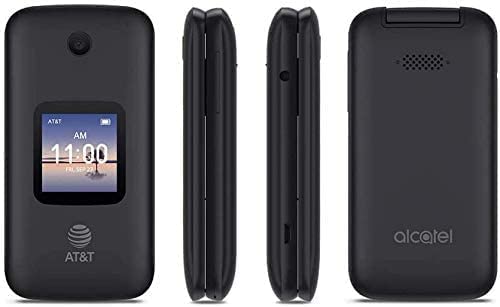
Simplicity is this phone’s entire pitch, and for the right buyer that pitch is perfect. The Alcatel SmartFlip arrives as an AT&T prepaid handset: activate it on that service, and it makes calls, sends texts and takes its modest photographs without demanding accounts, updates or digital housekeeping. For a household already on AT&T prepaid, few purchases in technology involve less friction.
The camera defines the floor of acceptable. It records faces recognisably in good light, captures documents when held steady, and should be forgiven everything else. Nobody should buy this phone for its camera; they should buy it for calls and texts, and accept the camera as a notebook that happens to use light. Within that framing it does its small job, and its owner will capture the occasional grandchild, parking spot and product label perfectly adequately.
Everything else about the SmartFlip follows the same philosophy of enough. The keypad is large, the menus are shallow, the battery sips, and the price band — check price on Amazon — reflects a tool rather than a treasure. The carrier tie is the one hard condition: step outside AT&T prepaid and this recommendation evaporates, which is why the guide states the tie in the heading rather than the footnotes.
- System: KaiOS-based flip, prepaid configuration
- Network: AT&T prepaid — carrier-tied
- Camera role: basic recording only
- Role: lowest-friction AT&T option
Strengths
- Effortless activation on its intended service.
- Large keys and shallow, learnable menus.
- Genuinely inexpensive to own.
Trade-offs
- Useless outside its carrier arrangement.
- Camera is the weakest here.
- Not a phone to grow into.
Best for: AT&T prepaid customers wanting calls, texts and an occasional photograph.
Not suited for: any other carrier, or camera-led buyers.

TCL Go Flip 2 — Unlocked value flip
Value with flexibility is a rarer combination than it should be, and the TCL Go Flip 2 offers both: a factory-unlocked flip that travels between compatible carriers, sold through a renewed listing that trims the cost further. Buyers equipping a spare phone, a teenager’s first handset or a glovebox emergency unit will recognise the appeal immediately.
The camera keeps pace with the category’s honest standard. Daylight snaps are clear, documents are legible when the light cooperates, and the shutter responds promptly enough for candid family moments. Low light remains the tax all basic cameras pay, and this one pays it without complaint or surprise. Photographs will not be printed large; they will be recognised, shared and understood, which is the assignment.
Because the pool listing is renewed, the usual discipline applies with extra weight on a budget phone: confirm the grading, test the hinge and battery during the return window, and verify your carrier’s compatibility with the exact model before ordering. Do those three things and the Go Flip 2 is the thinking bargain of this guide — unlocked freedom at a price that makes a second phone for the car feel sensible rather than indulgent.
- System: flip phone with smart-lite features
- Network: factory unlocked — verify your carrier
- Camera role: daylight recording and documents
- Listing in pool: renewed
Strengths
- Unlocked flexibility at a value price.
- Camera meets the category standard honestly.
- Ideal spare or first phone economics.
Trade-offs
- Renewed condition varies; inspect promptly.
- Low-light photographs are weak.
- Carrier bands need checking per buyer.
Best for: budget buyers wanting unlocked freedom and a serviceable camera.
Not suited for: buyers who dislike renewed purchases.
Kyocera DuraXE Epic — AT&T rugged tank
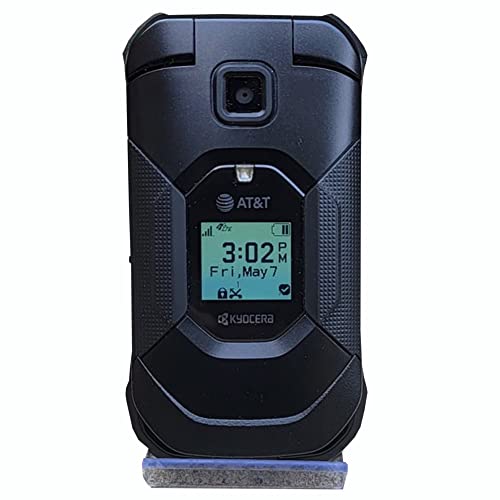
Some phones are bought for pockets that contain screws, sawdust and weather. The DuraXE Epic is built for those pockets: a ruggedised flip with shock resistance, a body that shrugs off drops onto concrete, and controls designed for gloved, hurried hands. On AT&T’s network it serves construction crews, farmers, warehouse teams and the chronically clumsy with equal indifference to abuse.
The camera on a phone like this has a specific professional job: evidence. Photograph the delivery damage, the meter reading, the finished installation, the crack before the argument about the crack. For that work the DuraXE Epic’s camera is well judged — quick to open, adequate in daylight, and housed in a body that will still be working after the drop that would retire a glass smartphone. Photographers of sunsets should look elsewhere; documenters of reality have found their tool.
Renewed AT&T stock is how this one reaches the pool, so grading and return checks apply, and the carrier tie is absolute. Weight and bulk are the daily prices of the armour, and the interface favours function over charm. Buyers whose phones die young from violence rather than age will find the arithmetic obvious: one tank outlasts three fragile phones, and its camera will be present for every incident report along the way.
- System: rugged flip, push-to-talk heritage
- Network: AT&T — carrier-tied
- Build: shock-resistant, job-site oriented
- Listing in pool: renewed
Strengths
- Survives drops that kill ordinary phones.
- Glove-friendly controls and loud, clear calls.
- Camera suits evidence and site documentation.
Trade-offs
- Heavy and bulky for gentle pockets.
- AT&T only, and renewed stock varies.
- Camera is a tool, not a pleasure.
Best for: tradespeople and outdoor workers on AT&T.
Not suited for: light-pocket minimalists or other carriers.

Kyocera DuraXV Extreme+ — Verizon rugged tank
Verizon customers whose phones live dangerously get their own tank. The DuraXV Extreme+ carries IP68 sealing against water and dust, a rugged shell rated for hard knocks, and the same glove-first design language as its AT&T sibling. It is the phone for fishing boats, ski lifts, delivery routes and building sites that happen to sit inside Verizon coverage.
Water resistance changes the camera’s working life in ways worth spelling out. The phone can photograph in rain, rinse mud off under a tap, and survive the puddle that ends other phones’ stories mid-holiday. The camera itself remains a basic recording instrument — faces, documents, scenes in daylight — but it is a recording instrument that is present in conditions where delicate phones stay zipped away, and presence is the first virtue of any camera.
Call quality deserves its sentence: Kyocera builds for noisy environments, with loud speakers and microphones tuned for wind and machinery, which matters more to its buyers than any pixel figure. The trade-offs mirror its sibling’s — bulk, a utilitarian interface, and a hard carrier tie — plus a price that reflects genuine engineering rather than fashion. For the Verizon worker who has buried two smartphones, this is less a purchase than a ceasefire.
- System: rugged flip with IP68 sealing
- Network: Verizon — carrier-tied
- Build: water and dust resistant, shock resistant
- Role: harsh-environment Verizon choice
Strengths
- IP68 sealing survives rain, mud and puddles.
- Excellent call clarity in noisy places.
- Camera available in conditions rivals avoid.
Trade-offs
- Substantial size and weight.
- Verizon only.
- Interface prioritises function over polish.
Best for: Verizon customers working outdoors or around water.
Not suited for: buyers wanting a slim, light everyday phone.

TCL Flip 4 5G — The 5G step-up
The newest idea in this guide is a basic phone with 5G, and the TCL Flip 4 makes the case for T-Mobile customers. As carriers keep refarming spectrum, a 5G flip buys insurance against network changes that strand older handsets, while KaiOS keeps the experience firmly basic: calls, texts, light apps, and a camera for the record. It is the future-proofed version of a deliberately old-fashioned product.
The camera follows the family pattern — competent daylight recording, honest documents, soft evenings — with processing that feels a touch more modern than the oldest flips here. Nobody should mistake it for a smartphone camera, and TCL does not ask you to. What the buyer gains over the Go Flip 2 is network longevity and a fresher platform; what they give up is the unlocked freedom, since this model is a T-Mobile handset.
Choose it when your household is settled on T-Mobile and the phone is expected to serve for years — a parent’s handset, a business line, a home’s second phone. The 5G radio also future-proofs the light data features KaiOS offers, keeping maps and messaging viable as networks evolve. In a category where buyers keep phones until they physically fail, buying the network of the future is the quietly rational move.
- System: KaiOS flip with 5G
- Network: T-Mobile — carrier-tied
- Camera role: modernised basic recording
- Role: long-service T-Mobile basic phone
Strengths
- 5G protects against network refarming.
- Fresh platform with years of relevance.
- Camera and battery meet the brief comfortably.
Trade-offs
- T-Mobile tie limits flexibility.
- Camera remains basic despite the modern radio.
- Costs more than 4G-only flips.
Best for: T-Mobile households buying a basic phone for the long term.
Not suited for: carrier-hoppers or unlocked-phone loyalists.
Comparison Table
| Pick | Network | Character | Link status |
|---|---|---|---|
| Nokia 2780 Flip | Unlocked | KaiOS all-rounder | Linked |
| Alcatel SmartFlip | AT&T prepaid | Simplest possible flip | Linked |
| TCL Go Flip 2 | Unlocked (renewed) | Value flexibility | Linked |
| Kyocera DuraXE Epic | AT&T (renewed) | Rugged, shock resistant | Linked |
| Kyocera DuraXV Extreme+ | Verizon | Rugged, IP68 sealed | Linked |
| TCL Flip 4 5G | T-Mobile | KaiOS with 5G | Linked |
What Can a Basic Phone Camera Honestly Do Well?
Documents are its finest work. A receipt, a form, a whiteboard, a page of a manual — flat, still subjects in reasonable light sit exactly inside a basic camera’s abilities, and the resulting photographs stay legible enough to file, share and act on. Workers who photograph paperwork daily will find these cameras not merely adequate but well matched, because the job never asks for beauty, only for fidelity to text and shape.
Faces in daylight come next. A grandparent photographing a visiting grandchild in a garden will capture the smile, the context and the day, at a quality that prints acceptably at small sizes and displays happily on any screen. What the camera cannot do is rescue the same scene moved indoors at night, where small sensors and simple processing surrender to noise and blur. Knowing that boundary lets owners step toward a window or a lamp — the oldest photographic skill — and come home with the picture anyway.
Proof is the third talent, and the least discussed. The photograph of the parked car’s position, the delivered parcel on the step, the hotel room as you left it: these images exist to settle questions, and they settle them at any resolution. A basic camera that is charged, present and quick to open is a better witness than a magnificent camera left at home, which is the entire philosophy of this category in one sentence.
Why Do Flip Phones Suit Camera Beginners and Seniors?
The hinge teaches the phone’s whole grammar physically. Open to answer, close to hang up, and the camera lives behind a cover that prevents the pocket-dialled photographs of trousers that plagued early smartphone owners. For a senior returning to mobile phones after years away, or a technophobe who never left, that physical clarity removes the fear of doing something wrong — and fear, more than any interface, is what stops people using the camera they own.
Buttons extend the same kindness. A camera that opens from a menu navigated by touch demands precision from fingers that may not have it; a keypad with real travel can be operated by feel, with gloves, or with limited dexterity. Several picks here also offer programmable keys and simplified modes that put the camera one press away. When the photograph is a grandchild doing something unrepeatable, one press is the difference between the picture and the story about the picture.
There is also the matter of dignity. A flip phone does not buzz with notifications, does not demand updates at breakfast, and does not make its owner feel managed by their own property. For many buyers in this category that calm is the product, and the camera is a welcome passenger. Guides that sneer at basic phones miss why their owners love them.
How Do You Check Carrier Compatibility Before Buying?
Begin with the blunt fact that basic phones are the most carrier-sensitive products in mobile. The SmartFlip belongs to AT&T prepaid, the DuraXE Epic to AT&T, the DuraXV Extreme+ to Verizon and the TCL Flip 4 to T-Mobile, and none of those ties is a suggestion. The unlocked Nokia and TCL Go Flip 2 roam more freely, yet even unlocked phones must match your carrier’s bands and its current activation policies, which have grown stricter as networks retired older technologies.
The reliable procedure takes ten minutes. Note your current carrier and plan type, find the exact model number of the phone you want, and check it against the carrier’s own compatibility tool or a call to its support line. If the phone is for a parent on your family plan, confirm the line type as well, because some basic phones activate differently on prepaid and postpaid accounts. Ten minutes of checking prevents the special misery of a gift that cannot be switched on.
Returns are the safety net, not the plan. Renewed listings in particular should be bought from sellers whose return terms you have read, and the phone should be activated and tested within days of arrival, while the window is open. A basic phone’s whole virtue is dependability; the purchase process should demonstrate some.
What Battery Life Should You Expect, and How Do You Protect It?
Days, not hours, is the honest headline — one of the great pleasures of this category. A flip phone sips power through a small screen and a light operating system, so several days of calls and texts between charges is normal, and standby stretches far longer. For an emergency-drawer phone or an elderly user’s handset, that endurance is a safety feature: the phone is alive when it is needed, not flat in a drawer with a charger nobody can find.
Habits still matter. Leaving the phone on its charger permanently, baking it on sunny dashboards and letting it sit empty for months all shorten a battery’s life. A gentle rhythm — charge when it asks, use it regularly, store it half-charged if it must rest — keeps the small battery healthy for years. The Kyocera models add replaceable-battery thinking in some configurations and rugged charging contacts in spirit; check your exact unit’s arrangement.
Charging hardware is blissfully simple here. Most of these phones charge from common USB arrangements, so a spare cable at the bedside and one in the car covers the geography of a life. Buy the spare cables when you buy the phone, because the day the only cable fails is always the day the phone is needed.
How Should You Take Better Photographs With a Basic Camera?
Light first, always. Move the subject toward a window, step outside, or turn on the room’s lamps before blaming the camera, because small sensors repay light more generously than any other input. A basic camera in good light produces photographs that surprise smartphone owners; the same camera in a dim room produces evidence of a dim room. The photographer’s feet remain the most powerful camera accessory ever sold, and they are free.
Stillness second. Brace the phone against a doorframe, rest your elbows on the table, and let the camera settle for a breath before pressing. Basic cameras lack the stabilisation and multi-frame tricks of smartphones, so your steadiness is the stabilisation. For documents, fill the frame, keep the page flat and parallel, and take two shots; checking the second one takes seconds and saves journeys.
Closeness third. Basic cameras have no meaningful zoom, and digital zoom on them is a crop wearing a costume. Walk toward the subject until the frame holds what matters, and the photograph improves in detail, light and honesty simultaneously. Grandparents who master these three habits — light, stillness, closeness — produce family archives that embarrass many a smartphone album.
Which Features Matter for Emergency and Family Use?
Loudness and clarity of the earpiece decide whether a parent actually hears the call about the appointment, so test call volume early and explore any hearing-aid compatibility ratings the model carries. Several picks here were designed with exactly this audience listening. A phone that rings loudly, speaks clearly and can be answered by flipping it open is an emergency device that happens to make calls, and it should be evaluated that way.
Dedicated emergency features vary by model: programmable SOS keys on some flips can dial a chosen number or send an alert, and carers should set these up on day one rather than leaving them as brochure promises. Location sharing through KaiOS apps on the smarter flips adds a gentle safety net for families who want it, balanced against the privacy preferences of the person carrying the phone — a conversation to have openly, not a setting to enable quietly.
The camera joins the emergency kit too. Photographing medication labels, insurance cards and the instructions on the boiler creates a reference library that lives in the phone and travels with its owner. Teach that habit during setup, take the photographs together in good light, and the basic camera becomes part of the household’s safety system rather than a toy at the bottom of the spec sheet.
How Long Do Basic Phones Last, and What Kills Them?
Years is the normal answer, and the category’s economics depend on it. With no app treadmill demanding newer hardware and no giant glass slab to crack, a flip phone’s enemies are few: hinge wear, battery ageing and network change. The hinge is engineered for tens of thousands of openings on reputable models like these, the battery can often be replaced or at least nursed, and network change is the risk the TCL Flip 4’s 5G exists to retire.
Care is mostly a matter of enemies avoided. Keep the phone out of the washing machine’s orbit, let a wet rugged model dry before charging, and do not sit on it in a back pocket — the one load case no hinge enjoys. The Kyocera pair forgives most of this by design, which is why they anchor the working end of this guide. A basic phone treated with ordinary respect commonly outlasts two smartphones, and its camera is still recording birthdays at the end.
End of life, when it comes, is usually announced by the network rather than the hardware. Keep an ear on your carrier’s notices about technology retirements, and let guides like this one help you choose the successor before the old phone is silenced. Planned replacement is a purchase; emergency replacement is a scramble.
How Do Texting and Messaging Work Without a Touchscreen?
Texting on a keypad divides into two schools. The older multi-tap method presses a key repeatedly to cycle through its letters, and predictive systems like T9 guess the word from one press per key, which practised thumbs operate astonishingly fast. Every phone here supports comfortable texting for the messages its owners actually send — arrangements, replies, the occasional photograph attached — and the learning curve for a returning user is measured in days, not weeks.
KaiOS models widen the conversation. Light versions of popular messaging services run on the Nokia and the TCL Flip 4, letting their owners join family group chats rather than sitting outside them, and photographs taken on the phone can travel through those chats like any other. Compatibility varies by region and carrier, so a buyer for whom a specific messaging app is essential should verify it for the exact model before ordering, rather than discovering its absence at the family dinner.
Voice helps too. Voice-to-text features on the smarter flips let a user dictate a message when the keypad feels slow, and voice calls — the original messaging — remain one flip away. Judge the phone by whether its owner can reach the people they love through it, by whichever channel those people use, and the specification sheet becomes a means rather than the verdict.
What About Photographs Sent by Family — Can These Phones Receive Them?
Yes, with expectations set by screen size. Photographs arriving by message display perfectly recognisably on these phones; a grandparent will see the new baby, the holiday beach and the birthday cake without difficulty. What the small screen cannot do is reward zooming into detail, and storage on basic phones fills faster than smartphone owners expect, so a household routine of saving favourites and clearing the rest keeps the phone healthy.
Receiving is also where KaiOS earns quiet credit. Messaging apps on the smarter flips display shared photographs in the flow of conversation, much as a smartphone does, while the simplest carrier flips rely on picture messaging that still works but feels more ceremonial. If the phone’s main social job is receiving family photographs, weight the KaiOS models — the Nokia and the TCL pair — more heavily in your choice.
A practical kindness: when family members send photographs to a basic phone, they should send them one at a time and not as enormous batches, and they should keep the accompanying text in the same message rather than spread across five. Small courtesies keep the small screen a pleasure rather than a puzzle, and the photographs keep arriving, which is the outcome everyone actually wants.
How Do These Phones Handle Hearing Aids and Accessibility?
Accessibility is a headline feature in this category, not a footnote, because so many buyers choose basic phones for ears, eyes and hands that smartphones serve poorly. Look for hearing-aid compatibility ratings on the model you are considering, test the earpiece volume with the actual user, and explore telecoil support where it is offered. The Kyocera and Nokia models have strong reputations here, built from years of serving exactly this audience.
Vision features deserve the same hands-on approach. Font sizes on these phones scale generously, screens favour contrast over prettiness, and the physical keypad removes the tremor-versus-touchscreen battle entirely. Some models add voice readout or talking menus in certain configurations. The only reliable test is the intended user’s own hands and eyes on the actual phone, inside the return window, performing the three tasks that matter: answering a call, calling a contact, and opening the camera.
Families should resist configuring accessibility settings on guesswork. Sit with the user, set text size and volume together, programme the speed dials with names they use rather than names in a directory, and take the practice photographs described earlier. Accessibility is not a specification; it is a fitting, like shoes, and it succeeds when the wearer helps choose.
Should a Basic Phone Be a Child’s First Phone?
Many parents land on exactly that conclusion, and this guide’s picks serve the role well. A flip phone gives a child calls, texts and a camera for the school trip, without an app store’s worth of distraction or a glass flagship’s replacement cost. The camera deserves a word in this context: it lets a child record the world — the den, the match, the museum — while keeping photography a deliberate act rather than a social feed.
Choice within the guide follows the household. The unlocked Nokia or TCL Go Flip 2 suits a family line being added to an existing plan; the carrier-tied models suit families already settled on that carrier’s prepaid arrangements. Durability argues for the Kyocera pair only if the child’s life is genuinely rough on equipment, since their bulk is a real daily cost for a small pocket.
Whatever the model, agree the household rules at setup: who the speed dials call, where the phone sleeps at night, and what the camera is for. A basic phone’s gift to a family is that these conversations stay simple, because the device itself is simple. That simplicity, not nostalgia, is why the category endures.
How Much Should You Spend, and Where Does Extra Money Go?
The spread across this guide runs from prepaid simplicity to rugged engineering, and the extra money buys identifiable things: durability in the Kyocera pair, network future-proofing in the TCL Flip 4, unlocked flexibility in the Nokia. None of the extra money buys a dramatically better camera, because at this level cameras converge on the same honest competence. Spend on the phone’s body, network and battery — the things its owner touches daily — and let the camera be the passenger it is.
Total cost includes the plan, and here basic phones shine quietly. Prepaid and basic lines cost a fraction of smartphone plans, and a phone kept for four years on a modest plan saves a household a sum that dwarfs any handset price difference in this guide. Buyers comparing two picks should compare two years of total ownership, not two sticker prices, and let that arithmetic settle arguments the spec sheet cannot.
The one upgrade worth funding at purchase is the boring kit: spare charging cable, a simple case or lanyard for users who drop things, and a memory card where the model accepts one for photographs. These small additions protect the phone’s working life more surely than any extended warranty conversation, and they cost less than the delivery meal celebrating the purchase.
What Happens During Setup Day? A Short Walkthrough
Setup day decides whether a basic phone becomes a companion or a drawer resident, so treat it as an appointment rather than an errand. Begin with the SIM and activation, on the carrier the phone belongs to, and make one test call in each direction before anything else. A phone that rings its owner and reaches a family member has passed its core examination; everything after that is improvement.
Contacts come next, entered with the names the owner actually uses — Mum, not the formal directory version — and assigned to speed dials where the model allows. Programme the emergency contact and any SOS key the phone carries, then test them together so the feature is a memory rather than a manual page. Set the ringtone loud, the font large and the clock correct, because small wrongnesses are what make a new phone feel foreign.
Finish with the camera ceremony this guide keeps recommending: walk to the best light in the house, take a photograph of something the owner cares about, view it together, and send it to a family member. That single loop — capture, view, share — teaches the whole camera in five minutes and proves to the owner that the phone is theirs. Then put the charger where it will live, agree where the phone sleeps, and let the device begin its quiet career.
How Do Basic Phones Compare With the Cheapest Smartphones?
The comparison deserves honesty in both directions. A bargain smartphone offers a far better camera, a browser that handles the modern web, and apps for everything from banking to bus times. If the buyer wants those things and can manage a touchscreen, the smartphone wins and this guide will not argue. Basic phones win on different ground entirely, and pretending the contest is one-sided in either direction helps nobody.
On that other ground: battery measured in days, a body that survives drops, an interface that cannot be rearranged by an accidental swipe, a bill that stays small, and an owner who feels in charge of the object. For a worker on a scaffold, a grandparent who wants calls and grandchildren’s photographs, or a teenager whose parents are rationing distraction, those are not consolation prizes. They are the specification.
The camera comparison, notably, is the smallest part of the decision. Both kinds of phone can record a document and a birthday; one does it beautifully and the other adequately, and adequacy is a perfectly respectable standard for a record. Choose the phone category by the life it will live, and the camera will follow the life rather than lead it.
Why Does This Category Keep Surviving the Smartphone Era?
Every few years an obituary is written for the basic phone, and every few years the category declines to die. The reasons are structural rather than sentimental. Networks need devices for the internet-of-things and for users who reject smartphones; carriers need prepaid handsets; employers need durable fleet phones; and a steady river of buyers — parents, minimalists, the accessibility community, the digitally exhausted — keeps choosing less on purpose. A market with that many independent reasons to exist does not vanish because a keynote says so.
The camera’s survival inside these phones tells the same story in miniature. Makers could strip it and save pennies, yet it remains on nearly every model, because even the most calls-only buyer eventually meets the moment that needs recording. The camera became part of what a phone is, at every level of the market, and its basic form — modest, quick, honest — is the purest expression of why: not to make art, but to make sure the moment is not lost.
Expect the category to keep evolving at its own calm pace: better KaiOS services, more 5G models like the TCL Flip 4, continued rugged engineering from Kyocera, and cameras that improve in small, useful increments. The buyers will not be swayed by any of it individually. They will keep asking the questions this guide is built on — does it ring, does it last, can I read it, and when the moment comes, will it take the picture? On the evidence of these six phones, the answer remains yes.
Which Pick Suits Which Household? A Decision in One Pass
Run the decision in the order the phones will experience life. First, the network: if the household is locked to a carrier by plan or coverage, the choice narrows immediately — AT&T households weigh the SmartFlip’s simplicity against the DuraXE Epic’s armour; Verizon households take the DuraXV Extreme+ or look at the unlocked pair after a compatibility check; T-Mobile households weigh the TCL Flip 4’s longevity. Unlocked buyers start with the Nokia and compare everything else against it.
Second, the hands: small hands and gentle lives favour the Nokia and the TCL models; hands in gloves, hands on tools and hands that drop things favour Kyocera without apology. Third, the years: a phone bought for a long service life earns the 5G TCL or the Nokia’s proven platform, while a phone bought as a spare or a stopgap can honourably be the renewed Go Flip 2. Run those three filters in that order and most households arrive at one phone, which is what a shortlist is for.
If two phones survive the filters, let the camera break the tie in daylight: take both listings’ sample expectations, remember that the Nokia and TCL Flip 4 feel the most modern, and then choose the one whose buttons you would rather press ten thousand times. You will press them ten thousand times. The camera will fire a few hundred times across the phone’s life, and it will do its honest work on each of them.
How Should You Care for the Camera Lens on a Basic Phone?
A basic camera has no lens cover heroics and no sapphire marketing, so its small lens lives exposed to pocket lint, fingerprints and the occasional encounter with keys. The good news is that the care routine fits on an index card. Wipe the lens with a soft cloth — the corner of a cotton shirt in an emergency — before important photographs, because half of all disappointing basic-camera pictures are simply a greasy lens diffusing the light into a soft, disappointed haze.
Storage habits protect the lens more than any cleaning. A pocket shared with coins and keys will frost the lens over a year; a pocket, pouch or belt case of its own keeps it clear. Flip phones enjoy one built-in mercy here, since the camera typically sits protected when the phone is closed and pocketed, which is yet another unglamorous way the hinge earns its keep. Rugged models shrug off more, but even a Kyocera’s lens prefers not to duel with a house key daily.
Test the lens when the phone arrives and once a season afterwards: photograph a bright window and a plain wall, and look for a glow or a soft patch that stays in the same place. That is the signature of lens damage rather than subject or light, and catching it inside a warranty or return window converts a slow disappointment into a simple exchange. Small cameras ask little; this is most of what they ask.
Common Mistakes
Buying for the camera alone heads the list, because the camera is the weakest instrument on every phone here and the purchase should be led by calls, buttons and battery. The second mistake is ignoring the carrier tie printed in the headings, then discovering at activation that a bargain belongs to another network entirely. Third comes assuming unlocked means universal; bands and activation policies still apply, and ten minutes of checking prevents a return.
Gifting without setup is the fourth error. A basic phone handed over in its box, without contacts entered, emergency numbers programmed and the camera demonstrated, often retires to a drawer within a month. Spend the half hour together; it is part of the gift. Fifth, buyers overlook the renewed grading on the value listings and skip the prompt inspection that makes renewed buying safe.
The last mistake is underestimating the owner. Plenty of people choose basic phones from wisdom rather than limitation, valuing calm, battery and buttons over an app store. Buy the phone that respects that choice, and the camera will quietly do its recording work for years.
Final Recommendation
Buy the Nokia 2780 Flip if you want one answer without a carrier lecture: unlocked, capable, calm, with a camera that honours the basic brief. Choose by network otherwise — the SmartFlip for AT&T prepaid simplicity, the DuraXE Epic for AT&T durability, the DuraXV Extreme+ for Verizon’s harsh environments, and the TCL Flip 4 5G for a T-Mobile handset bought for the long haul. The TCL Go Flip 2 is the value hunter’s unlocked alternative, renewed and ready.
Whichever phone lands in the pocket, set it up properly on the first day: contacts, emergency key, a charged battery, a spare cable, and a practice photograph taken together in good light. That small ceremony converts a purchase into a working tool, and it is the difference between the phones that serve for years and the ones that retire to drawers.
And when the camera captures the whiteboard before the cleaner arrives, the grandchild mid-laugh in the garden, or the label that settles the argument with the delivery company, it will have done everything this guide promised — no more, and honestly, no less. That is a respectable life’s work for a camera most manufacturers nearly apologise for, and it is why the basic phone, quietly and without keynote speeches, keeps its place in pockets that could afford anything and chose this.
Frequently Asked Questions
Can a basic phone camera handle video calls?
Some can, modestly. The experience suits a grandparent seeing a grandchild’s face across the country far better than it suits a business presentation, and that is the right calibration: warmth over polish, presence over production values. Where video calling matters daily, test it during setup week on your actual network, because carrier and app support vary enough that no guide can promise it sight unseen for every household.
KaiOS models like the Nokia 2780 Flip support light video-calling options depending on carrier and app availability, at quality suited to faces on a small screen. Set expectations at recognisable and warm rather than cinematic.
Will these phones work as networks keep changing?
The 4G models remain viable on their carriers’ current networks, and the TCL Flip 4 adds 5G insurance for T-Mobile. The carrier-tied models depend on their own network’s plans, which is another reason to confirm compatibility before buying.
Which pick is easiest for a complete, nervous beginner?
The Nokia 2780 Flip for unlocked buyers, thanks to its clear menus and forgiving keypad; the Alcatel SmartFlip for AT&T prepaid households, where activation is the simplest of all.
Are the Kyocera phones too much phone for a gentle user?
They are heavier than a gentle user needs, but their loudness, big controls and drop survival suit many older users well. Choose them for durability and clarity, not for slimness.
Can I print photographs from these cameras?
Daylight photographs print acceptably at small sizes — the family-album scale, the fridge-door scale. Do not plan wall-sized art from any basic camera; plan recognisable, warm records of real days.
What should I check on a renewed flip phone?
Hinge smoothness, battery behaviour across a day, screen and keypad condition, and a test activation on your carrier, all inside the return window. Add one camera test to the list: a daylight photograph of a document, checked for legibility, and a photograph toward a bright window, checked for the glow that betrays a scratched or hazy lens. Renewed phones earn their discount honestly when the buyer spends fifteen minutes verifying the handful of things that matter, and every item on this checklist is a thing a basic phone either does well for years or fails at immediately — there is very little middle ground to discover later.
Do these phones need a data plan for the camera to work?
No. The camera captures and stores photographs without any data service. A plan matters only when you want to send those photographs through messaging apps or browse KaiOS services; picture messaging and sharing follow your carrier’s terms for your specific line.
Related Guides
Keep going with the 1080p sports cameras for active, muddy, salt-sprayed weekends, the 4K 60fps action cameras for smooth, flowing footage, and the 360-degree cameras that capture absolutely everything at once.



[…] with the basic cell phones that keep a simple camera for everyday records, the 1080p sports cameras for fast, muddy weekends, and the 4K 60fps action cameras for smooth, […]