What's inside
- Where to Buy
- Key Takeaways
- Quick Picks
- How We Chose These Picks
- Comparison
- How to Choose a Laptop for Audio Engineering
- How Do You Test a Studio Laptop’s Noise Before the Return Window Closes?
- Does the Graphics Card Matter for Music Production?
- Mac or Windows for a Home Studio in Practice?
- Common Mistakes When Buying a Laptop for Audio Work
- Final Recommendation
- Frequently Asked Questions
- Related Guides
As an Amazon Associate I earn from qualifying purchases. This post may contain affiliate links at no extra cost to you.
[SITE_DOMAIN] is reader-supported. When you buy through links on our site, we may earn an affiliate commission.
Where to Buy
Six machines follow, each with its own Amazon listing behind its name. The Apple MacBook Air 13 with M5 opens the set as the macOS route, and its page is where the current figure for the Midnight configuration lives. Lenovo supplies the next three in different tempers: the Lenovo ThinkPad P14s Gen 6 as the compact Windows workstation, the Lenovo ThinkPad P1 Gen 7 as the larger, graphics-carrying studio machine, and the Lenovo ThinkPad P16s Gen 4 as the 4K OLED option. Between them sits the Dell Precision 3490, the small Dell with twin Thunderbolt 4 ports for interface-heavy desks. The Lenovo Legion Pro 5 closes the set as the raw-power gaming crossover, and its listing states the memory figure plainly for anyone comparing it against the workstations.
The best audio engineering laptops are judged by ears before benchmarks. A studio laptop lives in the room where recording happens, often a metre from a microphone, and it must run a digital audio workstation filled with tracks, plug-ins and virtual instruments without intruding on the take or stalling the session. That double demand — silence and stamina — shapes this guide more than any single specification. The six picks span an Apple machine built around efficiency, three Lenovo workstations of increasing size, a compact Dell, and one gaming powerhouse included for the producers whose sessions have become too large for politeness.
Three criteria organise the reviews, and they are worth naming before the machines. The first is noise behaviour under load, because a fan that spins up during a vocal take is a defect no specification can excuse; titles rarely state cooling design, so where a title is silent the spec box says so and the prose treats noise as a question to verify rather than a virtue to assume. The second is latency and connection: the ports a title names — Thunderbolt 4 counts appear in several — decide how audio interfaces, control surfaces and drives attach. The third is session stamina: processor class and memory, the figures that decide whether a forty-track mix with hungry plug-ins plays or pleads.
As ever in this series, claims come from listing titles and silences are recorded in the standard wording. Audio-specific features are mostly absent from these titles — no title here advertises a studio audio feature as such — and the guide does not pretend otherwise. What titles do state, processors, memory, storage, ports and screens, maps onto studio life more directly than marketing language would, and the reviews make that mapping explicitly, pick by pick, so a producer can verify every step of it against the listing in a minute.
Key Takeaways
- Ports divide the field for interface users: the Dell Precision 3490 and the ThinkPad P16s Gen 4 each state twin Thunderbolt 4 ports in their titles.
- Memory runs from the MacBook Air’s and Legion Pro 5’s 16GB to 32GB in the three workstation Lenovos and the Dell — the figure big sessions feel first.
- No title in this set states a cooling or fan design, so noise behaviour is flagged as a verify-before-buying item in every spec box where it matters.
- The MacBook Air is the sole macOS machine, with 16GB of unified memory and a 512GB drive as its stated configuration.
- The Legion Pro 5 carries the strongest stated processor-and-graphics pairing — Ryzen 9 8945HX and RTX 5060 — alongside the joint-lowest memory figure.
Quick Picks
| Pick | Badge | Why it earns a place |
|---|---|---|
| Apple MacBook Air 13 M5 | macOS route | M5 efficiency, 16GB of unified memory and a 13.6-inch Liquid Retina display for mobile production. |
| Lenovo ThinkPad P14s Gen 6 | Compact workstation | Ryzen AI 7 PRO 350 with 32GB of memory and a 500-nit WUXGA panel at 14 inches. |
| Dell Precision 3490 | Interface desk pick | Twin Thunderbolt 4 ports and 32GB of memory in a 14-inch Precision. |
| Lenovo ThinkPad P1 Gen 7 | Studio power, slim body | RTX 3000 graphics and a 2560 x 1600 panel for sessions that outgrow smaller machines. |
| Lenovo Legion Pro 5 | Raw-power crossover | Ryzen 9 8945HX and RTX 5060 for enormous sessions and score-to-picture work. |
| Lenovo ThinkPad P16s Gen 4 | OLED session screen | 4K OLED touch display, 32GB of memory and twin Thunderbolt 4 ports. |
How We Chose These Picks
The first pass was about session stamina, because audio work punishes hesitation audibly. A DAW session is a real-time system: the audio either flows at the buffer size the engineer chose or it crackles, and the margin between those outcomes is processor headroom and memory. Every pick here runs a modern performance-class chip — Apple’s M5, AMD’s Ryzen AI 7 and Ryzen 9 parts, Intel’s Ultra processors — and five of the six carry 16GB or more, with the workstation core of the guide at 32GB. Machines from the budget chip classes were excluded for the same reason they are excluded from engineering guides: a stutter in audio is not an inconvenience, it is a ruined take.
Connectivity formed the second pass, read from titles with care. Audio interfaces, docks and fast sample-library drives all compete for the machine’s best ports, and two picks state twin Thunderbolt 4 ports outright, which settles the interface question in print. Where titles do not enumerate ports — the MacBook Air and the Legion among them — the spec boxes record the silence and the reviews advise verifying the port layout against the listing, because an interface purchase made on an assumed port is a return waiting to happen. Wireless figures, where stated, are reported as longevity rather than as audio features.
The third pass concerned the room. A studio laptop’s screen is a mixing surface stared at for hours, so panels matter: the guide includes a colour-stated WUXGA screen, a 2.8K IPS panel and a 4K OLED, alongside the MacBook’s Liquid Retina display. Cooling design, by contrast, appears in no title here, and the guide refuses to award quietness it cannot source. Instead, each review treats the noise question honestly — as a property to verify in manufacturer documentation and in the return window, with the microphone as the final judge — because that is the only treatment the evidence supports.
The final pass arranged the six by studio temperament. There is a macOS machine for the Logic-centred producer, a compact workstation for the travelling engineer, a port-rich Dell for the interface-heavy desk, a slim powerhouse for large sessions, a gaming crossover for maximum plug-in headroom, and an OLED machine for the engineer who also cuts video. A reader finishing all six should be able to name their own constraint — operating system, ports, screen, raw power or portability — and point at the machine that was chosen around it.

Apple MacBook Air 13 M5 — macOS route
The MacBook Air opens the guide because for a large share of working producers the operating system is the first decision, and this is the only machine here that makes it. Its title describes Apple’s 2026 Air with the M5 chip, a 13.6-inch Liquid Retina display, 16GB of unified memory, a 512GB drive, a 12MP Center Stage camera, Touch ID and Wi-Fi 7, in Midnight. Apple’s silicon has earned its studio reputation on efficiency — performance delivered without the thermal drama of older laptop generations — and the Air’s position in this guide rests on that design philosophy: a light machine for writing, tracking and mixing that travels between studio, home and collaborators without ceremony.
Sixteen gigabytes of unified memory is the figure to interrogate. Unified memory serves both the system and the graphics, and Apple’s architecture uses it efficiently, but a DAW session does not care about architectures — it cares about the sample libraries, convolution reverbs and virtual instruments resident at once. Moderate sessions, singer-songwriter productions, podcast and voice work, electronic production built on synthesised rather than sampled instruments: all sit comfortably. A composer loading a full orchestral template will find the ceiling, and should read the 32GB workstation reviews below with that template in mind. The 512GB drive asks the same discipline: sample libraries are the storage story of audio life, and they will want an external drive quickly.
The title does not enumerate this machine’s ports, and in a studio guide that silence is operational rather than pedantic. An audio interface, a controller, a drive and power must all attach somehow, and the Air’s buyers should confirm the port layout and plan the hub or dock on the listing page before the interface is ordered. The same honesty applies to cooling: the title states no fan or cooling design, so this review makes no claim about its noise behaviour beyond noting that the verify-in-the-room advice in the final section applies to it as to every pick. What the title does support is the mobility case: this is the machine in the guide most likely to be present at the session, wherever the session is.
Who it suits is the macOS-centred producer: the Logic user, the travelling songwriter-engineer, the podcaster and voice producer whose sessions are serious but not orchestral, and whose studio is often a room they have just walked into. Touch ID speeds the constant unlocking of a shared-space machine, the camera serves the remote collaboration that modern production runs on, and the whole package asks little of its owner beyond the memory and storage discipline its configuration implies. Producers whose sessions are already large should treat this as the guide’s elegant doorway rather than its destination.
- Processor: Apple M5
- Memory: 16GB unified memory
- Storage: 512GB SSD
- Display: 13.6-inch Liquid Retina
- Camera: 12MP Center Stage
- Security: Touch ID
- Wireless: Wi-Fi 7
- Finish: Midnight
- Ports: Not stated in the listing title — verify with the manufacturer documentation
- Cooling design: Not stated in the listing title — verify with the manufacturer documentation
Strengths
- The only macOS machine in the guide, for Logic-centred workflows.
- M5 efficiency suits a machine that records in the room it sits in.
- Touch ID and the Center Stage camera serve shared, collaborative studios.
Trade-offs
- 16GB of unified memory bounds large sampled-instrument sessions.
- The 512GB drive will want an external sample-library drive early.
- Ports are not enumerated in the listing title.
Best for: a macOS producer whose sessions are writing, tracking and mixing at moderate track counts, often in rooms that are not studios. Not suited for: a composer running a full orchestral template from internal storage, because 16GB of unified memory and a 512GB drive are both sized below that workload’s appetite.
Set the Air up as the front end of a small system: a fast external drive for libraries, a hub chosen for your interface before the interface itself, and a backup habit that treats project folders as the irreplaceable objects they are. Record one demanding test session in the first week — your largest current project, played end to end — and listen to the machine as much as to the mix. The Air’s promise is that it disappears into mobile production; the first week is when that promise should be made to prove itself, in your room, with your microphone open.

Lenovo ThinkPad P14s Gen 6 — Compact workstation
Lenovo’s P14s Gen 6 is the Windows workstation in miniature, and its title is unusually generous with the figures a studio cares about: an AMD Ryzen AI 7 PRO 350 processor, 32GB of DDR5 memory, a 1TB drive, and a 14-inch WUXGA display specified at 500 nits with 100% sRGB coverage, non-touch, with Wi-Fi 7 and Windows 11 Pro under the Copilot+ banner. The screen specification deserves its prominence in this review, because an audio engineer’s display is a landscape of waveforms, meters and plug-in windows stared at for entire days — brightness for bright control rooms and stated colour coverage for the video-adjacent work that increasingly shares the session.
Thirty-two gigabytes is the memory figure this guide keeps recommending, and in audio it buys a specific freedom: the session, the sample libraries, the notation or video application and the browser of reference material all alive at once, without the engineer performing memory triage between takes. The 1TB drive holds a working library internally — the instruments in current rotation — which matters for a machine that records away from the main studio. The Ryzen AI PRO processor brings the PRO line’s management and security features, relevant to engineers whose laptops join facility networks or carry client work between studios.
The title names no discrete graphics card and does not enumerate the port layout, and both silences are recorded in the spec box rather than filled from the P14s family’s reputation. For audio work the graphics silence is mostly benign — DAWs are processor-and-memory creatures — but the port question is practical: an interface, a control surface and a drive need homes, and buyers should confirm the layout on the listing page and plan the dock accordingly. Cooling design is likewise unstated, so the noise verdict belongs, as this guide keeps insisting, to the buyer’s own room and microphone during the return window.
Who it suits is the travelling engineer and the small-studio owner whose main machine must also be the portable one: tracking sessions on location, mixes finished at home, a workstation’s memory and manners in a 14-inch body that fits the bag beside the microphones. The stated screen makes long editing days kinder, Windows 11 Pro fits managed environments, and the specification spends nothing on the gaming or graphics theatre that audio never uses. In a guide organised by studio temperament, this is the professional default for Windows users who move.
- Processor: AMD Ryzen AI 7 PRO 350
- Memory: 32GB DDR5
- Storage: 1TB SSD
- Display: 14-inch WUXGA, 500 nits, 100% sRGB, non-touch
- Wireless: Wi-Fi 7
- Operating system: Windows 11 Pro
- Graphics card: Not stated in the listing title — verify with the manufacturer documentation
- Ports: Not stated in the listing title — verify with the manufacturer documentation
- Cooling design: Not stated in the listing title — verify with the manufacturer documentation
Strengths
- 32GB of memory keeps big sessions and libraries resident together.
- The 500-nit, 100% sRGB WUXGA panel is specified for long editing days.
- A 14-inch workstation body travels to location sessions without drama.
Trade-offs
- The port layout is not enumerated in the listing title.
- No discrete graphics card is named for video-heavy side work.
- Cooling behaviour must be verified in the buyer’s own room.
Best for: a Windows engineer who tracks and mixes on one travelling machine and needs workstation memory with a properly specified screen. Not suited for: an interface-heavy fixed desk bought blind, because the title’s silence on ports means the connection plan must be confirmed on the listing before the desk is built around it.
Make this Lenovo prove its studio manners early. In the first week, run your largest session at your working buffer size with the microphone live in the room where you actually record, and listen for the machine as an instrument of the room, not as a specification. Set the power profile deliberately for recording days, keep the sample library’s current rotation on the internal drive, and archive finished projects off it monthly. A compact workstation treated that way stops being the portable compromise and becomes, for many engineers, simply the machine.

Dell Precision 3490 — Interface desk pick
The Precision 3490 earns its studio seat with a line most laptop titles treat as an afterthought: two Thunderbolt 4 ports, stated outright. An audio desk is a small parliament of devices — the interface that owns the session’s sound, a fast drive for libraries and projects, often a control surface, a dock, a second screen — and Thunderbolt is the language they negotiate in. A machine that prints twin Thunderbolt 4 ports in its title lets an engineer design the desk on paper with confidence, and that is why this compact Dell, an Intel Ultra 5 135H machine with 32GB of DDR5 memory, a 1TB drive, a 14-inch FHD screen and a 1080p webcam on Windows 11 Pro, is reviewed here as the interface desk pick rather than as a generic business laptop.
Thirty-two gigabytes at this size is the second half of the argument. The 3490’s specification matches the guide’s recommended memory figure while staying in the smallest Precision body, which suits the engineer whose studio is a desk in a shared house or a corner of a facility: the machine docks into the full rig for mixing, and lifts away for writing, editing and admin without becoming a second computer to maintain. The Ultra 5 processor is the line’s efficiency-leaning tier rather than an HX powerhouse, and its honest positioning is session work at ordinary-to-large scale — the forty-track mix, the podcast network, the production library — rather than the extreme templates the Legion below was built to carry.
The title names no graphics card and no cooling design, and the spec box records both. Audio forgives the first readily; the second belongs to the room test this guide prescribes for every pick, and a desk machine has one advantage there — it can be positioned, on a stand or in a rack-adjacent spot, with its vents and its distance from the microphone arranged deliberately, rather than wherever a bag happened to be opened. The 1080p webcam, a small line in the title, covers the remote production meetings and client calls that now punctuate studio life.
Who it suits is the interface-led engineer: the producer whose desk is a connected system, whose interface and drives matter as much as the laptop, and who wants the connection plan printed in the title rather than discovered at setup. It also suits facilities buying a consistent, manageable machine for several rooms, where the Precision name’s support culture counts. Engineers whose sessions are primarily enormous and processor-bound should keep reading; engineers whose studios are primarily connected will recognise their desk in this review and can stop with confidence.
- Processor: Intel Ultra 5 135H
- Memory: 32GB DDR5
- Storage: 1TB SSD
- Display: 14-inch FHD
- Ports: 2x Thunderbolt 4
- Camera: 1080p webcam
- Operating system: Windows 11 Pro
- Graphics card: Not stated in the listing title — verify with the manufacturer documentation
- Cooling design: Not stated in the listing title — verify with the manufacturer documentation
Strengths
- Twin Thunderbolt 4 ports are stated in the title, anchoring the interface desk.
- 32GB of memory matches the guide’s recommended session figure.
- The smallest Precision body suits shared and multi-room facilities.
Trade-offs
- The Ultra 5 tier trails the HX-class processors for extreme sessions.
- The FHD panel is a working screen, not a showcase for video work.
- No graphics card is named in the listing title.
Best for: an engineer whose studio is a connected desk of interface, drives and surfaces, planned around stated Thunderbolt 4 ports. Not suited for: a producer whose sessions are defined by hundreds of plug-in instances, because the Ultra 5’s tier is session-strong rather than session-limitless.
Build the desk this Dell describes. Choose the dock and the interface as one decision, keep the sample-library drive on the fastest connection, position the machine for airflow and microphone distance as deliberately as you position the monitors, and set the recording-day power profile once rather than per session. The 3490’s contribution is a calm, connected centre; the engineer’s contribution is refusing to let cable improvisation undo it. Studios run on such small disciplines far more than on any single specification, and this machine rewards the disciplined.

Lenovo ThinkPad P1 Gen 7 — Studio power, slim body
The P1 Gen 7 is the guide’s answer for the engineer whose sessions have outgrown compact machines but whose studio has not outgrown portability. Its title pairs an Intel Ultra 7 165H with an NVIDIA RTX 3000 graphics card, 32GB of memory and a 1TB drive, behind a 16-inch 2560 x 1600 IPS non-touch panel, with a 5MP RGB+IR camera and Windows 11 Pro. The graphics card needs its role in an audio guide explained: modern production increasingly includes video — session films, live-streamed recordings, score-to-picture work, content for the artists being recorded — and a named professional card makes this the pick for the engineer whose DAW shares the machine with a video editor that leans on the GPU.
The panel is the other studio argument. At 2560 x 1600, a DAW’s arrangement window gains the vertical room that plug-in chains and track counts consume, and an engineer mixing at the laptop rather than at a desk monitor feels that room in every session. The slim P-series chassis carries this specification without the bulk of the full-size workstations, which matters for the engineer-engineer life of studios, homes and collaborators’ rooms. The 5MP camera, unusually specified in a title, serves the remote mix-review call — now a standard delivery mechanism — with a picture that does not apologise for the room’s lighting.
Balance requires the caveats in the open. The title enumerates neither the port layout nor a cooling design, so the interface plan and the noise judgement both belong to verification — the listing page for the first, the buyer’s own room for the second, as with every pick here. The Ultra 7 165H is a strong modern processor without the HX core counts of the Legion below; sessions that are large but sane are its territory, and the extreme template belongs to the crossover. Memory at 32GB matches the guide’s working recommendation, and the 1TB drive will want the same library discipline as its companions once video projects join the audio ones.
Who it suits is the hybrid engineer-producer: audio at the centre, video at the edges, sessions too large for the compact picks, and a working life split between a main studio and everywhere else. It is also the natural upgrade path for the P14s owner whose projects grew — same family manners, larger canvas, a named card for the GPU work. Engineers whose world is purely audio and desk-bound may find the Dell’s stated ports a better spend; engineers whose world includes picture will find this Lenovo the only pick here specified for both halves of it.
- Processor: Intel Ultra 7 165H
- Graphics: NVIDIA RTX 3000
- Memory: 32GB RAM
- Storage: 1TB SSD
- Display: 16-inch 2560 x 1600 IPS, non-touch
- Camera: 5MP RGB+IR
- Operating system: Windows 11 Pro
- Ports: Not stated in the listing title — verify with the manufacturer documentation
- Cooling design: Not stated in the listing title — verify with the manufacturer documentation
Strengths
- A named RTX 3000 serves the video work that shares modern production.
- The 2560 x 1600 panel gives arrangement windows real vertical room.
- A 5MP RGB+IR camera upgrades remote mix reviews and sign-in.
Trade-offs
- The port layout is not enumerated in the listing title.
- The Ultra 7 165H trails HX-class chips for extreme session counts.
- Cooling behaviour must be judged in the buyer’s own room.
Best for: an engineer-producer whose work mixes large audio sessions with GPU-leaning video tasks, in a body that still travels. Not suited for: a purely desk-bound interface rig bought without checking ports, because this title leaves the connection layout to the listing page.
Exploit the P1’s double life deliberately. Keep the video and audio project archives on separate external drives so neither discipline’s library swamps the internal terabyte, set the graphics behaviour per application where your tools allow it — the card for the editor, restraint for the DAW — and use the big panel’s room by arranging the DAW once, properly, rather than inheriting a cramped default layout. A slim workstation with this specification rewards the engineer who configures it as two machines in one chassis, because that is precisely what it is.

Lenovo Legion Pro 5 — Raw-power crossover
The Legion Pro 5 is in this guide for one honest reason: some sessions are enormous, and enormous sessions are a processor problem before they are anything else. Its title describes a 16-inch gaming laptop with a 240Hz 2.5K display at 500 nits and 2560 x 1600, an AMD Ryzen 9 8945HX, an NVIDIA GeForce RTX 5060 with 8GB, a 24-zone RGB keyboard and a 5MP webcam — a specification aimed at gamers that happens to describe exactly the machine a producer with a hundred hungry plug-ins dreams about. The HX processor is the headline for audio: flagship core counts and sustained performance headroom are what stand between a giant mix and the crackle of an overwhelmed buffer.
Then the figure that must be faced in the same breath: 16GB of memory, in a configuration the title prints as 16GB with a 1TB drive. For the Legion’s intended gaming life that is unremarkable; for this guide’s life it is the joint-lowest figure, shared with the MacBook Air, and it bounds the very sessions the processor invites. Sample-heavy work will ration it, and a buyer whose templates are library-led should weigh the 32GB workstations above more heavily than the processor gap suggests. Whether this configuration’s memory can be expanded is a question the title does not answer, so it goes to Lenovo’s documentation before purchase — for this pick more than any other, that answer changes the recommendation.
The rest of the specification translates with varying grace. The 240Hz refresh rate is a gaming figure that audio will never use, though the 2560 x 1600 resolution beneath it is genuinely welcome in an arrangement window. The RTX 5060 serves video side-work and GPU-accelerated tools capably, with the usual note that its drivers are written for games. Windows 11 Home, stated in the title’s closing words, is a real distinction from the Pro editions around it — facilities and engineers who need Pro’s management features should register that this machine does not claim them. Cooling design, as throughout this guide, is unstated in the title and belongs to the room test; a gaming chassis under a giant mix is exactly the case that test exists for.
Who it suits is the power-first producer: electronic and score work with dense plug-in chains, mix engineers whose sessions have become cities, and the gamer-producer who wants one flagship machine for both lives and accepts the memory question as the price of the processor. It does not suit the recording-room minimalist — its talents are stamina, not discretion — nor the library-heavy composer until the memory question is answered in writing. Read that way, the Legion is this guide’s honest extreme: the most session headroom per machine here, wrapped in the configuration that most demands a buyer’s verification homework.
- Processor: AMD Ryzen 9 8945HX
- Graphics: NVIDIA GeForce RTX 5060, 8GB
- Memory: 16GB
- Storage: 1TB
- Display: 16-inch 2560 x 1600, 240Hz, 500 nits
- Keyboard: 24-zone RGB backlit
- Camera: 5MP webcam
- Operating system: Windows 11 Home
- Cooling design: Not stated in the listing title — verify with the manufacturer documentation
- Memory upgradeability: Not stated in the listing title — verify with the manufacturer documentation
Strengths
- The Ryzen 9 8945HX offers the most session headroom in this guide.
- The RTX 5060 covers video and GPU-accelerated side work strongly.
- The 2560 x 1600, 500-nit panel suits long arrangement-window days.
Trade-offs
- 16GB of memory is the joint-lowest figure here and bounds big templates.
- Windows 11 Home lacks the Pro management features its rivals state.
- The 240Hz panel and RGB keyboard are gaming spend audio never uses.
Best for: a producer whose sessions are plug-in cities and who needs flagship processor headroom above every other virtue. Not suited for: a sample-library composer buying blind, because the stated 16GB of memory is the one figure their workload will test first and hardest.
Treat the Legion’s first week as an audition with a script. Load the largest session you own, set your working buffer, play it end to end with a microphone live, and write down two observations: whether the session breathes, and whether the machine can be heard doing it. Resolve the memory upgrade question in the same week, while the answer can still change the order. A crossover machine earns its studio place by passing tests a gaming review never sets — and a producer who sets them early will know, rather than hope, that this one has.
Lenovo ThinkPad P16s Gen 4 — OLED session screen
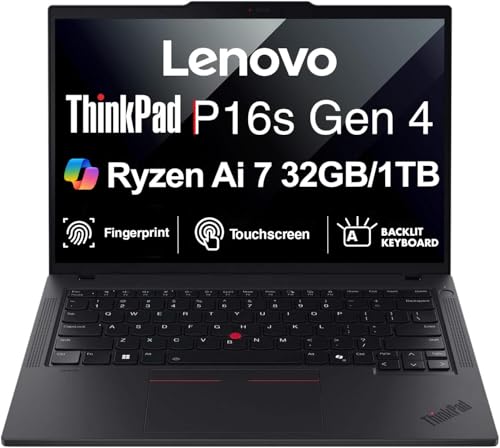
The P16s Gen 4 closes the guide with the screen the other picks make you imagine: a 16-inch 4K OLED touch display, in a Copilot+ mobile workstation on an AMD Ryzen AI 7 processor with 32GB of memory, a 1TB drive, an AMD Radeon 860M graphics unit named in the title, a backlit keyboard, a fingerprint reader, twin Thunderbolt 4 ports and Wi-Fi 7, on Windows 11 Pro. For the engineer whose work has merged with video — editing session films, cutting performance clips, mixing to picture — an OLED panel’s contrast and colour are working tools, and the touch layer serves the annotate-and-review habits of collaborative production. This is the guide’s most complete specification for that merged life.
The audio core of the specification is quieter and just as sound. Thirty-two gigabytes of memory carries the session and its libraries together; the Ryzen AI 7 processor is a modern performance-class chip; the twin Thunderbolt 4 ports, printed outright, anchor the interface desk as firmly as the Dell’s do — with the larger screen waiting when the machine undocks. The Radeon 860M is integrated-class graphics, named honestly in the title, and its positioning matches the P1 review’s logic in reverse: where the P1 buys a discrete card for video muscle, this machine buys the display for video judgement, and engineers should choose which half of video work — rendering or reviewing — dominates their own week.
Caveats are the familiar honest pair, plus one of its own. Ports beyond the stated Thunderbolt pair are not enumerated; cooling design is unstated, so the room test governs; and an OLED panel, while glorious for picture work, asks its owner the ordinary emissive-panel care when a DAW’s static interface sits on it for long days — vary the layout, let the screen rest, use the external monitor for the longest static sessions. None of these diminish the specification; they define the ownership it asks for, which is the most useful thing a review can print about a flagship-leaning machine.
Who it suits is the engineer-producer whose deliverables now include picture: the studio that films what it records, the composer mixing to screen, the producer whose mix reviews happen on the laptop’s own display in rooms without a calibrated monitor. It also suits the buyer who wants one machine to be the studio’s best screen and a full workstation at once. Pure-audio engineers on a strict budget can let the P14s or the Dell carry the same memory and processor class without the OLED premium; engineers who judge colour for a living will find that premium the easiest line in this guide to defend.
- Processor: AMD Ryzen AI 7
- Graphics: AMD Radeon 860M
- Memory: 32GB
- Storage: 1TB
- Display: 16-inch 4K OLED touch
- Ports: 2x Thunderbolt 4
- Wireless: Wi-Fi 7 and Bluetooth, as stated in the listing title
- Security: fingerprint reader
- Keyboard: backlit
- Operating system: Windows 11 Pro
- Cooling design: Not stated in the listing title — verify with the manufacturer documentation
Strengths
- The 4K OLED touch panel is the finest screen in this guide for picture work.
- Twin Thunderbolt 4 ports are stated, anchoring the interface desk.
- 32GB of memory and a named graphics unit complete a balanced specification.
Trade-offs
- The Radeon 860M is integrated-class graphics, not a discrete rendering card.
- OLED care applies when a static DAW interface occupies the screen all day.
- The exact Ryzen AI 7 model is not specified in the listing title.
Best for: an engineer-producer mixing to picture and judging colour on the laptop’s own OLED screen, with an interface desk on Thunderbolt. Not suited for: a render-heavy video workflow needing a discrete GPU’s muscle, because this specification spends its graphics budget on the display instead.
Run the P16s as the studio’s window. Calibrate the OLED if picture is judged on it, give the DAW a layout that uses the 4K room without shrinking text into punishment, and rest the panel with an external monitor during the longest static mixing days. Enrol the fingerprint reader, dock through the Thunderbolt pair, and let the machine’s two talents — session stamina and picture judgement — share the week deliberately. Configured with that much intention, the closing pick stops reading as the expensive one and starts reading as the consolidated one: two machines’ jobs, honestly specified, in a single chassis.
Comparison
| Pick | Processor | Memory / Storage | Display | Notable from title |
|---|---|---|---|---|
| Apple MacBook Air 13 M5 | Apple M5 | 16GB unified / 512GB | 13.6″ Liquid Retina | Touch ID, Wi-Fi 7, macOS |
| Lenovo ThinkPad P14s Gen 6 | Ryzen AI 7 PRO 350 | 32GB / 1TB | 14″ WUXGA, 500 nits, 100% sRGB | Wi-Fi 7, Windows 11 Pro |
| Dell Precision 3490 | Ultra 5 135H | 32GB / 1TB | 14″ FHD | 2x Thunderbolt 4, 1080p webcam |
| Lenovo ThinkPad P1 Gen 7 | Ultra 7 165H | 32GB / 1TB | 16″ 2560 x 1600 IPS | RTX 3000, 5MP RGB+IR camera |
| Lenovo Legion Pro 5 | Ryzen 9 8945HX | 16GB / 1TB | 16″ 2560 x 1600, 240Hz | RTX 5060, Windows 11 Home |
| Lenovo ThinkPad P16s Gen 4 | Ryzen AI 7 | 32GB / 1TB | 16″ 4K OLED touch | Radeon 860M, 2x Thunderbolt 4 |
Read the table by studio role. The memory column separates the session machines — four at 32GB — from the two 16GB configurations whose owners must either work at moderate scale or, in the Legion’s case, resolve the upgrade question before relying on templates. The display column separates the picture workers — OLED, 2.8K and the colour-stated WUXGA — from the working screens. The notable column is where the desks get decided: stated Thunderbolt pairs on the Dell and the big Lenovo, Touch ID on the Apple, a discrete card on the P1, and a Home edition on the Legion that facilities should notice.
The column the table cannot print is noise, and its absence is the guide’s most honest feature. No title here states a cooling design, so no row can claim the quiet studio as a specification. That judgement waits in your room, with your microphone, during your return window — and the section after next explains how to run that test so it actually answers the question instead of reassuring you by accident.
How to Choose a Laptop for Audio Engineering
Start with the session, not the shop. Open your largest current project and note three numbers: the track and plug-in count at its hungriest moment, the size of the sample libraries it loads, and the buffer size you mix at. Those numbers allocate the budget more truthfully than any advertisement. Processor headroom answers the first, memory answers the second, and the third is a discipline the machine must support without complaint. Every pick in this guide was chosen against that audit; a buyer who performs it will find the six reviews sort themselves with surprising speed.
Memory deserves its reputation as the audio figure. Sixteen gigabytes serves writing, tracking and moderate mixing — and this guide includes two such machines with their envelopes stated plainly. Thirty-two gigabytes is where large sessions stop negotiating: libraries resident, the DAW unhurried, the video or notation application open beside it. Composers and mix engineers with growing templates should buy the larger figure first and let other specifications be merely good, because memory exhaustion announces itself mid-session, in front of clients, in the take that mattered.
Ports come next, because the interface is the studio’s front door. Count what must connect at once — interface, library drive, project drive, control surface, dock, power — and favour the machines whose titles state the ports to carry them, as the Dell and the P16s state their Thunderbolt pairs. Where a title is silent, treat the listing page as part of the purchase: confirm the layout, price the hub or dock the layout implies, and add it to the machine’s true cost before comparing. An interface bought on an assumed port is the most common false start in project-studio life.
The operating system decision should be made by software and collaborators, not by tribe. The MacBook Air is here for the Logic-centred and the macOS-collaborating; the Windows machines carry the broader hardware variety and the Pro editions facilities manage. Plug-in libraries, it should be remembered, are investments that follow the engineer across machines within a platform far more easily than across platforms. A producer mid-library should weigh switching costs with the same seriousness as specifications, because the library, not the laptop, is usually the larger asset.
Finally, plan the room test before the box arrives. Decide which session will be the audition, which microphone will judge, and what you will listen for — fan behaviour under the mix’s heaviest minute, at the distance the machine will actually sit from the microphone. A laptop for audio is the only computer purchase where the product’s own sound is part of the product, and the return window is the only studio where that sound can be auditioned for free. Everything else in this guide can be read; that one thing must be heard.
How Do You Test a Studio Laptop’s Noise Before the Return Window Closes?
Reproduce the worst minute of your working life, not the average one. Load your largest session, set your tracking buffer, arm a track with your most sensitive microphone in its usual position, and record a minute of the room while the session plays its densest passage. Then listen to that recording on headphones at the volume a quiet vocal would occupy. A machine that intrudes there will intrude on every delicate source you record for years; a machine that passes there has passed the only noise specification that matters, whatever its cooling design is called.
Test the positions too, because noise is a geometry problem as much as a hardware one. A laptop behind the monitor, on a stand, at the room’s edge or in the adjoining space on a long cable run can change its audibility entirely, and a desk machine like the Dell invites that arrangement deliberately. Engineers who discover the workable geometry in the first week own a quieter studio for the machine’s whole life. Engineers who discover it in the second month own an anecdote. The return window rewards the curious and the systematic, which is why this guide keeps returning to it: it is the one laboratory every buyer is given, free, with the actual product inside.
Does the Graphics Card Matter for Music Production?
For pure audio, barely — and the guide’s allocations say so. A DAW’s graphical life is windows, waveforms and meters, which any modern graphics unit, integrated ones included, renders without breaking stride. That is why two picks here can name integrated-class graphics or none at all and still be serious studio machines, and why the memory and processor columns deserve a producer’s money before the graphics column does. The producer who buys a flagship card for the DAW alone has purchased a spectator.
The card earns its place at the edges where modern production actually lives. Video has merged with audio work — session films, streamed performances, clips for the artists, score-to-picture — and video editing leans on the GPU with real appetite. The P1’s named RTX 3000 serves that merged life; the Legion’s RTX 5060 serves it alongside its gaming; the P16s answers the same merger from the display side instead. Choose by which edge of video is yours: rendering it, or judging it. If neither is, let the graphics column be the one you economise on, and spend the difference on the memory your sessions will thank you for weekly.
Mac or Windows for a Home Studio in Practice?
The practical answer begins with the DAW and the library, because those are the assets that outlive machines. A producer deep in Logic, or collaborating daily with macOS studios, will find the MacBook Air’s route cheaper in everything except the sticker: no library migration, no workflow translation, no plug-in repurchases. A producer whose tools and collaborators live on Windows gains the wider hardware field this guide mostly surveys — stated Thunderbolt pairs, 32GB workstations at several sizes, an OLED flagship — and loses nothing in audio capability, because the major DAWs and interfaces serve both platforms seriously.
The secondary factors are honestly secondary. Touch ID against fingerprint readers, a Center Stage camera against 5MP webcams, unified memory’s efficiency against the workstations’ larger stated figures — each is a daily texture rather than a decision. What should not decide it is mythology in either direction: both platforms record records. Decide by the software you own, the people you exchange sessions with, and the machine in this guide whose memory and ports fit your largest project — then let the platform question, so enormous in the abstract, shrink to the practical size it occupies in a working studio.
Common Mistakes When Buying a Laptop for Audio Work
Judging noise from a review instead of a room. No title in this guide states a cooling design, so no prose can certify quiet. Record the room test in the return window, with your microphone and your largest session, or accept the result unheard.
Buying the graphics card for the DAW. Audio sessions spend on processors and memory. A flagship card serves video edges and gaming; a producer without those should let the 32GB machines have the money.
Assuming the ports you did not count. Interfaces, drives and surfaces compete for the best connections. Favour titles that state their ports, and price the hub into every silent title before comparing totals.
Letting 16GB meet a growing template. Both 16GB picks here carry their envelopes in plain print. Sample-heavy composers who ignore them will meet the ceiling mid-project, which is the most expensive place to meet anything.
Forgetting the library is the asset. Machines are replaced; sample libraries and plug-in collections follow the engineer. Choose the platform and the storage plan around the library’s future, not the laptop’s present.
Final Recommendation
For the Windows studio that must do everything, the ThinkPad P14s Gen 6 is the balanced centre: 32GB, a properly specified screen, a body that travels. The Dell Precision 3490 serves the connected desk best, the P1 Gen 7 serves the engineer whose work has grown picture, and the P16s Gen 4 serves the producer who judges that picture on an OLED screen. The MacBook Air is the macOS answer at moderate scale, elegantly and honestly bounded. The Legion Pro 5 is the power extreme, awaiting only its owner’s answer on memory before it can be recommended without a footnote.
Whichever machine takes the studio seat, audition it like an instrument — in the room, under the heaviest session, against the return window’s clock — because an audio laptop is the rare computer whose own voice joins every recording it touches, and the right one is the one you stop hearing, in every sense, within the first week.
Frequently Asked Questions
How much RAM does a DAW laptop need?
Moderate sessions run well at 16GB, the figure carried by the MacBook Air and the Legion here. Large sessions with sample libraries resident belong at 32GB, which is why four of the six picks carry it and why this guide treats it as the working recommendation.
Which pick is best for recording vocals in a small room?
The guide cannot crown one on noise, because no title states a cooling design. Shortlist by memory and ports — the P14s Gen 6 or the MacBook Air for mobile rooms, the Dell for a desk that can position the machine away from the microphone — then let the recorded room test in the return window decide.
Do I need Thunderbolt for an audio interface?
Many modern interfaces use it, and the two picks that state twin Thunderbolt 4 ports — the Precision 3490 and the P16s Gen 4 — make the desk plan printable in advance. For machines whose titles are silent on ports, confirm the layout on the listing page before ordering the interface.
Is a gaming laptop a good production machine?
Its processor headroom can be excellent, as the Legion Pro 5 shows. The checks are memory — this configuration states 16GB — the Windows edition, and noise in your room. Producers who resolve those three in the first week gain a genuinely powerful session machine.
Why does an audio guide care about screens?
Because the arrangement window is the engineer’s workbench, stared at for whole days, and because modern production includes picture. The colour-stated WUXGA, the 2.8K IPS and the 4K OLED in this guide serve long editing days and video-adjacent work respectively.
MacBook Air or a Windows workstation for a first studio laptop?
Follow your DAW and your collaborators. The Air suits macOS-centred, moderate-scale production with unmatched portability; the Windows workstations offer 32GB of memory and stated port layouts at similar roles. Either is a serious first studio machine when its envelope matches your sessions.
Related Guides
Audio engineering shares its hardware logic with the wider engineering family, and the neighbouring guides follow the overlaps. Producers whose work leans into programming, systems and GPU computing should compare the power arguments in the best laptops for computer engineering, where virtual laboratories set the memory agenda. And engineers whose sessions accompany designed spaces and visual work will find the workstation flagship view in the best laptops for architects, where professional graphics and big panels lead the specification.