Our Top Picks


What's inside
- Best Cable Lock for Laptops: A Practical Way to Stop Opportunistic Theft
- How a Laptop Cable Lock Actually Works
- The Honest Limits: What a Cable Lock Cannot Do
- The Three Lock Slot Standards You Need to Know
- Combination Locks Versus Keyed Locks
- Cable Length, Thickness, and Anchor Choice
- The Eight Locks, Reviewed Individually
- Kensington Combination Cable Lock With T-Bar for the Standard Slot
- Kensington Combination Laptop Lock K60213WW for the Standard Security Slot
- Kensington Universal 3-in-1 Combination Laptop Lock
- I3C Laptop Cable Lock With Keys
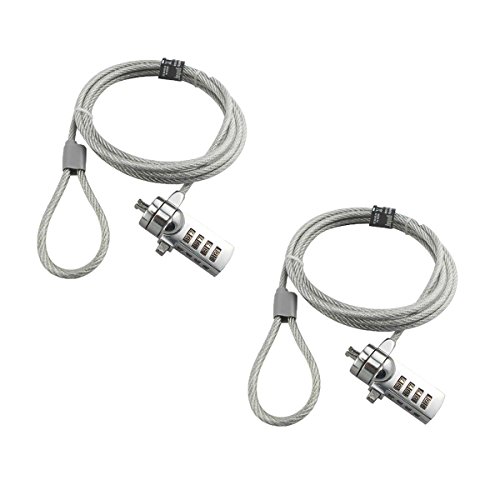
- AOMGD 2-Pack Laptop Combination Locks, 6-Foot
- Kensington N17 Combination Lock for Dell Wedge Slots
- LORADAR Laptop Cable Lock With Adhesive Anchors, 6.7-Foot Cable
- Multplx Universal Laptop Security Lock, 1.7 Metre Cable
- Choosing by Scenario: Where You Leave Your Laptop Decides the Lock
- Choosing by Laptop Type
- Setup Habits That Make Any of These Locks Work Better
- Frequently Asked Questions
- Our Research Verdict
- Check prices on Amazon
- Affiliate Disclosure
As an Amazon Associate I earn from qualifying purchases. This post may contain affiliate links at no extra cost to you.
Best Cable Lock for Laptops: A Practical Way to Stop Opportunistic Theft
A laptop cable lock is one of the simplest security accessories you can buy, and also one of the most misunderstood. It will not make a laptop impossible to steal. It will not survive a determined thief with proper cutting tools and time alone with the machine. What it does very well is remove the easy opportunity: the unattended laptop lifted off a library table in ten seconds, the notebook carried away during a coffee run, the device quietly unplugged and slipped into a bag while its owner is in a meeting down the hall. Most laptop theft in offices, dormitories, classrooms, co-working spaces, and trade show booths is exactly that kind of opportunistic theft, and a steel cable looped around a desk leg and locked into the side of the machine changes the calculation completely. The thief has to cut, yank, or carry the furniture too, and almost all of them will simply move on.
This guide covers eight cable locks built around the products listed at the top of the page. Four carry the Kensington name but are genuinely different models for different lock slots, and treating them as interchangeable is the most common buying mistake in this category. One is made for the wedge-shaped slot found on many Dell laptops. One uses adhesive anchors so it can work with MacBooks and other machines that have no lock slot at all. Others compete on pack quantity or on flexibility across mixed fleets. The right choice depends on what kind of lock slot your laptop has, if it has one at all, whether you prefer a combination or a key, and where you leave the machine unattended.
Our research focused on slot compatibility, locking mechanism, cable length, and reset behaviour as described in each product listing, combined with the well-established facts of how the three main lock slot standards work. Where a listing does not state a specification, we do not invent one.
How a Laptop Cable Lock Actually Works
Every lock in this guide follows the same basic design that has been standard for decades. One end of a steel cable terminates in a locking head. The other end is a loop. You pass the cable around a fixed object — a desk leg, a table frame, a heavy monitor stand, a railing, the metal frame of a dorm bed — and pass the locking head through the loop, which anchors the cable. Then you insert the locking head into the security slot on the side or rear of the laptop and engage the mechanism. On a combination model you scramble the dials. On a keyed model you turn and remove the key. The laptop is now tethered. It can be moved a short distance, opened, and used, but it cannot be carried away without cutting the cable, breaking the slot area, or taking the anchor object along.
The locking head engages inside the slot in one of a few ways. T-Bar designs insert and then rotate so that a crossbar sits behind the internal wall of the slot, which is why one product in this guide is explicitly described as a T-Bar lock. Other heads use expanding or rotating hooks that grip the inside of the slot in a similar fashion. The principle is identical: the slot is a reinforced opening in the laptop chassis, and the lock holds on from inside it. The cable itself is typically braided or stranded steel, often with a coating to protect desk surfaces and the laptop finish. Steel cable of this type resists pulling and casual cutting attempts far better than it resists a proper cable cutter — the heart of the honest limits discussion below.
The Honest Limits: What a Cable Lock Cannot Do
A cable lock is a deterrent and a delay, not a vault. A thief equipped with a decent pair of bolt cutters or a purpose-made cable cutter can sever a typical laptop security cable quickly. A thief willing to damage the laptop can wrench a lock out of its slot, sacrificing the machine’s casing and sometimes its resale value in the process, but it can be done. A thief can also simply steal the whole anchor if you have looped the cable around something light and portable, which is a surprisingly common failure: locking a laptop to a small side table or a lightweight chair accomplishes almost nothing.
Understanding this does not make cable locks pointless. Most physical security works the same way: raise the effort, time, noise, and visibility required until theft stops being the easy option. In a busy café, a thief cannot sit at your table working on your cable with cutters without drawing attention. In an open-plan office, a tethered laptop cannot be casually carried out during a busy lunch hour. In a dorm room with a rotating cast of visitors, a tethered laptop is not the one that disappears during a party.
A cable lock also does nothing for data security — enable full-disk encryption, a strong sign-in password, and automatic locking for that — and nothing while you are carrying the machine. Think of it as one layer covering one specific, very common scenario: the unattended laptop in a semi-public or shared space.
The Three Lock Slot Standards You Need to Know
Compatibility is decided before brand, price, or features. Laptop security slots come in three main forms, and a lock built for one will not fit the others. Checking your machine takes less than a minute: look along the left, right, and rear edges for a small reinforced slot, usually marked with a tiny padlock icon.
The Standard Kensington Slot
The original and most widespread standard is the Kensington security slot, often called the K-Slot or standard slot. It is an elongated oval opening found on generations of business laptops from Lenovo ThinkPad, HP EliteBook and ProBook lines, Dell Latitude models of certain eras, Acer, Toshiba and Dynabook machines, docking stations, monitors, projectors, and desktop PCs. If your laptop is a few years old and business-oriented, this is very likely the slot you have. The first three Kensington models in this guide include options for this slot, and several third-party locks target it as well.
The Kensington Nano Slot
As laptops became thinner, a smaller slot appeared: the Nano security slot. It is noticeably smaller than the standard slot and is found on many recent slim business machines. A standard lock head will not fit a Nano slot, and forcing it risks damage. Some modern locks address this with interchangeable tips. The Kensington Universal 3-in-1 model in this guide is built around that idea: one lock supplied with tips intended to cover the standard slot, the Nano slot, and the wedge slot described next, which makes it particularly relevant for households and small offices with a mix of older and newer machines.
The Wedge Slot Used by Dell
Many Dell laptops, especially XPS and various Inspiron and Latitude models, use a wedge-shaped slot associated with Noble Locks rather than the Kensington shape. It is narrower at one end and does not accept standard Kensington heads. This is the slot the Kensington N17 in this guide is made for; its listing names Dell directly. Dell owners are the shoppers most often burned by compatibility mistakes, because product photos of slots look similar at a glance. If your Dell has the wedge slot, buy a lock that explicitly says it fits that slot, and treat generic claims of universal fit with caution unless interchangeable tips are included.
Laptops With No Slot at All
Apple removed lock slots from MacBooks years ago, and many ultra-thin Windows laptops and most tablets never had one. For these machines the workaround is an adhesive anchor: a small metal plate with a slot or loop that bonds to the laptop lid or base with strong adhesive, giving the cable something to attach to. The LORADAR lock in this guide includes adhesive anchors and names MacBook and tablets in its listing, and the Multplx universal lock likewise presents itself as compatible with all laptops including MacBook, which for a slotless machine necessarily means an anchor or adapter approach. Be realistic about anchors: the bond is strong for deterrence purposes, but a determined pull can defeat adhesive in a way it cannot defeat a chassis-integrated slot, and removing an anchor later can leave residue or mark a finish. For a slotless machine, an anchor lock is still far better than nothing in a dorm or shared office, and it is currently the only cable-lock option available.
While you are checking your machine, it is also worth confirming storage and port layout before buying accessories in general. Shoppers comparing larger machines for study or work often start from roundups such as the following:
That kind of comparison has nothing to do with lock slots, but it illustrates the same habit this guide asks for: verify the physical facts of your specific model first, then buy the accessory that matches them.
Combination Locks Versus Keyed Locks
Six of the eight products here use four-digit combinations, one is described with keys in its listing, and one listing mentions both key hardware and combination language, which we discuss in its individual section. The choice matters more than it first appears.
Combination Locks
A four-digit combination gives ten thousand possible codes. That is plenty against casual guessing in a public place, where nobody can sit undisturbed working through combinations. The practical advantages are convenience: nothing to carry, nothing to lose, and the code can be shared with a colleague or family member who also uses the machine. The disadvantages are real too. Codes get forgotten, especially on a lock used only during travel or exam season. Dials can be fiddly with gloves or for users with limited dexterity. And a code that is never changed from its factory setting, or set to a birth year, is weaker than it should be. All of the combination models in this guide are described as resettable, which means you set your own code and can change it; do so as soon as the lock arrives, and record the code somewhere secure such as a password manager, not on a sticky note attached to the laptop.
Keyed Locks
A keyed lock is faster in daily use — insert, turn, done — and there is no code to forget. The trade-off is key management. Lose the key while the laptop is locked to a desk and you have a genuine problem that usually ends with cutting the cable. Keyed locks make the most sense when the same person uses the same desk every day and the key can live in a desk drawer or on a keyring that is always present. They are less convenient for travel, hot-desking, and shared machines. If you choose a keyed model, note how many keys are supplied, keep a spare in a separate location, and record any key code the maker provides for ordering replacements.
How Resetting a Combination Works
The reset process varies in detail but follows a common pattern. With the lock open on its current code — the factory code on a new lock — you engage a reset mechanism, which may be a small button, a lever, or rotating the head to a marked position. While holding that state, you dial your new code, then release the mechanism. Set the code while the lock is open in front of you, test the new code several times before locking the laptop, and never scramble the dials mid-reset. If you forget a code on a locked laptop, there is generally no master reset; that is why recording the code matters.
Cable Length, Thickness, and Anchor Choice
Cable length in this guide ranges from the 1.7 metre cable stated for the Multplx lock, through the 6-foot cables stated for the first Kensington model and the AOMGD pack, to the 6.7-foot cable stated for the LORADAR. Six feet is the practical standard: enough to reach from a laptop on a desk down around a desk leg or through a table frame with the machine still usable. The extra length of a 6.7-foot cable helps with deep desks, shared tables, and exhibition counters where the anchor point is not conveniently close. Longer is not always better. Excess cable pools on the desk, tangles with chargers, and creates a trip loop on the floor. Measure your actual setup: distance from the laptop’s slot side to the anchor, plus slack to open and reposition the machine comfortably.
None of the listings in this guide state cable diameter, so we do not rank these locks on thickness; choose on what each listing does confirm — length, mechanism, and slot type. Anchor choice deserves as much thought as the lock itself. Good anchors cannot be moved, lifted, or slipped off: a structural desk leg with a crossbar that stops the loop sliding up, a bolted table frame, a radiator pipe. Poor anchors include chair legs, lightweight side tables, and any post the loop can simply be raised over. Before you rely on a setup, give the cable a firm pull from a few angles. If you can defeat your own anchor in ten seconds without tools, so can anyone else.
The Eight Locks, Reviewed Individually
The order below follows the product list for this guide rather than a ranked podium, because the correct lock for a Dell wedge slot and the correct lock for a slotless MacBook are different products, and ranking them against each other would mislead. Read the section for the slot type you own first.
Kensington Combination Cable Lock With T-Bar for the Standard Slot
The first product, ASIN B005J7Y99W, is described as a Kensington combination cable lock with a T-Bar design for the standard lock slot, a resettable four-digit password, and a 6-foot cable. This is the classic configuration that defined the category: a combination head that inserts into the standard Kensington slot and rotates so the T-Bar sits behind the slot wall. For the huge installed base of business laptops with the standard slot, this is the reference design against which cheaper alternatives are compared.
The strengths are straightforward. The T-Bar engagement is mechanically simple, the 6-foot cable suits most desk setups, and a resettable four-digit combination avoids key management entirely. Kensington created this slot standard, so the fit on a genuine standard slot is as reliable as this category offers. If you manage a small fleet of older ThinkPads or EliteBooks, a lock of this type is the safe default.
The limitations follow from its specialisation. It fits the standard slot only; it is not the model for a Nano slot machine, a Dell wedge slot, or a MacBook. It also carries the usual forgotten-code risk, so an office deploying these should keep a confidential record of codes per machine. Within its intended role, this is the least complicated recommendation in the guide.
Kensington Combination Laptop Lock K60213WW for the Standard Security Slot
The second product, ASIN B0CRKFVZ9L, is a Kensington combination laptop lock for the standard security slot, described as resettable, with the model reference K60213WW, in black. On paper it addresses the same slot as the T-Bar model above, which raises the obvious question of why both exist. Kensington maintains several lock lines for the standard slot with different head mechanisms, cable constructions, and generations of design, and retail listings do not always spell out the engineering differences. What can be said honestly from the listing is that this is a current Kensington combination model for the standard slot, resettable, in a black finish that suits modern dark-chassis laptops better than older silver hardware.
For a buyer with a standard slot, the decision between this model and the T-Bar version comes down to availability and head style. Both rest on the same slot standard and the same four-digit combination concept, and both require the same discipline of setting and recording a personal code.
Shoppers outfitting a newer laptop sometimes pair security with a broader accessory refresh, and those comparing current machines in higher price bands may also be browsing roundups like this one:
Whatever machine the lock is for, confirm the slot visually before ordering this model. Standard slot owners are well served here; Nano and wedge owners should keep reading to the models built for them.
Kensington Universal 3-in-1 Combination Laptop Lock
The third product, ASIN B08T2GTBGW, is the Kensington Universal 3-in-1 combination laptop lock, described as a computer security locking cable in a resettable version. The 3-in-1 concept is the headline: instead of committing to a single slot standard, this style of lock is supplied with interchangeable lock tips intended to fit the standard Kensington slot, the smaller Nano slot, and the wedge slot. For a single buyer that may sound like overkill. For real households and offices, it solves a genuine and frequent problem.
Consider the common situations. A family has an older laptop with a standard slot and a newer thin one with a Nano slot. A small business buys laptops over several years and ends up with all three slot types in service. In each case, a universal lock avoids returns, mis-orders, and a drawer of incompatible hardware. One lock can be reassigned as machines are replaced, and the spare tips cover the next purchase whatever slot it arrives with.
The trade-offs are the usual ones for universal designs. You must keep track of the extra tips, changing tips adds a small step compared with a dedicated lock, and you should verify that the fit in your specific machine is snug. Our research view is that for mixed fleets this is the most flexible product in the guide, while owners of a single laptop with a known slot may prefer a dedicated model.
I3C Laptop Cable Lock With Keys
The fourth product, ASIN B01C6T36EY, is the I3C laptop cable lock, described as a hardware security cable lock with keys and as an anti-theft combination lock. That listing language mentions both keys and combination, which is ambiguous, and we flag it honestly rather than resolving it by invention: the title emphasises keys, so treat this primarily as a keyed hardware lock, check the product page details for the exact mechanism before ordering, and be prepared for either a keyed design or a design that combines both methods.
Taking it as the keyed option in this guide, its role is clear. Keyed locks suit a fixed workstation: the same user, the same desk, the key kept on the ring you already carry or in the desk itself. Engagement is fast, there is no code to forget, and there are no dials to manipulate. For a desktop replacement laptop that rarely travels, or a machine on a reception desk where one named person is responsible for it, that simplicity has real value.
The cautions are the standard ones. Keep the spare key somewhere separate from day one, and record any key code supplied. A keyed lock is a poor companion for hot-desking unless the key travels reliably with the laptop bag. Buyers who want a combination should choose an explicitly resettable combination model instead of relying on this listing’s mixed wording.
AOMGD 2-Pack Laptop Combination Locks, 6-Foot
The fifth product, ASIN B07CCJPWH7, is a two-pack: two AOMGD laptop notebook combination locks, each described as a 6-foot security cable with four-digit password protection. The value proposition is quantity. Two locks in one purchase cover two laptops, or one laptop at home and one at the office, or a laptop plus a second compatible device such as a docking station, monitor, or desktop case with a standard slot.
Two-pack buying makes particular sense in dormitories and shared houses, and in families where siblings have school laptops. Setting the same code on both locks simplifies life, though anyone who learns one code then knows both; for office use, distinct codes with a recorded list are wiser.
Verify your slot type before ordering, since the listing title does not name a specific slot standard, and the standard slot is the fit this class of lock is normally built for. Set and test both codes on arrival. Within the guide, this is the straightforward choice for covering two machines or two locations without buying two separate products.
Students in particular tend to buy security at the same time as the laptop itself, often while comparing compact machines for lectures and coursework, for example in roundups such as:
A two-pack bought at that moment, with codes set the same evening, is far more likely to be used than a lock considered months later after the first scare.
Kensington N17 Combination Lock for Dell Wedge Slots
The sixth product, ASIN B07SHJ1RC8, is the Kensington N17, described as a Dell laptop computer lock and combination security locking cable, model K68008WW, in black. This is the specialist in the guide. The N17 line exists for the wedge-shaped lock slot used on many Dell laptops, the slot that standard Kensington heads do not fit. If you own an affected Dell — many XPS, Inspiron, and Latitude models use this slot — this product class is not optional variety; it is the correct-fitting category, and buying a standard lock instead leads to a return.
The combination format keeps the usual benefits: no key to lose, a resettable code, and easy sharing with a family member who also uses the machine. Because this is a single-purpose lock, the buying check is simple but must be done: confirm your Dell actually has the wedge slot, since Dell has used different slots across ranges and years, and some Dell machines have a standard slot or no slot. The wedge shape — narrower at one end — is the visual tell, and your model’s documentation will state the slot type if you are unsure.
Dell owners should also be wary of generic listings that claim to fit everything without naming the wedge slot or supplying interchangeable tips. The only other product in this guide with a credible wedge claim is the Universal 3-in-1, by virtue of its tip system. A Dell-only household gets the simpler dedicated tool from the N17; a household with Dell and non-Dell machines may prefer the universal model.
LORADAR Laptop Cable Lock With Adhesive Anchors, 6.7-Foot Cable
The seventh product, ASIN B07YWQGDGN, is the LORADAR laptop cable lock, described as a 6.7-foot anti-theft security cable with adhesive anchors, for MacBook, tablets, and laptops. This is the guide’s answer for machines with no lock slot. The adhesive anchor plates bond to the device and provide the attachment point the cable needs, which is why the listing can name MacBook and tablets directly: those are precisely the devices that lack built-in slots.
The 6.7-foot cable is the longest stated in this guide, a genuine practical advantage at café tables, library desks, and exhibition counters where the fixed anchor point may be a table leg some distance from where the device sits. The anchor approach also works on laptops that do have a slot if you prefer not to use it, though a built-in slot is the stronger connection and should be used when available.
Set expectations correctly. Surface preparation decides anchor strength: the bonding area must be clean and dry, and given proper curing time before the first real pull. Choose the anchor position with care, because repositioning is difficult and removal can mark a finish or leave residue — a real consideration for a MacBook you may resell. Place it where it will not interfere with vents, ports, or the lid closing. Used with those caveats, this lock brings genuine deterrence to machines that otherwise have no cable-lock option at all.
Owners of thin, slotless machines often chose them for portability in the first place, sometimes after comparing small-screen options in guides like this:
best 11 12 inch laptops 8gb ram
The lighter and more portable the machine, the easier it is to carry away — which is exactly why the anchor-based lock earns its place for this category.
Multplx Universal Laptop Security Lock, 1.7 Metre Cable
The eighth product, ASIN B0CWLTRK4P, is the Multplx universal laptop security lock, described as compatible with all laptops including MacBook, with a 1.7 metre anti-theft cable and a four-digit combination. The universal claim, as with all such claims for slotless machines, rests on an anchor or adapter method for devices without slots, alongside direct fitting for slotted machines. Buyers should confirm from the product details exactly which fittings are included and how the MacBook fitting attaches before relying on it.
The stated cable length of 1.7 metres is slightly shorter than the 6-foot cables elsewhere in the guide. At a typical desk that difference rarely matters; at a wide shared table it might. The four-digit combination keeps the no-key convenience shared by most products here. The appeal is breadth: one purchase intended to cover whatever laptop it meets, suiting a guest desk, a training room, or a household where machines rotate.
Our research advice for any universal product is to test the fit on your actual machine on arrival, while returns are still easy, and to store any adapters or anchors with the lock itself. Universal hardware only delivers its convenience if all of its pieces stay together.
Choosing by Scenario: Where You Leave Your Laptop Decides the Lock
Open-Plan Offices and Hot-Desking
In offices, the risk is the unattended desk during meetings, lunch, and after-hours cleaning or contractor access. A standard-slot combination lock suits most business fleets, and the universal 3-in-1 suits mixed fleets. Codes should be recorded centrally and confidentially by whoever manages the equipment, because staff forget codes and staff leave. Hot-desking argues for locks that stay with the desk: one lock per desk, anchored permanently, used by whoever sits there.
Dormitories and Shared Houses
Dorm rooms have constant visitor traffic and doors that stand open — the highest-value scenario for a cable lock relative to its cost. The AOMGD two-pack covers roommates in one purchase, the LORADAR covers the MacBook that has no slot, and any combination model covers a standard-slot Windows laptop. Anchor to the bed frame or a fixed desk, not a movable chair.
Cafés, Libraries, and Co-Working Spaces
Public spaces are where opportunistic theft is fastest. A tethered laptop lets you order a coffee without packing everything away, though for long absences you should still take the machine with you; a cable buys minutes, not hours, of unattended time in public. Longer cables like the LORADAR’s help because café furniture rarely offers an anchor exactly where you need it.
Trade Shows, Classrooms, and Home Offices
Exhibition and classroom machines sit in place for days among strangers, and cable locks are standard practice there; combination locks avoid key chaos across staff rotations. At home the threat is burglary rather than opportunism, and a tethered laptop is simply slower to grab in a quick break-in. A keyed lock like the I3C suits a permanent home desk well, since the key can live in the room.
Choosing by Laptop Type
Standard-slot business laptops: choose the Kensington T-Bar model or the K60213WW for a dedicated fit, or the AOMGD pack when you need two. Newer thin laptops with a Nano slot: choose the Universal 3-in-1 and use its Nano tip, after confirming your slot is indeed the Nano type. Dell laptops with a wedge slot: choose the Kensington N17, or the Universal 3-in-1 with its wedge tip. MacBooks, tablets, and slotless ultra-thin laptops: choose the LORADAR with its adhesive anchors, or confirm the Multplx universal fitting suits your machine. Gaming laptops: these are thick, heavy, and often do include a standard slot on the rear or side; check before assuming, use a standard-slot lock if present, and remember that weight alone is no protection in a dorm or LAN event hall. Chromebooks and school laptops: slots vary by model; where present they are usually standard, and combination locks avoid lost-key problems for younger users, provided the code is recorded by a parent or school.
Setup Habits That Make Any of These Locks Work Better
Set your code before first use and record it in a password manager. Choose the anchor before you need it, and pull-test it. Route the cable so it does not cross walkways or pull against charging cables. Scramble the dials fully after locking. Inspect the cable and head occasionally for damage. For adhesive anchors, respect the curing time and re-check the bond after the first week. All of it is the difference between owning a lock and actually being protected by one.
Frequently Asked Questions
Will a cable lock stop someone from stealing my laptop?
It will stop the most common kind of theft: the quick, opportunistic lift of an unattended machine. It will not stop a prepared thief with cutting tools and privacy. Treat it as a strong deterrent and a delay, and still take the laptop with you during long absences in public places.
How do I know which slot my laptop has?
Look for a small reinforced slot on the side or rear edge, usually marked with a padlock icon. A larger elongated slot is the standard Kensington type, a visibly smaller one is the Nano type, and Dell’s wedge slot is narrower at one end. Your model’s manual or support page will state the type. If there is no slot anywhere, you need an adhesive-anchor lock such as the LORADAR.
Can I use a standard Kensington lock in a Dell wedge slot?
No. The shapes are different and the head will not engage properly. Use a lock made for the wedge slot, such as the Kensington N17, or a universal lock with a wedge tip, such as the 3-in-1 model in this guide.
What if I forget my combination?
There is generally no recovery method on a resettable combination lock; that is what makes it secure. Prevention is the answer: record the code in a password manager when you set it. If the lock is engaged on the laptop and the code is truly lost, the cable usually has to be cut, which is why the record matters.
Are four digits enough?
Four digits give ten thousand combinations. Nobody can work through those by hand while sitting at your desk in a public or shared space without being noticed. The real weaknesses are predictable codes and codes left on the factory setting, both of which are in your control.
Will an adhesive anchor damage my MacBook?
It can leave residue and may mark some finishes on removal, and repositioning is difficult. That is the accepted trade-off for adding a lock point to a machine that has none. Apply it to a clean, flat area away from vents, follow the curing instructions, and plan on it staying where you put it.
Can one lock secure two devices?
Sometimes. A cable can be routed so a second slotted device, such as a dock or monitor, is also tethered, depending on cable length and desk layout. Purpose-made multi-device setups exist, but among the products in this guide the two-pack AOMGD is the simpler answer for two laptops: one lock each, properly anchored.
Does a cable lock protect my data?
No. It protects the hardware from being carried away. Protect data separately with full-disk encryption, a strong account password, automatic screen locking, and backups, so that even a successful theft does not become a data breach.
Our Research Verdict
There is no single best cable lock in this guide, because slot standards divide the market into groups that do not compete with each other. Within each group the choice is clear. Standard-slot owners should start with the Kensington T-Bar model or the K60213WW, and consider the AOMGD two-pack when quantity matters. Nano-slot and mixed-fleet owners should choose the Kensington Universal 3-in-1. Dell wedge-slot owners should choose the Kensington N17. MacBook and tablet owners should choose the LORADAR and its adhesive anchors, with the Multplx universal as the alternative to examine. Fixed-desk users who dislike codes should look at the keyed I3C, after confirming its exact mechanism from the listing. Every one of these choices rests on the same foundation: check your slot, pick a real anchor, set and record your code, and use the lock every time — because the lock that stays in the bag protects nothing.
Check prices on Amazon
Live listings for the shortlist in this guide are pulled from Amazon below, so prices and availability are always current at the moment you look.

Kensington Combination Laptop Lock for Standard Security Slot, Resettable (K60213WW), Black

Kensington N17 Dell Laptop Computer Lock, Combination Security Locking Cable (K68008WW) Black


Affiliate Disclosure
This article contains affiliate links. If you buy one of the laptop cable locks covered here through a link on this page, widgetverdict.com may earn a commission from the retailer at no additional cost to you. Those commissions help fund the research and writing that keep guides like this one available to read for free. We base our product coverage on the listings and specifications published for each item and on established industry knowledge about lock slot standards, and we do not claim to have personally used every product featured. Prices and availability change over time, so please check the product page for the current details before you buy. Our recommendations are organised around compatibility and use case rather than commission, and a lock that does not fit your laptop’s slot is never the right recommendation regardless of anything else.