What's inside
- Where to Buy
- Key Takeaways
- Quick Picks
- How the picks were chosen
- The six machines in detail
- Comparison table
- How do you choose the right ProBook size and generation for a team?
- Deploying ProBooks across a small organisation
- ProBook versus EliteBook versus consumer lines, in plain terms
- Common mistakes
- Frequently asked questions
- Final recommendation
As an Amazon Associate I earn from qualifying purchases. This post may contain affiliate links at no extra cost to you.
[SITE_DOMAIN] is reader-supported. When you buy through links on our site, we may earn an affiliate commission at no extra cost to you. Prices and availability change; check the Amazon listing for the current details.
Where to Buy
HP ProBook 440 G11 – Check price on Amazon
HP ProBook 450 G10 – Check price on Amazon
HP ProBook 460 G11 – Check price on Amazon
HP ProBook 4 G1i 14 – Check price on Amazon
HP ProBook 465 G11 – Check price on Amazon
HP ProBook 4 G1a 16 – Check price on Amazon
The best hp probook laptops answer a specific organisational need: professional machines that sit below the EliteBook tier, carrying Windows 11 Pro, business security branding, and fleet-friendly specifications without the premium line price posture. This roundup gathers six current ProBook configurations, three screen sizes, two processor platforms, and two generations, and sorts them the way an IT buyer actually sorts: by size first, then by platform, then by how long the model will serve.
A discipline note applies across the whole page. The security and manageability framing here stays at the level the listings themselves state, named suites such as Wolf Security and the Pro edition of Windows, without invented claims about specific mechanisms that no title mentions. Where a title leaves a specification unstated, graphics in most cases, an operating system edition in one, the specification boxes record the absence plainly rather than filling it with assumption.
The cast divides into three pairs. The 14-inch travellers are the established 440 G11 and its next-generation successor, the ProBook 4 G1i. The larger desk machines are the value-led 450 G10 and the flagship 460 G11. And the AMD path runs through the 465 G11 and the next-generation ProBook 4 G1a, giving platform-standardised fleets a coherent choice at both sizes and both generations.
Key Takeaways
- All six picks carry 16GB of memory and Windows 11 Pro where the title states it, the ProBook mainstream formula
- Sizes split evenly by mission: two 14-inch travellers, and four larger machines from 15.6 to 16 inches for desk work
- Two platforms run through the set, Intel Ultra and Core on one side, AMD Ryzen on the other, for fleet standardisation
- The next-generation ProBook 4 models, G1i and G1a, extend the ownership runway for long refresh cycles
- Only one listing, the ProBook 4 G1a, states its graphics in the title; the rest ask for office-grade assumptions
Quick Picks
| Pick | Processor | Graphics | Memory | Storage | Display |
|---|---|---|---|---|---|
| HP ProBook 440 G11 | Intel Core Ultra 5 125U | Not stated in title | 16GB DDR5 | 512GB SSD | 14″ WUXGA Anti-Glare |
| HP ProBook 450 G10 | Intel Core i5-1335U | Not stated in title | 16GB RAM | 256GB SSD | 15.6″ Full HD |
| HP ProBook 460 G11 | Intel Ultra 7 155U | Not stated in title | 16GB DDR5 | 512GB SSD | 16″ FHD+ Anti-Glare |
| HP ProBook 4 G1i 14 | Intel Ultra 5 225U | Not stated in title | 16GB DDR5 | 512GB SSD | 14″ FHD+ Anti-Glare |
| HP ProBook 465 G11 | AMD Ryzen 7 7735U | Not stated in title | 16GB DDR5 | 512GB SSD | 16″ FHD+ |
| HP ProBook 4 G1a 16 | AMD Ryzen 5 230 | Radeon 760M | 16GB DDR5 | 512GB SSD | 16″ FHD+ |
How the picks were chosen
Candidates were required to be genuine ProBook configurations with professional intent stated in their own listings: business positioning, the Pro edition of Windows where claimed, and feature sets aimed at managed work rather than home entertainment. Consumer Pavilion-class machines and EliteBook flagships were both excluded, the first for lacking the business brief, the second for breaking the tier this guide exists to map.
Assessment weighted completeness of the professional checklist, display suitability for office lighting, and platform currency, in that order. In this category, the difference between a good and a frustrating fleet purchase is rarely processor pace; it is the missing Ethernet port discovered at a site, the dim screen in a bright office, the camera that embarrasses a client call. The reviews therefore read listings the way an office manager reads them, hunting for the mundane lines.
Generational honesty was maintained throughout: the G10 model is presented as the value it is, the G11 models as the established present, and the ProBook 4 models as the arriving future, without pretending the differences are larger than daily work will feel. Buyers equipping roles beyond the business mainstream, creative, technical, or presentational, may find the premium thin machines among the aSUS Zenbook Laptops a useful contrast before committing a whole fleet.
The six machines in detail

HP ProBook 440 G11 – the 14-inch mainstream business standard
Mainstream 14-inch business pick
- Processor: Intel Core Ultra 5 125U
- Graphics: Not stated in the listing title – verify with the manufacturer documentation
- Memory: 16GB DDR5
- Storage: 512GB PCIe NVMe SSD
- Display: 14 inch WUXGA anti-glare
- Operating system: Windows 11 Pro
- Connectivity: Wi-Fi 6E, Bluetooth 5.3, backlit keyboard, fingerprint reader
The ProBook 440 G11 is the centre of gravity of this roundup: the 14-inch business laptop in its current, mainstream form, specified the way fleet buyers actually order it. An Intel Core Ultra 5 125U, 16GB of DDR5, and a 512GB NVMe drive cover the professional stack, documents, browsers, video calls, and the line-of-business applications that constitute most working days, without a single figure grandstanding or lagging.
The details around that core are the business details: a WUXGA anti-glare display that stays legible under office lighting and in bright meeting rooms, a backlit keyboard for dim rooms and red-eye flights, a fingerprint reader that makes the day dozen unlocks painless, and Wi-Fi 6E with Bluetooth 5.3 for current office networks and peripherals. None of these lines sells a laptop alone; together they describe a machine with no daily irritations left in it.
Windows 11 Pro is the point of the exercise, of course. The ProBook line exists below the EliteBook tier to deliver professional deployment, management, and security tooling at a mainstream price, and the framing here stays deliberately general because the listings themselves keep it general: this is a manageable business machine, sold through business channels, with the operating system edition that IT departments standardise on.
Portability is the 14-inch dividend. The 440 travels between offices, sites, and home desks as a daily companion rather than an occasional expedition, and its efficiency-minded Ultra processor suits the meeting-to-meeting rhythm of mobile professional life better than a power-hungry performance chip would. Battery expectations belong to that rhythm: a working day of mixed duties, with the usual video-call tax understood.
Graphics are not stated in the listing title, so the honest planning assumption is integrated graphics and office-grade visual work: presentations, dashboards, light photo handling, and video, rather than 3D or gaming ambitions. Buyers with those ambitions are reading the wrong roundup, and this guide other categories will serve them better.
Against the 450 G10 below, the 440 argues currency: a newer platform, faster wireless, and the anti-glare WUXGA panel. Against the 460 G11, it argues size: the same professional idea in the more portable frame. Against its own next-generation sibling, the ProBook 4 G1i, it argues established familiarity, a known model with a known service story.
For a small business buying its first fleet, or a professional buying a personal work machine that an employer network will welcome, the 440 G11 is the default recommendation of this page, the one the others must argue against.
It earns that position the ProBook way: not by topping any single chart, but by refusing to be wrong about anything.
Warranty and service thinking belongs in the 440 conversation even though no title here prints its terms. Business buyers should confirm the warranty arrangement on the exact configuration before ordering, because the difference between a return-to-base errand and an on-site visit is measured in employee days across a fleet’s life. The ProBook line’s business channels exist to have that conversation properly.
The anti-glare WUXGA panel deserves one more practical note: taller than the old Full HD standard, it shows more of a document per screen, and in a 14-inch traveller that vertical generosity is the difference between reading a contract and scrolling through one.
Strengths
- Ultra 5 125U, 16GB DDR5, and 512GB NVMe form the current mainstream business core
- WUXGA anti-glare panel suits bright offices and meeting rooms
- Fingerprint reader and backlit keyboard remove daily friction
Trade-offs
- Graphics are not stated in the title, so plan for office-grade visuals
- 14-inch screen gives up the numeric keypad larger models carry
- 512GB storage assumes business cloud or network shares
Best for: a mobile professional seeking a current 14-inch business laptop for office days split across sites, meetings, and home
Not suited for: a finance worker seeking a full numeric keypad for daily data entry, where the 16-inch configurations below carry one
For the mainstream business standard, Check price on Amazon on the ProBook 440 G11 listing.

HP ProBook 450 G10 – the 15.6-inch previous-generation value
Larger-screen value pick
- Processor: Intel Core i5-1335U, 13th Gen, deca-core
- Graphics: Not stated in the listing title – verify with the manufacturer documentation
- Memory: 16GB total RAM
- Storage: 256GB SSD
- Display: 15.6 inch Full HD 1920×1080
- Operating system: Not stated in the listing title – verify with the manufacturer documentation
- Finish: Pike Silver Plastic as listed
The ProBook 450 G10 represents the previous generation of the same idea, and its presence in this roundup is a value argument: a 15.6-inch business laptop with a Core i5-1335U, 16GB of RAM, and the ProBook badge, for buyers whose work is the standard professional stack and whose budget prefers yesterday platform at today friendlier tier. The ten-core i5 remains entirely adequate for documents, browsers, calls, and business applications; the generation gap shows in efficiency and platform features rather than in any daily task failing.
The larger screen is its own argument. Fifteen-point-six inches suits desk-anchored professionals, spreadsheet work, and side-by-side documents better than any 14-inch frame, and the Full HD panel covers that work without pretension. Buyers who rarely travel with the machine gain space they will use every hour, in exchange for portability they would rarely have used.
Storage is the configuration honest pinch: 256GB is the smallest allocation in this roundup, and it demands the cloud-and-network discipline that business environments usually provide anyway. A professional whose files live on company shares and cloud drives will never notice; a professional hoarding local media and virtual machines will notice within a month, and should read the 512GB configurations above and below as their true shortlist.
The listing does not state its operating system edition in the title, a detail worth verifying before a fleet purchase, since the Pro edition is the usual reason for choosing a ProBook at all. That verification is a two-minute check against the full listing and manufacturer documentation, and this guide flags it rather than assuming it, exactly as it flags unstated graphics here and elsewhere.
Pike Silver Plastic, the listed finish, tells the value story in materials: a functional business chassis rather than a premium sculpture, which many organisations actively prefer for fleet machines that will be issued, travelled, and eventually cascaded to lighter duties.
Against the 440 G11, the 450 trades platform currency for screen size and tier. Against the 460 G11, it trades almost everything modern, Ultra processor, Wolf Security branding, numeric keypad, and a 1080p camera, for that same value position. Those trades are coherent when the workload is ordinary and the spreadsheet matters.
Small firms equipping several seats for standard duties will find this the roundup easiest multiplication: one known model, adequate everywhere, priced for quantity.
It is the ProBook idea with the glamour removed and the business intact, which for many buyers is the idea at its best.
The 450’s previous-generation status carries one underappreciated virtue: maturity. Its platform has known drivers, known behaviours, and a service literature written by other people’s experience, which conservative buyers value more than a spec-sheet increment. A fleet that cannot afford surprises can rationally choose the machine whose surprises have already happened to someone else.
Its 15.6-inch frame also accepts the desk accessories of a decade: stands, docks, and monitor arms sized for the classic business laptop all fit without research, a small economy that multiplies across an office.
Strengths
- 15.6-inch screen suits desk-based document and spreadsheet work
- Core i5-1335U with 16GB RAM covers the standard professional stack
- Value tier makes multi-seat purchases easier to approve
Trade-offs
- 256GB storage is the smallest here and demands cloud discipline
- Operating system edition is not stated in the title, so verify it
- Previous-generation platform trails on efficiency and wireless
Best for: a small firm seeking several 15.6-inch business laptops for standard office duties at a value tier
Not suited for: a consultant seeking the newest platform features and wireless standards, where the G11 configurations above lead
For the value-tier ProBook route, Check price on Amazon on the 450 G10 listing.

HP ProBook 460 G11 – the 16-inch Ultra 7 flagship of the set
Large-screen flagship pick
- Processor: Intel Ultra 7 155U
- Graphics: Not stated in the listing title – verify with the manufacturer documentation
- Memory: 16GB DDR5
- Storage: 512GB SSD
- Display: 16 inch FHD+ anti-glare
- Operating system: Windows 11 Pro
- Features: Wolf Security, numeric keypad, fingerprint, 1080p webcam, Ethernet as listed
The ProBook 460 G11 is the flagship of this particular fleet: the largest screen, the strongest processor, and the fullest feature list in the roundup. An Intel Ultra 7 155U steps above the Ultra 5 machines, the 16-inch FHD+ anti-glare display gives documents and spreadsheets genuine room, and a numeric keypad, a small line in the listing that finance and data-entry professionals will read first, completes a specification aimed at people who live in their laptops all day.
The feature set reads like a checklist written by an office manager: Wolf Security branding for the business security story, a fingerprint reader for painless unlocks, a 1080p webcam for presentable calls, and Ethernet, wired networking, for the desks and sites where wireless is crowded or forbidden. Each item is mundane alone; together they describe a machine that has pre-answered the ordinary objections of professional life.
Sixteen inches changes the working posture. Side-by-side documents stop overlapping, spreadsheets show their columns, and the machine becomes a plausible single-screen workstation for desk-based roles, at the cost of the 14-inch models easy portability. The 460 is the ProBook for the professional whose travel is between buildings rather than between cities, or whose home desk is the real headquarters.
Memory and storage hold the mainstream line at 16GB of DDR5 and a 512GB SSD, adequate for the professional stack with the usual cloud partnership, and the Ultra 7 efficiency keeps the large chassis civilised through a day of meetings and documents. Windows 11 Pro and the AI PC positioning in the listing mark it as a current-generation business purchase rather than a leftover.
Graphics, as with most of this roundup, are not stated in the title, so plan on integrated, office-grade visuals. The 460 ambitions are width and completeness, not 3D, and buyers needing graphical muscle should look to the workstation and gaming categories instead.
Against the 440, it is the same idea at desk scale with a stronger processor and the keypad. Against the AMD pair below, it is the Intel flagship with the fullest stated feature list. Against the EliteBook tier it never mentions, it is the standing ProBook argument: the professional essentials, complete, without the premium line price posture.
Organisations standardising on one model for mixed desk roles could standardise here and answer most needs with a single purchase order, which is an administrative virtue that never appears in benchmark charts.
For the professional who wants the most ProBook this roundup offers, in size, processor, and features, this is the one.
The 460’s Ethernet port deserves a second paragraph of its own, because wired networking is quietly returning to professional relevance: crowded wireless in dense offices, restricted wireless in secure sites, and the simple speed of moving large files to network storage all argue for the cable. A flagship that includes the port is a flagship that listened.
Its Ultra 7 also future-proofs the local-assistance features the AI PC branding gestures toward, as office software grows heavier with on-device assistance. Buying the strongest processor in a fleet line is rarely about today; it is about the software of the machine’s fourth year.
Strengths
- Ultra 7 155U tops the processor table in this roundup
- 16-inch anti-glare display and numeric keypad suit desk-based professionals
- Ethernet, 1080p webcam, fingerprint, and Wolf Security complete the brief
Trade-offs
- 16-inch frame trades daily portability for working room
- Graphics are not stated in the title, keeping visuals office-grade
- 16GB memory is the mainstream figure rather than a headroom play
Best for: a desk-based analyst seeking a 16-inch business laptop with a numeric keypad, wired networking, and the strongest processor here
Not suited for: a field consultant seeking the lightest daily carry, where the 14-inch configurations above travel more kindly
For the flagship ProBook configuration, Check price on Amazon on the 460 G11 listing.

HP ProBook 4 G1i 14 – the next generation arrives
Next-generation 14-inch pick
- Processor: Intel Ultra 5 225U
- Graphics: Not stated in the listing title – verify with the manufacturer documentation
- Memory: 16GB DDR5
- Storage: 512GB SSD
- Display: 14 inch FHD+ anti-glare
- Operating system: Windows 11 Pro
- Features: Wolf Security, 1080p webcam, Ethernet, AI PC as listed
The ProBook 4 G1i is the future of the line arriving early: HP next-generation ProBook, positioned in its own listing as the successor to the 440, carrying an Ultra 5 225U and the feature set the newer platform standardises. For buyers who keep machines for years and prefer to start at the newest point of a line life, this is the roundup forward-looking 14-inch choice.
The specification holds the proven mainstream core, 16GB of DDR5 and a 512GB SSD, and surrounds it with the modern checklist: FHD+ anti-glare display, Wolf Security branding, a 1080p webcam, and Ethernet alongside the wireless life. That combination quietly out-features the 440 G11 above, whose listing omits the camera and wired-networking details this one states, a generational tidiness that fleet buyers will appreciate.
The listing comparative processor note, a claim against an older Ultra 7, is marketing garnish and should be read as such; the substance is a current Ultra 5 with the efficiency character that 14-inch business travel rewards. Daily professional work will not distinguish it dramatically from the 440 chip, and it does not need to: the G1i argument is platform life, not a benchmark.
Windows 11 Pro and AI PC positioning complete the current-generation picture. As with the whole roundup, the security framing stays at the level the listings themselves use, a named suite rather than a catalogue of invented mechanisms, and graphics remain unstated in the title, so office-grade visuals are the planning assumption.
Choosing between this and the 440 G11 is the roundup most genuinely difficult call, and it resolves on temperament: the established model with its known history, or the successor with its longer runway. Organisations mid-refresh, buying for the next cycle rather than the last one, will lean G1i; conservative fleets will lean 440; both are defensible, and neither will embarrass its buyer.
Portability matches the 14-inch class standard, and the feature completeness makes it arguably the best travelling specification here, wired networking for the site office, a proper camera for the calls, and a fingerprint-free listing that nonetheless covers the professional essentials stated.
It is also the natural cascade target: as the line future, today G1i becomes tomorrow standard issue, and accessories, docks, and institutional knowledge accumulate around it from this cycle onward.
Buy the runway if your refresh cycle is long; the newest ProBook in the room is this one.
Early-platform honesty applies to the G1i as it did to any new line: drivers and firmware mature across the first year, and organisations should pilot a handful of units before a full rollout, exactly as they would with any successor model. That is not a warning against the machine; it is the standard professional courtesy owed to any new platform, and the G1i’s mainstream specification makes the pilot cheap to run.
Its stated feature completeness also simplifies procurement paperwork: when the listing itself names the camera, the wired networking, and the security suite, the purchase order writes itself without a verification correspondence for each line.
Strengths
- Next-generation ProBook platform extends the ownership runway
- Stated Ethernet and 1080p webcam complete the travelling feature set
- Mainstream 16GB DDR5 and 512GB core keeps the proven formula
Trade-offs
- Graphics are not stated in the title, so visuals stay office-grade
- Newer model has a shorter service history than the established 440
- Processor gains over the 440 are generational rather than dramatic
Best for: an IT buyer seeking the newest 14-inch ProBook platform for a long refresh cycle across a growing team
Not suited for: a conservative fleet manager seeking the longest-established model history, where the 440 G11 above carries it
For the next-generation route, Check price on Amazon on the ProBook 4 G1i listing.
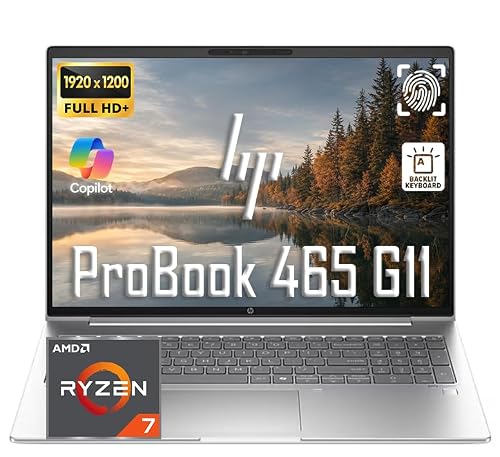
HP ProBook 465 G11 – the AMD 16-inch alternative
AMD large-screen pick
- Processor: AMD Ryzen 7 7735U
- Graphics: Not stated in the listing title – verify with the manufacturer documentation
- Memory: 16GB DDR5
- Storage: 512GB SSD
- Display: 16 inch FHD+
- Operating system: Windows 11 Pro
- Features: Wolf Security, fingerprint reader, backlit keyboard, RJ-45, fast charge as listed
The ProBook 465 G11 is the roundup AMD path at desk scale: a Ryzen 7 7735U in a 16-inch frame, with the professional checklist, Wolf Security, fingerprint reader, backlit keyboard, RJ-45 Ethernet, and fast charge, stated in full. For organisations whose standardisation runs AMD, or buyers who simply prefer the platform character for multi-threaded office work, this is the large-screen ProBook that does not ask them to switch camps.
The Ryzen 7 brings eight capable cores to the professional stack, and the honest daily verdict is parity with the Intel machines for documents, browsers, calls, and business applications, with platform preference and fleet consistency deciding more than any benchmark gap. Sixteen inches of FHD+ display and the 16GB, 512GB core repeat the set mainstream formula at the larger size.
Fast charge earns its specific mention for mobile professionals: a large machine that recovers meaningful charge during a meeting or a layover softens the 16-inch class one real weakness, its appetite, and pairs with the efficiency-minded U-series processor to give the 465 a friendlier travel temperament than its size suggests.
The RJ-45 port continues the theme of professional completeness, wired networking for the desk, the site, and the server-adjacent tasks that still run on cables. Windows 11 Pro holds the deployment line, and the silver business finish keeps the machine anonymous in the way fleet equipment should be.
Graphics are not stated in the title, so the planning assumption remains integrated visuals for office work. The listing comparative processor note is, as elsewhere, garnish; the substance is a complete, current, AMD business laptop at the size desk workers prefer.
Against the 460 G11, its Intel sibling in size, the 465 trades the Ultra platform and its stated numeric keypad for the AMD ecosystem and fast charge. Organisations should choose by platform standard, full stop, because consistency across a fleet outweighs the small differences between these two well-matched machines.
For the AMD-standardised office, this is not the alternative ProBook; it is simply the ProBook, in the size that suits desk work best.
It closes its case with completeness: every professional essential stated, nothing exotic promised, and a platform loyalists will not have to apologise for.
Fast charge deserves its operational translation: in a working pattern of meetings, a half hour plugged in beside a conference table restores the afternoon, and that rhythm suits the 465’s likely owner, a desk-based professional with mobile hours, better than a headline battery figure ever could. Large machines live on opportunistic charging, and this one is equipped for the habit.
The silver finish and full-size frame also make the 465 the natural shared-desk machine: issued to a role rather than a person, hot-desking between shifts or staff, where its size stays put and its completeness serves whoever sits down.
Strengths
- Ryzen 7 7735U serves AMD-standardised fleets at desk scale
- Fast charge softens the travel appetite of a 16-inch machine
- RJ-45, fingerprint, Wolf Security, and backlit keyboard all stated
Trade-offs
- Graphics are not stated in the title, keeping visuals office-grade
- 16-inch frame remains a deliberate carry rather than a light one
- Numeric keypad is not stated, unlike the 460 G11 listing
Best for: an AMD-standardised practice seeking a 16-inch ProBook with wired networking and fast charging for desk-based staff
Not suited for: a data-entry specialist seeking a stated numeric keypad, where the 460 G11 listing names one explicitly
For the AMD large-screen option, Check price on Amazon on the ProBook 465 G11 listing.

HP ProBook 4 G1a 16 – the next-gen AMD at 16 inches
Next-generation AMD pick
- Processor: AMD Ryzen 5 230
- Graphics: Radeon 760M Graphics
- Memory: 16GB DDR5
- Storage: 512GB SSD
- Display: 16 inch FHD+
- Operating system: Windows 11 Pro
- Features: Wolf Security, 1080p webcam, AI PC as listed
The ProBook 4 G1a closes the roundup as the next-generation AMD entry: a Ryzen 5 230 with Radeon 760M graphics, stated plainly in the title, inside a 16-inch frame positioned as the successor generation to the 450 and 460. That stated graphics line gives it a small distinction in this set, where most listings leave visuals unstated, and the Radeon 760M is a capable integrated solution for the office visual workload, presentations, dashboards, video, and light creative handling.
The rest of the specification holds the family formula: 16GB of DDR5, a 512GB SSD, a 16-inch FHD+ display, Windows 11 Pro, Wolf Security branding, and a 1080p webcam. It is the mainstream business core wearing the newest AMD badge, aimed at buyers whose refresh thinking matches the G1i on the Intel side: start at the new generation and let the runway be long.
The Ryzen 5 tier sits a step below the 465 Ryzen 7 in multi-core ambition, and the honest framing is that the professional stack will not feel the difference in documents, browsers, and calls, while heavier local workloads, large data handling or many simultaneous demanding applications, belong to the stronger configurations above. This machine virtues are currency, completeness, and size, in that order.
Sixteen inches suits the desk-anchored professional as it does throughout this roundup, with the standing trade against daily portability. The listing positioning as the next-generation 450 and 460 successor makes its fleet role explicit: this is where AMD-standardised ProBook buying is heading, and early adopters of the line gain the longest service runway.
The listing comparative processor claims are garnish, as throughout this guide, and the substance underneath them is a coherent, current, professionally complete laptop. Buyers should nonetheless verify the full specification against their fleet requirements, as with any configurable business line.
Against the 465 G11, the G1a trades processor tier for platform currency and stated graphics. Against the Intel G1i, it is the same generational argument on the other platform. Fleets should standardise on one of these next-generation paths rather than mixing both, because consistency compounds.
For an AMD organisation buying for the next cycle rather than the last, this is the considered choice, and its stated Radeon graphics remove one verification errand from the purchase.
It ends the set looking forward, which is where a roundup of a business line ought to end.
Stated graphics have a procurement virtue beyond performance: they remove a verification step from the fleet order, and across dozens of seats those steps are where purchasing time actually goes. The G1a’s title, naming its Radeon 760M outright, is a small model of how business listings ought to behave.
Its Ryzen 5 tier also disciplines the price conversation for the next-generation line, giving AMD fleets an entry rung that the Intel side of this roundup, where the G1i carries an Ultra 5 as well, mirrors neatly. Symmetric ladders make mixed-generation planning easier for everyone.
Strengths
- Radeon 760M graphics are stated in the title, unlike most rivals here
- Next-generation AMD platform gives a long ownership runway
- 16-inch FHD+ frame with the full mainstream business core
Trade-offs
- Ryzen 5 tier trails the Ryzen 7 and Ultra 7 machines on heavy local work
- 16-inch size asks the usual portability compromise
- Newer line carries a shorter field history than the G11 models
Best for: an AMD fleet buyer seeking the newest 16-inch ProBook generation with stated integrated graphics for the next cycle
Not suited for: a power user seeking the strongest processor in this roundup, where the Ultra 7 and Ryzen 7 configurations above lead
For the next-generation AMD route, Check price on Amazon on the ProBook 4 G1a listing.
Comparison table
| Model | Processor | Graphics | Memory | Storage | Display |
|---|---|---|---|---|---|
| HP ProBook 440 G11 | Intel Core Ultra 5 125U | Not stated in title | 16GB DDR5 | 512GB SSD | 14″ WUXGA Anti-Glare |
| HP ProBook 450 G10 | Intel Core i5-1335U | Not stated in title | 16GB RAM | 256GB SSD | 15.6″ Full HD |
| HP ProBook 460 G11 | Intel Ultra 7 155U | Not stated in title | 16GB DDR5 | 512GB SSD | 16″ FHD+ Anti-Glare |
| HP ProBook 4 G1i 14 | Intel Ultra 5 225U | Not stated in title | 16GB DDR5 | 512GB SSD | 14″ FHD+ Anti-Glare |
| HP ProBook 465 G11 | AMD Ryzen 7 7735U | Not stated in title | 16GB DDR5 | 512GB SSD | 16″ FHD+ |
| HP ProBook 4 G1a 16 | AMD Ryzen 5 230 | Radeon 760M | 16GB DDR5 | 512GB SSD | 16″ FHD+ |
How do you choose the right ProBook size and generation for a team?
Start with the working pattern, not the catalogue. Staff who travel daily between sites, clients, and home belong on the 14-inch machines, where the weight saving compounds across thousands of journeys. Staff whose laptop moves between two desks, or none, should take the 16-inch screen and the working room it buys, because a larger display is a productivity feature used every hour, while portability unused is merely a specification admired twice a year.
Generation is the second decision, and it is really a decision about time. The G11 models are the known present, with service histories and accessory ecosystems in place. The ProBook 4 models are the same idea at the start of its life, better for organisations buying a platform to standardise on for years. The G10 is the honest exception: a value purchase for standard duties where the saving across many seats funds something else the team needs more.
Platform is the third decision, and fleets should make it once. Intel and AMD configurations here are matched closely enough that consistency, one driver story, one set of habits, one spare-parts shelf, outweighs the small deltas between them. Mixed fleets are not wrong, but they should be mixed deliberately, by role, rather than by accident of ordering. Readers speccing the individual professional rather than the fleet may cross-check the dual-use machines among the laptops for Programmers and Gamers for roles where development joins the job description.
Deploying ProBooks across a small organisation
A calm deployment has a rhythm worth copying. Image one machine completely, accounts, applications, security settings, and the hundred small preferences of your environment, then clone that calm to the rest of the fleet rather than configuring each laptop as a unique snowflake. The ProBook line business positioning exists to make that cloning boring, and boring deployments are the ones still working quietly in year three.
Accessories standardise alongside the machines: one dock model, one charger type per platform, one case. The 14-inch travellers gain a desk identity through the dock, monitor, keyboard, and mouse waiting at the office, while the 16-inch machines often skip the dock and take a monitor directly. Either way, the returning employee ritual should be one cable and no thought.
Support arrangements complete the picture. Record serial numbers centrally on day one, photograph the fleet register into the same system that holds your other asset records, and decide in advance which failures mean repair, which mean swap from a spare, and which mean cascade the machine to lighter duties. Organisations that decide those rules calmly in advance never have to invent them during an outage.
Security, discussed at the level these listings support, still deserves its own considered paragraph. The ProBook proposition combines a professional operating system edition with a named security suite, Wolf Security on the models that state it, and the physical layer of fingerprint readers and privacy-minded design. Organisations should map those stated elements against their own policies with their IT provider, rather than treating any badge as a complete answer, because a suite is a starting point for a security posture, never the posture itself.
Remote and hybrid work stress that posture in specific ways the feature lists quietly answer: the 1080p cameras keep client-facing staff presentable from home, the anti-glare panels keep documents legible in uncontrolled lighting, and the fingerprint readers keep the constant unlock cycle of a home office from eroding into password shortcuts taped to a monitor. Business laptops earn their tier in exactly these unglamorous translations.
Accessibility within a fleet deserves the same planning. Larger 16-inch screens serve staff who need bigger text without scaling gymnastics, backlit keyboards serve low-vision and low-light workers, and a standardised line lets an organisation hold a small pool of adapted accessories that fit every seat. A fleet chosen with those needs in the room from the start is cheaper and kinder than one retrofitted seat by seat.
ProBook versus EliteBook versus consumer lines, in plain terms
The tiers confuse buyers because the machines overlap in size and silhouette. The working distinction is intent. Consumer lines optimise for entertainment value and shelf appeal; the ProBook line optimises for managed professional life at a mainstream price, business operating system, security branding, and fleet-friendly consistency; the EliteBook line above it adds premium materials, deeper enterprise arrangements, and the price posture to match.
Most small and mid-sized organisations live correctly in the ProBook tier, because their real needs, reliable machines, manageable deployments, presentable video calls, and parts that exist, are met here without remainder. The EliteBook conversation begins when an organisation compliance, durability, or executive requirements specifically demand it, and not a moment before.
The mirror-image mistake is buying consumer machines for business duty to save per seat, then paying the saving back in deployment friction, inconsistent configurations, and shorter service patience. The six machines in this roundup exist precisely at the point where that false economy ends.
Total cost thinking should close every fleet discussion. The purchase figure is the beginning of a ProBook’s cost story, not the story: deployment hours, support arrangements, accessory standardisation, energy across thousands of plugged-in days, and the residual value of a recognised business model at cascade time all belong in the same spreadsheet. Judged on that full page, the mainstream configurations here routinely out-argue both the cheaper consumer alternative and the grander tier above.
Employee experience is the line item that spreadsheet keeps forgetting. A laptop is the one piece of company equipment a knowledge worker touches all day, and its keyboard, screen, camera, and unlock ritual colour their opinion of their employer in miniature. The ProBook checklist, backlit keys, anti-glare panels, fingerprint readers, and honest webcams, is precisely an employee-experience checklist wearing a specification’s clothing.
Retention of that experience across a refresh is the final argument for line consistency. Staff moving from a G11 to a ProBook 4 keep their habits, their docks where platforms allow, and their muscle memory, and the organisation keeps its sanity. Novelty is a consumer virtue; in fleet computing, familiarity is the feature.
Cascade planning turns a fleet purchase into a multi-year asset story. A ProBook bought for a senior role today becomes a capable machine for a lighter role in three years and a training or hot-desk unit after that, and recognised business models hold their usefulness through those cascades because their specifications were mainstream rather than minimal. Buying the 16GB mainstream core, as every machine here does, is what makes the cascade possible.
Environmental reporting, increasingly required of organisations, also favours boring virtues: long service life, repairable mainstream models, and parts availability. A fleet that serves five years across cascades reports better than a fleet replaced twice, and the ProBook line’s whole design language, consistency, serviceability, and restraint, points in that direction.
Finally, involve the staff who will carry the machines in the size decision, briefly and genuinely. A one-week trial of a 14-inch and a 16-inch unit across a few volunteers surfaces preferences and problems that no specification meeting ever will, and the fleet that results is one the organisation chose with its eyes open.
Procurement timing for business lines follows its own calm logic. Models persist, configurations stay orderable, and the panic of consumer launch cycles is absent, which means an organisation can pilot in one quarter and roll out in the next without the catalogue changing underneath it. That stability is itself a ProBook feature, and it is why fleet guides like this one can be written in seasons rather than in weeks.
Documentation habits inside the buying organisation matter as much as the machines. Keep the exact configuration of every order, processor, memory, storage, and operating system edition as invoiced, because configurable business lines make the invoice, not the model name, the true record of what a fleet contains. The unstated-edition caution attached to the 450 G10 in this roundup is simply that habit, applied before purchase instead of after.
Training budgets deserve a final mention beside the hardware budget. A fleet of capable laptops issued to staff without the hour of orientation that covers security habits, backup arrangements, and support channels returns a fraction of its value. The machines here are deliberately unexciting to operate; the orientation hour exists to keep them that way.
And when the fleet eventually refreshes, the discipline that made it work, standardisation, documentation, and cascade planning, transfers intact to the successor line, which is the deepest reason to buy inside a coherent business family in the first place.
The home-office era added one more seat category that fleet planners now recognise on sight: the permanent hybrid, two days in an office the organisation controls and three at a kitchen table it does not. For that seat, the travelling 14-inch machines with their full feature lists, camera, wired networking for the desk days, and efficient processors for the rest, are the roundup’s quiet centre of demand, and the G1i’s completeness makes it the hybrid era’s natural standard issue.
Hot-desking pools draw the opposite conclusion from the same catalogue: machines issued to a desk rather than a person should be the larger, sturdier configurations, the 460 and 465, whose screens serve every sitter and whose wired ports live permanently connected. One catalogue, two rational fleets, decided entirely by where the laptop sleeps at night.
Executive exceptions test every standard, and the mature response is to let the standard absorb them: the executive who travels constantly takes the 14-inch flagship configuration of the fleet line rather than a foreign premium model, keeping support, spares, and images uniform while the individual’s genuine need, portability, is honoured inside the system.
That is the ProBook philosophy in a single anecdote: a line wide enough to answer real variation in roles, narrow enough that the variation never breaks the system supporting it.
A note on buying singly, since not every reader here runs a fleet. The individual professional buying one ProBook gains the same virtues in miniature: a machine an employer’s network will accept, parts and chargers that exist everywhere, and a specification with no embarrassing gap when a client’s IT department asks its polite questions. The freelance consultant and the small-firm founder are, in fleet terms, an organisation of one, and the logic scales down intact.
Students in professional programmes occupy a similar seat of one, and for them the value-led 450 G10 or the mainstream 440 makes a defensible study-to-first-job bridge, business-ready on graduation day in a way a consumer machine is not. The ProBook badge in a placement office is a small, real signal of seriousness.
Whichever seat is being filled, the verification ritual from earlier in this guide applies unchanged: read the exact listing’s operating system, memory, and storage figures before ordering, especially on configurable lines, and keep the invoice as the fleet record afterwards.
Spare-unit strategy is the last piece of fleet craft worth recording. Holding one spare per platform and size class, imaged and ready, converts most hardware failures from a crisis into a courier errand, and the cost of that insurance across a fleet is a rounding error beside the salaries it protects. The ProBook line’s consistency is what makes the spare strategy cheap: one spare genuinely covers many seats.
Disposal closes the lifecycle with the same professionalism: certified data wiping, asset records closed, and cascaded or donated machines documented as they leave. A business line bought well should also leave well, and the records discipline recommended throughout this guide is what makes the leaving auditable.
None of this craft is glamorous, and all of it is the actual content of business computing. The six ProBooks here were chosen because they support the craft rather than obstruct it.
One more audience reads this page every season: the growing firm crossing from founder laptops to its first real fleet. That crossing is the moment the ProBook tier was invented for, when ad-hoc consumer purchases stop scaling and a standard, documented, supportable line becomes the cheapest professionalism money can buy. The six configurations here give that firm a complete first catalogue: travellers, desk staff, two platforms, and a value rung for quantity.
Cross it deliberately, in one planned order with records kept, rather than seat by seat across a year of emergencies, and the fleet begins its life as infrastructure instead of as archaeology.
Keep a one-page fleet summary where the whole team can find it: models in service, counts by size and platform, warranty contacts, and the spare-unit locations. That single page, updated at every order and every cascade, is the difference between an organisation that owns its laptops and one that is merely surrounded by them.
Review that summary twice a year, alongside the cascade plan, and the fleet will never surprise its owners with its own contents, which is a more common corporate embarrassment than any hardware failure in this article.
Business buying rewards the patient reader above all: the listings in this category contain nearly everything a fleet decision needs, printed in plain sight, and the errors that remain are almost always errors of haste rather than of information.
Read slowly, order once, deploy calmly, and record everything: four habits that will do more for a small organisation’s computing than any single specification debated in this guide.
The fleet that results from those habits will not trend on any chart, and it will still be working, quietly and completely, long after louder purchases have been replaced.
That quiet endurance, more than any processor badge, is what the ProBook name has always promised.
Choose the configuration that fits the role, and let the line do the rest.
Consistency, recorded and repeated, is the whole secret.
It always has been so.
Common mistakes
- Buying by processor tier alone when the missing Ethernet port or dim screen will be cursed daily
- Mixing platforms and generations randomly across a fleet, multiplying drivers, docks, and spare parts
- Assuming an unstated operating system edition on the value model instead of verifying it before a fleet order
- Issuing 16-inch machines to daily travellers and 14-inch machines to desk-bound analysts, backwards
- Skipping the central serial register at deployment and reconstructing it during the first warranty claim
Frequently asked questions
What is the difference between ProBook and EliteBook?
Positioning and price posture. ProBook is HP mainstream business line, professional operating system, security branding, and fleet-friendly specifications below the EliteBook tier, which adds premium materials and deeper enterprise arrangements. This roundup covers the ProBook line only, as its title promises.
Is 16GB of memory enough for business use?
For the professional mainstream of documents, browsers, video calls, and line-of-business applications, yes, and it is the uniform specification across all six machines here. Roles running heavy local workloads should be specced individually rather than assumed into the fleet standard.
Should I buy the G11 models or the newer ProBook 4 models?
Both are defensible. The G11 machines offer established histories and ecosystems; the ProBook 4 G1i and G1a offer the newest platform and the longest runway. Long refresh cycles lean new, conservative fleets lean established, and platform consistency matters more than the choice itself.
Do ProBooks suit gaming or heavy creative work?
No, and they do not claim to. Graphics are unstated in most of these titles and integrated where stated, aimed at office visuals. Creative and gaming roles belong to the workstation and gaming categories covered elsewhere in our guides.
Final recommendation
Standardise deliberately and the ProBook choice becomes simple: the 440 G11 or its G1i successor for travellers, the 460 G11 or 465 G11 for desk professionals on your chosen platform, the G1a for the AMD fleet next cycle, and the 450 G10 where value across many seats is the honest priority. Development-adjacent roles that outgrow the business brief are better served by the machines in our laptops for AI Programming guide than by stretching a fleet laptop past its design.
Buy the tier that matches the work, keep the fleet consistent, and a ProBook deployment becomes the kind of infrastructure a business stops thinking about, which is the highest compliment business infrastructure can earn.


