What's inside
- Where to Buy
- Key Takeaways
- Quick Picks
- How the Picks Were Chosen
- Detailed Reviews
- Comparison Table
- How Do You Choose the Right Kyocera for Your Office?
- Running Costs, Drums and the ECOSYS Idea
- Placement, Paper and the Shared-Floor Reality
- What Changes When an Office Standardises on One Brand
- Common Mistakes When Buying a Kyocera
- Frequently Asked Questions
- Final Recommendation
As an Amazon Associate I earn from qualifying purchases. This post may contain affiliate links at no extra cost to you.
[SITE_DOMAIN] is reader-supported. When you buy through links on our site, we may earn an affiliate commission at no extra cost to you. Prices and availability change; check the Amazon listing for the current details.
Where to Buy
Kyocera ECOSYS MA2600cwfx — Check price on Amazon
Kyocera ECOSYS MA4000wfx — Check price on Amazon
Kyocera ECOSYS PA4500x — Check price on Amazon
Kyocera ECOSYS MA3500wfx — Check price on Amazon
Kyocera ECOSYS MA5500ifx — Check price on Amazon
Kyocera TASKalfa MA4500ci — Check price on Amazon
Model codes in this brand family differ by a single letter while describing very different machines, so treat the listing title, not a search snippet, as the authority when you order.
Shopping for the best kyocera printers usually starts with a frustration that has nothing to do with print quality: a cheaper machine somewhere else in the office has consumed its third set of cartridges this quarter, and the invoices have finally attracted attention. Kyocera built its ECOSYS name on exactly that complaint. The pitch across this range is durable hardware, long-life components and toner as the main recurring consumable, aimed at offices that count cost per page over years rather than cost per box on day one. None of that makes a Kyocera glamorous. It makes the brand the sensible answer when the printer is infrastructure rather than a gadget.
The six machines below split into three honest groups. Two are colour all-in-ones, the MA2600cwfx at 27 pages per minute and the TASKalfa MA4500ci at 47. Three are mono all-in-ones spanning 37, 42 and 57 pages per minute, and one, the PA4500x, is a print-only mono unit for desks and departments that already scan elsewhere. Every one of them prints, and the five all-in-ones copy, scan and fax according to their listing titles. Speeds, resolutions, memory figures and panel types quoted in this guide come only from those titles, because Kyocera sells regional variants under near-identical names and the title is what the listing in front of you actually promises.
One habit will serve you well before any of the reviews: decide your monthly page volume first, in writing, from the last three months of paper orders or the counter reading on the machine being replaced. Kyocera’s range rewards that honesty. A 27 ppm colour machine asked to absorb a whole department’s output will feel slow by February, while a 57 ppm mono flagship parked under a two-person desk is money spent on capacity that never gets used. The reviews below keep returning to volume because, with this brand more than most, volume is the decision.
Paper handling is the second quiet divider. Only one title in this set states a tray capacity outright, the 600-sheet tray on the PA4500x, so where a listing stays silent this guide says so rather than guessing. Scanning tells a clearer story: two machines carry a dual scan document processor that reads both sides of a page in a single pass, and that single feature can matter more to a busy office than five extra pages per minute. Read the scan sections of the reviews as carefully as the print sections if your office digitises paperwork daily.
There is also a temperament to this brand worth naming before the specifications begin. Kyocera machines are styled like appliances and specified like infrastructure, and offices that love them tend to be offices that think in budget years. The range will not dazzle a design studio comparing silhouettes, and it does not chase the home-user features — novelty photo modes, decorative finishes — that fill rival brochures. What it offers instead is a legible ladder: every step up buys measurable speed, paper capacity, scanning hardware or platform capability, and the step you skip is a step your paperwork evidently did not need. Reading the six reviews below with that ladder in mind turns a catalogue into a decision.
Key Takeaways
- The MA2600cwfx is the only colour all-in-one here with Wi-Fi Direct named in its title, pairing 27 ppm colour with a 4.3 inch colour touch panel.
- The MA5500ifx is the speed flagship at 57 ppm mono, with a 7 inch touchscreen and HyPAS capability for offices running document workflows.
- The TASKalfa MA4500ci brings 47 ppm colour, a dual scan document processor and HyPAS to departments that scan as heavily as they print.
- The PA4500x is the sole print-only machine, and its title states a 600-sheet tray, duplex printing and Gigabit Ethernet.
- Dual scan document processors appear on the MA4000wfx and the TASKalfa MA4500ci; single-pass two-sided scanning is their shared strength.
- Memory splits the range cleanly: 1GB on the MA2600cwfx, 512 MB on the PA4500x and MA5500ifx, unstated on the other three listings.
Quick Picks
| Pick | Badge | Headline specification | Why it earns a place |
|---|---|---|---|
| Kyocera ECOSYS MA2600cwfx | Colour for small teams | 27 ppm colour, 1200 dpi, Wi-Fi Direct | The approachable colour all-in-one, with a colour touch panel and wireless printing for offices without wired drops at every desk. |
| Kyocera ECOSYS MA4000wfx | Scanning-led mono | 42 ppm mono, dual scan document processor, free OCR | Built around digitising paper: both sides scanned in one pass, with OCR bundled for searchable archives. |
| Kyocera ECOSYS PA4500x | Print-only workhorse | 47 ppm mono, 600-sheet tray, duplex | A dedicated printer with the largest stated tray in this guide and a hard-key panel that gloves and haste cannot confuse. |
| Kyocera ECOSYS MA3500wfx | Wireless mono starter | 37 ppm mono, wireless, document processor | The gentlest step into the ECOSYS mono all-in-one range, with wireless connectivity and an automatic document processor. |
| Kyocera ECOSYS MA5500ifx | Departmental speed | 57 ppm mono, 7 inch touchscreen, HyPAS capable | The fastest machine here, aimed at shared floors where queues at the printer waste paid time. |
| Kyocera TASKalfa MA4500ci | Colour department hub | 47 ppm colour, dual scan, HyPAS capable | Colour output at mono-flagship pace, with single-pass duplex scanning and the larger TASKalfa panel. |
How the Picks Were Chosen
Every machine in this guide is a current ECOSYS or TASKalfa model whose Amazon listing title states its speed and core functions, and those stated figures are the only specifications used anywhere below. That discipline matters with Kyocera because the brand’s catalogue runs deep: the same family names cover machines sold through dealer channels with different standard fittings, and a specification copied from a brochure for a sibling variant would misdescribe the listing you can actually order. Where a title omits a figure, the spec boxes say so in plain words instead of borrowing a number from elsewhere in the range.
The set was balanced deliberately across the three jobs offices actually buy Kyocera for. Colour all-in-ones anchor one end, because plenty of small firms print their own proposals, invoices with colour branding and the occasional site photograph. Mono all-in-ones fill the middle at three speeds, since the bulk of office paper remains black text on white stock. A single print-only model represents the departments that centralised scanning years ago and simply need pages. If your office still scans at individual desks, weight the all-in-ones; if a central copier handles that work, the PA4500x deserves a longer look than its badge suggests.
Running cost shaped the selection without producing any invented figures. Kyocera’s ECOSYS concept separates the long-life drum and developer components from the toner supply, so the routine purchase is toner rather than a combined cartridge, and that architecture is the brand’s long-standing answer to cost-per-page complaints. This guide states no cost-per-page numbers for any machine here, because honest figures depend on the toner yield a given office buys, the coverage on its pages and the contract it holds. What can be said from the titles alone is which machines carry the speed, trays and duplex hardware that keep cost per finished job down: duplex printing halves paper on two-sided documents, and a 600-sheet tray cuts the refill trips that interrupt work.
Connectivity was the final filter. Offices standardising on Kyocera usually wire shared machines, and Gigabit Ethernet appears on the PA4500x, MA5500ifx and TASKalfa MA4500ci titles, while the two smaller all-in-ones lead with wireless instead. Teams comparing across brands while they read may also want our guide to ricoh Color Printers open for the rival office-colour picture, since the two brands chase the same cost-disciplined buyer with different ranges. Nothing in this guide was admitted on the strength of a badge or a launch announcement; each machine earned its place from its own listing.
One more selection principle ran quietly underneath: no machine was included to fill a price rung or to flatter a segment. The gaps in this ladder are real gaps in the range as listed — there is, for instance, no slow colour print-only unit and no wireless departmental flagship among these titles — and the guide leaves those gaps visible rather than papering over them with a near-miss model. A shortlist that admits its own edges is more useful than one padded to a rounder shape, because the edges tell you where the brand itself thinks its range ends.
Detailed Reviews
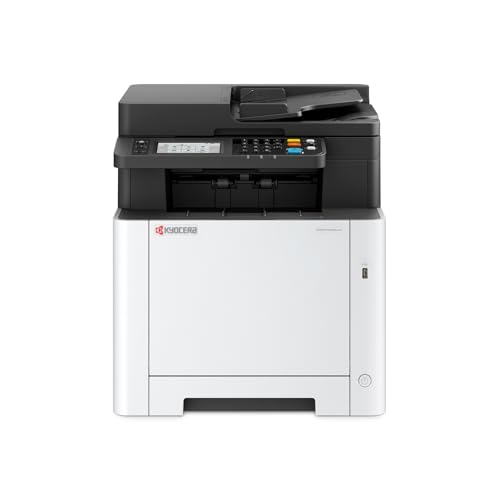
Kyocera ECOSYS MA2600cwfx
Badge: Colour for small teams
- Print speed: 27 ppm (colour laser)
- Functions: Print, copy, scan, fax
- Resolution: 1200 dpi
- Connectivity: Wi-Fi Direct
- Memory: 1GB
- Control panel: 4.3 inch colour touch screen
The MA2600cwfx is where this range starts for most small offices, and its title reads like a checklist written by someone who has shared a corridor with a complaining finance manager. Colour laser output at 27 pages per minute will not set any records, yet it covers the realistic diet of a five-to-fifteen-person office: invoices with a colour logo, proposals where the charts carry the argument, internal reports and the steady drip of signed forms going out by scan. The 1200 dpi resolution stated in the title is the figure that matters for that work, because colour text and simple graphics stay crisp without the grain that lower-resolution colour engines leave on small type.
Wi-Fi Direct earns its mention for a practical reason. Offices adding a printer to a meeting room, a site cabin or a satellite desk often lack a spare network point, and Wi-Fi Direct lets laptops and phones print without routing everything through the main wireless network. The 4.3 inch colour touch screen supports that walk-up use: guests and occasional users can copy or scan to email from the panel without installing anything, and colour icons shorten the learning curve for staff who touch the machine twice a month. The 1GB of memory is the largest figure stated anywhere in this guide, which helps the machine absorb complex colour pages — a brochure proof with large images is exactly the job that exposes thin memory on smaller colour units.
Honest limits follow from the same title. At 27 ppm this is a team printer, not a departmental one; a hundred-page colour run will occupy it for several minutes, and a queue forms quickly when three colleagues print at once. The title states no tray capacity and no duplex scanning hardware, so paper handling expectations should stay modest until the listing’s full details confirm them. Fax is present for the offices that still need it, and harmless for those that do not. Treat this model as the colour starting point of the Kyocera ladder: capable, connected and sized for a workgroup rather than a floor.
Strengths
- Colour, copy, scan and fax in one ECOSYS unit with 1200 dpi output for presentable client documents.
- Wi-Fi Direct plus a colour touch panel make walk-up printing simple for guests and occasional users.
- 1GB memory, the most stated in this guide, suits image-heavy colour pages.
Trade-offs
- 27 ppm is workgroup pace; sustained departmental colour volume will outgrow it.
- Tray capacity is not stated in the listing title, so heavy paper diets need confirmation before ordering.
- No dual scan document processor is named, so two-sided originals take longer to digitise.
Best for: a small office seeking colour proposals and branded invoices from one shared machine with walk-up wireless printing.
Not suited for: a department seeking high-volume colour runs, where 27 ppm turns the print queue into a daily negotiation.
Day-to-day, this is the machine a small office stops noticing fastest, which counts as praise for shared equipment. Colour pages emerge with the flat, even finish laser engines give to charts and letterheads, the touch panel keeps the three common jobs — copy, scan to email, print from a phone — within a couple of taps, and the ECOSYS layout means the routine consumable conversation stays about toner rather than hardware. Put it where the team actually gathers documents, keep its wireless signal strong by avoiding a metal cabinet enclosure, and it will quietly become the office default for everything short of a print run measured in hundreds of pages.
Small teams comparing colour running costs against purchase convenience can Check price on Amazon on the MA2600cwfx listing.

Kyocera ECOSYS MA4000wfx
Badge: Scanning-led mono
- Print speed: 42 ppm (monochrome laser)
- Functions: Print, copy, scan, fax
- Scanning: Dual scan document processor
- Software: Free OCR included
- Utilities: Cloud and mobile utilities
- Resolution: Not stated in the listing title – verify with the manufacturer documentation
Plenty of mono all-in-ones print quickly; the MA4000wfx distinguishes itself on the way paper enters the digital world rather than the way it leaves. Its title leads the scanning story with a dual scan document processor, the hardware that captures both faces of a sheet in a single pass instead of flipping each page mechanically. Anyone who has watched a feeder reverse fifty double-sided contracts one page at a time understands the difference immediately: single-pass scanning is faster, quieter and gentler on fragile originals, and it removes the skew and mis-ordering that creep in when pages make two journeys through a feeder.
The free OCR named in the title completes that story. Optical character recognition turns a scanned contract from a picture of text into searchable, editable text, and bundling it with the machine matters because OCR is so often the paid extra an office discovers it needed after installation. Paired with the cloud and mobile utilities the title mentions, the MA4000wfx is clearly aimed at offices moving paper into shared digital storage: scan at the machine, route to the cloud service the office already uses, and let staff pull the document from a phone on site. Print speed of 42 ppm mono keeps the output side respectable for invoices, statements and internal paperwork, and fax remains aboard for the stubborn corners of business that still run on it.
The compromises are visible in what the title does not say. Resolution goes unstated, memory goes unstated, and no panel size is promised, so an office with strong feelings about any of those should confirm them against manufacturer documentation before committing. Colour is absent entirely, which sounds obvious for a mono machine yet still catches offices that print colour just often enough to miss it weekly. And while the document processor is the headline, its sheet capacity is not given in the title either. None of that dents the core proposition: among the mono machines here, this is the one designed around getting existing paper into a searchable archive.
Strengths
- Dual scan document processor captures both sides in one pass, speeding contract and file digitising.
- Free OCR is included, turning scans into searchable text without a separate software purchase.
- 42 ppm mono printing with cloud and mobile utilities fits paper-to-digital office workflows.
Trade-offs
- Monochrome only; offices with weekly colour work will feel the absence.
- Resolution and memory go unmentioned in the title.
- Feeder capacity is not stated in the title, so very large scan batches need checking first.
Best for: an office seeking single-pass duplex scanning and searchable archives from its mono all-in-one.
Not suited for: a studio seeking colour output, since this engine prints black only.
Consider the workflow this machine enables when it is set up thoughtfully. Incoming post and signed documents go through the dual scan feeder once, OCR renders them searchable, and the cloud utilities file them where the whole office can reach them; the paper original can then leave for storage the same day instead of colonising a desk for a month. That rhythm — scan once, file once, retrieve in seconds — is worth more to a growing firm than a modest difference in print speed, and it is the rhythm this particular model was clearly specified to support. Offices still keeping paper archives in lever-arch files will feel the change within a single filing cycle.
Records teams weighing feeder hardware against raw speed can Check price on Amazon for the MA4000wfx.

Kyocera ECOSYS PA4500x
Badge: Print-only workhorse
- Print speed: 47 ppm (monochrome laser)
- Functions: Print only
- Resolution: 600 x 600 dpi, up to Fine 1200 dpi
- Paper tray: 600 sheets
- Duplex: Automatic two-sided printing
- Connectivity: Gigabit Ethernet
- Memory: 512 MB
- Control panel: 5-line LCD with hard key panel
The PA4500x is the contrarian of this guide: a machine that refuses to scan, copy or fax and puts everything into printing. That focus shows in the title’s paper figure. A 600-sheet tray is the largest capacity stated anywhere in these six listings, and it changes the daily rhythm of a busy desk more than a few extra pages per minute ever could. Fewer refill trips mean fewer half-printed jobs stranded by an empty tray, fewer reams left open gathering dust, and a machine that can take a full morning of statements, picking lists or exam papers in stride. At 47 ppm with automatic duplex, long runs finish quickly and two-sided documents come out collated by the engine rather than by hand.
The control panel tells the same no-nonsense story. A 5-line LCD with a hard key panel lacks the glamour of the touchscreens elsewhere in this guide, and in a warehouse office, a workshop or a back counter that is a virtue: physical keys work with gloves, dusty fingers and hurry, and a text display shows toner and error states plainly. Gigabit Ethernet suits a fixed installation wired into the office network, and 512 MB of memory is paired to a mono print engine whose pages are far lighter than colour work. The resolution line deserves a careful read: 600 x 600 dpi is the native figure, with up to Fine 1200 dpi available, which is honest specification writing and entirely adequate for text-sharp office output.
Choosing a print-only machine is a workflow decision before it is a hardware one. If scanning already happens at a central copier, or the department digitises through a separate dedicated scanner, the PA4500x avoids paying twice for the same functions and removes the scanner lid as one more thing to break. If, on the other hand, the desk buying this printer occasionally needs a copy of a delivery note, that copy will involve a walk to another machine, and the walk gets old. Offices standardising several print points across a building often mix exactly this model with one all-in-one per floor, and the comparison later in this guide returns to that pattern.
Strengths
- 600-sheet tray, the largest stated here, cuts refill interruptions on long mono runs.
- 47 ppm with automatic duplex keeps two-sided statement and report work moving.
- Hard-key panel and Gigabit Ethernet suit fixed, wired, high-use print points.
Trade-offs
- Print only: no copying or scanning at this desk, ever.
- No wireless connectivity is named in the title; placement depends on a network point.
- The LCD panel cannot match a colour touchscreen for guided walk-up tasks.
Best for: a department seeking a wired, high-capacity mono printer alongside separate scanning facilities.
Not suited for: a solo desk seeking occasional copies, because this machine offers no scanner at all.
There is also a fleet argument for this model that single-desk buyers can ignore and facilities managers should not. Identical print-only stations scattered across a building simplify everything downstream: one toner line to stock, one driver to deploy, one set of panel habits for staff to learn, and a spare unit can cover any desk while its twin is serviced. The 600-sheet tray supports that standardisation by making every station behave the same way through a full morning. In buildings where printing is a utility rather than an event, boring uniformity is a feature, and the PA4500x is the most uniform citizen in this guide.
Print-room planners standardising wired stations can Check price on Amazon on the PA4500x listing.

Kyocera ECOSYS MA3500wfx
Badge: Wireless mono starter
- Print speed: 37 ppm (monochrome laser)
- Functions: Print, copy, scan, fax
- Connectivity: Wireless
- Scanning: Automatic document processor
- Utilities: Mobile utilities
- Resolution: Not stated in the listing title – verify with the manufacturer documentation
The MA3500wfx is the entry rung of Kyocera’s mono all-in-one ladder in this guide, and its specification makes sense once you picture the buyer Kyocera had in mind: a small office, a branch desk or a home-based business that prints real paperwork daily but measures volume in hundreds of pages a week rather than thousands. At 37 ppm it is the slowest printer in this set, and in that context the number is not a flaw. A two-person office printing invoices, delivery paperwork and correspondence will rarely queue behind 37 ppm; what it will appreciate is wireless placement, an automatic document processor for multi-page scanning, and mobile utilities for printing from the phones that increasingly run small businesses.
The document processor deserves emphasis because it separates genuine office machines from flatbed-only boxes. Feeding a twenty-page agreement through a processor while making coffee beats lifting a lid twenty times, and it is the feature home-office buyers most often regret skipping. The title calls it an automatic document processor rather than the dual scan unit on the MA4000wfx, so two-sided originals should be expected to take the slower reversing route; for occasional duplex paperwork that is a fair trade, and for daily contract digitising it is the clearest reason to step up to the model above. Wireless connectivity plus mobile utilities round out a package aimed at desks without network cabling, rented spaces and rooms that rearrange themselves twice a year.
What the title withholds matters as much as what it states. Resolution, memory, tray size and panel type all go unmentioned, which is common at this end of the range and simply means the listing page and manufacturer documents carry the burden of confirmation. Fax is included, useful for the trades and professional offices whose clients still send orders that way. Consider the MA3500wfx the honest baseline of this guide: everything a small office genuinely uses, at the speed a small office genuinely needs, with the ECOSYS running-cost architecture that brought you to this brand in the first place. Offices already printing thousands of pages a month should read its specification as a floor and shop further down this page.
Strengths
- Full print, copy, scan and fax set with an automatic document processor at the range’s entry point.
- Wireless connectivity and mobile utilities suit uncabled rooms and phone-led small businesses.
- 37 ppm covers genuine small-office paperwork without paying for departmental pace.
Trade-offs
- Slowest engine in this guide; busy shared desks will feel the ceiling.
- The document processor is not the dual scan type, so two-sided scanning runs slower.
- Resolution, memory and tray capacity are not stated in the listing title.
Best for: a compact office seeking wireless mono printing, copying and feeder scanning in one ECOSYS unit.
Not suited for: a floor seeking single-pass duplex scanning at volume, where the reversing feeder becomes the bottleneck.
Growth is the question to ask of this model honestly. A two-person office that becomes a six-person office within a year will lean harder on every figure in its specification, and the gap between its reversing document processor and the dual scan unit above it will widen with every archived file. Nothing about that makes the MA3500wfx a poor purchase — it makes it a purchase with a known horizon. Buy it for the office you have, at the volume you measured, and let a future expansion justify the departmental models on their own merits when the paperwork actually arrives.
Branch offices fitting out a first shared desk can Check price on Amazon for the MA3500wfx.

Kyocera ECOSYS MA5500ifx
Badge: Departmental speed
- Print speed: 57 ppm (monochrome laser)
- Functions: Print, copy, scan, fax
- Resolution: Up to Fine 1200 dpi
- Connectivity: Gigabit Ethernet
- Platform: HyPAS capable
- Control panel: 7 inch touchscreen
- Memory: 512 MB
Speed is the headline and speed is real: 57 pages per minute makes the MA5500ifx the fastest machine in this guide by a clear margin, and at departmental scale that margin is measured in staff minutes rather than stopwatch pride. A thirty-person floor printing meeting packs, statements and case files generates exactly the bursty load that exposes a 37 ppm machine — ten people printing within the same quarter hour — and a 57 ppm engine with a big touchscreen queue display absorbs those bursts without the corridor conversations about whose job is stuck. The 7 inch touchscreen, shared with the TASKalfa colour model below, gives that shared floor a panel large enough for job lists, scan destinations and user shortcuts to stay legible at arm’s length.
HyPAS capability is the specification that separates a fast printer from a document platform. Kyocera’s HyPAS environment lets the machine run embedded applications — the plumbing behind follow-me printing, scan-to-workflow routing and cost-centre accounting that larger offices layer onto shared devices. The title states the capability rather than any specific application, so treat it as headroom: the hardware can join a managed document system when the office adopts one. Gigabit Ethernet is the right transport for that role, wired and boring in the best way, and the stated resolution of up to Fine 1200 dpi keeps dense mono documents — contracts with small print, financial tables — sharp.
Restraint is still required. The title states no tray capacity and no dual scan processor, so a department whose scanning is as heavy as its printing should verify the feeder hardware before assuming this is the complete hub; its sibling colour model explicitly names dual scan, and this one does not. Memory is stated at 512 MB, half the figure on the small colour MA2600cwfx, which sounds backwards until you remember mono pages are far lighter data than colour pages and the engine is specified accordingly. Fax is aboard. For a floor whose pain is print queues rather than scan queues, this is the Kyocera in the guide built to end the complaint.
Strengths
- 57 ppm, the fastest engine here, absorbs shared-floor print bursts without long queues.
- 7 inch touchscreen and HyPAS capability support managed, workflow-driven departments.
- Gigabit Ethernet and Fine 1200 dpi output suit dense, text-heavy departmental documents.
Trade-offs
- Monochrome only, despite sitting at the top of this guide’s mono range.
- No dual scan document processor is named in the title.
- Tray capacity is not stated in the title, so paper handling needs confirmation for very long runs.
Best for: a busy floor seeking the quickest mono throughput in this range plus a platform for document workflows.
Not suited for: a team seeking colour client documents, since the flagship engine here prints black only.
One more consideration belongs in any departmental purchase: accountability. A shared 57 ppm machine serving a whole floor becomes the natural point where an organisation starts counting who prints what, and the combination of a large job-list touchscreen and HyPAS headroom means this model can grow into that role without replacement. Even offices that never activate a single embedded application benefit from the underlying discipline of a machine specified for shared service — clearer queues, clearer ownership of long jobs, fewer anonymous hundred-page runs discovered at the output tray on a Friday afternoon.
Facilities managers clearing a corridor queue problem can Check price on Amazon on the MA5500ifx listing.

Kyocera TASKalfa MA4500ci
Badge: Colour department hub
- Print speed: 47 ppm (colour laser)
- Functions: Print, copy, scan, fax
- Resolution: 1200 dpi
- Connectivity: Gigabit Ethernet
- Platform: HyPAS capable
- Control panel: 7 inch touchscreen
- Scanning: Dual scan document processor
The TASKalfa name signals Kyocera’s departmental line, and the MA4500ci carries the specification to justify it: 47 ppm in colour, which is the pace mono machines in this guide manage, delivered by a colour engine with 1200 dpi output. That combination redraws the usual office compromise. Colour work no longer means sending the job to a slower machine and waiting; proposals, training packs, colour-coded plans and client reports move at departmental speed on the same device that handles the mono load. For offices whose colour printing is real production rather than the occasional logo, this is the machine in the guide that treats colour as a first-class citizen.
Scanning matches printing here, which is rarer than it should be. The dual scan document processor reads both sides of an original in one pass, and pairing that with 47 ppm colour printing makes the MA4500ci a genuine two-way hub: paper flows in as searchable files and out as finished documents at comparable pace. The 7 inch touchscreen and HyPAS capability mirror the mono flagship above, so an organisation standardising on both models gives staff one interface to learn and one platform for embedded workflow applications — follow-me release, departmental accounting and scan routing behave the same at either machine. Gigabit Ethernet anchors it to the network as shared infrastructure rather than a peripheral.
The cautions are about fit rather than quality. A departmental colour machine is wasted on a desk printing fifty pages a week, and its running costs only make sense when the ECOSYS architecture is fed steady volume; the brand’s value case is built on throughput over years. The title states neither memory nor tray capacity, so those figures belong on your confirmation list before a purchase order is signed. Wireless goes unmentioned too — this is a wired hub by design. Fax is included for completeness. Judged as the top of this particular ladder, though, the MA4500ci is the complete Kyocera statement in one box: colour speed, serious scanning and a workflow platform, from the line built for departments.
Strengths
- 47 ppm colour at 1200 dpi removes the speed penalty offices usually accept for colour.
- Dual scan document processor gives single-pass two-sided scanning to match the print pace.
- HyPAS capability and a 7 inch touchscreen align it with managed departmental fleets.
Trade-offs
- Oversized for light-duty desks; its value case depends on sustained volume.
- Memory and tray capacity go unmentioned in the title.
- No wireless connectivity is named; it expects a wired network position.
Best for: a department seeking colour output at mono pace with single-pass scanning and fleet-standard controls.
Not suited for: a quiet corner seeking occasional colour, where a departmental engine’s capacity would sit idle.
Standardising on this model alongside its mono flagship sibling is the fleet play the range quietly encourages. Staff moving between floors meet the same 7 inch panel layout, the same scan destinations and the same HyPAS behaviours, so training evaporates and the helpdesk stops fielding questions about which machine does what. Colour simply becomes available at the hub that has it, at full departmental pace, while the mono stations absorb the text load. Few purchasing decisions in an office compound as reliably as interface consistency across shared machines.
Department heads consolidating colour and mono onto one hub can Check price on Amazon for the TASKalfa MA4500ci.
Comparison Table
| Model | Speed | Colour | Functions | Panel | Standout figure from its title |
|---|---|---|---|---|---|
| ECOSYS MA2600cwfx | 27 ppm | Yes | Print, copy, scan, fax | 4.3 inch colour touch | 1GB memory, Wi-Fi Direct |
| ECOSYS MA4000wfx | 42 ppm | No | Print, copy, scan, fax | Not stated | Dual scan processor, free OCR |
| ECOSYS PA4500x | 47 ppm | No | Print only | 5-line LCD, hard keys | 600-sheet tray, duplex |
| ECOSYS MA3500wfx | 37 ppm | No | Print, copy, scan, fax | Not stated | Wireless, document processor |
| ECOSYS MA5500ifx | 57 ppm | No | Print, copy, scan, fax | 7 inch touchscreen | HyPAS capable, Fine 1200 dpi |
| TASKalfa MA4500ci | 47 ppm | Yes | Print, copy, scan, fax | 7 inch touchscreen | Dual scan processor, HyPAS capable |
How Do You Choose the Right Kyocera for Your Office?
Start with the colour question, because it halves the field instantly. If colour leaves your office weekly — proposals, branded invoices, teaching materials, plans with colour coding — the choice is between the MA2600cwfx for workgroup scale and the TASKalfa MA4500ci for departmental scale, and monthly volume decides between them. If colour is a twice-a-year event, a mono machine plus an outside print shop for those rare jobs is the cheaper honest answer, and the remaining four models divide by speed and scanning. Offices that have never counted should count now: one month of paper purchases, divided by ream size, gives a page estimate close enough to choose with.
Next, weigh scanning as heavily as printing if your office is digitising records. The dual scan document processor on the MA4000wfx and the TASKalfa MA4500ci is the single feature in this guide most likely to be felt daily, because reversing feeders tax every two-sided original twice. An office scanning mostly single-sided forms can ignore the distinction and buy on print speed; an office archiving contracts, case files or signed agreements should treat single-pass scanning as close to mandatory. The free OCR on the MA4000wfx strengthens that case for smaller offices that lack separate scanning software.
Then match the connection to the room. Wired Gigabit Ethernet models — PA4500x, MA5500ifx, TASKalfa MA4500ci — belong in fixed positions on a structured network, where they stay put for years and serve many users. Wireless models suit rented space, meeting rooms and desks far from a network point, with Wi-Fi Direct on the MA2600cwfx adding guest printing without network access. Finally, consider whether the machine stands alone or joins a managed fleet: HyPAS capability on the two flagships is dormant value in a standalone office and real value the day follow-me printing or departmental cost accounting arrives. Readers outfitting other corners of a print room, from merch runs covered in our dTG Garment Printers guide to the shipping bench, will find the same volume-first logic applies there too.
Running Costs, Drums and the ECOSYS Idea
The ECOSYS name compresses the brand’s founding argument: economy plus ecology through durable components. In a conventional cartridge printer, the imaging drum often travels with the toner cartridge and is replaced with it, so every toner purchase quietly includes fresh hardware. Kyocera’s architecture separates those parts, engineering the drum and developer units to live in the machine far longer and leaving toner as the routine consumable. The environmental half of the claim follows from the mechanical half: fewer drum assemblies discarded means less waste per thousand pages, and fewer combined cartridges means simpler recycling. This guide attaches no figures to that argument, because yields depend on the toner an office buys and the coverage on its pages, but the architecture itself is consistent across all six listings and is the main reason cost-disciplined offices shortlist this brand.
Durability shows up in daily life as boring reliability rather than as a specification. Long-life components are designed for offices that print through the month without a service visit culture, and the range’s plain panels, wired connections and absence of gimmicks reflect that intent. The trade is equally plain: Kyocera machines rarely lead on purchase-day excitement or compact design, and the range rewards buyers who keep a printer for years over buyers who refresh hardware casually. If your office replaces printers the way it replaces phones, the ECOSYS argument lands weakly; if a printer is expected to serve until the office moves, it lands exactly as designed.
Practical ownership habits protect that durability better than any extended agreement. Keep firmware and drivers current through the office’s normal IT routine, vacuum paper dust from trays during the monthly clean nobody schedules until someone does, and feed the machines decent paper: bargain stock sheds fibres, and fibre dust is the slow enemy of every feed roller in this guide. None of that is Kyocera-specific wisdom, but long-life hardware rewards long-view housekeeping disproportionately, because the components expected to serve for years are the ones housekeeping protects.
Placement, Paper and the Shared-Floor Reality
Where a Kyocera lives decides how hard it works. Departmental models earn their keep in a shared print point with ventilation, a waist-height surface and room for the output tray’s traffic; wedging a 57 ppm machine into a cupboard punishes both the machine and everyone queuing at its door. Paper discipline matters more than most offices admit: keep one opened ream near the machine rather than five, store the rest dry and flat, and standardise on a single office weight so duplex settings, tray guides and expectations stay constant. The PA4500x’s 600-sheet tray makes that discipline easier by swallowing a full ream and more at once.
Think about the neighbouring jobs too. A print room usually clusters functions: the office Kyocera handles documents while shipping relies on the machines in our desktop Label Printers guide, and keeping those roles separate protects each device from work it does badly. Labels through a laser engine and A4 documents through a label printer are the two classic mismatches, and both end in jams, wasted stock and a service call. Clear role signage above each machine sounds trivial until the day a temp feeds label sheets into the departmental colour unit.
Sound belongs in the placement conversation as well, even though no title in this guide publishes a noise figure. Laser all-in-ones announce themselves during long runs — fans, feed rollers and the soft percussion of pages landing — and a machine placed beside a telephone-heavy desk will be resented at exactly the moments it works hardest. Corridor print points, alcoves and the end of a run of desks all beat the elbow of the person who answers client calls. The same logic favours keeping the fastest machines, the MA5500ifx above all, where their bursts disturb the fewest conversations; speed placed badly feels like noise, and speed placed well feels like infrastructure.
Finally, plan the consumables geography with the same care as the machine geography. Toner for the fleet belongs in one labelled cupboard near the busiest machine, spare paper belongs beside every tray that empties weekly, and the person who notices either running low should be a named human rather than a hope. Kyocera’s long-life pitch reduces how often these logistics bite; it does not abolish them, and the offices that glide through month-end statement runs are the ones that treated toner and paper as supplies with owners.
What Changes When an Office Standardises on One Brand
Single-brand fleets are unfashionable advice in an era of comparison shopping, yet offices that settle on one printer family — and Kyocera shops are the archetype — report a particular kind of calm. Toner stocking collapses to a short list of cartridges that all live in one cupboard. Drivers and scan destinations are configured once and cloned. Staff who change desks meet panels they already understand, and the person who informally becomes the office printer expert can actually stay expert, because the machines stop surprising them. None of those benefits appear on a specification sheet, and all of them compound monthly.
The counterweight deserves stating plainly. Standardising means accepting a brand’s weak spots along with its strengths: if the family lacks a feature your office later craves, the fleet feels the gap everywhere at once, and switching costs rise with every identical machine on the floor. The defence is the discipline this guide opened with — measure volume, name the jobs, and buy the specification your paperwork actually uses. An office that did that homework can standardise with confidence, because the fleet was chosen from evidence rather than from habit. An office that skipped the homework should diversify cautiously until it knows its own patterns.
Kyocera’s range structure supports that fleet logic unusually well, which is part of why the brand persists in cost-conscious organisations. The ladder in this guide runs from a 37 ppm wireless starter to a 57 ppm departmental engine and a colour hub, sharing an architecture, a consumables philosophy and, at the top, a panel and platform. Growth inside the family is a step, not a leap. Whether you climb that ladder now or later, the first rung is the honest measurement of your own paper.
Common Mistakes When Buying a Kyocera
The commonest error is buying speed for the wrong bottleneck: a floor whose real delay is a reversing scanner gains little from a faster print engine, and the MA4000wfx exists precisely for that diagnosis. Second is ignoring the print-only nature of the PA4500x in a purchase order written by habit — its specification is excellent and its lack of a scanner is absolute. Third is assuming every model carries every feature in the family brochure; tray sizes, memory and panel types genuinely differ across these six listings, and several figures are unstated in titles, so confirmation belongs before the order, not after delivery. Fourth is placing a wired-only flagship where no network point exists and discovering the fact with the machine on a trolley. Fifth is judging the brand on first impressions of its plain styling and missing the running-cost architecture that is the entire point.
A sixth mistake hides in the calendar rather than the catalogue: ordering the machine before the office has agreed who administers it. Shared printers accumulate small needs — a scan destination added, a department code changed, a tray reassigned — and without a named administrator those needs queue up behind nobody in particular until the machine feels neglected. Kyocera’s panels and platforms are built for light-touch administration, but light-touch still requires a touch. Name the person, hand them the documentation, and the fleet stays configured the way the office intended long after the delivery boxes are gone.
Frequently Asked Questions
What does ECOSYS actually mean in practice? It is Kyocera’s design approach built around long-life components, where the drum and developer units are engineered to outlast many toner changes, leaving toner as the main routine purchase. In practice it means the buying decision should weigh years of volume, not just the day-one specification.
Which of these printers is fastest? The ECOSYS MA5500ifx, at 57 ppm mono. The fastest colour machine is the TASKalfa MA4500ci at 47 ppm, which matches the print-only PA4500x’s mono pace.
What is a dual scan document processor? Scanning hardware that reads both sides of a sheet in a single pass. It appears on the MA4000wfx and the TASKalfa MA4500ci in this guide, and it matters most to offices digitising two-sided paperwork daily.
Does the PA4500x scan or copy? No. It is a print-only machine with a 600-sheet tray, duplex printing and Gigabit Ethernet, designed for desks and departments that scan on separate equipment.
What is HyPAS, and should a small office care? HyPAS is Kyocera’s platform for running embedded applications on the machine, such as workflow routing and print accounting. A standalone small office can ignore it; a growing organisation joining a managed fleet will use it, which is why it appears on the two flagship models here.
Colour or mono — how do most offices decide wrongly? They count colour pages instead of colour importance. A firm printing five colour pages a week may still need them badly if those pages are the proposals clients judge. Volume argues for mono; consequence can argue for colour, and the honest answer weighs both.
Should a growing office buy the flagship now or step up later? Step up later, usually. The ladder’s lower rungs hold their value as satellite machines when a departmental model arrives, so an MA3500wfx bought today becomes the branch-desk unit after the MA5500ifx takes the floor. Buying the flagship first, by contrast, strands capital in capacity the office may never use.
Why do several spec boxes leave figures unstated? Because the listing titles themselves omit them, and this guide reports only what a title states. Resolution, memory and tray figures marked that way should be confirmed in the manufacturer documentation for that exact model code.
Final Recommendation
Match the machine to the measured month, not the imagined one. Small teams printing colour weekly should take the MA2600cwfx and enjoy the guide’s most approachable specification; offices drowning in two-sided paper should take the MA4000wfx for its single-pass scanning and bundled OCR; departments whose corridor complaint is the print queue should take the MA5500ifx; and a department ready to consolidate everything onto one hub should take the TASKalfa MA4500ci. The PA4500x remains the connoisseur’s choice where scanning already lives elsewhere, and the MA3500wfx the sensible first step for a small wireless office. Choose the Kyocera whose stated figures describe your actual paperwork, and its long-life design will repay the decision quietly, month after month, in the background of the office — which is precisely where a printer ought to be.


