What's inside
- Where to Buy
- Key Takeaways
- Quick Picks
- How the Picks Were Chosen
- Detailed Reviews
- Comparison Table
- How Do You Choose Between New, Renewed and Leased Ricoh Colour?
- Buying Renewed Copiers Without Regretting It
- A3 Colour: When the Big Format Earns Its Floor Space
- Why Ricoh Sells This Way: The Dealer and Leasing Legacy
- Common Mistakes When Buying Ricoh Colour
- Frequently Asked Questions
- Final Recommendation
As an Amazon Associate I earn from qualifying purchases. This post may contain affiliate links at no extra cost to you.
[SITE_DOMAIN] is reader-supported. When you buy through links on our site, we may earn an affiliate commission at no extra cost to you. Prices and availability change; check the Amazon listing for the current details.
Where to Buy
Ricoh C125 MF — Check price on Amazon
Ricoh IM C6000 (Renewed) — Check price on Amazon
Ricoh Aficio MP C4504 (Renewed) — Check price on Amazon
Three further models discussed below — the IM C3000, the IM C3500 and the SP C360DNw — carry no purchase line here, because no clean new-machine listing for them was verified; they are covered as prose-only context so the range makes sense.
Start with the market reality, because it shapes everything else in this guide: Ricoh colour machines on Amazon are mostly renewed and lease-return stock. Ricoh sells its big office colour range mainly through dealer and leasing channels, so the machines that surface on a marketplace like this one are typically ex-lease units that a refurbisher has cleaned, tested and relisted — often genuinely capable hardware at a very different ownership proposition from a new machine. Only one pick below, the compact C125 MF, is a new machine with a conventional listing. Two are renewed listings, flagged in their titles and treated that way in their reviews, with the condition stated plainly rather than buried. The remaining three models appear as prose-only entries because the verified listings for them were renewed or lease-channel offers, or in one case toner listings with no machine attached. Anyone shopping for the best ricoh color printers deserves that map before any specification, because with this brand the channel is half the product.
None of that makes the renewed route a bad one. A large Ricoh colour copier was built for departmental duty cycles far beyond what a small office will ever ask of it, and a well-refurbished unit with a low meter reading can deliver years of A3 colour service that a new desktop machine cannot match at any comparable commitment. The risks are equally real: condition varies by seller, warranty terms on renewed equipment differ from factory cover, and the machine arriving on the pallet is a specific unit with a specific history rather than a sealed box. The reviews below keep both halves of that sentence in view for every renewed pick, and the buying advice later in the guide explains how to interrogate a renewed listing before money moves.
The range itself splits by scale. At one end sits the C125 MF, a new desktop colour all-in-one at 26 pages per minute for small offices that want Ricoh colour without the copier-room footprint. In the middle and at the top stand the A3-class machines: the renewed Aficio MP C4504 at 45 ppm and the renewed IM C6000 at 60 ppm, both with four trays and PostScript 3, flanked by their prose-only siblings the IM C3000 and IM C3500 from the same IM family. The SP C360DNw closes the set as the desktop print-only name that buyers keep searching for and finding only toner for. Speeds and features quoted for the three linked machines come only from their listing titles; the prose-only models are discussed by position and role, with no borrowed specifications.
A word about what colour means in this guide, because Ricoh’s colour machines serve a particular register of it. This is document colour: the accurate blue of a corporate chart, the faithful red of a marked-up drawing, skin tones in a staff newsletter that nobody complains about. It is not gallery photographic colour, and the machines here are not rivals to the dedicated photo printers covered elsewhere in this series. Offices sometimes blur that line when a copier’s colour looks good on a proof and someone proposes it for the exhibition prints; resist the blur. Document colour at departmental pace is a genuine discipline, and it is the discipline every machine below was built and, in two cases, rebuilt to perform.
Key Takeaways
- Only the C125 MF is a new machine here; the IM C6000 and Aficio MP C4504 listings are renewed units, and their reviews say so in full.
- The renewed IM C6000 is the performance ceiling: 60 ppm colour, four trays, PostScript 3 and a low meter reading stated in its title.
- The renewed Aficio MP C4504 offers A3 colour at 45 ppm with four trays and a pre-installed PostScript 3 supplement.
- The C125 MF covers small offices wanting new-machine colour with AirPrint, Mopria, Ethernet and duplex printing.
- The IM C3000 and IM C3500 exist in this market mainly through renewed and lease channels, so they are covered without purchase links.
- The SP C360DNw name currently resolves to toner listings rather than a clean machine listing; do not mistake a cartridge page for a printer.
Quick Picks
| Pick | Badge | Headline specification | Why it earns a place |
|---|---|---|---|
| Ricoh C125 MF | New-machine desktop colour | 26 ppm, copy scan fax, duplex, AirPrint and Mopria | The straightforward purchase in this guide: a new colour all-in-one with secure wireless and a touchscreen. |
| Ricoh IM C6000 (Renewed) | Renewed flagship | 60 ppm, four trays, PostScript 3, low meter | Departmental A3 colour at the top of the range, renewed, with setup and tech support named in the listing. |
| Ricoh Aficio MP C4504 (Renewed) | Renewed A3 value | 45 ppm, A3, four trays, PostScript 3 supplement | The older Aficio generation’s colour workhorse, renewed, for offices needing A3 without flagship pace. |
| Ricoh IM C3000 | Prose-only: renewed and lease channel | IM family A3 colour tier below the C6000 | Discussed for range context; no clean new listing was verified, so no link is offered. |
| Ricoh IM C3500 | Prose-only: renewed and lease channel | IM family A3 colour tier between C3000 and C6000 | The middle sibling, available through the same refurbished channels; covered without a purchase route. |
| Ricoh SP C360DNw | Prose-only: no clean machine listing | Desktop colour print-only name | Included because buyers search for it; current listings under the name are toner, not machines. |
How the Picks Were Chosen
Selection for this guide began with a channel audit rather than a specification sheet, because Ricoh’s Amazon presence cannot be read the way a consumer brand’s can. Each candidate model was checked for what its listings actually were: a new machine, a renewed unit, a lease-channel offer, or consumables wearing the machine’s name. That audit produced the structure you see — three linked machines whose listings could be verified and described honestly, and three prose-only entries that exist to stop readers mistaking a toner cartridge page or a lease advertisement for a purchasable printer. A guide that linked everything indiscriminately would be longer on links and shorter on truth.
For the linked machines, only title-stated specifications are used anywhere below. The C125 MF’s title gives its speed, functions, wireless security, touchscreen and connection set. The renewed machines’ titles give their speeds, tray counts, duplexing, networking and PostScript arrangements, and the IM C6000’s title adds two details that matter enormously for renewed purchases: a low meter reading and included remote setup and tech support. Those phrases are quoted as listing claims, not as guarantees, and the renewed reviews explain what to confirm with the seller before relying on them.
The prose-only three were placed by family position, which is public, structural knowledge about how Ricoh names its range rather than a specification claim. The IM C3000 and IM C3500 sit in the same IM colour family as the linked C6000, at tiers below it; the SP C360DNw belongs to Ricoh’s desktop printer line rather than the copier family. No speeds, resolutions or capacities are asserted for any of the three, because no verified machine listing supplied them. Readers comparing office colour across brands may also want the Kyocera ladder from the previous guide in this series in mind, and those outfitting specialist corners of a print room — garment work in our dTG Garment Printers guide, for instance — will recognise the same lesson there: what a listing actually is matters as much as what it claims.
One further selection rule deserves daylight: support language counted as a specification. On new machines, support is a background assumption; on renewed machines it is a headline feature, and the IM C6000’s title naming remote setup and tech support genuinely differentiates that listing from a bare refurbished offer. Where a renewed title said nothing about support, that silence was weighed too. In a market where the seller is half the product, the sentences a seller writes about helping you are data, and this guide read them as carefully as the speeds and tray counts.
Detailed Reviews

Ricoh C125 MF
Badge: New-machine desktop colour
- Print speed: 26 ppm (colour laser)
- Functions: Copy, scan, fax, print
- Wireless: Secure wireless, WiFi
- Mobile printing: AirPrint, Mopria
- Connections: Ethernet, USB
- Duplex: Automatic two-sided printing
- Control panel: Touchscreen
The C125 MF is the conventional purchase in an unconventional guide: a new colour laser all-in-one, in a box, with the buying experience a small office expects. Its 26 ppm colour engine sits in the same pace class as the workgroup colour machines in rival ranges, and for a small office the surrounding specification matters more than raw speed. Copy, scan and fax are all aboard, duplex printing is automatic, and the connection list is unusually complete for a desktop unit — WiFi with secure wireless named in the title, Ethernet for a fixed desk, USB for a single-PC setup, and both AirPrint and Mopria so Apple and Android phones print without a translation layer or a proprietary app detour.
That completeness is the review in miniature. Small offices buy desktop colour machines to stop thinking about printing, and the C125 MF’s title reads like a checklist against the usual regrets: no duplex, no Ethernet, no Android route, a panel from another decade. The touchscreen addresses the last of those, keeping copy and scan-to destinations reachable for staff who never open a driver window. Secure wireless deserves its line too — an office printer holds copies of invoices, contracts and personnel documents in its memory and its output tray, and a machine that treats its wireless link as a security surface rather than a convenience feature belongs on a business shortlist for that reason alone.
The limits are the honest limits of the desktop class. At 26 ppm this is a small team’s machine; a department that discovers it and adopts it for hundred-page colour runs will wear out its welcome and possibly its feed rollers. It is not an A3 machine, so the posters, plans and ledger spreadsheets that justify the big renewed units elsewhere in this guide remain outside its reach. Tray capacity and resolution go unstated in the title and belong on a confirmation list. But judged inside its class — new, desktop, colour, complete — the C125 MF is the lowest-drama way to put Ricoh colour on a small office’s desk, and in this guide that distinction is uniquely its own.
Strengths
- A genuinely new machine, with the standard purchase and warranty expectations that renewed listings cannot offer.
- AirPrint, Mopria, WiFi, Ethernet and USB cover Apple, Android, wireless and wired desks in one unit.
- Automatic duplex printing and a touchscreen panel suit shared small-office walk-up use.
Trade-offs
- 26 ppm is small-team pace, not departmental throughput.
- Letter-class desktop format: no A3 colour for plans or large spreadsheets.
- Tray capacity and resolution are not given in the listing title.
Best for: a small office seeking new Ricoh colour with every common connection route on one desktop unit.
Not suited for: a department seeking A3 output, since this desktop machine prints letter-class pages only.
Ownership of a machine like this settles into a rhythm small offices appreciate: it sits on a credenza or a sturdy desk end, the touchscreen handles the walk-up copying, and phones print to it without anyone becoming the household IT department. Because it is the one new machine in this guide, it is also the one whose early life is predictable — no meter to audit, no refurbishment scope to interrogate, just setup, connection and work. For a practice, studio or shop whose colour printing is steady but modest, that predictability is not a consolation prize; it is the product.
Small firms that prize a sealed-box purchase above copier-room scale can Check price on Amazon on the C125 MF listing.
Ricoh IM C6000 (Renewed)
Badge: Renewed flagship
- Condition: Renewed (refurbished)
- Print speed: 60 ppm (colour laser copier)
- Meter: Low meter reading stated in the listing title
- Functions: Copy, print, scan
- Duplex: Automatic two-sided printing
- Connections: Network, WiFi
- Paper handling: 4 trays
- Language: PostScript 3
- Support: Remote setup support and tech support included, per the title
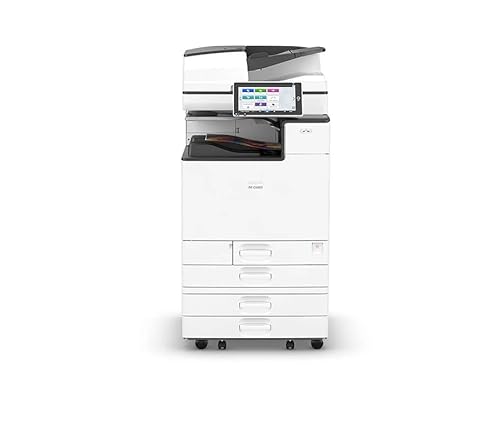
Condition disclosure, stated plainly before anything else: this listing is for a renewed machine. Renewed means the IM C6000 on offer is not new from the factory — it is a previously owned or leased unit that has been refurbished and resold, and the specific copier delivered will have a working history behind it. The listing title states a low meter reading, which is the copier equivalent of low mileage and the single most reassuring phrase a renewed listing can carry, but it remains a claim to confirm with the seller, along with exactly what warranty the refurbisher provides, what that warranty covers, and who services the machine when it faults. Buy this pick as refurbished equipment with a seller’s support arrangement — the title names remote setup support and tech support as included — and not with the assumptions that attach to a sealed new unit.
With that understood, the hardware case is formidable. The IM C6000 is the flagship tier of Ricoh’s IM colour family, and 60 ppm colour with four trays, automatic duplex and PostScript 3 describes a departmental copier in full: the machine a floor of fifty people shares for reports, booklets, colour presentations and A3 work, fed from four trays that can hold different stocks simultaneously so letterheads, plain paper and large sheets wait ready rather than being swapped by hand. PostScript 3 matters in design-adjacent offices where accurate colour page description is the difference between a proof and a surprise. Network and WiFi connections are both named, and scanning joins copy and print in the function list.
Who should take the renewed flagship route? An organisation that genuinely needs A3 departmental colour, has someone competent to receive, place and administer a copier-class machine, and is comfortable verifying a refurbisher’s claims before payment. The support named in the title softens the landing — remote setup help is precisely what a first-time copier buyer burns hours on — yet it does not convert a renewed purchase into a new one, and this review will not pretend otherwise. Organisations without that administrative confidence should read the C125 MF review again and accept its smaller scale in exchange for its simpler ownership. The IM C6000 renewed is the highest-ceiling pick in this guide and the one demanding the most diligence, in exactly that order.
Strengths
- 60 ppm colour with four trays and PostScript 3: full departmental A3 capability.
- Low meter reading stated in the title, the key longevity signal on a renewed copier.
- Remote setup support and tech support are named as included in the listing.
Trade-offs
- Renewed condition: a refurbished ex-lease unit, with seller-dependent warranty rather than factory cover.
- Copier-class size and administration; it needs a proper home and a named owner.
- Condition details must be confirmed unit by unit with the seller before purchase.
Best for: an organisation seeking departmental A3 colour at 60 ppm and prepared to verify a refurbished unit’s history.
Not suited for: a small desk seeking sealed-box simplicity, since this renewed copier arrives with a past and a pallet.
Picture the working week this machine was specified for and the specification stops looking extravagant. Monday opens with a hundred-page board pack in colour, duplexed, from the tray holding the good stock. Midweek brings A3 plans checked at full size and a run of training manuals. Friday closes with scanning — contracts through the feeder, filed to the network — while the next print job queues behind it. A flagship copier absorbs that week without becoming the office’s bottleneck or its hobby, and a renewed example with a genuinely low meter has the engineered headroom to absorb hundreds more weeks like it. The diligence is front-loaded; the ease is what follows.
Office managers comfortable auditing a refurbisher’s paperwork can Check price on Amazon for the renewed IM C6000.

Ricoh Aficio MP C4504 (Renewed)
Badge: Renewed A3 value
- Condition: Renewed (refurbished)
- Format: A3 colour laser multifunction copier
- Print speed: 45 ppm
- Functions: Copy, fax, print, scan
- Duplex: Automatic two-sided printing
- Connections: Network, WiFi
- Paper handling: 4 trays
- Language: Pre-installed PostScript 3 supplement
Condition disclosure, stated plainly before anything else: this listing is for a renewed machine. The Aficio MP C4504 offered here is a refurbished unit — previously owned or leased, serviced and resold — not a new copier in a factory-sealed box. Its condition, meter history and warranty rest with the refurbishing seller, and those details should be confirmed directly before purchase: what the refurbishment replaced, what warranty period applies and what it excludes, and how service is reached if the machine faults in its first months. The title’s own wording carries the renewed flag, and this review treats the machine accordingly throughout — as serious departmental hardware being bought through the refurbished channel, with the diligence that channel requires.
The Aficio name marks the generation before the IM family, and the MP C4504 was that generation’s A3 colour workhorse tier: 45 ppm across copy, fax, print and scan, with automatic duplex, network and WiFi connection, and four trays. The four-tray layout is the specification that changes daily life most, because A3 offices live on mixed stock — A4 plain, A3 plain, letterhead, heavier cover sheets — and a tray per stock ends the ritual of unloading and reloading the one tray a smaller machine offers. The pre-installed PostScript 3 supplement named in the title deserves attention: on this generation, PostScript capability arrived as an addition rather than a given, and a renewed unit with it already installed saves a licensing and fitting errand that buyers of lesser-equipped units discover later.
Against the renewed IM C6000 above, the C4504 trades fifteen pages per minute and a generation of panel and platform refinement for its position as the value route into four-tray A3 colour. That trade suits offices whose A3 need is steady rather than frantic — schools, churches, professional firms, local government desks — where 45 ppm remains far beyond the day’s actual demand and the money saved against the flagship funds the service arrangement a renewed machine deserves. Fax, notably, is present here and absent from the C6000’s title, which still matters to offices whose incoming orders arrive that way. Bought with open eyes and a confirmed warranty, the C4504 is the pragmatic heart of this guide’s renewed selection.
Strengths
- A3 colour at 45 ppm with four trays for mixed-stock departmental work.
- PostScript 3 supplement comes pre-installed, per the listing title.
- Full function set including fax, with network and WiFi connection both named.
Trade-offs
- Renewed condition: refurbished ex-lease hardware with seller-dependent warranty terms.
- An older generation than the IM family, with the platform age that implies.
- 15 ppm slower than the renewed flagship above it in this guide.
Best for: an office seeking four-tray A3 colour through the refurbished channel with PostScript already fitted.
Not suited for: a buyer seeking factory warranty cover, because renewed units carry the refurbisher’s terms instead.
Schools and community organisations deserve a specific mention in this review, because the C4504’s profile fits them uncannily well. Their colour work is real — worksheets, concert programmes, newsletters, display material — their A3 need is genuine, their budgets are governed by committees, and their pace is busy without being frantic. A renewed four-tray A3 machine with fax still aboard for the district office answers that brief in a way a new desktop unit cannot, provided the committee does the renewed homework this guide keeps repeating: meter confirmed, warranty written, service route named. The homework is an afternoon; the machine is a decade’s fixture.
Firms that run mixed A3 and A4 stock all day can Check price on Amazon on the renewed Aficio MP C4504 listing.
Ricoh IM C3000
Badge: Prose-only — renewed and lease channel
- Availability: Renewed and lease channels; no verified new-machine listing
- Family: Ricoh IM colour A3 multifunction line
- Position: Entry tier of the IM colour family in this guide
- Purchase route: None offered here — see the notes below
The IM C3000 is the tier of Ricoh’s IM colour family that most mid-sized offices would rationally choose, which makes its absence from the linked picks worth explaining carefully. Within the family structure, it sits below the C6000 flagship reviewed above: same IM generation, same A3 colour copier concept, scaled for departments whose daily volume is real but not relentless. On paper — the family’s paper — it is the sensible departmental default. In the marketplace this guide is built from, however, the C3000 surfaces through renewed stock and lease arrangements rather than through a clean new-machine listing that could be verified, linked and held to account.
That distinction is the entire reason for this entry’s prose-only status, and it generalises across this brand. A lease offer is not a purchase: it bundles the machine into a service relationship with its own terms, meter charges and end-of-term conditions, and presenting it beside purchasable machines would mislead readers about what their money buys. A renewed listing from a refurbisher is a purchase, but the renewed C3000 listings encountered were not accompanied by the verifiable detail this guide requires for a linked recommendation. Readers who specifically want this tier should therefore treat the renewed-buying discipline in the IM C6000 review — meter confirmation, warranty terms in writing, a named service route — as the price of admission, and apply it to whichever refurbisher they approach.
Positioned qualitatively, the C3000 occupies the value tier of the IM colour range: the point where an office gains the family’s A3 colour platform without stepping to flagship pace. For a department printing and scanning steadily through the day, that tier is usually the correct engineering answer, and the frustration of this market is that the correct answer arrives through channels demanding the most buyer diligence. If your organisation already leases its copier fleet, the C3000 is very likely the machine your dealer will propose, and nothing in this guide argues against accepting it there. What this guide will not do is dress a lease or an unverifiable renewed offer as a retail recommendation.
Strengths
- The IM family’s sensible departmental tier, with A3 colour in the platform’s modern generation.
- Widely placed through leasing, so service-backed acquisition routes genuinely exist.
- Shares the IM family’s operating logic with the linked flagship, easing fleet standardisation.
Trade-offs
- No verified new-machine listing to link; acquisition runs through renewed or lease channels.
- Terms, condition and support vary entirely by the channel and seller chosen.
- Specifications cannot be quoted here from a verified listing, so confirmation sits with the supplier.
Best for: a department seeking the IM colour platform at its value tier through a lease or vetted refurbisher.
Not suited for: an office seeking a straightforward retail purchase today, since no clean listing backs this entry.
There is a fleet-consistency angle worth adding for organisations already running the linked flagship. A department that takes the C3000 through a lease while another floor runs a renewed C6000 gives its staff one IM operating logic across both, and gives its administrator one family of drivers, scan destinations and habits to maintain. Mixed-generation fleets tax everyone quietly; same-family tiers do not. That consistency is part of what the prose-only entries are for — they let an organisation plan a coherent Ricoh estate even when only some rungs of the ladder can be bought through a listing.
No purchase link accompanies this entry; the model is covered so its place in the range is clear when a dealer or refurbisher quotes it.
Ricoh IM C3500
Badge: Prose-only — renewed and lease channel
- Availability: Renewed and lease channels; no verified new-machine listing
- Family: Ricoh IM colour A3 multifunction line
- Position: Middle tier of the IM colour family in this guide
- Purchase route: None offered here — see the notes below
The IM C3500 occupies the middle of the IM colour family as this guide presents it — above the C3000 in the range’s structure, below the C6000 flagship — and it inherits the same marketplace problem as its smaller sibling. The listings that carry this model are renewed units and lease-channel offers. That is not a Ricoh failing so much as a distribution reality: machines of this class are placed by dealers into offices under contract, and the secondary market in ex-lease units is where they become visible to a marketplace shopper at all. A guide pretending otherwise would be inventing a retail shelf that does not exist.
Why include a middle sibling that cannot be linked? Because range comprehension prevents expensive mistakes. A refurbisher quoting an IM C3500 to an office that has read only about the C6000 leaves that office unable to judge whether the quote represents the value tier or the flagship tier wearing a friendlier number. With the family laid out — C3000 as the entry tier, C3500 in the middle, C6000 at the top — a buyer can place any quote on the ladder and ask the right comparative questions: what does stepping up actually add for our volume, and what does stepping down genuinely surrender? Those questions, asked of a dealer with the ladder in hand, are worth more than any single listing.
Qualitatively, the middle tier is where high-duty departmental colour starts to feel unhurried: the class of machine a busy floor shares without queuing rituals, in the IM generation’s current platform. Offices whose colour volume has outgrown a desktop unit but not yet justified flagship pace are precisely the offices dealers steer toward this tier, and on the engineering merits that steering is usually honest. The channel caveats remain identical to its siblings’: verify meter and condition on renewed units, read lease terms as the financial products they are, and secure the service arrangement in writing before the machine lands. This guide offers no link because no verified listing earned one; the model’s inclusion is a map, not a recommendation to buy through any particular door.
Strengths
- The IM family’s middle tier, balancing departmental colour capability against flagship scale.
- Commonly quoted by dealers, so understanding its position strengthens any negotiation.
- Same IM platform generation as the linked C6000, keeping fleet behaviour consistent.
Trade-offs
- Reaches buyers through renewed and lease channels rather than a verifiable retail listing.
- Every ownership term depends on the supplying channel’s contract or refurbishment standard.
- No listing-verified specifications are quoted for it anywhere in this guide.
Best for: a growing department seeking mid-tier IM colour through a dealer relationship it can interrogate.
Not suited for: a purchaser seeking a one-click retail transaction, because this tier does not trade that way.
One more scenario gives this middle tier its due: the satellite office. Headquarters runs the flagship; the regional office handling its own proposals, site documentation and client packs needs the same colour language and the same A3 reach at a scale matched to twenty desks rather than eighty. Dealers propose the middle IM tier for exactly that satellite role, and an organisation reading a quote for one can now judge it as a deliberate tier choice rather than a mysterious model number. Middle tiers exist because organisations come in sizes, and this one is sized for the substantial middle.
No purchase link accompanies this entry either; use it to place dealer and refurbisher quotes on the family ladder.
Ricoh SP C360DNw
Badge: Prose-only — no clean machine listing
- Availability: Toner listings under this name; no clean machine listing verified
- Family: Ricoh SP desktop printer line
- Position: Desktop colour print-only name, distinct from the A3 copier family
- Purchase route: None offered here — see the notes below
The SP C360DNw earns its place in this guide as a warning label. Search for this model and the results fill with listings — for its toner. The name belongs to Ricoh’s SP desktop printer line, a colour print-only machine concept aimed at desks rather than copier rooms, and at some point it plainly sold through channels that left a long tail of consumable listings behind. What a shopper cannot currently do, on the evidence gathered for this guide, is buy the machine itself through a clean, verifiable listing. Every result wearing its name resolves to cartridges, and a cartridge page dressed in a printer’s name is a trap for the hurried: the order arrives, the box is suspiciously light, and the office still has no printer.
Including the model anyway serves two honest purposes. First, it answers the search honestly — readers arrive asking about this exact name, and telling them the shelf is stocked with toner rather than machines saves them a mistaken order. Second, it completes the map of Ricoh colour as a marketplace shopper actually experiences it: a new desktop all-in-one that can be bought, renewed A3 copiers that can be bought carefully, leased tiers that can be contracted, and a desktop print-only name that currently cannot be bought at all. That is the whole terrain, and a guide that omitted the impassable part of the terrain would fail its readers at the exact point of need.
If your heart is set on this class of machine — desktop, colour, print-only, Ricoh — the practical routes are the C125 MF above if scanning and copying are welcome, or a dealer’s remaining channels for the SP line itself, approached with the same verification habits this guide applies everywhere. Do not, under any circumstances, order a listing under this name without reading whether the box contains a printer or the toner a printer would have used. The qualitative tier here is desktop and modest by design; the renewed copiers elsewhere in this guide are not substitutes for it, and it is not a substitute for them. It is a name on a shelf of cartridges, and now you know why.
Strengths
- Represents the desktop colour print-only concept in Ricoh’s line for readers researching the name.
- Its toner listings confirm a real installed base existed, which informs parts and consumables hunting.
- Clarifies the range: SP desktop printers are a separate family from the A3 IM and Aficio copiers.
Trade-offs
- No clean machine listing was verified, so there is nothing responsible to link.
- Listings under its name are toner, creating a genuine mistaken-order risk.
- Any acquisition would run through dealer remnants or used channels with full verification burdens.
Best for: a researcher seeking to understand a Ricoh desktop name whose listings turned out to be consumables.
Not suited for: an office seeking a printer it can order today, because the machine itself is not cleanly listed.
The afterlife of a discontinued-channel machine cuts both ways, and fairness requires noting the favourable side. An installed base large enough to fill pages with toner listings is also an installed base that keeps consumables manufactured and findable, which is more than owners of some short-lived rival models can say. Anyone who already owns this printer is, paradoxically, well served by the very listings that trap new buyers. The trap is only for shoppers who mistake supply for availability — a distinction this guide exists to police across every brand it covers, and nowhere more visibly than here.
No purchase link accompanies this entry; treat any listing under this name as toner until its contents are proven otherwise.
Comparison Table
| Model | Status | Speed | Format | Trays | Standout point |
|---|---|---|---|---|---|
| Ricoh C125 MF | New, linked | 26 ppm | Desktop | Not stated in title | AirPrint, Mopria, Ethernet, duplex |
| Ricoh IM C6000 | Renewed, linked | 60 ppm | A3 copier | 4 | Low meter, PostScript 3, support included |
| Ricoh Aficio MP C4504 | Renewed, linked | 45 ppm | A3 copier | 4 | PostScript 3 supplement pre-installed, fax |
| Ricoh IM C3000 | Prose-only | Not quoted — no verified listing | A3 copier family | Not quoted | IM family entry tier, lease and renewed channels |
| Ricoh IM C3500 | Prose-only | Not quoted — no verified listing | A3 copier family | Not quoted | IM family middle tier, lease and renewed channels |
| Ricoh SP C360DNw | Prose-only | Not quoted — no machine listing | Desktop printer family | Not quoted | Name currently resolves to toner listings |
How Do You Choose Between New, Renewed and Leased Ricoh Colour?
Begin with the format question, because it outranks every channel question. If your colour work is letter and A4 sized — proposals, invoices, handouts — a desktop machine serves it, and the new C125 MF is the clean route. If your work includes A3 — plans, spreadsheets printed whole, posters, booklet proofs — only the copier-class machines in this guide answer, and every one of them reaches you renewed or leased. Offices that print A3 twice a year should stay desktop and outsource those two jobs; offices printing A3 weekly have no honest desktop alternative and should embrace the copier channel with the diligence it deserves.
Next, be honest about your organisation’s appetite for verification. A renewed purchase done well is a process: confirm the meter reading, obtain the warranty terms in writing, identify who services the machine and how quickly, and confirm what the refurbishment actually replaced. Organisations with an office manager or IT contact who enjoys that process routinely land excellent departmental colour through it. Organisations where the printer is bought by whoever drew the short straw should weight the new machine more heavily than its specification gap suggests, because an unverified renewed copier is the one outcome worse than a modest new desktop unit.
Finally, separate the machine decision from the neighbourhood decisions. A print room’s colour hub does not replace the specialised devices around it — the shipping bench still runs on the machines in our desktop Label Printers guide, and photographic colour at large sizes belongs to a different class again, covered in our color 13×19 Inkjet Printers guide. Ricoh colour, new or renewed, is office document colour: accurate, fast and durable. Buy it for documents, verify the channel as carefully as the machine, and the range’s odd marketplace shape stops being a hazard and becomes simply the way this brand is bought.
Buying Renewed Copiers Without Regretting It
The renewed copier market rewards a specific checklist, and both renewed reviews above assume you will run it. First, the meter: a copier’s page counter is its odometer, and the IM C6000’s title claim of a low meter reading is exactly the figure to have the seller confirm in writing against the physical machine being shipped. Second, the refurbishment scope: ask what was replaced — rollers, drums, fuser components — and what was merely cleaned, because the difference decides the machine’s first-year reliability. Third, the warranty: its length, its exclusions, and whether service is on-site or return-to-base, which for a copier-class machine effectively means on-site or nothing. Fourth, delivery and placement: these are palletised machines, and the route from kerb to print room, including door widths and lift access, is the buyer’s problem to solve before the truck arrives.
None of that should frighten an office that genuinely needs A3 colour; it should merely convert excitement into procedure. The refurbished channel exists because leased copiers return with most of their engineered life unspent, and a competent refurbisher plus a verified low meter is a legitimate route to departmental hardware. The buyers who regret renewed purchases are almost never the ones who asked too many questions. They are the ones who read a flagship model name, assumed a new-machine transaction, and discovered the channel’s rules afterwards. This guide’s structure — condition disclosed inside each renewed review, not in a footnote — is designed to make that sequence impossible for its readers.
Add one procedural habit that experienced buyers swear by: keep the entire pre-purchase exchange in writing, in one thread, with the machine’s serial identity tied to the meter figure and the warranty wording before payment is released. Verbal assurances evaporate; a written thread survives staff changes at the refurbisher and turns a later disagreement into a document comparison. Ask also what arrives in the delivery — which trays, which finishers if any were photographed, what toner state the unit ships with — because a copier’s listing photographs sometimes show a better-equipped sibling configuration. None of these questions insult a good seller. Good sellers answer them daily, and their fluency is itself a quality signal worth weighing beside the specification.
A3 Colour: When the Big Format Earns Its Floor Space
A3 is the specification that separates this guide’s two worlds, so it deserves a plain accounting. A3 colour earns its floor space when the work itself is large: architectural and engineering drawings checked at readable scale, financial spreadsheets that collapse into illegibility when shrunk, event posters and signage produced in-house, educational materials designed for wall and table. It also earns space indirectly, because an A3 engine prints A4 with a mechanical ease that shows in duty headroom and paper handling — four trays holding four stocks is an A3-copier habit that transforms A4 life too. Against that stand the costs of scale: floor space, delivery logistics, administration and, in the renewed channel, verification effort.
The desktop alternative should not be undersold while the big machines hold the stage. A new C125 MF on a desk prints colour documents the day it arrives, under factory expectations, with phone printing that the copier generation above it treats more stiffly. Many offices ultimately run both patterns — a desktop colour unit for the daily letter-class load and shared A3 access for the large work — and nothing in this guide’s structure forbids that reading. The ladder exists so each office can find its own rung and recognise the rungs it is skipping.
Why Ricoh Sells This Way: The Dealer and Leasing Legacy
None of this market shape is accidental, and understanding its origin helps buyers navigate it calmly. Ricoh grew as a copier company, and copiers were never sold like kettles. They were placed: leased to organisations over multi-year terms, serviced by dealer technicians, billed by the meter, and collected at term’s end for refurbishment or resale. That system built Ricoh’s reputation in offices — the machines are engineered for contract life, with duty headroom and serviceability as first principles — and it explains every oddity in this guide. New desktop models like the C125 MF are the exception the company makes for smaller buyers. The A3 colour range is the rule, and the rule trades through contracts and refurbishers.
The practical consequence is that buying Ricoh colour is partly a vendor-selection exercise. With a consumer printer, the manufacturer is the counterparty and the box is the product. With a renewed or leased Ricoh, the refurbisher or dealer standing behind the machine is half the product: their meter honesty, their refurbishment standard, their service response. Experienced office buyers know this instinctively and interview sellers accordingly. First-time buyers, arriving from a search box with a model number in mind, are the ones this guide is written for — and the single transferable skill it teaches is to evaluate the channel with the same care as the machine.
There is an upside to the legacy that deserves the last word in this section. Equipment engineered for leased departmental life is engineered generously: frames, feed systems and engines specified for years of metered service do not become fragile because their first contract ended. The renewed market, navigated with the checklist in the previous section, is how smaller organisations access that over-engineering without signing the contracts it was designed for. That is not a loophole. It is the copier industry’s normal second act, and Ricoh colour is simply where a marketplace shopper meets it most directly.
Common Mistakes When Buying Ricoh Colour
The gravest mistake is ordering a renewed copier with new-machine assumptions: no meter confirmation, no warranty in writing, no service route identified. The second is the SP C360DNw trap — ordering a listing under a printer’s name that ships toner. Third is buying A3 capability for A4 work, committing floor space and administration to a format the office uses twice a year. Fourth is the mirror error: strangling a genuinely A3-heavy office with a desktop machine and outsourcing its weekly large work at retail copy-shop rates. Fifth is ignoring the support phrases in a renewed title — remote setup and tech support included on the IM C6000 listing is a material part of that offer, and comparing renewed listings on headline specification alone, without weighing the support each seller names, misprices them all.
A sixth mistake is logistical and entirely avoidable: forgetting that a copier-class machine arrives as freight. Offices have taken delivery of A3 units that could not pass the print-room door, could not turn the corridor corner, or exceeded what a small lift would carry. Measure the route while you measure the room, confirm who unboxes and positions the unit, and schedule the delivery for a day when the person who verified the purchase is present to inspect the machine against the written thread. Renewed buying done well is a chain of small confirmations, and delivery day is the last link, not an afterthought.
Frequently Asked Questions
What does renewed actually mean for the IM C6000 and MP C4504? It means the machine is refurbished — previously owned or leased, serviced and resold — rather than new. Condition, meter history and warranty come from the refurbishing seller, which is why both reviews carry their own disclosure paragraphs and why confirming terms in writing matters.
Is a low meter reading important on a renewed copier? Yes. The meter counts the pages the machine has produced in its life, so a low reading suggests more of its engineered life remains. Treat any meter claim as a figure to have confirmed against the specific unit being delivered.
Why are the IM C3000 and IM C3500 not linked? Because they reach this market through renewed and lease channels without a clean, verifiable new-machine listing. They are covered so readers can place dealer quotes on the family ladder, not as retail recommendations.
Can the C125 MF print from phones? Its title names AirPrint and Mopria, covering Apple and Android devices respectively, alongside WiFi, Ethernet and USB connections.
What is PostScript 3 doing on the big machines? PostScript is the page-description language design and print workflows rely on for accurate colour output. The IM C6000 lists PostScript 3 directly; the MP C4504 arrives with its PostScript 3 supplement pre-installed, per its title.
Should a small business lease an IM model instead of buying renewed? Leasing suits organisations that value a single service relationship and predictable terms over ownership, and it is the channel these machines were designed for. Buying renewed suits organisations comfortable verifying a unit and arranging their own support. Neither is the wiser choice in the abstract; the deciding factor is how much administration your organisation can competently supply itself.
What should be checked on delivery day of a renewed copier? The serial identity against your written thread, the meter reading against the confirmed figure, the tray configuration against the listing, and basic copy, print and scan tests in colour and mono before the delivery crew leaves. Five minutes of checking on the day is worth a month of correspondence later.
Why does the SP C360DNw appear with no link? Because listings under its name are toner cartridges, not machines. It is included so readers searching the name learn that before ordering, rather than after a light box arrives.
Final Recommendation
Choose your channel as deliberately as your machine. A small office that wants Ricoh colour without a project should take the new C125 MF and be done. An organisation that needs departmental A3 colour and can run a verification checklist should take the renewed IM C6000 for its pace, trays and named support, or the renewed Aficio MP C4504 where 45 ppm and a pre-installed PostScript supplement fit the workload more sensibly. Treat the IM C3000 and IM C3500 as the ladder’s lease-channel rungs and the SP C360DNw as a cautionary name. Whichever rung you land on, write the agreement down carefully, name the human responsible for the machine, and keep the meter and warranty paperwork with the office’s other asset records from the very first day onward, without exception. Buy Ricoh colour with your eyes open about what this market actually sells, and the machine on your floor will be the one you meant to buy — meter, warranty, trays and all.


