What's inside
As an Amazon Associate I earn from qualifying purchases. This post may contain affiliate links at no extra cost to you.
[SITE_DOMAIN] is reader-supported. When you buy through links on our site, we may earn an affiliate commission at no extra cost to you. Prices and availability change; check the Amazon listing for the current details.
There is a quiet elegance to a printer that does one thing. The best color laser printers single function buyers choose are machines with no scanner lid to lift, no copier glass to clean, no feeder to jam with a dog-eared original — just a paper path, four toner cartridges and a network connection, dedicated entirely to turning digital colour into paper colour. In offices that already own a scanner, in studios where a multifunction device sits down the hall, and in homes where the phone camera handles every digitising task, that single-mindedness is not a compromise. It is the correct allocation of money: everything spent on the print engine, nothing spent duplicating hardware that already exists nearby.
Colour laser occupies a particular niche in the printing landscape, and it is worth locating precisely. Against inkjet, laser trades photographic subtlety for text sharpness, dry-to-the-touch pages, and toner that waits months between jobs without complaint. Against monochrome laser, colour trades simplicity for range: charts that communicate, covers that persuade, teaching materials that use colour as information rather than decoration. A single-function colour laser is therefore a deliberate instrument — bought by people who know their work is colour, know it is text-and-graphics colour rather than gallery photography, and know their scanning already lives somewhere else.
The six machines below span that instrument’s range. Canon opens with a 26 PPM print-only model in white; HP contributes two Pro models whose titles repeat the words Printer Only and Single Function like a manifesto; Lexmark brings a touchscreen compact at up to 26 ppm and a 42 ppm departmental machine with a stated resolution; Brother closes with a compact colour printer carrying NFC, Ethernet and a subscription trial. Speeds, where titles state them, cluster at two levels — the mid-twenties for desk-scale machines and 42 ppm for the Lexmark CS730de — and that clustering is itself a buying signal: this category sells colour quality and driver reliability more than raw pace.
Two disciplines govern the guide that follows. The first is cost-per-page thinking: colour laser ownership is a years-long relationship with four toner cartridges, and the purchase price is merely the introduction. The second is driver support, because a dedicated print station lives inside other people’s workflows — shared across a small office’s laptops, driven by design software, expected to handle the odd paper size without a support ticket. A print-only machine earns its place by being the most predictable device on the network.
One more framing before the reviews: a dedicated colour station changes the politics of an office’s printing for the better. When colour lives in one known machine with known costs, the casual colour printing that inflates consumables budgets becomes a deliberate trip rather than a default, while genuinely colour-worthy documents get the quality they deserve. Several offices discover that simply centralising colour — visible, shared, well-specced — reduces waste more effectively than any quota software, because the decision to print in colour becomes conscious. The six machines below are, in that sense, policy instruments as much as peripherals, and the reviews treat them with that seriousness.
Key Takeaways
- Every pick is print-only by design; models whose titles showed scan or copy were excluded from this shortlist entirely.
- Stated speeds: Canon LBP646Cdw at 26 PPM, Lexmark CS431dw at up to 26 ppm, Lexmark CS730de at 42 ppm.
- The Lexmark CS730de is the only title here stating a resolution: 1200 x 1200 dpi.
- Both HP Pro models declare Printer Only and Single Function in their titles — the category’s brief in miniature.
- The Brother HL-L3295CDW adds NFC and Ethernet to the compact colour formula, plus a Refresh Subscription Trial.
- Running cost is a four-cartridge story; cost-per-page discipline matters more than purchase-day comparisons.
Where to Buy
- Canon Color imageCLASS LBP646Cdw — Check price on Amazon
- HP Color LaserJet Pro 3201dw — Check price on Amazon
- HP Color LaserJet Pro 3204dw — Check price on Amazon
- Lexmark CS431dw — Check price on Amazon
- Lexmark CS730de — Check price on Amazon
- Brother HL-L3295CDW — Check price on Amazon
Quick Picks
| Pick | Best for | Stated speed | Paper-path note | Check |
|---|---|---|---|---|
| Canon Color imageCLASS LBP646Cdw | Balanced colour for a home office desk | 26 PPM | Duplex, print only | Check price on Amazon |
| HP Color LaserJet Pro 3201dw | Wireless colour station for home-office documents | Title silent | Duplex, printer only | Check price on Amazon |
| HP Color LaserJet Pro 3204dw | Duplex colour without the wireless emphasis | Title silent | Duplex, single function | Check price on Amazon |
| Lexmark CS431dw | Touchscreen colour with security framing | Up to 26 ppm | Print only, compact | Check price on Amazon |
| Lexmark CS730de | Departmental colour at pace | 42 ppm | Print only, Ethernet | Check price on Amazon |
| Brother HL-L3295CDW | Compact colour with NFC tap and Ethernet | Title silent | Duplex, compact | Check price on Amazon |
How the Picks Were Chosen
The methodology for this guide can be stated in one sentence, and it is the sentence the whole category rests on: any model whose listing title showed scanning or copying was excluded by design. That rule sounds severe until its purpose lands — a single-function shortlist contaminated by all-in-ones would betray the readers who arrived specifically to avoid scanner bulk, scanner cost and scanner-shaped machines. Every survivor below is a printer, full stop, and several of them say so in their titles with unusual pride.
Within the print-only pool, selection favoured stated evidence. Titles that quote a speed earned a speed line in the spec box; titles that stay silent carry the silence sentence rather than a borrowed figure from a sibling model. Connectivity was read the same way — wireless claimed where claimed, Ethernet noted where named, NFC credited only to the Brother whose title lists it. The result is a shortlist where every specification in every box can be traced to a phrase in the corresponding title.
Spread completed the selection: three manufacturers’ philosophies at the desk scale — Canon’s balanced white unit, HP’s twin Pro models, Lexmark’s touchscreen compact, Brother’s connected compact — plus one departmental outlier, the CS730de, for readers whose colour volume has outgrown desk machines entirely. A reader should be able to locate their own workload somewhere along that line.
Colour capability itself was never in question, since the category defines it, but colour intent was weighed: these are document-colour machines, built for pages where colour carries charts, branding, emphasis and clarity. Photographic printing belongs to inkjets, and this guide will not pretend otherwise in any review below.
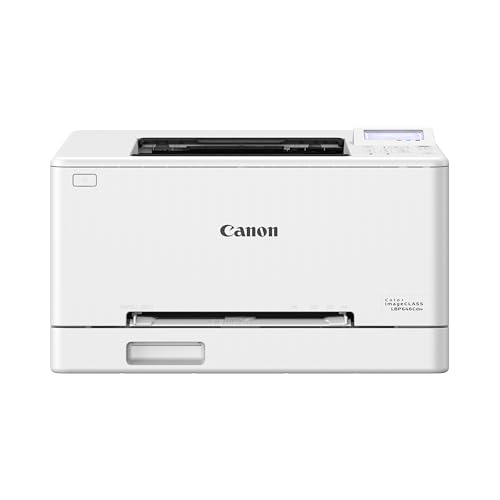
Canon Color imageCLASS LBP646Cdw
Best for: a home office or studio desk printing colour documents two-sided, at a stated pace, from a white print-only unit.
Not suited for: scanning artwork or copying handouts at the same desk — there is no scanner in this design at all.
- Print technology: colour laser, print only
- Speed, per title: 26 PPM
- Duplex: two-sided printing included
- Connectivity, per title: wireless
- Finish, per title: white
- Functions: print only
Canon’s LBP646Cdw states the desk-colour brief with unusual completeness: wireless, duplex, 26 PPM, print only, white. Each element earns its place in a home-office story. Wireless frees the placement — the printer can live on the sideboard rather than tethered to the desk. Duplex turns long colour documents into finished, fileable objects instead of single-sided stacks. The stated 26 PPM sets honest expectations: brisk for documents, unhurried for a hundred-page run, and quoted plainly enough to plan around. Even the white finish participates, softening the machine’s presence in a room that is also a living space.
Print-only scope shapes the ownership experience in ways owners tend to underrate before purchase and appreciate after. The top surface is flat and closed; nothing rattles, nothing needs aligning, no scanner calibration ever interrupts a deadline. The machine wakes, prints and sleeps. In a home where a phone already scans receipts and forms competently, the absent scanner is not a missing feature but a missing failure mode, and the money it would have cost sits instead in the colour engine.
Canon’s imageCLASS line has long courted the small-office middle ground, and this model’s balance shows the lineage: no touchscreen theatre, no departmental bulk, just the document-colour essentials with a number attached to the speed. For the solo professional — consultant, tutor, designer of documents rather than photographs — that balance is frequently the whole requirement.
One planning note belongs to colour generally and to this Canon specifically: budget the four cartridges as a set in your mind even though they deplete at different rates. Black falls first in document work; the colours follow according to how chart-heavy the workload runs. A shelf spare of black alone prevents most mid-job crises.
Strengths
- Complete desk brief in the title: wireless, duplex, stated 26 PPM, print only.
- White finish suits visible placement in multi-use rooms.
- Single-function focus keeps the machine simple, closed and quiet in routine.
Trade-offs
- No scanning or copying, by design and without exception.
- No Ethernet or NFC appears in the title’s connectivity wording.
- Colour toner is a four-cartridge commitment, as with every model here.
Think about where this Canon’s output goes, because destinations explain its specification better than any benchmark. Client proposals printed two-sided and bound. Course materials for a weekend workshop. A portfolio of document work for a meeting where the screen version has already been seen and the paper version must feel more considered. In each case the virtues are the same: colour that stays put under a highlighter, pages dry the instant they land, and a machine that produced the same quality in March as it did in January because toner does not age in the tray. That steadiness, more than any single figure, is what a stated-speed print-only laser is selling.
Home offices matching this brief should confirm the current bundle on the listing itself; the Canon Color imageCLASS LBP646Cdw is shown at Check price on Amazon with its present details.

HP Color LaserJet Pro 3201dw
Best for: home-office colour documents produced wirelessly, with duplex output and mobile compatibility, from a proudly print-only Pro model.
Not suited for: photographic prints or glossy colour work — this engine is tuned for documents, and its title says so.
- Print technology: colour laser
- Scope, per title: printer only; single function
- Duplex: included
- Connectivity, per title: wireless
- Mobile, per title: mobile compatibility
- Speed figure: Not stated in the listing title — verify with the manufacturer documentation
HP’s title for the 3201dw reads almost like a rebuttal to the all-in-one era: Printer Only. Single Function. Ideal Home Office Use. Between those declarations sit the practical claims — wireless, duplex, mobile compatibility, colour documents — and together they describe a machine aimed at the worker whose colour needs are documents: proposals with charts, invoices with branding, teaching packs, reports that will be read in rooms where impressions matter. The Pro badge promises office-grade driver behaviour and build priorities in a home-office size.
Mobile compatibility earns a precise reading here, as it did elsewhere in this programme of guides. It promises that phones and tablets can send work to the printer through supported routes on the home or office network — the daily pattern of modern work, where the document so often begins in an email attachment on a handset. It does not promise a scanner that does not exist, and the title’s honesty about scope lets the mobile claim be trusted at face value.
The absence of a stated speed deserves the same face-value treatment. HP quotes no figure in this title, so the spec box records the silence. In lived terms, desk colour lasers in this class print documents at a pace that rarely governs a purchase; what governs it is first-page behaviour, duplex reliability and colour that stays consistent across a long run. Buyers for whom pace is genuinely critical have two stated figures elsewhere in this guide to anchor on.
Between the two HP siblings, the 3201dw is the wireless-and-mobile expression of the formula. A home office that prints from three laptops and two phones scattered across the house will feel that emphasis daily, and should choose this twin on exactly that basis.
Strengths
- Single-function scope declared twice in the title — no ambiguity about what the machine is.
- Wireless plus mobile compatibility covers the scattered-device home office.
- Duplex included for finished, two-sided colour documents.
Trade-offs
- No speed figure in the title, so pace comparisons require documentation.
- Print-only scope is absolute; even a quick copy needs another device.
- Home-office framing may under-serve a growing shared team.
There is a workflow argument for the Pro badge that home workers feel during deadline weeks. When the printer is driven from presentation software, spreadsheet applications and a browser in the same hour, driver behaviour — remembering paper size, honouring duplex, scaling honestly — becomes the difference between printing as a pause and printing as a project. HP’s Pro line is engineered for that mixed-software reality, and the 3201dw’s wireless mobile reach means the deadline-week documents can originate anywhere in the house. It is a machine specified for how home offices actually behave under pressure, not for how they behave in brochures.
Read the title’s declarations against your own device habits on the product page; the HP Color LaserJet Pro 3201dw appears at Check price on Amazon for that direct comparison.

HP Color LaserJet Pro 3204dw
Best for: a single-desk colour station where duplex documents are the staple and the wireless spotlight matters less than the print engine itself.
Not suited for: a household expecting to print from every phone in the house — mobile compatibility is not among this title’s claims.
- Print technology: colour laser
- Scope, per title: printer only; single function
- Duplex: included
- Audience, per title: home office; colour documents
- Mobile compatibility: Not stated in the listing title — verify with the manufacturer documentation
- Speed figure: Not stated in the listing title — verify with the manufacturer documentation
The 3204dw is the quieter twin. Its title repeats the family declarations — colour laser, duplex, printer only, single function, home office, colour documents — and omits the two phrases its sibling leads with: wireless and mobile compatibility do not appear. That omission must be handled honestly rather than smoothed over. It may reflect title-writing economy rather than missing hardware, but a guide that quotes titles cannot upgrade silence into a claim, so the spec box records both gaps and points to documentation. For network flexibility, verifying the connection list for this exact model before ordering is essential.
What remains, taken on its stated merits, is a focused duplex colour printer for a defined desk. Plenty of real workstations match that shape: one professional, one desk, one machine within arm’s reach, printing client documents two-sided all day. In that habitat the questions are colour consistency, duplex dependability and driver manners with the software the professional actually uses — and the Pro line exists to answer those questions well.
The twin relationship is itself useful buying information. HP sells near-identical print engines at slightly different connectivity pitches because offices differ in how devices reach the printer. The disciplined response is not to guess which twin does what, but to read each title as its own contract — precisely the exercise this review is modelling — and to confirm any unstated connection in documentation before the box arrives.
There is also a small virtue in a printer bought for one desk: it can be placed for one person’s convenience, loaded with the paper that person uses, and configured once, deeply, rather than generically for a crowd. Dedicated stations reward that attention with years of unremarkable, reliable service.
Strengths
- Duplex colour printing with the family’s print-only clarity of purpose.
- Home-office document focus stated plainly in the title.
- Pro positioning brings office driver expectations to a single desk.
Trade-offs
- Wireless is not claimed in this title’s wording — verify before relying on it.
- Mobile compatibility is likewise unstated in the title.
- No speed figure is quoted, as with its sibling.
Consider also the economics of the dedicated desk. A professional whose billable work flows through printed documents — an accountant with client files, a translator with annotated drafts, a surveyor with reports — loses more to one unreliable shared printer than a dedicated unit costs. The 3204dw’s proposition is that reliability, purchased once and placed within reach: duplex colour, Pro driver manners, no negotiation with colleagues’ queues. Read in that light, its title’s silence about household-wide wireless is not a gap in the product but a boundary around its intended job, and buyers inside that boundary will find the focus refreshing.
Because the twins differ in wording that matters, check this model’s own page rather than its sibling’s; the HP Color LaserJet Pro 3204dw is listed at Check price on Amazon for a line-by-line read.

Lexmark CS431dw
Best for: colour printing at a small workstation where a touchscreen panel and a security-minded design are worth more than extra trays.
Not suited for: high-volume colour runs — the stated up-to-26 ppm pace and compact 4-Series frame describe desk-scale work.
- Print technology: colour laser
- Speed, per title: print speed up to 26 ppm
- Display, per title: interactive touch screen
- Security, per title: full-spectrum security
- Series, per title: 4-Series; model code 40N9320
- Finish, per title: white
Lexmark’s CS431dw brings two ideas to the desk-colour class that its rivals here mostly leave to bigger machines: an interactive touch screen and full-spectrum security, both named in the title. The touchscreen changes the texture of owning a print-only device. Settings that on other machines require a laptop session — network status, toner levels, job management — become walk-up interactions, and in a small office where the printer serves several people, that panel is where confusion goes to be resolved quickly.
Full-spectrum security is Lexmark’s framing for protection designed into the device rather than bolted on, and while the title does not enumerate mechanisms, the claim’s presence in a compact model’s title is itself the signal: Lexmark expects this printer to live on networks where document confidentiality is a policy, not a preference. Workplaces with such policies should read the documentation’s enumeration carefully; workplaces without them lose nothing by the capability’s presence.
The stated speed — up to 26 ppm — matches the Canon at the top of this guide and sets the desk-class pace honestly. Up to is doing work in that phrase, as it does in every manufacturer’s speed claim: sustained colour throughput on real documents will sit below the headline, which is an argument for treating all such figures as class indicators rather than stopwatch promises. Within its class, the CS431dw’s combination of pace, panel and security framing is distinctive.
White finish and compact 4-Series proportions complete a machine designed to sit visibly in professional small spaces — a reception desk, a consulting room, a studio — where a printer is part of the room’s equipment rather than hidden infrastructure.
Strengths
- Interactive touch screen, unique among the desk-scale picks here.
- Full-spectrum security claimed in the title, signalling policy-grade design.
- Stated up-to-26 ppm pace matches the desk class leaders.
Trade-offs
- Connectivity specifics are not enumerated in the title wording.
- Compact frame implies desk-scale paper handling rather than departmental capacity.
- Security mechanisms need documentation reading to evaluate properly.
The touchscreen also future-proofs the CS431dw against the way small offices actually grow. Today’s two-person practice prints from two laptops; next year’s adds a third person, a guest device and a confidentiality expectation from a larger client. A printer whose panel can mediate users and whose security was designed in from the start absorbs that growth without replacement. Lexmark’s enterprise heritage shows in such details — this is a company whose larger machines live in hospitals and banks, and the 4-Series compact inherits the assumptions of those environments at a desk-appropriate scale.
Small offices weighing panel and security against the simpler desk models can inspect the claim set on the listing; the Lexmark CS431dw sits at Check price on Amazon with its full title wording.

Lexmark CS730de
Best for: a department or busy workgroup printing colour at volume, where 42 ppm pace and gigabit networking keep the queue invisible.
Not suited for: a single quiet desk — the capacity, pace and Ethernet-first design describe shared infrastructure, not personal equipment.
- Print technology: colour laser
- Speed, per title: print speed of 42 ppm
- Resolution, per title: 1200 x 1200 dpi
- Display, per title: 4.3-inch colour touch screen
- Connectivity, per title: wireless connectivity, Gigabit Ethernet
- Certification, per title: Energy Star
Every shortlist benefits from one machine that shows what the category becomes at scale, and the CS730de is emphatically that machine. A stated 42 ppm colour engine is department pace — the level at which a workgroup stops thinking about the printer’s speed at all. Gigabit Ethernet anchors it to the network at the speed large colour files deserve. A 4.3-inch colour touch screen gives the shared device a proper public interface. And the title’s resolution figure, 1200 x 1200 dpi, is the only resolution claim in this entire guide, a detail that matters for colour work carrying fine graphics, small type and detailed diagrams.
Resolution deserves a careful sentence, because dpi figures invite magical thinking. At 1200 x 1200, text edges and line art render with a crispness that serves technical documents, presentations and branded material; it does not convert a laser into a photographic printer, and this guide will not claim otherwise. What it does is raise the ceiling on document quality for exactly the materials departments print — reports whose charts must survive scrutiny at arm’s length.
Energy Star certification, named in the title, speaks to the running story at department scale, where a printer’s idle and active consumption multiply across years and fleets. Combined with the efficiency of shared infrastructure — one capable machine instead of five desk units idling — the CS730de represents the consolidation argument in this category: fewer, better printers, properly networked, properly specified.
Buyers should nonetheless respect the step it represents. Capacity, pace and panel all assume volume; a department printing forty colour pages a week will never feel the difference between this and the desk models, while a department printing four hundred a day will feel it hourly. The title gives the evidence; the workload makes the decision.
Strengths
- The fastest stated colour engine here at 42 ppm, with Gigabit Ethernet to feed it.
- The guide’s only stated resolution: 1200 x 1200 dpi.
- A 4.3-inch colour touch screen sized for shared, walk-up use.
Trade-offs
- Departmental scale is wasted on light colour workloads.
- Energy and capacity virtues assume shared use to pay back.
- Print-only scope persists even at this level — scanning lives elsewhere.
Consolidation deserves one more paragraph, because the CS730de often replaces several machines rather than joining them. A department retiring three ageing desk colour printers gains more than speed: one cartridge inventory instead of three, one driver to maintain, one service relationship, and output that looks identical regardless of who printed it — a quiet brand virtue in client-facing material. The transition cost is walking distance, and it is real, but departments consistently overestimate it before the change and underestimate the consistency gains after it. The 42 ppm engine ensures the consolidated station never becomes the bottleneck that sends staff shopping for rogue desk units again.
Workgroups speccing shared colour should start their documentation reading from the product page; the Lexmark CS730de is presented at Check price on Amazon with its capacity details.

Brother HL-L3295CDW
Best for: compact colour printing in a connected home office that wants duplex output, an Ethernet option and NFC tap convenience in one small body.
Not suited for: relying on a stated pace — the title quotes no speed, so expectations should be set from documentation.
- Print technology: digital colour printer with laser-quality output
- Duplex: included
- Connectivity, per title: wireless, mobile and Ethernet
- NFC: included, per title
- Consumables, per title: includes a 2 Month Refresh Subscription Trial; Amazon Dash Replenishment Ready
- Speed figure: Not stated in the listing title — verify with the manufacturer documentation
Brother closes the guide by packing the compact colour formula with connection options: wireless, Ethernet and NFC in one title, alongside duplex printing and mobile support. That trio covers the three ways a printer actually gets used in a connected home — laptops on Wi-Fi, a desktop or network point on Ethernet for stability, and a phone tapped against the NFC point for the walk-up job nobody wants to configure. Few compact colour machines state all three, and the completeness signals Brother’s read of its audience: households and small offices whose devices are many and whose patience for connection rituals is short.
The title’s phrasing — digital colour printer with laser-quality output — is Brother’s house style for this line, and the practical meaning for buyers is colour document output with the handling virtues this category promises: dry pages, sharp text, toner patience during idle weeks. The compact body keeps the machine desk-credible, and duplex keeps its documents finished rather than flimsy.
Two consumables notes ride along in the title. A two-month Refresh Subscription Trial introduces Brother’s replenishment programme at a trial’s low commitment, and Amazon Dash Replenishment readiness offers the alternative of automatic reordering triggered by the printer’s own toner readings. Both convert toner from a remembered chore into a monitored system; both deserve the same clear-eyed reading of terms that any subscription-shaped arrangement does, matched against the household’s actual monthly colour volume.
Against the Canon that opens this guide, the Brother trades a stated speed for broader stated connectivity. That is a fair summary of the desk-colour decision generally: no model states everything, and the buyer’s own bottleneck — pace, connections, panel, security — should arbitrate.
Strengths
- Wireless, Ethernet and NFC all stated — the broadest connection list among the compact picks.
- Duplex colour in a compact body suited to home offices.
- Two replenishment routes named in the title, trial subscription and Dash readiness.
Trade-offs
- No speed figure in the title, leaving pace to documentation.
- Subscription-shaped replenishment will not suit every printing rhythm.
- Laser-quality colour serves documents, not photographic ambitions.
Brother’s replenishment options also deserve a household-level reading. A two-month trial is long enough to reveal whether a household’s colour printing is steady or spiky — the single fact that decides whether subscription-shaped toner is convenience or friction. Dash readiness offers the middle path: no schedule, just a printer that notices its own toner falling and orders before the empty warning. Households that print school projects in bursts around term dates often prefer exactly that trigger-based model. Either way, the HL-L3295CDW treats toner as a system to be managed by the machine, which suits homes that bought a printer to think about printing less.
Connected households comparing the compact options can weigh the connection list on the live listing; the Brother HL-L3295CDW appears at Check price on Amazon with its trial terms alongside.
Comparison Table
| Pick | Stated speed | Duplex | Distinctive connection or panel | Standout claim |
|---|---|---|---|---|
| Canon Color imageCLASS LBP646Cdw | 26 PPM | Yes | Wireless | White print-only balance |
| HP Color LaserJet Pro 3201dw | Title silent | Yes | Wireless; mobile compatibility | Printer Only declared in title |
| HP Color LaserJet Pro 3204dw | Title silent | Yes | Title silent | Single Function declared in title |
| Lexmark CS431dw | Up to 26 ppm | Title silent | Interactive touch screen | Full-spectrum security |
| Lexmark CS730de | 42 ppm | Title silent | Gigabit Ethernet; 4.3-inch colour touch screen | 1200 x 1200 dpi resolution |
| Brother HL-L3295CDW | Title silent | Yes | Ethernet and NFC | Refresh trial and Dash replenishment |
How to Choose
What does cost-per-page discipline actually look like?
It looks like arithmetic done before purchase rather than resentment felt after. Estimate monthly colour and black pages separately — colour cartridges deplete by colour pages, black by everything — then read the cartridge yield information in each model’s documentation and divide. The machine with the gentle purchase story sometimes carries the expensive page story, and over a three-year life the page story wins. Discipline also means habits: printing drafts in monochrome where the software allows, reserving full colour for final documents, and keeping one spare black cartridge so a deadline never forces a panic purchase at the worst available terms. Readers who find their page counts climbing into true volume territory should compare the economics against fast inkjet printers for busy desks, where tank systems rewrite the per-page maths entirely.
How much does driver support matter for a print station?
More than any single specification, because a dedicated print station is shared infrastructure. Every laptop in the office must install its driver without drama; design and office software must see the printer’s real paper sizes and duplex options; operating-system updates must not orphan the device. The Pro and business lines in this guide — HP’s Pro models, Lexmark’s range, Brother’s line — compete partly on exactly this unglamorous ground. Before buying for a team, check the manufacturer’s driver pages for every operating system the team runs, including the one old machine in the corner that everyone forgets until it cannot print.
Desk machine or departmental machine?
Let monthly colour volume arbitrate. A few hundred colour pages a month belongs to the desk class — the Canon, the HP twins, the CS431dw, the Brother — where 26 ppm-class engines and compact trays match the load. Sustained daily colour volume, shared by a workgroup, belongs to the CS730de’s class, where 42 ppm, gigabit networking and a proper panel keep the shared resource from becoming the shared grievance. Buying one class up wastes money; buying one class down wastes everyone’s time weekly.
Which connections should the station have?
Ethernet for permanence, wireless for reach, NFC for walk-up convenience — in that order of importance for most offices. An Ethernet-equipped model (the CS730de, the Brother) can be anchored and forgotten; wireless-only models depend on signal quality at their placement. NFC, stated only by the Brother here, is a genuine convenience for phone-heavy workplaces and a non-factor elsewhere. Match the list to the building, not to the brochure.
How should the station handle paper sizes beyond the everyday?
Occasional envelopes, legal sheets or heavier cover stock test a print station’s manners more than its speed. The disciplined approach is to keep the main tray standardised, feed specials deliberately for the job, and confirm in documentation which weights and sizes each model accepts before a deadline depends on them. Offices printing envelopes weekly should rehearse the path once during setup week; the first attempt should never coincide with a mailing that must leave by noon.
What lifespan should a dedicated colour station have?
Plan in years, and let that horizon discipline the purchase. A print station bought for a three-to-five-year life justifies the model with better driver support and a cartridge ecosystem that will remain stocked, over a marginally cheaper unit from a line that may be discontinued. The manufacturers in this guide all maintain long-lived business lines, which is one reason the shortlist contains no novelty brands: the station’s second set of cartridges should be as easy to buy as its first.
When is print-only the wrong choice after all?
When scanning is daily, local and currently homeless. If the office digitises paperwork every day and no scanner exists, an all-in-one consolidates two purchases into one footprint, and the single-function discipline becomes false economy. Print-only shines when scanning is occasional, phone-shaped, or already owned — which describes more workplaces each year, but not all of them. Be honest about the scanning diary before enjoying the elegance of the dedicated station. Kitchens and production spaces with entirely different paper needs — labels, dates, ingredients — are served by food label printers for small producers, not by anything in this colour-document category.
The Dedicated Print Station, Set Up Properly
A print-only machine asks for a slightly different installation mindset from an all-in-one, because it will be driven entirely from other devices. Give it a fixed network address, a name the whole office recognises, and a place in everyone’s printer list configured once, carefully, with duplex as the default where the workload favours it. Print a test page from every machine that will use it — including the phone — and file one colour sample in the tray as a reference for what good output from this unit looks like. That sample becomes the troubleshooting baseline when someone later reports that the colour looks wrong.
Paper discipline completes the station. Colour laser output rewards decent stock: very cheap paper greys the colours and curls under fuser heat, while a midweight smooth sheet makes the same engine look a class better. Keep one tray standardised on the office’s everyday paper and handle special stock — letterhead, heavier cover sheets — as deliberate exceptions loaded for the job, rather than as surprises discovered mid-run.
Finally, document the station like infrastructure: a small card near the machine naming its network identity, its cartridge set and the person who administers it. Dedicated stations outlast memories, and the card is what lets a new colleague be productive with the printer on their first morning.
Colour Management Without the Mystique
Document colour disappoints for predictable reasons, and most of them live upstream of the printer. Screens emit light and paper reflects it, so the vivid blue of a chart on a monitor will always print deeper; designing documents with print in mind — slightly brighter colours, generous contrast, no critical information carried by subtle shade differences alone — prevents most complaints before they happen. Within the printer’s own settings, choosing the document or presentation mode rather than a photo mode aligns the engine with the work these machines exist to do.
Consistency across a run matters more than absolute fidelity for office colour. A report whose charts shift hue between page ten and page forty looks careless even if each page is individually acceptable, and the usual causes are mundane: a cartridge nearing its end, mixed paper stock in one run, or draft settings left engaged. The reference sample from setup day, kept in the tray, turns those suspicions into a thirty-second comparison. Colour laser’s gift is repeatability; the habits above are simply how offices collect it.
Toner Strategy for a Four-Cartridge Life
Colour laser ownership becomes calm the moment toner is treated as inventory rather than emergency. The four cartridges deplete independently, and the printer reports each one’s level; the disciplined household or office checks those levels monthly, keeps a black spare permanently in stock, and orders colours as they approach their final stretch rather than when the warning interrupts a job. This rhythm converts the category’s one real anxiety — the mid-run empty cartridge — into a non-event, and it costs nothing but a calendar habit.
Yield claims in documentation are stated under standard test conditions, and real documents differ from test pages in coverage. A page of text uses a fraction of the toner of a page carrying a full-bleed chart background, which is why two offices with identical page counts can report wildly different cartridge lives. Track your own first set of cartridges — note the dates and rough volumes — and your second year’s purchasing will be guided by evidence instead of by the standard figures. That small act of record-keeping is the practical core of the cost-per-page discipline the buying guide preaches.
Storage matters at the margins: cartridges keep best sealed, flat and away from heat, and a spare stored beside a radiator ages faster than its calendar suggests. Keep the spare black in the same cupboard as the paper, and the system runs itself.
There is a subtler benefit to the dedicated station that only appears after a season of use: fault isolation. When a document prints badly from a single-function machine, the suspects are few — file, driver, paper, toner — and the reference sample in the tray discriminates between them quickly. Multifunction devices multiply the suspects with every subsystem they carry. Offices that value their own time come to love the short suspect list, and it is a large part of why print-only machines persist in professional environments long after the all-in-one was declared the obvious future. Simplicity, in infrastructure, is a feature that compounds.
Common Mistakes
Buying the printer and discovering the scanner was load-bearing. Print-only discipline is a virtue only when scanning genuinely lives elsewhere. Audit the scanning diary honestly before purchase, not during the first week of ownership.
Comparing purchase prices instead of page costs. Four cartridges over three years outweigh the box’s price difference between rival models. Do the per-page arithmetic with your own colour mix, or accept that the decision was made blind.
Assuming sibling models share connections. The two HP titles in this guide differ in exactly the wording that matters. Read each model’s own title and documentation as its own contract.
Feeding a laser the wrong media. Inkjet photo paper and unrated labels can damage a fuser. Laser-rated stock only — the manual’s media list is short and worth the minute it takes to read.
Judging colour by the office’s worst document. A muddy spreadsheet printed from a muddy file proves nothing about the engine. Test with a clean, well-designed page before forming a colour opinion.
Leaving draft or toner-save modes on for client work. Economy modes have their place — internal drafts — and client-facing documents are not it. Check the driver profile when output looks washed out.
Placing a shared station at the network’s edge. Colour files are large; a weak wireless position turns them into queues and retries. Wire the Ethernet models, and place the wireless ones inside honest coverage.
Parking the colour printer on the weakest network corner. Large colour files expose marginal wireless positions ruthlessly. Place or wire the station properly at installation, and a whole species of intermittent complaint never hatches.
Skipping the reference sample at setup. Without a filed example of good output, every later colour question becomes an argument from memory. Print the sample, date it, keep it in the tray.
Mixing paper stocks inside one long run. Colour consistency across a document depends on the sheet staying constant; a mid-run stock change announces itself on the exact pages a client will open first.
Frequently Asked Questions
Why choose single-function when all-in-ones exist?
Because duplication costs money, space and complexity. Where scanning already exists — a multifunction device nearby, a phone that handles forms — a print-only machine puts the entire budget into the colour engine and the paper path, and removes a whole category of moving parts from your maintenance life.
Which pick is fastest on stated evidence?
The Lexmark CS730de, at a stated 42 ppm. The desk class clusters lower: the Canon LBP646Cdw states 26 PPM and the Lexmark CS431dw states up to 26 ppm. The HP twins and the Brother quote no figure in their titles.
Can these printers produce photographs?
They can print images, but photographic quality is not their design centre. Colour lasers excel at documents — text, charts, covers, graphics with clean edges. Dedicated photo work belongs to inkjet technology, a distinction this guide maintains in every review.
What does duplex in a title guarantee?
Automatic two-sided printing through the machine’s own paper path, without manual re-feeding. Four titles here claim it directly; where a title is silent, as with the two Lexmark models, the comparison table records the silence and documentation carries the answer.
How many cartridges will be replaced in a year?
That depends entirely on page volume and colour mix, which is why the buying-guide section insists on personal arithmetic. Black depletes first under document workloads; colours follow the chart density of the work. Yield figures in each model’s documentation convert your page counts into a replacement calendar.
Is a touchscreen worth having on a printer?
On a shared station, yes — the Lexmark models here make that case, turning network status, toner checks and job handling into walk-up tasks. On a single-desk machine driven from one laptop, the panel matters less, and its absence in the Canon, HP and Brother designs is no hardship. Readers whose colour volume grows beyond even the departmental model here should examine high-volume inkjet printers built for page counts as the alternative technology path.
Does a print-only machine still need network security attention?
Yes. It sits on the network, receives documents and holds them briefly in memory, so firmware updates and sensible network placement apply exactly as they would to an all-in-one. The Lexmark titles in this guide make security an explicit theme; the discipline is wise for every model.
What paper gives colour laser output its best look?
A smooth, midweight sheet rated for laser use. Heavier stock flatters colour documents and survives duplexing without curl; everyday lightweight paper remains fine for drafts. One consistent stock for final work also keeps colour consistent across a run.
Can a single-function printer be shared by a whole team?
Sharing is its natural state. A networked print-only machine serves every workstation that can reach it, with the driver installed per machine and the printer itself indifferent to whose job is in the queue. The departmental Lexmark in this guide is built for exactly that pattern; the desk models share gracefully across a handful of users.
What should be printed first during setup week?
A representative set, not a test page alone: one text-heavy document, one chart-heavy document, one two-sided long document, and one page from every device that will use the station. File the best colour page as the reference sample. That half hour of rehearsal exposes driver, duplex and colour questions while the answers are still free, and it gives every future complaint a baseline to be measured against.
Is white or black the better finish for an office?
Purely situational. White units — the Canon and the smaller Lexmark here wear it — disappear into bright rooms and show dust less accusingly; darker units suit traditional office furniture and hide scuffs. Neither finish changes a single specification, which makes it the one decision in this entire guide that can be made purely by eye.
Final Recommendation
The desk-scale centre of this category is a tie broken by priorities: the Canon LBP646Cdw for its stated 26 PPM and clean balance, the Brother HL-L3295CDW for the broadest stated connections, the HP 3201dw for wireless mobile home-office work, its 3204dw twin for a defined single desk, and the Lexmark CS431dw where a touchscreen and security framing earn their place. Above them all in scale, the CS730de stands alone for departmental colour at a stated 42 ppm with a stated resolution to match. Decide by monthly colour volume first, verify any silent specification in documentation second, and a dedicated colour station will repay its single-mindedness every working day.


