What's inside
- Key Takeaways
- Where to Buy
- Quick Picks
- How the Picks Were Chosen
- Comparison Table
- How to Choose
- Label Stock, Freezers and Condensation: A Practical Primer
- Templates and Batch Discipline for Packing Day
- Cottage-Food Labelling: Where Small Producers Start
- Common Mistakes
- Frequently Asked Questions
- Final Recommendation
As an Amazon Associate I earn from qualifying purchases. This post may contain affiliate links at no extra cost to you.
[SITE_DOMAIN] is reader-supported. When you buy through links on our site, we may earn an affiliate commission at no extra cost to you. Prices and availability change; check the Amazon listing for the current details.
Every jar of jam sold at a market stall, every frozen meal leaving a home kitchen, every bakery box with a use-by date carries a small printed promise. The best food label printers for small producers are the machines behind those promises — and the honest starting point is that none of the six below was designed exclusively for food. They are general label printers, from professional counter machines to pocketable app-driven makers, applied here to the work food businesses actually need: ingredient labels, use-by dates, freezer and pantry labels, batch identification and the cottage-food labelling that turns a kitchen hobby into a compliant small business.
That framing shapes everything that follows, including a boundary this guide will not cross: no pick here is described as food-safe or food-certified, because no title claims any such thing. Labels in food work almost never touch the food itself; they live on jars, lids, boxes, bags and freezer containers. What matters is the partnership between printer and label stock — freezer-grade stock that keeps its adhesive in the cold, water-resistant stock that survives condensation and washing-up splashes, sizes that fit a jam jar’s curve or a bakery box’s lid. The printers supply the print; the stock, chosen separately and discussed in generic terms throughout this guide, supplies the environment resistance.
The six split cleanly into two families. At the professional end stand two DYMO LabelWriter models built around direct thermal printing and automatic label recognition, and two Brother QL machines from the counter-and-office world, one of them printing at a stated 110 labels per minute in black and red. At the small-producer end stand two app-driven machines — the NIIMBOT B1, a 2-inch Bluetooth label maker that ships with a roll of white labels, and the Phomemo 241BT, a Bluetooth thermal printer handling 4×6 shipping labels alongside its food-labelling second life. Between the families lies the real buying question: whether labelling is a counter operation with volume and templates, or a phone-driven ritual woven into packing day.
Thermal printing is the shared technology, and its virtues explain the category. No ink, no toner, nothing to run dry mid-run — the print head heats treated label stock and the text appears. The corresponding duty is stock discipline: thermal prints fade under heat and sunlight over time, so date labels belong in the environments they were designed for, and long-life archival labelling is a different conversation.
There is also a trust dimension that producers feel at the stall even when they cannot name it. A customer deciding between two jars of the same preserve reads the labels the way travellers read signage: the printed, consistent, complete label signals a producer who measures things, while the handwritten scrawl — however charming — asks to be trusted on personality alone. As a business grows from friends-and-family sales to strangers at a market, that signal becomes part of the product. The machines below are, in the end, trust-printing devices, and they should be chosen with the seriousness that role deserves.
Key Takeaways
- These are general label printers applied to food labelling; no title claims food-safe or food-certified status, and neither does this guide.
- All six print thermally — no ink or toner anywhere in the set.
- The Brother QL-810W states the set’s only speed: an ultra-fast 110 labels per minute, in monochrome with black and red printing.
- The DYMO LabelWriter 550 series restricts itself to DYMO-branded labels with automatic recognition, per its title.
- The NIIMBOT B1 is a 2-inch Bluetooth label maker bundled with a roll of white labels sized 2×1.2 inches.
- The Phomemo 241BT spans 4×6 shipping labels down to small food labels through its app-driven Bluetooth design.
Where to Buy
- DYMO LabelWriter 550 — Check price on Amazon
- DYMO LabelWriter 550 Turbo — Check price on Amazon
- Brother QL-820NWB — Check price on Amazon
- Brother QL-810W — Check price on Amazon
- NIIMBOT B1 — Check price on Amazon
- Phomemo 241BT — Check price on Amazon
Quick Picks
| Pick | Best for | Print method | Label path note | Check |
|---|---|---|---|---|
| DYMO LabelWriter 550 | Counter labelling with recognised genuine labels | Direct thermal | DYMO-branded labels with automatic recognition | Check price on Amazon |
| DYMO LabelWriter 550 Turbo | Faster counter work with network connection | Direct thermal, high-speed | USB and LAN connectivity | Check price on Amazon |
| Brother QL-820NWB | Flexible professional labelling with many connection routes | Thermal, monochrome | Multiple connectivity options | Check price on Amazon |
| Brother QL-810W | High-speed address and date labels in two colours | Thermal, black and red | 110 labels per minute stated | Check price on Amazon |
| NIIMBOT B1 | Small jars and home production from a phone | Thermal, 2-inch | Bluetooth; starter roll included | Check price on Amazon |
| Phomemo 241BT | Mixed shipping and food labels from one app printer | Thermal, up to 4×6 | Bluetooth; 20 labels included | Check price on Amazon |
How the Picks Were Chosen
Selection began with the labelling tasks food producers actually perform, then looked for machines whose titles support those tasks honestly. Date and ingredient labels need crisp small text and repeatable templates. Freezer labels need a printer whose stock ecosystem includes cold-tolerant options. Cottage-food businesses need ingredient and allergen layouts that can be saved, edited and reprinted as recipes change. Machines were admitted for their fit to that work — professional counter models for volume and template discipline, app-driven models for phone-native producers — not for any food-specific claim, since none of the titles makes one.
Thermal printing was a requirement in practice, because the category has standardised on it: no ink to dry in a seasonal business, no toner to manage in a kitchen environment, and label stock that feeds as a roll rather than as sheets through a document path. Within thermal, the spread covers the real axes of choice — branded-label ecosystems versus open stock, wired network counters versus Bluetooth portability, monochrome versus the Brother’s black-and-red option.
Two deliberate exclusions deserve naming. Document printers appear nowhere here, because sheet-fed labels through a laser or inkjet are a compromise this guide’s readers have usually already outgrown. And industrial print-and-apply machinery appears nowhere either; a small producer’s labelling is a hands-on ritual, and every machine below respects that scale.
Finally, a note on evidence: label widths, speeds and connectivity are quoted only where titles state them. Several titles are terse — the Brother QL-820NWB’s especially — and their spec boxes record the terseness rather than filling it with the model’s wider reputation.

DYMO LabelWriter 550
Best for: a market-stall or shop counter printing ingredient and date labels from saved templates all season long.
Not suited for: printing on third-party label stock — the title ties the machine to DYMO-branded labels with automatic recognition.
- Print method, per title: direct thermal printing, optimised
- Label system, per title: DYMO-branded label compatibility with automatic recognition
- Waste, per title: low waste design
- Packaging, per title: plastic-free packaging
- Consumables: no ink or toner (thermal)
- Speed figure: Not stated in the listing title — verify with the manufacturer documentation
The LabelWriter 550’s defining decision sits in its title: automatic recognition of DYMO-branded labels. Load a genuine roll and the machine knows what it is holding — size, type, remaining count — and the software presents the matching template without the measuring and guessing that plague generic label printing. For a food producer whose labels must be right every time — ingredients legible, dates accurate, allergen lines present — that recognition removes a whole species of error from packing day. The jam labels come out as jam labels, at the size the jar expects.
The bargain’s other side is equally plain: the ecosystem is branded. Third-party stock is not the machine’s language, and producers who built their costs around generic rolls should weigh that commitment honestly. What the commitment buys is the recognition system, the low-waste printing the title claims — labels printed individually without the sheet-fed waste of partial pages — and a counter machine whose entire design assumes labels are its life’s work.
Direct thermal printing suits the food counter’s rhythm. The machine can sit idle through a quiet week and print the first label of market morning instantly, with no ink system to wake or clean. Its prints live on jars and boxes rather than in sunlight, which respects thermal printing’s known sensitivity to heat and light over long periods.
For a producer graduating from handwriting dates on masking tape — the universal first system — the 550 represents the template era arriving: design once, save, and let every subsequent production run inherit the same correct label. That inheritance is the real product being bought.
Strengths
- Automatic recognition of genuine labels removes size-and-template guesswork.
- Low-waste direct thermal printing suits one-at-a-time counter labelling.
- No ink or toner to manage through a seasonal business’s quiet months.
Trade-offs
- Branded-label ecosystem excludes the generic stock many producers start with.
- No speed figure is stated in the title.
- Connectivity specifics are not enumerated in the title wording.
Picture the counter this machine serves best. Saturday’s market stock is cooling in crates; the labels for three products sit saved and waiting; the producer prints exactly the count each crate needs, sticks them in one pass, and the handwriting era ends without ceremony. The 550’s recognition system quietly guarantees that the date label template lands on date-sized stock and the ingredient panel lands on its larger label, a guarantee whose value is invisible precisely because the mistakes it prevents never occur. Reliability of that invisible kind is what professional counters are actually buying, and it is why this unglamorous machine anchors the professional end of the guide.
Producers ready to commit to the branded ecosystem can confirm the current roll options on the listing; the DYMO LabelWriter 550 is shown at Check price on Amazon with its label range.
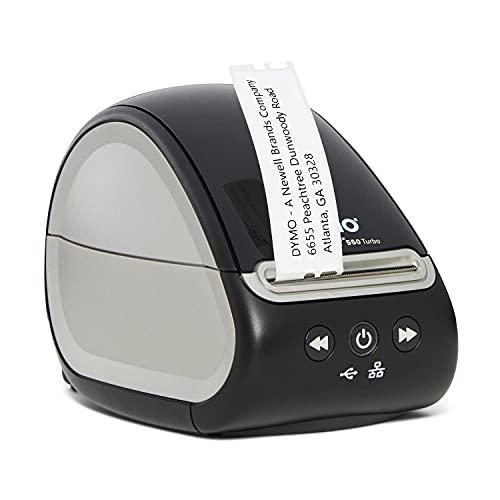
DYMO LabelWriter 550 Turbo
Best for: a busier counter or small packing bench needing high-speed thermal labels with a wired network option.
Not suited for: phone-only workflows — the title’s connectivity story is USB and LAN, not Bluetooth.
- Print method, per title: high-speed direct thermal printing
- Connectivity, per title: USB and LAN network connectivity
- Consumables, per title: no ink or toner needed
- Stated uses, per title: shipping, mailing, postage
- Series: LabelWriter 550 family
- Speed in labels per minute: Not stated in the listing title — verify with the manufacturer documentation
The Turbo variant of the 550 answers the question its sibling leaves open: what happens when the counter gets busy. High-speed direct thermal printing heads the title, and LAN network connectivity joins USB — a pairing that moves the machine from one person’s counter to a small team’s shared bench. A wired network label printer can live where the packing happens and serve whichever computer is running the day’s orders, which is exactly the geometry of a growing food business whose labels now include shipping and postage work alongside ingredients and dates.
DYMO’s own title for the Turbo leads with shipping, mailing and postage, and a food guide should honour that framing while extending it honestly. The same speed and reliability that move parcels also move production labels — the machine does not know whether the roll carries a shipping label or a use-by date, and a producer whose business ships what it makes will use both, sometimes in the same hour. The Turbo is the natural single machine for that combined duty.
No ink or toner, the title reminds, and at higher volumes that absence compounds: no cartridge inventory beside the label rolls, no print-quality drift as a cartridge ages, just thermal consistency from the first label of a run to the last. Speed claims deserve the usual discipline — the title says high-speed without a labels-per-minute figure, so the spec box records the absence and documentation holds the number.
Between the two DYMOs, the choice is a workload census. A single counter with seasonal rhythm belongs to the standard 550; a bench with daily volume and more than one computer belongs to the Turbo, whose LAN port is the smallest feature in this guide with the largest organisational consequences.
Strengths
- High-speed direct thermal printing for busier counters.
- USB and LAN connectivity lets a small team share one label station.
- No ink or toner at any volume the machine will meet.
Trade-offs
- No numeric speed appears in the title despite the high-speed claim.
- Bluetooth and phone-first printing are not part of the title’s story.
- The 550-series branded-label ecosystem applies here as well.
The LAN connection also future-proofs the bench in a way worth spelling out. The day a second packer joins — a partner, a Saturday helper, a second computer for orders — a USB-only printer becomes a small bottleneck of cables and computer-sharing etiquette. A networked label station simply serves whoever sends the job, from wherever in the premises they sit. Food businesses grow in exactly this lumpy, person-at-a-time way, and the Turbo’s connectivity is priced and specced for the growth rather than for the launch. Buying it one stage early is among the cheaper forms of foresight available to a small producer.
Growing producers weighing the network step can read the connectivity wording on the product page; the DYMO LabelWriter 550 Turbo sits at Check price on Amazon for that comparison.

Brother QL-820NWB
Best for: a professional labelling point — deli counter, bakery bench, farm shop — needing flexible connections for varied label work.
Not suited for: ordering on a fully spelled-out specification list alone — this title is terse, and several details live only in documentation.
- Print method: professional label printing, monochrome
- Flexibility, per title: ultra flexible
- Connectivity, per title: multiple connectivity options
- Series: Brother QL professional range
- Colour printing: monochrome only, per title
- Label width range: Not stated in the listing title — verify with the manufacturer documentation
The QL-820NWB arrives with the shortest title in this guide and one of the strongest professional pedigrees: a Brother QL machine described as professional and ultra flexible, with multiple connectivity options, printing in monochrome. Brevity in a title is not absence in the machine — the QL range is Brother’s dedicated label line, built for counters, offices and warehouses — but this guide’s discipline is to quote what is given and flag what is not, so the spec box pairs the stated claims with silence sentences where a buyer needs documentation to proceed.
What the title does promise maps well onto food-counter reality. Professional positioning means a machine designed for daily commercial duty rather than occasional home use. Ultra flexible, in a label printer’s vocabulary, points at the range of label work the machine absorbs — different widths and types for different products, which is precisely the situation of a bakery labelling loaves, cakes and deli pots from one station. Multiple connectivity options means the machine can join the counter’s existing setup rather than demanding a new one.
Monochrome printing is the honest limitation to weigh. Ingredient and date labels live happily in black — the information is text, and text is monochrome’s home ground. Branding-heavy labels, where a logo’s colour carries recognition, belong to a different production method entirely, usually pre-printed stock onto which a machine like this adds the variable data: dates, weights, batch codes. That hybrid — beautiful pre-printed brand labels, thermally printed variable information — is how many admired small brands actually produce their packaging, and the QL-820NWB fits it perfectly.
Buyers drawn to this model should do the documentation reading its title invites: confirm the label widths, the exact connectivity set and the software story, then judge it as the professional instrument it positions itself to be.
Strengths
- Professional QL lineage built for daily commercial labelling.
- Multiple connectivity options suit established counter setups.
- Flexibility across label work matches multi-product food businesses.
Trade-offs
- Monochrome only, so colour branding needs pre-printed stock or another route.
- The terse title leaves widths and speeds to documentation.
- Professional positioning exceeds a hobbyist’s labelling needs.
There is a counter-psychology point in this Brother’s favour. Professional label printers disappear into a business’s routine in a way app-driven makers do not: they sit connected, stocked and ready, indifferent to whose phone is charged or which app updated overnight. For a farm shop or deli where staff rotate and the labelling must be identical on every shift, that institutional reliability outweighs the charm of phone-native design. The QL-820NWB is the guide’s pick for labelling as infrastructure — installed once, trusted by everyone, and judged, correctly, by how rarely it is discussed.
Counters considering the professional step should start from the listing and continue into the documentation it points to; the Brother QL-820NWB is listed at Check price on Amazon as the entry point.

Brother QL-810W
Best for: fast runs of address-style and date labels where a red highlight — for use-by dates or allergen flags — earns its place.
Not suited for: full-colour label designs — the palette is black and red, and the title says so plainly.
- Print method: professional label printing, monochrome base
- Speed, per title: ultra-fast 110 labels per minute
- Colour capability, per title: black and red printing
- Connectivity, per title: USB and WiFi
- Stated format, per title: standard address labels among its uses
- Series: Brother QL professional range
The QL-810W owns this guide’s only stated speed, and it is a startling one: 110 labels per minute. At that pace, labelling stops being a stage in production and becomes a gesture — a morning’s jars labelled between two other tasks, a freezer restock dated in minutes. Speed at this level also changes error economics: a misprinted run costs seconds to redo, which makes producers more willing to fix the label that is merely slightly wrong, and label quality across the whole business quietly rises.
Black and red printing is the second distinction, and food work gives it a natural job. A use-by date in red commands the eye in a way black text among black text never does; an allergen line in red separates itself from the ingredient list it warns about; a price-reduction or short-date mark in red is understood at a glance by staff and customers alike. Two-colour thermal printing is a narrow capability with an unusually high usefulness density for food labelling specifically.
USB and WiFi together cover the connection habits of small premises: the bench computer wired in, the laptop or second station joining wirelessly. The title’s mention of standard address labels signals the machine’s office heritage, and food producers should read it as a size clue — the address-label format is close kin to the labels that fit jars, tubs and bakery boxes — while confirming exact stock options in documentation.
Against its QL sibling above, the 810W trades the flagship’s breadth for stated speed, two colours and wireless convenience. A single-premises food business will usually find that trade favourable; the labels fly, the dates shout in red, and the counter keeps moving.
Strengths
- A stated 110 labels per minute — production labelling without the wait.
- Black and red printing gives dates and allergen flags real visual priority.
- USB and WiFi cover wired and wireless counter setups.
Trade-offs
- Two colours is not full colour; branded artwork still needs another route.
- The speed figure assumes suitable label stock and run conditions.
- Professional features exceed what a tiny home operation will use.
The red capability deserves one more practical exploration, because its best use is systematic rather than occasional. Producers who adopt the QL-810W often standardise a visual grammar across their whole range: dates always in red, allergens always in red, everything else in black. Customers learn the grammar without being taught it, staff checking shelves spot the red fields first, and the use-by discipline of the entire business gains a visual enforcement mechanism. A feature that begins as a printing option becomes, used consistently, part of the brand’s trustworthiness — the kind of compounding return that justifies professional equipment.
Producers whose dates deserve red ink can inspect the label range on the product page; the Brother QL-810W appears at Check price on Amazon with its stock options.
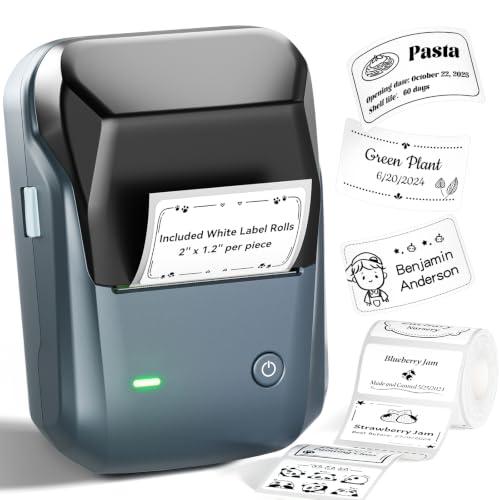
NIIMBOT B1
Best for: home producers and market beginners labelling jars, tubs and pantry containers straight from a phone.
Not suited for: wide shipping labels or high-volume runs — the 2-inch width and app-driven design define a small-label instrument.
- Print method: label maker, thermal
- Width, per title: 2 inch
- Connectivity, per title: Bluetooth; supports smartphones and PC
- Included, per title: 1 roll of white labels, 2×1.2 inches
- Finish, per title: blue
- Audience, per title: small business, school, office, home
The NIIMBOT B1 represents the phone-native generation of labelling, and its title assembles the whole proposition: a 2-inch Bluetooth label printer supporting smartphones and PC, sold with a roll of white labels measuring 2 by 1.2 inches, aimed at small business, school, office and home. For a home food producer, that 2-inch width is not a limitation but a fit — it is the size family of jar lids, spice containers, freezer tubs and pantry jars, the exact surfaces a kitchen business labels all week.
Bluetooth and an app change the labelling ritual’s location. The label is designed where the food is — phone in hand at the counter, photographing nothing, typing the bake date, choosing the saved template for the product, printing, sticking. There is no desk session, no computer boot, no separation between production and labelling. For cottage-food producers whose business lives in a domestic kitchen, that integration is worth more than raw speed, because the labelling actually happens, every time, as part of packing rather than as a postponed chore.
The included starter roll matters more than its size suggests: the machine can label its first production run on the day it arrives, and the producer learns the app, the templates and the stock’s behaviour in the freezer before committing to larger stock purchases. That first roll is effectively a training course bundled in the box.
Honesty about scale completes the review. A producer labelling hundreds of units weekly will outgrow an app-driven 2-inch machine’s rhythm, and the professional models above exist for that graduation. But businesses are built in stages, and for the first stage — and for the home pantry labelling that continues alongside any business — the B1’s little blue presence on the counter is very hard to beat.
Strengths
- Bluetooth phone-driven design integrates labelling into packing itself.
- 2-inch format matches jars, tubs and pantry containers precisely.
- A starter roll of labels is included, so production begins on day one.
Trade-offs
- The 2-inch width excludes larger labels and shipping formats.
- App-driven printing suits small runs, not counter volume.
- Stock options should be confirmed for freezer use in documentation.
It is worth describing the B1’s first evening in a real kitchen, because that evening is its sales pitch. The preserves are cooling; the phone already holds the recipe notes; the app offers a template, the producer types the product name and the date, adjusts one line for the batch, and prints a strip of neat labels that make the jars look — suddenly, unmistakably — like products. That transformation matters commercially out of proportion to its cost: labelled goods sell at markets, photograph well for online listings, and reassure customers asking about ingredients. The B1 is the cheapest door into that world in this guide, and it opens from the phone already in the producer’s apron pocket.
Home producers starting their labelling journey can check the current bundle on the listing; the NIIMBOT B1 is offered at Check price on Amazon in its blue finish.

Phomemo 241BT
Best for: online food sellers whose packing bench prints shipping labels and product labels from the same small Bluetooth machine.
Not suited for: counter-template workflows on a wired network — this is a wireless, app-centred printer through and through.
- Print method: Bluetooth thermal label printer
- Format, per title: 4×6 wireless shipping label capability
- Compatibility, per title: iPhone, Android, Shopify, USPS
- Included, per title: 20 labels
- Finish, per title: pink
- Audience, per title: small business and package work
The Phomemo 241BT closes the guide at the point where food businesses increasingly live: online. Its title leads with 4×6 wireless shipping labels and names iPhone, Android, Shopify and USPS compatibility — the vocabulary of a seller whose products travel by post. For a food producer shipping shelf-stable goods — spice blends, preserves, baked goods with a shelf life, coffee, confectionery — that shipping capability is not adjacent to the business; it is the business’s front door, and a printer that handles it natively earns its bench space before a single ingredient label is printed.
The food-labelling role arrives through the same app-driven flexibility that serves the NIIMBOT’s audience, at a larger maximum format. A machine that accepts 4×6 stock can also print the smaller labels a product line needs, and the app’s templates let a seller keep the shipping workflow and the product-labelling workflow in one place, one device, one habit. Twenty included labels start the relationship; the pink finish makes the machine a deliberate presence on a small seller’s bench rather than a grey appliance.
Bluetooth is the whole connection story here, stated in the title’s first three words, and for the phone-run business that is a feature rather than a gap: the seller’s phone already holds the orders, the shop app and the label designs, so the printer joins the phone’s world instead of demanding a desk computer’s. Sellers whose packing bench has outgrown phone-only work should look at the LAN-equipped DYMO Turbo above; sellers whose bench is a phone and a scale will feel recognised by this design.
Thermal printing’s no-ink economy completes the small-seller case. The consumable is the label stock itself, the machine asks nothing else, and a seasonal seller can drawer it for a month and print the first returning order’s label without a warm-up ritual.
Strengths
- 4×6 shipping capability with named shop and carrier compatibility.
- Bluetooth phone-driven design matches online sellers’ actual workflow.
- One machine spans shipping labels and smaller product labels.
Trade-offs
- Only 20 labels are included — a starter gesture, not a supply.
- No wired or LAN option appears in the title.
- High-volume counters will outgrow its app-centred rhythm.
The online seller’s bench has its own economics of attention. Orders arrive through the shop platform the title names; the phone that receives them also designs the labels and drives the printer; the scale, the tape and the 241BT complete a packing station that fits a spare-room desk. Every device removed from that chain — no computer to boot, no cable to trail — shortens the distance between an order arriving and a parcel leaving. For sellers whose food products ship daily in modest counts, that shortened distance is the business’s margin of sanity, and the Phomemo was clearly designed by people who had stood at such a bench.
Online sellers comparing the phone-driven options can review the compatibility list on the product page; the Phomemo 241BT is presented at Check price on Amazon in pink.
Comparison Table
| Pick | Family | Stated speed | Connection story | Standout claim |
|---|---|---|---|---|
| DYMO LabelWriter 550 | Professional counter | Title silent | Title silent | Automatic recognition of branded labels |
| DYMO LabelWriter 550 Turbo | Professional counter | High-speed, figure silent | USB and LAN | Network sharing for busier benches |
| Brother QL-820NWB | Professional counter | Title silent | Multiple options | Ultra flexible professional range |
| Brother QL-810W | Professional counter | 110 labels per minute | USB and WiFi | Black and red printing |
| NIIMBOT B1 | App-driven small label | Title silent | Bluetooth | 2-inch format; starter roll included |
| Phomemo 241BT | App-driven small label | Title silent | Bluetooth | 4×6 shipping labels; shop compatibility |
How to Choose
Counter machine or phone-driven maker?
This is the guide’s master question, and it is about workflow rather than budget. A counter machine — either DYMO, either Brother — assumes labelling happens at a station, from templates, often by more than one person, at volumes where speed and stock capacity matter. A phone-driven maker — NIIMBOT or Phomemo — assumes labelling happens where the food is, from an app, by the producer, in the flow of packing. Businesses migrate from the second pattern to the first as volume grows, and many keep a small Bluetooth maker forever for the odd jobs. Choose for the pattern you have this season, and let next season’s growth make its own case. Producers whose labelling grows into general document volume alongside should also keep high-volume inkjet printers built for page counts in mind for the paperwork side of the business.
What label stock does food work actually need?
Match stock to environment, in generic terms. Freezer labels need adhesive that holds at low temperatures and a face that tolerates frost and condensation. Fridge and pantry labels need resistance to splashes and handling. Counter and shelf labels need scuff tolerance and clean removal when prices change. None of that is a printer specification — it is a stock specification, chosen per product line, and every machine here should be paired with stock chosen for the coldest, wettest environment its labels will meet. Buy a small quantity first, freeze it, wash it, live with it for a fortnight, then commit.
How much label width is enough?
Measure the products, not the brochure. Jam jars, spice tins and tubs live in the NIIMBOT’s 2-inch world. Bakery boxes and larger containers want the professional machines’ wider stock. Shipping needs the 4×6 format the Phomemo names. A producer with both product labels and shipping labels must either span formats with one flexible machine or accept two specialised ones — a common and perfectly rational arrangement in small food businesses.
What belongs on a compliant-feeling food label?
Local rules govern the specifics, and this guide is not a legal source — but the recurring elements producers plan templates around are the product name, the ingredient list in the required order, allergen emphasis, net quantity, the producer’s identity, and the date mark appropriate to the product. Design templates with room for all of them from the start, because retrofitting an allergen line into a finished design on packing morning is how mistakes happen. The printer’s contribution is legibility and consistency; the content remains the producer’s responsibility, checked against the rules of the market being sold into.
How many label sizes should a small range carry?
Fewer than instinct suggests. One size for jars and tubs, one for boxes and larger containers, and the shipping format if the business posts its goods — three sizes cover most small ranges, and each additional size multiplies stock-keeping and template maintenance. Producers with a flair for packaging should let the products’ containers argue for any exception, rather than collecting sizes speculatively and discovering that half the stock drawer serves one seasonal line.
What should be checked before the first market day?
Print one of every label the stall will use, stick them on the real containers, freeze the frozen ones, chill the chilled ones, and carry one crate through a mock market morning. Labels that survive rehearsal survive the season; labels that fail in rehearsal fail cheaply. That single dry run is worth more than any specification in this guide.
When does red printing matter?
When a date or a warning must win the eye’s first glance. The Brother QL-810W’s black-and-red capability is the only two-colour option here, and food work is unusually rich in text that deserves priority — use-by dates, allergen flags, short-date marks. If your labels carry such lines daily, two-colour printing is not decoration; it is communication design, and it may justify the model on its own.
Label Stock, Freezers and Condensation: A Practical Primer
The freezer is the harshest critic a label will ever meet. Adhesives stiffen as temperatures fall, so a label applied to a room-temperature container before freezing behaves differently from one applied to an already-frozen surface — apply before freezing wherever the workflow allows, and press firmly, because the bond forms in that first contact. Condensation is the second critic: a label that survives the freezer may still meet a wet bench, a steamed kitchen or a customer’s damp shopping bag, and water-resistant stock earns its premium in exactly those moments. Test the full journey — freeze, thaw, wipe, handle — with the actual stock on the actual container before a production run depends on it.
Thermal print itself has a temperament worth respecting. The printed image is a heat-triggered reaction in the stock’s coating, and sustained heat or strong sunlight can fade it over time. Pantry and freezer labels live in the dark and the cold, which suits thermal perfectly; a label destined for a sunny market stall display should be tested there too, and producers whose jars sit in shop windows for months often keep display stock separate from sale stock for exactly this reason.
Finally, removal matters to any business reusing containers. Some stocks release cleanly from glass after a soak; others are effectively permanent. Match the ambition — returnable jars in a deposit scheme want releasable labels; retail jars want labels that survive the customer’s dishwasher curiosity intact. The printer is indifferent; the stock decides.
Templates and Batch Discipline for Packing Day
The producers whose labelling never goes wrong share a habit: the template is finished before the food is. Each product owns a saved template with its ingredients, allergen emphasis and layout locked; packing day edits only the variables — the date, the batch identifier, the weight where it varies. That separation between the fixed and the variable is the entire secret. It converts labelling from a writing task performed under time pressure into a printing task performed by routine, and it is available in every ecosystem in this guide, from the DYMO software’s saved layouts to the phone apps’ stored designs.
Batch discipline extends the same idea. One production run, one batch code, printed in one session, with the count of labels printed reconciled against the count of units packed. A mismatch is a question to answer before the market, not at it. Keep a notebook — paper suits kitchens — of batch codes and dates; when a customer asks a question in three weeks, the answer exists. The printers in this guide make the labels; the discipline makes the system, and customers can taste the difference even if they never see it.
Cottage-Food Labelling: Where Small Producers Start
Most food-labelling journeys begin under cottage-food rules — the frameworks many regions offer for low-risk foods made in home kitchens and sold directly. The details differ by place and this guide deliberately stays general, but the labelling pattern is consistent: the producer’s identity, the product’s name and ingredients, allergen information, and a statement that the food was made in a home kitchen where the rules require one. A label printer’s role in that pattern is consistency. The statement that must appear appears identically on every unit, the ingredient order stays as approved, and the producer’s records — templates saved, batches logged — demonstrate the seriousness that market organisers and inspectors look for.
The growth path from cottage beginnings also explains this guide’s two families. The app-driven makers serve the cottage stage perfectly: low commitment, phone-native, sized for jars and tubs. Success creates the counter stage — a market stall with volume, a farm shop shelf, a wholesale account — and the professional machines wait there with their speed, stock capacity and template systems. Producers should buy for the stage they are in while recognising the staircase exists; the mistake is not starting small, it is starting with equipment whose stock ecosystem cannot follow the products as they grow.
Common Mistakes
Handwriting dates on an otherwise printed label. The hybrid looks improvised and invites transcription errors on the one field that matters most. Print the variable data with the rest, in the same session.
Testing label stock only at room temperature. A label that behaves on the bench may surrender in the freezer by Friday. Test in the real environment, across a full freeze-thaw cycle, before committing a product line to a stock.
Designing the label before measuring the container. Text that wraps a jar’s curve disappears at its edges. Measure the flat, readable area of the actual packaging and design inside it.
Treating allergen information as a design afterthought. Allergen emphasis needs planned space and visual priority in the template from the first draft — the Brother’s red printing exists partly for this. Retrofits breed cramped, error-prone labels.
Buying the printer before the stock ecosystem. The machine is the smaller commitment. Confirm that stock in your sizes, in freezer-grade and water-resistant forms, exists for the model you favour — especially inside branded ecosystems.
Printing the whole season’s date labels in advance. Dates change, recipes change, plans change. Thermal labels are cheap to print in the session they are needed; advance printing converts flexibility into waste.
Assuming a shipping printer cannot label food, or the reverse. The Phomemo’s dual life in this guide is deliberate: format range, not marketing category, decides what a thermal printer can label. Judge by width and stock, not by the box’s headline.
Labelling before the containers are fully cooled or dried. Steam and surface moisture defeat adhesives quietly, and the label that lifts on market morning was usually applied to a warm, damp jar. Cool, dry, then label — in that order, every time.
Keeping the only copy of a template on one phone. Templates are business records. Back them up wherever the app allows, because a lost phone should cost a phone, not the entire label library.
Frequently Asked Questions
Are any of these printers certified for food use?
No title in this guide claims food-safe or food-certified status, and the article makes no such claim for any pick. These are general label printers applied to food packaging — labels on jars, boxes and containers — with suitability coming from label stock chosen for the environment, not from a food certification on the machine.
Will thermal labels survive the freezer?
The print will; the question is the stock. Freezer-grade label stock is formulated to keep its adhesive bond at low temperatures, and choosing it — then testing a full freeze-thaw cycle on your own containers — is the reliable path. Standard stock on a frozen tub is the classic failure this guide’s stock section exists to prevent.
Which pick prints fastest?
On stated evidence, the Brother QL-810W, at an ultra-fast 110 labels per minute in its title. The DYMO Turbo claims high-speed printing without a figure, and the remaining titles are silent on speed, so their pace is a documentation question.
Can the small Bluetooth printers handle ingredient lists?
Yes, within their width. A 2-inch label carries a compact ingredient and date layout for jars and tubs, designed in the app with small but legible type. Products with long ingredient declarations may need the wider stock of the professional machines or a two-label arrangement — ingredients on one label, dates and branding on another.
What is the advantage of the DYMO recognition system?
Certainty. The printer identifies genuine loaded stock automatically, so the software always knows the label size and remaining count, and templates print as designed. The trade is commitment to the branded ecosystem, weighed in the DYMO reviews above.
Do these machines need ink?
None of them. All six print thermally — the image is produced by heating treated label stock — so the only consumable is the labels themselves. Producers whose labelling expands into posters and menus for the stall should look beyond labels entirely, toward display options such as nebula projectors for market-night signage experiments.
How should labels be stored before use?
Cool, dry and out of sunlight — thermal stock is a heat-sensitive material, and a roll left on a sunny windowsill or above a warm oven ages before it prints. A drawer near the packing bench is the traditional and correct answer.
Can one printer serve both a market stall and an online shop?
Yes, if its format range spans the product labels and the shipping labels — the Phomemo’s 4×6 ceiling is the clearest example here — or if the business accepts a two-machine bench, which many do happily: a small maker for jars, a counter machine for volume.
What is the most common reason labels get reprinted?
A changed variable discovered late — a corrected date, a revised weight, an ingredient substitution. The template discipline described earlier shrinks the category to genuine changes, and printing in session-sized runs keeps the cost of each correction at a handful of labels rather than a drawer of obsolete stock.
Should the market stall bring a spare roll?
Always. Stock is the only consumable these machines have, and a sold-out Saturday with unlabelled stock is the one failure no feature can fix. A spare roll of each size in the market crate is the cheapest insurance in the entire business.
How legible is legible enough for ingredient text?
Legible at arm’s length, in market light, to a customer holding the jar at reading distance — that is the practical standard. If the producer must squint at the proof, the type is too small, and the answer is a larger label or a two-label layout, never a smaller font squeezed harder into the same space.
When should a producer graduate from an app-driven maker to a counter machine?
When labelling time becomes visible in the production schedule — when the jars wait for the labels rather than the labels appearing inside the packing flow — the counter stage has arrived. A second sign is staff: the moment someone else must produce identical labels in the producer’s absence, template systems and shared connections stop being luxuries.
Does the label printer need its own spot in the kitchen?
A small one, kept dry and away from the steamiest work. Thermal printers are tolerant machines, but stock and electronics both prefer a calm corner of the bench — ideally the same corner where packing happens, so the labelling station and the packing station become one place.
Final Recommendation
Match the machine to the labelling pattern and the choice resolves: the phone-driven NIIMBOT B1 for home producers labelling jars in the flow of packing, the Phomemo 241BT for online sellers whose bench prints shipping and product labels together, the Brother QL-810W where stated speed and red date printing serve a busy counter, the QL-820NWB for professional flexibility across a varied product range, and the two DYMO 550 models — standard for a single counter, Turbo for a networked bench — where automatic label recognition and template certainty are worth a branded ecosystem. Choose the stock for the freezer your labels will actually meet, lock the templates before packing day, and the smallest print in your business will carry its weight. Sellers ready to widen the stall’s reach further can read about LG projectors for evening market displays as the next experiment.


