What's inside
- Key Takeaways
- Quick Picks
- How Did We Balance Combinations, a Voice Specialist and a Bare Modem?
- What Changes When You Replace the Xfinity Gateway With Your Own Box?
- The Six Xfinity Picks in Detail
- How Do Xfinity’s Tiers Map Onto These Six Devices?
- Where Should an Owned Gateway Sit in an Xfinity Home?
- What Does the Rental Arithmetic Really Look Like Over Five Years?
- When the Signal Itself Is the Problem, How Can You Tell?
- What Security Setup Does an Owned Gateway Deserve on Day One?
- How Should a Work-From-Home Household Choose Among These Picks?
- What Happens to an Owned Modem When You Move House?
- Why Do Some Xfinity Households Keep a Separate Router Even With a Combination?
- How Should You Judge the First Week With the New Gateway?
- What Separates a Good Xfinity Setup From a Merely Working One?
- Which Pick Survives a Tier Upgrade Best?
- Xfinity Shelves Compared: Combinations, Voice and One Bare Modem
- How Do You Activate an Owned Modem on Xfinity Without a Support Marathon?
- What Mistakes Do Xfinity Gateway Replacers Keep Making?
- Final Recommendation
- Frequently Asked Questions
- Related Guides
As an Amazon Associate I earn from qualifying purchases. This post may contain affiliate links at no extra cost to you.
widgetverdict.com is reader-supported. When you buy through links on our site, we may earn an affiliate commission.
Where to buy: every pick below is sold through Amazon and the usual electronics channels, linked here to the listing whose title states its Xfinity compatibility outright. Xfinity’s own approved-device list remains the final authority — check your exact model and your exact tier there on the day you order, because approvals are Comcast’s to grant and to retire.
The best comcast xfinity routers share one job — replacing the rented Xfinity gateway and its monthly fee — and divide into three honest shapes. Four picks are DOCSIS 3.1 modem-router combinations: ARRIS’s Surfboard G34 and G20, NETGEAR’s Nighthawk CAX30S, and NETGEAR’s Orbi CBK752 mesh combination for larger homes. One pick, the Nighthawk C7100V, is a DOCSIS 3.0 combination with a specialism nothing else here offers: support for Xfinity Voice, with two phone lines. And one pick, Motorola’s MB7621, is not a router at all — it is a modem only, DOCSIS 3.0, which must be paired with a separate router you supply. That last distinction is printed in its section, its table row and its verdict, because buying a bare modem while expecting Wi-Fi is the classic Xfinity shopping accident.
Compatibility language in this category deserves a careful eye. These listings name Xfinity directly — several name Cox and Spectrum alongside — but a listing’s claim describes the model’s approval generally, while your service depends on your tier: a device approved for the network may still not be approved for your speed. The picks below are therefore described with their plan ceilings attached, exactly as their titles state them, so the matching exercise stays arithmetic rather than hopeful.
Key Takeaways
- Four picks are DOCSIS 3.1 combinations (G34, G20, CAX30S, Orbi CBK752) built for plans up to the gigabit class, with Xfinity named in every listing.
- The Motorola MB7621 is a modem only — DOCSIS 3.0, no Wi-Fi, no routing — and requires a separate router; it is approved by Comcast Xfinity per its listing for plans up to 900 Mbps.
- The C7100V is the voice pick: it supports Xfinity Cable and Voice plans up to 600 Mbps with two phone lines, on DOCSIS 3.0 with AC1900 Wi-Fi.
- Port counts separate the ARRIS siblings: G34 carries four 1 GbE ports, G20 carries two — same AX3000 Wi-Fi, same 2,500 sq ft claim.
- The Orbi CBK752 is the coverage answer: a DOCSIS 3.1 modem inside a tri-band AX4200 mesh system for homes one box cannot serve.
- Your tier on Xfinity’s current approved list is the only compatibility confirmation that counts.
Quick Picks
| Pick | Badge | Why it is here |
|---|---|---|
| ARRIS Surfboard G34 Modem Router | Gigabit-plan all-rounder | DOCSIS 3.1 plus AX3000 Wi-Fi 6, up to 1 Gbps plans, 2,500 sq ft, four 1 GbE ports, Xfinity named. |
| ARRIS Surfboard G20 Modem Router | Gigabit-plan lean version | The G34’s brief with two 1 GbE ports — AX3000, up to 1 Gbps plans, same coverage claim. |
| NETGEAR Nighthawk CAX30S Modem Router Combo | Nighthawk alternative | DOCSIS 3.1 with Wi-Fi 6 at 2.7 Gbps, four gig ports, guided setup and Xfinity compatibility stated. |
| NETGEAR Orbi CBK752 | Mesh combination for big homes | A DOCSIS 3.1 modem inside a tri-band AX4200 mesh Wi-Fi 6 system, for coverage a single box cannot give. |
| NETGEAR Nighthawk Cable Modem WiFi Router Combo with Voice | Xfinity Voice specialist | DOCSIS 3.0 combination supporting Xfinity Voice plans up to 600 Mbps, two phone lines, AC1900 Wi-Fi. |
| Motorola MB7621 Cable Modem | Modem only — bring a router | DOCSIS 3.0 modem approved by Comcast Xfinity for plans up to 900 Mbps; pairs with any Wi-Fi router you choose. |
How Did We Balance Combinations, a Voice Specialist and a Bare Modem?
By starting from the three questions an Xfinity household actually asks. Can I stop renting? Every pick answers yes, subject to tier approval. Do I have Xfinity Voice? Only the C7100V answers yes, and households with a Comcast phone line should treat that as a gate, not a feature — a combination without voice support orphans the phone service. Do I already own a router I love? Then the MB7621’s modem-only shape is not a deficiency but the correct architecture, and the combinations are the wrong shelf entirely. Picks were then graded inside their answers on the evidence of their titles: plan ceilings, Wi-Fi class, port counts, coverage claims and the explicitness of their Xfinity language.
One evidential rule ran throughout: compatibility is claimed only as far as each title claims it. Where a listing says “works with Xfinity”, the guide says the listing says so — and then sends you to Xfinity’s list, because Comcast revises approvals as tiers evolve and a guide cannot outrank the provider on the provider’s own network. Households cross-shopping the same hardware for a Spectrum line will find the sister analysis in Best Cable Modem Routers That Work with Spectrum, where the approval conversation is Spectrum’s rather than Comcast’s.
What Changes When You Replace the Xfinity Gateway With Your Own Box?
Three things change and one thing does not. The rental line leaves the bill — the change everyone came for. The Wi-Fi becomes yours: your name, your password, your placement, your upgrade schedule, rather than a gateway whose radios and features Comcast chose. And the support boundary moves: Xfinity remains responsible for the signal reaching your home, while the equipment inside becomes yours to tend, which is a fair trade most owners are glad to make. What does not change is the service itself — the tier, the street’s capacity, the evening behaviour of your neighbourhood’s node. An owned combination removes the modem as a bottleneck and the rental as a cost; it does not promote a 600 Mbps subscription into a gigabit one, and the C7100V’s voice support exists precisely because one bundled service — the phone line — does not automatically survive the swap.
Plan the swap as an errand with a sequence: confirm approval for your tier, buy, activate with the new unit’s MAC address in hand, set up Wi-Fi before moving devices across, run the first evening’s checks, and only then return the rented gateway — through a channel that gives you a receipt, keeping the receipt until the rental line demonstrably vanishes from the bill. Households that keep a home office through the swap should also think about the outage hour itself; the backup-connection thinking in Best Routers for Tethered Phone Failover is the natural companion reading for anyone whose work cannot pause while a modem activates.
The Six Xfinity Picks in Detail

ARRIS Surfboard G34 Modem Router — Gigabit-plan all-rounder
The G34 is the centre of this guide for a reason: a DOCSIS 3.1 cable modem and an AX3000 Wi-Fi 6 router in one box, aimed at plans up to 1 Gbps, covering up to 2,500 sq ft, with four 1 GbE ports and Xfinity named first among its providers. That is the exact shape of the mainstream Xfinity household’s need — a gigabit-class tier, a family-sized home, a television cluster that wants wiring, and a rented gateway to hand back. ARRIS’s Surfboard name carries the modem credibility; the AX3000 class carries the modern wireless workload without flagship pricing theatre.
Its limits are the honest ones of its class. AX3000 is right-sized, not future-proofed; a household already dense with Wi-Fi 6 devices and hungry for more wireless ceiling should look at the CAX30S’s positioning or the Orbi’s mesh architecture. And 2,500 sq ft is a coverage claim under favourable construction — a long ranch or a masonry house of the same area may still argue with a single unit’s geography. Within those limits, the G34 is the pick this guide expects most readers to buy, because most Xfinity households are, in fact, its brief.
- Type: DOCSIS 3.1 cable modem and Wi-Fi 6 router combination
- Plan class: up to 1 Gbps plans, as listed
- Wireless: AX3000 Wi-Fi 6; coverage up to 2,500 sq ft
- Wired: four 1 GbE ports
- Compatibility: works with Xfinity, Cox, Spectrum, per the listing
Strengths
- The mainstream gigabit-plan brief, complete in one box.
- Four gigabit ports match the wired entertainment cluster.
- Surfboard modem lineage behind the half that faces Comcast.
Trade-offs
- AX3000 is a right-sized class, not a headroom class.
- Single-unit coverage obeys placement physics in larger homes.
- Combination fate-sharing at upgrade time, as with all gateways.
Best for: a mainstream Xfinity household on a gigabit-class plan, ending the rental with one complete box.
Not suited for: a large or masonry home expecting one unit’s radios to cover every room unaided.

ARRIS Surfboard G20 Modem Router — Gigabit-plan lean version
The G20 is the G34 with two ports removed and everything else — DOCSIS 3.1, AX3000 Wi-Fi 6, up to 1 Gbps plans, 2,500 sq ft coverage claim, Xfinity among its named providers — left standing. That makes its buyer easy to picture: the flat-dweller or small-house household whose wired world is a television and maybe a console, whose everything else lives on Wi-Fi, and who sees no reason to pay for sockets that will hold dust. Two 1 GbE ports serve that household completely.
The risk is purely temporal. Wired appetites grow — a desk appears, a network drive arrives, a games console multiplies — and the G20 household that outgrows two ports will add a small switch, which is a modest and honourable outcome rather than a failure. Choose between the ARRIS siblings by counting the cables you own today and the ones you can honestly foresee; the modem and wireless halves will not distinguish them for you, because ARRIS deliberately built them identical where it counts.
- Type: DOCSIS 3.1 cable modem and Wi-Fi 6 router combination
- Plan class: up to 1 Gbps cable plans, as listed
- Wireless: AX3000 Wi-Fi 6; coverage up to 2,500 sq ft
- Wired: two 1 GbE ports
- Compatibility: works with Xfinity, Cox, Spectrum, per the listing
Strengths
- The full G34 modem and Wi-Fi brief in a leaner, simpler box.
- Gigabit-plan class retained — only the port count is trimmed.
- An honest price posture for wireless-first households.
Trade-offs
- Two ports will eventually meet a household that grew.
- No other distinction from its sibling to hide behind if needs change.
- Same single-unit coverage physics as every combination here.
Best for: a wireless-first flat or small home on a gigabit-class Xfinity plan with minimal wired devices.
Not suited for: a household wiring a desk, a drive and a console today and expecting ports to spare.

NETGEAR Nighthawk CAX30S Modem Router Combo — Nighthawk alternative
The CAX30S is NETGEAR’s answer to the same brief: a DOCSIS 3.1 modem fused with a Wi-Fi 6 router at the 2.7 Gbps class, multi-gig positioning in its listing, four gig ports, dual-band operation, guided setup and free expert help, with Xfinity, Spectrum and Cox compatibility stated. The Nighthawk name brings its own ecosystem expectations — a setup experience and app culture that NETGEAR households already know — and for a buyer choosing between this and the G34, the honest grounds are those: brand ecosystem, the day’s pricing, and which box’s face they prefer on the shelf, because the specifications are close cousins.
Where the CAX30S distinguishes itself is the support language in its title — guided set up, free expert help — which matters disproportionately in this category, because activation day is where Xfinity swaps succeed or stall. A first-time gateway replacer who values a guided path and a human at the end of it is not buying fluff; they are buying insurance on the one afternoon the whole purchase depends on. The combination caveats apply unchanged: one box, one location, modem and router retiring together when the household’s ambitions eventually fork.
- Type: DOCSIS 3.1 modem router combination
- Wireless: Wi-Fi 6, 2.7 Gbps class, dual-band
- Wired: 4x gig ports; multi-gig positioning as listed
- Compatibility: Xfinity, Spectrum, Cox named in the listing
- Support: guided set up and free expert help as listed
Strengths
- Nighthawk ecosystem and setup culture in combination form.
- Four gig ports and multi-gig positioning keep the wired side honest.
- Guided setup plus named expert help suit first-time replacers.
Trade-offs
- Wireless class sits below flagship combinations for very dense homes.
- Brand-ecosystem comfort is a preference, not a performance gap.
- Single-box coverage limits remain the household’s to solve.
Best for: a NETGEAR-comfortable Xfinity household on a gigabit-class plan wanting guided setup in one box.
Not suited for: a multi-room coverage problem expecting a single combination to behave like mesh.

NETGEAR Orbi CBK752 — Mesh combination for big homes
The CBK752 is the pick that dissolves this category’s oldest frustration: the modem lives where the coax arrives, but the home’s life happens elsewhere. It is a DOCSIS 3.1 modem built into an Orbi mesh system — Wi-Fi 6, AX4200, tri-band, 4.2 Gbps class language in the listing, four gigabit ports — so the gateway itself is a mesh citizen, and coverage is extended by the system’s other units placed where the household actually sits. For the large Xfinity home, this is the only pick here whose architecture matches its floor plan.
The costs are the mesh costs: a system price rather than a box price, more devices to place and tend, and a combination’s fate-sharing now multiplied across a system. Judge it against the alternative honestly — a modem plus a separate mesh system is the same architecture bought in two receipts, with the same total ambition. The CBK752’s proposition is integration: one purchase, one ecosystem, the modem native to the mesh rather than a stranger feeding it. Homes whose size makes coverage the first problem — the readers of Best Routers for Large Homes and Multiple Devices will recognise themselves — should start their Xfinity shortlist here and let smaller homes start with the G34.
- Type: DOCSIS 3.1 modem router combination, mesh system
- Wireless: mesh Wi-Fi 6, AX4200, tri-band, 4.2 Gbps class
- Wired: 4x gigabit ports
- Compatibility: Xfinity, Spectrum, Cox named in the listing
- Support: guided set up and free expert help as listed
Strengths
- The only pick solving modem replacement and whole-home coverage together.
- Tri-band mesh architecture with a dedicated conversation between units.
- Keeps four gigabit ports for the wired core at the gateway.
Trade-offs
- System pricing for what smaller homes solve with one box.
- More units to place, power and keep updated.
- Mesh integration ties the modem’s fate to the system’s generation.
Best for: a large Xfinity home on a fast plan whose dead rooms matter as much as its rental fee.
Not suited for: a compact flat paying system prices to cover two rooms.
NETGEAR Nighthawk Cable Modem WiFi Router Combo with Voice — Xfinity Voice specialist
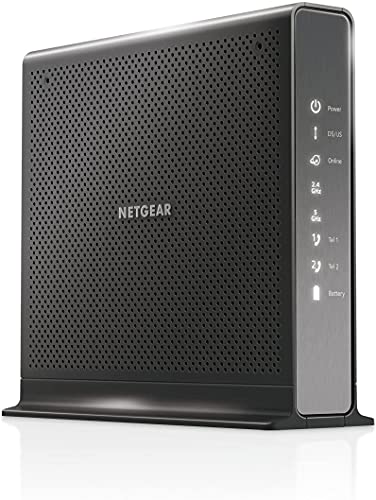
The C7100V exists because of a wire most buying guides forget: the telephone line. Its listing states that it supports Xfinity Cable and Voice plans up to 600 Mbps, with two phone lines, AC1900 Wi-Fi and a DOCSIS 3.0 modem. For the household whose Comcast bundle includes voice — the landline that grandparents call, the number printed on a decade of paperwork — this is not a niche feature but the entire decision, because the other combinations in this guide cannot carry the phone service at all. A gateway swap that silences the house phone is a household incident, and the C7100V is the pick that prevents it.
Its compromises are generational and should be weighed openly: DOCSIS 3.0 rather than 3.1, a 600 Mbps plan ceiling rather than the gigabit class, AC1900 rather than Wi-Fi 6. A voice household on a mid-tier plan will feel none of those as losses — its tier fits the ceiling, its phone works, its rental ends. A voice household planning a gigabit upgrade faces a genuine fork, because the gigabit path and the voice path diverge in current hardware; that household should confirm with Comcast how voice is served on higher tiers before choosing. Everyone without Xfinity Voice should pass this pick by entirely and buy its modern siblings.
- Type: cable modem Wi-Fi router combination with voice
- Modem: DOCSIS 3.0
- Voice: supports Xfinity Cable and Voice plans, two phone lines
- Plan class: up to 600 Mbps, as listed
- Wireless: AC1900 Wi-Fi speed class
Strengths
- The only pick here that keeps an Xfinity Voice line alive through the swap.
- Two phone lines supported, per the listing.
- Ends the gateway rental for voice households that other guides abandon.
Trade-offs
- DOCSIS 3.0 and a 600 Mbps ceiling cap the plan it can serve.
- AC1900 wireless trails the Wi-Fi 6 combinations.
- Pointless premium of complexity for households without voice service.
Best for: an Xfinity Voice household on a plan at or below its stated ceiling, replacing the rented gateway safely.
Not suited for: a gigabit-tier household without voice, buying yesterday’s modem generation for no reason.

Motorola MB7621 Cable Modem — Modem only: bring your own router
Read this heading twice, because it is the most important one in the guide: the MB7621 is a cable modem and nothing else. No Wi-Fi. No routing. One job — DOCSIS 3.0 service, approved by Comcast Xfinity, Cox and Spectrum per its listing, for cable plans up to 900 Mbps — performed for whatever router you pair it with, which its title states outright: “Pairs with Any WiFi Router”. A buyer who understands that sentence owns the separates architecture in its purest form; a buyer who skips it will open the box, look for a network name that does not exist, and blame Motorola for their own headline reading.
For the right household, this is the connoisseur’s pick. The modem is the stable half of a network — DOCSIS generations turn slowly, and a 3.0 modem approved for plans up to 900 Mbps covers most Xfinity tiers below gigabit — while routers evolve quickly and personally. Pair the MB7621 with the mesh system, gaming router or 6E platform of your choosing, replace that router twice across the modem’s life if you wish, and the modem never notices. Its ceiling is its honesty: gigabit-and-above tiers belong to DOCSIS 3.1 modems, and an MB7621 bought for such a tier is the wrong modem however good the router behind it. Matched to its plans, it is the most flexible purchase in this guide precisely because it refuses to be a router.
- Type: cable modem ONLY — no Wi-Fi, no router; a separate router is required
- Modem: DOCSIS 3.0
- Plan class: cable plans up to 900 Mbps, as listed
- Approvals: Comcast Xfinity, Cox and Spectrum, per the listing
- Pairing: works with any Wi-Fi router, per the listing title
Strengths
- Lets the household choose, keep and upgrade its router independently.
- Approved for the big three cable providers, with a high 3.0 plan ceiling.
- One job, done by a maker whose modem lineage is the category’s reference.
Trade-offs
- Contains no Wi-Fi whatsoever — a router purchase is mandatory, not optional.
- DOCSIS 3.0 cannot serve gigabit-class tiers.
- Two devices to place, power and troubleshoot instead of one.
Best for: a household with a router it loves — mesh, gaming or 6E — needing an approved Xfinity modem beneath it.
Not suited for: a shopper expecting Wi-Fi out of this box, or a gigabit-tier line it cannot serve.
How Do Xfinity’s Tiers Map Onto These Six Devices?
Read your bill before you read another specification. Xfinity sells a ladder of tiers, and each pick in this guide was built for a rung: the C7100V’s listing speaks of plans up to 600 Mbps, the MB7621 of plans up to 900 Mbps, the two ARRIS combinations and their DOCSIS 3.1 siblings of the gigabit class. Matching device to rung is the entire compatibility game, and it runs in both directions — a gigabit-class combination on a modest tier is harmless headroom, while a 600 Mbps-ceiling device on a gigabit subscription strands speed you are paying for, at the modem, every hour of every day. Households often discover their true tier only when shopping for the modem, because the rented gateway never asked them to know it.
Two subtleties keep the matching honest. First, plan names and speeds drift over time — providers raise tier speeds quietly, and a device bought with exact-fit headroom can find itself outgrown by its own subscription’s promotion. Buying one rung of headroom, where the price gap is small, is the experienced household’s habit. Second, upstream is the ladder’s hidden side: residential tiers advertise their download figure, while the upload figure that governs video calls and cloud backups stays modest across the rungs these devices serve. No pick in this guide changes your tier’s upstream shape; the modem’s duty is to stop subtracting from it. Judge the swap by whether your evenings improve in the rooms that complained — not by whether a speed test at the modem beats the old gateway’s, which it may barely do, since both were serving the same tier all along.
Where Should an Owned Gateway Sit in an Xfinity Home?
The coax decides the neighbourhood; you decide the rest. A combination radiates from its shelf, so the practical craft is choosing the best shelf the cable run allows — elevated, in open air, as central as the drop permits, clear of the metal and masonry that shadow a whole direction. If the drop lands in a basement corner and the household lives two floors up, no combination in this guide will charm its way through that geometry; the honest answers are a longer coax run to a better room where the installation allows it, a wired access point fed from the gateway’s ports, or the Orbi CBK752’s mesh architecture, which exists precisely to relocate the radios without relocating the modem.
The MB7621 household holds a quiet advantage here that deserves naming: because the modem and router are separate, the modem can stay at the drop in the cupboard while the router — the device whose position matters — migrates to the home’s centre on an Ethernet run. That single architectural freedom is why some households choose separates even when a combination would be simpler, and it is the strongest non-financial argument on the modem-only side of this guide. Judge your own home by its worst seat at its busiest hour, and let that seat, not the shelf by the television, arbitrate between the architectures.
What Does the Rental Arithmetic Really Look Like Over Five Years?
The case for owning is usually made in one line — the rental never ends — and it survives scrutiny, provided the owned device is matched to a tier the household keeps. A gateway rental is a perpetual payment for hardware the provider chose; an owned combination is a single payment for hardware you chose, and across a five-year residence the lines cross early and never cross back. The arithmetic’s enemies are not prices but churn: a household that moves to a fibre street, upgrades beyond its modem’s ceiling, or discovers its bundle needed voice after all, restarts the clock with a second purchase. That is why this guide keeps returning to the tier, the bundle and the floor plan — the three facts that decide whether the owned box serves its full term.
There is also a softer return that rarely enters the spreadsheet: control. The owned gateway’s Wi-Fi name survives a house move; its settings are yours to back up and restore; its replacement happens on your schedule rather than the provider’s truck schedule. Households that have lived both ways rarely describe the saving as the main benefit a year later — they describe the absence of a negotiation. Buy the right shape once, keep the receipt and the label photograph, and the arithmetic and the calm arrive together.
When the Signal Itself Is the Problem, How Can You Tell?
An owned modem makes one diagnostic gift to its household: it separates your equipment from the provider’s plant, so faults acquire an address. If wired speed at the gateway collapses at the same evening hour for the whole street’s pattern — and neighbours’ complaints rhyme with yours — the node is congested and no purchase in this guide fixes it; that is a provider conversation, armed with dates and times. If the modem struggles to lock, drops at random hours, or degrades after weather, suspect the physical run first: aged splitters, corroded connectors, a coax line shared with forgotten television branches. Every splitter between the street and the modem spends signal, and simplifying the run is free, unglamorous and routinely miraculous.
Heat is the third suspect nobody interviews. Gateways live in cabinets, on amplifiers, under other warm boxes, and a modem-router that runs hot will misbehave in ways that impersonate dying hardware. Give the unit air, give it its own shelf, use the power supply it arrived with, and reboot with patience — down, a full minute, up, then several minutes of looking broken while it locks and configures — before concluding anything. Only when a simplified run, a cool shelf and a patient reboot all fail together has the household earned the support call; and on that call, the owner of an approved modem with dated notes is a customer the script cannot dismiss.
What Security Setup Does an Owned Gateway Deserve on Day One?
The rented gateway arrived pre-configured by the provider; the owned one arrives as your responsibility, and the first hour decides its character. Change the administrator password from its default before anything else connects. Set the Wi-Fi name and a long, unique passphrase — the one your household will type for years, so make it memorable to humans and unguessable to everyone else. Enable the strongest wireless encryption your oldest device tolerates, switch on automatic updates where the maker offers them, and turn off remote administration from the internet unless you deliberately require it. If the unit offers a guest network, use it for visitors and for the growing parliament of smart gadgets, keeping the household’s computers and storage on the main network’s side of the fence.
Then write the credentials down in the household’s records — not on a note stuck to the gateway, which converts physical access into network access for anyone who photographs the shelf. Households with children should set the parental controls while the setup screens are already open, in the calm of installation day rather than in the heat of the first bedtime dispute. None of this is advanced practice; it is the ordinary hygiene that a provider’s installer performs invisibly on a rented box, now performed once, visibly, by the owner who benefits from it for the life of the device.
How Should a Work-From-Home Household Choose Among These Picks?
The remote worker’s network has a different centre of gravity: the desk, not the sofa. Its traffic is video calls that cannot freeze, uploads that cannot crawl, and a work machine whose connection is a professional obligation. For that household, the first decision is wiring — whichever pick is chosen, the desk should reach it by Ethernet if the building allows, because a wired call survives neighbourhood Wi-Fi weather that a wireless one does not. The four-port combinations (G34, CAX30S, the Orbi gateway) serve that instinct directly; the G20’s two ports serve it exactly once, which may be exactly enough for a single desk.
The second decision is upstream honesty. Residential cable tiers give the upload a fraction of the download’s figure, and no pick here alters the fraction — so the work household should test its real call quality at the real busy hour during the first week, while returns are still possible, rather than discovering the ceiling in front of an employer. The third decision is the failure plan: a household whose income rides the connection should think about the outage hour before it happens, whether that means a phone hotspot rehearsed in advance or simply the rented gateway kept in a drawer for the first month. The MB7621 architecture earns a mention here too — the worker who already owns a serious router with traffic controls keeps that investment intact and lets the modem be a modem, which is why so many home offices are separates households without ever having used the phrase.
What Happens to an Owned Modem When You Move House?
It travels better than almost any appliance you own. Within Xfinity territory, the same approved unit can usually be activated at the new address on the new account’s tier — subject, as ever, to the model appearing on the current list for that tier — and the Wi-Fi name and settings arrive with it, so the household’s devices find their network waiting in the new rooms. Photograph the label before packing, keep the power supply with the unit rather than in the general cable box, and activate early in the move, because the household that schedules the internet for day three spends two days negotiating with hotspots.
Moving out of cable territory is the modem’s only true ending, and even then it is a soft one: DOCSIS hardware holds a second life with relatives on cable streets and in the resale drawer, which is more than can be said for the rented gateway, whose entire biography is a fee. Households that move frequently are, paradoxically, among the strongest candidates for owning — the rental restarts at every address with activation friction of its own, while the owned box is a known quantity in an unfamiliar house. The tier check remains the ritual at each new activation; perform it before the van is loaded, not after.
Why Do Some Xfinity Households Keep a Separate Router Even With a Combination?
Because the two halves of a network age at different speeds and serve different masters. The modem half answers to Comcast — its standard, its approvals, its tiers — and changes slowly. The router half answers to the household — its devices, its standards, its appetite for new features — and changes whenever the family does. A household that discovers this asymmetry after buying a combination often adopts the hybrid quietly: the combination stays as the approved modem, its radios retire, and a chosen router takes over the home’s wireless life from one of its ports. Nothing about that arrangement is a failure; it is the separates architecture arriving by experience rather than by plan.
Knowing the hybrid exists in advance improves the initial purchase either way. A household certain it will never want more router than a combination offers can buy the G34 or CAX30S with a clear conscience and enjoy the single-box years fully. A household that can already see the mesh system or the specialist router in its future should price the MB7621 route now, because buying the modem alone first is cheaper than buying a combination and retiring half of it later. The fork is not about sophistication — it is about how honestly the household can forecast its own next three years, and the listings give every figure that forecast requires.
How Should You Judge the First Week With the New Gateway?
By evidence collected at the hours that matter, not by the installation afternoon’s enthusiasm. Run one wired speed test at the gateway on day one and write it down; it establishes that the modem and the tier agree with each other. Then live normally, and note the evenings: the stream that used to buffer, the bedroom that used to drop, the call that used to freeze. Those three anecdotes, honestly recorded, are the trial’s real data — a combination that fixes the household’s actual complaints has succeeded even if a benchmark moved by little, and one that posts fine numbers while the far bedroom still sulks has failed at its only job.
Check the unglamorous list too. Does the unit return by itself after a power flicker? Does it run warm rather than hot in its chosen spot? Did every device — including the printer, the thermostat and the one smart plug nobody remembers installing — find the new network? And has the first bill been sighted with the rental question in mind, so the return of the old gateway is scheduled inside its window rather than discovered after it? A week judged this way ends in a decision the household trusts, whether the decision is to keep the box for five years or to send it back and choose its sibling.
What Separates a Good Xfinity Setup From a Merely Working One?
Mostly, the second hour of work. The first hour — activation, Wi-Fi name, devices connected — produces a working network in almost any home. The second hour is where the good setups are made: the gateway moved those two metres to the better shelf, the desk wired instead of forgiven, the guest network switched on for visitors and gadgets, the parental pause set while the screens are open, the label photographed, the credentials filed, the old gateway’s return receipt pinned to the bill it should shrink. None of it requires expertise, and all of it compounds quietly for years, in evenings that do not become troubleshooting sessions.
That is the real destination of the gateway swap this keyword describes. The rental fee’s departure is the headline, but the durable prize is a network the household understands — because it chose the modem, placed it, named it and can describe it. When something does fail, that household troubleshoots from knowledge rather than from folklore, and the support call, if it comes, starts halfway to solved. Every pick in this guide can be the foundation of such a setup; the difference between the good and the merely working was never in the boxes. It was in the second hour, and it is yours to spend.
Which Pick Survives a Tier Upgrade Best?
Households rarely sit still on the ladder, so the upgrade path deserves a forecast before the purchase. Within this guide, the DOCSIS 3.1 combinations hold the strongest position: the G34, G20, CAX30S and Orbi CBK752 already speak the standard that gigabit-class tiers assume, so a household climbing from a mid-tier plan to the gigabit rung keeps its hardware and changes only its bill. The MB7621’s ceiling — plans up to 900 Mbps per its listing — forgives most upgrades short of the gigabit line itself, after which a 3.1 modem must take its place while the router behind it serves on untouched, which is the separates architecture’s consolation in its purest form. The C7100V, bound to 600 Mbps and DOCSIS 3.0, is the pick an upgrade outgrows first — another reason it belongs specifically to voice households settled on their tier.
The practical advice follows directly: if an upgrade within the device’s life is likely, buy inside the DOCSIS 3.1 rows even if today’s tier does not need them, because the price of headroom at purchase is small against the price of replacement at upgrade. If the tier is settled — and many households’ tiers are, for years at a stretch — the 3.0 picks can be chosen on their own merits without apology. What no household should do is buy a 3.0 device while telling itself a story about an upgrade it has already half-planned; the listings state every ceiling in plain numbers, and the numbers are not known for their mercy.
Xfinity Shelves Compared: Combinations, Voice and One Bare Modem
| Pick | Shape | Modem | Plan class | Wi-Fi | Ports |
|---|---|---|---|---|---|
| ARRIS G34 | Combination | DOCSIS 3.1 | Up to 1 Gbps | AX3000 Wi-Fi 6 | Four 1 GbE |
| ARRIS G20 | Combination | DOCSIS 3.1 | Up to 1 Gbps | AX3000 Wi-Fi 6 | Two 1 GbE |
| NETGEAR CAX30S | Combination | DOCSIS 3.1 | Gigabit class | Wi-Fi 6, 2.7 Gbps | 4x gig |
| NETGEAR Orbi CBK752 | Mesh combination | DOCSIS 3.1 | Gigabit class | AX4200 tri-band mesh | 4x gigabit |
| NETGEAR C7100V | Combination with voice | DOCSIS 3.0 | Up to 600 Mbps | AC1900 | Two phone lines for voice |
| Motorola MB7621 | MODEM ONLY | DOCSIS 3.0 | Up to 900 Mbps | None — router required | Feeds one router |
The table’s shape column is the decision. Four rows replace a gateway outright; one row replaces it only if your bundle includes voice; one row replaces nothing until a router joins it. Read your own household down that column first, then let plan class arbitrate inside your shape, then let ports and Wi-Fi class settle the remainder. Inverting that order — choosing by wireless number and discovering the shape later — is how modems get returned and phone lines get orphaned.
How Do You Activate an Owned Modem on Xfinity Without a Support Marathon?
Prepare the three facts Xfinity will ask for: the new unit’s MAC address from its label, its exact model name, and your account details. Connect the coax, power the unit, give it unhurried minutes to lock and configure, and connect one device by cable or by the unit’s default Wi-Fi. Xfinity’s activation flow — through its app or the browser page the first session summons — ties the hardware to your account; the combinations then need their Wi-Fi set up properly, and the MB7621 needs its router connected and configured before the household has wireless at all. Test wired speed at the unit before testing Wi-Fi across the home, so a signal problem and a coverage problem are never confused.
Keep the rented gateway until the new arrangement has survived ordinary life for a few days — an evening of streaming, a morning of calls, the far bedroom at bedtime. Then return it through a channel that issues a receipt, and watch the next bill for the rental line’s departure. If it lingers, the receipt and the activation date are the whole conversation. The swap done in this order is an afternoon; done in any other order it becomes a correspondence.
What Mistakes Do Xfinity Gateway Replacers Keep Making?
Buying a modem-only device while expecting Wi-Fi leads the list, and the MB7621’s section exists to prevent it. Second: forgetting the phone line — voice households that swap to a non-voice combination silence their landline. Third: matching the network instead of the tier, because a model approved for Xfinity generally may not be approved for your speed specifically. Fourth: returning the rented gateway before the replacement has survived a week, leaving the household naked if activation snags. Fifth: judging the new Wi-Fi from the room where the unit sits, rather than from the room that used to complain.
Final Recommendation
Start with your bundle, not the hardware. If Xfinity Voice rides on your account, the C7100V is the safe swap within its plan ceiling, and every other pick is a trap. If you own a router you intend to keep, the MB7621 is your modem — and only your modem. Otherwise the combinations divide by house: the G34 for the mainstream gigabit-plan home, the G20 for its wireless-first smaller sibling, the CAX30S for the NETGEAR household, and the Orbi CBK752 when the floor plan itself is the problem. Whichever row you choose, the ritual is the same — tier checked, activation prepared, receipt kept — and the reward is the same too: a bill with one less line on it, every month, for years, which is the quiet arithmetic that made this category worth a guide at all.
Frequently Asked Questions
Will Xfinity let me use my own modem instead of the rented gateway?
Yes — customer-owned equipment is an established Xfinity arrangement, provided the exact model appears on Comcast’s approved list for your tier. Every pick here names Xfinity in its listing, but the provider’s list on the day you order is the authority, and activation ties the unit’s MAC address to your account. Return the rented gateway with a receipt and confirm the rental charge leaves the bill.
Does the Motorola MB7621 have Wi-Fi?
No. None. The MB7621 is a modem only — its own title says it pairs with any Wi-Fi router, meaning you supply the router. It converts the cable service into an Ethernet feed; everything wireless in your home will come from the router you connect to it. Buyers wanting one box should choose among the four combinations instead.
What happens to my Xfinity Voice phone line if I swap gateways?
It survives only on hardware that supports it. Of these picks, the C7100V is the voice model — it supports Xfinity Cable and Voice plans with two phone lines. The DOCSIS 3.1 combinations and the MB7621 do not carry voice service, so a voice household swapping to them must arrange the phone service with Comcast first or keep a voice-capable gateway.
G34 or G20 — is the difference really just the ports?
On the evidence of their listings, essentially yes: both are DOCSIS 3.1 with AX3000 Wi-Fi 6, up to 1 Gbps plan class and the same 2,500 sq ft coverage claim; the G34 carries four 1 GbE ports, the G20 two. Count your wired devices and your honest near-future additions, and the choice makes itself.
My tier is above a gigabit. Should I buy any of these?
No — the combinations here top out at the gigabit class, and the two DOCSIS 3.0 picks sit below it. Above-gigabit Xfinity tiers call for DOCSIS 3.1 hardware with multi-gig positioning beyond this guide’s shelves. Buying a gigabit-class box for an above-gigabit line strands the speed you are paying for at the modem.
Can I use one of these combinations with a mesh system later?
Yes, in the hybrid arrangement this guide describes: the combination remains the approved modem, a mesh system takes over the wireless work from one of its Ethernet ports, and the combination’s own radios are stepped aside so the two systems do not compete. It is a respectable evolution rather than an admission of error — though a household already certain of the mesh future should compare the Orbi CBK752, which integrates the modem into the mesh from the start, and the MB7621 route, which never buys a radio it intends to retire.
Why does my speed test at the gateway look similar to the rented box?
Because the tier did not change — the modem did. Both devices were serving the same subscription through the same street, and a healthy rented gateway was rarely the bottleneck at the modem itself. The gains of owning arrive elsewhere: the rental line gone, the Wi-Fi class and placement under your control, and the evenings in the far rooms. Judge the swap on those, over a week, rather than on a single number at noon beside the shelf.
What should I do with the rented gateway’s power supply and cables?
Return what the provider asks for, together, in the same transaction that produces your receipt — partial returns have a way of becoming partial charges. Photograph the returned kit beside the receipt before you leave the counter or seal the box. The owned gateway’s own power supply should be labelled as its property from day one, because in a drawer of identical black bricks, the correct brick is the one that keeps a modem honest, and future-you deserves to know which it is.
How long does the whole gateway swap usually take?
For a prepared household, the honest answer is an afternoon — most of it waiting, by design, while modems lock, accounts provision and devices migrate room by room. The unprepared version of the same errand has no reliable duration at all, because its timeline is written by hold queues and return trips. Preparation is the entire difference, and it costs one list, one photograph and one bill read in advance.
Does owning the gateway change my Xfinity plan or contract?
No — the plan, the tier and the contract stand exactly as they were; only the equipment line changes. You are substituting your approved hardware for the provider’s rented hardware on the same service, which is why the approval check matters and why nothing else about the account needs renegotiating on swap day.
Related Guides
- Best Cable Modem Routers That Work with Spectrum
- Best Routers for Large Homes and Multiple Devices
- Best Routers for Tethered Phone Failover