What's inside
- Key Takeaways
- Quick Picks
- How Did We Choose Gateways for a Technology the Providers Mostly Rent Out?
- What Do VDSL, VDSL2, ADSL and Bonding Mean for Your Line?
- The Six VDSL Gateways in Detail
- Why Does Distance Rule Every VDSL Line?
- How Much Does Your Home’s Own Telephone Wiring Matter?
- What Should You Do When a DSL Line degrades Slowly?
- How Does DSL Serve a Rural Household Differently From a Town One?
- When Fibre Finally Reaches a DSL Street, What Happens to the Gateway?
- How Should a Small Business Run Its Premises on a VDSL Gateway?
- What Do the Gateway’s Own Line Statistics Tell You?
- How Long Should a VDSL Gateway Stay in Service?
- What Should You Ask Your Provider Before Ordering Any Gateway Here?
- How Do You Keep a DSL Household’s Wi-Fi Honest in a Big Home?
- Six VDSL Gateways, One Honest Table
- How Do You Set Up a VDSL Gateway on an Existing Line?
- What Mistakes Do DSL Gateway Buyers Keep Making?
- Final Recommendation
- What Is the Kindest Way to Retire an Old DSL Gateway?
- Frequently Asked Questions
- What Does a Second Property or a Rental Change About the Choice?
- Related Guides
As an Amazon Associate I earn from qualifying purchases. This post may contain affiliate links at no extra cost to you.
widgetverdict.com is reader-supported. When you buy through links on our site, we may earn an affiliate commission.
Where to buy: VDSL gateways are sold through Amazon and networking retailers, and each pick below links to the listing we checked. DSL shopping has one rule that outranks all others: confirm with your own DSL provider that the exact model works on your line — VDSL variants, bonding arrangements and provider firmware expectations differ enough that a gateway loved by one network can be a stranger to another.
The best vdsl routers serve the internet’s most patient customers: households and small premises whose broadband arrives over telephone copper, where the gateway is not a lifestyle accessory but the single device standing between the home and the outside world. VDSL — and its faster VDSL2 profile — squeezes remarkable service out of those pairs of copper, at speeds that depend on the length and condition of the line to the cabinet, which is why this guide discusses plan and speed claims with unusual care: the listings state wireless classes and modem types, and the guide claims nothing about line speeds beyond what those titles support. Six gateways follow: two TP-Link units, two NETGEAR Nighthawks of different ambition, and two CenturyLink-associated models, one of them a Technicolor combo.
The honest framing for the whole category is generational. These are largely AC-era and Wireless-N-era devices, because the VDSL gateway market consolidated around provider-supplied equipment years ago; the retail shelf exists for customers who want to own their gateway, replace a failing provider unit, or match a specific line type. Within that shelf, the differences that matter are the modem’s DSL profile support, the wireless class riding on it, and — for the CenturyLink models — the provider association printed in the name itself.
Key Takeaways
- All six picks are VDSL/ADSL modem routers — the DSL modem and the Wi-Fi router share one box, and none of them is a cable or fibre device.
- The D7000’s listing carries two conditions worth memorising: certified with CenturyLink, non-bonded, and DSL internet only.
- Wireless spans AC1900 (D7000) and AC1600 (D6400) through AC1200 (VR300) down to Wireless N units (TD-W9950, C2000T) — line speed, not Wi-Fi, is usually the real ceiling on DSL.
- The CenturyLink C3000A’s listing title states almost nothing beyond the name; its specifications must be confirmed from CenturyLink documentation before purchase.
- Bonded versus non-bonded lines are a hard compatibility gate: a non-bonded gateway cannot serve a bonded line.
- Provider confirmation for your exact line type outranks every claim in every listing in this guide.
Quick Picks
| Pick | Badge | Why it is here |
|---|---|---|
| TP-Link Archer VR300 | AC1200 all-rounder | AC1200 wireless VDSL/ADSL modem router — the balanced modern entry in TP-Link’s DSL line. |
| Netgear D6400 | AC1600 step up | AC1600 dual-band gigabit VDSL/ADSL modem router for households wanting more wireless class. |
| Netgear D7000-100NAS Nighthawk AC1900 VDSL/ADSL Modem Router | CenturyLink-certified flagship | AC1900 Nighthawk, certified with CenturyLink — non-bonded, DSL internet only, per its listing. |
| TP-Link TD-W9950 | Wireless N value | 300Mbps Wireless N VDSL/ADSL modem router for modest lines and modest budgets. |
| CenturyLink C3000A | Provider-associated gateway | CenturyLink’s own-named gateway for customers matching the provider’s ecosystem — verify specs in provider documentation. |
| CenturyLink Technicolor C2000T Wireless 802.11N ADSL2+ VDSL | Legacy provider combo | A Technicolor-built 802.11N ADSL2+/VDSL modem router combo from the CenturyLink world. |
How Did We Choose Gateways for a Technology the Providers Mostly Rent Out?
By respecting what the retail shelf is for. Most VDSL households use the provider’s gateway and never shop at all; the readers of this keyword are the minority with a reason — a failing provider unit, a wish to own, a second property, a specific line arrangement — and they need models whose listings state their DSL identity unambiguously. Every pick here declares VDSL/ADSL modem routing in its title or its provider association, and the guide excluded cable and fibre hardware that search results cheerfully mix into DSL queries. Within the six, the spread is deliberate: two wireless classes of NETGEAR, two generations of TP-Link thinking, and the two CenturyLink names that dominate North American DSL conversations.
Evidence discipline mattered more than usual because DSL listings are terse. Where a title states a class — AC1200, AC1600, AC1900, 300 Mbps Wireless N — the guide uses it. Where a title is nearly bare, as the C3000A’s is, the guide says so in the pick’s own section and sends the buyer to the provider’s documentation rather than borrowing specifications from a sibling or a review. And no line-speed promise appears anywhere in this article, because a VDSL line’s speed is a property of your copper, your distance and your provider’s profile — a truth the failover-minded reader will also meet in Best Routers for Tethered Phone Failover, where DSL’s fragility is the very reason the backup exists.
What Do VDSL, VDSL2, ADSL and Bonding Mean for Your Line?
DSL sends broadband over telephone copper, and the letters describe generations of that trick. ADSL is the elder standard, slower and longer-reaching. VDSL — and its refined VDSL2 profile, which is what modern VDSL service generally means — trades reach for speed: the closer your home sits to the provider’s cabinet or node, the more the line can carry. Every gateway in this guide speaks both VDSL and ADSL per its listing, which suits the real world, where a line’s provisioned profile is the provider’s decision and a gateway that covers both families avoids a whole class of mismatch.
Bonding is the term that decides purchases. A bonded line joins two copper pairs to carry more than one pair can; a non-bonded gateway — and the D7000’s title states non-bonded in plain words — physically cannot serve it. The buyer’s check is therefore not “is this a good gateway” but “what is my line”: bonded or single-pair, which provider, which profile. Ask the provider, in those terms, before ordering anything on this page. A gateway matched to the wrong bonding arrangement does not run slowly; it does not run, and no wireless class printed on its box can compensate.
The Six VDSL Gateways in Detail

TP-Link Archer VR300 — AC1200 all-rounder
The Archer VR300 is the balanced centre of this guide: a VDSL/ADSL modem router with AC1200 wireless, wearing TP-Link’s Archer name, which the company reserves for its mainstream router line. AC1200 is the right-sized wireless class for DSL reality — since the line itself, not the Wi-Fi, sets the household’s speed ceiling on all but the shortest VDSL runs, a mid-class dual-band radio serves the home’s internal traffic without pretending the copper is fibre. For the typical DSL household replacing a provider gateway, the VR300 is where the shortlist should start.
Its appeal is proportion rather than any single headline: a recognisable platform, a wireless class matched to the technology, and the modem covering both VDSL and ADSL families per its title. The buyer it leaves behind is the one whose line is bonded — the VR300’s listing makes no bonded claim, so bonded households must confirm compatibility with their provider explicitly or look to a gateway whose documentation answers the question — and the household that wants the strongest wireless class available on DSL should read the two NETGEAR sections next.
- Type: VDSL/ADSL modem router
- Wireless: AC1200
- Maker line: TP-Link Archer
- Bonding: not claimed in the listing title — confirm with your provider
- Positioning: balanced mainstream DSL gateway
Strengths
- AC1200 class honestly matched to what DSL lines deliver.
- Covers VDSL and ADSL families in one unit, per its title.
- The mainstream platform in TP-Link’s DSL range.
Trade-offs
- No bonded-line claim in the listing — bonded households must verify.
- Wireless class trails the D7000 for internal-network heavy lifting.
- Like all gateways here, its fate is tied to one provider line type.
Best for: a single-pair VDSL household replacing a provider gateway with a balanced, current-class unit.
Not suited for: a bonded-line subscriber buying on the assumption that all VDSL gateways serve bonded service.
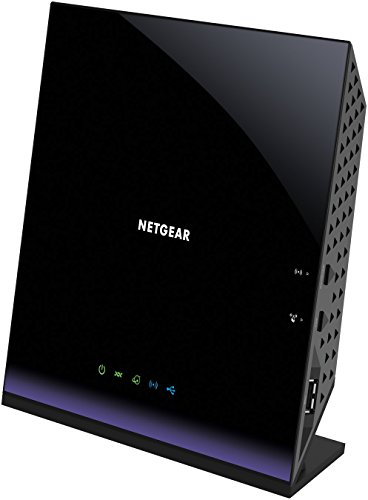
Netgear D6400 — AC1600 step up
The D6400 raises the wireless side to AC1600 — dual-band, gigabit language in its title — over a VDSL/ADSL modem, for the DSL household whose internal network works harder than its line does. That household is real: local streaming from a network drive, several people moving files, a home office whose traffic is mostly room-to-room. The line governs what enters the house; the AC1600 governs how gracefully it circulates once inside, and the D6400 is NETGEAR’s answer for buyers who feel the second constraint more than the first.
Against its bigger sibling, the D7000, the D6400 concedes wireless class and the CenturyLink certification language; against the VR300 it buys radio headroom at a NETGEAR position in the market. The choosing logic is therefore triangular and honest: provider association points one way, wireless ambition another, and the buyer’s own line — confirmed with the provider, in bonding terms — arbitrates before either. A D6400 on the right line in a busy house is a quietly excellent purchase; on the wrong line it is, like everything here, an ornament.
- Type: VDSL/ADSL modem router
- Wireless: AC1600, 802.11ac dual-band gigabit class
- Model code: D6400-100NAS
- Bonding: not claimed in the listing title — confirm with your provider
- Positioning: wireless-forward DSL gateway
Strengths
- AC1600 gives the internal network genuine headroom over DSL basics.
- NETGEAR’s DSL platform with gigabit-class positioning.
- Dual-band wireless suits mixed device households.
Trade-offs
- The D7000 carries the stronger class and the CenturyLink certification.
- Extra wireless class cannot raise the line’s own ceiling.
- Bonding compatibility must be confirmed outside the listing.
Best for: a DSL household whose room-to-room traffic justifies AC1600 wireless over its line.
Not suited for: a CenturyLink bonded-line customer needing certification and bonding answered by the box itself.
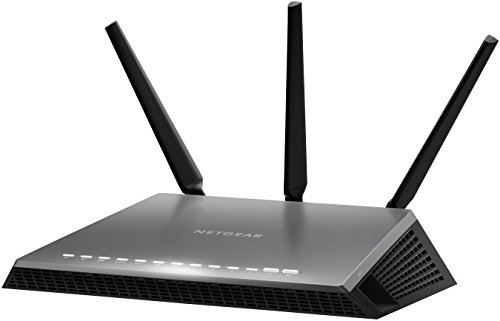
Netgear D7000-100NAS Nighthawk AC1900 VDSL/ADSL Modem Router — CenturyLink-certified flagship
The D7000 wears the Nighthawk name and the strongest wireless class in this guide, AC1900 — and then its listing does something more valuable than either: it states its conditions. Certified with CenturyLink. Non-bonded. DSL internet only. Those three phrases define the buyer with unusual precision. A CenturyLink DSL customer on a single-pair, non-bonded line gets the flagship gateway of this category with the provider relationship printed on the box; anyone outside that description — bonded line, different provider expectations, a household confusing DSL with cable — is being warned off by the manufacturer itself, and this guide amplifies the warning rather than softening it.
Within its brief, the D7000’s case is straightforward: the Nighthawk platform’s wireless ambition serves the busy home’s internal network, while the certified modem serves the line it was certified for. “DSL internet only” also deserves its plain reading — this is a gateway for DSL service, not a universal router for whatever arrives next; a household expecting a fibre conversion soon should weigh whether a flagship DSL purchase earns its term. For the settled CenturyLink non-bonded household, though, this is the strongest pick in the guide, and its listing’s candour is a model the whole category could copy.
- Type: VDSL/ADSL modem router
- Wireless: AC1900 Nighthawk class
- Certification: certified with CenturyLink, per the listing
- Line condition: NON-BONDED lines only, per the listing
- Service condition: DSL internet only, per the listing
Strengths
- The strongest wireless class in this guide, on a Nighthawk platform.
- CenturyLink certification stated outright — no guessing for that provider’s customers.
- Its conditions are printed in its own title, making self-selection easy.
Trade-offs
- Non-bonded only: bonded CenturyLink lines are excluded by the listing itself.
- DSL internet only — no second life if the household converts to another technology.
- Flagship positioning prices above the guide’s value picks.
Best for: a CenturyLink household on a non-bonded DSL line wanting the strongest gateway in this category.
Not suited for: a bonded-line subscriber, or any household expecting to leave DSL service soon.

TP-Link TD-W9950 — Wireless N value
The TD-W9950 is the guide’s value anchor: a 300 Mbps Wireless N VDSL/ADSL modem router, plainly specified and plainly positioned. Wireless N is an old radio generation, and on most technologies that would end the conversation — but DSL is the exception that keeps this pick honest, because on a modest line the internet itself arrives slower than the radio can carry it. A single person or a light household on a rural line, browsing and streaming one screen at a time, will rarely meet the TD-W9950’s wireless ceiling; they will meet the line’s, daily, and no gateway in this guide can change that.
The discipline is to buy it for that household and no other. Several simultaneous streams, a houseful of devices, a home office moving large files internally — each exposes the N radio in ways the line never would. TP-Link builds this unit for the world’s enormous base of simple DSL connections, and at that job — a working gateway, honestly cheap in concept, covering both VDSL and ADSL per its title — it is exactly proportioned. Value in this category means matching the smallest sufficient tool to the line, and for the lightest lines in the guide’s audience, this is that tool.
- Type: VDSL/ADSL modem router
- Wireless: 300 Mbps Wireless N
- Maker line: TP-Link TD-W series
- Bonding: not claimed in the listing title — confirm with your provider
- Positioning: value pick for modest lines
Strengths
- Proportioned to modest DSL lines where the line, not the radio, is the ceiling.
- Covers VDSL and ADSL families per its title.
- The simplest purchase in the guide — nothing to overthink or overbuy.
Trade-offs
- Wireless N strains under several simultaneous modern devices.
- No headroom if the household’s internal traffic grows.
- Bonded-line households must look elsewhere or verify carefully.
Best for: a light-use household on a modest DSL line wanting a gateway matched to its real demand.
Not suited for: a busy multi-device home expecting the radio to carry an evening of parallel streams.

CenturyLink C3000A — Provider-associated gateway
The C3000A’s listing title is the shortest in this guide — a provider’s name and a model code, nothing more — and this section honours that brevity by refusing to decorate it. What the name establishes is the association: this is a gateway from CenturyLink’s own ecosystem, the class of device the provider itself deploys, and its natural buyer is a CenturyLink DSL customer replacing or matching provider equipment with the same family of hardware. What the title does not establish — wireless class, DSL profile details, port furniture — must be confirmed in CenturyLink’s own documentation for the model before money moves, because guessing at a provider gateway’s specifications is how households end up owning the wrong variant.
That caution is not a dismissal. Provider-ecosystem gateways carry a practical advantage no third-party box can print on its title: the provider’s support organisation knows them, provisions them routinely, and cannot plausibly blame them when a line misbehaves. For a customer whose priority is a quiet life with their DSL provider — particularly one whose technical confidence is modest — that alignment can outweigh a rival’s stronger wireless class. Buy the C3000A as what it verifiably is: the provider’s own-shaped answer, specified by the provider’s documents, supported by the provider’s habits. Households wanting their gateway’s numbers stated in the listing itself should take the NETGEAR or TP-Link picks, whose titles do that work.
- Type: DSL gateway, CenturyLink ecosystem
- Wireless class: not stated in the listing title — confirm in CenturyLink documentation
- DSL profile details: not stated in the listing title — confirm in CenturyLink documentation
- Association: CenturyLink model line
- Positioning: provider-aligned replacement
Strengths
- Provider-ecosystem alignment: provisioning and support familiarity.
- The natural like-for-like replacement for CenturyLink-supplied equipment.
- A known quantity to the provider’s own technicians.
Trade-offs
- The listing title specifies almost nothing — documentation homework is mandatory.
- Its value is CenturyLink-shaped; other providers’ customers gain little.
- Variant confusion is a real risk without exact-model verification.
Best for: a CenturyLink DSL customer replacing provider equipment with the provider’s own gateway family.
Not suited for: a buyer on another network expecting the listing alone to settle specifications.
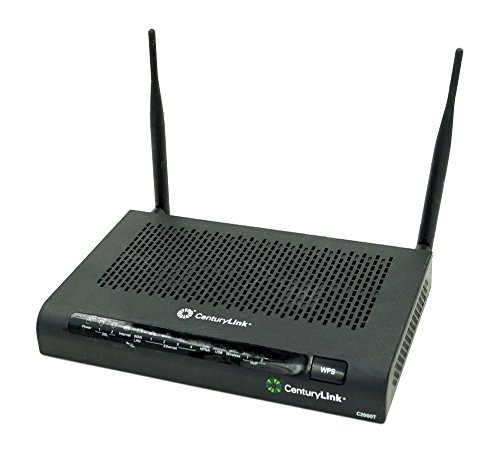
CenturyLink Technicolor C2000T Wireless 802.11N ADSL2+ VDSL — Legacy provider combo
The C2000T completes the CenturyLink pair: a Technicolor-built modem router combo carrying 802.11N wireless and both ADSL2+ and VDSL in its title, from the generation when this hardware was the provider’s standard issue. Technicolor built gateways for providers worldwide, and the C2000T’s presence on the retail shelf serves the same continuity audience as its sibling — a CenturyLink household whose line, account and habits were formed around this equipment and who needs a replacement that changes nothing.
Its honest limits mirror the D7000’s in reverse: where the Nighthawk is the category’s flagship, the C2000T is its legacy anchor, with a Wireless-N radio that suits light lines and light households and no others. Read it as the guide reads the C3000A — a provider-shaped answer whose specifications and suitability are matters for the provider’s documentation and the household’s own history with the model. A household choosing fresh, without that history, will almost always be better served by the AC-class picks above; a household replacing the exact box its line already knows is making a different and entirely rational decision. Readers whose DSL serves a large home should also weigh the coverage discussion in Best Routers for Large Homes and Multiple Devices, since a legacy gateway’s radio reach is often the first thing a big floor plan exposes.
- Type: ADSL2+/VDSL modem router combo
- Wireless: 802.11N
- Maker: Technicolor, for the CenturyLink ecosystem
- Generation: legacy provider equipment
- Positioning: like-for-like provider replacement
Strengths
- Covers both ADSL2+ and VDSL families per its title.
- Provider-standard hardware the CenturyLink ecosystem knows well.
- Continuity for households already running this model.
Trade-offs
- 802.11N wireless is the guide’s oldest radio class alongside the TD-W9950.
- Legacy generation — support horizons belong to its era.
- Fresh buyers without CenturyLink history should choose AC-class picks.
Best for: a CenturyLink household replacing this exact gateway model on a light DSL line.
Not suited for: a new DSL installation expecting modern wireless performance from legacy provider hardware.
Why Does Distance Rule Every VDSL Line?
VDSL’s bargain with physics is written into its name’s promise and its deployment alike: very high speed, over short copper. The signal weakens as it travels the pair from the cabinet, so two houses on the same street, buying the same service from the same provider, can live in different internets — the one beside the cabinet streaming happily, the one at the lane’s end negotiating for stability. No gateway in this guide changes a household’s distance, and any guide implying a model can “boost” a long line is selling weather. What a good gateway does on a long line is more modest and more valuable: sync reliably at the rate the copper allows, hold that sync through noise and weather, and retrain gracefully when conditions shift rather than sulking offline.
This is why DSL households should judge a gateway by its first month rather than its first speed test. The relevant evidence is a diary of stability — drops per week, resyncs at dusk when the street’s electrical noise rises, behaviour in rain — and it cannot be gathered in an afternoon. It is also why the provider conversation matters more here than in any cable guide: the provider can see the line’s attenuation and error counts, and a household that asks for those figures learns whether its problem is a gateway, a wiring run, or the copper itself. Each of those has a different remedy, and only one of them is sold on this page.
How Much Does Your Home’s Own Telephone Wiring Matter?
More than any specification in this guide. Between the street and the gateway, the line may pass through decades of domestic archaeology: extensions wired by forgotten hands, sockets in rooms that no longer hold phones, junction boxes painted shut, a doorbell transformer sharing the run. Every junction is a place for corrosion and reflections, and DSL — a technology listening for a faint, fast signal — hears all of it. The master socket, where the provider’s line enters, is the gateway’s rightful home; a unit plugged into the far end of a daisy-chained extension system is being asked to hear a whisper down a corridor of doors.
The practical audit takes an hour and costs nothing. Find the master socket. Count what hangs off the internal wiring. If filters belong in your installation, confirm each telephone socket that needs one has one, and that the gateway’s own socket follows the provider’s design rather than an inherited improvisation. Where the internal wiring is genuinely chaotic, a provider visit to establish a clean data point at the master socket can transform a line that three gateways failed to fix — because the gateways were never the fault. DSL buyers swap hardware with a lighter heart than cable buyers, since the boxes are the visible part; the wiring, invisible and unglamorous, is where this technology keeps its secrets.
What Should You Do When a DSL Line degrades Slowly?
Slow degradation has a signature: the line that was fine last year now resyncs on wet evenings, the sync rate creeps down across seasons, the errors accumulate where none were noted before. Work the suspects in the order of their likelihood and their price. First, your own wiring — a corroding extension or a new device plugged into an unfiltered socket can poison a line gradually, and disconnecting the internal wiring to test at the master socket isolates the question in minutes. Second, the gateway itself: power supplies tire, and a unit that has run hot for years can lose its composure; a known-good spare or the provider’s loaner settles it. Third, the provider’s copper, which ages in the ground and in the air, and whose repair is the provider’s obligation — pursued most effectively with your dated notes of sync rates and drop times in hand.
What not to do is buy gateway after gateway in search of the one that tolerates a dying line. A new unit may indeed sync a little more bravely than a tired one, and the improvement will feel like vindication for a month, until the copper worsens past the new unit’s bravery too. The diary habit this guide keeps recommending — baseline statistics recorded while healthy, symptoms dated while sick — is what converts a degradation saga from superstition into evidence, and evidence is the only language in which providers schedule line work.
How Does DSL Serve a Rural Household Differently From a Town One?
Rural DSL is a study in lowered ceilings and raised stakes. The lines are longer, so the speeds are humbler; the alternatives are fewer, so the connection matters more — it is the farm office, the school homework, the telehealth appointment, the weather data the work runs on. For such a household, gateway virtues reorder themselves: stability outranks wireless class by a wide margin, and the TD-W9950’s honest modesty or the VR300’s balance can be wiser purchases than the D7000’s flagship radio, because the household’s pain is the line’s fragility, not its internal network. Rural buyers should also weigh the gateway’s behaviour after power cuts, which are not rare events at the end of long lines of every kind: a unit that resyncs unattended and restores the household without a visit to the cupboard is worth more than any class printed on a box.
The rural context also sharpens the failover question that runs through this batch of guides. A household whose single copper pair carries its livelihood is the natural audience for a backup path — the tethered-phone discipline treated in the companion guide linked earlier — because DSL’s failure modes (a dug-up cable, a flooded cabinet) are measured in days, not hours. None of that diminishes the gateway purchase; it frames it. The gateway is the primary citizen of a rural network, and it should be chosen, placed and documented with the seriousness of infrastructure, which in a rural home is exactly what it is.
When Fibre Finally Reaches a DSL Street, What Happens to the Gateway?
It retires, and the household should plan the retirement without bitterness. Fibre terminates on the provider’s optical terminal, and the network beyond it wants a router, not a DSL modem — the gateways in this guide have no second career on a fibre line, the D7000’s “DSL internet only” being merely the most explicit statement of a universal condition. Households with a credible fibre date on their street should therefore buy DSL hardware at the value end — the TD-W9950’s proportionality becomes a financial virtue — while households whose DSL is settled for years can buy the flagship class with a clear conscience, because the gateway will serve its full term on the technology it was built for.
The transferable assets are the habits, not the hardware: the documented line facts become documented account facts, the placement craft transfers to the new router, the household’s device census and Wi-Fi naming carry over intact. A family that ran its DSL years with a diary, a tidy master socket and a gateway matched to its line will find the fibre transition almost boring — which is the highest compliment infrastructure ever earns. Buy for the line you have, at the weight your timeline justifies, and let the future arrive when it arrives.
How Should a Small Business Run Its Premises on a VDSL Gateway?
Plenty of small premises — the café at the end of the lane, the rural workshop, the branch the fibre map forgot — run their whole operation on DSL, and their gateway choices deserve the business treatment. The till, the card terminal and the booking system are the network’s citizens of consequence; the guest Wi-Fi is a courtesy that must never be allowed to inconvenience them. In practice that means placing the gateway centrally to the working space rather than the building, wiring the till and terminal where the layout permits, and separating guest traffic from business traffic with whatever controls the gateway offers. It also means treating the gateway as a business asset in the records: model, provider, line type, bonding status and the date of the last line test, written where a relief manager or a support technician can find them.
The business case for the stronger picks in this guide is not speed — the line decides that — but composure: the AC-class NETGEAR units carry a busy room’s mixed traffic with more grace, and a premises with staff devices, customer devices and business devices in the air at once is precisely where wireless class stops being a luxury. Conversely, the business case against overbuying is the fibre question with a lease attached: a premises whose connectivity may change with its tenancy should weight value picks and provider-aligned units more heavily. Either way, the rural and small-premises reader should recognise their real specification — continuity — and notice that it is served as much by the spare gateway in the cupboard and the provider’s number on the wall as by anything in the Quick Picks table.
What Do the Gateway’s Own Line Statistics Tell You?
Every gateway in this class keeps a quiet ledger of the line’s health — sync rate, attenuation, noise margin, error counts — visible in its administration pages to anyone who looks. Most owners never look, which is a waste of the best diagnostic instrument in the house. Read in health, those figures are the baseline this guide keeps invoking: the sync rate your copper achieves on a good day, the margin it holds, the errors it ordinarily shrugs off. Read in sickness, they are the differential diagnosis — a sync rate fallen by a third with attenuation unchanged suggests a different story from errors exploding at dusk — and they are the evidence that turns a provider phone call from a complaint into a work order.
Learn to glance at them the way a driver glances at a dashboard: not obsessively, but often enough that the normal is familiar and the abnormal is noticed early. Note them after installation, after any wiring change, and at the first sign of trouble, with dates. Households that keep this small habit discover that DSL, for all its reputation as the temperamental technology, is actually the most legible one they own — the line confesses everything, in numbers, to anyone willing to read them. The gateway you choose matters less, in the long run, than whether you ever open that page.
How Long Should a VDSL Gateway Stay in Service?
Until the line changes, the provider’s expectations change, or the unit’s composure goes — whichever arrives first. DSL gateways do not age by wireless fashion the way cable combinations do, because the line’s ceiling makes radio generations a secondary matter; an AC1200 unit bought today is not embarrassed by next year’s client devices the way a router on a gigabit line would be. The realistic service term is set by the household’s own timeline: the fibre conversion if one is credibly scheduled, the move to another technology, or the slow arithmetic of a power supply and a fanless box running warm for years in a dusty cupboard.
That longevity cuts in favour of buying well within the category. A settled DSL household — and DSL households are, by the technology’s nature, among the most settled in broadband — can justify the D7000’s flagship class or the VR300’s balance on a five-year view without the upgrade anxiety that haunts faster technologies. Keep the unit ventilated, keep its statistics noted, keep the provider’s facts in the drawer, and a VDSL gateway will repay the household in the only currency this technology trades in: uneventful days, in long runs, on copper that was never promised to anyone.
What Should You Ask Your Provider Before Ordering Any Gateway Here?
Six questions, asked in one call, written down in one place. Is my line bonded or single-pair? Which DSL profile is provisioned on it — VDSL, VDSL2, or an ADSL family service? Does the provider require specific gateway features or settings for its service, and does it publish a list of gateways it supports? Will a customer-owned gateway affect the support the provider gives when the line faults — and if so, how? Are there connection credentials or configuration values the gateway will need, and how do I obtain them? And if I later return to a provider-supplied gateway, is the old arrangement restorable without penalty?
The answers convert shopping from gambling into matching. A provider that answers them clearly has told you exactly which rows of this guide’s table are candidates; a provider that cannot answer them has told you something equally valuable about where your support will come from when the line misbehaves. Keep the answers with the gateway’s paperwork — the next owner of the problem, whether that is a family member, a technician or yourself in three years, will be grateful the call was made once and recorded properly.
How Do You Keep a DSL Household’s Wi-Fi Honest in a Big Home?
The gateway’s radio radiates from the master socket’s neighbourhood, which in many homes is the hallway by the door — a poor pulpit for the whole house. The DSL household’s options mirror the cable world’s, with one wrinkle: moving the gateway away from the master socket trades Wi-Fi position against line quality, because every metre of internal extension wiring is a metre of noise the modem must forgive. The usual resolution is to leave the gateway at its electrical home and carry the network onward by wire — a single access point in the living centre, fed by Ethernet from the gateway, does more for a large DSL home than any gateway upgrade, and it leaves the modem’s precious sync undisturbed.
Where Ethernet cannot run, a mesh node or extender fed from the gateway is the second-best answer, placed at the edge of the gateway’s good coverage rather than inside the dead room. Judge every arrangement in the far room at the busy hour, and remember the category’s standing truth: the line caps what enters the home, but placement decides what reaches the chair. A household that solves placement on DSL has usually solved its complaints entirely, because the line — for all the jokes made about it — was delivering its honest best all along, to a gateway standing in the wrong room.
Six VDSL Gateways, One Honest Table
| Pick | DSL families | Wireless | Defining condition from the listing |
|---|---|---|---|
| TP-Link Archer VR300 | VDSL/ADSL | AC1200 | Balanced mainstream; bonding unclaimed |
| Netgear D6400 | VDSL/ADSL | AC1600 dual-band | Gigabit-class positioning |
| Netgear D7000 | VDSL/ADSL | AC1900 | CenturyLink certified; NON-BONDED; DSL only |
| TP-Link TD-W9950 | VDSL/ADSL | 300 Mbps Wireless N | Value class for modest lines |
| CenturyLink C3000A | CenturyLink DSL | Confirm in provider documentation | Provider-ecosystem gateway |
| CenturyLink C2000T | ADSL2+/VDSL | 802.11N | Technicolor provider combo, legacy |
Read the table’s last column first. The D7000’s conditions are the most explicit in the guide, the CenturyLink pair’s conditions are their provider association, and the TP-Link and D6400 rows carry the standing instruction of this entire category: bonding and line compatibility are confirmed with the provider, not inferred from a box. Wireless class, the column most buyers read first, is honestly the least decisive — on DSL, the line is the ceiling, and the gateway’s job is to reach it reliably.
How Do You Set Up a VDSL Gateway on an Existing Line?
Begin with the line’s facts gathered from the provider: the service type, whether it is bonded, and any connection credentials or settings the provider’s service expects. Connect the gateway to the master socket where possible — DSL rewards the shortest, cleanest internal wiring, and a gateway hung off a chain of extensions and filters inherits every fault in the chain. Where the provider’s service uses microfilters, fit them as instructed on the other sockets; where the installation is filterless, follow that design instead of improvising one. Power up, allow the DSL light its unhurried negotiation — sync can take minutes, and a watched gateway always syncs slowly — and only then set the Wi-Fi name, passphrase and admin password.
Then test in the order that isolates faults: sync first, with the gateway’s own status showing the line trained; wired throughput second, from a laptop at the gateway; wireless last, from the rooms that matter. Keep the provider’s old gateway, if you have one, until the new unit has survived a week of evenings — DSL faults love weather and weekends — and record the line statistics the gateway reports while things are healthy, because those numbers are the baseline every future fault will be compared against. Cable households reading out of curiosity will find the parallel ritual for their own technology in Best Cable Modem Routers That Work with Spectrum.
What Mistakes Do DSL Gateway Buyers Keep Making?
Buying for a bonded line without checking bonding leads, and the D7000’s title — non-bonded, in plain type — exists to prevent exactly that purchase. Second: importing cable expectations, choosing by wireless class while the copper line quietly caps everything. Third: treating provider-ecosystem models as universal, when the CenturyLink pair’s value is precisely their association. Fourth: hanging the gateway off the worst socket in the house and blaming the hardware for the wiring. Fifth: discarding the old gateway on day one, before the new unit has met a rainy Tuesday.
Final Recommendation
Let your line choose first and your household choose second. A CenturyLink customer on a non-bonded line should take the D7000’s certified flagship without a backward glance; a CenturyLink household replacing provider equipment like-for-like should take the C3000A or C2000T with the provider’s documentation open. Everyone else divides by ambition: the VR300 for balance, the D6400 for a harder-working internal network, the TD-W9950 for the light line that needs nothing more. Behind every one of those choices stands the same unglamorous ritual — the provider asked, in bonding terms, before the order — and the households that perform it are the ones whose gateways simply work, on copper, for years, asking nothing of anyone.
What Is the Kindest Way to Retire an Old DSL Gateway?
Wipe it, label it, and keep it if the cupboard allows. A factory reset clears your credentials and settings — a step too many households skip before a gateway leaves the building — and a wiped unit of a known model is either a spare for your own line, a kindness for a neighbour on the same service, or a clean donation. What it should never be is a configured device passed along with your network’s name and password still living inside it. The gateway served your household’s private traffic for years; its retirement deserves the same ten minutes of care as its installation, and the household that gives it will handle every future device in this guide’s spirit — deliberately, on the record, with nothing left to chance or to strangers.
One last piece of standing advice for the DSL household, offered because this technology rewards it more than any other in the batch: befriend your line’s facts early, while everything works. The bonded status, the profile, the healthy sync figures, the provider’s fault number, the gateway’s model and its paperwork — gathered in calm, they are a fifteen-minute errand; gathered in a crisis, they are an afternoon of hold music with the rain coming through the connection. Every pick in this guide will serve a household that knows those facts, and be blamed unfairly by one that does not.
Frequently Asked Questions
Will any of these gateways work on a bonded DSL line?
Only if the specific model supports bonding — and the listings here mostly do not claim it. The D7000 states the opposite: non-bonded. Bonded-line customers must confirm bonding support for the exact model with their provider before buying anything in this guide, because a non-bonded gateway cannot be persuaded, configured or firmware-updated into serving a bonded line.
Can I use a VDSL gateway with cable or fibre internet?
No. These are DSL modem routers: their modem speaks to telephone-line DSL service. The D7000’s title says “DSL Internet Only” in so many words, and the same is true in substance for the rest. Cable needs a DOCSIS modem; fibre needs the provider’s terminal with a router behind it. Some gateways can be repurposed as routers in some configurations, but that is a documentation question per model, not a promise this guide makes.
Why are the wireless classes here older than in cable guides?
Because the DSL gateway market is older and more provider-shaped. Retail VDSL hardware consolidated around AC and Wireless-N generations while development money moved to cable and fibre. On DSL this matters less than elsewhere — the line is usually the ceiling — but households with heavy internal traffic should still prefer the AC1900 and AC1600 picks for room-to-room work.
How do I find out whether my line is bonded?
Ask your provider directly, in those words, and note the answer with your account records. Clues exist — bonded installations often show two pairs in use and higher provisioned speeds than single-pair VDSL typically reaches at your distance — but clues are not confirmation. The provider’s answer governs which gateways are even candidates, so obtain it before shopping, not at the activation call.
Is the C3000A a safe buy given its listing states so little?
It is a safe buy for the specific reader it serves — a CenturyLink customer who verifies the model’s specifications and line compatibility in CenturyLink’s documentation first. The thin listing is a reason to do homework, not a verdict on the hardware, which belongs to the provider’s own deployed family. Buyers unwilling to do that homework should choose a pick whose title states its numbers.
Can a better gateway raise my VDSL sync speed?
At the margins, occasionally — a modern gateway may negotiate a slightly cleaner sync than a tired decade-old unit on the same line. But the line’s distance, profile and condition set the neighbourhood of the result, and no model in this guide repeals them. Buy a gateway for reliability, fit and wireless class; treat any small sync improvement as a pleasant accident rather than the purchase’s justification, and direct real speed complaints to the line itself, with statistics in hand.
Should I keep my provider’s gateway as a spare?
If the arrangement allows it, yes — it is the lowest-cost safeguard in this entire category. A known-good provider unit in the cupboard converts every future fault into a ten-minute experiment: swap it in, and if the line behaves, your gateway was the problem; if it misbehaves identically, the line is, and the provider conversation starts from evidence. Households that keep the spare, labelled with its power supply, rarely regret the shelf space.
What Does a Second Property or a Rental Change About the Choice?
Second properties concentrate every DSL virtue and vice. The line is often longer and the visits rarer, so the gateway must be a device that recovers alone — resyncing after power cuts, restoring service without a hand on the reset button — and the household’s documentation habit becomes remote management by notebook: line type, provider, gateway model and statistics, kept at the main home where the troubleshooting will actually happen. For such properties the value and provider-aligned picks earn a second look, because the cost of a gateway that needs babysitting is measured in journeys, not money.
Rentals invert the emphasis: the tenant household needs a gateway it can remove cleanly, leaving the line and the property’s wiring exactly as found, and the landlord’s or provider’s equipment question should be settled before the order rather than at the deposit’s return. In both cases the standing disciplines of this guide — ask the provider, record the answers, test at the master socket — do the heavy lifting. The gateway itself is almost the smallest part of a DSL story told at a distance; the facts about the line are the story, and they travel in a notebook better than in anyone’s memory.
Does it matter which socket the gateway uses if every socket works?
Yes, in the only currency DSL respects: margin. A gateway may sync from a distant extension socket and appear to work, while holding a fraction of the noise margin the master socket would give it — a debt collected on the first wet evening, when the line’s conditions tighten and the marginal sync lets go. Working and working with headroom are different states that look identical at noon, which is why this guide sends the gateway to the master socket even when the extension tempts with a better view.
Should the gateway be switched off at night to rest it?
No — DSL gateways are designed to hold sync continuously, and a line that retrains every morning spends its first minutes of each day renegotiating what it could simply have kept. Leave the unit on, ventilated, and let its stability accumulate; the electricity involved is trivial beside the cost of a household whose internet begins every day as a fresh negotiation.
Related Guides
- Best Cable Modem Routers That Work with Spectrum
- Best Routers for Large Homes and Multiple Devices
- Best Routers for Tethered Phone Failover


