What's inside
- Key Takeaways
- Quick Picks
- How Did We Sort Six DOCSIS 3.0 Combinations Without Pretending They Are 3.1?
- What Do Channel Counts Like 16×4 Actually Buy You?
- Why Does the Wi-Fi Half Matter as Much as the Modem Half?
- The Six DOCSIS 3.0 Combinations, Pick by Pick
- How Do You Activate a Customer-Owned Combination Without Losing an Evening?
- What Should You Check During the First Week of Ownership?
- How Long Should a DOCSIS 3.0 Combination Stay in Service?
- How Should You Read a DOCSIS 3.0 Listing Title Like an Engineer?
- What Does Living With One Box Instead of Two Actually Change?
- When the Connection Drops, What Should You Check Before Blaming the Modem?
- Why Does Upstream Deserve Its Own Paragraph in a DOCSIS 3.0 Guide?
- Where Should a Combination Unit Physically Sit in the Home?
- How Do the Six DOCSIS 3.0 Combinations Compare Side by Side?
- What Mistakes Do DOCSIS 3.0 Buyers Keep Making?
- Final Recommendation
- What About Firmware and Security on an Older Standard?
- Frequently Asked Questions
- Related Guides
As an Amazon Associate I earn from qualifying purchases. This post may contain affiliate links at no extra cost to you.
widgetverdict.com is reader-supported. When you buy through links on our site, we may earn an affiliate commission.
Where to buy: these combination units sit on Amazon alongside the makers’ own storefronts, and every pick in this guide links to the listing whose title we checked. One errand matters more than the shopping itself: before you pay, find the exact model on your cable provider’s approved-equipment page for your speed tier. A DOCSIS 3.0 gateway that your provider refuses to activate cannot be fixed by a good review, a firmware update or a persuasive phone call.
The best docsis 3.0 modem routers are a deliberately unfashionable purchase, and that is their charm. DOCSIS 3.1 owns the gigabit headlines now, yet millions of households subscribe to tiers of a few hundred megabits where a 3.0 combination — cable modem and Wi-Fi router sharing one housing, one power brick and one setup wizard — remains the rational way to retire a rented gateway. This guide covers six of those combinations, from ARRIS’s compact SBG10 through the Motorola MG7550, and it is honest about the ceiling each one carries: channel counts, plan ceilings and Wi-Fi classes are printed in the listings themselves, and we quote them rather than rounding them up.
One pick needs a warning label before anything else. The NETGEAR C7000’s own listing title states that the model is discontinued and that no new cable provider activations are accepted for it. We include it because existing owners search for it constantly and because its hardware story is instructive, but a reader buying fresh equipment today should treat it as a reference point, not a recommendation to purchase. The other five picks are current, activatable combinations spread across three makers, two Wi-Fi generations and plan ceilings from modest to near-gigabit.
Key Takeaways
- Every pick here is a DOCSIS 3.0 modem and a Wi-Fi router in a single box — none of them is a modem alone, and none needs a second device to get a household online.
- Channel bonding is the honest spec: 8×4, 16×4 and the wider configurations map to different plan ceilings, and the listings state maximum internet speeds from 400 Mbps up to 960 Mbps.
- The C7000 is discontinued with no new provider activations, per its own listing title — it is documented here, not endorsed for a fresh purchase.
- Wi-Fi spans N300 single-purpose simplicity through AC1600 and AC2350 dual-band to the C7000’s AC1900 — older standards that still serve tiers well below gigabit.
- Provider compatibility language matters: ARRIS prints a check-with-your-provider caution, NETGEAR names certified providers, and your provider’s current list outranks both.
- These units earn their keep on sub-gigabit tiers; a household already paying for gigabit service belongs in DOCSIS 3.1 territory instead.
Quick Picks
| Pick | Badge | Why it is here |
|---|---|---|
| ARRIS (SBG10) – Cable Modem Router Combo – DOCSIS 3.0 16 x 4 | Compact 16×4 starter | DOCSIS 3.0 16×4 bonding with AC1600 Wi-Fi and a stated 400 Mbps maximum, sized for modest tiers and small homes. |
| ARRIS SURFboard SBG7600AC2 | Four-port step up | AC2350 Wi-Fi, four 1 Gbps ports and an 800 Mbps stated maximum for households wiring several devices. |
| ARRIS (SBG7400AC2) – Modem Router Combo – Fast DOCSIS 3.0 | Highest stated ceiling | AC2350 Wi-Fi and four gigabit ports with the range’s highest stated maximum internet speed, up to 960 Mbps. |
| NETGEAR C3000-100NAS N300 (8×4) WiFi DOCSIS 3.0 Cable Modem | Named-provider simplicity | An 8×4 N300 combination certified in its listing for Xfinity, Spectrum, Cox, Cablevision and more. |
| NETGEAR Nighthawk DOCSIS 3.0 Modem Router Combo C7000 | Discontinued — reference only | AC1900 hardware with four gigabit ports, included because its listing declares it discontinued with no new activations. |
| Motorola MG7550 2-in-1 Cable Modem with Built-in WiFi Router | Third-maker alternative | Motorola’s 2-in-1 entry for buyers who prefer its modem lineage and support culture over the two bigger shelves. |
How Did We Sort Six DOCSIS 3.0 Combinations Without Pretending They Are 3.1?
By grading them against the job DOCSIS 3.0 actually still does. The selection favoured combinations whose listings state their limits plainly — bonded channel counts, maximum internet speeds, port counts, Wi-Fi classes — because a buyer on a 300 or 500 Mbps tier deserves arithmetic, not adjectives. Models that hid their ceilings behind vague speed language were passed over. The result is a ladder with visible rungs: an 8×4 entry point, two 16×4-class ARRIS units at different ceilings, a wider-ceiling ARRIS flagship of the standard, a discontinued Nighthawk kept for reference, and Motorola’s alternative for brand-loyal households.
Compatibility evidence was weighed the way a careful buyer weighs it. ARRIS prints a bracketed caution in its titles telling shoppers to check with their provider; NETGEAR’s C3000 names the providers it is certified for. Neither statement substitutes for your provider’s own approved list on the day you order, because providers retire 3.0 models from activation lists on their own schedules. Readers comparing this older standard against its successor will find the generational contrast drawn in Best DOCSIS 3.1 Routers, which covers the tier where gigabit plans live.
What Do Channel Counts Like 16×4 Actually Buy You?
The two numbers describe bonded channels: downstream channels carrying data toward your home, upstream channels carrying it back. A cable modem locks onto as many channels as the provider’s plant offers and the modem supports; the wider the bonding, the more aggregate capacity the modem can draw on before it becomes the choke point. An 8×4 design suits the slowest tiers. A 16×4 design, like the SBG10, comfortably serves mid-tier plans. The listings here translate bonding into stated maximum internet speeds — 400 Mbps for the SBG10, 800 Mbps for the SBG7600AC2, up to 960 Mbps for the SBG7400AC2 — and those stated ceilings, not the raw channel arithmetic, are what you should match against your subscription.
Two cautions keep that matching honest. First, a stated maximum is a laboratory ceiling for the modem, not a speed your provider sells or guarantees; buy for the tier you pay for, with modest headroom. Second, upstream stays narrow across this whole generation — the “x4” never grows in these listings — so households whose work leans on uploads, cloud backups and video calls sent in high quality will feel 3.0’s age sooner than download-heavy households will. Neither caution is a reason to overspend on 3.1 for a 200 Mbps subscription; both are reasons to read your own usage before choosing a rung.
Why Does the Wi-Fi Half Matter as Much as the Modem Half?
Because the modem half is capped by your subscription while the Wi-Fi half is capped by physics and standard. The wireless classes here — N300, AC1600, AC1900, AC2350 — are all pre-Wi-Fi 6 generations. In a small flat with a dozen devices, AC1600 dual-band is genuinely sufficient: streams start, calls hold, and the bottleneck stays at the cable plant where it belongs. In a larger home with simultaneous streams, game downloads and a work laptop competing, the AC2350 units’ extra class buys breathing room, and the placement of the single box — near the cable entry, usually — becomes the real coverage problem no class rating solves.
That placement problem deserves plain speech. A combination lives where the coax arrives, which is rarely the centre of the home. If your cable drop lands in a corner basement, every combination in this guide will radiate from that corner, and the honest fixes are a long coax run to a better spot (where the provider allows), a mesh system fed from the unit’s ports with its own Wi-Fi managed carefully, or a separate modem and router instead. Households whose real problem is a big floor plan rather than an old modem should read Best Cable Modem Routers That Work with Spectrum alongside this guide, since several households arrive at 3.0 combinations through a Spectrum subscription and leave through coverage complaints that were never about DOCSIS at all.
The Six DOCSIS 3.0 Combinations, Pick by Pick

ARRIS (SBG10) – Cable Modem Router Combo – DOCSIS 3.0 16 x 4 — Compact 16×4 starter
The SBG10 is the sensible front door to this category: DOCSIS 3.0 with 16 downstream and 4 upstream bonded channels, gigabit-class networking language in its title, AC1600 dual-band Wi-Fi, and a stated maximum internet speed of 400 Mbps. That ceiling is not a weakness to apologise for — it is a specification that matches the tiers a large share of cable households actually buy. If your subscription sits at or below a few hundred megabits, the SBG10’s modem half will not be the thing slowing you down, and its Wi-Fi half is a full generation beyond the rented gateways many households still tolerate.
ARRIS prints its compatibility caution directly in the title — check with your provider — and the SBG10 buyer should obey it literally, because 3.0 activation policies now vary by provider and by region. Within its brief, the unit’s appeal is proportion: one compact box, a modern-enough radio, and no money spent chasing ceilings the subscription cannot reach. The household it leaves behind is the one already shopping for gigabit; that household’s correct move is to skip this entire standard, not to buy the biggest 3.0 box in defiance of it.
- Modem: DOCSIS 3.0, 16 x 4 channel bonding
- Stated maximum internet speed: 400 Mbps
- Wireless: AC1600 Wi-Fi
- Compatibility: provider check required, per the listing title itself
- Form: modem and router in one housing
Strengths
- 16×4 bonding gives mid-tier plans genuine headroom over 8×4 designs.
- AC1600 dual-band Wi-Fi covers the streaming-and-browsing household without strain.
- The stated 400 Mbps ceiling is printed plainly, making tier-matching easy.
Trade-offs
- A subscription above its stated ceiling wastes the plan, not the modem.
- Pre-Wi-Fi 6 radio — no OFDMA-era efficiency for dense device counts.
- Combination architecture: the modem and router age out together.
Best for: a small household on a mid-tier cable plan replacing a rented gateway with one honestly specified box.
Not suited for: a subscriber paying for speeds beyond 400 Mbps and expecting the modem to keep pace with the bill.
ARRIS SURFboard SBG7600AC2 — Four-port step up
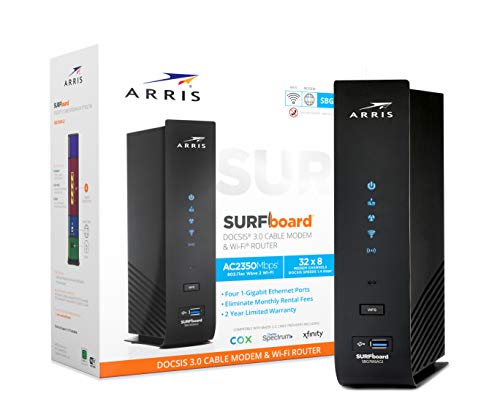
The SBG7600AC2 doubles the SBG10’s stated ceiling to 800 Mbps and upgrades the wireless side to AC2350, then adds the detail wired households notice first: four 1 Gbps Ethernet ports. That port count changes how a living room works. A television, a streaming box, a console and a work laptop can all sit on wire, leaving the Wi-Fi to the phones and tablets that have no choice, and the whole household’s evening traffic stops competing for the same air. Among DOCSIS 3.0 combinations, this is the one shaped by someone who counted sockets before adjectives.
Its positioning between siblings is exact. Against the SBG10 it buys ceiling and ports; against the SBG7400AC2 below it concedes the last slice of stated maximum speed. A buyer choosing between the two ARRIS AC2350 units should compare the prices on the day and their own tier: if the subscription sits comfortably under 800 Mbps, this unit’s ceiling is not a compromise at all. The same provider-check caution from the SBG10’s title applies here with equal force — ARRIS repeats it in this listing too.
- Modem: DOCSIS 3.0
- Stated maximum internet speed: 800 Mbps
- Wireless: AC2350 Wi-Fi
- Wired: four 1 Gbps ports
- Compatibility: provider check required, per the listing title itself
Strengths
- Four gigabit ports wire the whole entertainment cluster without a switch.
- 800 Mbps stated ceiling covers fast sub-gigabit tiers with headroom.
- AC2350 is the stronger of the two Wi-Fi classes ARRIS fields in this guide.
Trade-offs
- Still DOCSIS 3.0 — gigabit-tier subscribers are shopping in the wrong aisle.
- The SBG7400AC2 states a higher ceiling for buyers who want the maximum available.
- Single-box coverage depends entirely on where the cable drop sits.
Best for: a wired-first household on a fast sub-gigabit tier, with several devices that deserve Ethernet.
Not suited for: a gigabit-tier subscriber treating an 800 Mbps stated ceiling as close enough.

ARRIS (SBG7400AC2) – Modem Router Combo – Fast DOCSIS 3.0 — Highest stated ceiling
The SBG7400AC2 carries the largest number in this guide: up to 960 Mbps maximum internet speed, stated in its title, alongside the same AC2350 Wi-Fi and four 1 Gbps ports as its SBG7600AC2 sibling. That figure needs careful reading. It describes the modem’s ceiling under DOCSIS 3.0, brushing against the practical top of the standard — it does not convert a 3.0 device into a gigabit-plan device, because providers gate their gigabit tiers behind 3.1 hardware regardless of what a 3.0 modem can theoretically bond. Read it instead as headroom: on any tier a provider will actually activate on 3.0, this modem will not be the constraint.
That makes the SBG7400AC2 the pick for the buyer who has decided, deliberately, to stay on 3.0 — perhaps because their provider still activates it happily, their tier sits in the upper hundreds, and the price difference against 3.1 gear is real money in their budget. The decision is defensible on exactly those terms and indefensible on any others. If a gigabit upgrade is even a rumour in your household’s future, the money belongs in a 3.1 combination; if the tier is settled and the provider is content, this is the most capable 3.0 box ARRIS lists here.
- Modem: DOCSIS 3.0
- Stated maximum internet speed: up to 960 Mbps
- Wireless: AC2350 Wi-Fi
- Wired: four 1 Gbps ports
- Compatibility: provider check required, per the listing title itself
Strengths
- The highest stated ceiling of any pick here — headroom on every activatable 3.0 tier.
- AC2350 Wi-Fi and four gigabit ports match the guide’s best supporting kit.
- A rational flagship for households committed to the 3.0 standard by choice.
Trade-offs
- Its ceiling cannot unlock gigabit tiers, which providers reserve for 3.1.
- Paying flagship-of-the-standard money always invites the 3.1 comparison.
- Upstream remains 3.0-narrow for upload-heavy work.
Best for: a household on an upper sub-gigabit tier, settled with its provider, wanting the strongest 3.0 combination listed.
Not suited for: a buyer planning a gigabit upgrade this year and hoping this purchase survives it.

NETGEAR C3000-100NAS N300 (8×4) WiFi DOCSIS 3.0 Cable Modem — Named-provider simplicity
The C3000 is the elder of this guide: an 8×4 DOCSIS 3.0 modem paired with N300 Wi-Fi, and a listing that names its certifications outright — Xfinity from Comcast, Spectrum, Cox, Cablevision and more. That naming is its whole personality. Where ARRIS asks you to check, NETGEAR’s older listing tells you where it stands, and for a buyer on one of those named networks with a slow tier and a simple home, the C3000’s proposition is a cheap, understood, activatable box that ends a rental fee without pretending to be anything grander.
Its limits are equally legible. Eight downstream channels cap it at the modest tiers; N300 is a 2.4 GHz-era wireless class that a busy modern household will feel in the evenings; nothing about it courts the future. None of that matters to its true audience — a small household, a holiday property, a grandparent’s flat — where the internet workload is email, browsing and one stream at a time. Bought with that self-knowledge, the C3000 is honest value. Bought as a main-home gateway for a streaming family, it would be a false economy measured in buffering.
- Modem: DOCSIS 3.0, 8×4 channel bonding
- Wireless: N300 Wi-Fi
- Compatibility: certified for Xfinity from Comcast, Spectrum, Cox, Cablevision and more, per the listing
- Form: modem router combination (C3000)
- Positioning: entry rung of this guide
Strengths
- Provider certifications are named in the listing rather than left to guesswork.
- The simplest, most understood hardware in the guide — nothing to overthink.
- Ends a rental fee on slow tiers at the lowest commitment level here.
Trade-offs
- 8×4 bonding confines it to modest speed tiers.
- N300 Wi-Fi strains under several simultaneous streams.
- Its age means the provider activation lists deserve an especially careful check.
Best for: a lightly connected small home on a named provider and a slow tier, replacing rental gear cheaply.
Not suited for: a streaming-heavy family expecting N300 wireless to carry an evening of simultaneous video.

NETGEAR Nighthawk DOCSIS 3.0 Modem Router Combo C7000 — Discontinued — reference only
This section exists to answer the searches, not to sell the box. The C7000’s listing title carries two declarations in capital letters: DISCONTINUED, and NO NEW CABLE PROVIDER ACTIVATIONS. Taken together they mean a fresh purchase cannot be put into service on a new account — the provider will not activate it — and any guide that recommended it as a buy would be sending readers toward an expensive paperweight. We state that in the Quick Picks, in the takeaways and here, because the C7000’s reputation from its long career still drives buyers toward listings whose own titles warn them off.
The hardware explains the reputation: an AC1900 dual-band Nighthawk router half, four gigabit ports, guided setup and the promise of free expert help — a genuinely strong specification for its era, which is why so many households still run one and why owners researching a fault or a setting land on pages like this. If you already own a working, activated C7000, nothing here urges you to replace it before its time. If you are shopping, its role in your decision is as a yardstick: the current combinations above were chosen partly by measuring what replaced it. Any reader who arrived here mid-comparison with faster legacy gear may also want Best 3.0 Qualcomm Quick Chargers — a different corner of the same lesson, that a respected older standard still deserves scrutiny about what “3.0” promises on the box.
- Modem: DOCSIS 3.0
- Status: DISCONTINUED, per the listing title
- Activations: NO NEW CABLE PROVIDER ACTIVATIONS, per the listing title
- Wireless: AC1900, dual-band
- Wired: 4x gigabit ports; guided set up and free expert help named in the listing
Strengths
- Strong legacy specification — AC1900 Wi-Fi and four gigabit ports — for existing owners.
- Its listing is admirably blunt about its own status, which this guide honours.
- A useful yardstick for judging what current combinations improved.
Trade-offs
- Cannot be activated on a new cable account — the disqualifying fact for shoppers.
- Discontinued status ends meaningful firmware and support horizons.
- Any purchase price is money spent on hardware a provider will not provision.
Best for: an existing owner researching the unit already running, activated and working in their home.
Not suited for: a shopper needing a modem a provider will activate on a new or transferred account.

Motorola MG7550 2-in-1 Cable Modem with Built-in WiFi Router — Third-maker alternative
The MG7550’s listing title is the shortest in this guide — Motorola’s 2-in-1 cable modem with built-in Wi-Fi router, full stop — and that brevity forces an honest writing choice: where the title withholds channel counts, ceilings and Wi-Fi class, this guide does not invent them. The channel configuration and wireless class of this unit are not stated in the listing title we checked, so verify them against Motorola’s own documentation before matching the MG7550 against a specific tier. What the title does establish is the category and the maker: a genuine combination from the brand whose name was on cable modems before the category had a retail shelf.
That lineage is the reason to shortlist it. Motorola’s modem business built its reputation on signal handling and support that cable technicians respected, and households who have run Motorola gear happily for a decade are not being sentimental in preferring its combination over an unfamiliar badge. The buying discipline is simply stricter here: confirm the documented specifications against your tier, confirm activation on your provider’s current list, and then the brand preference can legitimately decide. A buyer unwilling to do that documentation step should take one of the ARRIS units instead, whose listings state their ceilings outright.
- Form: 2-in-1 cable modem with built-in Wi-Fi router
- Channel bonding: not given in the listing title — confirm in Motorola’s documentation
- Wireless class: not given in the listing title — confirm in Motorola’s documentation
- Compatibility: confirm on your provider’s approved list before ordering
- Maker: Motorola
Strengths
- Motorola’s modem lineage and support culture, in combination form.
- A clean alternative for households standardised on the brand.
- The 2-in-1 brief is unambiguous even where the title’s spec detail is thin.
Trade-offs
- The listing title omits the numbers its ARRIS rivals print, shifting work to the buyer.
- Tier-matching requires a documentation check the other picks do not demand.
- As with every combination, modem and router retire together.
Best for: a Motorola-loyal household willing to confirm documented specifications against its tier before ordering.
Not suited for: a buyer wanting every ceiling and channel count settled by the listing alone.
How Do You Activate a Customer-Owned Combination Without Losing an Evening?
Activation is the step where DOCSIS 3.0 purchases succeed or quietly fail, and it rewards preparation out of all proportion to its difficulty. Begin before the box arrives: photograph the rented gateway’s label, note your account number, and download your provider’s approved-device list so the model check happens at your desk rather than on a support call. When the new unit is on the shelf, connect the coax firmly — finger-tight plus a small fraction more, never wrench-forced — run one Ethernet cable to a laptop, and power up. The modem needs several unhurried minutes to find its channels, negotiate with the headend and pull its configuration file; interrupting that first boot is the most common self-inflicted wound in the whole process.
Most providers then route the first browser session to a self-activation page, where the modem’s MAC address — printed on its label, so photograph that too — ties the hardware to your account. If the page does not appear, the fallback is a phone activation, and the detail that saves the call is having the MAC address and the exact model name in front of you rather than read off a box balanced on a shelf edge. Once the modem locks and the laptop loads pages, set up the Wi-Fi half properly before celebrating: change the admin password, set your own network name and a strong passphrase, and place the unit as centrally and as high as the coax run allows. Only then move the household’s devices across, one room at a time, so a failure has an address.
The rented gateway goes back last, and with paperwork. Providers are generally efficient about removing rental charges once their equipment is returned, but “generally” has ended friendships; return it through a channel that issues a receipt, keep the receipt with the photograph of its label, and check the next two bills for the rental line’s disappearance. If the charge persists, the receipt and the activation date are the whole argument, and you will have both. The entire ritual, done in this order, takes most households under an hour — and the order matters more than the speed, because every shortcut in it corresponds to a forum thread written at midnight by someone who skipped it.
What Should You Check During the First Week of Ownership?
The first week is a trial the modem does not know it is sitting, and a few deliberate checks convert it from a hope into evidence. Run speed tests at three different times — morning, evening peak and late night — wired directly to the unit, and write the numbers down. The wired figures should sit near your tier’s advertised rate, with the evening number allowed some neighbourhood discount; what you are hunting for is not perfection but pattern. A modem that delivers at noon and collapses at eight is telling you about the provider’s node, not itself, and that distinction decides whose support line you call.
Then test the Wi-Fi half where the household actually lives: the far bedroom, the garden-facing kitchen, the desk behind two walls. A combination’s radios radiate from wherever the coax arrives, and the first week is when you learn whether that accident of architecture is acceptable or whether the unit needs a longer coax run, a relocation, or a wired access point fed from one of its ports. Check the mundane things too — that the unit runs warm rather than hot, that its vents are unobstructed, that a power flicker brings it back online unattended. Households that work from home should also place one real video call at peak hour, because upstream behaviour under a live call is the DOCSIS 3.0 trait no benchmark in this guide can fully promise on any model’s behalf.
Keep the packaging until the week ends and the first bill without a rental charge is plausible. Returns windows are the buyer’s insurance, and the week of checks above is precisely the evidence a return decision should rest on — not a single bad evening, which might be the street’s fault, and not a single good speed test, which might be noon’s. This discipline sounds fussy for a humble modem; it is in fact the difference between owning your network hardware and merely storing it.
How Long Should a DOCSIS 3.0 Combination Stay in Service?
Longer than fashion suggests, shorter than nostalgia hopes. The hardware itself rarely dies on schedule — these are fanless, solid-state boxes whose failure modes are usually a tired power supply or a provider policy change rather than a dramatic breakdown. The realistic service life is set by three clocks running at once. The first is your tier: the day you upgrade past the modem’s stated ceiling, its usefulness ends regardless of its health. The second is your provider’s activation list, which retires 3.0 models on a schedule nobody publishes far in advance — the C7000’s discontinued status is simply the visible end of a road every pick in this guide is travelling. The third is the Wi-Fi standard inside the box: N300 already feels antique, AC classes remain serviceable, and none of them will gain Wi-Fi 6 features with age.
A household buying a 3.0 combination today should therefore price it as a three-to-five-year appliance, not a decade-long fixture, and that arithmetic still favours buying over renting comfortably on most tiers. The households that regret 3.0 purchases are rarely the ones whose modem wore out; they are the ones who bought a slow-tier box months before a foreseeable gigabit upgrade, or who never checked the activation list until the box was open. Both errors are decision errors, not hardware errors, and both are avoidable with the checks this guide keeps repeating — which is, in the end, the entire editorial position of this page: the standard is old, the arithmetic still works, and the diligence is yours.
How Should You Read a DOCSIS 3.0 Listing Title Like an Engineer?
Listing titles in this category are compressed specification sheets, and learning to decompress them is worth more than any single recommendation on this page. Work through one methodically. The standard comes first — DOCSIS 3.0 — and it is a ceiling on the conversation, not a detail. The channel notation follows, 8×4 or 16×4, telling you the bonding width the modem can use. Then comes the maker’s translation of that bonding into a maximum internet speed, which is the number to match against your bill. The Wi-Fi class — N300, AC1600, AC1900, AC2350 — describes the router half’s generation and rough capacity. Ports, where stated, count your wired future. Everything after that is either compatibility language, which you verify against the provider’s own list, or service language like guided setup and expert help, which is real but secondary.
Apply that reading to this guide’s six titles and their personalities snap into focus. ARRIS states bonding, ceiling and the provider caution — an engineer’s title. NETGEAR’s C3000 states bonding, class and named certifications — an older, more confident title from an era when those certifications were stable. The C7000’s title states its own discontinuation, the most honest words in the category. Motorola’s MG7550 title states almost nothing beyond the form — which is itself information, telling you the specification hunt will continue in the manufacturer’s documentation. A buyer who can perform this reading on any listing, including models no guide has covered, owns a skill that outlasts every pick on this page; a buyer who reads only the largest number in the title owns a modem chosen by typography.
One further discipline: treat every figure in a title as a claim about the device under ideal conditions, never as a description of your service. Your service is the tier on your bill, delivered through your street’s infrastructure, at your neighbourhood’s busy hour. The modem’s job is to stop being the reason you get less than that — no modem in this guide, at any ceiling, can give you more.
What Does Living With One Box Instead of Two Actually Change?
Day to day, less than the brochures promise and more than the sceptics admit. The combination household has one admin password, one firmware stream, one device to reboot when the internet sulks, and one less power brick heating the shelf. Troubleshooting simplifies genuinely: when the connection drops, there is no border between modem and router across which blame can be passed, and a provider support agent cannot ask you to bypass a router you do not separately own. For the majority of households — whose networking ambition begins and ends with “it works, everywhere, always” — that simplicity is not a compromise but the product itself.
The costs arrive on a longer fuse. When Wi-Fi standards turn, the combination owner replaces a working modem along with the outdated router, and pays for both halves again. When the household’s needs fork — a mesh system for a growing house, a VPN router for a remote worker, a gaming platform for a teenager — the combination cannot fork with them; it can only be demoted, bridged or replaced. And placement stays hostage to the coax drop, the single most common real-world complaint about every unit in this guide. None of this condemns the format. It defines its term: a combination is a decision to optimise the next several years for simplicity, taken by a household confident its needs will stay roughly their current shape. Households in flux should hear that sentence as a warning; settled households should hear it as a description of a bargain.
There is also a quieter benefit worth naming for renters and the frequently relocated: a combination is one box to pack, one device to re-activate at the next address, one item on the inventory of a life in motion. The separates architecture rewards stability with flexibility; the combination rewards motion with lightness. Knowing which life you are living is, as ever in this category, most of the decision.
When the Connection Drops, What Should You Check Before Blaming the Modem?
Every owner of a combination unit eventually faces the evening when the internet vanishes, and the order of the investigation determines whether the evening is salvaged. Start with scope: is anything online? A single dead device is that device’s problem — its Wi-Fi, its cable, its pride. Everything dead points upstream. Look at the modem’s lights next, because they narrate the fault with surprising honesty: a downstream light still hunting means the modem cannot find the cable plant, which is either your coax, your splitter or the provider’s street, and no amount of router-side fiddling will change it. A modem fully locked with no traffic points instead at the router half or the account.
Coax is the suspect nobody checks because it looks too dumb to fail. Splitters age, corrode and were sometimes installed for television runs the house no longer uses; every splitter between the street and the modem takes signal, and a marginal signal that worked in October can fail in the first hot week of June. If your combination sits behind two splitters and a barrel connector of unknown vintage, simplifying that run is the highest-value maintenance in the whole network — and it is free. Check also that the coax connector is snug, that the modem’s vents are clear, and that its power supply is the one it shipped with; a substituted brick of the wrong rating produces faults that impersonate dying hardware with real conviction.
The reboot ritual, done properly, is slower than instinct wants: power off, wait a full minute rather than a theatrical ten seconds, power on, and then wait again while channels lock and the configuration loads — several minutes in which the lights will look wrong before they look right. Interrupting this sequence manufactures faults. Only when a simplified coax run, a patient reboot and a wired laptop test all fail together have you earned the provider call — and on that call, the facts that matter are your model, its MAC address, your signal story and the times the drops occurred. Arriving with that dossier shortens the call and, not incidentally, moves you past the script written for people who rebooted for ten seconds.
Why Does Upstream Deserve Its Own Paragraph in a DOCSIS 3.0 Guide?
Because the modern household’s pain moved upstream while the marketing stayed downstream. Downloads are the numbers on the billboard; uploads are the video call that freezes when a cloud backup wakes, the game stream that stutters, the homework folder that takes until bedtime. DOCSIS 3.0’s upstream is structurally narrow — every pick in this guide bonds four upstream channels, the “x4” that never varies across the listings — and the providers’ 3.0 tiers were drawn in an era when upstream was an afterthought for residential service. The result is a category of hardware that can be simultaneously excellent and wrong: excellent for the streaming household, wrong for the household whose living is made on camera.
Judge your own household by its worst upstream hour, not its average day. Two simultaneous video calls, a photo library syncing and a doorbell camera uploading events is an ordinary Tuesday in a working home, and on a narrow-upstream tier that load queues at the modem no matter which pick in this guide you chose. If that description matches your life, the honest recommendation leaves this category entirely: DOCSIS 3.1 improves the upstream story materially, and no cleverness in a 3.0 combination’s router half — no QoS setting, no prioritisation toggle — can manufacture upstream capacity the standard does not provide. If, instead, your household’s upstream is the occasional document and the nightly trickle of phone backups, the x4 ceiling will never announce itself, and this guide’s picks can be chosen on their downstream merits alone. The paragraph exists so that both households recognise themselves before the purchase rather than after it.
Where Should a Combination Unit Physically Sit in the Home?
Placement is the cheapest performance upgrade in this entire category, and the one most households never collect because the coax drop makes the decision for them. A combination radiates from wherever it stands, and Wi-Fi weakens with every wall, floor, mirror and metal appliance between the antennas and the listener. The ideal position — central, elevated, in open air, away from the microwave and the fish tank — is rarely where the cable enters. The practical question is therefore how far the unit can migrate from the drop: a longer coax run along a skirting board, a drop relocated by the provider during a visit, or a unit placed in the least-bad room the existing cable can reach. Even moving a combination from a floor-level corner to a shelf in the same room measurably changes the far bedroom’s evening.
What not to do is equally specific. Do not bury the unit inside a closed media cabinet, where heat accumulates and radios shout through wood and glass to reach the room they are already in. Do not stand it beside a large metal enclosure — a refrigerator side, a filing cabinet, a boiler — that shadows an entire direction. Do not stack it on another warm device. And do not judge placement by the signal icon in the room where the unit sits; judge it in the room that complains, at the hour the household is busiest, with the doors in their usual positions. A week of small experiments — shelf instead of floor, this end of the room instead of that — costs nothing and routinely outperforms the upgrade a household was about to buy.
Where placement cannot be rescued, the combination’s Ethernet ports become the escape route: a wired access point or a single mesh node in the dead half of the home, fed by cable, outperforms any amount of wireless repeating from a badly placed source. This is the combination format’s quiet strength — four-port models like the SBG7600AC2 and SBG7400AC2 carry the sockets for exactly this rescue — and it is worth remembering before concluding that a unit has failed, when in fact its address has.
How Do the Six DOCSIS 3.0 Combinations Compare Side by Side?
| Pick | Modem | Stated ceiling | Wi-Fi | Ports |
|---|---|---|---|---|
| ARRIS SBG10 | DOCSIS 3.0, 16×4 | 400 Mbps | AC1600 | Not stated in the listing title |
| ARRIS SBG7600AC2 | DOCSIS 3.0 | 800 Mbps | AC2350 | Four 1 Gbps |
| ARRIS SBG7400AC2 | DOCSIS 3.0 | Up to 960 Mbps | AC2350 | Four 1 Gbps |
| NETGEAR C3000 | DOCSIS 3.0, 8×4 | Entry tiers | N300 | Not stated in the listing title |
| NETGEAR C7000 | DOCSIS 3.0 — discontinued | No new activations | AC1900 dual-band | 4x gigabit |
| Motorola MG7550 | DOCSIS 3.0 combination | Confirm in maker documentation | Built-in Wi-Fi router | Not stated in the listing title |
Read the table as three decisions stacked. The first is generational honesty: the C7000 row is a warning, not an option. The second is ceiling-matching: 400, 800 and 960 Mbps stated maximums sort the ARRIS units by the tier they serve, with the C3000 beneath them for the slowest plans. The third is temperament: Motorola asks for a documentation errand, NETGEAR’s elder names its providers, ARRIS prints its ceilings and its caution in the same breath. None of these rows reaches gigabit service — that door is labelled 3.1, and it is a different guide.
What Mistakes Do DOCSIS 3.0 Buyers Keep Making?
The first is buying the ceiling instead of the tier: a 960 Mbps stated maximum cannot unlock a gigabit plan, because the provider’s activation policy, not the modem’s bonding, guards that gate. The second is skipping the approved-list check on the assumption that a modem sold everywhere must be activatable somewhere specific — providers retire 3.0 models quietly, and the C7000’s fate shows where that road ends. The third is judging the combination by its modem alone and discovering, a month later, that N300 or corner-placed Wi-Fi was the real bottleneck all along. The fourth is paying flagship-of-the-standard money without asking the 3.1 question out loud: if the price gap is small and an upgrade is plausible, the newer standard is the better buy even for a household that cannot use its speed yet.
Final Recommendation
Start from the tier printed on your bill and the provider list printed on their website; everything else follows. On a modest plan in a small home, the C3000 or SBG10 ends the rental with the least fuss. On a fast sub-gigabit plan with wired devices waiting, the SBG7600AC2 is the balanced buy, and the SBG7400AC2 is its maximum-headroom sibling for households certain they are staying on 3.0. Motorola loyalists can choose the MG7550 after one documentation check. Nobody shopping today should buy the C7000. A DOCSIS 3.0 combination chosen with open eyes — ceiling matched, activation confirmed, Wi-Fi class understood — is not a compromise at all; it is simply the right-sized tool, bought at the right-sized price, for the internet the household actually uses.
What About Firmware and Security on an Older Standard?
Cable modem firmware works differently from router firmware, and the difference surprises buyers: the modem half of a combination is updated by the provider, on the provider’s schedule, because the device sits on their network under their certification. You cannot — and should not try to — flash a cable modem yourself. The router half’s settings, by contrast, are yours: the admin password, the Wi-Fi passphrase, the guest network and the update behaviour where the maker exposes it. Owning a combination therefore means tending the half you control and accepting that the half you do not control is maintained, or eventually not maintained, by the provider’s certification programme.
That arrangement is the deeper meaning of the C7000’s discontinued notice. A model the maker has retired and providers no longer activate is a model whose certification story has ended; whatever its hardware health, its network citizenship has lapsed. For the current picks, the practical security duties are unglamorous and entirely within the owner’s power: change the default admin credentials on day one, use a long unique Wi-Fi passphrase, enable the strongest wireless encryption the household’s devices support, and switch off remote administration from the internet side unless you deliberately need it. A DOCSIS 3.0 combination tended that way is a respectable network citizen; one left on factory passwords is a liability at any DOCSIS generation.
One last habit separates satisfied owners from the rest: keep the modem’s label photographed and the provider’s activation confirmation somewhere findable. Months later, when a billing question or a support call asks what hardware sits on your account, the household that can answer in one breath gets its problem solved in one call.
Frequently Asked Questions
Will a DOCSIS 3.0 modem router work on a gigabit plan?
No — and the reason is policy as much as physics. Providers reserve gigabit tiers for DOCSIS 3.1 devices on their activation lists, so even the SBG7400AC2’s stated 960 Mbps ceiling does not qualify it. If your subscription is gigabit-class, shop the 3.1 guide instead; if it is a few hundred megabits, every activatable pick here can serve it.
How do I know whether my provider will activate one of these?
Check the provider’s own approved-equipment list for your exact tier, using the exact model name, on the day you order. Listing titles help — NETGEAR names certified providers for the C3000, ARRIS tells you to check — but lists change as 3.0 models retire, and the C7000’s discontinued, no-new-activations status is the standing example of why the check cannot be skipped.
Is 16×4 bonding enough, or should I insist on more?
Match bonding to the tier through the stated ceiling rather than the channel count alone. The 16×4 SBG10 states 400 Mbps; the wider-ceiling ARRIS units state 800 and up to 960 Mbps. If your plan sits below a modem’s stated ceiling with room to spare, its bonding is sufficient by definition — extra channels you cannot subscribe to add nothing.
Can one of these combinations feed a mesh system later?
Generally yes, with care: the combination’s Ethernet ports can feed a mesh node, and the household then manages two Wi-Fi systems unless the combination’s radios are disabled or the mesh runs in an access-point arrangement. It works, but it is a patch on the combination concept — households already certain they want mesh should consider a modem-only device plus mesh from the start.
Why is the discontinued C7000 in a buying guide at all?
Because readers search for it, listings still circulate, and its own title carries the warning that matters: discontinued, no new cable provider activations. Including it with that status stated plainly protects buyers better than silence, which would leave the field to listings and older reviews that never mention the activation ban.
Should I replace a working rented gateway with one of these, or wait for a 3.1 upgrade?
Decide by the tier you expect to hold for the next few years, not the one you might sample someday. If your plan sits comfortably inside a pick’s stated ceiling and your provider activates that model today, buying ends the rental immediately and the arithmetic rewards you every month thereafter. If a gigabit upgrade is already scheduled in your mind — a new job, a bigger household, a provider promotion you intend to take — skip this standard entirely and put the same diligence into a 3.1 combination, because buying twice is the only genuinely wasteful outcome in this category.
Related Guides
- Best DOCSIS 3.1 Routers
- Best 3.0 Qualcomm Quick Chargers
- Best Cable Modem Routers That Work with Spectrum
Related guides
- Best 17 Laptops: The Complete Tier-by-Tier Guide to Big-Screen Machines
- Best 4K Monitors for MacBook Pro: USB-C Panels With Real Power Delivery
- Best Routers for Remote Work: VPN Gateways, Travel Routers and Home Wi-Fi That Holds a Call
- Best Sim Racing Monitors: Ultrawide Cockpits From 34-Inch OLED Speed to the 49-Inch Wrap


