What's inside
As an Amazon Associate I earn from qualifying purchases. This post may contain affiliate links at no extra cost to you.
[SITE_DOMAIN] is reader-supported. When you buy through links on our site, we may earn an affiliate commission at no extra cost to you. Prices and availability change; check the Amazon listing for the current details.
Volume changes the meaning of every printer specification. The best high volume inkjet printers are not simply faster versions of home machines; they are built around the arithmetic of page counts — paper capacities that swallow a ream, feeders that digitise a filing cabinet’s worth of paperwork, engines that hold their pace through an afternoon of runs, and ink systems whose costs stay sane when the monthly count climbs into the thousands. An office living at that altitude does not ask whether a printer is good. It asks whether the printer is still good on page nine hundred of the month, with the tray refilled twice and the feeder on its fortieth stack.
All six machines below come from one manufacturer, and that fact is itself information about this category: Epson’s two business families dominate the high-volume inkjet brief. The WorkForce Pro line supplies four cartridge machines — a compact 250-sheet model, its 500-sheet sibling, a wide-format variant, and a touchscreen model with a 500-sheet appetite — while the EcoTank Pro line supplies the tank alternative in two forms, a wide-format flagship and a 17 ppm office model. The comparison therefore becomes unusually pure: same ecosystem, two ink philosophies, and a ladder of paper-handling capacity that maps directly onto monthly volume.
Evidence discipline in this guide is strict about the numbers that matter most. Paper capacity, feeder size and stated pace are quoted only where titles state them — which, to Epson’s credit, is often: 25 ppm appears on four titles, 500-sheet capacity on four, feeder sizes on four. What no title states is a monthly duty cycle, and this guide invents none. Duty framing here is built from the stated structure — capacity, feeder, pace — because a machine’s honest volume story is written in its paper path long before it is written in a marketing cycle figure. Where a title is silent, most notably on the WF-5938’s speed, the spec box records the silence.
The ink question deserves its framing up front. Cartridge WorkForce Pro machines concentrate cost into high-yield swaps an office can delegate to anyone; EcoTank Pro machines move the cost into the hardware and make the page itself nearly free, at the price of a refill ritual. At high volume both systems are defensible, and the reviews below keep returning to the fork with the volume figures attached.
One framing completes the introduction: high-volume inkjet is where inkjet stopped apologising. The machines below print colour at laser-contesting pace, hold a ream without blinking, digitise paperwork by the stack, and — in tank form — produce pages at a cost structure that rewired office budgets. What they ask in return is honesty about volume, because every rung of this ladder is a bet on a page count. Offices that measure before they buy climb it once; offices that guess climb it twice.
Key Takeaways
- Four titles state up to 25 ppm: the WF-4820, WF-4830, WF-7840 and the EcoTank Pro ET-16600; the ET-5170 states up to 17 ppm.
- The WF-5938 states no speed in its title; its spec box carries the silence sentence.
- 500-sheet capacity appears on the WF-4830, WF-7840, WF-5938 and ET-16600 — the volume class’s signature figure.
- The WF-4820 is the compact entry: 250-sheet tray, 35-sheet ADF, same stated 25 ppm pace.
- Two models print wide format: the WF-7840 and the ET-16600.
- No monthly duty-cycle figure is stated in any title, and none is invented in this guide.
Where to Buy
- Epson WorkForce Pro WF-4820 — Check price on Amazon
- Epson WorkForce Pro WF-4830 — Check price on Amazon
- Epson WorkForce Pro WF-7840 — Check price on Amazon
- Epson WorkForce Pro WF-5938 — Check price on Amazon
- Epson EcoTank Pro ET-16600 — Check price on Amazon
- Epson EcoTank Pro ET-5170 — Check price on Amazon
Quick Picks
| Pick | Best for | Stated speed | Capacity / feeder in title | Check |
|---|---|---|---|---|
| Epson WorkForce Pro WF-4820 | Compact high-pace desk for a small office | Up to 25 ppm | 250-sheet tray; 35-sheet ADF | Check price on Amazon |
| Epson WorkForce Pro WF-4830 | The volume step-up with double capacity | Up to 25 ppm | 500-sheet; 50-sheet ADF | Check price on Amazon |
| Epson WorkForce Pro WF-7840 | Wide-format volume for larger pages | Up to 25 ppm | 500-sheet; 50-sheet ADF | Check price on Amazon |
| Epson WorkForce Pro WF-5938 | Touchscreen volume station | Title silent | 500-sheet; 50-page ADF | Check price on Amazon |
| Epson EcoTank Pro ET-16600 | Wide-format tank volume | Up to 25 ppm | 500-sheet capacity | Check price on Amazon |
| Epson EcoTank Pro ET-5170 | Tank economics for steady office volume | Up to 17 ppm | ADF; capacity silent | Check price on Amazon |
How the Picks Were Chosen
Admission to this shortlist required volume structure stated in the title: a serious paper capacity, a document feeder of real size, a stated business pace, or a tank system built for page counts — in practice, several at once. Ordinary home all-in-ones, however pleasant, were excluded on the same evidence rule used across this programme of guides: if the title does not describe volume hardware, the machine does not enter a volume guide.
The resulting single-manufacturer field was accepted rather than disguised. Epson’s WorkForce Pro and EcoTank Pro lines are where the stated evidence for high-volume inkjet concentrates, and padding the list with weaker claims from elsewhere would have diluted the comparison that actually matters: within one ecosystem, how do capacity, format and ink system trade against each other as volume climbs? Readers get a ladder instead of a bazaar, and ladders are easier to climb.
Duty framing follows the titles throughout. No monthly duty-cycle number appears in any of the six titles, so none appears in any review as a fact; instead, each review reasons from the stated tray, feeder and pace to the workload shape the machine suits. That reasoning is labelled as reasoning, and buyers with contractual volume requirements should confirm cycle figures in manufacturer documentation before committing a department to any single model.
All six machines print, scan, copy and fax in colour, wirelessly, with automatic two-sided printing where titles state it — the full office set, because high-volume environments rarely specialise narrowly enough to forgive a missing function.
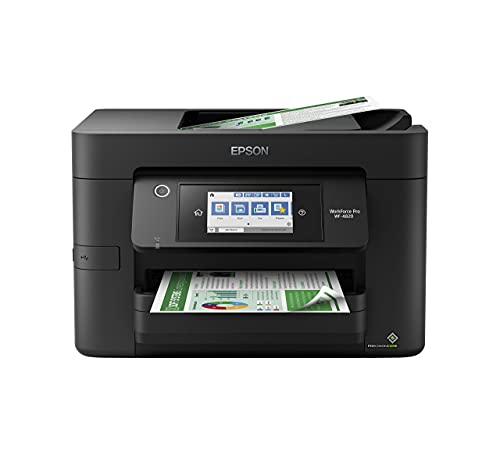
Epson WorkForce Pro WF-4820
Best for: a small office whose volume is real but whose desk space is not, needing stated pace in a compact body.
Not suited for: ream-at-a-time printing days — the 250-sheet tray refills twice as often as its 500-sheet siblings.
- Print technology: wireless colour all-in-one inkjet
- Speed, per title: up to 25 ppm
- Functions, per title: print, scan, copy, fax
- Feeder, per title: 35-sheet ADF
- Duplex: auto 2-sided printing
- Paper capacity, per title: 250-sheet tray
The WF-4820 is the volume ladder’s first rung, and its title states the rung precisely: up to 25 ppm, a 35-sheet automatic document feeder, auto two-sided printing and a 250-sheet tray, wrapped around the full four-function set for small offices. The pace figure matching its bigger siblings is the headline — Epson does not ration engine speed at this level — while the tray and feeder sizes mark the honest boundary of its stamina. A quarter-ream tray serves a small office’s ordinary week gracefully and asks for a refill visit on the heavy days.
That boundary is worth respecting rather than resenting, because it defines the machine’s ideal habitat: the two-to-four-person office whose printing is daily and colour-rich but arrives in human-sized jobs — the client pack, the invoice run, the scanned contract — rather than in pallet-sized batches. In that habitat the WF-4820’s compactness is a genuine asset, leaving desk for the work the printing supports.
The 35-sheet feeder deserves a practical translation. It digests the standard artefacts of office paper — a contract, a set of forms, a meeting’s worth of handouts — in one load, and it asks for a second load on the archive-box digitising days. Offices whose scanning arrives in forty-page stacks as a matter of routine should already be looking at the 50-sheet feeders above; offices whose stacks are smaller will never feel the difference.
As the cartridge family’s entry point, the WF-4820 also carries the simplest running story in the guide: swaps anyone can perform, yields to plan around, and no reservoir ritual. For a small office without an IT habit, that simplicity is a volume feature too — the machine spends its life printing rather than being administered.
Strengths
- Stated up to 25 ppm matches the pace of the larger models.
- Full four-function set with auto two-sided printing in a compact body.
- A 250-sheet tray sized honestly for small-office weeks.
Trade-offs
- The 35-sheet ADF is the smallest feeder in this guide.
- Tray refills come twice as often as on the 500-sheet models.
- Cartridge costs at sustained volume trail the tank alternatives.
There is a small-office archetype this machine fits so precisely that naming it helps the comparison. Three people, one shared desk run, colour documents for clients every day, a scanner that earns its keep weekly, and a purchasing habit that values never thinking about the printer. The WF-4820’s tray asks for a refill roughly when the office’s own rhythm pauses anyway; its feeder takes the contracts that actually arrive; its stated pace means nobody has ever waited on it in a way they remember. Volume is a relative term, and for this archetype the smallest machine in the guide is not the compromise — it is the correct size, with headroom spent exactly where the office feels it.
Small offices measuring their real weekly volume can check the tray and feeder wording on the listing; the Epson WorkForce Pro WF-4820 is shown at Check price on Amazon with its full specification.

Epson WorkForce Pro WF-4830
Best for: an office stepping up to sustained daily volume that wants double the paper and feeder capacity of the entry model.
Not suited for: occasional printing — the capacity and feeder are volume investments a quiet desk never cashes in.
- Print technology: wireless colour all-in-one inkjet
- Speed, per title: up to 25 ppm
- Functions, per title: print, scan, copy, fax
- Feeder, per title: 50-sheet ADF
- Duplex: auto 2-sided printing
- Paper capacity, per title: 500-sheet
If the WF-4820 is the ladder’s first rung, the WF-4830 is the rung where volume stops being a weekly event and becomes the machine’s ordinary weather. Every stamina figure doubles: a 500-sheet capacity that swallows a full ream, a 50-sheet feeder that takes the archive stack in one load, the same stated up to 25 ppm, the same four functions and auto two-sided printing. Epson’s titling makes the relationship unmistakable, and offices should read the pair as a single decision — how much paper infrastructure does the month require?
The practical difference a ream-sized tray makes is measured in interruptions avoided. A 500-sheet supply filled on Monday carries most offices to the following week; the printer leaves the staff’s attention entirely, which is the true product being bought at this level. The 50-sheet feeder extends the same courtesy to the digitising side, where a single load-and-leave scan of a full contract file replaces the hover-and-feed ritual that makes staff postpone scanning altogether.
Postponed scanning is a real organisational cost, and it is worth naming in this review because the WF-4830’s feeder is its cure. Paperwork that is tedious to digitise stays paper, accumulates, and eventually becomes someone’s lost weekend. A feeder that absorbs the stack whole keeps the digital archive current as a by-product of ordinary days, and offices feel that difference in retrieval times months later.
Between this model and the wide-format sibling below, the question is purely format: identical stamina figures, different paper widths. Between this model and the tanks, the question is ink philosophy at volume. The WF-4830 is the cartridge answer at full office scale, and for offices that value swap-and-go simplicity across a heavy month, it is a complete one.
Strengths
- 500-sheet capacity and 50-sheet ADF — the full volume paper path.
- Stated up to 25 ppm sustained by the tray and feeder around it.
- Auto two-sided printing across a complete four-function set.
Trade-offs
- Standard formats only; oversize work belongs to the wide models.
- Cartridge economics at very high volume invite the tank comparison.
- The capacity is wasted on an office that prints weekly, not daily.
The step from the WF-4820 to this model is the most instructive comparison in the guide, because nothing about the printing itself changes — same stated pace, same functions, same two-sided path — while everything about the office’s relationship with paper changes. Refills halve. Feeder loads halve. The printer’s presence in the working week shrinks toward invisibility, and that invisibility is what high-volume equipment is actually for. Offices hesitating between the two should ask a single question: how many times last month did someone walk to the printer for paper reasons? If the honest answer is more than a handful, this is the rung.
Offices at the step-up point can compare the capacity figures directly on the product page; the Epson WorkForce Pro WF-4830 sits at Check price on Amazon beside its smaller sibling.

Epson WorkForce Pro WF-7840
Best for: businesses whose volume includes wide-format pages — plans, posters, large spreadsheets — at office pace and capacity.
Not suited for: letter-only workflows on a shallow desk — the wide paper path needs room and earns nothing without oversize work.
- Print technology: wireless all-in-one wide-format inkjet
- Format, per title: wide-format print, scan, copy, fax
- Speed, per title: up to 25 ppm
- Duplex: auto 2-sided printing
- Feeder, per title: 50-sheet ADF
- Paper capacity, per title: 500-sheet
The WF-7840 takes the WF-4830’s volume skeleton — up to 25 ppm, 50-sheet feeder, 500-sheet capacity, auto two-sided printing — and widens every part of it. The title’s wide-format claim spans all four functions, which matters more than it first appears: wide scanning and copying mean the large original — the plan, the poster proof, the chart — can be digitised and duplicated in-house as well as printed, closing the loop that a print-only wide machine leaves open. Businesses handling large paper in both directions are this machine’s natural constituency.
Volume and format interact in a specific way worth understanding. Oversize pages are rarely printed one at a time in the businesses that need them; they arrive as sets — the plan issue for a project, the menu run for a restaurant group, the display materials for a retail refresh. A 500-sheet capacity and a stated business pace turn those sets into an unattended job rather than a supervised afternoon, and the feeder handles the corresponding intake of marked-up originals on the return journey.
Auto two-sided printing on a wide chassis is an engineering statement as much as a feature, since the duplex path must turn the larger sheet reliably. Offices should confirm in documentation which sizes the two-sided path accepts, as wide duplexing commonly covers part of the format range — but its presence in the title signals Epson’s intent that this machine behave like a full office citizen, not a specialty peripheral.
Placement planning is the honest footnote, as with every wide machine: the desk or stand must accommodate the body and the paper path’s clearance, and the businesses that thrive with the WF-7840 are those that gave it a proper home — near the people who produce the large work, on a surface that respects its size.
Strengths
- Wide-format capability across print, scan, copy and fax.
- The full volume skeleton: 500-sheet capacity, 50-sheet ADF, stated 25 ppm.
- Auto 2-sided printing included despite the oversize path.
Trade-offs
- Footprint and stock costs exceed standard-format machines.
- Letter-only offices gain nothing from the wide path.
- Duplex size coverage needs a documentation confirmation for oversize jobs.
The businesses that extract full value from the WF-7840 tend to share a trait: large paper is not their exception but their medium. The design studio issuing drawing sets, the training provider printing workbooks and wall charts, the property firm producing board-sized listings — for them, a standard-format machine is the specialty device, kept for letters, while the wide machine carries the identity of the business. That inversion is why this model belongs in a volume guide rather than a format guide: its wide work arrives in runs, at pace, through a feeder and a tray built for exactly that repetition.
Businesses with large paper in their weekly reality can verify the format range on the listing; the Epson WorkForce Pro WF-7840 is presented at Check price on Amazon with its paper story.

Epson WorkForce Pro WF-5938
Best for: a shared office station where walk-up operation through a colour touchscreen matters as much as the 500-sheet paper supply.
Not suited for: putting a stated speed figure ahead of everything else — the title quotes none, so pace starts as a documentation question.
- Print technology: wireless all-in-one inkjet
- Functions, per title: print, copy, scan, fax
- Duplex: auto 2-sided printing
- Feeder, per title: 50-page ADF
- Paper capacity, per title: 500-sheet
- Display, per title: 4.3-inch colour touchscreen
- Speed figure: Not stated in the listing title — verify with the manufacturer documentation
The WF-5938’s title tells its story through paper and interface rather than pace: a 50-page automatic document feeder, a 500-sheet paper capacity, auto two-sided printing across print, copy, scan and fax, and a 4.3-inch colour touchscreen to conduct it all. Read together, those claims describe a shared station — a machine placed where a team reaches it, operated standing up by people whose jobs are not printing, and expected to absorb the office’s paper in both directions without a resident expert.
The touchscreen is the social half of that specification. On shared machines, usability is throughput: the colleague who can copy a two-sided original correctly the first time, because the panel showed the option plainly, saves the queue behind them a full retry cycle. A 4.3-inch colour panel is large enough to make scan destinations, duplex settings and error states legible at arm’s length, and in a busy office that legibility compounds across hundreds of small interactions a month.
Speed requires this guide’s customary honesty: the title states no figure, so none is quoted. The structural evidence — the feeder, the capacity, the WorkForce Pro lineage it shares with three stated-25 ppm siblings — places the machine in the business class, but a purchaser whose requirement is a contractual pace should extract the number from Epson’s documentation rather than from family resemblance. This guide will not do the resemblance trick on the reader’s behalf.
Within the cartridge family, then, the WF-5938 is the usability-led choice at full volume capacity: same paper skeleton as the WF-4830, a proper public interface on top. Offices where the printer serves many hands will feel the panel’s value daily; a single-operator office may rationally prefer its plainer siblings.
Strengths
- 500-sheet capacity with a 50-page feeder — full volume paper handling.
- A 4.3-inch colour touchscreen sized for shared, walk-up operation.
- Auto two-sided printing across the complete four-function set.
Trade-offs
- No speed figure in the title, an unusual gap in this family.
- Standard format only, despite the flagship-style presentation.
- The panel’s value fades in a single-operator office.
Shared stations also accumulate a particular kind of wear that has nothing to do with mechanics: configuration drift. Someone changes a default, someone else inherits it, and the office’s documents slowly wander from the house standard. A clear touchscreen is the natural place to restore order — defaults visible, settings nameable, the correct choice presentable as the easy choice. The WF-5938’s panel, read this way, is a governance tool for the office’s paper, and teams that have suffered drift will value it above an extra increment of paper capacity they may never load.
Shared offices weighing interface against plain capacity can read the panel and feeder details on the product page; the Epson WorkForce Pro WF-5938 appears at Check price on Amazon for that judgement.

Epson EcoTank Pro ET-16600
Best for: high-volume wide-format printing where tank economics and a 500-sheet capacity serve a busy small office or business.
Not suited for: cartridge loyalists — the refillable system is the entire proposition, and it asks for bottles, not swaps.
- Print technology: wireless all-in-one wide-format tank printer
- Ink system, per title: cartridge-free
- Format, per title: wide-format print, scan, copy, fax
- Speed, per title: up to 25 ppm
- Paper capacity, per title: 500-sheet
- Audience, per title: small offices and businesses
The ET-16600 is the tank philosophy at full stretch: a cartridge-free, wide-format all-in-one stating up to 25 ppm and a 500-sheet capacity, aimed at small offices and businesses. Every axis of the volume brief is answered at once — pace, capacity, format, and an ink system whose per-page cost at volume is the reason tank machines exist. For a business printing colour heavily, including oversize work, this is the guide’s maximal machine, and its title does not waste a word pretending otherwise.
Wide format and tank economics reinforce each other in a way worth pausing on. Oversize pages consume ink generously; under cartridges, a poster run carries a visible cost that makes staff ration the capability they bought the machine for. Under a tank, the same run costs so little per page that the wide path gets used freely — drafts printed at full size for proper proofing, displays revised the same afternoon, plans reissued without a budget conversation. The capability and the economics together change behaviour, which is the deepest argument for this model.
The 500-sheet capacity keeps the paper side honest at the same scale, and the full four-function wide set — print, scan, copy, fax across the format — closes the loop for businesses whose large paper travels in both directions. Nothing in the title suggests a compromise made to reach the tank system; the specification reads as the WF-7840’s volume skeleton with reservoirs where the cartridges would be.
The duties are the tank family’s usual ones, amplified by volume: keep reservoirs fed, keep the machine exercised — a non-issue at this workload — and treat the first fill as the start of a long, cheap-page era. Businesses printing at this level will find the ET-16600 less a purchase than a change in the office’s cost structure.
Strengths
- Cartridge-free tank system at stated 25 ppm with 500-sheet capacity.
- Wide-format capability across all four functions.
- Tank economics unlock free use of the ink-hungry wide format.
Trade-offs
- The refill ritual replaces cartridge swaps entirely — a genuine preference fork.
- Wide-format footprint and stock exceed standard office habits.
- Feeder size is not stated in the title.
It is worth stating plainly what the ET-16600 asks of its owners in return for its economics: a shelf for bottles, a habit of glancing at reservoir levels, and the acceptance that the machine’s first hour — filling, charging, aligning — is an investment rather than a delay. Businesses at this volume recover that hour in the first month of cheap pages and never think about it again. The wide-format tank flagship is not an experiment; it is the logical end of the argument that at sufficient volume, ink should be bought by the bottle and paper by the case, and everything else is overhead.
High-volume businesses comparing the two ink philosophies at wide format can study the tank details on the listing; the Epson EcoTank Pro ET-16600 is listed at Check price on Amazon for that head-to-head.

Epson EcoTank Pro ET-5170
Best for: steady office volume that wants tank running costs with duplex printing and a feeder, at a gentler pace than the flagship models.
Not suited for: pace-critical shared queues — the stated up to 17 ppm is the slowest figure in this guide, honestly labelled.
- Print technology: wireless colour all-in-one supertank
- Ink system, per title: cartridge-free
- Speed, per title: up to 17 ppm
- Functions, per title: print, scan, copy, fax, with ADF
- Duplex: auto 2-sided printing
- Audience, per title: small offices and small businesses
The ET-5170 closes the guide as the tank system’s steady-state expression: cartridge-free print, scan, copy and fax, an automatic document feeder, auto two-sided printing, and a stated up to 17 ppm, aimed at small offices and small businesses. That pace figure — the lowest in this guide — deserves respect rather than apology, because it is honestly stated and correctly aimed. A great deal of real office volume is not queue-forming volume; it is a high monthly page count arriving in ordinary-sized jobs across the day, and for that shape of work a 17 ppm engine with tank economics serves beautifully.
The distinction between pace and volume is this model’s whole lesson. Volume is a monthly total; pace is a moment’s pressure. Offices whose total is high but whose moments are calm — the practice printing statements all day in small runs, the agency producing colour documents steadily between meetings — should weight the tank’s per-page story over the flagship’s ceiling. Offices whose moments are frantic should climb the ladder instead. The ET-5170 exists for the first group, and its title’s audience line says so.
Auto two-sided printing and the feeder keep the machine’s office credentials complete; nothing about the gentler pace demotes it to home equipment. The supertank system carries the same behavioural dividend described at the wide-format end of this guide — colour used freely because pages cost little — at a scale and price of admission suited to smaller operations.
Against the cartridge family’s entry, the WF-4820, the ET-5170 trades stated pace for ink economics, and the trade is decided by the monthly count and the queue’s temperament. It is a fitting final review for a guide whose argument has always been that volume, honestly measured, chooses the machine.
Strengths
- Cartridge-free tank economics for steady office volume.
- ADF and auto two-sided printing keep the full office workflow.
- An honestly stated pace aimed at real small-office rhythms.
Trade-offs
- Up to 17 ppm is the guide’s slowest stated figure.
- Paper capacity is not stated in the title.
- Tank value still depends on sustained monthly volume.
The ET-5170 also makes an environmental argument that steady offices increasingly weigh: a tank system across years of volume generates a fraction of the plastic churn of cartridge cycles, and duplex printing halves the paper stream at the same time. No title in this guide makes that argument explicitly, so it appears here as reasoning rather than as a claim — but for offices reporting on their footprint, the combination of refillable ink and two-sided defaults is the most defensible specification in the set, and it arrives attached to the guide’s most honest pace figure.
Steady-volume offices can weigh the tank figures on the product page; the Epson EcoTank Pro ET-5170 waits at Check price on Amazon for the final comparison.
Comparison Table
| Pick | Stated speed | Ink system | Capacity / feeder in title | Format |
|---|---|---|---|---|
| Epson WorkForce Pro WF-4820 | Up to 25 ppm | Cartridge | 250-sheet; 35-sheet ADF | Standard |
| Epson WorkForce Pro WF-4830 | Up to 25 ppm | Cartridge | 500-sheet; 50-sheet ADF | Standard |
| Epson WorkForce Pro WF-7840 | Up to 25 ppm | Cartridge | 500-sheet; 50-sheet ADF | Wide format |
| Epson WorkForce Pro WF-5938 | Title silent | Cartridge | 500-sheet; 50-page ADF | Standard; touchscreen |
| Epson EcoTank Pro ET-16600 | Up to 25 ppm | Tank | 500-sheet; feeder silent | Wide format |
| Epson EcoTank Pro ET-5170 | Up to 17 ppm | Tank | Capacity silent; ADF | Standard |
How to Choose
How should monthly volume be estimated honestly?
Count paper, not impressions. Reams purchased per quarter, divided by months, gives a floor figure every office can verify from its own invoices; add the scanning stack estimate from the feeder’s perspective and the workload’s true shape emerges. Then match the shape to the ladder: hundreds of pages monthly with calm moments suits the ET-5170 or the WF-4820; thousands with daily pressure belongs to the 500-sheet models; wide pages at any real volume point at the WF-7840 or the ET-16600. Offices still forming their picture should start from their own supply cupboard: the ream count never lies, and it is a better counsellor than any recollection of a busy week. (The same count-first discipline applies when the same office budgets its meeting-room display, where nebula projectors are compared on stated figures rather than impressions.)
Cartridge or tank at high volume?
At volume, the question becomes organisational. Cartridges delegate well: anyone can swap one, stock is compact, and the cost arrives in predictable units an office manager can budget. Tanks economise relentlessly: the per-page cost at thousands of pages monthly is the system’s reason to exist, and the refill ritual — minutes, occasionally — is the entire price. Offices with a person who owns supplies will thrive with either; offices where supplies are nobody’s job often find the tank’s indifference to ordering liberating, since full reservoirs forgive months of administrative neglect.
What does paper capacity actually buy?
Uninterrupted runs and forgotten trays. A 500-sheet capacity converts paper from a daily interaction into a weekly one, and on long jobs it is the difference between a run that finishes and a run that pauses mid-stack for a refill nobody scheduled. Capacity also interacts with paper types: larger trays and multi-source arrangements let letterhead and plain stock coexist. Buy capacity for the longest regular job, not for the average day.
When does wide format justify itself?
When oversize pages are a recurring output rather than an annual errand — the same test applied elsewhere in this programme of guides, sharpened by volume. Two models here carry the capability at full office stamina, one per ink philosophy, so format need not disturb the ink decision. Offices whose wide work is real should also budget the stock and the surface; the machine is only the middle third of the wide-format commitment. Display-side colleagues working in projected rather than printed output will find their own category overviews, from LG projectors to specialist ranges, more relevant than anything in this paper-bound guide.
What does the touchscreen class buy a growing team?
Onboarding, mostly. A new starter can be taught a touchscreen station in one demonstration because the machine explains itself; a button-and-menu station accumulates folklore that lives in one employee’s head. Teams expecting to grow should weight the WF-5938’s panel as a training investment, and teams that are stable and expert can safely bank the saving its plainer siblings offer.
How should colour be governed at volume?
By defaults rather than by memos. Set the fleet’s everyday profile to the settings the office actually wants — duplex on, colour available but deliberate for internal drafts — and reserve full-quality colour for the final-document profile. At thousands of pages, defaults are the entire cost policy; everything else is commentary. The machines here all support that discipline through their drivers and panels.
How much feeder is enough?
Enough is the largest stack the office scans weekly, taken in one load. The 35-sheet feeder on the WF-4820 covers contracts and form sets; the 50-sheet feeders cover the archive-minded stacks. Digitising projects measured in boxes exceed every feeder here and become a scanning-service conversation — an honest boundary worth recognising before a project plan assumes otherwise. Beyond feeders and trays, the remaining volume question is technological: print ecosystems adjacent to this one, including the BenQ projectors in the under-750 class category that offices sometimes budget alongside, solve presentation problems rather than paper ones, and should never be asked to substitute for a printer’s duty.
Paper Logistics at Volume
High-volume printing is a supply discipline wearing a machine’s clothes. Paper arrives by the case, not the ream, and its storage — flat, dry, near the machine — determines feed reliability more than any specification. A case stored in a damp room will jam a 500-sheet flagship as faithfully as a home printer, while a modest machine fed crisp, dry stock runs clean all month. Offices stepping up to this class should step up the paper shelf in the same purchase: a dedicated, dry home for two cases of the standard stock and one pack of each specialty the office uses.
Tray discipline completes the system. Standardise which tray holds what, label it, and let the driver defaults match the physical truth. Most volume misprints are not machine errors but disagreements between the software’s belief and the tray’s contents — letterhead runs on plain settings, plain runs through the letterhead tray. The machines in this guide are honest brokers; the office’s job is to keep the facts they broker consistent.
Recycling and output handling deserve a line at this scale too: duplex printing, stated across this guide, halves the paper stream’s bulk, and a bin placed where the output lands keeps the finished work moving instead of colonising the machine’s surroundings.
Ink at Scale: Managing the Two Philosophies
Cartridge volume management is a stock-keeping exercise: know the yields the office actually achieves, keep one full set in reserve, and reorder at the reserve line rather than at the warning light. The WorkForce Pro family’s four models share this discipline, and offices running several of them gain the quiet efficiency of a single cartridge inventory across the fleet.
Tank volume management is a level-checking exercise: glance at the reservoirs during the weekly paper fill, order bottles when a level crosses its final third, and never let a reservoir run dry mid-run, because repriming wastes the ink the system exists to save. The two EcoTank Pro models reward that small vigilance with the lowest-friction running story in this guide.
Either way, the mature volume office tracks one number monthly — pages printed — because that number, trended across a year, is the evidence base for the next purchase, the next capacity decision and the next ink-philosophy review. Machines generate the count through their own counters and panels; the office merely has to write it down.
When One Machine Is Not Enough: Fleet Thinking
Very high-volume offices eventually face a question this guide’s ladder cannot answer alone: one flagship or two mid-sized machines? The fleet answer has real virtues — redundancy on breakdown day, capacity split between floors or teams, and the ability to dedicate one machine to a paper type. The single-flagship answer has its own: one inventory, one interface to learn, one service relationship, and the full capability in one place. The stated figures in this guide support either reading, and the deciding evidence is the office’s tolerance for a printerless morning. Departments that cannot tolerate one should buy redundancy deliberately rather than discovering the preference during an outage.
Fleet buyers should also notice the ecosystem dividend inside this single-manufacturer shortlist: drivers, ink systems and panel logic repeat across models, so a mixed fleet of a WF-4830 and an ET-5170 trains its users once. That consistency is a legitimate volume feature, invisible in any single machine’s title and obvious in a year of office life.
There is a final, quieter virtue to choosing the correct rung first time: the office’s printing culture forms around the machine it has. A well-matched volume printer teaches staff that paper is a normal, unremarkable tool — print the full document, scan the whole file, use colour where colour helps. An undersized machine teaches rationing and workarounds that persist long after the machine is replaced. Culture, once set, is the hardest specification to upgrade, and it is set in the first quarter of ownership.
Common Mistakes
Buying pace and starving it with a small tray. A fast engine behind a 250-sheet tray in a high-volume office spends its advantage waiting for refills. Match capacity to the longest regular run.
Inventing a duty cycle the title never stated. No title in this guide quotes a monthly cycle figure. Offices with hard volume requirements must take that number from manufacturer documentation, not from a review’s optimism.
Letting a tank reservoir run dry. The one unforgivable tank sin. Levels are visible at a glance; the weekly paper fill is the natural moment to check them.
Storing the paper case in the damp room. Volume machines jam on damp stock exactly like small ones, only faster and at greater length. Dry, flat, near the machine.
Scanning projects planned beyond the feeder. A 50-sheet feeder is generous for office stacks and irrelevant to a warehouse of archive boxes. Recognise the boundary before the project plan depends on crossing it.
Judging volume by the busiest remembered week. Memory inflates. The ream invoices give the true monthly figure, and the true figure chooses the correct rung of the ladder.
Ignoring the output side. At volume, finished paper needs a destination — tray space, a collection rhythm, a recycling path — or the fastest printer in the building drowns in its own productivity.
Skipping the counter reading at installation. Without a starting figure, the office can never state its own monthly volume, and every future purchase repeats this one’s guesswork. Photograph the counter on day one.
Letting one person’s settings become the office standard by accident. Volume stations serve everyone; their defaults should be agreed, documented and reset deliberately when the agreement changes — not inherited from whoever configured the machine last.
Forgetting the scan side of the volume budget. Offices count printed pages and forget the feeder’s thousands. Digitising volume wears the same welcome; include scanning stacks in the workload estimate that chooses the model.
Frequently Asked Questions
Which picks state the fastest pace?
Four titles state up to 25 ppm: the WF-4820, WF-4830, WF-7840 and the ET-16600. The ET-5170 states up to 17 ppm, and the WF-5938 states no figure, which its spec box records as silence.
What is the difference between the WF-4820 and the WF-4830?
Stamina, on stated evidence: the WF-4830 doubles the paper capacity to 500 sheets and enlarges the feeder to 50 sheets, at the same stated pace and with the same function set. The WF-4820 is the compact expression of the same office brief.
Does any title state a monthly duty cycle?
None of the six does. This guide frames duty from stated capacity, feeder size and pace, and directs buyers with contractual volume needs to manufacturer documentation for cycle figures.
Which models print wide format?
Two: the WorkForce Pro WF-7840 on cartridges and the EcoTank Pro ET-16600 on a tank system, both with wide capability across their function sets per their titles.
Are tank printers always cheaper to run at volume?
The tank proposition is precisely that — very low per-page cost once the system is in place — and at sustained high volume it is the strongest running-cost story in this guide, stated qualitatively because real costs depend on each office’s colour mix and yields. Cartridge offices trade some of that economy for delegation-friendly simplicity.
Can one of these machines serve a whole department?
The 500-sheet models are built for shared office duty, with the WF-5938’s touchscreen explicitly serving walk-up teams. Department-scale buyers should still confirm duty-cycle figures in documentation and consider whether one station or two mid-sized ones better survives a breakdown day.
How long should a high-volume inkjet last?
Plan on a multi-year life and let that horizon justify buying the correct capacity rung initially; replacing an undersized machine in year two is the expensive path. Longevity at volume is protected by the unglamorous habits this guide repeats — dry paper, honest volumes, reservoirs or spares kept ahead of the work.
Is wireless reliable enough for this class?
For the great majority of offices, yes, provided the machine sits inside honest coverage; large colour files are the stress test, and a struggling signal shows up as slow first pages rather than failures. Where a network point exists beside the machine’s home, documentation will confirm whether the model can use it.
What should the first month with a volume machine establish?
Three baselines: the true pages-per-month count from the machine’s own counter, the refill or reorder rhythm the office settles into, and the one configuration — tray assignments, defaults, scan destinations — that everyone agrees is standard. Record all three where the supplies live. The second year of ownership is governed by those baselines far more than by the purchase decision itself.
Which single figure best predicts satisfaction at volume?
Interruptions per month. Every specification in this guide — capacity, feeder size, ink system, pace — is ultimately a lever on that one number, and the machine that interrupts least at the office’s real volume is the right machine, whatever its rung. Choose the rung that makes the printer boring.
Does high volume change what good output means?
It changes the emphasis from perfection to consistency. The thousandth page of the month must match the first — same colour behaviour, same duplex alignment, same text weight — because volume output is read as a body of work. The business lines in this guide are engineered for exactly that consistency, and the office’s part is the steady diet of good paper and timely ink this guide keeps describing.
What if the office’s volume is seasonal?
Size for the season’s peak if the peak is the business — enrolment periods, tax season, holiday retail — and accept quieter months as the cost of surviving the surge. Tank machines tolerate the quiet months gracefully provided they are exercised occasionally; cartridge machines tolerate them entirely. The ladder rung should be chosen by the month that would break the smaller machine.
Where should a volume machine live in the office?
Where the paper flow is: near the people who print most, on a surface that can carry its weight and its output, inside strong network coverage, with the paper store within a few steps. A volume machine exiled to a distant cupboard taxes every job with a walk, and the tax is paid thousands of times a year.
What paperwork should accompany the machine’s installation?
A single page, kept with the supplies: the model and its network identity, the ink system and its reorder trigger, the tray assignments, and the name of the person who owns supplies. At volume, that page is consulted monthly and saves a meeting every time it answers a question before the question becomes one.
Is a demonstration period worth arranging?
Where a supplier allows it, yes — a fortnight of the office’s real work reveals more than any specification sheet: the true refill rhythm, the feeder’s manners with the office’s actual paper, the panel’s reception by the team. Offices buying blind should simulate the same honesty in the first fortnight and treat configuration problems as setup findings rather than as verdicts on the machine.
Final Recommendation
Climb the ladder by the month’s true page count. The WF-4820 serves the compact small office at full stated pace; the WF-4830 is the volume centre of the cartridge family, with the tray and feeder the heavy month demands; the WF-7840 adds wide format to that same skeleton, and the WF-5938 adds the touchscreen a shared station deserves. On the tank side, the ET-16600 is the maximal machine — wide, fast on stated figures, and cartridge-free — while the ET-5170 delivers tank economics to steady offices whose pace is calm. Confirm any duty-cycle requirement in documentation, store the paper dry, keep the reservoirs or the spare cartridges ahead of the work, and page counts will stop being a constraint the office plans around.


