What's inside
- Key Takeaways
- Where to Buy
- Quick Picks
- How the Picks Were Chosen
- The Six Nebula Projectors in Detail
- Comparison Table
- How to Choose a Nebula Projector
- Setting Up a Nebula Screening, Indoors or Out
- Care Habits That Keep a Portable Projector Honest
- Battery, Brightness and the Portable Bargain
- Streaming Without a Stick: What Certification Buys
- Sound From a Small Box: Setting Expectations Fairly
- Common Mistakes
- Frequently Asked Questions
- Final Recommendation
As an Amazon Associate I earn from qualifying purchases. This post may contain affiliate links at no extra cost to you.
[SITE_DOMAIN] is reader-supported. When you buy through links on our site, we may earn an affiliate commission at no extra cost to you. Prices and availability change; check the Amazon listing for the current details.
One brand name covers a surprising amount of ground in projection. The best nebula projectors stretch from a soda-can-sized unit that runs on its own battery to a 3,500-lumen RGB triple-laser flagship with a motorised gimbal, and everything between those poles carries the same Nebula badge. That spread is exactly why a single-brand guide earns its keep: the hard part is not finding a Nebula projector, it is working out which rung of the ladder matches the room, the screen size and the evening you actually have planned.
Anker builds the line in recognisable tiers. The Capsule models are the pocket class — self-contained, battery-powered, designed to be carried to a wall rather than installed in front of one. The Mars models add brightness and battery endurance for gardens, campsites and bigger pictures. The Cosmos 4K SE moves toward the living room with a 1,800-lumen engine and Google TV, while the Nebula X1 sits at the top as a serious home-cinema machine that happens to remain movable. Each tier trades the same three currencies — lumens, battery hours and portability — in different proportions.
Every specification quoted in the reviews below comes from the model’s own listing title, and where a title stays silent on a figure, the spec box says so instead of guessing. That discipline matters most with brightness: two of the six titles state no lumen figure at all, and those two reviews treat brightness as an unknown to verify rather than a number to repeat. Streaming credentials, by contrast, are stated plainly across the range — Netflix certification and Google TV recur from the smallest Capsule to the flagship X1, with one Android TV model in the middle of the line.
Read the guide as a ladder. Start by deciding whether the projector lives in a bag, on a garden table or on a shelf in a darkened room, then let the picks narrow themselves. The closing sections cover throw distance, screen pairing and the setup habits that separate a sharp 120-inch picture from a washed-out one, and the final recommendation names the rung most evenings actually need.
Key Takeaways
- The range divides into four tiers: Capsule pocket models, Mars outdoor models, the Cosmos 4K SE for the living room, and the X1 flagship.
- Battery playtime is stated for four picks — 2.5 hours on the Capsule 3, Capsule 3 Laser and Mars 3 Air, and 5 hours on the Mars 3.
- Stated brightness runs from 400 ANSI lumens on the Mars 3 Air to 3,500 ANSI lumens on the X1; the two Capsule titles state no lumen figure.
- Five picks run Google TV per their titles; the Mars 3 runs Android TV instead.
- Netflix certification appears in the titles of the Capsule 3, Capsule 3 Laser and Mars 3 Air.
- Maximum stated picture sizes climb from 120 inches on the Capsules to 200 inches on the Mars 3, Cosmos 4K SE and X1 class.
Where to Buy
- NEBULA Capsule 3 — Check price on Amazon
- NEBULA Capsule 3 Laser — Check price on Amazon
- NEBULA Mars 3 Air — Check price on Amazon
- NEBULA Mars 3 — Check price on Amazon
- NEBULA Cosmos 4K SE — Check price on Amazon
- Nebula X1 — Check price on Amazon
Quick Picks
| Pick | Best for | Core spec | Display | Check |
|---|---|---|---|---|
| NEBULA Capsule 3 | Bedroom walls and travel nights | 1080p, Google TV, 2.5H battery | Up to 120 inches | Check price on Amazon |
| NEBULA Capsule 3 Laser | A laser engine in the pocket format | Laser light source, Google TV, 2.5H battery | Up to 120 inches | Check price on Amazon |
| NEBULA Mars 3 Air | Garden screenings on battery power | 1080p, 400 ANSI lumens, 2.5H playtime | Up to 150 inches | Check price on Amazon |
| NEBULA Mars 3 | Long outdoor evenings, biggest battery | 1,000 ANSI lumens, 5H battery, Android TV | Up to 200 inches | Check price on Amazon |
| NEBULA Cosmos 4K SE | A movable living-room centrepiece | 1,800 ANSI lumens, NebulaMaster, HybridBeam | Up to 200 inches | Check price on Amazon |
| Nebula X1 | Dark-room cinema with flagship optics | 4K RGB triple laser, 3,500 ANSI lumens, Dolby Vision | Large-format home and outdoor screens | Check price on Amazon |
How the Picks Were Chosen
Six places and one brand meant the selection work happened inside the Nebula catalogue rather than across the market. The first filter was coverage of the ladder: a guide that listed three near-identical pocket models and nothing else would describe the brand’s shelf, not its range, so each tier — Capsule, Mars, Cosmos, X1 — had to be represented by the model whose title makes the clearest case for that tier. The second filter was title evidence. A pick needed its defining claims stated in its own listing title: resolution, battery hours, lumen output, streaming platform, sound format. Models whose titles leaned on accessories, bundles or vague superlatives were passed over, however familiar their names.
Accessories deserve a sentence of their own. Nebula’s catalogue is surrounded by stands, cases, screens and gimbals sold under the same brand words, and search results mix them freely with projectors. None of those items can project anything, so none appears here as a pick; where a stand or a screen genuinely helps a setup, the how-to sections mention the category in passing, without a link and without a model name. The six reviews below are six projectors, full stop.
Brightness claims were handled with particular care because the two ends of this range behave differently. Where a title states ANSI lumens, the figure is quoted and the review discusses what that output can and cannot do to a wall after dark. Where a title states no figure — true of both Capsule models — the review refuses to fill the gap with a number borrowed from a sibling model or a different region’s listing. A pocket projector’s real brightness decides whether it is a bedroom-ceiling toy or a credible travel screen, so an honest unknown beats a confident invention every time.
Finally, the ordering follows the ladder rather than any ranking of worth. The Capsule 3 opens the reviews because it is the smallest complete expression of the idea — battery, streaming, sound and a 120-inch ceiling in one can — and the X1 closes them because it is the largest. Most readers will land somewhere in the middle three, and the comparison table after the reviews is built to make that middle easy to read at a glance. Readers weighing rival brands against this line will find the neighbouring brand guides useful; the CineBeam range is covered in our guide to the best LG projectors, which makes a useful contrast in how another maker splits its portable and home models.
The Six Nebula Projectors in Detail

NEBULA Capsule 3
Best for: spontaneous film nights in bedrooms, hotel rooms and rented flats where the projector travels in a jacket pocket and the wall is the screen.
Not suited for: a bright living room at midday — the title states no lumen figure, so daylight performance is an unknown rather than a promise.
- Resolution: 1080p, as stated in the listing title
- Streaming platform: Google TV, with Netflix certification stated in the title
- Battery: 2.5 hours of stated playtime
- Maximum picture: 120-inch display
- Sound: Dolby Digital Sound
- Connectivity: Wi-Fi stated in the title
- Brightness: Not stated in the listing title — verify with the manufacturer documentation
- Throw ratio: Not stated in the listing title — verify with the manufacturer documentation
The Capsule 3 is the purest form of the Nebula idea: a self-contained cinema that asks for nothing but a wall and a darkened room. Its title reads like a checklist of everything a pocket projector must prove — 1080p resolution so text and faces stay crisp at moderate sizes, Google TV so the streaming interface lives inside the unit rather than in a stick dangling from a port, Netflix certification so the biggest library runs natively, and a 2.5-hour battery so a full feature film fits inside one charge with room to spare. Nothing in that list is decorative. Each item removes one cable, one adapter or one workaround from the evening.
Picture size is the honest constraint. The title promises a display up to 120 inches, and at the smaller end of that range — a 60- to 80-inch image thrown across a bedroom — a 1080p pocket unit looks composed and watchable once the lights are out. Push toward the maximum in a room with pale walls and any stray light, and the image thins out; that is physics, not a defect of this model. The absence of a stated brightness figure in the title is the one gap a careful reader should close before ordering, because it decides which side of that line a given room falls on. Dolby Digital sound from a body this small will not shake furniture, yet for dialogue-driven viewing at close range it keeps voices clear without a separate speaker cluttering the bedside table.
Ownership of a unit like this also includes a rhythm: charge it after the screening rather than before the next one, and it will always be ready when a plan forms at short notice. The 2.5-hour figure in the title is best read as the length of a full evening’s main feature, and households whose viewing runs to long sports broadcasts or three-episode sessions should treat a nearby socket as part of the setup rather than as a defeat for the battery concept.
Strengths
- Netflix certification and Google TV together remove the need for any external streaming device.
- The 2.5-hour battery covers a complete feature film away from a socket.
- Full 1080p resolution keeps the picture honest at the sizes this format does best.
Trade-offs
- No brightness figure in the title means daylight capability cannot be judged from the listing alone.
- The 120-inch ceiling is a maximum, not a recommendation — the sweet spot sits well below it.
- Battery viewing and maximum picture size pull against each other on a single charge.
Bedrooms, dorms and travel bags are where this model earns its place, and the listing lays out its credentials plainly; the Capsule 3’s own page is at Check price on Amazon for readers ready to match its 2.5-hour battery against their typical film lengths.
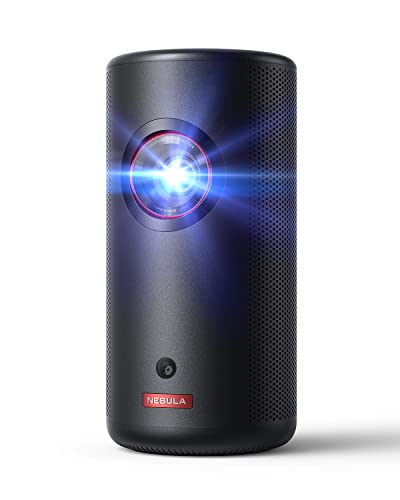
NEBULA Capsule 3 Laser
Best for: keeping the pocket format while swapping the light source for a laser engine, for travel and garden use where the projector gets carried weekly.
Not suited for: judging by resolution figures — the title names the laser and the platform but states no resolution, so sharpness claims rest on the maker’s documentation.
- Light source: laser, per the model name and title wording
- Streaming platform: Google TV, Netflix-Certified
- Battery: 2.5 hours built in
- Maximum picture: 120-inch display
- Sound: Dolby Digital Sound
- Connectivity: outdoor Wi-Fi stated in the title
- Resolution: Not stated in the listing title — verify with the manufacturer documentation
- Brightness: Not stated in the listing title — verify with the manufacturer documentation
Sibling rivalry defines this model. The Capsule 3 Laser keeps the can-sized body, the 2.5-hour battery, the Google TV interface and the Netflix certification of the standard Capsule 3, then changes the one component that shapes long-term ownership: the light source. A laser engine typically means consistent output across the unit’s life, instant on-and-off behaviour and no lamp waiting at the end of a few thousand hours, and in a projector designed to be carried, charged and used in short bursts, that always-ready character suits the format. The title positions it for outdoor duty as well, with Wi-Fi described in outdoor terms.
What the title does not do is state a resolution or a brightness figure, and this review will not supply either from outside knowledge. That silence changes how the model should be evaluated: the Laser is a bet on light-source quality and format convenience rather than on published numbers, and the bet pays best for readers whose viewing is close-range and after dark — a tent wall, a caravan interior, a bedroom ceiling — where a modest image thrown a short distance looks rich regardless of spec-sheet arithmetic. Set beside its sibling, the choice is philosophical as much as technical: published 1080p certainty from the standard model, or laser longevity from this one, in the same silhouette.
Strengths
- Laser light source in the smallest body Nebula sells, with the format’s full streaming stack intact.
- Netflix certification and Google TV carry over unchanged from the standard Capsule 3.
- Outdoor positioning in the title matches the carry-everywhere design.
Trade-offs
- Neither resolution nor brightness is stated in the title, so two core figures need outside verification.
- The same 120-inch maximum applies, with the same caution about using all of it.
- Laser convenience is the headline; readers wanting stated numbers get more from the Mars models below.
For a traveller who values the light source over the spec sheet, this variant makes its case quietly, and its listing sits at Check price on Amazon where the current configuration can be confirmed before a trip depends on it.

NEBULA Mars 3 Air
Best for: garden film nights and campsite screenings where a stated 400 ANSI lumens, a battery and a 150-inch ceiling cover the whole event without a generator.
Not suited for: dusk screenings that start before the sky is properly dark — 400 ANSI lumens is an after-sunset figure, not a twilight one.
- Resolution: 1080p, as stated in the listing title
- Brightness: 400 ANSI lumens
- Battery: built in, with 2.5 hours of stated playtime
- Streaming platform: Google TV, Netflix officially licensed
- Maximum picture: 150 inches
- Sound: Dolby Digital Sound
- Weight: Not stated in the listing title — verify with the manufacturer documentation
- Weather resistance: Not stated in the listing title — verify with the manufacturer documentation
The Mars 3 Air is where the Nebula ladder stops being pocket-sized and starts being event-sized. The title’s numbers tell the story in sequence: 1080p resolution, 400 ANSI lumens actually printed rather than implied, a built-in battery good for 2.5 hours, and a picture that can stretch to 150 inches. Read together, those figures describe a projector meant to be carried into a garden at dusk, set on a table, and trusted with the whole evening — no extension lead across the lawn, no laptop tethered to it, no streaming stick to lose in the grass.
Four hundred ANSI lumens deserves an honest paragraph. In full darkness it is enough for a large, satisfying image; against a summer sky that still holds light at nine in the evening it is not, and no setting changes that arithmetic. The practical craft with this class of machine is timing and surface: start the film when the light has genuinely gone, throw onto a pale wall or a proper screen rather than a fence with slats, and keep the picture nearer 100 inches than 150 when the audience is large. Google TV with Netflix officially licensed keeps the software side as self-contained as the hardware, and Dolby Digital sound handles dialogue outdoors, where a separate speaker would otherwise be one more thing to carry and charge.
Strengths
- A stated lumen figure — 400 ANSI — lets garden size and screen size be planned with real numbers.
- Battery, streaming and sound are all built in; the garden kit is the projector alone.
- The 150-inch ceiling gives growing room for bigger gatherings than the Capsules allow.
Trade-offs
- Twilight defeats 400 lumens; the screening schedule bends to the sunset.
- The 2.5-hour battery matches one film, not a double feature with a long interval.
- Weather resistance is not stated in the title, so rain planning stays the owner’s job.
Garden hosts who plan around darkness rather than fighting it will find this the natural centre of the range, and the Mars 3 Air’s listing is waiting at Check price on Amazon for a final look at what ships in the box.

NEBULA Mars 3
Best for: long outdoor evenings — backyard double bills, campsite stays and outdoor events — where the 5-hour battery and 1,000 ANSI lumens remove the two usual limits at once.
Not suited for: a Netflix-first streaming setup built around Google TV, because this model’s title specifies Android TV as its platform instead.
- Brightness: 1,000 ANSI lumens
- Battery: 5 hours of stated playtime
- Image processing: AI-powered image features stated in the title
- Maximum picture: 200 inches
- Streaming platform: Android TV
- Stated settings: backyard, office and business use, and camping
- Resolution: Not stated in the listing title — verify with the manufacturer documentation
- Sound format: Not stated in the listing title — verify with the manufacturer documentation
Everything about the Mars 3 is scaled for endurance. Five hours of battery is double what the rest of the battery-powered range states, and it changes the social shape of an outdoor screening: a film plus the match before it, a double feature with a proper break, or a campsite evening that does not end with a percentage warning. One thousand ANSI lumens is the other half of the proposition — output that holds a big picture together after dark and tolerates a little ambient spill from a patio light or a neighbouring tent better than the 400-lumen class can.
The platform is the deliberate difference. Android TV, rather than the Google TV found across the rest of this guide, brings its own interface habits and app catalogue, and the title does not carry the Netflix certification wording its siblings display. Readers whose evenings run through specific apps should confirm their services sit comfortably on this platform before treating the bigger battery as decisive. The title also leaves resolution unstated, an unusual silence at this size and brightness, so the documentation check matters here too. What the title does claim — AI-powered image features and a 200-inch picture — points at the model’s real job: a large, bright, long-running image in places where plugging in is the exception, from back gardens to the office-and-business settings the title names.
There is also a presenter’s angle hiding in the title’s wording. A projector that lists office and business among its settings, throws 200 inches and runs five hours untethered is a plausible meeting-room and event machine, and the same endurance that serves a campsite serves a training day. That breadth is worth weighing for households whose projector will genuinely live two lives; a dedicated cinema unit would be wasted on slides, and a dedicated presentation unit would be a joyless film machine, while this one credibly attempts both.
Strengths
- The 5-hour battery is the longest stated playtime in this guide and reshapes what an outdoor evening can include.
- At 1,000 ANSI lumens, stated output supports the full 200-inch picture after dark.
- AI-powered image features aim the setup effort at the projector rather than the host.
Trade-offs
- Android TV replaces the Google TV interface used by every other pick here.
- Resolution goes unstated in the title despite the flagship-outdoor positioning.
- Size and battery capacity make this a carried appliance, not a pocket companion.
When the evening is long and the socket is far away, endurance becomes the whole argument, and the Mars 3 states its endurance plainly; its page is at Check price on Amazon for readers planning a season of outdoor screenings.

NEBULA Cosmos 4K SE
Best for: a living room that wants a 200-inch-capable 4K picture from a unit that can still be moved between rooms, with gaming and office duty in the same week.
Not suited for: battery-powered viewing away from mains electricity — the title describes a portable mains-class machine and states no battery at all.
- Brightness: 1,800 ANSI lumens
- Image engine: NebulaMaster with HybridBeam, both named in the title
- Streaming platform: Google TV
- Maximum picture: 200-inch screen
- Stated settings: gaming, home and office
- Form: portable, per the title
- Battery: Not stated in the listing title — verify with the manufacturer documentation
- Sound format: Not stated in the listing title — verify with the manufacturer documentation
The Cosmos 4K SE is the hinge of the whole range — the point where Nebula stops asking how portable a projector can be and starts asking how domestic it can become. The 4K designation in its name, 1,800 ANSI lumens of stated output and a 200-inch screen ceiling describe a machine for a real living room: bright enough to hold a large picture together in a darkened room with lamps at the edges, resolute enough that a 120-inch image does not dissolve into softness, and still portable in the honest sense that one person can carry it to another room or another house.
Two pieces of named technology carry the image story. NebulaMaster is the brand’s image-processing banner and HybridBeam its light-engine approach, and while the title offers no further detail on either, their presence signals where the engineering budget went: processing and light, the two things a living-room projector cannot borrow from the room itself. Google TV keeps the streaming side consistent with the smaller models, so a household moving up from a Capsule meets a familiar interface. The title’s stated settings — gaming, home and office — sketch a triple life that suits this class well: films at night, a console at the weekend, slides on a weekday, all from a unit that lives on a shelf rather than in a ceiling mount.
Strengths
- 1,800 ANSI lumens is the strongest stated output in the range below the flagship X1.
- The 4K class and 200-inch ceiling give a living-room picture genuine scale.
- Google TV continuity makes it an easy step up from the portable models.
Trade-offs
- No battery is stated, so the portability is room-to-room rather than off-grid.
- NebulaMaster and HybridBeam are named without detail in the title; their specifics need the documentation.
- A darkened room still flatters it most, as with every model in this guide.
Living rooms that cannot commit to a fixed installation get the most from this middle path, and readers at that crossroads can examine the Cosmos 4K SE closely at Check price on Amazon before deciding how permanent their big screen should be. Households comparing it against conventional lamp-lit rivals in the same room might also weigh the models gathered in our best living room projectors guide, where brightness for lamps-on viewing is the organising test.

Nebula X1
Best for: a dedicated dark room — or a serious outdoor cinema — where 3,500 ANSI lumens, an RGB triple-laser engine and Dolby Vision mark the ceiling of what this brand builds.
Not suited for: casual shelf-to-wall viewing in small rooms, where a flagship of this output and ambition spends most of its capability unused.
- Resolution class: 4K, per the model name and title
- Light source: RGB triple laser
- Brightness: 3,500 ANSI lumens
- Contrast: 56,000:1 stated in the title
- HDR: Dolby Vision
- Certifications: ISF and TÜV, as stated in the title
- Alignment: auto-align gimbal
- Streaming platform: Google TV; stated for indoor and outdoor use
- Battery: Not stated in the listing title — verify with the manufacturer documentation
The X1 reads less like a bigger portable and more like a statement of intent. An RGB triple-laser engine — three laser colours rather than a single laser exciting a phosphor wheel — is the light source serious home-cinema machines use when colour purity is the goal, and the title surrounds it with the vocabulary of calibration culture: Dolby Vision for HDR, a stated 56,000:1 contrast figure, ISF and TÜV certifications. At 3,500 ANSI lumens it also carries more than double the Cosmos output, which opens the door to larger screens and to rooms that are dark rather than blacked out.
The auto-align gimbal is the detail that keeps the flagship honest to the brand. A projector of this class normally demands a fixed mount and a careful installer; a gimbal that aligns the unit itself preserves some of the carry-it-there freedom the Capsules were built on, scaled up. Google TV completes the picture of a machine that wants to be used often rather than admired. None of that makes it casual — certifications and triple-laser engines belong to deliberate purchases, and the title states no battery, so mains power anchors every screening — but as the top of a single brand’s ladder it is a coherent one: the portable philosophy, executed without the portable compromises. Readers cross-shopping this tier against other makers’ flagships will find the value end of that contest in our BenQ projectors under 750 guide — a different philosophy entirely, useful precisely for the contrast.
Ownership at this tier also implies a screen decision made with some care. A 3,500-lumen RGB laser picture thrown on a wavy wall wastes the contrast the title advertises; a flat, quality screen surface is what lets a stated 56,000:1 figure become visible as depth in dark scenes rather than as a number in a spec box. Readers speccing a room around the X1 should budget attention — and wall space — for the surface with the same seriousness they give the projector itself.
Strengths
- RGB triple-laser light with Dolby Vision is flagship hardware by any brand’s standard.
- 3,500 ANSI lumens and a stated 56,000:1 contrast support genuinely large screens.
- The auto-align gimbal keeps setup flexible where rivals demand fixed installation.
Trade-offs
- No battery is stated; every screening happens within reach of mains power.
- Small rooms and modest screens leave most of its output and cost unjustified.
- Calibration-grade features reward an owner willing to use them; casual viewing ignores them.
Deliberate cinema rooms are the X1’s natural habitat, and its specification sheet rewards slow reading; the flagship’s listing waits at Check price on Amazon for readers measuring it against a screen they already own.
Comparison Table
| Pick | Brightness (title) | Battery | Platform | Max picture |
|---|---|---|---|---|
| NEBULA Capsule 3 | Not stated in the title | 2.5 hours | Google TV | 120 inches |
| NEBULA Capsule 3 Laser | Not stated in the title | 2.5 hours | Google TV | 120 inches |
| NEBULA Mars 3 Air | 400 ANSI lumens | 2.5 hours | Google TV | 150 inches |
| NEBULA Mars 3 | 1,000 ANSI lumens | 5 hours | Android TV | 200 inches |
| NEBULA Cosmos 4K SE | 1,800 ANSI lumens | None stated | Google TV | 200 inches |
| Nebula X1 | 3,500 ANSI lumens | None stated | Google TV | Large-format screens |
How to Choose a Nebula Projector
Where will the projector actually live?
Begin with geography, not specifications. A projector that lives in a bag and works on bedroom walls, hotel rooms and the sides of tents belongs to the Capsule class, where the whole design bends toward smallness and self-sufficiency. A projector that lives in a cupboard and emerges for garden events belongs to the Mars class, where battery endurance and weather-agnostic convenience matter more than pocketability. A projector that lives in the living room, even without a fixed mount, belongs to the Cosmos and X1 class, where output and resolution stop being compromises. Naming the home first collapses a six-way choice into a two-way one, and the remaining decision is usually settled by a single figure from the spec boxes.
How much brightness does the room demand?
Brightness is the currency every other feature is priced in, and the stated figures in this guide span an order of magnitude: 400 ANSI lumens on the Mars 3 Air, 1,000 on the Mars 3, 1,800 on the Cosmos 4K SE and 3,500 on the X1. The working rule is that darkness is worth lumens — a fully dark room makes 400 lumens feel generous at 100 inches, while a living room with lamps burning asks for the top half of that ladder even at moderate sizes. The two Capsule titles state no figure, which does not make them dim; it makes them unquantified, and the sensible response is to verify the number in the manufacturer documentation and then judge it against the room’s worst lighting, not its best. Screen size multiplies everything: doubling the diagonal quarters the light per unit area, so a model that looks bright at 80 inches can look tired at 150 from the same distance.
Does the evening fit the battery?
Battery arithmetic is simple and unforgiving. A stated 2.5 hours covers one feature film with trailers, or two long episodes, or a match that does not go to extra time; the Mars 3’s stated 5 hours covers the double bill and the post-film conversation with the projector still running the credits playlist. Streaming over Wi-Fi, higher brightness settings and larger pictures all lean on the battery harder than a quiet test in a product video suggests, so plan against roughly four-fifths of the stated figure and treat the remainder as insurance. Where a title states no battery — the Cosmos 4K SE and the X1 — the question answers itself: those machines plan around a socket, and their portability is about moving between rooms and houses, not about leaving the grid behind.
Laser, lamp-free LED or flagship laser — does the light source matter?
Light source shapes ownership more than any single viewing. The Capsule 3 Laser’s title makes its laser engine the headline, and laser light typically brings instant readiness, stable output across years and no replacement lamp in the unit’s future. The X1’s RGB triple-laser design sits at the far end of the same idea, chasing colour purity for a dedicated room. Between those poles, the remaining models’ titles emphasise output figures and features rather than light-source type, and for a projector used a few evenings a month the practical difference narrows: what reaches the eye is brightness, contrast and colour as a combined result, not the mechanism behind them. The light source becomes decisive at the extremes — heavy weekly use, where longevity compounds, and flagship cinema, where the RGB design’s colour behaviour is the point of the purchase.
Which streaming platform feels like home?
Five of the six titles specify Google TV; the Mars 3 specifies Android TV. The practical difference is the interface layer and how services present themselves, and for most streaming libraries both roads reach the same films. The sharper question is certification: the Capsule 3, Capsule 3 Laser and Mars 3 Air state Netflix certification or official licensing in their titles, which means the service runs natively at full quality inside the unit. Where a title is silent on a particular service, the safe assumption is that a phone, a stick or a laptop joins the setup — workable, but one more device to charge and pair. Readers standardising a whole home on one platform should weigh the Mars 3’s platform difference alongside its battery advantage rather than discovering it on the first evening.
Setting Up a Nebula Screening, Indoors or Out
Throw distance decides picture size before any menu does. Every projector in this guide builds its image by throwing light across a gap, and the gap available — coffee table to wall, garden table to screen — sets the diagonal more firmly than the maximum printed in a title. Measure the distance first, then choose a model whose comfortable range covers it; running a projector at the extreme edge of its zoom or its keystone correction costs brightness and sharpness at exactly the moment both are wanted most. Flat, pale and matte are the three virtues of a surface: a smooth wall in a light neutral colour outperforms a textured or tinted one, and outdoors a proper screen or a taut sheet beats a fence, a garage door or the side of a van with panel lines running through the picture.
Outdoor evenings reward a short rehearsal. Set the unit out while some light remains, focus on the chosen surface, and mark where the feet or the stand sit, so the real setup after dark is a repetition rather than an improvisation. Keep the projector’s air path clear of cushions and blankets, keep drinks on a different surface from the electronics, and run any necessary cable where feet will not find it in the dark. Sound travels differently outside: dialogue that sounds full indoors can thin out in open air, so seating the audience nearer the unit, or accepting a smaller picture with the projector closer, often improves the evening more than any setting in a menu.
Care Habits That Keep a Portable Projector Honest
Portable projectors die of small neglects rather than dramatic failures. Charge cycles matter: a battery left empty in a drawer for a season ages faster than one stored partly charged and exercised monthly. Lenses matter more: the front element of a pocket projector lives unprotected in bags and pockets, and a microfibre cloth habit — wipe before the screening, never after with whatever fabric is nearest — preserves contrast that no menu can restore. Heat is the third quiet enemy; these compact bodies shed warmth through small vents, and a unit smothered by a cushion or run inside a closed cabinet will throttle its brightness to protect itself. Finally, firmware and app updates arrive through the streaming platform, and letting them install keeps services working; a projector whose apps age untouched eventually meets a service it can no longer open, which is a software ending to a hardware story that had years left in it.
Battery, Brightness and the Portable Bargain
Every portable projector is a negotiation between three numbers that cannot all grow at once. Brightness drinks power; power lives in a battery; a battery has weight, and weight is the enemy of the portability that justified the machine in the first place. The Nebula range is best understood as six different settlements of that negotiation. The Capsules settle it in favour of the bag — modest pictures, complete features, a battery sized to one film. The Mars models settle it in favour of the evening — bigger batteries, bigger pictures, bodies that travel by hand rather than by pocket. The Cosmos and the X1 decline the negotiation altogether by returning to mains power, and their stated outputs show what becomes possible when the battery leaves the equation: 1,800 and 3,500 ANSI lumens, figures no battery machine in this guide approaches.
The practical consequence is that brightness comparisons only make sense inside a power class. Judging the Mars 3 Air’s stated 400 lumens against the X1’s 3,500 misses the point of both machines: one carries its power station inside itself and works at the bottom of a garden, the other assumes a wall socket and a darkened room. The fair comparisons are Capsule against Capsule, Mars against Mars, and then a deliberate decision about which class a household’s evenings belong to. Readers who screen in both worlds — a bedroom in winter, a garden in summer — will notice the ladder has a rung for each, which is precisely how a single-brand range earns its shelf space.
Streaming Without a Stick: What Certification Buys
The streaming layer decides how a screening starts. A projector with a full smart platform and certified apps begins with a remote and a home screen; a projector without one begins with a cable, a dongle or a laptop, and a small ceremony of pairing and input-switching that guests find baffling and hosts find tedious. Nebula’s titles lean hard into the first pattern: Google TV appears on five of the six, and Netflix certification or official licensing is stated on three. Certification is more than a logo — it signals that the service’s app runs natively on the unit at its proper quality, rather than through a workaround that caps resolution or drops the service entirely after an update.
The Mars 3’s Android TV is the range’s one variation, and it deserves a fair reading rather than a reflexive one. Android TV carries a deep app catalogue and a familiar interface lineage; the difference lies in the presentation layer and in which services choose to certify which platform. A household whose viewing runs through two or three major services will likely find all of them present either way. A household built around one specific service should check that service against the exact platform named in the title — Google TV or Android TV — because the title, not the brand, is where the promise lives. That single check, done once before ordering, prevents the most common disappointment in this entire product class: a beautiful picture fed by an improvised source.
Sound From a Small Box: Setting Expectations Fairly
Four of the six titles name Dolby Digital Sound, and the phrase deserves translation. In a portable projector, built-in sound exists to make the unit complete — one box, one button, a film — and for dialogue-led viewing at bedroom distances it succeeds at exactly that. Voices carry, music sits where it should, and nobody misses a separate speaker during a comedy or a drama watched from three metres away. The physics of small enclosures set the boundary: low frequencies need air volume, and a can-sized or shoebox-sized body holds only so much air. Explosions will be suggested rather than felt, and a garden audience spread wide will hear a thinner version of what the front row hears.
The honest way to judge the sound story across this range is by venue. Indoors and close, the built-in speakers of the Capsule and Mars classes are the whole system for most owners, most nights. Outdoors, placement becomes the sound engineer’s tool: the projector near the audience rather than near the screen, a wall or fence behind the seating to give the sound something to lean on, and a picture sized so nobody sits fifteen metres from the source. The Cosmos and X1 class, playing to a living room, will often be paired with the room’s existing audio over time — not because their titles promise weak sound (the Cosmos title states no sound format at all, and the X1’s audio story sits behind its Dolby Vision headline), but because a 150-inch picture eventually asks for sound with matching scale. None of this is a flaw in any single model; it is the acoustics of rooms and gardens asserting themselves, and planning for it costs nothing but a few minutes of thought before the first screening.
Common Mistakes
Buying the maximum picture size. Titles advertise ceilings — 120, 150, 200 inches — and those numbers describe what the lens can draw, not what the light can fill. A picture sized to the room’s darkness always beats a picture sized to the wall’s dimensions.
Assuming sibling models share specifications. The two Capsules differ in light source and in what their titles state; the two Mars models differ in platform, battery and output. Nebula reuses names across genuinely different machines, so the spec box of the exact model is the only safe reference.
Planning a twilight start. Garden screenings scheduled for the moment the barbecue ends usually begin in light the projector cannot fight. Darkness is a feature of the venue, and the programme should be timed to it.
Forgetting the sound path outdoors. Built-in Dolby Digital sound handles a bedroom easily; a garden audience spread across ten metres of lawn is a different acoustic problem, solved by seating and placement rather than volume alone.
Treating unstated as unimportant. A title that omits brightness or resolution is not hiding a triumph. Verify the missing figure in the documentation before the purchase, not after the first screening.
Frequently Asked Questions
Do all Nebula projectors run Netflix natively?
Three titles in this guide state Netflix certification or official licensing outright — the Capsule 3, the Capsule 3 Laser and the Mars 3 Air. The other titles name their platforms (Google TV, and Android TV on the Mars 3) without the certification wording, so native support for a specific service should be confirmed on the listing or in the documentation before purchase.
Which Nebula has the longest battery life?
The Mars 3, at a stated 5 hours — double the 2.5 hours stated for the Capsule 3, Capsule 3 Laser and Mars 3 Air. The Cosmos 4K SE and the X1 state no battery in their titles and are mains-powered machines.
What is the brightest projector in this guide?
By stated figures, the Nebula X1 at 3,500 ANSI lumens, followed by the Cosmos 4K SE at 1,800. The two Capsule models state no lumen figure in their titles, so they cannot be placed on that ladder from listing evidence alone.
Can these projectors work in daylight?
None of the six is a daylight machine in the way a television is. Higher stated output — the X1 and Cosmos class — tolerates lamps and curtains-drawn daylight at moderate sizes; the battery portables are after-dark devices, and the Mars 3 Air’s stated 400 lumens should be planned around full darkness.
Is the Mars 3’s Android TV a problem?
Not inherently — it is a full streaming platform with its own interface. It matters only where a specific service’s native app or certification is essential, since the Mars 3’s title does not carry the Netflix certification wording found on the Capsule 3 and Mars 3 Air.
How large a picture can a Capsule really sustain?
The titles state a 120-inch display ceiling for both Capsule models. In a properly dark room, pictures in the 60- to 100-inch range are the comfortable working territory for this class; the stated maximum is headroom for a pale wall and a dark night, not a target for every screening.
Which model suits a camper van or a tent?
The battery models are the candidates, and the choice turns on picture size and evening length: the Capsules for close walls and single films, the Mars 3 Air for a larger picture on one charge, and the Mars 3 where 5 hours of stated playtime and 1,000 stated lumens need to cover a whole night away from mains power.
Do I need a screen, or is a wall enough?
A smooth, pale wall serves the portable models well, and most owners start there. A dedicated screen earns its place as picture sizes grow — with the Mars 3, Cosmos 4K SE and X1 classes — because surface flatness and gain start to decide how much of the stated brightness and resolution survives to the eye.
Are stands, cases and screens part of these recommendations?
No. Nebula sells a wide ring of accessories under the same brand words, and none of them projects an image, so none appears as a pick. A stand or a screen can still improve a setup — the how-to sections mention both in passing — but each of the six recommendations above is a complete projector judged on its own title.
Final Recommendation
The middle of this ladder is where most evenings live. The Mars 3 Air is the recommendation for the widest circle of readers: stated 1080p, stated 400 ANSI lumens, a battery matched to a feature film, Netflix officially licensed and Google TV aboard — a complete garden and spare-room cinema with no unknowns in its title. Step down to the Capsule 3 when portability outranks picture size, and step up to the Cosmos 4K SE when the living room becomes the main venue and mains power is always near. The Mars 3 owns the long outdoor night, and the X1 owns the dedicated room; both are specialists, chosen deliberately rather than by default. Whichever rung fits, choose it by the room and the evening rather than by the badge — a Nebula sized honestly to its venue will still be earning its shelf space years after a bigger, dimmer compromise has been quietly retired to a drawer.