What's inside
- Key Takeaways
- Where to Buy
- Quick Picks
- How the Picks Were Chosen
- The Six Living Room Projectors in Detail
- Comparison Table
- How to Choose for a Living Room
- Screen Pairing: The Other Half of Brightness
- Lamp Strategy for a Room That Stays a Room
- Laser, Lamp-Era and 3LCD: The Imaging Traditions in This List
- Ceiling Mount, Shelf or Cabinet: Settling the Placement
- Sound for a Room With a Sofa in It
- The June Test: Seasonal Light and Honest Scheduling
- Common Mistakes
- Frequently Asked Questions
- Final Recommendation
As an Amazon Associate I earn from qualifying purchases. This post may contain affiliate links at no extra cost to you.
[SITE_DOMAIN] is reader-supported. When you buy through links on our site, we may earn an affiliate commission at no extra cost to you. Prices and availability change; check the Amazon listing for the current details.
A living room is the most honest testing ground a projector can face, and the best living room projectors are the ones specified for its terms rather than for a showroom’s. The room has lamps that somebody wants left on, windows that face the wrong way, a sofa that cannot move, children crossing in front of the screen, and a film starting at eight on a June evening when the sky is still arguing. Brightness is the headline qualification for surviving all of that, and this guide is organised around stated brightness first — what each title actually promises in lumens — with resolution, throw and screen pairing as the supporting evidence.
The selection discipline behind the list matters as much as the list. The market’s loudest corner is crowded with no-name projectors advertising extreme brightness numbers that cannot be verified against any accountable standard, and those models were deliberately excluded from this guide: every pick below is a branded model whose ratings can be checked, from makers — ViewSonic, Optoma, Epson, BenQ — whose published figures have reputations attached to them. A living-room purchase is too large and too long-lived to rest on an unverifiable claim, and the screening rule is stated here so the shortlist’s shape makes sense: six checkable machines beat sixty miraculous ones.
Inside that discipline, the range spreads widely. Stated output runs from 3,500 to 5,500 lumens among the titles that publish figures; two titles publish none and are handled as unknowns to verify rather than numbers to repeat. Resolution divides between 1080p workhorses, one WXGA presentation model flagged for exactly what it is, and two 4K UHD machines for rooms ready to feed them. Three picks are laser-lit per their titles. One is a gaming instrument with a 240Hz claim and a 4.2ms lag figure; one is a 3LCD design from the maker that champions that technology. The living room contains multitudes, and so does the shortlist.
Specifications below come only from the titles, with silences recorded in the spec boxes. The how-to sections then take over the part spec sheets cannot settle: how far the unit sits from the wall, which screen surface rescues which brightness figure, and how to arrange lamps so the room stays a room while the wall becomes a cinema. A projector purchase succeeds or fails in those arrangements more often than in any single number, and this guide treats them with the same seriousness as the picks themselves.
Key Takeaways
- Screening rule: branded models with verifiable ratings only — no-name projectors with extreme, unverifiable brightness claims were excluded deliberately.
- Stated brightness among the publishing titles runs from 3,500 to 5,500 lumens; two titles publish no figure and are treated as verify-first unknowns.
- Three picks are laser models per their titles: the ViewSonic LS740HD, the Optoma UHZ36 and the ViewSonic LX700-4K.
- Two picks are 4K UHD — the UHZ36 and the LX700-4K; the PA503W is a WXGA model and is flagged as such.
- The BenQ TH575 appears here under a room-light angle — brightness, throw and screen pairing — distinct from its treatment in brand guides.
- Every pick’s claims can be traced to its own title; gaps are marked, never filled.
Where to Buy
- ViewSonic LS740HD — Check price on Amazon
- ViewSonic PA503W — Check price on Amazon
- Optoma UHZ36 — Check price on Amazon
- ViewSonic LX700-4K — Check price on Amazon
- Epson Home Cinema 980 — Check price on Amazon
- BenQ TH575 — Check price on Amazon
Quick Picks
| Pick | Best for | Core spec | Display | Check |
|---|---|---|---|---|
| ViewSonic LS740HD | Maximum stated brightness for stubborn rooms | 1080p laser, 5,500 lumens | Very large living-room screens | Check price on Amazon |
| ViewSonic PA503W | Bright multi-purpose rooms and presentations | WXGA DLP, 4,000 lumens | Large presentation-scale pictures | Check price on Amazon |
| Optoma UHZ36 | 4K laser theatre in a black finish | 4K UHD laser, HDR | Home theatre screens | Check price on Amazon |
| ViewSonic LX700-4K | 4K gaming at living-room scale | 4K UHD laser, 3,500 lumens, 240Hz, 4.2ms lag | Large gaming screens | Check price on Amazon |
| Epson Home Cinema 980 | 3LCD colour from the technology’s champion | 3-chip 3LCD, 1080p | Movie screens | Check price on Amazon |
| BenQ TH575 | The proven bright all-rounder | 1080p, 3,800 lumens, dual HDMI | Large home screens | Check price on Amazon |
How the Picks Were Chosen
The screening note belongs at the front, because it shaped everything. While candidates were gathered, the loudest claims in the category came from no-name projectors advertising extreme brightness figures — numbers several times higher than the branded flagships in this guide, attached to machines with no accountable measurement behind them. Those models were deliberately excluded. A lumen is only useful if it can be verified, and a living-room projector is a years-long fixture; resting that fixture on an unverifiable claim would corrupt every comparison built on top of it. The six survivors are branded models whose ratings can be checked against the makers’ own documentation, and the guide’s comparisons stay inside that verified company.
Within the verified field, selection balanced the living room’s three real demands. Light came first: the room’s ambient conditions are the category’s defining problem, so stated brightness weighed heaviest, and the two titles without a published figure — the Optoma and the Epson — were admitted only because their other stated credentials (4K laser HDR in one case, 3-chip 3LCD movie design in the other) made them impossible to omit honestly; their reviews carry the verify-first flag openly. Picture class came second, spreading the list across 1080p, WXGA and 4K so that households at each feeding level — broadcast, Blu-ray, UHD sources — find a native match. Duty came third: films lead, but gaming, sport and the occasional presentation all live in this room, and the picks divide those duties among specialists rather than pretending one machine tops every table.
One pick requires a note on angles. The BenQ TH575 also appears in this site’s BenQ brand guide; here it is assessed strictly as a living-room machine — its stated brightness against room light, its throw against real furniture distances, its pairing with screens — because that is the question this guide exists to answer, and a model can honestly earn its place in two guides by answering two different questions well. Readers planning a dedicated cinema rather than a living room should continue upward to our best high-end projectors guide, where installation-grade machines take over the conversation.
The Six Living Room Projectors in Detail

ViewSonic LS740HD
Best for: the brightest stated output in this guide — a laser 1080p machine for living rooms that refuse to darken, very large screens, and multipurpose spaces.
Not suited for: a small, fully dark cinema corner, where 5,500 stated lumens is artillery aimed at a problem the room does not have.
- Resolution: 1080p Full HD
- Light source: laser
- Brightness: 5,500 lumens, as stated in the title
- Zoom: optical zoom
- Geometry: keystone and corner adjustment
- Mounting: ceiling mount ready; 360-degree projection stated
- Also stated: golf simulation, classroom and auditorium suitability, quick setup
- Contrast ratio: Not stated in the listing title — verify with the manufacturer documentation
- Speaker output: Not stated in the listing title — verify with the manufacturer documentation
Five thousand five hundred lumens is a statement of intent, and the LS740HD’s title makes it without flinching. This is the brightest verified figure in the guide, from a laser-lit 1080p machine, and it reframes what a living room can ask of a projector: lamps on, curtains merely drawn rather than blacked out, a picture large enough to dominate a wall and still hold its contrast against a room that stays social. Laser light underpins the promise with the class’s usual virtues — instant readiness, stable output across years, no lamp anxiety — and the title’s additional settings (classrooms, auditoriums, golf simulation) reveal the design’s origin in bright, demanding spaces.
The geometry toolkit suits real rooms unusually well. Optical zoom preserves full resolution while forgiving placement, keystone handles the vertical compromises, and corner adjustment — the rarer tool — lets each corner of the picture be pulled true independently, which rescues setups where the unit cannot sit square to the wall: a sideboard at an angle, a mount offset by a beam. The stated 360-degree projection and ceiling-mount readiness widen the placement envelope further. In a living room, those tools matter more than a spec-sheet beauty contest, because living rooms are precisely where square, centred, dedicated placement goes to die.
The honest cautions are two. Contrast goes unstated in the title, and in a bright room contrast is the figure ambient light attacks first — the documentation check matters, and the screen-pairing section below matters more, since a suitable surface returns more real contrast than any specification can. And raw output this large deserves a room that needs it: in a small dark space the same lumens buy nothing but fan work. Aimed at the right room, though — big, bright, busy — the LS740HD is the guide’s blunt and effective answer.
There is a social dividend to output at this level that spec sheets never mention. A projector that holds its picture with the lamps on lets the room remain a room — faces visible, conversation possible, the film sharing the evening instead of confiscating it — and households that watch together, across generations, often value that dividend above any other figure in this guide. Brightness, in the living room, is hospitality measured in lumens.
Strengths
- 5,500 stated lumens is the strongest verified brightness figure in this guide.
- Corner adjustment plus optical zoom solves placements most projectors cannot square.
- Laser light brings instant-on, stable output to a very bright machine.
Trade-offs
- Contrast ratio is unstated in the title; bright-room buyers should verify it.
- 1080p is the ceiling while two rivals here state 4K.
- Small dark rooms gain nothing from output at this scale.
Rooms that have defeated lesser projectors with their windows will want this one’s measure, and the LS740HD’s listing at Check price on Amazon is where the current offer stands.

ViewSonic PA503W
Best for: bright multi-purpose rooms that split their week between films, sport, presentations and family use, where 4,000 stated lumens keeps everything legible.
Not suited for: a detail-critical cinema screen — the title’s WXGA resolution sits below 1080p, and film grain at large sizes will show it.
- Resolution: WXGA — below 1080p, flagged openly
- Display technology: DLP
- Brightness: 4,000 lumens
- Geometry: vertical keystone, optical zoom
- Motion: 120Hz stated in the title, with low latency
- Inputs: HDMI, VGA, USB named in the title
- Mounting: ceiling mount ready
- Stated settings: classroom, business, presentation, large screen
- Contrast ratio: Not stated in the listing title — verify with the manufacturer documentation
The PA503W enters this guide with its flag already flying: WXGA resolution, stated in its title, in a list where most rivals carry 1080p or better. The flag is not a dismissal. WXGA is a widescreen presentation format, and the rooms this model serves — the multi-purpose living spaces where a projector shows sport on Saturday, a slideshow on Sunday and a film when the week allows — run content that is bold, bright and forgiving of the format’s grain. What those rooms cannot forgive is dimness, and there the title’s 4,000 lumens does the heavy lifting: a verified figure, from a branded DLP machine, aimed at rooms with the lights up.
Its supporting details read like a checklist drawn from shared-space life. Optical zoom and vertical keystone forgive the placements that multipurpose rooms impose; the input spread — HDMI for modern sources, VGA for the laptop that will not retire, USB alongside — covers the procession of devices a family-and-work room actually hosts; ceiling-mount readiness offers a permanent home where the room allows one. The stated 120Hz and low latency give games and fast sport a smoother road than the presentation label suggests, though players chasing published lag figures in milliseconds should note the title claims the quality without printing the number.
Judged as a cinema instrument, the resolution ceiling is real and this review will not argue it away: seat a critical viewer close to a very large picture and the format’s limits announce themselves in fine detail and text edges. Judged as the bright room’s general servant — the role its title actually claims, with classroom, business and presentation named outright — it is one of the most honest machines in the guide, a reminder that the correct resolution is the one matched to the content and the seating, not the largest number the wall can be fed.
Longevity flatters this kind of machine. Presentation-class designs are built for duty cycles that home models rarely meet — daily hours, shared users, rooms that are not theirs — and that institutional toughness transfers gracefully to a family room where the projector will be operated by everyone and maintained by whoever draws the short straw. Simplicity is a feature in such houses, and the PA503W’s specification is nothing if not simple to explain at the point of purchase.
Strengths
- 4,000 stated lumens from a branded DLP design keeps busy rooms legible.
- HDMI, VGA and USB cover the full procession of household and work sources.
- Optical zoom and keystone forgive multipurpose placement compromises.
Trade-offs
- WXGA resolution trails the 1080p and 4K picks on fine film detail.
- Low latency is claimed without a printed millisecond figure.
- Contrast goes unstated in the title.
Households whose projector leads a double life will recognise their requirements in this title, and the PA503W’s page at Check price on Amazon carries its current terms.
Optoma UHZ36
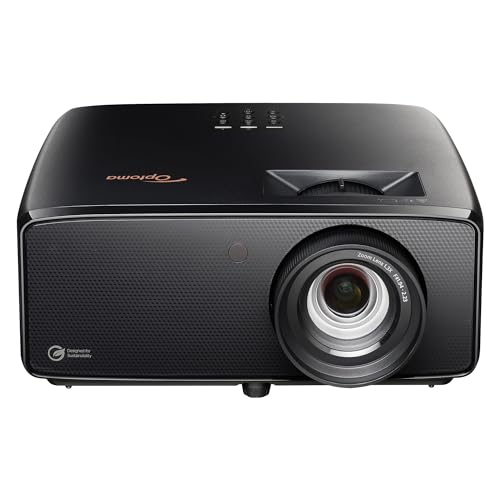
Best for: a living room stepping up to 4K laser projection with HDR, in a black-finished unit that disappears against a dark wall or cabinet.
Not suited for: a decision made on published brightness — the title states no lumen figure, so output must be verified in the documentation before a bright room depends on it.
- Resolution: 4K UHD
- Light source: laser
- HDR: HDR, per the title
- Role: home theatre projector
- Finish: black
- Brightness: Not stated in the listing title — verify with the manufacturer documentation
- Contrast ratio: Not stated in the listing title — verify with the manufacturer documentation
- Input lag: Not stated in the listing title — verify with the manufacturer documentation
- Speaker output: Not stated in the listing title — verify with the manufacturer documentation
Some titles argue; this one declares. The UHZ36’s title states four things — 4K UHD, laser, HDR, home theatre, in black — and stops, and the review must therefore be built the way a careful purchase would be: on the strength of what those four claims imply, and on a clear-eyed list of what remains to verify. What they imply is considerable. A 4K UHD laser engine is the current mainstream summit for living-room projection: resolution that rewards large pictures and close seating, a light source with instant readiness and long stable life, and HDR support to give that resolution dynamic range worth resolving. Optoma’s name carries the category’s longest DLP heritage, and the black finish suits the theatre end of the living-room spectrum, where equipment is meant to vanish.
The silences, though, are where this model will be won or lost, and the guide’s discipline requires naming them as the review’s centre rather than its footnote. Brightness decides whether a 4K picture survives a lamps-on room, and it is unstated. Contrast shapes HDR’s depth, and it is unstated. Input lag decides gaming suitability, and it is unstated. None of that makes the UHZ36 a poor prospect — it makes it a documentation-first prospect, a machine whose purchase should begin at the manufacturer’s specification page and only then proceed to the listing, with the room’s light measured against whatever figure the documentation provides.
Placed in a controlled-light living room — curtains that close, lamps that dim, a screen sized to the seating — a 4K laser machine of this class delivers the picture quality leap that justifies the category’s existence, the jump from watching a large image to sitting inside one. The living room that cannot control its light should either verify a strong brightness figure for this model or step toward the stated-output picks above and below it. That fork, honestly presented, is the most useful thing a review of a four-claim title can offer.
Strengths
- 4K UHD resolution with laser light is the living-room class’s current summit combination.
- HDR support gives the resolution dynamic range to work with.
- Black finish and theatre positioning suit dedicated viewing corners.
Trade-offs
- Brightness, contrast, lag and speaker output are all unstated in the title.
- Bright-room suitability cannot be judged until the documentation figure is checked.
- Gaming credentials are unknown from the listing evidence.
Readers with a darkenable room and a 4K library will want the documentation open beside the listing, and the UHZ36’s own page at Check price on Amazon is the place to begin that two-document comparison.

ViewSonic LX700-4K
Best for: the gaming living room — 4K laser projection with a stated 240Hz Xbox focus, 4.2ms lag and 3,500 lumens for rooms that play as hard as they watch.
Not suited for: a household indifferent to gaming, which would be paying the specialist’s premium of attention for figures it never uses.
- Resolution: 4K UHD
- Light source: laser
- Brightness: 3,500 lumens
- Refresh: 240Hz, with Xbox named in the title
- Input lag: 4.2ms, as stated in the title
- Inputs: dual HDMI
- Colour: SuperColor, per the title
- HDR: HDR stated
- Geometry: optical zoom and keystone
- Also stated: streaming suitability
- Contrast ratio: Not stated in the listing title — verify with the manufacturer documentation
The LX700-4K is what happens when a gaming specification grows up and moves into the living room. Its title pairs the theatre credentials — 4K UHD, laser light, 3,500 stated lumens, HDR — with response figures that belong to competitive displays: 240Hz refresh with Xbox named outright, and an input lag of 4.2ms printed to the tenth. That pairing is rare because the two audiences usually shop in different aisles; a machine stating both sets of numbers, from a branded maker whose figures can be verified, collapses the aisle wall entirely.
The lag figure deserves its moment. At 4.2ms, the display’s contribution to the delay chain shrinks below the console’s own processing and most players’ perception, which is the point at which a wall-sized picture stops being a compromise for serious play and becomes an advantage — scale without cushion. The 240Hz claim extends the same logic to motion: high-frame-rate sources gain a screen that can present their cadence rather than halving it. Around those headlines, the supporting specification stays grown-up: dual HDMI for console plus source, optical zoom and keystone for real furniture geometry, SuperColor as the maker’s colour banner, and streaming suitability named for the hours when the room reverts to cinema.
Brightness is the figure that keeps the machine honest as a living-room device rather than a den toy. Three thousand five hundred stated lumens holds a large 4K picture together in a curtained room and stays respectable with a lamp on, though the full gaming glory — maximum size, maximum rate — will always look best as the room darkens. Contrast goes unstated in the title, the one documentation errand this otherwise forthcoming specification leaves behind. For the household whose evenings genuinely split between UHD films and competitive play, the LX700-4K is the guide’s most complete single answer, and it is not close.
The Xbox naming in the title is a small tell worth reading correctly. Console ecosystems certify and optimise for displays that meet their expectations, and a projector that puts a console’s name in its own title is declaring that the partnership shaped the design — the refresh support, the lag path, the signal handling. PC players are not excluded by that declaration; the same figures serve any high-frame-rate source. But the household whose console anchors its gaming life can read the naming as the closest thing this category offers to a handshake.
Strengths
- 4.2ms stated lag and 240Hz support are elite response credentials in a projector.
- 4K laser picture with 3,500 stated lumens serves films at the same level as games.
- Dual HDMI, optical zoom and keystone keep the specialist usable as a family machine.
Trade-offs
- Contrast ratio is unstated in the title.
- Non-gaming households pay attention-premium for figures they will never feel.
- Maximum performance assumes the source and cables complete the high-rate chain.
Gaming households speccing one screen for everything will likely end their search here, and the LX700-4K’s listing at Check price on Amazon holds its current details.

Epson Home Cinema 980
Best for: film-led living rooms that prize colour behaviour — a 3-chip 3LCD 1080p movie projector from the maker that built its name on that technology.
Not suited for: a purchase decided by published figures — the title states almost nothing beyond the imaging technology and resolution, so brightness and the rest await the documentation.
- Resolution: 1080p
- Display technology: 3-chip 3LCD
- Role: movie projector, per the title
- Brightness: Not stated in the listing title — verify with the manufacturer documentation
- Contrast ratio: Not stated in the listing title — verify with the manufacturer documentation
- Input lag: Not stated in the listing title — verify with the manufacturer documentation
- Speaker output: Not stated in the listing title — verify with the manufacturer documentation
- Zoom range: Not stated in the listing title — verify with the manufacturer documentation
Epson’s title for the Home Cinema 980 is the most repetitive in this guide — it says the model’s name and its two facts twice — and yet those two facts carry a genuine argument. Three-chip 3LCD is a distinct imaging architecture: separate chips for red, green and blue, combined into the picture, from the company that has championed the design for decades. Its traditional talking points are colour behaviour — colour brightness keeping pace with white brightness, so saturated scenes do not dim the way single-chip designs can render them — and for a movie-led room, colour behaviour is not a garnish on the picture; on faces, skies and firelight, it is the picture.
Everything else about the model must be approached as a verification exercise, and this review treats that as the honest headline rather than an embarrassment. Brightness decides the living-room question and is unstated; contrast, lag, zoom and sound are unstated with it. The documentation for the exact model is therefore not a formality here but the substance of the decision, and it should be read against the room’s measured light and the seating’s distance before the listing gets a vote. What can be said from the title is intent: a machine named Home Cinema, in the 1080p class, built on the colour-first architecture, aimed at films in rooms that can darken respectably.
In the guide’s ecology, the 980 is the colour argument made by an appliance. Set beside the DLP models that dominate the list, it represents the other great imaging tradition, and households sensitive to the differences — viewers who notice colour fatigue in long films, or who simply prefer the 3LCD rendering character — will find it the most interesting machine here precisely because its case rests on how the picture feels rather than on a ladder of figures. Everyone else should let the documentation speak first, and loudly.
There is also a temperament match to consider. The 3LCD tradition appeals to viewers who watch long and notice colour behaviour across a whole evening — the way a sunset scene holds its gradations, the way candlelit faces keep their warmth without tipping into orange. Those sensitivities are real even where they resist measurement, and viewers who recognise them in their own habits should weigh this architecture’s argument more heavily than viewers of shorter, brighter bursts.
Strengths
- 3-chip 3LCD architecture is the colour-first alternative to the list’s DLP majority.
- A movie-led design brief from the technology’s defining maker.
- 1080p resolution matches the Blu-ray and broadcast libraries most rooms actually own.
Trade-offs
- Brightness and nearly every other figure are unstated in the title.
- Gaming suitability cannot be assessed from the listing evidence.
- The purchase decision leans on documentation more heavily than any other pick here.
Colour-led film households will want the specification document open early, and the Home Cinema 980’s listing at Check price on Amazon is where the current offer waits for that comparison.
BenQ TH575
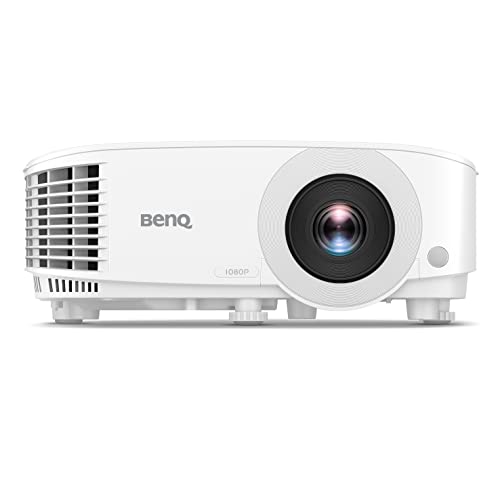
Best for: the classic lamps-on living room — 3,800 stated lumens, a throw that suits real furniture distances, and screen pairings that keep a big picture composed while the room stays social.
Not suited for: ultra-short-throw placement against the wall; this is a conventional-throw machine and needs its distance to draw the picture.
- Resolution: 1080p
- Brightness: 3,800 lumens
- Input lag: 16.7ms low latency, with an enhanced game mode
- Inputs: dual HDMI
- Zoom: 1.1x
- 3D: 3D Ready, per the title
- Keystone: auto vertical keystone
- Warranty: 3 years, as stated in the title
- Speaker output: Not stated in the listing title — verify with the manufacturer documentation
This guide’s angle on the TH575 is deliberately narrow: not the model in the abstract, but the model in a lit room, at a real throw distance, on a real screen. Begin with the light. Three thousand eight hundred stated lumens is the family-room figure in this guide’s ladder — enough, at sensible picture sizes, to keep contrast respectable while a reading lamp burns and the kitchen light spills through the doorway. It will not defeat direct sun on the screen wall, and no projector at any sane figure will; what it defeats is the demand that the room become a cave before the film can start, which is the demand that quietly kills projector use in real households.
Throw is the second act. A conventional-throw machine with a 1.1x zoom asks for a measured shelf or mount behind the seating, and repays the measurement with placement forgiveness: the small zoom range absorbs the half-metre errors that separate the shelf you have from the shelf the diagram wanted. Auto vertical keystone handles the low-cabinet alternative, squaring the picture when the unit sits beneath screen centre. Screen pairing completes the triangle — at this output, a neutral matte screen flatters films, a modest-gain surface helps the brightest rooms, and a plain pale wall remains a respectable starting point while the household learns its own light. Each pairing is a small decision; together they are the difference between a projector that impresses on day one and one that satisfies in year three.
The supporting facts travel well into this room: dual HDMI for the console-and-streamer pair that living rooms accumulate, an enhanced game mode and 16.7ms stated lag for the household’s second shift of gaming, and a three-year warranty stated in the title for the long view. Among the six picks, the TH575 is the one whose reputation precedes it across guides — and under this guide’s specific interrogation, room light and throw and screen, it answers as completely as it does anywhere else. Compact smart alternatives for smaller rooms are surveyed in our best mini smart projectors guide, a useful sideways step for readers whose living room is also a bedroom.
Strengths
- 3,800 stated lumens hits the lamps-on family-room target squarely.
- 1.1x zoom plus auto keystone forgive the placements real furniture imposes.
- Dual HDMI and a stated game mode cover the room’s second shift.
Trade-offs
- Conventional throw needs distance; wall-hugging layouts belong to other designs.
- Speaker output is unstated in the title, so audio planning needs the documentation.
- 1080p is the ceiling in a guide where two picks state 4K.
For the room that stays lit and lived-in, this remains the reference all-rounder, and readers can confirm the TH575’s current listing terms at Check price on Amazon.
Comparison Table
| Pick | Resolution | Brightness (title) | Light / imaging | Signature figure |
|---|---|---|---|---|
| ViewSonic LS740HD | 1080p | 5,500 lumens | Laser | Corner adjustment, 360-degree projection |
| ViewSonic PA503W | WXGA | 4,000 lumens | DLP | 120Hz stated, VGA input |
| Optoma UHZ36 | 4K UHD | Not stated in the title | Laser | HDR home theatre design |
| ViewSonic LX700-4K | 4K UHD | 3,500 lumens | Laser | 240Hz, 4.2ms input lag |
| Epson Home Cinema 980 | 1080p | Not stated in the title | 3-chip 3LCD | Colour-first movie design |
| BenQ TH575 | 1080p | 3,800 lumens | Home entertainment design | 16.7ms lag, 1.1x zoom |
How to Choose for a Living Room
How much light must the picture defeat?
Start at the windows. A north-facing room with curtains is a different venue from a south-facing glass wall, and the stated ladder in this guide — 3,500, 3,800, 4,000 and 5,500 lumens among the publishing titles — maps onto that difference. Moderate, controllable light is served by the middle of the ladder at sensible screen sizes; stubborn light, big pictures or daytime sport push toward the top. The two titles without published figures cannot be placed on the ladder from listing evidence, so their documentation figures must be fetched and placed before any comparison is fair. Remember also that brightness and size trade against each other continuously: the same lumens at 150 inches deliver a dimmer picture per unit area than at 100, and a room can often gain more by surrendering a foot of diagonal than by climbing a model tier.
Which resolution does the room’s library justify?
Resolution should follow the sources and the seating, not the catalogue’s enthusiasm. Broadcast, streaming in HD and Blu-ray libraries sit natively at 1080p, and the three 1080p picks serve them without scaling apologies. UHD discs and premium 4K streams justify the UHZ36 and LX700-4K, provided the seating is close enough — or the screen large enough — for the eye to collect the difference. The PA503W’s WXGA is the honest outlier: matched to presentations, sport and casual viewing at distance, outmatched by close critical film work. A useful test is the room’s own geometry: the farther the sofa, the less any resolution above 1080p can prove, and the more brightness should lead the decision instead.
Where will the unit sit, and what does the throw allow?
Measure from the projector’s realistic home — the shelf, the mount point, the cabinet — to the screen wall, and let that distance arbitrate. Conventional-throw models reward a rear position with a clean light corridor; the LS740HD’s corner adjustment and zoom forgive placements that cannot sit square; ceiling mounting removes the corridor problem and the coffee-table negotiations in one act, at the price of a fixed installation. Seating then arranges around the decision: nobody should sit where heads cross the beam, and the screen’s height should let the back row see over the front without a crick. These are furniture decisions wearing technical clothes, and making them on paper first is the cheapest upgrade in the entire purchase.
Films, games, or the whole calendar?
The living room’s calendar should cast the deciding vote between the specialists. A film-led calendar leans toward the 3LCD colour argument of the Home Cinema 980 or the 4K theatre posture of the UHZ36. A game-led calendar has one clear address — the LX700-4K, whose stated 240Hz and 4.2ms figures were printed for exactly that household — with the TH575’s stated game mode covering the casual tier. A calendar of everything, in a bright room, at family scale, is the LS740HD’s and TH575’s shared home ground. Naming the calendar honestly prevents the most expensive living-room error: buying a specialist when the household needed a citizen.
Screen Pairing: The Other Half of Brightness
A projector’s stated lumens describe light leaving the lens; the screen decides how much of it returns to the eye, and in a living room that makes the surface a full partner in the purchase. Matte white is the honest default — even illumination, wide viewing angles for a sofa’s full width, no surprises. Gain screens concentrate light toward the centre seats, which rescues brightness in stubborn rooms at the cost of dimmer edges for side seating; on a wide family sofa that trade can backfire, flattering the middle seat and taxing the corners. Ambient-light-rejecting surfaces earn their complexity where lamps and windows cannot be moved, steering room light away while accepting the projector’s — but their directionality means the projector’s position relative to the screen stops being a preference and becomes a specification.
The wall itself remains a legitimate screen for the first season. A smooth, pale, matte wall under any of this guide’s brighter picks will teach a household its room’s true light behaviour — where the lamp spill lands, how the June evening behaves, what size the seating actually enjoys — and that knowledge makes the eventual screen purchase precise instead of speculative. What a wall cannot do is stay flat by wishing, and the moment waves or texture begin to print through the picture, the surface has given its verdict. Readers weighing a step beyond living-room duty altogether — into printed and fabricated display hobbies and their own exacting surfaces — may enjoy the precision culture of our best resin SLA printers guide, where light control is likewise the whole craft.
Lamp Strategy for a Room That Stays a Room
The living room’s lighting should be designed in zones once a projector moves in. The screen wall wants darkness at its surface — no lamp beside the screen, no sconce reflecting in it — while the seating zone can keep a warm, low light that lets the room stay social and the snacks stay visible. Dimming is the master tool: a lamp on a dimmer at the room’s far end costs the picture almost nothing and buys the room its evening life back. Bias thinking helps too — light placed behind the seating, aimed away from the screen, lifts the room’s perceived brightness without touching the picture’s contrast, because contrast is judged at the screen, not at the sofa. Households that arrange those three zones — dark screen wall, gentle seating light, nothing reflective in between — routinely find that a mid-ladder projector performs like a brighter one, which is the cheapest brightness upgrade available anywhere in this guide.
Laser, Lamp-Era and 3LCD: The Imaging Traditions in This List
Three imaging philosophies share this guide, and a living-room buyer meets all three in one shortlist, so their characters deserve a page. Laser light — the LS740HD, UHZ36 and LX700-4K — brings instant switch-on, output that holds steady across years, and freedom from the lamp-replacement calendar that defined earlier projector ownership; in a family room used daily, that readiness quietly decides whether the projector becomes the default screen or the special-occasion one. The DLP designs — the PA503W and the DLP-heritage machines in this company — render sharp, responsive pictures from a single-chip architecture with a long service record in bright rooms. And 3LCD, represented by the Home Cinema 980, takes the three-chip road to colour, the tradition that argues saturated scenes should hold their brightness as faithfully as white ones do.
None of the three traditions wins the living room outright, because the room keeps changing the question. Daily breadth favours laser readiness; bright multipurpose duty favours the proven DLP workhorses; film-led colour sensitivity favours the 3LCD argument. The mature purchase recognises which question its own room asks most often and lets the tradition follow. What unites the six picks is that each tradition is represented by a branded, verifiable machine — the screening rule again — so the philosophy debate happens between honest specifications rather than between a specification and a slogan.
Ceiling Mount, Shelf or Cabinet: Settling the Placement
Placement is the living room’s permanent negotiation, and each option carries a personality. The ceiling mount is the commitment: the beam corridor clears every head, the geometry never drifts, the unit disappears from the furniture conversation — and the installation day involves ladders, cable runs and decisions that cannot be unmade by Tuesday. The rear shelf is the reversible classic, keeping the projector reachable for source-swapping and cleaning, at the cost of a light path that tall guests can interrupt. The low cabinet or coffee table is the provisional arrangement that becomes permanent in more homes than any other, served here by auto keystone on several picks and by the LS740HD’s corner adjustment for the truly awkward angles.
Whichever home the unit takes, three details decide contentment. Ventilation clearance preserves the brightness the purchase was based on, because a heat-throttled projector dims itself without asking. Power and signal runs that do not cross walkways preserve tempers and ankles. And a position the household’s tallest member has personally walked past, at screening height, preserves the film. Placement chosen with those three checks tends to be chosen once; placement chosen by optimism tends to be renegotiated monthly, in the dark, during films.
Sound for a Room With a Sofa in It
Projector titles in this guide are largely silent on speaker output — the spec boxes record that silence faithfully — so the living-room sound plan should be made deliberately rather than discovered. Built-in projector sound, where fitted, covers news, casual viewing and children’s programmes at sofa distances without complaint. Films are the demanding case: dialogue sits at the centre of the picture while the projector sits behind or above the audience, and that geometry alone justifies the classic living-room upgrade, a speaker at the screen fed from the source or the projector’s audio output. The upgrade path costs nothing to preserve at purchase time — shelf space beneath the screen, an accessible audio connection, a power point in the right wall — and everything to retrofit after the room has been decorated around the omission.
Room acoustics then do quiet, free work. Soft furnishings — the sofa itself, curtains, a rug — absorb the echoes that make dialogue feel distant in a bare room, and most living rooms already own the full treatment. The projector’s own fan is the final sound in the system: brighter machines move more air, and a ceiling mount above the seating places that murmur at its most noticeable, one more argument for matching output to the room’s real need rather than buying the ladder’s top by reflex.
The June Test: Seasonal Light and Honest Scheduling
Every living-room projector should be bought against the room’s hardest month, not its easiest. In June the evening screening begins in a room still holding daylight, and a machine chosen against December’s darkness will spend the summer being apologised for. The June test is simple to run before purchase: sit in the room at the household’s usual screening hour, in the brightest month, and look at the screen wall. If the wall glows, the purchase belongs at the top of the stated brightness ladder or behind better curtains; if the wall sits in genuine shade, the ladder’s middle will serve beautifully and the difference can go toward the screen. Scheduling is the other half of the test — households that can start films at nine in summer live in a different brightness economy from households with young children and a seven o’clock start, and the honest hour, like the honest window, belongs in the decision.
Common Mistakes
Believing the loudest brightness claim in the category. Extreme figures from unverifiable brands are marketing, not measurement. This guide screened them out; a purchase should too.
Sizing the picture to the wall instead of the light. A 150-inch picture from a mid-ladder projector in a bright room loses to a 110-inch picture the same machine can actually illuminate.
Placing a lamp beside the screen. Light at the picture’s surface is the one opponent no lumen figure defeats gracefully. Zones first, lumens second.
Judging the unstated-figure models as dim. The Optoma and Epson titles publish no brightness; that is an errand for the documentation, not a verdict. Unknown is not the same as low.
Forgetting the beam corridor. A projector placed where people cross its light turns every refill trip into a shadow show. Mount, shelf or geometry — solve the corridor in the plan.
Frequently Asked Questions
Why were some very bright budget projectors excluded?
Because their brightness claims cannot be verified. The screening for this guide admitted branded models with checkable ratings only; no-name models advertising extreme lumen figures were deliberately excluded, since a living-room fixture bought for years should rest on numbers a maker will stand behind.
Which pick is brightest?
By stated title figures, the ViewSonic LS740HD at 5,500 lumens, followed by the PA503W at 4,000 and the BenQ TH575 at 3,800. The Optoma UHZ36 and Epson Home Cinema 980 publish no figure in their titles, so they stand outside the ladder until their documentation is consulted.
Is 1080p enough for a living room in the 4K era?
For broadcast, HD streaming and Blu-ray libraries, yes — those sources are 1080p, and seating distance decides how much more the eye could collect anyway. UHD sources and close seating justify the two 4K picks; the honest test is the room’s own geometry and library, not the calendar year.
Can a living-room projector replace the television?
For evening-centred households, the brighter picks here make a credible case, especially ceiling-mounted with a proper screen. A sun-flooded midday room remains television territory; the realistic pattern is projector-first evenings with the TV retained for harsh daylight, or a full commitment backed by curtains and the top of the brightness ladder.
What screen suits a bright living room?
Begin with the wall if it is smooth and pale, and learn the room. Then choose deliberately: matte white for even family seating, modest gain where the centre seats dominate, or an ambient-light-rejecting surface where lamps and windows cannot move — matched to the projector’s position, since those surfaces are directional.
Which pick should a gaming household choose?
The ViewSonic LX700-4K, on stated figures — 240Hz refresh and 4.2ms input lag are in a class of their own here. The BenQ TH575’s stated game mode and 16.7ms lag cover casual and family gaming comfortably.
How do I verify a brightness figure before buying?
Go to the manufacturer’s own documentation for the exact model name and read the rated output there, then compare it against the room’s light at the household’s real screening hour. A figure a maker publishes in its specification documents is a figure it can be held to; a figure that exists only in marketplace headlines cannot.
Lamp or laser for a family room?
The laser picks in this guide — the LS740HD, UHZ36 and LX700-4K — offer instant readiness and stable output across years, which suits a room used daily in short and long sessions alike. The remaining designs carry their own proven records; the practical difference is ownership rhythm rather than picture worth, and the household’s usage pattern, honestly counted in hours per week, should cast the vote.
Final Recommendation
For the archetypal living room — lamps, windows, family, films — the BenQ TH575 remains the balanced answer: stated brightness matched to the room, throw matched to the furniture, a screen pairing for every budget of effort. Where the room fights harder, the LS740HD’s 5,500 stated lumens is the escalation; where the calendar turns competitive, the LX700-4K is the specialist that also happens to be a fine cinema; where colour leads, the Epson argues its architecture’s case. Choose by the room’s light first and its calendar second, verify every unstated figure before it is needed, and the wall will take care of the rest — a living room, after all, was always a cinema waiting for the lamps to be arranged.