What's inside
- Key Takeaways
- Where to Buy
- Quick Picks
- How the Picks Were Chosen
- The Six Mini Smart Projectors in Detail
- Comparison Table
- How to Choose a Mini Smart Projector
- Ceiling Projection: The Mini Class’s Signature Trick
- Power, Banks and Cables: The Portable Infrastructure
- Auto-Everything: What Self-Setup Really Changes
- Sound in Small Bodies: The Honest Physics
- Kids, Guests and Other Real Audiences
- WiFi 6, Bluetooth 5.4 and Other Quiet Numbers
- Common Mistakes
- Frequently Asked Questions
- Final Recommendation
As an Amazon Associate I earn from qualifying purchases. This post may contain affiliate links at no extra cost to you.
[SITE_DOMAIN] is reader-supported. When you buy through links on our site, we may earn an affiliate commission at no extra cost to you. Prices and availability change; check the Amazon listing for the current details.
Small used to mean compromised, and the best mini smart projectors exist to retire that assumption — carefully, and with one honest condition attached. The condition is darkness. Every machine in this guide is a dark-room device, happiest after sunset or behind curtains, and no title here will be allowed to pretend otherwise. Inside that condition, though, the class has become genuinely capable: streaming platforms built in rather than bolted on, auto focus and auto keystone that set the picture up by themselves, bodies that rotate, flip and travel, and — at the top of this list — an RGB triple-laser design piece with a proper zoom lens and a loudspeaker pedigree.
The smart half of the name does the daily work. Two picks run Roku TV, two run Google TV per their titles, and the remaining pair carry built-in apps and connectivity of their own — in every case the streaming library lives inside the unit, so the evening begins with a remote instead of a cable hunt. That completeness is the class’s real revolution: a mini projector is no longer a display waiting for a source, but a small television whose screen happens to be whatever wall is nearest.
Design is the other storyline, and two picks carry it. The XGIMI Elfin Flip builds its identity around a gimbal-style flip design with an optical zoom — a projector that poses as readily as it projects. The soundcore Nebula P1i builds its identity around sound, with a flippable speaker arrangement and a stated 20W of Dolby Audio that dwarfs what mini bodies usually attempt. Between those poles sit the rotation specialists — bodies that turn through 180 degrees to throw at walls or ceilings — and the USB-C-powered traveller that can run from a power bank. Small, it turns out, contains multitudes.
The discipline of the reviews is the standing one: claims only from titles, gaps recorded in the open. It matters acutely in this class, where “4K support” and native resolution are different claims wearing similar clothes, where brightness units vary — one title here speaks in ISO lumens, another in ANSI — and where several titles state no brightness at all. Each review keeps those distinctions visible, because a mini projector bought on a misunderstood claim is a small disappointment that looms large at bedtime.
Key Takeaways
- Every pick is a dark-room device; brightness expectations for the whole class are set honestly in each review.
- Platforms divide by title: Roku TV on the Aurzen and HAPPRUN, Google TV on the XGIMI Elfin Flip and the Nebula P1i, built-in apps on the remaining pair.
- Only two titles state a brightness figure — 1,600 ISO lumens on the Elfin Flip and 380 ANSI lumens on the P1i, in different units that should not be compared raw.
- “4K support” means signal acceptance on the models that phrase it that way; the Aurzen states native 1080P outright, and the Elfin Flip is the list’s 4K design.
- Design stories lead twice: the Elfin Flip’s flip-and-zoom construction and the P1i’s flippable 20W speaker.
- Rotation is a class theme — two bodies turn through a stated 180 degrees for ceiling projection.
Where to Buy
- XGIMI Elfin Flip — Check price on Amazon
- Magcubic Mini Projector — Check price on Amazon
- Philoent Mini Projector — Check price on Amazon
- Aurzen Roku TV D1R air — Check price on Amazon
- HAPPRUN Roku TV Smart Mini Projector — Check price on Amazon
- soundcore Nebula P1i — Check price on Amazon
Quick Picks
| Pick | Best for | Core spec | Display | Check |
|---|---|---|---|---|
| XGIMI Elfin Flip | The design-led flagship of the class | 4K, RGB triple laser, 1,600 ISO lumens, optical zoom | Home theatre and camping screens | Check price on Amazon |
| Magcubic Mini Projector | Rotating all-rounder for walls and ceilings | WiFi 6, Bluetooth 5.4, 180-degree rotation | Home and outdoor pictures | Check price on Amazon |
| Philoent Mini Projector | Quiet, self-focusing bedroom viewing | WiFi 6, auto keystone, fast focus, 25 dB stated | Home cinema pictures | Check price on Amazon |
| Aurzen Roku TV D1R air | Power-bank portability with Roku inside | USB-C powered, Roku TV, native 1080P | Home and outdoor movies | Check price on Amazon |
| HAPPRUN Roku TV Smart Mini Projector | Roku streaming in a simple portable body | Roku built in, Dolby Audio, auto keystone | Outdoor and home theatre use | Check price on Amazon |
| soundcore Nebula P1i | Sound-first portable viewing | 1080p, 380 ANSI lumens, 20W Dolby Audio | Portable screens | Check price on Amazon |
How the Picks Were Chosen
Screening came first, and it was brisk: the wider candidate pool for this class is flooded with no-name minis advertising inflated brightness figures that no accountable measurement supports, and those were screened out before features were even compared — a mini bought for a bedroom ceiling cannot be rescued by a fictional lumen count. The six survivors earned their places on stated, checkable claims: a named streaming platform, a named connectivity standard, a design idea described in the title, or — in the two cases where brightness is published — a figure attached to a recognisable unit.
Coverage shaped the rest. The class serves several distinct evenings — the design-conscious lounge, the rotating bedroom-ceiling setup, the power-bank garden screening, the sound-first portable night — and the picks divide those evenings among specialists rather than crowning one all-rounder the titles cannot support. Platform coverage was deliberate too: Roku TV and Google TV households each get two native options, because a smart projector’s interface is its daily texture and loyalty to an ecosystem is a legitimate deciding factor at this size. Auto-setup features recur across the titles — auto keystone nearly everywhere, autofocus where stated — reflecting the class’s shared promise that the picture assembles itself.
One structural honesty runs through the selection and the reviews alike: this is a dark-room class. The two stated brightness figures, in their different units, describe evening machines, and the four titles without figures should be assumed to live in the same economy until their documentation says otherwise. A guide that sold minis as daylight televisions would be setting up returns; this one sells them as what they are — small, smart, self-sufficient night machines — and lets the genuinely impressive parts of that proposition carry the argument. Readers whose fabrication hobbies demand the same claim-by-claim honesty will recognise the editorial culture of our best resin SLA printers guide, where stated tolerances face the same scrutiny.
The Six Mini Smart Projectors in Detail

XGIMI Elfin Flip
Best for: the buyer of small projectors who refuses to buy a toy — a 4K RGB triple-laser machine with optical zoom and Harman Kardon sound in a flip-format body.
Not suited for: bright-room viewing; its stated 1,600 ISO lumens is an evening figure, and the class condition — darkness — applies to the flagship too.
- Resolution: 4K, per the title
- Light source: RGB triple laser
- Brightness: 1,600 ISO lumens — note the unit; ISO lumens are not ANSI lumens
- Zoom: optical zoom, 0.98–1.3:1 range stated
- Platform: Google TV
- Connectivity: Wi-Fi and Bluetooth
- Sound: Harman Kardon
- Gaming: 1ms gaming claim, as stated in the title
- Stated settings: home theatre and outdoor camping
- Battery: Not stated in the listing title — verify with the manufacturer documentation
The Elfin Flip is the class’s argument that mini can be flagship. Begin with the light: an RGB triple-laser engine — the same light-source architecture the largest home-cinema machines in this site’s guides use for colour purity — inside a portable body, driving a stated 4K picture at a stated 1,600 ISO lumens. Add the detail mini projectors almost never offer, a true optical zoom with a stated 0.98–1.3:1 range, and the Flip stops being a curiosity and becomes an instrument: picture size can be tuned by lens rather than by shuffling furniture, at full resolution, which digital zoom can never promise.
The flip design is the second half of the identity. XGIMI’s Elfin line treats the projector as a designed object with a gimbal-like stance — a body that angles its lens where the room needs it, wall or ceiling, and looks intentional doing it. Google TV supplies the streaming completeness the class promises, Wi-Fi and Bluetooth cover sources and speakers, and Harman Kardon sound gives the audio a named pedigree instead of the usual anonymous mini speaker. The title’s 1ms gaming claim is the boldest figure on the page and should be read as the maker’s own headline for its gaming mode — players for whom milliseconds are a religion will want the documentation’s detail, while the rest of the readership can take the claim as a statement of gaming intent.
Discipline requires the unit note to be repeated in the review, not buried: the brightness figure is ISO lumens, a different measurement convention from the ANSI lumens used elsewhere on this site, and the two cannot be compared raw. What can be said is that the figure, the laser engine and the 4K claim together describe the most ambitious mini in this guide by a wide margin — a machine for dark rooms and campsite nights that takes its picture seriously enough to zoom it optically. Battery goes unstated in the title, so its portability should be planned around power access until the documentation says otherwise.
Ownership of a design object includes showing it a little respect: the flip mechanism that gives the model its name and its angles is a moving part, and it rewards being moved deliberately rather than knocked into position by passing sleeves. A unit that lives on a shelf between sessions, charged or powered and ready, will be used weekly; a unit that lives in a drawer of cables will be used at Christmas. The Flip’s whole design argues for the shelf.
Strengths
- RGB triple-laser light and a stated 4K picture put flagship imaging in a mini body.
- A true optical zoom with a stated range — a rarity at any portable size.
- Harman Kardon sound and Google TV complete the one-box promise at a high level.
Trade-offs
- Brightness is stated in ISO lumens; raw comparison with ANSI figures misleads.
- Battery is unstated in the title — portability may still mean a power source nearby.
- The 1ms gaming claim needs documentation detail for competitive play.
Design-led readers will start and possibly end here, and the Elfin Flip’s listing at Check price on Amazon is where its current configuration can be admired in detail.

Magcubic Mini Projector
Best for: flexible placement on a budget of attention — a 180-degree rotating body with WiFi 6, auto keystone and a soundbase speaker for walls, ceilings and garden nights.
Not suited for: native-resolution certainty — the title claims 4K support, which is signal acceptance, and states no native resolution figure.
- Signal support: 4K support stated — acceptance, not native resolution
- Native resolution: Not stated in the listing title — verify with the manufacturer documentation
- Connectivity: WiFi 6 and Bluetooth 5.4
- Body: 180-degree rotatable
- Geometry: auto vertical keystone
- Sound: 5W Soundbase speaker
- Brightness: Not stated in the listing title — verify with the manufacturer documentation
- Platform detail: smart features per the title’s wording
Rotation is this model’s whole personality, and it is a better idea than it first sounds. A body that turns through a stated 180 degrees treats the ceiling as a screen — the bedroom use case that defines mini projection for a generation raised on phones in bed — and returns to wall duty without a tripod negotiation. Auto vertical keystone squares the picture through those rotations, so the geometry keeps up with the gymnastics. Around that centre, the title assembles a modern connectivity brief: WiFi 6 for the streaming feed, Bluetooth 5.4 for speakers and headphones, and a 5W Soundbase speaker built into the body.
The honesty work concerns resolution and light. The title’s “4K Support” is the class’s most abused phrase and this guide reads it strictly: the projector accepts a 4K signal, and its native resolution is a separate fact the title does not state — the documentation holds it, and with 4K sources in the house it should be fetched before anything is assumed in either direction. Brightness is likewise unstated, placing the Magcubic in the class’s default economy: plan for darkness, size the picture modestly, and let the rotation and the connectivity — the things the title actually promises — carry the purchase.
Judged on its stated merits, this is the flexible friend of the list: the unit that goes to the spare room, the kids’ ceiling, the garden wall, without a setup ritual at any stop. Households that know their evenings are dark and their walls are various will find the proposition coherent. Households that need published figures before they can relax should read the two stated-brightness reviews in this guide first, and treat this one’s documentation errand as the price of its flexibility.
The rotation also changes the social geometry of a screening in a way worth noticing. A ceiling picture gathers its audience horizontally — blankets, cushions, a floor-level picnic — which suits children, campouts in the lounge and any evening that wants to feel like an event rather than a broadcast. A projector that can invent a new seating plan for the same room has added a room, in every sense that matters to a small flat.
Strengths
- 180-degree rotation makes ceiling projection a designed feature, not a hack.
- WiFi 6 and Bluetooth 5.4 are current-generation connectivity, stated plainly.
- Auto vertical keystone keeps the rotating body’s picture square.
Trade-offs
- Native resolution and brightness are both unstated in the title.
- 4K support describes signal acceptance only.
- The 5W speaker serves rooms, not gardens full of guests.
Ceiling dreamers and restless rearrangers will find their candidate here, and the Magcubic’s page at Check price on Amazon carries its current offer.

Philoent Mini Projector
Best for: bedroom cinema with the lights out and the volume down — a WiFi 6 mini with fast focus, auto keystone and a stated 25 dB quietness figure for late-night viewing.
Not suited for: decisions that need brightness in writing — the title publishes no lumen figure, so its picture must be planned as a dark-room one.
- Signal and resolution wording: 1080P/4K support, as stated in the title
- Connectivity: WiFi 6 and Bluetooth 5.4
- Apps: built-in apps, described in the title as a 2026 upgraded set
- Body: 180-degree rotation
- Geometry: automatic keystone correction
- Focus: fast focus, per the title
- Noise: 25 dB stated in the title
- Brightness: Not stated in the listing title — verify with the manufacturer documentation
- Speaker output: Not stated in the listing title — verify with the manufacturer documentation
The Philoent’s title leads with a number most mini titles never mention: 25 dB, a stated noise figure, and in a bedroom that figure can matter more than any resolution claim. A projector lives close to its audience in this class — on the nightstand, above the bed — and fan noise at that distance becomes part of the soundtrack unless the design treats quietness as a specification. This title does, in print, and the rest of its brief supports the same late-night brief: fast focus and automatic keystone correction to assemble the picture without a menu expedition, 180-degree rotation for the ceiling, built-in apps so no source device joins the bedside, and WiFi 6 with Bluetooth 5.4 for the feed and the headphones.
The resolution wording needs the guide’s usual care. The title states “1080P/4K Support” — a pairing best read as a 1080P-class machine accepting 4K signals, with the exact native arrangement left to the documentation. Brightness and speaker output are unstated, so the planning defaults apply: darkness, modest picture sizes, seating near the unit. Within those defaults, the model’s proposition is unusually coherent — every stated feature serves the same scenario of a quiet room, a rotated body, a self-assembling picture and a film before sleep.
That coherence is the review’s verdict. Mini projectors often read as a sack of unrelated claims; this one’s claims form a scene, and readers who recognise their own evenings in that scene have found the most purposeful budget of attention on the list. Evenings that run louder, brighter or more social should take the class tour instead — the rotation will still tempt, but the 25 dB headline will be wasted on a garden.
The 2026-upgraded apps wording in the title is worth a calm sentence: built-in app sets age, and a maker advertising a current set is at least acknowledging the calendar. What matters in practice is that the services the household actually watches are present and maintained, a check that takes two minutes on the listing and the maker’s pages and should never be skipped on any smart projector, this one included.
Strengths
- A stated 25 dB noise figure treats bedroom quietness as a specification.
- Fast focus plus automatic keystone makes setup nearly invisible.
- 180-degree rotation and built-in apps complete the bedside-cinema brief.
Trade-offs
- Brightness and speaker output are unstated in the title.
- The 1080P/4K support wording leaves the native arrangement to the documentation.
- Its virtues concentrate on quiet rooms; social, bright venues belong to other picks.
Night-owl viewers will linger on the quietness figure, and the Philoent’s listing at Check price on Amazon is where the rest of its offer can be checked.
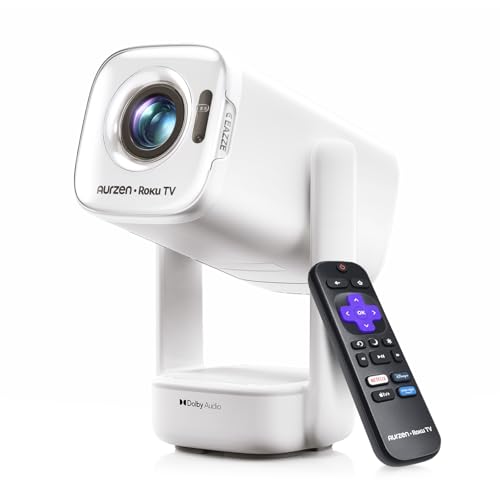
Aurzen Roku TV D1R air
Best for: genuinely untethered outdoor and travel viewing — USB-C power with power-bank support, Roku TV built in and a stated native 1080P picture.
Not suited for: a bright patio at dusk; no brightness figure is stated, and the class rule — darkness — governs this traveller too.
- Resolution: native 1080P, as stated in the title
- Platform: Roku TV built in
- Power: USB-C powered; power bank supported
- Connectivity: WiFi and Bluetooth
- Sound: Dolby Audio
- Finish: white
- Stated settings: home and outdoor movies
- Brightness: Not stated in the listing title — verify with the manufacturer documentation
- Battery: none built in is stated; power comes from USB-C sources
Power is this model’s plot twist. Most minis carry their electricity assumptions silently; the D1R air states its arrangement in the title — USB-C powered, power bank supported — and that single decision redraws the map of where a projector can work. Anywhere a power bank can go, a cinema can go: the deep garden, the campsite, the boat, the power-cut evening that becomes a neighbourhood event. USB-C also simplifies the travel kit to the cables a phone already owns, which is the kind of detail that decides whether a portable product actually travels.
The viewing brief is equally plain. Roku TV built in gives the streaming side a mature, familiar platform — the same interface millions of televisions run — with WiFi and Bluetooth for the feed and the audio. Native 1080P is stated outright, a clarity about resolution this class often avoids, and at the picture sizes a power-bank evening supports, 1080P is the right resolution rather than a compromise. Dolby Audio covers the sound brief on paper; outdoors, seating and placement will do the rest, as they always do.
Brightness is the standing unknown — unstated in the title, governed by the class rule — so the D1R air’s outings should be planned for real darkness and its picture sized with restraint. Inside those terms it offers the most complete freedom story in the guide: platform, resolution and power all stated, all pointing the same way, toward a screen that can appear wherever the evening happens to be. Households loyal to Roku will find the decision even easier; the platform they know, in the projector that can leave the house’s wiring behind. The fabrication-minded reader planning a whole portable maker kit might pair this traveller’s philosophy with the machines in our best consumer-grade 3D printers guide — different craft, same insistence on stated specifications.
Runtime planning becomes the owner’s one new habit: the bank’s capacity, the picture’s size and the evening’s length form a small equation, and households that learn their bank’s real endurance on the first outing — rather than at a film’s climax on the third — will find the freedom habit-forming. A second bank, charged in rotation, is the seasoned traveller’s entire secret.
Strengths
- USB-C power with power-bank support is true untethered freedom, stated in the title.
- Native 1080P is claimed outright — rare clarity in this class.
- Roku TV built in brings a mature platform to the portable format.
Trade-offs
- Brightness is unstated; every outing must be planned for darkness.
- Power-bank capacity becomes the evening’s runtime budget.
- No built-in battery is stated, so the bank is a required companion.
Campers, garden hosts and power-cut romantics will read this title with recognition, and the D1R air’s page at Check price on Amazon holds its current terms.

HAPPRUN Roku TV Smart Mini Projector
Best for: the Roku household’s simplest route to a big picture — Roku entertainment built in, Dolby Audio and auto keystone in a portable body for home and outdoor evenings.
Not suited for: a figures-first purchase; neither native resolution nor brightness is stated in the title, so its case rests on platform and convenience.
- Platform: Roku entertainment built in
- Sound: Dolby Audio
- Connectivity: WiFi and Bluetooth
- Geometry: auto keystone
- Apps: streaming apps, per the title
- Stated settings: outdoor and home theatre
- Native resolution: Not stated in the listing title — verify with the manufacturer documentation
- Brightness: Not stated in the listing title — verify with the manufacturer documentation
Some products compete on specification and some on recognition, and the HAPPRUN competes on recognition. Its title is a promise of familiarity: Roku entertainment built in — the interface the household already knows from its television — with streaming apps aboard, Dolby Audio for the sound, auto keystone for the geometry, and WiFi with Bluetooth for the connections. For a family that wants a projector to feel like an appliance rather than a project, that familiarity is the feature; nobody learns a new interface, nobody’s viewing history starts over, and the portable body carries the whole arrangement between the lounge and the garden.
The unstated figures define the homework, and this review assigns it without varnish: native resolution and brightness both live in the documentation, and a buyer should fetch them before the first garden party depends on the answers. The class defaults offer interim guidance — darkness, moderate sizes, seating near the unit — and the model’s stated settings, outdoor and home theatre, fit those defaults honestly. What the title does guarantee is the experience layer: platform, apps, audio format, self-squaring picture, wireless everything. In a class where the experience layer is most of the product, that guarantee is not nothing; it is, for many households, the deciding layer.
Set beside its Roku sibling above, the division of labour is clear. The Aurzen argues from power freedom and a stated native resolution; the HAPPRUN argues from simplicity and the platform’s entertainment breadth. Roku households choosing between them are really choosing which unknown they prefer to verify — and households new to the platform get, in this model, the gentlest possible introduction to big-picture viewing: open box, join WiFi, watch.
Durability of interest is the final test for platform-led machines, and the Roku answer is structural: the interface continues to be updated as a television platform regardless of the projector around it, so the experience layer ages at the pace of a major ecosystem rather than at the pace of a small hardware brand’s update budget. For a purchase meant to be opened nightly by the whole household, that pace is a genuine specification, even if it never appears in a spec box.
Strengths
- Roku built in makes the interface a known quantity from the first evening.
- Dolby Audio and auto keystone cover sound and geometry without accessories.
- The portable brief spans home theatre and outdoor use in one body.
Trade-offs
- Native resolution and brightness are both unstated in the title.
- Specification-led comparisons will always favour the stated-figure picks.
- Outdoor use still obeys the class rule of darkness.
Households that measure a projector by how quickly it disappears into the evening will appreciate this one, and its listing at Check price on Amazon carries the current offer.

soundcore Nebula P1i
Best for: portable viewing where sound usually fails first — a 1080p Google TV mini with a flippable speaker design, a stated 20W of Dolby Audio and a published 380 ANSI lumens.
Not suited for: large or bright venues; 380 stated ANSI lumens is a small-room, dark-evening figure and should be planned as such.
- Resolution: 1080p
- Brightness: 380 ANSI lumens
- Sound: 20W Dolby Audio, with a flippable speaker design
- Platform: Google TV
- Connectivity: Wi-Fi and Bluetooth
- Setup: autofocus and auto keystone
- Lens: all-glass lens, per the title
- Signal support: 4K support — acceptance, per the title
- Battery: Not stated in the listing title — verify with the manufacturer documentation
The P1i begins from a diagnosis the rest of the class avoids: in portable projection, the picture usually survives the evening and the sound does not. Its answer is architectural — a flippable speaker design with a stated 20W of Dolby Audio, wattage that belongs to small soundbars rather than to mini projectors — so the audio can be aimed where the audience sits instead of where the lens points. Soundcore’s audio heritage stands behind the arrangement, and for dialogue-driven viewing in small rooms and tents, that speaker story will decide more evenings than any other figure in this review.
The picture brief is stated with a completeness the class should copy. Native class 1080p, a published 380 ANSI lumens — an honest, modest figure that lets a buyer plan a dark room and a moderate picture with real arithmetic — autofocus and auto keystone for self-assembly, an all-glass lens for edge integrity, Google TV for the platform, and 4K support correctly worded as support. Nothing is inflated and nothing is hidden; even the battery’s absence from the title is informative, marking the P1i as a mains-or-bank portable rather than a self-powered one.
As the closing pick, it crystallises the guide’s values: stated figures over slogans, design aimed at a real weakness, platform completeness, and darkness planned for rather than apologised about. A household whose portable viewing happens in bedrooms, caravans and dens — close quarters, dark walls, films with dialogue — may find this the most grown-up mini on the list despite its gentle lumen figure, because it spends its engineering where those evenings actually live. The multi-material makers in our best multi-material 3D printers guide would recognise the philosophy: a machine honest about its envelope, excellent inside it.
There is a bedtime-economics point in the P1i’s favour that deserves stating. A portable projector’s sound is usually the first thing its owner upgrades, and the upgrade usually costs a speaker, a cable and a shelf. A unit that arrives with its sound already engineered — aimed, powered, decoded — deletes that entire second purchase from the story, which is why its modest lumen figure should be weighed against a total-evening ledger rather than against a brightness table alone.
Strengths
- A flippable speaker with a stated 20W of Dolby Audio is the class’s strongest sound story.
- Brightness is published in ANSI lumens — 380 — enabling honest room planning.
- Autofocus, auto keystone and an all-glass lens complete a grown-up specification.
Trade-offs
- 380 ANSI lumens confines it to dark rooms and moderate picture sizes.
- Battery is unstated in the title; untethered use needs a power plan.
- 4K support is signal acceptance; the native picture is 1080p.
Listeners as much as viewers will give this one its due, and the P1i’s listing at Check price on Amazon is where its current terms stand.
Comparison Table
| Pick | Platform (title) | Brightness (title) | Resolution story | Signature design |
|---|---|---|---|---|
| XGIMI Elfin Flip | Google TV | 1,600 ISO lumens | 4K stated | Flip body, optical zoom, RGB triple laser |
| Magcubic Mini Projector | Smart features, WiFi 6 | Not stated in the title | 4K support; native unstated | 180-degree rotation |
| Philoent Mini Projector | Built-in apps | Not stated in the title | 1080P/4K support wording | 180-degree rotation, 25 dB stated |
| Aurzen Roku TV D1R air | Roku TV | Not stated in the title | Native 1080P stated | USB-C and power-bank power |
| HAPPRUN Roku TV Smart Mini Projector | Roku built in | Not stated in the title | Not stated in the title | Platform-first simplicity |
| soundcore Nebula P1i | Google TV | 380 ANSI lumens | 1080p stated | Flippable 20W speaker |
How to Choose a Mini Smart Projector
Which platform should the projector speak?
The platform is the interface the household will touch nightly, so loyalty is a rational criterion. Roku TV — on the Aurzen and the HAPPRUN — suits homes already fluent in Roku’s rows of apps and search habits. Google TV — on the Elfin Flip and the P1i — suits Android-centred households and brings its own recommendation culture. The Magcubic and Philoent carry built-in apps and connectivity without naming one of the two big platforms, which suits platform-agnostic viewing and phone-fed evenings. Choose the interface first and the hardware shortlist often halves itself, because at this size the software is not a layer on the product — it is most of the product’s daily surface.
How should brightness claims be read in this class?
With a unit check and a darkness plan. Only two titles here publish figures, and they publish them in different units — 1,600 ISO lumens on the Elfin Flip, 380 ANSI lumens on the P1i — which measure light under different conventions and cannot be ranked by raw number. The four silent titles should be planned as dark-room machines of the class’s usual economy, with their documentation figures fetched before any bright venue is promised. Then the universal rule applies: size the picture to the darkness, keep seating near the unit, and treat any mini’s maximum diagonal as a ceiling for a blacked-out room rather than a target for a summer evening. A mini projector judged inside its envelope delights; judged outside it, nothing in this class survives.
What does “4K support” actually buy?
Compatibility, not resolution. A model stating 4K support accepts a 4K signal and renders it at its native resolution — 1080p on the P1i, unstated on the Magcubic — which means 4K sources play without complaint and without their full detail. That is a perfectly respectable arrangement at mini sizes and bedroom distances, where native 1080p holds together well. It becomes a problem only when the phrase is misread as a native claim at purchase time. The guide’s wording discipline exists for exactly this moment: support means the door is open; native means the room beyond it is furnished.
Where will it project — wall, ceiling, or the outdoors?
Venue narrows the list fastest. Ceiling viewing belongs to the rotating bodies — Magcubic and Philoent, each stating 180 degrees — with the Philoent’s quietness figure arguing for bedrooms specifically. Outdoor freedom belongs to the Aurzen’s power-bank power story, with the darkness rule riding along. The lounge’s design shelf belongs to the Elfin Flip; the sound-led den or caravan belongs to the P1i; the platform-led family room belongs to the HAPPRUN. Naming the venue first is the mini-class equivalent of measuring a theatre’s throw — the decision that makes every later decision easy.
Ceiling Projection: The Mini Class’s Signature Trick
Throwing a picture at the ceiling sounds like a novelty until the first film watched lying flat, at which point it becomes a ritual households defend fiercely. The rotating bodies in this guide exist for that ritual, and a few crafts make it sing. The surface matters more overhead: ceilings are usually matte white and smooth — accidentally ideal — but light fittings and smoke alarms cast shadows in the beam and should be mapped before the unit settles. Keystone correction earns its keep at these angles, and the stated auto systems on both rotating picks do the squaring without a ladder of menus. Sound placement completes the scene: a speaker aimed at the ceiling audience rather than at the wall audience changes dialogue clarity completely, which is why the P1i’s flippable speaker, though not a rotating-body design, belongs in the same conversation. Finally, runtime: ceiling sessions run long and sleepy, so power — bank, cable, socket — should be arranged to outlast the film, because nobody wants to climb down from comfort to rescue a battery at the climax.
Power, Banks and Cables: The Portable Infrastructure
Portable projection runs on an infrastructure nobody photographs. The Aurzen’s USB-C arrangement makes the power bank the evening’s fuel tank, and bank capacity therefore becomes a runtime specification — a long film at full brightness is the planning unit, with a second bank as the intermission. For the mains-fed minis, cable length and socket position decide placement more firmly than any throw chart: a unit that must sit where the cable ends will sit there, so a modest extension lead, routed out of the walkway, is the cheapest placement upgrade in the class. Heat and airflow follow the small bodies everywhere; a mini smothered by bedding during a ceiling session will dim itself in protest, and a clear inch around the vents is the whole remedy. Households that treat these unglamorous details as part of the product find their minis reliable; households that improvise them nightly find the class flaky, and both verdicts say more about infrastructure than about projectors.
Auto-Everything: What Self-Setup Really Changes
The quiet revolution in this class is not resolution or lumens; it is the disappearance of setup. Auto keystone appears across these titles, autofocus joins it on the P1i and fast focus on the Philoent, and together they convert the projector from an instrument that must be aligned into an appliance that aligns itself. The behavioural consequence is larger than the technical one: a projector that sets itself up gets used on whim — a Tuesday episode on the ceiling, a recipe video on the kitchen wall — while a projector with a setup ritual gets used on occasions. Mini smart projectors live or die by whim frequency, and the auto features are therefore not conveniences sprinkled on top of the product; in daily life they are the product.
The limits deserve their sentence. Auto keystone corrects geometry digitally, which costs a margin of resolution and brightness at the extremes — a unit placed reasonably square needs little correction and loses little, while a unit thrown from a wild angle pays for its drama in softness. Autofocus assumes a surface it can read; textured or very dark walls can confuse it, and the manual override then earns its keep. The craft, as ever, is to let the automation do the last ten percent rather than the first ninety: place the unit sensibly, square it roughly by hand, and let the sensors finish the portrait.
Sound in Small Bodies: The Honest Physics
Mini projectors fight acoustics with one hand tied: low frequencies need enclosure volume, and the class’s enclosures are measured in centilitres. The titles here answer the physics three ways. The P1i answers with wattage and aim — a stated 20W in a flippable speaker that can face the audience. The Elfin Flip answers with pedigree — Harman Kardon tuning inside its design body. The Magcubic answers with architecture — a 5W speaker described as a Soundbase, borrowing the soundbar idea of using the base as the cabinet. The remaining titles name formats, Dolby Audio on the Aurzen and HAPPRUN, which describe the decoding the unit performs rather than the air it can move.
The owner’s half of the bargain is placement and expectation. Dialogue at bedroom distance is the class’s home fixture and every pick here serves it; a garden audience spread across a lawn is a different fixture, answered by seating near the unit or by the Bluetooth every one of these titles carries, feeding a portable speaker placed with the audience. Judged that way — sound matched to venue, Bluetooth as the escape hatch — the class’s audio story is coherent. Judged as home cinema at full stretch, it was never entered in that contest, and the titles, to their credit, mostly decline to pretend otherwise.
Kids, Guests and Other Real Audiences
Mini projectors meet audiences that flagship theatres never face, and the class’s features read differently against them. For children, the ceiling picture is a planetarium one night and a storybook the next, and the rotating bodies earn their keep while the auto-setup keeps adult involvement to a cameo. For guests — the garden screening, the holiday-let evening — the platform completeness of every pick here is the mercy: no guest’s phone needs to become the source, no password needs to be typed on a wall-sized keyboard in front of an audience, because the apps live in the unit and the remote is the only interface. For the travelling worker, the same completeness turns a hotel wall into a cinema without a laptop tether, provided the room’s darkness cooperates, which hotel curtains usually do.
The through-line is friction. Every stated feature in this guide — auto keystone, autofocus, built-in platforms, Bluetooth, power-bank power — subtracts a step between the idea of watching something and the watching of it. Flagship machines optimise the picture; this class optimises the path to the picture, and for audiences of children, guests and tired travellers, the path is where evenings are won and lost. That is the mini smart projector’s true specification, and it never appears in a title.
WiFi 6, Bluetooth 5.4 and Other Quiet Numbers
Connectivity generations rarely headline a review, yet in a streaming appliance they decide how the evening feels at its weakest moments. WiFi 6, stated on the Magcubic and the Philoent, is the current household standard’s efficient chapter — better behaviour in crowded airspace, which matters in flats where forty networks argue overhead and in gardens at the edge of the router’s reach. Bluetooth 5.4, stated on the same pair, extends the audio escape hatch’s range and stability, so the speaker by the audience stays married to the projector by the wall. The remaining titles state WiFi and Bluetooth without generation numbers, which places them in the documentation for the exact figures and in practice on the same side of the only line that matters: everything here connects wirelessly to sources and speakers, and no evening in this guide requires a cable for its content.
The practical advice is placement again: a mini streaming over WiFi wants a sightline-ish relationship with the router’s territory, and a garden screening at the fence’s far end should be rehearsed before guests arrive, with a downloaded film as the insurance policy every platform here makes possible. Connectivity, like brightness, rewards the household that tests its worst corner in advance.
Common Mistakes
Reading 4K support as native 4K. Support is signal acceptance. Native resolution is a separate fact, stated on some titles here and left to the documentation on others.
Comparing ISO lumens with ANSI lumens. Different conventions, different numbers. The Elfin Flip’s ISO figure and the P1i’s ANSI figure cannot be ranked against each other raw.
Planning a mini for a bright room. The whole class is a dark-room class. Curtains and sunset are features of the venue; buy for them honestly.
Stretching the picture past the light. A mini at 60 inches in the dark beats the same mini at 120 in the gloom of its own overreach, every time.
Ignoring the fan in a bedroom. At nightstand distance, noise is a specification. The Philoent publishes a figure for it; with other models, placement distance is the mitigation.
Frequently Asked Questions
Can a mini smart projector replace a television?
For evening viewing in a darkenable room, the stronger designs here make a credible case — platform, apps and sound all live inside the unit. For daylight viewing, no: the class’s brightness economy is built for darkness, and a television remains the daylight instrument. Many households run both, projector for the night’s main event, TV for the day.
Which pick is best for a bedroom ceiling?
The rotating pair lead: the Philoent, with its stated 25 dB quietness, fast focus and 180-degree rotation, is the bedroom specialist; the Magcubic matches the rotation with WiFi 6 and a soundbase speaker. Both assemble their own picture through auto keystone.
What is the brightest mini in this guide?
Only two titles publish figures, in different units — 1,600 ISO lumens for the XGIMI Elfin Flip and 380 ANSI lumens for the Nebula P1i — so no honest single ranking exists from title evidence. Both are dark-room figures; the Elfin Flip’s laser engine and 4K design mark it as the class’s picture flagship regardless.
Do these projectors need a streaming stick?
No. Roku TV, Google TV or built-in apps are stated across the six titles, which is the class’s founding promise: the library lives inside the unit, and a stick becomes an option for a specific service rather than a requirement for the evening.
Which model travels best?
The Aurzen D1R air, on its stated power story: USB-C power with power-bank support frees it from sockets entirely, and its native 1080P and Roku platform travel with it. The P1i and the rotating pair travel well within reach of power; the Elfin Flip travels like the flagship it is, carefully.
Is 1080p enough at mini sizes?
At the picture sizes and distances this class serves — a bedroom wall, a ceiling, a caravan interior — 1080p holds together convincingly, which is why two picks state it as their native class without apology. The Elfin Flip’s stated 4K serves larger, closer viewing; the rest of the class spends its budget on convenience, sound and design instead.
Can these projectors play from a phone?
Wireless connection is stated across the list — WiFi throughout, Bluetooth for audio — and the built-in platforms mean a phone is an option rather than a necessity. Phone-fed viewing suits clips and photos; the installed apps suit films, and a downloaded title on the unit itself is the reliable pattern for venues at the edge of WiFi range.
How large a picture should a mini be asked for?
Smaller than its maximum and matched to the room’s darkness: in a properly dark bedroom or den, the class is happiest in the range a television would call large, and every step beyond that spends brightness the titles never promised. When in doubt, move the unit closer and the seating nearer — the picture gains more from proximity than from diagonal.
Final Recommendation
The class rewards the reader who names the evening first. For the picture itself, the XGIMI Elfin Flip stands alone — laser light, a stated 4K picture, an optical zoom and a design that earns its shelf. For sound, the Nebula P1i’s flippable 20W speaker answers the weakness every other portable ignores. For freedom, the Aurzen’s power-bank power story leaves the socket behind; for the bedroom ceiling, the Philoent’s quiet rotation is the specialist; for platform comfort, the HAPPRUN’s Roku simplicity and the Magcubic’s flexible rotation divide the remaining evenings between them. Buy the darkness honestly, size the picture kindly, and a machine the size of a paperback will run the night’s entertainment with less fuss than the television it parks beside — small, in this class, was never the compromise; it was the entire idea.