What's inside
- Key Takeaways
- Quick Picks
- How We Chose These Picks
- How Do the Six Compare Side by Side?
- What Should a Dorm Buyer Check Before Spending?
- How Do You Run a Dorm Cinema Without Waking the Floor?
- Ceiling, Wall, or Common Room — Which Surface Should a Dorm Projector Serve?
- What Mistakes Do Dorm Projector Buyers Make?
- Final Recommendation
- Frequently Asked Questions
- Related Guides
As an Amazon Associate I earn from qualifying purchases. This post may contain affiliate links at no extra cost to you.
widgetverdict.com is reader-supported. When you buy through links on our site, we may earn an affiliate commission.
A dorm room is the most demanding cinema in the world. It is twelve feet long if the brochure is honest, it contains a roommate whose sleep schedule is a diplomatic matter, its walls cannot be drilled, screwed, or painted, its single desk already holds a degree’s worth of equipment, and its door opens onto a corridor where the whole floor can hear a film’s third act. The best projectors for dorm room life are the ones designed inside those constraints rather than in spite of them: small enough to live on a shelf or a bedside crate, quick enough to set up between dinner and midnight, quiet enough — in light and in sound — to respect the person asleep four feet away, and honest enough about their limits that a student budget is spent once, correctly.
Every pick in this guide is a mini projector, and the guide will be candid about what that means, because candour is the whole value of a student purchase. Most of this class comes from small brands whose support and warranty organisations are thinner than the majors’; one pick here, the Kodak Luma 150, carries an established brand name, and the difference is discussed where it matters. The phrase 4K support appears in these titles, and it means what it meant everywhere else in this fleet: the machine accepts a 4K signal, it does not project a native 4K picture. Native resolutions in this class are modest, picture sizes must stay modest to match, and the lumen figures printed on mini projector listings are not comparable between brands and will not be compared here.
What a dorm projector can do, bought with open eyes, is still remarkable. It turns the wall above a desk, the end of a bed, or a ceiling into a screen larger than any television a student could afford, carry, or fit. It gathers a corridor’s worth of friends for a match in a way a laptop never will. It packs into a backpack in August and a tote bag in May. The six picks below divide by the dorm problem they solve best: the established-brand pico, the electric-focus all-rounder, the Roku pair for the two kinds of streamer, the rotating Android mini, and the newest WiFi 6 design with a stated quietness figure that roommates will appreciate more than any other specification in this guide.
A word about the roommate, since no specification table will mention them. The dorm projector’s social contract is simple: headphones or low volume after hours, light kept off the sleeping half of the room, and a machine whose fan does not drone through a 2 a.m. study session. Several picks below were chosen with that contract in view — Bluetooth for the headphones, modest pictures that do not flood the room, and in one case a decibel figure printed in the title itself. Buy the projector your roommate would buy for you, and the cinema survives the semester.
Key Takeaways
- All six picks are mini projectors; the class trades raw output for size, price of entry, and setup speed, and this guide states that trade in every section.
- The Kodak Luma 150 is the one established-brand pick; the rest are small-brand minis whose support and warranty depth are thinner than the majors’.
- “4K support” in these titles means input support only — native pictures in this class are 1080P-class at best, per each title, and one Kodak title states only its 1080p input.
- Printed brightness figures are not compared across these listings; dorm rooms are darkenable and small, which is what makes the class viable at all.
- Bluetooth headphone pairing and low fan noise are dorm features, not luxuries — the Philoent even prints a 25 dB figure in its title, the only noise claim in the whole class.
- The ceiling is a dorm’s largest free screen, and the rotating picks exist for it; decide your main surface — ceiling, wall, or common room — before you decide the machine.
Quick Picks
| Pick | Badge | Why it is here |
|---|---|---|
| KODAK Luma 150 Mini Projector | Established-Brand Pico | Kodak’s pocket mini with a battery and 1080p input support — the known name in a no-name class. |
| YGSKK Mini Projector | Electric-Focus All-Rounder | Built-in apps, WiFi and Bluetooth, and focus adjusted from the remote instead of a thumbwheel. |
| Aurzen Roku TV D1R Smart Outdoor Projector | Roku Crowd-Pleaser | The full Roku TV interface with autofocus in a portable 1080P machine a whole corridor can operate. |
| HAPPRUN Roku TV Mini Projector | Smallest Roku Pick | Roku built in with Dolby Audio and auto keystone in the mini format for bedside shelves. |
| Mini Projector with WiFi and Bluetooth (Android 14) | Rotating Android Pick | The HY300Pro design: Android 14, auto keystone, and a body built to aim at walls or ceilings. |
| Philoent Mini Projector WiFi 6 | Quiet Roommate Pick | WiFi 6, Bluetooth 5.4, 180-degree rotation, fast focus, and a stated 25 dB for home cinema. |
How We Chose These Picks
The dorm brief was written from the room outward. A candidate had to be genuinely mini — shelf, crate, or backpack scale — because a dorm has no projector furniture and no permission to install any. It had to stream with minimal ceremony, since the dorm’s sources are phones, laptops, and sticks rather than a component rack. And it had to offer a headphone path, via Bluetooth, because the roommate clause is not negotiable. Machines that failed the size test, however impressive, were left to the living-room guides where they belong.
Within that filter the six were chosen to represent the class as it actually exists, not as a brochure would tidy it. There is an established-brand pico, because some buyers will pay for the name and the support and should be able to. There are two Roku machines, because Roku is the interface a corridor of guests can drive without instruction. There is an Android 14 rotating mini, because the ceiling is a dorm’s biggest screen. And there are the small-brand all-rounders whose value is their feature-per-pound ratio, presented with their support caveat attached rather than footnoted.
The specification rule is the fleet rule: only what titles state. That produces some unusually honest spec boxes below — the Kodak’s native resolution is not in its title, the Roku mini’s is not in its — and those boxes record the absence rather than borrowing a figure from a sibling model or a review of a different unit. A student budget deserves that discipline more than most, because it cannot afford the return-and-rebuy cycle that a guessed specification causes.
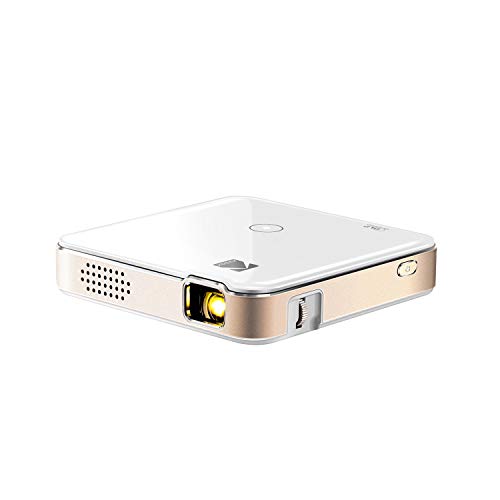
KODAK Luma 150 Mini Projector — Established-Brand Pico
The Luma 150’s title is three facts long — a Kodak mini projector, 1080p input, battery — and in a class addicted to inflated vocabulary, that brevity is the brand speaking. Kodak’s Luma line is the established name in pocket projection, and this smallest member is the pick for the buyer who wants the pico experience with a recognisable company standing behind the box: retail presence, a support channel, a warranty that leads somewhere. In a guide that will spend several sections explaining the support thinness of small brands, the Luma 150 is the control case that shows what the premium for a name actually buys.
What the title states must be read exactly. The 1080p in it is an input figure: the Luma 150 accepts a 1080p signal. Its native resolution is not stated in the title, and the spec box below records that honestly rather than borrowing a number from the larger Luma models. The practical consequence is a sizing instruction, not a disqualification: a pico’s picture should be kept modest — the span of a wardrobe door, the wall at the foot of a bed — where its output and its resolution are both in their comfort zone, and where, in a dark dorm room, the effect is disproportionately delightful for a machine that fits in a hand.
The battery is the dorm feature that matters most in this little machine. A battery pico sets up where the picture is, not where the socket is; it survives the room’s single accessible outlet being occupied by a laptop charger, a lamp, and a phone; and it makes the projector a genuinely communal object, carried to a friend’s room or a common room for the evening and home again in a pocket. Battery endurance belongs to the documentation rather than the title, and the wise owner plans around a film’s length rather than a double feature — or keeps a USB power bank in the same drawer, the dorm’s universal remedy.
Against its larger sibling in the small-spaces guide, the Luma 350, this 150 is the smaller, simpler instrument: fewer platform ambitions, a pico’s pico. Against the small-brand minis below, it trades their app lists and focus machinery for the brand and the brevity. Students who have been burned by anonymous electronics before — and every dorm corridor has that story — will understand the trade instantly. Students who have not may prefer to learn the class’s economics from the cheaper seats, and this guide has picks for them too.
Buy the Luma 150 as what it is: the pocket cinema from a name you can find again, for dark rooms, modest pictures, and a battery-powered freedom that no socket-bound machine in this guide can match at its size.
- Class: mini pico projector, as stated in the listing title
- Signal input: 1080p input support, as stated in the listing title
- Power: battery, as stated in the listing title
- Native resolution: Not stated in the listing title — verify with the manufacturer documentation
- Brightness: Not stated in the listing title — verify with the manufacturer documentation
- Wireless: Not stated in the listing title — verify with the manufacturer documentation
Strengths
- The established brand in a small-brand class, with the support story that implies.
- Battery power frees setup from the dorm’s contested sockets.
- Pocket size makes it a communal, carry-to-a-friend’s-room machine.
Trade-offs
- The title states an input figure, not a native resolution; verify the panel before buying.
- Pico output limits it to dark rooms and modest picture sizes.
- Its platform and feature list are slimmer than the app-led minis below.
Best for: a student who wants the pico experience from a known brand, for bed-wall and ceiling pictures in a dark room.
Not suited for: any shortlist built on title-printed native resolution, since this title states only the 1080p input figure.

YGSKK Mini Projector — Electric-Focus All-Rounder
The YGSKK returns from this site’s movie-watching guide, where it served as the bedroom convenience pick, and it earns its second appearance on dorm merits that overlap without duplicating: WiFi and Bluetooth, built-in apps, electric focus, and a stated willingness to accept nearly anything a student owns — smartphone, TV stick, iPad, PS5, laptop, HDMI, USB. A dorm’s source collection is exactly that miscellaneous, accumulated across birthdays and hand-me-downs, and a projector whose title reads like the inventory of a student desk is a projector designed by someone who has seen one.
Electric focus remains its most grown-up feature, and in a dorm it matters twice. The projector will live on a crate, a shelf, or a stack of textbooks, and it will be knocked — by the door, by a bag, by the roommate’s elbow — roughly weekly. Refocusing from the remote, from the bed, without rebuilding the perch, converts each knock from a five-minute ceremony into a five-second correction. Multiply by a semester and the feature has paid for itself in the only currency students actually hold, which is evenings not spent fiddling.
The built-in apps cover the streaming baseline without a stick, and the stick support in the title covers the services the apps miss — the correct two-layer architecture for a small-brand machine, since the stick can be replaced when platforms shift while the projector’s optics carry on. Its title describes a 1080P video projector and publishes no standardised brightness figure; this guide’s class discipline applies in full. Dark room, modest size, honest expectations: within those, a watchable and enjoyable picture; beyond them, physics.
Brand depth is the standing caveat, repeated here because a dorm purchase should be made with it in view: YGSKK is a small brand, and its support, updates, and warranty handling will not match Kodak’s or the living-room majors’. The purchase logic that fits is the low-stakes logic — a modest price of entry, a machine expected to serve a degree’s worth of film nights, and a corridor that will get more cinema per pound from it than from any television that could fit through the door.
For the student whose room is the corridor’s cinema — the one with the wall, the crate, and the tolerance for hosting — the YGSKK is the natural house machine: connected to everything, focused from the bed, and cheap enough in spirit that lending it carries no anxiety.
- Resolution class: described as a 1080P video projector in the listing title
- Wireless: WiFi and Bluetooth, as stated in the listing title
- Platform: built-in apps, as stated in the listing title
- Focus: electric focus, as stated in the listing title
- Sources named in the title: smartphone, TV stick, iPad, PS5, laptop, HDMI, USB
- Brightness: Not stated in the listing title — verify with the manufacturer documentation
Strengths
- Electric focus from the remote survives the dorm’s weekly knocks.
- Built-in apps plus stick support layer the streaming sensibly.
- The broadest source compatibility in this guide, matching a student desk’s inventory.
Trade-offs
- Small-brand support and updates trail the established names.
- No standardised brightness figure is published in the title.
- Its picture belongs to dark rooms at modest sizes, like every mini here.
Best for: the corridor’s host — a room that screens for friends, fed by whatever device each guest brings.
Not suited for: multi-year purchases that need a major brand’s warranty organisation behind them.

Aurzen Roku TV D1R Smart Outdoor Projector — Roku Crowd-Pleaser
The D1R also appears in this site’s movie-watching guide, and its dorm case rests on a different pillar than its living-room one: operability by committee. A dorm projector is operated by whoever is nearest the remote — friends, guests, the roommate’s visiting sibling — and the Roku TV interface is the one streaming system that a stranger can drive without a tutorial. The D1R carries the full Roku TV platform in a portable 1080P body with WiFi, Bluetooth, auto focus, auto keystone, zoom, and Dolby Audio, per its title. In a room whose social life revolves around shared screens, that interface is not a convenience. It is the feature that decides whether the projector is used by the room or merely owned by one person in it.
Autofocus and auto keystone carry the same argument into setup. A dorm projector is repositioned constantly — desk for study hours, crate for film hours, a friend’s room for the match — and a machine that focuses and squares itself after each move removes the tax on every one of those evenings. The zoom helps fit the picture to whatever wall segment the room’s furniture leaves blank, which in a dorm is rarely the segment a designer would have chosen.
Outdoor, in this title, works out in dorm terms as a portability claim rather than a weatherproofing one: no sealing is claimed, so read it as a machine built to be carried — to the quad on a dry evening with a sheet and a battery pack nearby, to the common room, home for the holidays. Its 1080P FHD designation is the clearest resolution statement among the minis in this guide, and its Dolby Audio gives its own speaker a head start, with Bluetooth ready to hand sound to a speaker or, crucially for the roommate clause, to headphones.
Against the HAPPRUN Roku mini below, the D1R is the larger, more complete machine: autofocus where the mini offers auto keystone, a stated resolution where the mini’s title is silent, a body aimed at rooms and gardens rather than bedside shelves. Against the YGSKK, it trades the electric focus and the app miscellany for the platform’s polish. The dorm buyer choosing between them is choosing between the machine that does the most and the machine that everyone can drive — and in a shared room, the second quality wins more evenings than the first.
It is, in short, the social pick: the projector a whole corridor can use, focused by itself, sounding respectable by itself, and forgiving of every hand that touches the remote.
- Resolution: 1080P FHD, as stated in the listing title
- Platform: Roku TV built in, as stated in the listing title
- Wireless: WiFi and Bluetooth, as stated in the listing title
- Setup aids: auto focus, auto keystone, and zoom, as stated in the listing title
- Sound: Dolby Audio, as stated in the listing title
- Brightness: Not stated in the listing title — verify with the manufacturer documentation
Strengths
- Roku TV makes it operable by any guest without instruction.
- Autofocus and auto keystone forgive its constant repositioning.
- A stated 1080P FHD picture is the clearest resolution claim among these minis.
Trade-offs
- The outdoor label carries no weather-sealing claim in the title.
- It is the largest of the dorm minis here, though still portable.
- No brightness figure is published in the title.
Best for: a sociable dorm room whose projector is operated by everyone and repositioned constantly.
Not suited for: the smallest possible bedside setup, where the HAPPRUN mini below is the tighter fit for the shelf.

HAPPRUN Roku TV Mini Projector — Smallest Roku Pick
If the D1R is the corridor’s projector, the HAPPRUN Roku mini is the bedside one: the smallest body in this guide carrying a full platform, with Roku entertainment built in, Dolby Audio, streaming apps, auto keystone, and WiFi and Bluetooth, per its title. Its natural perch is the shelf at the foot of a bed or the top of a mini-fridge, its natural picture is the wall or ceiling a few feet away, and its natural hour is late — a film after the library, watched by one person, at a volume the roommate sleeps through, possibly on Bluetooth headphones the machine is ready to feed.
Roku’s presence in a body this small deserves emphasis, because mini projectors usually economise on the platform before anything else. A licensed, complete Roku means the mini behaves like the television its owner left at home: the same home screen, the same channels, the same forgiving remote logic. For a student whose viewing is entirely streaming, that continuity collapses the learning curve to zero and the setup to a WiFi password.
The flag this guide raised in the wireless roundup is raised again, in the open: the title does not state a native resolution. The spec box records the absence in the standard words, and the buying instruction is the same — verify the panel in the manufacturer documentation before purchase if sharpness is a deciding factor for you. Buyers whose use is casual streaming at bedside distances may fairly rank the platform and the size above the figure; buyers comparing on specification should do the verification rather than assume parity with the D1R’s stated 1080P.
Auto keystone suits its life precisely. A mini that moves between shelf, crate, and a friend’s floor lands at a new angle every time, and automatic squaring converts each landing into a watchable rectangle without a geometry ritual. Dolby Audio covers the processing side of its small speaker, and Bluetooth covers the escalation — to the speaker for a group, to headphones for the roommate clause.
Choose this pick when the room is smallest, the hours are latest, and the audience is usually one. It is the dorm projector as personal appliance, and within that role its combination of platform, size, and manners is the most complete in this guide.
- Platform: Roku entertainment built in, as stated in the listing title
- Wireless: WiFi and Bluetooth, as stated in the listing title
- Setup aid: auto keystone, as stated in the listing title
- Sound: Dolby Audio, as stated in the listing title
- Native resolution: Not stated in the listing title — verify with the manufacturer documentation
- Brightness: Not stated in the listing title — verify with the manufacturer documentation
Strengths
- A complete licensed Roku in the smallest body in this guide.
- Auto keystone matches a mini that is repositioned nightly.
- Bluetooth headphone readiness honours the roommate clause.
Trade-offs
- The title omits the native resolution; verification is required.
- Mini output asks for darkness and modest sizes.
- Its speaker serves one viewer better than a roomful.
Best for: a single-viewer dorm setup — bedside shelf, late hours, streaming only.
Not suited for: shortlists that exclude any projector whose title omits the native resolution figure entirely.

Mini Projector with WiFi and Bluetooth (Android 14) — Rotating Android Pick
This listing’s title names a model rather than a brand — the HY300Pro — and describes a mini projector with WiFi and Bluetooth, portable 4K support, Android 14, and auto keystone, compatible with HDMI, USB, TV stick, smartphone, and laptop. The HY300 design family is the one dorm residents will recognise on sight: the compact projector built around a rotating body, made to swing its lens from the wall to the ceiling without a mount, a bracket, or permission from a landlord. That rotation is the dorm feature par excellence, because the ceiling is the largest unobstructed surface in any dorm room and the only one nobody has already covered with posters.
Android 14, stated in the title, places its smart system on a current generation — a meaningful detail in a class where ageing, orphaned Android versions are the commonest cause of app decay. A current system runs the present services properly and stands a chance of updates; the honest caveat is that update promises from small brands should be valued at a discount, and the stick compatibility in the title is the insurance policy: when the built-in system eventually ages, an HDMI stick refreshes the machine in minutes. Buy it as a projector with a good current platform, not as a platform with a projector attached, and the economics stay sound.
The 4K support phrase receives the guide’s standard reading, for the last time in this article because it matters most exactly here, where budgets are smallest: support means the input. The native picture is the modest panel of a mini, and the title does not state its figure — the spec box records that, and the sizing advice follows from it. Wall or ceiling, dark room, a picture the span of a bed or a wardrobe: inside that envelope, a rotating mini produces the specific joy this category exists for, a film on the ceiling above a bed in a room that could not fit a television worth naming.
Auto keystone is the enabler of the rotation habit, squaring the picture at each new angle without a menu expedition, and the compatibility list — HDMI, USB, stick, phone, laptop — covers the dorm’s source miscellany as completely as the YGSKK’s does. What the title does not offer is a brand’s support organisation or a stated focus system, and the purchase should be framed as the class’s value logic dictates: a current platform and a unique physical talent, at a small-brand risk profile, for the price of a textbook.
For the student whose cinema is the ceiling — and once tried, ceiling cinema converts most students — this is the pick designed around the habit rather than adapted to it.
- Model named in the title: HY300Pro; no brand name stated in the listing title
- Signal handling: 4K support (input support), as stated in the listing title
- Platform: Android 14, as stated in the listing title
- Wireless: WiFi and Bluetooth, as stated in the listing title
- Setup aid: auto keystone, as stated in the listing title
- Sources named in the title: HDMI, USB, TV stick, smartphone, laptop
- Native resolution: Not stated in the listing title — verify with the manufacturer documentation
Strengths
- The rotating design makes ceiling projection a posture, not a project.
- Android 14 is a current platform generation in a class full of orphaned ones.
- Stick compatibility insures the streaming future cheaply.
Trade-offs
- No brand is named in the title; support expectations should be set accordingly.
- Native resolution is not stated in the title.
- 4K support is input support; the picture is a mini-class picture.
Best for: students whose cinema is the ceiling, served from a current Android platform.
Not suited for: support-led purchases that need a named brand behind them, since the title names a model only.

Philoent Mini Projector WiFi 6 — Quiet Roommate Pick
The Philoent closes the guide with the specification a dorm buyer should learn to hunt for and almost nobody prints: noise. Its title states 25 dB for home cinema — a fan-noise figure, in a class where the fan sits a metre from the audience and the audience includes a sleeping roommate. Around that figure the title assembles the most current connection set in the guide: WiFi 6 and Bluetooth 5.4, built-in apps in a 2026-upgraded design, 1080P/4K support, 180-degree rotation, automatic keystone, and fast focus. Read plainly, it is a mini designed by someone who itemised dorm complaints and answered them in order.
Take the quietness claim with the right measure of trust. A decibel figure depends on the distance and conditions of its measurement, which the title does not state, so 25 dB should be read as a design intent — a machine engineered and marketed for quiet — rather than as a laboratory guarantee. Even read that way, it distinguishes the Philoent from every rival here, none of whose titles mentions noise at all. In a dorm, where the projector’s fan competes with a roommate’s sleep and a 2 a.m. essay, intent matters, and a manufacturer who prints the figure has at least understood the room the machine will live in.
The rotation matches the HY300Pro’s ceiling talent — 180 degrees of swing, per the title — while the fast focus and automatic keystone shorten the setup that rotation invites. The resolution wording needs the standard care: 1080P/4K support describes the input range, and the title does not separate a native figure from it, so the spec box records the native resolution as not stated and the buyer should verify it in the documentation. WiFi 6 and Bluetooth 5.4, meanwhile, are unambiguous goods in a dormitory, the most interference-crowded wireless environment in ordinary life: newer radios hold their manners in a building where two hundred networks argue at once.
Philoent is a small brand, and the standing caveat applies with its usual force — support and updates will not match the majors, and the 2026-upgraded phrasing in the title is marketing’s way of saying the design is current, not a promise about its future. The value case rests on the stated facts: the quiet design, the current radios, the rotation, the focus. For the roommate-sensitive buyer, those facts answer the questions that actually decide whether a dorm projector gets used after the first month — and a projector’s second month, not its first evening, is where dorm purchases are truly judged.
It is the connoisseur’s pick of the small-brand minis: not the cheapest story, not the biggest brand, but the one whose title reads like it was written in a dorm room.
- Wireless: WiFi 6 and Bluetooth 5.4, as stated in the listing title
- Noise: 25 dB for home cinema, as stated in the listing title
- Design: 180-degree rotation, as stated in the listing title
- Setup aids: automatic keystone and fast focus, as stated in the listing title
- Platform: built-in apps, 2026 upgraded design, as stated in the listing title
- Signal handling: 1080P/4K support (input support), as stated in the listing title
- Native resolution: Not stated in the listing title — verify with the manufacturer documentation
Strengths
- A stated 25 dB noise figure answers the dorm’s most ignored specification.
- WiFi 6 and Bluetooth 5.4 are the most current radios in this guide.
- Rotation, auto keystone, and fast focus minimise nightly setup.
Trade-offs
- The decibel figure’s measurement conditions are not stated in the title.
- Native resolution is not separated from the support wording; verify before buying.
- A small brand’s support depth trails the established names.
Best for: a light-sleeping roommate situation, where fan noise is the deciding specification.
Not suited for: shortlists requiring the native resolution and the noise figure’s test conditions both printed in the title.
How Do the Six Compare Side by Side?
| Pick | Platform per title | Wireless per title | Distinguishing dorm talent | Honesty note |
|---|---|---|---|---|
| KODAK Luma 150 | Not stated in title | Not stated in title | Battery pico from an established brand | Title states 1080p input, not native resolution |
| YGSKK Mini | Built-in apps | WiFi and Bluetooth | Electric focus; widest source list | No standardised brightness in title |
| Aurzen Roku TV D1R | Roku TV | WiFi and Bluetooth | Autofocus; operable by any guest | Outdoor label, no sealing claimed |
| HAPPRUN Roku Mini | Roku | WiFi and Bluetooth | Smallest platform-complete body | Native resolution not stated in title |
| HY300Pro Android 14 Mini | Android 14 | WiFi and Bluetooth | Rotating body for ceiling cinema | Model named; no brand in title |
| Philoent WiFi 6 Mini | Built-in apps | WiFi 6, Bluetooth 5.4 | Stated 25 dB; 180-degree rotation | Native resolution not stated in title |
The honesty column is the table’s reason to exist. Every mini in this class arrives with a gap between its vocabulary and its panel, and the column records each pick’s gap in the same words, so the comparison a student makes is between machines rather than between marketing departments. The talent column then does the positive work: each of these six is genuinely the best in this guide at one dorm thing.
What Should a Dorm Buyer Check Before Spending?
Measure the room’s one good wall — or decide on the ceiling — before anything else. A dorm picture lives on the wall segment between the door and the wardrobe, or above the bed, and its width is fixed by furniture you cannot move far. Every pick here thrives at modest sizes; choose the machine whose talents match the surface you actually have, and let the picture be that size proudly rather than an apology for a larger one.
Check the socket map and the perch. Where will the machine sit — shelf, crate, desk corner — and where will it plug in, if it needs to? Battery picks relax the second question; all picks are hostage to the first, because a projector balanced on a wobbling stack will be re-aimed nightly and resented by midterms. A mini tripod or a cleared shelf is the cheapest upgrade in this entire guide.
Agree the roommate terms before the box arrives, not after the first complaint. Headphones after an hour you both name, light off the sleeping half, the projector’s fan considered a shared sound. The picks here were chosen to make those terms easy to keep — Bluetooth for the headphones, modest pictures, one stated quiet design — but the terms themselves are a conversation, and rooms that have it early keep their cinemas.
Budget for the whole cinema, not just the machine, because the accessories are where dorm purchases quietly double. A mini tripod or a shelf bracket, a longer cable than the one in the box, a power bank for the battery picks, a Bluetooth speaker shared with the room’s music life, and the streaming stick that a source-fed mini will eventually want — none is expensive, together they are a real sum, and the student who prices them in advance buys once. The student who does not discovers them one Friday at a time, each time at the worst exchange rate, which is urgency. The picks above were described with their accessory appetites in view: the platform machines need least, the source-fed minis need the stick conversation early, and the battery machines reward the power bank that the rest of dorm life probably already owns.
Finally, verify the one figure your chosen title omits.
Several spec boxes above record a native resolution as not stated in the title; that is an instruction, not a dead end. The manufacturer documentation holds the figure, and five minutes with it before purchase is the difference between a student who bought a panel and a student who bought a phrase.
How Do You Run a Dorm Cinema Without Waking the Floor?
Start with the picture’s placement, because light discipline is mostly geometry. Aim the image at the wall segment farthest from the roommate’s bed, keep its size modest so its spill stays contained, and prefer the ceiling over the sleeper when the room’s layout makes the wall a shared border. A darker room needs less light from the machine, so close the door, kill the hallway spill with a towel’s worth of draft excluder if the gap glares, and let the picture run at the gentler end of its brightness range.
Move the sound into headphones or into the room’s near field. Bluetooth headphones are the complete answer for solo late viewing — full volume, zero spill — and every pick here with Bluetooth can feed them. For a group, a small speaker at low volume beneath the picture beats the projector’s own speaker turned up from across the room; proximity is quietness, because sound meant for ears two metres away need not fill a corridor.
Charge and stage the machine before the evening, not during it. A battery pico that dies at the climax teaches a room to distrust projectors, and a cable hunt conducted in the dark, over a sleeping roommate, is a small domestic tragedy with a laugh track of whispers. The dorm cinema that runs weekly is the one whose setup has been reduced to a ritual: machine on its perch, surface chosen, headphones or speaker paired, lights out. Build the ritual in the first week, while novelty makes everyone patient, and it will carry the machine through the semesters when novelty is gone and only the ritual remains.
Respect the fan as a sound source with a schedule.
Machines run their cooling hardest in bright modes and warm rooms; a modest picture in a cool room is a quieter one, and the Philoent’s stated quiet design exists precisely for this arithmetic. Finish the film before the building’s quiet hours where your hall has them, and the cinema becomes a neighbour the floor defends rather than reports.
Ceiling, Wall, or Common Room — Which Surface Should a Dorm Projector Serve?
The question sounds like a detail and is actually the purchase, because each surface rewards a different machine in this guide and punishes the others in small, nightly ways. Start with the ceiling, the dorm’s secret cinema screen. It is the largest blank surface in the room, the only one no poster, shelf, or roommate’s art project contests, and it comes with the audience already reclined at the correct distance. Ceiling viewing flatters modest brightness, because the room around a bed can be made completely dark, and it flatters modest resolution, because the picture can stay the width of the bed. The rotating picks — the HY300Pro by design, the Philoent through its stated 180 degrees — exist for this surface, and the battery Kodak joins them from any bedside perch. A student whose film life happens in bed, which is most students by November, should weight rotation and quietness above every other line in the comparison table.
The wall is the social surface. A wall picture gathers a room: chairs turn, friends sit on the floor with their backs to the bed, the film becomes an event with an audience geometry. It asks more of the machine — a larger picture, a touch more light, a focus that survives being set up at an angle from a crate — and it rewards the picks with autofocus and the broadest source manners, the D1R and the YGSKK, because a wall screening is where guests arrive with their own devices and their own streaming accounts. The wall is also where the roommate negotiation is sharpest, since one person’s cinema wall is often the other person’s headboard. Choose the wall and you are choosing the corridor’s cinema; stock it accordingly, with the headphone plan for the nights the audience is one.
The common room is the third surface and the easiest to forget at purchase time, though it may host the semester’s best screenings: the final, the derby, the film society’s pick. It rewards portability above all — a machine that travels in a tote, sets up on a borrowed table in minutes, and drives a picture somewhat larger than a dorm wall allows. Every pick here can make the trip, but the battery Kodak and the autofocus D1R make it most gracefully, and the student who expects to be the floor’s projectionist should buy for the common room’s table and the quad’s dry evenings as much as for their own twelve feet.
The honest answer for most buyers is that the machine will serve all three surfaces across a semester, which is why this guide’s picks emphasise the transferable virtues — auto keystone, autofocus, electric focus, rotation — over any single room’s perfection. But the proportions matter, and they should set the shortlist: ceiling-first buyers take the rotators, wall-first buyers take the platform pair and the all-rounder, common-room buyers take the battery and the autofocus. A projector matched to its main surface feels like it was designed for the room. A projector matched to the wrong one feels like a compromise repeated nightly, and dorm life is quite full enough of those already.
What Mistakes Do Dorm Projector Buyers Make?
Believing the vocabulary is the first and most expensive mistake: reading 4K support as a 4K picture, reading a five-digit lumen slogan as brightness, reading a mini’s maximum picture size as its recommendation. Every one of those readings is a disappointment scheduled for the first evening. The spec boxes in this guide exist to intercept them — read the native figure, or its recorded absence, and size the picture to the class.
Forgetting the roommate is the second mistake, and it ends more dorm cinemas than any technical failure. A projector bought without a headphone plan, aimed across a sleeping person’s wall, at a fan volume nobody auditioned, will be negotiated away by October. The social specification is a specification; shop for it.
Buying for the room you wish you had comes next in the catalogue of errors, — the suite, the apartment, next year’s house — instead of the twelve feet you actually hold the lease on. Dorm machines should be bought for dorm geometry: small, quick, forgiving, portable. The graduate can sell or gift the mini in May; the student who bought a living-room projector in September spends the year working around it.
Finally, buyers skip the perch. A projector needs a stable, level, permanent-enough home, and in a dorm that home must be invented: a cleared shelf, a crate, a tripod. The machine balanced on textbooks will drift, wobble, and lose focus at the exact moment the film gets good, every time, all year.
Final Recommendation
Choose by the dorm problem that is actually yours. For a known brand and a battery, the Kodak Luma 150. For the corridor’s shared cinema, the Aurzen D1R’s Roku polish; for the smallest personal version of the same idea, the HAPPRUN Roku mini — with its panel verified first. For the host whose sources are everyone’s devices, the YGSKK and its electric focus. For the ceiling, the rotating HY300Pro on its current Android. And for the roommate whose sleep is the room’s constitution, the Philoent, whose title bothered to print a decibel figure. Buy the class with open eyes — native figures checked, sizes modest, headphones ready — and a twelve-foot room becomes the best cinema on the floor. There will come a week, usually in the second semester, when the whole corridor crowds in for something nobody planned to watch together, and the little machine on its crate holds the room in a way no laptop ever has — that evening is what the purchase was for, and it repays every honest compromise in this guide at once.
Frequently Asked Questions
Are mini projectors bright enough for a dorm room?
For a dorm’s actual conditions, yes: the room is small, the picture can stay modest, and curtains or a door deliver real darkness. What minis cannot do is fight daylight or fill a common-room wall at midday. Judge them by the evening standard they were built for, and keep the size honest.
What does “4K support” mean on these titles?
It means the projector accepts a 4K signal as an input and displays it at its native resolution, which in this class is a mini-class panel — 1080P-class where a title states it, and to be verified in the documentation where a title does not. It never means a native 4K picture at this size and price of entry.
How do I watch without disturbing my roommate?
Bluetooth headphones are the complete solution, and the wireless picks here can feed them. For group viewing, place a small speaker near the audience at low volume, keep the picture off the sleeper’s wall or on the ceiling, and favour a quiet-designed machine — the Philoent states 25 dB in its title — over a loud one at midnight.
Is the Kodak worth it over the small-brand minis?
It depends on what you are buying. The Kodak offers an established brand’s support and a battery pico’s simplicity, with a title that states only its input figure. The small brands offer more platform and focus features per pound, with thinner support. Buyers who value the name and the warranty path take the Kodak; buyers who value features take the others, knowingly.
Can I take the projector home or to another room easily?
That is the class’s founding virtue, and the reason a projector, alone among screens, fits a life that moves rooms every year and starts again each September. Every pick here is mini-format, most set up in minutes with auto keystone or autofocus, and the battery picks travel without a socket plan. The dorm projector is the only cinema that fits in the same bag as the textbooks.
What breaks first on a dorm projector, and how do I avoid it?
In this class, the casualties are rarely dramatic: a remote lost inside a futon, a lens scratched by a semester loose in a backpack, a charging cable borrowed into oblivion, dust in a fan that lived on a carpet. The defences are equally unglamorous — a case or the original box for travel, a lens cap treated as sacred, a labelled cable, and a perch that is a shelf rather than the floor. Small brands’ thinner support makes prevention worth more here than in the majors’ classes, because the repair path is longer. Treat the little machine like the only cinema you own, which it is, and it will usually outlast the degree itself.
Can a dorm projector handle games?
Casual gaming, comfortably: the source lists in these titles name consoles up to the PS5, and a mini on a dorm wall delivers the big-screen version of a racing or party game with real joy. What the titles do not publish is input lag, and competitive players in timing-critical genres should treat that silence as the answer it is — verify figures in the documentation, or keep the tournament play on the monitor and let the projector host the spectacles. Most dorm gaming is spectacle, and for spectacle the class is well built.
Do I need a screen on a dorm wall?
No. Dorm walls are usually smooth, pale, and close — a respectable surface for a mini at modest sizes — and leases forbid most fixings anyway, which settles the question for most rooms before it is asked. A hanging sheet or a portable screen can help in a common room, but the wall and the ceiling carry dorm cinema perfectly well, night after night.
Related Guides
When the degree ends and the room grows, our guide to native 4K projectors shows the class where every panel is genuinely 4K. Readers furnishing the rest of a small creative room should see our companion guide to food photography cameras for the other half of a student studio. And for shared-house evenings beyond the dorm, our roundup of compact concert cameras covers the cameras that record them.


