What's inside
- Key Takeaways
- Quick Picks
- How We Chose These Picks
- USB-A or USB-C: Which Connector Does Your Laptop Need?
- What Do In-Line Controls Actually Do for You?
- Why Do IT Departments Keep Choosing USB Headsets?
- What Should You Check Before Ordering Headsets for a Team?
- How Long Do USB Headsets Last, and What Wears Out First?
- How Do the Six USB Headsets Compare?
- Which USB Headset Suits Which Kind of Desk?
- How Should You Set Up a USB Headset for the Clearest Sound?
- How Does a USB Headset Behave Across Different Computers?
- What Mistakes Do Buyers Make With USB Headsets?
- Can a USB Headset Handle Music and Media Too?
- What Is the Difference Between a USB Headset and a 3.5mm Headset With an Adapter?
- How Should You Care for a USB Headset Month to Month?
- What Do Owners Say After Six Months?
- Final Recommendation
- One Last Consideration Before You Order
- Frequently Asked Questions
- Related Guides
As an Amazon Associate I earn from qualifying purchases. This post may contain affiliate links at no extra cost to you.
widgetverdict.com is reader-supported. When you buy through links on our site, we may earn an affiliate commission.
Where to buy: the six models below are all sold on Amazon, and every one of them earns its listing here by doing the simplest trick in office technology — arriving at your desk, plugging into a USB port, and working.
There is a reason the search for the best usb headsets never really goes away, even in an age of wireless everything. A USB headset carries both audio directions down one cable, identifies itself to the computer as a proper communications device rather than a pair of headphones, and asks for nothing in return: no charging cable on the desk, no pairing ritual after every laptop reboot, no battery anxiety before a long call. For employers issuing headsets by the dozen and for home workers whose laptop is managed by an IT department three time zones away, that boring dependability is the entire product.
This guide compares six wired USB headsets that cover the realistic range of the category. Two come from Logitech, in USB-A and USB-C flavours. Two come from Jabra’s Evolve line, the professional range that call-heavy businesses buy in fleets. Two come from value-focused makers, NUBWO and JIAMQISHI, whose headsets promise the same core experience — a noise cancelling microphone, in-line controls, all-day comfort claims — at prices that make equipping a whole team painless. The differences that matter are not in the marketing adjectives. They are in connector type, in how the controls feel under your thumb, in whether the frame suits glasses, and in how much confidence you have that the same model will be purchasable next year.
One clarification before the picks: USB headsets divide by connector. USB-A is the rectangular plug that older laptops and most docking stations still offer; USB-C is the small oval plug on modern machines. Several workplaces now issue laptops with only USB-C ports, which turns connector choice from trivia into the first filter. Two of the picks below exist specifically to answer that shift, and the buying sections explain how to check your own machine in ten seconds.
Key Takeaways
- USB headsets remain the most reliable choice for work calls because they skip charging and pairing entirely.
- Check your laptop’s ports first: the Logitech H391 answers the USB-C-only machines that the classic H390 cannot plug into directly.
- Jabra’s Evolve 10 and Evolve 20 bring professional call-centre heritage to home and office desks.
- The NUBWO HW02 and JIAMQISHI headsets deliver the core USB experience — noise cancelling mic, in-line controls — for team-wide rollouts.
- In-line controls for mute and volume are a genuine daily advantage, not a minor convenience.
- Every pick here is dual-ear except where noted, favouring concentration in shared spaces.
Quick Picks
| Pick | Badge | Why it earns its place |
|---|---|---|
| Logitech H390 | Best USB-A all-rounder | The long-running default: noise cancelling microphone, padded comfort, and in-line controls over USB-A. |
| Logitech H391 | Best for USB-C laptops | Logitech’s wired formula rebuilt around a USB-C connection for modern PC and laptop setups. |
| Jabra Evolve 10 | Best simple professional pick | Easy USB-A setup and a noise-cancelling mic from Jabra’s work-focused Evolve range. |
| Jabra Evolve 20 | Best for dual-ear office focus | The 2025 Evolve 20 pairs a microphone for calls with comfortable dual-ear coverage and USB-A/USB flexibility. |
| NUBWO HW02 | Best value for teams | Noise cancelling microphone and in-line control in an ultra-comfort design priced for bulk buying. |
| JIAMQISHI USB Headset | Best lightweight on-ear option | On-ear computer headphones with a noise cancelling microphone and in-line controls for PC work. |
How We Chose These Picks
The first filter was the connection itself. Each pick had to be a true USB headset — digital audio over USB, recognised by the computer as a headset — rather than an analogue model with a cheap adapter bundled in the box. That distinction decides whether in-line controls talk to the computer properly and whether the device behaves consistently across meeting apps. We then checked the connector spread across the six, deliberately including USB-C so the guide serves current laptops rather than only the installed base of older machines.
Microphone design came second. Every pick carries a noise cancelling microphone on a boom or stalk, because that remains the dividing line between headsets that make you sound professional and headphones that happen to have a mic. We looked for in-line or on-device controls as well, since a mute you can reach without looking is a feature people use fifty times a day. Comfort claims were read sceptically: padded headbands, rotating cups, and light frames counted for more than adjectives, because USB headsets are bought for eight-hour wear, not twenty-minute demos.
The final consideration was fleet logic. USB headsets are disproportionately bought by teams — a manager equipping six support staff, a school issuing headsets to a classroom of laptops. Models with stable listings and recognisable makers got the benefit of the doubt, and the two value picks were included because their whole reason to exist is painless bulk purchase. A guide that only recommended premium models would miss how this category is actually bought.
USB-A or USB-C: Which Connector Does Your Laptop Need?
Look at the side of your laptop before you look at any headset. A USB-A port is the familiar rectangle, roughly the size of a fingernail, with a tongue inside that means the plug only fits one way up. A USB-C port is a small rounded oval, and its plug works either way up. Many current laptops — thin ultrabooks especially — have dropped USB-A entirely, while docks and older machines still revolve around it. If your machine has both, either headset family works. If it has only USB-C, a USB-A headset needs an adapter, which adds a failure point and sometimes confuses the in-line controls; the native USB-C pick in this guide exists to avoid exactly that fudge.
Beyond the plug shape, USB-C headsets suit the way modern desks are wired. A single-cable dock or monitor hub usually exposes USB-C first, and a headset that plugs straight into the laptop survives the dock being swapped or the hub running out of legacy ports. USB-A retains one advantage: ubiquity in shared environments. Training rooms, hot-desks, and older desktops almost always present a free USB-A socket, and a headset that plugs into any of them without thought is operationally simpler for IT teams. Neither connector changes sound quality in any way you can hear on calls; this is purely a question of what your hardware accepts.
There is a smaller detail worth knowing: some USB headsets route their in-line control block close to the plug, others midway down the cable. On a desktop with a tower under the desk, a short control reach can leave the mute button dangling by your shins. Check cable layout against your desk geometry if you can, and remember that a headset used with a laptop on a stand behaves differently from one used with a tower on the floor.
What Do In-Line Controls Actually Do for You?
They give you a mute button your fingers can find without your eyes. That sounds like a small thing until a meeting turns to you unexpectedly, a child opens the office door mid-sentence, or a cough arrives during a client call. Reaching for a software mute means finding the window, finding the icon, and clicking — three chances to fumble while everyone waits. The in-line blocks on these headsets put volume and mute on the cable where your hand already rests, and after a week the gesture becomes reflex. Several picks here also make the mute state physically obvious through the button’s position or feel, which prevents the worse error of speaking at length while muted.
Volume on the cable matters for a different reason: call volume varies wildly between participants. One colleague whispers, the next shouts, and a recording played into a meeting arrives at concert level. A thumb-reachable volume control lets you correct each swing instantly instead of enduring it or digging through system settings. When you compare the picks below, note where each maker placed the controls and how the buttons are shaped; in a category where the audio hardware is broadly similar, control ergonomics are a legitimate deciding factor.

Logitech H390 — Best USB-A all-rounder
If a colleague has ever handed you a headset from a desk drawer, there is a fair chance it was this one. The H390 pairs a wired USB-A connection with a noise cancelling boom microphone and padded on-ear cushions, and its longevity comes from getting the unglamorous things right: it enumerates instantly on work laptops, its in-line controls are chunky enough to use blind, and its microphone makes an ordinary voice sound clear and close in a meeting. Logitech sells it in black as a straightforward PC headset, and that plainness is a feature for anyone buying for a team.
The microphone deserves its reputation. The boom holds the capsule at a fixed distance from your mouth, and the noise cancelling design trims the room around you — air conditioning, office chatter, a television through a wall — so callers concentrate on your words. It will not flatter you; the sound is functional rather than rich. But functional is what a standup, a support call, or a lesson needs, and the H390 delivers it identically on the first plug-in and the five-hundredth. The rotating boom also swings up when you only want to listen, a small mercy during long webinars.
Comfort runs to good rather than plush. The on-ear cushions are padded and the headband is adjustable, yet the clamping pressure that keeps it secure can make itself known to glasses wearers late in a long day. The build is plastic and unpretentious, creaking slightly when twisted, though in practice these headsets survive years of drawer-and-desk life. Against its USB-C sibling below, the only real question is your ports: if your laptop still offers USB-A, this remains the reference point for the whole category.
- Connection: Wired USB-A
- Microphone: Noise cancelling boom mic
- Wearing style: Dual-ear, padded on-ear
- Controls: In-line volume and mute
Strengths
- Instant, driver-free behaviour on almost any work PC.
- Boom microphone keeps voice clarity consistent call after call.
- In-line controls are large and easy to operate without looking.
Trade-offs
- USB-A plug needs an adapter on USB-C-only laptops.
- On-ear pressure can bother glasses wearers across long days.
- Utilitarian plastic build prioritises function over feel.
Best for: anyone with a USB-A port who wants the proven default for daily calls. Not suited for: USB-C-only laptops without an adapter in the drawer.

Logitech H391 — Best for USB-C laptops
The H391 exists because the port landscape changed underneath its famous sibling. Logitech describes it as a wired headset for PC and laptop with a USB-C connection and stereo headphones, finished in graphite, with in-line controls. That short description contains the whole argument: the same wired, no-battery, no-pairing philosophy as the classic USB-A models, rebuilt for the machines people are actually issued now — slim laptops whose entire port selection is two USB-C sockets and optimism.
In daily use the benefit is the absence of an adapter. Adapters are small, losable, and occasionally temperamental with control signals; a native USB-C plug removes a whole category of desk-drawer archaeology before an important call. The stereo earcups render meeting voices cleanly and handle music during focused work respectably, and the in-line controls keep mute and volume at your fingertips. The boom microphone carries the family approach of favouring voice clarity over everything else, so your end of the call sounds like a person at a desk rather than a person inside a laptop.
Choosing between the H391 and H390 is refreshingly uncomplicated: match the plug to your laptop. Where the decision gets interesting is the future. A USB-C headset will follow you to your next laptop without an adapter, while a USB-A model may strand you at upgrade time. The counterweight is shared spaces — training rooms and older desktops still speak USB-A — so people who roam between unknown machines may prefer the older connector or carry the adapter deliberately rather than discovering its absence mid-meeting.
- Connection: Wired USB-C
- Microphone: Boom mic for calls
- Wearing style: Dual-ear stereo
- Controls: In-line controls
- Colour: Graphite
Strengths
- Native USB-C plug suits current slim laptops without adapters.
- All the wired virtues remain: no charging, no pairing, instant setup.
- In-line controls keep mute within thumb reach.
Trade-offs
- Older desktops and docks may lack a free USB-C port.
- Shares the wired category’s fixed radius around the computer.
- Graphite finish shows desk dust more than matte black rivals.
Best for: owners of modern USB-C laptops who want wired reliability. Not suited for: shared training rooms built entirely around USB-A sockets.

Jabra Evolve 10 — Best simple professional pick
The Evolve 10 is Jabra’s argument that a work headset should be judged on how completely it disappears into the working day. It is a wired USB headset with a noise-cancelling mic, built for PC and laptop use with an easy USB-A setup, and carrying TCO Certification for buyers who track sustainability credentials. Nothing on it glows, folds into origami, or demands an app. You plug it in, and the quality of the engineering shows up in your voice on other people’s speakers.
Jabra’s microphone tuning is the differentiator in this price neighbourhood. The noise-cancelling mic keeps your voice forward and trims room rumble without the underwater quality that aggressive processing can introduce, so colleagues hear natural speech rather than a filtered approximation. The dual-ear design helps on your side too: with both ears covered, you can follow a soft-spoken caller in a busy office without turning the volume into territory that will fatigue you by the afternoon.
Set against the Logitech pair, the Evolve 10 feels a fraction more considered in fit — the kind of small ergonomic edge that matters at hour six — while giving up nothing in setup simplicity. Its weaknesses are the category’s weaknesses: a cable defines your movement, and dual-ear coverage shuts out the room. It is also a deliberately plain product, so buyers wanting media flair or wireless freedom should look at other categories entirely. As a pure instrument for talking through a computer, it is hard to fault.
- Connection: Wired USB-A
- Microphone: Noise-cancelling mic
- Wearing style: Dual-ear
- Certification: TCO Certified
Strengths
- Natural, forward voice quality from Jabra’s call-focused tuning.
- Dual-ear coverage helps concentration in shared offices.
- Setup is a single USB-A plug with no software layer.
Trade-offs
- Cable limits movement during long calls.
- Plain styling offers nothing for media-first buyers.
- USB-A connection needs help on the newest laptops.
Best for: professionals whose day is wall-to-wall PC and laptop calls. Not suited for: pacing, presenting on the move, or any wireless routine.

Jabra Evolve 20 — Best for dual-ear office focus
The Evolve 20, in its 2025 edition, sits a step above its sibling as the comfortable dual-ear office headset in Jabra’s wired range, with a microphone built for calls and USB-A/USB connection flexibility. Where the Evolve 10 emphasises simplicity, the 20 leans into the wearing experience: fuller dual-ear coverage for concentration, a frame tuned for long sessions, and the reassurance of a line that businesses have deployed in call-heavy environments for years.
The dual-ear design changes the character of a workday more than specifications suggest. With both ears in the call, the outside office recedes; you stop leaning toward the screen to catch words, and your own voice settles because you can hear yourself properly through the conversation. The microphone keeps the family trait of prioritising your speech over the room, so the focus runs in both directions — you hear the call clearly, and the call hears you clearly. For support staff and anyone measured on call quality, that symmetry is the product.
It shares the wired constraints of every pick here, and its fuller coverage makes it the wrong choice for anyone who must monitor a room, a child, or a front desk with one ear. It also overlaps its own sibling closely enough that the choice between Evolve 10 and 20 should be made on fit and coverage preference rather than on any dramatic feature gap. If your office is loud and your calls are long, the 20’s emphasis on dual-ear comfort is the version of the Evolve idea aimed at you.
- Connection: Wired USB, USB-A/USB
- Microphone: Built-in mic for calls
- Wearing style: Comfortable dual-ear
- Edition: 2025 Edition
Strengths
- Dual-ear coverage genuinely improves focus in noisy offices.
- Comfort-oriented frame suits long, call-heavy shifts.
- Comes from a line with deep call-centre deployment history.
Trade-offs
- Full coverage shuts out surroundings some roles must monitor.
- Overlaps the Evolve 10 closely; fit decides between them.
- Wired connection fixes you near the computer.
Best for: office and support staff who need concentration across long call blocks. Not suited for: roles that require hearing the room while on a call.
NUBWO HW02 — Best value for teams
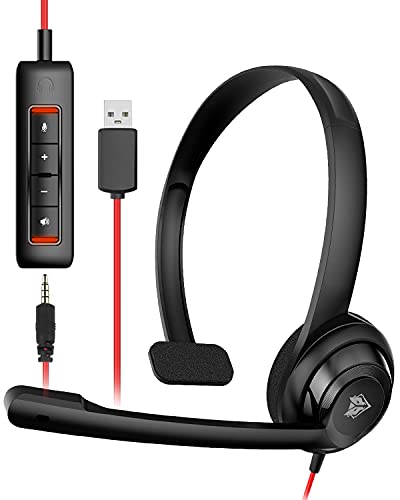
The HW02 is the headset a team lead buys when the requirement is six working headsets this week rather than one perfect headset eventually. NUBWO describes it as a USB headset with a noise cancelling microphone and in-line control, built for ultra comfort on laptops and PCs, and that combination — the full checklist of work features without the premium badge — is precisely its appeal. It sounds like a sensible tool on calls, it mutes from the cable, and equipping a small team does not require a finance meeting.
On calls, the noise cancelling microphone does the essential job: your voice arrives clear, and the worst of a home office — a fan, a distant television — is pushed down where it belongs. Nobody will mistake the HW02 for a broadcast microphone, but that is true of every pick in this guide, and the HW02 reaches the “perfectly intelligible, pleasantly neutral” standard that meetings actually require. The ultra-comfort framing translates to light weight and soft cushioning, which new headset wearers often prefer to the firmer clamp of professional fleet models.
The honest caveats concern time rather than day-one performance. Value headsets historically vary more between production runs, and long-term durability under daily team use is harder to predict than with the fleet brands. Strain relief and cable quality are where cheap headsets usually confess their price, so treat the cable kindly. For a classroom, a small support team, or a home worker testing whether headset life suits them before spending more, the HW02’s equation is compelling.
- Connection: Wired USB
- Microphone: Noise cancelling mic
- Controls: In-line control
- Wearing style: Dual-ear, comfort-focused
Strengths
- Covers the full work checklist at a team-friendly cost.
- Light, soft fit is welcoming for new headset wearers.
- In-line control keeps mute and volume immediate.
Trade-offs
- Long-term durability is less proven than fleet brands.
- Cable and strain relief reward gentle handling.
- Voice quality is solid rather than class-leading.
Best for: small teams, classrooms, and first-time headset buyers equipping several desks. Not suited for: a purchase where a decade-long service record outranks every other virtue.
JIAMQISHI USB Headset — Best lightweight on-ear option
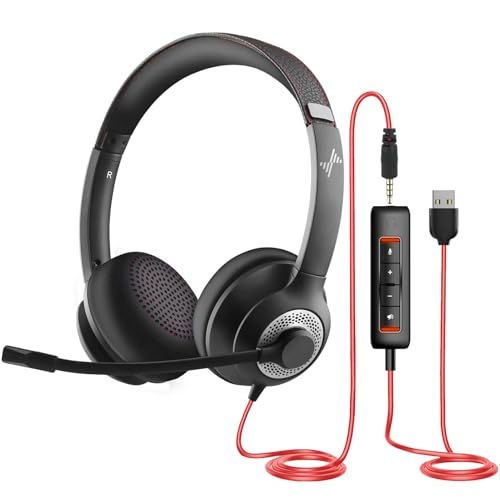
JIAMQISHI’s entry is an on-ear USB headset with a noise cancelling microphone and in-line controls, positioned as computer headphones for PC work. The on-ear format is its identity: smaller and lighter than the over-ear and dual-cushion designs around it, it sits lightly, travels easily in a laptop bag, and suits people who find full coverage headsets hot or heavy across a day of intermittent calls. If your headset spends half its life hanging on a hook between meetings, lightness is not a compromise — it is the feature.
The microphone keeps the category standard of noise cancelling aimed at your voice, and in ordinary home-office conditions callers report the expected result: clear speech with the room pushed politely into the background. In-line controls handle the mute-and-volume routine. Sound on your side is tuned for voices first, which is correct for its purpose; music during work breaks is pleasant rather than thrilling, and the on-ear seal means bass never reaches over-ear depth.
Expectations should be set by role. This is a light-duty, light-weight headset for people whose calls are frequent but not continuous — coordinators, teachers between lessons, administrators — rather than a six-hour call-floor instrument. On-ear pressure accumulates differently from over-ear fatigue, and all-day wearers usually graduate to fuller designs. Within its intended pattern of use, though, the JIAMQISHI offers the complete USB headset experience in the least imposing physical package in this guide.
- Connection: Wired USB
- Microphone: Noise cancelling microphone
- Controls: In-line controls
- Wearing style: On-ear
Strengths
- Lightest, least imposing wearing experience in this guide.
- Full USB feature set: noise cancelling mic and in-line controls.
- Packs easily into a laptop bag for hybrid days.
Trade-offs
- On-ear fit fatigues sooner during continuous all-day calling.
- Shallower seal means leaner bass for music.
- Value-brand longevity is a shorter track record.
Best for: intermittent callers who value a light on-ear fit. Not suited for: continuous six-hour call-floor shifts.
Why Do IT Departments Keep Choosing USB Headsets?
Talk to the people who support headsets rather than merely wear them and a clear philosophy emerges: every wireless headset is a small fleet of batteries, radios, and pairing states that can each fail in a unique way at 8:55 on a Monday. A USB headset reduces the support surface to a cable and a device the operating system already understands. When something goes wrong, the diagnostic tree has two branches — try another port, try another headset — and both branches take under a minute. Multiply that simplicity by a hundred seats and the wired preference stops looking old-fashioned and starts looking like arithmetic.
There is also a security and policy dimension that home buyers rarely see. Some employers disable Bluetooth on managed laptops entirely; others permit it but cannot support the variety of personal devices employees pair. A USB headset sidesteps the entire policy conversation. It works on the locked-down machine, the training-room desktop, and the borrowed laptop with equal indifference, which is why so many of the models in this guide are bought by organisations rather than individuals — and why their designs prioritise behaving identically everywhere over delighting anywhere.
None of this argues that wireless headsets are worse for the individual who manages their own desk. It explains why the USB category persists at full strength alongside them, and why a home worker with a managed laptop often discovers that the “old” technology is the one their employer’s policies quietly require. Buy the connection your environment supports, and the rest of the decision becomes pleasantly small.
What Should You Check Before Ordering Headsets for a Team?
Ports, first and always: walk the actual desks or inventory the actual laptop models, because a fleet order placed against an assumed port is the most common and most avoidable failure in this category. Second, check the meeting platforms your team lives in and confirm the chosen model behaves there — USB headsets are broadly universal, but control behaviour and default device selection vary just enough that a five-headset pilot beats a fifty-headset surprise. Third, decide the wearing-style policy before the order, not after the complaints: one standard model, one approved alternative for the glasses-wearing, pressure-sensitive minority, and no free-for-all that turns support into archaeology.
Spares and consumables belong in the same purchase conversation. Cushions wear, cables get run over by chair wheels, and a team running at zero spares will cannibalise a vacant desk within the quarter. A modest buffer of complete headsets plus cushion sets costs little beside the payroll of the people wearing them. Finally, write down the setup in one page — plug in, select in the app, boom position, mute location — and tape it inside the spares drawer. The best fleet headset is the one a new starter can make work alone at 9:05 on their first morning, and that is a property of your process as much as of the product.
How Long Do USB Headsets Last, and What Wears Out First?
The electronics in a USB headset are rarely what ends its life. The cable is the first casualty — flexed at the control block, trapped under chair wheels, wrapped too tightly for storage — followed by the cushions, whose foam compresses and whose covering eventually flakes. The boom hinge follows in heavy fleets, loosened by thousands of swings. Knowing the order matters because two of the three are manageable: route cables kindly, store headsets unwrapped and unstressed, and replace cushions when they flatten rather than when they disintegrate, since a flattened cushion changes both comfort and microphone distance.
Realistic service life in daily office use runs to years for the fleet brands in this guide, which is precisely why they dominate fleet purchases: the cost per year of a proven wired headset is small, and its failure modes are visible and gradual rather than sudden. Value-tier headsets can serve just as long under gentle single ownership; the difference shows under shared, hot-desk conditions where handling is rougher and nobody owns the cable’s welfare. Match the tier to the handling the headset will actually receive, and longevity stops being a gamble.
How Do the Six USB Headsets Compare?
| Headset | Connector | Microphone | Wearing style | Strongest suit |
|---|---|---|---|---|
| Logitech H390 | USB-A | Noise cancelling boom | Dual-ear on-ear | Proven all-round calls |
| Logitech H391 | USB-C | Boom mic | Dual-ear stereo | Modern slim laptops |
| Jabra Evolve 10 | USB-A | Noise-cancelling mic | Dual-ear | Simple professional setup |
| Jabra Evolve 20 | USB-A/USB | Built-in mic | Dual-ear comfort | Noisy-office focus |
| NUBWO HW02 | USB | Noise cancelling mic | Dual-ear comfort | Team rollouts |
| JIAMQISHI USB Headset | USB | Noise cancelling mic | On-ear | Lightweight intermittent use |
The table reduces to three decisions. First, the connector: USB-C for current laptops, USB-A for everything else. Second, the maker tier: Logitech and Jabra bring fleet history and predictable replacements, while NUBWO and JIAMQISHI trade some of that certainty for team-friendly pricing. Third, the wearing style: fuller dual-ear designs for concentration, the lighter on-ear JIAMQISHI for people whose calls come in bursts. Everything else in this category is refinement.
Which USB Headset Suits Which Kind of Desk?
Desks have personalities, and matching the headset to the desk prevents most disappointments in this category. The permanent home desk, with its monitor arm and its plant, rewards the fuller dual-ear picks and tolerates a cable beautifully, because the cable’s route can be arranged once and forgotten. The kitchen-table worker, packing up nightly, should weight the lighter on-ear pick and a cable that coils without memory; their headset’s worst enemy is being stuffed into a bag, and a lighter build with fewer pretensions survives that life more gracefully than a flagship treated roughly.
The hot-desk and training-room environment argues for the fleet logic this guide keeps returning to: the model that every desk already understands, with spares in a drawer and a one-page setup card taped inside the lid. The executive desk, where the headset shares space with client impressions, argues for the calmer professional designs — Jabra’s restraint over gaming-adjacent styling — because the headset appears on camera in every meeting and is, whether we like it or not, part of the wearer’s professional costume.
The student desk deserves its own sentence, because it is really three desks — bedroom, library, kitchen at home — and the headset that serves it must be light, tough, and unbothered by being borrowed. That profile points at the value end of this guide, where a loss or a breakage is an annoyance rather than an insurance claim. Read your own desk honestly before you read the picks again; the right answer is usually the one that fits the furniture.
And the travelling desk — the laptop on a train table, the hotel room at midnight — is the one desk where this guide’s category itself should be questioned, since a compact wireless model may serve better. USB headsets can travel, and many do, but their home turf is the desk that stays where you left it.
How Should You Set Up a USB Headset for the Clearest Sound?
Plug the headset in before you open your meeting app, and give the computer a few seconds to recognise it as an audio device. Then open the app’s audio settings and select the headset explicitly for both speaker and microphone — do not trust defaults, because laptops happily route your voice through a webcam mic while playing sound through the headset, a mismatch that ruins your side of the call while sounding fine to you. Make a short test call or recording and listen to yourself; hearing your own headset for ten seconds is worth more than any review, including this one.
Position the boom so its tip sits near the corner of your mouth, angled slightly toward it, and keep it there. USB headset microphones are voiced on the assumption of that distance, and drifting the boom up or down changes your volume and clarity more than any software setting. Set your input level while speaking at your true call volume, not a careful test voice, and re-check it after switching apps, since some programs apply their own gain. If colleagues say you sound distant, the fix is almost always boom position, not a new headset.
Cable care is the unglamorous final step. Route the cable so it does not cross your keyboard or hang where a chair wheel can find it, and avoid wrapping it tightly around the headset for storage, which fatigues the conductors at the control block. A USB headset has no battery to maintain; the cable is its lifespan, and treating it gently is the whole maintenance programme.
How Does a USB Headset Behave Across Different Computers?
One of the category’s quiet pleasures is that a USB headset carries its own audio personality with it. Plug the same headset into a desktop, a laptop, and a borrowed machine, and your voice keeps the same character, because the conversion electronics live in the headset rather than in whichever computer you met that morning. For people who hot-desk, teach in different rooms, or support family members’ computers over the phone, that consistency turns troubleshooting into a one-line question: does the headset work on the other machine? If yes, the first machine has a settings problem; if no, the headset has a hardware problem. Few peripherals bisect a fault tree so cleanly.
Operating systems treat USB headsets as first-class audio citizens, which brings small dignities: the device appears by name in sound settings, meeting apps remember it, and switching between headset and speakers is a selection rather than a replugging ritual. The discipline still required of the user is selection itself — confirming, in each new app, that the headset is the chosen input and output. The category’s most common support story remains “my headset is broken” resolving into “the app was listening to my webcam,” and it will remain common until apps choose more wisely by default.
There is a corollary for buyers of the USB-C pick in particular: as laptops converge on USB-C for everything, a USB-C headset shares its port with chargers and docks, so hub behaviour matters. A headset plugged through a dock inherits the dock’s reliability; plugged directly, it inherits the laptop’s. Neither is wrong, but a worker whose dock is temperamental should keep the headset on the laptop’s own port and save the dock for screens. Small wiring decisions like this are the unglamorous substance of a setup that simply works every morning.
Finally, remember that a USB headset is also a small act of future-proofing in one direction only: it will work on the next computer you own, provided the ports match. That proviso is the entire H390-versus-H391 question, and it is why this guide treats connector choice as a first-class decision rather than a footnote. Ports are the one specification that can strand an otherwise perfect headset, and the ten seconds spent checking them is the highest-value ten seconds in the whole purchase.
What Mistakes Do Buyers Make With USB Headsets?
The classic error is ordering a box of USB-A headsets the same week the company issues USB-C-only laptops. Port-checking takes ten seconds per machine and prevents the most common return in this category. A related mistake is assuming an adapter is a perfect substitute: most work, but control signals and fit vary, and a native connector is always calmer. Buy the plug your machines actually have.
The second family of mistakes concerns expectations. A USB headset will not make a bad room quiet, will not fix a colleague’s dreadful microphone, and will not turn a voice call into a concert. Buyers also underrate fit: a headset chosen from a specification table without regard to glasses, head size, or wearing hours will be abandoned in a drawer by March. Finally, teams sometimes buy one premium headset for a manager and value models for everyone else, then discover the support burden concentrates on the mixed fleet. Standardising on one model per role is boring and correct.
Can a USB Headset Handle Music and Media Too?
Yes, within honest limits that depend on what you ask of it. A USB headset is tuned for the human voice’s range, and for spoken media — podcasts, lectures, meetings, language courses, audiobooks — that tuning is not a compromise but a specialisation: words arrive clear at low volumes, and long listening stays untiring. For background music during focused work, every pick in this guide is perfectly pleasant. For critical music listening, where bass texture and treble air are the point, a communications headset will feel like what it is: a tool optimised for a different sense. The sensible pattern for most desk workers is one headset for the talking day and, if music matters deeply, dedicated headphones for the listening evening — rather than a single device asked to be two specialists and succeeding as neither.
There is a workflow argument for the single-device life, though, and it deserves its due. The worker who moves between calls, tutorials, and concentration music fifty times a day loses real minutes to device swapping, and a USB headset that is merely good at everything can beat a rotation of excellent specialists on the only metric that compounds: friction. If that is your day, choose the pick whose comfort you trust most, because you will wear it for all three jobs, and let the music be good enough in exchange for a desk with one headset on it.
Video deserves a footnote: for films and streams at a desk, the dual-ear stereo image of these headsets is entirely satisfying, and the boom parks or rotates away on several picks so the device reads as headphones while you watch. The category is more versatile than its office reputation suggests — it is simply honest about which sense it serves first.
What Is the Difference Between a USB Headset and a 3.5mm Headset With an Adapter?
The difference is where the digital conversion happens and what the computer believes is attached. A true USB headset contains its own audio electronics and presents itself to the computer as a communications device, which is why its in-line controls can speak to the system, why its behaviour is consistent from machine to machine, and why meeting apps list it by name. An analogue 3.5mm headset is a pair of drivers and a microphone that borrow the computer’s built-in audio hardware, whose quality varies wildly between machines; adding a USB adapter moves the conversion into the adapter, with results that depend on that adapter’s own electronics and control support.
In practice the gap shows up as predictability. The USB headset sounds like itself on every computer it meets. The adapted analogue headset sounds like the weakest link in a chain you reassemble at every desk. For a single careful owner with one good machine, the difference may never matter. For anyone who moves between machines, shares desks, or is buying for a team, the native USB design’s consistency is worth insisting on — it is, in the end, the entire premise of this category and of this guide.
One more practical note: USB headsets free the 3.5mm jack for other duties and free the user from the hiss and interference that some laptops’ analogue outputs carry. Small mercies, but they accumulate across a working year.
How Should You Care for a USB Headset Month to Month?
The maintenance list is short enough to fit in one paragraph and valuable enough to deserve it. Wipe the cushions weekly with a dry or barely damp cloth, because skin oils are what age foam and coverings fastest. Coil the cable loosely when it must be stored, never wound tight around the headset, and never let a chair wheel cross it — the wheel is this category’s apex predator. Keep the boom’s hinge moving gently through its full range rather than forcing it past its stops, and store the headset on a hook or stand rather than under a pile of desk archaeology. Once a quarter, make the thirty-second test recording described earlier in this guide; it catches cable crackle, boom drift, and settings changes while they are still small.
None of this extends a headset’s life by magic. It simply removes the five ordinary causes of early death, which between them account for nearly every premature replacement in offices that track such things. A USB headset has no battery to baby and no firmware to feed; kindness to its cable and cushions is the whole stewardship, and it is repaid in years.
What Do Owners Say After Six Months?
The six-month verdict on a USB headset is rarely about sound. Owners praise the absence of incidents: the headset that has never once failed to appear in the meeting app, never needed a charge before the big call, never required a settings expedition. They curse, with equal consistency, the small physical things — a cable an inch too short for a standing desk’s full height, a control block that lands exactly where the desk edge presses it, a cushion that began flaking in month five. The lesson for buyers is to read long-term owner reports for those physical details specifically, because they are the features that dominate year one, and they are invisible in launch coverage.
There is a second six-month pattern: people stop noticing the headset entirely, and mention it again only when it breaks or when a colleague’s wireless model fails mid-meeting and the room turns to the wired person as the reliable one. That invisibility is the category’s highest achievement. If the picks in this guide share a philosophy, it is that a work tool should aspire to be forgotten, and the USB headset — plugged in, selected once, and silent about itself ever after — comes closer to that ideal than any rival technology on the desk.
Final Recommendation
Match the connector first and the badge second. USB-C laptop owners should take the Logitech H391 and enjoy a life without adapters. Everyone else can choose by role: the H390 as the proven default, the Evolve 10 for the calmest professional setup, the Evolve 20 when a loud office demands full dual-ear focus, and the NUBWO HW02 or JIAMQISHI when the job is equipping several desks sensibly. Our single default, if your ports allow it, remains the H390 — not because it dazzles, but because a USB headset’s whole promise is that you stop thinking about it, and no model here keeps that promise more completely.
One Last Consideration Before You Order
Check the returns window and keep the packaging for the first week. Fit is the one variable no review can decide for your head, and a USB headset’s whole value is realised across long days rather than first impressions. Order from a listing whose return terms you have read, wear the headset through two full working days before judging it, and let the boom position and control layout prove themselves under real meetings. The models in this guide have survived years of exactly that scrutiny from thousands of desks; give your own desk the same two days, and the choice will either confirm itself or cost you nothing but a walk to a returns counter.
Frequently Asked Questions
Do USB headsets work with all meeting software?
Yes, in practice. A USB headset presents itself to the computer as a standard audio device, so Zoom, Teams, Meet, and softphone apps all use it the same way. The step people miss is selecting it inside the app’s audio settings rather than assuming the default is correct.
Is USB-C audio better than USB-A audio?
No. The connector shape has no effect on call quality; the audio carried is equivalent. The choice matters only for physical compatibility with your laptop’s ports and for avoiding adapters.
Can I use a USB headset with a phone or tablet?
Sometimes, with the right port or adapter, but these headsets are designed and tested for PC and laptop use. Behaviour on phones varies, and controls may not respond. If phone calling is central to your day, a Bluetooth headset is the safer design.
Why does my voice sound quiet to colleagues?
Almost always boom position. Move the microphone tip closer to the corner of your mouth, confirm the headset — not a webcam or laptop mic — is the selected input, and then raise the input level while speaking at your normal volume.
How many headsets should a small team standardise on?
One model per role is the manageable pattern. It simplifies spares, replacements, and troubleshooting, and it means every team member’s setup advice applies to everyone else’s desk.
Should I keep my old headset as a spare?
Yes — a working retired headset costs nothing to keep, lives in a drawer, and turns a cable failure from a lost morning into a two-minute swap. Test it once when you retire it, coil its cable loosely, and note which computer port it suits. When the main headset eventually falters, the spare carries you through the replacement’s delivery days, and the habit generalises to teams, where the spares drawer is the same idea at fleet scale. It is the simplest resilience a home worker can own: yesterday’s headset, kept kindly, quietly guaranteeing that no single cable can cancel a working day.
Related Guides
Staffing a call floor brings different demands, covered in Best Call Center Headsets. If background noise is your main enemy, read Best Noise Cancelling Headsets, and for immersive hardware of a different kind, see Best Vr Headsets.


