What's inside
- Key Takeaways
- Quick Picks
- How We Chose These Picks
- Mono or Dual-Ear: Which Suits a Call Floor?
- What Makes a Microphone Call-Centre Grade?
- What Does a Headset Cost a Centre When It Fails?
- How Should Centres Handle Hygiene and Sharing?
- Which Metrics Tell You a Headset Is Working on Your Floor?
- How Do the Six Call Centre Picks Compare?
- How Do Seasons and Shift Patterns Stress a Headset Fleet?
- What Training Should Accompany a New Headset?
- How Should a Centre Roll Out New Headsets?
- How Should Supervisors and Quality Teams Use Headsets?
- What Mistakes Do Centres Make When Buying Headsets?
- How Does Remote Work Change Call Centre Headset Buying?
- What Should a Small Business Running a Support Queue Choose?
- How Do You Know When a Fleet Standard Needs Replacing?
- What Do Agents Themselves Ask For?
- Final Recommendation
- One Last Consideration Before the Fleet Order
- A Note on Buying for One Agent Versus One Hundred
- Frequently Asked Questions
- Related Guides
As an Amazon Associate I earn from qualifying purchases. This post may contain affiliate links at no extra cost to you.
widgetverdict.com is reader-supported. When you buy through links on our site, we may earn an affiliate commission.
Where to buy: all six headsets below are listed on Amazon, and between them they cover the three ways call centres actually connect — USB to a softphone, DECT to a desk system, and mono designs built for people who talk for a living.
Call centre work is the most demanding environment a headset will ever face, and the best call center headsets are designed around that reality rather than around occasional meetings. An agent may wear a headset for six or seven hours of a shift, take a call every few minutes, and be measured on how clearly customers hear them and how accurately they hear customers. Equipment that is merely fine for a weekly video call — a slightly heavy frame, a microphone that drifts, a cable that tangles — becomes a genuine operational problem at that tempo. Small discomforts multiply by hundreds of calls.
This guide therefore judges headsets the way an operations manager would: voice clarity in both directions, wearing comfort across a full shift, controls that survive constant use, and a connection story that matches the centre’s phone system. The six picks split into wired USB models for softphone-based centres, where the computer runs the calls, and DECT wireless models for environments built around desk phones or bases, where agents benefit from standing, stretching, and walking to a supervisor without dropping the conversation. Mono and dual-ear designs both appear, because centres disagree — correctly, for their own floors — about whether agents should hear the room or only the caller.
A note on who should read this: team leaders equipping a floor, remote agents upgrading from whatever came in the laptop box, and small businesses running a support queue from ordinary desks. The picks scale from single purchases to fleet orders, and the buying sections address the questions that only appear at fleet scale — spares, standardisation, hygiene, and what breaks first.
Key Takeaways
- Call centre headsets are judged on shift-long comfort and microphone consistency, not on media features.
- Mono designs from Arama and Wantek keep one ear on the floor, suiting agents who confer with colleagues mid-call.
- The Logitech H390 and Jabra Evolve 10 are the dependable dual-ear USB options for softphone centres.
- DECT models — the Plantronics CS540 and Yealink WH63 E2 — free agents from the desk while keeping calls clean.
- Standardising a floor on one or two models simplifies spares, training, and troubleshooting.
- In-line controls and a reachable mute are safety equipment on a call floor, not conveniences.
Quick Picks
| Pick | Badge | Why it earns its place |
|---|---|---|
| Logitech H390 | Best dual-ear USB for softphone teams | A noise cancelling boom and plug-and-play USB-A behaviour that fleet buyers have trusted for years. |
| Jabra Evolve 10 | Best professional USB all-rounder | Jabra’s call-focused tuning and an easy USB-A setup in a wired headset made for PC work. |
| Arama USB Mono Headset | Best single-ear USB value | A single ear mono design with a noise-cancelling mic, in-line controls, and a lightweight frame. |
| Wantek Monaural USB Headset | Best corded mono for softphones | A monaural corded USB headset with a noise cancelling mic and in-line controls, built as a UC business headset. |
| Plantronics CS540 | Best DECT for desk-phone centres | Single ear, three wearing styles, and a DECT connection to a desk phone for agents who move. |
| Yealink WH63 E2 | Best convertible DECT for teams platforms | A Teams Certified DECT headset with three wearing styles, an earhook option, and noise cancelling design. |
How We Chose These Picks
We began with the connection map of real call centres. Softphone operations need USB headsets that enumerate identically on every workstation; desk-phone operations need DECT bases; and any credible shortlist must serve both worlds. The six picks divide evenly across that map. We then filtered for microphone design: every pick carries a noise cancelling microphone on a boom, because a call floor is the worst possible place for a weak mic — dozens of agents talking at once is exactly the background a caller’s headset must reject.
Wearing style was the next deliberate split. Two picks are mono, two of the DECT models are single-ear convertibles, and the two USB flagships are dual-ear. That balance reflects the genuine operational divide: floors where agents coach each other and hear supervisors call out updates favour mono, while floors fighting ambient noise favour dual-ear coverage. A guide that crowned one style would fail half its readers, so each review argues its style’s case honestly, including where the style hurts.
Finally, we favoured models a purchasing manager can actually standardise on: stable listings, recognisable product lines, and designs that have survived in commercial use. Call centres do not buy a headset; they buy a hundred headsets and a drawer of spares. Every pick here can plausibly fill that drawer.
Mono or Dual-Ear: Which Suits a Call Floor?
The mono case is about awareness. A single-ear agent hears a supervisor’s announcement, a colleague’s quick question, and their own voice at natural volume, which keeps their speaking level honest — dual-ear agents sometimes shout without realising, because the headset makes their own voice sound muffled to them. Mono headsets are also lighter, cooler across a long shift, and quicker to lift off for a face-to-face conversation. On floors with heavy coaching and floor-walking support, mono is not the budget option; it is the operationally correct one.
The dual-ear case is about defence. On a loud floor, the second earcup is noise protection for concentration: the agent hears the caller instead of the agent beside them, mishears fewer account details, and finishes the shift less fatigued by the effort of listening through noise. Dual-ear also helps remote agents in imperfect homes, where the competing sounds are televisions and traffic rather than colleagues. The trade is isolation — a dual-ear agent is functionally absent from the room — which is either the point or the problem, depending on how your floor runs.
Many mature operations settle the argument by role rather than by vote: mono for team leaders and floor support who must stay reachable, dual-ear for agents on dense call queues. If you are equipping a new floor and genuinely unsure, pilot both styles with a handful of agents for a fortnight. The preference that emerges will be strong, consistent, and cheaper to discover with eight headsets than with eighty.
What Makes a Microphone Call-Centre Grade?
Consistency under repetition. A call-centre microphone must deliver the same voice on call one and call three hundred, which means a boom that holds its position through a shift of being swung away for sips of water and swung back for the next caller. It must reject the floor’s ambient wash — the merged murmur of every other agent — without clipping the agent’s own consonants, because customers forgive many things but not being asked to repeat a card number four times. And it must survive being handled constantly, since booms are adjusted far more often than product photographs suggest.
Noise cancelling in this context is about geometry as much as electronics. A boom places the capsule close to the mouth, where the voice is loud, and the cancelling design exploits the difference between that close voice and distant noise. This is why call floors standardised on booms decades ago and why the picks in this guide all use them. When you evaluate headsets for a floor, test the worst seat, not the best: the desk beside the door, under the air conditioning, next to the loudest talker. A microphone that keeps voices clear there will be fine everywhere else.
Your side of the audio matters too, though it is discussed less. Agents who cannot hear callers clearly make errors and ask for repeats, which lengthens calls and frays tempers on both ends. Clear, voice-tuned earpiece audio at moderate volume is a quality feature, and centres should treat listening fatigue as a real cost: an agent straining to hear for seven hours is an agent whose accuracy quietly declines by the afternoon.

Logitech H390 — Best dual-ear USB for softphone teams
For softphone centres, the H390 is the headset against which fleet purchases are measured. Its wired USB-A connection behaves identically on every workstation, its noise cancelling boom microphone keeps an agent’s voice clear above the floor’s murmur, and its in-line controls put mute where an agent’s hand can find it mid-sentence. There is no battery programme to manage, no pairing variation between desks, and no learning curve for new starters — three properties that matter more at fleet scale than any specification.
On the floor, its dual-ear coverage earns its keep in noisy rooms. Agents hear callers without leaning in, and the padded on-ear cushions keep the headset stable through a shift of constant small movements. Voice quality is the familiar H390 signature: focused, intelligible, unglamorous. Supervisors listening to call recordings hear agents clearly, which is the metric that actually feeds quality scores. The rotating boom parks upward during wrap-up work, sparing the mic the knocks that kill lesser headsets.
The costs are the known ones. A cable per desk means cable management per desk, and the on-ear fit can press on glasses across the longest shifts. Centres should also budget the headset as a consumable at scale: with daily use by rotating staff, cushions and cables wear, and a spares drawer is part of the real price. None of that dents its position. If a softphone floor asked us for one default answer, this is it.
- Connection: Wired USB-A
- Microphone: Noise cancelling boom mic
- Wearing style: Dual-ear, padded on-ear
- Controls: In-line volume and mute
Strengths
- Identical plug-and-play behaviour across every workstation.
- Boom mic keeps agents intelligible over floor noise.
- No batteries or pairing for IT to manage.
Trade-offs
- Cables need managing and eventually wear at fleet scale.
- On-ear pressure can surface during the longest shifts.
- Dual-ear isolation removes agents from floor awareness.
Best for: softphone centres wanting one dependable dual-ear standard. Not suited for: floors where agents must hear supervisors and colleagues constantly.

Jabra Evolve 10 — Best professional USB all-rounder
The Evolve 10 brings Jabra’s professional call heritage to the same softphone problem with a slightly different emphasis: voice tuning and wearing calm. Its noise-cancelling mic presents agents naturally, without the processed edge that fatigues callers on long conversations, and its easy USB-A setup means a replacement headset can be swapped mid-shift in seconds. The TCO Certified badge will matter to organisations tracking the sustainability of fleet purchases, a consideration that has moved from footnote to procurement criterion in many centres.
Where the Evolve 10 distinguishes itself on a floor is in long-call comfort and consistency. The dual-ear frame distributes pressure evenly, and the earpiece audio is tuned for speech intelligibility at moderate volumes, which helps agents through the afternoon accuracy dip that listening fatigue causes. Quality teams tend to like what they hear in recordings from Jabra mics: the agent present, the room subdued, nothing calling attention to the equipment.
Against the H390, the choice is closer than brand loyalists admit — both are wired, dual-ear, boom-mic USB headsets from proven makers. The Evolve 10’s case rests on fit and voice naturalness; the H390’s rests on ubiquity and drawer-familiarity. A centre already standardised on either should stay put. A centre choosing fresh should put both on agents’ heads for a week and let the floor vote, because at this level the deciding evidence is worn, not read.
- Connection: Wired USB-A
- Microphone: Noise-cancelling mic
- Wearing style: Dual-ear
- Certification: TCO Certified
Strengths
- Natural voice presentation that callers find easy on long calls.
- Speech-tuned earpiece audio supports all-shift accuracy.
- Mid-shift swaps take seconds with USB-A setup.
Trade-offs
- Shares the wired category’s desk tether.
- Dual-ear coverage isolates agents from the floor.
- Very close in spirit to its Logitech rival; fit decides.
Best for: centres valuing natural call sound and professional fleet credentials. Not suited for: mono-style floors built around constant side conversation.

Arama USB Mono Headset — Best single-ear USB value
The Arama makes the mono case in USB form: a single ear headset with a noise-cancelling mic, in-line controls, and a lightweight build, connecting to a PC for agents who need one ear on the call and one on the room. It is the pick for floors where coaching happens live — a supervisor leaning in, a colleague flagging a policy answer — and where agents find dual-ear isolation more hindrance than help.
Single-ear wearing changes an agent’s self-awareness in a way recordings reveal quickly: hearing their own voice naturally, agents moderate their volume without training, and callers stop encountering the booming delivery that dual-ear isolation can cause. The Arama’s lightweight frame suits the constant on-off rhythm of a floor, and the in-line controls keep mute reachable. The noise-cancelling mic handles the paradox of mono work — an open ear for the agent, a focused channel for the caller — by keeping the boom close and the room down.
The limitations mirror the style. In a genuinely loud floor, one open ear admits the neighbour’s conversation, and concentration suffers on complex calls. The value positioning also means fleet buyers should test durability across a pilot group before a full rollout, as with any budget line. For the right floor, though — coached, collaborative, moderately quiet — the Arama delivers the mono pattern at a price that makes standardising painless.
- Connection: Wired USB
- Microphone: Noise-cancelling mic
- Wearing style: Single ear (mono)
- Controls: In-line controls
Strengths
- Keeps one ear open for coaching and floor awareness.
- Lightweight frame suits constant on-off use.
- Natural self-hearing keeps agents’ volume honest.
Trade-offs
- Open ear admits noise on loud floors.
- Budget line warrants a durability pilot before rollout.
- Mono audio is wrong for media or stereo needs.
Best for: coached, collaborative floors that run softphones. Not suited for: very loud floors where agents need both ears defended.

Wantek Monaural USB Headset — Best corded mono for softphones
Wantek describes this model plainly as a monaural corded USB headset with a noise cancelling mic and in-line controls, a UC business headset for Skype and softphone platforms — and that plain description is a good map of its strengths. It is a purpose-built tool for unified-communications work: one earpiece, a proper boom, a cable to the PC, and nothing in the design that does not serve a person answering calls through a computer all day.
The UC framing matters because softphone work has its own rhythm: calls arrive through an app, wrap-up notes are typed while the next call queues, and the headset lives on the head through all of it. The Wantek’s monaural design lets agents hear a colleague’s warning or a team lead’s update without lifting a cup, and its corded connection means the thousandth call of the month behaves exactly like the first. In-line controls keep the essential gestures — answer-era habits of mute and volume — on the cable rather than in a software window.
As with the Arama, the open ear is both the point and the boundary: choose it for awareness, not for silence. Wantek is a specialist rather than a giant, so fleet buyers should confirm replacement availability for their region before standardising. Within a softphone operation that has decided mono is its pattern, this is one of the most directly aimed products in the guide.
- Connection: Corded USB
- Microphone: Noise cancelling mic
- Wearing style: Monaural (single ear)
- Controls: In-line controls
- Platform fit: UC business headset for softphones
Strengths
- Purpose-built for softphone and UC call patterns.
- Mono awareness suits coached, team-based floors.
- Corded connection removes charging and pairing entirely.
Trade-offs
- Open ear struggles in high-noise environments.
- Smaller brand; confirm spares availability before rollout.
- Single-ear audio only, by design.
Best for: softphone teams committed to the mono working pattern. Not suited for: noisy floors or agents who take calls in shared, loud homes.
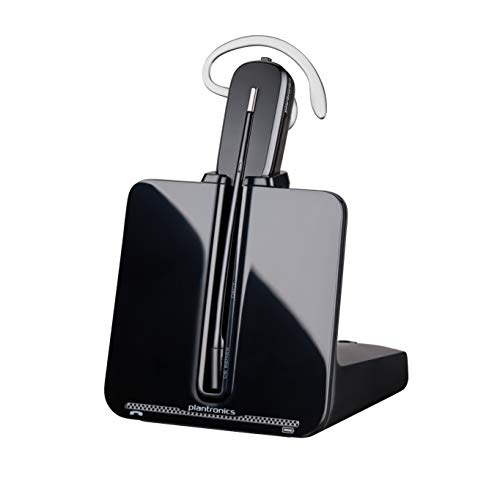
Plantronics CS540 — Best DECT for desk-phone centres
The CS540 serves the centres this guide’s USB picks cannot: operations built on desk phones. It is a wireless DECT headset, single ear, with three convertible wearing styles, connecting to a desk phone through its base. For agents whose work involves standing to greet a visitor, walking to a printer mid-call, or turning to a supervisor without trailing a cable, DECT’s dedicated voice channel and generous range turn the headset from a tether into a tool.
The three wearing styles are operationally significant. Call-centre staff wear headsets longer than almost any other workers, and a style that suits one head — over the ear for one agent, a headband for the next, behind the neck for a third — reduces the fit complaints that quietly erode morale and equipment care. The mono format keeps the room audible, matching how desk-phone environments actually work, and the noise-cancelling boom keeps the caller’s experience focused even as the agent moves.
Its boundaries are clear. It will not join a softphone on a PC, so centres migrating to computer-based calling should not buy it as a bridge. The base-and-handset-lifter world it belongs to is mature technology, which means excellent reliability and zero novelty. Centres still on desk phones — and there are many, in healthcare, hospitality, and local services — will find it the most proven answer in this guide.
- Connection: DECT wireless to desk phone
- Microphone: Noise-cancelling boom
- Wearing style: Single ear, 3 wearing styles
- Brand line: Poly (Plantronics)
Strengths
- Built for desk-phone systems that USB cannot serve.
- Three wearing styles fit a whole floor’s preferences.
- DECT range lets agents move without losing the call.
Trade-offs
- Desk-phone only; no softphone or PC connection.
- Mono audio, by design.
- Base-station setup is more involved than a USB plug.
Best for: desk-phone centres whose agents move while they talk. Not suited for: softphone operations, which need USB or PC-connected DECT instead.

Yealink WH63 E2 — Best convertible DECT for teams platforms
The Yealink WH63 E2 represents the newer school of call-centre wireless: a DECT headset with a single-ear convertible earpiece, three wearing styles including an earhook, noise cancelling design, and Teams Certification for operations whose calling runs through Microsoft’s platform. Yealink built its name on desk phones and conference gear, and the WH63 E2 applies that heritage to the agent who needs wireless freedom with platform assurance.
Teams Certification is more than a logo in a managed environment. It signals the headset and its base are built to behave predictably with the platform’s call controls and audio handling, which reduces the small frictions — a mute that desyncs, a call control that lags — that agents notice a hundred times a week. The convertible design with earhook, headband, and neckband options continues the CS540’s lesson that fit choice is a fleet feature, while the single-ear format preserves floor awareness.
DECT brings its usual gifts: a dedicated channel that stays clean when office wireless gets crowded, and range that survives a walk to the far end of the floor. The costs are equally familiar — a base to install, a battery to charge nightly, and a price above wired USB models. For a Teams-centred operation equipping agents who move, the WH63 E2 is the modern expression of what the CS540 pioneered, aimed at a different phone system.
- Connection: DECT wireless
- Microphone: Noise cancelling design
- Wearing style: Single ear convertible, 3 wearing styles with earhook
- Certification: Teams Certified
Strengths
- Teams Certification suits platform-managed call operations.
- Convertible wearing styles fit varied agent preferences.
- DECT connection stays clean in crowded wireless offices.
Trade-offs
- Base installation and nightly charging add fleet process.
- Costs more than wired USB standards.
- Single-ear format gives up stereo isolation.
Best for: Teams-based operations whose agents need wireless movement. Not suited for: buyers wanting the simplicity of a cable and nothing else.
What Does a Headset Cost a Centre When It Fails?
On a call floor, a failed headset is not an inconvenience; it is an agent off the phones, a queue lengthening, and a supervisor improvising. That arithmetic explains the category’s conservatism. Centres standardise on models with gradual, visible failure modes — a cushion flattening, a cable crackling before it dies — over models that fail silently or suddenly, because a headset that warns you can be swapped at a break, while one that dies mid-call writes its cost into the day’s service statistics. When you evaluate the picks in this guide for a floor, ask not only “how does it sound?” but “how does it die, and how much warning does it give?”
The same arithmetic drives the spares drawer and the swap drill. A centre that can replace any agent’s headset in under two minutes, from stock, without IT involvement, has effectively deleted headset failure as an operational category. Achieving that requires standardisation, labelled spares, and agents trained to swap rather than troubleshoot. The headsets themselves support the drill to different degrees — USB models swap fastest, DECT models need pairing to a base — and that difference belongs in any fleet decision alongside comfort and sound.
There is a human line in the ledger too. Agents judge their employer partly by the tools on their heads, and a floor that issues worn, shared, crackling headsets teaches a lesson about how the work is valued that no engagement programme fully un-teaches. Decent headsets, individually issued and maintained, are among the cheapest morale instruments a centre owns.
How Should Centres Handle Hygiene and Sharing?
The cleanest answer is individual issue: one headset per agent, labelled, stored in the agent’s locker or drawer, with cushions treated as personal equipment. Where budgets genuinely force sharing across shifts, the defensible pattern is personal components within a shared system — individual cushions or covers that swap with the agent, a wipe-down protocol for shared parts between shifts, and scheduled deep replacement of anything that touches skin. What is not defensible is silent sharing: headsets passed hand to hand with no protocol at all, which agents notice and remember.
Remote and hybrid agents simplify the question — the headset lives with one person — but add a different one: who pays for replacement when a home headset wears out? Centres that issue equipment for home use should state the replacement path in writing at issue time, because the alternative is agents quietly buying the cheapest headset available and the centre’s call quality quietly becoming whatever the bargain bin sounds like. Call quality is an organisational output; its inputs deserve organisational ownership.
Whichever model a centre chooses from this guide, the hygiene policy should be written before the headsets arrive, not improvised after the first complaint. Agents forgive many operational compromises. Being handed a stranger’s ear cushion without a word is rarely one of them.
Which Metrics Tell You a Headset Is Working on Your Floor?
Listen to recordings first. A monthly sample of calls per model tells you what customers actually hear — agent clarity, room leakage, handling noise — and cuts through every internal opinion about how a headset “feels.” Track mishears and repeat requests in quality scoring; a rising pattern localised to one model or one floor area is a headset signal wearing a disguise. Monitor average handle time with suspicion rather than faith: clearer audio can shorten calls by removing repeats, but a headset change that coincides with a campaign change proves nothing, and honest operations teams say so.
The softer metrics matter too. Agent comfort complaints, logged rather than anecdotal, predict abandonment and breakage months ahead. Swap frequency per model — how often the spares drawer opens — is the fleet’s own verdict on durability, more honest than any warranty statistic. And the simplest measure of all: after a model has been standard for a quarter, ask the floor whether they think about their headsets. The best fleet outcome is that they do not, because equipment that never enters consciousness is equipment that is working.
How Do the Six Call Centre Picks Compare?
| Headset | Connection | Ears | Microphone | Strongest suit |
|---|---|---|---|---|
| Logitech H390 | Wired USB-A | Dual | Noise cancelling boom | Softphone fleet default |
| Jabra Evolve 10 | Wired USB-A | Dual | Noise-cancelling mic | Natural call sound |
| Arama USB Mono | Wired USB | Mono | Noise-cancelling mic | Coached floors, value |
| Wantek Monaural | Corded USB | Mono | Noise cancelling mic | UC softphone work |
| Plantronics CS540 | DECT, desk phone | Mono | Noise-cancelling boom | Desk-phone centres |
| Yealink WH63 E2 | DECT | Mono convertible | Noise cancelling | Teams operations |
Two questions sort the table. First, what runs your calls — a computer or a phone system? USB picks serve the computer; DECT picks serve the phone system, with the Yealink aimed at Teams-centric setups. Second, how does your floor work — heads-down concentration or constant side conversation? Dual-ear answers the first pattern, mono the second. Every other difference between these six is secondary to those two decisions.
How Do Seasons and Shift Patterns Stress a Headset Fleet?
Fleets live on a calendar that purchasing rarely consults. The pre-holiday surge doubles call volume and extends shifts, which is precisely when a marginal cushion becomes a complaint and a marginal battery becomes an absence; a centre that schedules its headset refresh for the calm before that surge is practising operations, not shopping. Summer stresses fleets differently — heat makes every gram and every sealed cushion feel heavier, and mono’s cooler wearing profile wins converts every July. Winter brings the static and dry-air season in many buildings, cracked lips that change how booms are positioned, and the flu-season hygiene questions this guide has already raised. None of these is a reason to buy a different headset; all of them are reasons to time purchases, pilots, and cushion replacements with the year in mind.
Shift patterns write their own stresses. A fleet serving a single day shift rests at night; a fleet serving follow-the-sun operations may be worn twenty hours a day by three successive owners, which triples the hygiene stakes and the wear rate while eliminating the charging window that DECT fleets quietly depend on. Centres running continuous operations should weight wired USB picks more heavily than their feature lists suggest, because a cable never needs the night off. Conversely, a single-shift desk-phone floor is DECT’s natural habitat, with bases charging in an empty room every night like phones in a farmhouse kitchen.
The deepest lesson is that a headset fleet is a living system with seasons, not a purchase with a date. The centres that get years of quiet service from the picks in this guide are the ones that think in rhythms — pilot in the calm, refresh before the surge, replace cushions as routine — rather than in emergencies. Emergencies are what happen to fleets that were bought once and thought about never.
What Training Should Accompany a New Headset?
Fifteen minutes, well spent, outperforms any manual. Show agents where the boom belongs and let them hear a recording of themselves before and after the correction; the difference teaches faster than instruction. Walk the controls blindfold-style — mute by touch, volume by touch — because the first time an agent needs the mute urgently is not the time to learn its location. Explain the swap drill: where spares live, what to do with a failing unit, and the rule that a crackling cable is reported the day it crackles, not the day it dies mid-call.
Add one module most centres skip: how to listen. Agents set their own call volume, and the habit of cranking it early in a shift guarantees fatigue by the end; teach moderate volume, teach using the quiet of a good earpiece seal instead of raw level, and teach that asking a caller to repeat is cheaper than mishearing. These are soft skills with hard consequences for accuracy, and the headset is the instrument they are played on.
Finally, train the trainers. Supervisors who wear the same model and follow the same disciplines can coach by example; supervisors on different equipment give advice that does not quite transfer. A fleet is a culture as much as a purchase, and the fifteen minutes is where the culture gets set.
How Should a Centre Roll Out New Headsets?
Pilot before you purchase at scale. Put the shortlisted models on a small group of agents for at least two full weeks, including your busiest days, and collect structured feedback on fit, hearing clarity, and how callers sound in recordings. Agents discover in week two what no demo reveals: the cushion that warms up, the boom that drifts, the control block that catches on a desk edge. A pilot also reveals your floor’s true mono-versus-dual preference, which is the most expensive guess to get wrong at scale.
Standardise once the pilot concludes. One primary model, one approved alternative for fit exceptions, and a spares drawer stocked at a sensible ratio to headcount. Train the small things during rollout — boom position, mute location, how to report a failing cable — because most “bad headset” tickets are position and settings problems wearing a disguise. For hygiene, issue headsets to individuals rather than pooling them where your operation allows, and schedule cushion replacement as routine maintenance rather than waiting for complaints.
For wireless DECT fleets, add a charging ritual to the rollout: headsets return to bases at shift end, every shift, no exceptions. Fleets rarely die from technology; they die from a Tuesday where half the headsets are flat. A named owner for the fleet — checking spares, rotating stock, retiring worn units — keeps a rollout working in year two, not just in week two.
How Should Supervisors and Quality Teams Use Headsets?
The headset conversation usually stops at agents, but supervisors and quality analysts are heavy headset users with different needs. A supervisor monitoring calls live, dropping in to coach, and taking escalations needs instant transitions between listening and speaking, and benefits from the mono awareness this guide discusses — the floor is their second channel. Quality analysts live in recordings for hours at a stretch, and for them the earpiece’s speech clarity at modest volume is a fatigue issue with accuracy consequences: an analyst straining through a poor headset grades the afternoon’s calls with tired ears. Equipping the listeners as deliberately as the talkers is a mark of a mature operation, and the dual-ear USB picks here serve analysts exactly as they serve agents.
Trainers form a third group with a hybrid need: they demonstrate calls, narrate over recordings, and join live sessions, often switching roles within the hour. For them the virtues are boring and specific — a boom that parks cleanly, controls that behave identically in every training room, and a model the trainees also wear, so that “check your boom position” is advice the trainer can demonstrate on identical hardware. Standardisation pays its dividend here most visibly: one model across agents, supervisors, and trainers means every piece of headset advice in the building is universally applicable.
There is a coaching technique worth naming because headsets enable it: the recorded self-review, where an agent listens to their own calls through the same model they wore. Hearing your own voice as customers heard it — boom artefacts, room leakage, the sentence you rushed — teaches faster than any rubric. Centres that build self-review into their rhythm find microphone discipline improving without a single memo, because agents correct what they can hear.
None of this requires exotic equipment. It requires treating headsets as the instruments of the whole operation rather than as agent-issue consumables, and buying the picks in this guide with the listeners’ hours counted alongside the talkers’.
What Mistakes Do Centres Make When Buying Headsets?
The expensive mistake is buying for the demo instead of the shift: choosing the headset that impressed in a quiet meeting room rather than the one agents can wear for seven hours on a loud floor. The second is ignoring the phone system — ordering excellent USB headsets for a desk-phone estate, or DECT for a softphone migration already scheduled. Headset purchases should follow the telephony roadmap, not precede it.
Operational mistakes follow. Centres under-buy spares and then cannibalise desks; they pool headsets without a hygiene policy and create a morale problem no memo fixes; they skip the pilot and discover the floor hates the chosen wearing style at eighty units instead of eight. There is also a subtler error: judging microphones by how agents sound to each other in the office rather than in call recordings, which are the only version customers ever hear. Buy from recordings, pilot at scale, and standardise without apology.
How Does Remote Work Change Call Centre Headset Buying?
The home-based agent breaks several assumptions the floor used to guarantee. There is no supervisor to notice a failing cable, no spares drawer down the corridor, and no controlled acoustic environment — instead there are doorbells, pets, and a neighbour’s renovation. Buying for remote agents therefore shifts weight toward three things: microphones that forgive a real house, which every pick in this guide was chosen for; a connection the agent’s own laptop handles without IT heroics, which favours USB for softphone operations; and a replacement process that ships a spare before the old headset fully dies, because a remote agent with a dead headset is not a degraded resource but an absent one.
Comfort also changes meaning at home. A floor agent’s discomfort is visible and gets reported; a home agent quietly endures, then quietly buys their own replacement, and the centre’s carefully standardised call quality dissolves into whatever each agent found on sale. Centres that take remote quality seriously issue the headset, state the replacement path, and ask about fit during regular check-ins. The cost is small. The alternative — fifty agents on fifty random headsets — is a quality programme with fifty uncontrolled variables.
There is an opportunity hidden in the shift: home agents can pilot new models cheaply and honestly, because their environments are the real test environments. A centre planning a fleet change can learn more from six remote agents wearing a candidate for a month than from any vendor demonstration conducted in a quiet showroom.
What Should a Small Business Running a Support Queue Choose?
Most small businesses are call centres in denial: a support queue, a softphone app, and three people who also do three other jobs. Their headset needs match this guide’s centre criteria at miniature scale — clear microphones, all-day-enough comfort, controls that prevent mute accidents in front of customers — with two differences. First, the phones are almost always softphones on ordinary computers, which makes wired USB the default answer and removes DECT from the conversation unless a desk-phone system genuinely exists. Second, there is no fleet process, so the headset must be individually forgiving: easy to set up, hard to misconfigure, and replaceable in two days from a normal retailer.
For that reader, the practical shortlist from this guide is the H390 or Evolve 10 per person, chosen by fit, with one spare kept in the office against the inevitable cable incident. Mono becomes attractive only if the team’s work involves constant in-room collaboration while on calls. Wireless should wait until the queue justifies it; a small team’s first headset problem is never a shortage of features, it is a shortage of clarity and a surplus of “sorry, say that again.”
The encouraging news is that small scale is an advantage in disguise: three people can each try the shortlist, vote with their own heads, and standardise by Friday. Use that agility. The enterprises in this category would envy it.
How Do You Know When a Fleet Standard Needs Replacing?
Standards age in three ways, and each has its own signal. The hardware ages first and most visibly: failure rates climb, the spares drawer opens more often, and a model that once lasted years starts dying in months as the surviving units accumulate wear. The platform ages second: a centre that standardised on desk-phone DECT and then migrates its telephony to softphones owns a fleet answering a question nobody asks anymore, however healthy the headsets themselves remain. The workforce ages third and most subtly: a floor that was heads-down and dual-ear becomes collaborative and mono by culture, or the reverse, and the standard that fit the old floor starts generating the low, constant grumble that precedes non-compliance.
The disciplined response is a scheduled review rather than a crisis purchase — once a year, with failure data, platform roadmap, and floor feedback on the same table. Most years the answer will be “hold,” and that is a success, not a non-event: stability is what lets agents forget their equipment. The year the answer changes, the pilot method in this guide applies unchanged, because the process that chose the last standard well is the process that should choose the next one.
What a centre should never do is drift into a mixed fleet by accident — a replacement bought here, a different model there — until support becomes guesswork and no two desks match. Mixed fleets happen by decision or by neglect, and only one of those is defensible. The picks in this guide are all credible standards; the fleet discipline around them is what turns a good headset into a good decade.
What Do Agents Themselves Ask For?
Ask a floor what it wants and the answers are humbler than procurement documents: a headset that does not hurt by three o’clock, a mute they can trust, a boom that stays where it was put, and a replacement that arrives the same day when something dies. Agents rarely ask for features. They ask for the absence of friction, because their working day is measured in calls and every friction is multiplied by the queue. That is why this guide’s picks skew conservative, and why the flashiest product in a category is so seldom the right fleet answer: the floor’s criteria are durability criteria, and they are set by people who will wear the decision for two thousand hours.
There is management wisdom in simply honouring those four requests visibly. When agents see the spares drawer stocked, the pilot taken seriously, and the uncomfortable model actually withdrawn, equipment stops being a symbol of how the organisation values the work. Headsets are small objects with an outsized voice in that conversation, precisely because they touch the worker’s body all day. Centres that understand this treat the picks in this guide as a promise kept daily; centres that do not, discover the cost in attrition interviews, where the headset is mentioned more often than executives expect.
Final Recommendation
Softphone centres should standardise on the Logitech H390 for dual-ear floors or the Jabra Evolve 10 where call sound naturalness is prized, and choose between the Arama and Wantek mono models — after a pilot — for coached, awareness-first floors. Desk-phone operations should take the CS540 for its proven convertible design, and Teams-centred operations should look first at the Yealink WH63 E2. If this guide must name one headset for a new centre starting tomorrow on softphones, it names the H390: the floor will forgive its plainness within a day and rely on its consistency for years.
One Last Consideration Before the Fleet Order
Before the purchase order goes in, run the numbers that include the humans: headcount today, expected growth this year, spares at a sensible ratio, cushions as a recurring line, and one training quarter-hour per agent. The headset unit price is the smallest figure in that table, and centres that budget the whole system — rather than the box alone — are the ones whose fleets still feel new in year two. Then place the order, run the pilot’s lessons into the rollout, and let the floor get on with the work the headsets were bought to serve: conversations customers can hear, handled by people who can hear them back.
A Note on Buying for One Agent Versus One Hundred
Everything in this guide scales, but it does not scale identically. A single remote agent should weight fit and microphone forgiveness above all, because there is no floor to average out a bad match. A hundred-agent floor should weight the system around the headset — spares, swaps, training, standardisation — because at that scale the process contributes more to call quality than the last increment of product quality. Readers between those poles can interpolate honestly: a ten-person team needs a named owner and a small spares shelf, not a fleet department. The picks themselves do not change across that range, which is the quiet strength of standardising on proven models: the same H390 that serves one agent’s spare drawer serves the hundredth agent’s first day, and advice given to either applies to both.
Frequently Asked Questions
How many spare headsets should a call centre keep?
A practical pattern is a spares drawer sized to your failure experience — enough to swap any agent’s headset mid-shift without borrowing from another desk. New fleets should start with a modest buffer and adjust after the first quarter’s failure pattern is known.
Are wireless headsets reliable enough for a call floor?
DECT models are built for exactly this environment and have served desk-phone centres for years. The reliability risk is process, not radio: charging discipline and base management decide whether a wireless fleet feels dependable.
Should agents share headsets between shifts?
Individual issue is cleaner and better for morale where budgets allow. If sharing is unavoidable, use replaceable cushions, a cleaning routine between shifts, and personal windscreens or covers so the arrangement stays hygienic.
Does mono or dual-ear produce better call quality scores?
Neither inherently. Scores follow fit between style and floor: mono wins where coaching and awareness matter, dual-ear wins where ambient noise threatens concentration. Pilot both if your floor’s pattern is genuinely mixed.
When should a centre replace its headsets?
Replace on condition and call evidence — worn cushions, intermittent cables, microphones drifting in recordings — rather than on a fixed calendar. Track failures by model; a rising failure pattern is the signal to re-standardise.
How quickly should a broken headset be replaced mid-shift?
Within minutes, from stock, without a ticket or an approval chain. The swap drill described in this guide exists because every minute an agent spends troubleshooting at their desk is a minute the queue feels. Keep the spare at the supervisor’s station or a labelled drawer, log the failure on the spot, and let the broken unit’s diagnosis happen later, away from the floor. Speed here is a process property, not a product property — the fastest headset in the world cannot help a centre whose replacement requires three signatures.
Related Guides
For the microphone-noise question in depth, read Best Noise Cancelling Headsets. A different kind of immersion is covered in Best Vr Headsets, and voice chat for play is handled by Best Gaming Headsets With Microphone.
Related guide: Best Wireless Call Center Headsets
Related guide: Best VoIP Headsets


