What's inside
- Key Takeaways
- Quick Picks
- How We Chose These Picks
- What Should You Look for in a Headset With a Microphone?
- Which Matters More for Calls: the Microphone or the Speakers?
- How Does Wearing a Headset All Day Change What You Should Buy?
- Which Headset Features Are Worth Paying More For?
- How Should You Test a New Headset in Its First Week?
- How Do the Six Picks Compare Side by Side?
- What Does a Headset Do to Your Own Voice and Energy?
- How Should You Set Up a Headset for Clearer Calls?
- How Do Headsets Differ for Meetings, Support Queues, and Voice Chat?
- What Mistakes Do People Make When Buying a Headset?
- What Changes When the Headset Is for a Child or a Student?
- How Should You Read Headset Listings Without Being Misled?
- Final Recommendation
- Frequently Asked Questions
- Related Guides
As an Amazon Associate I earn from qualifying purchases. This post may contain affiliate links at no extra cost to you.
widgetverdict.com is reader-supported. When you buy through links on our site, we may earn an affiliate commission.
Where to buy: every headset below links to its Amazon listing, and the six picks split cleanly between wired USB models you plug in and forget, wireless models for people who pace during calls, and one gaming headset that moonlights respectably on work calls.
The phrase best headsets covers an unusually wide territory, because a headset is really two products fused together: something that puts sound in your ears and something that carries your voice out to other people. Most buying guides obsess over the first half and treat the microphone as an afterthought, which is backwards for anyone who spends their day in meetings. Your colleagues cannot hear your expensive drivers. They hear only the microphone, the noise it lets through from your kitchen, and whether it stays in the same place relative to your mouth for three straight hours. This guide therefore judges headsets primarily as communication tools, with one deliberate exception for gaming, where positional audio and a broadcast-style voice matter in a different way.
We also drew a line around the job these six do. A headset here means a device with a dedicated microphone boom or an engineered microphone system, built for calls, meetings, support work, or voice chat in games. Pure music headphones with a tiny inline mic are a different purchase, covered elsewhere. Within that boundary the range is still wide: a wired USB model that costs less than a team lunch sits beside a DECT desk-phone system and a wireless over-ear model with multipoint. That spread is the point. The right answer depends on whether your day is back-to-back video calls, a support queue, or a mix of standups in the morning and squad games at night, and each pick below is argued for one of those lives rather than declared universally superior.
Comfort gets treated as a specification in this guide, not a soft extra. A headset that sounds superb for twenty minutes and aches by lunch will lose to a plainer model you forget you are wearing, because the plain one is the one still on your head during the four o’clock call. Weight, clamp force, earcup material, and whether the design sits on the ear or around it all show up in the individual reviews, alongside the microphone behaviour that decides how you sound to everyone else.
Key Takeaways
- Microphone quality, not driver size, is what your callers actually experience, so every pick here was chosen for its mic first.
- Wired USB headsets such as the Logitech H390 and Jabra Evolve 10 remain the most dependable option for shared desks and locked-down work laptops.
- The Logitech Zone Vibe 100 is the wireless pick for people who move between a laptop and a phone throughout the day.
- The Razer BlackShark V2 X covers the gaming side of this guide, with a cardioid microphone tuned to reject keyboard noise.
- The Plantronics CS540 serves a narrower but real need: a mono DECT headset that connects to a desk phone rather than a computer.
- Single-ear and dual-ear designs suit different work; decide whether you need to hear your own room before choosing.
Quick Picks
| Pick | Badge | Why it earns its place |
|---|---|---|
| Logitech H390 | Best wired value for everyday calls | A noise cancelling boom microphone and USB-A plug-and-play simplicity that has made it a default office headset for years. |
| Logitech Zone Vibe 100 | Best wireless for hybrid workers | Lightweight over-ear comfort, a noise cancelling microphone, and multipoint connections for laptop-and-phone days. |
| Jabra Evolve 10 | Best no-fuss USB setup | Easy USB-A connection and a noise-cancelling mic in a wired design built purely for PC and laptop calls. |
| Razer BlackShark V2 X | Best for gaming voice chat | TriForce Titanium 50 mm drivers and a HyperClear cardioid mic aimed at PC and PS5 players. |
| Plantronics CS540 | Best for desk phones | A mono DECT headset with three wearing styles that connects to a desk phone, not a computer. |
| Wireless Headset with Mic for Work | Best wireless with a charging base | Bluetooth pairing plus a USB dongle and a charging base for a tidy, always-ready desk setup. |
How We Chose These Picks
We started from the microphone and worked outward. Each candidate needed a boom or purpose-built microphone arrangement with noise cancelling behaviour aimed at the voice, because that is the feature that separates a headset from headphones in any honest comparison. Models whose microphones were an afterthought, or whose listings could not clearly state how the mic connects and behaves, were cut early. We then checked the connection story: USB-A wired, Bluetooth with a dongle, DECT to a desk phone, or a gaming connection for PC and console. A headset that cannot connect to the device you actually use is not a bargain at any price.
Comfort evidence came next. We favoured designs with published wearing styles, padded headbands, and earcup shapes matched to long sessions, and we were sceptical of heavy gaming frames being recommended for eight-hour call queues. The six survivors deliberately span the wearing styles: dual-ear wired, dual-ear wireless over-ear, mono convertible, and a closed gaming design. That spread lets the guide answer real questions — do you need to hear the doorbell, do you wear glasses, do you pace — instead of crowning one shape for everybody.
Finally, we weighted staying power. Several of these models have been sold for years with stable listings, which matters for replacement parts, employer purchasing lists, and simply knowing the product will still exist when a second team member wants the same one. Newer wireless models earned their places by solving specific problems, mainly multipoint switching and desk tidiness, rather than by novelty alone.
What Should You Look for in a Headset With a Microphone?
Begin with microphone placement. A boom that ends near the corner of your mouth captures your voice at a consistent level and lets the noise cancelling design reject sounds arriving from other directions — keyboards, colleagues, a television in the next room. Microphones built into an earcup or dangling on a cable sit further from your mouth, vary in position as you move, and typically pick up far more of the room. For occasional calls that trade-off is acceptable. For anyone whose job is talking, the boom earns its keep within the first week.
Then decide how much of the room you want to hear. Dual-ear headsets help you concentrate and make stereo cues in games and video feel natural, but they isolate you from doorbells, children, and office conversations directed at you. Mono headsets keep one ear on the world, which is why call centres and reception desks have used them for decades. Neither is better in the abstract; the honest question is whether your work rewards immersion or awareness, and several people who bought dual-ear models for focus later admitted they kept one cup pushed back during the day anyway.
Connection type quietly determines daily friction. Wired USB is the zero-maintenance option: no charging, no pairing, no dongle to lose, and it works on locked-down employer laptops where Bluetooth may be disabled. Bluetooth adds freedom to move and fetch coffee mid-call, at the cost of charging discipline and the occasional pairing hiccup. DECT, used by the CS540 in this guide, exists for desk phones and offers range and dedicated voice channels that office Bluetooth sometimes struggles to match in dense buildings. Match the connection to the device at the centre of your working day, not to the device you occasionally use.
Controls deserve a look before you buy. In-line or earcup controls for mute and volume sound trivial until you are unmuting under pressure in a meeting and hunting for a software button with your mouse. A physical mute you can find by touch, ideally with a clear on-off feel, prevents the two classic headset embarrassments: talking while muted and broadcasting while believing you are muted. Several picks below were favoured partly because their controls sit where your hand expects them.
Which Matters More for Calls: the Microphone or the Speakers?
The microphone, and it is not especially close. Speaker quality affects only your experience; microphone quality affects everyone else’s experience of you, which is what shapes whether people describe you as clear or as the person who always sounds like they are calling from a stairwell. A modest driver paired with a well-placed noise cancelling boom will win more goodwill in a week of meetings than a superb driver paired with a weak mic. This is also why gaming headsets have improved so quickly as work tools: competitive players demanded cardioid microphones that reject keyboard clatter, and that engineering transfers directly to home offices with mechanical keyboards.
Speakers still matter for two things. The first is intelligibility at low volume: voices on calls are mostly midrange, and a headset that renders midrange cleanly lets you listen quieter, which is gentler across a long day. The second is whatever else you do in the headset. If it doubles for music, video, or games, driver quality and tuning shape your enjoyment for hours. The picks below are honest about this split — the work-first models render voices cleanly without pretending to be audiophile products, while the Razer is the one pick where the drivers themselves are a headline feature.

Logitech H390 — Best wired value for everyday calls
The H390 has been the headset employers hand out for so long that it is easy to overlook what it gets right. The formula is a wired USB-A connection, a padded dual-ear frame, and a noise cancelling boom microphone that rotates out of the way when you are listening rather than talking. Nothing about it chases novelty, and that restraint is precisely why it survives in offices where headsets get shared, dropped, and replaced in batches. Plug it into a PC and it simply appears as an audio device; there is no pairing menu, no battery gauge, and no companion software standing between you and a call that starts in ninety seconds.
The microphone is the reason to buy it. Positioned at the end of a stiff boom, it sits consistently near your mouth, and its noise cancelling design favours your voice over the ambient wash of an office or a home with other people in it. Callers hear a focused, slightly narrow voice rather than a hi-fi one, which is the correct priority for meetings: consonants stay clear, keyboard noise recedes, and you do not need to raise your volume to be understood. In-line controls on the cable handle volume and mute, and while a cable control block is unfashionable, it is findable by touch without looking down mid-sentence.
Comfort is adequate rather than luxurious. The earcups sit on the ear with padded cushions and the headband spreads weight evenly, so the first two or three hours pass without complaint. Across a full day of back-to-back calls, glasses wearers may notice the on-ear pressure, and the plastic build creaks a little when handled. Those are fair criticisms at this tier. What the H390 offers instead is predictability: the same fit, the same mic position, and the same behaviour every single morning, with a replacement available everywhere if a cable finally gives up.
- Connection: Wired USB-A
- Microphone: Noise cancelling boom mic
- Wearing style: Dual-ear, on-ear cushions
- Controls: In-line volume and mute
Strengths
- Noise cancelling boom keeps your voice ahead of office background noise.
- USB-A plug-and-play behaviour suits locked-down work laptops perfectly.
- In-line mute and volume are easy to find by touch during calls.
Trade-offs
- On-ear cushions can press on glasses frames during very long sessions.
- Wired connection tethers you to the desk while you talk.
- Plastic construction feels utilitarian next to newer wireless designs.
Best for: desk-based staff who take calls all day on a work PC and want zero setup. Not suited for: pacing during calls, or listening in rooms where freedom to move matters.

Logitech Zone Vibe 100 — Best wireless for hybrid workers
The Zone Vibe 100 answers a specific modern problem: your morning standup is on the laptop, your afternoon call arrives on your phone, and a headset that only talks to one of them forces a daily compromise. Its multipoint wireless design keeps both connections alive, and the over-ear cushions in a lightweight graphite frame make it the headset in this guide you are most likely to forget you are wearing. Logitech pitched it at hybrid workers rather than gamers or audiophiles, and that focus shows in the details, starting with a noise cancelling microphone that flips up out of sight when you are done talking.
Voice quality is a clear step above what earcup microphones usually manage. The boom arm, though shorter and tidier than a call-centre boom, holds the mic close enough for consistent levels, and the noise cancelling behaviour keeps a home office sounding like an office rather than a kitchen. Colleagues will not mistake it for a studio recording, but they will hear you plainly over a dishwasher in the next room. Because the cups go around the ear rather than on it, longer meetings stay comfortable, and the lighter clamp suits people who found older office headsets vice-like by mid-afternoon.
The compromises are the usual wireless ones, honestly stated. You must remember to charge it, and a forgotten charge means a morning of laptop speakers. Bluetooth also introduces the occasional reconnect dance when a laptop wakes from sleep, something a wired rival never does. And while the over-ear design helps focus, it shuts out more of the room than some home workers want. Weighed against the freedom to stand, stretch, and take a phone call without swapping devices, those costs are reasonable for the hybrid pattern this headset was built around.
- Connection: Wireless Bluetooth with multipoint
- Microphone: Noise cancelling mic, flip-up arm
- Wearing style: Over-ear, lightweight frame
- Colour: Graphite
Strengths
- Multipoint pairing handles laptop meetings and phone calls in one headset.
- Lightweight over-ear fit stays comfortable through long meeting blocks.
- Flip-up microphone arm parks neatly when you switch to listening.
Trade-offs
- Battery discipline becomes part of your routine; a flat battery means no headset.
- Over-ear cups block household sounds some home workers prefer to hear.
- Bluetooth reconnection after sleep can occasionally need a nudge.
Best for: hybrid workers splitting calls between a computer and a phone. Not suited for: shared-desk setups where a charged, personal headset cannot be guaranteed.

Jabra Evolve 10 — Best no-fuss USB setup
Jabra built its reputation in professional headsets, and the Evolve 10 is that heritage distilled into a simple wired product: a USB headset with a noise-cancelling mic, an easy USB-A setup, and a TCO Certified badge that signals attention to sustainability in materials and packaging. It does not try to be a lifestyle product. It is a tool for PC and laptop calls, and its design decisions — light frame, dual-ear cushions, a boom that parks against the headband — all serve the person who puts a headset on at nine and takes it off at five.
In calls, the Evolve 10 sounds like Jabra equipment usually sounds: your voice comes through clean and forward, with the mic’s noise cancelling trimming the low rumble of a room without making you sound processed. The dual-ear wearing style helps concentration in a busy office because both ears are covered, and voices from your call sit in a stable stereo image that makes overlapping speakers slightly easier to separate. Setup really is as plain as the listing claims — USB-A in, select it once in your meeting app, and it stays selected.
Where it differs from the Logitech H390, its closest rival here, is feel. The Evolve 10 wears a touch lighter and its cushions breathe a little better across long sessions, though the differences are matters of head shape as much as engineering. It lacks the H390’s long track record simply because it is the newer product, and its wired-only design shares the same desk tether. Choose it if your priority is a calm, professional wired headset from a maker whose entire business is people talking for a living.
- Connection: Wired USB-A
- Microphone: Noise-cancelling mic on a boom
- Wearing style: Dual-ear
- Certification: TCO Certified
Strengths
- Professional voice tuning from a maker specialising in work headsets.
- Light dual-ear frame suits full days of calls without fatigue building early.
- USB-A setup is immediate on PC and laptop alike.
Trade-offs
- Wired design keeps you within cable reach of the computer.
- Dual-ear coverage reduces awareness of your surroundings.
- Fewer years of fleet history than the longest-running rivals.
Best for: professionals who want a wired headset that simply handles calls well. Not suited for: moving between rooms on long calls, since the cable decides your radius.

Razer BlackShark V2 X — Best for gaming voice chat
Every guide to headsets that pretends gaming does not exist ends up recommending office gear to people who play. The BlackShark V2 X is here because voice chat in games is its own discipline: your microphone competes with a mechanical keyboard inches away, game audio runs loud through the same cups, and a callout delivered half a second late is worthless. Razer’s answer pairs TriForce Titanium 50 mm drivers with a HyperClear cardioid microphone, a combination aimed squarely at PC and PS5 players who talk as much as they listen.
The cardioid pattern is the meaningful detail. By favouring sound arriving from the front — your mouth — and rejecting sound from the sides and rear, the mic keeps keyboard clatter and fan noise from swamping your voice. Teammates hear callouts cleanly, and the same trait makes this headset surprisingly competent on work calls from a desk with a loud keyboard, a crossover more home workers have discovered than Razer probably expected. The drivers, meanwhile, do the gaming half of the job: directional cues in shooters are easy to place, and explosions carry weight without smearing dialogue.
Honesty requires noting what it is not. This is a wired gaming headset with a gaming silhouette; the styling and the long sessions it encourages belong to a desk with a PC or console, not a video standup with clients. Its fit is built for immersion, with closed cups that isolate well and warm up over hours. Comfort for gaming marathons is genuinely good, with memory-foam style cushioning, but professionals who want one headset for client calls and evening games should weigh the looks carefully. As a gaming-first pick with a microphone that embarrasses many office models, it earns its place.
- Connection: Wired, for PC and PS5
- Drivers: TriForce Titanium 50 mm
- Microphone: HyperClear cardioid mic
- Wearing style: Closed-back dual-ear
Strengths
- Cardioid microphone rejects keyboard and fan noise impressively.
- 50 mm drivers give clear positional cues for competitive play.
- Closed cups isolate game audio without leaking much into the room.
Trade-offs
- Gaming styling will not suit every client-facing video call.
- Closed design warms up across very long sessions.
- Wired connection limits it to desk and console setups.
Best for: PC and PS5 players whose voice chat needs to cut through keyboard noise. Not suited for: a discreet, office-first look on client video calls.
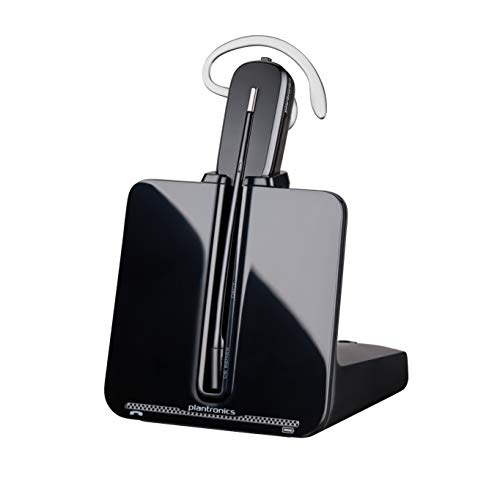
Plantronics CS540 — Best for desk phones
The CS540 looks like an outlier in a guide full of computer headsets, and that is exactly why it is included. Plenty of offices, clinics, and reception desks still run on desk phones, and for those workers a USB or Bluetooth headset is useless no matter how good it sounds. The CS540 is a DECT wireless headset that connects to a desk phone, wearing as a single-ear mono design with three convertible wearing styles — over the ear, over the head, and behind the neck — so the wearer can match it to their hair, glasses, and patience.
DECT is the quiet advantage. It is a dedicated voice technology rather than a shared radio band, so calls stay clean in buildings where Bluetooth devices crowd every channel, and the range lets a receptionist walk to a filing cabinet or a printer without the audio thinning into static. The mono design keeps the other ear open for the room: colleagues can get your attention, you can hear a patient at the desk, and your own voice sounds natural to you because one ear hears it unprocessed. People new to mono headsets sometimes find hearing a call in one ear odd for a day, then prefer it permanently.
The limits are structural. It connects to a desk phone, full stop — it will not join your laptop’s video meeting, and buying it for computer use is a category error. The single-ear format also gives up stereo for music or video. And as a specialised professional tool it asks more of your budget than simple USB models. Within its intended world, though, it solves a problem the other five picks cannot touch, and its long service in call-heavy workplaces shows the design is proven where headsets are worn ten hours a day.
- Connection: DECT wireless to a desk phone
- Microphone: Noise-cancelling boom
- Wearing style: Single ear (mono), 3 wearing styles
- Brand line: Poly (Plantronics)
Strengths
- Purpose-built for desk phones that USB headsets cannot serve.
- Three wearing styles let each wearer find a genuinely comfortable fit.
- DECT connection stays clean in radio-crowded offices.
Trade-offs
- Desk-phone only; it will not connect to a computer for video calls.
- Mono audio gives up stereo for media and games.
- Specialist design costs more than simple wired USB models.
Best for: reception, clinic, and office staff whose calls live on a desk phone. Not suited for: laptop-based video meetings, which this headset cannot join at all.

Wireless Headset with Mic for Work — Best wireless with a charging base
Some wireless headsets fail on logistics rather than sound: the battery dies mid-morning because the headset spent the night on a chair instead of a charger. This work headset attacks that problem with a charging base that gives it a home. Drop it on the base at the end of the day and it is charged for the next; pick it up and the Bluetooth connection, backed by a USB dongle for PCs, is ready. The noise cancelling mic targets the usual home-office offenders, and the whole arrangement suits a permanent desk far better than a hot-desking bag.
The dongle matters more than it first appears. Many work laptops have Bluetooth, but pairing permissions, driver quirks, and sleep behaviour vary; a dedicated USB dongle sidesteps all of that and behaves like a wired connection that happens to have no wire. Switching between dongle-connected PC calls and a Bluetooth phone is straightforward, which makes the headset practical for people whose work arrives on both. Voice pickup from the boom is clear and consistent, with the noise cancelling keeping your end of the call presentable when the house gets loud.
As an unbranded work headset, it lacks the long fleet history of the Logitech and Jabra names in this guide, and long-term parts support is harder to predict. The base, while convenient, also anchors it to one desk; travellers will leave it behind and miss the routine. Judge it on its system rather than its badge: for a fixed home office where the daily failure mode is a forgotten charge, a headset that lives on its charger is a genuinely thoughtful answer.
- Connection: Bluetooth plus USB dongle
- Microphone: Noise cancelling mic
- Dock: Charging base included
- Use case: PC and phone work calls
Strengths
- Charging base ends the flat-battery morning problem.
- USB dongle gives PCs a dependable connection without pairing menus.
- Bluetooth pairing covers phone calls away from the desk.
Trade-offs
- Base-centred design suits one fixed desk better than travel.
- Unbranded support and parts are less predictable than big-name rivals.
- Still a battery device; multi-day trips need a charging plan.
Best for: home-office workers with a permanent desk and a charging routine. Not suited for: frequent travel, where the base stays home and the routine breaks.
How Does Wearing a Headset All Day Change What You Should Buy?
Session length rewrites the priority list. For a twenty-minute call, almost any headset in this guide is comfortable and clear. At hour five, the ranking inverts: weight distribution beats driver quality, breathable cushions beat isolation, and a headband that spreads pressure across the skull beats a fashionable narrow one. This is why call-centre veterans choose headsets that look boring in photographs. They are optimising for the part of the day when novelty has worn off and only physics remains — grams, pressure points, and heat. If your calendar shows three or more hours of calls on a typical day, shop with hour five in mind and let the shorter-session features fall where they may.
Heat deserves its own sentence because buyers rarely anticipate it. Ears are radiators, and sealing them under cushions in a warm room raises your whole sense of fatigue. Over-ear designs with fabric or velour-style cushions breathe better than sealed leatherette; on-ear designs run cooler still but trade pressure for airflow. None of this appears in specification tables, yet it decides whether a headset is still being worn in August. People who run warm should weight the lighter, airier picks in this guide more heavily than any audio consideration.
There is also a posture effect nobody mentions. A headset that sounds good encourages you to stay seated and centred; a headset that pinches encourages the fidgeting, leaning, and one-cup-off wearing that wrecks both your microphone position and your back by Friday. Fit is not a comfort luxury layered on top of the real product. Across a working week, fit is the product, and the audio is what the product carries.
Which Headset Features Are Worth Paying More For?
Multipoint wireless is the first feature that earns a premium honestly, because it removes a daily friction rather than adding a spec-sheet trophy: your laptop and phone both stay connected, and the call you answer is the call that rang, on whichever device it chose. Sidetone — hearing a little of your own voice in the earcups — is the second, quietly preventing the volume creep that makes dual-ear wearers shout by afternoon. A proper charging base, as on one pick here, is the third: it converts battery management from a memory test into a piece of furniture.
By contrast, several fashionable features repay scrutiny. Elaborate app-based equalisers matter for music, not for the midrange clarity of voices. Folding mechanisms and travel cases serve people who carry headsets between sites, and are dead weight for a desk that never moves. Extended wireless range figures assume empty halls; in real homes, walls set the limit long before the radio does. Spend on the features that touch your routine every day — connection behaviour, fit, controls, microphone — and let the brochure features belong to somebody else’s routine.
The deepest value question is replacement economics. A headset from a line with available spare cushions, cables where detachable, and a maker who will still exist in three years can out-earn a cheaper rival that becomes e-waste at its first worn cushion. Two of the brands in this guide have sold essentially the same headset for over a decade, which is not a failure of imagination; it is a promise that your second purchase will match your first, and that promise is worth money to anyone equipping more than one desk.
How Should You Test a New Headset in Its First Week?
Do not judge it in silence. Run the tests that resemble your life: a call from your noisiest room at your busiest hour, a call while typing, a call while the kettle or the dishwasher runs. Record at least one of them and listen to the recording the next morning, when your ears are fresh and your loyalties are weak. Ask one honest colleague the only question that matters — “how do I sound?” — and believe the answer more than your own impression from inside the headset, because the person inside the headset is the one person who never hears what it transmits.
Wear it for a full working day before deciding, including the meeting you dread. Pressure points and heat build on a schedule that a ten-minute try-on cannot simulate, and the return window is best spent on full days rather than first impressions. Test the mute with your eyes closed, test the volume without looking, and test what happens when the call ends and the next one starts immediately — the transitions are where controls prove themselves. A headset that passes a week of your actual life will pass the year; one that merely impressed on day one is a return waiting for a reason.
How Do the Six Picks Compare Side by Side?
| Headset | Connection | Microphone | Wearing style | Strongest suit |
|---|---|---|---|---|
| Logitech H390 | Wired USB-A | Noise cancelling boom | Dual-ear on-ear | Everyday office calls |
| Logitech Zone Vibe 100 | Bluetooth multipoint | Noise cancelling, flip-up | Over-ear | Hybrid laptop and phone days |
| Jabra Evolve 10 | Wired USB-A | Noise-cancelling boom | Dual-ear | Professional PC calls |
| Razer BlackShark V2 X | Wired | HyperClear cardioid | Closed dual-ear | Gaming voice chat |
| Plantronics CS540 | DECT to desk phone | Noise-cancelling boom | Mono, 3 styles | Desk-phone workplaces |
| Wireless Headset with Mic for Work | Bluetooth plus dongle | Noise cancelling | Dual-ear with base | Fixed home-office desk |
Read the table by connection first. If your calls live on one work PC, the two wired USB models remove every wireless variable, and the choice between them comes down to fit. If your day crosses devices, the Zone Vibe 100 and the base-equipped wireless headset divide the territory by routine: multipoint elegance for people who move, a charging dock for people who stay. The Razer and the CS540 are specialists at opposite ends — one for play, one for desk phones — and both are excellent precisely because they refuse to be generalists.
What Does a Headset Do to Your Own Voice and Energy?
There is a physiological side to headset choice that spec sheets ignore: how hard you have to work to be heard shapes how tired you are by evening. A headset with a well-placed microphone and a touch of sidetone lets you speak at conversation level all day. A headset that makes you sound distant to yourself — no sidetone, a drifting boom, a caller who keeps saying “sorry?” — pushes your voice up a gear, and throats notice by Thursday. Teachers, support staff, and anyone whose voice is a work tool should treat microphone quality as occupational health in the plainest, non-medical sense: the easier the headset makes speaking, the more of your voice remains at the end of the week.
Listening effort compounds the same way. Straining to decode callers through a muffled earpiece is cognitive work, and it is subtracted from the same budget you spend on the conversation’s content. Clear midrange at modest volume is therefore not an audiophile preference in this category; it is an energy policy. When you compare the picks in this guide, the ones that render voices cleanly at low volume are offering you Friday-afternoon alertness as a feature, even though no box will ever print it.
The practical translation: if your job is talking, do not economise on the microphone and the earpiece tuning to afford decorative features. Your future self, in the last meeting of the week, is the person who will grade that decision.
How Should You Set Up a Headset for Clearer Calls?
Start with microphone position, the single adjustment that changes how you sound more than any setting. The boom tip should sit roughly two finger-widths from the corner of your mouth, slightly below lip level, not directly in front of your lips where breath blasts it and not down by your chin where your voice thins out. Make a test recording in your meeting app or a voice recorder and listen back; thirty seconds of testing teaches more than an hour of guessing, and you will hear immediately whether the mic is too close, too far, or catching every breath.
Next, set levels once and leave them alone. In your operating system and meeting software, speak at your normal call volume and adjust input gain so your voice peaks comfortably without clipping into distortion. Automatic gain can help, but it can also pump background noise upward during your pauses, so if colleagues mention the room getting louder when you stop talking, switch to a fixed level you have tested. Choose the headset explicitly as both input and output device in each app you use; the classic “great mic, wrong speaker” confusion usually traces to an app defaulting to laptop speakers while using the headset microphone.
Finally, build the small habits that keep quality consistent. Wired users should route the cable so it does not drag across the keyboard or catch on a chair arm, since cable tugs transmit noise straight into the boom. Wireless users should charge on a schedule rather than on a warning light. Everyone should wipe cushions weekly and store the headset off the desk’s busiest corner. None of this is glamorous, and all of it shows up in how professional you sound on the calls that matter.
How Do Headsets Differ for Meetings, Support Queues, and Voice Chat?
It is worth pausing on the three great use patterns, because a headset can be excellent at one and merely adequate at another, and most returns are pattern mismatches rather than product failures. Meetings reward natural voice and comfort in bursts: you speak in turns, listen for stretches, and the headset comes off between calls. The workhorses of this guide — the H390, the Evolve 10, the Zone Vibe 100 — are meeting animals, tuned for the human voice and for being forgotten during the listening stretches.
Support queues reward something colder: consistency at volume. The agent’s hundredth call must sound like the first, the controls must survive being used hundreds of times a week, and the fit must survive a shift rather than a meeting. That is why the call-centre guide in this batch exists separately, and why two of its standards appear here too — queue-grade equipment is simply meeting equipment that has passed a harder exam. If your “meetings” are actually a queue wearing a calendar’s clothing, buy by queue standards and ignore the lifestyle features entirely.
Voice chat in games rewards rejection and speed: a microphone that refuses the keyboard, audio that places sounds in space, and a fit that survives excitement. The BlackShark in this guide is the pattern’s representative, and its crossover competence on work calls surprises people precisely because gaming’s demands are stricter in the microphone dimension. The lesson generalises beyond headsets: buy for the most demanding pattern in your life, and the easier patterns will be covered by the same purchase. Buy for the easiest pattern, and the demanding one will send you shopping again by spring.
One more pattern deserves naming because it is growing fastest: the hybrid creator-worker, who takes client calls at noon and records or streams in the evening. For them the microphone’s ceiling matters more than any other single trait, since recordings outlive meetings, and the picks with the strongest voice engineering — the cardioid Razer, the professionally tuned Jabra — justify themselves across both halves of that day. Ordinary meetings forgive almost everything; recordings forgive almost nothing.
What Mistakes Do People Make When Buying a Headset?
The commonest mistake is shopping by driver size and brand glamour while ignoring the microphone, then wondering why colleagues keep asking for repeats. A close second is buying for the wrong host device: a desk-phone DECT headset for a laptop job, or a Bluetooth model for an employer laptop with Bluetooth disabled by policy. Check the connection against your actual work device before anything else, because no amount of comfort rescues a headset that cannot connect.
Fit mistakes come next. People buy dual-ear isolation for a job that needs room awareness, or mono for a noisy open office where covering both ears is the only way to concentrate. Glasses wearers underestimate on-ear pressure until week two. There is also a quieter error: assuming a gaming headset cannot work for calls, or that an office headset will satisfy for games. The picks in this guide show both assumptions failing — the Razer’s mic is superb for calls, and the office models will leave gamers wanting positional audio. Buy for your dominant use and accept the compromise in the secondary one, rather than buying a middle product that serves neither well.
What Changes When the Headset Is for a Child or a Student?
Family and student use rearranges the criteria without changing the physics. Durability climbs the list, because a headset that travels in a school bag lives a harder life than one that hangs by a monitor; the wired picks in this guide, with no batteries to manage and no pairing to explain, suit younger users and shared family computers well. Volume behaviour deserves a parent’s attention in qualitative terms: choose headsets that sound clear at modest levels, teach the habit of listening at the lowest comfortable volume, and prefer designs whose fit keeps the earcups sealed so there is no temptation to compensate for a noisy room by turning everything up. Clarity at low volume is a design virtue for every age, and it is one reason voice-tuned headsets serve study calls and language lessons so well.
For students specifically, the headset is often three devices in one: lesson tool in the morning, music in the afternoon, game voice chat at night. That triple life argues for the versatile middle of this guide rather than a specialist — a wired USB model that behaves identically on the school laptop and the home PC, or the gaming pick if evening play dominates and daytime calls are with teachers who care about audibility, not appearance. What students should avoid is the fragile fashion headset bought for looks; a term of bag travel will grade it more harshly than any review.
Shared family headsets raise a small etiquette worth stating: wipe the cushions, return the boom to its parked position, and leave the controls as you found them. The next user’s call quality depends on the last user’s habits more than on the brand, a sentence that applies to offices exactly as much as to kitchens.
How Should You Read Headset Listings Without Being Misled?
Read for the connection and the microphone, and let everything else queue behind. A listing that states its connection plainly — USB-A, USB-C, Bluetooth with dongle, DECT to a desk phone — and describes its microphone’s type and placement is a listing written by people who expect informed buyers. A listing that leads with lifestyle adjectives and buries the connection in the eighth bullet is telling you where its confidence lies. Check the wearing style in the same spirit: “dual-ear,” “mono,” “over-ear,” and “on-ear” are load-bearing words that predict your comfort more reliably than any photograph of a smiling model.
Beware two specific fog machines. The first is cancellation language, which this batch’s noise-cancelling guide dissects fully: in headsets it almost always describes the microphone’s work on your voice, not silence for your ears. The second is compatibility sprawl, where a listing names every platform ever manufactured; what matters is the one device on your desk, and the honest picks in this guide state their platforms narrowly and keep the promise. A short listing that answers your three questions beats a long one that answers thirty questions you did not ask.
Finally, weigh the maker’s history with the product. A headset that has been sold, reviewed, and reordered by employers for years carries evidence no launch copy can manufacture. Newer models can absolutely earn their place — two picks in this guide are recent — but they earn it by solving a named problem, like USB-C laptops or multipoint days, rather than by being new. Shop for the problem you have, verify the connection and microphone, and the rest of the listing can be safely skimmed.
Final Recommendation
If your work is calls on one computer, start with the Logitech H390 or the Jabra Evolve 10 and let fit decide between them; both make you sound clear without asking anything of you. If your day crosses between laptop and phone, the Zone Vibe 100 is the graceful answer, and the base-equipped wireless headset suits a fixed home desk that runs on routine. Gamers should take the BlackShark V2 X without apology, and desk-phone workplaces should take the CS540 for the same reason. For the hybrid worker reading this with a standup in ten minutes and a raid tonight, the honest answer is that one headset rarely wins both worlds — but if a single purchase must, the Zone Vibe 100’s balance of voice, comfort, and freedom is where we would put the money.
Frequently Asked Questions
Is a wired or wireless headset better for work calls?
Wired USB is better for reliability: no charging, no pairing, and consistent behaviour on employer laptops. Wireless is better for movement and multi-device days. Call quality itself is comparable when the microphone is well designed, so choose by routine rather than by fear of wireless audio.
Does a noise cancelling microphone block out my whole house?
It reduces steady background sounds and favours your voice, but it will not erase a dog barking beside you or a child asking you a question. Think of it as tilting the balance strongly toward your voice, not as silence for everything else. Positioning the boom correctly helps it work as designed.
Can I use a gaming headset for professional meetings?
Yes, and the microphone may be better than an office model’s, particularly for rejecting keyboard noise. The considerations are appearance on camera and whether a wired gaming design suits your desk. Many people use one happily; client-facing roles should judge the styling honestly.
Why would anyone choose a single-ear headset?
To hear their own surroundings and their own voice naturally. Reception desks, clinics, and call handlers who must stay aware of a room often prefer mono, and the CS540’s three wearing styles exist because those workers wear a headset longer than almost anyone.
How long should a work headset last?
A wired model with no battery often serves for years, with cushions as the main wear item. Wireless models depend on battery health over time. Buying from a line with replacement cushions available extends useful life considerably, and storing the headset properly matters more than most owners expect.
Related Guides
For a deeper look at plug-in models, see Best Usb Headsets. Teams staffing a call floor should read Best Call Center Headsets, and anyone whose main problem is a loud room will find Best Noise Cancelling Headsets useful.


