What's inside
- Key Takeaways
- Quick Picks
- How We Chose These Picks
- Comparison
- How Does Interactive Projection Actually Work at the Wall?
- What Surface Should an Interactive Projector Use?
- How Bright Does a Teaching Wall Need to Be?
- How Should a School Roll Out Interactive Rooms Without Chaos?
- What Should a Buyer Verify on the Listing for Interactive Models?
- How Do Pens Change Classroom Management?
- What Happens When an Interactive Room Meets a Substitute Teacher?
- How Should Meeting Rooms Use Interaction Differently From Classrooms?
- How Long Should an Interactive Installation Serve Before Refresh?
- Common Mistakes
- Final Recommendation
- Frequently Asked Questions
- Related Guides
As an Amazon Associate I earn from qualifying purchases. This post may contain affiliate links at no extra cost to you.
widgetverdict.com is reader-supported. When you buy through links on our site, we may earn an affiliate commission.
A whiteboard that answers back changes how a room teaches, and schools and offices hunting the best interactive projectors are really shopping for that moment: a teacher annotating a diagram where the class can see it, a team marking up a plan on the wall it will be built from. Five picks below come from Epson’s BrightLink line, the ultra short throw family built around pen and touch interaction. The sixth, a ViewSonic classroom projector, carries no interactive claim in its title at all, and this guide labels that absence as carefully as it labels the BrightLinks’ presence.
Ultra short throw is the enabling geometry. A projector mounted or placed immediately above or below its surface throws a large image across a few inches of distance, so the person teaching stands inside the picture’s neighbourhood without standing inside its beam — no shadow swallowing the diagram, no light in the presenter’s eyes. Interaction then happens at the wall itself, with a pen or a finger, at the scale of the whole room’s attention. Every BrightLink title here declares that ultra short throw design, and the reviews treat it as the foundation the interactivity stands on.
Honesty about titles matters in this class more than most, because interactive is a word sellers stretch. The BrightLink 595Wi and 685Wi print the word interactive in their names. The 770Fi, 760Wi and 725Wi carry the BrightLink family name, Epson’s interactive line, with ultra short throw 3LCD construction stated. The ViewSonic PS502W’s title says nothing about interaction whatsoever — it is a short throw classroom projector with stated lumens and inputs — so its spec list records that silence in the guide’s standard wording and its review presents it as the non-interactive alternative for rooms that want the wall without the pen.
Pens, boards and touch surfaces are accessories in this guide, never picks. The right surface for interaction depends on the room’s existing walls and boards, and the right pen arrangement depends on how many hands the teaching style puts on the wall at once. What a round-up can settle is the projector at the centre: its throw, its aspect, its stated brightness where a title prints it, and whether its title honestly supports the interactive claim that brought the buyer here.
Key Takeaways
- Five picks are Epson BrightLink ultra short throw 3LCD machines — the interactive line this keyword is really about.
- The ViewSonic PS502W states no interactive feature in its title and is presented here as a plain short throw classroom alternative, never as an interactive pick.
- The BrightLink 595Wi bundle is the only pick printing a brightness figure: 3,300 ANSI lumens, with interactive in its name.
- Aspect divides the BrightLinks: the 770Fi is a 21:9 machine for wide modern rooms, while the 760Wi and 725Wi are 16:10 designs.
- Ultra short throw placement keeps teachers and presenters out of the beam, which is the physical foundation of wall interaction.
- The PS502W counters with stated 4,000 lumens and dual HDMI for rooms that need a bright classroom picture without interaction.
Quick Picks
| Pick | Badge | Why it earns its place |
|---|---|---|
| Epson BrightLink 770Fi UST 3LCD | The 21:9 wide-room BrightLink | An ultra short throw 3LCD projector in 21:9, wall mountable and tabletop-ready, for wide teaching and meeting surfaces. |
| Epson BrightLink 760Wi UST 3LCD | The 16:10 classroom standard | An ultra short throw 3LCD projector in 16:10, wall mountable and tabletop-ready, in the classic BrightLink classroom shape. |
| Epson BrightLink 725Wi UST 3LCD | The established 16:10 BrightLink | An ultra short throw 3LCD projector in 16:10 from the BrightLink interactive family’s earlier generation. |
| Epson BrightLink 595Wi Interactive Bundle | Interactive in the name, bundle in the box | A WXGA interactive 3LCD ultra short throw projector stating 3,300 ANSI lumens, bundled with remote, HDMI and power cables. |
| Epson BrightLink 685Wi Interactive | The interactive veteran | An Epson BrightLink carrying interactive in its name, from the line’s long-serving classroom generation. |
| ViewSonic PS502W | NOT interactive — the bright classroom alternative | A WXGA short throw projector stating 4,000 lumens and dual HDMI for business, classroom and conference rooms that skip the pen. |
How We Chose These Picks
Lineage came first, because in this class the family name is the interactive evidence. BrightLink is Epson’s interactive projector line, built around ultra short throw optics and pen or touch work at the wall, so BrightLink machines whose titles state that construction were admitted as the guide’s interactive core. The two models printing the word interactive in their own names — the 595Wi and the 685Wi — anchor the claim, and the three newer or parallel models are presented as members of that same family, with their titles quoted so readers can audit the reasoning themselves.
The ViewSonic was admitted under the opposite label, deliberately. Rooms shopping this keyword frequently discover, mid-research, that their teaching style does not actually put hands on the wall — that they need a bright, dependable classroom picture and nothing more. The PS502W serves that discovery honestly: a short throw WXGA machine stating 4,000 lumens, dual HDMI and classroom duties, with its interactive row recording title silence instead of borrowing the keyword’s promise. Including it, labelled, serves readers better than pretending every buyer needs a pen.
Aspect earned the next scoring column because it decides what the wall looks like for a decade. The 770Fi’s 21:9 canvas suits wide meeting rooms, hybrid calls with people and content side by side, and modern teaching walls. The 16:10 machines suit the document-and-slides diet of ordinary classrooms, where vertical room is working room. Neither is better in the abstract; each is better in a specific room, and the reviews argue from rooms rather than from novelty.
Stated figures were credited only where titles print them, which in this guide is a short list: the 595Wi’s 3,300 ANSI lumens and the PS502W’s 4,000 lumens. The remaining BrightLink titles print no brightness figure, so none is claimed for them, and buyers comparing output across the family should take those figures from the listings. That asymmetry is reported rather than repaired, because a guide that invents the missing numbers teaches its readers to distrust all of them.
Finally, mounting and placement flexibility weighed on every call. Wall mountable and tabletop appear in the 770Fi and 760Wi titles, and in real institutions that duality matters: a projector that can serve from a table during a room’s renovation and from a mount afterward survives the building’s calendar instead of dictating it. Interactive projectors live institutional lives, and this guide scored them as institutions will use them.

Epson BrightLink 770Fi UST 3LCD — The 21:9 wide-room BrightLink
Width is the 770Fi’s opening argument. Its 21:9 aspect describes a canvas noticeably wider than the classroom standard, shaped for the rooms teaching and meeting culture have become: a video call’s faces along one side, the shared document along the other, annotation across both. As the flagship-shaped entry in this guide’s BrightLink family — ultra short throw, 3LCD, wall mountable or tabletop — it represents the line’s answer to the wide, hybrid room rather than to the traditional classroom alone.
Ultra short throw placement is what makes that width usable. A 21:9 image thrown from immediately beside the wall fills the room’s attention without asking the presenter to vacate a beam’s corridor, and interaction at the surface — the BrightLink family’s defining act — happens at full width, with the teacher’s handwriting as large as the diagram deserves. Rooms that tried wide canvases with conventional throw projectors learned the shadow problem the hard way; this design exists because of those lessons.
3LCD imaging suits the content these rooms actually show. Documents, calls, dashboards and photographs share the wall across a single day, and a three-chip engine’s colour behaviour keeps each register honest without mode-hopping. The title prints no brightness figure, so none is claimed here; institutions comparing output should read the listing’s number in its stated dialect and model it against the room’s light and the wide canvas’s area, since width spends light exactly as height does.
Wall mountable and tabletop, both stated, give the 770Fi an institutional virtue that spec sheets undervalue: it can begin life on a table in a room still being fitted and end it on the wall above the board, without the institution buying twice. Hybrid rooms churn — furniture rotates, call systems arrive, boards move — and a projector whose placement story includes both postures survives the churn with its interactivity intact.
Who should choose it is therefore specific: the organisation whose teaching or meeting surface is genuinely wide, whose sessions mix people and content on one canvas, and whose presenters work at the wall rather than in front of it. A standard classroom with a standard board will not spend the extra width on anything, and for that room the 16:10 machines below are the honest recommendation. The 770Fi’s width is a tool; buy it for a wall that needs it.
As the family’s wide representative, the 770Fi also marks where interactive projection is heading: toward the room as a shared screen, with the call, the document and the annotation inhabiting one continuous surface. Institutions planning a room for the next decade rather than the next term should weigh that direction seriously, because the wall they build around this projector will outlast several generations of the laptops feeding it.
- Line: Epson BrightLink interactive family
- Throw: ultra short throw stated in title
- Technology: 3LCD stated
- Aspect: 21:9 stated
- Placement: wall mountable and tabletop stated
- Brightness figure: Not stated in the listing title — verify with the manufacturer documentation
Strengths
- 21:9 canvas suits wide hybrid rooms
- Ultra short throw frees the presenter
- Mount or tabletop placement flexibility
Trade-offs
- No brightness figure printed in its title
- Extra width is wasted on standard boards
- Wide surface may need a new board or wall
Best for: a wide meeting or teaching room mixing video calls, content and annotation on one surface.
Not suited for: a standard classroom whose board and lessons are built for 16:10 and would strand the extra width.

Epson BrightLink 760Wi UST 3LCD — The 16:10 classroom standard
If the 770Fi is the family’s future, the 760Wi is its present tense: an ultra short throw 3LCD BrightLink in 16:10, wall mountable or tabletop, shaped exactly like the interactive classroom as most schools actually run it. Sixteen-ten is the aspect of documents and slides with room to breathe, of the worksheet and the worked example, and a machine built natively in that shape spends no pixels apologising to the content teachers already own.
The BrightLink proposition, restated for this room, is proximity with freedom. The projector lives immediately above the board, the image fills the teaching wall, and the teacher works at the surface — writing, circling, dragging — without a shadow puppet of themselves competing with the lesson. Anyone who has taught with a conventional projector, squinting into its beam while their own silhouette ate the diagram, understands that this geometry is not a refinement of the old way but a different profession.
Tabletop as well as wall mounting, both stated in the title, widens the machine’s institutional life. A school can deploy it on a cart in a borrowed room this term and mount it permanently over the board next term, and the interactive habit the class has built survives the move. That continuity matters pedagogically: children learn the wall’s routines once, and the technology’s job is to keep those routines stable while the building rearranges itself around them.
No brightness figure is printed in this title, so the guide claims none and gives the standard advice with genuine emphasis: read the listing’s figure, then judge it against the classroom’s real light at its brightest real hour, because a teaching wall must stay legible under the lighting lessons actually happen in, not under cinema darkness. Interactive projectors earn their keep at noon on a Tuesday, and their specifications should be audited at noon on a Tuesday.
Against its siblings, the 760Wi is the balanced present-day choice: newer family position than the 725Wi below, standard aspect rather than the 770Fi’s width, and the full BrightLink premise without a bundle’s extras or a veteran model’s age. Schools standardising a fleet across many identical classrooms — the commonest real purchase in this entire category — will recognise this machine as the one written for them.
Standardisation deserves its final word, because it is how interactive projection actually succeeds in institutions. One model, one mounting pattern, one set of pens and routines across twenty rooms means any teacher can walk into any classroom and teach. The 760Wi’s unglamorous centrality in the line is therefore a feature in the deepest sense, and buyers purchasing for a building rather than for a single wall should weigh it accordingly.
- Line: Epson BrightLink interactive family
- Throw: ultra short throw stated in title
- Technology: 3LCD stated
- Aspect: 16:10 stated
- Placement: wall mountable and tabletop stated
- Brightness figure: Not stated in the listing title — verify with the manufacturer documentation
Strengths
- 16:10 shape matches teaching content
- Mount or tabletop deployment flexibility
- Fleet-friendly standard classroom design
Trade-offs
- No brightness figure printed in its title
- No bundle extras named in its title
- Standard width only — no 21:9 canvas
Best for: a school standardising interactive classrooms around the 16:10 teaching wall.
Not suited for: a wide hybrid meeting room that needs the 770Fi’s 21:9 canvas for calls and content together.

Epson BrightLink 725Wi UST 3LCD — The established 16:10 BrightLink
The 725Wi is the family’s established campaigner: an ultra short throw 3LCD BrightLink in 16:10 whose title is the shortest of the Epson five, offering the line’s essential geometry without elaboration. In institutional purchasing, that kind of established model carries its own argument. Schools already running BrightLink rooms know its generation, its mounting pattern and its habits, and a machine that extends an existing fleet without retraining a single teacher has a value no headline specification captures.
Its teaching proposition is the family’s founding one, undiluted. Projector above the board, image across the wall, teacher at the surface with the class’s attention undivided by shadows or glare. Lessons built on annotation — the worked maths problem, the annotated poem, the labelled diagram — run on this geometry regardless of which generation supplies it, and the 725Wi supplies it in the aspect those lessons were designed in.
The title’s brevity cuts the way brevity always does in this guide: no brightness figure is printed, so none is claimed, and no placement words appear either, so the review credits the machine with its stated ultra short throw 3LCD 16:10 identity and directs buyers to the listing for the rest. Institutions should read that listing against their existing rooms, since compatibility with a standing fleet is this pick’s most likely reason for being chosen.
Generational honesty belongs in the open. The 725Wi sits earlier in the family than the 760Wi and 770Fi, and buyers equipping a brand-new room with no existing fleet should generally start their reading with those newer machines and their fuller titles. The 725Wi’s natural buyer already owns its world — mounts, routines, spares, staff knowledge — and is extending it, a purchase pattern so common in education that a guide ignoring it would fail the institutions it claims to serve.
There is also a steadiness argument for the established model in hard budget years. Interactive programmes die more often from over-ambitious rollouts than from modest hardware, and a school that adds two proven rooms a year for five years ends with a building transformed, while a school that bets everything on the newest canvas sometimes ends with one magnificent room and a staffroom story. The 725Wi is the incrementalist’s BrightLink, and incrementalism built most of the interactive classrooms now in daily use.
Choose it, then, as a fleet decision rather than as a flagship decision: the same wall, the same routines, the same training, extended into the next classroom on the corridor. Judged on that duty, its short title is not a lack of ambition but a sign of a machine whose institution already knows exactly what it does.
- Line: Epson BrightLink interactive family
- Throw: ultra short throw stated in title
- Technology: 3LCD stated
- Aspect: 16:10 stated
- Brightness figure: Not stated in the listing title — verify with the manufacturer documentation
- Placement wording: Not stated in the listing title — verify with the manufacturer documentation
Strengths
- Established fleet-compatible BrightLink design
- Founding ultra short throw teaching geometry
- 16:10 canvas matches lesson content
Trade-offs
- Earlier generation than its siblings here
- No brightness figure printed in its title
- No placement wording printed in its title
Best for: a school extending an existing BrightLink fleet into the next classroom without retraining anyone.
Not suited for: a brand-new room with no fleet, where the newer 760Wi or 770Fi titles argue more completely.

Epson BrightLink 595Wi Interactive Bundle — Interactive in the name, bundle in the box
No pick in this guide states its case more completely than the 595Wi bundle. Interactive is in its name. Its brightness is printed — 3,300 ANSI lumens, the only stated figure among the BrightLinks here. Its resolution language is WXGA, its engine is 3LCD, its throw is ultra short, its connection is HDMI, and the bundle contents are itemised: remote control, HDMI cable, power cable. A buyer can shortlist this machine from its title alone with fewer open questions than any other pick on the page, and in institutional purchasing that completeness is worth real money.
The stated brightness deserves its moment, because ANSI wording makes it a figure other ANSI figures can be compared against, and 3,300 of them aimed at a classroom wall describes a machine specified for real teaching light rather than for a darkened demo. Schools should still model it against their own brightest rooms, as with every figure in this guide, but they can model it — which is more than the silent titles above allow without a trip to the listing.
Bundle logic suits the way these machines are actually bought. A projector ordered by a district office and installed by whoever is available fails embarrassingly when a cable is missing, and a bundle that itemises its remote and cables removes one whole category of installation-day improvisation. The extras are humble — nobody frames a power cable — but interactive programmes run on humble logistics, and the 595Wi’s title shows a maker who understands its own customers’ store rooms.
WXGA resolution places the machine honestly in its generation. It is the widescreen canvas of the document-and-slides era these classrooms were built in, and for annotation-led teaching — where the handwriting is the content and the content is large — it serves without apology. Buyers planning text-dense work at small sizes should weigh the newer family’s canvases, but a school whose lessons are worked examples and labelled diagrams will not feel this specification as a ceiling.
Age, stated plainly, is the counterweight. The 595Wi belongs to an earlier BrightLink generation than the 760Wi and 770Fi, and its presence here is justified by its title’s completeness and by the fleet reality described for the 725Wi: institutions run mixed generations, and a well-specified bundle remains a rational purchase for the right room at the right moment in a programme’s life. New flagship rooms should start higher up this page; working classrooms on a deadline can start here with confidence.
For a single-room purchase by a buyer who wants the interactive claim, the brightness figure and the box contents all in writing before ordering, the 595Wi bundle is this guide’s most self-documenting pick. That quality — everything important printed where a sceptic can check it — is the same discipline this guide applies to itself, and it deserves recognition wherever a seller practises it.
- Line: Epson BrightLink — interactive in its name
- Brightness: 3300 ANSI lumens stated in title
- Resolution language: WXGA stated
- Technology: 3LCD, ultra short throw stated
- Bundle: remote control, HDMI cable, power cable
- Connection: HDMI stated
Strengths
- Only BrightLink here stating its brightness
- Interactive claim printed in the name itself
- Bundle itemises its cables and remote
Trade-offs
- Earlier generation than the 760Wi and 770Fi
- WXGA canvas suits annotation over fine text
- Bundle cables are basic institutional grade
Best for: a single classroom purchase that wants the interactive claim, brightness and box contents in writing.
Not suited for: a new flagship room planning a decade around the family’s newest canvas and generation.
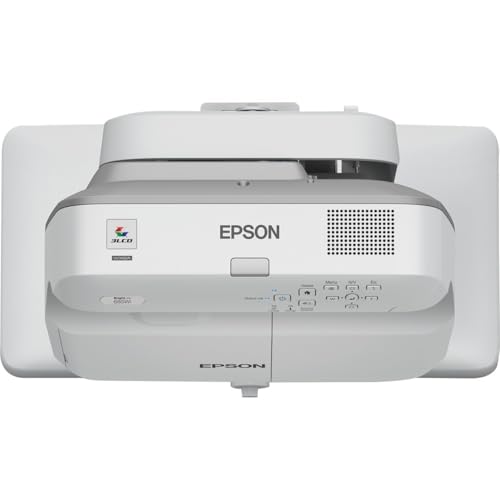
Epson BrightLink 685Wi Interactive — The interactive veteran
The 685Wi carries the shortest title in this guide — Epson BrightLink 685Wi Interactive Project, in the listing’s own truncated phrasing — and the longest institutional memory. Interactive stands in its name, BrightLink stands in its lineage, and between those two facts sits a machine from the generation that put interactive projection into ordinary classrooms in serious numbers. Many teachers working today learned wall annotation on this model’s era, and that familiarity is a genuine asset no newer specification can download.
A veteran model’s argument is continuity at its purest. Schools holding rooms of this generation own its mounts, its pens’ habits, its menus in their staff’s muscle memory, and a training investment measured in years. Adding or replacing within the generation keeps all of that capital intact. The buyer for the 685Wi is therefore rarely choosing a projector in the abstract; they are maintaining a programme, and maintenance purchases should be judged by how invisibly they preserve the working day.
Title discipline applies with full force here, because the title offers almost nothing else: no brightness figure, no aspect, no throw wording beyond the family identity, and this guide claims none of them for it. Everything a new buyer needs beyond the name lives on the listing, and institutions considering this model outside an existing fleet should read that listing as a primary source rather than as a formality. The family’s interactive identity is the claim; the details are homework.
That homework matters more for this pick than for any other, precisely because its generation is the eldest in the guide. Support horizons, parts and compatibility with current computers and boards are the questions a veteran model must answer in the present tense, and a school that asks them before ordering will get the continuity it is paying for. A school that assumes them may discover that continuity has an expiry date printed nowhere in the title.
None of that diminishes what the model represents. Interactive projection succeeded as a teaching idea on this generation’s shoulders: the pen at the wall, the teacher out of the beam, the lesson annotated live in front of the class. Rooms still running that idea on this hardware are not behind the times; they are the proof the idea worked, and their next purchase — whether another veteran or a climb to the 760Wi — will be made by people who know exactly what interactivity is worth in practice.
Choose the 685Wi to sustain a programme, not to start one. Start programmes with the fuller titles above, whose specifications can be audited from the page. Sustain this one where its generation already lives, and it will repay the decision the way veteran institutional equipment always does: by making Tuesday feel exactly like Monday, in a building full of people who have lessons to teach.
- Line: Epson BrightLink — interactive in its name
- Identity: interactive projector, per title
- Brightness figure: Not stated in the listing title — verify with the manufacturer documentation
- Aspect: Not stated in the listing title — verify with the manufacturer documentation
- Throw wording: Not stated in the listing title — verify with the manufacturer documentation
- Generation: the family’s long-serving classroom era
Strengths
- Interactive claim printed in the name itself
- Deep fleet familiarity in existing schools
- Continuity preserves staff training capital
Trade-offs
- Title states almost no specifications
- Eldest generation in this guide
- Support horizon needs listing verification
Best for: a school sustaining an existing BrightLink programme of this generation without disruption.
Not suited for: a first-time interactive buyer who needs specifications auditable from the title itself.

ViewSonic PS502W — NOT interactive — the bright classroom alternative
The label comes first for the last time in this guide: the ViewSonic PS502W is not an interactive projector, and its title never claims to be one. It is a WXGA short throw classroom projector stating 4,000 lumens, dual HDMI, a 0.5 short throw, vertical keystone, VGA, RS232, USB and a speaker, for business, classroom and conference room duty. It earns its place here as the honest alternative for rooms that researched interactivity and concluded, correctly for their teaching style, that they need a bright wall more than they need a pen.
That conclusion is more common than the keyword suggests. Lectures that run from slides, training that runs from video, meetings that run from shared screens — none of them put a hand on the wall, and all of them benefit from the PS502W’s stated strengths instead: the highest brightness figure in this guide at 4,000 lumens, short throw placement that keeps presenters out of the beam, and an input list that welcomes the visiting laptop, the legacy source and the room computer without negotiation.
RS232 deserves its sentence, because it reveals the machine’s institutional intent. Serial control belongs to rooms where projectors are managed as building infrastructure — switched, monitored and integrated with room systems by people who are not in the room. Combined with dual HDMI and VGA, it describes a projector designed to be installed into a system rather than carried into a session, the opposite posture from the tabletop BrightLinks and a perfectly coherent one.
Vertical keystone and the stated 0.5 throw ratio give installers the geometry story in numbers, a courtesy the BrightLink titles mostly leave to their listings. A short throw at that ratio places a large image from close to the wall, capturing much of the shadow-avoidance that makes ultra short throw designs valuable, while stopping short of the surface-interaction ecosystem that defines the BrightLink family. The distinction is the review in miniature: same neighbourhood, different profession.
Easy setup, claimed in the title, is the promise this machine will actually be judged on, because its buyers are buying relief from friction: the relief of a bright picture in a lit room, of any laptop connecting, of the projector simply being ready when the lesson starts. Schools whose interactive ambitions honestly amount to reliable display should buy this relief without feeling they have settled, because a tool matched to the real job is never a settlement.
Buy the PS502W only with the label understood. A school that orders it expecting pens and touch will be disappointed in a way no brightness can repay, and the fault will belong to the shopping, not the machine. A school that orders it for display duty gains the guide’s brightest stated figure and its broadest stated input list — which, for the rooms it suits, is the correct definition of the best projector on this page.
- Interactive features: Not stated in the listing title — verify with the manufacturer documentation
- Brightness: 4000 lumens stated in title
- Resolution language: WXGA stated
- Throw: short throw, 0.5 ratio stated
- Inputs: dual HDMI, VGA, USB stated
- Control: RS232 stated; speaker stated
Strengths
- Highest stated brightness in this guide
- Dual HDMI, VGA and RS232 suit systems
- Short throw keeps presenters out of the beam
Trade-offs
- No interactive features stated — no pen teaching
- Short throw, not ultra short throw
- Display duty only — annotation needs another tool
Best for: a classroom or conference room needing a bright, connected display wall without pen interaction.
Not suited for: any teaching style built on annotating at the wall, which requires a BrightLink from above.
Comparison
| Pick | Headline facts from its listing title | Room it suits first |
|---|---|---|
| Epson BrightLink 770Fi UST 3LCD | BrightLink family, ultra short throw 3LCD, 21:9, wall or tabletop | A wide hybrid meeting or teaching room |
| Epson BrightLink 760Wi UST 3LCD | BrightLink family, ultra short throw 3LCD, 16:10, wall or tabletop | A standardised interactive classroom |
| Epson BrightLink 725Wi UST 3LCD | BrightLink family, ultra short throw 3LCD, 16:10 | An existing BrightLink fleet extension |
| Epson BrightLink 595Wi Interactive Bundle | Interactive in name, WXGA, 3300 ANSI lumens, bundled cables | A single documented classroom purchase |
| Epson BrightLink 685Wi Interactive | Interactive in name, BrightLink veteran, figures not stated | A programme being sustained, not started |
| ViewSonic PS502W | NOT interactive — WXGA short throw, 4000 lumens, dual HDMI, RS232 | A bright display-only classroom |
How Does Interactive Projection Actually Work at the Wall?
The projector throws the image and senses the teaching at the same surface. In the BrightLink pattern, a pen — or, in touch-capable arrangements, a finger — works directly on the projected picture, and the system tracks that work so handwriting, circling and dragging appear as part of the lesson rather than as shadows across it. The computer feeding the projector receives the annotation as input, which is why an interactive wall behaves like a giant, shared, upright tablet rather than like a screen being pointed at.
Ultra short throw geometry is what makes the trick civilised. Because the projector sits immediately beside the surface, the teacher’s body never crosses the beam’s path, the class never watches a silhouette swallow the diagram, and the presenter never turns into the light to explain what it is hiding. Rooms that understand this stop describing interactive projection as a feature and start describing it as the removal of an obstacle that conventional projection put between the teacher and the wall.
What Surface Should an Interactive Projector Use?
The surface is an accessory decision, made with the room rather than from a catalogue, and it matters more than most first-time buyers expect. Interaction needs a surface that is flat, smooth and sized to the projector’s aspect — a 21:9 machine on a 16:10 board wastes its width exactly as surely as the reverse pairing wastes height. Existing whiteboards serve many classrooms well; dedicated projection boards serve the picture better; and a bare wall serves the budget while taxing both brightness and pen accuracy.
Pens and touch arrangements belong to the same accessory conversation. How many writers the teaching style puts at the wall simultaneously, and whether fingers or pens do the writing, are pedagogical questions before they are purchasing ones. Settle them with the teachers who will live at the wall, then match the accessory purchase to the projector chosen here — in that order, because the projector’s throw and aspect constrain the surface far more than the surface constrains the projector.
How Bright Does a Teaching Wall Need to Be?
Bright enough for the room’s real teaching light, which is the only honest unit. Classrooms work under daylight and fluorescents, with blinds in whatever state the last lesson left them, and an interactive wall that only performs in darkness will be abandoned by October. That is why the stated figures in this guide — the 595Wi’s 3,300 ANSI lumens and the PS502W’s 4,000 — deserve attention, and why the silent BrightLink titles must be resolved on their listings against the room’s brightest hour before any order is signed.
Canvas size spends brightness as it does everywhere in projection. A modest teaching wall in a controlled room asks far less than a wide 21:9 surface in a glazed meeting space, so the same figure can be generous in one institution and marginal in another. Measure the wall, photograph the room at noon, and let those two artefacts — not a showroom’s darkness — arbitrate between the models on this page.
How Should a School Roll Out Interactive Rooms Without Chaos?
One room, one term, one honest evaluation. Pilot the chosen model in the classroom of a teacher who wants it, let that room discover the mounting, surface and routine lessons, and write those lessons down in the institution’s own words before the fleet order exists. Rollouts fail on logistics — the board that was not flat, the mount that met a cable run, the training that was scheduled after the hardware — and a pilot converts each of those failures into a checklist while the stakes are still one room.
Standardise once the pilot settles. The fleet logic argued in the 760Wi’s review — one model, one pattern, any teacher in any room — is the difference between a programme and a collection of gadgets. Institutions that standardise can train once, stock spares sensibly and support each other across classrooms. Institutions that let every room choose separately will spend the decade translating between their own purchases.
What Should a Buyer Verify on the Listing for Interactive Models?
Verify the interaction itself: which pen or touch arrangement the specific model uses, what it includes, and what remains an accessory purchase. Titles in this guide establish family and, in two cases, the interactive name, but the working details of the pen system belong to the listing, and a school that assumes them may receive a projector ready for interaction with the instruments of interaction still in a catalogue.
Verify the unstated figures with the same diligence — brightness for the 770Fi, 760Wi, 725Wi and 685Wi, read in their stated dialects — and verify mounting against the actual wall, since ultra short throw placement tolerates less improvisation than its convenience suggests. The projector, the mount, the surface and the pens are one system wearing four invoices, and the listing is where the system’s seams are inspected before money crosses them.
How Do Pens Change Classroom Management?
An interactive wall redistributes attention in ways a teacher feels within the first week. The pupil at the wall becomes the lesson’s temporary centre, the class watches a peer’s working rather than only the teacher’s finished answer, and mistakes made in public at full size become teaching material instead of private embarrassments in a notebook. Teachers who adopt the wall deliberately — rotating who writes, narrating what the pen is doing, saving annotated work for revision — find the projector changing their pedagogy, not merely their display.
The same redistribution asks for new small disciplines. Pens need a home the class respects, a routine for handing them over, and a shared understanding that the wall is a workplace rather than a toy. Classrooms that invent those rituals in the first fortnight keep them for years; classrooms that leave the pen’s etiquette to chance spend the year renegotiating it at the exact moment a lesson should be starting.
None of this requires the newest machine on this page. It requires the BrightLink geometry, a surface that behaves, and a teacher given one afternoon to practise before thirty faces arrive. Institutions weighing the 725Wi’s established design against the 760Wi’s newer one should remember that the classroom management dividend pays out identically on either, because it was never a specification in the first place.
What Happens When an Interactive Room Meets a Substitute Teacher?
Every institutional technology eventually faces its hardest user: the capable professional who has never seen this room before and has eleven minutes to begin. Interactive walls pass that test only when the institution designed for it — a laminated start-up card in the room’s own words, the standard model across classrooms that fleet discipline provides, and a default state in which the projector simply shows the computer’s picture even if the pen is never touched.
That last property deserves emphasis, because it is the interactive system’s safety net. A BrightLink room that works as an ordinary display on its worst day loses nothing when expertise is absent, while gaining everything when the trained teacher returns. Buyers should test exactly that failure mode during any pilot: hand the room to a colleague with no briefing and watch what happens, because the result predicts the programme’s resilience better than any demonstration by an expert.
Standardisation, argued throughout this guide, earns its keep most visibly on these mornings. The substitute who taught in room four last month already knows room nine’s wall when the model, the mount and the routines match, and a school’s interactive investment quietly compounds across its whole staffing reality rather than only across its enthusiasts.
How Should Meeting Rooms Use Interaction Differently From Classrooms?
Meetings annotate decisions rather than lessons, and the difference changes what good looks like. A team’s wall work is fast, temporary and collaborative: a plan marked up, a sketch amended by three hands in five minutes, a document whose final state matters more than the performance of producing it. Saving and sharing the annotated result is therefore the meeting room’s core ritual, and the wide 770Fi’s canvas — people, content and markup in one continuous surface — suits rooms where the call’s participants must watch the markup happen live.
Classrooms, by contrast, annotate to teach, and the writing itself is the event. Legibility from the back row and a teacher’s control of pace outrank breadth, which is why the 16:10 BrightLinks remain the education standard while the wide model courts the meeting building. Organisations furnishing both kinds of room should resist forcing one answer onto both; the aspects differ because the work differs, and this guide’s shelf was assembled to let each room have its own.
How Long Should an Interactive Installation Serve Before Refresh?
Institutional projectors live on institutional timescales, and a well-chosen interactive room should serve across several cohorts of pupils or several reorganisations of a company. Laser-era steadiness is not claimed by these titles, so the honest planning tool is the pilot’s evidence plus the fleet’s own history: how the existing BrightLink rooms have aged, how their brightness and pen accuracy have held, and how the building’s surfaces have worn under daily writing.
Refresh decisions should follow the teaching, not the catalogue. A room whose wall is written on daily and read clearly from the back row is not obsolete because a newer aspect exists, and a room whose surface has dulled or whose routines have outgrown its canvas is due regardless of its age. The 770Fi will tempt programmes whose rooms have genuinely widened; the 760Wi will refresh programmes whose rooms have not. Both impulses are legitimate, and confusing novelty with need is the only true error available here.
Common Mistakes
Assuming every projector under this keyword
is interactive leads the list, and the PS502W exists in this guide to catch exactly that assumption. Its title claims brightness, inputs and classroom duty, and not one syllable of interaction. A school that orders it for pen teaching has misread a label this guide prints in its heading, its badge, its spec list and its table — a reminder that in this category, reading the title literally is not pedantry but procurement.
Buying the canvas before measuring the wall follows closely. A 21:9 projector on a standard board, or a 16:10 machine under a wide modern surface, strands part of the picture or part of the wall for the installation’s entire life. Aspect is a decade-long decision disguised as a specification, and the tape measure should vote before the catalogue does.
Treating the surface and pens as afterthoughts strands more programmes than any projector choice. An interactive system is projector, mount, surface and instruments together, and a budget that funds the first lavishly and the rest reluctantly delivers a wall that almost works, which in a classroom means a wall teachers quietly stop using. Fund the system or pilot smaller; the half-funded wall is the only true waste in this category.
Skipping teacher training in favour of more hardware repeats the same error in human form. Interactive projection is a teaching technique before it is a technology, and a staffroom that has practised on one room’s wall will outperform a building of untrained flagship installations by November. Spend on the afternoon of training with the same seriousness as on the projector, because the return on it compounds every single lesson.
Finally, judging an interactive wall in the dark. Showrooms and demo videos love a dim room, but teaching happens in light, among glare, blinds and thirty faces that need to read handwriting from the back row. Audit the finalist in conditions that resemble a Tuesday, or expect Tuesday to deliver the audit instead, at a much less convenient moment.
Final Recommendation
For most schools buying interactively today, the BrightLink 760Wi is the centre of gravity: the family’s current classroom standard, in the teaching aspect, with placement flexibility for the building’s real calendar. Rooms that are genuinely wide and hybrid should step to the 770Fi and build the 21:9 wall it deserves. Fleets extending what they already run should match their generation — the 725Wi for its cohort, the 685Wi for the veterans — and single-room buyers who want every claim in writing should take the 595Wi bundle’s self-documenting title seriously.
And for the rooms that discover, honestly, that their teaching never touches the wall, the PS502W is not a consolation but the correct purchase: the brightest stated figure in this guide, the broadest stated inputs, and no interactive promise it cannot keep, because it never made one. Respecting that label is what separates a school that bought the right projector from a school that bought the keyword.
Whichever name a room chooses, buy the system whole — projector, mount, surface, instruments, training — and pilot it in one real classroom before the fleet follows. Interactive projection succeeds as a programme, not as a product, and the institutions that treat it that way are the ones whose walls are still being written on, enthusiastically, five years after the installers left.
Teach at the wall, in the light, with the teacher’s shadow nowhere in the picture — that is the whole promise of this category, and the BrightLink that matches your room’s aspect, your fleet’s generation and your building’s brightness is the machine that will keep it every school day of its life. Pilot it in one room, train the people who will stand at that wall, fund the surface and the pens as part of the same decision, and the installation will stop being equipment within a single term — it will simply be where the teaching happens, which is the highest compliment any classroom technology has ever earned. Rooms that reach that state rarely talk about their projector at all, and the silence of satisfied users, in this category above all others, is the sound of a purchase made correctly the first time, for the right room, with its eyes open and its teachers trained well.
Frequently Asked Questions
Is the ViewSonic PS502W interactive?
No. Its title states no interactive feature at all, and this guide presents it strictly as a bright short throw classroom alternative — 4,000 lumens, dual HDMI, RS232 — for rooms that need display without pen interaction. Its spec list records the interactive row as not stated in the listing title.
Which picks print the word interactive in their names?
The BrightLink 595Wi and the BrightLink 685Wi. The 770Fi, 760Wi and 725Wi carry the BrightLink family name — Epson’s interactive line — with ultra short throw 3LCD construction stated in their titles, and the guide presents them on that family basis with titles quoted for audit.
Why does ultra short throw matter for teaching?
It places the projector immediately beside the surface, so the teacher works at the wall without crossing the beam: no shadow over the diagram and no light in the presenter’s eyes. That geometry is the physical foundation that makes pen and touch interaction practical in a real classroom.
Which BrightLink should a wide meeting room choose?
The 770Fi, the family’s 21:9 model, built for surfaces where video call participants and shared content sit side by side with annotation across both. Standard classrooms should choose the 16:10 machines instead, since the extra width would go unused.
Which pick states a brightness figure?
Two do: the BrightLink 595Wi bundle at 3,300 ANSI lumens and the ViewSonic PS502W at 4,000 lumens. The other BrightLink titles print no figure, so this guide claims none for them and directs buyers to their listings before comparing output.
Do interactive projectors need a special board?
The surface is an accessory choice that should match the projector’s aspect and the room: many classrooms use existing whiteboards, dedicated projection boards serve picture and pen work better, and pens themselves are part of the same system purchase. Settle the surface with the projector, not after it.
Related Guides
Teaching spaces connect outward to property and photography in the round-up of real estate cameras under a mid-range budget, to field work in the survey of street photography cameras with a big sensor, and to portrait beginnings in the guide to entry level cameras for portraits.


