What's inside
- Key Takeaways
- Quick Picks
- How Did We Assemble This 3LCD Line-Up?
- How Does 3LCD Actually Build a Picture, and How Does DLP Differ?
- How Do the Six Compare in One View?
- How Should You Install a 3LCD Projector for Its Best Picture?
- What Should Rainbow-Sensitive Buyers Know Before Choosing?
- How Should You Verify a 3LCD Projector in Its First Week?
- When Is DLP Still the Right Answer Instead?
- Why Does Colour Brightness Deserve Its Own Line in the Specification?
- How Do Lamp and Laser Change the 3LCD Ownership Story?
- What Screen Pairings Flatter Three-Panel Pictures?
- What Mistakes Do First-Time 3LCD Owners Make?
- How Do You Match Screen Size to a 3LCD Brightness Class?
- How Does Room Colour Quietly Tax a Three-Panel Picture?
- What Cabling and Sources Let a 3LCD System Breathe?
- What Does the Second Decade of a 3LCD Installation Look Like?
- Final Recommendation
- What Else Should a 3LCD Buyer Ask Before Ordering?
- Frequently Asked Questions
- Related Guides
As an Amazon Associate I earn from qualifying purchases. This post may contain affiliate links at no extra cost to you.
widgetverdict.com is reader-supported. When you buy through links on our site, we may earn an affiliate commission.
Where to buy: The six machines below are sold through Amazon. Check each listing for the current lamp or laser specification and the included lens accessories, and confirm whether a ceiling mount is bundled or merely pictured, because product photography in this category is optimistic about what the box contains.
Every projector in this guide shares one engineering decision, and it is the reason the guide exists. The best 3lcd projectors route light through three separate LCD panels — one each for red, green and blue — and recombine the three images into a single full-colour picture, continuously, with every colour present in every moment. Epson invented the approach, still manufactures the panels that power most of the world’s LCD projectors, and builds the six machines below, which span living-room cinema, bright-room versatility, 4K laser permanence and outright boardroom muscle.
Why should a buyer care which light engine sits inside the box? Because the alternative dominant technology, single-chip DLP, builds colour sequentially at high speed, and a minority of viewers perceive its rainbow artefacts; because 3LCD’s colour brightness equals its white brightness by design, so saturated scenes do not dim; and because three-panel machines have historically offered the lens shift and installation manners that dedicated rooms demand. None of that makes DLP wrong — it makes 3LCD a distinct answer, and this page is for the households whose eyes, rooms or presentations point that way.
Key Takeaways
- 3LCD shows all three primary colours continuously, so there are no colour-wheel rainbow artefacts for sensitive viewers to see.
- Colour brightness matches white brightness on these Epson models, keeping saturated images as luminous as pale ones.
- The line spans lamp and laser light sources, 1080p and 4K-enhanced or 4K pixel-shifted images, and throws from living room to lecture hall.
- Three-panel alignment is fixed at the factory; there is no convergence ritual for owners, but panel machines reward clean filters and dust discipline.
- Lens shift, absent from most rivals at these prices, appears repeatedly here and transforms installation in real rooms.
Quick Picks
| Pick | Badge | Why it is here |
|---|---|---|
| Epson Home Cinema 5050UB | Best for Cinema | Ultra Black contrast, motorised optics and the most filmic image Epson sells in this class. |
| Epson Home Cinema 3800 | Best Versatile 4K | 4K enhancement, strong brightness and lens shift for rooms that are not caves. |
| Epson Home Cinema 3200 | Best Value 4K | The 3800 formula distilled: same enhancement family, friendlier cost of entry. |
| Epson Home Cinema 2350 | Best Smart Gaming Leaning | Streaming built in, gaming-friendly manners and bright 4K-enhanced pictures. |
| Epson Home Cinema LS11000 | Best Laser Cinema | Laser permanence, 4K pixel shifting and serious contrast for a fixed installation. |
| Epson Pro EX11000 | Best Bright Room | Laser output in the mid-4,000 lumen class for lit rooms, halls and large screens. |
How Did We Assemble This 3LCD Line-Up?
We limited the field to Epson’s own machines deliberately, and the limitation is honest rather than lazy: Epson’s dominance of 3LCD is so complete that a multi-brand 3LCD roundup would be a fiction. Within the brand, we selected for genuine differentiation — light source, resolution approach, brightness class and intended room — so that each pick answers a different household’s question instead of six shades of the same answer.
Home-cinema credentials were weighted first for the top half of the list: contrast engineering, lens quality and shift, colour accuracy out of the box. The bottom half answers the technology’s other historic strength, versatility — streaming smarts for the family room and laser brightness for spaces where darkness is a negotiation rather than a given.
We also checked the ownership ledger for each model: lamp economics where lamps remain, filter access, and the availability of the model’s glasses or accessories where relevant. A projector is a decade-scale appliance in most homes, and the guide treats it that way.
How Does 3LCD Actually Build a Picture, and How Does DLP Differ?
Inside a 3LCD projector, white light from a lamp or laser-phosphor source is split by dichroic mirrors into red, green and blue paths. Each path passes through its own LCD panel, where millions of shutters modulate that colour’s contribution pixel by pixel. A prism then recombines the three coloured images into one, and the lens projects a picture in which every colour exists simultaneously and continuously. There is no wheel, no sequence and therefore nothing for the eye to catch mid-construction.
Single-chip DLP takes the opposite route: one micromirror array, blinking between colours presented in rapid succession by a wheel or by sequenced solid-state sources, relying on the viewer’s visual persistence to fuse the sequence into colour. It is ingenious, compact and capable of superb contrast and sharpness, and most viewers see exactly the intended picture. A minority, however, catch rainbow fringes on high-contrast edges, particularly when their eyes move — and for that minority, the artefact is not subtle and does not fade with familiarity.
The honest comparison continues past rainbows. DLP typically wins native sharpness per pound and shrugs at dust with sealed optics; 3LCD counters with equal colour and white brightness, freedom from sequential-colour issues, and — in Epson’s implementations — generous lens shift that DLP rivals at similar prices rarely match. Contrast leadership swaps by price tier and generation. Anyone who tells you one technology simply wins is selling something; the correct question is which compromises your eyes and room prefer, and this guide assumes you have reasons to prefer these.
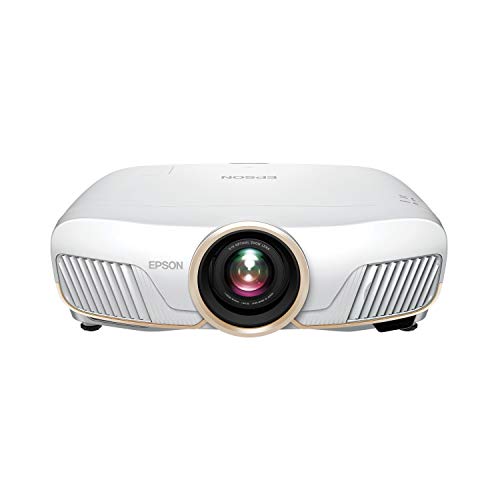
Epson Home Cinema 5050UB — Best for Cinema
Within a 3LCD guide, the 5050UB is the reference instrument: the machine against which the technology’s cinema claims are measured. Its Ultra Black engineering gives it contrast that embarrasses projectors costing considerably more, its motorised lens offers shift and memory that installers dream about, and its colour, fed by equal colour and white brightness, has the settled confidence of a display that is not rationing anything.
Night material is where it separates from this page’s other five. A starfield holds individual points against darkness that reads as darkness; a lamplit interior keeps the pools of light distinct from the gloom between them; faces in shadow retain the modelling that tells you where the cinematographer placed the key light. These are the pleasures 3LCD buyers are paying for, delivered here at their fullest.
The 4K approach is enhancement through pixel shifting rather than a native UHD panel count, and on film content the distinction is mostly theological. What is not theological is the machine’s size, its appetite for a proper mount, and its expectation that the room will darken like it means it. Its roughly 2,600-lumen output is honest cinema brightness, not living-room artillery.
For the buyer building the dedicated room — fixed screen, controlled light, a shelf of carefully mastered discs — the 5050UB remains the centre of gravity of the entire 3LCD world, and the projector the rest of this list is sensibly measured against.
There is a ritual quality to owning the 5050UB that its owners tend to describe with unexpected affection: the powered lens gliding to a stored position, the hush of a well-damped fan in eco trim, the sense that the machine was engineered by people who project films themselves. Such qualities never headline a specification table, yet they decide whether a projector feels like an appliance or an instrument across a decade of evenings.
Pairing advice follows from its contrast: give it a neutral, unity-gain screen and let the machine’s own range do the work, rather than chasing gain it does not need. Add a player with good tone mapping for HDR material, keep the room’s stray light behind the seating, and the Epson will present catalogue restorations with a gravity that flatters the restorers’ work as much as the projector’s.
Guests remember the 5050UB differently from other projectors, and the difference is instructive: they describe scenes rather than specifications. The reason is that contrast-led images resemble the cinema the audience grew up trusting, where darkness is a place rather than a shade. If your household’s film culture leans that way — restorations, classics, slow cinematography — this Epson is not merely the best 3LCD for you; it is close to the best projector argument at its level in any technology.
- Picture approach: 4K enhancement by pixel shifting
- Brightness: mid-2,000 lumen class, colour equal to white
- Optics: motorised, wide shift, stored positions
- Engine: lamp-driven, cinema-tuned
- Room: dedicated and darkened
Strengths
- Contrast and black depth lead the 3LCD field
- Lens memory serves multi-ratio screen setups
- Colour integrity in dark scenes is superb
Trade-offs
- Large chassis demands a serious mount
- Brightness is for dark rooms, not daylight
- Lamp replacements are part of ownership
Best for: dedicated cinema rooms and contrast-led buyers.
Not suited for: bright family rooms or portable duty.

Epson Home Cinema 3800 — Best Versatile 4K
The 3800 is the 3LCD machine for rooms that refuse to be caves. With brightness in the 3,000-lumen neighbourhood, 4K enhancement and a lens with genuine shift, it splits the difference between cinema discipline and family-room reality more gracefully than anything else in Epson’s line — bright enough for a lamp-lit evening, civilised enough for a film when the curtains finally close.
Its colour behaviour is the technology’s calling card: saturated sports kits, animated features and sunlit travel material all hold their luminance instead of washing toward grey, because the colour light output keeps pace with the white. Owners upgrading from an older DLP often remark on exactly this quality first, before resolution enters the conversation at all.
Installation manners are exemplary for the class. Lens shift in both axes means the projector can sit on a shelf or mount slightly off the ideal axis without digital keystone vandalising the picture, and the zoom range forgives room measurements taken in optimism. For real houses with real furniture, that forgiveness is worth more than a specification point of contrast.
Gaming is competent rather than specialised, streaming arrives via whatever source you attach, and the lamp keeps purchase and running costs in familiar territory. As the one-projector answer for a household that watches everything, the 3800 is Epson’s most persuasive argument that 3LCD is a mainstream technology and not a niche.
The 3800 also moonlights convincingly as the household’s events projector. A cup final with the curtains half open, a photo slideshow at a family gathering, a streamed concert with lamps lit — the brightness and colour honesty carry all of it without the apologetic dimness that sends guests drifting to the kitchen. Versatility of that order is what keeps a projector powered weekly rather than monthly, and weekly use is what justifies the shelf, the screen and the sound around it.
Owners stepping up from televisions should prepare for one pleasant surprise: at this size, lens shift quietly transforms furniture decisions. The projector no longer dictates a ceiling mount at the room’s exact centre; a high bookshelf to one side, aligned by optics, becomes a legitimate home. That freedom, more than any single picture virtue, is why the 3800 anchors so many first serious installations.
There is also a resale civility to the 3800 worth noting: versatile machines with shift, brightness and a famous badge find second owners easily, because their next room is easy to imagine. Keep the packaging and the lamp log, and an eventual upgrade toward the laser flagship is part-funded by a projector that served the household without ever demanding the household reorganise itself around it.
- Picture approach: 4K enhancement, HDR signal handling
- Brightness: around the 3,000-lumen mark
- Optics: zoom plus horizontal and vertical shift
- Engine: lamp
- Room: living rooms with partial light control
Strengths
- Brightness and shift together suit real rooms
- Colour stays luminous in mixed content
- Forgiving installation geometry
Trade-offs
- Blacks sit a class below the 5050UB
- No built-in streaming personality of its own
- Lamp life governs long-term budgeting
Best for: family rooms wanting 4K 3LCD without cave discipline.
Not suited for: black-level absolutists or ultra-bright sunrooms.

Epson Home Cinema 3200 — Best Value 4K
The 3200 exists because the 3800’s formula deserved a wider audience. It keeps the family’s essentials — 4K enhancement, 3LCD colour honesty, useful lens shift and brightness in the high-2,000s — and trims the specification where trimming hurts least, arriving as the most affordable credible route into four-thousand-line Epson projection.
Picture character is recognisably kin to its sibling: colour that stays up in bright scenes, skin tones that behave, and a general freedom from the artefacts that send sensitive viewers shopping for this technology in the first place. Contrast is the honest sacrifice, visible in the deepest scenes as a lighter floor to the blacks, and buyers whose rooms darken fully and whose shelves lean nocturnal should weigh the 5050UB’s premium with that in mind.
Where the 3200 wins its place is in the complete household calculation. The money it saves against the 3800 buys the screen, the mount and the streaming source, leaving a finished system rather than a superior projector projecting onto a bedsheet of compromises. First systems live or die on exactly that completeness.
Ownership is standard Epson practice: accessible filters, a lamp with predictable economics, and menus shared with the rest of the family, so advice travels between models. For a buyer who has decided on 3LCD and 4K and wants the decision to survive contact with a budget, the 3200 is the page’s sensible floor.
The 3200’s restraint deserves one more defence, because value models are often reviewed against flagships they never claimed to be. Judged against its actual brief — honest 4K-enhanced 3LCD pictures in ordinary rooms at the friendliest price in the family — it is not a diminished 3800 but a correctly specified answer. Its blacks will satisfy everyone except the viewers who already know they need the 5050UB, and those viewers were never its audience.
It is also the natural recommendation for the projector-curious household that wants to learn its own preferences cheaply. A year with the 3200 teaches a family its screen size, its darkness tolerance and its content habits, and the machine then either stays happily or moves to a second room when the flagship arrives. Few technology purchases offer so graceful a learning curve.
First-time installers should take comfort from the 3200’s forgiveness in one more respect: its picture forgives a modest screen. Where flagship contrast exposes every surface flaw and gain inconsistency, this model’s balanced output looks at home on the mid-priced screens its buyers actually purchase, which keeps the total system honest instead of forcing a screen upgrade the budget never planned.
- Picture approach: 4K enhancement
- Brightness: high-2,000 lumen territory
- Optics: zoom with lens shift included
- Engine: lamp
- Room: mixed-use spaces, moderate darkness
Strengths
- Most affordable genuine 4K 3LCD route here
- Shift and colour honesty retained
- Savings fund the rest of the system
Trade-offs
- Contrast trimmed versus the 3800
- Fewer refinement features throughout
- Still a lamp machine with lamp arithmetic
Best for: first 4K systems and budget-disciplined households.
Not suited for: dedicated dark-room contrast hunters.

Epson Home Cinema 2350 — Best Smart Gaming Leaning
The 2350 is Epson’s acknowledgement that the modern living-room projector is also the household’s streamer and games display. It arrives with Android TV built in, a bright 4K-enhanced picture and gaming manners unusual in the 3LCD world, packaged slimmer and friendlier than the cinema-first models above it on this page.
Brightness is its social skill: output in the high-2,000 lumen class keeps casual viewing — sport on a Sunday afternoon, a streamed series with a lamp on — entirely respectable, and the 3LCD colour engine keeps kits, cartoons and cooking shows saturated while it does so. When the room does darken, the picture settles into a perfectly enjoyable film trim, if not the 5050UB’s cathedral of blacks.
Gaming deserves its sentence because 3LCD has historically ceded the territory. The 2350 courts players with responsive modes for 1080p play and the general smoothness of a panel technology with no wheel in the chain. Dedicated gaming projectors still beat it on published lag figures, but for the household whose gaming is social rather than ranked, it closes a gap that used to force a technology choice by itself.
As the family-room member of this family, the 2350 is the easiest to live with and the easiest to recommend to non-enthusiasts: one remote, built-in apps, no source juggling. Enthusiasts will add their preferred streamer and sound solution; everyone else will simply watch things, which is rather the point.
The 2350’s built-in platform changes household politics in a way external streamers never quite do: anyone who can hold the remote can drive the entertainment, including grandparents, babysitters and guests, without a briefing on inputs and dongles. That accessibility is a genuine feature in a family appliance, and it is why this model, more than its cinema siblings, tends to become the most-used screen in the houses that buy it.
Its gaming leanings, meanwhile, suit the way most households actually play — shared, social, on the sofa, at sizes that make split-screen legible again. Four players around a two-metre picture is an experience no television in the house can stage, and the 2350’s brightness keeps that picture lively with the room lights low but not extinguished. It is the populist of the family, and populism has its own excellence.
Parents may value the 2350 for a reason absent from every specification: it lowers the ceremony of a film afternoon to the level of turning on a television, and lowered ceremony is what turns a projector from a father’s project into a family’s habit. Cartoons after school, a streamed match at teatime, a film when cousins visit — the machine absorbs all of it without a briefing.
- Picture approach: 4K enhancement with HDR handling
- Brightness: high-2,000 lumen class
- Platform: Android TV built in
- Engine: lamp
- Room: everyday living rooms
Strengths
- Streaming and apps without extra boxes
- Bright, colourful casual viewing
- Gaming manners rare in 3LCD
Trade-offs
- Cinema contrast is not its brief
- Built-in audio remains a starting point
- Serious gamers can find lower lag elsewhere
Best for: streaming-first households wanting 3LCD colour.
Not suited for: dedicated cinema builds or ranked gaming.

Epson Home Cinema LS11000 — Best Laser Cinema
The LS11000 answers the question cinema buyers ask of every lamp flagship: what would this be like without the lamp? Epson’s answer pairs a laser light source with 4K pixel-shifting at full 120Hz-class signal handling, serious contrast engineering and the installation optics of a permanent fixture. It is the 5050UB’s philosophy translated into solid-state permanence.
Laser changes the texture of ownership. Brightness and colour hold their calibration across years instead of tracing a lamp’s slow decline; power-on feels immediate; a double bill does not carry the faint guilt of consumable hours. For a projector that will anchor a room for a decade, those qualities compound into the machine’s entire argument, and they are persuasive.
The picture pursues the family virtues at a higher level: deep, stable blacks for a laser design, colour that keeps its nerve in dark scenes, and detail that satisfies on the largest screens this class serves. Signal handling is thoroughly modern, welcoming current consoles and players at their best, which future-proofs the installation in a way the lamp generation could not promise.
It is priced and sized as the flagship it is, and its brightness — in the mid-2,000 lumen class — still belongs to darkened rooms. Buyers with caves and patience should put it at the top of their Epson list; buyers with sunlit lounges should read the next pick instead and spend the difference on curtains only if the room allows them.
Consider the LS11000 as an answer to a scheduling problem as much as a picture problem. Lamp households unconsciously ration their best projector — saving hours, skipping casual sessions — and a cinema that is rationed slowly stops being the room’s centre. The laser’s rated life abolishes that rationing psychology entirely. Owners report using their rooms more, for sport, for series finales, for a Tuesday, and a projector that invites use is worth more than a marginally finer one that discourages it.
Its signal modernity also protects the installation against the churn of source devices. Players, consoles and streamers will be replaced several times across this machine’s service life, and a projector that accepts their best output without adapters or apologies keeps the room current by default. Permanence, in the LS11000’s case, is not stubbornness; it is hospitality toward the future.
The LS11000 also rewards the calibration-minded owner unusually well, because a laser’s stability means an afternoon spent with test patterns and a meter stays true for years rather than drifting with a lamp’s ageing curve. In an installed cinema, that permanence converts calibration from a recurring chore into a founding act, performed once and then simply enjoyed.
- Picture approach: 4K pixel shifting, advanced signal rates
- Brightness: mid-2,000 lumen range
- Optics: powered, with generous shift
- Engine: laser, long rated life
- Room: fixed, darkened cinema spaces
Strengths
- Laser permanence with cinema contrast ambitions
- Modern signal handling for current sources
- Calibration that stays calibrated
Trade-offs
- Flagship money and flagship dimensions
- Brightness still asks for darkness
- Overkill for casual or portable use
Best for: permanent cinema installations planning a decade ahead.
Not suited for: bright rooms or first-projector budgets.
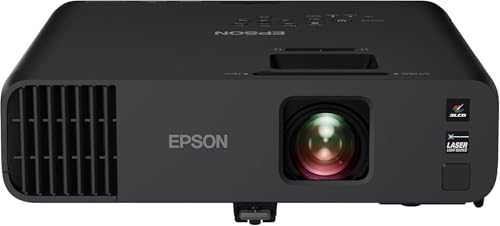
Epson Pro EX11000 — Best Bright Room
The Pro EX11000 wears a suit to this cinema party: a laser business-and-education flagship whose roughly 4,600-lumen output and Full HD 3LCD engine are built for lit rooms, large screens and audiences who did not come to sit in the dark. Its presence in a home guide is deliberate, because a growing class of households — open-plan, glass-heavy, presentation-sharing — needs exactly its priorities.
Brightness of this order changes what projection means in a home. Sport at noon becomes a wall-sized event rather than a squint; a photo slideshow for thirty guests reads clearly from the back; a work presentation shared on the family screen stays legible with every lamp burning. The 3LCD engine’s equal colour brightness matters even more here than in a cave, because lit-room content is saturated content — charts, kits, cartoons — and dim colour would surrender the advantage the lumens bought.
The laser source suits the duty cycle: long rated life, instant readiness, no lamp ceremony before guests arrive. Wireless connectivity and installation flexibility follow its professional brief, and the Full HD resolution, unglamorous beside the 4K badges above, is honestly matched to large-screen viewing distances and mixed content.
Cinema purists will note the contrast ceiling that bright-room engineering accepts, and they will be right — in a cave, the 5050UB walks away with the evening. But caves are not every home, and for the glass-walled, lamp-lit, crowd-hosting reality many households actually inhabit, the EX11000 is the most useful projector on this page.
Organisations have long understood what the EX11000 offers homes: legibility is a form of hospitality. A grandparent following a slideshow, a child reading lyrics at a party, a colleague squinting at a shared chart — all are served by output that refuses to be defeated by the room. The professional Epson brings that institutional reliability into domestic spaces whose architecture has outgrown the cave assumption entirely.
Its wireless and installation flexibility suit the way such homes actually change: furniture moves, rooms repurpose, a screen becomes a wall and then a screen again. A laser engine with no lamp to nurse and a brightness reserve for every arrangement simply absorbs that change. Buyers whose lives are in flux, but whose rooms are bright, may find this professional machine the most domestic choice on the page.
Finally, the EX11000’s professional heritage brings an unglamorous benefit home buyers underrate: documentation and support written for institutions, with clear throw charts, honest duty specifications and accessories that remain orderable. A household that keeps its projector for a decade will meet that support eventually, and meeting competence then is worth a surprising amount.
- Picture approach: Full HD, widescreen
- Brightness: mid-4,000 lumen class
- Optics: installation-flexible, wireless friendly
- Engine: laser, professional duty cycle
- Room: lit spaces and large screens
Strengths
- Output that defeats ordinary room light
- Laser readiness for guests and events
- Colour brightness holds in saturated content
Trade-offs
- Full HD ceiling beside 4K siblings
- Contrast tuned for lit rooms, not caves
- Professional styling and feature emphasis
Best for: bright open-plan homes, events and presentation households.
Not suited for: dark-room film purists chasing blacks.
How Do the Six Compare in One View?
| Pick | Resolution approach | Light source | Brightness class | Home ground |
|---|---|---|---|---|
| 5050UB | 4K enhanced | Lamp | Mid-2,000s | Dedicated cinema |
| 3800 | 4K enhanced | Lamp | Around 3,000 | Versatile living room |
| 3200 | 4K enhanced | Lamp | High-2,000s | Value 4K entry |
| 2350 | 4K enhanced | Lamp | High-2,000s | Streaming family room |
| LS11000 | 4K pixel-shifted | Laser | Mid-2,000s | Permanent cinema |
| Pro EX11000 | 1080p | Laser | Mid-4,000s | Bright rooms, events |
How Should You Install a 3LCD Projector for Its Best Picture?
Exploit the lens shift before touching keystone. Epson’s shift ranges exist precisely so the projector can sit where the room wants it — a rear shelf, an offset mount — while the image lands square by optics rather than by digital correction. Spend the extra twenty minutes with a tape measure and a spirit level; a geometrically honest setup is the cheapest picture upgrade in this entire guide.
Airflow is the second installation commandment, because three-panel machines pass light through components that prefer cool, clean air. Honour the exhaust clearances, keep the filter on a cleaning rhythm suited to your home’s dust, and never enclose the unit in an unventilated cabinet for tidiness. Panel machines reward this discipline with stable colour uniformity across years; neglected filters announce themselves as tinted blotches that no menu can remove.
Finally, calibrate in the room’s real conditions: the screen you bought, the darkness you can actually achieve, the seating you actually use. Store separate memories for film darkness and family-room light if your model allows, and label them plainly enough that another household member can find the right one without a tutorial.
What Should Rainbow-Sensitive Buyers Know Before Choosing?
If you have seen rainbow artefacts on single-chip DLP — brief red-green-blue fringes on bright edges as your eyes move — you already know whether this guide is your home; the artefact does not diminish with exposure for most sensitive viewers, and no 3LCD machine can produce it, because its colours never take turns. If you have never noticed the effect, borrow or audition a DLP before assuming immunity either way, since sensitivity is personal and roughly binary.
What 3LCD asks in exchange is its own short list: attention to dust and filters, awareness that ultimate native sharpness per pound often belongs to DLP, and, at the bright end of the market, prices that reflect professional engineering. Buyers who accept those terms get the calmest picture in projection — colour that simply sits there, whole and simultaneous, the way the eye expects light to behave.
How Should You Verify a 3LCD Projector in Its First Week?
Begin with uniformity: project a plain mid-grey field and look for tinted corners or blotches, which on a healthy machine should be absent and on a dusty one are mercifully rare when new. Follow with a familiar dark film scene to set the brightness and gamma relationship your room prefers, then a saturated animated sequence to confirm the colour authority that brought you to this technology. Store both as named memories before curiosity scatters the settings.
Then test the installation rather than the image: run the projector for a full evening’s duration, confirm the exhaust path stays unobstructed as the room warms, and listen at the seating position during a quiet passage. A machine that passes a week of such ordinary scrutiny will pass years of it, and any unit that does not has announced itself while returns remain a conversation rather than a dispute.
When Is DLP Still the Right Answer Instead?
Honesty requires the paragraph. A buyer who has never seen a rainbow, who prizes the smallest chassis or the sharpest test-pattern performance per pound, or who needs the sealed optical path of a dusty workshop environment may be better served by the DLP shelves of this site, and several excellent machines wait there. Equally, the lowest published gaming lag figures live in that world. Choosing 3LCD should be a positive preference — for simultaneous colour, for shift, for the calm of the image — rather than a superstition, and buyers whose preference runs the other way lose nothing by following it.
What this guide insists on is only that the choice be made knowingly. The technologies differ in mechanism, and mechanism becomes experience at the seating position: sequence versus simultaneity, wheel versus prism. See both if you can, in darkness, with material you love. The eyes that will live with the decision are the only instruments qualified to make it.
Why Does Colour Brightness Deserve Its Own Line in the Specification?
For decades, projector brightness was quoted as a single white figure, and the habit concealed a genuine difference between technologies. A sequential-colour design can produce a brilliant white test field while its saturated colours — which must share time or mirrors between hues — land considerably dimmer. Three-panel machines modulate all colours continuously, so a red, a green and a blue field each carry the same luminous authority as the white one, a property Epson formalised as colour light output.
The practical consequence appears in exactly the content households watch most: sport in saturated kits, animation, video games, presentations dense with coloured charts. On a machine whose colour brightness trails its white figure, those images look washed beside a test pattern’s brilliance; on the six projectors here, they hold. When comparing across technologies, therefore, ask for the colour figure as well as the white one, and treat a seller who cannot answer as a seller whose numbers are incomplete rather than whose projector is necessarily poor.
How Do Lamp and Laser Change the 3LCD Ownership Story?
The lamp models in this guide — the 5050UB, 3800, 3200 and 2350 — follow the classic bargain: lower purchase prices, a light source that renews the projector to full brightness when replaced, and a slow dimming arc across thousands of hours that film households schedule around. Genuine lamps are a known cost, and many owners keep a spare in the cupboard the way earlier generations kept projector bulbs for slide shows, with the same quiet satisfaction when the spare is needed at short notice.
The laser pair — LS11000 and Pro EX11000 — rewrite that bargain as permanence. Output and colour hold steady across a rated life that most households will not exhaust, power behaviour is immediate, and the maintenance conversation shrinks to filters and dust. The price of that permanence is paid once, up front, and the light source cannot be renewed when its decades eventually close. Neither bargain is superior in the abstract; they are answers to different household temperaments, the tinkerer-provider and the install-and-forget planner, and this list is unusual in offering both philosophies inside one technology family.
What Screen Pairings Flatter Three-Panel Pictures?
Because 3LCD colour arrives whole and luminous, these projectors are happiest on honest, neutral surfaces that neither tint nor exaggerate. A matte white screen near unity gain preserves the colour balance Epson’s cinema modes work to achieve and keeps the wide viewing angles that a family sofa needs. Grey screens earn their place only where the room’s darkness is genuinely compromised, trading a little of the colour brightness advantage for perceived contrast — a trade the bright-room EX11000 can afford and the cave-bound 5050UB rarely needs.
Fixed frames flatter every model here, since panel projectors are typically installed rather than carried, and a tensioned surface keeps geometry true for the lens-shift setups this guide recommends. Retractable screens remain the pragmatic choice in multipurpose rooms; choose the flattest mechanism the budget allows, and let the projector’s optics, not the screen’s waves, describe the picture’s edges.
What Mistakes Do First-Time 3LCD Owners Make?
The commonest is starving the machine of darkness it was designed for, then blaming the technology. The cinema models here are honest about their lumens; a sunlit room is the EX11000’s job, not the 5050UB’s, and choosing across that line is the buyer’s error, not the projector’s. The second mistake is ignoring the filter schedule until colour uniformity drifts — a maintenance task measured in minutes per season, against a service visit measured in money.
Third, new owners underuse the lens shift they paid for, defaulting to keystone because it is in the quick menu. Shift first, always; keystone is the apology, not the method. And fourth, buyers pair a contrast-led cinema projector with a high-gain screen chosen for a brightness problem they do not have, narrowing viewing angles for the whole sofa to solve an imaginary issue.
How Do You Match Screen Size to a 3LCD Brightness Class?
Work from the seating outward. A household seated three metres from the screen is usually happiest with an image between two and two and a half metres wide; at that size, every machine in this guide is comfortably within its brightness competence in a darkened room, and the cinema models are in their element. Stretch toward three metres and the arithmetic tightens: the 3800’s headroom and the EX11000’s artillery earn their keep, while the cave models ask for gain, darkness or a smaller ambition.
The mistake to avoid is buying the largest screen the wall accepts and then asking the projector to apologise for physics. Light spreads; a fixed output across twice the area is half as bright, and no picture mode repeals that. Owners who choose the screen their projector can feed generously are rewarded with the colour saturation and shadow confidence that define this technology, while owners who overreach spend years watching a dimmer, greyer version of the machine they paid for.
If the room genuinely demands both size and light, the honest answers are the bright models on this page or a rethink of the room itself — seating moved closer, screen moved to the darker wall, curtains where there were none. Those architectural courtesies cost little and return more than any specification chase.
How Does Room Colour Quietly Tax a Three-Panel Picture?
Projectors do not perform in a vacuum; they perform in a room whose walls return a portion of the image to the screen as ambient wash. Pale walls and ceilings, delightful at noon, bounce enough light during an evening screening to lift blacks and desaturate the deep colours 3LCD renders so well. The remedy need not be a black-painted cave: a darker wall behind the screen, a rug that kills a floor reflection, and curtains that cover the glass transform the contrast of any model here more cheaply than the next model up would.
Owners who cannot redecorate should still experiment with the projector’s own countermeasures — a slightly deeper gamma for evening viewing, a screen with modest ambient rejection — before concluding the machine disappoints. In practice, most disappointment traced to 3LCD contrast is room wash wearing the projector’s name, and most of it is curable with fabric rather than money.
What Cabling and Sources Let a 3LCD System Breathe?
Feed these projectors the best signal you own before upgrading anything else. A 4K-enhanced Epson fed by a tired streaming stick at low bitrates will faithfully enlarge compression artefacts to wall size, and owners routinely blame the projector for the source’s poverty. A proper disc player or a quality streamer, a cable honestly rated for the run’s length and bandwidth, and a receiver that passes video untouched constitute the unglamorous foundation on which every virtue in this guide stands.
Long runs deserve particular respect in installed rooms: the cable that worked on the desk for a weekend may fail intermittently at ceiling length under a hot roof void, producing dropouts that masquerade as projector faults. Test the full chain at full length before the mount closes, and run a spare while the route is open. Future you, standing on a ladder in year three, will be grateful in proportion to present you’s diligence.
What Does the Second Decade of a 3LCD Installation Look Like?
The machines on this page are built by a manufacturer that supports its panels across long product lives, and that institutional memory shows in the ownership horizon: lamps and filters remain orderable, firmware and documentation stay findable, and the second-hand market understands the badges. A buyer choosing between two competent projectors should weigh that horizon honestly, because the difference between a five-year appliance and a twelve-year fixture is usually support, not specifications.
Plan the installation for that horizon from the first day. Run a spare cable while the route is open, photograph the mount and settings, keep the manual with the lamp log, and the projector becomes part of the house’s infrastructure rather than a gadget passing through it. That is the natural destiny of a well-chosen 3LCD machine: unglamorous, unhurried and still throwing a calm, whole-coloured picture when newer technologies are announcing themselves in the next room.
Final Recommendation
Let your room cast the deciding vote. A dedicated dark space belongs to the 5050UB today or the LS11000 for the laser decade; a normal living room belongs to the 3800, with the 3200 as its value shadow and the 2350 as its streaming-native sibling; a bright, social, glass-walled home belongs, perhaps surprisingly, to the Pro EX11000. Every one of them delivers the technology’s central promise — colour presented whole, without sequential tricks — and that promise, once seen in your own room, tends to settle the DLP question permanently for the eyes that needed it settled.
Choose the Epson whose compromises your household will never meet, install it with the patience its optics reward, and keep its filters clean. A 3LCD projector so treated becomes the calmest appliance in the house: no rainbows, no drama, just a large, honest picture that treats colour the way colour deserves.
A word, before the questions, about confidence. Buyers sometimes arrive at 3LCD apologetically, as though choosing it required defence against a louder technology’s marketing. It does not. The three-panel approach powers more of the world’s serious projection — in classrooms, boardrooms, houses of worship and cinemas’ smaller cousins — than any rival, precisely because its colour is honest and its manners are civilised. Choosing it for your home places you in the largest and least excitable company in projection, and there is a particular comfort in owning the technology that simply gets on with the picture while others argue about rainbows that, in your room, will never appear at all.
What Else Should a 3LCD Buyer Ask Before Ordering?
Does 3LCD suit outdoor evening projection?
The brighter models can serve a garden screening respectably after full dark, with the EX11000 the obvious candidate and the 3800 a willing understudy. Remember that outdoor air carries dust and insects toward an unsealed optical path, so treat garden duty as an occasional pleasure, clean the filter afterwards, and never leave the machine out overnight.
How long do Epson projector lamps typically last?
Rated lives run to several thousand hours, longer in eco modes, with brightness declining gradually rather than failing suddenly. Households that log hours honestly and replace with genuine lamps at the planned interval never experience the dim tail that gives lamp ownership a bad name.
Can I mount these projectors on a shelf instead of the ceiling?
Several are designed to allow exactly that, and lens shift is what makes shelf placement respectable rather than apologetic. Confirm the model’s shift range against your shelf height and screen position before drilling anything, and keep the exhaust path as clear on a shelf as a mount would.
Why do my blacks look grey on a new 3LCD projector?
Almost always the room, not the machine: pale walls returning light, a screen gain chosen for brightness you did not need, or a brightness setting carried over from a lit-room memory. Darken the wall behind the screen, select the cinema memory, and re-judge with a familiar night scene before suspecting the projector.
Is lens shift worth paying for?
In fixed installations, emphatically yes. Shift lets the projector live where the room allows while the picture lands where the screen demands, without digital correction spending resolution. Owners who have installed both ways rarely return to keystone willingly.
Should a first-time buyer choose lamp or laser?
Choose lamp for a lower entry cost and a light source that can be renewed to full brightness; choose laser for steadiness, immediacy and a maintenance diary that nearly empties. Households unsure of their long-term room should start with lamp and learn; households building a permanent cinema can justify laser immediately.
Do these projectors work with streaming sticks?
Yes, and the 2350 removes the need by building its platform in. On the others, a stick in an HDMI port with USB or mains power works exactly as it would on a television, with the projector’s own speakers or your audio system handling sound.
How far should I sit from a 4K-enhanced image?
Closer than television habits suggest: roughly one to one and a half times the screen width lets the added detail register without exposing the pixel structure, and most households find the middle of that range cinematic without fatigue.
Frequently Asked Questions
Is 3LCD better than DLP?
Neither technology is simply better. 3LCD offers simultaneous colour, no rainbow artefacts and equal colour and white brightness; DLP often counters with sharpness, compactness and sealed optics. The right choice follows your eyes, your room and your content, not a league table.
Do 3LCD projectors need more maintenance?
They ask for regular filter cleaning because air passes through the optical path, a task of minutes that owners should schedule seasonally. Lamp models of any technology share lamp replacement; laser models largely retire that concern.
What does 4K enhancement mean on the Epson models?
It describes pixel-shifting: the panels display offset Full HD images in rapid succession to construct a picture with 4K-class detail from a UHD signal. On film content at normal distances, the result satisfies most viewers completely, though it is not a native 4K panel.
Can a 3LCD projector handle gaming?
Yes, within limits. The 2350 courts casual and social gaming directly, and the others play perfectly well for story-driven titles. Ranked competitive players chasing the lowest published lag figures usually shop in gaming-specific DLP lines instead.
Why do several picks share similar brightness figures yet suit different rooms?
Because brightness interacts with screen size, gain and content. A mid-2,000 lumen cinema model on a modest screen in darkness outperforms a brighter machine stretched across a huge screen in light. Match the whole system, not the headline number.
Are Epson lamps expensive to run?
Genuine replacement lamps are a predictable, budgetable cost spread across thousands of hours, and the laser models remove the question entirely. Buy genuine modules from reputable sellers; improvised lamps are false economy in a precision light path.
What should I do if soft coloured spots appear on the picture?
Pause on a plain white or black test image and note whether the blobs stay fixed while the film changes underneath them. Fixed, softly edged spots usually mean dust has settled inside the light path, a known 3LCD ownership chore rather than panel failure. Start with the filter and vents, since neglected airflow invites the problem, and use only the cleaning method the manual sanctions. Never open the optical block yourself. If gentle external cleaning changes nothing, a service clean is cheaper than months of watching every bright scene through freckles.
Related Guides
Read next our DLP versus 3LCD technology explainer, the lens shift and placement handbook, and our home cinema screen pairing guide.



[…] with our guide to gaming projector setup, compare flat performance in the 4K gaming projector roundup, and read the room-darkening basics guide before your first […]