What's inside
- Key Takeaways
- Quick Picks
- How Did We Choose Projectors That Do Both?
- Why Is the 4K and 3D Combination So Rare?
- How Do the Six Compare at a Glance?
- How Should You Set Up One Projector for Two Formats?
- How Does HDR Complicate the Two-Format Life?
- Why Should Collectors Act While the Combination Exists?
- What Should You Verify on the Listing Before Ordering?
- What Mistakes Do Combination Buyers Make?
- What Does a Screening Night Look Like When Both Formats Share One Room?
- How Should You Split a Budget Across Projector, Screen and Glasses?
- How Do You Future-Proof a Library That the Industry Left Behind?
- Final Recommendation
- How Do You Care for a Flagship Combination Machine?
- When Does a Separate Dedicated 3D Projector Still Make Sense?
- What Else Should a Combination Buyer Ask Before Ordering?
- Frequently Asked Questions
- Related Guides
As an Amazon Associate I earn from qualifying purchases. This post may contain affiliate links at no extra cost to you.
widgetverdict.com is reader-supported. When you buy through links on our site, we may earn an affiliate commission.
Where to buy: The six projectors below are sold through Amazon. This category demands unusual care on the listing page: confirm that 3D support applies to the resolution and input you intend to use, and verify the glasses standard, because 4K and 3D features are often described in separate corners of the same page.
For years, buyers were forced to choose: a projector could be modern, or it could be stereoscopic, and the industry’s quiet abandonment of 3D in its 4K lines made the choice for them. The best 4k 3d projectors are the machines that refused that bargain. They pair genuine Ultra HD pictures — for the streaming premieres, games and sport that fill most evenings — with frame-packed 3D for the disc libraries that fill the best ones, and they do it without treating either mode as an afterthought.
The engineering tension is real. A 3D signal is, by Blu-ray definition, a 1080p signal, so these projectors must be bilingual: native or pixel-shifted 4K for today’s content, honest Full HD depth for yesterday’s treasures, and processing that switches between the two without turning setup into a ceremony. The six below manage that bilingual life in strikingly different housings — two ultra-short-throw laser flagships that live under the screen, two BenQ all-rounders built around gaming and colour respectively, Epson’s contrast-led cinema instrument, and Formovie’s theatre-tuned UST — and the right choice among them is a decision about your room as much as your library.
Key Takeaways
- 4K and 3D coexist in a small, deliberate set of models; always verify that a specific unit supports frame-packed 3D rather than assuming the badge implies it.
- Blu-ray 3D is a 1080p format, so these projectors earn their 4K keep on modern content and their 3D keep on your existing library.
- Ultra-short-throw laser models dominate the premium end, pairing tri-laser or laser colour with mount-free installation.
- The Epson 5050UB remains the depth-and-contrast connoisseur’s route, with three-chip freedom from rainbow artefacts.
- Glasses ecosystems differ between DLP-Link and RF designs; standardise your household on one before buying pairs for everyone.
Quick Picks
| Pick | Badge | Why it is here |
|---|---|---|
| AWOL Vision LTV-3000 Pro | Best UST Flagship | Tri-laser colour, huge mount-free images and full 3D in a premium living-room package. |
| Hisense PX3-PRO | Best Gaming UST | A tri-laser ultra-short-throw built with gamers in mind, without surrendering 3D. |
| BenQ TK700 | Best All-Rounder | Conventional-throw 4K versatility with gaming reflexes and honest stereoscopic support. |
| BenQ X3100i | Best LED Colour | Long-life LED colour and a complete feature set for a permanent installation. |
| Epson Home Cinema 5050UB | Best Contrast | Three-chip blacks and motorised optics for the dedicated cinema room. |
| Formovie Theater | Best Cinema UST | A theatre-tuned tri-laser picture that film lovers adopted as their UST reference. |
How Did We Choose Projectors That Do Both?
The shortlist began with a hard intersection: models verifiably sold with both 4K-class pictures and frame-packed 3D support. That single filter removes most of the modern market, including several excellent projectors whose makers quietly retired depth, and it is why this guide reads as a honour roll of holdouts rather than a survey of everything.
Within the intersection, we weighted the quality of the bilingual life. How gracefully does the machine move between a 4K streaming premiere and a 1080p depth disc? Does the 3D mode inherit a sensible picture trim, or must the owner rebuild settings each time? Is the glasses ecosystem alive and purchasable? A projector that technically supports both formats but makes one of them miserable has not solved the problem this page exists to solve.
Installation diversity finished the selection: two UST flagships for the mount-free households, one gaming-leaning UST, two conventional throws at different philosophies, and the three-chip cinema instrument. Six machines, six different rooms, one shared refusal to choose between the future and the library.
Why Is the 4K and 3D Combination So Rare?
The reasons are industrial rather than technical. When television makers exited 3D, the panel and chipset ecosystems followed, and projector lines built on shared platforms inherited the omission. Adding stereoscopic support costs engineering, licensing and support effort for a feature that marketing departments could no longer photograph for a brochure, so it survived only where a brand’s identity or audience demanded it: DLP gaming lines, Epson’s cinema range, and the UST flagships competing on completeness.
There is also a signal-path subtlety. A modern projector’s processing is tuned for 4K HDR pipelines; interleaving a 1080p frame-packed path with its own picture behaviour requires deliberate design rather than a checkbox. The makers on this page did that work. Buyers should reward the effort consciously, because the alternative future — in which no new projector plays a 3D library — arrives precisely when the holdouts stop selling.
For collectors, the practical conclusion is cheering: the surviving combination machines are not reluctant compromises but flagships and enthusiasts’ models, built by the divisions that cared most. The intersection of 4K and 3D turned out to be small and excellent rather than large and mediocre.
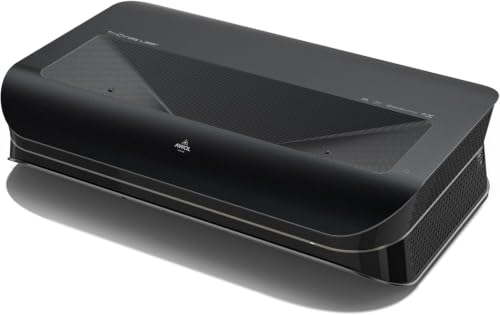
AWOL Vision LTV-3000 Pro — Best UST Flagship
AWOL’s flagship approaches the combination from the living room inward: if the projector lives on a cabinet like a soundbar’s larger sibling, turns on like a television and throws a screen-filling picture up the wall, then both of its formats get used constantly rather than ceremonially. The tri-laser engine gives that convenience a picture with genuine flagship colour, and the 3D support is full rather than vestigial.
On modern content, the colour volume is the experience — streaming premieres and nature material exploit the three-laser gamut with a saturation that stays clean instead of garish. On the depth library, the same engine delivers stable, bright stereoscopic images with no colour wheel in the chain, so the rainbow-sensitive members of the household are served by the same machine as everyone else.
The UST terms are by now familiar and remain non-negotiable: an exact, level surface; a screen designed for the grazing angle; a centre channel placed with thought. Within those terms, the AWOL offers the least installation friction per inch of picture in this guide, and its brightness keeps both formats honest in rooms that darken imperfectly.
It is priced as the flagship it is, and its value case rests on consolidation — one machine, under one screen, replacing a television and anchoring a cinema. Households ready for that consolidation will find the LTV-3000 Pro the most complete expression of this page’s entire idea.
Think of the AWOL’s working week to see its value clearly. Breakfast news at television brightness, a streamed premiere in the evening at full 4K ceremony, a depth classic on Saturday with the glasses charged and the curtains drawn — one engine, three registers, no installation theatre between them. Projectors that demand a dark room and a mounted ritual simply get used less, and a combination machine’s whole promise is use.
Its gaming manners, while not the Hisense’s headline, are respectable enough for the casual and social play that living rooms actually host, and its audio provisions outgun the television it replaces. The household that entertains will also value how instantly guests understand it: the picture is simply there, enormous and bright, and the explanation takes no longer than handing over a pair of glasses.
Longevity completes the flagship case. A tri-laser source rated for tens of thousands of hours, colour that holds its calibration, and a form factor that will survive several rearrangements of the room around it — the AWOL is built to be the last display a household buys for a long while, in both of its languages.
Sound strategy around the AWOL rewards a soundbar or a bookshelf pair placed to flank the screen, since the unit itself claims the centre’s traditional home. Solve that once and the room gains an audio image wide enough to match the picture’s ambition, which matters more for depth presentations than owners expect: a voice anchored to the screen sells the space behind it.
Its ownership community is young, vocal and UST-specific, which shortens every learning curve from screen pairing to glasses choice. In a niche category, an active community is a spare part that never wears out.
- Picture: 4K UHD, triple-laser engine
- Placement: ultra-short throw, cabinet-top
- Colour: very wide gamut from laser primaries
- Depth: frame-packed 3D supported
- Room: living rooms wanting one flagship display
Strengths
- Mount-free scale with flagship colour
- Both formats feel native, not negotiated
- No rainbow artefacts from sequential colour
Trade-offs
- Premium total cost with screen and glasses
- Furniture placement must be exact
- Centre speaker competes for its spot
Best for: households consolidating TV and cinema into one UST flagship.
Not suited for: ceiling-mount traditionalists or tight budgets.

Hisense PX3-PRO — Best Gaming UST
Hisense built the PX3-PRO as the gamer’s ultra-short-throw: a tri-laser engine, 4K picture and gaming credentials — high-refresh support and low-lag manners unusual in UST — while keeping 3D on the specification sheet where its rivals in the gaming-UST niche let it lapse. For a player whose room centres on a low cabinet and a huge wall, it is the combination machine with the fewest apologies.
The tri-laser colour gives games the saturated authority their art direction asks for, and the UST geometry gives players a room where nobody’s head shadows the picture during a standing session. Flat gaming at size is the daily delight; the depth library, played from a PC or a legacy console through the same lens, is the weekend one, and the machine moves between them with a streamer’s ease thanks to its built-in Google TV platform.
Brightness is strong for the class, which matters in the living rooms UST actually inhabits, and the picture’s contrast — a traditional UST weakness — is handled with more ambition than the category’s early generations managed. A proper UST screen remains compulsory equipment, and its cost belongs in the budget from the first day.
Against the AWOL, the Hisense trades a measure of flagship polish for gaming emphasis and platform fluency. Players will call that the right trade; film-first households may reverse it. Either way, the PX3-PRO proves the combination category has room for personalities, not just specifications.
The PX3-PRO’s gaming depth deserves a closer look, because UST and gaming were strangers for years: the category’s early machines carried lag figures that competitive players read as insults. Hisense’s gaming trim changes that reputation, and the result is a machine that can host a fighting-game evening on a wall-sized screen without the picture feeling a half-step behind the hands — a sensation no specification fully captures and every player recognises instantly.
Its platform fluency matters to the combination life as well. Streaming premieres, cloud libraries and the console all live within one interface’s reach, so the projector’s flat life is frictionless; the depth life, arriving by HDMI from a PC or legacy machine, inherits the same screen, sound and seating without a second setup. Friction, more than fidelity, is what kills second formats in real households, and this Hisense is engineered against it.
Buyers should simply budget honestly: the UST screen, a sound solution worthy of the picture, and glasses for the regulars. Assembled completely, the PX3-PRO system is the gaming household’s most convincing route into the combination category.
Multiplayer households should note what UST geometry does for shared gaming: the screen can grow to sizes where split-screen quarters remain individually legible, and nobody’s silhouette interrupts a race. The PX3-PRO turns the living room into the arcade the group chat keeps promising to visit.
Its colour, finally, gives streamed animation a celebratory quality that suits family viewing at daylight hours, so the machine earns its cabinet on ordinary Tuesdays and not only on library Saturdays.
- Picture: 4K UHD, triple-laser engine
- Placement: ultra-short throw
- Gaming: high-refresh, low-lag emphasis
- Platform: Google TV built in
- Depth: 3D supported; confirm glasses on listing
Strengths
- Gaming UST that kept its 3D
- Tri-laser colour for games and film
- Complete smart platform onboard
Trade-offs
- UST screen cost is unavoidable
- Exact placement discipline required
- Film contrast trails dedicated cinema picks
Best for: gamers wanting a huge UST picture plus a depth library.
Not suited for: buyers wanting a portable or ceiling-first design.

BenQ TK700 — Best All-Rounder
The TK700 is the combination’s conventional-throw ambassador: a 4K DLP projector that mounts or shelves like projectors always have, carries BenQ’s gaming DNA in its lag figures and refresh manners, and still speaks fluent frame-packed 3D for the disc shelf. In a guide of flagships and specialists, it is the machine most households can simply buy.
Its bilingual life is the smoothest here relative to price. One input can live as the 4K streaming and console channel, another as the depth channel with its own brighter picture memory, and the projector’s per-input manners keep the two from interfering. The image in both modes is characteristically BenQ: crisp, punchy, tuned for legibility rather than for a test bench.
Brightness in the low-3,000 lumen class gives the glasses something to work with on sensible screen sizes, and the lamp that produces it is a known, replaceable quantity rather than a sealed promise. Fan noise at full power is the familiar lamp-projector tax, mitigated by eco trims for dialogue-led material.
Buyers whose rooms suit a mount and whose budgets suit sanity will find the TK700 the centre of this category, exactly as it is the centre of the gaming one: not the most exotic machine here, and the one against which the exotic machines must justify their premiums.
There is a democratic quality to the TK700’s version of the combination that the flagships cannot imitate: it fits the rooms and budgets where most viewing actually happens. A spare-room cinema, a living room with a ceiling mount and a modest screen, a household whose library mixes discs, streams and games in roughly equal thirds — the BenQ serves all of it without requiring the household to become enthusiasts first.
Its picture tuning philosophy helps the bilingual life in a specific way: BenQ’s modes are legible. Owners can find, name and store the trims for flat and depth viewing without a forum’s assistance, and that legibility is why so many TK700 households actually use both formats instead of letting one become a specification they once paid for.
Resale, when the upgrade itch eventually arrives, is kind to understood machines, and the TK700 is deeply understood by its market. Buy it as the centre of a growing system, keep its lamp log, and it will either serve for years or fund its successor politely.
For upgraders from an older 1080p 3D machine, the TK700 is the gentlest landing in this guide: the mount, the screen and very likely the glasses all carry over, and only the picture changes — twice, once in each format. Migration paths that painless are rare in this hobby and worth valuing explicitly.
Its fan, run in the eco trim that dialogue films allow, settles to a level that small rooms forgive, which keeps the machine viable in the spare-room cinemas where it will most often live.
- Picture: 4K UHD, single-chip DLP
- Placement: standard throw
- Output: low-3,000 lumen class, lamp
- Gaming: low-lag modes, high-refresh 1080p
- Depth: frame-packed and broadcast formats
Strengths
- Both formats handled without fuss or flagship pricing
- Gaming reflexes for the flat hours
- Straightforward mount-or-shelf installation
Trade-offs
- Lamp replacement is part of the ledger
- Blacks are all-rounder class, not cinema class
- Limited lens adjustment
Best for: mixed households wanting the combination at a sane price.
Not suited for: mount-free rooms or black-level purists.

BenQ X3100i — Best LED Colour
Where the TK700 is the combination’s citizen, the X3100i is its connoisseur: an LED light source with wide colour, a full modern feature set and 3D retained as a matter of completeness. Its argument is permanence — a machine whose colour and brightness in year five will match year one, serving a library that deserves consistency.
LED colour flatters both halves of the bilingual life. Modern games and streamed films arrive with their saturated palettes intact, and the depth library’s animated crown jewels hold hues that lamp ageing would slowly mute. The stability also means a 3D calibration performed once stays performed, a small mercy that owners of lamp machines re-earn with every bulb.
The chassis asks for commitment: sizeable, standard-throw, happiest mounted once in a room that knows its own mind. Built-in streaming and audio cover the casual hours with more competence than the class average, though a permanent room will route sound properly and treat the onboard speakers as the understudies they are.
For the buyer installing a room rather than buying a gadget, the X3100i is the combination expressed as infrastructure — and infrastructure, properly chosen, is the purchase a household makes once.
Consider the X3100i’s colour in the context of a library that spans decades. Animated features from the early digital era, aggressively graded action releases, muted prestige dramas — a projector whose primaries are stable and wide treats each era’s mastering kindly, where a brightness-first machine flattens their differences. Collectors, who are this category’s natural citizens, tend to value exactly that kindness once the first month’s spectacle fades.
The LED engine also changes the household’s relationship with time. A lamp projector’s best picture is behind it from the first hour; the X3100i’s thousandth hour resembles its tenth, so the room’s calibration, the screen pairing and the owner’s expectations all stay settled. Permanence is an unglamorous virtue that compounds quietly into satisfaction.
Its size and price exclude it from casual consideration, and properly so: this is the pick for the household that has stopped experimenting and started furnishing. For that household, few machines at any badge combine the two formats with this completeness.
The X3100i also suits the household archivist in a subtler way: its stable output makes it a reliable reference display for judging transfers themselves. When a disc looks wrong on this machine, the disc is wrong — a diagnostic confidence that lamp drift quietly undermines in lesser installations.
BenQ’s gaming modes, inherited from its day job, give the room a second personality after the film ends, and a projector with two personalities gets scheduled like furniture rather than stored like equipment.
- Picture: 4K UHD, single-chip DLP
- Placement: standard throw, installation-led
- Output: low-3,000 lumen class, LED
- Colour: wide gamut, stable across life
- Depth: supported within full feature set
Strengths
- LED colour that does not age on duty
- Complete modern features in one chassis
- Calibration stability across years
Trade-offs
- Flagship pricing and footprint
- Brightness asks for a darkened room
- More machine than occasional viewers need
Best for: permanent rooms and colour-led buyers.
Not suited for: portable use or entry budgets.
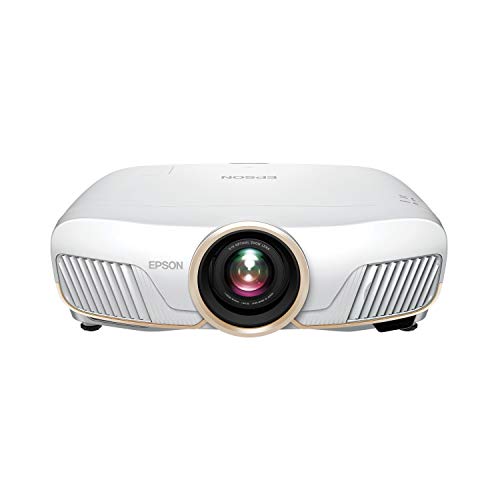
Epson Home Cinema 5050UB — Best Contrast
The 5050UB enters this guide from the cinema side of the combination: a three-chip LCD projector whose 4K enhancement serves modern content respectably while its contrast, blacks and lens serve the depth library superlatively. It is the pick for the collector who measures a projector by its darkest scene rather than its brightest.
Depth on the Epson has a foundation the DLP machines cannot replicate: true darkness behind the foreground plane. Underwater, underground and outer-space sequences — the genres where 3D either becomes architecture or collapses — gain their spatial conviction from that floor. Add the absence of rainbow artefacts, by three-chip design, and the machine offers the most cinematically faithful stereoscopy in this guide.
The motorised lens, with shift and stored positions, makes the installation feel like a projection booth rather than a compromise, and aspect-ratio choreography across a mixed library becomes a button press. The costs are size, weight, lamp economics and an output figure that belongs to dark rooms — all declared, all consistent with its brief.
Modern-content buyers should note the 4K approach is enhancement rather than native panels; on film, the trade is invisible next to the contrast dividend. For the dedicated room, the 5050UB remains the combination’s reference for picture quality, full stop.
The 5050UB’s presence in a combination guide also settles an argument about value. Its premium buys the one quality no setting can add later — contrast — while its compromises, size and lamp economics among them, are all negotiable by installation and budgeting. Experienced buyers learn to purchase the unfixable virtues and manage the fixable ones, and by that doctrine the Epson is the wisest money on this page for a dark room.
Its lens memory deserves a second mention in the combination context, because a mixed library is a mixed-ratio library: scope-ratio epics, academy classics, IMAX-flavoured modern releases. Recalling a stored lens position for each shape turns a screening into a presentation, and guests feel the professionalism without knowing its name.
Keep its filters clean, its room dark and its glasses charged, and the 5050UB will present a 3D archive with an authority that reminds its owner, every single evening, why the format deserved saving.
Visitors encountering the 5050UB for the first time tend to ask what television could do this, and the honest answer — none, at this scale, with this darkness — is the machine’s whole biography. It is a specialist that makes its specialism feel inevitable.
Its running costs, lamp included, remain modest against the flagship USTs’ purchase prices, a reminder that the oldest machine in this guide is in some budgets the most rational flagship of all.
- Picture: 4K enhanced, three-chip LCD
- Placement: standard throw, motorised lens
- Output: mid-2,000 lumen class
- Contrast: Ultra Black engineering
- Depth: full support, RF glasses ecosystem
Strengths
- Deepest blacks in this guide
- No sequential-colour artefacts
- Lens memory for multi-ratio libraries
Trade-offs
- Large, heavy, installation-grade
- Brightness belongs to dark rooms
- Glasses ecosystem differs from DLP-Link
Best for: dedicated cinema rooms and serious collectors.
Not suited for: bright rooms or casual portability.

Formovie Theater — Best Cinema UST
Formovie’s Theater earned its name in the UST world by behaving like a cinema projector that happens to sit under the screen: a tri-laser engine tuned for film colour, Dolby Vision support for modern content, and a picture that reviewers and owners adopted as the class’s movie reference. Its 3D support completes a specification that reads as though a film society wrote it.
Colour accuracy is the signature. Where some UST flagships chase saturation, the Theater pursues fidelity — skin tones, film grain and the muted palettes of prestige drama all land with an authority that flatters a serious library. In depth, that fidelity keeps animated and live-action material equally convincing, and the laser brightness holds the glasses tax at bay on sensible screen sizes.
The living-room terms mirror its UST siblings: exact placement, a proper screen, sound routed around the unit it displaces — though its built-in audio, tuned with a respected partner, is better than the class expects. The smart platform covers streaming duty, and the whole arrangement preserves the room’s ceiling and the household’s weekends.
Against the AWOL, the Theater trades a little all-round muscle for cinema tuning; against the Hisense, it trades gaming emphasis for film fidelity. Households whose library leans cinematic will recognise their projector immediately.
The Theater’s tuning philosophy rewards a particular kind of viewer: the one who notices when a transfer’s grain survives, when a face keeps its texture under makeup, when a night scene’s blues stay blue instead of sliding toward teal. Formovie built its reputation on exactly those viewers, and in the combination category they are disproportionately the collectors keeping 3D alive.
Its UST practicality should not be undersold beneath the cinephilia. A household can move from decision to screening in a weekend — cabinet, screen, alignment, glasses — without builders, mounts or ceiling scars, and the resulting room still passes the only test that matters at midnight: the picture feels like cinema, not like a very good television.
For film-led households that cannot or will not mount a projector, the Theater is not the convenient alternative to the Epson; it is the destination itself, wearing a different geometry.
The Theater’s restraint in showroom brightness is a deliberate cinema virtue misread by specification shoppers: in a darkened room its highlights hold detail that brighter-tuned rivals clip, and its colour stays where the colourist put it. Judge it at midnight, not under shop lights.
Its cabinet-top life also future-proofs the room’s layout in a way mounts cannot: rearrange the furniture, move house, and the cinema re-forms in an afternoon around the same engine.
- Picture: 4K UHD, triple-laser engine
- Placement: ultra-short throw
- Colour: cinema-tuned, Dolby Vision support
- Audio: built-in, partner-tuned
- Depth: 3D supported; verify glasses on listing
Strengths
- Film colour fidelity leads the UST class
- Modern HDR handling for streaming premieres
- Mount-free cinema at flagship scale
Trade-offs
- Premium pricing plus compulsory screen
- Placement precision is unforgiving
- Gaming is served, not specialised
Best for: film-led households wanting UST convenience without cinema compromise.
Not suited for: competitive gamers or bare-wall setups.
How Do the Six Compare at a Glance?
| Pick | Engine | Placement | Light source | Personality |
|---|---|---|---|---|
| AWOL LTV-3000 Pro | Tri-laser DLP | Ultra-short | Triple laser | Flagship all-rounder |
| Hisense PX3-PRO | Tri-laser DLP | Ultra-short | Triple laser | Gaming UST |
| BenQ TK700 | DLP | Standard | Lamp | Value versatility |
| BenQ X3100i | DLP | Standard | LED | Colour permanence |
| Epson 5050UB | 3LCD | Standard | Lamp | Contrast reference |
| Formovie Theater | Tri-laser DLP | Ultra-short | Triple laser | Cinema UST |
How Should You Set Up One Projector for Two Formats?
Give each format its own picture memory and defend the boundary. The 4K memory should be your accurate, film-leaning calibration for streamed and disc content in darkness; the 3D memory should run brighter, with colour and gamma adjusted for the tint and tax of the glasses, because a setting that is correct without eyewear is wrong with it. Label both in language a guest can navigate, and the bilingual life becomes a button rather than a ritual.
Wire the sources so the formats do not fight. A modern player or streamer owns the 4K input; the depth chain — legacy console, 3D-capable player, PC — owns another, with the receiver passing both untouched. Test the full depth chain on arrival week with a familiar disc, while glasses returns and cable swaps are still painless, and photograph the working settings against the day a firmware update resets them.
Seating serves both masters at the same distance: close enough for depth to envelop, far enough for 4K detail to resolve without visible structure. In most rooms that is the familiar one-to-one-and-a-half screen widths, and a household that finds its distance once can stop thinking about geometry and start thinking about films.
How Does HDR Complicate the Two-Format Life?
Modern 4K content arrives wearing HDR, and HDR is a negotiation between the source’s ambitions and the projector’s tone mapping — a negotiation that has nothing to do with the 3D path, which remains a standard-dynamic-range world. Owners sometimes misread the difference between the two modes’ brightness and colour as a fault; it is a format boundary, and the correct response is the separate picture memories this guide keeps recommending, each tuned to its own format’s nature rather than forced into a single compromise.
The UST flagships here carry the most developed HDR handling, including Dolby Vision on the cinema-tuned models, while the standard-throw picks rely on HDR10-class processing that still flatters mainstream content. None of that diminishes the depth library, whose masters were graded for exactly the range these projectors give them. Judge each format against its own era’s intentions and both will satisfy; judge either against the other and both will seem to fail a test nobody set.
Why Should Collectors Act While the Combination Exists?
Product lines turn over, and features without a marketing department behind them have a way of vanishing between generations without announcement. The combination machines on this page exist now, are supported now, and have glasses ecosystems that are purchasable now. A collector whose library matters to them should treat that present tense as the opportunity it is, because the cost of rebuilding this capability later — hunting discontinued models and orphaned eyewear — is measured in exactly the frustration this guide exists to prevent.
That is not a pressure argument for buying carelessly; it is a scheduling argument for buying deliberately, while the deliberate options are these six rather than a second-hand market. Choose the room, choose the geometry, confirm the glasses, and the archive’s future is settled for the working life of a laser or a long succession of lamps.
What Should You Verify on the Listing Before Ordering?
Verify the 3D claim in the manufacturer’s own specification, in writing, for the exact model variant in the basket — regional variants and model-year refreshes have quietly differed on this feature before. Verify the glasses standard in the same visit and price a household set, because an ecosystem surprise after delivery converts a bargain into a bill.
Verify, finally, the return route. Combination machines are flagships with flagship bulk, and preferences about fan character, rainbow sensitivity and UST geometry are personal. A seller whose returns process you have read is part of the specification in this category, as surely as the lens.
What Mistakes Do Combination Buyers Make?
The defining mistake is assuming the combination rather than confirming it: a famous 4K badge, a famous brand, and a 3D library that the delivered machine cannot play. The second is calibrating once and forcing both formats through the same settings, which guarantees that one of them — usually the glasses mode — looks like a compromise. The third is skimping on the screen while overspending on the projector, a misallocation the UST picks punish immediately and the standard throws punish eventually.
Owners also forget the library’s other half: the player. A depth chain is only as capable as its source, and a streaming-only household that buys a combination projector for discs it cannot play has purchased a monument. Keep a 3D-capable player in the rack, however humble, and the machine’s second language stays alive.
What Does a Screening Night Look Like When Both Formats Share One Room?
Picture the ritual at its best, because the ritual is the product. Early evening belongs to the present tense: a streamed premiere in 4K, lights low, the projector in its accurate memory, the room behaving like every modern living room in the country. Then a pause — drinks, conversation, the particular pleasure of choosing from a shelf rather than a menu — and the second feature opens the archive. Glasses come out of their case charged, the projector recalls its brighter depth memory, and a film made a decade ago fills the wall with a spatial confidence that no flat presentation of it has ever matched.
Nothing in that evening required two displays, two seating plans or two sound systems. The combination projector’s achievement is domestic, not technical: it lets one room keep two eras of cinema in daily conversation. Households that build the ritual discover that the library gets watched more, not less, once the modern content stops competing with it for hardware — the formats stop being rivals the moment they share a lens.
How Should You Split a Budget Across Projector, Screen and Glasses?
Resist the flagship’s gravitational pull long enough to fund its supporting cast. In UST systems, the screen is a third of the experience and should be budgeted like it; in standard-throw systems, the mount, the long cable run and a blackout solution for the worst window all outrank the next projector tier. Glasses for the household plus one spare pair are a fixed cost of the category, not an accessory to be trimmed when the basket grows heavy.
A useful discipline is to price the complete system for two rival picks before comparing the projectors themselves. The machine that looked dearer often assembles into the cheaper system once its included platform, its audio or its gentler screen demands are counted, and the machine that looked like a bargain reveals its ecosystem bill. Combination buyers, of all buyers, should shop systems rather than boxes, because both of their formats live or die by the chain around the lens.
How Do You Future-Proof a Library That the Industry Left Behind?
Redundancy is the collector’s friend. Keep the 3D-capable player you trust and a second, inexpensive one in reserve, because players fail more often than projectors and the format’s hardware tail is finite. Store glasses with their charging leads, keep a written record of which standard each pair follows, and rip nothing, lend carefully, and catalogue the shelf — the unglamorous disciplines that separate a library from a pile of discs.
On the projector side, future-proofing means choosing the machine whose maker still answers for the feature: firmware pages that mention the model, support channels that recognise it, glasses that remain orderable. Every pick in this guide passes that test today, which is precisely why they are in the guide. Revisit the test annually, the way you would any insurance, and the archive will outlive several generations of streaming fashion.
Final Recommendation
Choose by room geometry first. Cabinet-top households divide between the AWOL’s all-round flagship polish, the Hisense’s gaming accent and the Formovie’s cinema tuning; mounted rooms divide between the TK700’s sane versatility, the X3100i’s LED permanence and the 5050UB’s contrast authority. Every route lands on a machine that honours both halves of a modern collection, which is a rarer sentence than it should be.
Buy the one whose compromises live in rooms you do not have and formats you do not watch, set up its two picture memories with care, and the projector will do something quietly remarkable across the next decade: premiere the future in 4K on Friday, and open the archive in depth on Saturday, without either evening feeling like the other’s compromise.
How Do You Care for a Flagship Combination Machine?
These are the most valuable projectors most households will own, and their care regime should match: surge protection on the power, ventilation honoured in the cabinet or mount, filters cleaned on a calendar rather than on a whim, and firmware updated when the maker publishes it — with the working settings photographed beforehand, because a flagship reset to factory defaults on a screening night is a special kind of heartbreak.
UST owners add one discipline: the mirror and lens surface at the top of the unit collects the room’s dust precisely because it faces the ceiling, and it should be blown clean, never wiped casually, on the same rhythm as the filters. Standard-throw owners add the lamp log where relevant. None of this exceeds an hour a season, and it protects a machine asked to serve two eras of cinema for a decade — a fair wage for the work.
When Does a Separate Dedicated 3D Projector Still Make Sense?
Rarely, but honestly: a collector with a very large archive, a second room and a beloved legacy machine already in hand may keep that machine in service and buy a modern 4K projector without depth for the main room. The arithmetic can favour it, and sentiment certainly can. What this guide argues against is the default version of that split, in which a household buys a new 4K projector that orphans its library by accident and then maintains a ageing second machine by necessity.
One display, two formats, remains the cleaner household answer for almost everyone: one screen, one sound system, one set of habits, and no projector gathering dust as a single-purpose monument. The six machines here exist so that the cleaner answer is also the available one, and their variety — geometry, engine, temperament — means the compromise, such as it is, can be chosen rather than endured.
What Else Should a Combination Buyer Ask Before Ordering?
Will my AV receiver pass a frame-packed 3D signal?
Most receivers of the last decade pass it untouched, but older or heavily processing models can block what they cannot decode. Test the complete chain — player, receiver, projector — during the returns window, with the actual disc you care about, rather than trusting logos.
How many pairs of glasses should I buy?
One for each regular viewer, plus one spare for the guest, the breakage and the pair that will inevitably be found uncharged. In this category, the spare pair is not pessimism; it is the difference between a screening and an apology.
Can I wall-mount a screen later and use a wall first?
For standard-throw models, a smooth, pale wall is a workable apprenticeship that teaches you your preferred size before the screen purchase. For the UST picks, treat the proper screen as part of the machine from day one; their geometry forgives nothing, and first impressions formed on a wavy wall have unfairly condemned excellent projectors.
How loud are the UST flagships in a quiet scene?
They sit close to the audience, so their fans are honest company rather than distant weather, but the class has matured: at normal viewing volumes and sensible picture modes, the noise recedes beneath dialogue for most viewers. Ceiling-mounted standard throws keep their fans furthest from ears, one of their quieter virtues.
What if my favourite 3D title is only on a streaming service?
Streaming 3D has largely vanished, which is why this guide keeps returning to physical media and PC libraries. If a title matters to you, the disc is the durable copy; services have already demonstrated how quickly a format can be withdrawn when a catalogue is renegotiated.
What is the first film to screen?
Choose the title that made you keep the format — familiarity exposes a new system’s faults and virtues faster than any test disc.
Are firmware updates important for these models?
Yes, particularly where streaming platforms and HDMI handshakes evolve. Update deliberately, with settings photographed first, rather than automatically on a screening night.
How do I know if a listing variant really includes 3D?
Download the manual for the exact model code in the basket and search it for the 3D formats section. The manual is the contract; the marketing summary is the advertisement, and in this category the difference between the two documents has disappointed buyers before.
Should I keep my old 1080p 3D projector as a backup?
If it works and the room exists for it, keeping it costs a shelf and buys insurance for the archive during any future repair. Many collectors run exactly this arrangement and sleep better for it.
What screen size suits a combined 4K and 3D room?
Most households land between two and three metres of width: large enough for depth to envelop and for 4K detail to justify itself, small enough for the brighter picture memories to feed through glasses. Let seating distance arbitrate the final number rather than wall size alone.
Is pixel-shifted 4K visibly softer than native 4K?
On test patterns, measurably; on films at honest seating distances, rarely in a way viewers can name. The Epson’s contrast advantage is visible in every dark scene, which is why this guide weighs the two qualities as it does.
Can children use the 3D modes safely?
In moderated sessions with properly fitting glasses and regular breaks, yes, as with any screen time. Keep early sessions short and let comfort, not the film’s running time, set the schedule.
Do these projectors work with soundbars?
Yes — through HDMI ARC or eARC where fitted, or optical on older pairings. UST owners should measure the soundbar’s height against the projected image’s lower edge, because a tall bar in front of a UST screen can intrude into the picture’s first inches.
Should I buy the projector or the screen first?
Decide them together and install the screen first if the room allows, because its size and position dictate the projector’s placement to the centimetre in UST systems and to the tape measure in standard ones. Shopping in the wrong order is how excellent components become an awkward room.
Does the UST screen choice affect 3D?
Yes. A flat, UST-specific screen preserves the geometry depth depends on, while a wavy or incorrect surface distorts it. The screen is part of the 3D system, not a separate purchase that happens to share a wall.
A final encouragement belongs to the hesitant, because hesitation in this category usually wears the disguise of waiting for something better. The combination of 4K and 3D is not a technology in its springtime, improving by the quarter; it is a mature settlement between two eras, maintained by the makers who cared, and its current representatives are as good as the settlement is likely to get. Waiting does not improve the choice — it merely spends evenings that could have been screening nights, in both of the formats your collection already owns.
Nor should the size of the decision paralyse it. Every machine in this guide will present a modern premiere beautifully and an archive title faithfully; the differences are of room, geometry and temperament, and those are questions a household can actually answer about itself. Answer them, order the glasses with the projector, and let the first double bill make the argument that this page has been making in words.
Frequently Asked Questions
Is 3D content itself available in 4K?
Essentially no: Blu-ray 3D is a 1080p format, and consumer 3D sources remain Full HD. These projectors use their 4K capability for modern flat content and their 3D capability for the existing library, which is why the combination, not 4K 3D as a single format, is the honest description.
Do all three UST picks use the same glasses?
DLP-based UST models generally work within the DLP-Link ecosystem, but fit and performance vary by pair, and specifications change. Confirm the exact standard for your model on its listing and buy one pair to test before equipping the household.
Why does the Epson appear in a 4K guide if it pixel-shifts?
Because it accepts and displays UHD signals with 4K-class detail through pixel shifting, and its contrast advantage is material to real viewing. Buyers who require native 4K panels should choose among the DLP picks and accept their different compromises.
Can these projectors upscale 3D discs to 4K?
They display the 1080p depth signal natively in 3D mode rather than upscaling it, which is the correct behaviour: the format’s integrity matters more than a resolution badge, and the picture’s scale does the rest.
Is it worth buying into 3D now if my library is small?
If the projector is otherwise the right 4K machine for your room, the retained 3D costs you nothing and keeps a door open that the rest of the market has closed. Libraries have a way of growing once the capability exists.
Which pick is best for a bright living room?
The UST flagships, paired with their ambient-light screens, tolerate living-room light best; among standard throws, favour the brighter BenQ models and keep screen sizes sensible. No pick here repeals direct sunlight.
What does it mean if the 3D depth looks turned inside out?
It means the left-eye and right-eye images are reaching the wrong eyes, so near objects sink into the screen and distant scenery pushes uncomfortably towards you. The fix is a single setting, usually labelled 3D sync invert or left/right swap, buried in the projector’s 3D menu rather than the player’s. Change it once while a scene with obvious foreground layering is paused, confirm faces and furniture sit at natural depths, and leave it there. If only one disc misbehaves, suspect that title’s authoring before touching a setup that otherwise works.
Related Guides
Pair this guide with our ultra-short-throw screen selection handbook, the 3D projector collector’s roundup, and our gaming projector setup guide.



[…] with our ambient light screen pairing guide, the classroom and boardroom projector handbook, and our laser versus lamp ownership […]