What's inside
- Key Takeaways
- Quick Picks
- How We Chose These Picks
- DECT Wireless or a Cord: Which Family Fits Your Desk?
- Why Does the Phone Model Matter More Than the Headset Brand?
- Which Desk Phone Headsets Earn a Full Review?
- How Do the Six Desk Phone Headsets Compare Side by Side?
- How Do You Check Compatibility Before You Order?
- What Should You Test in the First Week?
- How Do You Keep a Desk Phone Headset Working for Years?
- How Do Headsets Behave at a Shared or Hot Desk?
- What Does a Sensible Fleet Purchase Look Like?
- How Does Call Quality Actually Get Decided on a Desk Phone?
- How Should a New Hire Be Fitted and Trained on One?
- What Mistakes Do Desk Phone Headset Buyers Keep Making?
- When Is a Headset Worn Out Rather Than Just Dirty?
- Final Recommendation
- Frequently Asked Questions
- Related Guides
As an Amazon Associate I earn from qualifying purchases. This post may contain affiliate links at no extra cost to you.
widgetverdict.com is reader-supported. When you buy through links on our site, we may earn an affiliate commission.
Where to buy: Amazon carries all six headsets below, and the first check costs nothing — find the model name printed on your desk phone, then match it against the compatibility notes under each pick before you spend anything.
The best headsets for desk phone work start with a decision that has nothing to do with comfort: how the headset reaches the phone. Three of the six picks here are DECT wireless models that talk to a base station wired into the handset port, freeing you to walk to a filing cabinet mid-call. The other three are corded designs ending in an RJ9 plug or a quick-disconnect cord, built for desks where the phone never moves and neither does the person answering it. Neither family is better in the abstract. They solve different problems, and most returns in this category come from buyers who picked a family before they picked a product.
Desk phones themselves divide the field further. A traditional landline handset, a Yealink or Poly IP phone on a hosted system, and an older Avaya or Nortel set on a PBX all present the same-looking RJ9 headset port while behaving differently behind it. That is why the corded picks below name the exact phone families their listings claim, and why the wireless picks are judged partly on how honestly their listings describe what the base connects to. A headset that cannot hear your dial tone is furniture, whatever its microphone can do.
One more expectation to set before the picks: answering and ending calls away from the desk is not automatic on DECT systems. The wireless headsets here let you talk anywhere in range once a call is live, but picking up a ringing phone from the corridor usually needs an electronic hookswitch cable or a mechanical handset lifter matched to your phone model. None of the three wireless listings in this guide states that accessory in its title, so treat remote answer as a separate line item to verify for your exact phone, not as a feature you already own.
Key Takeaways
- Split the shortlist by connection first: DECT wireless with a base for people who move, corded RJ9 or quick-disconnect for fixed desks.
- The Poly CS540 is the long-running DECT convertible here — one ear, three wearing styles, and a design offices have standardised on for years.
- Yealink’s WH62 Mono is the only wireless pick whose listing also claims a PC connection and Teams certification alongside the IP phone.
- Corded picks live or die on named compatibility: Wantek and Yealink list specific Yealink, Poly and Snom phone models, MAIRDI lists Polycom, Avaya and Nortel.
- Remote answer and end-call from the headset usually needs a lifter or hookswitch accessory; verify it against your phone rather than assuming it.
- A quick-disconnect cord lets a corded user step away without unplugging the phone or dropping the call.
Quick Picks
| Pick | Badge | Why it earns its place |
|---|---|---|
| Poly CS540 Wireless DECT Headset | Best proven DECT convertible | The single-ear DECT classic with three wearing styles and a noise cancelling microphone, still the default answer for a desk phone. |
| EPOS Impact D 30 DECT Headset | Best dual-ear DECT focus | Both ears covered on a DECT link to the desk phone, for workers who need the room kept out of the call. |
| Yealink WH62 Mono DECT Headset | Best for IP phone plus PC | A mono DECT headset whose listing claims IP phone and PC duty, Teams certification, a 525 ft range and 13 hours of talk time. |
| Wantek Corded Phone Headset (RJ9) | Best corded pick for Yealink fleets | An RJ9 corded headset with a quick-disconnect cord and a listing that names the Yealink, Grandstream and Snom models it fits. |
| Yealink YHS34 Phone Headset (RJ9) | Best lightweight corded dual-ear | A dual-ear wired headset at 129 g on a 2.1 m cable, with leather ear pads and QD-to-RJ9 connection for Poly and Snom phones. |
| MAIRDI Phone Headset (RJ9) | Most flexible corded connections | RJ9 and 3.5 mm plugs on one headset, aimed at call centre desks running Polycom, Avaya or Nortel phones. |
How We Chose These Picks
A desk phone headset guide earns its keep on compatibility information, so the first filter was whether a listing tells you what the headset actually connects to. Models that named a connection standard — DECT, RJ9, quick disconnect — and, for the corded picks, named phone families survived. Models described only with adjectives did not. That filter is why this shortlist reads like a wiring diagram as much as a comfort contest: in this category the wiring is the product, and everything else is refinement.
The second filter balanced the two connection families instead of crowning one. A guide that listed six DECT headsets would abandon the call centres and small offices that deliberately choose cords for cost, reliability and zero charging discipline. A guide of six cords would ignore the receptionists and warehouse offices where walking to a shelf mid-call is the entire point. Three and three keeps both buying problems visible, and the comparison sections keep returning to the fork between them.
Finally, every specification quoted below comes from the listing title supplied for each pick, and nothing else. Where a title stays silent — on talk time for the CS540, for instance — the spec box says so in plain words instead of borrowing a figure from a sibling model or an older revision. Desk phone hardware lives for years and gets quietly revised, so a number copied from the wrong variant is worse than an honest gap.
DECT Wireless or a Cord: Which Family Fits Your Desk?
DECT is a cordless standard built for voice, and its desk phone bases plug into the phone rather than into a computer. The practical gifts are range and freedom: a DECT wearer can stand, stretch, fetch a document and keep talking, and the call quality does not depend on how crowded the office Wi-Fi feels that morning. The costs are a base that needs desk space and power, a battery that needs charging every night, and a price of entry well above a cord. DECT earns its money when the wearer’s job physically moves — reception, dispatch, a small warehouse office, a home desk shared with a kitchen.
A corded RJ9 headset is the opposite bargain: no battery, no base, no pairing, nothing to forget to charge before a Monday. It plugs into the headset port, works the second it is plugged in, and keeps working for years because there is almost nothing in it to fail. The quick-disconnect fitting on all three corded picks softens the one real drawback — step away and you unclip at the QD point, leaving the call live on the phone instead of dragging a cable or hanging up. Corded earns its money at fixed desks: call centres, ticket counters, back offices where the chair is the workplace.
The honest middle cases deserve naming. A worker who takes six calls a day gains little from DECT and will feel the charging chore more than the freedom. A worker who takes sixty calls and never leaves the chair gains little either — the cord stops mattering once the day is spent seated. DECT pays off in the wide band between: heavy call volume plus a job that pulls you upright between and during calls.
Why Does the Phone Model Matter More Than the Headset Brand?
Because the RJ9 port is a shape, not a promise. Wiring order inside that plug differs between phone makers, which is why corded listings name names: a headset wired for Yealink’s pin order may behave oddly on a phone wired another way, and reputable listings say which camp they are in. The three corded picks below divide the territory cleanly — Yealink-centric, Poly-and-Snom, and the older Polycom, Avaya and Nortel installed base — and choosing inside your camp matters more than any difference in ear cushion foam.
IP phones add a second layer. A Yealink or Poly handset on a hosted system may also offer USB or Bluetooth headset paths, which is how the WH62 below can claim a PC alongside the phone. But the desk phone’s own firmware decides which controls work — answer from the headset button, mute sync, ring in the earpiece. When a listing claims certification or names exact handset models, that claim is doing real work; when it says only “compatible with most phones,” budget ten minutes with the maker’s compatibility guide before the box arrives.
Which Desk Phone Headsets Earn a Full Review?
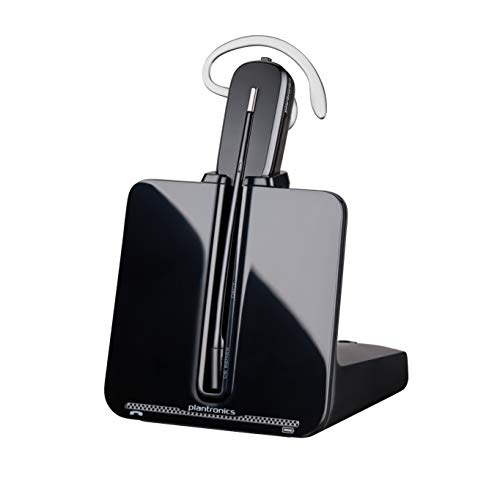
Poly CS540 Wireless DECT Headset — Best proven DECT convertible
The CS540 is the rare product in this guide whose age is the argument. Poly — under the Plantronics name the listing still carries — has sold this single-ear DECT convertible for well over a decade, and it remains on sale because offices keep reordering the thing they already know. Three wearing styles come in the box concept: over the ear, over the head, and behind the neck, so a new hire can settle the fit question in an afternoon instead of returning the unit. For a facilities manager equipping a mixed team, that convertibility removes the most common reason headsets end up in a drawer.
On the phone side the proposition is deliberately narrow. The base connects to a desk phone, the listing says so and nothing more exotic, and the noise cancelling microphone handles the caller’s experience while the open ear handles yours — you hear the office, the door, the colleague trying to catch your eye. What the listing does not claim is equally instructive: no talk time figure, no range figure, no computer connection. Treat the CS540 as a single-purpose telephone tool. Within that purpose it is the benchmark the other two wireless picks are measured against, precisely because it refuses to be anything else.
- Connection: DECT wireless via base station
- Connects to: desk phone (per listing title)
- Wearing style: single ear (mono), convertible, 3 wearing styles
- Microphone: noise cancelling
- Talk time: the listing title gives no figure — check the manufacturer documentation before buying
- Range: likewise absent from the title — confirm in the maker documentation
Strengths
- Three wearing styles settle fit disputes that sink fixed-design headsets in shared offices.
- A single open ear keeps the wearer aware of the room, which suits reception and front-desk work.
- Its long production run means bases, ear loops and replacement parts stay easy to source.
Trade-offs
- Mono coverage lets a loud office straight into your free ear and, on busy days, into your concentration.
- The listing claims a desk phone connection only — computer softphone users should look at the WH62 instead.
- Answering away from the base depends on an accessory the title never mentions, so verify the lifter or hookswitch path for your handset.
Best for: a receptionist or office manager on a traditional desk phone who walks away from the desk mid-call and wants the fit settled once. Not suited for: softphone-first workers who need the same headset to serve a laptop, since the listing ties this base to the desk phone alone.
If the CS540 matches your phone, check the current listing for the base-and-headset bundle and confirm the wearing kit is the full three-style set.
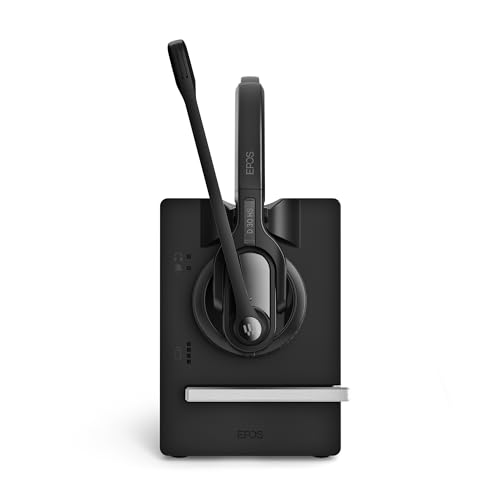
EPOS Impact D 30 DECT Headset — Best dual-ear DECT focus
EPOS built the Impact D 30 around a simple observation: some desk phone workers do not want to hear the office at all. Both ears are covered, the link to the phone is DECT wireless through its base, and the result is a headset for the person taking sensitive or difficult calls in a room that will not quiet down — a benefits adviser, a complaints handler, a trader’s assistant. Where the CS540 keeps one ear on the room on purpose, the D 30 closes the room out on purpose, and that single difference decides between them more honestly than any specification.
The listing is terse — dual ear, DECT, desk phone, black — and the review respects that terseness rather than dressing it up. EPOS descends from the Sennheiser enterprise line, and the Impact family is its desk phone range, so the D 30’s pitch is build and voice pedigree rather than a feature list. Buyers who need published talk time or range numbers before committing will find the title silent on both; the manufacturer’s own documentation is the place to confirm them. What can be said from the listing alone is enough to place it: it is the only dual-ear DECT pick here, and for focus-first phone work that placement is the whole story.
- Connection: wireless DECT, base linked to the phone
- Connects to: desk phone (per listing title)
- Wearing style: dual ear (stereo coverage)
- Colour: black
- Talk time: not given in the title wording — see the manufacturer documentation
- Microphone detail: the title does not specify it — confirm in the maker documentation
Strengths
- Dual-ear coverage is the strongest passive help a noisy office worker can get on a call.
- DECT freedom still applies — focus does not have to mean being chained to the chair.
- A single-purpose desk phone brief keeps setup to base, phone and headset, with no app layer.
Trade-offs
- Covering both ears shuts out colleagues too; a supervisor who must stay reachable by voice will find it isolating.
- The sparse listing leaves talk time and range to be confirmed elsewhere before a fleet purchase.
- No computer connection is claimed, so hybrid phone-and-laptop days need a second solution.
Best for: a desk phone worker in a loud shared office whose calls demand concentration, on a phone-only setup. Not suited for: a front-desk role that must hear the room and greet visitors while wearing the headset, where the mono CS540 fits the job better.
Focus-first buyers can check the D 30 listing to confirm the base variant matches their phone system before ordering.

Yealink WH62 Mono DECT Headset — Best for IP phone plus PC
The WH62 Mono is where this category stops being only about telephones. Its listing claims a DECT headset for IP phone and PC together, Teams certification, dual noise cancelling microphones, a busylight, quick mute and call control, thirteen hours of talk time and a range stated at 525 feet. Read that list again and notice it describes a hybrid worker’s day: calls on the desk phone in the morning, Teams meetings on the laptop after lunch, one headset, one charging base, no swapping devices at midday. No other pick in this guide attempts that span.
The mono wearing style is the deliberate compromise inside the ambition. One ear stays open to the office — sensible for someone whose headset serves two systems and who still needs to hear a knock at the door. The busylight deserves its sentence: a visible in-call signal on the headset tells colleagues you are live before they start talking, which prevents more ruined calls than most microphone features do. The stated range should be read the way all such figures should — as an open-space number that walls and floors will reduce — but even halved, it covers any office a single base would serve. For a Yealink IP phone estate, this is the pick that also retires the separate USB headset.
- Connection: DECT link to its base station
- Connects to: IP phone and PC (per listing title)
- Certification: Teams certified (per listing title)
- Range: 525 ft, the figure the title publishes
- Talk time: 13 hours per the title’s own wording
- Microphones: dual, noise cancelling; quick mute and call control; busylight fitted
Strengths
- One headset covering both the IP phone and the computer removes the two-headset desk clutter entirely.
- The busylight and quick mute are working-day features, not brochure filler — both prevent real call accidents.
- Published range and talk time figures in the title make fleet planning possible without a documentation hunt.
Trade-offs
- Mono coverage again leaves the office audible; workers wanting isolation should weigh the dual-ear D 30.
- The Teams certification helps Microsoft shops most; a different platform gains less from that specific claim.
- Its natural home is a Yealink-friendly IP estate — a legacy analogue line gains nothing from the PC side.
Best for: a hybrid worker on a Yealink IP phone who also lives in Teams on a PC and wants one DECT headset across both. Not suited for: a purely analogue desk phone line with no computer calling, where its second connection goes unused and a simpler base wins.
Hybrid buyers should check the WH62 listing for the exact variant — mono is the one reviewed here — and the base connections their phone model needs.

Wantek Corded Phone Headset (RJ9) — Best corded pick for Yealink fleets
Wantek’s listing does something the whole corded category should copy: it names names. Yealink VoIP phones T21P, T42S, T46S, T48S, T27G, T53W and T54W, plus Grandstream and Snom — that is a compatibility statement a buyer can check against the phone already on the desk in ten seconds. The headset itself is a corded RJ9 design with a noise cancelling microphone and a quick disconnect cord, which is the fitting that matters at a working desk: clip apart at the QD point and you can stand, file and fetch while the caller waits on hold music rather than on silence.
Position it honestly and it is a fleet headset, bought in fives and tens for offices standardised on Yealink hardware. Nothing about it chases the home user with a random landline; the listing’s own model list points at IP estates. The QD cord also creates a quiet economy — when a cord eventually frays, the replaceable half is the cheap half, and the headset itself stays in service. For an office manager, that arithmetic across thirty desks outweighs any single comfort feature. If your phones are on its list, this is the lowest-risk corded buy in the guide; if they are not, no discount makes it the right one.
- Connection: corded, RJ9 plug with quick disconnect cord
- Named compatibility: Yealink T21P, T42S, T46S, T48S, T27G, T53W, T54W; Grandstream; Snom (per listing title)
- Microphone: noise cancelling
- Battery: none — powered by the phone connection
- Cable length: the title gives no figure — look to the manufacturer documentation
- Wearing style detail: not spelled out in the title — verify in the maker documentation
Strengths
- A named model list removes the guesswork that causes most corded headset returns.
- Quick disconnect turns a tethered headset into a practical one — breaks without hang-ups.
- No battery, no base and no pairing: it works the moment it is plugged into a listed phone.
Trade-offs
- The compatibility list is a fence as much as a promise — phones outside it are a gamble.
- A cord still sets the working radius at a desk’s length, however good the disconnect is.
- Offices mixing several phone brands may need more than one corded model on the shelf.
Best for: an office standardised on the listed Yealink IP phones, buying corded headsets for fixed desks in quantity. Not suited for: a desk running a phone brand absent from its compatibility list, where the MAIRDI or YHS34 camps are the safer start.
Fleet buyers can check the Wantek listing against each phone model in their estate — the title’s list is the checklist to work through.

Yealink YHS34 Phone Headset (RJ9) — Best lightweight corded dual-ear
The YHS34’s listing leads with numbers a corded headset rarely publishes: dual ear, 129 grams, a 2.1 metre cable. Together they describe the headset for someone who wears one all shift and feels every gram by hour six. Dual-ear coverage at that weight is the combination call centre workers actually ask for — both ears in the call, nothing heavy pressing on the head — and the cable length is long enough to reach a phone parked at the back of a deep desk without the cord running tight across the keyboard.
Its connection is QD to RJ9, and the named compatibility runs to Poly and Snom phones, which places it in the opposite camp from its Wantek stablemate above: same Yealink brand on the box, different phones on the desk. Leather ear pads are the other title claim, and they cut both ways — comfortable and wipeable across a long day, warmer than foam on a hot afternoon. Read as a whole, the YHS34 is the considered corded choice: not the cheapest way to put a microphone near a mouth, but the one specified like its maker expects it to be worn for a living.
- Connection: corded, QD to RJ9
- Named compatibility: Poly and Snom phones, desk landline (per listing title)
- Wearing style: dual ear
- Weight: 129 g according to the listing title
- Cable: 2.1 m, per the title
- Ear pads: leather
Strengths
- Published weight and cable length let a buyer judge all-day wear before the box arrives.
- Dual-ear coverage helps concentration in a shared office without any wireless complexity.
- Leather pads wipe clean between shifts, which matters where headsets are shared.
Trade-offs
- Its named camp is Poly and Snom — a Yealink-phone office should start with the Wantek above.
- Leather pads can feel warm in summer compared with breathable foam alternatives.
- Dual-ear coverage cuts the wearer off from colleagues calling across the room.
Best for: a full-shift agent on a Poly or Snom desk phone who wants dual-ear coverage at the lightest stated weight here. Not suited for: a Yealink IP phone desk, where the pin camp differs and the Wantek’s model list is the safer match.
Agents on Poly or Snom hardware can check the YHS34 listing to confirm the QD cord variant their phone’s headset port expects.

MAIRDI Phone Headset (RJ9) — Most flexible corded connections
MAIRDI’s headset carries two plugs — RJ9 and 3.5 mm — and aims them at the installed base the other corded picks leave behind: Polycom, Avaya and Nortel phones, the hardware still humming in call centres, surgeries and back offices that have not moved to modern IP estates. That targeting is its identity. A buyer whose phone system predates the current Yealink and Poly ranges usually finds modern headset listings silent about their handset; this listing says the old names out loud, and adds deskphone, cell phone, PC and laptop in the title for the desks where one headset gets borrowed across devices.
The noise cancelling microphone and call centre framing put it in the same working class as the Wantek and YHS34, but the buying logic differs. Choose the MAIRDI when the phone on the desk is the deciding fact — an Avaya set the company will not replace, a Nortel system with years left in it. The 3.5 mm plug then earns its place on the days the headset migrates to a laptop for training or a mobile for a overflow shift. It is the pragmatist’s pick: less specialised than either rival, useful across more of the odd corners a real office contains.
- Connection: corded, RJ9 and 3.5 mm plugs
- Named compatibility: Polycom, Avaya, Nortel; deskphone, cell phone, PC, laptop (per listing title)
- Microphone: noise cancelling
- Intended setting: call centre and office landline work
- Cable length: absent from the title — the manufacturer documentation carries it
- Weight: absent from the title — confirm via the maker documentation if it matters
Strengths
- It speaks directly to legacy Polycom, Avaya and Nortel estates that newer listings ignore.
- Two plug types let one headset cover the desk phone and the occasional laptop or mobile session.
- Call centre framing means the basics — mic cancellation, QD-class working use — are the design centre.
Trade-offs
- Breadth cuts both ways: a single-brand modern estate gets a tidier match from a specialised pick.
- The title publishes neither weight nor cable length, so all-day comfort is harder to pre-judge.
- Legacy compatibility should still be confirmed model by model — “Avaya” spans many handsets.
Best for: a call centre or office still running Polycom, Avaya or Nortel desk phones, needing a corded headset that also fits a laptop. Not suited for: a brand-new Yealink IP deployment, where a headset listing that names those exact handsets removes all doubt.
Legacy-estate buyers can check the MAIRDI listing and match their handset’s exact model against the maker’s compatibility notes before ordering.
How Do the Six Desk Phone Headsets Compare Side by Side?
| Headset | Connection | Ears | Stated figure from listing | Named phone camp |
|---|---|---|---|---|
| Poly CS540 | DECT wireless base | Mono, 3 wearing styles | None published in title | Desk phone (general) |
| EPOS Impact D 30 | DECT wireless base | Dual | None published in title | Desk phone (general) |
| Yealink WH62 Mono | DECT wireless base | Mono | 525 ft range; 13 h talk | IP phone and PC, Teams certified |
| Wantek Corded RJ9 | Corded RJ9, quick disconnect | Not stated in title | Model list published | Yealink, Grandstream, Snom |
| Yealink YHS34 | Corded QD to RJ9 | Dual | 129 g; 2.1 m cable | Poly, Snom |
| MAIRDI RJ9 | Corded RJ9 and 3.5 mm | Not stated in title | None published in title | Polycom, Avaya, Nortel |
Read the table by camp before reading it by features. The two general DECT bases and the WH62 divide wireless buyers by ears and by whether a PC joins the phone. The three cords divide wired buyers by handset brand first and by weight, cable and plug count second. Any row can win inside its camp; no row wins outside it, because a headset that cannot talk to the phone on your desk has no other virtues that matter.
How Do You Check Compatibility Before You Order?
Start with the handset, not the headset. Turn the phone over or open its settings and write down the exact model — T46S is a different answer from T46U, and compatibility lists trade in that level of precision. Next, find the headset port: most desk phones offer a dedicated RJ9 headset socket separate from the handset socket, and some older sets route the headset through the handset port instead, which changes which cord or base setting applies. The phone’s own manual names the port and usually lists tested headset families; five minutes there outranks an hour of review reading.
Then match the camp. Corded buyers compare their model against the three named lists in this guide and choose inside the matching one. Wireless buyers check the base’s stated connection — a DECT base for a desk phone assumes a handset or headset port it can sit on, and an IP phone with electronic hookswitch support may enable remote answer with the right cable, while an older phone may need a mechanical lifter. Both accessories are phone-specific. Order the headset first if you like, but do not promise yourself corridor answering until the accessory question is answered for your exact handset.
What Should You Test in the First Week?
Wear it for the longest call block of your real week, not for ten polite minutes. Fit problems announce themselves at hour two: a mono ear loop that pinches, a headband that creeps, leather pads that warm up. Use that window while returns are painless. Make test calls to a colleague and ask the only question that matters — how do I sound when the office is at full volume — because the microphone is the half of the headset your callers experience and you never hear yourself.
For DECT picks, walk your real route: the corridor, the storeroom, the kitchen run. The stated range is an open-air figure; your building’s walls set the true one, and the honest test is whether the call survives the trips you actually make. For corded picks, practise the quick disconnect until it is muscle memory, and route the cable so a chair wheel cannot find it. A week of deliberate testing converts a purchase into a settled tool; skipping it converts small annoyances into a headset that lives in a drawer.
How Do You Keep a Desk Phone Headset Working for Years?
These are simple machines and they mostly die of neglect at the edges. Ear cushions compress and crack — replace them when they do, because a flattened cushion changes both comfort and how the earpiece seals. DECT batteries fade across years of nightly charging; when talk time shrinks noticeably, a battery swap usually restores the headset for a fraction of replacement cost. Corded headsets fail at the cord, which is why the quick-disconnect split matters: the worn half is the replaceable half.
Shared headsets need a hygiene habit to match: wipe leather pads between users, assign foam covers individually where headsets rotate across shifts, and keep a labelled spare at any desk where a dead headset means a missed queue. None of this is glamorous, and all of it is why a modest headset bought carefully outlasts a premium one bought carelessly.
How Do Headsets Behave at a Shared or Hot Desk?
Hot-desking rearranges the buying logic. A headset that belongs to a person can be fitted once and forgotten; a headset that belongs to a desk gets worn by whoever sits down, which argues for the convertible CS540 — three wearing styles forgive three different heads — and against any model whose fit depends on careful personal adjustment. It also argues for corded simplicity in some buildings: a QD corded headset left plugged into the phone is simply there for the next occupant, with no base pairing to explain and no battery a previous user forgot to charge.
Hygiene becomes a purchasing line item rather than an afterthought. Leather pads like the YHS34’s wipe down in seconds between occupants; foam pads argue for issuing personal cushion sets while the headset itself stays with the desk. Offices that skip this planning discover it in the worst way — staff quietly refusing the shared headset and going back to handsets, which defeats the entire purchase. The fix costs little: a wipe routine, a small stock of spare cushions, and a label on each base or cord naming the phone it belongs to.
There is also a security footnote worth one sentence in any shared-desk policy: a DECT base left paired is an open line into the phone system for whoever picks up its headset, so facilities teams in sensitive buildings should treat headset bases like the phones themselves — inventoried, assigned and collected when a desk is decommissioned.
What Does a Sensible Fleet Purchase Look Like?
Buy two before you buy twenty. Put one unit of the shortlisted model on the loudest desk and one on the busiest, and let a full working week vote. The trial will surface the things no listing can: whether the base’s ringtone setting suits the room, whether the QD point sits where a left-handed agent expects it, whether the stated DECT range survives the walk to the stockroom. A week of evidence costs two units; a fleet mistake costs the whole order and the staff’s patience with the next attempt.
Then standardise ruthlessly inside the winning camp. One model per phone camp, one spare headset per ten desks, one box of cushions and one replacement cord per site — that inventory fits in a drawer and keeps a dead headset from becoming a day of handset work. Record which accessory path each phone model needs for remote answering at purchase time, while the compatibility research is fresh, and file it with the phone system’s own documentation. Fleets fail on administration far more often than on hardware.
Finally, budget the consumables as part of the headset, not as surprises. Cushions yearly, a DECT battery somewhere in the middle distance, the occasional phone-side QD cord — a small annual line that keeps the original purchase performing like the trial unit did. Offices that fund that line keep headsets for many years; offices that treat the first order as the whole cost replace headsets early and blame the category.
How Does Call Quality Actually Get Decided on a Desk Phone?
Callers judge a headset by one thing: your voice against your room. Every pick in this guide claims a noise cancelling microphone, but that phrase describes a family of techniques rather than a guaranteed result, and the wearer’s habits decide half the outcome. A boom parked at the corner of the mouth, roughly two finger-widths away, gives the cancellation something clean to work with; a boom swung down at the chin or pushed up toward the nose feeds it breath and room noise instead. The first training minute with any new headset should be spent on boom position, not on the phone’s settings menu.
The desk phone itself adds variables reviews rarely mention. Handset volume settings, sidetone — how much of your own voice the phone feeds back into your ear — and the phone system’s own compression all colour what callers hear. A headset that sounded thin on one system may sound full on another, which is another reason the trial week in the fleet section matters: judge the combination you will actually run, on your own phone system, with a colleague listening from a mobile in another room. That three-minute test tells you more than any specification table, including the honest ones in this guide.
Your own hearing of the caller matters almost as much and gets less attention. Mono wearers should swap the headset to the other ear at midday during the first weeks; one-ear listening fatigue is real, and alternating sides spreads it. Dual-ear wearers should keep call volume at the lowest comfortable level — with both ears covered, the temptation to run loud in a noisy room quietly punishes hearing across a long shift. None of the six picks can set these habits for you; all six reward them.
How Should a New Hire Be Fitted and Trained on One?
Fit first, features second. With the CS540, let the new hire try all three wearing styles across a real morning rather than choosing from a photograph — the style that looks oddest often wins by lunchtime. With headband models, the band should sit mid-crown with the earpieces centred over the ears, and the boom should be adjusted once, firmly, then left alone; booms bent a little every day eventually stay bent. Mark the successful settings — a discreet dot of tape on a headband slider saves the next adjustment session entirely.
Then teach the three desk skills nobody is born knowing: the quick disconnect for corded models, so breaks never mean hang-ups; the mute control’s exact location by touch, practised before the first live call rather than during it; and the charging ritual for DECT models, headset on base at day’s end, every day, so Monday never starts with a flat battery. Supervisors should make one test call with each new hire and listen from the caller’s side. Five minutes of this on day one prevents the two classic first-week failures — the boom pointed at the ceiling and the confidential aside broadcast because mute was a rumour.
Keep a one-page card at each equipped desk: the phone model, the headset model, which accessory the remote-answer path uses if one is fitted, and who to tell when a cushion splits or a cord frays. That card is the difference between a headset programme and a pile of headsets.
What Mistakes Do Desk Phone Headset Buyers Keep Making?
The classic error is buying by wearing style and discovering the connection afterwards — a lovely DECT headset for a phone with no compatible base path, or a corded model wired for the rival camp’s pin order. The second error is assuming remote answer is built in; the ringing phone in the corridor stays unanswered until the lifter or hookswitch question is settled. Third comes range literalism: a stated figure measured in open space will not survive three stud walls and a lift shaft, and DECT buyers should test their own building in week one.
Corded buyers make a quieter mistake — treating all RJ9 plugs as identical because they share a shape. The named compatibility lists exist precisely because they are not. And fleet buyers repeat a management error: equipping thirty desks with two different headset models “temporarily,” then supporting both forever. Standardise inside the right camp, keep one spare per ten desks, and the category becomes boring in the best way.
When Is a Headset Worn Out Rather Than Just Dirty?
Desk phone headsets rarely die dramatically; they fade. The microphone boom loses its stiffness and drifts away from the mouth mid-call, so callers start asking you to repeat yourself. The headband’s clamping force relaxes until the earpiece migrates during any head movement. On DECT models the battery’s working day shrinks from a full shift to a nervous afternoon. Each symptom has a cheap first remedy — a replacement boom is rarely available, but cushions, batteries and cords are — and the discipline is to try the remedy once, then replace the unit without sentimentality when the symptom survives it.
There is also a systems moment when replacement stops being about the headset at all. When the phone estate changes — a move from analogue lines to a hosted IP platform, say — the headset camp map in this guide redraws itself overnight. Corded models wired for the old camp may not follow the phones, and DECT bases bought for handset ports may give way to USB-connected designs like the WH62 pattern. Smart offices time their headset refresh to the phone refresh, trial against the new handsets before the old ones are collected, and treat the overlap week as the migration’s safety net. Buying headsets a month after the phones arrive means a month of handsets, sore shoulders and staff who conclude the new system is worse than the old one.
One more replacement trigger hides in plain sight: the wearer’s role changes. The mono headset that suited a receptionist promoted into a focused, call-heavy advisory role may be the wrong tool in the new job even though it works perfectly, and the dual-ear model she resisted at the front desk becomes the obvious fit. Reassess headsets when jobs change, not only when hardware fails, and the fleet stays matched to the work instead of to the org chart of two years ago.
Keep the retired units that still work. A drawer with two serviceable spares covers the gap between a failure and a delivery, and in a call-driven office that gap is measured in missed customers, not in convenience.
Final Recommendation
Let the phone on your desk cast the deciding vote. On a Yealink IP estate with a laptop in the day, the WH62 Mono is the one headset here that honestly covers both machines. On a traditional desk phone with a wearer who moves, the CS540’s decade of reorders is the safest evidence in the guide; where the room is loud and the calls are hard, the D 30’s dual-ear DECT focus takes the same desk in the opposite direction. Corded desks should buy inside their named camp — Wantek for the listed Yealink fleets, YHS34 for Poly and Snom at a weight an all-shift wearer will respect, MAIRDI where Polycom, Avaya or Nortel hardware still runs the office. Choose the camp first and the badge second, and a desk phone stops being the thing you hunch over and becomes the easiest call you take all day.
Frequently Asked Questions
Can I answer calls away from my desk with a DECT headset?
You can talk away from the desk once a call is connected, within range of the base. Answering or ending a call remotely usually needs an electronic hookswitch cable or a handset lifter matched to your phone model. None of the wireless listings in this guide names that accessory in its title, so check the manufacturer’s compatibility documentation for your exact handset before counting on corridor answering.
Will any RJ9 headset work with any desk phone?
No. The RJ9 plug is a shared shape, but wiring order differs between phone makers, which is why the corded listings in this guide name their camps — Yealink, Grandstream and Snom for the Wantek; Poly and Snom for the YHS34; Polycom, Avaya and Nortel for the MAIRDI. Match your handset’s model to the list rather than trusting the plug to fit the problem.
Is mono or dual-ear better for desk phone work?
It depends on the room and the role. Mono keeps one ear on the office, which suits receptionists and anyone who must hear the door. Dual-ear coverage shuts the room out and helps concentration on difficult or confidential calls in a noisy space. The CS540 and WH62 cover the mono side here; the D 30 and YHS34 cover the dual-ear side.
What does a quick disconnect cord actually do?
It is a break point partway along a corded headset’s cable. Unclip it and you can stand up and walk away while the call stays connected to the phone — the caller waits, you fetch the file, you clip back in. All three corded picks in this guide include one, and it is the feature that makes a tethered headset practical at a working desk.
Can one headset serve both my desk phone and my computer?
Of these six, only the Yealink WH62 Mono claims that in its listing — IP phone and PC, with Teams certification. The CS540 and D 30 listings describe desk phone connections, and the corded MAIRDI’s 3.5 mm plug is the wired route to occasional laptop use. If phone-plus-computer in one wireless headset is the requirement, the WH62 is the pick built around it.
Does a headset improve how professional a small office sounds?
Callers cannot see the headset, but they hear its effects: a steady voice level instead of the fading that comes from a handset slipping on a shoulder, less keyboard clatter when both hands are free to type quietly rather than pin a phone in place, and fewer requests to repeat an address because the microphone sits at a fixed distance from the mouth. Reception and support callers consistently rate a headset-run office as more organised, and the cause is mechanical rather than mysterious — consistency. A handset’s microphone position changes every time its owner moves; a boom’s position barely changes all day, and voices recorded at a constant distance simply sound more competent.
How long will a desk phone headset last?
Years, if the consumable edges are maintained: ear cushions replaced when they flatten, DECT batteries swapped when talk time fades, and the phone-side half of a quick-disconnect cord replaced when it frays. The electronics in this category are mature and rarely the failure point; the parts touching skin, desks and chair wheels are.
Related Guides
Noise changes shape when the desk sits in an open plan room, and Best Headsets for Open Office takes up that fight from the microphone’s side. Microphones become the whole job in Best Broadcast Headsets, where commentary and intercom headsets work to a studio standard. And the wired discipline of the tournament floor gets its own shortlist in Best Lan Headsets.


