What's inside
- Key Takeaways
- Quick Picks
- How We Chose These Picks
- Microphone Cancelling or Earcup ANC: Which One Do You Actually Need?
- Why Does the Dongle Matter More Than the Bluetooth Version?
- Which Open Office Headsets Earn a Full Review?
- Mono or Stereo: How Many Ears Does Your Job Actually Need?
- How Should a Buyer Think About Cost Across a Whole Floor?
- How Do You Test a Headset Properly in Its First Week?
- How Does Your Room’s Layout Change Which Headset Works?
- What Happens to Your Voice Across a Full Day of Calls?
- How Do You Keep a Shared Fleet of Headsets Working Year After Year?
- How Do the Six Open Office Headsets Compare Side by Side?
- How Do You Set Up a Headset So the Whole Floor Benefits?
- How Should an Office Roll Headsets Out Without Wasting the Budget?
- What Mistakes Do Open Office Headset Buyers Keep Making?
- Final Recommendation
- Frequently Asked Questions
- Related Guides
As an Amazon Associate I earn from qualifying purchases. This post may contain affiliate links at no extra cost to you.
widgetverdict.com is reader-supported. When you buy through links on our site, we may earn an affiliate commission.
Where to buy: all six headsets below are sold on Amazon, and the sensible first step is free — walk your floor at its loudest hour, note what actually reaches your ears, and only then decide which kind of noise problem you are paying to solve.
The best headsets for open office work are chosen against a confusion that costs buyers real money every week: there are two completely different noise problems sharing one desk. The first is what you hear — the colleague narrating a spreadsheet three seats away, the sales call happening at full volume behind you, the espresso machine. The second is what your callers hear, which is the same room arriving through your microphone. A headset can attack either problem, both, or neither, and product pages blur the two on purpose, because “noise cancelling” sounds like a single feature. It is not. Microphone noise cancelling cleans up your outgoing voice. Active noise cancelling in the earcups quiets the room for you. They live in different parts of the headset, they cost different money, and an open-plan floor punishes anyone who buys one expecting the other.
So this shortlist is organised by which problem each pick actually solves. Two picks carry hybrid or active cancellation for the wearer’s ears. Several lean on multi-microphone arrays that scrub your voice for the people listening at the other end. One wired single-ear model does almost nothing for your own concentration and everything for being heard clearly at a low price of entry. And one pick takes the opposite road entirely: bone conduction that leaves your ears completely open, because some open offices require you to hear the room — a manager who must catch their name across the floor, a reception lead who cannot afford to be sealed off.
Certification gets the same honest treatment. A Teams or Zoom certification is claimed below only where the listing title itself states it, which is the case for the Dell, both Yealinks, and — for Zoom — the Dell again. Where a title stays silent, the headset may still work perfectly well with your meeting platform; it simply has not been certified in a way we can point to, and for offices whose IT department buys against a certification list, that distinction decides purchases.
Key Takeaways
- Decide which noise you are fighting first: microphone cancelling protects your callers’ ears, earcup ANC protects yours, and the two are sold under confusingly similar names.
- The Dell WL5024 and Yealink BH74 are the picks here with cancellation aimed at the wearer; the BH74 pairs it with a six-microphone array for outgoing voice.
- The Yealink UH35 is wired, single-ear and inexpensive to deploy, with an AI noise cancelling microphone doing the work instead of earcup technology.
- The Shokz OpenComm cancels nothing for the wearer at all — its bone conduction design deliberately keeps the room audible.
- Teams certification is stated in the listing titles of the Dell WL5024, Yealink BH74 and Yealink UH35; treat silence in a title as uncertified, not as incompatible.
- A USB dongle matters in open offices: pre-paired adapters from Jabra and Yealink sidestep the crowded Bluetooth environment of a shared floor.
Quick Picks
| Pick | Badge | Why it is here |
|---|---|---|
| Dell WL5024 Wireless ANC Headset | Best wearer-side quiet | Hybrid ANC in the earcups plus dual platform certification for floors where concentration is the scarce resource. |
| Yealink BH74 ANC Wireless Headset | Best for heavy callers | Six-microphone voice array, ANC, a charging dock and flip-to-mute for people who live on calls all day. |
| Jabra Evolve 65 Wireless Headset | Best proven all-rounder | A long-running stereo Bluetooth design with its own USB adapter, bought by IT departments in bulk for years. |
| Yealink UH35 Wired Headset | Best wired value | Single-ear USB-A headset whose AI microphone cancelling does the open-office work without batteries or pairing. |
| Poly Blackwire 5220 USB-C Headset | Best plug flexibility | Stereo wired headset covering USB-C, USB-A via adapter, and a 3.5 mm plug for whatever sits on the desk. |
| Shokz OpenComm Bone Conduction Headset | Best for hearing the room | Bone conduction leaves both ears open while a noise-cancelling boom keeps your voice presentable on calls. |
How We Chose These Picks
Every pick had to answer the open-plan question directly: what does this headset do about a loud shared room, and for whom — the wearer, the caller, or both? Models whose only noise claim was vague marketing were passed over in favour of listings that name a mechanism: hybrid ANC, a counted microphone array, an AI cancelling mic, bone conduction. We also weighted connection discipline, because a floor with two hundred Bluetooth devices in it is a hostile radio environment; headsets shipping with a dedicated USB dongle earned their place partly on that unglamorous detail. Finally, we deliberately kept one wired single-ear and one wired stereo model in the six, because hot-desking offices with shared equipment still run on cables, and a guide that only lists premium wireless gear fails the people equipping a forty-seat floor on a real budget.
Microphone Cancelling or Earcup ANC: Which One Do You Actually Need?
Picture two adjacent desks. On the first, an account manager takes a client call while a colleague behind her conducts a loud negotiation. Her problem is outgoing: the client keeps asking her to repeat figures because the neighbour’s voice bleeds into her microphone. Earcup ANC does nothing for her — she needs a microphone system that isolates her voice, ideally a multi-mic array with processing that treats everything off-axis as interference. On the second desk, an analyst wears a headset purely to concentrate between calls, listening to low music or nothing at all. His problem is incoming. A brilliant microphone array does nothing for him; he needs cancellation in the earcups themselves.
Most open-office workers have both problems in the same hour, which is why the two strongest picks in this guide — the Dell and the BH74 — spend money on both ends. But the mix matters. If your day is back-to-back external calls, weight the microphone. If your day is deep work punctuated by stand-ups, weight the earcups. And if your role requires hearing a doorbell, a name called across the floor, or a machine alarm, neither form of sealing helps you, which is exactly the gap the OpenComm exists to fill.
Why Does the Dongle Matter More Than the Bluetooth Version?
Bluetooth version numbers make tidy spec-sheet reading, but on a dense office floor the practical question is how the headset reaches the laptop. A pre-paired USB dongle — Jabra’s Link 370, the Yealink BH74’s USB C/A dongle — creates a managed connection that survives the laptop’s own Bluetooth stack, its sleep quirks, and the forty other radios shouting nearby. It also tends to unlock the headset’s call-control buttons inside meeting software, so mute and answer behave the same in the app and on the earcup. Direct Bluetooth pairing to the computer works, and the Dell’s Bluetooth 5.3 radio is thoroughly modern, but when a headset offers both routes, the dongle route is the one IT teams standardise on, because it removes a whole category of Monday-morning support tickets.
Which Open Office Headsets Earn a Full Review?

Dell WL5024 Wireless ANC Headset — Best wearer-side quiet
The WL5024 is the pick for the worker whose open office defeats concentration before it defeats communication. Its headline feature is hybrid ANC in the earcups — cancellation fed by microphones on both sides of the cup, which handles the steady wash of a shared floor, the air conditioning, the keyboard clatter, better than simpler feedforward designs. Dell states a 20Hz–20kHz frequency range and a microphone sensitivity of -45dBV/Pa in the listing, and at 0.48 lbs it sits in the middleweight class: substantial enough to seal, light enough for a full day.
Certification is where this headset quietly outmuscles most of the field. The listing states both Teams certification and Zoom certification, a pairing that matters in companies mid-migration between platforms, or in agencies whose staff join client meetings on whichever platform the client chose. Bluetooth 5.3 handles the wireless link, and the title notes iPhone and Android compatibility, so the same headset can follow you from laptop calls to a phone call taken in the corridor. For a buyer equipping a mixed-platform team, that dual stamp removes the certification gamble entirely.
What the listing does not give you is a talk-time figure, and that absence is worth respecting rather than filling in. Heavy callers who measure their day in hours of continuous talk should compare the BH74’s stated figure below before defaulting to the Dell. The WL5024’s case rests on wearer-side quiet and platform paperwork, and on those two axes it is the strongest seat in this guide.
In daily use, hybrid cancellation earns its keep on the noises open offices make constantly rather than dramatically: the ventilation hum, the rolling murmur of thirty conversations, the trolley in the corridor. Peaks still poke through — a dropped mug will always win — but the floor’s baseline drops away, and it is the baseline, endured for eight hours, that wears people down. Workers new to ANC often describe the first day as strangely tiring, then the second week as the point where going back feels impossible.
- Connection: Bluetooth 5.3 wireless
- Cancellation: hybrid ANC for the wearer
- Certification: Teams Certified and Zoom Certified, per the listing title
- Frequency response: 20Hz–20kHz, as stated in the listing
- Microphone sensitivity: -45dBV/Pa, as stated in the listing
- Weight: 0.48 lbs, as stated in the listing
- Talk time: the listing title gives no figure — check the full product page before buying for all-day call duty
Strengths
- Hybrid ANC attacks the wearer’s problem directly, the rarer and more expensive half of open-office noise.
- Dual Teams and Zoom certification in the title ends platform arguments in mixed estates.
- Phone compatibility extends the same headset to mobile calls away from the desk.
Trade-offs
- No talk-time figure in the listing title, so all-day callers must verify stamina elsewhere.
- At 0.48 lbs it is not the lightest option here for people who forget they are wearing a headset.
- Its value concentrates on the wearer’s ears; a caller-side-only problem is solved cheaper by the UH35.
Best for: a knowledge worker on a loud floor whose calendar mixes Teams and Zoom and whose main complaint is concentration, not being heard.
Not suited for: anyone who needs a stated all-day talk-time number before purchasing, or a shared hot-desk pool where per-seat ANC pricing cannot be justified.
Check the WL5024’s current price on Amazon, and confirm the talk-time figure on the full listing if your day runs to six hours of calls.

Yealink BH74 ANC Wireless Headset — Best for heavy callers
Yealink built the BH74 for the person the open office hears most: the one on calls from nine to five. The listing leads with a six-microphone AI noise cancelling array, and six is a meaningful number — arrays of that size give the processing enough spatial information to separate a voice at boom distance from a voice two desks away, which is precisely the separation an open floor demands. Layer ANC for the wearer’s own ears on top and the BH74 is the only pick here that spends seriously on both directions of the noise problem at once.
The working details suit heavy use. A charging dock gives the headset a home that is not a tangle of cable, which sounds cosmetic until a team’s headsets start dying mid-afternoon because nobody plugged them in. Flip-to-mute answers the privacy problem of shared spaces: swing the boom up and you are muted, a gesture a colleague can see and a caller cannot override. The stated 32 hours of talk time covers a week of ordinary calling between charges, and the hybrid USB C/A dongle means the same adapter fits the new laptop and the ageing desktop down the row. Teams certification is stated in the title, so it clears the IT paperwork bar as well.
One discipline note: this headset also appears in our wireless business headsets guide, judged there on travel and platform grounds. Here it earns its place on floor noise alone, and the judgement is narrower — in a quiet private office its array is over-engineered, while on a loud floor it is the closest thing to a standard issue answer.
The array also changes how you should speak. With six microphones isolating a close voice, there is no need to project across the desk or lean toward the laptop as people do on speakerphone; a normal conversational level gives the processing the cleanest signal to work with. Teams switching from laptop microphones often sound worse for a day, talking at their old volume, then noticeably better once everyone relaxes into speaking like the caller is in the room.
- Connection: Bluetooth with USB C/A dongle
- Microphone: 6 AI noise cancelling microphones, per the listing title
- Cancellation: ANC for the wearer
- Talk time: 32H, as stated in the listing
- Mute: flip-to-mute boom
- Charging: dock included, per the listing title
- Certification: Teams Certified, per the listing title
Strengths
- Six-microphone array is the strongest caller-side voice isolation claim in this guide.
- Dock charging plus 32-hour stated talk time suits genuinely heavy daily calling.
- Flip-to-mute gives a visible, physical privacy gesture in a shared room.
Trade-offs
- The dock claims permanent desk space, which hot-desking floors may not grant it.
- Buyers on Zoom-first estates should note the title states Teams certification only.
- Its caller-side power is wasted on staff who rarely take external calls.
Best for: a full-time caller on a loud floor — support lead, recruiter, account manager — who needs callers to hear one voice and one voice only.
Not suited for: a Zoom-certified-only purchasing policy, or a worker whose headset lives in a laptop bag rather than on a docked desk.
Check the BH74’s price on Amazon and confirm the dock fits the desk footprint you actually have.
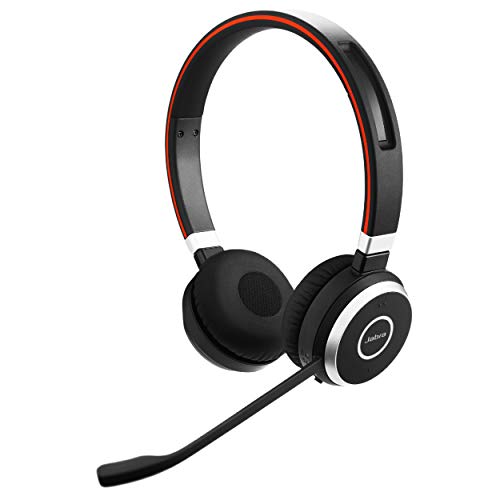
Jabra Evolve 65 Wireless Headset — Best proven all-rounder
The Evolve 65 is the elder of this guide, a stereo Bluetooth headset that IT departments have been issuing for years, and in an open office that history is a feature. It is the headset your colleagues already know how to pair, the one with a busylight culture already established around it, the one whose behaviour in a crowded radio environment is a known quantity rather than a launch-day promise. Jabra ships it with the Link 370 USB adapter, so the laptop connection is pre-paired and managed, leaving the Bluetooth radio free for a phone.
Its noise story is one-sided and honestly so: the listing claims an advanced noise-cancelling microphone, and says nothing about cancelling the room for the wearer. Treat it as a caller-side headset. Your clients will hear you cleanly; you will still hear the floor, softened only by the passive effect of stereo earcups over both ears. For many office workers that trade is correct — full ANC can feel isolating across an eight-hour day, and the Evolve’s lighter touch keeps you aware of the room while your voice stays professional.
The listing’s battery claim is phrased as all-day, without a number in the title, so the same advice applies as with the Dell: ordinary meeting loads are plainly the design target, while marathon call-centre shifts should look at the BH74’s stated figure. What the Evolve 65 offers instead of records is certainty — a mature stereo design, a proper dongle in the box, and a microphone reputation built over years of open-plan service.
There is a social feature worth naming: the Evolve line helped normalise the busylight, the small status lamp that tells a floor a call is live. In offices that adopted it early, the interruption culture changed measurably — people glance, see the light, and write a message instead. A headset that reduces interruptions without cancelling a single decibel is doing open-office work of a different kind, and the Evolve’s long presence means that culture may already exist around your desk.
- Connection: Bluetooth, with Link 370 USB adapter included
- Form: stereo, both ears covered
- Microphone: advanced noise-cancelling, per the listing title
- Wearer-side ANC: not claimed in the listing title — the earcups provide passive reduction only
- Battery: described as all day in the listing; no hour figure is stated in the title
- Certification: the MS variant name denotes the Microsoft Teams version; confirm the exact variant on the listing before ordering
Strengths
- Link 370 dongle in the box gives a managed, pre-paired laptop connection.
- Years of fleet deployment make its open-office behaviour predictable for IT buyers.
- Stereo coverage softens the room passively without sealing the wearer off completely.
Trade-offs
- No wearer-side ANC, so concentration seekers should look at the Dell or BH74 instead.
- Battery life is described rather than numbered in the title.
- An older design means no USB-C-era refinements on the headset itself.
Best for: an IT buyer standardising a team on a known stereo headset with a dongle, where callers’ clarity matters more than wearer silence.
Not suited for: a worker whose core problem is hearing the room too much — this headset protects your callers, not your focus.
Check the Evolve 65 on Amazon, and make sure the listing variant matches your meeting platform before ordering in quantity.

Yealink UH35 Wired Headset — Best wired value
The UH35 makes a unfashionable argument: on a fixed desk in an open office, a cable is not a compromise. It is a single-ear USB-A headset, plug and play by the listing’s own description, with a 5.6 ft cable that reaches a tower under the desk without strain. No battery dies before the afternoon stand-up. No pairing menu appears when a shared workstation changes hands. For hot-desking floors and call-heavy back-office teams, those absences are the product.
Its noise weapon is concentrated entirely at the microphone: an AI noise cancelling mic built from two microphones, in a listing that also claims HD audio and both Teams and Zoom certification — a certification pair matched only by the Dell in this guide, at a wired headset’s very different cost of entry. Single-ear wearing keeps one ear on the room, which suits supervisors, reception desks, and anyone whose job includes hearing their name called. You give up stereo immersion and any pretence of wearer-side quiet; the room reaches your open ear at full volume, and the covered ear gets only the call.
Judged as a fleet purchase, the UH35 is the pick that scales: identical behaviour on every seat, nothing to charge, nothing to lose, and a microphone that does the open-office work where it matters most for outbound impressions — in the caller’s ear.
Single-ear wearing has one more practical virtue in shared spaces: hygiene and handover. An on-ear mono headset is wiped down and passed on in seconds, with no earbud tips to swap and no deep cushions holding the previous wearer’s day. Training rooms and shift-based desks feel that difference daily. Pair it with the plug-and-play claim in the listing and the UH35 becomes the headset a facilities manager can issue from a cupboard without an instruction session.
- Connection: wired USB-A, plug and play
- Form: single-ear, on-ear
- Microphone: AI noise cancelling, 2-microphone design, per the listing title
- Audio: HD audio, per the listing title
- Cable length: 5.6 ft, as stated in the listing
- Certification: Teams and Zoom certified, per the listing title
- Battery: none — the listing describes a wired headset, so there is nothing to charge
Strengths
- Dual Teams and Zoom certification in a wired, fleet-friendly design.
- AI microphone cancelling targets exactly what callers hear from a loud floor.
- Nothing to charge or pair makes it the natural hot-desk and shared-seat choice.
Trade-offs
- Single ear means the room stays fully audible — no help for concentration.
- USB-A only, so USB-C-only laptops need an adapter the listing does not mention.
- The 5.6 ft cable tethers you to the desk for the whole call.
Best for: a fixed or shared desk doing steady call work, where the buyer wants certified caller-side clarity without managing batteries.
Not suited for: a worker who paces during calls, or one buying primarily to shut the room out of their own ears.
Check the UH35’s price on Amazon — it is the natural first purchase for trialling a whole row of desks.

Poly Blackwire 5220 USB-C Headset — Best plug flexibility
Open offices accumulate hardware generations the way kitchens accumulate mugs, and the Blackwire 5220 is built for that reality. It is a stereo wired headset whose listing strings together three connection stories: USB-C at the headset, a 3.5 mm plug for the devices that still offer one, and a USB-C/A adapter for the rest. A worker can move from a new laptop to an older desktop to a phone’s analogue jack without changing headsets, and a facilities team can issue one model across a mixed estate.
Poly’s Blackwire line is call-centre heritage equipment, designed around voices rather than media, and the 5220’s stereo earcups give the wearer passive reduction from the room plus the ability to follow a call with both ears — an underrated advantage when a caller is quiet and the floor is not. The listing makes no ANC claim and no certification claim in its title, and this guide will not invent either. What you are buying is wired reliability, wearing comfort proven across long shifts, and connector diplomacy.
That restraint defines its buyer. If your platform demands a certification stamp for procurement, the UH35 and the Dell carry theirs in their titles and this one does not. If your problem is simply that three desks have three different ports and one headset budget, the 5220 dissolves it.
The 3.5 mm plug deserves its sentence: it keeps the headset useful with desk phones that offer an analogue headset jack, with older laptops, and with the occasional recording or transcription setup that never joined the USB era. Connector flexibility sounds like a spec-sheet consolation prize until a floor’s hardware refresh slips by a year — then it is the difference between a headset programme that continues and one that stalls waiting for ports to match.
- Connection: wired USB-C, plus 3.5 mm plug
- Adapter: USB-C/A adapter included, per the listing title
- Form: stereo
- Wearer-side ANC: not claimed in the listing title
- Certification: no platform certification is stated in the listing title — verify against your IT policy if one is required
- Battery: none, as a wired design
Strengths
- Three-way connectivity covers the mixed hardware generations of a real office floor.
- Stereo wired design needs no charging, pairing or firmware attention.
- Call-centre lineage means voice clarity is the design centre, not an afterthought.
Trade-offs
- No certification stated in the title, which can stall corporate procurement.
- No active cancellation for the wearer; the room is reduced only passively.
- A cable still sets the radius of your working day.
Best for: a mixed-estate office where one wired stereo model must serve new laptops, old desktops and the occasional analogue device.
Not suited for: offices whose IT department purchases strictly against a Teams or Zoom certification list.
Check the Blackwire 5220 on Amazon, and count the port types on your floor first — that count is the whole argument for it.
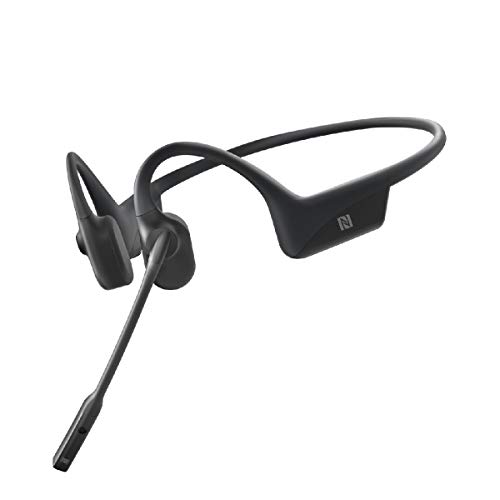
Shokz OpenComm Bone Conduction Headset — Best for hearing the room
Every other pick in this guide treats the open office as something to keep out. The OpenComm treats it as something to stay in. Bone conduction sends sound through the cheekbones and leaves the ear canal completely open, so a wearer hears calls and colleagues, doorbells and alarms, questions called across the floor, all at natural volume. For team leads, office managers, warehouse-office hybrids and anyone whose job description includes being interruptible, that openness is not a compromise — it is the requirement.
The call side is handled by a noise-cancelling boom microphone, the listing’s stated mechanism, which keeps your outgoing voice respectable while your incoming audio stays environmental. The listing addresses office, home business and even truck-driver use, a spread that makes sense once you grasp the design: anywhere that sealed ears are a liability, this form factor earns its keep. Stereo is claimed, delivered by conduction rather than drivers in cups.
Be clear-eyed about the exchange. There is no ANC and there can be none — the design’s virtue is the absence of isolation, so music will sound thin beside a pair of sealed earcups and a loud floor will compete with a quiet caller. Buy the OpenComm because your role forbids isolation, and it will feel like the only honest headset in the building. Buy it hoping for a quieter office and it will disappoint you by design.
Fit is the variable to test hardest in week one. Bone conduction depends on the transducers sitting correctly on the cheekbones, and a band worn too loosely trades call clarity for comfort in a way wearers often misdiagnose as poor audio. The boom, meanwhile, does the heavy lifting for your callers, so position it with the same care as any microphone in this guide. Get those two placements right and the OpenComm delivers its strange, specific magic: a full working day of calls without ever leaving the room.
- Connection: Bluetooth wireless
- Form: bone conduction, ears fully open
- Microphone: noise-cancelling boom microphone, per the listing title
- Wearer-side ANC: none, and none is possible in an open-ear design
- Certification: the listing title carries no platform certification claim — confirm with your IT team if your estate requires one
- Fit note: nothing enters or covers the ear, per the bone conduction design described in the listing
Strengths
- Total situational awareness — the room stays audible at natural volume all day.
- Boom microphone keeps outgoing voice quality separate from the open-ear compromise.
- Nothing in or on the ear canal suits wearers who find earcups fatiguing over long shifts.
Trade-offs
- A loud floor competes directly with quiet callers; there is no isolation to hide behind.
- Audio fidelity for music is limited by conduction physics, not by build quality.
- No certification is stated in the title for estates that purchase against a list.
Best for: a team lead, reception lead or floor supervisor who must hear the room and still take professional-sounding calls.
Not suited for: a buyer seeking quiet, immersion or music quality — every one of those goals points at a sealed design instead.
Check the OpenComm’s price on Amazon if being reachable by voice across the room is part of your actual job.
Mono or Stereo: How Many Ears Does Your Job Actually Need?
The single-ear versus stereo decision looks like a comfort preference and behaves like a job description. A mono headset like the UH35 keeps one ear in the room, which suits anyone whose work includes the physical office: supervisors who field shoulder-tap questions, reception staff who greet visitors between calls, trainers who monitor a floor while staying reachable. Stereo coverage, as on the Dell, the BH74, the Evolve 65 and the Blackwire, serves the opposite worker — the one whose value comes from sustained attention to the call or the document, and for whom every interruption costs a thread of thought that takes minutes to recover.
There is also a fatigue argument that cuts across both camps. A single-ear headset concentrates all call audio in one ear at higher effective volume, while stereo spreads the load and lets both ears work at lower levels. Workers on six hours of daily calls often report that stereo simply feels less tiring by Friday, even when Monday’s preference was for the freedom of an open ear. The honest method is the pilot again: one week each way, judged by end-of-day tiredness rather than first-impression comfort, because headsets are worn on the scale of months and bought on the scale of minutes.
Hybrid roles exist, and the convertible answer is to choose by the majority of the week rather than the memorable exception. The worker who takes two days of deep-focus analysis and three days of floor supervision should buy for the three days and borrow focus from a meeting room on the other two. Headsets are cheap next to the salaries wearing them; matching the ear count to the dominant working mode is the highest-return decision in this entire category.
How Should a Buyer Think About Cost Across a Whole Floor?
Equipping a floor multiplies every decision in this guide, and the arithmetic rewards thinking in tiers rather than in a single fleet model. The top tier — wearer-side ANC plus a serious microphone array — belongs on the seats where both concentration and external reputation are at stake, which on most floors is a minority of desks. The middle tier of proven stereo Bluetooth or certified wired models covers the broad centre of meeting-heavy knowledge work. The wired tier covers shared seats, training rooms and spare-drawer duty, where the headset’s job is to work instantly for whoever sits down. A floor budgeted this way spends its premium money only where premium problems live.
Hidden costs deserve a line in the same calculation. Dongles get lost and should be budgeted as consumables. Docks occupy desk space that hot-desking policies may charge against the headset programme. Batteries age; a wireless fleet bought today needs a replacement conversation in a few years, while the wired picks in this guide will still be working, unchanged, for whoever inherits the desk. None of this argues against wireless — it argues for buying wireless where movement and focus repay it, and letting cable carry the seats where they do not.
Finally, standardise within tiers even when you diversify across them. Two or three models, each with a known pairing routine and a known spare-parts story, keep support sane. Six different bargains from six different sales create a floor where no two desks troubleshoot alike, and the savings evaporate into support time within a quarter.
How Do You Test a Headset Properly in Its First Week?
Day one is for fit and placement: boom position set once, carefully, then a test recording made from your real chair while the floor is at working volume. Play it back before judging anything else, because that recording is your callers’ entire experience of you. Day two is for the meeting marathon — accept every call on the headset, use its own mute rather than the software button, and learn whether the controls fall where your hand expects them. Midweek, test the failure modes: walk to the printer during a call if the headset is wireless, join a meeting from the second device, let the battery run rather than topping it up, and discover the headset’s limits while the return window is open rather than during a client escalation.
By Friday, judge three things only. Did callers ask you to repeat yourself less often than with the old setup? Did you end the day less tired than the same day last week? Did the headset disappear from your attention for long stretches, which is the true sign of a working tool? A headset that passes those three tests at your desk has earned its place regardless of what any specification promised, and one that fails them should go back while going back is still free.
How Does Your Room’s Layout Change Which Headset Works?
Open offices are not one acoustic environment but several wearing the same name. A low-ceilinged floor with carpet and upholstered booths absorbs voice energy quickly, and on such a floor a mid-tier microphone headset often performs indistinguishably from a flagship — the room is doing half the work. A converted warehouse with hard floors, glass walls and a ceiling three metres up returns every voice to every desk, and there the gap between a basic cancelling mic and a six-microphone array becomes audible within one call. Before choosing a tier, stand in your room at peak hour and clap once: the length of the decay you hear is a rough quote for how much headset you need.
Desk geography matters as much as materials. Seats backing onto a kitchenette or a printer station live in a noise postcode of their own, and equipping by seat rather than by person — the two desks beside the espresso machine get the wearer-side ANC models regardless of who sits there — often outperforms equipping by seniority. Call-heavy teams clustered together create a special case: each person’s microphone is fighting colleagues doing the same job at the same volume, which is why support floors benefit most from array microphones and from staggered call scheduling that no headset can substitute for.
Finally, consider the meeting-room overflow pattern. In offices where every call migrates to a booked room, headsets serve mainly for internal meetings and quick calls, and mid-tier models suffice. In offices where rooms are scarce and calls happen at desks by default, the headset is the meeting room, and it should be budgeted like one — per seat, with the same seriousness as the chair.
What Happens to Your Voice Across a Full Day of Calls?
Vocal fatigue is the open office’s quiet tax. In a loud room, speakers unconsciously raise their voices to compete — the Lombard effect — and a headset wearer is not immune, because the voice in your own ears is partly the room’s version of it. By mid-afternoon, people on poor headsets are often speaking several decibels louder than they did at nine, tiring their voices and adding to the floor’s noise for everyone else. Good sidetone — hearing your own voice naturally in the earcup — is the countermeasure, because it closes the feedback loop that tells you how loud you are actually being.
This is one more reason the wearer-side and caller-side questions cannot be fully separated. A headset that quiets the room for you also lowers the volume at which you speak, which improves your callers’ experience and reduces the noise your neighbours must cancel. Floors that equip well often report the room itself growing calmer over a few months, not because anyone was asked to whisper, but because two hundred small feedback loops each settled at a lower level. When you pilot headsets, record the same speaker at nine and at four; the difference is a measurement of the headset, not of the person.
How Do You Keep a Shared Fleet of Headsets Working Year After Year?
Headsets fail at their soft edges first. Ear cushions compress and crack, boom arms loosen at the pivot, cables fray where they leave the cup, and dongles vanish into the same dimension as the office’s missing scissors. A fleet programme that treats cushions as scheduled consumables — swapped on a calendar rather than on complaint — keeps both comfort and acoustic seal closer to day-one performance, which matters doubly for ANC models whose cancellation assumes the seal the cushion provides. Label every dongle with its headset’s asset number the day the box opens; the pairing between them is invisible, and an unlabelled dongle in a drawer is e-waste waiting for a clear-out.
Charging discipline is the wireless fleet’s other slow failure. Headsets that live on docks, like the BH74, mostly solve it structurally. Headsets charged by cable need a norm — plugged in at day’s end, every day — because a battery kept near empty ages faster and a headset found dead at nine in the morning teaches its owner to stop trusting the programme. Keep one wired headset per team as the universal spare: it needs no charge, pairs with nothing, and rescues any morning the wireless fleet has a bad day. That single UH35 or Blackwire in the cupboard is the cheapest insurance in this entire guide.
How Do the Six Open Office Headsets Compare Side by Side?
| Headset | Connection | Noise strength | Certification in title |
|---|---|---|---|
| Dell WL5024 | Bluetooth 5.3 | Hybrid ANC for the wearer | Teams and Zoom |
| Yealink BH74 | Bluetooth + USB C/A dongle, dock | ANC plus 6-mic AI array for callers | Teams |
| Jabra Evolve 65 | Bluetooth + Link 370 dongle | Noise-cancelling microphone | MS variant naming |
| Yealink UH35 | Wired USB-A | AI noise cancelling microphone | Teams and Zoom |
| Poly Blackwire 5220 | Wired USB-C, 3.5 mm, USB-A adapter | Passive stereo coverage | None stated |
| Shokz OpenComm | Bluetooth, bone conduction | Noise-cancelling boom; ears stay open | None stated |
Read the table by columns of consequence. The certification column decides whether procurement can approve the purchase at all. The noise column decides whose ears the money protects. The connection column decides how much daily friction the headset adds — dongles and docks at one end, a plain cable at the other, and nothing at all in the OpenComm’s case beyond a Bluetooth pairing.
How Do You Set Up a Headset So the Whole Floor Benefits?
Start with the microphone position, because it decides more than any processing does. A boom tip should sit roughly two finger-widths from the corner of the mouth, not directly in front of the lips where breath noise lives. Every cancelling array in this guide performs better when the voice it is protecting arrives strong and close; a boom swung up or worn loosely forces the processing to work harder and lets more of the room through. Spend the first call of the day on placement, and record yourself on a test call from your actual desk at its actual loudest hour — the recording tells you what your callers have been too polite to mention.
Then set expectations with the people around you. A busylight or a visible docked headset only reduces interruptions if the floor agrees on what the signals mean. Teams that adopt headsets one desk at a time get the microphone benefits immediately and the cultural benefits never; teams that agree a small set of norms — headsets on means knock softly, flip-to-mute means a private word is happening — find the room itself gets quieter, because fewer people need to raise their voices over a neighbour’s speakerphone.
One setup detail is routinely skipped and routinely regretted: the meeting software’s own noise suppression setting. Platforms layer their processing on top of the headset’s, and two aggressive systems stacked together can chew consonants and make a good microphone sound underwater. During the pilot week, test the platform suppression at its lower settings while the headset’s cancelling does the heavy work, and keep whichever combination your test recording prefers — your ears, on your floor, outrank any default.
How Should an Office Roll Headsets Out Without Wasting the Budget?
Pilot by problem, not by department. Give the wearer-side ANC models to the staff whose work is concentration with occasional calls, the heavy microphone models to the staff whose voices carry the company’s external reputation, and the wired models to shared desks. A two-week pilot with six headsets teaches more than a spreadsheet of specifications, because open offices differ in the one variable no listing can describe: your room’s actual noise, at your actual peak hour, made by your actual colleagues. Measure the pilot by complaints — callers asking for repeats, wearers reporting end-of-day fatigue — and only then standardise. The most expensive rollout error is buying forty identical premium headsets for a floor where half the seats needed a cable and a good microphone.
What Mistakes Do Open Office Headset Buyers Keep Making?
The founding mistake is reading “noise cancelling” as one feature and buying a microphone headset to fix a concentration problem, or an ANC headset to fix a caller complaint. The second is sealing a worker who must not be sealed: a supervisor in full ANC misses the room they are paid to monitor, and the OpenComm exists in this guide as the standing correction. Third, buyers forget the radio environment — pairing premium headsets directly to laptop Bluetooth on a two-hundred-seat floor, then blaming the headsets for dropouts that a dongle would have prevented. Fourth, they equip individuals and skip the norms, so the floor stays loud and every headset works harder than it should. Finally, they buy against a certification requirement they never checked, discovering at deployment that the chosen model’s title never claimed the stamp their platform demands.
Final Recommendation
Match the headset to the ear you are protecting. If callers must hear you cleanly through a loud floor, the Yealink BH74’s six-microphone array is the strongest tool here, with the wired UH35 delivering the same caller-side philosophy to shared desks at fleet scale. If the room is destroying your own concentration, the Dell WL5024’s hybrid ANC and dual certification make it the complete wearer-side answer. The Evolve 65 remains the safe fleet standard, the Blackwire 5220 solves mixed hardware, and the OpenComm serves the people the room still needs to reach. An open office never becomes a quiet office — but with the right half of the noise problem solved on each desk, it stops sounding like one on the phone, and that is the version of quiet your callers and your deadlines will actually notice.
Frequently Asked Questions
Will ANC stop my callers hearing my colleagues?
No — earcup ANC works on what reaches your ears. Your callers are protected by the microphone system instead: multi-mic arrays like the BH74’s, AI cancelling mics like the UH35’s, or a noise-cancelling boom like the OpenComm’s. Buy for the direction of noise you actually need to fix.
Is a wired headset still sensible in a wireless office?
At a fixed or shared desk, often more sensible. The UH35 and Blackwire 5220 never need charging, never lose pairing when a workstation changes hands, and their microphones do the caller-side work that matters most. Wireless earns its premium when the wearer moves.
What does Teams certification actually guarantee?
That the headset has been tested against the platform so its call controls — answer, mute, volume — behave predictably inside the software, and that audio meets the platform’s requirements. It is claimed in this guide only where a listing title states it: the Dell WL5024, Yealink BH74 and Yealink UH35.
Can I wear a bone conduction headset all day?
The OpenComm’s design keeps the ear canal open and uncovered, which many wearers find easier across a long shift than sealed cups. The exchange is audio isolation: there is none, deliberately, so a loud floor stays part of your soundscape.
Should every seat on the floor get the same model?
Rarely. Concentration roles, heavy-calling roles and shared desks have different noise problems, and a mixed issue of two or three models usually serves a floor better than one premium model everywhere. Pilot by problem type before standardising.
Why does my headset sound fine to me but poor to callers?
Because you hear the earcup side and they hear the microphone side, and the two are engineered separately. Boom position is the first fix — close to the corner of the mouth — followed by a test recording from your real desk at its loudest hour.
Related Guides
Commentary work pushes microphone standards further still, and Best Broadcast Headsets covers the headsets built for studios and production intercom. The tournament floor makes its own wired argument in Best Lan Headsets, where cables are a discipline rather than a compromise. And younger listeners need a different shortlist entirely, which Best Gaming Headsets For Children handles with manufacturer-stated volume limits kept in plain view.


