What's inside
- Key Takeaways
- Quick Picks
- How We Chose These Picks
- DECT or Bluetooth: Why Do Telephone Headsets Use a Different Standard?
- Mono or Dual-Ear: Which Suits Telephone Work?
- How Do the Six Telephone Headsets Compare?
- How Do You Check Compatibility Before Ordering a DECT Headset?
- What Does Range Actually Mean Inside a Real Building?
- How Do You Set Up a DECT Headset Desk Properly?
- How Does a Busylight Earn Its Keep in a Shared Office?
- What Happens to Your Voice Over a Full Day of Calls?
- How Should a Small Office Standardise on One Headset?
- How Do DECT Headsets Behave When the Whole Building Uses Them?
- How Do You Migrate From a Handset Habit to a Headset Habit?
- What Should You Replace, and When, on a DECT Headset?
- How Do You Run a Fair Trial Before Equipping a Whole Office?
- What Mistakes Do Telephone Headset Buyers Keep Making?
- Final Recommendation
- Frequently Asked Questions
- Related Guides
As an Amazon Associate I earn from qualifying purchases. This post may contain affiliate links at no extra cost to you.
widgetverdict.com is reader-supported. When you buy through links on our site, we may earn an affiliate commission.
Where to buy: Amazon lists every headset in this guide, and all six speak the same wireless language — DECT — connecting to desk phones, IP phone systems and, on the Yealink models, to computers and mobiles as well.
The best wireless telephone headsets belong to a different technological family from the Bluetooth headsets most people know, and understanding that difference is the whole purchase. These are DECT headsets: they pair with a base station wired to your desk phone or phone system, they carry voice over a dedicated cordless standard built for telephony, and they offer ranges measured in hundreds of feet rather than the length of a room. A Bluetooth headset is a phone accessory; a DECT headset is telephone infrastructure that happens to sit on your ear.
That infrastructure exists for people whose working day is measured in calls: receptionists, support agents working from home, office managers, sales staff, anyone who has ever tucked a handset against a shoulder and paid for it with a stiff neck by Friday. The six picks split by wearing style and ambition — single-ear convertibles that keep one ear on the office, dual-ear models that shut the office out, a workstation that replaces half the desk, and two value designs that put DECT range within reach of a small business or a home desk.
Compatibility is the first question in this category and the reviews answer it pick by pick: which phone each headset expects, whether a computer joins the party, and what adapters are involved. Buy the wrong DECT headset and you own an elegant paperweight that cannot hear your phone system; buy the right one and the desk phone becomes the most comfortable telephone you have ever used. The sections between the reviews and the verdict exist to make sure you buy the right one the first time, because this category punishes guessing more than most.
Key Takeaways
- DECT is the standard here, not Bluetooth: longer range, a base wired to the phone, and voice quality built for telephony.
- The Plantronics CS540 remains the benchmark single-ear convertible, with three wearing styles and a desk-phone base.
- Yealink’s WH62 and WH64 bring IP phones and PCs into the same headset, with ranges past 500 feet and Teams certification on the WH62.
- The EPOS Impact D 30 is the dual-ear choice for workers who need the office kept out of both ears.
- INNOTALK’s RJ9 adapter route and the AT&T Marathon serve smaller setups and home offices at the category’s simpler end.
- Check your phone system’s connection before anything else; DECT headsets are loyal to their bases.
Quick Picks
| Pick | Badge | Why it earns its place |
|---|---|---|
| Plantronics CS540 | Best single-ear DECT classic | The convertible mono headset offices standardised on: three wearing styles, a noise cancelling mic and a desk-phone base. |
| EPOS Impact D 30 Phone | Best dual-ear for focus | DECT wireless with both ears covered, built by EPOS for desk-phone workers who need the room shut out. |
| Yealink WH62 Mono | Best for IP phone and PC desks | Teams Certified, a 525 ft range, dual noise cancelling microphones and a busylight that guards your calls. |
| Yealink WH64 Workstation | Best all-in-one desk workstation | A touchscreen base with speakerphone and a three-port USB hub, serving desk phone, computer and mobile together. |
| INNOTALK Desk Phone Wireless Headset | Best value with RJ9 adapter | 12 hours of talk time and a 300 ft range, connecting to desk phones through the included RJ9 route. |
| AT&T Marathon | Best simple home-office telephone | A DECT 6.0 headset-and-cordless-telephone combination for homes that want one phone that does everything. |
How We Chose These Picks
We began with the connection map of real desks. A traditional desk phone on an analogue or digital PBX, an IP phone on a modern VoIP system, and a computer running softphone calls are three different habitats, and a credible shortlist must serve all three. The CS540 and the EPOS serve the classic desk-phone world; the Yealink pair straddle IP phones and PCs; the INNOTALK’s RJ9 adapter speaks to the enormous installed base of ordinary desk phones; and the AT&T Marathon replaces the phone itself for the smallest setups.
Wearing style was the second deliberate split, because telephone work divides by it. Single-ear designs — the CS540, WH62 and INNOTALK — keep one ear on the room, which suits receptionists, collaborators and anyone who must hear a doorbell or a colleague. Dual-ear designs — the EPOS D 30 and the WH64’s headset — defend concentration in open offices. A guide that crowned one style would fail the other half of the telephone workforce, so both are argued honestly, costs included.
Range and talk time were weighed as working properties rather than brochure numbers. DECT range decides whether you can reach the filing cabinet, the printer or the kitchen without the call degrading, and the picks here span 300 to over 600 feet of stated range. Talk time decides whether the headset survives the day uncharged, and every pick here is built around a full working day or better, because a telephone headset that dies at three in the afternoon has failed at telephony’s first duty.
Finally, we favoured ecosystems a buyer can live in: headsets from makers with telephone heritage, bases that double as chargers, and designs an office can standardise on. A telephone headset is bought once and used ten thousand times; the picks reflect that arithmetic.
DECT or Bluetooth: Why Do Telephone Headsets Use a Different Standard?
DECT — Digital Enhanced Cordless Telecommunications — was engineered for exactly one job: carrying voice between a base and a handset, reliably, all day, in buildings full of other DECT systems doing the same. Its range is the headline difference, hundreds of feet through an office rather than Bluetooth’s room-scale reach, because the base is a dedicated radio plugged into the wall rather than a phone sharing its antenna with everything else. Its voice handling is the quieter difference: the standard was built around call quality and density, so a floor of DECT headsets interferes with itself far less than a floor of Bluetooth devices would.
The base station is the other half of the design. It wires into the desk phone or phone system, charges the headset between calls, and holds the pairing so the headset itself can be light — there is no need for the earpiece to carry the electronics a Bluetooth headset must. That is how the CS540 class of headsets stays featherweight across a full shift: the heavy thinking lives on the desk.
Bluetooth still has its place — mobile phones, laptops, the commute — and the WH64 acknowledges it by serving a mobile alongside its DECT duties. But for a headset whose home is a desk phone, DECT remains the professional answer, and the second-hand market’s loyalty to decade-old DECT models tells you how well the standard ages. Buy Bluetooth for mobility; buy DECT for telephony.
Mono or Dual-Ear: Which Suits Telephone Work?
The mono case is awareness and endurance. A single-ear wearer hears the office at natural volume, holds face-to-face conversations without removing anything, and carries half the weight across a shift — which is why reception and collaborative roles standardised on mono convertibles like the CS540 generations ago. Mono also keeps the wearer’s own voice honest: hearing yourself at natural volume, you speak at natural volume, and callers stop meeting the booming delivery that isolation can cause.
The dual-ear case is defence and focus. In an open office, the second earcup is the difference between hearing your caller and hearing the colleague beside you taking a different call at the same volume. Workers handling concentration-heavy calls — support queues, financial details, anything where a misheard digit costs money — are measurably better served by dual-ear coverage like the EPOS D 30’s, and the fatigue difference across a day of difficult listening is real.
Many offices settle it by role, as call centres do: mono for the front desk and the floor-walkers, dual for the queue. If you are buying for one — yourself — the honest test is your room. Buy mono for a room you participate in; buy dual for a room you endure.
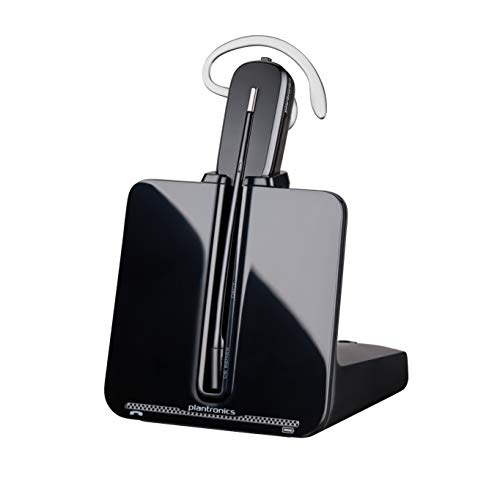
Plantronics CS540 — Best single-ear DECT classic
Some products become the category, and the CS540 is this category’s example: a single-ear DECT headset from Plantronics — now under the Poly name — that offices have standardised on for years. Its base connects to a desk phone, its noise cancelling microphone keeps the wearer’s voice clear over an office’s ambient wash, and its convertible design offers three wearing styles, so the same headset serves the worker who wants an over-the-head band, the one who wants an ear hook, and the one who changes their mind by Thursday.
Convertibility is more than a comfort menu. Telephone workers wear a headset longer per day than almost any other equipment they own, and pressure in the same place for eight hours becomes the story of the working week. Rotating between wearing styles moves the load, and the CS540’s ability to do that within one purchase is a large part of why facilities managers keep reordering it. The single ear keeps the room present, the microphone keeps the caller convinced, and the base keeps the headset charged between calls without a thought.
Its boundaries are the classic DECT boundaries. It is a desk-phone headset: the base expects a traditional phone connection, and while that covers an enormous installed base of office and home-office desk phones, it is not a USB softphone device and does not pretend to be. Workers whose calls have migrated entirely to a laptop should look at the Yealink pair below instead.
Within its world, though, the CS540 remains the reference. When a small office asks what to buy for the person who answers the phone all day, this is still the answer that requires no follow-up questions — the safe pair of hands of the DECT category, bought new and bought once.
Its second-hand fame carries a warning worth heeding, however: because the model has served offices for years, the market is full of retired fleet units and refurbished listings of varying honesty. A headset worn by a stranger for five years is not the same product as the one reviewed here, whatever the badge says. Buy this one new, from a listing that says so, and the famous longevity starts from zero on your own desk — which is the only version of the CS540 story worth purchasing.
- Standard: Wireless DECT
- Wearing style: Single ear (mono), convertible, 3 styles
- Connection: Desk phone via base
- Microphone: Noise cancelling
- Brand: Plantronics (Poly)
Strengths
- Three wearing styles rotate pressure across a long week.
- Proven desk-phone base that offices already understand.
- Featherweight single-ear wearing for full shifts.
Trade-offs
- Desk-phone only; no native USB softphone route.
- Mono audio is wrong for workers who need isolation.
- Traditional design offers no touchscreen-era extras.
Best for: desk-phone professionals who live on calls and want the proven convertible. Not suited for: laptop-only softphone workers.
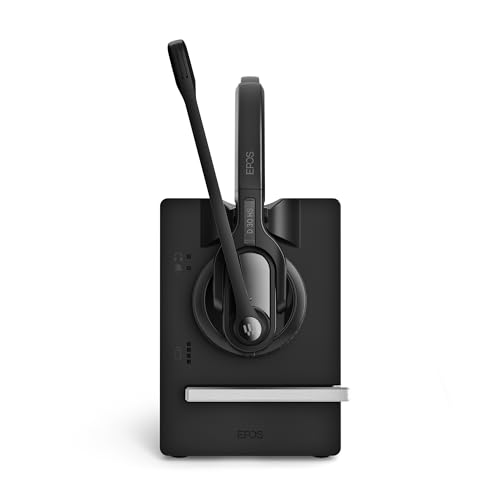
EPOS Impact D 30 Phone — Best dual-ear for focus
The Impact D 30 Phone is EPOS applying its professional audio discipline to the dual-ear DECT brief: a wireless headset covering both ears, connecting to a desk phone, in a sober black finish. Where the CS540 keeps the room in the conversation, the D 30’s job is the opposite — to give a worker in a loud office a private channel to the caller, defended on both sides.
Dual-ear DECT is a smaller club than mono, because most telephone veterans grew up on single-ear designs, and EPOS’s entry argues the modern case well. Open-plan offices have grown louder as they have grown denser, and the worker taking a support call beside a sales team’s celebration needs the second earcup the way a reader needs a door. EPOS’s tuning heritage also shows in the voice presentation: callers hear a natural, unforced version of the wearer, which matters on the long, difficult calls where dual-ear workers are usually deployed.
The trade is the mirror of the mono case. A dual-ear wearer is functionally absent from the room: colleagues learn to wave rather than speak, and quick desk-side exchanges become headset-off ceremonies. Supervisors who need to reach a worker mid-call will feel the D 30’s isolation as a cost. It is the right cost for concentration roles and the wrong one for the front desk, and the guide’s mono picks exist for exactly the desks this one should not be bought for.
For the home office, the D 30’s case sharpens further: the room it shuts out is not colleagues but the household — the television, the children, the delivery at the door — and a worker whose calls are confidential or concentration-critical will find dual-ear DECT the most complete privacy a desk phone can offer. Confidentiality deserves the emphasis: a caller discussing medical, legal or financial details is trusting your room as well as your voice, and dual-ear coverage is the part of that trust you can buy.
- Standard: Wireless DECT
- Wearing style: Dual ear
- Connection: Desk phone
- Finish: Black
- Range focus: EPOS Impact professional line
Strengths
- Both ears defended against open-office noise.
- EPOS voice tuning keeps callers comfortable on long calls.
- DECT range frees the wearer from the desk chair.
Trade-offs
- Isolation removes the wearer from the room’s conversation.
- Heavier presence than any mono pick here.
- Desk-phone connection only, like the CS540.
Best for: concentration-critical call work in loud offices and busy homes. Not suited for: reception roles that must hear the room.

Yealink WH62 Mono — Best for IP phone and PC desks
The WH62 Mono is where this guide’s map expands. Yealink built it for the modern desk where the telephone is an IP phone and half the calls arrive through the computer: it connects to both, carries a Teams Certified badge, and stretches its DECT range to a stated 525 feet — far enough to reach the far end of a warehouse office, the garden of a home worker, or the coffee machine on another floor of a small building, with the call intact.
Its microphone system is doubled: dual noise cancelling microphones work on the outgoing voice, which is the correct arms race for open offices where the room is the enemy of every call. The controls show the same practical bent — quick mute and call control on the headset itself, because a worker fifty feet from the desk cannot use the desk’s buttons — and a busylight signals to the room that the wearer is on a call, the small social technology that prevents the tapped shoulder and the spoken-over opening sentence.
Talk time is rated at 13 hours, which covers the longest plausible telephone day with margin, and the mono wearing style keeps one ear on the office in the CS540 tradition, updated for the IP era. For a worker whose phone system has already migrated to VoIP and whose laptop shares the call load, the WH62 is not an upgrade to the classic picks; it is their successor, designed for the desk as it now exists.
The consideration is ecosystem: the WH62 rewards a Yealink-friendly environment and a buyer whose phone and PC genuinely share duty. A worker on a purely traditional desk phone gains less from its breadth and may be better served by the CS540’s simplicity. Breadth is only value when your desk needs it — this desk, increasingly, does.
Teams certification deserves a translation for buyers outside the Microsoft world: it means the headset’s call controls, mute behaviour and audio have been validated against the platform that now carries a large share of business calls, so the buttons do what the screen promises. Even buyers whose calls run elsewhere benefit indirectly — a headset engineered to that standard has passed examinations a merely compatible one has only sat.
- Standard: Wireless DECT
- Wearing style: Mono
- Connection: IP phone and PC
- Certification: Teams Certified
- Range: 525 ft
- Talk time: 13 hours
- Microphones: Dual noise cancelling
- Extras: Busylight, quick mute and call control
Strengths
- Serves the IP phone and the PC from one headset.
- 525 ft range reaches well beyond the office.
- Busylight protects calls from room interruptions.
Trade-offs
- Breadth is wasted on a traditional-phone-only desk.
- Mono fit will not satisfy isolation seekers.
- Modern feature set asks a short learning curve.
Best for: VoIP-era professionals splitting calls between an IP phone and a computer. Not suited for: purely analogue desks wanting the simplest possible tool.

Yealink WH64 Workstation — Best all-in-one desk workstation
The WH64 Workstation stops pretending a headset base is a charger with ambitions. Its base is a workstation: a 4-inch touch screen, a built-in speakerphone, and a three-port USB hub, serving a desk phone, a computer and a cellphone from one command post, with the headset itself ranging a stated 606 feet from it — the longest reach in this guide. This is the pick for the desk that runs a small operation: the office manager, the dispatcher, the solo professional whose telephone is the business.
The design logic is consolidation. The speakerphone covers the moments a call becomes a room conversation; the hub absorbs the peripherals that otherwise colonise the desk; the touchscreen replaces the archaeological dig through a phone’s menu system with something a person can operate at a glance. The headset’s three noise cancelling microphones continue the WH62’s outgoing-voice arms race one step further, because a workstation user is typically the person whose voice represents the whole company.
Scale is its caveat. A workstation base is desk furniture, with a footprint and a presence that a minimal home desk may not want, and its capabilities overlap devices some buyers already own. It is also the most committed purchase here: you are buying into Yealink’s vision of your desk, not adding a peripheral to it.
For the right desk, that commitment pays daily. One base answering three devices ends the headset-per-phone multiplication that clutters multi-line work, and the 606-foot range turns the whole premises into the office. If your desk is a headquarters, this is the headquarters’ headset.
- Standard: DECT wireless workstation
- Base: 4-inch touch screen, speakerphone, 3-port USB hub
- Connection: Desk phone, computer, cellphone
- Range: 606 ft
- Microphones: 3x noise cancelling
- Wearing style: Workstation headset
Strengths
- One base runs the desk phone, PC and mobile together.
- Speakerphone and USB hub consolidate the desk.
- Longest stated range in this guide at 606 ft.
Trade-offs
- Workstation footprint is too much desk for minimalists.
- Capabilities duplicate kit some buyers already own.
- The most committed ecosystem purchase here.
Best for: solo professionals and office managers whose desk is the whole operation. Not suited for: a simple home desk needing only a headset.

INNOTALK Desk Phone Wireless Headset — Best value with RJ9 adapter
The INNOTALK serves the desk the premium picks overlook: the ordinary office or home desk phone, connected through an RJ9 adapter — the small modular plug that standard desk phone handsets have used for decades. That adapter is the pick’s whole argument. Enormous numbers of working phones are not IP systems and not PBX flagships; they are standard desk phones with a handset port, and the INNOTALK speaks to them directly, wirelessly, with 12 hours of talk time and a stated 300 ft range.
Those numbers deserve respect rather than apology. Twelve hours covers any telephone day a small business generates, and 300 feet covers a shop floor, a clinic’s corridor or a house with a home office at the far end — the actual geography of the buyers this headset serves. Handsfree working is the benefit being bought: the freedom to type, file, fetch and gesture while the call continues, which is the entire reason wireless telephone headsets exist, delivered here without the workstation price of admission.
The compromises are the value tier’s usual ones. The ecosystem is thinner than Plantronics’ or Yealink’s — fewer accessories, less institutional history — and the feature list stops at the essentials rather than reaching for busylights and touchscreens. Buyers equipping a fifty-seat floor should standardise on the heritage brands; buyers equipping a five-seat office, or one home desk, are paying for range and talk time rather than for a logo’s support network, and the INNOTALK prices that trade honestly.
Check the phone before ordering: the RJ9 route covers a wide field of desk phones, but handset-port variations exist, and five minutes with your phone’s model number is the difference between plug-and-play and a returns label. That small diligence is the value tier’s only real tax.
- Connection: Desk phone via RJ9 adapter
- Talk time: 12 hours
- Range: 300 ft
- Style: Handsfree office phone headset
- Audience: Small offices and home desks
Strengths
- RJ9 adapter speaks to ordinary desk phones directly.
- 12-hour talk time covers a full small-business day.
- 300 ft range suits shops, clinics and houses.
Trade-offs
- Thinner accessory and support ecosystem than heritage brands.
- Feature list stops at the essentials.
- Phone compatibility deserves a pre-order check.
Best for: small offices and home desks with standard desk phones. Not suited for: large fleets needing one vendor’s support network.

AT&T Marathon — Best simple home-office telephone
The Marathon approaches the category from the telephone side: it is a DECT 6.0 wireless office headset and cordless headset telephone combined, an AT&T product for the home or micro-office that wants one device to be the phone system. Where the other picks assume a phone exists and improve how you wear it, the Marathon is the phone — headset and cordless telephone in a single purchase, aimed at the smallest setups where that consolidation is the entire requirement.
That positioning clarifies its buyer precisely. A home-based business with one line, a workshop that needs a phone that follows the owner around it, a household that still values a landline and wants it handsfree — these are Marathon desks, and for them the alternative is not a Yealink workstation but a handset cradled against a shoulder. DECT 6.0 provides the cordless foundation, and AT&T’s telephone heritage provides the call handling a combined device lives or dies by.
Its limits follow from its simplicity. It will not join a corporate IP system, it does not serve a computer’s softphone calls, and an office that grows past one line will grow past it. The Marathon is a finished answer to a small question, and it should be bought by people whose question stays small.
There is a dignity in that. Not every telephone buyer needs infrastructure; some need a phone that lets them make tea during a call with a supplier. The Marathon closes this guide by serving them with a name their parents trusted, in a category where trust is half the product.
- Standard: DECT 6.0
- Type: Wireless office headset and cordless telephone combined
- Audience: Home offices and micro-businesses
- Brand: AT&T
Strengths
- Headset and telephone in one purchase for the smallest setups.
- Handsfree cordless freedom without any existing phone system.
- Simple operation suited to non-technical households.
Trade-offs
- Cannot join IP systems or serve PC softphone calls.
- A growing office will outgrow its single-line world.
- Fewest expansion paths of any pick here.
Best for: home offices and micro-businesses wanting one handsfree telephone. Not suited for: companies with multi-line or VoIP systems.
How Do the Six Telephone Headsets Compare?
| Headset | Wearing style | Connects to | Range | Talk time |
|---|---|---|---|---|
| Plantronics CS540 | Mono convertible | Desk phone | — | — |
| EPOS Impact D 30 | Dual ear | Desk phone | — | — |
| Yealink WH62 Mono | Mono | IP phone and PC | 525 ft | 13 hours |
| Yealink WH64 Workstation | Workstation headset | Desk phone, PC, mobile | 606 ft | — |
| INNOTALK | Single ear | Desk phone via RJ9 | 300 ft | 12 hours |
| AT&T Marathon | Headset telephone | Is the phone | — | — |
How Do You Check Compatibility Before Ordering a DECT Headset?
Compatibility in this category is a physical question before it is a digital one, and five minutes of checking prevents the category’s commonest return. Identify your phone precisely: maker, model, and whether it is a traditional desk phone, an IP phone on a VoIP service, or a softphone living in a computer. Then match the pick to the habitat — CS540 or EPOS for the classic desk phone, Yealink for the IP-and-PC desk, INNOTALK where an RJ9 handset port is what your phone offers, Marathon where no phone exists yet.
Ask the second question next: does anything else need to join? A worker whose calls split between the desk phone and a laptop should not buy a desk-phone-only headset and improvise; the WH62 exists for that desk. A worker whose mobile takes client calls should look at the WH64’s three-device base. Compatibility is not only about the phone you have; it is about every device that rings during your working day.
Finally, check the unglamorous details: whether your phone needs an electronic hook switch or a handset lifter for remote answering — the feature that lets you pick up a call from the far end of your DECT range — and whether your phone system’s administrator needs to enable anything. Remote answering is the difference between range as a brochure figure and range as a working freedom, and it is decided by these small accessories, not by the headset itself.
What Does Range Actually Mean Inside a Real Building?
Stated DECT ranges — 300, 525, 606 feet in this guide — are measured in open conditions, and buildings tax them. Walls, floors, metal shelving and lift shafts all take their cut, so the working rule is to treat the stated figure as a budget to spend on obstacles rather than a promise of distance. A 525 ft headset may deliver flawless audio at 150 feet through three walls, which is precisely the scenario the number exists for: not distance for its own sake, but headroom that absorbs a building’s interference.
This reframing changes buying. A home worker choosing between 300 and 525 feet is rarely choosing between two distances; they are choosing how much wall the signal must survive between the desk and the garden. Buy range the way you buy insurance — for the worst room in the building, not the average one — and the WH62 and WH64’s generous figures stop looking like excess and start looking like prudence.
Test on arrival in the places that matter: the far room, the stairwell, the garden chair. DECT either holds a call cleanly or begins to fray at the edges audibly, and a two-minute walk during the return window tells you more than any specification. If your building defeats your pick, the answer is a longer-range model, not a louder complaint.
How Do You Set Up a DECT Headset Desk Properly?
Place the base where the work is, not where the cables happen to reach. The base is charger, pairing point and control centre in one, and it belongs within arm’s reach of the chair, with the headset’s resting place obvious enough that returning it becomes muscle memory. A headset that sleeps in its base is charged every morning of its life; a headset that sleeps wherever it was dropped is flat by Thursday.
Run the wearing-style experiment in the first week if you chose a convertible like the CS540: a full day on the headband, a full day on the ear hook, and an honest verdict from your neck rather than from the mirror. Set the microphone position once, properly — boom close to the corner of the mouth — and then leave it, because a boom adjusted daily is a boom that is never in the right place twice. Test remote answering from the far end of your range before you need it, with a colleague calling the desk while you stand by the printer.
For multi-device bases like the WH64, spend the setup time naming and prioritising the connections, so the base’s behaviour when two devices ring is a policy you chose rather than a surprise you meet. Twenty minutes of deliberate setup in this category buys years of invisible operation, which is the highest compliment telephone equipment can earn.
How Does a Busylight Earn Its Keep in a Shared Office?
The busylight on the WH62 looks like a garnish until you have worked under one. It is a small indicator, visible across a desk, that tells the room its wearer is on a call. Its value is social rather than technical: most office interruptions are not rude, they are uninformed — a colleague who cannot tell a call from a person thinking quietly in a headset. The light converts an invisible state into public information, and the number of conversations that start one sentence too early falls accordingly.
Home workers get a second dividend. A household learns the light faster than it learns any rule: children read it, partners read it, and the wearer stops performing the frantic mime that otherwise accompanies a family member approaching during a client call. Equipment that negotiates on your behalf, silently, all day, is worth more than equipment with a longer specification list and no manners.
Offices standardising headsets should treat the busylight as a fleet feature, not a personal extra, because its value compounds when every desk has one: the room’s noise floor drops when nobody has to ask whether a colleague is free. It is the cheapest acoustic treatment an open office can buy, worn one ear at a time.
What Happens to Your Voice Over a Full Day of Calls?
Telephone professionals develop a specific fatigue that has little to do with ears. Speaking for six hours against background noise, through a handset that returns your own voice muffled or not at all, pushes volume upward unconsciously — by afternoon the wearer is projecting like a stage actor and going home hoarse. Headset design is the countermeasure, and it works through feedback: a wearer who hears callers clearly, and hears their own voice naturally through an open ear or honest sidetone, speaks at conversation level all day.
This is the unglamorous reason mono designs dominate professional telephony. The open ear is not merely awareness of the room; it is the volume control for your own voice, calibrated by anatomy. Dual-ear wearers rely on the headset’s sidetone instead, which is why dual-ear picks for call work — the EPOS D 30 in this guide — come from makers who tune voice presentation as a discipline rather than a feature.
The practical test for any buyer: after your longest call day on a new headset, is your throat tired? If yes, the problem is rarely your technique. It is feedback — yours, missing — and the fix is a wearing style or a sidetone setting, not a lozenge.
How Should a Small Office Standardise on One Headset?
Standardisation is the fleet buyer’s version of the compatibility check, and it pays for itself in the drawer of spares. Choose one model per role — the CS540 pattern for desk-phone talkers, the WH62 for IP-and-PC desks — and buy a spare for every handful in service. A spare headset that pairs with an existing base turns a failure from a lost working day into a five-minute swap, and a single model means every charger, cushion and wearing style in the building is interchangeable.
Resist the upgrade-of-the-month instinct. Telephone headsets age slowly because telephony changes slowly, and a fleet held on one model for years accumulates exactly the institutional knowledge that makes support trivial: everyone knows the mute is there, the boom goes like this, the base light means that. New starters learn the headset from the person at the next desk, which is training no manual survives contact with.
When the fleet does change, change it by role and all at once, piloted by the two heaviest talkers in the office. Their verdict, earned across a fortnight of real calls, predicts the fleet’s experience better than any demonstration — and a model they reject in the pilot is a model the office just saved itself from buying thirty of.
How Do DECT Headsets Behave When the Whole Building Uses Them?
Density is DECT’s home fixture. The standard was designed for buildings where dozens of cordless devices operate within earshot of one another — hospitals, warehouses, call floors — and it manages its channels with a discipline consumer Bluetooth never needed. An office that standardises on DECT headsets does not create a radio traffic jam by succeeding; the bases coordinate the way the system was always intended to be used.
Interference, when it appears, is usually architectural rather than electronic: a base buried behind a metal cabinet, a range asked to cross a lift shaft, a floor plate between the desk and the room where calls must work. The fixes are placement fixes — base in the open, line of sight where possible, the range test walked before the furniture is final. Treat the base like a lamp whose light is radio, and most mysteries in this category solve themselves.
This is also why the category’s second-hand heroes are so old. A well-placed DECT system does not become obsolete on a product cycle; it becomes furniture, in the complimentary sense — present, working, unremarked. Buyers choosing between a fashionable gadget and a DECT standard should know which of the two they are actually shopping for.
How Do You Migrate From a Handset Habit to a Headset Habit?
Offices underestimate the human side of this purchase. A worker who has held a handset for a decade has built posture, note-taking and even thinking habits around it, and a headset rearranges all three in the first week. Expect a short, honest awkwardness: calls feel exposed without the handset’s familiar weight, notes improve immediately because both hands are free, and by the second week the handset feels like the strange object. Managers rolling out headsets should schedule the change away from the busiest week and let the heaviest talkers convert first, because their visible relief recruits the sceptics better than any announcement.
Two small provisions ease the crossing. Keep the handset connected and reachable during the first fortnight, so the headset is a choice being tested rather than a sentence being served — paradoxically, workers adopt the headset faster when retreat is allowed. And teach the three gestures explicitly: mute, volume, and answering away from the desk. Everything else about a DECT headset is discoverable; those three, undiscovered under pressure, are what make a new wearer reach for the handset in a panic.
The payoff, once crossed, is physical and measurable in the mirror: shoulders that no longer live at different heights, a neck that ends the week uncomplaining, and a desk posture that a physiotherapist would recognise as work rather than injury in progress. Telephone headsets are ergonomic equipment wearing a telecom costume, and the migration week is the price of the costume change.
What Should You Replace, and When, on a DECT Headset?
The headset will outlast several of its own parts, and knowing the order of mortality saves money. Ear cushions go first — a year or two of daily wear compresses them — and replacing cushions restores most of what owners describe as a headset getting old. Batteries go second, on a multi-year rhythm for quality DECT models, and a headset whose talk time has halved is asking for a battery, not a burial. The boom and its hinge go third, loosened by years of swings, and that failure, when it comes, is the genuine end-of-life signal.
Bases almost never die. They are mains-powered, motionless and simple, which is why the standardise-on-one-model advice compounds: a spare headset bought in year three pairs into an ecosystem whose bases are still on their first decade. Offices that track these small replacements spend a fraction of what offices spend who replace whole units at the first cushion failure.
For the home buyer the same logic applies at smaller scale. Buy the pick whose cushions and battery you can imagine replacing, keep the receipt with the phone’s model number written on it, and your headset purchase becomes a five-to-eight-year decision rather than an annual one. In a category built on standards older than some of its users, longevity is not a hope; it is the design brief.
How Do You Run a Fair Trial Before Equipping a Whole Office?
Buy two headsets before you buy twenty: one mono, one dual-ear, from this guide’s shortlist, and give them to the two people whose call loads are least alike — the receptionist and the support specialist are the classic pairing. A fortnight of real work will produce verdicts with a specificity no demonstration can imitate: which wearing style survived the long day, whether the range reached the rooms that matter, how callers rated the voice without being asked to.
Score the trial on the complaints, not the compliments. New equipment is always pleasant in week one; the informative data is the small friction that remains in week two, because that friction, multiplied by a fleet and a year, is the true cost of the wrong model. Ask specifically about the end of the longest day, the farthest room, and the most difficult caller — the three examinations every pick in this guide was chosen to pass.
Then standardise without reopening the debate. A trial that ends in three models for three preferences has purchased comfort at the price of the spares drawer, and the drawer always wins the argument in year two. The trial’s purpose is a decision the whole office can inherit, and its discipline is what separates an equipment policy from a series of individual shopping trips.
What Mistakes Do Telephone Headset Buyers Keep Making?
The expensive mistake is buying the headset before identifying the phone: DECT headsets are loyal to their bases and their habitats, and a softphone worker with a desk-phone headset owns jewellery, not equipment. The second is buying Bluetooth out of familiarity and discovering its room-scale range at the filing cabinet, mid-call, in front of a client. The third is ignoring remote answering — the lifter or hook-switch question — and learning that a 500-foot range is decorative if every call must be answered at the desk anyway.
Fourth, buyers choose wearing style by photograph rather than by role, putting isolating dual-ear headsets on receptionists and airy mono designs on concentration workers. Fifth, small offices buy consumer gadgets per employee instead of standardising on one model, and inherit a drawer of incompatible chargers and a support burden no one owns. Finally, nobody tests the far room during the return window. In this category, the walk to the far room is the review that matters, and it takes two minutes.
Final Recommendation
Start from the phone, and the shortlist builds itself. A traditional desk phone and a full day of calls point to the CS540 for mono wearers and the EPOS Impact D 30 for workers who need both ears defended. An IP phone sharing duty with a computer points to the WH62, and a desk that is effectively a headquarters points to the WH64 Workstation and its three-device base.
The INNOTALK is the honest value answer for the standard desk phone in a small office, and the Marathon closes the category for the home that wants the telephone itself to be the headset. Whichever you choose, walk your building with it in the first week — a wireless telephone headset proves itself at the far end of its range, on a real call, and every pick here deserves that walk before it earns the desk.
Buy new, buy once, and buy for the phone you actually have rather than the system you may migrate to someday; DECT’s long service life means today’s honest match will still be answering calls when that someday arrives, and it will probably handle the migration too. The desk telephone survived the smartphone by being better at its one job — these six headsets are how it stays better, one un-cramped neck at a time.
Frequently Asked Questions
Can a DECT headset connect to my mobile phone?
Most cannot directly — DECT pairs a headset to its own base, not to a phone’s Bluetooth. The exception in this guide is the Yealink WH64 Workstation, whose base serves a cellphone alongside the desk phone and computer. If mobile calls are central to your day, that workstation pattern, or a separate Bluetooth headset, is the answer.
Will the CS540 work with a VoIP softphone on my laptop?
No — the CS540’s base connects to a desk phone, which is the job it was built for. Laptop softphone workers should choose the Yealink WH62, which serves an IP phone and a PC from one headset, or the WH64 if a mobile must join as well.
What is a handset lifter, and do I need one?
A lifter is a small accessory that physically lifts the desk phone’s handset when you answer from the headset, letting you take and end calls at the far end of your range. Electronic hook switch cables do the same job electronically on phones that support them. If you plan to roam while answering, one of the two is essential; if you always answer at the desk, neither is.
How far will these headsets really work from the base?
The stated figures — 300 ft for the INNOTALK, 525 ft for the WH62, 606 ft for the WH64 — are open-condition measurements. Walls and floors spend that budget, so expect strong performance at a fraction of the stated distance indoors, which still covers houses and most offices. Test the far room during your return window.
Mono or dual-ear for a receptionist?
Mono, almost always. A receptionist’s job includes the room — visitors arriving, colleagues passing messages, a door that needs hearing — and a single-ear design like the CS540 or WH62 keeps that channel open while the caller gets a clear, noise-cancelled voice. Dual-ear belongs to concentration roles away from the public desk.
How long does a DECT headset battery last before it needs replacing?
Talk time per charge is a different question from battery lifespan. Per charge, the picks here are built around full working days — 12 hours for the INNOTALK, 13 for the WH62. Across years, a quality DECT battery typically serves several years of daily use before its capacity fades noticeably, and on standardised models the battery is a replaceable part rather than a reason to replace the headset.
Can two people share one DECT base?
Bases are generally paired to their headset, and sharing one headset between shifts is common and hygienic enough with a cushion wipe — but two simultaneous users need two headsets and, in most setups, two bases. Offices standardising on one model, as this guide recommends, make such scaling painless when the second seat is added.
Related Guides
PlayStation players can trade the desk phone for a console in best gaming headsets ps5, where the headsets chase immersion rather than call time. Creators who split the day between calls and content will find best headsets for gaming and streaming closer to their evenings. And the family console that shares the home office gets its own shortlist in best nintendo switch headsets.



[…] picks built for children at laptops. For voices that travel by desk phone instead of game chat, best wireless telephone headsets rounds up the DECT models offices rely on. And if your open-back ambitions centre on one console, […]