What's inside
- Key Takeaways
- Quick Picks
- How We Chose These Picks
- Why Does Volume Limiting Matter More Than Sound Quality Here?
- Wired, Wireless or USB-C: Which Connection Suits a School Device?
- How Do the Six School Headsets Compare?
- How Do You Set Up a School Headset Routine That Survives the Term?
- What Should You Do When the School Issues Its Own Device List?
- How Do You Help a Child Be Heard Clearly in an Online Class?
- How Should a School Headset Fit a Head That Is Still Growing?
- What Breaks First on a School Headset, and How Do You Prevent It?
- How Do You Keep a School Headset Clean Enough to Share?
- How Does a School Headset Change for Secondary School and Sixth Form?
- What Should You Spend the First School Week Checking?
- How Do You Handle the Headset on Travel and School Trips?
- What Mistakes Do Parents Make When Buying a School Headset?
- Final Recommendation
- Frequently Asked Questions
- Related Guides
As an Amazon Associate I earn from qualifying purchases. This post may contain affiliate links at no extra cost to you.
widgetverdict.com is reader-supported. When you buy through links on our site, we may earn an affiliate commission.
Where to buy: each of the six headsets below is sold individually on Amazon — this guide is written for a parent or student buying one headset for one learner, and every pick connects to the laptops, Chromebooks and tablets that online school actually runs on. Nothing here requires a school account, a bulk order or a procurement department to obtain.
The best headsets for online school are not small gaming headsets, and treating them that way is where most buying goes wrong. A school headset has a stranger job description: it must keep a child’s hearing protected across hours of daily listening, present a young voice clearly to a teacher listening on laptop speakers, survive being dropped into a school bag two hundred mornings a year, and fit a head that is still growing. Sound quality, the thing adult headsets compete on, comes a distant fifth.
That is why volume limiting leads this guide. Four of the six picks cap their maximum output — at 85dB, or at a switchable 85/94dB as their listings state — because a child cannot be relied on to self-regulate volume across a school day, and a limit built into the hardware does not depend on anyone remembering a setting. The remaining two picks serve older students, the teenagers and college learners whose school day runs on the same video platforms as office work, and whose headsets are judged by microphone quality and all-day comfort instead.
A note on scope, stated plainly: we excluded the bulk classroom packs that fill this category’s shelves. Schools buying thirty headsets at once have procurement questions — spares ratios, storage, sanitising — that a family does not, and mixing the two audiences serves neither. Everything here is a single retail headset a parent can order tonight and hand over tomorrow morning, with the school-day problems of one learner in mind. That single-learner focus also means every pick was judged on individual fit and individual features, not on how cheaply it multiplies.
Key Takeaways
- Volume limiting is the headline feature for younger learners: four picks cap output at 85dB or a switchable 85/94dB.
- The wired kids’ picks from the lead group and Nabevi need no charging and cannot be flat on a school morning.
- The Bywulanda’s USB-C plug suits modern Chromebooks and tablets that have dropped the headphone jack.
- Belkin’s SoundForm Mini is the flexible option: wireless or wired, 30 hours of playtime, and an 85dB limit.
- Older students are better served by the Amazon Basics and AOC USB headsets, built for calls rather than sized for children.
- Every pick here is sold singly for one learner; classroom bulk packs were deliberately left out.
Quick Picks
| Pick | Badge | Why it earns its place |
|---|---|---|
| Kids Headphones with Cord | Best wired starter for young learners | Over-ear comfort, a microphone for class answers, and an 85/94dB volume limit across school, travel and tablets. |
| Nabevi Kids Headphones with Cord | Best for siblings who share devices | The same 85/94dB limit and microphone, plus a SharePort so a second listener can plug into the same lesson. |
| Bywulanda USB Type C Kids Headphone | Best for USB-C Chromebooks and tablets | A native USB-C connection, 94dB safe volume limit and a foldable on-ear frame in dark blue. |
| Belkin SoundForm Mini | Best wireless-or-wired flexibility | 30 hours of playtime, an 85dB limit, and both Bluetooth freedom and a 3.5mm cable for flat-battery days. |
| Amazon Basics On Ear Wired Computer Headset | Best for older students on PCs | An adjustable microphone and a choice of 3.5mm or USB-A connection in a foldable, call-ready design. |
| AOC USB Headset with Microphone for PC | Best microphone for teens and tutors | A noise cancelling USB microphone tuned for the Teams, Skype and online class calls older students live on. |
How We Chose These Picks
Age came first, because a headset for a six-year-old and a headset for a sixteen-year-old are different products that happen to share a name. The four children’s picks are built around volume limits and simple wired or dual-mode connections. The two student picks drop the limits — a teenager managing their own volume is a reasonable expectation — and compete instead on microphone clarity and connection flexibility for laptops. Any guide that ranks one list for both audiences is ranking for neither.
Volume limiting was assessed as a hardware property, not a promise. The children’s picks state their caps in their own listings — 85dB, 94dB, or a choice between the two — and we treated the switchable designs as the most practical, because a limit that suits a quiet bedroom can leave a child straining to hear a lesson over a busy kitchen, and the 94dB setting exists for exactly that hour. We make no medical claims for any of these numbers; they are engineering caps that support sensible listening habits, and the habits still matter.
Connection coverage was the third filter. School devices are a museum of ports: older laptops with 3.5mm jacks, Chromebooks that have moved to USB-C, tablets that vary by year. The six picks between them cover all three without adapters — 3.5mm on the wired kids’ models, USB-C on the Bywulanda and the Belkin, USB-A on the two student headsets — so whichever device a school issues, one of these plugs straight in.
Finally, we applied the school-bag test in imagination to every candidate: folded, dropped, sat on, and fished out by the cable. Foldable frames appear on three picks for a reason, wired models dominate because a flat battery is the only failure a school morning cannot forgive, and the single wireless pick carries a wired fallback for the same reason. Durability at this level is not a specification; it is a survival strategy.
Why Does Volume Limiting Matter More Than Sound Quality Here?
Because the listener is not in charge. An adult who finds a headset loud turns it down; a child absorbed in a lesson, a game-based quiz or a video does not reliably do either, and the volume a device opens at can persist for a whole school day. A hardware cap at 85dB — the figure the children’s picks here are built around — removes that variable from the child’s judgement entirely. The limit is not a feature the child uses; it is a boundary the child cannot cross, which is the only kind of protection that works at age seven.
The switchable 85/94dB designs on the first two picks acknowledge a real complication: environments differ. A lesson heard in a silent bedroom needs less volume than the same lesson heard beside a running washing machine, and a cap set for the bedroom can leave a child leaning in and straining in the kitchen — which teaches the worst habit of all, because the child learns to want it louder. The higher setting is for supervised, noisier hours; the lower is the default the headset should live on.
What a limit cannot do deserves equal clarity. It does not manage listening time, it does not fix a headset worn at maximum for six unbroken hours, and it is not a medical device. Breaks between lessons, a volume set comfortably below the cap rather than parked against it, and a parent who checks in during the first week remain the actual safety system. The cap is the fence; the habits are the parenting, and this guide refuses to sell the fence as a substitute for the parenting.
Wired, Wireless or USB-C: Which Connection Suits a School Device?
Start with the device the school issued, because it decides for you. A laptop or older Chromebook with a headphone jack takes the wired kids’ picks and the Amazon Basics without a thought. A newer Chromebook or tablet that has dropped the jack takes the Bywulanda’s USB-C plug natively — no adapter to lose, which in a school bag is the difference between a connection and a daily scavenger hunt. A PC-based older student is best served by USB-A, the connection the Amazon Basics and AOC both offer, because USB audio sidesteps the flaky jack sockets of ageing laptops entirely.
Wireless earns its place in exactly one school scenario: the learner whose desk is not where the device charges, or whose lessons involve moving — a language class acted out, a science video followed around a kitchen worktop. The Belkin SoundForm Mini covers it with 30 hours of playtime, and crucially keeps a 3.5mm cable in the box for the morning the battery is flat, because a wireless-only headset on a school day is a single point of failure wearing a headband.
The rule we would hand any parent: wired for the young, because school mornings forgive nothing; USB-C where the jack has vanished; wireless only with a wired fallback; and USB-A for the older student’s laptop, where the microphone quality it enables is worth more than the freedom it costs.

Kids Headphones with Cord — Best wired starter for young learners
This is the archetype the rest of the children’s picks are variations on: a wired over-ear headset with a microphone, a volume limit that switches between 85dB and 94dB, and compatibility listed across online school, travel, iPad, tablet and phones. It leads the guide because it makes the fewest assumptions. Whatever device a school issues, if it has a headphone jack this headset works; whatever the morning brings, there is no battery to have died in the night.
The over-ear fit is the right default for the youngest learners. Cups that surround the ear stay put on small heads better than on-ear pads, they soften the room’s distractions a little without sealing a child away from a parent’s voice entirely, and they spread pressure across a wider area during long lessons. The microphone matters more than parents expect: online teachers run their classes on voice answers, and a child mumbling into a laptop’s distant built-in mic learns to dread being called on. A mic near the mouth turns answering into a normal act.
The switchable limit is this pick’s quiet sophistication. Set 85dB as the household default; treat 94dB as the setting for the noisy kitchen-table hour, chosen by an adult rather than discovered by the child. Between the two settings, the headset covers the whole geography of a home-school day without asking a young learner to manage anything beyond wearing it.
Its limits are the wired category’s limits. The cord is a tangle risk in a bag and a chew risk in a restless six-year-old, and the headset has no wireless escape if the family’s devices all lose their jacks at the next upgrade. Neither flaw is hidden, and neither outweighs the package for its intended wearer: a young child, a jack-equipped device, and a parent who wants the volume question answered by hardware.
- Connection: Wired with cord
- Volume limit: 85dB / 94dB switchable
- Microphone: Built-in, for class participation
- Wearing style: Over-ear
- Use: Online school, travel, iPad, tablet, phone
- Audience: Kids, teens and children
Strengths
- Hardware volume limit with two settings for quiet and noisy rooms.
- No battery, so it can never be flat at lesson time.
- Microphone makes answering in class a normal, confident act.
Trade-offs
- Cord tangles in school bags and needs untangling patience.
- Needs a headphone jack on the school device.
- Over-ear cups can feel warm in summer classrooms at home.
Best for: young learners on jack-equipped laptops and tablets whose parents want the volume cap handled by hardware. Not suited for: children whose school device has already dropped the headphone jack.

Nabevi Kids Headphones with Cord — Best for siblings who share devices
The Nabevi matches the lead pick specification for specification — over-ear, wired, microphone, an 85/94dB volume limit — and then adds the one feature that changes its household entirely: a SharePort. A second headset plugs into the first, so two children can listen to the same lesson, the same audiobook, the same long-car film, from one device. In homes where siblings share a tablet, that single socket ends a daily negotiation.
SharePort listening is also a quietly educational arrangement. A younger child following an older sibling’s lesson audio, or two children sharing a story on a journey, are hearing the same thing at the same volume-limited level — the cap applies to the shared feed, so the second listener inherits the protection rather than bypassing it. Parents running one device for two children on a long trip will understand immediately why this pick exists.
The rest of the design keeps faith with the category: wired so it cannot be flat, cushioned over-ear cups sized for children from toddler upward in the listing’s framing, and a microphone that keeps the wearer a participant in class rather than a spectator. The Nabevi is listed for boys and girls across school, tablet, iPad and travel use, which matches its real life: it is the household headset, not a personal one.
Against the lead pick, the choice is the socket. A one-child household gains nothing from the SharePort and may prefer the first pick’s simplicity; a two-child, one-tablet household gains a daily peace treaty. That is the whole comparison, and it is enough — features that solve a specific family’s recurring problem are worth more than features that merely lengthen a list.
- Connection: Wired with cord
- Volume limit: 85/94dB
- Microphone: Built-in
- Extra: SharePort for a second listener
- Wearing style: Over-ear
- Use: School, tablet, iPad, travel
Strengths
- SharePort lets a sibling join the same audio from one device.
- Same switchable volume limit as the lead pick.
- Wired reliability for school mornings.
Trade-offs
- SharePort is wasted on a one-child household.
- Still needs a headphone jack on the source device.
- Two listeners means two headsets to store and untangle.
Best for: families where two children share one tablet or laptop for lessons and journeys. Not suited for: a single learner who will never plug a second headset in.

Bywulanda USB Type C Kids Headphone — Best for USB-C Chromebooks and tablets
The Bywulanda exists because the headphone jack is disappearing from the devices schools issue. Its USB Type-C plug connects natively to modern Chromebooks, tablets and phones, carrying audio digitally without the adapter that younger children lose with metronomic regularity. For a school that has standardised on USB-C devices, this is not the alternative pick; it is the only pick on the children’s side of this guide that plugs straight in.
Its volume limit is a fixed 94dB safe volume, as the listing states, rather than a switchable pair — worth an honest sentence. That figure sits above the 85dB default of its rivals, so parents whose priority is the lower cap should weigh the first two picks or the Belkin. Parents whose priority is a child actually hearing a lesson clearly at a moderate setting, on the device the school issued, will find the Bywulanda’s arrangement workable, especially paired with the habit of setting volume below the cap rather than against it.
The physical design suits its traveller’s brief: foldable, lightweight, on-ear, in a dark blue that hides school-bag grime better than pastel finishes. On-ear cups run cooler than over-ear on smaller heads and fold flatter in a bag, at the cost of admitting more room noise. HD stereo sound is claimed in the listing, and for lesson audio — speech, music classes, language listening — clarity of speech is the metric that matters, and the one this design is built around.
Choose it by port, not by preference. If the school device has USB-C and no jack, the Bywulanda is the children’s pick that respects that reality while keeping a hardware volume limit in place. If the device has a jack, its rivals’ switchable 85dB setting is the stronger safety story. Both conclusions are in this guide deliberately: the port decides first, the cap decides second.
- Connection: USB Type-C wired
- Volume limit: 94dB safe volume
- Audio: HD stereo sound
- Wearing style: Foldable, lightweight on-ear
- Use: School, tablet, travel
- Finish: Dark Blue
Strengths
- Native USB-C for the newest school Chromebooks and tablets.
- Folds flat and light for the school bag.
- Hardware volume limit retained despite the digital connection.
Trade-offs
- Fixed 94dB cap rather than a switchable 85dB option.
- On-ear fit admits more household noise.
- Useless on a device that only offers a 3.5mm jack.
Best for: children issued USB-C-only Chromebooks or tablets for school. Not suited for: parents who want the lower 85dB cap as the default.
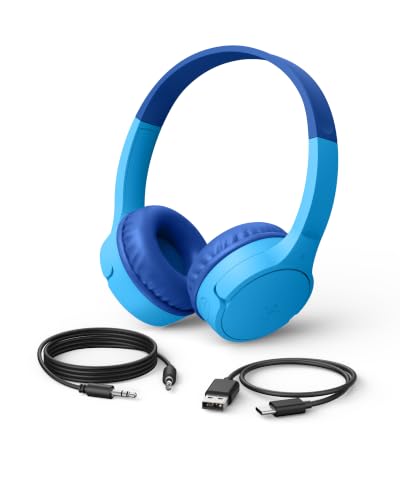
Belkin SoundForm Mini — Best wireless-or-wired flexibility
Belkin’s SoundForm Mini is the children’s pick for households whose school day refuses to sit still. It works wirelessly, with 30 hours of playtime between charges, and it works wired through a 3.5mm AUX connection when the battery or the situation demands — the dual arrangement this guide insists on for any wireless school headset. The volume limit is 85dB, the conservative figure, applied whichever way it is connected.
The brand matters here in a specific way. Belkin builds accessories for schools as a line of business, and the SoundForm Mini’s listing names school, classroom and travel alongside the usual tablet and laptop uses. The built-in microphone covers class participation, charging is by USB-C — the same cable the family tablet probably uses — and the whole design assumes institutional realities: shared spaces, long days, and children who treat equipment as scenery.
Wireless freedom for a child is a genuine good when it is supervised freedom. A learner who can stand, stretch and act out a language lesson without unplugging from a laptop participates differently, and 30 hours means the charging rhythm is weekly rather than nightly — a Sunday-evening charge covers the school week with room to spare. The wired fallback then removes the only catastrophic failure mode, which is why this pick, alone among wireless children’s headsets we considered, survived the school-morning test described earlier.
The cautions are managerial rather than technical. A wireless headset must be charged by somebody, and in most homes that somebody is a parent building a Sunday routine. Bluetooth pairing with a new school device mid-year is a small ceremony an adult should perform, not a child at 8:55 in the morning. Households happy to own those two rituals get the most flexible children’s headset in this guide; households that know they will not, should take a wired pick and never think about it again.
- Connection: Wireless and wired
- Playtime: 30 hours
- Volume limit: 85dB
- Microphone: Built-in
- Ports: USB-C charging, 3.5mm AUX
- Use: School, classroom, travel, laptop, tablet
Strengths
- Wireless freedom with a wired fallback for flat-battery mornings.
- 85dB limit in both connection modes.
- 30-hour playtime makes charging a weekly habit.
Trade-offs
- Somebody must own the charging routine.
- Pairing a new device is an adult’s job, not a child’s.
- More to manage than any wired pick here.
Best for: active learners whose lessons involve moving, in homes happy to charge weekly. Not suited for: families who want a headset with zero upkeep of any kind.

Amazon Basics On Ear Wired Computer Headset — Best for older students on PCs
The Amazon Basics headset marks the guide’s border crossing into student territory. The volume limits and child sizing fall away; what replaces them is a proper computer headset pattern — an adjustable microphone on a boom, an in-line control offering either a 3.5mm connection or USB-A, a foldable frame, and a small/medium fit in plain black. It is a headset for a learner whose classes are seminars and whose teacher is one tile among twenty.
The dual connection is its defining practicality. A laptop with a healthy jack takes the 3.5mm plug; a laptop whose jack crackles — a common condition in machines old enough to be handed down to students — takes USB-A and bypasses the socket entirely. That flexibility extends the working life of exactly the hardware older students actually own, which is a more useful feature than any audio flourish at this level.
The adjustable boom deserves its sentence, because it is the feature younger picks simplify away. A student presenting in a seminar, recording a language assignment or interviewing for a school project needs a microphone that can be positioned precisely and moved aside when not in use, and the boom provides both. The on-ear fit runs cooler than over-ear alternatives across a day of back-to-back classes, at the usual cost of admitting more room noise.
Who should skip it: anyone buying for a young child, for whom the absence of a volume limit is disqualifying and the fit is wrong. Who should take it seriously: the secondary-school or college student whose laptop is the classroom, and the parent equipping a home learning desk for a teenager. It is the honest, unglamorous tool for that job, and its foldable frame even survives the bag between home and library.
- Connection: 3.5mm or USB-A via in-line control
- Microphone: Adjustable boom
- Wearing style: On-ear, foldable
- Size: Small/Medium
- Finish: Black
- Audience: Older students and computer users
Strengths
- Two connection routes rescue ageing laptop audio.
- Adjustable boom positions the voice properly for seminars.
- Foldable frame travels between home and library.
Trade-offs
- No volume limit, so it is wrong for young children.
- On-ear fit lets the room compete with the lesson.
- Plain styling will not excite a fashion-conscious teen.
Best for: older students whose school day runs through a laptop. Not suited for: young children who still need a hardware volume cap.

AOC USB Headset with Microphone for PC — Best microphone for teens and tutors
The AOC closes the guide at the point where school shades into work. It is a wired USB headset for PC with a noise cancelling microphone, listed for home office, online class, Teams and Skype — the exact platform list of an older student’s week and a young tutor’s working day. If the Amazon Basics pick is the all-rounder, the AOC is the specialist: everything in its design serves the outgoing voice.
Noise cancelling at the microphone is the feature that matters when the classroom is a kitchen. A student answering a teacher while a household cooks, talks and runs a television behind them is broadcasting all of it through a basic mic; the AOC’s cancelling design concentrates on the voice at the boom and pushes the room down. For a teenager whose participation is assessed, or a student-tutor earning money teaching younger children online, that clarity is not polish — it is the product.
USB connection keeps the arrangement simple and digital: one plug, no jack lottery, and consistent behaviour across the PCs a student is likely to meet. The wired link also means the headset is ready at every login, which suits the back-to-back call rhythm of revision sessions, group projects and tutoring slots stacked through an evening.
Its audience boundary should be respected in both directions. It offers a young child nothing — no volume limit, no child sizing, no bright finish to make it theirs — and it offers a commuter nothing either, being a desk headset by design. For the older learner or young teacher whose reputation travels through a microphone several hours a day, it is the most purposeful pick in this guide, and the one most likely to be kept after graduation into work. Procurement officers for entire schools should look elsewhere; this guide never promised them anything.
- Connection: Wired USB
- Microphone: Noise cancelling
- Platforms: Online class, Teams, Skype, home office
- Wearing style: Over-ear headset design
- Finish: Black
- Audience: Older students, tutors, home workers
Strengths
- Noise cancelling mic keeps a student’s voice clear in a busy home.
- USB plug-and-play across school and work platforms.
- Always ready, with no battery in the equation.
Trade-offs
- No volume limiting or child sizing of any kind.
- Desk-bound wired design with no travel ambitions.
- Overkill for a young child’s simple lesson listening.
Best for: teenagers and student-tutors whose voice on calls is assessed or paid for. Not suited for: young children, who need the capped picks at the top of this guide.
How Do the Six School Headsets Compare?
| Headset | Connection | Volume limit | Microphone | Best wearer |
|---|---|---|---|---|
| Kids Headphones with Cord | Wired 3.5mm | 85/94dB switchable | Built-in | Young learners |
| Nabevi Kids Headphones | Wired 3.5mm | 85/94dB | Built-in | Siblings sharing a device |
| Bywulanda USB-C Kids | USB Type-C | 94dB | Built-in | USB-C Chromebook users |
| Belkin SoundForm Mini | Wireless and wired | 85dB | Built-in | Active learners |
| Amazon Basics Computer Headset | 3.5mm or USB-A | None | Adjustable boom | Older students |
| AOC USB Headset | USB | None | Noise cancelling | Teens and tutors |
How Do You Set Up a School Headset Routine That Survives the Term?
The headset is the easy part; the routine is the product. Give the headset a home — a hook or a specific drawer beside the learning desk — because a headset with a home is findable at 8:55 in the morning and a headset without one is a daily search. Label it with the child’s name if siblings are involved, even when the headsets are identical, because ownership ends arguments that specifications cannot.
Run a two-minute check on the first school morning of each month: join a test call, speak, listen back, and confirm the microphone has survived another month of bag travel. Cables fail gradually, crackling before they die, and a monthly check finds the failure on a Sunday rather than during an assessed lesson. For the Belkin, fold the charge into the same rhythm — the monthly check and the Sunday charge are the entire maintenance burden of this category when they are done on schedule.
Finally, set the volume together, once, at the start of term: the lesson audible at a comfortable level in the actual learning room, the cap confirmed on the children’s picks, and the agreement stated that the dial is an adult’s setting for younger learners. A routine built in September is invisible by October, which is what success looks like in school equipment.
What Should You Do When the School Issues Its Own Device List?
Read it for ports and platforms before reading it for brands. Schools occasionally name specific headset models, and when they do, follow the list — compatibility with their chosen learning platform and their IT support matters more than any guide’s ranking. More often the list specifies only a connection: a jack, a USB port, a Bluetooth requirement. That specification, plus your child’s age, is enough to choose from this guide in about a minute.
If the school’s platform is named — the AOC’s listing, for instance, speaks directly to Teams and Skype environments — prefer the pick that names your platform, because microphone behaviour and mute controls are tested against those applications by the makers who bother to list them. And if the school runs a bring-your-own-device programme with a mixed fleet, the Amazon Basics’ two-connection design is the hedge against the unknown port on next term’s replacement machine.
Keep the receipt and the packaging until the headset has survived a full school week on the actual device. Port surprises and fit rejections declare themselves within five days, and a headset returned in week one is a lesson; the same headset discovered wrong in week six is an expense.
How Do You Help a Child Be Heard Clearly in an Online Class?
Teachers consistently report the same frustration: the child who knows the answer but cannot be understood giving it. The causes are rarely the child’s voice. A laptop’s built-in microphone sits a metre from the speaker, off-axis, competing with the room; any headset microphone in this guide improves on it by geometry alone, because a mic near the mouth hears the voice louder than everything else in the room combined.
Beyond the hardware, three habits complete the fix. Position the microphone where the maker intended — near the mouth, not resting on a cheek or pointing at a collar. Teach the unmute as part of answering, the way raising a hand is taught in a physical classroom, so the gesture stops costing the child the first word of every answer. And run one practice call at home before term starts, with the child speaking at normal volume while a parent listens on another device in the next room. What the parent hears is what the teacher hears, and five minutes of adjustment at home saves a term of “speak up” in class.
For older students the same logic scales up: the Amazon Basics’ adjustable boom and the AOC’s noise cancelling microphone are presentation tools, and a student who sounds clear in a seminar is perceived as prepared before the content of the answer is even weighed. Voice quality is unfair that way, in school as in work, which is precisely why it is worth a modest headset.
How Should a School Headset Fit a Head That Is Still Growing?
Children’s heads change size faster than headsets wear out, so fit is a moving target and adjustability is the feature that tracks it. A school headset should adjust across a generous range without tools, hold the setting it is given through a day of being taken off and put on, and distribute its weight so that no single point — the crown, the ears — carries the whole lesson. Over-ear cups help the youngest wearers by giving the headset a stable home; on-ear designs like the Bywulanda run cooler and fold smaller, and suit children who fidget with anything that encloses them.
The fit test that matters is the last lesson of the day, not the first. A headset that is charming at nine in the morning and abandoned by two in the afternoon has failed at its job regardless of its specifications, because a child who will not wear the headset gets none of its protection or clarity. Watch for the tells: the headset pushed up onto the forehead between answers, the volume creeping up to compensate for cups displaced by movement, the sudden preference for laptop speakers. Each is a fit problem wearing a disguise.
Glasses wearers need a specific check, because frames and earcups compete for the same real estate. Softer cushions and lighter clamp — the children’s picks here are built light for a reason — reduce the pressure that turns a school day into a headache. If a child wears glasses and headphones both, trial the headset over a full afternoon at home before term, not over the ten polite minutes a shop allows.
What Breaks First on a School Headset, and How Do You Prevent It?
The cable, almost always the cable — at the plug, where it bends every time the headset is pulled from a bag, and at the cup, where it is tugged every time a child stands up while still wearing it. The prevention is embarrassingly simple and almost never taught: unplug by gripping the plug, coil the cord loosely in the same hand span every time, and never let the headset be lifted by its cable. A child taught the unplugging grip in September owns a working headset in June.
Second on the casualty list is the microphone, on designs where it flexes. Booms that are bent rather than rotated, and inline mics that swing and knock against desks, accumulate damage invisibly until a crackle appears in class. The monthly test call described earlier exists to catch exactly this: crackle is a warning with weeks of grace inside it, if somebody is listening for it.
Third is the headband’s adjustment, loosened by the daily ritual of a child pulling the cups apart wide to put the headset on. Teach the slide-from-the-headband method — cups placed on ears, band settled after — and the mechanism survives. None of this care is burdensome; it is three small habits, and together they are the difference between a headset bought once and a headset bought every term.
How Do You Keep a School Headset Clean Enough to Share?
Even a headset owned by one child accumulates a school term’s worth of life: cushion dust, snack residue on the microphone, the general archaeology of a school bag. A weekly wipe of the cushions and band with a barely damp cloth, left to dry fully before the next use, keeps the materials from degrading and the headset pleasant to wear. Foam cushions that have gone flat or cracked are telling you the headset’s comfort is spent even if its speakers are fine — that is a replace-the-headset signal at this level, not a repair project.
Sharing raises the standard. Siblings swapping a headset between lessons should each have their own where the budget allows — the Nabevi arrangement, where a second headset plugs into the first, works best when each child wears their own — and a shared headset should be wiped between wearers as a matter of household routine rather than occasional conscience. Head lice scares and ear infections travel through schools every year; a thirty-second wipe is cheap insurance and a good habit to hand a child along with the headset.
Storage completes the hygiene picture. A headset that lives on a hook dries out and stays clean; a headset that lives at the bottom of a bag marinates in crumbs and damp sports kit. The hook is not tidiness for its own sake — it is the difference between a headset a child reaches for willingly and one they have quietly started avoiding.
How Does a School Headset Change for Secondary School and Sixth Form?
Somewhere around the early teens, the buying logic inverts. The volume cap that was the headline feature becomes a feature the wearer resents and routes around, the child sizing becomes a genuine misfit, and the properties that matter migrate to the other end of this guide: microphone quality for seminars and recorded assignments, comfort across a day that now includes evening revision calls, and a design a teenager will consent to be seen wearing on a video grid of their peers.
The Amazon Basics and AOC picks exist for that side of the border, and the honest advice is to cross it when the learner does rather than a year early or a year late. A useful signal: when the school day starts including assessed presentations, group project calls and language orals, the microphone has become an academic instrument, and the headset budget should follow the marks. The children’s picks can then retire to travel and tablet duty, where their caps and colours remain assets instead of embarrassments.
College and university learners complete the migration. Their headset is a work tool that happens to attend lectures, judged exactly as the AOC is judged here — voice clarity, platform behaviour, all-day readiness — and the school-specific criteria of this guide fall away entirely. Families buying for a student leaving home should buy the AOC pattern without nostalgia: the next four years of calls will not miss the volume cap, and the microphone will be thanked weekly.
What Should You Spend the First School Week Checking?
Treat the first week as the headset’s probation, because it is the last week in which every problem is cheap. Check the fit at the end of a real school day, not the start. Check the microphone on the school’s actual platform, in an actual lesson call, rather than in a friendly test at the kitchen table. Check the volume setting in the noisiest room the headset will meet, and confirm the cap is set where you intended on the children’s picks.
Check the logistics too: where the headset sleeps, who charges the Belkin if you chose it, whether the cable reaches from the device to the chair without crossing a walkway, and whether the whole arrangement survives the morning routine at its most rushed rather than its most rehearsed. School equipment fails on ordinary Tuesdays, under ordinary time pressure, and a setup proven only on a calm Sunday has not been proven at all.
Anything that fails in week one points sideways within this guide rather than out of it: a fit failure moves between the over-ear and on-ear children’s picks, a port failure moves between the wired and USB-C designs, a voice failure moves an older student up to the AOC. Keep the packaging until Friday. After Friday, with the checks passed, the headset stops being a purchase and becomes part of the furniture of the school day — which is where every pick here is trying to get to.
How Do You Handle the Headset on Travel and School Trips?
School headsets travel more than their name suggests: the same headset that attends lessons attends the long car journey, the flight, the grandparent’s house where homework still happens. Wired picks travel best, being immune to charging and pairing, and the foldable designs — Bywulanda and Amazon Basics — earn their hinges on every trip. Pack the headset in a hand-luggage pocket rather than the hold of a bag, because the cable that survives a school term can still be crushed by a suitcase lid.
Travel also stress-tests the volume discipline. A car or cabin is the noisiest classroom a child meets, and it is where the 94dB setting on the switchable picks earns its existence under adult control — set it for the journey, set it back at the destination. The Belkin’s 30-hour battery covers a holiday’s lessons and films without hunting for a charger in an unfamiliar house, which is the practical reason its playtime figure matters beyond the school week.
One travel habit protects every pick in this guide: the headset goes in the same pocket of the same bag every time, so its absence is noticed at packing rather than at the motorway services. School equipment survives on rituals, and travel is simply the school routine with worse lighting.
What Mistakes Do Parents Make When Buying a School Headset?
The classic mistake is buying the child’s gaming headset’s twin — louder, flashier, unlimited — when the school brief demanded almost the opposite properties. The second is ignoring the issued device’s ports and discovering the missing jack on the first morning. The third is buying for the age the child will be in three years rather than the age they are now: a seven-year-old in a teen’s unlimited headset has the wrong tool today in exchange for the right tool in Year 5, by which time the cable will have failed anyway.
Fourth, parents buy the wireless headset and skip the routine, then blame the technology for the flat battery in week two. Fifth, they buy in bulk for siblings without checking whether sharing is actually the household pattern — the Nabevi’s SharePort is brilliant for one tablet and pointless for two. Finally, nobody tests the microphone. A headset can be comfortable, capped and compatible, and still fail the school day on the one feature the teacher experiences directly. Test the voice before term, always.
Final Recommendation
For a young learner on a conventional laptop or tablet, take the lead wired pick and set its limit to 85dB: it is the simplest correct answer in this guide, and school mornings reward simple correct answers above all else. If two children share one device, the Nabevi’s SharePort turns the same purchase into a peace treaty. If the school’s Chromebook has no jack, the Bywulanda is the children’s pick that respects the port reality.
For movement, take the Belkin and own the Sunday charge. For the older student, skip the children’s shelf entirely: the Amazon Basics for flexibility across ageing laptops, the AOC when the voice on calls carries marks or money. Buy one headset, for one learner, matched to one device and one age — a school headset chosen that precisely disappears into the school day, which is the highest praise this category ever earns.
And keep the perspective the category deserves: this is a modest purchase that touches every school day, which makes it one of the highest-leverage pieces of equipment in the house. The right cap, the right plug and a microphone a teacher can hear will do more for a child’s online school experience than any peripheral costing five times as much — provided it is still working, still fitting and still findable in June, which is what the routines in this guide are for.
Frequently Asked Questions
Is 85dB or 94dB the right volume limit for my child?
Treat 85dB as the default for quiet home learning, which is why the switchable picks and the Belkin centre on it. The 94dB setting exists for noisier supervised environments where a child would otherwise strain to hear. Whichever cap you choose, set the listening volume comfortably below it rather than parked against the ceiling, and keep lesson breaks in the day.
Why did this guide leave out the big classroom multi-packs?
Because they answer a different buyer’s questions. Multi-packs serve schools equipping a room — spares, storage and bulk pricing — while this guide serves a parent buying one headset for one child. A pack headset divided among a family usually means no volume information, no individual fit, and no single learner it was chosen for.
Can a school headset double as a gaming headset?
The children’s picks handle game audio on tablets and consoles happily, and their microphones serve game chat as readily as class answers. The traffic is one-way, though: a volume-limited school headset makes a fine casual gaming headset, while an unlimited gaming headset makes a poor school one for a young child.
What if my child’s school device has no headphone jack?
Choose by the port it does have. USB-C devices take the Bywulanda on the children’s side or the Belkin’s USB-C-charged wireless route with its AUX cable where a jack exists elsewhere. USB-A laptops take the Amazon Basics or the AOC. An adapter is the last resort, because adapters and school bags are natural enemies.
How long should a school headset last?
A wired children’s pick should survive a school year of bag travel comfortably and often two, with the cable as the likeliest first failure. Build the monthly microphone check into the routine and you will see a failure coming in time to replace the headset on a weekend rather than mid-lesson. When a child outgrows a working headset — the fit fails before the electronics do — pass it down to a younger sibling rather than binning it; the volume cap that protected the first wearer protects the second identically, and a headset with a second life is the best value in this entire guide.
Do teachers really notice microphone quality?
Yes, immediately and mostly unconsciously. A child whose voice arrives clearly gets called on, understood and marked as engaged; a child arriving through a distant laptop microphone gets asked to repeat, and learns to volunteer less. Every pick in this guide improves the outgoing voice by placing a microphone near the mouth.
Related Guides
For the desk-phone side of family working life, best wireless telephone headsets covers the DECT headsets built for long calls at home and in offices. Play takes over in best gaming headsets ps5, where the picks trade volume caps for surround sound and console features. And for learners who stream or record as well as study, best headsets for gaming and streaming follows the microphones up to broadcast quality.
Related guide: Best Corded Headsets for Online Meetings
Related guide: Best Headsets for Voice Acting



[…] designs in best open ear gaming headsets. And when the audience is a class rather than a channel, best headsets for online school covers the volume-limited picks for […]