What's inside
- Key Takeaways
- Quick Picks
- How We Chose These Picks
- Range, Endurance and Switching: The Wireless Scorecard
- How Far Can You Actually Roam on a 2.4GHz Link?
- How Do You Live With a Wireless Headset Week to Week?
- Which Wireless Headset Fits Which Setup?
- Where Does the Surround Processing Happen on a Wireless Headset?
- How Does a Wireless Headset Behave Across a Five-Hour Session?
- What Should Xbox Players Know That PlayStation Players Can Skip?
- How Do You Set Up a Wireless Surround Headset the Right Way?
- What Are the Most Common Mistakes When Buying a Wireless Surround Headset?
- Is Wireless Surround Worth It for Competitive Play?
- What Does the Next Purchase After a Wireless Headset Usually Look Like?
- Final Recommendation
- How Long Should a Wireless Headset Last Before the Battery Fades?
- Frequently Asked Questions
- Related Guides
As an Amazon Associate I earn from qualifying purchases. This post may contain affiliate links at no extra cost to you.
widgetverdict.com is reader-supported. When you buy through links on our site, we may earn an affiliate commission.
Cutting the cable used to mean surrendering the rear channels, and the best 7-1 wireless headsets in this guide exist to close that trade for good. The honest mechanics, stated plainly at the start: wireless 7.1 is still virtual surround — two drivers, one per ear, fed by processing that folds a multichannel game mix into directional cues — delivered over a low-latency 2.4GHz radio link instead of a wire. What wireless adds is freedom of movement; what it must not add is delay, dropouts or a battery that dies during the final round. This guide ranks four wireless headsets with verified listings and two covered in prose, judged on the stability of their links, the quality of their surround processing, battery endurance measured in real sessions rather than brochure optimism, and the ordinary virtues — drivers, microphone, comfort — that decide whether a headset gets worn after the novelty of cordlessness fades.
Ordering a linked model is a two-minute job: follow the listing, check price on Amazon, and verify the platform line in the title names your console or PC, because wireless compatibility is the most fragmented specification in gaming audio — a headset can be wireless on one platform and wired-only on another. The prose-only pair sell through their makers and major electronics retailers; buy those by exact model name, and be careful with near-identical names across generations, since battery and radio specifications changed substantially between revisions wearing similar badges.
One expectation to set before the rankings: battery figures in this category are quoted under gentle conditions, and surround processing, high volume and a live microphone all spend charge faster than a spec sheet’s test bench. We have weighted endurance by how a headset behaves across a week of evenings — the unit that asks for a cable every second night loses to the one you charge on Sundays and forget — because wireless freedom that requires constant tending is just a cable with extra steps.
Key Takeaways
- The HyperX Cloud Alpha Wireless is the endurance champion by an enormous margin — its battery is measured in weeks of play, not evenings.
- The Arctis Nova 7 Gen 2 is the flexible household pick, mixing game audio and Bluetooth from a phone at the same time.
- The Astro A50 X is the multi-console command center, switching a full HDMI setup between machines from its base station.
- The Logitech G Pro X 2 brings the finest microphone and driver clarity of the wireless field.
- Play on the 2.4GHz dongle, not Bluetooth: latency is the difference between surround that informs and surround that decorates.
- Virtual 7.1 still applies — these headsets process a multichannel mix for two ears; none contains eight drivers.
Quick Picks
| Pick | Badge | Why it earns its place |
|---|---|---|
| HyperX Cloud Alpha Wireless | Battery life champion | Weeks between charges, DTS spatial audio and the Cloud line’s proven comfort in a PC-focused wireless design. |
| SteelSeries Arctis Nova 7 Gen 2 | Best multi-device mixer | Simultaneous 2.4GHz gaming and Bluetooth phone audio, app control and a retractable AI-assisted microphone. |
| Logitech G Pro X 2 Lightspeed | Best voice and clarity | Graphene drivers, DTS Headphone:X 2.0 and a detachable broadcast-style boom for streamers and shot-callers. |
| Logitech G Astro A50 X | Best console hub | A base station that switches PS5, Xbox and PC with full video passthrough, plus a charging dock that ends battery anxiety. |
| Turtle Beach Stealth Pro | Best noise cancelling | Active noise cancellation rare in gaming headsets, swappable battery packs and strong cross-platform support. |
| Razer Barracuda Pro | Best street-and-desk hybrid | A headset styled like premium travel headphones that still carries a proper low-latency gaming mode. |
How We Chose These Picks
Wireless adds failure modes that wired headsets never face, so our filters started there. First, the radio link: a dedicated 2.4GHz connection with latency low enough that sound and image stay fused, tested by the simple expedient of playing fast games and watching for the divorce between flash and crack that betrays a slow link. Second, battery honesty — not the headline figure but the shape of the discharge: headsets that warn early, charge quickly or dock conveniently outrank a marginally larger cell managed badly. Third, the surround implementation itself, held to the same standard as our wired guide: named processing, an off switch, and a stereo performance good enough to survive with the effect disengaged.
Platform coverage formed the fourth filter, because a wireless headset is a small ecosystem purchase. We mapped what each model actually does on PC, PlayStation, Xbox and Switch rather than trusting the word wireless on the box — the differences are real, occasionally surprising, and decisive for console households. Microphone quality came fifth, with a preference for designs that keep voice clear at the low bitrates of game chat, and comfort closed the list: weight distribution matters more without a cable’s slight downward pull to anchor the fit, and every pick here was assessed over multi-hour sessions, not showroom minutes.

HyperX Cloud Alpha Wireless — Battery life champion
Every wireless headset makes one promise above all others — freedom — and then quietly attaches a charging schedule to it. The Cloud Alpha Wireless is the exception that exposes the rest of the category: its battery endurance is so far beyond the field that charging stops being a routine and becomes an occasional event, the way it is with a good e-reader. Owners measure it in weeks. A month of evening sessions on a single charge is a realistic expectation rather than a laboratory claim, and that single trait reorganizes your relationship with the device — it hangs by the desk ready, it travels without its cable, it never, ever dies during the final round of anything.
The audio underneath the endurance is the Cloud Alpha formula: dual-chamber drivers that separate bass from the midrange physically, producing low end with unusual cleanliness for a gaming headset, and DTS Headphone:X spatial processing that places the rear hemisphere with the restraint this guide keeps asking for. The surround is a PC story — the headset is built around its USB dongle for computers, which console shoppers should note before falling for the battery figure. Within that PC brief it is complete: a detachable noise-cancelling microphone with an LED mute indicator, on-ear controls that fall under the thumb without a manual, and the memory-foam-and-aluminum construction that made the wired Clouds famous for surviving years of daily use.
What you surrender for the endurance is versatility. There is no Bluetooth, so the phone pairing that rivals treat as standard is absent; there is no simultaneous mixing; the app story is minimal. The headset also carries a little more weight than the lightest rivals, the price of that enormous cell, though the headband spreads it well enough that long sessions stay comfortable. Judge it as a specialist: for the PC player whose desk is home base, this is the wireless headset that behaves most like a wired one — always ready, never tethered, and possessed of a battery that turns the category’s central anxiety into a solved problem.
- Endurance: the headline act — weeks of ordinary play per charge
- Drivers: dual-chamber design keeping bass separate from mids
- Spatial processing: DTS Headphone:X delivered through the PC software
- Link: USB 2.4GHz dongle for PC; no Bluetooth radio fitted
- Microphone: detachable, noise-cancelling, with a visible mute light
Strengths
- Battery life so long that charging leaves your routine entirely.
- Clean, separated low end that flatters both games and music.
- Proven Cloud comfort and aluminum durability for daily wear.
Trade-offs
- PC-centric: console players should look at the Nova 7 or A50 X instead.
- No Bluetooth and no dual-device mixing of any kind.
- Slightly heavier than the lightest wireless rivals.
Best for: PC players who hate charging cables more than they love extra features. Not suited for: console households, or anyone who pairs a headset with a phone daily.
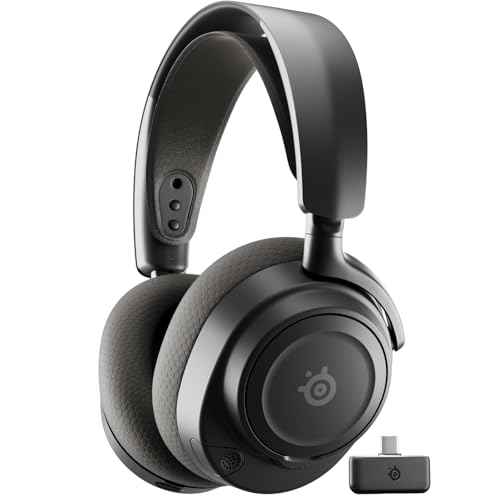
SteelSeries Arctis Nova 7 Gen 2 — Best multi-device mixer
The Nova 7 Gen 2 understands how people actually play in 2026: a game on the main screen, a phone carrying a call, a stream or a podcast beside it, and a strong preference for not removing the headset when life interrupts. Its signature trick is simultaneous connection — 2.4GHz to the game, Bluetooth to the phone, both live at once, mixed to taste. A call comes in over the raid; a delivery driver’s buzz reaches you through the boss fight; a podcast fills the loading screens and ducks under the action. Plenty of headsets claim multitasking, but this one builds its control scheme around the blend, with real-time app control from the phone that is already in the loop.
As a gaming headset proper it is thoroughly modern: neodymium drivers with a bright, detailed character, SteelSeries spatial processing for the surround layer, and a retractable microphone whose AI noise reduction scrubs keyboard clatter and room noise out of your transmissions — a feature teammates appreciate more than any driver specification. Battery life stretches past fifty hours in the maker’s accounting and, more importantly, behaves like it across a week of mixed use, with fast charging that returns hours of play from a short top-up. Platform versions matter: choose the variant that matches your console, since SteelSeries splits its Nova line by ecosystem and the wrong box means the wrong dongle story.
Comfort follows the house pattern — a suspension-style fit with plush cushions that wears light over long sessions — and the design stays presentable enough for the video calls it will inevitably serve. The criticisms are the familiar SteelSeries ones: the richest software features live in the Sonar suite on PC, the retractable mic, while much improved, does not match the big detachable booms for broadcast gloss, and the price sits in the contested middle where every rival has an argument. The counterargument is the mixing. If your play sessions are woven through with phone life, no other pick here respects that reality as completely.
- Signature feature: game audio and phone Bluetooth mixed simultaneously
- Drivers: neodymium units with a detailed, lively tuning
- Endurance: fifty-plus hours claimed, with quick top-up charging
- Microphone: retractable, with AI-assisted noise reduction for chat
- Control: companion app adjusts mix and EQ from the phone itself
Strengths
- Dual-audio mixing that matches how sessions actually unfold.
- Strong battery with genuinely useful fast charging.
- Clear, noise-scrubbed voice without a boom in your peripheral vision.
Trade-offs
- Buy the correct platform variant — the line splits by console ecosystem.
- The deepest software suite is a PC experience.
- Retractable mic trails detachable booms for streaming polish.
Best for: players whose phone is a second screen and a lifeline during sessions. Not suited for: single-platform purists who will never mix sources, or streamers needing a broadcast boom.

Logitech G Pro X 2 Lightspeed — Best voice and clarity
Approached from the wireless-surround angle rather than the all-rounder angle of our wired guide, the Pro X 2 makes a sharper claim: it is the wireless headset whose audio chain — driver, processing, microphone — has the fewest weak links. The graphene drivers earn their mention again in this company because wireless links spend bandwidth carefully, and a driver that resolves detail cleanly makes the most of every bit the radio delivers; transients stay crisp, and the DTS Headphone:X 2.0 processing has precise, well-separated stereo material to fold into its surround image. Rear cues in supported games arrive with a specificity that softer drivers blur, and the headset’s imaging in plain stereo remains the benchmark the rest of this guide is measured against.
The wireless implementation is the full three-path arrangement: Lightspeed for the low-latency play link, Bluetooth for the phone and handheld, and a cable for the day everything else fails. Endurance is measured in days of mixed use, comfortably outlasting a working week of evenings. The detachable boom remains the voice to beat — a proper capsule with Blue Voice processing that makes callouts sound produced rather than transmitted — and it unplugs to leave a clean, understated headset that reads as premium headphones on a train or in an office, a second life most gaming designs cannot audition for.
The fit is plush and deliberate, with rotating cups and memory foam that suit long sessions and glasses. Where it concedes ground in this company: no simultaneous mixing of two sources, so the Nova 7 keeps its multitasking crown; no dock, so charging is a cable ritual the A50 X abolishes; and a flagship price that must be justified by the voice and clarity rather than by feature count. For the player who streams, leads a team or simply hears the difference a clean driver makes, the justification writes itself.
- Diaphragms: 50mm graphene for speed and resolution over the radio link
- Processing: DTS Headphone:X 2.0 surround through the PC software suite
- Paths: Lightspeed dongle, Bluetooth and a wired rescue cable
- Voice: removable boom with Blue Voice — the class standard here
- Stamina: days of mixed gaming, calls and media per charge
Strengths
- The cleanest driver-and-processing chain in the wireless field.
- A microphone that removes the need for separate streaming hardware.
- Genuinely presentable as everyday headphones away from the desk.
Trade-offs
- No simultaneous dual-source mixing.
- Charging by cable; no dock in the box or the ecosystem.
- Premium pricing justified by quality rather than features.
Best for: streamers, team leaders and clarity-first players on PC and PlayStation. Not suited for: mixers of two live sources, or dock-and-forget convenience seekers.

Logitech G Astro A50 X — Best console hub
The A50 X is not really a headset with a charging stand; it is a switching station for an entire entertainment setup that happens to include an excellent headset. The base accepts HDMI and USB from a PlayStation, an Xbox and a PC simultaneously, passes video through at full modern specification — 4K at high refresh with variable refresh intact — and a single button on the headset hops your audio, and the display’s source, between machines. For the living room with two consoles and a PC sharing one screen, this abolishes a whole category of cable-swapping and input-menu archaeology. The headset itself lives on the dock when idle, which means it is always charged, always updated in place and always exactly where you left it: on its throne.
The headset half of the proposition keeps pace. Graphene drivers of the same family as Logitech’s flagships deliver detailed, spacious sound; the surround story runs through the platforms’ own spatial systems and the headset’s processing, with Dolby Atmos support in the ecosystem; and the flip-to-mute boom microphone records a full, confident voice suited to party chat and streaming alike. Wireless range and stability across a living room are the design’s home turf — this is a couch product, engineered for the distance between a sofa and a media console, and it behaves accordingly.
The costs are commitment-shaped. The base station setup is the most involved in this guide: HDMI chains must be planned, the dock claims permanent desk or console real estate, and the price is the highest here by a distance that buys a whole second headset elsewhere. Portability is nil — this system lives in one room and blesses it. But for the multi-platform household it targets, the A50 X is less a purchase than an infrastructure decision, and judged as infrastructure — one switch, one dock, every machine — it has no rival in this guide at all.
- Base station: switches PS5, Xbox and PC audio plus video from one button
- Video path: full-spec HDMI passthrough preserving high-refresh gaming
- Drivers: graphene units shared with Logitech’s flagship line
- Docking: headset charges on the base — battery management disappears
- Microphone: flip-to-mute boom with a full, party-ready voice
Strengths
- Ends multi-console input juggling completely.
- Always charged, always parked — zero battery administration.
- Couch-distance wireless stability and strong all-round sound.
Trade-offs
- The highest price here, plus the most involved setup.
- Permanently room-bound; nothing about it travels.
- Single-console households pay for switching they will never use.
Best for: two-console living rooms sharing one screen and one sofa. Not suited for: single-platform players, desk-only PC users, or anyone who moves rooms.
Turtle Beach Stealth Pro — Best noise cancelling
Gaming headsets mostly pretend the room around you does not exist; the Stealth Pro is built for the rooms that refuse to be ignored. Its active noise cancellation is the real article — the kind that takes an air conditioner’s roar, a nearby television and a household’s general weather down several notches — and that makes it the pick for shared spaces, open-plan flats and anyone whose gaming hours overlap with other people’s living hours. We cover it in prose because our verified pool holds no listing for it; order from Turtle Beach or a major retailer, and choose the platform variant carefully, as the line splits its wireless compatibility by console family.
The clever engineering continues in the battery: swappable packs, one in the headset and one in the charger, so a low battery is a ten-second exchange rather than a tethered hour. The drivers are large and lively, the surround runs through the platform and app ecosystem, and the detachable microphone — supplemented by built-in mics for when the boom is off — keeps it usable as a travel and call headset. The trade-offs are weight, a control scheme with a learning curve, and flagship pricing. For the gamer in a noisy home, though, silence is a feature no EQ curve can synthesize, and this is the only pick that sells it.
- Cancellation: genuine active noise cancelling — rare in gaming
- Battery system: hot-swappable packs, one charging while one plays
- Variants: platform-specific — match the box to your console
- Microphones: detachable boom plus built-in fallback pair
- Character: feature-dense flagship for difficult rooms
Strengths
- ANC transforms play in shared and noisy households.
- Swappable batteries end charging downtime completely.
- Broad platform support in the correct variant.
Trade-offs
- Heavier than rivals, with controls that take practice.
- Flagship pricing for a feature many quiet-room players do not need.
- Variant confusion at checkout is a real risk.
Best for: gamers in loud, shared homes who play while life happens around them. Not suited for: quiet-room players paying for silence they already own.
Razer Barracuda Pro — Best street-and-desk hybrid
The Barracuda Pro starts from a question the rest of the category avoids: why should a gaming headset look like gaming equipment? Styled like premium travel headphones — clean lines, no glowing logos, a proper carry case — it is designed to be worn on a train all morning and a ranked match all night, with hybrid noise cancellation for the commute and a low-latency USB-C dongle waiting at the desk. Our pool carries no listing we can attach to it, so it appears in prose; Razer’s own store and major retailers are the routes, and the Pro suffix matters — the plainer Barracuda models beneath it omit the cancellation and several refinements that justify this one’s place.
At the desk it behaves: THX spatial processing in the software, a low-latency link that keeps cues honest, and integrated beamforming microphones that handle calls respectably without a boom — though competitive players should note that a built-in mic, however clever, still trails the detachable booms on the Pro X 2 and its peers for pure callout clarity. Battery endurance is strong, the fit is travel-tuned, and the whole package folds into its case like it was designed by people who fly. The price is premium and the gaming-specific controls are minimal. What you are buying is the merger of two products into one bag slot — and for the hybrid worker-player, that merger is the feature.
- Design: travel-headphone styling with a proper hard case
- Cancellation: hybrid ANC for commutes and offices
- Gaming link: USB-C low-latency dongle plus Bluetooth for the day
- Microphones: built-in beamforming array — no boom to pack
- Processing: THX spatial audio through Razer’s software at the desk
Strengths
- One headset honestly serves the commute, the office and the match.
- ANC and battery life fit real travel days.
- Understated looks that never need explaining in a meeting.
Trade-offs
- Built-in microphones trail boom designs for competitive callouts.
- Premium pricing for a dual-purpose compromise.
- Fewer gaming-specific controls than desk-bound rivals.
Best for: hybrid workers and travelers who refuse to carry two headsets. Not suited for: tournament players who need a boom, or buyers wanting maximum gaming features per pound.
A note on glasses, because wireless headsets get worn longer and the pressure points accumulate: every linked pick here accommodates ordinary frames acceptably, and the suspension-fit Nova 7 and the plush Pro X 2 are the kindest of the set. If you play in glasses for five-hour stretches, prioritize cushion softness over every other comfort variable, angle the frames slightly upward where the arms cross the seal, and treat a faint leak at the temple as a fit issue to solve with pad choice rather than a defect. Your ears will file the report either way.
Range, Endurance and Switching: The Wireless Scorecard
| Headset | Play link | Second path | Endurance story | Surround processing |
|---|---|---|---|---|
| HyperX Cloud Alpha Wireless | 2.4GHz USB dongle | None — PC only | Weeks per charge; category outlier | DTS Headphone:X (PC) |
| SteelSeries Arctis Nova 7 Gen 2 | 2.4GHz dongle | Bluetooth, simultaneous | Fifty-plus hours, fast top-ups | SteelSeries spatial (app/PC) |
| Logitech G Pro X 2 Lightspeed | Lightspeed USB | Bluetooth + cable | Days of mixed use | DTS Headphone:X 2.0 (PC) |
| Logitech G Astro A50 X | Base-station 2.4GHz | Bluetooth from the headset | Lives on its dock; always full | Platform spatial + Dolby ecosystem |
| Turtle Beach Stealth Pro | 2.4GHz by variant | Bluetooth | Swappable packs; no downtime | App and platform spatial |
| Razer Barracuda Pro | USB-C dongle | Bluetooth | Long travel-grade endurance | THX spatial (PC) |
The columns tell one story three ways: endurance is a solved problem at three different prices — by capacity, by docking and by swapping — while the second path is where personalities diverge. The Nova 7 spends its radio budget on simultaneity, the Pro X 2 on a rescue cable and voice, the A50 X on never thinking about any of it. Choose the column that matches your actual frustration with your current headset, because that frustration, not a benchmark, is what the upgrade has to cure.
Charging speed deserves a sentence in any endurance discussion, because it converts mistakes into footnotes. Several picks here recover hours of play from a quarter-hour on the cable, which changes the lived experience of a forgotten charge from a ruined evening to a coffee break. When comparing two otherwise equal models, ask not only how long the battery runs but how quickly a dead one forgives you — the second figure is the one your future self will care about, usually at the worst possible moment of a match night.
How Far Can You Actually Roam on a 2.4GHz Link?
Manufacturers quote range in open air, and your home is not open air. A 2.4GHz gaming link typically holds a clean connection through one interior wall and begins to fray through two, with masonry, metal shelving and aquarium water — an underrated radio sponge — all shortening the leash. In practice every pick here covers a desk-to-sofa distance in the same room without drama, and most cover a trip to the kitchen for a drink with the call still live, which is the real-world test players actually care about. The A50 X, engineered for living rooms, holds its link across the largest spaces; the dongle-based headsets benefit enormously from a simple trick — a short USB extension that lifts the dongle out from behind the PC case and into line of sight, worth several meters of effective range for pennies.
Interference is the other invisible variable. The 2.4GHz band is shared with Wi-Fi, microwaves and every smart bulb in the building; modern gaming links hop frequencies and recover gracefully, but a headset that crackles at 7pm and behaves at midnight is usually reporting your neighbors’ dinner, not its own defect. If dropouts plague you, move the dongle, move the router’s channel, and only then blame the headset. Judged fairly, in a normal room, all six links here are stable enough that range should rank below battery and fit in your decision.
Sound leakage runs the other direction and matters in the same rooms: closed-back designs here keep game audio respectably private at ordinary volumes, but a quiet bedroom at midnight shrinks ordinary considerably. If a partner sleeps within earshot of your sessions, lower volumes plus the discipline of a closed cup are the whole solution — no pick in this guide is silent at full chat-and-explosions tilt, and the open secrets of the category are that your teammates hear your household through your microphone far more often than your household hears your game through the cups. Position the boom, set the gate, and both directions of leakage calm down together.
How Do You Live With a Wireless Headset Week to Week?
The ownership rhythm differs by endurance philosophy. The Cloud Alpha asks for a charge roughly when you would descale a kettle — rarely, and on your schedule. The docked A50 X asks for a habit instead: headset on throne when not on head, a ritual that takes a week to form and then deletes battery thought forever. The swappable Stealth Pro asks for a drawer with the spare pack in it. The middle-endurance models — Nova 7, Pro X 2, Barracuda Pro — ask for a weekly cable and reward it with days of grace, plus fast-charge top-ups that rescue forgotten weeks in minutes. None of these is onerous; all of them fail the same way, which is a player who treats a wireless headset like a wired one until the night it dies mid-match with the cable in another room. Keep the cable where the headset lives and the category’s one real pitfall closes.
Care is equally simple. Wipe cushions after long sessions, since wireless headsets serve longer continuous wear than wired ones ever did. Update firmware when the app suggests it — radio stacks genuinely improve — but not on tournament day. Store the dongle in the headset’s case when traveling, because the dongle is small, essential and irreplaceable by anything in a hotel. And every few months, run the battery down and charge it fully once; modern cells are forgiving, but the fuel gauges that estimate your remaining hours calibrate on exactly that cycle.
Price sorting deserves the same honesty as platform sorting. The field divides into a flagship tier — the A50 X alone at its summit, the Pro X 2 and Stealth Pro beneath it — and a value tier where the Cloud Alpha and Nova 7 argue that endurance and mixing beat exotic features. The striking fact of this generation is how little the value tier concedes in core audio: drivers, processing and microphones at the lower prices are genuinely good, and the flagship money buys ecosystems, hubs and cancellation rather than a different class of sound. A buyer whose room and platform are simple should spend at the value tier with a clear conscience and put the difference toward the games the headset exists to play.
Which Wireless Headset Fits Which Setup?
Sort by room first. A PC desk with long sessions points to the Cloud Alpha’s endurance or the Pro X 2’s clarity, depending on whether your voice works for a living. A couch with two consoles points to the A50 X and brooks no argument. A shared flat points to the Stealth Pro’s cancellation or the Barracuda Pro’s discretion. A life split between desk and departure lounge points to the Barracuda Pro outright. The Nova 7 is the answer to a behavioral question rather than a spatial one — if your phone interrupts your play and you like it that way, its mixing is the feature you have been missing without knowing its name.
Sort by platform second, and do it with the listing open, because wireless compatibility charts reward careful readers. Xbox households face the narrowest field and should start from the A50 X or the correct Stealth Pro variant; PlayStation and PC households can choose freely among the linked four. Switch players should favor the models with USB-C dongles and Bluetooth fallbacks. None of this is fine print for its own sake — a wireless headset bought for the wrong platform is a wired headset with an expensive battery, and the return postage teaches the lesson at your expense.
Where Does the Surround Processing Happen on a Wireless Headset?
Three places, and the location shapes what you can adjust. On the PC-led models, the processing usually lives in the companion software on the computer, which means the dongle carries an already-processed stereo signal across the air — efficient, flexible, and dependent on the PC being the source. On console-oriented systems like the A50 X, the platform’s own spatial engine does the folding, and the base station’s job is faithful transport plus mixing. A third arrangement puts light processing in the headset itself, which travels across sources but offers the least tuning depth. None of these is inherently superior; the question is whether the layer you can control is the layer your platform uses. PC players should confirm the software suite supports their games; console players should confirm the headset is certified for the console’s spatial system rather than merely compatible with its audio jack by radio.
This is also where double processing sneaks back in. A PC running its own spatial mode while the headset software applies a second fold will produce the same hollow wash our wired guide warns about, now with a radio in the middle to blame unfairly. The setup discipline transfers unchanged: one layer, default strength, a repeatable test scene, and adjustments made singly. Wireless adds exactly one new variable — if the rear image seems unstable rather than merely inaccurate, suspect the link before the processing, and move the dongle into line of sight before touching a single slider.
How Does a Wireless Headset Behave Across a Five-Hour Session?
Hour one is the showroom: everything is light, cool and impressive. Hour three is the audit. Weight that distributed beautifully at minute ten concentrates wherever the headband’s padding is thinnest; earcup heat builds inside closed designs, more noticeably without a cable’s occasional tug reminding you to adjust; a clamp tuned for security during animated play becomes a slow pressure at the jaw. The picks here survive the audit by different strategies — the Cloud Alpha by padding depth and a forgiving clamp, the Nova 7 by its suspension fit, the Pro X 2 by plush foam and rotation, the A50 X by a couch posture its designers assumed from the start. The prose pair split: the Stealth Pro’s cancellation earns its weight, the Barracuda Pro’s travel tuning keeps it the freshest at hour five.
Battery psychology matters across the same span. A headset that shows a percentage invites arithmetic; a dock that guarantees a full cell deletes the subject; a multi-week cell makes the subject boring, which is the highest praise available. Microphone fatigue is real too — a boom at a fixed distance keeps your voice level when you slump, while built-in microphones punish posture changes, one more reason competitive players gravitate to booms for long sessions. When you test a new wireless headset, schedule the test for the longest session of your week, not the shortest: comfort and endurance claims are only falsifiable at full length.
What Should Xbox Players Know That PlayStation Players Can Skip?
That their platform licenses wireless audio more strictly, so the phrase wireless headset conceals a compatibility chart with real gaps. Several excellent headsets in this category are wireless on PlayStation and PC but wired-only on Xbox, or ship in a separate Xbox variant with different radio hardware. The A50 X earns its hub status partly by solving this properly, with the console as a first-class input; the Stealth Pro answers with platform variants; the dongle-led PC models largely sit the question out. None of this reflects on the headsets’ quality — it reflects a licensing regime — but it makes the Xbox buyer the one reader of this guide who must check the variant box twice, and who gains the most from buying through retailers with painless returns.
The compensating good news: Xbox’s own spatial audio support is strong, and a correctly matched wireless headset there delivers surround through the console’s engine with no software layer to maintain. The platform also standardizes chat mixing at the system level, which simplifies setups that PC players assemble from three applications. Buy the right variant and the Xbox experience is arguably the tidiest in the guide; buy the wrong one and you own a wired headset with a battery it cannot use wirelessly on your machine.
How Do You Set Up a Wireless Surround Headset the Right Way?
Charge it fully before the first session — not for the battery’s sake, which modern cells forgive, but for yours: a full cell removes endurance from your list of new-headset variables while you judge sound and fit. Place the dongle in line of sight on an extension if the PC hides under a desk, pair, and then update firmware before customizing anything, since updates reset some settings and improve the radio you are about to evaluate. In the software, disable every spatial layer except one, set the chosen engine to its default, and run a repeatable scene — the same discipline as wired, with the dongle’s position as the new first suspect when anything sounds unstable.
Then set the habits. Decide where the headset lives — hook, dock or desk corner — and put its charging cable there permanently, not in a drawer of cables. Pair the phone on day one even if you rarely mix, because the day you need it is the day setup friction wins. Save your EQ and surround settings once they satisfy you, and note the dongle’s home port; moving it between ports and hubs is the source of more mysterious wireless behavior than any firmware ever shipped. A wireless headset set up deliberately in its first hour tends to disappear into the hobby, which is the entire point of the technology.
What Are the Most Common Mistakes When Buying a Wireless Surround Headset?
The first is platform presumption: assuming wireless means wireless everywhere, then discovering the dongle speaks only to PCs or only to one console family. Read the compatibility line twice; it is the most consequential sentence in the listing. The second is playing on Bluetooth because it paired first — Bluetooth is for phones and convenience, and its delay quietly degrades exactly the positional timing you paid for. If a game feels like its audio trails its images, check which radio you are on before blaming the headset.
Third is battery neglect dressed as bad luck: no charging habit, no cable at hand, no dock ritual, and then a dead headset at the worst moment, repeatedly, as if by fate. Fourth is ignoring the second-device story — buyers who take calls mid-session suffer on single-link headsets they could have avoided for similar money. Fifth is paying flagship prices for a switching hub when one console lives under the television; the A50 X’s genius is wasted on a one-machine room. Sixth is forgetting the off switch for surround: music, films and stereo-mixed games deserve the processing bypassed, and a wireless headset judged only in maximum-effect mode will be misjudged in both directions.
Shared headsets deserve a word as well, because wireless models migrate between family members more than wired ones ever did. The adjustable picks here span a wide range of head sizes, the memory foams forgive different preferences, and the profiles in the software let two players keep separate EQ and surround settings under separate names. Hygiene is the unglamorous footnote: wipe the cushions between users, and if the headset serves a household rather than a person, choose the model whose pads are cheapest to replace, because they will be replaced.
Is Wireless Surround Worth It for Competitive Play?
The skeptical case says a cable never drops, never dies and never lags, and at the highest level of play that conservatism has logic. The practical case answers that modern 2.4GHz links have closed the latency gap below perception for the overwhelming majority of players, that freedom of movement is itself a competitive trait — a headset that stays planted through a lean, a glance at a second monitor, a celebration — and that the microphones and drivers on the flagship wireless picks no longer concede anything to wired equivalents at their prices. Tournament stages still show cables because tournaments standardize ruthlessly and banish variables, not because the variables still matter at home. For the home competitor, the honest remaining costs are the charging habit and the purchase price, and both are visible in this guide rather than hidden.
There is one competitive scenario where wireless actively wins: the shared team house or the streaming room, where a player moves between desk, couch and camera positions inside a single session. A cable managed across that geography is a tripping, tangling tax on attention; the A50 X and Nova 7 exist precisely in that world. Judge the technology by your geography. A fixed desk with a fixed chair narrows wireless’s advantage to tidiness; a life in motion across a room makes it the obvious engineering answer.
What Does the Next Purchase After a Wireless Headset Usually Look Like?
Owners of the picks here tend to buy the same small things, which makes them worth budgeting as the real price of the category. A stand or hook comes first — a wireless headset without a home migrates across the desk and loses its dongle in the migration. A hard case follows for the travel-capable models, though the Barracuda Pro includes its own. Replacement earpads arrive in year two, sooner for daily players, and buying the maker’s own pads preserves the seal the tuning assumed. A second dongle or a spare cable lives in the travel kit of anyone who has ever arrived somewhere with a headset and no way to connect it properly. None of these purchases is large; together they are the difference between a wireless setup that feels finished and one that feels borrowed. The headsets themselves have matured past the accessory-rescue era — these are completions, not corrections.
Final Recommendation
The Cloud Alpha Wireless is our default answer for PC players: its battery rewrites the ownership experience, its drivers are clean and separated, and its surround processing is honest, tasteful DTS work. The Nova 7 Gen 2 takes the recommendation for the connected multitasker whose phone is part of the session. The Pro X 2 is the choice when voice and clarity lead — streamers, captains, connoisseurs. The A50 X stands alone for the multi-console living room, a hub that happens to include a superb headset. The Stealth Pro serves the noisy household and the Barracuda Pro the traveling hybrid, each the best in this guide at its particular merger of worlds.
If you are upgrading from wired, expect the first week to feel like a small luxury you keep noticing — standing up mid-cutscene, answering the door in a call, leaning back beyond the cable’s old horizon — and expect the noticing to stop by the second week, which is the real definition of a successful upgrade. The rear channels will still be there, placed by the same processing our wired guide describes, now arriving by air. Freedom, it turns out, was the feature; surround was just along for the ride.
Pick the Cloud Alpha if charging is your pet hate, the A50 X if switching is — and enjoy the first time you walk to the kitchen still wearing the match.
How Long Should a Wireless Headset Last Before the Battery Fades?
Battery aging is the category’s slow tax: lithium cells lose capacity gradually, and a headset rated for days of play when new may ask for its cable a day sooner after three years of nightly service. The designs here soften that future differently. The Cloud Alpha’s enormous starting margin means even a faded cell outlasts most rivals’ fresh ones; the Stealth Pro’s swappable packs make aging a spare-part purchase; the A50 X’s dock keeps the cell in its happiest charge range by topping it gently and often. The models with sealed, ordinary cells ask the owner to accept a slow shortening of the leash — acceptable at their prices, worth naming at purchase time. Care habits bend the curve modestly: avoid storing any of them empty in a hot room, and a wireless headset should serve four or five years before battery fade becomes the reason to replace it, by which time its radio and drivers will feel their age anyway.
Frequently Asked Questions
Is wireless surround as accurate as wired?
On the 2.4GHz links these headsets use for play, yes for practical purposes: the positional cues live inside the audio signal, and the link’s delay is small enough that sound and image stay fused. Bluetooth is the exception — its higher delay is audible in fast games — which is why every pick here treats Bluetooth as the convenience path and the dongle as the play path.
How long do the batteries really last?
Longer than the category’s reputation suggests. The Cloud Alpha measures endurance in weeks of evening play; the Nova 7 and its peers deliver days; the A50 X sidesteps the question by living on a dock; the Stealth Pro swaps packs in seconds. Real figures shrink with volume, surround processing and microphone use, but no pick in this guide should die inside a single long session.
Can one wireless headset serve two consoles?
The A50 X is built for exactly that, switching PlayStation, Xbox and PC from its base. Other models are typically loyal to one console family for wireless use, sometimes with a wired or Bluetooth fallback for the other. Multi-console households should start from the hub and work backward; single-console households should simply match the variant to their machine.
Does surround processing drain the battery faster?
Modestly. The processing itself is light work for modern chips; the bigger spends are volume, the radio working harder at range, and active noise cancellation on the models that offer it. In practice the endurance rankings in this guide already reflect headsets used as surround headsets — the champion’s margin is so large that no setting rescues its rivals.
What happens when the battery dies mid-game?
Nothing dramatic, if you planned the cable’s location. The Pro X 2 plays wired over its cable; others charge while playing over USB with varying grace; the Stealth Pro swaps a pack in seconds. The headsets warn you well ahead of empty — the failure mode is ignoring the warnings with the rescue cable in another room.
Do I need Wi-Fi for a wireless headset?
No. The gaming link is a direct radio conversation between the headset and its USB dongle or base station; your home network is not involved, which is why these headsets work in rooms where Wi-Fi is weak and why router trouble never silences a match. Bluetooth pairings are likewise direct, device to device. Internet access matters only for firmware updates, companion software and the games themselves.
Can I walk between rooms during a call or match?
Within the honest limits of the band, yes — and it is one of the quiet joys of the category. Expect a clean link across the room and through one ordinary interior wall, with kitchens and bathrooms as the usual dead spots thanks to appliances, plumbing and tile. The docked A50 X covers the largest homes best; dongle models gain real distance from an extension cable that raises the dongle into line of sight. Test your own floor plan during the return window, because no two homes attenuate alike.
Are firmware updates worth installing?
Yes, on a calm day. Radio performance, battery gauging and microphone processing all improve through updates in this category, and the apps here make the process painless. The one rule is timing: never update on the day of a match, a stream or a trip, because even a reliable process deserves a rollback window.
Related Guides
With the wireless question settled, the dispatch room offers a contrasting discipline in our guide to headsets built for 911 dispatchers and all-night shifts. The cockpit makes its own demands, covered in the affordable aviation headsets roundup where clarity at altitude is the whole brief. And if the budget matters more than the feature list, our affordable gaming headsets guide proves how far careful engineering stretches when every dollar is argued over.
Related guide: Best HyperX Wireless Headsets
Related guide: Best Wireless Call Center Headsets
Related guide: Best Noise-Cancelling Headsets for Transcribing


