What's inside
- Key Takeaways
- Quick Picks
- How We Chose These Picks
- Seven Channels, Two Ears: How Does Each Contender Handle the Rear Hemisphere?
- How Does Virtual 7.1 Actually Fool Your Ears?
- Which Surround Route Fits Your Platform?
- How Do You Set Up Surround Without Ruining the Sound?
- How Can You Test Imaging Honestly in Your First Week?
- Why Does the Microphone Matter as Much as the Surround?
- Does Wireless Latency Undermine Positional Audio?
- What Are the Most Common Mistakes When Shopping for 7.1 Headsets?
- How Should You EQ a Surround Headset Without Chasing Your Tail?
- What Does a 7.1 Headset Offer a Streamer or Creator?
- Final Recommendation
- Open-Back or Closed-Back: Which Serves Surround Better?
- Frequently Asked Questions
- Related Guides
As an Amazon Associate I earn from qualifying purchases. This post may contain affiliate links at no extra cost to you.
widgetverdict.com is reader-supported. When you buy through links on our site, we may earn an affiliate commission.
Seven speakers and a subwoofer is what 7.1 means in a living room, so honesty has to open any guide to the best 7-1 audio headsets: no headset in this roundup contains eight drivers, and the one famous historical attempt at true multi-driver surround is a museum piece now. What these six headsets actually do is more interesting. Each takes a stereo pair of drivers and feeds it a signal that has been processed — by a USB sound card, a desktop DAC or software on your PC — so that sounds carry directional cues your brain reads as front, side and rear. Done well, virtual 7.1 is genuinely useful: a reload behind your left shoulder sounds behind your left shoulder. Done badly, it is a hollow echo with a marketing sticker. This guide separates the two, ranking four headsets with verified listings and two covered in prose, judged on imaging accuracy, the quality of the processing itself, driver tuning underneath it, microphone clarity and the comfort that decides whether any of it gets used.
Buying a linked pick here is simple — open the listing, check price on Amazon, and confirm the connection type in the title suits your machine, because a USB-processing headset behaves differently on a console than on the PC it was designed around. The two prose-only models are sold through their makers and specialist audio retailers; order those by exact model name and generation, since several respected audio brands reuse a model name across revisions with meaningfully different tuning. With surround headsets more than most gear, the exact version is the product.
A second piece of honesty belongs up front too. Virtual surround is a layer, not a foundation: switch it off and a good headset should still sound good, because the processing can only rearrange what the drivers produce. Every pick below was therefore judged first as a stereo headset — tonal balance, detail, soundstage width — and only then on its surround implementation. A model that needs its 7.1 mode to sound acceptable did not make this list, however impressive its box copy.
Key Takeaways
- Headset 7.1 is processing, not hardware: one driver per ear, with software or a dongle synthesizing rear and side channels from directional cues.
- The HyperX Cloud II remains the benchmark budget implementation — its USB sound card’s surround is restrained, and the headset underneath is excellent with processing off.
- The Arctis Nova Pro Wired offers the most control, with a desktop DAC, parametric EQ and the best raw audio quality in this guide.
- Surround helps most in games that mix for it; for music and film, most listeners will prefer these headsets in plain stereo.
- Your platform decides your processing: PC unlocks full software suites, consoles accept a narrower set of options.
- Comfort and microphone quality separate the finalists more than surround branding does.
Quick Picks
| Pick | Badge | Why it earns its place |
|---|---|---|
| HyperX Cloud II | Best value 7.1 headset | A decade-proven design whose USB dongle adds tasteful virtual surround to an already strong stereo headset. |
| Logitech G Pro X 2 Lightspeed | Best wireless all-rounder | Graphene drivers, DTS Headphone:X 2.0 and a broadcast-grade detachable microphone in one wireless package. |
| SteelSeries Arctis Nova Pro Wired | Best sound and control | GameDAC Gen 2 hardware, hi-res capable playback and deep EQ control for listeners who tune. |
| Razer BlackShark V2 Pro | Best for competitive play | Featherweight fit, THX spatial profiles tuned per game and a microphone built for shot-calling. |
| EPOS H6PRO | Best open-back option | An airy, wide presentation from an audio-first brand, for quiet rooms and long single-player sessions. |
| Beyerdynamic MMX 300 | Best studio-grade pick | Studio headphone DNA with a condenser microphone — stereo purity over surround features. |
How We Chose These Picks
Our first filter was integrity of implementation: the surround processing had to come from a named, reputable engine — DTS, THX, Dolby-derived or a well-regarded house implementation — with an off switch and a stereo path that did not collapse when the effect was disengaged. Headsets whose 7.1 existed only as a bullet point, with processing that smeared detail into a cave-like wash, were cut early. Second, we weighed the underlying headphone: driver size and type, tuning out of the box, and whether the soundstage was wide enough in stereo to give the processing something to work with. Surround software cannot invent separation that the hardware’s imaging does not already hint at.
Third came the microphone, because a surround headset that garbles your voice has failed its actual job in team play; we favored detachable or retractable designs with proven clarity. Fourth, platform honesty: several headsets deliver their full processing only on PC, and we scored them for what a buyer on each platform truly receives. Finally, build and comfort — clamping force, earcup depth, cable or battery practicality — because positional audio is worthless in a headset that comes off after forty minutes. The six below are the models that survived all five filters without needing excuses.

HyperX Cloud II — Best value 7.1 headset
Longevity in gaming hardware usually signals inertia; with the Cloud II it signals a design that got the fundamentals right early and never needed rescuing. The aluminum frame, the memory-foam cushions in both leatherette and velour in the box, the detachable microphone — the checklist reads like a modern product, because this template defined what a modern gaming headset ships with. Its 53mm drivers are tuned with a warmth that flatters games and voices alike, and in plain stereo it images well enough that many owners never engage the surround at all. That is the correct starting point for judging its famous USB sound card: the 7.1 here is a garnish on a meal that already works.
The dongle’s virtual surround is best described as disciplined. It widens the stage and pulls rear cues genuinely rearward — in a shooter, the difference between a footstep at your flank and a footstep behind you becomes readable — without the metallic echo that plagues cheaper implementations. There are no profiles to tune and no app to babysit; a button toggles the effect, a knob rides volume, and that simplicity is a feature for buyers who want to play rather than administer their headset. The processing lives entirely in the USB path, so on a 3.5mm connection to a controller you hear the Cloud II in stereo — which, given the drivers, remains a perfectly good outcome rather than a punishment.
Comfort over long sessions is the trait owners mention years later. The clamp is moderate, the headband padding distributes weight honestly, and the two cushion materials let you trade isolation (leatherette) against coolness (velour) as seasons change. The microphone detaches for film watching and records a clear, slightly compressed voice that teammates consistently rate as easy to understand. Nothing about the Cloud II is fashionable in 2026 — no wireless, no app, no RGB — and that restraint is precisely why it anchors this guide: it is the reference implementation of wired 7.1 value against which newer rivals must argue their premiums.
- Surround route: USB sound-card dongle with a single toggle — simple, tasteful processing
- Drivers: 53mm, warm-leaning tuning that suits games and voice
- Cushions: two sets included — leatherette for isolation, velour for airflow
- Microphone: detachable, noise-cancelling, team-chat proven
- Connections: USB for PC surround; 3.5mm stereo for consoles and mobile
Strengths
- The stereo foundation is strong enough that surround becomes a bonus rather than a crutch.
- Build quality and comfort have a decade of owner evidence behind them.
- Zero software burden — plug in, toggle, play.
Trade-offs
- No wireless option and no tuning app for listeners who like to adjust.
- Console players get stereo only, since the processing rides the USB dongle.
- The design’s age shows in small ways, including a non-folding frame for travel.
Best for: PC players after proven wired 7.1 without software fuss or flagship spending. Not suited for: wireless devotees, console-first players chasing surround, or tinkerers who live inside EQ apps.

Logitech G Pro X 2 Lightspeed — Best wireless all-rounder
The G Pro X 2 is what happens when a competitive line grows up. Its headline change is the driver: 50mm graphene diaphragms, stiffer and lighter than the usual materials, which in listening terms means transients start and stop with unusual cleanliness — a gunshot’s crack, a bowstring’s release, the edge of a voice in a crowded call all arrive with definition that lesser drivers blur. Wrapped around that driver is DTS Headphone:X 2.0, a surround implementation with a reputation for restraint, rendering a 7.1 mix into binaural cues that place effects around you without hollowing out the center. In supported games the rear hemisphere is convincingly distinct; in stereo content the headset simply sounds like a good closed-back headphone, which is the compliment this category keeps failing to earn.
Wireless execution is thorough. Lightspeed over USB is the low-latency path for play, Bluetooth covers the phone and the handheld, and a 3.5mm cable rescues dead-battery evenings. Battery life stretches across days of mixed use rather than hours of anxiety. The detachable boom microphone is the best in this guide for voice: a larger capsule and Blue Voice processing deliver the kind of clarity streamers buy separate microphones to get, and it removes cleanly when the headset goes outdoors as ordinary headphones — a role the understated design genuinely supports.
Comfort is tuned for the long scrim block: plush memory foam, a rotating earcup that lies flat, and a weight that disappears over an evening. The trade-offs are the price of admission — this is a flagship-cost headset — and a feature set centered on PC, since console players receive a narrower slice of its processing and app support. The G Hub software, while powerful, asks for an account of your patience during setup. None of that dents the core verdict: as a single wireless headset for competitive play, calls, music and travel, the Pro X 2 covers more ground, more competently, than anything else ranked here.
- Drivers: 50mm graphene — fast, clean transients and clear imaging
- Surround route: DTS Headphone:X 2.0 through Logitech’s software on PC
- Wireless: Lightspeed USB plus Bluetooth, with a wired fallback cable
- Microphone: detachable 6mm boom with Blue Voice processing — best voice here
- Battery: multi-day endurance across mixed gaming and media use
Strengths
- Driver clarity gives the surround processing unusually precise material to place.
- Microphone quality removes the usual reason to buy a separate streaming mic.
- Three connection modes make it a genuine one-headset-for-everything purchase.
Trade-offs
- Flagship pricing, and the full feature set leans on PC software.
- G Hub setup is powerful but not brief.
- Closed-back isolation is good, not class-leading, for noisy households.
Best for: competitive PC players who also stream, call and travel with one headset. Not suited for: console-only players, or buyers who want surround without flagship spending.
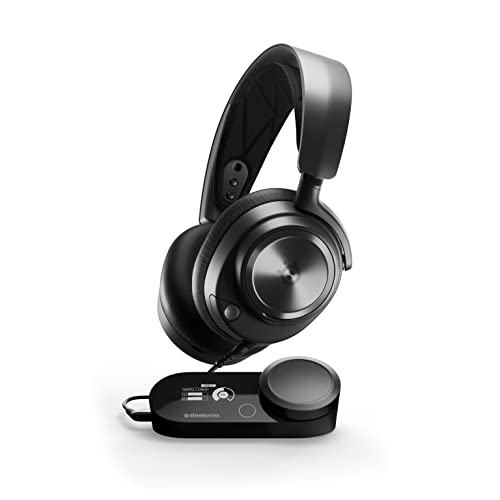
SteelSeries Arctis Nova Pro Wired — Best sound and control
The Nova Pro Wired is the audiophile’s argument inside a gaming shell, and its argument is hardware. The GameDAC Gen 2 sits on your desk as a physical control station — a knob for volume, a screen for settings, connections for console and PC at once — and inside it lives a quality DAC and amplifier that lift the headset past what any USB dongle in this guide can do. Playback is hi-res capable over the wired path, and the drivers respond with the kind of detail that makes you hear production choices in a game’s mix: the room tone under a dialogue scene, the direction a distant engine dopplers across. Its 360 spatial processing is correspondingly precise, because precise hardware gives the algorithm honest material.
Control is the second half of the proposition. The Sonar software offers parametric equalization per game, a separate mixer for game and chat, and surround adjustments that let you trade width against center focus rather than accepting one designer’s taste. That depth cuts both ways: a listener willing to spend an evening tuning will extract the best surround experience in this guide, while a listener who wants to plug in and forget will find the Cloud II’s single button philosophically friendlier. The retractable microphone hides fully in the earcup, records clearly with AI-assisted noise reduction in software, and keeps the silhouette clean enough for video calls where a boom would shout gamer.
Physically, the Nova Pro refines the ski-goggle suspension SteelSeries is known for, with a floating headband that suits long sessions and a build that feels a class above its price peers. The honest costs: it is wired, permanently, to a desk-bound DAC, which makes it a station rather than a companion; the full software suite is a PC affair; and the price, while under the very top of the market, buys a whole Cloud II with change. For the listener who treats game audio as a hobby in itself, those costs read as the point. For everyone else, they are the reason it ranks third rather than first.
- Hub: GameDAC Gen 2 desktop unit with screen, knob and dual inputs
- Playback: hi-res capable wired audio — the fidelity ceiling of this guide
- Surround route: SteelSeries spatial processing with deep per-game EQ in Sonar
- Microphone: fully retractable boom with software noise reduction
- Fit: suspension headband, plush cups, desk-station ergonomics
Strengths
- The best raw sound quality here, with or without surround engaged.
- Desk hardware control ends alt-tabbing to adjust volume or inputs.
- Tuning depth rewards listeners who know what they want to hear.
Trade-offs
- Wired to a desktop DAC — no couch, no travel, no exceptions.
- The software’s depth is homework for plug-and-play temperaments.
- Console use works but leaves much of the suite behind.
Best for: desk-bound PC and console players who tune their audio and prize fidelity. Not suited for: anyone who plays in more than one room, or who wants surround without software.

Razer BlackShark V2 Pro — Best for competitive play
Razer’s BlackShark line was designed with esports players in the room, and the V2 Pro’s priorities show it: nothing decorative, everything pointed at hearing the opponent first and being heard clearly in reply. The fit is the lightest-feeling in this guide, with a padded headband and memory-foam cushions that isolate well without clamping like a vice — in a five-map evening, that lightness is a performance feature, because fatigue is a tax on concentration. The 50mm drivers are tuned with a competitive lean: footsteps, reloads and ability cues sit forward, and the tuning stays composed rather than shrill when a scene gets loud.
Its surround story runs through THX Spatial Audio, delivered in software with per-game profiles for major competitive titles. The profiles matter more than the brand: a shooter mixed with its own strong object audio may need only a gentle touch, while a game with flat stereo output benefits from fuller processing, and the BlackShark’s ecosystem lets you set that per title instead of globally. Latency over its 2.4GHz connection is low enough that audio cues land in step with the image, and Bluetooth covers the second device most players actually have. Battery endurance stretches across a week of ordinary play sessions, which quietly removes charging from your routine.
The detachable microphone is the other half of the competitive brief — a wideband capsule that carries voice with unusual fullness, so callouts sound like a person rather than a phone call from 2009. It bends, it removes, and its sidetone and processing live in the same software as the EQ. Criticisms are fair but narrow: the build leans on plastics that feel less luxurious than the Nova Pro’s, there is no wired USB processing path with its own dongle identity, and console support, while present in this generation, still centers the PC experience. As a tool for ranked ladders, it is the sharpest instrument in this guide.
- Drivers: 50mm with a competitive, cue-forward tuning
- Surround route: THX Spatial Audio with per-game profiles in Razer’s software
- Fit: among the lightest here; memory-foam isolation without heavy clamp
- Microphone: detachable wideband boom built for callouts and streaming
- Endurance: multi-session battery with 2.4GHz and Bluetooth connections
Strengths
- Lightness and isolation sustain focus across long competitive sessions.
- Per-game surround profiles respect that titles mix audio differently.
- Voice quality is good enough that teammates notice the upgrade.
Trade-offs
- Materials feel functional rather than premium at this price.
- The richest processing and profiles live on PC.
- Music lovers may find the tuning lean compared with the Nova Pro.
Best for: ranked and tournament players who live in team voice chat. Not suited for: listeners who want a plush, music-first headset or a desk DAC setup.
EPOS H6PRO — Best open-back option
EPOS inherited Sennheiser’s gaming division and its habits: measure twice, decorate never. The H6PRO comes in closed and open variants, and it is the open one that earns this slot, because an open back does naturally what surround processing imitates — it lets the soundstage breathe beyond the earcups, so a game’s world feels wide before any software touches it. In a quiet room, single-player games on the H6PRO have a spaciousness the closed headsets here chase with algorithms. It carries no surround engine of its own, and we include it deliberately: paired with your platform’s spatial software, its natural width makes a persuasive case that the driver and the enclosure matter more than the badge on the box.
We cover it in prose because our verified pool holds no listing for it; buy through EPOS or an authorized audio retailer, and specify open or closed carefully, since the two share a name and a silhouette while suiting opposite rooms. The open version leaks sound both ways — your household hears your game, and you hear your household — which confines it to quiet, private setups. The closed version isolates properly and trades away the airiness that justifies the pick. The microphone, on a flip-to-mute boom, is clear and typically EPOS-disciplined, and the build favors replaceable parts and long service over fashion.
Comfort runs high for glasses wearers thanks to modest clamp and generous cups, and the tuning is the most neutral here — voices sit naturally, bass stays in its seat, and long narrative sessions fatigue the ears least. If your gaming is solo, your room is quiet and your taste runs to immersion over isolation, the H6PRO plus your platform’s spatial mode is the connoisseur’s budget route into wide, convincing game audio.
- Enclosure: open-back variant chosen here for natural soundstage width
- Surround route: none built in — pair with platform spatial audio
- Tuning: neutral, voice-forward, low listening fatigue
- Microphone: flip-to-mute boom with clear, disciplined capture
- Room requirement: quiet and private; open backs leak in both directions
Strengths
- The widest, most natural stage in this guide without any processing.
- Neutral tuning flatters dialogue-heavy and orchestral games.
- Serviceable, replaceable-parts build from an audio-first company.
Trade-offs
- No isolation in the open version — unusable in shared, noisy rooms.
- No surround engine of its own; you supply the software layer.
- The shared model name makes ordering the right variant essential.
Best for: solo players in quiet rooms who value natural width and neutral tone. Not suited for: shared spaces, streamers needing isolation, or buyers wanting processing in the box.
Beyerdynamic MMX 300 — Best studio-grade pick
The MMX 300 is a studio headphone that grew a microphone, and the genealogy shows in every decision. Its drivers descend from Beyerdynamic’s DT-series studio line, which engineers have trusted for decades, and the sound follows that lineage: detailed, honest, with a soundstage that images precisely in plain stereo. It offers no 7.1 processing at all, and its presence in a 7.1 guide is an argument we want on the record — for a meaningful share of games and listeners, excellent stereo imaging plus a platform’s built-in spatial mode equals or beats mediocre dedicated processing, and the MMX 300 is the finest stereo foundation a buyer can put under any software layer.
Our pool holds no verified listing for it, so it appears in prose; order from Beyerdynamic or an authorized dealer, and note the generation, since the line has been revised. The microphone is a proper condenser broadcast design — the voice quality is the best in this guide for anyone whose work involves being recorded, from podcasters to coaches reviewing match footage. The build is German, metal where it matters, repairable by design, and priced like the professional tool it is.
The costs are lifestyle costs. It is wired, with a cable that expects a desk. It needs a decent source to show its best, though it runs acceptably from most controllers and improves with any modest DAC — including, pointedly, pairing beautifully with a desktop unit like the Nova Pro’s class of hardware. There is no app, no profile, no glow. What there is: a headset that will still be serviceable when two generations of gaming fashion have passed, sounding like a studio the entire time.
- Heritage: studio DT-line drivers adapted into a headset
- Surround route: none — stereo excellence plus your platform’s spatial mode
- Microphone: condenser broadcast capsule; best recorded voice here
- Build: metal-reinforced, repairable, made for long service
- Power note: rewards a proper DAC or amp more than rivals do
Strengths
- Stereo imaging precise enough to make processing optional.
- A microphone that doubles as legitimate recording equipment.
- Repairable construction with a decades-long parts culture behind it.
Trade-offs
- No surround features, no wireless, no app — by deliberate design.
- Professional pricing for a gaming-adjacent product.
- Desk-bound cable and a preference for quality sources.
Best for: audio-first buyers, creators and professionals who record their voice. Not suited for: console players wanting in-box surround, or anyone allergic to cables.
Seven Channels, Two Ears: How Does Each Contender Handle the Rear Hemisphere?
| Headset | Surround engine | Where it runs | Stereo character | Connection |
|---|---|---|---|---|
| HyperX Cloud II | HyperX virtual 7.1 | USB dongle | Warm, forgiving, spacious enough | Wired USB / 3.5mm |
| Logitech G Pro X 2 Lightspeed | DTS Headphone:X 2.0 | PC software | Clean, fast, precise imaging | Wireless + Bluetooth + cable |
| SteelSeries Arctis Nova Pro Wired | SteelSeries 360 spatial | GameDAC + PC software | Most detailed and refined here | Wired to desktop DAC |
| Razer BlackShark V2 Pro | THX Spatial Audio | PC software, per-game profiles | Cue-forward competitive tuning | 2.4GHz wireless + Bluetooth |
| EPOS H6PRO | None built in | Your platform’s spatial mode | Neutral, naturally wide (open) | Wired 3.5mm |
| Beyerdynamic MMX 300 | None built in | Your platform’s spatial mode | Studio detail and precision | Wired, DAC-friendly |
The table exposes the category’s real divide: four headsets sell you an engine, and two sell you ears good enough that the engine becomes your platform’s problem. Neither camp is cheating. The engines genuinely differ — DTS’s restraint, THX’s profiles, the Nova Pro’s tunable depth, HyperX’s one-button simplicity — and the purist pair genuinely image better in stereo than most gaming headsets image with help. Your platform and your temperament pick the camp; the rankings within each camp follow the quality of what you hear with the effect both on and off.
How Does Virtual 7.1 Actually Fool Your Ears?
Your brain locates sound using three families of cues. The first is timing: a sound from your left reaches your left ear a fraction of a millisecond before your right, and your auditory system is exquisitely sensitive to that gap. The second is level: your head shadows the far ear, softening and darkening sounds from the opposite side. The third, and the one surround processing lives on, is spectral: your outer ear’s folds filter incoming sound differently depending on its elevation and whether it comes from ahead or behind, stamping each direction with a subtle tonal signature your brain learned in childhood. A good virtual surround engine — DTS, THX and their peers — applies a measured set of those filters, called head-related transfer functions, to each channel of a 7.1 mix and sums the result into two channels that carry the cues of eight speaker positions.
The catch hides in the phrase measured set. The filters are typically averaged from test subjects or dummy heads, and your ears are not average. For most listeners the horizontal plane works well — front, side and rear separate convincingly — while elevation cues and the front-back distinction occasionally flip, especially in quiet scenes with a single rear source. That is why game audio with strong native mixing often sounds best with gentle processing, and why the per-game profiles and adjustable intensity offered by the stronger picks here are real features rather than garnish: they let you set the effect at the strength your own ears believe.
It also explains the music rule. A stereo recording was mixed to be heard in stereo; running it through a surround upmix invents rear information that was never recorded, and the invention usually sounds like a bathroom. Every headset in this guide lets you bypass processing entirely, and for music, podcasts and most film, bypassing is the connoisseur’s setting. Reserve 7.1 for content mixed in 7.1 — modern games, mainly — and the technology stops being a gimmick and becomes what it should be: a translation layer between a multichannel mix and two ears.
There is a budget dimension to the platform question as well. Software engines bundled with a headset cost nothing beyond the purchase, platform spatial modes are usually included with the operating system or a modest license, and a desk DAC is a separate hardware commitment that only the Nova Pro route demands. A buyer assembling a setup from nothing should sequence the spending: headset with a bundled engine first, platform mode as the free experiment, DAC when the hobby proves it deserves furniture. That sequence also protects against the most wasteful outcome in this category — an expensive processing chain feeding a headset whose drivers cannot resolve what the chain delivers.
Which Surround Route Fits Your Platform?
PC players hold the full menu. Software engines from the headset makers, platform-level options built into the operating system, and per-game object audio all compete, and a PC buyer can even mix layers — though stacking two surround processes at once is the classic way to produce expensive mud, so pick one layer and disable the rest. Console players should read listings with a detective’s eye: a headset advertising 7.1 may deliver that processing only through its PC software, arriving on console as a stereo headset with good manners. That is not fraud, but it is a fact to price in, and it is why the Cloud II’s console story and the Nova Pro’s DAC story are written plainly in their sections above.
Handhelds and phones sit at the simple end: Bluetooth headsets like the Pro X 2 and BlackShark pair happily and sound good, with spatial features depending on the device’s own audio stack. The universal advice is to decide your primary platform first and buy the processing that natively lives there, rather than buying the most advertised engine and discovering your platform cannot run it. Surround is software wearing a headset; match the software to the machine you own.
One more scene belongs in the test battery: a quiet one. Processing artifacts hide under explosions and announce themselves in silence — a faint hiss from an over-eager amplifier stage, a reverb tail that makes a library sound like a chapel, a center image that wanders when nothing should be moving. Sit in a menu, a safe room, a paused cutscene, and listen to the room tone of the game itself. The headsets that survive this test are the ones whose processing knows when to leave the signal alone, and it is no accident that the most restrained engines in this guide are the ones we recommend most warmly.
How Do You Set Up Surround Without Ruining the Sound?
Begin in stereo. Listen to a familiar game scene and a favorite song with every effect disabled, and set your baseline EQ flat. This teaches your ears what the drivers do unaided — the reference every later adjustment is judged against. Then enable exactly one surround layer: the dongle button, the maker’s app, or the platform mode, never two together. In the app, start with the default profile and the effect at its middle strength; the temptation to maximize width is the beginner’s error, because maximum settings smear the center image where dialogue and your own character’s sounds live.
Test with a scene you can repeat — a training range, a saved checkpoint on a busy street, a flyover. Walk a slow circle while a fixed sound source plays, and listen for the rear quadrant specifically: the cue should travel behind you smoothly, not teleport from left to right through your skull. If rear cues collapse into your head, reduce the effect strength before reaching for EQ; if dialogue thins out, check that no second processing layer is active in the operating system or the game itself, since double processing is the most common cause of the hollow, underwater character people blame on surround generally. Save your working settings per game where the software allows it, and revisit after a week — ears adapt, and the profile that impressed you on day one often wants softening by day seven.
How Can You Test Imaging Honestly in Your First Week?
Every headset in this guide will impress you in its first hour; the test that matters is whether it informs you in its fiftieth. Build a small ritual. Pick one repeatable scene per game you play seriously — a training range with bots crossing lanes, a story checkpoint on a street with traffic behind you — and run it with processing off, then on at default, then on at a notch above default. Note which setting lets you call a direction before you see the source, and be honest about errors: a setting that feels wider but makes you wrong more often is worse, whatever it does for atmosphere. Your kill-death ratio is not the metric; your confidence calibration is — the match between where you think a sound is and where it proves to be.
Test the center channel deliberately, because games put your own engine, your own footsteps and half the dialogue there. A surround implementation that hollows the center to buy width has made a bad trade for most genres. Test voices next: join a call and ask a friend to walk their character around yours in game while speaking over the game’s own chat if it has positional voice — few demos expose processing quality as ruthlessly. Finally, test the boring content: an hour of music and a podcast in stereo mode, because that is the headset your ears will live with between matches, and it is the mode in which the purist picks in this guide quietly outclass flashier rivals.
Keep the ritual inside the return window. Surround preference is partly personal physiology — the standard ear filters fit most people and flatter some, and no review can tell you whether your ears are in the flattered set. A week of structured listening can. If rear cues consistently collapse for you on one engine, another engine’s filters may suit your ears better, and that is a legitimate, evidence-based reason to exchange rather than a failure of research.
Why Does the Microphone Matter as Much as the Surround?
Because in team games your voice is half the product. A surround headset exists to move information — the game moves it to you through the drivers, and you move it to four teammates through the microphone, under time pressure, mid-fight. A capsule that clips consonants turns “two, catwalk” into a guess; a boom that sits too far from the mouth buries callouts under game audio bleed; noise reduction that is too aggressive eats the first syllable of every urgent sentence. The headsets ranked highly here treat the microphone as a headline component — larger capsules, considered placement, processing tuned for speech intelligibility rather than podcast gloss — and the two purist picks come from companies whose microphones are bought separately by professionals.
Judge a microphone the way teammates will: record yourself in the actual software you play in, at game volume, while a loud scene plays through the earcups. Listen for how much of the game leaks into your transmission, whether your voice stays level when you turn your head, and whether plosives and excitement distort. Detachable and retractable booms earn their keep here too, because a microphone you can remove is a microphone that survives being a daily headphone — and a headset that doubles as your travel and work headphone amortizes its price across far more hours than a game-only device ever will.
Does Wireless Latency Undermine Positional Audio?
It can, which is why the wireless picks in this guide use dedicated 2.4GHz connections for play rather than relying on Bluetooth alone. Positional cues depend on timing differences measured in fractions of a millisecond inside the audio itself — those survive any competent codec — but the overall delay between an on-screen event and its sound matters for feel: once total latency grows past the point where a muzzle flash and its crack visibly divorce, the brain stops fusing the two into one event and immersion frays. Modern gaming wireless keeps that delay low enough that even rhythm-sensitive players accept it, and the Pro X 2 and BlackShark V2 Pro both demonstrate the standard. Bluetooth, by contrast, still carries enough delay in its common modes to notice in fast games, which is why both headsets treat Bluetooth as the convenience path for phones and handhelds, not the play path.
The practical rule is simple: compete on the 2.4GHz dongle, relax on Bluetooth, and keep the cable for the day the battery dies mid-tournament. Buyers who play on a couch within sight of the console should also know that distance and walls tax wireless links unevenly; a dongle on a short extension cable, placed in line of sight, fixes more dropouts than any setting buried in software.
What Are the Most Common Mistakes When Shopping for 7.1 Headsets?
The foundational mistake is believing the channel count describes hardware, then feeling cheated when the box contains two drivers. It describes a mix format and a processing claim; judge both on evidence, not arithmetic. Second is judging surround in a shop demo or a film trailer — content mixed for speakers in a room, upmixed or processed a second time, tells you almost nothing about how a game’s native multichannel mix will behave. Third is leaving every layer on at once: game, operating system and headset app each applying their own spatial math, producing the phasey wash that gives the whole category a bad name among people who never heard it configured correctly.
Fourth, buyers ignore the off state. A headset that sounds poor in stereo will spend half its life sounding poor, because music, calls and older games are stereo citizens. Fifth, they forget the microphone until the first team session, discovering that a celebrated surround engine was paired with a voice capsule from a gas-station headset. Sixth, they buy processing their platform cannot run — the console trap described above. And seventh, they crank the effect to maximum and conclude surround is a scam, when the honest conclusion is that seasoning is not a main course. Set it gently, on the right content, on a good stereo foundation, and the rear hemisphere appears.
How Should You EQ a Surround Headset Without Chasing Your Tail?
Equalization is where surround headsets go to be ruined by enthusiasm, so begin from a principle: EQ fixes the headphone, surround handles the space, and confusing those jobs produces endless fiddling. Set EQ with processing off, in stereo, using content you know by heart. Most gaming headsets share a family resemblance — elevated bass for impact, a dip somewhere in the presence region, treble tuned for sparkle — and most listeners’ first useful move is a small reduction of the bass shelf if footsteps drown in explosions, or a gentle lift where voices live if dialogue hides under music. Small is the operative word: moves of a few decibels, one band at a time, with a day of play between changes so your ears judge the result rather than the novelty.
Only after the stereo foundation sits right should surround re-enter, and when it does, resist re-EQing to compensate for the processing — that path leads to a profile that only works in one mode and sounds broken in the other. The software suites on the stronger picks here allow per-game profiles; use them for genuine per-game problems, such as a title whose mix is notoriously bass-heavy, rather than maintaining six subtly different versions of your taste. And write down your settings when you find them. The listener who can restore a known-good configuration in one minute experiments freely; the listener who cannot stops experimenting, and their headset slowly drifts out of tune with their games.
What Does a 7.1 Headset Offer a Streamer or Creator?
A different calculus, in which the microphone and the monitoring path outrank the surround engine. An audience hears your voice and your mix, not your rear channels, so the creator’s ranking inside this guide shuffles: the Pro X 2’s broadcast-leaning boom and the MMX 300’s condenser capsule move to the front, and features like sidetone — hearing your own voice in the earcups at a natural level — become decisive, because a streamer who cannot hear themselves shouts or mumbles without knowing. Surround still earns its place on the creator’s desk for the same reason it earns it anywhere: better information during play means better decisions, and better decisions make better viewing. But it is the supporting act. If your channel is the priority, buy the microphone first and let the surround follow; if ranked play is the priority, reverse the order and accept the voice your teammates get.
Final Recommendation
Start with the Cloud II if your budget is sane and your platform is a PC: it is the reference for wired 7.1 value, its processing is tasteful, and its stereo self needs no apology. Step up to the BlackShark V2 Pro when competition is the point — its fit, profiles and microphone are purpose-built for ranked play — or to the G Pro X 2 when one wireless headset must cover play, work and travel with the best all-round polish. The Nova Pro Wired is the choice for the listener who hears the difference and wants the controls to prove it, desk-bound and delighted about it. The H6PRO and MMX 300 close the guide as the purist’s pair: no engines, just excellent ears, for buyers whose platform already supplies spatial processing or whose taste runs to stereo honesty.
Whichever you choose, spend the first evening the way the setup section suggests — stereo first, one layer, a repeatable scene — because the difference between surround as a gimmick and surround as information is almost entirely configuration. Configured well, these headsets will tell you things about a game world your eyes have not seen yet. That is the entire promise, and the six above keep it.
Buy the Cloud II for value, the Nova Pro for fidelity — and in either case, let a footstep behind you, correctly placed, be the moment the category earns your trust.
Open-Back or Closed-Back: Which Serves Surround Better?
Closed backs dominate this category for practical reasons — they isolate you from the household and the household from your game, they keep bass energy contained, and they travel. Their cost is a soundstage that lives closer to your head, which surround processing then works to push outward; the better closed headsets here image well enough natively that the processing starts from a position of strength. Open backs begin where processing is trying to arrive: a naturally broad, airy presentation in which distance cues feel effortless. Their costs are total — no isolation in either direction and bass that leans lighter — which is why the H6PRO’s open variant is a recommendation with an address attached: a quiet room of your own.
The deciding question is therefore environmental, not technical. Shared room, nearby television, thin walls, a partner asleep in the next room — closed, without debate, and spend the savings from skipping open-back romance on the better microphone. A dedicated desk in a quiet space, solo play, long narrative sessions — the open H6PRO offers something no algorithm in this guide fully reproduces, and pairing it with your platform’s spatial layer closes most of the remaining gap. Hybrid buyers who split time between a desk and a shared couch should own the closed headset and accept the compromise; the open one will spend its couch hours in a drawer, resented.
Frequently Asked Questions
Is headset 7.1 real surround sound?
It is a real multichannel mix rendered for two ears. A game outputs separate front, center, side and rear channels; the headset’s processing applies directional filtering to each and sums them into stereo that carries convincing positional cues. The speakers-around-the-room experience is simulated rather than physical, but the information — which direction, how far — is genuinely delivered when the processing is good and configured singly.
Does 7.1 help in every game?
No. It helps most in games mixed with discrete multichannel or object audio — modern shooters, racers and big adventures. Older or stereo-mixed games gain little and can sound worse when upmixed. Many competitive players actually prefer a light touch or plain stereo in titles whose native audio is already excellent, which is why adjustable intensity and per-game profiles matter.
Can I use these headsets for music?
Yes — with processing off. All six picks are respectable stereo headphones, the MMX 300 and Nova Pro genuinely good ones. Surround modes applied to music invent rear channels that were never recorded and usually sound artificial, so treat the effect as a game feature and the headset as a stereo product the rest of the time.
Why does surround sometimes sound hollow or echoey?
Almost always because two processing layers are running at once — the game’s, the operating system’s and the headset’s — or because the effect strength is set to maximum. Disable all but one layer, start at the default or middle intensity, and test in a repeatable scene. Configured singly and gently, the hollow character disappears on every headset in this guide.
Do consoles support these surround features?
Partially, and it varies by model. Consoles have their own spatial audio systems, and a headset that processes through PC software will typically arrive on console as a stereo device. The Nova Pro’s DAC path works with consoles as a high-quality stereo and chat hub. Read each pick’s platform notes above before assuming the advertised 7.1 follows the headset to your console.
Is a separate DAC worth it for a gaming headset?
For listeners who hear the difference, yes: a good DAC and amplifier clean up the source, drive demanding headphones properly and put physical controls on the desk. The Nova Pro builds that case. For most players, a well-implemented USB dongle or software path delivers the practical benefits — surround processing, mic monitoring, EQ — for a small share of that hardware commitment.
How long do these headsets typically last?
Years, if the wear parts are treated as wear parts. Earpads compress and crack first — most makers here sell replacements, and swapping pads restores both comfort and seal — followed by cables on wired models and batteries on wireless ones. The frames and drivers in this guide are the durable core; the Cloud II’s decade on sale and the MMX 300’s repairable construction mark the two ends of the longevity philosophy, and both philosophies work when pads and cables are replaced rather than mourned.
Can I use one headset for PC and console together?
Yes, with expectations set. The Nova Pro’s DAC accepts two hosts at once, the wireless flagships pair across devices through their multiple connections, and the Cloud II follows you anywhere a 3.5mm jack exists. What does not travel is the processing: surround engines tied to PC software stay on the PC, so the headset that is a 7.1 device at your desk may be a stereo device at your couch. Buy for the desk specification and enjoy the couch bonus, or the reverse — but know which you did.
Related Guides
Surround without the cable is the natural next question, answered in our roundup of wireless 7.1 headsets that keep the rear channels and lose the wire. If your interest in headsets runs toward the all-day professional end, the dispatch headsets chosen for emergency-service shifts show a different set of priorities at work. And for buyers watching the budget line specifically, our affordable aviation headset guide, where reliability outranks features is a useful study in what value engineering looks like in another cockpit entirely.


