What's inside
- Where to Buy Corded Headsets That Meetings Deserve
- Key Takeaways
- Quick Picks
- How Did We Shortlist the Best Corded Headsets for Online Meetings?
- Why Does the Humble Cable Keep Winning Meeting Rooms?
- Which Connector and Ear Design Fit Your Working Day?
- The Six Picks in Detail
- Can One Corded Headset Serve a Whole Household of Meeting-Goers?
- How Should a Team Roll Out Corded Headsets Without the Chaos?
- Head-to-Head: Six Corded Meeting Headsets on One Table
- How Do You Get a Corded Headset Sounding Right in Five Minutes?
- What Goes Wrong Most Often With Corded Meeting Headsets?
- What Should You Listen For in a Ten-Minute Headset Trial?
- How Do Corded Headsets Behave on Shared and Hot-Desks?
- Final Recommendation
- Frequently Asked Questions
- Related Guides
As an Amazon Associate I earn from qualifying purchases. This post may contain affiliate links at no extra cost to you.
[widgetverdict.com] is reader-supported. When you buy through links on our site, we may earn an affiliate commission.
Where to Buy Corded Headsets That Meetings Deserve
All six of the best corded headsets for online meetings in this guide are listed on Amazon, sold as computer headsets for meeting and call work rather than as entertainment headphones, which is the correct shelf to shop from for this particular job; the names in the Quick Picks table and in each detailed review link to their product pages, where you can confirm the current listing before ordering. If you are buying for a team, order one unit first and run it through a real week of meetings — corded headsets are cheap to pilot and expensive to regret in bulk. Readers who decide the cable life is not for them will find the untethered alternatives in Best Wireless Call Center Headsets.
The case for the best corded headsets for online meetings begins with everything that cannot go wrong. A corded headset has no battery to die at minute forty of a client presentation, no pairing menu to defeat a new starter, no wireless interference from the forty other radios in the building. It plugs in, it works, it works identically every day for years. In a professional life now conducted substantially through meeting apps, that boring reliability is a genuine feature, and it is why the corded category survives every prediction of its death.
This roundup covers six wired USB models: two Jabbras at different points of the hybrid-work spectrum, a platform-certified Yealink, a pair of Wantek workhorses in stereo and monaural forms, and a value-tier LEVN aimed at open offices and home workers. Between them they answer every ordinary meeting situation a desk worker will meet this year.
Key Takeaways
- Corded USB headsets remove charging and pairing from the working day entirely; the cable is the cost, and reliability is the payment.
- Inline controls on the cable are the fastest mute in any meeting, because they work regardless of which window has focus.
- Platform certification, stated in the Yealink UH34’s title, means call controls are tested inside Teams and Zoom rather than merely compatible.
- Dual-ear models suit concentration; the monaural Wantek suits agents who must hear the room while they talk.
- Connector choice is now a real decision: USB-A only, or the USB-A/USB-C flexibility of the 2025-edition Evolve 20.
- A ten-minute trial with three real calls predicts ownership better than any specification table, so pilot one unit through a genuinely busy day before any bulk order.
Quick Picks
| Headset | Badge | Why it made the list |
|---|---|---|
| Jabra Evolve 10 | Simplest wired Jabra for meeting-heavy days | Lightweight Jabra with a noise-cancelling mic and TCO Certified status for meeting marathons. |
| Jabra Evolve 20 (2025 Edition) | Dual-ear Jabra with USB-A and USB-C flexibility | The 2025 refresh adds USB-C alongside USB-A, solving the two-desk hybrid problem. |
| Yealink UH34 | Certified for Teams and Zoom, built for call centers too | Teams and Zoom certification plus on-ear all-day comfort from a telephony specialist. |
| Wantek Corded USB Headset (Stereo) | Proven UC602 stereo workhorse for webinars and classes | The UC602 is the issued-everywhere stereo standard for classrooms, webinars and desks. |
| Wantek Monaural Corded USB Headset | One ear on the call, one ear on the room | Single-ear design keeps one ear on the room, built for softphone call work. |
| LEVN USB Headset | Open-office and call center focus at a value tier | Value-tier USB headset with a cancelling mic, aimed at open offices and home workers. |
How Did We Shortlist the Best Corded Headsets for Online Meetings?
The shortlist was built from listing titles, because titles are where manufacturers make checkable commitments. A model qualified by stating the things meeting work actually requires: a noise-cancelling or noise-canceling microphone, a defined USB connection, inline controls, a certification, or a wearing design matched to long days. Models whose titles promised entertainment first and meetings second were set aside, however good their music might be.
Three questions then sorted the six. Does the connection fit the machines people really use, including the USB-C transition now splitting office fleets? Does the control scheme survive a real meeting, where the mute must be found by touch while someone waits for your answer? And does the wearing design match the job — dual-ear for concentration, monaural for room awareness, on-ear for coolness across a shift? Every pick below answers at least two of the three decisively, and the reviews say plainly where each one does not.
The result deliberately spans the organisational spectrum: certified fleet hardware, an institution’s bulk standard, and individual value picks. A home worker and a facilities manager should both find their situation recognised here.
Why Does the Humble Cable Keep Winning Meeting Rooms?
Because meetings punish uncertainty. A wireless headset introduces three small uncertainties — charge, pairing, interference — each trivial alone and corrosive in combination when a meeting starts in ninety seconds. The cable deletes all three. It also deletes the charging infrastructure a fleet otherwise needs: no docks, no rota, no spare pool kept on charge. For shared desks, the cable has a further virtue: the headset belongs to the desk, works for whoever sits down, and asks for no personal pairing at all.
The cable’s costs are equally real. Movement is limited to the cable’s reach, the wire crosses the desk’s working space, and a yanked cable can drag a laptop. Buyers should weigh those honestly. But for the seated, scheduled, screen-centred shape of online meeting work, the exchange remains heavily in the cable’s favour — which is why every model in this guide is unapologetically wired.
Which Connector and Ear Design Fit Your Working Day?
Connector first. USB-A remains the safe default for desktop fleets and docks; USB-C is where laptops have already gone. If your life spans both, the Evolve 20 (2025 Edition) names both in its title and ends the adapter question. If your machine is fixed and known, a single-connector model is simpler and cheaper in spirit. Ear design second. Dual-ear stereo gives concentration and natural meeting audio; on-ear dual designs run cooler; monaural keeps the room in the conversation. There is no universally correct answer — there is only the answer that matches how your meetings actually sound. Studio-minded readers preparing a recording corner instead should detour to Best Headsets for Voice Acting, where closed-back monitoring rules.
The Six Picks in Detail

Jabra Evolve 10 — Simplest wired Jabra for meeting-heavy days
There is a particular kind of meeting day — stand-up at nine, client call at ten, training webinar at eleven, one-to-one at noon — where a headset stops being an accessory and becomes the desk itself. The Jabra Evolve 10 was shaped for exactly that day. Its title emphasises three things: a noise-cancelling microphone, an easy USB-A setup, and a lightweight design for online meetings. None of those phrases is glamorous. All three are what a person in back-to-back calls actually needs by three in the afternoon.
Start with the weight. Corded headsets carry no battery, so a designer can spend the entire weight budget on structure and cushions, and Jabra’s entry model keeps the result light enough that the headset can be forgotten between calls rather than taken off and put back on forty times. That forgotten feeling is the real product. A headset that stays on the head gets used for the thirty-second call as well as the hour-long one, and audio quality across a team’s day becomes consistent instead of depending on whether someone bothered to gear up.
The inline controls put call and volume handling on the cable, within thumb reach, which sounds trivial until you compare it with hunting through a meeting window for the mute icon while a question hangs in the air. On the cable, the answer is physical and immediate. The USB-A connection is the older, squarer plug, still the standard port on the desktop PCs and docking setups that fill most offices, and the title’s promise of easy setup is really a promise that no adapter hunt precedes the first meeting of the day.
TCO Certified appears in the title as well — a sustainability and workplace certification that procurement departments in larger organisations actively look for. It will not change how a single call sounds, but it can decide whether a model is approved for a company-wide rollout, and for the individual buyer it signals a product built to a documented standard rather than to a price alone.
Against its bigger sibling below, the Evolve 10 is the leaner tool: it does not advertise the dual connection options of the 2025-edition Evolve 20. What it offers instead is focus — one plug, one job, minimal weight. For a meeting-heavy knowledge worker whose computer has a USB-A port and whose calendar is a wall of video calls, that focus is the recommendation.
One honest limit: a wired headset tethers you to the desk, so the mid-call stretch or coffee refill requires either a long enough cable run or taking the headset off. Workers who pace during calls should read the wireless guide linked at the end of this article instead. Everyone seated gets the Evolve 10’s bargain: nothing to charge, nothing to pair, nothing to update.
A week with the Evolve 10 teaches a subtler lesson about meeting load. Because the headset is light and the controls are physical, the friction of joining a call drops to nearly nothing, and people start using the headset for the two-minute check-in calls they previously took on laptop speakers. Those small calls are where laptop audio does its worst damage — echo, room noise, a colleague’s side conversation broadcast to a client. Raising the floor of the smallest calls improves a team’s professional surface more than any single big-meeting upgrade.
The TCO angle also grows on reflection. Certification schemes of that kind examine the product’s whole footprint, from materials to workplace ergonomics, and buyers in regulated industries increasingly need that paperwork to exist. An individual home worker may never open the certificate; the fact that the model carries it still signals a design audited beyond its price tag.
Mini spec box
- Connection: Wired USB, USB-A setup
- Microphone: Noise-cancelling mic
- Controls: Inline call and volume controls
- Certification named in title: TCO Certified
- Design note in title: Lightweight design for online meetings
Strengths
- Lightweight build stays comfortable through a wall-to-wall meeting calendar
- Inline controls answer mute and volume needs without touching the meeting window
- TCO Certified status helps the model pass corporate procurement checks
Trade-offs
- USB-A only, so USB-C-only laptops need an adapter the title does not mention
- Cable tether keeps the wearer at the desk during calls
- Entry positioning means fewer premium materials than Jabra’s higher lines
Best for: professionals whose day is a sequence of online meetings on a USB-A equipped desk setup.
Not suited for: laptop users whose machines offer USB-C ports exclusively and who refuse adapters.

Jabra Evolve 20 (2025 Edition) — Dual-ear Jabra with USB-A and USB-C flexibility
The Evolve 20 returns in a 2025 Edition, and the update tells a story about how offices changed. The headline change in the title is the connection: USB-A and USB-C are both named, which means one headset now walks between the older desktop in the office and the slim modern laptop at home without living in a nest of adapters. Hybrid workers have been quietly suffering that adapter problem for years; this edition simply removes it.
The dual-ear design is the second deliberate choice. Two earcups do more than play sound in stereo — they signal to the brain that a call is happening, they soften the room around the wearer, and they let a quiet-spoken client be heard without the volume climbing. In a home office shared with a partner’s calls or a household’s ordinary noise, that passive screening is worth real concentration. Jabra describes the model as a comfortable dual-ear office headset in the title, and comfort plus coverage is the correct pairing for long meeting days.
In-line call control keeps the essential buttons on the cable. There is a small ergonomic truth here: controls you can operate without looking are controls you will actually use, and the mute that gets used is the mute that prevents incidents. The 2025 refresh also matters for buyers of the older Evolve 20 generation, whose fleets are aging; a current edition means current production, current support and a spares pipeline that has not been wound down.
How does it differ from the Evolve 10 above? The 10 is the lighter, simpler, single-plug tool. The 20 (2025 Edition) is the flexible one: two connector worlds, dual-ear coverage, a slightly more substantial build. A buyer choosing between them is really deciding whether their week happens at one desk or two. One desk, one port type — the 10 suffices. Two desks, two port types — the 20 earns its keep every single commute day.
Nothing in the title promises wireless freedom or active noise cancelling for the wearer, and the review will not pretend otherwise. This is a wired, passive, dependable meeting headset whose modernisation went exactly where hybrid work needed it: the plug.
Think of the 2025 Edition as an answer to a very specific modern irritation: the headset that works perfectly at the office and refuses to connect at home, or the reverse. Every hybrid worker knows the small morning ritual of adapter hunting, and every IT manager knows the tickets it generates. A title that names both USB-A and USB-C is a title that has understood the assignment of the decade.
The dual-ear build also earns a second defence. Meeting fatigue is partly audio fatigue: straining to decode voices through one ear or through room noise tires people measurably across a day. Two ears sharing the work, with the room softened around them, leaves an agent or analyst fresher at the last meeting than the first would predict. Comfort features rarely get credited with afternoon productivity; they should be.
Mini spec box
- Connection: USB-A/USB-C connection
- Ear design: Dual-ear office headset
- Controls: In-line call control
- Edition: 2025 Edition
- Settings named in title: Office and work from home setups
Strengths
- USB-A and USB-C in one title ends the hybrid worker’s adapter shuffle
- Dual-ear coverage screens out household and office background sound
- A current 2025 edition means production and support are ongoing
Trade-offs
- Still a cable, so no walking to the printer mid-call
- No wearer-side active noise cancelling is claimed in the title
- Dual-ear coverage can feel warm in hot rooms during summer afternoons
Best for: hybrid staff splitting the week between an office desktop and a modern home laptop.
Not suited for: workers who take calls while moving around the building.

Yealink UH34 — Certified for Teams and Zoom, built for call centers too
Yealink built its name on desk phones, and the UH34 shows what happens when a telephony company designs a USB headset: the certifications come first. The title states Teams/Zoom Certified outright, which is not a decorative badge. Certification means the headset’s call controls — answer, end, mute, volume — are tested to work inside those platforms rather than merely sending audio to them. When a manager asks why the fleet should standardise on this model, that sentence is the answer.
The on-ear stereo design aims at all-day comfort, a phrase the title also uses directly. On-ear cushions sit on the ear rather than around it, which keeps the headset compact and cooler across a long shift, at the cost of letting a little more room sound in than a fully enclosing cup. For an online meeting or a call center seat, that trade is usually correct: the wearer stays aware of the room, the headset stays light, and the stereo image keeps video-call voices natural when several people speak in sequence.
Plug and play for PC, laptop and phone is the third promise in the title, and it is the one IT teams will test first. A certified, plug-and-play USB-A headset can be issued from a cupboard with a one-line instruction sheet. Compare that with the support tickets generated by headsets needing drivers, companion software or pairing rituals, and the UH34’s plainness becomes a budget line in its own right.
The title names three workplaces — call center, work from home, online meeting — and the headset genuinely fits all three because the requirements converge: clear speech out, clear speech in, controls that work inside the app, comfort that survives the day. Yealink’s phone heritage shows in the priorities. This is not a headset trying to be a music product on weekends; it is a work tool that happens to connect by USB.
Buyers whose laptops have dropped USB-A will need an adapter, the one friction point in an otherwise frictionless pitch. And buyers who want the hush of fully enclosing earcups should look at the dual-ear Jabra above. For platform-certified meeting and call work on standard office hardware, the UH34 is the most credentialled option in this roundup.
Yealink’s phone heritage shows in a place buyers rarely inspect: the UH34 was designed to be deployed by people who deploy hundreds of things. The box, the cable, the control unit — everything assumes a rollout, not a romance. That is why the title bothers to say plug and play and to name the call center alongside the home office. A model equally at home in both places gives a growing company one less decision to remake as it scales.
There is also a quiet argument for certification as future-proofing. Meeting platforms update constantly, and certified peripherals are the ones vendors test against those updates. An uncertified headset usually keeps working, but ‘usually’ is a word IT departments are paid to eliminate. The UH34’s credentials buy certainty, and certainty is a legitimate product feature.
Mini spec box
- Connection: Wired USB-A
- Microphone: Noise canceling mic
- Controls: In-line control
- Certifications in title: Teams/Zoom Certified
- Settings in title: Call center, WFH, online meeting; all-day comfort
Strengths
- Teams and Zoom certification means in-app call controls are tested, not hoped for
- On-ear stereo design stays cooler across long shifts than enclosing cups
- Plug and play behaviour keeps IT support tickets near zero
Trade-offs
- USB-A connection needs an adapter on the newest slim laptops
- On-ear cushions let more room sound reach the wearer than over-ear designs
- Work-first tuning will not thrill anyone shopping for music headphones
Best for: organisations standardised on Teams or Zoom that issue headsets from a central store.
Not suited for: buyers wanting fully enclosing earcups for maximum passive quiet.
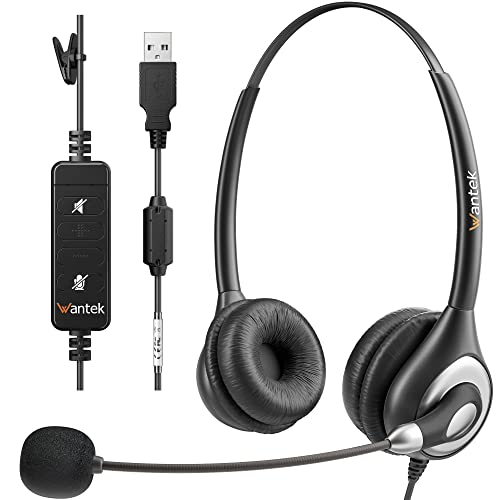
Wantek Corded USB Headset (Stereo) — Proven UC602 stereo workhorse for webinars and classes
Some products earn a guide place by being new; the Wantek UC602 earns it by being everywhere. Its title reads like a map of where corded USB headsets actually live: laptop and PC, Skype and Zoom, webinars, classrooms, home offices, business desks. That breadth is the product’s identity. It is a general-purpose communication headset that has been bought by schools, training companies and small firms precisely because it asks nothing of the buyer beyond a free USB port.
The stereo configuration matters for its classroom and webinar life. A trainer listening to a recorded session, a student in a language lab, a support agent shadowing a colleague’s calls — all benefit from two-ear listening that keeps voices centred and intelligible at modest volumes. The noise cancelling microphone handles the outbound side, keeping the speaker’s voice clear when the room is not. Ultra comfort is claimed in the title, and the design language — a lightweight frame with cushioned contact points — matches the claim’s intent: this headset expects to be worn by people who did not choose it, issued it by an institution, and it must therefore fit many heads tolerably rather than one head perfectly.
In-line controls complete the institutional picture. A teacher running a webinar cannot troubleshoot a student’s software mute; a physical control on the cable is the support strategy. The same logic serves call work, where the UC602 has long been a budget fleet staple.
Set against the certified Yealink above, the Wantek trades formal platform certification for ubiquity and value positioning. Set against its own monaural sibling below, it trades situational awareness for immersion. Institutions buying in bulk for mixed duties — training rooms this term, a support desk next term — are the natural home for this model, and its long presence in the market means replacement units and matching spares are easy to keep flowing.
No wireless, no active cancelling, no flagship materials: the UC602’s honesty is its charm. It is the headset equivalent of the office kettle — unglamorous, constantly used, and missed immediately when absent.
The UC602’s classroom life deserves a closer look, because classrooms are brutal product tests. Headsets are shared by students, stored in tubs, plugged and unplugged daily, and expected to work for whoever picks them up. A model that survives that ecosystem for years — as this Wantek has — has demonstrated a kind of durability no laboratory figure captures. Training companies discovered the same thing: when forty headsets must work on Monday morning, the proven generalist beats the exciting newcomer.
Its webinar role completes the picture. A presenter needs to hear questions clearly and be heard more clearly still, with a mute that cannot be misunderstood. The UC602’s in-line controls and cancelling microphone were practically designed in a webinar’s image, which is presumably why the format is named in its title.
Mini spec box
- Model in title: UC602
- Connection: Corded USB
- Microphone: Noise cancelling microphone
- Controls: In-line controls
- Settings in title: Skype, Zoom, webinar, classroom, home office, business
Strengths
- Long market presence makes bulk reordering and spares simple for institutions
- Stereo listening suits webinars, training and classroom use as much as calls
- In-line controls give issued users a physical, teachable control set
Trade-offs
- No platform certification is stated in the title
- General-purpose tuning serves speech well but music only adequately
- Value construction prioritises function over finish
Best for: schools, training providers and small firms issuing one headset model for many duties.
Not suited for: organisations that require formal Teams or Zoom certification for procurement.

Wantek Monaural Corded USB Headset — One ear on the call, one ear on the room
Every other headset in this guide covers both ears. This one deliberately covers one, and understanding why explains a whole philosophy of call work. A monaural headset leaves the second ear open to the room: to the supervisor’s instruction, the colleague’s quick question, the doorbell, the child. In call centers where agents constantly coordinate out loud, that open ear is not a compromise — it is the feature the job runs on.
Wantek’s monaural model pairs the single earcup with a noise cancelling microphone and in-line controls, over a corded USB connection aimed at Skype, softphones and call center platforms. The design brief is narrow and honest. Speech goes out cleanly, speech comes in through one ear at a comfortable level, and the wearer’s own voice sounds natural to themselves because one ear hears the room — including their own voice — the ordinary way. That last point matters more than spec sheets suggest: dual-ear wearers often speak louder than they realise, while monaural wearers self-regulate naturally, which lowers the overall noise of a floor.
The wearing experience is the lightest in this roundup by construction. Half the ear hardware means half the pressure, and agents who find dual-ear headsets claustrophobic frequently settle happily with a single cup. The headset can also be flipped to the preferred ear on most designs of this class, letting wearers alternate across a long week.
Who gives this a miss? Anyone whose environment is loud enough that the open ear becomes a liability — a call floor at full roar, a home office beside a building site — because the uncovered ear has no defence. Video-meeting regulars who enjoy stereo presence may also find mono listening flat. And if your work is mostly listening rather than conversing — transcribing, reviewing recordings, training videos — a stereo model serves better.
Within its intended world, though, the monaural Wantek is not the cheap option; it is the correct-shaped option. Call work is conversation, and conversation includes the room. This headset is built by people who know that.
Floor supervisors tend to be this headset’s strongest advocates, and their reasoning is worth hearing. An agent wearing a monaural headset can receive a whispered instruction without the customer hearing a headset being ripped off, can confirm an account detail with a neighbour mid-call, and can hear their name called across the floor. Operations that run on that kind of ambient coordination find dual-ear fleets strangely isolating, however good the audio is.
The monaural format also disciplines call length in an unexpected way. Because the wearer hears the room normally, their sense of time and place stays intact; agents report that long calls feel less like emerging from a submarine. For work that is fundamentally social — and call work is — staying half in the room is a sustainable way to spend a career.
Mini spec box
- Ear design: Monaural (single-ear)
- Connection: Corded USB
- Microphone: Noise cancelling mic
- Controls: In-line controls
- Settings in title: Skype, SoftPhone, call center; UC business headset
Strengths
- Open ear keeps supervisors, colleagues and doorbells audible during calls
- Lightest wearing experience in this guide, suiting agents who dislike dual-ear pressure
- Natural self-monitoring of voice level lowers overall floor noise
Trade-offs
- Uncovered ear has no protection in genuinely loud environments
- Mono listening feels flat for webinars, training video and media
- Less passive isolation means volume may creep up on busy days
Best for: call center agents who coordinate aloud with the room while staying on calls.
Not suited for: workers in loud spaces who need both ears shielded to concentrate.

LEVN USB Headset — Open-office and call center focus at a value tier
LEVN’s USB headset names its battleground in its title: work from home, call center, open office. Those three settings share one problem — other people’s noise — and the headset’s answer is a noise canceling microphone for PC and laptop work. It is a value-tier product with a work-tier brief, and that combination has made this class of headset the default purchase for small teams and home workers who need something proper without entering flagship territory.
The open-office mention deserves attention, because open offices are where cheap headsets go to fail. A microphone without meaningful noise handling turns one agent’s call into a broadcast of the whole bench. LEVN’s cancelling microphone is positioned as the fix, prioritising the wearer’s voice. The wearer-side experience is the standard corded arrangement: plug into USB, select the headset in the meeting app, work. No charging rota, no pairing menu, no firmware prompt at 8:58 before a 9:00 call.
For home workers, the calculus is similar but personal. The household noises that embarrass — a kettle, a dog, a delivery at the door — are exactly what a cancelling boom mic is built to soften before they reach the meeting. A boom near the mouth also simply captures a fuller voice than the microphone in a laptop lid, which is why colleagues notice the upgrade in the first call after a headset arrives.
Compared with the Wantek stereo model above, the LEVN is the more home-and-open-office flavoured of the two value picks; compared with the Jabra and Yealink models, it asks the buyer to accept a less established name in exchange for the value tier’s pricing logic. The title makes no certification claims, so organisations with formal platform requirements should stay with the certified picks. Individuals and small teams without such requirements get the essentials, stated plainly.
As with every corded model here, the cable defines the lifestyle: desk-bound, dependable, and immune to the flat-battery ambush. For a first dedicated meeting headset, that is a very sensible place to start.
LEVN’s positioning makes most sense when you follow the money of a small business. A ten-person firm cannot assign a procurement specialist to headsets; the owner buys something sensible, in a multipack if possible, and moves on. A title that states the microphone type and the three intended workplaces lets that owner decide in one minute with reasonable confidence. Products that respect a busy buyer’s minute earn a kind of loyalty that advertising cannot buy.
The open-office claim will be tested hardest, and buyers there should run the standard check: one call, busiest hour, nearest colleague also calling. If the caller’s recording comes back clean — and cancelling boom microphones at this tier have become genuinely capable — the LEVN has done everything its title promised, which is all any buyer can fairly ask.
Mini spec box
- Connection: USB headset
- Microphone: Noise canceling microphone
- Settings in title: Work from home, call center, open office
- Colour in title: Black
- Use in title: Headphones with mic for PC and laptop
Strengths
- Noise canceling microphone aimed squarely at open-office and household noise
- Corded USB simplicity suits first-time dedicated headset buyers
- Value-tier positioning keeps small-team rollouts affordable in spirit
Trade-offs
- No platform certification is claimed in the listing title
- Brand depth and spares ecosystem trail the established names here
- Cable tether rules it out for anyone who walks while talking
Best for: home workers and small teams buying a first proper meeting headset.
Not suited for: organisations whose procurement requires certified platform controls.
Budget holders should also notice what corded fleets do not require: no charging docks on every desk, no battery replacement programme in year three, no wireless site survey. The purchase is close to the whole cost of ownership, which makes corded headsets unusually easy to budget honestly. When a finance team asks what the headsets will cost over three years, the corded answer can be given in one sentence, and it will still be true in year three, which is more than most technology budgets can claim.
Can One Corded Headset Serve a Whole Household of Meeting-Goers?
Many homes now contain two meeting workers, a student in online classes and a grandparent on video calls, all reaching for the same drawer. A corded USB headset is unusually good household infrastructure precisely because it is impersonal: no pairing bonds it to one person’s laptop, no battery state greets the next user with a surprise, and the inline controls explain themselves to a first-time borrower. Families that keep one shared corded headset near the main computer report the same benefit offices do — the tool is simply always ready.
The one household rule worth setting is microphone manners: the boom belongs near the mouth of whoever is speaking, and the mute belongs on whenever they are not. Thirty seconds of family training buys years of better calls for everyone, including the grandparent whose book club will notice the upgrade immediately.
How Should a Team Roll Out Corded Headsets Without the Chaos?
Rollouts fail on logistics, not audio. Begin with a port audit: walk the floor, count USB-A and USB-C machines, note the docks, and only then choose models. Issue headsets with a one-page card covering the three things users actually get wrong — selecting the headset inside the meeting app, positioning the boom, and finding the mute. Keep a small pool of the alternate ear design for the inevitable minority who dislike the standard issue, and log which seats received which model so that the first breakage report contains useful information.
Finally, schedule the cushion-and-cable check quarterly. Cables fray at the inline control, cushions compress, and a five-minute inspection per desk prevents the mid-meeting failures that make staff quietly revert to laptop speakers. A fleet is a garden; the corded garden is low-maintenance, but it is not no-maintenance.
Head-to-Head: Six Corded Meeting Headsets on One Table
| Headset | Connection | Microphone | Controls | Defining trait |
|---|---|---|---|---|
| Jabra Evolve 10 | USB-A wired | Noise-cancelling mic | Inline call/volume | Lightweight, TCO Certified |
| Jabra Evolve 20 (2025 Edition) | USB-A/USB-C wired | Microphone (2025 ed.) | In-line call control | Dual-ear |
| Yealink UH34 | USB-A wired | Noise canceling mic | In-line control | Teams/Zoom Certified, on-ear |
| Wantek Corded USB (Stereo) | USB wired | Noise cancelling mic | In-line controls | UC602, stereo |
| Wantek Monaural Corded USB | USB wired | Noise cancelling mic | In-line controls | Single-ear, softphone focus |
| LEVN USB Headset | USB wired | Noise canceling mic | Headset controls | Open office / WFH focus |
The table exposes the category’s real dividing lines. Certification appears exactly once, on the Yealink, and for platform-standardised organisations that single cell can end the debate. Connector flexibility appears exactly once too, on the 2025-edition Evolve 20. Ear design splits the field three ways: enclosing dual-ear for concentration, on-ear dual for coolness, monaural for awareness. Everything else — cable, USB, inline controls, cancelling microphones — is shared ground, which is another way of saying the category has matured: the basics are solved, and choice now lives in the specialisations.
Price-tier logic follows the same pattern. The value models do not fail at meetings; they simply decline to pay for certification programmes, premium materials or brand support networks. A buyer who needs none of those should not fund them. A buyer who needs one of them should identify which, and buy exactly the model whose title states it. Organisations building a full softphone estate rather than buying meeting headsets one desk at a time will find the systems view in Best VoIP Headsets helpful alongside this guide.
A note on meeting equity closes the buying case. In hybrid meetings, the people in the room are heard through ceiling microphones and the people at home are heard through whatever they own. A good corded headset is the remote worker’s equaliser: it puts their voice as close and clear as anyone sitting beside the conference table. Teams that issue proper headsets to remote staff consistently report that those staff speak more in meetings — not because their ideas improved, but because being heard clearly makes contributing feel worthwhile. Equipment shapes participation, and participation is the point of the meeting.
There is a final, unfashionable virtue to record: repairability by replacement of parts rather than of wholes. A corded headset with a failed cushion is a cushion problem. A sealed wireless unit with a failed battery is a new headset. Across a fleet and across years, that difference compounds into real money and real waste avoided.
How Do You Get a Corded Headset Sounding Right in Five Minutes?
Plug the headset in before opening the meeting app, so the app discovers it cleanly. Then open the app’s audio settings and select the headset explicitly for both speaker and microphone — never trust the default, which may point at a webcam mic across the room. Run the app’s test recording and listen back: your voice should sound close and full, not distant or echoing. Position the boom near the corner of your mouth, a couple of centimetres away, rather than directly in front of your lips where breath noise lives.
Set your listening volume on a real voice, not a notification chime, and leave headroom. Then make one genuine call to a colleague and ask the only question that matters: how do I sound? Adjust the boom once, and you are done for the life of the headset. Finally, route the cable so it falls away from your keyboard hand and cannot be trapped by a chair wheel; most corded-headset deaths are cable deaths, and they are almost all preventable with thirty seconds of routing on day one.
What Goes Wrong Most Often With Corded Meeting Headsets?
The first failure is buying for the wrong port: a drawer of USB-A headsets and a fleet of USB-C laptops is a purchasing story told in many offices. The second is ignoring the microphone and buying on earcup comfort alone, then discovering in the first client call that the room sounds louder than the speaker. The third is treating one model as mandatory for every head; fit varies, and a small exception pool prevents quiet misery. The fourth is cable neglect — wheels, drawers and sharp desk edges destroy more headsets than electronics ever do. And the fifth is skipping the pilot: one week of real meetings with one unit would surface nearly every problem on this list while the fix still costs one headset, not sixty.
What Should You Listen For in a Ten-Minute Headset Trial?
A short trial, run properly, predicts a year of ownership. Make three calls. The first goes to a colleague in a quiet room: listen for whether their voice sounds present and natural, and ask whether yours sounds close or distant. The second call happens at the busiest hour your workplace produces, with ordinary noise around you; this is the microphone’s real examination. The third is a recorded meeting playback through the headset, which tests listening comfort rather than call audio — narration, multiple speakers, a full ten minutes without adjusting the fit.
Between calls, run the physical checks. Find the mute without looking. Find the volume without looking. Wear the headset while typing, turning your head, and taking a sip of water, because meetings involve all three. Note where the cable falls and whether it crosses your keyboard hand. A headset that passes the three calls and the physical checks will not surprise you later; a headset that fails any of them is telling you its future complaint history in advance, free of charge.
Record your impressions immediately, especially if you are trialling for a team. Memory flatters whichever headset was worn last, and a rollout decision deserves notes rather than vibes. Score microphone clarity, listening comfort, control findability and fit separately, because a model can win three categories and still be wrong for your floor on the fourth.
How Do Corded Headsets Behave on Shared and Hot-Desks?
Hot-desking is where the corded category quietly humiliates fancier technology. A shared desk needs a headset that belongs to the desk: the next person sits down, puts it on, and is in the meeting. There is no previous user’s pairing to evict, no battery at eleven percent because yesterday’s occupant forgot the dock, no personal settings to unwind. The inline control unit is the entire interface, and it is identical for every occupant. Facilities teams understand this instinctively, which is why training rooms and shared touchdown spaces remain corded territory long after private offices go wireless.
Hygiene is the one management task hot-desking adds. Cushions should be wipeable or replaceable, and many organisations issue personal cushion covers or personal headsets while keeping shared spares for visitors. Decide the policy before the headsets arrive, not after the first complaint. Also label the desk’s headset to the desk — a small tag on the cable — so that when a unit fails, the replacement conversation starts with a location rather than a mystery.
Visitors and new starters benefit most of all. A guest lecturer, an auditor, a first-day employee: each can be handed the desk’s corded headset with a single sentence of instruction. Onboarding friction is a real cost measured in late meetings and flustered openings, and the humble cable remains the cheapest known cure.
Final Recommendation
For a single recommendation that fits the most meeting workers, take the Yealink UH34: certification, comfort and plug-and-play manners in one telephony-bred package. Hybrid workers should choose the Evolve 20 (2025 Edition) for its two-connector freedom, minimalists the featherweight Evolve 10, institutions the UC602, room-aware agents the monaural Wantek, and budget-minded home workers the LEVN. The deeper truth of this category is comforting: corded meeting headsets are a solved problem at several price points, so the winning move is simply to match the specialisation to your day — then plug in, join the call a minute early like a professional, and get on with the meeting itself.
Frequently Asked Questions
Are corded headsets still a sensible buy in a wireless era?
For seated meeting work, yes — arguably the most sensible. They remove charging, pairing and interference from the day, they belong naturally to shared desks, and they cost less to run as a fleet because there is no battery to age. Wireless earns its place when movement matters. When the job is sitting in meetings, the cable’s simplicity is the feature.
What is the practical difference between USB-A and USB-C headsets?
Audio quality is not the difference; the plug shape and your machines are. USB-A suits desktops, docks and older laptops. USB-C suits current slim laptops. A model naming both, like the 2025-edition Evolve 20, simply travels between the two worlds without an adapter, which is why hybrid workers feel the difference most.
Does certification for Teams or Zoom change anything real?
It changes the controls. A certified headset’s answer, end, mute and volume functions are tested to operate the platform itself, not just to carry its audio. In practice that means fewer moments of fumbling with the mouse while a meeting waits, and a support story your IT team can stand behind when issuing headsets at scale.
Monaural or stereo for call work?
Choose monaural when the room is part of your job — supervisors, colleagues, customers at a counter — and stereo when concentration is the job. Many agents also find monaural keeps their own speaking volume natural, because one ear hears their voice the ordinary way. For listening-heavy work like training and review, stereo wins comfortably.
How do I stop my voice sounding distant on calls?
Bring the boom closer. The microphone should sit near the corner of your mouth, roughly two centimetres away. Distance is the main cause of thin, roomy audio, ahead of any setting. After positioning, check that the meeting app has the headset selected as its microphone, since apps love defaulting to a webcam or laptop mic across the desk.
Will a corded headset work with my phone for calls?
Generally, treat these as computer headsets. The titles here name PCs, laptops and meeting platforms, and USB phone connections vary too much by handset to promise. If phone calls are a major part of your day, choose a model whose title names phones explicitly, or use a separate phone headset rather than forcing one tool to cover two jobs badly.
Do corded headsets sound better than wireless ones?
For speech, the honest answer is that the microphone and its position matter far more than the wire. A corded connection is perfectly consistent, which removes one variable, and that consistency is worth having in professional calls. But a well-implemented wireless headset with a good boom will out-perform a careless corded one every time. Buy the microphone first; the cable is about reliability, not magic.
What if my laptop has no free USB port?
Then the headset decision is really a dock or hub decision. A powered hub or docking station restores the port and usually improves the whole desk setup. Avoid unpowered bargain hubs for audio where possible, since a starved port can introduce noise. Alternatively, a dual-connector model like the 2025-edition Evolve 20 can use whichever port type your machine does have free.
Should I keep a spare headset at my desk?
If your income depends on meetings, yes. A corded spare is the least expensive safeguard in this entire category precisely because it needs no maintenance while it waits: no battery slowly dying in the drawer, no pairing forgotten. Keep the spare in its box with its cable loosely coiled, and the day your main headset’s cable meets a chair wheel becomes a two-minute inconvenience instead of a cancelled client call.
Can I use one of these headsets for online classes and exams?
Yes, and corded models are often the safest choice for proctored online exams, where wireless devices are sometimes restricted and a flat battery is an automatic disaster. The classroom suitability named in the Wantek UC602’s title reflects exactly this world. Check your exam provider’s equipment rules first, but a plain USB corded headset is about as uncontroversial as audio equipment gets.
How long should a corded headset last?
With cable care, years. The electronics rarely fail first; cables, cushions and headband padding wear out. Route the cable away from chair wheels, avoid wrapping it tightly around the headset for storage, and expect to refresh cushions on heavily used units. Fleet buyers should budget a small annual replacement percentage rather than expecting immortality.
Related Guides
More headset guidance from the same shelf: Best Wireless Call Center Headsets for cable-free queue work, Best Headsets for Voice Acting for studio monitoring, and Best VoIP Headsets for phone-system setups.


