What's inside
- Key Takeaways
- Quick Picks
- What Did We Look for in a Conference Headset?
- Why Does the Microphone Matter More Than the Speakers?
- Which Wearing Style Fits Your Working Day?
- Why Do Wired Headsets Still Dominate Real Offices?
- How Should You Set Up a Home Office for Clearer Calls?
- How Do You Run a Better-Sounding Meeting From Your Side?
- How Do Meeting Platforms Treat These Headsets Differently?
- What Should a Small Team Standardise On?
- How Do You Look After Headsets That Several People Share?
- What About Ears, Posture, and the Long-Day Problem?
- How Does Hybrid Work Change What You Should Buy?
- How Do the Six Options Divide the Working Week?
- What Goes Wrong When Teams Buy Conference Headsets?
- How Should You Test a New Conference Headset in Its First Week?
- Final Recommendation
- Frequently Asked Questions
- Related Guides
As an Amazon Associate I earn from qualifying purchases. This post may contain affiliate links at no extra cost to you.
widgetverdict.com is reader-supported. When you buy through links on our site, we may earn an affiliate commission.
Where to buy: Amazon carries every model in this guide, and the range runs from simple wired USB headsets that a whole department can share to a convertible wireless unit and one table-top speakerphone that earns its place here for small meeting rooms.
A conference headset succeeds or fails on a single test: whether the people on the far end of the call can understand you the first time, in a real room, with real noise. The best conference headsets are therefore not the ones with the longest feature lists but the ones whose microphones, wearing styles, and controls match the way a working day actually unfolds. That day might mean six hours of back-to-back video meetings at a home desk, a call-centre shift where the headset never leaves your head, dictation between appointments, or a huddle room where four colleagues share one device on the table. This guide covers all four patterns, and it is honest about the sixth pick: the Jabra Speak 510 is a speakerphone, not something you wear, included because small-room meetings are part of conference life and a speakerphone serves them better than any headset can.
Five of the six picks are worn headsets. Jabra’s Evolve 20 anchors the wired end with dual-ear coverage and physical call controls. Poly’s Savi 8245 UC removes the wire entirely and advertises unlimited talk time, a claim aimed at people who talk for a living. MAIRDI courts the dictation and softphone crowd, JIAMQISHI offers both USB and 3.5mm connections in an on-ear frame, and NUBWO’s HW02 leans on comfort for long wearing. Read the pick sections against your own calendar: the right conference headset is the one whose compromises land where your day can absorb them.
Key Takeaways
- Microphone noise cancelling is the defining feature of this category; every worn pick here advertises it, because being understood matters more than sounding luxurious.
- The Jabra Evolve 20 is the straightforward departmental choice: dual-ear, wired USB with both USB-A and USB-C connection, and in-line call control.
- Poly’s Savi 8245 UC is a convertible wireless headset with unlimited talk time, built for people who move around while they talk.
- MAIRDI explicitly targets softphone work and Dragon dictation, a niche the other wired picks serve less deliberately.
- JIAMQISHI hedges its connections with USB plus 3.5mm in one on-ear headset, handy when laptops and phones both host calls.
- The Jabra Speak 510 is a Bluetooth speakerphone for a table, not a headset; it suits a small meeting room where several people share one voice.
Quick Picks
| Pick | Badge | Why it earns its place |
|---|---|---|
| Jabra Evolve 20 | The dependable dual-ear desk pick | A wired USB office headset with in-line call control and both ears covered for focus in a shared space. |
| Poly Savi 8245 UC | The walk-away wireless pick | Convertible wearing styles and unlimited talk time for professionals whose calls follow them around the room. |
| MAIRDI USB Headset | The dictation-friendly pick | A noise cancelling USB headset whose listing names Teams, Zoom, call centres, and Dragon dictation software. |
| JIAMQISHI USB Headset | The dual-connection pick | On-ear wearing with USB and 3.5mm options plus in-line control for home office and online classes. |
| NUBWO HW02 | The comfort-first on-ear pick | An ultra comfort wired design with noise cancelling microphone aimed at webinars and long call days. |
| Jabra Speak 510 UC | The table-top speakerphone alternative | A portable Bluetooth speakerphone, certified for Zoom and Google Meet, for rooms where several people share one device. |
What Did We Look for in a Conference Headset?
The screening started with the microphone, because a conference headset with a poor mic is a pair of headphones with pretensions. Every worn pick in this pool advertises a noise cancelling microphone in its title, and that requirement alone removed general-purpose headphones from contention. The second filter was controls: a working day punishes anyone who has to find a mute button on screen mid-sentence, so in-line or on-device call control weighed heavily, and three of the wired picks state it outright. The third filter was wearing style, since a dual-ear headset, an on-ear headset, and a convertible wireless unit solve different problems, and a useful guide needs the spread rather than six copies of one answer.
Platform language mattered too. Titles that name Teams, Zoom, Skype, or softphone use signal that a maker has thought about meeting software rather than generic audio, and the Speak 510 goes further with stated certification for Zoom and Google Meet. As with every guide in this series, nothing was borrowed from sibling models: where a title omits a figure such as wireless range or battery hours, the spec boxes record the omission instead of filling it from a catalogue memory.
Why Does the Microphone Matter More Than the Speakers?
In music listening, you are the audience. On a conference call, you are the broadcast. Your colleagues hear your voice through your microphone, your room, and their own equipment, and only the first of those is yours to choose. A noise cancelling microphone works by favouring sound that arrives close to the capsule, your voice, over sound that arrives from further away, the dishwasher, the dog, the colleague two desks over. The result is not studio silence; it is a voice that stays intelligible when the room gets busy, which is the difference between a meeting that flows and one punctuated by requests to repeat yourself.
Speaker quality still counts, just in a narrower way. Voices occupy a limited frequency range, so a conference headset does not need the deep bass or sparkling treble of a music headphone; it needs clarity in the middle, where consonants live, and enough volume headroom that a quiet speaker on the far end remains audible. Dual-ear designs like the Evolve 20 help here in open offices because covering both ears excludes more of the room. On-ear designs like the JIAMQISHI and NUBWO trade some of that exclusion for awareness, which some wearers prefer when they need to hear a doorbell, a child, or a colleague’s question between calls.
Which Wearing Style Fits Your Working Day?
Dual-ear over-ear wearing, represented by the Evolve 20, is the focus configuration. It suits open-plan offices, busy households, and anyone whose concentration is the scarce resource. The cost is isolation from your surroundings and a warmer head over a long day. On-ear wearing, the JIAMQISHI and NUBWO approach, presses smaller pads against the ear rather than around it; it feels lighter and lets the room in, which home workers often prefer, but it leans on the ear itself, so fit and padding quality decide whether hour five is comfortable. Convertible wearing, the Savi 8245’s party trick, lets one wireless unit be worn in different styles, which matters in shared-device environments and for wearers who simply cannot abide a headband all day.
The speakerphone is the fourth answer, and it belongs to a room rather than a person. When three or four people gather around a table, passing a headset is absurd; a Speak 510 in the middle gives everyone a voice and frees every head. Its weakness is the mirror of its strength: it hears the whole room, including the parts you might prefer stayed private, and it belongs in small spaces where the group sits close. Choosing among these four is really choosing where your meetings happen, and honest answers there prevent the most common disappointment in this category, a good headset bought for the wrong pattern of work.

Jabra Evolve 20 — The dependable dual-ear desk pick
The Evolve 20 is what an IT department buys when it wants the fewest possible surprises, and this 2025 edition listing keeps the formula plain: a wired USB headset, both ears covered, a microphone for calls, and an in-line control unit for answering, muting, and adjusting volume without touching the screen. In conference terms, those in-line controls are the feature that matters most after the microphone itself. A mute you can find by touch, mid-sentence, without glancing down, prevents the two classic meeting accidents: the comment that was never meant for the room, and the contribution that never reached it because a software mute stayed on.
The dual-ear design earns its place in shared spaces. Covering both ears does not silence an open office, but it lowers the room enough that a soft-spoken client stays intelligible without pushing volume to fatiguing levels. The listing states USB-A and USB-C connection, a small detail with outsized value in offices where a new laptop offers only the smaller port and an older desktop only the larger one; one headset serves both without an adapter drawer. Jabra positions this model for office and work-from-home setups, and nothing in its specification reaches beyond that brief, which is precisely its appeal. It will not follow you around the kitchen while you make coffee during a call, and it will not play music with any grandeur, but for the scheduled, seated, spoken core of a working week it is the reference against which this guide’s other picks justify their differences.
- Connection: wired USB, with USB-A and USB-C stated in the listing title
- Wearing style: dual-ear, over-ear office design
- Controls: in-line call control on the cable
- Microphone: boom microphone for calls; the title does not publish a noise cancelling specification for this model, so Jabra’s product documentation is the route to confirm its suppression behaviour
- Edition: 2025 edition, black
- Intended settings named: office and work from home
Strengths
- Physical in-line controls make muting and volume changes a touch operation instead of a screen hunt.
- Both USB-A and USB-C connection removes the adapter problem across old and new laptops.
- Dual-ear coverage helps focus and intelligibility in open offices and busy homes.
Trade-offs
- The cable defines your radius; standing up mid-call means taking the headset off or pausing the conversation.
- Full dual-ear isolation can feel cut off for home workers who need to hear the household around them.
- Its specification stays workmanlike, so anyone wanting wireless freedom should look at the Savi 8245 instead.
Best for: a desk-based professional whose meetings are scheduled, seated, and frequent. Not suited for: a manager who paces during calls, because the wired tether ends a few feet from the laptop.
Open the Evolve 20 listing on Amazon to confirm the control unit layout, since that small puck is the part your fingers will learn.

Poly Savi 8245 UC — The walk-away wireless pick
The Savi 8245 UC comes from the Plantronics and Polycom lineage, and its title makes two promises that define a whole category of professional headset: convertible wearing and unlimited talk time. Convertible means the unit can be worn in more than one style, which sounds like a novelty until you share a headset across a shift or discover that one wearing style irritates you by Thursday; the ability to change how the device sits on your head extends both its working life and the number of people it can serve. Unlimited talk time addresses the wireless category’s oldest anxiety. A headset that dies in hour six of a support shift is worse than a wired one, so a design built around keeping the conversation going indefinitely speaks directly to call-heavy professions.
Wireless freedom changes how a call feels. You can fetch a document, stand to stretch, or walk to a whiteboard without the small negotiation a cable demands, and experienced phone professionals consistently say that mobility keeps long conversations fresher. The UC designation signals that this unit is built for unified communications platforms, the softphone world of Teams and Zoom, rather than for a desk phone alone. What the listing title does not publish is a wireless range figure or a weight, and both matter: range decides which rooms stay connected, and a convertible unit’s comfort depends on its mass. Verify those two figures in Poly’s documentation before ordering for a large office, because a warehouse floor and a corner office ask very different things of the same radio.
- Connection: wireless, UC-oriented for softphone platforms
- Wearing style: convertible, multiple wearing options from one unit
- Talk time: unlimited, as stated in the listing title
- Wireless range: the title gives no range figure, so check Poly documentation against the size of your workspace before buying
- Brand lineage: Poly, combining Plantronics and Polycom
- Microphone details: not itemised in the listing title; Poly’s documentation carries the specification
Strengths
- Unlimited talk time removes the mid-shift battery failure that haunts ordinary wireless headsets.
- Convertible wearing suits shared devices and anyone whose ears rebel against a single fixed style.
- Wireless mobility lets a call continue while you move, fetch, stand, and think on your feet.
Trade-offs
- It sits in a professional price tier far above the wired picks in this guide.
- Range and weight are absent from the title, so large-space buyers must verify them in documentation first.
- A wireless unit adds charging discipline to a team that a wired headset never asks for.
Best for: a phone-heavy professional, support lead, or recruiter who talks for most of the day and moves while doing it. Not suited for: a small team equipping twenty seats at once, where its per-unit tier multiplies into a serious budget line.
Review the Savi 8245 UC listing on Amazon alongside Poly’s documentation if your office layout is large, since range is the specification that decides its success there.

MAIRDI USB Headset — The dictation-friendly pick
MAIRDI’s title is unusually specific about its intended life: PC work, Teams, Zoom, office calls, call centres, business softphones, and dictation with Dragon Naturally Speaking. That last item separates it from every other wired pick here. Dictation is the sternest test a headset microphone can face, because speech recognition software has no human tolerance for mumble; it needs a consistent, close, noise-managed signal, and a headset that a maker markets for dictation is claiming exactly that consistency. If your working day includes dictating notes, reports, or clinical or legal text between meetings, this is the pick designed with your software open on the desk.
The rest of the design follows the call-centre pattern: a USB connection for predictable behaviour across machines, and a noise cancelling microphone to keep a busy room out of your transmission. Call-centre heritage is a compliment in disguise, because headsets built for that world are expected to survive being worn all day, every day, by people who did not choose them and will not baby them. The title does not state whether the wearing style is single or dual ear, nor does it itemise in-line controls, so buyers with a firm preference on either point should confirm in the listing details. What is stated, the platform spread, is genuinely wide: the same headset that handles a Zoom stand-up is being pitched for the softphone queue and the dictation hour, and for a solo professional whose day contains all three, that breadth is the argument.
- Connection: USB wired for PC
- Microphone: noise cancelling, stated in the listing title
- Software named: Microsoft Teams, Zoom, and Dragon Naturally Speaking dictation
- Settings named: laptop work, office, call centre, business softphone
- Wearing configuration: the title does not specify single or dual ear, so confirm on the listing page if that choice is fixed for you
- Controls: not itemised in the title; check the listing contents for the control layout
Strengths
- Dictation support signals a microphone tuned for consistent, close speech capture.
- Noise cancelling microphone suits call-centre floors and shared home offices alike.
- USB connection behaves identically across the laptops and desktops of a small team.
Trade-offs
- Key physical details, wearing configuration and controls, are not stated in the title and need a listing check.
- USB-only connection leaves phones and tablets with no port match unless an adapter joins the setup.
- Its workmanlike styling prioritises function; nobody will mistake it for a lifestyle accessory.
Best for: a professional who dictates with Dragon between meetings and wants one USB headset for both jobs. Skip it if both ears must be covered and confirmed up front: the title never says whether this USB headset sits on one ear or two.
The MAIRDI listing on Amazon rewards a close read of its detail section, where the wearing configuration and controls are spelled out.
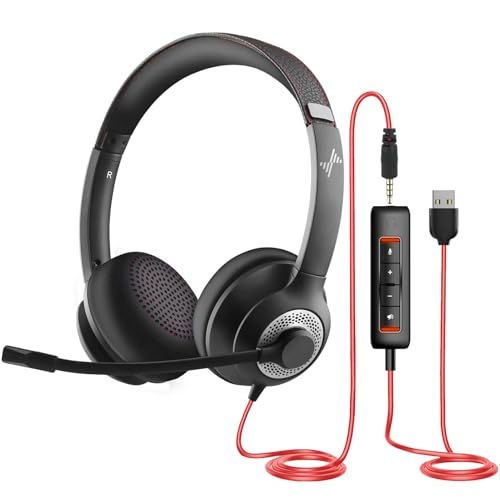
JIAMQISHI USB Headset — The dual-connection pick
JIAMQISHI’s distinguishing decision is printed at the end of its title: USB plus 3.5mm. That pairing solves a quiet modern problem. Your work laptop takes USB, your phone takes a 3.5mm or an adapter, an older desktop takes either, and a headset that speaks both languages never becomes the wrong tool when a call moves devices. The listing aims the headset at home office work, online classes, Skype, and Zoom, a spread that describes the hybrid household accurately: the same person, and often the same headset, attends a team stand-up at nine and supervises an online lesson at four.
The wearing style is on-ear, which keeps the headset light and leaves the wearer aware of the room, a preference many home workers hold strongly. A noise cancelling microphone and in-line control are both stated, covering the two features this category cannot do without. On-ear designs live or die by pad comfort, and the honest guidance is to expect a bedding-in period: the first day’s awareness of the pads usually fades as the headband relaxes, but a wearer with sensitive ears should alternate with speakers during the first week. The title does not publish weight or a driver figure, and for a speech-first device neither omission is damning; voices will sound clear long before they sound rich, and clarity is the job.
- Connection: USB and 3.5mm, both stated in the listing title
- Wearing style: on-ear
- Microphone: noise cancelling, with in-line control
- Colour: black
- Settings named: home office, online class, Skype, Zoom
- Weight: not published in the listing title; the maker’s documentation is where to verify it if a light headset is a hard requirement
Strengths
- Two connection types cover laptops, desktops, and phones without a second headset.
- On-ear lightness suits wearers who dislike the enclosed feeling of full dual-ear designs.
- In-line control keeps mute and volume at the fingers during classes and calls.
Trade-offs
- On-ear pads rest on the ear itself, which some wearers find tiring across a full shift.
- Room awareness cuts both ways: a loud household leaks into your listening more than with dual-ear coverage.
- The specification stays speech-focused, so music between meetings will sound serviceable rather than lush.
Best for: a hybrid worker whose calls alternate between a laptop and a phone in the same day. Not suited for: a call-centre agent on eight-hour shifts, where on-ear pressure accumulates and a purpose-built dual-ear model wears better.
Check the JIAMQISHI listing on Amazon for its cable arrangement, since how the two connections are implemented decides how tidy the dual-device life feels.
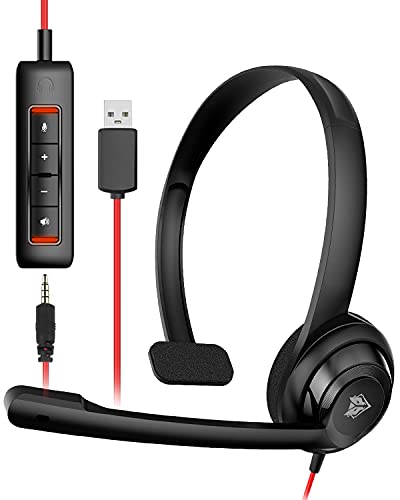
NUBWO HW02 — The comfort-first on-ear pick
NUBWO leads its HW02 title with a promise this category often forgets: ultra comfort. The claim matters because conference headsets are worn longer than almost any other audio product, and discomfort compounds silently, a slight pressure at ten o’clock becoming the reason a camera stays off and a headset stays in a drawer by Friday. An on-ear wired design keeps weight low, and the HW02’s stated settings, laptop and PC work, office calls, call centres, Skype, and webinars, describe exactly the long, seated, spoken sessions where comfort outranks almost everything else.
The functional core is complete: a noise cancelling microphone with in-line control, over a USB connection. Webinars deserve a word, because they invert the usual pattern; you listen far more than you speak, often for ninety minutes, and a headset that stays comfortable while you are mostly silent is a different product from one built for constant talking. The HW02’s positioning fits that listener-heavy life. The title does not state driver size or weight in grams, and its comfort claim cannot be verified from a listing, so treat the first week as a trial: wear it for your longest scheduled day before deciding, and alternate ears if the design allows, since on-ear pressure is the one risk its own marketing cannot argue away.
- Connection: USB wired
- Wearing style: on-ear
- Microphone: noise cancelling, with in-line control
- Design emphasis: ultra comfort, as stated in the listing title
- Settings named: laptop and PC work, office, call centre, Skype, webinars
- Published weight: the title gives no gram figure; NUBWO documentation is the verification source if you are comparing weights across models
Strengths
- Comfort-led design addresses the main reason conference headsets get abandoned in drawers.
- Noise cancelling microphone and in-line control cover the category’s essential functions without fuss.
- On-ear lightness suits webinar-heavy days spent mostly listening.
Trade-offs
- Comfort is personal and unprovable from a listing; sensitive ears remain a gamble until the first long day.
- On-ear wearing admits more room noise than the dual-ear Evolve 20 excludes.
- USB-only connection narrows its world to computers, unlike the dual-connection JIAMQISHI.
Best for: a webinar regular or support worker whose longest days are spent listening with occasional speaking. Not suited for: a wearer who already knows on-ear pressure bothers them, since no padding fully repeals that geometry.
Browse the HW02 listing on Amazon with the wearing style in mind, and plan your first long day as its real audition.
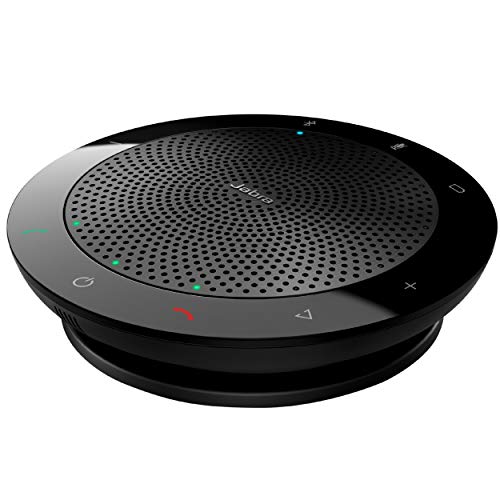
Jabra Speak 510 UC — The table-top speakerphone alternative
Honesty first: this is not a headset, and this guide will not pretend otherwise. The Speak 510 is a portable Bluetooth speakerphone, a small disc that sits in the middle of a table and gives a whole group one shared voice. It belongs in a conference guide because a large share of conferencing is not one person wearing a device but three or four people around a table, in a huddle room, a site office, or a kitchen-table startup, and for that pattern a speakerphone is simply the correct tool. Passing a headset around a table helps nobody; a speaker in the centre lets everyone speak naturally and hear together.
The listing states certification for Zoom and Google Meet, which means the device has been tested against those platforms’ expectations rather than merely being compatible in principle. Its pitch emphasises sound quality and portability, holding meetings anywhere, and that portability is real: a speakerphone that travels in a laptop bag turns a hotel room or a client’s spare office into a usable meeting space. The limits deserve equal clarity. A speakerphone hears everything in the room, so it is wrong for confidential calls in shared spaces, and its microphone favours people seated near it, so it suits small groups in small rooms rather than a boardroom table of twelve. It also cannot give one person privacy on a call in an open office, which remains headset territory. Choose it as a room’s device, alongside personal headsets, not instead of them.
- Device type: speakerphone, not worn; stated plainly in the listing title
- Connection: wireless Bluetooth
- Certification stated: Zoom and Google Meet
- Form: portable conference speaker for meetings anywhere
- Group size: the title publishes no participant figure; Jabra’s documentation describes its intended room scale, so verify there if your group is larger than a huddle
- UC variant: Speak 510 UC
Strengths
- One device gives a whole small group a voice, which no worn headset can do.
- Stated Zoom and Google Meet certification reduces platform guesswork for standardised teams.
- Portable form turns hotel rooms and borrowed offices into workable meeting spaces.
Trade-offs
- It offers zero privacy; everyone in the room hears the call and can be heard on it.
- Voices seated far from the unit reach the far end weaker, so large tables outgrow it.
- It cannot serve a solo worker in an open office the way any worn pick here can.
Best for: a small team that meets around one table and wants a shared, portable conference voice. Not suited for: an individual homeworker, who needs a worn headset’s privacy and microphone proximity instead.
Read the Speak 510 listing on Amazon for its room guidance, and pair it in your budget with at least one worn headset for private calls.
Why Do Wired Headsets Still Dominate Real Offices?
Wireless gets the attention, but wired USB remains the default in working offices for reasons that have little to do with sound. A wired headset cannot be flat, cannot be paired to the wrong laptop, cannot wander into a colleague’s bag, and costs little enough that a lost one is an annoyance rather than an incident. It also behaves identically every single day, which is the property IT support values above all others. Four of the five worn picks in this guide are wired for exactly those reasons, and their combined platform language, Teams, Zoom, Skype, softphones, describes an ecosystem that assumes a cable.
The honest case for wireless is not convenience in the abstract; it is the specific population whose work happens away from the chair. The Savi 8245’s unlimited talk time is a wired argument translated into wireless terms: the conversation never has to stop. If your calls are scheduled and seated, wireless buys you a charging routine and little else. If your calls are continuous and mobile, wired buys you a shorter career for your patience. Read your own calendar before reading any catalogue, because the calendar knows which of those people you are.
How Should You Set Up a Home Office for Clearer Calls?
Begin with the chair’s position rather than the equipment. A desk facing a wall gives your voice a short, controlled reflection; a desk in the middle of a hard-floored room gives it a small echo chamber. Add one soft surface near your speaking position, a rug, a curtain, a shelf of books, and your transmitted voice tightens audibly before you spend anything. Keep the headset’s cable routed so it never crosses your keyboard or the path of your chair’s wheels, and plug wired USB models directly into the laptop rather than through an unpowered hub when you can, because hubs are a classic source of intermittent audio that masquerades as a headset fault.
Lighting and camera belong to a different guide, but one audio habit belongs here: do a ten-second recording in your meeting platform every time you change anything, a new headset, a new room, a new laptop. Play it back on the speakers you trust. That tiny ritual catches boom misplacement, wrong input selection, and platform suppression mistakes while they are still free to fix, and it is the habit that separates people whose calls always sound professional from people who discover their problems live, in front of the client, one meeting in five.
How Do You Run a Better-Sounding Meeting From Your Side?
Position the boom first. A microphone boom should finish just beside your mouth, close enough that a finger or two spans the gap, never directly before your lips where breath strikes it and never sagging toward your chin where your voice loses its body. Speak across it rather than into it. Then set your levels once, properly: every meeting platform offers a microphone test, and thirty seconds there prevents the twin failures of whispering and clipping for every meeting that follows. Keep the input level where your loudest laugh stays clean, because a level set for your speaking voice will distort the moment you react to news.
Room habits matter as much as hardware. A soft room sounds better than a bare one, so a bookcase, curtains, or even a coat hung behind you will improve your transmission more than a headset upgrade would. Close the door you are able to close, mute when you are not speaking in groups larger than four, and wear the headset for the whole meeting rather than donning it to speak, because the handling noise of repeated fitting is its own distraction. Finally, keep a glass of water within reach and your phone’s notifications off; the most professional sound in a meeting is an absence of surprises, and most surprises are preventable.
How Do Meeting Platforms Treat These Headsets Differently?
Teams, Zoom, Google Meet, and Skype all process your voice before anyone hears it, and each applies its own noise suppression and echo handling on top of whatever your microphone already does. That layering explains a familiar puzzle: the same headset can sound crisp on Zoom and slightly processed on Teams, because the platforms are finishing the signal differently. Devices built for the UC world, like the Savi 8245, are designed to cooperate with that processing rather than fight it, and the Speak 510’s stated certification for Zoom and Google Meet means those two platforms have formally tested the pairing.
Practical consequences follow. If your organisation lives inside one platform, favour the pick whose title speaks that platform’s language, and run the platform’s own audio test with your chosen headset before your first important call. Turn the platform’s noise suppression down a step if your voice sounds underwater, since a noise cancelling microphone plus aggressive software suppression can over-process speech and clip the soft beginnings of words. Dictation inverts the advice: Dragon and its peers want the cleanest, least processed signal available, which is one reason MAIRDI’s dictation positioning matters. For recognition work, disable platform enhancements entirely and let the microphone’s own discipline do the work, because recognition software is a stricter listener than any colleague.
What Should a Small Team Standardise On?
Standardisation is a support decision disguised as a purchasing one. A team of eight with eight identical wired headsets has one spare to stock, one control layout to teach, and one troubleshooting script for every audio complaint. That is the Evolve 20 argument at fleet scale, and the MAIRDI and NUBWO wired picks make the same case at their tiers. Standardise the default, then carve out exceptions deliberately: the person who talks six hours a day gets the Savi conversation, the room where everyone gathers gets the Speak 510, and the dictation user gets the MAIRDI even if the fleet standard is Jabra. A standard with named exceptions survives contact with reality; a standard without them gets quietly routed around.
Budget the unglamorous extras at the same time. A spare headset per five seats, replacement ear cushions for the worn models, and one extra cable-friendly desk arrangement per office will cost less than a single day of a senior person’s meetings degraded by a dead device. Write down which platform each device was bought for and when, because in eighteen months nobody will remember why the cupboard holds two connection types, and that note is the difference between a tidy refresh and a fresh round of guesswork.
How Do You Look After Headsets That Several People Share?
Shared headsets live harder lives than personal ones, and a little protocol extends them noticeably. Ear cushions are the hygiene frontier: wipe them between users with a cloth intended for the purpose, replace them on a schedule rather than on visible failure, and prefer designs whose cushions detach without tools. The convertible Savi’s ability to change wearing style helps here too, since a unit is not stranded when one attachment wears. Store shared units on hooks or in a labelled tray, never in a tangle at the bottom of a drawer, because cable kinks and crushed headbands are drawer injuries, not usage injuries.
Microphone booms deserve a rule of their own: bend them by the base, never by the tip, and return them to a neutral position when the call ends rather than leaving them swung into whatever shape the last user preferred. For the speakerphone, keep the Speak 510’s surface clear of coffee rings and paper, since anything resting against its body dulls both its speaker and its hearing. None of this requires a facilities department. It requires one person who owns the cupboard and five minutes a week, and it routinely doubles the service life of a shared fleet.
What About Ears, Posture, and the Long-Day Problem?
A headset is worn on the body for longer than any other work tool except the chair, and its ergonomics deserve the same seriousness. Alternate the load where the design allows: an on-ear model worn all week on the same ear will eventually announce itself, so build speaker breaks into long listening days and let the NUBWO-style lightness work in your favour by keeping total pressure low. Keep call volume at the lowest level that stays intelligible, because the temptation in a noisy room is to climb, and hours of elevated volume are their own fatigue even when the conversation feels effortless.
Posture hides inside the wired-versus-wireless question too. A cable pins you to one position, and one position held for six hours is a back complaint in progress. The Savi’s mobility is partly an ergonomic feature: standing for the last ten minutes of a long call, fetching water without leaving the conversation, and shifting weight all become possible. Teams equipping heavy talkers should weigh that honestly rather than treating wireless as a luxury trim. The cheapest ergonomic upgrade in this entire guide, though, costs nothing: raise the laptop so the camera and screen sit at eye level, and the headset’s microphone geometry, your neck, and your voice all improve together.
How Does Hybrid Work Change What You Should Buy?
Hybrid schedules split one worker across two acoustic worlds, a treated office and an untreated spare room, and the headset has to survive both. That argues for the connection pragmatists in this guide: a JIAMQISHI that plugs into the office desktop by USB and the home laptop or phone by whichever port is free, or an Evolve 20 whose dual USB-A and USB-C ends the adapter negotiation at both desks. It also argues for owning the carrying case moment; a headset that travels twice a week needs a bag or a hook at each end, or its cable will live the short, exciting life of all regularly crushed things.
The second hybrid lesson is about the room device. Teams that gather in person two days a week concentrate their group calls into those days, and a Speak 510 living permanently in the gathering room removes the daily ritual of borrowing, charging, and hunting for the shared device. Buy the room its own unit, label it, and leave it plugged in. Hybrid work rewards equipment that stays where its job is, and punishes equipment that must commute.
How Do the Six Options Divide the Working Week?
| Model | Form | Connection | Control |
|---|---|---|---|
| Jabra Evolve 20 | Dual-ear worn headset | USB-A and USB-C wired | In-line call control |
| Poly Savi 8245 UC | Convertible worn headset | Wireless UC | On-device |
| MAIRDI USB Headset | Worn headset | USB wired | See listing details |
| JIAMQISHI USB Headset | On-ear worn headset | USB and 3.5mm | In-line control |
| NUBWO HW02 | On-ear worn headset | USB wired | In-line control |
| Jabra Speak 510 UC | Table speakerphone, not worn | Bluetooth | On-device |
The pattern in that table is a division of labour. Wired USB owns the seated desk, wireless owns the mobile professional, on-ear owns the listener-heavy day, and the speakerphone owns the shared table. Most real workplaces need two of those four answers, not one, and the cheapest sensible pairing in this guide is a wired headset per person plus a Speak 510 for the room where the team gathers.
One more platform habit deserves attention: recording and transcription. Modern meetings are routinely recorded, and automated transcripts punish a poor microphone twice, once for the humans straining to follow and once for the software that turns your mumble into a permanent, wrong sentence in the minutes. A close, noise-managed microphone is therefore also a documentation tool. If your organisation searches its meeting archive, the headsets in this guide are quietly deciding how findable your contributions will be in two years, which is a strange but real argument for taking the microphone sections above seriously.
There is a courtesy dimension to all of this. Speaking clearly into a decent microphone is a form of respect for the people giving you their hour, and its absence is felt even when nobody names it. Meetings run shorter when nobody asks for repetitions, decisions stick when the words were heard correctly the first time, and the humble headset, chosen with a little care, is responsible for more of that efficiency than most management initiatives.
Guests deserve a thought as well. The client who joins your call on a laptop’s built-in microphone in a tiled kitchen will sound distant no matter what you wear, and no purchase of yours can fix their end. What you can control is your own standard: when your side is consistently clear, the contrast gently teaches every regular collaborator what good sounds like, and headsets have a way of appearing on other people’s desks shortly afterwards.
What Goes Wrong When Teams Buy Conference Headsets?
The most expensive error is equipping everyone identically. A support agent, a pacing manager, and a dictating lawyer have almost nothing in common as headset users, and a single-model rollout guarantees two of the three quietly hate their device. Pilot with the heaviest talkers first; their verdict predicts the fleet’s. A second error is ignoring the mute. Teams discover too late that a headset without reachable controls produces on-air accidents, so test the mute with your eyes closed before buying in quantity. If your fingers cannot find it blind, it does not exist.
A third error is forgetting the room. A speakerphone bought for a glass-walled huddle space will echo, and a dual-ear headset bought for a worker who must hear a baby monitor will be worn one-eared and blamed. Match the device to the acoustics and obligations of its actual setting. Fourth, nobody budgets for spares and cables, so one frayed lead idles a seat. Wired headsets are cheap enough that a drawer spare is rational. Fifth, buyers assume certification language is decoration; a device stated as certified for your platform has passed tests that a merely compatible one has not, and in standardised IT environments that difference shows up as fewer tickets.
How Should You Test a New Conference Headset in Its First Week?
Day one is for the recording test: thirty seconds of your normal speaking voice in your actual platform, played back and judged cold. Note the boom position that produced the clearest result, because you will forget it by Wednesday and spend a month wondering why Tuesday sounded better. Day two is for the longest scheduled day the week offers; wear the headset for all of it, including the meetings where you mostly listen, and score comfort at the end rather than the start, since every headset in this guide is comfortable for twenty minutes.
Midweek, test the controls under pressure. Join a low-stakes call and practise muting, unmuting, and adjusting volume without looking, because the first time you need the mute blind should not be the first time you try. Test the failure modes too: let the Savi’s wearer walk to the edge of its comfortable range and learn where the audio thins, plug the wired picks into every machine you own to confirm the connection story the titles promised, and sit a colleague at the far side of the table from the Speak 510 to learn its honest reach. End the week by asking the people who hear you most whether anything changed. Their ears are the only review that counts in this category, and a headset that passes their test has passed the only examination that was ever real.
Final Recommendation
Start with the Evolve 20 if your work is seated and scheduled; it is the calm centre of this category and the safest single purchase here. Step to the Savi 8245 UC when talking is the job itself and the chair is optional, because its convertible wearing and unlimited talk time are built for exactly that life. The MAIRDI earns its place wherever dictation shares the day with meetings, the JIAMQISHI wherever one headset must serve a laptop and a phone, and the HW02 wherever long listening days make comfort the deciding sense. Add the Speak 510 when a small room needs a shared voice, remembering it complements worn headsets rather than replacing them. Equip the pattern of your meetings, not the prestige of the catalogue, and your calls will sound like it.
Frequently Asked Questions
Is a dual-ear or single-ear headset better for calls?
Dual-ear designs, like the Evolve 20 here, exclude more room noise and help concentration in shared spaces. Single-ear and on-ear styles keep you aware of your surroundings, which suits home workers and reception-style roles. Neither is universally better; the room you work in decides.
Can I use one of these headsets for music as well?
You can, and speech-first headsets handle podcasts and background listening pleasantly. They are tuned for voice clarity rather than musical richness, so a dedicated music headphone will still sound fuller. For a desk that hosts calls all day and music between them, the trade is usually acceptable.
What does UC mean on the Savi 8245 and Speak 510?
UC stands for unified communications. It signals that the device is built for software calling platforms such as Teams and Zoom rather than for a traditional desk phone alone. The Speak 510’s title goes further, naming certification for Zoom and Google Meet specifically.
When should a team choose a speakerphone over headsets?
When several people in one room join the same call together. A speakerphone gives the group a shared microphone and speaker, which is fairer and clearer than crowding around a laptop. For solo calls, privacy, or open offices, a worn headset remains the right tool.
Do noise cancelling microphones eliminate background noise completely?
No. They reduce steady and distant noise so your voice stays intelligible, but a dog barking beside you will still be heard. Position and room treatment finish the job: a close boom in a soft room outperforms any microphone specification in a bare, echoing one.
Can one headset cover both my office days and home days?
Yes, if its connections match both desks. The JIAMQISHI’s USB plus 3.5mm pairing and the Evolve 20’s USB-A plus USB-C support are designed for exactly that two-desk life. Give the travelling headset a case or a hook at each end so the commute does not shorten its life.
Why do I sound fine in the platform test but poor in the real meeting?
The test usually runs alone, while the meeting adds other voices, platform processing under load, and your own louder, faster meeting voice. Re-check your boom position and input level at the volume you actually present at, and lower the platform’s noise suppression a step if your speech sounds clipped or underwater.
Should our team buy identical headsets for everyone?
Standardise the default and name the exceptions. Identical wired headsets simplify spares and support, but the heaviest talker, the dictation user, and the shared meeting room each justify a different device. A standard that admits its exceptions survives; one that denies them gets quietly ignored.
How long should a wired conference headset last?
With ordinary office treatment, years. The cable and its strain reliefs are the usual failure points, so route the cable without sharp bends, avoid running chair wheels over it, and keep a spare in the drawer for the day one finally frays mid-meeting.


