What's inside
- Key Takeaways
- Quick Picks
- How Were These Six Chosen for the Series X?
- Wireless on Xbox: What Should You Know Before Choosing It?
- What Does Spatial Audio Add on the Series X?
- How Important Is the Microphone for Xbox Party Chat?
- How Do You Set Up Chat and Game Audio on the Series X?
- Does the Series S Change the Headset Decision?
- What Should Competitive Players Prioritise on Xbox?
- How Do You Share a Headset in a Family Living Room?
- How Do You Look After a Living-Room Headset?
- What Happens When Friends Play on Other Platforms?
- How Should You Test a New Xbox Headset in Its First Week?
- Which Genres Flatter Which Picks?
- What About Younger Players and Shared Consoles?
- How Do the Six Line Up on the Sofa Test?
- What Do Xbox Players Get Wrong When Buying a Headset?
- What Do the Console’s Own Audio Settings Change?
- Final Recommendation
- Frequently Asked Questions
- Related Guides
As an Amazon Associate I earn from qualifying purchases. This post may contain affiliate links at no extra cost to you.
widgetverdict.com is reader-supported. When you buy through links on our site, we may earn an affiliate commission.
Where to buy: Amazon carries each headset in this comparison, and Xbox players are spoilt for connection choices this generation, with first-party wireless, two Turtle Beach wireless tiers, an Xbox-native HyperX, and two wired models for players who never want to charge anything.
The best xbox series x headsets share a problem no other console’s headsets face in quite the same way: the Series X and S ask one device to handle competitive shooters at midnight, cinematic adventures on weekends, party chat with friends who may be on PC, and a controller that lives on the sofa rather than at a desk. This guide’s six picks answer that spread deliberately. Microsoft’s own Xbox Wireless Headset is the first-party reference. Turtle Beach fields two wireless models, the Stealth 700 with its 60mm dual drivers and the Stealth 600 beneath it, both advertising 80-hour batteries and flip-to-mute microphones. HyperX offers an Xbox-native wireless Stinger Core and, in the Cloud III, a wired model whose listing must be read carefully: it is a wired headset, full stop, and this guide will never describe it as anything else. RIG’s R5 Spear PRO HX completes the six as an officially licensed wired option with graphene drivers.
Wireless dominates the list because the living room rewards it, but wired earns its two places honestly: no charging, no pairing, no battery ageing, and a direct line into the controller. Read the picks against your own setup, your television distance, your chat habits, and whether your Xbox shares a room with a PC that also wants the headset’s attention.
Key Takeaways
- Four of the six picks are wireless, reflecting how Xbox is actually played: on a sofa, metres from the console.
- The Turtle Beach Stealth 700 and Stealth 600 both state an 80-hour battery and flip-to-mute microphones, differing mainly in driver size and tier.
- Microsoft’s own headset adds spatial audio with Dolby Atmos and the simplest pairing story on the platform.
- The HyperX Cloud III in this guide is a wired headset connected by USB-C, USB-A, or 3.5mm; only the Turtle Beach pair, the Xbox Wireless Headset, and the CloudX Stinger Core are wireless.
- The RIG R5 Spear PRO HX is officially licensed for Xbox and wired by 3.5mm, with 40mm graphene drivers and Dolby Atmos support.
- Multiplatform support runs through the Turtle Beach models, which also serve PS5, PC, and mobile over Bluetooth.
Quick Picks
| Pick | Badge | Why it earns its place |
|---|---|---|
| Xbox Wireless Headset | The first-party pick | Microsoft’s own over-ear wireless headset with spatial audio and Dolby Atmos, built for consoles, PCs, and TVs. |
| Turtle Beach Stealth 700 | The flagship wireless pick | 60mm dual drivers, an 80-hour battery, Bluetooth, and a flip-to-mute mic across Xbox, PlayStation, PC, and mobile. |
| Turtle Beach Stealth 600 | The long-battery wireless pick | 50mm drivers with the same 80-hour battery and flip-to-mute design at the tier below its sibling. |
| HyperX CloudX Stinger Core Wireless | The Xbox-native comfort pick | A wireless headset made for Xbox Series X and S and Xbox One, with memory foam, leatherette cushions, and a noise-cancelling mic. |
| RIG R5 Spear PRO HX | The licensed wired pick | Officially licensed for Xbox, with 40mm graphene drivers, Dolby Atmos, a flip-to-mute mic, and a universal 3.5mm plug. |
| HyperX Cloud III | The wired precision pick | A wired headset with 53mm drivers and a 10mm microphone, connecting by USB-C, USB-A, or 3.5mm to PC, PS5, and Xbox. |
How Were These Six Chosen for the Series X?
Xbox compatibility came first and was read strictly from the listings: every pick names the Xbox Series X or S, or the Xbox platform generally, in its title. That discipline matters on this platform more than most, because Xbox wireless is a proprietary conversation; a headset that is wireless on PlayStation or PC is not automatically wireless on Xbox, and several famous models are wired-only when they reach Microsoft’s console. Where a title claims wireless for Xbox, the pick is treated as wireless. Where it does not, as with the Cloud III and the RIG R5, the pick is presented as wired without apology or embellishment.
Beyond compatibility, the screening weighed the living-room realities: battery endurance for the wireless models, microphone style for party chat, driver information where a title publishes it, and the second-platform story, since many Xbox households also contain a PC or a phone that would like to borrow the headset. Spatial audio appears in this guide only where a title states it, on the Xbox Wireless Headset and the RIG R5, both naming Dolby Atmos. Nothing was imported from other generations or sibling models.
Wireless on Xbox: What Should You Know Before Choosing It?
Xbox wireless headsets connect directly to the console’s own wireless system rather than through a television or a Bluetooth hop, which is why the experience feels native: power on, and the headset is simply part of the console. The four wireless picks here exploit that in different ways. Microsoft’s headset is the platform’s own implementation. The Turtle Beach pair add Bluetooth alongside, so the same headset can take a phone call or serve a PC without surrendering its Xbox pairing. The CloudX Stinger Core keeps its focus narrow, an Xbox-first wireless design for the console and its predecessor.
Battery is the wireless tax, and this generation pays it gracefully. Eighty stated hours on both Turtle Beach models means charging becomes an occasional errand rather than a session-ending event, though owners should still build the habit of charging after long weekends rather than discovering an empty battery at the start of a raid night. Wireless also fixes your upgrade path: the electronics inside define the sound permanently. Wired owners can change their experience by changing what the headset plugs into; wireless owners buy the whole chain at once. Neither is a defect. They are different ownership shapes, and the sofa usually votes wireless while the desk votes wired.
What Does Spatial Audio Add on the Series X?
Spatial audio, represented here by Dolby Atmos on the Xbox Wireless Headset and the RIG R5, reshapes game sound so that height and distance become part of the information your ears receive. A helicopter genuinely passes overhead rather than merely getting louder, and a story game’s cathedral feels tall. The Series X was built with this in mind, and headsets that state Atmos support are speaking the console’s native spatial language. The benefit is most obvious in single-player adventures and atmospheric games, where immersion is the product. In competitive shooters, opinions divide: some players read spatial cues beautifully, while others prefer a plain stereo image they have trained on for years.
Two cautions keep the feature honest. First, spatial processing is a presentation choice, not a competitive guarantee; it will not rescue poor positioning or a microphone that swallows callouts. Second, titles in this guide that do not mention Atmos should not be assumed to lack spatial options through the console’s own settings, but this guide reports only what listings claim, and only two claim it. If Atmos is the feature you are shopping for by name, those two picks are your shortlist, one wireless and first-party, one wired and licensed, which is a tidy illustration of how this category’s choices cascade.
How Important Is the Microphone for Xbox Party Chat?
Party chat is the social centre of Xbox, and its microphone demands are specific: your voice must stay clear over game audio, your mute must be instant when the doorbell rings, and the boom must survive being swung, flipped, and occasionally sat on. The flip-to-mute design shared by both Turtle Beach models and the RIG R5 answers the second demand elegantly, turning muting into a physical gesture nobody forgets mid-conversation. The CloudX Stinger Core counters with a noise-cancelling microphone for households where the television, siblings, or a fan compete with your callouts. The Cloud III’s 10mm microphone, described in its title as ultra-clear, is the largest stated capsule in this group and gives wired players a voice with unusual body.
Chat balance is the other half of the equation, the mix between game sound and voices. Every headset here lives inside the Xbox ecosystem’s own audio settings, so spend five minutes in the console’s audio menu after pairing: set the chat mixer so voices sit clearly above game audio in competitive titles, and reverse the emphasis for story games where the world should swallow you. A headset cannot make that decision for you, and the players who sound effortlessly clear in party chat are usually the ones who made it once, deliberately, rather than the ones with the most expensive microphone.

Xbox Wireless Headset — The first-party pick
Microsoft’s own headset is the platform’s reference design, and its title keeps the promise simple: wireless, over-ear, spatial audio with Dolby Atmos, and play across consoles, PCs, and TVs. First-party status buys integration that third parties approximate: pairing that behaves like a controller’s, console settings that recognise the device, and an ownership experience with no dongle politics. For a player whose gaming life is entirely Xbox-shaped, that seamlessness is a feature with daily value, the audio equivalent of a controller that simply works every time you pick it up.
The Atmos support is its headline audio claim, and on the Series X it suits the cinematic library beautifully, giving story games the vertical space their mixes were built with. The listing’s breadth, consoles, PCs, and TVs, hints at its intended life as the household’s one wireless headset rather than a single-console accessory. What the title does not publish is battery endurance or driver dimensions, and this guide will not supply them from elsewhere; Microsoft’s own documentation carries those figures for buyers who compare by numbers. Judge this headset on integration and spatial audio, the two things its listing actually promises, and it stands as the calm default against which the Turtle Beach pair must justify their extra reach.
- Connection: wireless, first-party Xbox implementation
- Audio: spatial audio with Dolby Atmos, stated in the listing title
- Form: over-ear, carbon black
- Platforms named: consoles, PCs, TVs, and more
- Battery and driver figures: not published in the listing title; Microsoft documentation is the verification route for both
- Microphone details: not itemised in the title, so check the listing for boom style and mute behaviour
Strengths
- First-party integration makes pairing and console settings as simple as the platform allows.
- Dolby Atmos spatial audio serves the Series X’s cinematic catalogue natively.
- Its cross-device brief suits households that game across console, PC, and television.
Trade-offs
- The title withholds battery and driver figures, so numbers-led shoppers must detour through documentation.
- Players wanting Bluetooth multiplatform gymnastics will find the Turtle Beach models more forthcoming.
- Its ecosystem focus means PlayStation households get less from it than Xbox-first homes.
Best for: an Xbox-first player who values seamless pairing and spatial audio over spec-sheet drama. Not suited for: a numbers-driven buyer who refuses to purchase any headset whose listing omits battery and driver data.
Open the Xbox Wireless Headset listing on Amazon and Microsoft’s documentation together, since the figures live in the second of those.
Turtle Beach Stealth 700 — The flagship wireless pick
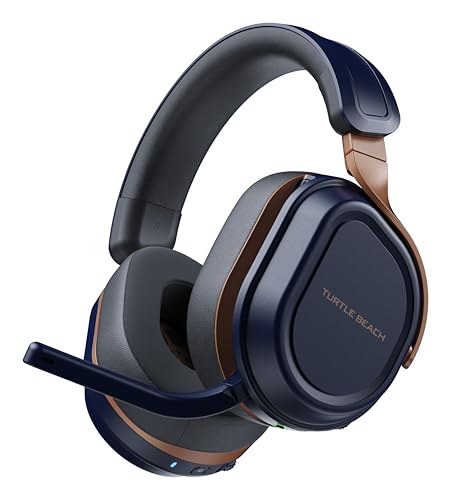
The Stealth 700 is Turtle Beach’s flagship argument in this guide, and its title is a small manifesto: wireless for Xbox, PS5, PC, and mobile; 60mm dual drivers, the largest stated in this roundup; an 80-hour battery; Bluetooth alongside the gaming connection; and a flip-to-mute microphone. Each element answers a living-room reality. The big drivers give cinematic games their scale and competitive games their authority. The battery figure, shared with its sibling, turns charging into a monthly habit. Bluetooth means the headset that plays the console also answers the phone and serves the laptop, so one device covers the household’s whole audio day.
Multiplatform breadth is this model’s soul. A player with a Series X under the television, a PS5 beside it, and a PC in the study is precisely who the Stealth 700 was drawn for, and the cobalt finish named in the title gives it a visual identity beyond the category’s default black. The flip-to-mute boom keeps party-chat manners physical. What flagship status cannot repeal is physics: this is the most elaborate wireless chain in the guide, and its sound is fixed by its electronics, so the wired upgrade path does not exist here. Buy it as a complete, finished system for several machines, and its tier makes sense; buy it for one console alone and the Stealth 600 below makes the same battery promise with money left over.
- Drivers: 60mm dual drivers, stated in the listing title
- Battery: 80 hours as stated
- Connection: wireless plus Bluetooth
- Microphone: flip-to-mute
- Platforms named: Xbox Series X and S, Xbox One, PlayStation, PS5, PC, mobile
- Colour: cobalt
Strengths
- The largest stated drivers in the guide give games scale and authority.
- An 80-hour battery with Bluetooth makes it a genuine all-device household headset.
- Flip-to-mute keeps party-chat privacy a gesture rather than a menu dive.
Trade-offs
- Its flagship tier buys breadth a single-console household may never use.
- The sealed wireless chain offers no wired upgrade path for later experimentation.
- Feature density means more settings to learn before the headset disappears into the game.
Best for: a multiplatform household that wants one flagship wireless headset to serve every screen it owns. Not suited for: an Xbox-only player on a careful budget, because the Stealth 600 covers that life with the same battery endurance.
The Stealth 700 listing on Amazon details its connection switching, which is the feature to study if several consoles share your television.
Turtle Beach Stealth 600 — The long-battery wireless pick
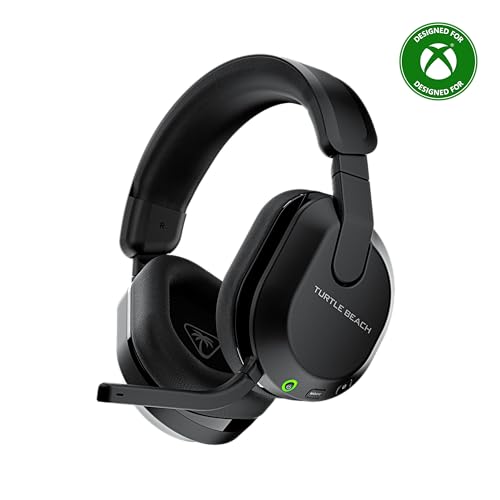
The Stealth 600 keeps the two promises players feel most, the 80-hour battery and the flip-to-mute microphone, and trims the flagship’s excess around them. Its drivers are 50mm against its sibling’s 60mm dual design, its finish is black against cobalt, and its platform list is equally generous: Xbox Series X and S, Xbox One, PlayStation, PS4, PC, and mobile, with Bluetooth in attendance. For a great many players this is the rational centre of the wireless market, because the difference between the two Turtle Beach models is refinement, while the difference between either of them and a lesser wireless headset is the battery that never interrupts a week.
Ownership rhythm is this model’s real subject. Eighty hours means the headset joins the category of things you charge when convenient, alongside controllers, rather than things you nurse nightly. The flip-to-mute boom handles the social side, and Bluetooth extends the headset’s usefulness into commutes and calls, which quietly raises its value per hour worn far beyond the console sessions it was bought for. Players choosing between the siblings should ask how much driver scale they can actually hear in their games and how much the flagship’s finish matters to them; players choosing between the 600 and wired life should ask whether a cable across the sofa is a triviality or a nightly annoyance. The second question decides more purchases than the first.
- Drivers: 50mm, stated in the listing title
- Battery: 80 hours as stated
- Connection: wireless plus Bluetooth
- Microphone: flip-to-mute
- Platforms named: Xbox Series X and S, Xbox One, PlayStation, PS4, PC, mobile
- Colour: black
Strengths
- The same 80-hour battery as the flagship removes charging from weekly consciousness.
- Bluetooth and broad platform support stretch one purchase across the household’s devices.
- Flip-to-mute gives party chat a fast, physical privacy control.
Trade-offs
- Its 50mm drivers concede the flagship’s extra scale for cinematic games.
- Wireless ownership still ends at a charging cable whenever the long battery finally empties.
- Players loyal to one console pay for multiplatform talents they may never exercise.
Best for: a value-aware wireless player who wants flagship battery life and mute manners without the flagship tier. Not suited for: a cinematic maximalist who hears driver scale as the whole point and would regret the smaller drivers nightly.
Compare the Stealth 600 listing on Amazon directly against the 700’s, since the differences between them are the whole decision.

HyperX CloudX Stinger Core Wireless — The Xbox-native comfort pick
The CloudX Stinger Core Wireless is the specialist in a field of generalists: a wireless headset built specifically for the Xbox Series X and S and Xbox One, wearing its allegiance in its name. Its title emphasises the wearing experience, memory foam and premium leatherette ear cushions, because HyperX’s Stinger line has always sold comfort as its headline, and its microphone is a noise-cancelling design for chat in real rooms. Where the Turtle Beach models roam across every platform, this HyperX stays home, and that focus has a quiet appeal for the player whose gaming is entirely Xbox and who wants a headset that feels designed for the console rather than adapted to it.
Memory foam cushions matter more on a sofa than at a desk, because living-room sessions sprawl: films between matches, a co-op campaign that runs long, a headset worn half the evening. Foam that distributes pressure and leatherette that seals gently keep the headset present without making its presence felt. The title does not state a battery figure or driver dimensions, an omission buyers should note and resolve through HyperX’s documentation, since wireless endurance is a headline concern in this category and the Turtle Beach pair publish theirs proudly. What is stated, the Xbox-native design, the cushion materials, and the noise-cancelling mic, describes a comfort-first wireless headset for a single-platform household, and judged on exactly those terms it earns its place without needing the flagship’s breadth.
- Connection: wireless, designed for Xbox
- Platforms named: Xbox Series X and S, Xbox One
- Cushions: memory foam with premium leatherette, stated in the listing title
- Microphone: noise-cancelling
- Battery endurance: not given in the listing title; HyperX documentation carries the figure and should be checked before comparing with the 80-hour Turtle Beach models
- Colour: black
Strengths
- Xbox-native design focuses every decision on the platform its owner actually uses.
- Memory foam and leatherette cushions suit long, sprawling living-room sessions.
- A noise-cancelling microphone keeps party chat clear in ordinary, noisy households.
Trade-offs
- Its platform focus gives PlayStation and PC households nothing to borrow.
- Battery and driver figures are absent from the title, complicating direct comparison shopping.
- No Bluetooth is claimed, so phone and laptop side duties belong to other picks.
Best for: an Xbox-only player who prioritises cushion comfort and a chat-clear microphone. Not suited for: a multiplatform household, because this headset’s talents deliberately stop at the Xbox’s border.
Check the CloudX Stinger Core listing on Amazon together with HyperX’s documentation, where its battery specification is published.

RIG R5 Spear PRO HX — The licensed wired pick
The RIG R5 Spear PRO HX carries the two words competitive Xbox players look for first: officially licensed. That licence means the headset was built to Microsoft’s programme expectations for the platform, and its wired universal 3.5mm connection plugs straight into the controller, the most reliable audio path in console gaming. Its title adds genuine technical interest: 40mm graphene drivers, a material choice associated with stiffness and light weight in driver design, Dolby Atmos support for spatial play, a flip-to-mute microphone, and memory foam cushions. In one wired package, RIG assembles the features this guide has been distributing across six models.
Wired discipline is this model’s character. There is no battery to age, no pairing to manage, and no wireless chain to cap the sound; the controller’s output and the headset’s drivers are the whole story, and for tournament-minded players that simplicity is a competitive feature. Atmos support over a wired connection also makes the R5 the spatial-audio alternative to Microsoft’s own wireless headset, for players who want height cues without a radio link. The 40mm drivers are the smallest stated here, which competitive players may read as a virtue, since speed and clarity in the midrange serve footsteps better than cinematic scale. Memory foam cushions keep the long-session comfort that wired players, tethered and focused, particularly need.
- Licence: officially licensed for Xbox, stated in the listing title
- Drivers: 40mm graphene
- Audio: Dolby Atmos support
- Connection: universal 3.5mm wired, into the controller
- Microphone: flip-to-mute
- Cushions: memory foam
Strengths
- Official licensing and a controller-direct wired connection make it the most predictable competitive option here.
- Graphene drivers and Atmos support bring genuine technical ambition to the wired tier.
- Flip-to-mute and memory foam cover the social and comfort essentials without electronics.
Trade-offs
- The cable ties you to the controller, which sofa players at a distance will feel nightly.
- Its 40mm drivers concede cinematic scale to the Stealth 700’s larger dual drivers.
- Wired connection to the controller means the headset’s world ends where the controller’s battery does.
Best for: a competitive Xbox player who wants licensed reliability, Atmos cues, and zero charging in their life. Not suited for: a player seated far from the screen who moves around during play, since the controller tether defines their radius.
The R5 Spear PRO HX listing on Amazon is worth reading for its licensing and Atmos details, which are this model’s twin signatures.

HyperX Cloud III — The wired precision pick
Read this listing’s title slowly, because it prevents the commonest mistake made about this model: the Cloud III here is a wired gaming headset. Its connections are USB-C, USB-A, and 3.5mm. There is no wireless mode in this listing, and any roundup that describes this Cloud III as wireless is describing a different product. What the wired design delivers instead is versatility of a different kind: one headset that plugs into a PC by USB, into a PS5, and into an Xbox Series X setup by the appropriate cable, with 53mm drivers, the second-largest stated in this guide, a 10mm ultra-clear microphone, memory foam, and a durable frame.
For Xbox players, the Cloud III’s proposition is precision and permanence. The 53mm drivers give games authority without a battery’s permission, the oversized microphone gives party chat and Discord calls a fuller voice than most console headsets manage, and the frame-and-foam build is made for years of daily use. Its natural home is the desk-adjacent Xbox setup, the monitor-and-chair arrangement where a cable is no hardship, or the household where the same headset serves a gaming PC all week and the Series X on weekends. Sofa players seated metres from the console should weigh the wireless picks first. Desk players should weigh this one’s driver size, microphone, and refusal to ever need charging, and recognise a wired flagship when they see one.
- Connection: wired only, by USB-C, USB-A, and 3.5mm; this listing includes no wireless mode
- Drivers: 53mm, stated in the listing title
- Microphone: 10mm, described as ultra-clear
- Cushions and frame: memory foam, durable frame
- Platforms named: PC, PS5, Xbox Series X
- Battery: none, by design; the cable is the power story
Strengths
- Stated 53mm drivers and a 10mm microphone give it the strongest wired hardware sheet in this guide.
- Three cable connections make one headset serve PC, PlayStation, and Xbox setups without adapters.
- No battery exists to age, empty, or interrupt a session at its climax.
Trade-offs
- It is wired, so the sofa-at-a-distance lifestyle belongs to the wireless picks above.
- Xbox use runs through a cable to the controller or console rather than the platform’s native wireless.
- Players who equate flagship with wireless may overlook it despite its superior stated drivers.
Best for: a desk-based Xbox and PC player who wants big drivers, a serious microphone, and zero charging forever. Not suited for: a living-room player whose seat sits metres from the console and who stands, fetches, and moves mid-session.
Confirm the Cloud III’s wired connections on its Amazon listing before ordering, and choose it for the cable, not in spite of it.
How Do You Set Up Chat and Game Audio on the Series X?
Pair or plug in, then go straight to the console’s audio settings before judging anything. Set the headset format to match what your model advertises, enable the spatial option your title promises if you chose an Atmos pick, and use the chat mixer to decide, per game type, whether voices or the world lead. Competitive titles want voices forward; story titles want the world forward and chat as a whisper beneath it. Test with a friend in an actual party rather than alone in a menu, because the mix only proves itself under real voices and real explosions together.
Microphone monitoring, the sidetone that lets you hear your own voice, deserves one experiment: set it so you can just hear yourself, and you will stop shouting over the game without realising you were doing it. Finally, if your household shares the headset, agree on a charging home for the wireless models, a specific spot by the console where the cable lives. More wireless headsets are lost to a flat battery at the wrong moment than to any technical failure, and a charging habit is the cheapest accessory in this entire guide.
Does the Series S Change the Headset Decision?
Barely, and that is good news. The Series S runs the same games, the same audio architecture, and the same controller ecosystem as its larger sibling, so every pick in this guide serves both consoles identically. The difference is the typical setup around the smaller console: Series S machines often live at desks, in bedrooms, and on secondary televisions rather than anchoring a main living room, and those environments tilt the wired-versus-wireless answer. A Series S at a desk makes the Cloud III and RIG R5 more attractive, because their cables stop being a compromise. A Series S in a shared family room keeps the wireless argument intact. Shop for the room and the chair, not the console’s badge, and the two machines will never need separate advice.
Storage and download habits differ between the consoles, but audio does not, which is worth stating plainly because buyers often assume the smaller console trims sound features too. It does not. Spatial audio, party chat, and headset support are full citizens on both, and your headset budget deserves the same seriousness whichever box sits under your screen.
What Should Competitive Players Prioritise on Xbox?
Information speed and voice reliability, in that order. The competitive headset is a sensor: it must render a footstep’s direction honestly, keep a reload audible under explosions, and carry your callout to four teammates without a syllable lost. That brief favours the wired RIG R5’s direct controller path and graphene drivers, and the Cloud III’s big drivers and oversized microphone for desk-based competitors. It also favours restraint with processing: audition spatial modes honestly in your actual game, because a presentation that flatters a film can smear the precise directional cues a ranked match is mixed around.
Fit becomes a performance feature across long sessions. A headset that shifts during a tense round steals attention at the worst moment, so memory foam models that hold their seal, the R5 and the Cloud III and the CloudX’s cushions, serve competitive players beyond mere comfort. Finally, treat the mute as part of your mechanics. The flip-to-mute gesture on the Turtle Beach pair and the R5 can be drilled like any other input until it is reflex, and in team play a reflex mute is worth more than a marginal driver upgrade.
How Do You Share a Headset in a Family Living Room?
Shared headsets need manners designed in. A flip-to-mute boom protects the room’s privacy when a parent walks in mid-chat; a noise-cancelling microphone like the CloudX’s protects the party from the room when the washing machine joins the conversation. Wipe cushions between users, keep the charging cable in one agreed place for the wireless models, and expect the wired picks to live permanently plugged into a spare controller so nobody hunts for the combination at the start of a session. Households that set these small conventions find a shared headset lasts years; households that improvise nightly find it under a sofa by spring.
Volume is the family’s other negotiation. Set a household ceiling in the console’s settings if younger players use the headset, and prefer models whose cushions seal well, because a good seal delivers clarity at lower levels. The headset that everyone can hear through at moderate volume is the one that survives family life with its welcome intact.
How Do You Look After a Living-Room Headset?
Living rooms are harder on equipment than desks: headsets get sat on, dropped behind sofas, borrowed by guests, and charged wherever a cable happens to be. Give the headset a home, a hook or a stand beside the console, and half its injuries never happen. Keep the wireless models’ charging cable in that home permanently, because a cable that wanders is a battery that dies at the wrong moment. Wipe the cushions weekly; memory foam and leatherette both reward the habit with longer life, and both punish neglect by cracking along the seams where they flex most.
Inspect the wired picks’ cables at the controller plug, the point of maximum flex, and treat intermittent sound when the plug turns as a retirement warning rather than a personality trait. For flip-to-mute booms, flip them fully rather than leaving them half-swung, since the mechanism’s detents are designed for its two honest positions. None of this is precious behaviour. It is the difference between a headset that serves a console generation and one that serves a season, and the picks in this guide are built well enough to deserve the longer life.
What Happens When Friends Play on Other Platforms?
Cross-platform friendships are the Series X generation’s default, and your headset choice decides how gracefully you join them. In-game chat and platform-agnostic apps have softened the old walls, but hardware still matters: the Stealth pair’s Bluetooth and multiplatform wireless make them the natural diplomats, the Cloud III’s three cables make it the wired equivalent, and the Xbox-native picks keep their excellence at home. If your regular squad spans Xbox, PlayStation, and PC, weight the multiplatform picks heavily, because re-pairing rituals and second headsets are the tax that narrow picks quietly charge every single week.
Voice quality travels across platforms unchanged, so the microphone virtues discussed earlier, the flip-to-mute trio’s manners, the CloudX’s noise cancelling, the Cloud III’s oversized capsule, matter as much in a cross-platform lobby as in an Xbox party. Choose for the friendships you actually keep, and the headset becomes part of the group’s furniture in the best sense: unnoticed, reliable, and always charged.
How Should You Test a New Xbox Headset in Its First Week?
Use three games as your laboratory: your most competitive title, your most cinematic one, and the game your party actually gathers in. In the competitive title, judge direction and callout clarity, and drill the mute until it is reflex. In the cinematic title, judge scale and spatial presentation at your real sofa distance, sitting where you actually sit rather than in a showroom crouch. In the party game, ask your friends directly how you sound, and believe them over your own monitoring, because they hear the delivered voice while you hear the intended one.
Run the practical tests too. Let the wireless picks live a full week on one charge to learn their honest rhythm in your hands, whatever the titles promise. Walk the wired picks’ cables through your real room and confirm the reach before a session depends on it. Check how the headset behaves when a second player joins on the same console, and how quickly it returns to your settings afterwards. A headset that passes your three games and your household’s habits in week one will not surprise you in month six, and surprises are the one feature no listing in this guide advertises.
Which Genres Flatter Which Picks?
Shooters reward the information picks: the RIG R5’s direct wired path and graphene clarity, the Cloud III’s driver control, and either Turtle Beach with its chat-forward mix. Racing and sports titles reward presence and crowd scale, where the Stealth 700’s 60mm dual drivers turn a stadium into weather. Story adventures reward spatial presentation, which is the Xbox Wireless Headset’s Atmos home ground and the R5’s second talent. Horror games, the connoisseur’s test, reward dynamic control above all: the whisper and the jump scare live at opposite ends of the volume range, and a headset that renders both without distortion or fatigue, as the foam-sealed picks here aim to, sells the genre properly.
Party and family games reward the social hardware instead, flip-to-mute manners, noise cancelling for a busy room, cushions that survive being shared. Notice that no single pick wins every genre, which is why this guide ranks by household and habit rather than crowning one champion. Your library is the ballot; count it honestly before you spend.
What About Younger Players and Shared Consoles?
A headset for a younger player needs durability, a volume ceiling you control, and a microphone whose manners are mechanical rather than discretionary, which again argues for flip-to-mute designs and against anything fragile or fiddly. Fit matters differently too: a headset that seals on an adult may swim on a smaller head, breaking both comfort and the isolation that keeps volumes safe. Let the young player wear the candidate through a full session before committing, and prefer the models whose cushions and frames tolerate being handled by someone for whom the headset is still partly a toy. The Stinger Core’s comfort-first design and the Turtle Beach pair’s physical mute both suit family consoles well, while the precision wired picks reward older, desk-based players who will treat them as instruments.
How Do the Six Line Up on the Sofa Test?
| Headset | Connection | Drivers | Microphone |
|---|---|---|---|
| Xbox Wireless Headset | Wireless | Not stated in title | See listing details |
| Turtle Beach Stealth 700 | Wireless plus Bluetooth | 60mm dual | Flip-to-mute |
| Turtle Beach Stealth 600 | Wireless plus Bluetooth | 50mm | Flip-to-mute |
| HyperX CloudX Stinger Core | Wireless, Xbox-native | Not stated in title | Noise-cancelling |
| RIG R5 Spear PRO HX | Wired 3.5mm | 40mm graphene | Flip-to-mute |
| HyperX Cloud III | Wired USB-C, USB-A, 3.5mm | 53mm | 10mm ultra-clear |
The sofa test is distance plus habit. Wireless owns the far sofa and the restless player; wired owns the desk chair and the player who hates charging. Both Turtle Beach models split the difference with batteries long enough to forget, and the two wired picks split it back with drivers and licensing that reward staying plugged in.
What Do Xbox Players Get Wrong When Buying a Headset?
The classic Xbox error is assuming wireless is universal. A headset that is wireless on PC or PlayStation may be wired-only on Xbox, because the console’s wireless is its own system; always confirm the Xbox-specific claim in the listing, as this guide has done pick by pick. The second error is buying for the television’s size rather than the room’s: a cinematic flagship serves a cinematic setup, while a monitor-desk player gains more from the wired picks’ drivers and microphones than from wireless freedom they cannot use.
Third, players ignore the controller’s role in wired life, forgetting that a 3.5mm headset’s sound passes through it and that a dying controller battery ends the audio too. Fourth, party-chat regulars undervalue the mute, discovering in a live conversation that a headset without a physical, findable mute is a liability; the flip-to-mute trio here exists because that lesson is universal. Fifth, owners of several consoles buy several headsets when one multiplatform model, the Stealth pair especially, would have served every screen and simplified every pairing they own.
What Do the Console’s Own Audio Settings Change?
More than most owners suspect, because the Series X offers several headset format choices and the wrong one quietly flattens a good headset. Stereo uncompressed is the honest baseline every pick here handles well. The spatial formats, including the Atmos path two picks advertise, reshape that baseline for height and distance, and they should be matched to the headset and game rather than left on universally out of habit. Volume and chat-mixer settings live in the same menu family, and the five minutes spent there during setup, described earlier in this guide, routinely improves a mid-tier headset more than an upgrade improves a neglected one. Revisit the menu after any console update, since defaults occasionally reset, and after adding a second headset to the household, since the console remembers formats per context rather than per intention.
One setting deserves a warning: microphone monitoring at high levels feeds your own voice back loudly enough to make you speak strangely, while none at all leaves new players shouting. The middle setting, where you can just perceive yourself, is the professional’s choice in studios and on sofas alike. Set it once, with a friend confirming your delivered level, and then resist the urge to keep adjusting; stable settings are what let a headset disappear into the game, which is the entire point of buying a good one.
A last household consideration: the second controller problem. Many Xbox homes run two controllers and one good headset, and the argument over who wears it is older than this console generation. The wired picks offer an inexpensive peace treaty, because a Cloud III or RIG R5 plugged into the second controller gives the second player a real voice without a second wireless budget. Keep that in mind when the flagship wireless tempts you; sometimes the generous purchase is not the best single headset but a great one plus a wired companion, and the household that can chat two-up never goes back to passing one headset around.
Streaming from the console adds one more consideration that deserves its sentence: a headset whose microphone sounds clear in party chat will also serve a console broadcast respectably, and the Cloud III’s oversized capsule and the Turtle Beach pair’s chat tuning both travel well to an audience. Creators who later graduate to a capture card and PC can carry the multiplatform picks with them, which softens the upgrade path considerably.
Gift buyers deserve a paragraph of their own, because Xbox headsets are bought as presents constantly and returned nearly as often. The safe gift in this guide is the Stealth 600: wireless on the platform it names, generous battery, physical mute, and no dependence on the recipient’s desk layout. The risky gifts are the wired precision picks, not because they are lesser, but because they presume a setup the giver may have imagined wrongly. If you know the recipient plays at a desk with a PC beside the Xbox, the Cloud III becomes the thoughtful choice instead. Match the gift to the room you have actually seen them play in, and include the receipt without embarrassment; fit is personal, and a headset exchanged for the right size of idea is a gift that landed.
Final Recommendation
For the simplest excellent Xbox life, take Microsoft’s own headset: native pairing, Atmos space, no fuss. For the fullest wireless system across every console and device in the house, the Stealth 700 justifies its flagship tier, while the Stealth 600 delivers its battery and mute virtues to everyone whose budget prefers sense to scale. The CloudX Stinger Core is the comfort-first choice for the Xbox-only household. On the wired side, the RIG R5 is the competitive player’s licensed instrument, and the Cloud III, wired proudly and precisely, is the pick for desk players who want the biggest stated drivers and the strongest microphone in this guide. Measure your room, count your consoles, decide how you feel about charging, and the right headset selects itself.
Frequently Asked Questions
Can I use a PlayStation headset on the Xbox Series X?
Wired models with a 3.5mm plug generally work through the controller. Wireless is the trap: a headset wireless on PlayStation is not automatically wireless on Xbox, whose system is separate. The Turtle Beach picks here state Xbox wireless explicitly; always verify that claim model by model.
Is the HyperX Cloud III wireless on Xbox?
No. The Cloud III listing in this guide is a wired headset with USB-C, USB-A, and 3.5mm connections. It serves Xbox through a cable. The wireless HyperX in this roundup is the CloudX Stinger Core, which was designed for Xbox specifically.
Does Dolby Atmos make a competitive difference?
It adds height and distance information that some players read very effectively, particularly in games mixed for it. Others prefer the plain stereo image they have trained on. Treat Atmos, offered here by the Xbox Wireless Headset and the RIG R5, as a presentation to audition rather than an advantage to assume.
How long do the wireless headsets here last between charges?
Both Turtle Beach models state 80 hours, which in ordinary play stretches across weeks. The Xbox Wireless Headset and CloudX Stinger Core titles do not publish figures, so consult their documentation listings if endurance is your deciding factor.
Wired or wireless for a desk-based Series X setup?
Wired, comfortably. At a desk or gaming monitor the cable costs nothing, and the RIG R5 and Cloud III repay the choice with licensing, Atmos, big drivers, and a serious microphone. Wireless earns its premium at sofa distance.
Why does my party hear an echo from my headset?
Usually because your television or speakers are also playing the party’s voices and your microphone is hearing them. Lower the room volume, wear the headset with both cups sealed, and check the console’s chat settings so party audio routes to the headset alone. A noise-cancelling model like the CloudX reduces the problem, but routing fixes it.
Do I need to update headset firmware?
Wireless models occasionally receive refinements through their makers’ companion tools, and a headset that behaves oddly after a console update is often cured by one. Wired picks like the RIG R5 and Cloud III need no such care, which is part of their simplicity argument.
Are expensive headsets worth it for casual Xbox play?
Only where their specific talents meet your habits: multiplatform breadth, battery endurance, spatial audio. A casual player on one console, playing a few evenings a week, is served completely by the middle of this guide, and the money saved buys a great many games.
What if my headset sounds quieter than my friend’s in the same party?
Check the console’s headset volume and chat mixer first, then your microphone monitoring level, and only then suspect the hardware. Different models present different default balances, and the settings menu exists precisely to equalise them. A friend confirmation after adjusting is worth more than any specification comparison.
Should I keep my old wired headset as a backup?
Yes, if it still works. A wired headset needs no charge and no pairing, which makes it the perfect understudy for the night a wireless battery dies mid-session or a friend arrives wanting to join chat. Several households in this guide’s audience run exactly that pairing, a wireless flagship plus a wired spare like the RIG R5 in a drawer.
Can one headset serve my Xbox and my gaming PC?
Yes. The Stealth 700 and 600 cover both wirelessly and by Bluetooth, the Cloud III covers both by cable, and Microsoft’s headset names PCs in its own brief. Multiplatform households are this generation’s norm, and the picks above were chosen with that in mind.


