What's inside
- Key Takeaways
- Quick Picks
- How Did We Choose These Six Mono Headsets?
- Why Would Anyone Choose One Ear on Purpose?
- How Do the Six Compare Side by Side?
- What Should You Check Before Buying a Single-Ear USB Headset?
- How Do You Set Up a Mono Headset for a Full Day of Calls?
- How Does Mono Work Differently in a Call Centre and at Home?
- What Does Talking All Day Demand From Your Voice and Your Gear?
- Which Pick Fits Which Kind of Caller?
- When Should a Worker Own Both a Mono and a Dual-Ear Headset?
- How Long Should a Mono Headset Last, and How Do You Help It?
- What Does Teams and Zoom Certification Actually Buy You?
- How Should You Judge a Mono Headset in Its First Week?
- Which Jobs Quietly Run on Mono Headsets?
- What Mistakes Do Single-Ear Headset Buyers Keep Making?
- Final Recommendation
- Frequently Asked Questions
- Related Guides
As an Amazon Associate I earn from qualifying purchases. This post may contain affiliate links at no extra cost to you.
widgetverdict.com is reader-supported. When you buy through links on our site, we may earn an affiliate commission.
Where to buy: all six single-ear headsets below are on Amazon, linked from the quick picks table and from their detailed sections. This category is a thicket of similar-looking call-centre gear, so verify two things on the listing before ordering: the connector set (straight USB, or USB plus 3.5mm and USB-C options) and which ear the design is worn on, because your desk’s layout has an opinion about both. A third check costs ten seconds and saves a return: confirm the cable length suits the distance between your computer and your chair, since wired freedom is measured in metres.
The best single ear USB headsets are built around a refusal: the refusal to seal you off from the room you are working in. One ear takes the call — clearly, professionally, through a noise-cancelling boom microphone — while the other stays on your actual life: the child in the next room, the delivery at the door, the colleague approaching your desk, the kettle, the dog, the doorbell of a house you are running single-handed. This guide compares six verified mono headsets, from Teams-certified Yealink models to a lightweight Arama designed for call centres, and explains where the single-ear design is a deliberate professional tool rather than half a headset.
Who is this for, stated plainly? Call-centre and support workers who talk all day and must hear their environment between and during calls. Home workers parenting in parallel. Dispatchers, receptionists, warehouse coordinators, anyone whose job is conversation plus awareness. If your work instead demands immersion — long focus calls in a loud house, music between meetings — the dual-ear guide in this series is your page. This one is for the people who keep one ear on the world on purpose. It is also, not incidentally, for the worker whose employer buys the equipment: every pick here is wired, dependable and priced like a tool rather than a treat, which makes the purchase request an easy signature in any procurement process ever devised.
Key Takeaways
- Single-ear design is a feature, not a compromise: one ear for the call, one for the room.
- Every pick here carries a noise-cancelling microphone — the cancelling serves your caller, keeping your room out of their ears.
- Yealink’s UH34 and UH35 bring Teams and Zoom certification, which matters in managed IT workplaces.
- Connector flexibility is the category’s quiet battleground: USB-only versus USB plus 3.5mm and USB-C.
- Light weight matters more in mono headsets than anywhere else, because one ear carries the whole device.
- In-line controls — answer, mute, volume — are the working surface of a call headset; learn them by touch.
- A wired mono headset has no battery to age, so its lifespan is decided by cable care and cushion condition alone.
- Buy the headset for the room you actually work in, not the silent studio you wish you worked in.
Quick Picks
| Pick | Badge | Why it earns its place |
|---|---|---|
| Arama USB Mono Headset | The lightweight call-centre staple | Noise-cancelling mic, in-line controls and a featherweight build for all-day talking. |
| Yealink UH34 Wired Headset, Single-Ear | The certified professional | Teams and Zoom certification, in-line control and plug-and-play USB-A. |
| Yealink UH35 Wired Headset, Single-Ear | The AI-mic upgrade | Two-microphone AI noise cancelling and HD audio in the same certified pattern. |
| New bee USB Headset with Microphone | The three-way connector | 3.5mm, USB and Type-C options make it the adapter-proof pick. |
| awatrue Single Ear USB Headset | The adjustable featherweight | Lightweight adjustable fit with 3.5mm flexibility for call-centre and office desks. |
| EAGATON X1 ENC Single Ear Office Headset | The triple-connection ENC pick | Environmental noise cancelling for your voice, across USB-C, USB-A and 3.5mm. |
How Did We Choose These Six Mono Headsets?
We filtered for the working essentials of the form. A boom microphone with genuine noise cancelling for the caller’s benefit — in mono headsets this is not a bonus feature, it is the product, because a single-ear wearer usually works in a live environment whose noise must not travel down the line. In-line controls that put answer, mute and volume under the fingers without a screen. A connection story that survives a real desk: USB plug-and-play as the baseline, with 3.5mm and USB-C options valued where a headset must move between a computer, a desk phone and a laptop with modern ports. And a published, plausible claim to lightness, because a mono headset hangs its entire weight on one ear and one headband contact patch.
The six that survived divide by pedigree. Yealink, a name that enterprise IT departments buy by the pallet, takes two places with its UH34 and the upgraded UH35 — certification, support and a two-microphone AI cancelling system on the newer model. Arama represents the call-centre specialist pattern: light, simple, controls-forward. The remaining three — New bee, awatrue and EAGATON — are the flexibility challengers, competing on connector sets that cover every port a modern worker might meet, with the EAGATON adding named ENC processing for the voice. If a mono headset could not state its mic, its controls and its connectors plainly in its own listing, it stayed off this page.
We also held the category to its own logic. A mono headset that tries to be a music headphone has misunderstood its assignment; none of these picks is sold here on soundstage or bass, because their owners listen to voices, in one ear, while doing something else. Judge them as communication instruments and every design decision in this guide snaps into focus. That discipline also shaped what we left out: convertible designs that promise to become dual-ear with a snap-on second cup usually serve neither configuration well, and Bluetooth mono headsets — a legitimate neighbouring category — fall outside this guide’s USB brief, which exists because wired USB remains the connection that call work trusts when the call simply cannot drop.
Why Would Anyone Choose One Ear on Purpose?
Because awareness is a job requirement disguised as a preference. Consider the support agent whose toddler naps in the next room: dual-ear immersion is not focus, it is absence, and the first cry missed during a call is a small domestic emergency. Consider the receptionist whose callers and whose walk-in visitors arrive in the same minute, the dispatcher who must hear the room’s other radios, the warehouse lead coordinating a floor where forklifts announce themselves acoustically. In each case the open ear is not idle — it is working, carrying the information that the job’s other half runs on. The mono headset is the only design that respects both halves at once.
There is a subtler benefit that long-shift workers report: natural self-monitoring. With one ear open, your own voice sounds to you the way it sounds in ordinary conversation, so you speak at a natural level and in a natural tone for eight hours — no occlusion boom, no unconscious shouting that sealed dual-ear wearers often develop. Call quality, paradoxically, improves when the wearer can hear themselves properly, and mono wearers get that feedback free, forever, with no sidetone circuitry required. Add the physical relief — half the clamping, a cooler ear, glasses and earrings left in peace on the open side — and the design’s endurance in call centres stops looking like economy and starts looking like ergonomics.
The honest boundary: mono is a working configuration, not a listening one. Music in one ear is a sketch of music, films lose their space, and a loud room will compete with your call in the open ear no matter how good the single driver is. Workers whose days mix calls with deep focus should read this guide alongside our dual-ear work guide and choose by the day’s true proportions — or do what many call-centre veterans do, and keep one of each within arm’s reach.
One more constituency deserves naming, because it chooses mono for comfort rather than awareness: workers who wear hearing aids, cochlear implants or simply an earring that fights every earcup ever made. A single-ear headset can be worn on the unaided side, leaving the other technology entirely undisturbed, and for those workers the category is not a niche but the only shelf in the shop that fits their life. The adjustable and lightweight picks in this guide — the awatrue and the Arama in particular — earn an extra measure of respect for serving that constituency without ever mentioning it in their marketing.

Arama USB Mono Headset — The lightweight call-centre staple
The Arama is the mono pattern in its purest form: a single-ear USB headset with a noise-cancelling microphone, in-line controls, and a lightweight build designed for the call-centre shift. Its design priorities are the shift’s priorities — a boom that keeps the agent’s voice clear of the room’s chatter for the customer’s benefit, controls that answer, mute and adjust without a glance, and a frame light enough that hour six feels like hour one. There is no certification badge and no AI branding; the Arama competes on the unglamorous fundamentals, executed completely.
For home workers, that purity translates well. The USB connection is plug-and-play across meeting platforms, the in-line control pod becomes muscle memory within a day, and the open ear keeps the household audible exactly as this category promises. The Arama is also the natural spare-headset purchase: the one that lives in the drawer against the day the main headset fails mid-shift, because its simplicity means it will simply work with whatever computer it meets. Buyers who need platform certification for a managed workplace should look at the Yealink pair; buyers who need a dependable voice tool at a call-centre price should start here.
- Connection: USB for PC
- Design: single-ear mono, lightweight
- Microphone: noise-cancelling boom
- Controls: in-line control pod
- Use focus: call centre, office and home calls
Strengths
- Lightweight build suits genuinely all-day wear.
- In-line controls cover the whole call without touching the screen.
- Simple USB behaviour makes it a perfect backup headset.
Trade-offs
- No Teams or Zoom certification for managed IT environments.
- USB-only connection limits phone and tablet use.
- Utilitarian build, as befits its call-centre brief.
Best for: call-heavy home workers and anyone buying a dependable spare. Not suited for: workplaces that require certified peripherals.
Yealink UH34 Wired Headset, Single-Ear — The certified professional
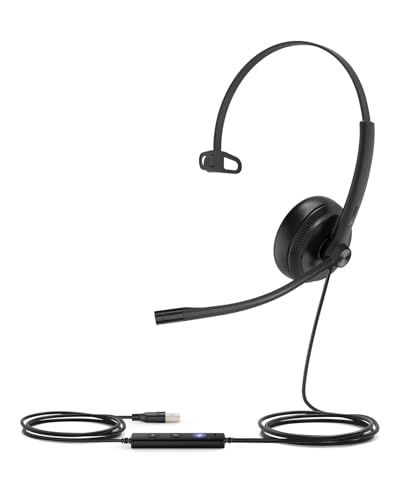
Yealink builds the phones and headsets that fill enterprise offices, and the UH34 is its single-ear wired entry: USB-A connection, a noise-cancelling microphone, in-line controls, an on-ear design, and certification for Teams and Zoom. That certification is this pick’s headline and it is not a sticker — it means the headset’s controls and behaviour are validated against the platforms’ own standards, so the mute button on the cable and the mute state in the meeting agree with each other, and an IT department will approve the purchase without a meeting about it. In managed workplaces, that boring fact outranks every other line on any spec sheet.
For the individual buyer, the UH34 offers the enterprise pattern at a personal scale: plug-and-play setup, a boom tuned for speech, and the support depth of a manufacturer whose products are serviced by the pallet. The on-ear single cup keeps the wearer’s other ear fully open, and the wired connection removes battery from the day’s concerns entirely. If your employer reimburses peripherals, or your work runs through a company laptop with opinions about accessories, this is the mono headset that will never generate an IT ticket — and in professional life, that is a feature with a cash value.
- Connection: USB-A, plug and play
- Certification: Teams and Zoom certified
- Microphone: noise-cancelling
- Controls: in-line
- Design: single-ear on-ear
Strengths
- Platform certification makes it the safe managed-workplace buy.
- Enterprise brand support and availability.
- Wired reliability with zero battery management.
Trade-offs
- USB-A only, so USB-C laptops need an adapter.
- On-ear cup is a work tool’s fit, not a comfort flagship’s.
- Single-ear audio remains a work configuration, not a listening one.
Best for: employees on managed laptops who need certified gear. Not suited for: buyers wanting one headset for music and leisure too.

Yealink UH35 Wired Headset, Single-Ear — The AI-mic upgrade
The UH35 is the UH34’s idea, upgraded where it matters most: the microphone. Where the UH34 carries a noise-cancelling boom, the UH35 fields a two-microphone system with AI noise cancelling — using the second microphone to sample the room and subtract it from your voice more intelligently — alongside HD audio for the wearer’s own ear. The certification story carries over: Teams and Zoom, USB-A plug-and-play, in-line control, the same enterprise pattern. Think of it as the UH34 for noisier postcodes.
That microphone upgrade is aimed at a real and growing situation: the professional whose “office” is a kitchen table in an open-plan home, a shared workspace, or a call floor where a dozen colleagues are also talking. Single-microphone cancelling handles steady noise well; a two-mic AI system is built for the harder problem of other voices, which are the mono wearer’s most common contaminant. If your callers currently hear your household’s conversations almost as clearly as yours, the UH35 is the pick in this guide engineered for your exact complaint — and it keeps the certified, wired, zero-battery discipline that made its sibling the safe buy.
- Connection: USB-A, plug and play
- Microphone: two-microphone system with AI noise cancelling
- Audio: HD audio for the wearer
- Certification: Teams and Zoom certified
- Design: single-ear on-ear
Strengths
- Two-mic AI cancelling targets other voices, the hardest noise of all.
- Certified, wired reliability of the Yealink pattern.
- HD audio improves the wearer’s side of the call as well.
Trade-offs
- Costs more than the UH34 for a difference quiet rooms will never reveal.
- USB-A only, like its sibling.
- AI processing cannot rescue a boom positioned badly — placement still rules.
Best for: professionals calling from noisy, voice-filled environments. Not suited for: quiet-home workers, for whom the UH34’s simpler mic is already enough.

New bee USB Headset with Microphone — The three-way connector
New bee’s mono headset competes on a specification the others treat as an afterthought: it connects three ways. The listing offers 3.5mm, USB and Type-C options, which between them cover the desktop PC, the modern laptop, the older machine, the phone and the tablet — a connector set that makes this the headset you buy when the device landscape of your working life is varied or in flux. Hot-desking between a home PC and a work laptop, or taking calls on whatever is charged, stops being a cable negotiation.
The rest of the design follows the call-centre pattern faithfully: single ear, a noise-cancelling microphone for your callers’ benefit, and a build intended for PC and call work across the day. New bee sells a great deal of this kind of gear, and the design reflects that volume — nothing exotic, everything present. Against the Yealink pair it trades certification for flexibility; against the Arama it trades a little simplicity for a lot of ports. Workers whose IT is their own problem — freelancers, small-business owners, the self-employed — will find that trade pointing directly at them.
- Connections: 3.5mm, USB and Type-C
- Design: single-ear mono
- Microphone: noise-cancelling
- Use focus: PC, call centre and mixed-device work
- Brand: high-volume call-gear maker
Strengths
- Three connector types end the adapter hunt permanently.
- Follows the device, not the desk — ideal for mixed setups.
- Call-centre pattern keeps mic and controls honest.
Trade-offs
- No platform certification for managed workplaces.
- Connector versatility means more small parts to keep track of.
- Sound is voice-first, as the category intends.
Best for: freelancers and multi-device workers who refuse adapter drama. Not suited for: certified-peripheral workplaces.

awatrue Single Ear USB Headset — The adjustable featherweight
The awatrue leans into the two qualities a mono headset lives by: it is lightweight, and it is adjustable. A single-ear design concentrates all of its fit into one cup and one band, so the ability to tune that fit — the listing emphasises an adjustable, lightweight build — decides whether the headset vanishes across a shift or becomes a hourly irritation. The awatrue also keeps a foot in two connection worlds, with USB for the computer and 3.5mm flexibility alongside, suiting desks where a desk phone or an older machine shares the workload.
Its stated habitats are the call centre and the office, and its design reads accordingly: microphone forward, controls simple, nothing decorative. For the home worker it offers the same proposition as the Arama with an extra emphasis on fit adjustment — worth weighting if you have found one-size call headsets unkind in the past, or if the headset will be shared between two people in a household business, where adjustability is the difference between a shared tool and a personal one. In a category of honest workhorses, the awatrue is the one that thought hardest about heads being different shapes.
- Design: single-ear, lightweight and adjustable
- Connections: USB with 3.5mm flexibility
- Microphone: headset mic for calls
- Use focus: call centre and office
- Fit: adjustable build for different wearers
Strengths
- Adjustability suits shared headsets and hard-to-fit heads.
- Lightweight frame for long shifts.
- USB and 3.5mm cover computer and legacy desk gear.
Trade-offs
- No certification story for managed IT buyers.
- Brand recognition is minimal outside the category.
- Voice-first tuning, like every honest mono headset.
Best for: shared-desk households and wearers who struggle with standard fits. Not suited for: buyers who need a certified, supported enterprise product.

EAGATON X1 ENC Single Ear Office Headset — The triple-connection ENC pick
The EAGATON X1 combines the two challenger strategies in this guide into one product: environmental noise cancelling on the microphone — ENC, the processing that strips your room out of your caller’s ears — and a connector set spanning USB-C, USB-A and 3.5mm, so the same headset serves a modern laptop, an older desktop and a phone without a single extra purchase. It is, in effect, the New bee’s flexibility argument and the UH35’s microphone argument folded into a single-ear office design from a challenger brand.
That combination makes the X1 the natural pick for the worker whose environment and devices are both unsettled: the freelancer on client sites, the small-business owner whose office is whichever room is free, the support worker splitting time between a home PC and a laptop. ENC will not perform the UH35’s two-microphone trickery — a single processed channel has physical limits, and other voices in your room will still leak more than they would through Yealink’s AI pair — but for steady household and street noise it is the right technology at a challenger price, attached to the most accommodating connector set in this guide alongside the New bee.
- Microphone: ENC environmental noise cancelling, for your callers
- Connections: USB-C, USB-A and 3.5mm
- Design: single-ear wired office headset
- Use focus: PC, laptop and phone call work
- Brand: challenger
Strengths
- ENC voice processing plus every connector that matters.
- One headset genuinely serves the whole device fleet.
- Wired design keeps battery out of the working day.
Trade-offs
- Single-mic ENC trails the UH35’s two-mic AI system on voice-filled noise.
- No platform certification.
- Challenger-brand support is thinner than Yealink’s.
Best for: mobile freelancers and small-business callers with mixed devices and noisy rooms. Not suited for: managed workplaces, or the very noisiest voice-filled floors.
How Do the Six Compare Side by Side?
| Headset | Connections | Microphone story | Signature strength |
|---|---|---|---|
| Arama USB Mono | USB | Noise-cancelling boom | Lightweight call-centre purity |
| Yealink UH34 | USB-A | Noise-cancelling boom | Teams and Zoom certification |
| Yealink UH35 | USB-A | Two-mic AI noise cancelling | Best voice isolation here |
| New bee | 3.5mm / USB / Type-C | Noise-cancelling boom | Connector for every device |
| awatrue | USB / 3.5mm | Call microphone | Adjustable featherweight fit |
| EAGATON X1 | USB-C / USB-A / 3.5mm | ENC processing | Flexibility plus voice cancelling |
What Should You Check Before Buying a Single-Ear USB Headset?
Decide your ear first — literally. Mono headsets are worn on one side all day, and while many designs allow the boom to swing for either ear, the listing’s intended wearing side and your desk’s layout should agree: the open ear is best aimed at the room’s life — the door, the children, the colleagues — and the covered ear at the quieter side. Next, inventory your ports with the same honesty as our other guides: USB-C-only laptops eliminate straight USB-A models without an adapter, while the triple-connector picks erase the question entirely. Then ask the certification question if your employer manages your machine; a Yealink’s badge is worth real money in that world and nothing at all outside it.
Weigh your room’s noise by type, because microphone systems specialise. Steady noise — fans, traffic, a washing machine’s cycle — yields to any competent noise-cancelling boom here. Other voices are the hard case, and they point specifically at the UH35’s two-microphone AI system. Finally, think about shift length with the same seriousness as our work-from-home guide: a mono headset’s entire weight rides on one ear, so the lightweight claims of the Arama and awatrue are not garnish. If you talk for a living, grams are a working condition.
Also decide where the headset will live when it is not on your head, because mono headsets die of storage more often than of use. A hook by the monitor, a drawer with nothing heavy in it, a stand if the desk allows — any home that keeps the cable un-kinked and the boom un-sat-on will do. The worker who tosses a wired headset into a bag of chargers every evening is running an experiment in cable fatigue whose result is known in advance, and the replacement cost of that experiment exceeds the price of a hook by an embarrassing margin.
How Do You Set Up a Mono Headset for a Full Day of Calls?
Fit comes first, because the microphone’s position is set by it. Seat the earcup comfortably, adjust the band so the headset is stable without clamping, and swing the boom until its tip sits a couple of centimetres from the corner of your mouth — close enough that your voice dominates the room at the capsule, far enough that breath and plosives stay out of the recording. Make one test call or recording and listen back as your customer will; mono headsets are unforgiving of a boom left at chin level, and thirty seconds of playback prevents a career of sounding distant.
Then build the control habit. The in-line pod — answer, mute, volume — is your working surface, and it should live in the same place every day: clipped to the same pocket, resting at the same point on the desk, until your fingers find mute mid-sentence without a thought. Set the headset as your computer’s default audio device so meetings stop hijacking the speakers, and set your call volume during a real conversation rather than a test tone, because voices are the signal you bought this for. Finally, give the open ear its job deliberately: arrange your desk so the room you need to hear is on the open side. Setup in this category is five minutes of fitting and a lifetime of the room working with you instead of against you.
If your work involves a desk phone as well as a computer, settle the switching pattern before the first busy morning rather than during it. The triple-connector picks make the physical move trivial — one plug out, one plug in — but the habit is the real system: headset lives on the computer by default, moves to the phone for the calls that need it, returns afterwards. Workers who improvise this dance daily eventually drop a call to a connector fumble; workers who ritualise it once never think about it again, which is the highest compliment any piece of office equipment can earn.
How Does Mono Work Differently in a Call Centre and at Home?
The call centre is this category’s native habitat, and its logic is worth understanding because home workers inherit its benefits without its context. On a call floor, the open ear carries the supervisor’s call-outs, the colleague’s quick question between calls, the room’s general weather — information a sealed agent would miss entirely. The headsets are light because the shifts are long, wired because a floor of two hundred wireless headsets is an IT incident waiting for a frequency to collide on, and controlled from an in-line pod because an agent’s eyes never leave the screen. Every pick in this guide descends from that environment, and the descent explains their shared virtues better than any marketing does.
At home, the same design meets a different room. The open ear now carries children, partners, deliveries and the acoustic life of a household — and the microphone’s noise cancelling, which on a call floor merely tidied the agent’s voice, becomes the home worker’s professional dignity, the thing standing between their callers and their domestic reality. The home worker also gains something the floor agent never had: the choice of ear per day, the freedom to stand and move within the cable’s radius during long calls, and a headset that doubles for the school-run phone call via the 3.5mm picks. The tool is the same; the room changed around it, and the tool turned out to fit the new room as if designed for it — which, in the era of distributed work, it now effectively is.
One inheritance deserves a warning. Call-centre headsets are specified for durability under professional abuse, but they are also specified to a price that assumes bulk purchase and scheduled replacement. The challenger models here will serve a home worker admirably, yet their cables and boom pivots live harder lives in a house with children, chairs with wheels and vacuum cleaners than in a managed facility. Route the cable kindly, coil it loosely, and the budget end of this guide will repay you in years rather than months.
There is also a training difference worth borrowing from the floor. Call centres teach the headset as part of the job’s first week — boom position, pod discipline, the etiquette of the mute — because they learned long ago that an untrained wearer makes an expensive headset sound cheap. Home workers, handed the same equipment with no induction at all, often blame the hardware for what is actually an untrained first week. This guide’s setup and first-week sections are written as the induction the box never includes; follow them, and a mono headset at any price in this article will perform closer to its professional billing than its packaging ever promised.
What Does Talking All Day Demand From Your Voice and Your Gear?
Professional voice users — agents, dispatchers, teachers on calls — learn a physiology lesson the rest of us skip: the voice is a muscle system with a daily budget, and equipment either spends it or saves it. A headset saves voice in two ways. The boom’s proximity means conversational volume carries the call, so the wearer never develops the raised, strained phone voice that tires throats by Thursday. And the open ear’s natural self-monitoring, described earlier in this guide, keeps that volume honest hour after hour, because you hear yourself exactly as the room hears you. Workers who move from handset or speakerphone to a well-fitted mono headset routinely report the same surprise: the end of the shift stops feeling like the end of a performance.
The gear habits that protect the voice are unglamorous. Hydration within reach, sipped between calls rather than during them. A boom position checked each morning, because yesterday’s knock is today’s distant voice. Volume set so the caller sits at conversational level in your ear — the temptation to creep upward across a shift is real, and it trains you to shout in reply. Breaks taken with the headset off, giving the ear’s skin and the head’s pressure points their recovery, which is another quiet argument for mono: one ear rests even while you work, and the whole apparatus is light enough that the neck never files a report. Choose the pick in this guide that fits your head best, keep these small disciplines, and the equipment disappears into the working day exactly as professional tools are supposed to.
Which Pick Fits Which Kind of Caller?
Portraits sharpen the shortlist. The employed agent on a company laptop, IT-managed and Teams-native, belongs to the Yealink UH34 — or the UH35, if the floor, office or household around them talks as much as they do. The self-employed support consultant, moving between a home desktop and a client-site laptop, is the New bee’s designed user, its three connectors erasing the one friction that defines that working life. The home-based parent-agent, whose callers must hear a professional while a household happens in the background, should weigh the microphone systems above all — UH35 first, EAGATON X1 as the flexible alternative — because their reputation is quite literally carried by noise cancelling.
The receptionist or dispatcher in a small business, answering a desk phone as well as a computer, will use the 3.5mm flexibility of the New bee, awatrue or EAGATON in a way pure-USB models cannot match. The worker equipping a spare drawer against the inevitable mid-shift failure should buy the Arama and stop thinking — its simplicity is the entire point of a backup. And the wearer whose heads have never agreed with standard headsets should start with the awatrue’s adjustability, because in a category this light and this worn, fit is not a preference. It is the product.
When Should a Worker Own Both a Mono and a Dual-Ear Headset?
More often than the industry admits. The working week of a modern knowledge worker is not one acoustic job but several wearing a trench coat: queue calls where awareness is safety, deep-focus hours where isolation is sanity, video meetings where presence matters, and music or podcasts in the seams between them. A mono headset is the perfect tool for the first of those and a poor one for the second; a dual-ear headset reverses the verdict. Workers who try to make one design serve the whole week end up dissatisfied in a way they misattribute to the product, when the real error was the brief. The veterans of call work solved this years ago by treating headsets like shoes — the right pair for the activity, changed in seconds.
The economics cooperate. Two honest work headsets — a mono from this guide and a dual-ear from our work-from-home guide — together cost less than one flagship leisure headphone, and each will outlast the flagship in its own role because neither is being asked to compromise. The mono lives by the phone hand, the dual-ear by the focus chair, and the worker’s only discipline is hanging each back in its place. If this guide and its sibling have left you torn between them, consider that the tear itself is the answer: your week genuinely contains both jobs, and it deserves both tools.
How Long Should a Mono Headset Last, and How Do You Help It?
A wired mono headset has no battery to fade, which removes the usual clock on its life; what remains is mechanical. The boom pivot loosens over thousands of adjustments, the cable fatigues where it meets the earcup and the control pod — the two flex points of every wired design — and the ear cushion compresses and eventually cracks. In a managed call centre these are scheduled consumables, replaced on a cycle without sentiment. At home, the same headset can serve for years if its owner respects the flex points: no wrapping the cable tightly around the headset for storage, no yanking the plug out by the wire, no chair wheels over the run of cable across the floor, which is the single commonest cause of death in this entire category.
Cleaning is the other half of longevity, and it is mostly about the cushion and the microphone. Skin oils and dust are the enemies; a weekly wipe of the cup and a gentle check that the boom’s windscreen is present and intact keep both the fit and the voice where they were on day one. A missing or clogged windscreen is a tiny thing that callers hear as a big one — pops, breath and muffle — so treat it as a service part, not a decoration. When the end does come, it announces itself honestly: a crackle when the cable moves, a boom that will not hold its position, a cushion that has become a hard ring. Replace then, into the same decision framework as your first purchase, and the category will serve a whole career one modest, dependable headset at a time.
What Does Teams and Zoom Certification Actually Buy You?
Certification is the most misunderstood line in this category, so here is what it concretely means. A certified headset has been tested by the platform owner against the platform’s behaviour: the call-control buttons on the cable — answer, end, mute, volume — are guaranteed to drive the software correctly, so pressing mute on the pod mutes you in Teams and lights the icon your colleagues see, with no divergence between the hardware’s state and the software’s. The audio path is validated for echo and level behaviour. And the device is on a list that corporate IT departments trust, which converts a purchase request from a negotiation into a formality.
What certification does not mean is equally important. It does not make the microphone better than an uncertified rival’s — the EAGATON’s ENC and the Arama’s boom are judged on their own merits, and a good uncertified headset can sound better than a mediocre certified one. It does not make the headset work “more” with the platform; every USB headset here functions in Teams and Zoom as an audio device. Certification is about guaranteed control integration and institutional trust. If you buy your own gear for your own computer, it is a nice assurance. If an employer’s environment, reimbursement policy or security review stands between you and your desk setup, it is the whole ballgame — which is why the Yealink pair anchor this guide’s professional end.
How Should You Judge a Mono Headset in Its First Week?
Wear it for one complete real shift before forming any opinion, because mono comfort is an hour-six property, not an unboxing property. Notice, at the end of that shift, whether the ear carrying the headset feels any different from the one that spent the day open — a well-chosen mono pick should leave the honest answer as “barely”. Run one call with a colleague and ask the only review question that matters in this category: how do I sound? Their answer audits the boom position, the cancelling and the level in a single sentence, and it is worth more than every specification in this article combined.
Across the week, deliberately exercise the category’s reason to exist. Take calls while life happens around you — the delivery, the child’s question, the partner’s raised eyebrow from the doorway — and notice whether the open ear carried its half of your attention without stealing the call’s. Test every device you actually own: the work laptop, the home PC, the phone, so the connector question is settled by experience rather than by a listing’s promises. And test the failure drill once: mute mid-sentence by touch, eyes on the screen, the way a doorbell will someday demand. A mono headset that passes a week like that has passed the only examination its working life will ever set it.
Which Jobs Quietly Run on Mono Headsets?
Walk through the working world with this category in mind and you start seeing it everywhere. Emergency and logistics dispatchers, whose open ear monitors the room’s other channels while the covered ear handles the caller. Medical receptionists booking appointments by phone while greeting the waiting room in person — two conversations, one headset, zero rudeness. Online tutors and language teachers, who must hear their own pronunciation as their students hear it, and who talk for a living in ninety-minute stretches. Radio producers and podcast interviewers working live, one ear on the guest and one on the studio. Warehouse and facilities coordinators, for whom the open ear is not a preference but a safety practice around moving machinery.
What unites these jobs is the dual-channel nature of the work itself: a formal channel that arrives through a wire, and an informal one that arrives through the air, both carrying information the worker is paid to catch. Dual-ear headsets serve the first channel and tax the second; speakers serve the second and disgrace the first. Mono is the only configuration that honours both at once, which is why it persists in profession after profession despite being, on paper, “half” a product. If your job description could be written as “talk to people who are not here, while remaining present for the people who are”, you have found your category — and the six picks above are its current honour roll, from the certified Yealinks to the flexible challengers.
There is a home-front version of the same list, and it may be the category’s fastest-growing constituency: the parent running a household and a job in the same hours, the carer whose other ear is a professional instrument pointed at the person they care for, the small-business owner whose shop floor and phone line are the same room. For all of them, the mono headset is not a compromise between work and life. It is the device that finally admits both are happening at once, and equips the worker for the truth of their day.
What Mistakes Do Single-Ear Headset Buyers Keep Making?
The commonest is buying mono for the wrong reason — as a cheaper half of a dual-ear headset — and then resenting it through every music break and film. Mono is a professional configuration with a purpose; bought on purpose it delights, bought as an economy it merely under-delivers. The second mistake is ignoring the connector census and discovering the USB-C problem at 9 a.m. on a Monday. Third, buyers underrate boom placement, wear the microphone at their chin, and conclude the noise cancelling is broken when their callers report a distant, roomy voice. And the quiet mistake is forgetting the open ear’s etiquette: your call audio plays into one ear only, but your voice plays into the whole room, and the mono wearer in a shared space still owes the room the courtesies of any caller. One more, specific to this category’s bargains, deserves a place: assuming the lightest listing is automatically the most comfortable. Weight matters enormously here, but so does where the weight sits and how the band distributes it — a slightly heavier headset with a well-shaped contact patch can out-wear a featherweight that concentrates its grams on one sore point. Fit first, grams second, and let the first-week shift test arbitrate between them.
Final Recommendation
For most single-ear buyers the Yealink UH34 is the safe professional answer — certified, wired and forgotten by lunchtime — but if your callers keep hearing the other voices in your room, step up to the UH35 and its two-microphone AI cancelling, because that specific problem is exactly what it was built to erase. Whichever you choose, choose it as the professional tool it is: one ear for the person on the line, one ear for the life going on around you, and no apology owed to anyone for the arrangement.
Frequently Asked Questions
Is a single-ear headset worse than a dual-ear one?
It is different, not worse. Dual-ear wins for immersion, focus and music. Single-ear wins when the job includes hearing your surroundings, speaking naturally for long shifts, and staying comfortable with glasses or earrings on the open side. Call centres run on mono for ergonomic reasons, not economy. The honest test is your own working day: count the moments you needed to hear the room this week, and the moments you needed to shut it out, and let the larger number choose the category — then let this guide choose the model.
What does the noise cancelling on these headsets actually cancel?
It works at the microphone, for your caller’s benefit: the processing suppresses your room’s noise in the voice you send. It does not quiet the room for your own ears — your open ear hears everything by design, and the covered ear hears the call. That arrangement is the whole point of the category. If you need the room quieted for yourself as well, you are shopping for a dual-ear headset with ANC, and our work-from-home guide covers exactly that machine; mono’s promise is awareness, and it keeps the promise by refusing to cancel anything on your side of the call.
Will a USB mono headset work with Teams and Zoom?
Yes — USB headsets appear as standard audio devices to meeting software. The Yealink UH34 and UH35 go further with formal Teams and Zoom certification, which validates their in-line controls against the platforms and smooths approval in managed workplaces. For everyone else, the practical meaning is simpler: plug the headset in before you open the meeting app, select it once in the app’s audio settings, and the combination will greet you the same way every morning thereafter, which is all that most of us ever asked of office technology.
Can I wear a mono headset on either ear?
Many designs let the boom rotate so the headset can be worn on the left or the right; check the listing for the model you favour. Choose the side that puts your open ear toward the room you need to hear — the door, the children, the office floor. Workers who switch sides across the day to rest each ear in turn swear by the rotatable designs, and if your shifts are long, that small mechanical mercy is worth checking for before the money moves.
Do I need an adapter for a USB-C laptop?
For straight USB-A models like the Yealinks, yes, unless your laptop still offers a USB-A port. The New bee and EAGATON X1 sidestep the question with Type-C among their included connections, which is a large part of their appeal for modern, mixed device fleets.
Can I listen to music or videos with a mono headset between calls?
You can, and many agents do — talk radio, podcasts and voice-led video all survive the single ear perfectly well, because speech is the signal these drivers were tuned for. Music is the honest casualty: you will hear the song, but in one ear, without the space and body that two channels give it. Treat music as a pleasant background function of a work tool, and keep your listening expectations where the category puts them.
Related Guides
One ear at a time is one corner of this shelf; the rest covers the console, the open road, the television, the busy home office and the rest of the working week: Best PS5 Wireless Headsets: Six Picks That Keep Game Audio and Chat in Step, Best Bone Conduction Bluetooth Headsets: Open-Ear Picks for Runners and Commuters and Best TV Wireless Headsets: Clear Dialogue and Personal Volume Without the Cable.


