What's inside
- Key Takeaways
- Quick Picks
- How Did We Choose These Five Linked Picks and One Prose-Only Slot?
- Why Do Podcasters Care About a Boom Microphone at All?
- How Do the Six Slots Compare Side by Side?
- What Should You Check Before Buying a Podcasting Headset?
- How Do You Record a Clean First Episode With a Headset?
- Headset, Kit or Split: How Do You Decide Honestly?
- What Changes When the Podcast Is an Interview Show?
- How Does a Podcast Setup Grow From Here?
- What Do the Numbers on These Listings Actually Mean for Your Voice?
- What If Your Podcast Is on Video?
- How Should You Judge a Podcast Headset in Its First Week?
- What Mistakes Do Podcast Headset Buyers Keep Making?
- Final Recommendation
- Frequently Asked Questions
- Related Guides
As an Amazon Associate I earn from qualifying purchases. This post may contain affiliate links at no extra cost to you.
widgetverdict.com is reader-supported. When you buy through links on our site, we may earn an affiliate commission.
Where to buy: five of the six slots below link to their Amazon listings from the quick picks table and their detailed sections. The sixth slot carries no link at all, deliberately — it is not a product but a piece of advice, and this guide would rather explain itself than sell you around it. Read the whole page before deciding which kind of buyer you are.
The best headsets with mic for podcasting promise a seductive shortcut: one device on your head that lets you hear yourself and be heard, broadcast-style, without a desk full of audio gear. That promise is real — radio and television presenters have worked exactly this way for decades — but the category hides a fault line that this guide will state plainly and return to often. Search Amazon for podcasting audio and most of what surfaces is not headsets at all: it is standalone USB microphones, because for a solo podcaster at a desk, a separate microphone plus ordinary headphones is very often the better tool. So this guide does two jobs. It ranks five genuine, verified headset-based options — from a true broadcast headset to a streaming USB model — and then, in the sixth slot, it argues the honest counter-case in prose.
Two labelling promises before the picks. First, the MAONO entry below is a kit: a USB condenser microphone bundled with a headphone for monitoring. It is labelled as a kit everywhere it appears in this guide, because calling it simply a headset would misdescribe what arrives in the box — and, as the prose-only slot explains, that kit shape is actually the shape of the smart money for many podcasters. Second, every claim below about converters, microphones and connections comes from the manufacturers’ own listings; where a headset is a broadcast tool expecting broadcast hardware, we say so before you buy it, not after. A guide that profits from your clicks owes you its warnings at the top of the page, in the same size type as its recommendations, and this one intends to keep that bargain visibly.
Key Takeaways
- A podcast headset earns its place by putting a broadcast-style boom microphone and monitoring in one worn device.
- The Audio-Technica BPHS1 is the genuine broadcast article — and it expects XLR-style broadcast connections, not a laptop’s USB port.
- The ATH-M50xSTS-USB is the plug-and-play streaming answer, with a 24-bit/96 kHz converter and sidetone built in.
- Most “podcasting” search results are standalone USB microphones, not headsets — slot six of this guide explains when that is the better buy.
- The MAONO AU-A04H is a microphone kit with a monitoring headphone, and it is labelled as a kit throughout this guide.
- Hearing yourself while you record — monitoring — is the unglamorous feature that separates podcast tools from call-centre tools.
- Your recording posture is the real buying decision: seated and settled favours a desk microphone, moving and conversational favours a boom.
Quick Picks
| Pick | Badge | Why it earns its place |
|---|---|---|
| Audio-Technica BPHS1 Broadcast Stereo Headset | The genuine broadcast headset | Dynamic cardioid boom mic and closed-back monitoring, built for studios and commentary booths. |
| Audio-Technica ATH-M50xSTS-USB StreamSet | The USB streaming headset | Condenser boom, 24-bit/96 kHz conversion and sidetone in a plug-and-play USB package. |
| VOLUBLES Podcasting Headset | The single-ear communicator | Gooseneck mic arm, 3.5mm and USB-A connections, mute and volume on the cable. |
| talomen Studio Monitor Headphones with Detachable Boom Microphone | The monitor-first hybrid | Studio monitor headphones that accept a boom mic when the recording starts. |
| MAONO AU-A04H USB Microphone Kit with Headphone | The kit, honestly labelled | A 192kHz/24-bit USB condenser microphone bundled with a monitoring headphone. |
| A standalone USB microphone plus headphones you already own (prose-only) | The honest detour | No link and no ASIN — an argument, explained in its section, for when the mic-and-headphones split beats any headset. |
How Did We Choose These Five Linked Picks and One Prose-Only Slot?
We began by verifying what the category actually contains, and the finding shaped the whole guide. Genuine podcasting headsets — a boom microphone engineered for voice recording, worn with monitoring headphones, in one unit — are rare. The verified pool for this guide produced exactly five products that meet the description, spanning broadcast, streaming, communication and kit forms. Rather than pad the sixth slot with a gaming headset wearing a podcast costume, we left it prose-only and used it to explain the category’s open secret: most podcasters are better served by a standalone microphone, and the search results have been trying to tell you so all along.
Within the five, we weighted the microphone above the headphone, because that is the podcasting equation. A headset’s headphones monitor; its microphone is the show. The two Audio-Technica models lead because their microphones are the point of the product — a dynamic broadcast capsule on the BPHS1, a condenser with a proper converter on the StreamSet. The VOLUBLES earns its place by serving the online-recording and video-call reality most podcasters actually live in, with dual connection types and cable controls. The talomen inverts the formula — monitor headphones first, detachable boom second — for recordists who edit as much as they talk. And the MAONO kit represents the bundle that the market keeps recommending, labelled as what it is.
We also insisted on monitoring honesty. A podcast headset must let you hear yourself as you record, with no delay worth mentioning; sidetone and direct monitoring are therefore treated as first-order features in the pick sections, not footnotes. And we checked connections against real desks: a broadcast headset that needs an interface is a fine purchase for a studio and a baffling one for a laptop-only beginner, so each pick states its connection expectations in plain language.
Why Do Podcasters Care About a Boom Microphone at All?
Because distance is destiny in voice recording. A microphone’s character is dominated by how far it sits from the mouth and how consistently it stays there. A boom holds a capsule a few centimetres from the corner of your mouth, at the same distance when you lean in for emphasis and when you sit back to laugh — and that consistency is what makes a recorded voice sound produced rather than captured. A desk microphone can match it, but only while you discipline yourself to stay on axis and on distance, which is a skill; the boom builds the discipline into the hardware, which is why broadcasters, commentators and air-traffic-adjacent professions converged on the same shape.
The second reason is the room. Most podcasts are recorded in rooms that were never treated for audio — spare bedrooms, offices, kitchen tables. A close boom microphone hears overwhelmingly more voice than room, because at a few centimetres your voice is enormously louder than the reflections arriving from the walls. That ratio is the cheapest acoustic treatment ever sold: it comes free with proximity. It is also why the headset form suits remote interviews so well — your guest hears a clean, present voice, and your recording keeps that presence even when the room itself would flatter nobody.
And the third reason is monitoring. Recording your own voice blind — speaking for an hour without hearing yourself — produces the classic beginner’s tape: drifting volume, unnoticed mouth noise, a pop filter’s worth of plosives discovered in the edit. A headset closes the loop. You hear what the microphone hears, as it happens, and you correct in the moment instead of in post-production. Every pick in this guide is judged partly on how honestly it closes that loop.
There is a fourth reason, quieter than the others, which experienced hosts mention most: a boom standardises your sound across episodes and across months. Podcast audiences bond with a voice’s consistency as much as with its content — the show that sounds like itself every week builds a listening habit, while the show whose voice wanders with every new microphone position makes the audience re-learn it each episode. A boom, worn the same way each session, is a consistency machine. It is why a commentator sounds identical in week one and week forty of a season, and it is an advantage no amount of editing software can retrofit onto recordings made at wandering distances.

Audio-Technica BPHS1 Broadcast Stereo Headset — The genuine broadcast headset
This is the real thing, and its listing makes no attempt to pretend otherwise: a broadcast stereo headset with a dynamic cardioid boom microphone, of the pattern worn in commentary booths and radio studios for decades. The dynamic capsule is the professional’s choice for voice in imperfect environments — it is rugged, it handles loud voices without complaint, and its cardioid pattern favours what is directly in front of it, which is your mouth, over everything else in the room. Paired with closed-back monitoring headphones, it gives a podcaster the exact tool a sports commentator uses, with the same virtues and the same expectations.
The expectation to understand before buying: this is broadcast hardware. It is built to plug into the kind of mixer or interface a studio provides, not to wander into a laptop’s USB port unaided. Podcasters with an audio interface already on the desk — the natural growth path of a serious show — will find the BPHS1 slots into that world perfectly and will likely outlast every other component in it. Beginners whose entire studio is a laptop should read the StreamSet’s section next, because Audio-Technica makes that product for precisely them, and buying the BPHS1 without the hardware to feed it is the one genuinely expensive mistake this guide can save you from.
- Microphone: dynamic cardioid boom
- Design: broadcast stereo headset, closed-back monitoring
- Connection: broadcast-style, expects mixer/interface hardware
- Use focus: studio commentary, broadcast and serious podcast rigs
- Brand: Audio-Technica professional line
Strengths
- A genuine broadcast microphone, not a call-centre boom with ambitions.
- Dynamic capsule forgives loud voices and lively rooms.
- Built to a professional standard that outlasts consumer gear.
Trade-offs
- Needs an interface or mixer — it is not a USB plug-and-play device.
- Broadcast neutrality will sound plain to ears expecting gaming warmth.
- Overkill for a hobby show recorded on a laptop alone.
Best for: podcasters with an interface-based studio who want the commentary-booth standard. Not suited for: laptop-only beginners — the StreamSet below exists for you.

Audio-Technica ATH-M50xSTS-USB StreamSet — The USB streaming headset
The StreamSet is Audio-Technica’s answer to the question the BPHS1 raises: what if the broadcast idea came in a package a laptop can use directly? It pairs the company’s M50x-pattern monitoring headphones with a cardioid condenser boom microphone, and puts a 24-bit/96 kHz converter inside the headset itself, so the analogue-to-digital step happens inches from the capsule rather than in a bargain laptop sound chip. The listing names podcasting explicitly, and the design shows it — this is a recording instrument that happens to connect by USB, not a gaming headset with a podcast sticker.
The detail that seals its purpose is sidetone circuitry: the headset feeds your own voice back into your ears as you speak, at a natural level, so monitoring requires no software round-trip and no perceptible delay. Anyone who has recorded a take while hearing themselves a half-second late knows that delay is unusable; sidetone is the broadcast solution, built in. For the solo podcaster recording at a desk, interviewing over the internet, and editing in the same headphones afterwards, the StreamSet is the most complete single-device answer in this guide — the one we would hand a serious beginner and expect never to hear a complaint from.
- Microphone: cardioid condenser boom
- Converter: 24-bit/96 kHz, built in
- Monitoring: sidetone circuitry for zero-delay self-hearing
- Connection: USB
- Lineage: M50x-pattern monitoring headphones
Strengths
- Plug-and-play USB with a genuinely good converter inside.
- Sidetone makes monitoring effortless and delay-free.
- Condenser clarity suits spoken word beautifully.
Trade-offs
- Condenser capsules hear more of the room than dynamics do — your space still matters.
- USB-only connection will not grow into an XLR studio chain.
- Premium positioning within this guide’s field.
Best for: solo podcasters and streamers who want one USB device that does the whole job properly. Not suited for: studios built around interfaces and mixers, where the BPHS1 belongs.

VOLUBLES Podcasting Headset — The single-ear communicator
The VOLUBLES takes the podcasting brief in a direction the broadcast models do not: it is a single-ear headset with a gooseneck microphone arm, built for online podcast recording and video calls, connecting by both 3.5mm and USB-A with an adapter for USB-C in the arrangement, and carrying mute and volume controls on the cable. The single-ear design is a deliberate choice with real logic behind it. A podcaster recording a conversation — a co-host in the room, a producer signalling through the glass, a household that still exists around the recording — often needs one ear on the world, and the gooseneck arm lets the wearer bend the microphone to exactly the distance their voice wants.
Set expectations by its company: this is a communication-grade instrument, closer in spirit to a superb call headset than to the Audio-Technica pair, and its voice capture serves intelligibility and presence rather than studio sheen. For the podcaster whose show is a conversation — interviews, panels, a co-hosted chat recorded over calls — that is frequently the honest requirement, and the dual connection types mean it follows you from laptop to phone to recorder without a drawer of adapters. It is the pragmatist’s pick in a guide with two purist flagships, and pragmatism records a great many real podcasts.
- Design: single-ear headset with gooseneck mic arm
- Connections: 3.5mm and USB-A, with USB-C adapter path
- Controls: mute and volume on the cable
- Use focus: online podcast recording and video calls
- Monitoring: one ear open to the room by design
Strengths
- Single-ear awareness suits conversational and co-hosted formats.
- Two connection types plus adapter cover almost any device.
- Cable mute and volume keep controls under your fingers mid-sentence.
Trade-offs
- Communication-grade capture, not studio-grade — set the expectation honestly.
- Single-ear monitoring is a poor fit for detailed audio editing.
- Brand depth is nothing like Audio-Technica’s.
Best for: interview and conversation podcasters who record over calls and value awareness. Not suited for: solo studio recordists chasing the cleanest possible voice track.
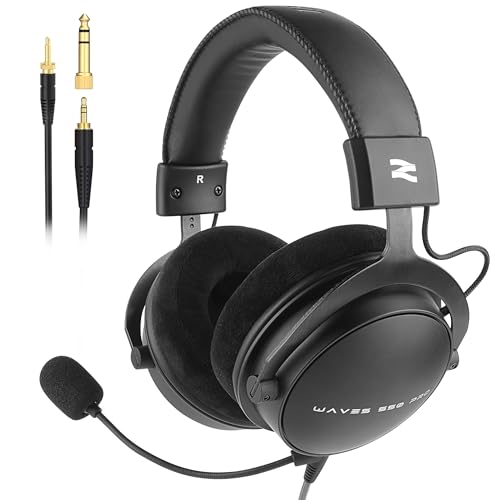
talomen Studio Monitor Headphones with Detachable Boom Microphone — The monitor-first hybrid
The talomen inverts this guide’s usual formula. It begins as wired over-ear studio monitor headphones — the flat, honest kind used for recording and editing — and adds a detachable boom microphone that turns them into a headset when the session demands it. For a certain kind of podcaster, that inversion is exactly right: the person who spends three hours editing for every hour recording lives in the headphones far longer than in front of the microphone, and a monitor-first design optimises the long part of the job while keeping a competent boom in the drawer for recording day.
The detachable arrangement carries a second, quieter virtue: failure isolation. A boom that can be unplugged can be replaced, set aside, or left behind when the headphones travel as pure listening gear, and the headphones themselves are never held hostage to a microphone fault. The honest trade is that a detachable boom on a monitor headphone rarely matches a purpose-built broadcast headset for capsule quality and positioning rigidity — the BPHS1’s microphone is a better microphone. The talomen’s bet is that your workflow is editing-led, and for the growing class of podcasters who are really producer-editors who also host, that bet is well placed.
- Design: wired over-ear studio monitor headphones
- Microphone: detachable boom, fitted for recording sessions
- Use focus: monitoring, recording and editing workflows
- Connection: wired
- Form: converts between headphones and headset
Strengths
- Monitor-grade headphones serve the editing hours, not just the recording hour.
- Detachable boom can be replaced, removed or travelled without.
- One device covers hosting and post-production honestly.
Trade-offs
- Boom capture sits below the purpose-built broadcast models.
- Wired only — no USB converter or sidetone circuitry inside.
- Challenger brand with a thinner support story.
Best for: podcaster-editors whose week is mostly post-production. Not suited for: hosts who record daily and edit never — buy the microphone-first models instead.
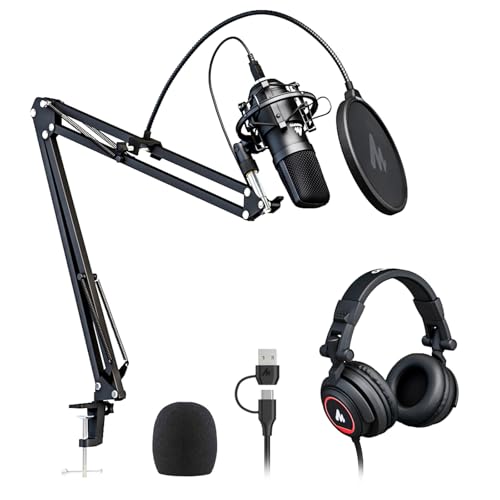
MAONO AU-A04H USB Microphone Kit with Headphone — The kit, honestly labelled
Read the name carefully, because this guide insists on it: the MAONO AU-A04H is a USB microphone kit with a headphone — a standalone condenser microphone for the desk, bundled with a headphone so you can monitor what it captures. It is not a headset; nothing about the microphone is worn. We include it as a linked pick, labelled as a kit in every mention, because it represents the configuration that the podcasting market actually buys most, and because its components are honestly specified: a cardioid condenser vocal microphone sampling at 192kHz/24-bit, USB connection for Mac and Windows, and the monitoring headphone in the same box.
As a recording proposition, the kit’s logic is strong. A desk condenser at a proper distance, on its own stand, is the classic solo-podcast setup, and the bundled headphone closes the monitoring loop that this guide keeps insisting on. The kit shape also upgrades gracefully — a better headphone later, a boom arm later, the microphone still at the centre. What you give up against a true headset is the boom’s distance discipline: the desk mic rewards a host who stays in position and punishes one who leans, turns and rummages mid-sentence. If your recording style is seated and settled, the MAONO kit is a legitimate, well-specified way into podcasting — just buy it knowing it is a kit, which is why this guide labels it as one without exception.
- What it is: USB microphone kit with monitoring headphone — not a worn headset
- Microphone: cardioid condenser, 192kHz/24-bit sampling
- Connection: USB, Mac and Windows
- Monitoring: bundled headphone for direct listening
- Use focus: solo podcast and streaming desks
Strengths
- Proper desk-condenser capture, the classic solo podcast arrangement.
- Everything needed to record and monitor arrives in one box.
- Kit components can be upgraded individually over time.
Trade-offs
- It is a kit, not a headset — the microphone lives on the desk.
- Desk microphones punish hosts who move around while talking.
- Takes desk space that a worn headset never touches.
Best for: seated solo podcasters who want one box that starts the show. Not suited for: anyone who specifically needs the microphone to travel with their head.
A Standalone USB Microphone Plus Headphones You Already Own — The honest detour
This slot carries no link, no ASIN and no product, and it may be the most useful section in the guide. Here is the fact the category dances around: when you search for podcasting audio, the results are dominated by standalone USB microphones, and that is not a search failure — it is the market telling you how most podcasts are actually recorded. A separate microphone plus a pair of ordinary headphones beats a headset for a large class of podcasters, and if you belong to that class, the five linked picks above are the wrong shopping list no matter how good they are.
The case rests on three legs. First, microphone quality per money: a standalone USB mic spends its entire budget on one capsule and one converter, while a headset splits its budget across headphones, boom, hinges and headband — at the same spend, the dedicated microphone is usually the better microphone. Second, you probably already own the other half. Any decent headphones you have — the pair you edit in, travel with, listen on — can monitor a recording perfectly well, so the headset’s bundled headphones may be a duplicate you never needed to buy. Third, upgrade paths: the split setup lets each half improve on its own schedule, while a headset is replaced as a unit when either half disappoints.
So when does the headset win back the argument? When you move while you record — pacing hosts, video podcasters who gesture and turn, commentators working live events. When your recordings are conversations in uncontrolled rooms, where the boom’s fixed distance rescues consistency. When you record away from a desk entirely. And when simplicity itself is the priority: one device to grab, wear and store, with no stand, no arm, no desk footprint. The honest podcaster shops their own habits first. If your show is you, seated, at a desk, talking — buy the microphone, keep your headphones, and let this slot have saved you from the wrong category altogether.
Notice, too, what the search results were quietly telling you before this guide said it out loud. The dominance of standalone microphones in podcasting searches is not an accident of algorithms; it reflects a decade of creators learning, one returned headset at a time, where their voices actually come from. The boom headset remains a magnificent tool — for the jobs it was invented for. The desk microphone is a magnificent tool for the job most podcasters actually have. A guide that cannot tell you that, in a category it profits from, is not a guide at all, which is why this slot exists and why it carries no link: some recommendations are worth more as sentences than as sales.
- What it is: buying advice, not a product — no link, no ASIN
- The split: standalone USB microphone for capture, existing headphones for monitoring
- Wins on: microphone quality per money, no duplicate headphones, separate upgrades
- Loses on: movement while recording, desk footprint, setup simplicity
- Deciding question: do you record seated at a desk, or moving and conversational?
Strengths
- Best possible microphone quality for a given budget.
- Uses headphones you already own and already like.
- Each half upgrades independently as your show grows.
Trade-offs
- A desk microphone demands a seated, settled recording posture.
- More objects to set up, position and store than one worn device.
- No boom discipline — your distance technique is your own responsibility.
Best for: seated solo podcasters with good headphones already in the house. Not suited for: moving hosts, live commentators and anyone recording away from a desk.
How Do the Six Slots Compare Side by Side?
| Slot | Form | Microphone | Signature strength |
|---|---|---|---|
| Audio-Technica BPHS1 | Broadcast headset | Dynamic cardioid boom | The studio standard, interface required |
| Audio-Technica StreamSet USB | USB streaming headset | Condenser boom, 24-bit/96 kHz | Plug-and-play with sidetone |
| VOLUBLES | Single-ear headset | Gooseneck mic arm | Conversational awareness, dual connections |
| talomen | Monitor headphones + boom | Detachable boom | Editing-first workflow |
| MAONO AU-A04H | Microphone kit with headphone | Desk condenser, 192kHz/24-bit | One-box solo podcast desk |
| Prose-only detour | Advice, not a product | Your own standalone mic | The honest alternative for desk recordists |
What Should You Check Before Buying a Podcasting Headset?
Begin with the question this whole guide circles: headset, kit, or split? Answer it from your recording posture — seated and settled points to the kit or the split; mobile and conversational points to a true headset — and the rest of the decision tree shortens dramatically. Next, audit your connections. An interface or mixer on the desk unlocks the BPHS1’s broadcast world; a bare laptop points to USB, where the StreamSet and the MAONO kit live; a phone-and-laptop life makes the VOLUBLES’ dual connections quietly valuable. Then check the monitoring story of anything you favour: sidetone, direct monitoring, or silence — and treat silence as disqualifying for a recording tool.
Consider your room with clear eyes. A condenser — in the StreamSet or the MAONO kit — renders your voice in lovely detail and your room in honest detail too; a dynamic like the BPHS1’s is the forgiving choice for untreated spaces. Consider your format: solo shows reward capture quality, interviews reward connection flexibility and the ability to hear a guest cleanly, and video podcasts add the visual question of whether a boom across your face is the look your show wants — for some formats it signals broadcast credibility, for others it is a distraction the audience mentions more than the content. And set a growth expectation: a headset is a cul-de-sac by design, while kits and splits are roads. Buy the shape that matches where your show will be in two years, not only where it is this month.
One last check costs nothing and prevents the commonest return in the category: measure your sessions. A podcaster recording twenty-minute solo segments and a podcaster recording ninety-minute interviews are buying for different bodies — clamp force, weight and heat build-up that a short session never reveals will dominate the long one, and the headsets here, designed for broadcast shifts and streaming marathons, earn their comfort credentials precisely at the durations beginners forget to imagine. Picture your longest realistic recording day, and shop for that day, not for the demo.
How Do You Record a Clean First Episode With a Headset?
Set the boom first: capsule a few centimetres from the corner of your mouth, off to the side rather than directly in the breath stream, and then leave it alone — consistency across the episode is worth more than any single perfect position. Set your input level so your loudest laugh stays below distortion; recording software shows this as peaks that should approach, but never slam, the top of the meter. Record thirty seconds, play it back in the same headphones, and listen like a stranger: for room echo, for mouth noise, for the hum of a computer fan the microphone has decided to feature. Fix what you hear by moving the microphone closer — proximity cures more faults than any setting — and only then record the episode.
During the session, monitor yourself the whole time. Sidetone or direct monitoring is not a luxury; it is how you catch the boom that drifted, the pen clicking against the desk, the sentence you swallowed. Keep water nearby and sip it off-microphone. If you interview, record a backup on a second device whenever the conversation matters — headsets simplify the chain, but no chain is above failure, and the guest’s hour is the one thing in podcasting that cannot be re-bought. Afterwards, edit in the same monitoring headphones you recorded in where you can; the talomen’s whole existence argues that the record-and-edit loop is one workflow, and your ears are the calibrated instrument that connects its halves.
Build one more habit into the first episode, because it will pay out across the show’s whole life: say the setup aloud at the top of the recording. Microphone, distance, level, room — a ten-second spoken note before the introduction. When episode twelve sounds different from episode eleven and you cannot remember why, that note is the difference between a five-minute fix and an evening of forensic listening. Professional studios log their sessions on paper; the spoken log is the podcaster’s version, and it costs nothing but the breath it takes to say it. Your future self, troubleshooting at midnight before a release deadline, will be grateful in a way that is difficult to overstate.
Headset, Kit or Split: How Do You Decide Honestly?
Strip the marketing away and the three shapes in this guide differ on one axis: where the microphone lives. On your head, it enjoys perfect distance discipline and zero desk footprint, and it shares its budget with headphones. On a desk stand in a kit, it enjoys a bigger capsule and a simpler life, and it demands a seated host. In a split setup you choose yourself, it enjoys total freedom of component choice, and it demands the most knowledge from the buyer. Every other difference — price, quality, convenience — flows downstream from that single placement decision, which is why this guide keeps returning to your recording posture as the deciding question. Posture is not a detail. Posture is the purchase.
Watch yourself record, or imagine it concretely. The host who reads from notes, leans toward the screen to greet a guest, laughs with their whole body and reaches for a drink twice a segment is a moving host, and a desk microphone will tax every one of those motions with a volume wobble the edit cannot fully repair — that host belongs in a boom, and the StreamSet or BPHS1 will make them sound more professional than a desk microphone twice the price. The host who records like a radio newsreader, settled and centred, gives a desk microphone nothing to punish, and the kit or split rewards that stillness with capture quality a headset cannot match at the same spend. Neither host is better. They are different animals, and the audio market’s refusal to say so is why so many first purchases get replaced within a year.
There is a budget corollary worth stating in plain terms. A headset concentrates spend into one object that ages as a unit — when the microphone disappoints in year two, the headphones go with it. A split spreads spend across objects with independent lives, and a kit sits between the two, its microphone outliving its bundled headphone in most real histories. Podcasters who expect their show to grow — and every podcaster should plan as if it might — are usually buying time as much as equipment, and the shape that lets them upgrade one piece at a time buys the most of it. That is the whole argument of slot six, and it is why a guide that sells headsets is willing to make it at full length.
What Changes When the Podcast Is an Interview Show?
Interviews rearrange the priorities again. Your own voice is now only half the product; the guest’s audio — usually arriving through a call, from a laptop microphone in a kitchen you will never see — is the half you cannot control. A headset serves the interviewer in two specific ways. It keeps your voice consistent while you react, nod and lean, which you will, because conversation moves bodies. And it keeps the guest’s voice in your ears and out of your microphone: headphones of any kind prevent the echo that ruins remote recordings, and a worn headset guarantees the headphones are actually on, rather than abandoned for speakers because the call ran long.
The conversational picks in this guide earn their keep here. The VOLUBLES, with its single open ear and call-friendly connections, is built for the producer-host who must hear the room and the guest at once. The StreamSet serves the host who records solo segments and interviews in the same session and wants one device that flatters both. And the prose-only logic inverts for interviews in one respect: even a desk-microphone host should keep proper headphones on for any remote conversation, because the echo argument admits no exceptions. Interview shows are also where a backup recorder earns its mention — a phone on the desk, recording the room, has saved more great conversations than any piece of equipment in this article.
One more interview truth: guests judge your show by how professional the experience feels, and your voice is most of that experience. A guest who hears a clear, present, broadcast-weight host relaxes, performs better and says yes to the next invitation. That is not vanity; it is production value you can hear in the finished episode, and it is the strongest argument for taking the microphone half of this purchase — headset, kit or split — more seriously than any other object on your desk.
How Does a Podcast Setup Grow From Here?
However you start, a growing show pulls its equipment in predictable directions, and buying with those directions in mind saves the second purchase from being a correction of the first. The first pull is acoustic: a treated corner, soft furnishings near the recording chair, the slow domestication of the room — upgrades that cost little and improve every microphone ever made. The second pull is mechanical: a boom arm for a desk microphone, a better stand, a pop filter — the ergonomics of a setup you now use daily. The third pull is electrical: an interface, which is the moment broadcast headsets like the BPHS1 enter the conversation and USB devices begin their honourable retirement to travel duty.
Notice which of this guide’s shapes rides that growth curve smoothly. The split setup absorbs every stage without waste. The kit absorbs most of it — its headphone may be outgrown, its microphone can serve into the interface era only if it offers the right outputs, which USB-only models generally do not. The true headsets hold their value differently: not as components in a growing chain, but as the permanent right answer for the moving, conversational, live style of recording, which does not get outgrown because it was never a beginner’s compromise — it is the broadcast end-state for that style. Growth is not one road, and the podcaster who knows which road their format travels can buy once, correctly, at the very start. That, in the end, is all this guide has been trying to arrange.
What Do the Numbers on These Listings Actually Mean for Your Voice?
Two numbers recur in this guide’s listings — 24-bit/96 kHz on the StreamSet’s converter, 192kHz/24-bit on the MAONO kit’s microphone — and they deserve translation, because they impress more than they inform. The bit depth, 24 in both cases, describes the converter’s dynamic range: how gracefully it handles the span from your quietest aside to your loudest laugh. Twenty-four bits is genuinely valuable for podcasting, not because listeners hear the difference in the finished, compressed episode, but because it gives you headroom while recording — you can set a cautious level, never distort, and lift the quiet parts later without the noise floor rising to meet you. It is insurance you use every session without noticing.
The sample rate — 96 kHz, 192 kHz — describes how many times per second the converter samples the sound. Human hearing and the spoken voice live far below what even 48 kHz captures completely, and podcast platforms will deliver your show at rates lower still. Treat the large figures as evidence of a modern, competently engineered converter rather than as a quality ladder to climb: the difference between the StreamSet’s voice and a cheap headset’s voice will be audible in the capsule, the preamp and the proximity — not in whether the sampling number has five digits or six. Buyers who internalise that hierarchy — placement first, capsule second, converter third, sample-rate bragging last — become very hard for this market to mislead.
The same hierarchy explains the guide’s respect for the BPHS1, which advertises no converter at all. Its dynamic capsule, correctly placed and fed into any competent interface, produces the voice that broadcast built its reputation on — a reminder that in audio, the oldest link in the chain is often the one carrying the signal that matters, and the newest numbers are frequently carrying only the marketing.
What If Your Podcast Is on Video?
Video adds a casting decision to the audio one: the headset is now part of your show’s visual identity. A broadcast-style boom reads, on camera, as professional intent — the visual shorthand of commentary and radio — and many successful video podcasts lean into exactly that reading, matching headsets across co-hosts like a panel show. Other formats want the equipment invisible, and for those, the honest options narrow: the talomen with its boom removed cannot record you, the kit’s desk microphone can be framed out or embraced as studio furniture, and the split setup lets a low-profile microphone sit below the frame line while ordinary headphones — or none — keep your face clear.
Neither aesthetic is more legitimate, but the choice should be made deliberately, because it interacts with everything else in this guide. The video host who gestures, turns to a second camera and works a live chat is a moving host, and the movement argument returns the boom headset to the top of the list on audio grounds alone — the look and the sound point the same way. The seated, single-camera, conversational show loses nothing by choosing the kit or the split, and gains the cleaner frame. What video punishes is the unconsidered middle: the headset bought for audio reasons whose look the host then fights for a year. Decide what your audience should see, confirm the audio logic agrees, and the purchase makes itself.
How Should You Judge a Podcast Headset in Its First Week?
Record the same two minutes every day. Pick a passage with range — a quiet introduction, a laugh, a deliberate whisper, a name full of plosives — and capture it on your new equipment each morning of the first week, in your real recording space, at your real recording hour. By day seven you will have something no review can give you: a controlled comparison of your own voice across your own learning curve, because most of what improves in week one is not the equipment but your placement, your levels and your distance discipline. If day seven sounds markedly better than day one, the equipment was never the problem and you have bought well. If it sounds identical and thin, the placement experiments have been exhausted and the return window is your friend.
Include one interview in the test week, even a rehearsal with a friend, because headsets reveal their social character under conversation: the sidetone that keeps your level honest while you react, the boom that stays put through laughter, the ear that can or cannot hear the doorbell. And include one full edit of a real segment, headphones on, start to finish — the session that exposes whether the monitoring half of your purchase serves the production half of your week. Podcast equipment is bought for a workflow, not a moment, and a first week that runs the whole workflow — record, converse, edit, publish — is the only audition that cannot lie to you.
What Mistakes Do Podcast Headset Buyers Keep Making?
The founding mistake is buying a broadcast headset for a laptop with no interface, then blaming the headset — the BPHS1’s section in this guide exists to prevent exactly that purchase. The second is assuming “podcasting” on a listing guarantees a recording-grade microphone; the word is unregulated, and communication headsets wear it as freely as broadcast tools do, which is why this guide separates the two so carefully. Third, buyers skip monitoring entirely and discover in the edit that they recorded an hour of drifting, popping audio that a sidetone feed would have corrected live. And the quiet mistake is its mirror image: buying a fine headset for a seated solo show that a standalone microphone would have served better — the mistake our prose-only slot was written to catch before the money moves. A fifth error completes the set, and it is about ears rather than microphones: recording at enthusiastic volume for an hour because the monitoring level was set by excitement rather than by the meter. Your listeners will normalise your show to their chosen loudness regardless; the level you should be managing is the one on the recording, peaks healthy and unclipped, and the headset’s job is to let you hear that truth while there is still time to fix it. Watch the meter, trust the sidetone, and let enthusiasm live in the performance instead of the gain knob.
Final Recommendation
For the podcaster who wants one worn device and a laptop, the StreamSet is this guide’s answer — condenser voice, honest converter, sidetone in the box — but if your show is recorded seated at a desk with good headphones already hanging on the hook, let slot six talk you out of the category entirely and put the money into a standalone microphone instead. And if your show grows into a studio with an interface at its heart, come back for the BPHS1: it was never the beginner’s pick, and it was always the professional’s destination.
Frequently Asked Questions
Do I really need a headset to start a podcast?
No. A standalone USB microphone and any decent headphones will start a podcast today, which is exactly the argument of this guide’s prose-only slot. A headset earns its premium when you move while recording, record conversations in lively rooms, or want one device to grab and wear. The worst reason to buy one is the belief that the category is compulsory — it is a tool with a territory, and this guide has tried to draw the territory’s borders honestly enough that you can tell which side of them your show records on.
What is sidetone, and why do podcasters want it?
Sidetone is your own voice fed back into your headphones as you speak, with no delay. It lets you monitor your recording live — catching a drifting boom, a clicking pen, a swallowed sentence — and it keeps your speaking level natural. The StreamSet builds it in; without it, recordists often end up shouting or mumbling without knowing. Think of it as the difference between speaking in a room and speaking into a pillow: your voice behaves itself when it can hear itself, and so, consequently, do you.
Dynamic or condenser microphone for a home podcast?
Dynamic capsules, like the BPHS1’s, forgive untreated rooms and loud voices. Condensers, like the StreamSet’s and the MAONO kit’s, capture finer detail and more of the room along with it. In a quiet, soft-furnished space a condenser shines; in a bare spare room, dynamic is the safer first buy.
Is the MAONO AU-A04H a headset?
No — it is a USB microphone kit bundled with a monitoring headphone, and this guide labels it as a kit in every mention. The microphone stands on your desk rather than riding on your head. That shape suits seated solo recording very well; it is simply a different shape from a headset, and buyers deserve the distinction in plain words.
Can I use a podcast headset for video calls too?
Yes. The USB models here present themselves as ordinary audio devices to meeting software, and the VOLUBLES is designed for calls as much as for recording. Broadcast models like the BPHS1 join calls through your interface, sounding — it must be said — considerably better than anyone else on the call.
How much should room treatment matter to my choice?
More than any specification in this guide, eventually. A soft-furnished, quiet room flatters every microphone here, and a bare, echoing one taxes them all — condensers most, dynamics least. But treatment and microphone choice are not substitutes for each other: proximity from a boom or a well-placed desk mic buys you forgiveness today, and the cushions, curtains and bookshelves you add over the show’s first year buy you quality forever. Start with the microphone your room can support, then improve the room at the pace your show grows.
Related Guides
Beyond the recording corner, this shelf also covers the caller’s desk, the console and the open road: Best Single Ear USB Headsets: One Ear on the Call, One Ear on the Room, Best PS5 Wireless Headsets: Six Picks That Keep Game Audio and Chat in Step and Best Bone Conduction Bluetooth Headsets: Open-Ear Picks for Runners and Commuters.
Related guide: Best Noise-Canceling Mic Headsets


