What's inside
- Key Takeaways
- Quick Picks
- How Did We Choose These Six Headsets?
- Why Does Latency Matter More Than Almost Anything Else on PS5?
- How Do the Six Compare Side by Side?
- What Should You Check Before Buying a PS5 Headset?
- How Do You Set Up a Wireless Headset on PS5 Properly?
- How Does Microphone Quality Actually Differ Between These Six?
- What Do the Battery Numbers Mean Across a Real Week of Play?
- What Mistakes Do PS5 Headset Buyers Keep Making?
- What About Glasses, Long Hair and Long Sessions?
- How Long Will a Headset Like These Actually Last?
- Why Does the Same Headset Sound Different on PS5 and PC?
- Final Recommendation
- Do Bigger Drivers Actually Sound Better for Games?
- How Should You Judge a New Headset in Its First Week?
- Which of These Headsets Fits Which Kind of Player?
- Frequently Asked Questions
- Related Guides
As an Amazon Associate I earn from qualifying purchases. This post may contain affiliate links at no extra cost to you.
widgetverdict.com is reader-supported. When you buy through links on our site, we may earn an affiliate commission.
Where to buy: all six headsets below are sold on Amazon, and each name in the quick picks table links straight to its listing. Console accessories churn fast — colourways and bundle variants come and go — so if a listing shows a sibling model, check the driver size and battery figure against the spec box in that pick’s section before you pay.
The best PS5 wireless headsets solve a problem the DualSense controller only half solves. Plug a wired headset into the controller and you get decent sound with a cable dangling across your lap; rely on TV speakers and you lose the directional detail that tells you whether footsteps are coming from the stairwell on your left or the corridor behind you. A proper wireless headset gives you low-latency game audio, a microphone your squad can actually understand, and enough battery to survive a weekend of sessions without living next to a charging cable. This guide compares six verified options, from an eighty-hour Turtle Beach flagship to a hundred-hour marathon runner from NUBWO, and explains the trade-offs that spec sheets blur together.
One thing worth saying before the picks: the PS5 does not support ordinary Bluetooth audio the way a phone does. Every headset here connects through a USB dongle running a 2.4GHz link, or through the controller’s headphone jack, and several add Bluetooth as a second channel for your phone. That dongle is not a limitation to apologise for — it is exactly why these headsets keep audio delay low enough that a gunshot on screen and the crack in your ears land together. Keep that in mind whenever a listing brags about Bluetooth alone.
Key Takeaways
- A USB dongle with a 2.4GHz connection is the route to low-latency PS5 audio; plain Bluetooth pairing to the console is not an option.
- Battery claims in this group range from forty hours to a claimed one hundred, and the gap changes how often charging shapes your week.
- Two Turtle Beach models anchor the list, but the Logitech G733 wins on weight and microphone processing for streamers.
- Flip-to-mute microphones beat button hunting in the middle of a firefight every single time.
- Multiplatform support matters if the same headset must also serve a PC, a Switch or a phone between console sessions.
- Comfort over three hours is decided by clamp force and earcup material, not by driver size.
Quick Picks
| Pick | Badge | Why it earns its place |
|---|---|---|
| Turtle Beach Stealth 600 Wireless Multiplatform Gaming Headset | The eighty-hour anchor | Big 50mm drivers, Bluetooth alongside the dongle, and battery life that turns charging into a monthly chore. |
| Turtle Beach Stealth 500 Wireless Amplified Gaming Headset | The lighter Turtle Beach | Memory foam cushions and a flip-to-mute mic in a simpler, lighter frame for long evenings. |
| Logitech G733 Lightspeed Wireless Gaming Headset | The streamer-leaning pick | Suspension headband comfort plus Blue VO!CE microphone filtering for people who broadcast their sessions. |
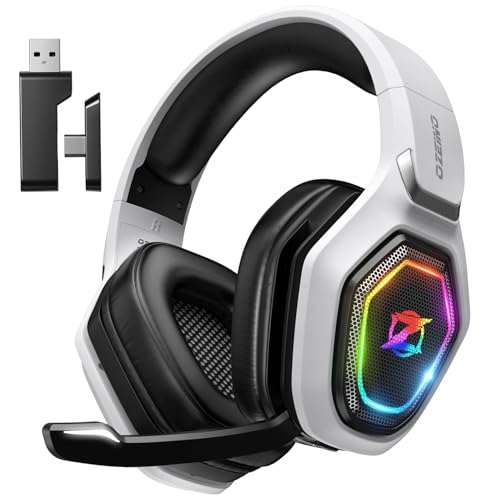
| Ozeino Wireless Gaming Headset for PS5 | The play-and-charge pragmatist | USB and Type-C dongle flexibility, a flip mic, and the ability to keep playing while the battery tops up. |
| NUBWO Wireless Gaming Headset with Mic for PS5, PS4 and PC | The hundred-hour claim | A battery figure that dwarfs the field and a low-latency link aimed squarely at competitive shooters. |
| WESEARY Wireless Gaming Headset for PS5 | The latency hunter | A 20ms latency claim, Bluetooth 5.4 on the side, and fifty hours of play for fast-paced games. |
How Did We Choose These Six Headsets?
We started from what PS5 owners actually complain about: audio delay that makes rhythm games and shooters feel drunk, microphones that make a clear voice sound like a drive-through intercom, and batteries that die mid-raid. Every pick here had to clear three bars. First, a genuine low-latency wireless path to the console through a 2.4GHz USB dongle — no Bluetooth-only pretenders. Second, a microphone design with a physical mute you can hit without looking, because software mute menus are where callouts go to die. Third, published battery and driver figures from the manufacturer’s own listing, so the comparison rests on claims the brands are willing to print rather than on forum folklore.
From there we spread the six across the real buying landscape. Two come from Turtle Beach, the brand that has owned console headsets for a decade, at two different weights and battery tiers. One comes from Logitech’s Lightspeed line, which treats the headset as a streaming tool as much as a gaming one. The remaining three — Ozeino, NUBWO and WESEARY — are the value challengers that undercut the big names while posting aggressive latency and battery numbers. If a challenger could not match the big brands on connection type and microphone basics, it did not matter how loud its listing shouted; it stayed off the page.
We also weighted ownership friction. A headset you charge every second night becomes a headset you stop using, so battery life counts heavily here. So does the second platform question: most PS5s share a room or a desk with a PC, and a headset that follows you between machines earns its shelf space twice. Finally, we read for comfort signals — suspension straps, memory foam, rotating earcups — because the best-sounding headset in the world is worthless at hour three if it clamps like a vice.
Why Does Latency Matter More Than Almost Anything Else on PS5?
Latency is the gap between something happening on screen and the sound of it reaching your ears. On a wired headset it is effectively zero. On a well-built 2.4GHz dongle link it sits low enough that your brain never notices. On a careless wireless link it creeps into territory where lip movement in cutscenes drifts from dialogue, where the crack of your own rifle feels detached from the trigger pull, and where rhythm-based games become genuinely unplayable. The PS5’s Tempest 3D audio can place sounds around your head with real precision, but spatial magic means nothing if the sound arrives late.
This is why the picks below talk about their wireless links so specifically. NUBWO prints a 23ms synchronisation figure; WESEARY claims 20ms. Treat single-number latency claims as marketing shorthand rather than laboratory measurement — your console, your display and the game itself all add their own delay — but the direction is honest: these dongle links are built to keep total delay below the threshold where most players perceive it. Bluetooth, where it appears in this guide, is a second channel for phones and handhelds, not the path your PS5 audio should take.
There is a practical test you can run with any headset you buy. Load a shooter, stand still, and fire single shots while watching the muzzle flash. If flash and crack feel like one event, your link is fine. Then open a cutscene-heavy game and watch faces during dialogue. If lips and words stay married, you can stop thinking about latency entirely and go back to thinking about aim — which is where your attention belongs.

Turtle Beach Stealth 600 Wireless Multiplatform Gaming Headset — The eighty-hour anchor
The Stealth 600 is the headset Turtle Beach builds for the player who owns more than one machine and refuses to own more than one headset. Its 50mm drivers are the largest in this guide, and that size shows up as headroom: explosions in a big-budget shooter carry weight without crowding out the dialogue layered over them, and quiet ambient detail — rain on a roof, a distant engine — survives at low volume instead of dissolving. The multiplatform dongle covers the PS5 and PC sides of a desk, while Bluetooth runs in parallel so a phone call or a podcast does not require taking the headset off.
The headline figure is the rechargeable battery rated at eighty hours. Put that in weekly terms: at three hours of play a night, you are charging roughly once a month. That changes behaviour. You stop rationing the headset for “important” sessions, you stop keeping a cable draped over the arm of the sofa, and you stop getting the low-battery warning in the middle of the one boss fight you had time for. Turtle Beach’s microphone follows the flip-to-mute pattern we insist on, and the earcups use the brand’s glasses-friendly cushion shaping, a small mercy that spectacle wearers notice within the first hour.
- Drivers: 50mm
- Battery: rechargeable, rated up to 80 hours
- Connection: 2.4GHz wireless dongle plus Bluetooth
- Platforms: PS5, PS4 and PC, with Bluetooth for mobile
- Microphone: flip-to-mute
Strengths
- Eighty-hour battery removes charging from your weekly routine almost entirely.
- Bluetooth running alongside the dongle means the phone stays connected while you play.
- Large drivers give action games genuine low-end weight without drowning dialogue.
Trade-offs
- The fuller feature set makes it one of the heavier frames in this group.
- Owners of a single console pay for multiplatform flexibility they may never use.
- Bluetooth and dongle audio management takes a session or two to learn.
Best for: players splitting time between a PS5 and a PC who want one headset to cover both. Not suited for: anyone shopping purely on the lowest possible price for a single console.

Turtle Beach Stealth 500 Wireless Amplified Gaming Headset — The lighter Turtle Beach
Think of the Stealth 500 as the Stealth 600’s sensible sibling. It keeps the family’s defining conveniences — wireless dongle connection, Bluetooth on the side, a flip-to-mute microphone — and trims the specification to a forty-hour battery and a lighter build with memory foam cushions. That trade reads like a downgrade on paper and feels like an upgrade at hour three of a session, because the thing on your head weighs less and the cushions mould around glasses arms instead of pressing them into your temples.
“Amplified” in the name refers to Turtle Beach’s onboard audio tuning for game sound, aimed at lifting the frequencies where footsteps, reloads and distant vehicles live. In practice the 500 is the headset for players whose sessions are social: party chat most nights, a campaign on weekends, nothing that demands the absolute widest soundstage. Forty hours still means a charge every week and a half at typical evening use, which keeps it firmly in set-and-forget territory. For households where the headset lives on a hook by the TV and gets grabbed by whoever is playing, that simplicity is the feature.
- Battery: rated up to 40 hours
- Cushions: memory foam
- Connection: wireless dongle plus Bluetooth
- Platforms: PS5, PS4, PC and mobile
- Microphone: flip-to-mute
Strengths
- Memory foam cushions stay comfortable through long social sessions.
- Lighter frame than the 600 suits players who found flagship headsets fatiguing.
- Flip-to-mute mic is instant and impossible to fumble in the dark.
Trade-offs
- Forty hours is half the 600’s endurance, so charging returns to the weekly calendar.
- Smaller drivers give up some of the cinematic low-end weight of its sibling.
- Fewer onboard extras for players who like to tune EQ per game.
Best for: social players who value comfort and simplicity over maximum battery. Not suited for: marathon players who want a month between charges.

Logitech G733 Lightspeed Wireless Gaming Headset — The streamer-leaning pick
The G733 comes from a different design philosophy. Where Turtle Beach builds around the console, Logitech builds around the person — specifically the person who might be on camera. The suspension headband replaces a rigid padded band with a stretchy strap that floats the headset on your head, distributing weight so evenly that the G733 disappears during long sessions in a way clampier designs never manage. It is one of the lightest full-size wireless headsets in its class, and if you play in a warm room, that lightness matters more than any audio specification.
Its party trick is the microphone. The detachable mic runs Logitech’s Blue VO!CE processing on PC, applying broadcast-style filtering that tames room echo and lifts vocal clarity — the difference between sounding like you are in a bedroom and sounding like you are on a show. On the PS5 you still get a clear, well-tuned mic; the full processing suite lives on the computer side through Logitech’s software. The PRO-G drivers are tuned for clarity over bombast, which competitive players tend to prefer: footsteps and callouts sit forward, explosions stay controlled. Lightspeed is Logitech’s name for its 2.4GHz link, and it has a long track record of staying invisible in play.
- Connection: Lightspeed 2.4GHz wireless via USB dongle
- Headband: suspension strap design
- Microphone: detachable, with Blue VO!CE filtering on PC
- Drivers: PRO-G
- Platforms: PC, PS5, PS4 and Switch
Strengths
- Suspension headband makes it the comfort benchmark of this group.
- Blue VO!CE processing gives streamers a noticeably cleaner voice on PC.
- Detachable microphone lets it pass as ordinary headphones away from the desk.
Trade-offs
- The full microphone processing suite only unlocks on a computer, not on the console.
- Clarity-first tuning delivers less cinematic rumble than the Turtle Beach pair.
- No Bluetooth channel for a phone alongside the game.
Best for: players who stream or record from a PC and game on PS5 with the same headset. Not suited for: console-only players who want thumping, cinema-style bass.
Ozeino Wireless Gaming Headset for PS5 — The play-and-charge pragmatist
Ozeino is not a household name, and this headset does not pretend to be a flagship. What it offers is a thoughtfully complete checklist at a challenger price: a 2.4GHz link delivered through both USB and Type-C dongle options, a flip microphone, forty hours of battery, and — the detail we keep coming back to — play-and-charge support, so a flat battery means plugging in and carrying on rather than ending the session. Console players whose PS5 sits in a shared living room will appreciate the Type-C flexibility when the front ports are spoken for.
The listing leans on the phrase “lossless audio” for its 2.4GHz path, which we read as shorthand for an uncompressed-feeling dongle link rather than an audiophile certification. In use terms, the Ozeino covers the fundamentals without drama: game audio stays synchronised, the mic is intelligible in party chat, and the headset works across PS5, PS4, Switch, PC and Mac, which makes it a natural household spare or a first wireless headset for a younger player. It lacks the brand-name software ecosystems of Logitech and Turtle Beach, so what you buy is what you get — for many buyers that honesty is refreshing.
- Battery: rated up to 40 hours
- Connection: 2.4GHz via USB and Type-C dongle options
- Microphone: flip design
- Charging: play-and-charge supported while connected
- Platforms: PS5, PS4, Switch, PC and Mac
Strengths
- Play-and-charge ends the dead-battery session killer outright.
- Both USB and Type-C dongle options fit crowded console setups.
- Broad platform list makes it an easy household or backup headset.
Trade-offs
- No companion software for EQ or microphone tuning.
- Build materials feel a step below the big-brand picks.
- Forty hours matches the Stealth 500 but not the marathon leaders here.
Best for: a first wireless headset, or a shared family console where flexibility beats features. Not suited for: tinkerers who want per-game EQ profiles and firmware extras.

NUBWO Wireless Gaming Headset with Mic for PS5, PS4 and PC — The hundred-hour claim
NUBWO’s pitch fits in one number: one hundred hours. That is the battery claim printed on this headset’s listing, and even allowing for the optimism baked into every manufacturer’s rating, it points at a genuinely large cell and efficient electronics. At three hours a night you would charge this headset about as often as you change a smoke alarm battery. For players who keep their setup in a bedroom or a dorm room without a convenient charging spot, that endurance is not a luxury — it is the whole buying argument.
The rest of the specification aims at competitive play. NUBWO quotes a 23ms synchronisation figure for its wireless link and names Fortnite and Call of Duty in its own listing copy, which tells you exactly who it is courting: players for whom a late footstep cue is a lost round. The headset advertises a zero-interference connection, marketing language for a dongle link designed to hold steady in homes crowded with Wi-Fi networks and other wireless gear. The trade for all that endurance is size and finish — a battery that big lives in a frame that feels more workmanlike than the Logitech or Turtle Beach designs — but as a tool for ranked grinds it makes a coherent case.
- Battery: claimed up to 100 hours
- Latency: 23ms sync figure quoted by the brand
- Connection: 2.4GHz wireless dongle
- Platforms: PS5, PS4 and PC
- Focus: competitive shooters and long sessions
Strengths
- Battery endurance in a different league from the rest of this guide.
- Latency figure and tuning aimed squarely at competitive shooters.
- Charging so rare it stops being part of your setup routine.
Trade-offs
- Large battery means a heavier, less elegant frame.
- No Bluetooth second channel for phone use between matches.
- Brand support and software polish trail the big names.
Best for: ranked-grind players and dorm setups where charging access is awkward. Not suited for: buyers who prize a light, premium-feeling build above endurance.

WESEARY Wireless Gaming Headset for PS5 — The latency hunter
WESEARY leads with speed. The listing quotes a 20ms low-latency figure for its 2.4GHz link — the lowest number in this guide — and pairs the dongle with Bluetooth 5.4, so the same headset can drop onto a phone or a Switch for a train journey and come home to the PS5 at night. Fifty hours of battery sits comfortably in the middle of this group: not the NUBWO’s hundred, but enough that a week of evening sessions never touches the cable.
That combination makes the WESEARY the natural pick for the player whose gaming is split between the television and everywhere else. Fighting games and fast shooters are where low latency earns its keep, and this headset is clearly tuned and marketed for responsiveness first. The microphone handles party chat duties in the usual way, and the build follows the challenger-brand pattern: functional, light, and less luxurious in its materials than the Turtle Beach pair. What you are paying for is the link speed and the dual-mode flexibility, and judged on those two axes it undercuts nobody’s argument.
- Latency: 20ms low-latency claim for the 2.4GHz link
- Battery: rated up to 50 hours
- Connection: 2.4GHz USB dongle plus Bluetooth 5.4
- Platforms: PS5, PS4, PC and Switch
- Microphone: built-in mic for chat
Strengths
- Lowest latency claim in this guide for fast, reactive games.
- Bluetooth 5.4 makes it a genuine travel and handheld companion too.
- Fifty-hour battery keeps charging to a fortnightly habit.
Trade-offs
- Materials and finish sit below the premium brands.
- No software suite for tuning sound or mic behaviour.
- Sound tuning favours clarity and speed over cinematic weight.
Best for: fighting-game and shooter players who also game on a handheld or phone. Not suited for: players who want a single luxurious headset above all else.
How Do the Six Compare Side by Side?
| Headset | Battery claim | Wireless path | Signature strength |
|---|---|---|---|
| Turtle Beach Stealth 600 | 80 hours | 2.4GHz dongle + Bluetooth | 50mm drivers and multiplatform reach |
| Turtle Beach Stealth 500 | 40 hours | 2.4GHz dongle + Bluetooth | Memory foam comfort in a lighter frame |
| Logitech G733 | Long-session Lightspeed cell | Lightspeed 2.4GHz | Suspension fit and Blue VO!CE mic tools |
| Ozeino | 40 hours | 2.4GHz USB / Type-C | Play-and-charge and dongle flexibility |
| NUBWO | 100 hours | 2.4GHz dongle | Endurance plus a 23ms sync claim |
| WESEARY | 50 hours | 2.4GHz dongle + Bluetooth 5.4 | 20ms latency claim |
What Should You Check Before Buying a PS5 Headset?
Start with the connection, because it quietly decides everything else. Confirm the headset ships with a USB dongle for its low-latency link; a headset that offers only Bluetooth cannot pair with a PS5 for game audio at all, and listings are not always loud about that distinction. Next, check what else lives in your gaming space. If a PC shares the desk, multiplatform support stops being a bonus and becomes the difference between one headset and two. If the console sits in a family room, look at the microphone mute: a flip-to-mute boom can be silenced mid-sentence when someone walks in, while a small button on an earcup cannot be found at speed.
Then think honestly about session length. Players who game in forty-minute bursts will never feel the difference between forty and one hundred hours of battery; players who lose whole Sundays to a campaign will feel it constantly. Glasses wearers should weight cushion design heavily — memory foam and glasses-friendly channels are real features, not garnish. Finally, remember the controller: every headset here can fall back to a wired connection through the DualSense jack in a pinch, but the wireless experience is what you are paying for, so judge the dongle link first.
How Do You Set Up a Wireless Headset on PS5 Properly?
Setup takes five minutes and repays care. Plug the dongle into a front USB port on the console rather than burying it behind the machine, where the console’s own body can crowd the signal. In the PS5 sound settings, set output to the USB headset explicitly instead of relying on automatic switching, and do the same for the input device so your party hears the boom mic rather than the controller’s built-in microphone. Turn on 3D audio and run the profile calibration with the headset on — the spatial effect depends on it. Set a game-and-chat balance you can live with before you join a party, not during the first firefight, and charge the headset fully once before its first long session so the battery gauge learns its real range. Keep the firmware question simple: if the brand offers a companion app on PC, one update at unboxing settles it for months.
It is also worth knowing what latency is not. It is not the same as audio quality, and a fast link carrying a poorly tuned signal still sounds poor; it is not affected by how expensive the headset was; and it is not something you can fix later with settings if the underlying connection is slow. That is why we treat the wireless path as the first filter in this guide and everything else — drivers, cushions, battery — as refinements layered on top of a link that already respects your reflexes.
How Does Microphone Quality Actually Differ Between These Six?
Every headset in this guide will make you understood. The differences show up in how much of your room comes along for the ride. A boom microphone placed close to the mouth, like the flip designs on both Turtle Beach models and the Ozeino, wins its clarity from geometry: your voice is simply much louder at the capsule than the television across the room, so the signal stays clean even in a lively living room. Players in shared spaces should weight that heavily, because no amount of processing fully rescues a microphone that starts with a bad ratio of voice to room.
Processing is the second layer. The Logitech G733’s Blue VO!CE tools, available when the headset is used with a PC, apply filtering that broadcasters have used for years: a noise gate that closes the channel between sentences, gentle compression that evens out the difference between your quiet callouts and your excited ones, and de-essing that softens harsh sibilants. On the console itself you hear the unprocessed version, which is still a good detachable boom — but streamers who record on the computer side get a genuinely different instrument from the same hardware.
The challenger brands — NUBWO and WESEARY — take the third path: competent booms, minimal processing, and an emphasis on keeping the voice intelligible rather than beautiful. For party chat in Fortnite or Call of Duty, intelligible is honestly enough. Nobody has ever won a round because their voice sounded warm; rounds are won because “two pushing left, one low” arrived crisply and instantly. Where the gap widens is content creation. If your sessions become clips, streams or videos, microphone polish stops being vanity and becomes production quality, and that is the moment the G733 pulls ahead of this field.
There is also a etiquette dimension buyers forget. A flip-to-mute boom communicates state physically — up means silent — and your household learns it too. The number of private conversations accidentally broadcast to a party because someone trusted a tiny earcup button is beyond counting. When we rank microphones for real living rooms rather than quiet studios, the mute mechanism counts as part of microphone quality, and on that measure the flip designs in this guide are simply better citizens.
What Do the Battery Numbers Mean Across a Real Week of Play?
Battery ratings are measured by manufacturers under gentle conditions — moderate volume, steady playback — and your real week will shave something off every figure printed here. That caveat applies to the whole field equally, so the ranking still holds: the NUBWO’s hundred-hour claim, the Stealth 600’s eighty, the WESEARY’s fifty and the forty-hour pair from Turtle Beach and Ozeino form a genuine ladder of endurance, and the lived difference between the rungs is larger than the numbers suggest.
Consider two players. The first games ninety minutes a night, five nights a week. On a forty-hour headset she charges a little over every five weeks, since forty hours divided by seven and a half hours a week stretches past a month even after real-world losses — which means even the shortest-lived headset here is effectively a monthly device for her. The second player is a student in a dorm room pulling four-hour sessions six days a week. For him, forty hours is gone in under two weeks, eighty hours lasts most of a month, and the NUBWO’s hundred stretches toward five weeks. Same headsets, completely different ownership experience — which is why we keep insisting that session length, not the printed figure, is the real specification.
Charging behaviour matters as much as capacity. The Ozeino’s play-and-charge support quietly solves the worst battery moment in gaming: the headset dying during the one session you cared about. With that feature, a flat battery is a cable across your lap for an hour, not the end of the evening. Players who know they are forgetful chargers — the headset lives where it falls — should weight that feature almost as heavily as raw hours, because a headset that can be rescued mid-session forgives the habit that a bigger battery only postpones.
One last practical note: lithium batteries age by charge cycles as much as by time. A headset charged monthly accumulates cycles four times more slowly than one charged weekly, so the endurance leaders in this guide should also hold their capacity better across years of ownership. That is a slow, unglamorous advantage, but headsets are bought for years, and it is part of why we rate the big-battery models as highly as we do.
One more setup habit pays off for months: label the dongle. In households with a PC and a console, identical-looking USB receivers migrate between machines and take an evening of troubleshooting with them. A tiny sticker or a dab of coloured tape on the PS5 dongle ends the confusion permanently. And if your console lives inside a closed media cabinet, consider a short USB extension lead to bring the dongle out into the open air — wireless links are measurably happier with line of sight to the sofa than with a cabinet door and the console’s own chassis in the way. These are five-minute fixes that quietly remove the two most common “my headset keeps cutting out” stories we hear, neither of which was ever the headset’s fault.
What Mistakes Do PS5 Headset Buyers Keep Making?
The most expensive mistake is buying a Bluetooth-only headset and discovering at the sofa that the PS5 will not pair with it. The second is judging a headset by driver size alone; a 50mm driver tuned badly loses to a smaller driver tuned well, and comfort beats both by hour three. Buyers also over-index on a single latency number — 20ms versus 23ms is not a gap your ears can arbitrate, while a stable connection you never think about is worth more than either figure. And a quiet one: leaving the controller’s microphone as the input device after plugging in a headset, so your squad hears the worst mic in the room while the good one sits on your head. To that list we would add a subtler error — buying for the game you play this month and ignoring the household the headset will live in. A headset that only you ever touch can be as specialised as you like; a headset on a shared console gets borrowed, dropped, grabbed by smaller hands and used for school calls, and the flexible, forgiving designs in this guide age far better under that regime than delicate specialist gear. Match the purchase to the household, not just the hobby, and the headset you buy tends to be the headset you keep.
What About Glasses, Long Hair and Long Sessions?
Comfort complaints rarely mention sound, and comfort praise rarely mentions it either — after the first week, how a headset feels is the review. Three design choices decide it. The first is how the weight is carried: the G733’s suspension strap spreads load across a wide, flexible band and suits players who get a hot spot on the crown from rigid headbands. The second is clamp force, the sideways squeeze that keeps a headset planted during animated play; too much becomes a headache at hour two, too little and the headset wanders every time you look down at the controller. The third is the earcup interface — memory foam, as on the Stealth 500, moulds around the arms of glasses instead of levering them into your temples, and Turtle Beach’s glasses-friendly cushion shaping exists precisely because spectacle wearers are a huge share of console players.
Long hair and ponytails interact with headbands in ways product photos never show. A strap design rides over a ponytail more gracefully than a solid band, and players who wear their hair up tend to rate suspension designs higher for reasons that never appear in specification tables. Heat is the other silent factor: closed earcups trap warmth, and in a summer room the lightest, loosest-fitting headset in this guide will feel better at midnight than the best-sealed one. If your gaming room runs warm, weight and clamp deserve as much of your attention as drivers and batteries — an unfashionable truth that every long-session player eventually learns firsthand.
There is a simple in-store or first-day test for all of this. Wear the headset for twenty uninterrupted minutes doing something else — reading, scrolling, making tea. Discomfort that appears while you are distracted will be far worse when it has a boss fight to compete with, and comfort that survives distraction is real comfort. Every pick in this guide was chosen partly on these signals, because a headset returned for hurting is a headset whose sound signature never mattered at all.
How Long Will a Headset Like These Actually Last?
A wireless gaming headset has three ageing clocks running at once. The battery clock is the slowest if you choose well: big cells charged infrequently, like the ones in the NUBWO and the Stealth 600, lose capacity gently, while small cells charged weekly work harder for the same years. The mechanical clock runs on hinges, headband adjustment sliders and the microphone boom’s pivot — the flip-to-mute designs here move that pivot constantly, and the brands with long console pedigrees engineer for it, which is one reason Turtle Beach’s mechanisms feel a notch sturdier than the challengers’. The third clock is software and standards: dongle-based headsets are refreshingly immune to fashion, because a 2.4GHz link to a USB port does not care what this year’s phone connector looks like.
You can slow all three clocks with dull habits. Store the headset on a hook or stand rather than tossed on the sofa, where a sat-on earcup is the most common headset death in family homes. Charge before the battery is fully empty when you can, and unplug it when it is full rather than leaving it cooking on the cable for days. Keep the dongle in the console instead of in a drawer of loose adapters. None of this is exciting, and all of it is the difference between a headset that is replaced in eighteen months and one that is still on your head when the next console generation arrives.
Why Does the Same Headset Sound Different on PS5 and PC?
Players who move a headset between console and computer often notice that it seems to change character, and the difference is real. On the PS5, the console applies its own 3D audio processing and a fixed output character shaped for living rooms; you get the spatial effect and a presentation tuned by Sony’s engineers, with limited scope to reshape it. On a PC, the same headset hands control to you — system equalisers, the brand’s own software, per-game audio settings — so the identical hardware can be pushed toward more bass, more vocal clarity, or a flatter reference sound. Neither is the true voice of the headset; both are the headset heard through different hosts.
This matters for buying because reviews written from a PC desk can mislead a console buyer about tuning. A headset praised for software-driven customisation may offer a console player a fixed, take-it-or-leave-it sound — which is why this guide weighs the out-of-the-box console experience so heavily, and why the G733’s PC-side microphone tools are described as a streaming bonus rather than a core console feature. If your life is console-first, judge every headset here by what it does the moment the dongle clicks into the PS5, because that is the product you actually own. The players who get the most from dual-platform headsets are the ones who accept each host on its own terms instead of chasing one identical sound across both.
A final word on value, because this category tempts overspending. The audible gap between the middle of this guide and its top is real but narrow, and it narrows further in the middle of an actual game, when attention is on play rather than on equipment. Spend for the fit, the battery and the microphone you will live with daily; let sound signature break ties between models that already suit your life. That ordering — comfort, endurance, voice, then tone — is the one owners consistently report being glad they followed a year later.
Final Recommendation
For most PS5 owners the Stealth 600 is the headset that ends the search — eighty hours of battery, Bluetooth for the phone, and drivers with real weight — but if your Sundays belong to ranked queues and charging cables are your enemy, take the NUBWO and its hundred-hour cell and never think about power again.
Do Bigger Drivers Actually Sound Better for Games?
Driver size is the specification buyers can compare at a glance, which is exactly why listings shout about it. The Stealth 600’s 50mm drivers are the largest here, and physics does give a bigger diaphragm an easier time moving air at low frequencies — the rumble of an engine, the body of an explosion. But tuning decides what a driver actually does with that ability. A large driver tuned for spectacle can swamp the midrange where dialogue and footsteps live, while a smaller, carefully tuned driver keeps the competitive cues forward. That is why the G733, with its clarity-first PRO-G tuning, can be the better headset for a shooter player despite conceding the size contest.
For games, the practical hierarchy runs like this. First, can you locate sounds — does a footstep behind-left genuinely land behind-left under the console’s 3D processing? Second, can you separate layers — dialogue over music over weather, each intelligible? Third, and only third, how much cinematic weight does the low end carry? Most players, asked honestly after a month of ownership, praise the first two and mention the third only when a set-piece demands it. Judge auditions accordingly: a menu screen’s orchestral swell is the least informative sound a headset will ever make, and a crowded firefight is the most.
Volume headroom is the quiet part of the driver conversation. A headset that must run near its maximum to reach your preferred level has nothing left for the loud moment the mix suddenly demands, and distortion creeps into exactly the scenes you bought the headset for. The amplified designs and larger drivers in this guide tend to loaf along comfortably at ordinary levels, which is a real, if unglamorous, mark in their favour. If you play in a noisy room — a fan, a street outside, other people — that headroom doubles as your defence, because you will ride the volume higher than a quiet-room player ever needs to.
How Should You Judge a New Headset in Its First Week?
Give any headset from this guide a structured first week rather than a verdict in the first hour, because ears adapt and first impressions overweight novelty. On day one, play something you know intimately — a map, a level, a race you could run blindfolded. Familiar content is a reference instrument: sounds you have heard a hundred times reveal immediately what the new headset emphasises and what it hides. If a cue you rely on has moved or thinned, that is information no review can give you.
By the middle of the week, test the social layer. Join your regular party and ask the blunt question — how do I sound? Friends will tell you in seconds whether the boom is an upgrade or a downgrade, and their answer matters more than any microphone specification. Run one long session on the weekend, the longest you would realistically play, and judge comfort at the end of it rather than the start: pressure points announce themselves at hour two, not minute ten. Note whether you thought about the battery at any point. On the headsets in this guide you mostly should not, and if range anxiety followed you through the week, that tells you your usage pattern belongs to the endurance end of this list.
Finally, test the failure modes. Let the headset run flat once, or nearly, and learn how it warns you and how the rescue works — the Ozeino’s play-and-charge turns that experiment from a disaster into a shrug. Walk to the kitchen with the headset on and find where the dongle link lets go; every home has a dead spot, and knowing yours beats discovering it mid-callout. A headset that passes a week of deliberate prodding like this has earned its place, and you can stop shopping — which, for most of us, is the real finish line.
Which of These Headsets Fits Which Kind of Player?
Archetypes sharpen choices, so here is the field mapped onto the players we actually hear from. The campaign player — single-player epics, headphones on for the score and the storms — should start with the Stealth 600, whose big drivers and eighty-hour battery suit long, immersive sessions, with the Stealth 500 as the lighter alternative if flagship weight has bothered you before. The ranked player lives in voice chat and cares about cue timing above all: the WESEARY’s latency claim and the NUBWO’s endurance both speak to that life, and the choice between them is really a choice between speed credentials and charging freedom.
The creator — streaming to a handful of friends now, hoping for more later — is the G733’s natural owner, because the microphone processing that matters for an audience lives in that headset’s ecosystem. The household player, whose console sits in a shared room and whose headset gets borrowed by siblings and partners, should look hard at the Ozeino: it survives being grabbed by anyone, charges while it plays, and its dongle options fit whatever port is free. And the traveller, who games on a Switch or phone on the train and a PS5 at home, gets the most from the two dual-mode designs, the Stealth 600 and the WESEARY, which treat Bluetooth as a first-class citizen rather than an afterthought.
Notice what is not in these archetypes: a player who needs a headset purely for chat while the television speakers handle game sound. That player exists, and for them almost any pick here is more hardware than the job requires — but since every model in this guide also does full game audio well, the honest advice is to buy for the sessions you will have on your best gaming days, not your most minimal ones. Headsets are kept for years; the cheap compromise is usually the one that gets replaced first, and replaced money is the most expensive money in any setup.
Frequently Asked Questions
Can I pair any Bluetooth headset directly with a PS5?
No. The console does not accept standard Bluetooth audio devices for game sound. You need a headset with a USB dongle, like all six picks here, or a wired connection into the controller. Bluetooth on these headsets serves phones and other devices alongside the console link.
Does 3D audio work with third-party wireless headsets?
Yes. The PS5 processes its Tempest 3D audio at the console and sends the finished signal to the headset, so dongle-connected models from other brands receive the spatial effect. Run the audio profile calibration in settings for the best result.
How long should a gaming headset battery last?
Anything past thirty hours covers a week of evening play for most people. The forty-to-one-hundred-hour range in this guide means charging ranges from weekly to monthly, and at that point battery stops being a buying factor and becomes pure convenience.
Is a flip-to-mute microphone actually better than a mute button?
In practice, yes. Flipping a boom up is one gross motor movement you can do mid-game without looking, and your party can often see the state of the mic in your habits. Buttons require a free hand, a memory of which earcup, and a moment you may not have.
Can these headsets work on a PC as well?
All six list PC support through the same USB dongle, and the Logitech adds its Blue VO!CE microphone processing on computer. If you split time between console and desk, that shared dongle is the simplest setup there is.
Will a wireless headset drain the DualSense controller battery?
No — a dongle headset draws its power from its own battery and the console’s USB port, not from the controller. In fact, moving game audio off the controller’s speaker and jack tends to spare the DualSense a little work compared with driving a wired headset at high volume, though the difference is modest either way.
What should I do if my party hears an echo of the game?
Echo usually means game sound is leaking from your earcups into your microphone, or a second device in the room — a TV left unmuted — is feeding the chat. Lower the headset volume a notch, make sure the television speakers are off while you play, and check in the console settings that your headset, not the controller, is the selected input device. One of those three fixes resolves nearly every case.
Related Guides
Keep exploring the headsets category: Best Bone Conduction Bluetooth Headsets: Open-Ear Picks for Runners and Commuters, Best TV Wireless Headsets: Clear Dialogue and Personal Volume Without the Cable and Best Headsets for Work From Home: Clear Calls, Calm Ears, All-Day Comfort.


